




phantomjs problem bei installation
-
Moin wenn ich den Adapter PhantomJS instllieren will kommt nach einiger zeit ein error, dass sich der adapter nicht installieren lässt. hat jemand eine Idee was da los ist?
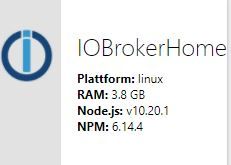
@petzi2712 sagte in phantomjs problem bei installation:
Moin wenn ich den Adapter PhantomJS instllieren will kommt nach einiger zeit ein error, dass sich der adapter nicht installieren lässt. hat jemand eine Idee was da los ist?
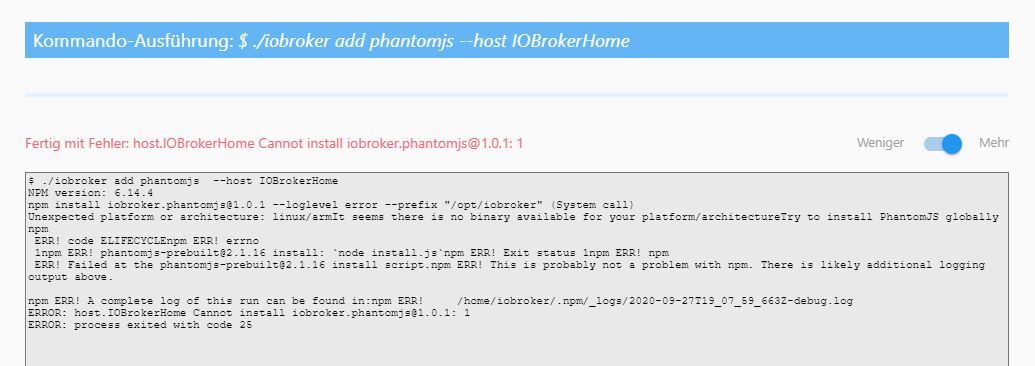
-
Moin wenn ich den Adapter PhantomJS instllieren will kommt nach einiger zeit ein error, dass sich der adapter nicht installieren lässt. hat jemand eine Idee was da los ist?
Die Log Ausgabe mit dem Error würde helfen ...hast du schon nachgereichtDein Node.js mit dem neuerem NPM gefällt mir nicht !
Zeige mal
which nodejs && nodejs -v && which node && node -v && which npm && npm -v && apt policy nodejs -
Die Log Ausgabe mit dem Error würde helfen ...hast du schon nachgereichtDein Node.js mit dem neuerem NPM gefällt mir nicht !
Zeige mal
which nodejs && nodejs -v && which node && node -v && which npm && npm -v && apt policy nodejs@Glasfaser
Dein Node.js mit dem neuerem NPM gefällt mir nicht !
heisst für mich was?!?! -
@Glasfaser
Dein Node.js mit dem neuerem NPM gefällt mir nicht !
heisst für mich was?!?!heisst für mich was?!?!
den Code wie oben in die Konsole eingeben und die Ausgabe hier in CodeTags </> posten
-
@Glasfaser
Dein Node.js mit dem neuerem NPM gefällt mir nicht !
heisst für mich was?!?!@petzi2712
Das deine nodeJS-Installation ggf. etwas 'krumm' ist. Kann man sagen, wenn du die Ausgabe der obigen Befehlskette hier postest. -
@Glasfaser
Dein Node.js mit dem neuerem NPM gefällt mir nicht !
heisst für mich was?!?!@petzi2712 sagte in phantomjs problem bei installation:
@Glasfaser
Dein Node.js mit dem neuerem NPM gefällt mir nicht !
heisst für mich was?!?!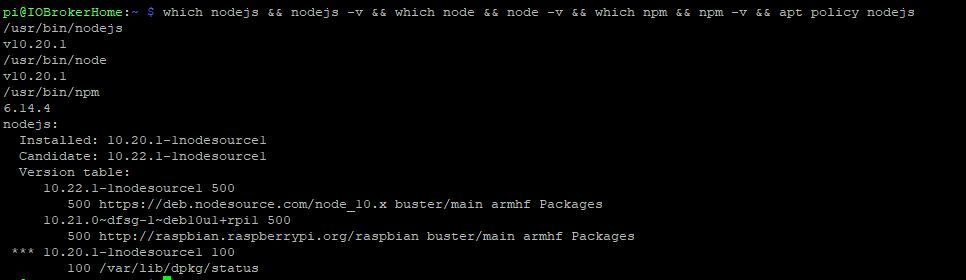
-
@petzi2712 sagte in phantomjs problem bei installation:
@Glasfaser
Dein Node.js mit dem neuerem NPM gefällt mir nicht !
heisst für mich was?!?!@petzi2712
Bitte Text-Ausgaben auch als Text in CodeTags setzen, nicht als Screenshot.phantomJS ist etwas komplex, wie mir ein Blick auf die Homepage verrät. Und wurde wohl auch länger nicht mehr weiterentwickelt.
Ich bin nicht mal sicher, ob sich das auf armhf bauen ließe. -
@petzi2712 sagte in phantomjs problem bei installation:
@Glasfaser
Dein Node.js mit dem neuerem NPM gefällt mir nicht !
heisst für mich was?!?!@petzi2712
Zeige maliobroker version -
@petzi2712
Zeige maliobroker version@Glasfaser sagte in phantomjs problem bei installation:
@petzi2712
Zeige maliobroker versionpi@IOBrokerHome:~ $ sudo iobroker version
2.2.9 -
@Glasfaser sagte in phantomjs problem bei installation:
@petzi2712
Zeige maliobroker versionpi@IOBrokerHome:~ $ sudo iobroker version
2.2.92.2.9
Uiii ... schon lang nicht mehr ein Update gemacht .
Auch Node 12 ist auch schon zu empfehlen. -
2.2.9
Uiii ... schon lang nicht mehr ein Update gemacht .
Auch Node 12 ist auch schon zu empfehlen.@Glasfaser sagte in phantomjs problem bei installation:
2.2.9
Uiii ... schon lang nicht mehr ein Update gemacht .
Auch Node 12 ist auch schon zu empfehlen
hatte mit den letzten updates immer schlechte erfahrungen gemacht... deswegen alt...
hat den adapter schon mal jemad installiert?!? -
@Glasfaser sagte in phantomjs problem bei installation:
2.2.9
Uiii ... schon lang nicht mehr ein Update gemacht .
Auch Node 12 ist auch schon zu empfehlen
hatte mit den letzten updates immer schlechte erfahrungen gemacht... deswegen alt...
hat den adapter schon mal jemad installiert?!?Die Fehlermeldung sagt auch bei dir
ERROR elifecycleeher ein Fall von js-controller der bei dir wohl Probleme macht .
Aktualisiere erstmal dein System !Ich habe auch den Adapter ... aber keine Probleme damit .
-
@Glasfaser sagte in phantomjs problem bei installation:
@petzi2712
Zeige maliobroker versionpi@IOBrokerHome:~ $ sudo iobroker version
2.2.9@petzi2712 sagte in phantomjs problem bei installation:
pi@IOBrokerHome:~ $ sudo iobroker version
2.2.9setzte es bitte beim nächsten mal in
CodeTags ...

-
@petzi2712 sagte in phantomjs problem bei installation:
pi@IOBrokerHome:~ $ sudo iobroker version
2.2.9setzte es bitte beim nächsten mal in
CodeTags ...
@Glasfaser sagte in phantomjs problem bei installation:
@petzi2712 sagte in phantomjs problem bei installation:
pi@IOBrokerHome:~ $ sudo iobroker version
2.2.9setzte es bitte beim nächsten mal in
CodeTags ...
ja sorry
-
@Glasfaser sagte in phantomjs problem bei installation:
@petzi2712 sagte in phantomjs problem bei installation:
pi@IOBrokerHome:~ $ sudo iobroker version
2.2.9setzte es bitte beim nächsten mal in
CodeTags ...
ja sorry
@petzi2712 sagte in phantomjs problem bei installation:
ja sorry
Du brauchst auch nicht alles im Vollpost Anworten !!!!
Eine Antwort reicht ;) -
@petzi2712 sagte in phantomjs problem bei installation:
ja sorry
Du brauchst auch nicht alles im Vollpost Anworten !!!!
Eine Antwort reicht ;)@Glasfaser Moin nochmal
ich hab jetzt endlich mal alles soweit upgedated. Trotzdem lässt sich phantomjs nicht installieren irgend ein plan was noch helfen könnte?
Ach so ich habe auch wie empfohlen " sudo apt-get install libfontconfig " ausgeführt / Neustart....gruß petzi
pi@raspberrypi:~ $ iobroker version 3.1.6 pi@raspberrypi:~ $ which nodejs && nodejs -v && which node && node -v && which npm && npm -v && apt policy nodejs /usr/bin/nodejs v12.19.0 /usr/bin/node v12.19.0 /usr/bin/npm 6.14.8 nodejs: Installed: 12.19.0-1nodesource1 Candidate: 12.19.0-1nodesource1 Version table: *** 12.19.0-1nodesource1 500 500 https://deb.nodesource.com/node_12.x buster/main armhf Packages 100 /var/lib/dpkg/status 10.21.0~dfsg-1~deb10u1+rpi1 500 500 http://raspbian.raspberrypi.org/raspbian buster/main armhf Packages -
@Glasfaser Moin nochmal
ich hab jetzt endlich mal alles soweit upgedated. Trotzdem lässt sich phantomjs nicht installieren irgend ein plan was noch helfen könnte?
Ach so ich habe auch wie empfohlen " sudo apt-get install libfontconfig " ausgeführt / Neustart....gruß petzi
pi@raspberrypi:~ $ iobroker version 3.1.6 pi@raspberrypi:~ $ which nodejs && nodejs -v && which node && node -v && which npm && npm -v && apt policy nodejs /usr/bin/nodejs v12.19.0 /usr/bin/node v12.19.0 /usr/bin/npm 6.14.8 nodejs: Installed: 12.19.0-1nodesource1 Candidate: 12.19.0-1nodesource1 Version table: *** 12.19.0-1nodesource1 500 500 https://deb.nodesource.com/node_12.x buster/main armhf Packages 100 /var/lib/dpkg/status 10.21.0~dfsg-1~deb10u1+rpi1 500 500 http://raspbian.raspberrypi.org/raspbian buster/main armhf Packageszeige mal bitte die Aktuelle Fehlerausgabe vom installieren !
-
zeige mal bitte die Aktuelle Fehlerausgabe vom installieren !
@Glasfaser ```
$ ./iobroker add phantomjs --host raspberrypi
NPM version: 6.14.8
npm install iobroker.phantomjs@1.1.2 --loglevel error --prefix "/opt/iobroker" (System call)
Unexpected platform or architecture: linux/armIt seems there is no binary available for your platform/architectureTry to install PhantomJS globally
npm ERR! code ELIFECYCLEnpm ERR! errno 1
npm ERR! phantomjs-prebuilt@2.1.16 install:node install.jsnpm ERR! Exit status 1npm ERR! npm ERR! Failed at the phantomjs-prebuilt@2.1.16 install script.npm ERR! This is probably not a problem with npm. There is likely additional logging output above.
npm ERR! A complete log of this run can be found in:npm ERR! /home/iobroker/.npm/_logs/2020-10-09T12_16_30_031Z-debug.log
ERROR: host.raspberrypi Cannot install iobroker.phantomjs@1.1.2: 1
ERROR: process exited with code 25 -
@Glasfaser ```
$ ./iobroker add phantomjs --host raspberrypi
NPM version: 6.14.8
npm install iobroker.phantomjs@1.1.2 --loglevel error --prefix "/opt/iobroker" (System call)
Unexpected platform or architecture: linux/armIt seems there is no binary available for your platform/architectureTry to install PhantomJS globally
npm ERR! code ELIFECYCLEnpm ERR! errno 1
npm ERR! phantomjs-prebuilt@2.1.16 install:node install.jsnpm ERR! Exit status 1npm ERR! npm ERR! Failed at the phantomjs-prebuilt@2.1.16 install script.npm ERR! This is probably not a problem with npm. There is likely additional logging output above.
npm ERR! A complete log of this run can be found in:npm ERR! /home/iobroker/.npm/_logs/2020-10-09T12_16_30_031Z-debug.log
ERROR: host.raspberrypi Cannot install iobroker.phantomjs@1.1.2: 1
ERROR: process exited with code 25mit dem Code-Tags setzten mußt du aber noch lernen ;)
Mache mal bitte das:
cd /opt/iobroker
iobroker stop
npm cache clean --force
iobroker start
warten und dann
sudo reboot


Hey! Du scheinst an dieser Unterhaltung interessiert zu sein, hast aber noch kein Konto.
Hast du es satt, bei jedem Besuch durch die gleichen Beiträge zu scrollen? Wenn du dich für ein Konto anmeldest, kommst du immer genau dorthin zurück, wo du zuvor warst, und kannst dich über neue Antworten benachrichtigen lassen (entweder per E-Mail oder Push-Benachrichtigung). Du kannst auch Lesezeichen speichern und Beiträge positiv bewerten, um anderen Community-Mitgliedern deine Wertschätzung zu zeigen.
Mit deinem Input könnte dieser Beitrag noch besser werden 💗
Registrieren Anmelden375
Online33.0k
Benutzende83.7k
Themen1.3m
Beiträge