Skip to content
  • Home
  • Recent
  • Tags
  • 0 Unread 0
  • Categories
  • Unreplied
  • Popular
  • GitHub
  • Docu
  • Hilfe
Skins
  • Light
  • Brite
  • Cerulean
  • Cosmo
  • Flatly
  • Journal
  • Litera
  • Lumen
  • Lux
  • Materia
  • Minty
  • Morph
  • Pulse
  • Sandstone
  • Simplex
  • Sketchy
  • Spacelab
  • United
  • Yeti
  • Zephyr
  • Dark
  • Cyborg
  • Darkly
  • Quartz
  • Slate
  • Solar
  • Superhero
  • Vapor

  • Default (No Skin)
  • No Skin
Collapse
ioBroker Logo

Community Forum

donate donate
  1. ioBroker Community Home
  2. Deutsch
  3. ioBroker Allgemein
  4. BackItUp für InfluxDB

NEWS

  • Monatsrückblick Januar/Februar 2026 ist online!
    BluefoxB
    Bluefox
    16
    1
    315

  • Jahresrückblick 2025 – unser neuer Blogbeitrag ist online! ✨
    BluefoxB
    Bluefox
    17
    1
    4.7k

  • Neuer Blogbeitrag: Monatsrückblick - Dezember 2025 🎄
    BluefoxB
    Bluefox
    13
    1
    1.3k

BackItUp für InfluxDB

Scheduled Pinned Locked Moved ioBroker Allgemein
backitup influxdb
273 Posts 32 Posters 58.4k Views 28 Watching
  • Oldest to Newest
  • Newest to Oldest
  • Most Votes
Reply
  • Reply as topic
Log in to reply
This topic has been deleted. Only users with topic management privileges can see it.
  • simatecS simatec

    @keksn
    Ich denke, dass SourceAnalytics die Werte vorm Restore zur Berechnung genommen hat und nach dem Restore gab es da etwas Chaos, da die Werte andere waren

    keksnK Offline
    keksnK Offline
    keksn
    wrote on last edited by
    #87

    @simatec
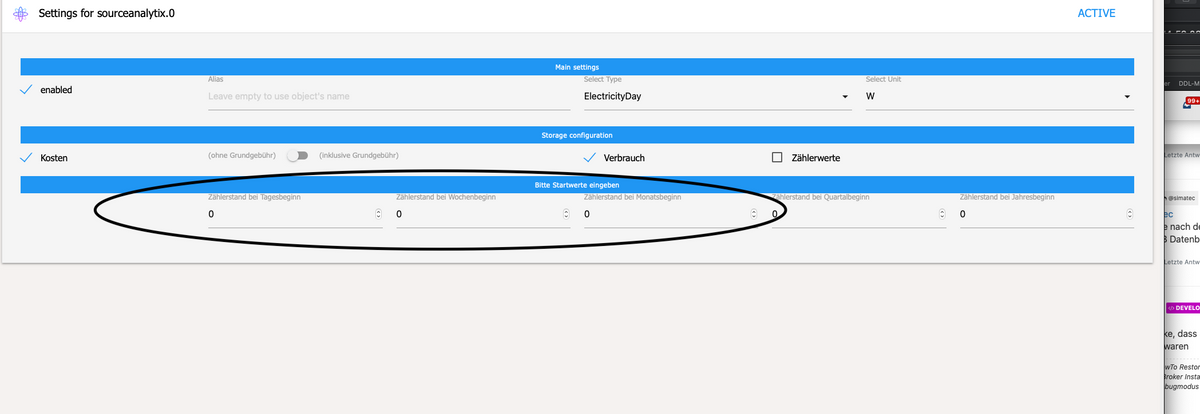
    SourceAnalytix hat nach dem Backup den ausgewählten Datenpunkten eine falschen Anfangswert eingetragen.(Wert des letzten Monats) ...hab da nicht aufgepasst... Null eingegeben jetzt passen die Werte wieder. Datenbank Backup funktioniert somit einwandfrei!! Danke!!

    Ist es möglich auch nur einzelne Adapter wieder herzustellen?
    Bildschirmfoto 2021-02-07 um 13.36.31.png

    F 1 Reply Last reply
    0
    • keksnK keksn

      @simatec
      SourceAnalytix hat nach dem Backup den ausgewählten Datenpunkten eine falschen Anfangswert eingetragen.(Wert des letzten Monats) ...hab da nicht aufgepasst... Null eingegeben jetzt passen die Werte wieder. Datenbank Backup funktioniert somit einwandfrei!! Danke!!

      Ist es möglich auch nur einzelne Adapter wieder herzustellen?

      Bildschirmfoto 2021-02-07 um 13.36.31.png

      F Offline
      F Offline
      Flyor87
      wrote on last edited by
      #88

      @simatec

      Ich hab mir den ganzen Thread durchgelesen, aber blicke leider nicht durch.

      backitup.0	2021-05-17 17:25:21.022	debug	(7583) [iobroker/influxDB] backup: invalid metadata received
      backitup.0	2021-05-17 17:25:21.022	debug	(7583) [iobroker/influxDB] 2021/05/17 17:25:21 Invalid metadata blob, ensure the metadata service is running (default port 8088)
      backitup.0	2021-05-17 17:25:21.022	debug	(7583) [iobroker/influxDB] [IGNORED] Error: Command failed: influxd backup -portable -database iobroker -host 192.168.178.190:8086 "/opt/iobroker/backups/influxDB_2021_05_17-17_25_21_Saves_backupiobro
      backitup.0	2021-05-17 17:25:21.022	debug	(7583) [iobroker/influxDB] InfluxDB tmp directory was successfully deleted
      backitup.0	2021-05-17 17:25:21.021	debug	(7583) [iobroker/influxDB] Try deleting the InfluxDB tmp directory
      backitup.0	2021-05-17 17:25:21.009	debug	(7583) [iobroker/influxDB] InfluxDB Backup tmp directory created
      backitup.0	2021-05-17 17:25:21.008	debug	(7583) [iobroker/influxDB] Start InfluxDB Backup ...
      backitup.0	2021-05-17 17:25:20.857	debug	(7583) [iobroker/iobroker] done
      backitup.0	2021-05-17 17:25:19.847	debug	(7583) [iobroker/iobroker] Backup created: /opt/iobroker/backups/iobroker_2021_05_17-17_25_16_Saves_backupiobroker.tar.gz
      backitup.0	2021-05-17 17:25:18.171	debug	(7583) [iobroker/iobroker] host.ubuntu 10258 objects saved
      backitup.0	2021-05-17 17:25:18.111	debug	(7583) [iobroker/iobroker] host.ubuntu 7752 states saved
      backitup.0	2021-05-17 17:25:16.754	debug	(7583) Backup has started ...
      

      Ich habe aus dem Thread gelesen, dass influxdb auf der VM wo iobroker läuft installiert sein muss, getan. Nur installiert, nichts angelegt / konfiguriert.

      Iobroker VM: IP .193
      Influx VM: IP .190

      Ich hab noch irgenwas von einer Bindadresse gelesen, weiß allerdings nicht wo die sein soll bzw. wie ich darauf zugreifen kann. Beide VMs haben Ubuntu Server als Betriebssystem.

      simatecS 1 Reply Last reply
      0
      • F Flyor87

        @simatec

        Ich hab mir den ganzen Thread durchgelesen, aber blicke leider nicht durch.

        backitup.0	2021-05-17 17:25:21.022	debug	(7583) [iobroker/influxDB] backup: invalid metadata received
        backitup.0	2021-05-17 17:25:21.022	debug	(7583) [iobroker/influxDB] 2021/05/17 17:25:21 Invalid metadata blob, ensure the metadata service is running (default port 8088)
        backitup.0	2021-05-17 17:25:21.022	debug	(7583) [iobroker/influxDB] [IGNORED] Error: Command failed: influxd backup -portable -database iobroker -host 192.168.178.190:8086 "/opt/iobroker/backups/influxDB_2021_05_17-17_25_21_Saves_backupiobro
        backitup.0	2021-05-17 17:25:21.022	debug	(7583) [iobroker/influxDB] InfluxDB tmp directory was successfully deleted
        backitup.0	2021-05-17 17:25:21.021	debug	(7583) [iobroker/influxDB] Try deleting the InfluxDB tmp directory
        backitup.0	2021-05-17 17:25:21.009	debug	(7583) [iobroker/influxDB] InfluxDB Backup tmp directory created
        backitup.0	2021-05-17 17:25:21.008	debug	(7583) [iobroker/influxDB] Start InfluxDB Backup ...
        backitup.0	2021-05-17 17:25:20.857	debug	(7583) [iobroker/iobroker] done
        backitup.0	2021-05-17 17:25:19.847	debug	(7583) [iobroker/iobroker] Backup created: /opt/iobroker/backups/iobroker_2021_05_17-17_25_16_Saves_backupiobroker.tar.gz
        backitup.0	2021-05-17 17:25:18.171	debug	(7583) [iobroker/iobroker] host.ubuntu 10258 objects saved
        backitup.0	2021-05-17 17:25:18.111	debug	(7583) [iobroker/iobroker] host.ubuntu 7752 states saved
        backitup.0	2021-05-17 17:25:16.754	debug	(7583) Backup has started ...
        

        Ich habe aus dem Thread gelesen, dass influxdb auf der VM wo iobroker läuft installiert sein muss, getan. Nur installiert, nichts angelegt / konfiguriert.

        Iobroker VM: IP .193
        Influx VM: IP .190

        Ich hab noch irgenwas von einer Bindadresse gelesen, weiß allerdings nicht wo die sein soll bzw. wie ich darauf zugreifen kann. Beide VMs haben Ubuntu Server als Betriebssystem.

        simatecS Offline
        simatecS Offline
        simatec
        Developer Most Active
        wrote on last edited by
        #89

        @flyor87
        Infos zum Influxdb Backup findest du in der Doku.
        https://github.com/simatec/ioBroker.backitup/blob/master/docs/de/backitup.md#InfluxDB-Backup

        Was mir direkt aufgefallen ist, dein Remote Port in den Einstellungen von Backitup muss auf 8088 geändert werden.

        Die influxdb.conf kannst du über diesen befehl editieren:

         sudo nano /etc/influxdb/influxdb.conf
        

        Im Anschluss influx neustarten

        • Besuche meine Github Seite
        • Beitrag hat geholfen oder willst du mich unterstützen
        • HowTo Restore ioBroker
        1 Reply Last reply
        0
        • MassiveAttackM Offline
          MassiveAttackM Offline
          MassiveAttack
          wrote on last edited by
          #90

          Bekomme beim InfluxDB Backup diesen Fehler, kann ja nur mehr eine Kleinigkeit sein :)

          [DEBUG] [iobroker] - done
          [DEBUG] [influxDB] - Start InfluxDB Backup ...
          [DEBUG] [influxDB] - InfluxDB Backup tmp directory created 
          [DEBUG] [influxDB] - Try deleting the InfluxDB tmp directory
          [DEBUG] [influxDB] - InfluxDB tmp directory was successfully deleted
          [ERROR] [influxDB] - [IGNORED] Error: Command failed: influxd backup -portable -database iobroker -host 192.168.0.80:8088 "/opt/iobroker/backups/influxDB_2021_05_19-15_35_53_backupiobroker"
          2021/05/19 15:35:53 Download shard 0 failed dial tcp 192.168.0.80:8088: connect: connection refused.  Waiting 2s and retrying (0)...
          2021/05/19 15:35:55 Download shard 0 failed dial tcp 192.168.0.80:8088: connect: connection refused.  Waiting 2s and retrying (1)...
          2021/05/19 15:35:57 Download shard 0 failed dial tcp 192.168.0.80:8088: connect: connection refused.  Waiting 2s and retrying (2)...
          2021/05/19 15:35:59 Download shard 0 failed dial tcp 192.168.0.80:8088: connect: connection refused.  Waiting 2s and retrying (3)...
          2021/05/19 15:36:01 Download shard 0 failed dial tcp 192.168.0.80:8088: connect: connection refused.  Waiting 2s and retrying (4)...
          2021/05/19 15:36:03 Download shard 0 failed dial tcp 192.168.0.80:8088: connect: connection refused.  Waiting 2s and retrying (5)...
          2021/05/19 15:36:06 Download shard 0 failed dial tcp 192.168.0.80:8088: connect: connection refused.  Waiting 3.01s and retrying (6)...
          2021/05/19 15:36:09 Download shard 0 failed dial tcp 192.168.0.80:8088: connect: connection refused.  Waiting 11.441s and retrying (7)...
          2021/05/19 15:36:20 Download shard 0 failed dial tcp 192.168.0.80:8088: connect: connection refused.  Waiting 43.477s and retrying (8)...
          2021/05/19 15:37:03 Download shard 0 failed dial tcp 192.168.0.80:8088: connect: connection refused.  Waiting 2m45.216s and retrying (9)...
          backup: dial tcp 192.168.0.80:8088: connect: connection refused
          

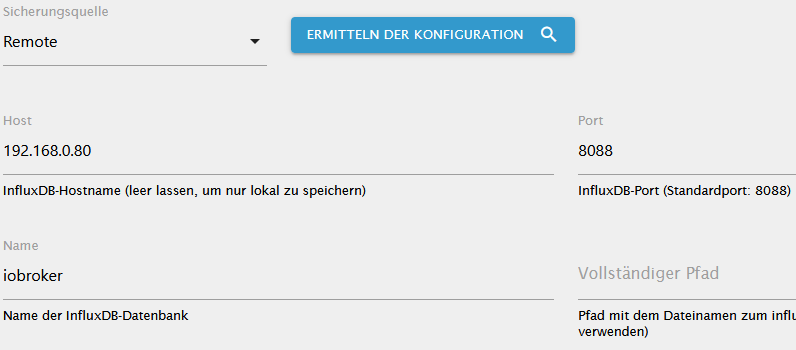
          .) Die DB läuft als Docker auf 192.168.0.80, habe dort das influxdb.conf geändert auf "0.0.0.0:8088"
          .) iobroker und eine 2te DB Instanz laufen am RasPi
          .) Config siehe Screenshot!

          influxdb.png

          simatecS 1 Reply Last reply
          0
          • MassiveAttackM MassiveAttack

            Bekomme beim InfluxDB Backup diesen Fehler, kann ja nur mehr eine Kleinigkeit sein :)

            [DEBUG] [iobroker] - done
            [DEBUG] [influxDB] - Start InfluxDB Backup ...
            [DEBUG] [influxDB] - InfluxDB Backup tmp directory created 
            [DEBUG] [influxDB] - Try deleting the InfluxDB tmp directory
            [DEBUG] [influxDB] - InfluxDB tmp directory was successfully deleted
            [ERROR] [influxDB] - [IGNORED] Error: Command failed: influxd backup -portable -database iobroker -host 192.168.0.80:8088 "/opt/iobroker/backups/influxDB_2021_05_19-15_35_53_backupiobroker"
            2021/05/19 15:35:53 Download shard 0 failed dial tcp 192.168.0.80:8088: connect: connection refused.  Waiting 2s and retrying (0)...
            2021/05/19 15:35:55 Download shard 0 failed dial tcp 192.168.0.80:8088: connect: connection refused.  Waiting 2s and retrying (1)...
            2021/05/19 15:35:57 Download shard 0 failed dial tcp 192.168.0.80:8088: connect: connection refused.  Waiting 2s and retrying (2)...
            2021/05/19 15:35:59 Download shard 0 failed dial tcp 192.168.0.80:8088: connect: connection refused.  Waiting 2s and retrying (3)...
            2021/05/19 15:36:01 Download shard 0 failed dial tcp 192.168.0.80:8088: connect: connection refused.  Waiting 2s and retrying (4)...
            2021/05/19 15:36:03 Download shard 0 failed dial tcp 192.168.0.80:8088: connect: connection refused.  Waiting 2s and retrying (5)...
            2021/05/19 15:36:06 Download shard 0 failed dial tcp 192.168.0.80:8088: connect: connection refused.  Waiting 3.01s and retrying (6)...
            2021/05/19 15:36:09 Download shard 0 failed dial tcp 192.168.0.80:8088: connect: connection refused.  Waiting 11.441s and retrying (7)...
            2021/05/19 15:36:20 Download shard 0 failed dial tcp 192.168.0.80:8088: connect: connection refused.  Waiting 43.477s and retrying (8)...
            2021/05/19 15:37:03 Download shard 0 failed dial tcp 192.168.0.80:8088: connect: connection refused.  Waiting 2m45.216s and retrying (9)...
            backup: dial tcp 192.168.0.80:8088: connect: connection refused
            

            .) Die DB läuft als Docker auf 192.168.0.80, habe dort das influxdb.conf geändert auf "0.0.0.0:8088"
            .) iobroker und eine 2te DB Instanz laufen am RasPi
            .) Config siehe Screenshot!

            influxdb.png

            simatecS Offline
            simatecS Offline
            simatec
            Developer Most Active
            wrote on last edited by
            #91

            @massiveattack Ist auf dem PI influxd installiert?

            • Besuche meine Github Seite
            • Beitrag hat geholfen oder willst du mich unterstützen
            • HowTo Restore ioBroker
            MassiveAttackM 1 Reply Last reply
            0
            • simatecS simatec

              @massiveattack Ist auf dem PI influxd installiert?

              MassiveAttackM Offline
              MassiveAttackM Offline
              MassiveAttack
              wrote on last edited by
              #92

              @simatec
              Ich habe eine eigene InfluxDb installiert, ist das falsch? Wie installiert man influxd?

              simatecS 1 Reply Last reply
              0
              • MassiveAttackM MassiveAttack

                @simatec
                Ich habe eine eigene InfluxDb installiert, ist das falsch? Wie installiert man influxd?

                simatecS Offline
                simatecS Offline
                simatec
                Developer Most Active
                wrote on last edited by
                #93

                @massiveattack Wenn du influx auf deinem PI hast, sollte alles passen

                • Besuche meine Github Seite
                • Beitrag hat geholfen oder willst du mich unterstützen
                • HowTo Restore ioBroker
                S 1 Reply Last reply
                0
                • simatecS simatec

                  @massiveattack Wenn du influx auf deinem PI hast, sollte alles passen

                  S Offline
                  S Offline
                  succo_J
                  wrote on last edited by
                  #94

                  @simatec @MassiveAttack
                  Das muss nicht unbedingt sein, dass das CLI "influxd" installiert ist.

                  Beim Repo von Influxdata ist es automatisch drin, bei Debian muss es nachinstalliert werden
                  ( apt-get install influxdb-client )

                  MassiveAttackM 1 Reply Last reply
                  0
                  • S succo_J

                    @simatec @MassiveAttack
                    Das muss nicht unbedingt sein, dass das CLI "influxd" installiert ist.

                    Beim Repo von Influxdata ist es automatisch drin, bei Debian muss es nachinstalliert werden
                    ( apt-get install influxdb-client )

                    MassiveAttackM Offline
                    MassiveAttackM Offline
                    MassiveAttack
                    wrote on last edited by
                    #95

                    @succo_j

                    Ich habs übers repo installiert. Kann es sein, dass der Fehler ein Berechtigungsproblem ist?
                    Wenn ich nur den client installiere, kann ich die db wieder löschen?

                    S simatecS 2 Replies Last reply
                    0
                    • MassiveAttackM MassiveAttack

                      @succo_j

                      Ich habs übers repo installiert. Kann es sein, dass der Fehler ein Berechtigungsproblem ist?
                      Wenn ich nur den client installiere, kann ich die db wieder löschen?

                      S Offline
                      S Offline
                      succo_J
                      wrote on last edited by
                      #96

                      @massiveattack
                      Oh, da bin ich überfragt. Aber ich glaube, es gibt grundsätzlich ein Problem mittels "influxd" von außen ein Backup im Docker anzustoßen.
                      Selbst die Leute von Influxdata machen es über docker exec ...
                      https://www.influxdata.com/blog/backuprestore-of-influxdb-fromto-docker-containers/

                      1 Reply Last reply
                      0
                      • MassiveAttackM MassiveAttack

                        @succo_j

                        Ich habs übers repo installiert. Kann es sein, dass der Fehler ein Berechtigungsproblem ist?
                        Wenn ich nur den client installiere, kann ich die db wieder löschen?

                        simatecS Offline
                        simatecS Offline
                        simatec
                        Developer Most Active
                        wrote on last edited by
                        #97

                        @massiveattack Kannst du bitte mal die Config deines Dockers posten

                        • Besuche meine Github Seite
                        • Beitrag hat geholfen oder willst du mich unterstützen
                        • HowTo Restore ioBroker
                        1 Reply Last reply
                        0
                        • MassiveAttackM Offline
                          MassiveAttackM Offline
                          MassiveAttack
                          wrote on last edited by MassiveAttack
                          #98

                          @succo_j said in BackItUp für InfluxDB:

                          apt-get install influxdb-client

                          Ich glaube das heißt, der Client ist schon installiert?!

                          Vorbereitung zum Entpacken von .../influxdb-client_1.6.4-1+deb10u1_armhf.deb ...
                          Entpacken von influxdb-client (1.6.4-1+deb10u1) ...
                          dpkg: Fehler beim Bearbeiten des Archivs /var/cache/apt/archives/influxdb-client_1.6.4-1+deb10u1_armhf.deb (--unpack):
                           Versuch, »/usr/bin/influx« zu überschreiben, welches auch in Paket influxdb 1.8.5-1 ist
                          dpkg-deb: Fehler: »einfügen«-Unterprozess wurde durch Signal (Datenübergabe unterbrochen (broken pipe)) getötet
                          Fehler traten auf beim Bearbeiten von:
                           /var/cache/apt/archives/influxdb-client_1.6.4-1+deb10u1_armhf.deb
                          E: Sub-process /usr/bin/dpkg returned an error code (1)


                          Pfuh das wird ja immer komplizierter :)

                          In der Config steht nix besonderes drin, alles default

                          simatecS 1 Reply Last reply
                          0
                          • MassiveAttackM Offline
                            MassiveAttackM Offline
                            MassiveAttack
                            wrote on last edited by
                            #99

                            Ich habe vorläufig einen Workaround gefunden. Leider muss ich dazu den backupjob manuell in der docker console starten:

                            influxd backup -portable -database iobroker "/var/lib/influxdb/backups/influxDB_20_05_21"

                            Wobei "/var/lib/influxdb/" mein Freigabeverzeichnis für den Docker ist. Dabei wird der Ordner "backups" erstellt. Auf diesen Freigabeordner kann ich über das NAS Filesystem ja zugreifen, und kopiere mir dann das influxdb backup weg.

                            1 Reply Last reply
                            0
                            • MassiveAttackM Offline
                              MassiveAttackM Offline
                              MassiveAttack
                              wrote on last edited by
                              #100

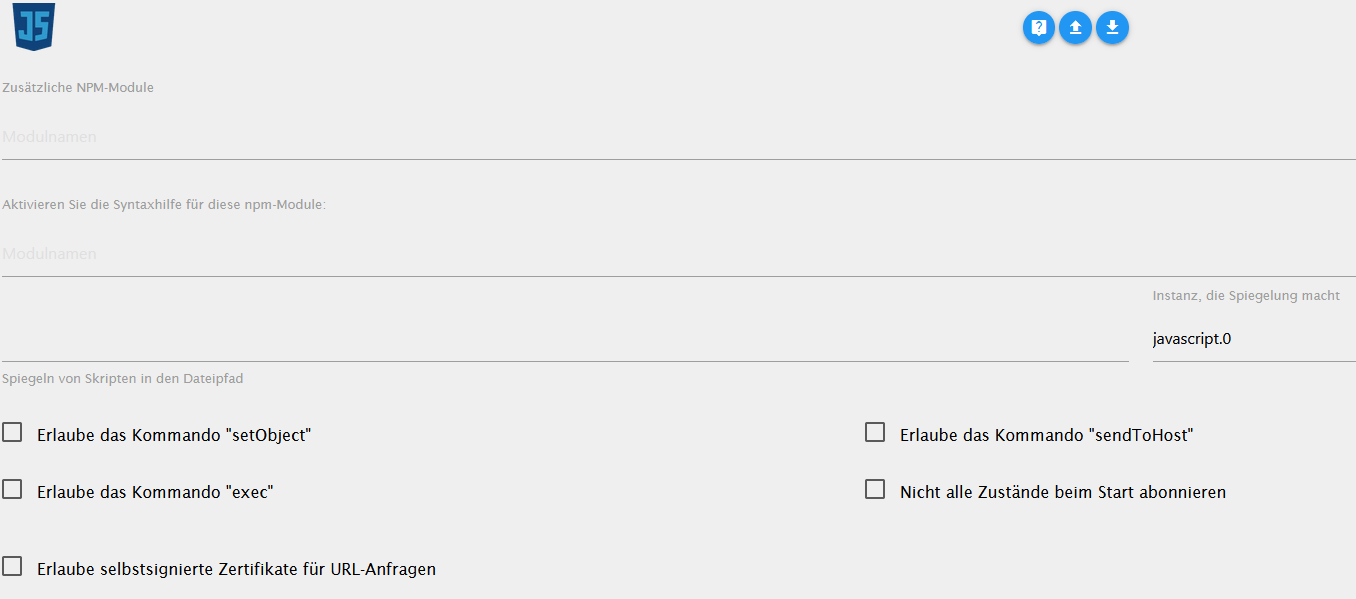
                              Noch eine andere Frage zum Backup von JS, was muss ich da eintragen, damit das Backup funktioniert?
                              js.png

                              Thomas BraunT 1 Reply Last reply
                              0
                              • MassiveAttackM MassiveAttack

                                Noch eine andere Frage zum Backup von JS, was muss ich da eintragen, damit das Backup funktioniert?

                                js.png

                                Thomas BraunT Online
                                Thomas BraunT Online
                                Thomas Braun
                                Most Active
                                wrote on last edited by
                                #101

                                @massiveattack
                                Im js-Adapter spiegeln (am besten außerhalb von /opt/iobroker ; z. B. im /home/iobroker/iobskripte oder sowas) und dieses Spiegelverzeichnis im Backitup eintragen.

                                Linux-Werkzeugkasten:
                                https://forum.iobroker.net/topic/42952/der-kleine-iobroker-linux-werkzeugkasten
                                NodeJS Fixer Skript:
                                https://forum.iobroker.net/topic/68035/iob-node-fix-skript
                                iob_diag: curl -sLf -o diag.sh https://iobroker.net/diag.sh && bash diag.sh

                                MassiveAttackM 1 Reply Last reply
                                0
                                • Thomas BraunT Thomas Braun

                                  @massiveattack
                                  Im js-Adapter spiegeln (am besten außerhalb von /opt/iobroker ; z. B. im /home/iobroker/iobskripte oder sowas) und dieses Spiegelverzeichnis im Backitup eintragen.

                                  MassiveAttackM Offline
                                  MassiveAttackM Offline
                                  MassiveAttack
                                  wrote on last edited by
                                  #102

                                  @thomas-braun

                                  Danke, funktioniert :)

                                  1 Reply Last reply
                                  0
                                  • MassiveAttackM MassiveAttack

                                    @succo_j said in BackItUp für InfluxDB:

                                    apt-get install influxdb-client

                                    Ich glaube das heißt, der Client ist schon installiert?!

                                    Vorbereitung zum Entpacken von .../influxdb-client_1.6.4-1+deb10u1_armhf.deb ...
                                    Entpacken von influxdb-client (1.6.4-1+deb10u1) ...
                                    dpkg: Fehler beim Bearbeiten des Archivs /var/cache/apt/archives/influxdb-client_1.6.4-1+deb10u1_armhf.deb (--unpack):
                                     Versuch, »/usr/bin/influx« zu überschreiben, welches auch in Paket influxdb 1.8.5-1 ist
                                    dpkg-deb: Fehler: »einfügen«-Unterprozess wurde durch Signal (Datenübergabe unterbrochen (broken pipe)) getötet
                                    Fehler traten auf beim Bearbeiten von:
                                     /var/cache/apt/archives/influxdb-client_1.6.4-1+deb10u1_armhf.deb
                                    E: Sub-process /usr/bin/dpkg returned an error code (1)


                                    Pfuh das wird ja immer komplizierter :)

                                    In der Config steht nix besonderes drin, alles default

                                    simatecS Offline
                                    simatecS Offline
                                    simatec
                                    Developer Most Active
                                    wrote on last edited by
                                    #103

                                    @massiveattack sagte in BackItUp für InfluxDB:

                                    In der Config steht nix besonderes drin, alles default

                                    Zeige bitte trotzdem mal die Config

                                    • Besuche meine Github Seite
                                    • Beitrag hat geholfen oder willst du mich unterstützen
                                    • HowTo Restore ioBroker
                                    MassiveAttackM 1 Reply Last reply
                                    0
                                    • simatecS simatec

                                      @massiveattack sagte in BackItUp für InfluxDB:

                                      In der Config steht nix besonderes drin, alles default

                                      Zeige bitte trotzdem mal die Config

                                      MassiveAttackM Offline
                                      MassiveAttackM Offline
                                      MassiveAttack
                                      wrote on last edited by
                                      #104

                                      @simatec

                                      $ docker run -p 8086:8086 \
                                            -v influxdb:/var/lib/influxdb \
                                            influxdb:1.8
                                      
                                      simatecS 1 Reply Last reply
                                      0
                                      • MassiveAttackM MassiveAttack

                                        @simatec

                                        $ docker run -p 8086:8086 \
                                              -v influxdb:/var/lib/influxdb \
                                              influxdb:1.8
                                        
                                        simatecS Offline
                                        simatecS Offline
                                        simatec
                                        Developer Most Active
                                        wrote on last edited by
                                        #105

                                        @massiveattack der Port 8088 ist da aber nicht konfiguriert.
                                        Den Port benötigst du als remote Port

                                        • Besuche meine Github Seite
                                        • Beitrag hat geholfen oder willst du mich unterstützen
                                        • HowTo Restore ioBroker
                                        MassiveAttackM 1 Reply Last reply
                                        0
                                        • simatecS simatec

                                          @massiveattack der Port 8088 ist da aber nicht konfiguriert.
                                          Den Port benötigst du als remote Port

                                          MassiveAttackM Offline
                                          MassiveAttackM Offline
                                          MassiveAttack
                                          wrote on last edited by
                                          #106

                                          @simatec
                                          den habe ich auch in der influx config eingestellt:

                                          [admin]
                                          enabled = true
                                          bind-address = ":8088"

                                          (hab auch schon "0.0.0.0:8088" erfolglos versucht"

                                          simatecS 1 Reply Last reply
                                          0
                                          Reply
                                          • Reply as topic
                                          Log in to reply
                                          • Oldest to Newest
                                          • Newest to Oldest
                                          • Most Votes


                                          Support us

                                          ioBroker
                                          Community Adapters
                                          Donate
                                          FAQ Cloud / IOT
                                          HowTo: Node.js-Update
                                          HowTo: Backup/Restore
                                          Downloads
                                          BLOG

                                          262

                                          Online

                                          32.7k

                                          Users

                                          82.5k

                                          Topics

                                          1.3m

                                          Posts
                                          Community
                                          Impressum | Datenschutz-Bestimmungen | Nutzungsbedingungen | Einwilligungseinstellungen
                                          ioBroker Community 2014-2025
                                          logo
                                          • Login

                                          • Don't have an account? Register

                                          • Login or register to search.
                                          • First post
                                            Last post
                                          0
                                          • Home
                                          • Recent
                                          • Tags
                                          • Unread 0
                                          • Categories
                                          • Unreplied
                                          • Popular
                                          • GitHub
                                          • Docu
                                          • Hilfe