Skip to content
  • Home
  • Recent
  • Tags
  • 0 Unread 0
  • Categories
  • Unreplied
  • Popular
  • GitHub
  • Docu
  • Hilfe
Skins
  • Light
  • Brite
  • Cerulean
  • Cosmo
  • Flatly
  • Journal
  • Litera
  • Lumen
  • Lux
  • Materia
  • Minty
  • Morph
  • Pulse
  • Sandstone
  • Simplex
  • Sketchy
  • Spacelab
  • United
  • Yeti
  • Zephyr
  • Dark
  • Cyborg
  • Darkly
  • Quartz
  • Slate
  • Solar
  • Superhero
  • Vapor

  • Default (No Skin)
  • No Skin
Collapse
ioBroker Logo

Community Forum

donate donate
  1. ioBroker Community Home
  2. Deutsch
  3. ioBroker Allgemein
  4. BackItUp für InfluxDB

NEWS

  • Jahresrückblick 2025 – unser neuer Blogbeitrag ist online! ✨
    BluefoxB
    Bluefox
    17
    1
    2.9k

  • Neuer Blogbeitrag: Monatsrückblick - Dezember 2025 🎄
    BluefoxB
    Bluefox
    13
    1
    1.1k

  • Weihnachtsangebot 2025! 🎄
    BluefoxB
    Bluefox
    25
    1
    2.4k

BackItUp für InfluxDB

Scheduled Pinned Locked Moved ioBroker Allgemein
backitup influxdb
273 Posts 32 Posters 57.7k Views 28 Watching
  • Oldest to Newest
  • Newest to Oldest
  • Most Votes
Reply
  • Reply as topic
Log in to reply
This topic has been deleted. Only users with topic management privileges can see it.
  • Marc BergM Offline
    Marc BergM Offline
    Marc Berg
    Most Active
    wrote on last edited by
    #235

    @michael_f
    https://portal.portainer.io/knowledge/unable-to-update-environment-variables-when-running-on-synology-nas

    NUC10I3+Ubuntu+Docker+ioBroker+influxDB2+Node Red+EMQX+Grafana

    Pi-hole, Traefik, Checkmk, Conbee II+Zigbee2MQTT, ESPSomfy-RTS, LoRaWAN, Arduino, KiCad

    Benutzt das Voting im Beitrag, wenn er euch geholfen hat.

    1 Reply Last reply
    0
    • M michael_f

      @andre sagte in BackItUp für InfluxDB:

      Gelesen? https://docs.buanet.de/iobroker-docker-image/docs/#backup-remote-databases-with-iobroker-backitup-in-docker

      Hallo André, habe ich schon mal gesehen/gelesen und jetzt wieder aufgefrischt - danke.

      @marc-berg sagte in BackItUp für InfluxDB:

      Kein Ahnung, das hat ja jetzt nichts mit dem konkreten Image zu tun. Bei mir geht das ohne Probleme. Schalt doch mal auf "simple mode" und probiere dort mal. Welche Version von Portainer?

      Portainer Version 2.18.1
      Mit dem simple mode funktionierts auch nicht (zuvor bereits probiert, jetzt nochmals).
      b2a55596-bcb5-406f-8398-a2957e3ee927-grafik.png

      andreA Offline
      andreA Offline
      andre
      Developer
      wrote on last edited by andre
      #236

      @michael_f Das ist leider ein Bug der immer wieder auftaucht. Hast du dir schonmal docker-compose bzw. Stacks in Portainer angesehen? Damit kannst du das umgehen und den Container nach Belieben im Stackfile anpassen. Kann ich nur jedem empfehlen und ist auch keine Raketentechnik.

      Hier mal was zum Lesen. Ist zwar noch "work in progress" aber vielleicht hilft das als Einstieg:
      https://blog.buanet.de/posts/2023/02/15_verwenden_von_stacks_in_portainer/

      Bitte keine Support-Fragen per PN! Nutzt die öffentliche Kanäle damit auch andere von den Antworten profitieren können!

      1 Reply Last reply
      1
      • Marc BergM Marc Berg

        @michael_f sagte in BackItUp für InfluxDB:

        Haben wir aneinander vorbeigeredet am 24.4. oder liegt es an was anderem, dass InfluxDB bei mir (ioB, influxDB 2.7, Grafana lauft in Portainer auf einer Synology) ausgegraut ist?

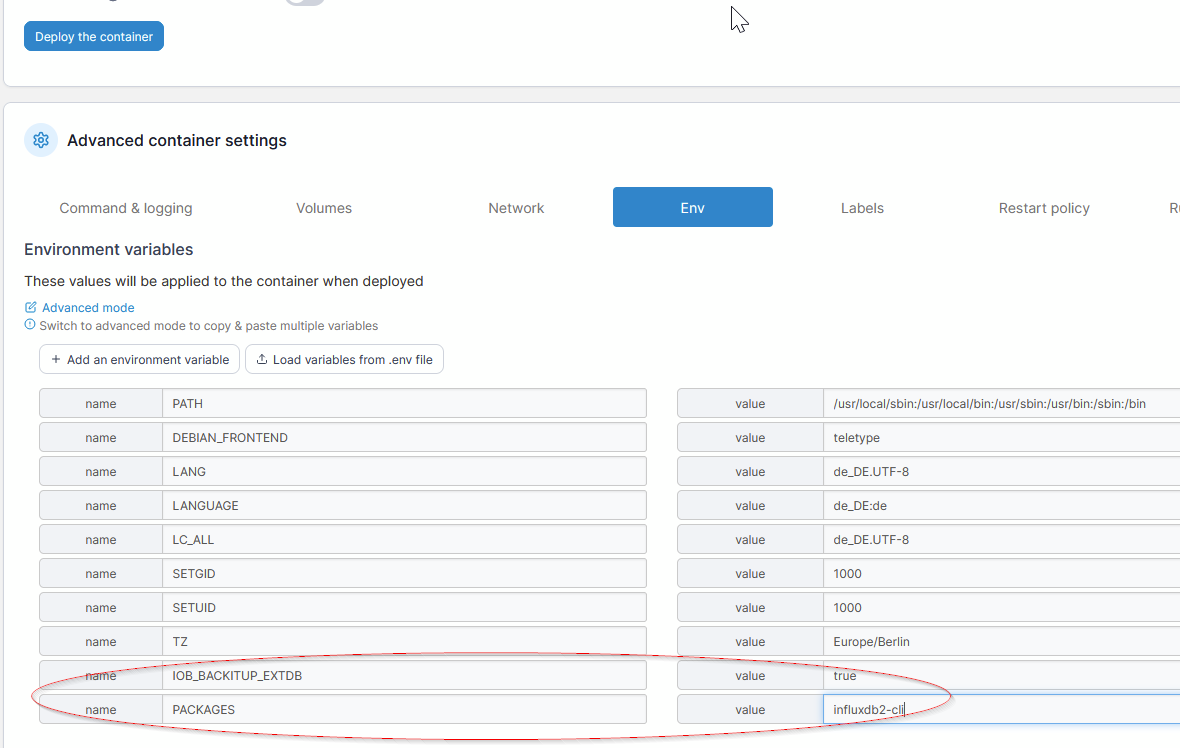
        Du musst zwei Environment Variablen setzen:

        1. IOB_BACKITUP_EXTDB = true
          562c3603-2270-45a7-8b88-04b6add651e1-grafik.png

        2. PACKAGES = influxdb2-cli
          a6002ef0-2d34-486f-a720-01c1ef12ab73-grafik.png

        Das Backup der Influxdb ging mit der ersten Variable schon länger, du musstest dich halt manuell um die Installation der CLI kümmern. Dieser Schritt wird dir jetzt mit der zweiten Variable abgenommen, indem das Repository ergänzt und die CLI installiert wird.

        M Offline
        M Offline
        Mike Hellracer
        wrote on last edited by
        #237

        @marc-berg
        ich habe ein Frage:
        Wie bekomme ich denn das REPO in den Container?
        ^

        wget -q https://repos.influxdata.com/influxdata-archive_compat.key
        echo '393e8779c89ac8d958f81f942f9ad7fb82a25e133faddaf92e15b16e6ac9ce4c influxdata-archive_compat.key' | sha256sum -c && cat influxdata-archive_compat.key | gpg --dearmor | sudo tee /etc/apt/trusted.gpg.d/influxdata-archive_compat.gpg > /dev/null
        echo 'deb [signed-by=/etc/apt/trusted.gpg.d/influxdata-archive_compat.gpg] https://repos.influxdata.com/debian stable main' | sudo tee /etc/apt/sources.list.d/influxdata.list


        Marc BergM 1 Reply Last reply
        0
        • M Mike Hellracer

          @marc-berg
          ich habe ein Frage:
          Wie bekomme ich denn das REPO in den Container?
          ^

          wget -q https://repos.influxdata.com/influxdata-archive_compat.key
          echo '393e8779c89ac8d958f81f942f9ad7fb82a25e133faddaf92e15b16e6ac9ce4c influxdata-archive_compat.key' | sha256sum -c && cat influxdata-archive_compat.key | gpg --dearmor | sudo tee /etc/apt/trusted.gpg.d/influxdata-archive_compat.gpg > /dev/null
          echo 'deb [signed-by=/etc/apt/trusted.gpg.d/influxdata-archive_compat.gpg] https://repos.influxdata.com/debian stable main' | sudo tee /etc/apt/sources.list.d/influxdata.list


          Marc BergM Offline
          Marc BergM Offline
          Marc Berg
          Most Active
          wrote on last edited by
          #238

          @mike-hellracer sagte in BackItUp für InfluxDB:

          Wie bekomme ich denn das REPO in den Container?

          Im Moment aus meiner Sicht am saubersten, indem du die Beta: "buanet/iobroker:v8.1.0-beta.2" installierst und als Umgebungvariable

          PACKAGES=influxdb2-cli
          

          setzt. Damit wird das Repo gesetzt und gleichzeitig der Influx-Client installiert. Was willst du denn erreichen?

          NUC10I3+Ubuntu+Docker+ioBroker+influxDB2+Node Red+EMQX+Grafana

          Pi-hole, Traefik, Checkmk, Conbee II+Zigbee2MQTT, ESPSomfy-RTS, LoRaWAN, Arduino, KiCad

          Benutzt das Voting im Beitrag, wenn er euch geholfen hat.

          M 1 Reply Last reply
          0
          • Marc BergM Marc Berg

            @mike-hellracer sagte in BackItUp für InfluxDB:

            Wie bekomme ich denn das REPO in den Container?

            Im Moment aus meiner Sicht am saubersten, indem du die Beta: "buanet/iobroker:v8.1.0-beta.2" installierst und als Umgebungvariable

            PACKAGES=influxdb2-cli
            

            setzt. Damit wird das Repo gesetzt und gleichzeitig der Influx-Client installiert. Was willst du denn erreichen?

            M Offline
            M Offline
            Mike Hellracer
            wrote on last edited by Mike Hellracer
            #239

            @marc-berg
            eigentlich genau das. ;)
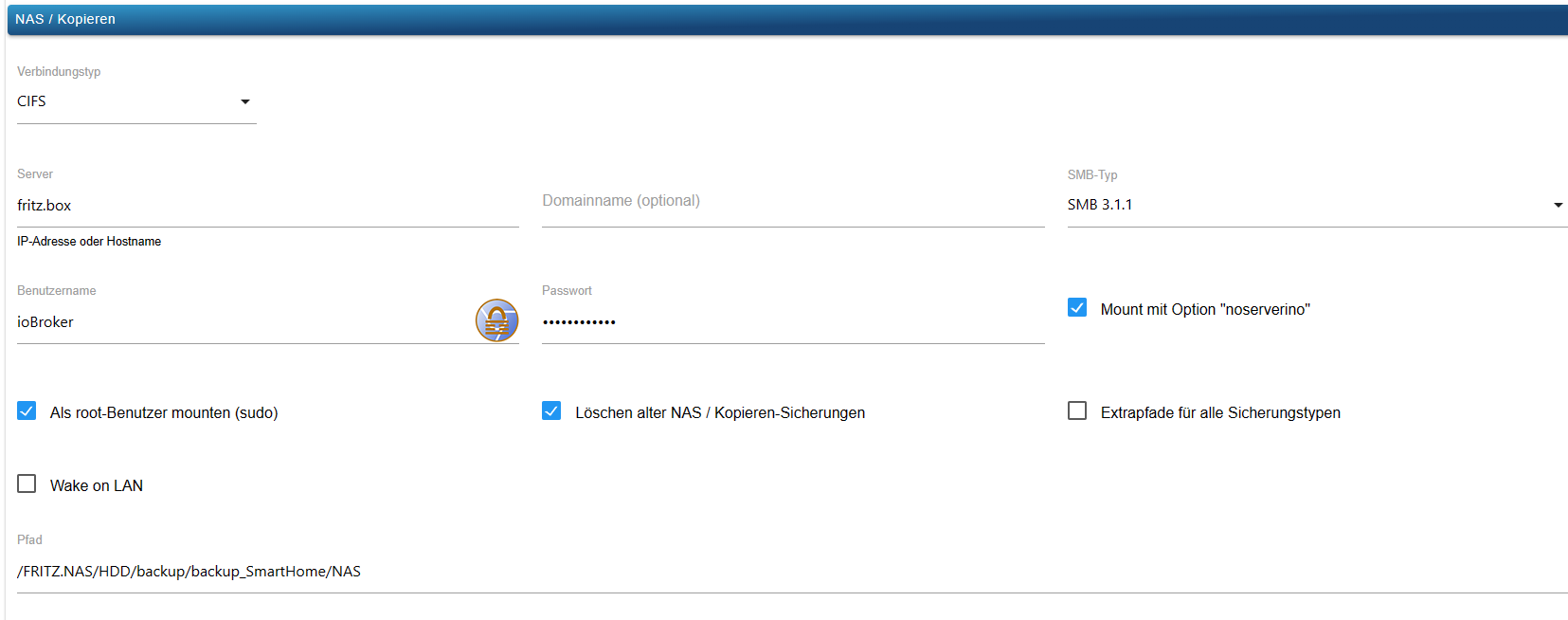
            und ich habe noch ein Problem mit dem NAS mount.
            habe die Einstellungen aus einer physikalischen Instanz (bei der es geht) kopiert und bekomme in der Docker Instanz gesagt "mount failed"
            Brauche ich da evtl. auch noch ein Paket?
            Sorry, Screenshot vergessen


            527dc8e8-af02-4cff-a2f1-bb54a79b4ab2-image.png

            1 Reply Last reply
            0
            • Marc BergM Offline
              Marc BergM Offline
              Marc Berg
              Most Active
              wrote on last edited by
              #240

              @mike-hellracer sagte in BackItUp für InfluxDB:

              Brauche ich da evtl. auch noch ein Paket?

              Ja, wahrscheinlich "cifs-utils". Also die Umgebungsvariable "PACKAGES" entsprechend ergänzen (mit Leerzeichen getrennt).

              NUC10I3+Ubuntu+Docker+ioBroker+influxDB2+Node Red+EMQX+Grafana

              Pi-hole, Traefik, Checkmk, Conbee II+Zigbee2MQTT, ESPSomfy-RTS, LoRaWAN, Arduino, KiCad

              Benutzt das Voting im Beitrag, wenn er euch geholfen hat.

              M 1 Reply Last reply
              0
              • Marc BergM Marc Berg

                @mike-hellracer sagte in BackItUp für InfluxDB:

                Brauche ich da evtl. auch noch ein Paket?

                Ja, wahrscheinlich "cifs-utils". Also die Umgebungsvariable "PACKAGES" entsprechend ergänzen (mit Leerzeichen getrennt).

                M Offline
                M Offline
                Mike Hellracer
                wrote on last edited by Mike Hellracer
                #241

                @marc-berg said in BackItUp für InfluxDB:

                cifs-utils
                cift-utils is allready installed
                ok, gibt es schon einen Termin wann beta -> latest wird?

                Marc BergM 1 Reply Last reply
                0
                • M Mike Hellracer

                  @marc-berg said in BackItUp für InfluxDB:

                  cifs-utils
                  cift-utils is allready installed
                  ok, gibt es schon einen Termin wann beta -> latest wird?

                  Marc BergM Offline
                  Marc BergM Offline
                  Marc Berg
                  Most Active
                  wrote on last edited by
                  #242

                  @mike-hellracer sagte in BackItUp für InfluxDB:

                  ok, gibt es schon einen Termin wann beta -> latest wird?

                  Ich sag' mal so: je mehr mittesten, umso früher ...

                  NUC10I3+Ubuntu+Docker+ioBroker+influxDB2+Node Red+EMQX+Grafana

                  Pi-hole, Traefik, Checkmk, Conbee II+Zigbee2MQTT, ESPSomfy-RTS, LoRaWAN, Arduino, KiCad

                  Benutzt das Voting im Beitrag, wenn er euch geholfen hat.

                  M 2 Replies Last reply
                  0
                  • Marc BergM Marc Berg

                    @mike-hellracer sagte in BackItUp für InfluxDB:

                    ok, gibt es schon einen Termin wann beta -> latest wird?

                    Ich sag' mal so: je mehr mittesten, umso früher ...

                    M Offline
                    M Offline
                    Mike Hellracer
                    wrote on last edited by
                    #243

                    @marc-berg
                    schon gut ich habe das repo gerade umgestellt :)
                    aber der cifs mount geht leider immer noch nicht. :(
                    wei gesagt 1:1 von einer physischen Instanz kopiert

                    1 Reply Last reply
                    0
                    • Marc BergM Marc Berg

                      @mike-hellracer sagte in BackItUp für InfluxDB:

                      ok, gibt es schon einen Termin wann beta -> latest wird?

                      Ich sag' mal so: je mehr mittesten, umso früher ...

                      M Offline
                      M Offline
                      Mike Hellracer
                      wrote on last edited by
                      #244

                      @marc-berg
                      influxdb2-cli ist installiert und als Pfad habe ich /usr/bin/influx gesetzt.
                      Leider bekomme ich immer noch einen Error

                      Error: Command failed: "/usr/bin/influx" backup --bucket iobroker --host http://influxdb:8086 -t <MEIN Token> "/opt/iobroker/backups/influxDB_2023_07_03-18_54_14_backupiobroker"
                      

                      Marc BergM 1 Reply Last reply
                      0
                      • M Mike Hellracer

                        @marc-berg
                        influxdb2-cli ist installiert und als Pfad habe ich /usr/bin/influx gesetzt.
                        Leider bekomme ich immer noch einen Error

                        Error: Command failed: "/usr/bin/influx" backup --bucket iobroker --host http://influxdb:8086 -t <MEIN Token> "/opt/iobroker/backups/influxDB_2023_07_03-18_54_14_backupiobroker"
                        

                        Marc BergM Offline
                        Marc BergM Offline
                        Marc Berg
                        Most Active
                        wrote on last edited by
                        #245

                        @mike-hellracer was sagt das Docker-Log auf der Console (fängt so an:)

                        --------------------------------------------------------------------------------
                        -------------------------     2023-05-28 09:38:14      -------------------------
                        --------------------------------------------------------------------------------
                        -----                                                                      -----
                        ----- ██╗  ██████╗  ██████╗  ██████╗   ██████╗  ██╗  ██╗ ███████╗ ██████╗  -----
                        ----- ██║ ██╔═══██╗ ██╔══██╗ ██╔══██╗ ██╔═══██╗ ██║ ██╔╝ ██╔════╝ ██╔══██╗ -----
                        ----- ██║ ██║   ██║ ██████╔╝ ██████╔╝ ██║   ██║ █████╔╝  █████╗   ██████╔╝ -----
                        ----- ██║ ██║   ██║ ██╔══██╗ ██╔══██╗ ██║   ██║ ██╔═██╗  ██╔══╝   ██╔══██╗ -----
                        ----- ██║ ╚██████╔╝ ██████╔╝ ██║  ██║ ╚██████╔╝ ██║  ██╗ ███████╗ ██║  ██║ -----
                        ----- ╚═╝  ╚═════╝  ╚═════╝  ╚═╝  ╚═╝  ╚═════╝  ╚═╝  ╚═╝ ╚══════╝ ╚═╝  ╚═╝ -----
                        -----                                                                      -----
                        -----              Welcome to your ioBroker Docker container!              -----
                        -----                    Startupscript is now running!                     -----
                        -----                          Please be patient!                          -----
                        --------------------------------------------------------------------------------
                         
                        --------------------------------------------------------------------------------
                        -----                          System Information                          -----
                        -----                    arch:                x86_64                       -----


                        NUC10I3+Ubuntu+Docker+ioBroker+influxDB2+Node Red+EMQX+Grafana

                        Pi-hole, Traefik, Checkmk, Conbee II+Zigbee2MQTT, ESPSomfy-RTS, LoRaWAN, Arduino, KiCad

                        Benutzt das Voting im Beitrag, wenn er euch geholfen hat.

                        M 1 Reply Last reply
                        0
                        • Marc BergM Marc Berg

                          @mike-hellracer was sagt das Docker-Log auf der Console (fängt so an:)

                          --------------------------------------------------------------------------------
                          -------------------------     2023-05-28 09:38:14      -------------------------
                          --------------------------------------------------------------------------------
                          -----                                                                      -----
                          ----- ██╗  ██████╗  ██████╗  ██████╗   ██████╗  ██╗  ██╗ ███████╗ ██████╗  -----
                          ----- ██║ ██╔═══██╗ ██╔══██╗ ██╔══██╗ ██╔═══██╗ ██║ ██╔╝ ██╔════╝ ██╔══██╗ -----
                          ----- ██║ ██║   ██║ ██████╔╝ ██████╔╝ ██║   ██║ █████╔╝  █████╗   ██████╔╝ -----
                          ----- ██║ ██║   ██║ ██╔══██╗ ██╔══██╗ ██║   ██║ ██╔═██╗  ██╔══╝   ██╔══██╗ -----
                          ----- ██║ ╚██████╔╝ ██████╔╝ ██║  ██║ ╚██████╔╝ ██║  ██╗ ███████╗ ██║  ██║ -----
                          ----- ╚═╝  ╚═════╝  ╚═════╝  ╚═╝  ╚═╝  ╚═════╝  ╚═╝  ╚═╝ ╚══════╝ ╚═╝  ╚═╝ -----
                          -----                                                                      -----
                          -----              Welcome to your ioBroker Docker container!              -----
                          -----                    Startupscript is now running!                     -----
                          -----                          Please be patient!                          -----
                          --------------------------------------------------------------------------------
                           
                          --------------------------------------------------------------------------------
                          -----                          System Information                          -----
                          -----                    arch:                x86_64                       -----
                          
                          
                          M Offline
                          M Offline
                          Mike Hellracer
                          wrote on last edited by
                          #246

                          @marc-berg
                          das sieht eigentlich ok aus. cifs-util habe ich wieder aus den Packages raus genommen, da es schon standard installiert ist.
                          hier mein Start Log (Docker Swarm)

                          --------------------------------------------------------------------------------
                          -----                          System Information                          -----
                          -----                    arch:                aarch64                      -----
                          -----                    hostname:            0c1759fb3315                 -----
                          -----                                                                      -----
                          -----                          Version Information                         -----
                          -----                    image:               v8.1.0-beta.2                -----
                          -----                    build:               2023-07-02T20:17:20+00:00    -----
                          -----                    node:                v18.16.1                     -----
                          -----                    npm:                 9.5.1                        -----
                          -----                                                                      -----
                          -----                        Environment Variables                         -----
                          -----                    IOB_BACKITUP_EXTDB:  true                         -----
                          -----                    IOB_STATESDB_TYPE:   redis                        -----
                          -----                    IOB_STATESDB_HOST:   redis                        -----
                          -----                    IOB_STATESDB_PORT:   6379                         -----
                          -----                    PACKAGES:            redis-tools influxdb2-cli speedtest-cli -----
                          -----                    SETGID:              1000                         -----
                          -----                    SETUID:              1000                         -----
                          --------------------------------------------------------------------------------
                          
                          --------------------------------------------------------------------------------
                          -----                   Step 1 of 5: Preparing container                   -----
                          --------------------------------------------------------------------------------
                          
                          Updating Linux packages on first run... Done.
                          
                          PACKAGES is set. Installing the following additional Linux packages: redis-tools influxdb2-cli speedtest-cli
                          
                          redis-tools is not installed. Installing... Done.
                          influxdb2-cli is not installed. Installing... Done.
                          speedtest-cli is not installed. Installing... Done.
                          
                          Registering maintenance script as command... Done.
                          
                          --------------------------------------------------------------------------------
                          -----             Step 2 of 5: Detecting ioBroker installation             -----
                          --------------------------------------------------------------------------------
                          
                          Existing installation of ioBroker detected in "/opt/iobroker".
                          
                          --------------------------------------------------------------------------------
                          -----             Step 3 of 5: Checking ioBroker installation              -----
                          --------------------------------------------------------------------------------
                          
                          (Re)setting permissions (This might take a while! Please be patient!)... Done.
                          
                          Fixing "sudo-bug" by replacing sudo with gosu... Done.
                          
                          Configuring custom states db...
                          IOB_STATESDB_TYPE is available and value meets detected ioBroker installation.
                          IOB_STATESDB_HOST is available and value meets detected ioBroker installation.
                          IOB_STATESDB_PORT is available and value meets detected ioBroker installation.
                          Done.
                          
                          Checking Database connection... Done.
                          Hostname in ioBroker does not match the hostname of this container.
                          Updating hostname to "0c1759fb3315"... Host "a2cd30786911" successfully renamed to "0c1759fb3315".
                          The host for instance "system.adapter.admin.0" was changed from "a2cd30786911" to "0c1759fb3315".
                          The host for instance "system.adapter.discovery.0" was changed from "a2cd30786911" to "0c1759fb3315".
                          The host for instance "system.adapter.backitup.0" was changed from "a2cd30786911" to "0c1759fb3315".
                          The host for instance "system.adapter.influxdb.0" was changed from "a2cd30786911" to "0c1759fb3315".
                          The host for instance "system.adapter.alias-manager.0" was changed from "a2cd30786911" to "0c1759fb3315".
                          The host for instance "system.adapter.feiertage.0" was changed from "a2cd30786911" to "0c1759fb3315".
                          The host for instance "system.adapter.web.0" was changed from "a2cd30786911" to "0c1759fb3315".
                          The host for instance "system.adapter.iqontrol.0" was changed from "a2cd30786911" to "0c1759fb3315".
                          The host for instance "system.adapter.javascript.0" was changed from "a2cd30786911" to "0c1759fb3315".
                          The host for instance "system.adapter.statistics.0" was changed from "a2cd30786911" to "0c1759fb3315".
                          The host for instance "system.adapter.virtualpowermeter.0" was changed from "a2cd30786911" to "0c1759fb3315".
                          The host for instance "system.adapter.logparser.0" was changed from "a2cd30786911" to "0c1759fb3315".
                          The host for instance "system.adapter.sainlogic.0" was changed from "a2cd30786911" to "0c1759fb3315".
                          The host for instance "system.adapter.telegram.0" was changed from "a2cd30786911" to "0c1759fb3315".
                          The host for instance "system.adapter.zigbee.0" was changed from "a2cd30786911" to "0c1759fb3315".
                          The host for instance "system.adapter.schoolfree.0" was changed from "a2cd30786911" to "0c1759fb3315".
                          The host for instance "system.adapter.daswetter.0" was changed from "a2cd30786911" to "0c1759fb3315".
                          The host for instance "system.adapter.meteoalarm.0" was changed from "a2cd30786911" to "0c1759fb3315".
                          The host for instance "system.adapter.owntracks.0" was changed from "a2cd30786911" to "0c1759fb3315".
                          The host for instance "system.adapter.broadlink2.0" was changed from "a2cd30786911" to "0c1759fb3315".
                          The host for instance "system.adapter.fb-checkpresence.0" was changed from "a2cd30786911" to "0c1759fb3315".
                          The host for instance "system.adapter.eusec.0" was changed from "a2cd30786911" to "0c1759fb3315".
                          Done.
                          
                          --------------------------------------------------------------------------------
                          -----                Step 4 of 5: Applying special settings                -----
                          --------------------------------------------------------------------------------
                          
                          Some adapters have special requirements/ settings which can be activated by the use of environment variables.
                          For more information see ioBroker Docker Image Docs (https://docs.buanet.de/iobroker-docker-image/docs/).
                          
                          IOB_BACKITUP_EXTDB is "true". Unlocking features... Done.
                          
                          
                          --------------------------------------------------------------------------------
                          -----                    Step 5 of 5: ioBroker startup                     -----
                          --------------------------------------------------------------------------------
                          
                          Starting ioBroker...
                          
                          ##### #### ### ## # iobroker.js-controller log output # ## ### #### #####
                          host.0c1759fb3315 check instance "system.adapter.admin.0" for host "0c1759fb3315"
                          host.0c1759fb3315 check instance "system.adapter.influxdb.0" for host "0c1759fb3315"
                          host.0c1759fb3315 check instance "system.adapter.javascript.0" for host "0c1759fb3315"
                          host.0c1759fb3315 check instance "system.adapter.telegram.0" for host "0c1759fb3315"
                          host.0c1759fb3315 check instance "system.adapter.zigbee.0" for host "0c1759fb3315"
                          host.0c1759fb3315 check instance "system.adapter.owntracks.0" for host "0c1759fb3315"
                          host.0c1759fb3315 check instance "system.adapter.discovery.0" for host "0c1759fb3315"
                          host.0c1759fb3315 check instance "system.adapter.backitup.0" for host "0c1759fb3315"
                          host.0c1759fb3315 check instance "system.adapter.feiertage.0" for host "0c1759fb3315"
                          host.0c1759fb3315 check instance "system.adapter.web.0" for host "0c1759fb3315"
                          host.0c1759fb3315 check instance "system.adapter.iqontrol.0" for host "0c1759fb3315"
                          host.0c1759fb3315 check instance "system.adapter.statistics.0" for host "0c1759fb3315"
                          host.0c1759fb3315 check instance "system.adapter.virtualpowermeter.0" for host "0c1759fb3315"
                          host.0c1759fb3315 check instance "system.adapter.logparser.0" for host "0c1759fb3315"
                          host.0c1759fb3315 check instance "system.adapter.sainlogic.0" for host "0c1759fb3315"
                          host.0c1759fb3315 check instance "system.adapter.schoolfree.0" for host "0c1759fb3315"
                          host.0c1759fb3315 check instance "system.adapter.daswetter.0" for host "0c1759fb3315"
                          host.0c1759fb3315 check instance "system.adapter.meteoalarm.0" for host "0c1759fb3315"
                          host.0c1759fb3315 check instance "system.adapter.broadlink2.0" for host "0c1759fb3315"
                          host.0c1759fb3315 check instance "system.adapter.fb-checkpresence.0" for host "0c1759fb3315"
                          host.0c1759fb3315 check instance "system.adapter.eusec.0" for host "0c1759fb3315"
                          ================================== > LOG REDIRECT system.adapter.admin.0 => true [system.adapter.admin.0.logging]
                          

                          Marc BergM 1 Reply Last reply
                          0
                          • M Mike Hellracer

                            @marc-berg
                            das sieht eigentlich ok aus. cifs-util habe ich wieder aus den Packages raus genommen, da es schon standard installiert ist.
                            hier mein Start Log (Docker Swarm)

                            --------------------------------------------------------------------------------
                            -----                          System Information                          -----
                            -----                    arch:                aarch64                      -----
                            -----                    hostname:            0c1759fb3315                 -----
                            -----                                                                      -----
                            -----                          Version Information                         -----
                            -----                    image:               v8.1.0-beta.2                -----
                            -----                    build:               2023-07-02T20:17:20+00:00    -----
                            -----                    node:                v18.16.1                     -----
                            -----                    npm:                 9.5.1                        -----
                            -----                                                                      -----
                            -----                        Environment Variables                         -----
                            -----                    IOB_BACKITUP_EXTDB:  true                         -----
                            -----                    IOB_STATESDB_TYPE:   redis                        -----
                            -----                    IOB_STATESDB_HOST:   redis                        -----
                            -----                    IOB_STATESDB_PORT:   6379                         -----
                            -----                    PACKAGES:            redis-tools influxdb2-cli speedtest-cli -----
                            -----                    SETGID:              1000                         -----
                            -----                    SETUID:              1000                         -----
                            --------------------------------------------------------------------------------
                            
                            --------------------------------------------------------------------------------
                            -----                   Step 1 of 5: Preparing container                   -----
                            --------------------------------------------------------------------------------
                            
                            Updating Linux packages on first run... Done.
                            
                            PACKAGES is set. Installing the following additional Linux packages: redis-tools influxdb2-cli speedtest-cli
                            
                            redis-tools is not installed. Installing... Done.
                            influxdb2-cli is not installed. Installing... Done.
                            speedtest-cli is not installed. Installing... Done.
                            
                            Registering maintenance script as command... Done.
                            
                            --------------------------------------------------------------------------------
                            -----             Step 2 of 5: Detecting ioBroker installation             -----
                            --------------------------------------------------------------------------------
                            
                            Existing installation of ioBroker detected in "/opt/iobroker".
                            
                            --------------------------------------------------------------------------------
                            -----             Step 3 of 5: Checking ioBroker installation              -----
                            --------------------------------------------------------------------------------
                            
                            (Re)setting permissions (This might take a while! Please be patient!)... Done.
                            
                            Fixing "sudo-bug" by replacing sudo with gosu... Done.
                            
                            Configuring custom states db...
                            IOB_STATESDB_TYPE is available and value meets detected ioBroker installation.
                            IOB_STATESDB_HOST is available and value meets detected ioBroker installation.
                            IOB_STATESDB_PORT is available and value meets detected ioBroker installation.
                            Done.
                            
                            Checking Database connection... Done.
                            Hostname in ioBroker does not match the hostname of this container.
                            Updating hostname to "0c1759fb3315"... Host "a2cd30786911" successfully renamed to "0c1759fb3315".
                            The host for instance "system.adapter.admin.0" was changed from "a2cd30786911" to "0c1759fb3315".
                            The host for instance "system.adapter.discovery.0" was changed from "a2cd30786911" to "0c1759fb3315".
                            The host for instance "system.adapter.backitup.0" was changed from "a2cd30786911" to "0c1759fb3315".
                            The host for instance "system.adapter.influxdb.0" was changed from "a2cd30786911" to "0c1759fb3315".
                            The host for instance "system.adapter.alias-manager.0" was changed from "a2cd30786911" to "0c1759fb3315".
                            The host for instance "system.adapter.feiertage.0" was changed from "a2cd30786911" to "0c1759fb3315".
                            The host for instance "system.adapter.web.0" was changed from "a2cd30786911" to "0c1759fb3315".
                            The host for instance "system.adapter.iqontrol.0" was changed from "a2cd30786911" to "0c1759fb3315".
                            The host for instance "system.adapter.javascript.0" was changed from "a2cd30786911" to "0c1759fb3315".
                            The host for instance "system.adapter.statistics.0" was changed from "a2cd30786911" to "0c1759fb3315".
                            The host for instance "system.adapter.virtualpowermeter.0" was changed from "a2cd30786911" to "0c1759fb3315".
                            The host for instance "system.adapter.logparser.0" was changed from "a2cd30786911" to "0c1759fb3315".
                            The host for instance "system.adapter.sainlogic.0" was changed from "a2cd30786911" to "0c1759fb3315".
                            The host for instance "system.adapter.telegram.0" was changed from "a2cd30786911" to "0c1759fb3315".
                            The host for instance "system.adapter.zigbee.0" was changed from "a2cd30786911" to "0c1759fb3315".
                            The host for instance "system.adapter.schoolfree.0" was changed from "a2cd30786911" to "0c1759fb3315".
                            The host for instance "system.adapter.daswetter.0" was changed from "a2cd30786911" to "0c1759fb3315".
                            The host for instance "system.adapter.meteoalarm.0" was changed from "a2cd30786911" to "0c1759fb3315".
                            The host for instance "system.adapter.owntracks.0" was changed from "a2cd30786911" to "0c1759fb3315".
                            The host for instance "system.adapter.broadlink2.0" was changed from "a2cd30786911" to "0c1759fb3315".
                            The host for instance "system.adapter.fb-checkpresence.0" was changed from "a2cd30786911" to "0c1759fb3315".
                            The host for instance "system.adapter.eusec.0" was changed from "a2cd30786911" to "0c1759fb3315".
                            Done.
                            
                            --------------------------------------------------------------------------------
                            -----                Step 4 of 5: Applying special settings                -----
                            --------------------------------------------------------------------------------
                            
                            Some adapters have special requirements/ settings which can be activated by the use of environment variables.
                            For more information see ioBroker Docker Image Docs (https://docs.buanet.de/iobroker-docker-image/docs/).
                            
                            IOB_BACKITUP_EXTDB is "true". Unlocking features... Done.
                            
                            
                            --------------------------------------------------------------------------------
                            -----                    Step 5 of 5: ioBroker startup                     -----
                            --------------------------------------------------------------------------------
                            
                            Starting ioBroker...
                            
                            ##### #### ### ## # iobroker.js-controller log output # ## ### #### #####
                            host.0c1759fb3315 check instance "system.adapter.admin.0" for host "0c1759fb3315"
                            host.0c1759fb3315 check instance "system.adapter.influxdb.0" for host "0c1759fb3315"
                            host.0c1759fb3315 check instance "system.adapter.javascript.0" for host "0c1759fb3315"
                            host.0c1759fb3315 check instance "system.adapter.telegram.0" for host "0c1759fb3315"
                            host.0c1759fb3315 check instance "system.adapter.zigbee.0" for host "0c1759fb3315"
                            host.0c1759fb3315 check instance "system.adapter.owntracks.0" for host "0c1759fb3315"
                            host.0c1759fb3315 check instance "system.adapter.discovery.0" for host "0c1759fb3315"
                            host.0c1759fb3315 check instance "system.adapter.backitup.0" for host "0c1759fb3315"
                            host.0c1759fb3315 check instance "system.adapter.feiertage.0" for host "0c1759fb3315"
                            host.0c1759fb3315 check instance "system.adapter.web.0" for host "0c1759fb3315"
                            host.0c1759fb3315 check instance "system.adapter.iqontrol.0" for host "0c1759fb3315"
                            host.0c1759fb3315 check instance "system.adapter.statistics.0" for host "0c1759fb3315"
                            host.0c1759fb3315 check instance "system.adapter.virtualpowermeter.0" for host "0c1759fb3315"
                            host.0c1759fb3315 check instance "system.adapter.logparser.0" for host "0c1759fb3315"
                            host.0c1759fb3315 check instance "system.adapter.sainlogic.0" for host "0c1759fb3315"
                            host.0c1759fb3315 check instance "system.adapter.schoolfree.0" for host "0c1759fb3315"
                            host.0c1759fb3315 check instance "system.adapter.daswetter.0" for host "0c1759fb3315"
                            host.0c1759fb3315 check instance "system.adapter.meteoalarm.0" for host "0c1759fb3315"
                            host.0c1759fb3315 check instance "system.adapter.broadlink2.0" for host "0c1759fb3315"
                            host.0c1759fb3315 check instance "system.adapter.fb-checkpresence.0" for host "0c1759fb3315"
                            host.0c1759fb3315 check instance "system.adapter.eusec.0" for host "0c1759fb3315"
                            ================================== > LOG REDIRECT system.adapter.admin.0 => true [system.adapter.admin.0.logging]
                            

                            Marc BergM Offline
                            Marc BergM Offline
                            Marc Berg
                            Most Active
                            wrote on last edited by
                            #247

                            @mike-hellracer

                            kannst du den Befehl

                            "/usr/bin/influx" backup --bucket iobroker --host http://influxdb:8086 -t <MEIN Token> "/opt/iobroker/backups/influxDB_2023_07_03-18_54_14_backupiobroker" 
                            

                            mal im Container auf der Kommandozeile ausführen? Vielleicht bekommt man da eine sprechendere Fehlermeldung.

                            NUC10I3+Ubuntu+Docker+ioBroker+influxDB2+Node Red+EMQX+Grafana

                            Pi-hole, Traefik, Checkmk, Conbee II+Zigbee2MQTT, ESPSomfy-RTS, LoRaWAN, Arduino, KiCad

                            Benutzt das Voting im Beitrag, wenn er euch geholfen hat.

                            M 1 Reply Last reply
                            0
                            • Marc BergM Marc Berg

                              @mike-hellracer

                              kannst du den Befehl

                              "/usr/bin/influx" backup --bucket iobroker --host http://influxdb:8086 -t <MEIN Token> "/opt/iobroker/backups/influxDB_2023_07_03-18_54_14_backupiobroker" 
                              

                              mal im Container auf der Kommandozeile ausführen? Vielleicht bekommt man da eine sprechendere Fehlermeldung.

                              M Offline
                              M Offline
                              Mike Hellracer
                              wrote on last edited by
                              #248

                              @marc-berg

                              Hi, bekomme dann ein auth fehler, aber ich verstehe nicht warum. Es sind dieselben Einstellungen server, token, etc. Muss ich auf dem influx Container noch etwas machen
                              2023/07/03 21:21:48 INFO: Downloading metadata snapshot
                              Error: failed to backup metadata: failed to download metadata snapshot: 401 Unauthorized: read:authorizations is unauthorized

                              Marc BergM 1 Reply Last reply
                              0
                              • M Mike Hellracer

                                @marc-berg

                                Hi, bekomme dann ein auth fehler, aber ich verstehe nicht warum. Es sind dieselben Einstellungen server, token, etc. Muss ich auf dem influx Container noch etwas machen
                                2023/07/03 21:21:48 INFO: Downloading metadata snapshot
                                Error: failed to backup metadata: failed to download metadata snapshot: 401 Unauthorized: read:authorizations is unauthorized

                                Marc BergM Offline
                                Marc BergM Offline
                                Marc Berg
                                Most Active
                                wrote on last edited by Marc Berg
                                #249

                                @mike-hellracer sagte in BackItUp für InfluxDB:

                                Error: failed to backup metadata: failed to download metadata snapshot: 401 Unauthorized: read:authorizations is unauthorized

                                Nein, das hat mit Container nichts zu tun. Hier ist der Token falsch. Hast du alles doppelt gecheckt? Kannst du denn den Befehl 1:1 auf der physikalischen Instanz ausführen?

                                NUC10I3+Ubuntu+Docker+ioBroker+influxDB2+Node Red+EMQX+Grafana

                                Pi-hole, Traefik, Checkmk, Conbee II+Zigbee2MQTT, ESPSomfy-RTS, LoRaWAN, Arduino, KiCad

                                Benutzt das Voting im Beitrag, wenn er euch geholfen hat.

                                M 1 Reply Last reply
                                0
                                • Marc BergM Marc Berg

                                  @mike-hellracer sagte in BackItUp für InfluxDB:

                                  Error: failed to backup metadata: failed to download metadata snapshot: 401 Unauthorized: read:authorizations is unauthorized

                                  Nein, das hat mit Container nichts zu tun. Hier ist der Token falsch. Hast du alles doppelt gecheckt? Kannst du denn den Befehl 1:1 auf der physikalischen Instanz ausführen?

                                  M Offline
                                  M Offline
                                  Mike Hellracer
                                  wrote on last edited by
                                  #250

                                  @marc-berg
                                  nein, da bekomme ich denselben Fehler.
                                  habe jetzt ein neues Token erstellt.
                                  selbes Ergebnis.
                                  Was kann ich noch tun?

                                  Marc BergM 1 Reply Last reply
                                  0
                                  • M Mike Hellracer

                                    @marc-berg
                                    nein, da bekomme ich denselben Fehler.
                                    habe jetzt ein neues Token erstellt.
                                    selbes Ergebnis.
                                    Was kann ich noch tun?

                                    Marc BergM Offline
                                    Marc BergM Offline
                                    Marc Berg
                                    Most Active
                                    wrote on last edited by
                                    #251

                                    @mike-hellracer sagte in BackItUp für InfluxDB:

                                    nein, da bekomme ich denselben Fehler.
                                    habe jetzt ein neues Token erstellt.
                                    selbes Ergebnis.
                                    Was kann ich noch tun?

                                    Jegliche Tokens, die über die Oberfläche erstellt werden, haben nicht die ausreichenden Berechtigungen.

                                    https://forum.iobroker.net/post/1006699
                                    https://forum.iobroker.net/post/1006158

                                    NUC10I3+Ubuntu+Docker+ioBroker+influxDB2+Node Red+EMQX+Grafana

                                    Pi-hole, Traefik, Checkmk, Conbee II+Zigbee2MQTT, ESPSomfy-RTS, LoRaWAN, Arduino, KiCad

                                    Benutzt das Voting im Beitrag, wenn er euch geholfen hat.

                                    M 1 Reply Last reply
                                    0
                                    • Marc BergM Marc Berg

                                      @mike-hellracer sagte in BackItUp für InfluxDB:

                                      nein, da bekomme ich denselben Fehler.
                                      habe jetzt ein neues Token erstellt.
                                      selbes Ergebnis.
                                      Was kann ich noch tun?

                                      Jegliche Tokens, die über die Oberfläche erstellt werden, haben nicht die ausreichenden Berechtigungen.

                                      https://forum.iobroker.net/post/1006699
                                      https://forum.iobroker.net/post/1006158

                                      M Offline
                                      M Offline
                                      Mike Hellracer
                                      wrote on last edited by
                                      #252

                                      @marc-berg
                                      super, das war es. Danke
                                      Kann ich den Token über die Environment Variable ändern?
                                      DOCKER_INFLUXDB_INIT_ADMIN_TOKEN

                                      Marc BergM 1 Reply Last reply
                                      0
                                      • M Mike Hellracer

                                        @marc-berg
                                        super, das war es. Danke
                                        Kann ich den Token über die Environment Variable ändern?
                                        DOCKER_INFLUXDB_INIT_ADMIN_TOKEN

                                        Marc BergM Offline
                                        Marc BergM Offline
                                        Marc Berg
                                        Most Active
                                        wrote on last edited by
                                        #253

                                        @mike-hellracer sagte in BackItUp für InfluxDB:

                                        Kann ich den Token über die Environment Variable ändern?
                                        DOCKER_INFLUXDB_INIT_ADMIN_TOKEN

                                        Diese Variable greift nur beim ersten Start der InfluxDB, deshalb auch "INIT". So kann man einen benutzerdefinierten Admin-Token generieren.

                                        Also: nein, ändern geht nicht.

                                        NUC10I3+Ubuntu+Docker+ioBroker+influxDB2+Node Red+EMQX+Grafana

                                        Pi-hole, Traefik, Checkmk, Conbee II+Zigbee2MQTT, ESPSomfy-RTS, LoRaWAN, Arduino, KiCad

                                        Benutzt das Voting im Beitrag, wenn er euch geholfen hat.

                                        1 Reply Last reply
                                        0
                                        • fnoltingF Offline
                                          fnoltingF Offline
                                          fnolting
                                          wrote on last edited by
                                          #254

                                          Das Backup meiner InfluxDB Buckets schlägt fehl:

                                          backitup-log.png

                                          Wenn ich das command manuell in der shell ausführe, funktioniert es aber:

                                          manual-run.png

                                          Ich habe TLS aktiviert und auch die entsprechenden Anpassungen (url in der ~/.influxdbv2/configs) vorgenommen. Der Token ist auch der root-Token, auch wenn ich davon ausgegangen wäre, dass ein nachträglich erstellter "all-access-token" eigentlich auch Access für die Erstellung der Backups haben sollte..?! Aber es muss anscheinend der root-Token von der initialen Installation sein.

                                          Warum funktioniert es manuell, aber nicht im automatischen Backup-Prozess?

                                          Marc BergM simatecS 2 Replies Last reply
                                          0
                                          Reply
                                          • Reply as topic
                                          Log in to reply
                                          • Oldest to Newest
                                          • Newest to Oldest
                                          • Most Votes


                                          Support us

                                          ioBroker
                                          Community Adapters
                                          Donate
                                          FAQ Cloud / IOT
                                          HowTo: Node.js-Update
                                          HowTo: Backup/Restore
                                          Downloads
                                          BLOG

                                          661

                                          Online

                                          32.6k

                                          Users

                                          82.3k

                                          Topics

                                          1.3m

                                          Posts
                                          Community
                                          Impressum | Datenschutz-Bestimmungen | Nutzungsbedingungen | Einwilligungseinstellungen
                                          ioBroker Community 2014-2025
                                          logo
                                          • Login

                                          • Don't have an account? Register

                                          • Login or register to search.
                                          • First post
                                            Last post
                                          0
                                          • Home
                                          • Recent
                                          • Tags
                                          • Unread 0
                                          • Categories
                                          • Unreplied
                                          • Popular
                                          • GitHub
                                          • Docu
                                          • Hilfe