



Skip to content
  • Home
  • Recent
  • Tags
  • 0 Unread 0
  • Categories
  • Unreplied
  • Popular
  • GitHub
  • Docu
  • Hilfe
Skins
  • Light
  • Brite
  • Cerulean
  • Cosmo
  • Flatly
  • Journal
  • Litera
  • Lumen
  • Lux
  • Materia
  • Minty
  • Morph
  • Pulse
  • Sandstone
  • Simplex
  • Sketchy
  • Spacelab
  • United
  • Yeti
  • Zephyr
  • Dark
  • Cyborg
  • Darkly
  • Quartz
  • Slate
  • Solar
  • Superhero
  • Vapor

  • Default (No Skin)
  • No Skin
Collapse
ioBroker Logo

Community Forum

donate donate
  1. ioBroker Community Home
  2. Deutsch
  3. Tester
  4. Test Adapter Midea Dimstal Klimaanlagen v0.0.x

NEWS

  • Monatsrückblick Januar/Februar 2026 ist online!
    BluefoxB
    Bluefox
    17
    1
    490

  • Jahresrückblick 2025 – unser neuer Blogbeitrag ist online! ✨
    BluefoxB
    Bluefox
    17
    1
    5.2k

  • Neuer Blogbeitrag: Monatsrückblick - Dezember 2025 🎄
    BluefoxB
    Bluefox
    13
    1
    1.4k

Test Adapter Midea Dimstal Klimaanlagen v0.0.x

Scheduled Pinned Locked Moved Tester
mideadimstalnethomenethome plus
368 Posts 65 Posters 93.6k Views 62 Watching
  • Oldest to Newest
  • Newest to Oldest
  • Most Votes
Reply
  • Reply as topic
Log in to reply
This topic has been deleted. Only users with topic management privileges can see it.
  • A Offline
    A Offline
    ARaS
    wrote on last edited by
    #137

    Ok, so wie es aussieht muss ich da wohl ne andere Python Version installieren... :thinking_face:

    npm ERR! code 1
    npm ERR! git dep preparation failed
    npm ERR! command /usr/bin/node /usr/lib/node_modules/npm/bin/npm-cli.js install --force --cache=/home/iobroker/.npm --prefer-offline=false --prefer-online=false --offline=false --no-progress --no-save --no-audit --include=dev --include=peer --include=optional --no-package-lock-only --no-dry-runnpm ERR! > iobroker.midea@0.1.0 postinstallnpm ERR! > node ./pythonPackages.jsnpm ERR!
    npm ERR! npm ERR! Start Python package installationnpm ERR! Python 3.5.3npm ERR! npm ERR! Python 3 foundnpm ERR! npm ERR! Please install python 3.8npm ERR! npm WARN using --force Recommended protections disabled.npm ERR! npm ERR! code 1npm ERR! npm ERR! path /home/iobroker/.npm/_cacache/tmp/git-cloneKDh0kZnpm ERR! npm ERR! command failednpm ERR! npm ERR! command sh -c node ./pythonPackages.jsnpm ERR! npm ERR! npm ERR! A complete log of this run can be found in:npm ERR! npm ERR! /home/iobroker/.npm/_logs/2022-07-25T12_34_02_885Z-debug-0.log
    npm ERR! A complete log of this run can be found in:npm ERR! /home/iobroker/.npm/_logs/2022-07-25T12_33_48_190Z-debug-0.log
    host.raspberrypi Cannot install TA2k/ioBroker.midea#6e0c2b5bf9a3f7f19b7827bf20bc2b48c0281d96: 1
    ERROR: Process exited with code 25
    
    T Thomas BraunT 2 Replies Last reply
    0
    • A ARaS

      Ok, so wie es aussieht muss ich da wohl ne andere Python Version installieren... :thinking_face:

      npm ERR! code 1
      npm ERR! git dep preparation failed
      npm ERR! command /usr/bin/node /usr/lib/node_modules/npm/bin/npm-cli.js install --force --cache=/home/iobroker/.npm --prefer-offline=false --prefer-online=false --offline=false --no-progress --no-save --no-audit --include=dev --include=peer --include=optional --no-package-lock-only --no-dry-runnpm ERR! > iobroker.midea@0.1.0 postinstallnpm ERR! > node ./pythonPackages.jsnpm ERR!
      npm ERR! npm ERR! Start Python package installationnpm ERR! Python 3.5.3npm ERR! npm ERR! Python 3 foundnpm ERR! npm ERR! Please install python 3.8npm ERR! npm WARN using --force Recommended protections disabled.npm ERR! npm ERR! code 1npm ERR! npm ERR! path /home/iobroker/.npm/_cacache/tmp/git-cloneKDh0kZnpm ERR! npm ERR! command failednpm ERR! npm ERR! command sh -c node ./pythonPackages.jsnpm ERR! npm ERR! npm ERR! A complete log of this run can be found in:npm ERR! npm ERR! /home/iobroker/.npm/_logs/2022-07-25T12_34_02_885Z-debug-0.log
      npm ERR! A complete log of this run can be found in:npm ERR! /home/iobroker/.npm/_logs/2022-07-25T12_33_48_190Z-debug-0.log
      host.raspberrypi Cannot install TA2k/ioBroker.midea#6e0c2b5bf9a3f7f19b7827bf20bc2b48c0281d96: 1
      ERROR: Process exited with code 25
      
      T Offline
      T Offline
      tombox
      wrote on last edited by
      #138

      @aras Korrekt der Adapter benötigt mindestens python 3.8

      1 Reply Last reply
      0
      • A ARaS

        Ok, so wie es aussieht muss ich da wohl ne andere Python Version installieren... :thinking_face:

        npm ERR! code 1
        npm ERR! git dep preparation failed
        npm ERR! command /usr/bin/node /usr/lib/node_modules/npm/bin/npm-cli.js install --force --cache=/home/iobroker/.npm --prefer-offline=false --prefer-online=false --offline=false --no-progress --no-save --no-audit --include=dev --include=peer --include=optional --no-package-lock-only --no-dry-runnpm ERR! > iobroker.midea@0.1.0 postinstallnpm ERR! > node ./pythonPackages.jsnpm ERR!
        npm ERR! npm ERR! Start Python package installationnpm ERR! Python 3.5.3npm ERR! npm ERR! Python 3 foundnpm ERR! npm ERR! Please install python 3.8npm ERR! npm WARN using --force Recommended protections disabled.npm ERR! npm ERR! code 1npm ERR! npm ERR! path /home/iobroker/.npm/_cacache/tmp/git-cloneKDh0kZnpm ERR! npm ERR! command failednpm ERR! npm ERR! command sh -c node ./pythonPackages.jsnpm ERR! npm ERR! npm ERR! A complete log of this run can be found in:npm ERR! npm ERR! /home/iobroker/.npm/_logs/2022-07-25T12_34_02_885Z-debug-0.log
        npm ERR! A complete log of this run can be found in:npm ERR! /home/iobroker/.npm/_logs/2022-07-25T12_33_48_190Z-debug-0.log
        host.raspberrypi Cannot install TA2k/ioBroker.midea#6e0c2b5bf9a3f7f19b7827bf20bc2b48c0281d96: 1
        ERROR: Process exited with code 25
        
        Thomas BraunT Online
        Thomas BraunT Online
        Thomas Braun
        Most Active
        wrote on last edited by
        #139

        @aras

        Aktuelle Debian-Releases kommen mit python 3.9 daher.
        Vielleicht die Gelegenheit das sinkende Schiff deiner bisherigen Distribution zu verlassen.

        Linux-Werkzeugkasten:
        https://forum.iobroker.net/topic/42952/der-kleine-iobroker-linux-werkzeugkasten
        NodeJS Fixer Skript:
        https://forum.iobroker.net/topic/68035/iob-node-fix-skript
        iob_diag: curl -sLf -o diag.sh https://iobroker.net/diag.sh && bash diag.sh

        1 Reply Last reply
        0
        • Thomas BraunT Thomas Braun

          @toralt

          Die Meldungen habe ich auch. Im Terminal funktioniert der Python-Code bei mir grundsätzlich und ich kann die Klimaanlage steuern. Jetzt muss 'nur noch' die Brücke zwischen dem Javascript/nodejs iobroker-Adapter zu Python geschlagen werden.

          Ob das geht und wie aufwändig das ist? Keine Ahnung

          T Do not disturb
          T Do not disturb
          toralt
          wrote on last edited by
          #140

          @thomas-braun
          Danke für die Info. Ich habe davon leider wenig Ahnung, daher verstehe ich zwar theoretisch was Du mir sagen willst, aber mir stellt sich dann wiederum die Frage, warum es jetzt nicht geht aber vorher ging? Wenn ich das richtig sehe, dann hat sich die Python Version geändert? D.h. es gab mal eine "Brücke" aber die braucht ein update?

          Und noch eine Frage, also es ist aktuell korrekt, dass der Adapter "läuft" aber nichts aktualisiert? Oder sollte er aktualisieren aber ich hab da irgendwo einen Bock?
          Ich hatte bzw habe meine Klimaanlagen via Yahka und diesem Adapter in Homekit, was wunderbar zu bedienen ging. Die MSmarthome App empfinde ich als mittlere Katastrophe, sehr langsam und man muss sich ständig neu anmelden.

          << ioBroker im Docker auf Synology DS1821+, 10GBit, 32GB RAM>>

          Thomas BraunT T 3 Replies Last reply
          0
          • T toralt

            @thomas-braun
            Danke für die Info. Ich habe davon leider wenig Ahnung, daher verstehe ich zwar theoretisch was Du mir sagen willst, aber mir stellt sich dann wiederum die Frage, warum es jetzt nicht geht aber vorher ging? Wenn ich das richtig sehe, dann hat sich die Python Version geändert? D.h. es gab mal eine "Brücke" aber die braucht ein update?

            Und noch eine Frage, also es ist aktuell korrekt, dass der Adapter "läuft" aber nichts aktualisiert? Oder sollte er aktualisieren aber ich hab da irgendwo einen Bock?
            Ich hatte bzw habe meine Klimaanlagen via Yahka und diesem Adapter in Homekit, was wunderbar zu bedienen ging. Die MSmarthome App empfinde ich als mittlere Katastrophe, sehr langsam und man muss sich ständig neu anmelden.

            Thomas BraunT Online
            Thomas BraunT Online
            Thomas Braun
            Most Active
            wrote on last edited by
            #141

            @toralt

            Der Adapter wurde weiterentwickelt und fußt jetzt auf Python 3.8 oder neuer. Das musst du dem System zur Verfügung stellen.
            Das aktuelle stable Release von Debian names 'Bullseye' würde das von Haus aus mitbringen. Was auch immer du da bewegst vielleicht nicht.

            Linux-Werkzeugkasten:
            https://forum.iobroker.net/topic/42952/der-kleine-iobroker-linux-werkzeugkasten
            NodeJS Fixer Skript:
            https://forum.iobroker.net/topic/68035/iob-node-fix-skript
            iob_diag: curl -sLf -o diag.sh https://iobroker.net/diag.sh && bash diag.sh

            1 Reply Last reply
            0
            • T toralt

              @thomas-braun
              Danke für die Info. Ich habe davon leider wenig Ahnung, daher verstehe ich zwar theoretisch was Du mir sagen willst, aber mir stellt sich dann wiederum die Frage, warum es jetzt nicht geht aber vorher ging? Wenn ich das richtig sehe, dann hat sich die Python Version geändert? D.h. es gab mal eine "Brücke" aber die braucht ein update?

              Und noch eine Frage, also es ist aktuell korrekt, dass der Adapter "läuft" aber nichts aktualisiert? Oder sollte er aktualisieren aber ich hab da irgendwo einen Bock?
              Ich hatte bzw habe meine Klimaanlagen via Yahka und diesem Adapter in Homekit, was wunderbar zu bedienen ging. Die MSmarthome App empfinde ich als mittlere Katastrophe, sehr langsam und man muss sich ständig neu anmelden.

              T Offline
              T Offline
              tombox
              wrote on last edited by
              #142

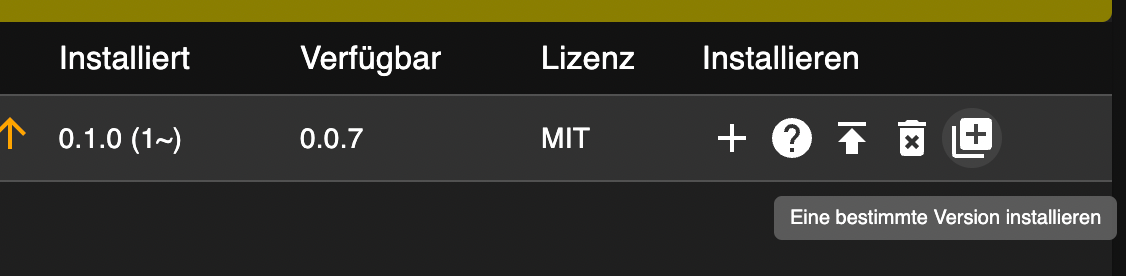
              @toralt Entweder distribution updaten oder python3 oder eine
              alte version vom adapter nehmen
              Unter Adapter
              Expertenmodus aktivieren
              und dann das letzte Icon auswählen
              b4b7c501-97a8-44a6-94a8-7c105c560550-image.png

              T 1 Reply Last reply
              0
              • T toralt

                @thomas-braun
                Danke für die Info. Ich habe davon leider wenig Ahnung, daher verstehe ich zwar theoretisch was Du mir sagen willst, aber mir stellt sich dann wiederum die Frage, warum es jetzt nicht geht aber vorher ging? Wenn ich das richtig sehe, dann hat sich die Python Version geändert? D.h. es gab mal eine "Brücke" aber die braucht ein update?

                Und noch eine Frage, also es ist aktuell korrekt, dass der Adapter "läuft" aber nichts aktualisiert? Oder sollte er aktualisieren aber ich hab da irgendwo einen Bock?
                Ich hatte bzw habe meine Klimaanlagen via Yahka und diesem Adapter in Homekit, was wunderbar zu bedienen ging. Die MSmarthome App empfinde ich als mittlere Katastrophe, sehr langsam und man muss sich ständig neu anmelden.

                Thomas BraunT Online
                Thomas BraunT Online
                Thomas Braun
                Most Active
                wrote on last edited by
                #143

                @toralt sagte in Test Adapter Midea Dimstal Klimaanlagen v0.0.x:

                D.h. es gab mal eine "Brücke" aber die braucht ein update?

                Jein, mit der alten midea API / App funktioniert das im Moment noch, aber mit der neuen API / App muss noch eine Brücke vom ioBroker-Adapter zur python library geschlagen werden.

                Linux-Werkzeugkasten:
                https://forum.iobroker.net/topic/42952/der-kleine-iobroker-linux-werkzeugkasten
                NodeJS Fixer Skript:
                https://forum.iobroker.net/topic/68035/iob-node-fix-skript
                iob_diag: curl -sLf -o diag.sh https://iobroker.net/diag.sh && bash diag.sh

                T 1 Reply Last reply
                0
                • Thomas BraunT Thomas Braun

                  @toralt sagte in Test Adapter Midea Dimstal Klimaanlagen v0.0.x:

                  D.h. es gab mal eine "Brücke" aber die braucht ein update?

                  Jein, mit der alten midea API / App funktioniert das im Moment noch, aber mit der neuen API / App muss noch eine Brücke vom ioBroker-Adapter zur python library geschlagen werden.

                  T Do not disturb
                  T Do not disturb
                  toralt
                  wrote on last edited by
                  #144

                  @thomas-braun
                  Ahh, ok, dass ist das Problem. Ich hatte nachdem der Adapter nicht mehr funktionierte auf die neue App umgestellt.
                  Python 3.9 läuft auf meinem Docker Image soweit ich das gesehen habe.

                  @tombox and @thomas-braun
                  Danke Euch beiden, jetzt hab ich das Problem verstanden. MSmarthome und der Adpater geht aktuell nicht, midea App und Adapter funktioniert nach wie vor.

                  << ioBroker im Docker auf Synology DS1821+, 10GBit, 32GB RAM>>

                  1 Reply Last reply
                  0
                  • A Offline
                    A Offline
                    ARaS
                    wrote on last edited by
                    #145

                    Ich habe nun Python 3.9 am laufen. Aber leider bekomme ich immer noch die Fehlermeldung, dass ich mind. Python 3.8 brauche, damit ich den Adapter installieren kann. Jemand ne Idee was da noch hängt? :man-shrugging:

                    T Thomas BraunT 2 Replies Last reply
                    0
                    • A ARaS

                      Ich habe nun Python 3.9 am laufen. Aber leider bekomme ich immer noch die Fehlermeldung, dass ich mind. Python 3.8 brauche, damit ich den Adapter installieren kann. Jemand ne Idee was da noch hängt? :man-shrugging:

                      T Offline
                      T Offline
                      tombox
                      wrote on last edited by
                      #146

                      @aras Wie ist die genaue debug ausgäbe beim installieren

                      was kommt bei

                      python -V
                      python3 -V
                      
                      sudo su iobroker
                      python3 -V
                      
                      1 Reply Last reply
                      0
                      • A ARaS

                        Ich habe nun Python 3.9 am laufen. Aber leider bekomme ich immer noch die Fehlermeldung, dass ich mind. Python 3.8 brauche, damit ich den Adapter installieren kann. Jemand ne Idee was da noch hängt? :man-shrugging:

                        Thomas BraunT Online
                        Thomas BraunT Online
                        Thomas Braun
                        Most Active
                        wrote on last edited by
                        #147

                        @aras

                        Wo/wie bist du denn da unterwegs?

                        sudo ln -s /usr/bin/node /usr/bin/nodejs
                        uname -m && type -P nodejs node npm && nodejs -v && node -v && npm -v && whoami && pwd && sudo apt update &> /dev/null && sudo apt update && apt policy nodejs
                        python --version
                        

                        Ist zwar eigentlich für was anderes, aber liefert auch sonst einen guten Anhaltspunkt...

                        Linux-Werkzeugkasten:
                        https://forum.iobroker.net/topic/42952/der-kleine-iobroker-linux-werkzeugkasten
                        NodeJS Fixer Skript:
                        https://forum.iobroker.net/topic/68035/iob-node-fix-skript
                        iob_diag: curl -sLf -o diag.sh https://iobroker.net/diag.sh && bash diag.sh

                        1 Reply Last reply
                        0
                        • A Offline
                          A Offline
                          ARaS
                          wrote on last edited by
                          #148

                          Also unter python -V habe ich nun die neu installierte Python Version 3.9.12. Python3 hab ich da jetzt nicht mehr verknüpft.

                          Beim installieren kommt folgende Meldung:

                          npm ERR! code 1
                          npm ERR! git dep preparation failed
                          npm ERR! command /usr/bin/node /usr/lib/node_modules/npm/bin/npm-cli.js install --force --cache=/home/iobroker/.npm --prefer-offline=false --prefer-online=false --offline=false --no-progress --no-save --no-audit --include=dev --include=peer --include=optional --no-package-lock-only --no-dry-run
                          npm ERR! > iobroker.midea@0.1.0 postinstallnpm ERR! > node ./pythonPackages.jsnpm ERR! npm ERR! npm ERR! Start Python package installationnpm ERR! npm ERR! Python 3 not found. Please install minimum python 3.8npm ERR! npm WARN using --force Recommended protections disabled.npm ERR! /bin/sh: 1: python3: not foundnpm ERR! npm ERR! code 1npm ERR! npm ERR! path /home/iobroker/.npm/_cacache/tmp/git-clonenZK3zUnpm ERR! npm ERR! command failednpm ERR! npm ERR! command sh -c node ./pythonPackages.jsnpm ERR! npm ERR! npm ERR! A complete log of this run can be found in:npm ERR! npm ERR! /home/iobroker/.npm/_logs/2022-07-25T14_49_37_774Z-debug-0.log
                          npm ERR! A complete log of this run can be found in:npm ERR! /home/iobroker/.npm/_logs/2022-07-25T14_49_22_118Z-debug-0.log
                          host.raspberrypi Cannot install TA2k/ioBroker.midea#6e0c2b5bf9a3f7f19b7827bf20bc2b48c0281d96: 1
                          ERROR: Process exited with code 25
                          
                          T 1 Reply Last reply
                          0
                          • A ARaS

                            Also unter python -V habe ich nun die neu installierte Python Version 3.9.12. Python3 hab ich da jetzt nicht mehr verknüpft.

                            Beim installieren kommt folgende Meldung:

                            npm ERR! code 1
                            npm ERR! git dep preparation failed
                            npm ERR! command /usr/bin/node /usr/lib/node_modules/npm/bin/npm-cli.js install --force --cache=/home/iobroker/.npm --prefer-offline=false --prefer-online=false --offline=false --no-progress --no-save --no-audit --include=dev --include=peer --include=optional --no-package-lock-only --no-dry-run
                            npm ERR! > iobroker.midea@0.1.0 postinstallnpm ERR! > node ./pythonPackages.jsnpm ERR! npm ERR! npm ERR! Start Python package installationnpm ERR! npm ERR! Python 3 not found. Please install minimum python 3.8npm ERR! npm WARN using --force Recommended protections disabled.npm ERR! /bin/sh: 1: python3: not foundnpm ERR! npm ERR! code 1npm ERR! npm ERR! path /home/iobroker/.npm/_cacache/tmp/git-clonenZK3zUnpm ERR! npm ERR! command failednpm ERR! npm ERR! command sh -c node ./pythonPackages.jsnpm ERR! npm ERR! npm ERR! A complete log of this run can be found in:npm ERR! npm ERR! /home/iobroker/.npm/_logs/2022-07-25T14_49_37_774Z-debug-0.log
                            npm ERR! A complete log of this run can be found in:npm ERR! /home/iobroker/.npm/_logs/2022-07-25T14_49_22_118Z-debug-0.log
                            host.raspberrypi Cannot install TA2k/ioBroker.midea#6e0c2b5bf9a3f7f19b7827bf20bc2b48c0281d96: 1
                            ERROR: Process exited with code 25
                            
                            T Offline
                            T Offline
                            tombox
                            wrote on last edited by
                            #149

                            @aras die symlinks für python3 werden eigentlich automatisch angelegt. Wie hast du es genau installiert

                            1 Reply Last reply
                            0
                            • A Offline
                              A Offline
                              ARaS
                              wrote on last edited by
                              #150

                              Ich hab das nach der Vorlage hier gemacht https://allurcode.com/install-latest-version-of-python-on-raspberry-pi/
                              Da es aber erst mal nicht funktioniert hat, habe ich die Verknüpfung anstatt auf Python3 direkt auf Python gesetzt.

                              Thomas BraunT 1 Reply Last reply
                              0
                              • A ARaS

                                Ich hab das nach der Vorlage hier gemacht https://allurcode.com/install-latest-version-of-python-on-raspberry-pi/
                                Da es aber erst mal nicht funktioniert hat, habe ich die Verknüpfung anstatt auf Python3 direkt auf Python gesetzt.

                                Thomas BraunT Online
                                Thomas BraunT Online
                                Thomas Braun
                                Most Active
                                wrote on last edited by
                                #151

                                @aras

                                Macht man nicht so.
                                Was hast du denn da nun für ein System?

                                Linux-Werkzeugkasten:
                                https://forum.iobroker.net/topic/42952/der-kleine-iobroker-linux-werkzeugkasten
                                NodeJS Fixer Skript:
                                https://forum.iobroker.net/topic/68035/iob-node-fix-skript
                                iob_diag: curl -sLf -o diag.sh https://iobroker.net/diag.sh && bash diag.sh

                                1 Reply Last reply
                                0
                                • A Offline
                                  A Offline
                                  ARaS
                                  wrote on last edited by
                                  #152

                                  Ok... Naja, so wirklich kenne ich mich da halt nicht aus... Sorry. Ich hab nen Raspberry PI 3 mit Rasbian drauf, da läuft der ioBroker. Bis jetzt auch ohne größere Probleme. Die Anbindung meiner Midea Klimaanlagen wäre halt jetzt noch ne schöne Sache.

                                  Thomas BraunT 1 Reply Last reply
                                  0
                                  • A ARaS

                                    Ok... Naja, so wirklich kenne ich mich da halt nicht aus... Sorry. Ich hab nen Raspberry PI 3 mit Rasbian drauf, da läuft der ioBroker. Bis jetzt auch ohne größere Probleme. Die Anbindung meiner Midea Klimaanlagen wäre halt jetzt noch ne schöne Sache.

                                    Thomas BraunT Online
                                    Thomas BraunT Online
                                    Thomas Braun
                                    Most Active
                                    wrote on last edited by
                                    #153

                                    @aras sagte in Test Adapter Midea Dimstal Klimaanlagen v0.0.x:

                                    Die Anbindung meiner Midea Klimaanlagen wäre halt jetzt noch ne schöne Sache.

                                    Über die python-Schnittstelle (für die neue API) funktioniert das momentan eh noch nicht.

                                    Was kommt auf

                                    sudo ln -s /usr/bin/node /usr/bin/nodejs
                                    uname -m && type -P nodejs node npm && nodejs -v && node -v && npm -v && whoami && pwd && sudo apt update &> /dev/null && sudo apt update && apt policy nodejs
                                    python --version
                                    

                                    denn nun zurück?

                                    Linux-Werkzeugkasten:
                                    https://forum.iobroker.net/topic/42952/der-kleine-iobroker-linux-werkzeugkasten
                                    NodeJS Fixer Skript:
                                    https://forum.iobroker.net/topic/68035/iob-node-fix-skript
                                    iob_diag: curl -sLf -o diag.sh https://iobroker.net/diag.sh && bash diag.sh

                                    1 Reply Last reply
                                    0
                                    • A Offline
                                      A Offline
                                      ARaS
                                      wrote on last edited by
                                      #154

                                      Da kommt das hier zurück:

                                      /usr/bin/nodejs
                                      /usr/bin/node
                                      /usr/bin/npm
                                      v16.16.0
                                      v16.16.0
                                      8.11.0
                                      pi
                                      /home/pi
                                      OK:1 http://archive.raspberrypi.org/debian stretch InRelease
                                      OK:2 http://raspbian.raspberrypi.org/raspbian stretch InRelease
                                      OK:3 https://deb.nodesource.com/node_16.x stretch InRelease
                                      Paketlisten werden gelesen... Fertig
                                      Abhängigkeitsbaum wird aufgebaut.       
                                      Statusinformationen werden eingelesen.... Fertig
                                      Aktualisierung für 100 Pakete verfügbar. Führen Sie »apt list --upgradable« aus, um sie anzuzeigen.
                                      nodejs:
                                        Installiert:           16.16.0-1nodesource1
                                        Installationskandidat: 16.16.0-1nodesource1
                                        Versionstabelle:
                                       *** 16.16.0-1nodesource1 500
                                              500 https://deb.nodesource.com/node_16.x stretch/main armhf Packages
                                              100 /var/lib/dpkg/status
                                           8.11.1~dfsg-2~bpo9+1 500
                                              500 http://archive.raspberrypi.org/debian stretch/main armhf Packages
                                           4.8.2~dfsg-1 500
                                              500 http://raspbian.raspberrypi.org/raspbian stretch/main armhf Packages
                                      
                                      Thomas BraunT 1 Reply Last reply
                                      0
                                      • A ARaS

                                        Da kommt das hier zurück:

                                        /usr/bin/nodejs
                                        /usr/bin/node
                                        /usr/bin/npm
                                        v16.16.0
                                        v16.16.0
                                        8.11.0
                                        pi
                                        /home/pi
                                        OK:1 http://archive.raspberrypi.org/debian stretch InRelease
                                        OK:2 http://raspbian.raspberrypi.org/raspbian stretch InRelease
                                        OK:3 https://deb.nodesource.com/node_16.x stretch InRelease
                                        Paketlisten werden gelesen... Fertig
                                        Abhängigkeitsbaum wird aufgebaut.       
                                        Statusinformationen werden eingelesen.... Fertig
                                        Aktualisierung für 100 Pakete verfügbar. Führen Sie »apt list --upgradable« aus, um sie anzuzeigen.
                                        nodejs:
                                          Installiert:           16.16.0-1nodesource1
                                          Installationskandidat: 16.16.0-1nodesource1
                                          Versionstabelle:
                                         *** 16.16.0-1nodesource1 500
                                                500 https://deb.nodesource.com/node_16.x stretch/main armhf Packages
                                                100 /var/lib/dpkg/status
                                             8.11.1~dfsg-2~bpo9+1 500
                                                500 http://archive.raspberrypi.org/debian stretch/main armhf Packages
                                             4.8.2~dfsg-1 500
                                                500 http://raspbian.raspberrypi.org/raspbian stretch/main armhf Packages
                                        
                                        Thomas BraunT Online
                                        Thomas BraunT Online
                                        Thomas Braun
                                        Most Active
                                        wrote on last edited by
                                        #155

                                        @aras

                                        Achdujeh...

                                        Steinalt, ausgestorben.

                                        Installier da was lebendiges.

                                        Linux-Werkzeugkasten:
                                        https://forum.iobroker.net/topic/42952/der-kleine-iobroker-linux-werkzeugkasten
                                        NodeJS Fixer Skript:
                                        https://forum.iobroker.net/topic/68035/iob-node-fix-skript
                                        iob_diag: curl -sLf -o diag.sh https://iobroker.net/diag.sh && bash diag.sh

                                        1 Reply Last reply
                                        0
                                        • A Offline
                                          A Offline
                                          ARaS
                                          wrote on last edited by
                                          #156

                                          Mit was "lebendigem" meinst du jetzt in Form des gesamten Raspberry's?

                                          Thomas BraunT 2 Replies Last reply
                                          0
                                          Reply
                                          • Reply as topic
                                          Log in to reply
                                          • Oldest to Newest
                                          • Newest to Oldest
                                          • Most Votes


                                          Support us

                                          ioBroker
                                          Community Adapters
                                          Donate

                                          519

                                          Online

                                          32.7k

                                          Users

                                          82.5k

                                          Topics

                                          1.3m

                                          Posts
                                          Community
                                          Impressum | Datenschutz-Bestimmungen | Nutzungsbedingungen | Einwilligungseinstellungen
                                          ioBroker Community 2014-2025
                                          logo
                                          • Login

                                          • Don't have an account? Register

                                          • Login or register to search.
                                          • First post
                                            Last post
                                          0
                                          • Home
                                          • Recent
                                          • Tags
                                          • Unread 0
                                          • Categories
                                          • Unreplied
                                          • Popular
                                          • GitHub
                                          • Docu
                                          • Hilfe