
NEWS




HS100 Adapter Fehlermeldungen
-
@arteck
Super 👍🏻 -
ok mal zum Testen
der alte Adapter muss nicht gelöscht werden...diesen einfach drüber isntallieren
https://github.com/arteck/ioBroker.hs100/tarball/vers2das einzige was ihr anpassen müsst ist
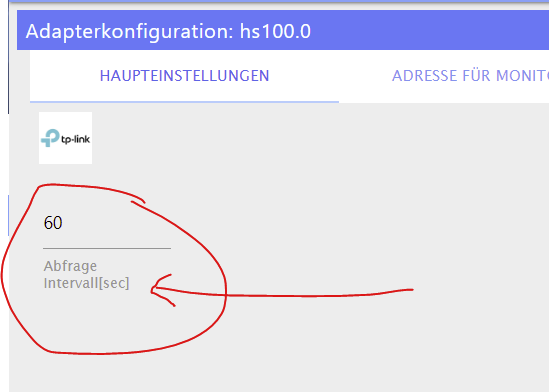
ich habs auf sekunden umgestellt... also die Zeit in Sekunden angeben
bei timeout sollte es jetzt so aussehen

zigbee hab ich, zwave auch, nuc's genauso und HA auch
-
ok mal zum Testen
der alte Adapter muss nicht gelöscht werden...diesen einfach drüber isntallieren
https://github.com/arteck/ioBroker.hs100/tarball/vers2das einzige was ihr anpassen müsst ist
ich habs auf sekunden umgestellt... also die Zeit in Sekunden angeben
bei timeout sollte es jetzt so aussehen
-
Bei mir klappt die Version von GitHub leider nicht. Der Adapter startet nicht mehr...
2020-06-07 12:10:08.895 - error: hs100.0 (4288) [create_state] : TCP Timeout, stack: Error: TCP Timeout
at Timeout._onTimeout (I:\iobroker\node_modules\tplink-smarthome-api\lib\network\tcp-socket.js:62:22)
at listOnTimeout (internal/timers.js:549:17)
at processTimers (internal/timers.js:492:7)
2020-06-07 12:10:12.645 - info: host.IO-Broker-Server stopInstance system.adapter.hs100.0 (force=false, process=true)
2020-06-07 12:10:12.645 - info: host.IO-Broker-Server stopInstance system.adapter.hs100.0 send kill signal
2020-06-07 12:10:12.641 - info: hs100.0 (4288) Got terminate signal TERMINATE_YOURSELF
2020-06-07 12:10:12.642 - info: hs100.0 (4288) cleaned everything up...
2020-06-07 12:10:12.643 - info: hs100.0 (4288) terminating
2020-06-07 12:10:12.643 - info: hs100.0 (4288) Terminated (ADAPTER_REQUESTED_TERMINATION): Without reason
2020-06-07 12:10:13.184 - info: host.IO-Broker-Server instance system.adapter.hs100.0 terminated with code 11 (ADAPTER_REQUESTED_TERMINATION)
2020-06-07 12:10:15.665 - info: host.IO-Broker-Server instance system.adapter.hs100.0 started with pid 8208
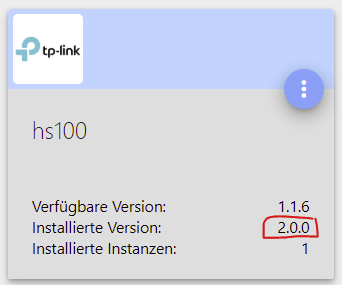
2020-06-07 12:10:16.236 - info: hs100.0 (8208) starting. Version 2.0.0 in I:/iobroker/node_modules/iobroker.hs100, node: v12.16.1, js-controller: 3.1.5
2020-06-07 12:10:26.254 - error: hs100.0 (8208) [create_state] : TCP Timeout, stack: Error: TCP Timeout
at Timeout._onTimeout (I:\iobroker\node_modules\tplink-smarthome-api\lib\network\tcp-socket.js:62:22)
at listOnTimeout (internal/timers.js:549:17)
at processTimers (internal/timers.js:492:7)
2020-06-07 12:10:36.265 - warn: hs100.0 (8208) getDevice Socket connection Timeout : 192.168.1.240
IO-Broker Master/Slave auf Windows 11 64bit, NPM 10.9.4, Node 22.21.1 js-controller 7.0.7
-
Bei mir klappt die Version von GitHub leider nicht. Der Adapter startet nicht mehr...
2020-06-07 12:10:08.895 - error: hs100.0 (4288) [create_state] : TCP Timeout, stack: Error: TCP Timeout at Timeout._onTimeout (I:\iobroker\node_modules\tplink-smarthome-api\lib\network\tcp-socket.js:62:22) at listOnTimeout (internal/timers.js:549:17) at processTimers (internal/timers.js:492:7) 2020-06-07 12:10:12.645 - info: host.IO-Broker-Server stopInstance system.adapter.hs100.0 (force=false, process=true) 2020-06-07 12:10:12.645 - info: host.IO-Broker-Server stopInstance system.adapter.hs100.0 send kill signal 2020-06-07 12:10:12.641 - info: hs100.0 (4288) Got terminate signal TERMINATE_YOURSELF 2020-06-07 12:10:12.642 - info: hs100.0 (4288) cleaned everything up... 2020-06-07 12:10:12.643 - info: hs100.0 (4288) terminating 2020-06-07 12:10:12.643 - info: hs100.0 (4288) Terminated (ADAPTER_REQUESTED_TERMINATION): Without reason 2020-06-07 12:10:13.184 - info: host.IO-Broker-Server instance system.adapter.hs100.0 terminated with code 11 (ADAPTER_REQUESTED_TERMINATION) 2020-06-07 12:10:15.665 - info: host.IO-Broker-Server instance system.adapter.hs100.0 started with pid 8208 2020-06-07 12:10:16.236 - info: hs100.0 (8208) starting. Version 2.0.0 in I:/iobroker/node_modules/iobroker.hs100, node: v12.16.1, js-controller: 3.1.5 2020-06-07 12:10:26.254 - error: hs100.0 (8208) [create_state] : TCP Timeout, stack: Error: TCP Timeout at Timeout._onTimeout (I:\iobroker\node_modules\tplink-smarthome-api\lib\network\tcp-socket.js:62:22) at listOnTimeout (internal/timers.js:549:17) at processTimers (internal/timers.js:492:7) 2020-06-07 12:10:36.265 - warn: hs100.0 (8208) getDevice Socket connection Timeout : 192.168.1.240 -
@surfer09 sind alle Dosen erreichbar und am Strom ???
wenn nicht soltest du diese auf disable setzten ..zeigmal deine konfuguration Seite

@arteck: Ja, sind definitiv alle erreichbar. Bei mir tauchen auch immer wieder in unregelmäßigen Abständen diese Meldungen im LOG auf:
2020-06-07 21:26:29.030 - info: hs100.0 (3664) terminating
2020-06-07 21:26:29.031 - info: hs100.0 (3664) Terminated (NO_ERROR): Without reason
2020-06-07 21:26:29.562 - error: host.IO-Broker-Server Caught by controller[1]: TCP 192.168.1.240:9999 Error: TCP Timeout
2020-06-07 21:26:29.564 - error: host.IO-Broker-Server Caught by controller[1]: at Timeout._onTimeout (I:\iobroker\node_modules\tplink-smarthome-api\lib\network\tcp-socket.js:62:22)
2020-06-07 21:26:29.565 - error: host.IO-Broker-Server Caught by controller[1]: at listOnTimeout (internal/timers.js:549:17)
2020-06-07 21:26:29.565 - error: host.IO-Broker-Server Caught by controller[1]: at processTimers (internal/timers.js:492:7)
2020-06-07 21:26:29.565 - error: host.IO-Broker-Server Caught by controller[2]: TCP 192.168.1.240:9999 Error: TCP Timeout
2020-06-07 21:26:29.565 - error: host.IO-Broker-Server Caught by controller[2]: at Timeout._onTimeout (I:\iobroker\node_modules\tplink-smarthome-api\lib\network\tcp-socket.js:62:22)
2020-06-07 21:26:29.565 - error: host.IO-Broker-Server Caught by controller[2]: at listOnTimeout (internal/timers.js:549:17)
2020-06-07 21:26:29.565 - error: host.IO-Broker-Server Caught by controller[2]: at processTimers (internal/timers.js:492:7)
2020-06-07 21:26:29.565 - error: host.IO-Broker-Server Caught by controller[3]: TCP 192.168.1.240:9999 Error: TCP Timeout
2020-06-07 21:26:29.565 - error: host.IO-Broker-Server Caught by controller[3]: at Timeout._onTimeout (I:\iobroker\node_modules\tplink-smarthome-api\lib\network\tcp-socket.js:62:22)
2020-06-07 21:26:29.565 - error: host.IO-Broker-Server Caught by controller[3]: at listOnTimeout (internal/timers.js:549:17)
2020-06-07 21:26:29.565 - error: host.IO-Broker-Server Caught by controller[3]: at processTimers (internal/timers.js:492:7)
2020-06-07 21:26:29.565 - error: host.IO-Broker-Server Caught by controller[4]: TCP 192.168.1.240:9999 Error: TCP Timeout
2020-06-07 21:26:29.565 - error: host.IO-Broker-Server Caught by controller[4]: at Timeout._onTimeout (I:\iobroker\node_modules\tplink-smarthome-api\lib\network\tcp-socket.js:62:22)
2020-06-07 21:26:29.566 - error: host.IO-Broker-Server Caught by controller[4]: at listOnTimeout (internal/timers.js:549:17)
2020-06-07 21:26:29.566 - error: host.IO-Broker-Server Caught by controller[4]: at processTimers (internal/timers.js:492:7)
2020-06-07 21:26:29.566 - error: host.IO-Broker-Server Caught by controller[5]: TCP 192.168.1.182:9999 Error: TCP Timeout
2020-06-07 21:26:29.566 - error: host.IO-Broker-Server Caught by controller[5]: at Timeout._onTimeout (I:\iobroker\node_modules\tplink-smarthome-api\lib\network\tcp-socket.js:62:22)
2020-06-07 21:26:29.566 - error: host.IO-Broker-Server Caught by controller[5]: at listOnTimeout (internal/timers.js:549:17)
2020-06-07 21:26:29.566 - error: host.IO-Broker-Server Caught by controller[5]: at processTimers (internal/timers.js:492:7)
2020-06-07 21:26:29.566 - error: host.IO-Broker-Server Caught by controller[6]: TCP 192.168.1.240:9999 Error: TCP Timeout
2020-06-07 21:26:29.566 - error: host.IO-Broker-Server Caught by controller[6]: at Timeout._onTimeout (I:\iobroker\node_modules\tplink-smarthome-api\lib\network\tcp-socket.js:62:22)
2020-06-07 21:26:29.566 - error: host.IO-Broker-Server Caught by controller[6]: at listOnTimeout (internal/timers.js:549:17)
2020-06-07 21:26:29.566 - error: host.IO-Broker-Server Caught by controller[6]: at processTimers (internal/timers.js:492:7)
2020-06-07 21:26:29.566 - error: host.IO-Broker-Server Caught by controller[7]: TCP 192.168.1.182:9999 Error: TCP Timeout
2020-06-07 21:26:29.566 - error: host.IO-Broker-Server Caught by controller[7]: at Timeout._onTimeout (I:\iobroker\node_modules\tplink-smarthome-api\lib\network\tcp-socket.js:62:22)
2020-06-07 21:26:29.566 - error: host.IO-Broker-Server Caught by controller[7]: at listOnTimeout (internal/timers.js:549:17)
2020-06-07 21:26:29.566 - error: host.IO-Broker-Server Caught by controller[7]: at processTimers (internal/timers.js:492:7)
2020-06-07 21:26:29.566 - error: host.IO-Broker-Server Caught by controller[8]: TCP 192.168.1.240:9999 Error: TCP Timeout
2020-06-07 21:26:29.566 - error: host.IO-Broker-Server Caught by controller[8]: at Timeout._onTimeout (I:\iobroker\node_modules\tplink-smarthome-api\lib\network\tcp-socket.js:62:22)
2020-06-07 21:26:29.567 - error: host.IO-Broker-Server Caught by controller[8]: at listOnTimeout (internal/timers.js:549:17)
2020-06-07 21:26:29.567 - error: host.IO-Broker-Server Caught by controller[8]: at processTimers (internal/timers.js:492:7)
2020-06-07 21:26:29.567 - error: host.IO-Broker-Server Caught by controller[9]: TCP 192.168.1.182:9999 Error: read ECONNRESET
2020-06-07 21:26:29.567 - error: host.IO-Broker-Server Caught by controller[9]: at TCP.onStreamRead (internal/stream_base_commons.js:205:27) {
2020-06-07 21:26:29.567 - error: host.IO-Broker-Server Caught by controller[9]: errno: 'ECONNRESET',
2020-06-07 21:26:29.567 - error: host.IO-Broker-Server Caught by controller[9]: code: 'ECONNRESET',
2020-06-07 21:26:29.567 - error: host.IO-Broker-Server Caught by controller[9]: syscall: 'read'
2020-06-07 21:26:29.567 - error: host.IO-Broker-Server Caught by controller[9]: }
2020-06-07 21:26:29.567 - error: host.IO-Broker-Server Caught by controller[10]: TCP 192.168.1.182:9999 Error: read ECONNRESET
2020-06-07 21:26:29.567 - error: host.IO-Broker-Server Caught by controller[10]: at TCP.onStreamRead (internal/stream_base_commons.js:205:27) {
2020-06-07 21:26:29.567 - error: host.IO-Broker-Server Caught by controller[10]: errno: 'ECONNRESET',
2020-06-07 21:26:29.567 - error: host.IO-Broker-Server Caught by controller[10]: code: 'ECONNRESET',
2020-06-07 21:26:29.567 - error: host.IO-Broker-Server Caught by controller[10]: syscall: 'read'
2020-06-07 21:26:29.567 - error: host.IO-Broker-Server Caught by controller[10]: }
2020-06-07 21:26:29.567 - error: host.IO-Broker-Server Caught by controller[11]: TCP 192.168.1.182:9999 Error: read ECONNRESET
2020-06-07 21:26:29.567 - error: host.IO-Broker-Server Caught by controller[11]: at TCP.onStreamRead (internal/stream_base_commons.js:205:27) {
2020-06-07 21:26:29.567 - error: host.IO-Broker-Server Caught by controller[11]: errno: 'ECONNRESET',
2020-06-07 21:26:29.568 - error: host.IO-Broker-Server Caught by controller[11]: code: 'ECONNRESET',
2020-06-07 21:26:29.568 - error: host.IO-Broker-Server Caught by controller[11]: syscall: 'read'
2020-06-07 21:26:29.568 - error: host.IO-Broker-Server Caught by controller[11]: }
2020-06-07 21:26:29.568 - error: host.IO-Broker-Server Caught by controller[12]: TCP 192.168.1.182:9999 Error: read ECONNRESET
2020-06-07 21:26:29.568 - error: host.IO-Broker-Server Caught by controller[12]: at TCP.onStreamRead (internal/stream_base_commons.js:205:27) {
2020-06-07 21:26:29.568 - error: host.IO-Broker-Server Caught by controller[12]: errno: 'ECONNRESET',
2020-06-07 21:26:29.568 - error: host.IO-Broker-Server Caught by controller[12]: code: 'ECONNRESET',
2020-06-07 21:26:29.568 - error: host.IO-Broker-Server Caught by controller[12]: syscall: 'read'
2020-06-07 21:26:29.568 - error: host.IO-Broker-Server Caught by controller[12]: }
2020-06-07 21:26:29.568 - info: host.IO-Broker-Server instance system.adapter.hs100.0 terminated with code 0 (NO_ERROR
Den Screenshot habe ich mit angehangen.
Und wie schon beschrieben, deinen Adapter von GitHub bekomme ich bei mir nicht auf „grün“. Ich bin aktuell auf Version 1.1.5 zurück gegangen.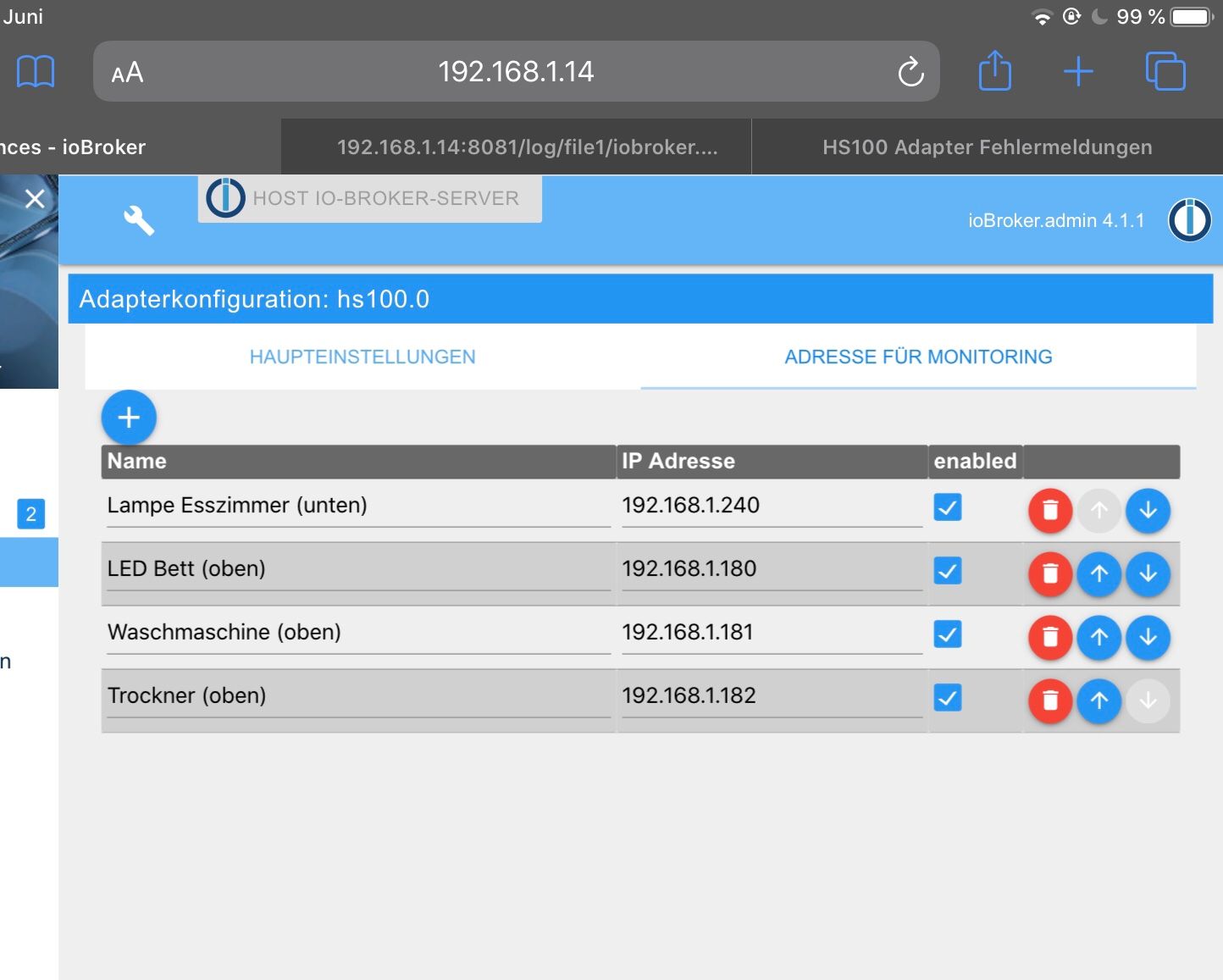
IO-Broker Master/Slave auf Windows 11 64bit, NPM 10.9.4, Node 22.21.1 js-controller 7.0.7
-
@arteck: Ja, sind definitiv alle erreichbar. Bei mir tauchen auch immer wieder in unregelmäßigen Abständen diese Meldungen im LOG auf:
2020-06-07 21:26:29.030 - info: hs100.0 (3664) terminating
2020-06-07 21:26:29.031 - info: hs100.0 (3664) Terminated (NO_ERROR): Without reason
2020-06-07 21:26:29.562 - error: host.IO-Broker-Server Caught by controller[1]: TCP 192.168.1.240:9999 Error: TCP Timeout
2020-06-07 21:26:29.564 - error: host.IO-Broker-Server Caught by controller[1]: at Timeout._onTimeout (I:\iobroker\node_modules\tplink-smarthome-api\lib\network\tcp-socket.js:62:22)
2020-06-07 21:26:29.565 - error: host.IO-Broker-Server Caught by controller[1]: at listOnTimeout (internal/timers.js:549:17)
2020-06-07 21:26:29.565 - error: host.IO-Broker-Server Caught by controller[1]: at processTimers (internal/timers.js:492:7)
2020-06-07 21:26:29.565 - error: host.IO-Broker-Server Caught by controller[2]: TCP 192.168.1.240:9999 Error: TCP Timeout
2020-06-07 21:26:29.565 - error: host.IO-Broker-Server Caught by controller[2]: at Timeout._onTimeout (I:\iobroker\node_modules\tplink-smarthome-api\lib\network\tcp-socket.js:62:22)
2020-06-07 21:26:29.565 - error: host.IO-Broker-Server Caught by controller[2]: at listOnTimeout (internal/timers.js:549:17)
2020-06-07 21:26:29.565 - error: host.IO-Broker-Server Caught by controller[2]: at processTimers (internal/timers.js:492:7)
2020-06-07 21:26:29.565 - error: host.IO-Broker-Server Caught by controller[3]: TCP 192.168.1.240:9999 Error: TCP Timeout
2020-06-07 21:26:29.565 - error: host.IO-Broker-Server Caught by controller[3]: at Timeout._onTimeout (I:\iobroker\node_modules\tplink-smarthome-api\lib\network\tcp-socket.js:62:22)
2020-06-07 21:26:29.565 - error: host.IO-Broker-Server Caught by controller[3]: at listOnTimeout (internal/timers.js:549:17)
2020-06-07 21:26:29.565 - error: host.IO-Broker-Server Caught by controller[3]: at processTimers (internal/timers.js:492:7)
2020-06-07 21:26:29.565 - error: host.IO-Broker-Server Caught by controller[4]: TCP 192.168.1.240:9999 Error: TCP Timeout
2020-06-07 21:26:29.565 - error: host.IO-Broker-Server Caught by controller[4]: at Timeout._onTimeout (I:\iobroker\node_modules\tplink-smarthome-api\lib\network\tcp-socket.js:62:22)
2020-06-07 21:26:29.566 - error: host.IO-Broker-Server Caught by controller[4]: at listOnTimeout (internal/timers.js:549:17)
2020-06-07 21:26:29.566 - error: host.IO-Broker-Server Caught by controller[4]: at processTimers (internal/timers.js:492:7)
2020-06-07 21:26:29.566 - error: host.IO-Broker-Server Caught by controller[5]: TCP 192.168.1.182:9999 Error: TCP Timeout
2020-06-07 21:26:29.566 - error: host.IO-Broker-Server Caught by controller[5]: at Timeout._onTimeout (I:\iobroker\node_modules\tplink-smarthome-api\lib\network\tcp-socket.js:62:22)
2020-06-07 21:26:29.566 - error: host.IO-Broker-Server Caught by controller[5]: at listOnTimeout (internal/timers.js:549:17)
2020-06-07 21:26:29.566 - error: host.IO-Broker-Server Caught by controller[5]: at processTimers (internal/timers.js:492:7)
2020-06-07 21:26:29.566 - error: host.IO-Broker-Server Caught by controller[6]: TCP 192.168.1.240:9999 Error: TCP Timeout
2020-06-07 21:26:29.566 - error: host.IO-Broker-Server Caught by controller[6]: at Timeout._onTimeout (I:\iobroker\node_modules\tplink-smarthome-api\lib\network\tcp-socket.js:62:22)
2020-06-07 21:26:29.566 - error: host.IO-Broker-Server Caught by controller[6]: at listOnTimeout (internal/timers.js:549:17)
2020-06-07 21:26:29.566 - error: host.IO-Broker-Server Caught by controller[6]: at processTimers (internal/timers.js:492:7)
2020-06-07 21:26:29.566 - error: host.IO-Broker-Server Caught by controller[7]: TCP 192.168.1.182:9999 Error: TCP Timeout
2020-06-07 21:26:29.566 - error: host.IO-Broker-Server Caught by controller[7]: at Timeout._onTimeout (I:\iobroker\node_modules\tplink-smarthome-api\lib\network\tcp-socket.js:62:22)
2020-06-07 21:26:29.566 - error: host.IO-Broker-Server Caught by controller[7]: at listOnTimeout (internal/timers.js:549:17)
2020-06-07 21:26:29.566 - error: host.IO-Broker-Server Caught by controller[7]: at processTimers (internal/timers.js:492:7)
2020-06-07 21:26:29.566 - error: host.IO-Broker-Server Caught by controller[8]: TCP 192.168.1.240:9999 Error: TCP Timeout
2020-06-07 21:26:29.566 - error: host.IO-Broker-Server Caught by controller[8]: at Timeout._onTimeout (I:\iobroker\node_modules\tplink-smarthome-api\lib\network\tcp-socket.js:62:22)
2020-06-07 21:26:29.567 - error: host.IO-Broker-Server Caught by controller[8]: at listOnTimeout (internal/timers.js:549:17)
2020-06-07 21:26:29.567 - error: host.IO-Broker-Server Caught by controller[8]: at processTimers (internal/timers.js:492:7)
2020-06-07 21:26:29.567 - error: host.IO-Broker-Server Caught by controller[9]: TCP 192.168.1.182:9999 Error: read ECONNRESET
2020-06-07 21:26:29.567 - error: host.IO-Broker-Server Caught by controller[9]: at TCP.onStreamRead (internal/stream_base_commons.js:205:27) {
2020-06-07 21:26:29.567 - error: host.IO-Broker-Server Caught by controller[9]: errno: 'ECONNRESET',
2020-06-07 21:26:29.567 - error: host.IO-Broker-Server Caught by controller[9]: code: 'ECONNRESET',
2020-06-07 21:26:29.567 - error: host.IO-Broker-Server Caught by controller[9]: syscall: 'read'
2020-06-07 21:26:29.567 - error: host.IO-Broker-Server Caught by controller[9]: }
2020-06-07 21:26:29.567 - error: host.IO-Broker-Server Caught by controller[10]: TCP 192.168.1.182:9999 Error: read ECONNRESET
2020-06-07 21:26:29.567 - error: host.IO-Broker-Server Caught by controller[10]: at TCP.onStreamRead (internal/stream_base_commons.js:205:27) {
2020-06-07 21:26:29.567 - error: host.IO-Broker-Server Caught by controller[10]: errno: 'ECONNRESET',
2020-06-07 21:26:29.567 - error: host.IO-Broker-Server Caught by controller[10]: code: 'ECONNRESET',
2020-06-07 21:26:29.567 - error: host.IO-Broker-Server Caught by controller[10]: syscall: 'read'
2020-06-07 21:26:29.567 - error: host.IO-Broker-Server Caught by controller[10]: }
2020-06-07 21:26:29.567 - error: host.IO-Broker-Server Caught by controller[11]: TCP 192.168.1.182:9999 Error: read ECONNRESET
2020-06-07 21:26:29.567 - error: host.IO-Broker-Server Caught by controller[11]: at TCP.onStreamRead (internal/stream_base_commons.js:205:27) {
2020-06-07 21:26:29.567 - error: host.IO-Broker-Server Caught by controller[11]: errno: 'ECONNRESET',
2020-06-07 21:26:29.568 - error: host.IO-Broker-Server Caught by controller[11]: code: 'ECONNRESET',
2020-06-07 21:26:29.568 - error: host.IO-Broker-Server Caught by controller[11]: syscall: 'read'
2020-06-07 21:26:29.568 - error: host.IO-Broker-Server Caught by controller[11]: }
2020-06-07 21:26:29.568 - error: host.IO-Broker-Server Caught by controller[12]: TCP 192.168.1.182:9999 Error: read ECONNRESET
2020-06-07 21:26:29.568 - error: host.IO-Broker-Server Caught by controller[12]: at TCP.onStreamRead (internal/stream_base_commons.js:205:27) {
2020-06-07 21:26:29.568 - error: host.IO-Broker-Server Caught by controller[12]: errno: 'ECONNRESET',
2020-06-07 21:26:29.568 - error: host.IO-Broker-Server Caught by controller[12]: code: 'ECONNRESET',
2020-06-07 21:26:29.568 - error: host.IO-Broker-Server Caught by controller[12]: syscall: 'read'
2020-06-07 21:26:29.568 - error: host.IO-Broker-Server Caught by controller[12]: }
2020-06-07 21:26:29.568 - info: host.IO-Broker-Server instance system.adapter.hs100.0 terminated with code 0 (NO_ERROR
Den Screenshot habe ich mit angehangen.
Und wie schon beschrieben, deinen Adapter von GitHub bekomme ich bei mir nicht auf „grün“. Ich bin aktuell auf Version 1.1.5 zurück gegangen.@surfer09 ok puss uff
installiere nochmal die 2.0.. mach bitte die .240 und die .182 im Adapter aus..
läuft der dann ?wenn nicht mach den bitte mal auf Debug und poste das LOG
zigbee hab ich, zwave auch, nuc's genauso und HA auch
-
@surfer09 ok puss uff
installiere nochmal die 2.0.. mach bitte die .240 und die .182 im Adapter aus..
läuft der dann ?wenn nicht mach den bitte mal auf Debug und poste das LOG
@arteck Gerade den Adapter in Version 2.0 installiert und die beiden Geräte deaktiviert - siehe da - der Status wird grün. Was ist denn mit den beiden Steckdosen?
IO-Broker Master/Slave auf Windows 11 64bit, NPM 10.9.4, Node 22.21.1 js-controller 7.0.7
-
@arteck Gerade den Adapter in Version 2.0 installiert und die beiden Geräte deaktiviert - siehe da - der Status wird grün. Was ist denn mit den beiden Steckdosen?
@arteck : Ich glaub' ich weiß, woran es liegen könnte! Er hat mit der einen Steckdose ein Problem, wo die Firmware noch nicht auf Version 1.5.6 ist. Diese Steckdose ist noch auf der 1.5.4. Sobald ich diese im Adapter aktiviere, bleibt der Status auf gelb und der Adapter startet nicht.
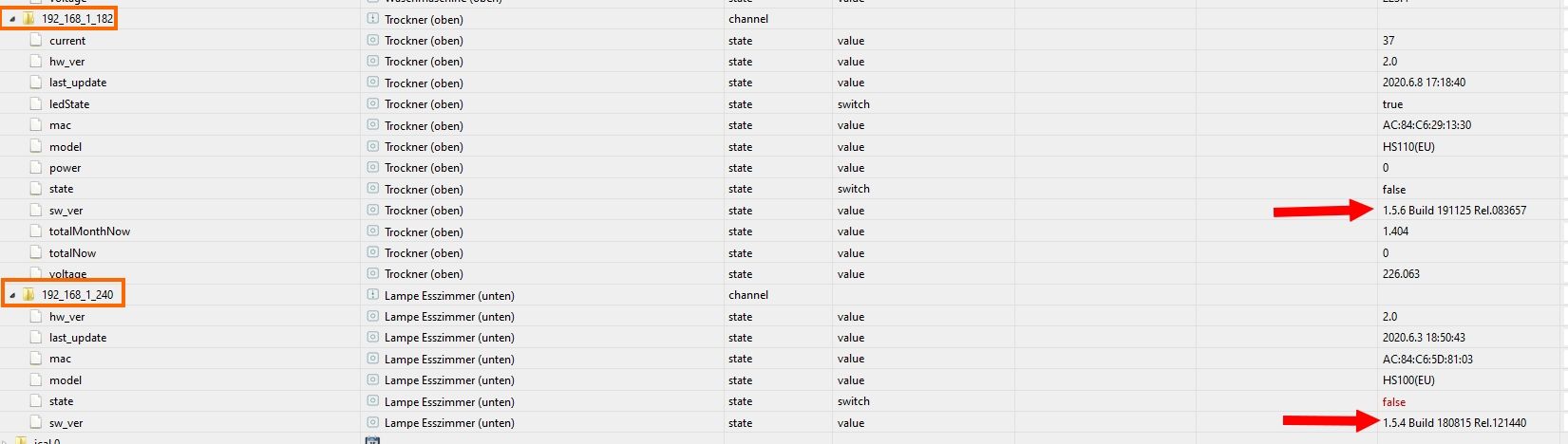
IO-Broker Master/Slave auf Windows 11 64bit, NPM 10.9.4, Node 22.21.1 js-controller 7.0.7
-
@arteck : Ich glaub' ich weiß, woran es liegen könnte! Er hat mit der einen Steckdose ein Problem, wo die Firmware noch nicht auf Version 1.5.6 ist. Diese Steckdose ist noch auf der 1.5.4. Sobald ich diese im Adapter aktiviere, bleibt der Status auf gelb und der Adapter startet nicht.
versuchmal folgendes
adapter stoppen
lösche nur den einen Datenpunkt (zb _240)
der wird dann neu erstellt bei adapter start
aktiviere die _240 dose und starte den adapterzigbee hab ich, zwave auch, nuc's genauso und HA auch
-
versuchmal folgendes
adapter stoppen
lösche nur den einen Datenpunkt (zb _240)
der wird dann neu erstellt bei adapter start
aktiviere die _240 dose und starte den adapter@arteck Geht nicht. Ich habe den kompletten Datenpunkt gelöscht, sobald ich das Gerät wieder aktiviere, startet der Adapter nicht mehr.
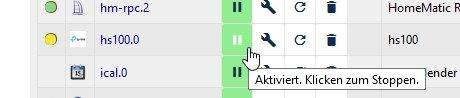
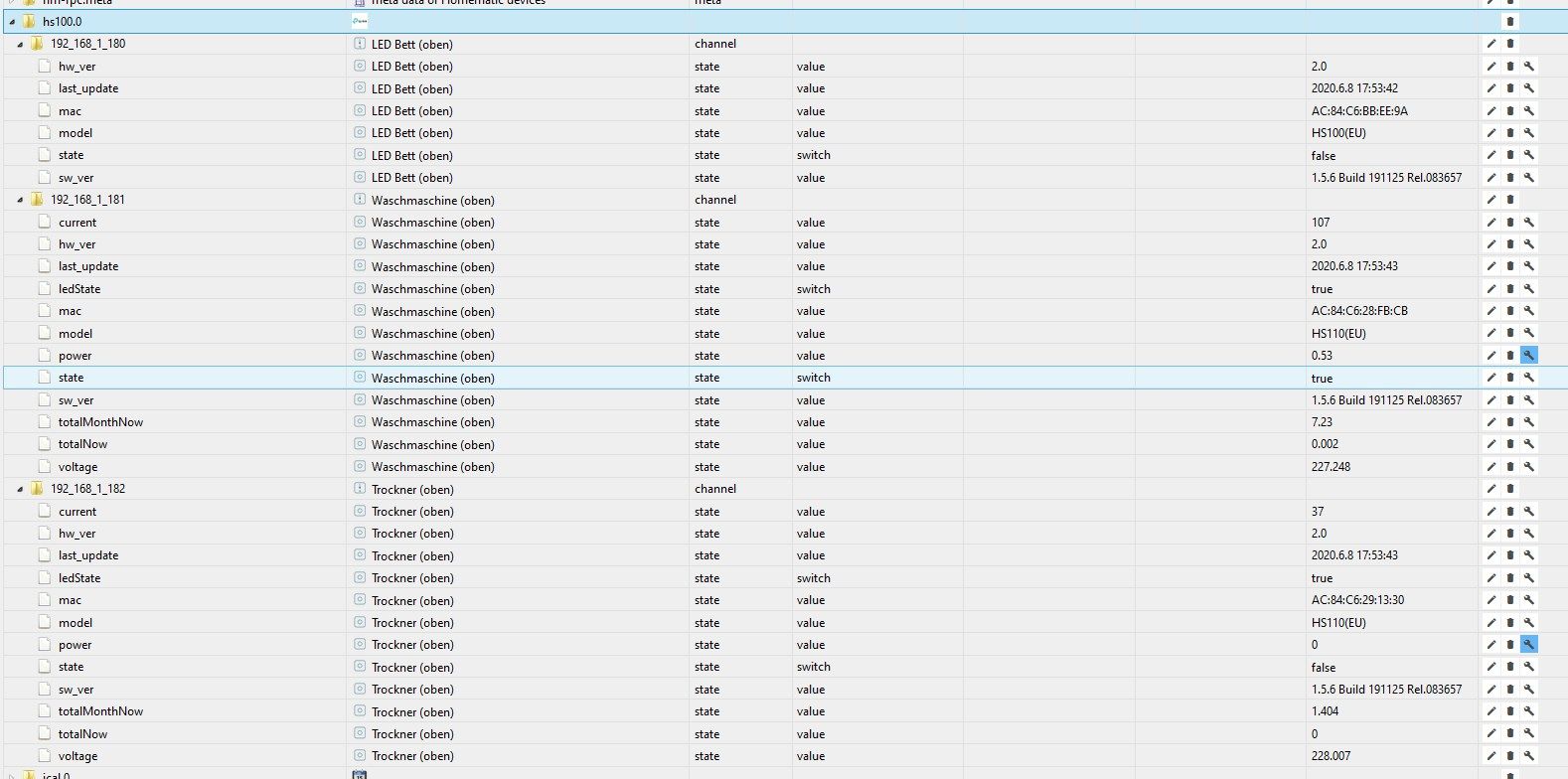
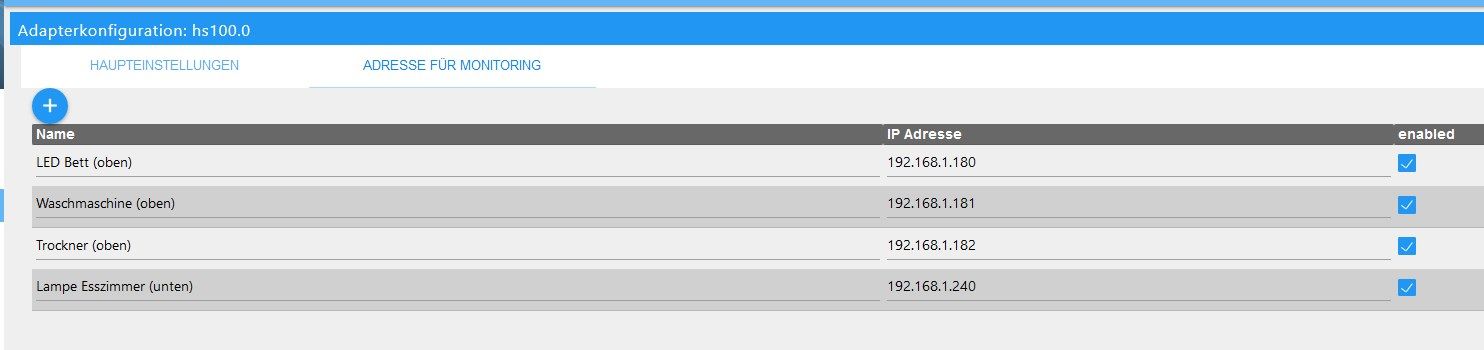
Er erzeugt aber auch den Datenpunkt nicht mehr.
-
ich konnte heute problemlos auf 2.0 aktualisieren. Melde mich wieder wenn ich Ergebnisse habe.
-
bisher sieht alles gut aus, kein einziger Fehler im LOG.
-
@arteck Geht nicht. Ich habe den kompletten Datenpunkt gelöscht, sobald ich das Gerät wieder aktiviere, startet der Adapter nicht mehr.
Er erzeugt aber auch den Datenpunkt nicht mehr.
-
da ich bisher nur stiller Mitleser war, das Thema für mich aber durchaus interessant und wichtig ist, wollte ich auch meinen Senf dazugeben:
Habe drei HS110-Steckdosen im Einsatz um Waschmaschinen und Trockner zu monitoren und hatte ebenfalls die hier schon genannten Timeoutprobleme! Nachdem ich nun bei allen drei auf Firmware 1.5.6. bin und die 2.0 des Adapters installiert habe, sind alle Fehler im Log weg!
@arteck, danke für deinen unermüdlichen Einsatz! -
@surfer09 dann mach alles aus nur den einen _240 an.. und debug infos an.. vielleicht bekommen wir das so raus
sonst update der Dose auf neue Firmware
@arteck sagte in HS100 Adapter Fehlermeldungen:
@surfer09 dann mach alles aus nur den einen _240 an.. und debug infos an.. vielleicht bekommen wir das so raus
sonst update der Dose auf neue Firmware
Ich werde die Steckdose updaten. Ich glaube der Aufwand für dich das erstmal zu analysieren lohnt nicht. Außerdem muss die Dose sowieso geupdatet werden.
Danke dir trotzdem! :-)



Support us
467
Online32.6k
Users82.3k
Topics1.3m
Posts