




Test Adapter mihome-vacuum v2.0.x
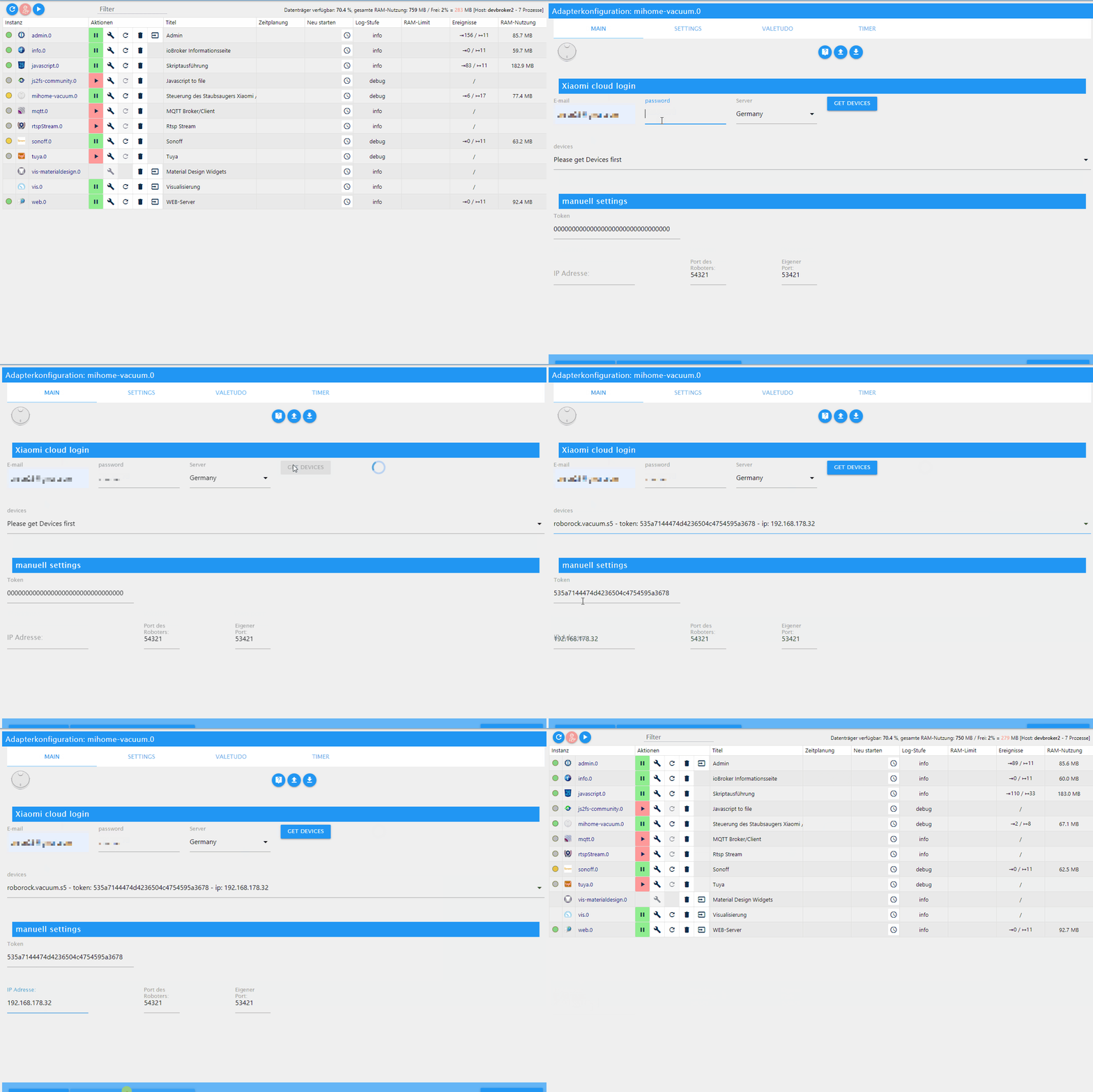
-
@Meistertr Sorry aber wo finde ich den?
-
Gute Idee. Ich persönlich würde es besser finden wenn in jedem Raum ein Schalter/State (0 oder 1) wäre ob der Raum angewählt wurde bzw. später noch gereinigt wird (müsste ja über Queue auswertbar sein). Sobald der Raum gereinigt wird, fällt die ID doch aus dem Queue und könnte in ein Objekt geschrieben werden (wird gerade gereinigt). Somit hätte man doch alle Informationen zur aktuellen Reinigung (Warteschlage und aktuell gereinigter Raum). Für die Vis wäre dass super..
-
@Sweatchuck umsetzten lassen müsste sich das. Ich schaue mir das an, aber ob das dieses we noch was wird, glaube ich nicht.
@dirkhe
Vielen herzlichen Dank. Deine Arbeit ist wirklich toll!Gruß
Sweatchuck -
@blackeagle998 Hallo blackeagle998, danke für die Antwort.
Das meinte ich jedoch nicht. Ich meine im Vis ein Widget.
Aktuell benutze ich das hqwidgets on/off Widget als Steuerung. Leider fährt der Roboter immer 2 mal, obwohl nur einmal gedrückt wird.
Ich vermute das liegt an dem Widget.
Jemand eine Idee, warum der sonst immer 2 mal fährt?
Danke
Gruß
@xADDRx said in Test Adapter mihome-vacuum v2.0.x:
@blackeagle998 Hallo blackeagle998, danke für die Antwort.
Das meinte ich jedoch nicht. Ich meine im Vis ein Widget.
Aktuell benutze ich das hqwidgets on/off Widget als Steuerung. Leider fährt der Roboter immer 2 mal, obwohl nur einmal gedrückt wird.
Ich vermute das liegt an dem Widget.
Jemand eine Idee, warum der sonst immer 2 mal fährt?
Danke
Gruß
-
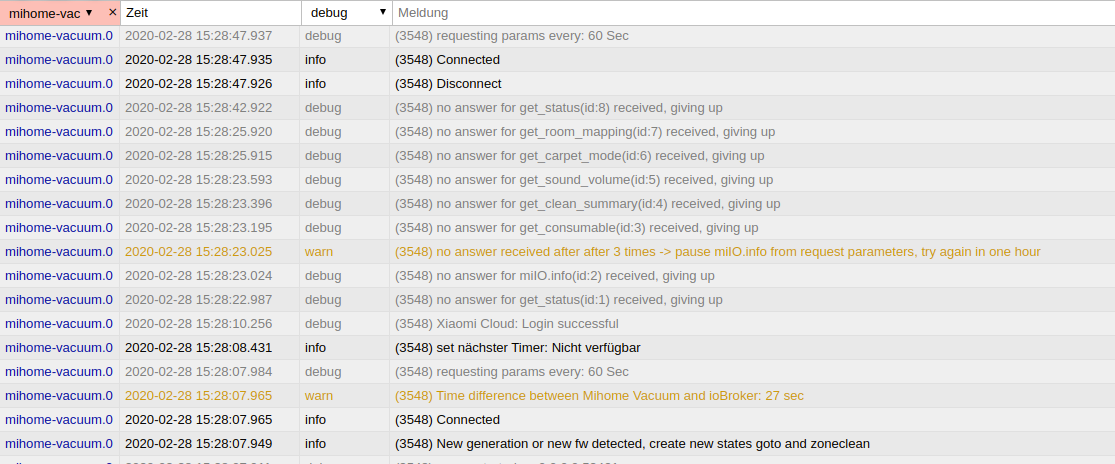
Hallo,
habe im log so ca. 1 x pro Minute:mihome-vacuum.0 2020-02-28 19:11:48.765 info (14588) Connected mihome-vacuum.0 2020-02-28 19:11:48.761 info (14588) DisconnectIst das normal ?
Wenn ich helfen konnte, dann Daumen hoch (Pfeil nach oben)!
Danke.
gute Forenbeiträge: https://forum.iobroker.net/topic/51555/hinweise-f%C3%BCr-gute-forenbeitr%C3%A4ge
ScreenToGif :https://www.screentogif.com/downloads.html -
Hallo,
habe im log so ca. 1 x pro Minute:mihome-vacuum.0 2020-02-28 19:11:48.765 info (14588) Connected mihome-vacuum.0 2020-02-28 19:11:48.761 info (14588) DisconnectIst das normal ?
-
Hallo,
habe im log so ca. 1 x pro Minute:mihome-vacuum.0 2020-02-28 19:11:48.765 info (14588) Connected mihome-vacuum.0 2020-02-28 19:11:48.761 info (14588) DisconnectIst das normal ?
-
@bahnuhr ist er denn bei dir verbunden? Sonst stell den loglevel mal auf Silly und schaue mal, ob er dir überhaupt antwortet
@dirkhe sagte in Test Adapter mihome-vacuum v2.0.x:
@bahnuhr ist er denn bei dir verbunden? Sonst stell den loglevel mal auf Silly und schaue mal, ob er dir überhaupt antwortet
Ja, klappt alles.
Saugt, alles läuft wie bisher.
Und nun wird auch die map erzeugt. Super.log hab ich nun auf warn gestellt.
Dann war ruhe.Ich stelle aber gerne nochmal auf Silly.
Mal schauen was dann kommt. -
aus silly kommt jede Menge:
mihome-vacuum.0	2020-02-28 20:21:29.022	silly	(21068) States user redis pmessage mihome-vacuum.0.*/mihome-vacuum.0.map.mapURL:{"val":"/mihome-vacuum.admin/actualMap_0.png","ack":true,"ts":1582917689020,"q":0,"from":"system.adapter.mihome-vacuum.0
mihome-vacuum.0	2020-02-28 20:21:28.993	silly	(21068) States user redis pmessage mihome-vacuum.0.*/mihome-vacuum.0.map.map64:{"val":"<img src=\"data:image/png;base64,iVBORw0KGgoAAAANSUhEUgAAA0AAAARkCAYAAABb+XTsAAAABmJLR0QA/wD/AP+gvaeTAAAgAElEQVR4
mihome-vacuum.0	2020-02-28 20:21:28.845	debug	(21068) 24770
mihome-vacuum.0	2020-02-28 20:21:27.199	debug	(21068) update_Map got new time:1582917686
mihome-vacuum.0	2020-02-28 20:21:27.199	debug	(21068) update_Map got new expires:1582919501
mihome-vacuum.0	2020-02-28 20:21:27.198	debug	(21068) update_Map got new url:https://cnbj2.fds.api.xiaomi.com/robomap/roboroommap/55356075/9?Expires=1582919501000&GalaxyAccessKeyId=5271733786445&Signature=Lpyg9VI+Kfsl0VoBzE/sDBvcDdc=
mihome-vacuum.0	2020-02-28 20:21:26.308	debug	(21068) update_Map need new mapurl
mihome-vacuum.0	2020-02-28 20:21:26.308	debug	(21068) update_Map Mimap enabled
mihome-vacuum.0	2020-02-28 20:21:26.307	debug	(21068) Mappointer_updated
mihome-vacuum.0	2020-02-28 20:21:26.307	silly	(21068) Receive <<< {"result":["roboroommap%2F55356075%2F9"],"id":40}
mihome-vacuum.0	2020-02-28 20:21:26.302	debug	(21068) Mappointer_nomap___retry
mihome-vacuum.0	2020-02-28 20:21:26.301	silly	(21068) sendMsg[1] >>> {"id":40,"method":"get_map_v1"}
mihome-vacuum.0	2020-02-28 20:21:25.800	silly	(21068) Receive <<< {"result":["retry"],"id":39}
mihome-vacuum.0	2020-02-28 20:21:25.791	debug	(21068) Mappointer_nomap___retry
mihome-vacuum.0	2020-02-28 20:21:25.790	silly	(21068) sendMsg[1] >>> {"id":39,"method":"get_map_v1"}
mihome-vacuum.0	2020-02-28 20:21:25.272	silly	(21068) Receive <<< {"result":["retry"],"id":38}
mihome-vacuum.0	2020-02-28 20:21:25.267	debug	(21068) Mappointer_nomap___retry
mihome-vacuum.0	2020-02-28 20:21:25.266	silly	(21068) sendMsg[1] >>> {"id":38,"method":"get_map_v1"}
mihome-vacuum.0	2020-02-28 20:21:24.764	silly	(21068) Receive <<< {"result":["retry"],"id":37}
mihome-vacuum.0	2020-02-28 20:21:24.760	debug	(21068) Mappointer_nomap___retry
mihome-vacuum.0	2020-02-28 20:21:24.759	silly	(21068) sendMsg[1] >>> {"id":37,"method":"get_map_v1"}
mihome-vacuum.0	2020-02-28 20:21:24.460	silly	(21068) Receive <<< {"result":[{"enable":0,"current_integral":450,"current_high":500,"current_low":400,"stall_time":10}],"id":36}
mihome-vacuum.0	2020-02-28 20:21:24.453	silly	(21068) sendMsg[1] >>> {"id":36,"method":"get_carpet_mode"}
mihome-vacuum.0	2020-02-28 20:21:24.258	silly	(21068) Receive <<< {"result":["retry"],"id":35}
mihome-vacuum.0	2020-02-28 20:21:24.253	silly	(21068) sendMsg[1] >>> {"id":35,"method":"get_map_v1"}
sieht für mich ok aus.
Probiere nochmal "Info"
-
Bitte und vor allem Danke:
[user/pw] habe ich korrigiert
mihome-vacuum.0 2020-02-28 20:25:03.304 debug (20439) requesting params every: 60 Sec mihome-vacuum.0 2020-02-28 20:24:41.738 debug (20439) stateChange mihome-vacuum.0.control.home {"val":true,"ack":false,"ts":1582917881731,"q":0,"from":"system.adapter.web.0","user":"system.user.admin","lc":1581066090653} mihome-vacuum.0 2020-02-28 20:24:27.242 info (20439) trigger cleaning all null mihome-vacuum.0 2020-02-28 20:24:27.236 debug (20439) sendTo "startVacuuming" to system.adapter.mihome-vacuum.0 from system.adapter.mihome-vacuum.0 mihome-vacuum.0 2020-02-28 20:24:27.235 debug (20439) stateChange mihome-vacuum.0.control.start {"val":true,"ack":false,"ts":1582917867230,"q":0,"from":"system.adapter.web.0","user":"system.user.admin","lc":1581065963877} mihome-vacuum.0 2020-02-28 20:24:12.825 debug (20439) CLEAN_LOGGING[{"Datum":"28.2","Start":"19:59","Saugzeit":"0 min","Fläche":"0.12 m²","Error":0,"Ende":false},{"Datum":"28.2","Start":"19:56","Saugzeit":"1 min","Fläche":"0.35 m²","Error":0,"End mihome-vacuum.0 2020-02-28 20:24:07.821 debug (20439) CLEAN_LOGGING[{"Datum":"28.2","Start":"19:59","Saugzeit":"0 min","Fläche":"0.12 m²","Error":0,"Ende":false},{"Datum":"28.2","Start":"19:56","Saugzeit":"1 min","Fläche":"0.35 m²","Error":0,"En mihome-vacuum.0 2020-02-28 20:24:06.314 info (20439) create state for carpet_mode mihome-vacuum.0 2020-02-28 20:24:03.827 info (20439) set nächster Timer: Nicht verfügbar mihome-vacuum.0 2020-02-28 20:24:03.369 debug (20439) requesting params every: 60 Sec mihome-vacuum.0 2020-02-28 20:24:03.356 info (20439) Connected mihome-vacuum.0 2020-02-28 20:24:03.322 info (20439) New generation or new fw detected, create new states goto and zoneclean mihome-vacuum.0 2020-02-28 20:24:03.311 debug (20439) server started on 0.0.0.0:53421 mihome-vacuum.0 2020-02-28 20:24:03.305 warn (20439) Xiaomi Cloud username or password missing. mihome-vacuum.0 2020-02-28 20:24:03.303 info (20439) Disconnect mihome-vacuum.0 2020-02-28 20:24:03.287 info (20439) Cloud control disabled mihome-vacuum.0 2020-02-28 20:24:03.285 info (20439) Expert mode disabled, states deleted mihome-vacuum.0 2020-02-28 20:24:03.283 error (20439) Xiaomi Cloud: username or password missing. mihome-vacuum.0 2020-02-28 20:24:03.280 debug (20439) load Map creator... true mihome-vacuum.0 2020-02-28 20:24:03.192 info (20439) starting. Version 2.0.7 in /opt/iobroker/node_modules/iobroker.mihome-vacuum, node: v10.18.1 mihome-vacuum.0 2020-02-28 20:24:00.445 debug (20439) statesDB connected mihome-vacuum.0 2020-02-28 20:24:00.444 debug (20439) States connected to redis: 127.0.0.1:9000 mihome-vacuum.0 2020-02-28 20:24:00.426 debug (20439) States create System PubSub Client mihome-vacuum.0 2020-02-28 20:24:00.423 debug (20439) States create User PubSub Client mihome-vacuum.0 2020-02-28 20:24:00.408 debug (20439) Redis States: Use Redis connection: 127.0.0.1:9000 mihome-vacuum.0 2020-02-28 20:24:00.404 debug (20439) objectDB connected mihome-vacuum.0 2020-02-28 20:24:00.394 debug (20439) Objects connected to redis: 127.0.0.1:9001 mihome-vacuum.0 2020-02-28 20:24:00.376 debug (20439) Objects client initialize lua scripts mihome-vacuum.0 2020-02-28 20:24:00.375 debug (20439) Objects create User PubSub Client mihome-vacuum.0 2020-02-28 20:24:00.374 debug (20439) Objects create System PubSub Client mihome-vacuum.0 2020-02-28 20:24:00.369 debug (20439) Objects client ready ... initialize now mihome-vacuum.0 2020-02-28 20:24:00.015 debug (20439) Redis Objects: Use Redis connection: 127.0.0.1:9001 mihome-vacuum.0 2020-02-28 20:23:56.615 info (3200) Terminated (START_IMMEDIATELY_AFTER_STOP): Without reason mihome-vacuum.0 2020-02-28 20:23:56.613 info (3200) terminating mihome-vacuum.0 2020-02-28 20:23:56.609 info (3200) Got terminate signal TERMINATE_YOURSELF mihome-vacuum.0 2020-02-28 20:24:07.821 debug (20439) CLEAN_LOGGING[{"Datum":"28.2","Start":"19:59","Saugzeit":"0 min","Fläche":"0.12 m²","Error":0,"Ende":false},{"Datum":"28.2","Start":"19:56","Saugzeit":"1 min","Fläche":"0.35 m²","Error":0,"End -
aus silly kommt jede Menge:
mihome-vacuum.0	2020-02-28 20:21:29.022	silly	(21068) States user redis pmessage mihome-vacuum.0.*/mihome-vacuum.0.map.mapURL:{"val":"/mihome-vacuum.admin/actualMap_0.png","ack":true,"ts":1582917689020,"q":0,"from":"system.adapter.mihome-vacuum.0
mihome-vacuum.0	2020-02-28 20:21:28.993	silly	(21068) States user redis pmessage mihome-vacuum.0.*/mihome-vacuum.0.map.map64:{"val":"<img src=\"data:image/png;base64,iVBORw0KGgoAAAANSUhEUgAAA0AAAARkCAYAAABb+XTsAAAABmJLR0QA/wD/AP+gvaeTAAAgAElEQVR4
mihome-vacuum.0	2020-02-28 20:21:28.845	debug	(21068) 24770
mihome-vacuum.0	2020-02-28 20:21:27.199	debug	(21068) update_Map got new time:1582917686
mihome-vacuum.0	2020-02-28 20:21:27.199	debug	(21068) update_Map got new expires:1582919501
mihome-vacuum.0	2020-02-28 20:21:27.198	debug	(21068) update_Map got new url:https://cnbj2.fds.api.xiaomi.com/robomap/roboroommap/55356075/9?Expires=1582919501000&GalaxyAccessKeyId=5271733786445&Signature=Lpyg9VI+Kfsl0VoBzE/sDBvcDdc=
mihome-vacuum.0	2020-02-28 20:21:26.308	debug	(21068) update_Map need new mapurl
mihome-vacuum.0	2020-02-28 20:21:26.308	debug	(21068) update_Map Mimap enabled
mihome-vacuum.0	2020-02-28 20:21:26.307	debug	(21068) Mappointer_updated
mihome-vacuum.0	2020-02-28 20:21:26.307	silly	(21068) Receive <<< {"result":["roboroommap%2F55356075%2F9"],"id":40}
mihome-vacuum.0	2020-02-28 20:21:26.302	debug	(21068) Mappointer_nomap___retry
mihome-vacuum.0	2020-02-28 20:21:26.301	silly	(21068) sendMsg[1] >>> {"id":40,"method":"get_map_v1"}
mihome-vacuum.0	2020-02-28 20:21:25.800	silly	(21068) Receive <<< {"result":["retry"],"id":39}
mihome-vacuum.0	2020-02-28 20:21:25.791	debug	(21068) Mappointer_nomap___retry
mihome-vacuum.0	2020-02-28 20:21:25.790	silly	(21068) sendMsg[1] >>> {"id":39,"method":"get_map_v1"}
mihome-vacuum.0	2020-02-28 20:21:25.272	silly	(21068) Receive <<< {"result":["retry"],"id":38}
mihome-vacuum.0	2020-02-28 20:21:25.267	debug	(21068) Mappointer_nomap___retry
mihome-vacuum.0	2020-02-28 20:21:25.266	silly	(21068) sendMsg[1] >>> {"id":38,"method":"get_map_v1"}
mihome-vacuum.0	2020-02-28 20:21:24.764	silly	(21068) Receive <<< {"result":["retry"],"id":37}
mihome-vacuum.0	2020-02-28 20:21:24.760	debug	(21068) Mappointer_nomap___retry
mihome-vacuum.0	2020-02-28 20:21:24.759	silly	(21068) sendMsg[1] >>> {"id":37,"method":"get_map_v1"}
mihome-vacuum.0	2020-02-28 20:21:24.460	silly	(21068) Receive <<< {"result":[{"enable":0,"current_integral":450,"current_high":500,"current_low":400,"stall_time":10}],"id":36}
mihome-vacuum.0	2020-02-28 20:21:24.453	silly	(21068) sendMsg[1] >>> {"id":36,"method":"get_carpet_mode"}
mihome-vacuum.0	2020-02-28 20:21:24.258	silly	(21068) Receive <<< {"result":["retry"],"id":35}
mihome-vacuum.0	2020-02-28 20:21:24.253	silly	(21068) sendMsg[1] >>> {"id":35,"method":"get_map_v1"}
sieht für mich ok aus.
Probiere nochmal "Info"
@bahnuhr Silly heißt ja nur, dass er mehr Infos ins log schreibt.ist leider nur ein kleiner Ausschnitt, aber macht er jetzt auch immer noch connect/Disconnect? Gerade wenn der Adapter mehrfach hintereinander gestartet wird, kann es sein, dass er einen Moment braucht.
-
Bitte und vor allem Danke:
[user/pw] habe ich korrigiert
mihome-vacuum.0 2020-02-28 20:25:03.304 debug (20439) requesting params every: 60 Sec mihome-vacuum.0 2020-02-28 20:24:41.738 debug (20439) stateChange mihome-vacuum.0.control.home {"val":true,"ack":false,"ts":1582917881731,"q":0,"from":"system.adapter.web.0","user":"system.user.admin","lc":1581066090653} mihome-vacuum.0 2020-02-28 20:24:27.242 info (20439) trigger cleaning all null mihome-vacuum.0 2020-02-28 20:24:27.236 debug (20439) sendTo "startVacuuming" to system.adapter.mihome-vacuum.0 from system.adapter.mihome-vacuum.0 mihome-vacuum.0 2020-02-28 20:24:27.235 debug (20439) stateChange mihome-vacuum.0.control.start {"val":true,"ack":false,"ts":1582917867230,"q":0,"from":"system.adapter.web.0","user":"system.user.admin","lc":1581065963877} mihome-vacuum.0 2020-02-28 20:24:12.825 debug (20439) CLEAN_LOGGING[{"Datum":"28.2","Start":"19:59","Saugzeit":"0 min","Fläche":"0.12 m²","Error":0,"Ende":false},{"Datum":"28.2","Start":"19:56","Saugzeit":"1 min","Fläche":"0.35 m²","Error":0,"End mihome-vacuum.0 2020-02-28 20:24:07.821 debug (20439) CLEAN_LOGGING[{"Datum":"28.2","Start":"19:59","Saugzeit":"0 min","Fläche":"0.12 m²","Error":0,"Ende":false},{"Datum":"28.2","Start":"19:56","Saugzeit":"1 min","Fläche":"0.35 m²","Error":0,"En mihome-vacuum.0 2020-02-28 20:24:06.314 info (20439) create state for carpet_mode mihome-vacuum.0 2020-02-28 20:24:03.827 info (20439) set nächster Timer: Nicht verfügbar mihome-vacuum.0 2020-02-28 20:24:03.369 debug (20439) requesting params every: 60 Sec mihome-vacuum.0 2020-02-28 20:24:03.356 info (20439) Connected mihome-vacuum.0 2020-02-28 20:24:03.322 info (20439) New generation or new fw detected, create new states goto and zoneclean mihome-vacuum.0 2020-02-28 20:24:03.311 debug (20439) server started on 0.0.0.0:53421 mihome-vacuum.0 2020-02-28 20:24:03.305 warn (20439) Xiaomi Cloud username or password missing. mihome-vacuum.0 2020-02-28 20:24:03.303 info (20439) Disconnect mihome-vacuum.0 2020-02-28 20:24:03.287 info (20439) Cloud control disabled mihome-vacuum.0 2020-02-28 20:24:03.285 info (20439) Expert mode disabled, states deleted mihome-vacuum.0 2020-02-28 20:24:03.283 error (20439) Xiaomi Cloud: username or password missing. mihome-vacuum.0 2020-02-28 20:24:03.280 debug (20439) load Map creator... true mihome-vacuum.0 2020-02-28 20:24:03.192 info (20439) starting. Version 2.0.7 in /opt/iobroker/node_modules/iobroker.mihome-vacuum, node: v10.18.1 mihome-vacuum.0 2020-02-28 20:24:00.445 debug (20439) statesDB connected mihome-vacuum.0 2020-02-28 20:24:00.444 debug (20439) States connected to redis: 127.0.0.1:9000 mihome-vacuum.0 2020-02-28 20:24:00.426 debug (20439) States create System PubSub Client mihome-vacuum.0 2020-02-28 20:24:00.423 debug (20439) States create User PubSub Client mihome-vacuum.0 2020-02-28 20:24:00.408 debug (20439) Redis States: Use Redis connection: 127.0.0.1:9000 mihome-vacuum.0 2020-02-28 20:24:00.404 debug (20439) objectDB connected mihome-vacuum.0 2020-02-28 20:24:00.394 debug (20439) Objects connected to redis: 127.0.0.1:9001 mihome-vacuum.0 2020-02-28 20:24:00.376 debug (20439) Objects client initialize lua scripts mihome-vacuum.0 2020-02-28 20:24:00.375 debug (20439) Objects create User PubSub Client mihome-vacuum.0 2020-02-28 20:24:00.374 debug (20439) Objects create System PubSub Client mihome-vacuum.0 2020-02-28 20:24:00.369 debug (20439) Objects client ready ... initialize now mihome-vacuum.0 2020-02-28 20:24:00.015 debug (20439) Redis Objects: Use Redis connection: 127.0.0.1:9001 mihome-vacuum.0 2020-02-28 20:23:56.615 info (3200) Terminated (START_IMMEDIATELY_AFTER_STOP): Without reason mihome-vacuum.0 2020-02-28 20:23:56.613 info (3200) terminating mihome-vacuum.0 2020-02-28 20:23:56.609 info (3200) Got terminate signal TERMINATE_YOURSELF mihome-vacuum.0 2020-02-28 20:24:07.821 debug (20439) CLEAN_LOGGING[{"Datum":"28.2","Start":"19:59","Saugzeit":"0 min","Fläche":"0.12 m²","Error":0,"Ende":false},{"Datum":"28.2","Start":"19:56","Saugzeit":"1 min","Fläche":"0.35 m²","Error":0,"End -
gestellt auf "Info".
Instanz gestartet um 20:23
mihome-vacuum.0	2020-02-28 20:23:22.870	info	(16940) create state for carpet_mode
mihome-vacuum.0	2020-02-28 20:23:20.396	info	(16940) set nächster Timer: Nicht verfügbar
mihome-vacuum.0	2020-02-28 20:23:19.956	warn	(16940) Time difference between Mihome Vacuum and ioBroker: 15 sec
mihome-vacuum.0	2020-02-28 20:23:19.955	info	(16940) Connected
mihome-vacuum.0	2020-02-28 20:23:19.921	info	(16940) New generation or new fw detected, create new states goto and zoneclean
mihome-vacuum.0	2020-02-28 20:23:19.864	info	(16940) Disconnect
mihome-vacuum.0	2020-02-28 20:23:19.851	info	(16940) Cloud control disabled
mihome-vacuum.0	2020-02-28 20:23:19.850	info	(16940) Expert mode enabled, states created
mihome-vacuum.0	2020-02-28 20:23:19.791	info	(16940) starting. Version 2.0.7 in C:/ioBroker/node_modules/iobroker.mihome-vacuum, node: v10.18.0
Bis jetzt 20:33 kein disconnent, connect mehr.
-
Soweit ich weiss, ist das so. Der robbi schickt die daten in die Cloud und von da kann msn sich die karte abholen. Mein robbi ist zb. Nicht mit dem Internet verbunden, daher bekomme ich kein Karte. Ich habe mir die Karte nur einmal runtergeladen.


Support us
297
Online32.7k
Users82.5k
Topics1.3m
Posts