



Skip to content
  • Home
  • Recent
  • Tags
  • 0 Unread 0
  • Categories
  • Unreplied
  • Popular
  • GitHub
  • Docu
  • Hilfe
Skins
  • Light
  • Brite
  • Cerulean
  • Cosmo
  • Flatly
  • Journal
  • Litera
  • Lumen
  • Lux
  • Materia
  • Minty
  • Morph
  • Pulse
  • Sandstone
  • Simplex
  • Sketchy
  • Spacelab
  • United
  • Yeti
  • Zephyr
  • Dark
  • Cyborg
  • Darkly
  • Quartz
  • Slate
  • Solar
  • Superhero
  • Vapor

  • Default (No Skin)
  • No Skin
Collapse
ioBroker Logo

Community Forum

donate donate
  1. ioBroker Community Home
  2. Deutsch
  3. ioBroker Allgemein
  4. Multihost Probleme, sie finden sich nicht.
NEWS

  • Jahresrückblick 2025 – unser neuer Blogbeitrag ist online! ✨
    BluefoxB
    Bluefox
    17
    1
    2.9k

  • Neuer Blogbeitrag: Monatsrückblick - Dezember 2025 🎄
    BluefoxB
    Bluefox
    13
    1
    1.1k

  • Weihnachtsangebot 2025! 🎄
    BluefoxB
    Bluefox
    25
    1
    2.4k

Multihost Probleme, sie finden sich nicht.

Scheduled Pinned Locked Moved ioBroker Allgemein
123
17 Posts 2 Posters 2.3k Views 1 Watching
  • Oldest to Newest
  • Newest to Oldest
  • Most Votes
Reply
  • Reply as topic
Log in to reply
This topic has been deleted. Only users with topic management privileges can see it.
  • K Offline
    K Offline
    kg36304
    wrote on last edited by
    #7

    Nö geht auch nicht, das steht jetzt drin:

    pi@raspberrypi-iob-slave:~ $ iobroker setup custom
    Current configuration:
    - Objects database:
      - Type: file
      - Host/Unix Socket: 192.168.62.93
      - Port: 9001
    - States database:
      - Type: redis
      - Host/Unix Socket: 192.168.62.93
      - Port: 6379
    - Data Directory: ../../iobroker-data/
    
    und beim Master:
    
    pi@raspberrypi4-iob:~ $ iobroker setup custom
    Current configuration:
    - Objects database:
      - Type: file
      - Host/Unix Socket: 0.0.0.0
      - Port: 9001
    - States database:
      - Type: redis
      - Host/Unix Socket: 127.0.0.1
      - Port: 6379
    - Data Directory: ../../iobroker-data/
    
    Type of objects DB [(f)ile, (r)edis], default [file]: 
    

    Muss da nicht auch irgendwo die IP vom Master rein???

    HomoranH 2 Replies Last reply
    0
    • K kg36304

      Nö geht auch nicht, das steht jetzt drin:

      pi@raspberrypi-iob-slave:~ $ iobroker setup custom
      Current configuration:
      - Objects database:
        - Type: file
        - Host/Unix Socket: 192.168.62.93
        - Port: 9001
      - States database:
        - Type: redis
        - Host/Unix Socket: 192.168.62.93
        - Port: 6379
      - Data Directory: ../../iobroker-data/
      
      und beim Master:
      
      pi@raspberrypi4-iob:~ $ iobroker setup custom
      Current configuration:
      - Objects database:
        - Type: file
        - Host/Unix Socket: 0.0.0.0
        - Port: 9001
      - States database:
        - Type: redis
        - Host/Unix Socket: 127.0.0.1
        - Port: 6379
      - Data Directory: ../../iobroker-data/
      
      Type of objects DB [(f)ile, (r)edis], default [file]: 
      

      Muss da nicht auch irgendwo die IP vom Master rein???

      HomoranH Do not disturb
      HomoranH Do not disturb
      Homoran
      Global Moderator Administrators
      wrote on last edited by
      #8

      @kg36304 sagte in Multihost Probleme, sie finden sich nicht.:

      Muss da nicht auch irgendwo die IP vom Master rein???

      schrieb ich doch!
      in Zeile 2 und 5

      kein Support per PN! - Fragen im Forum stellen - es gibt fast nichts, was nicht auch für andere interessant ist.

      Benutzt das Voting rechts unten im Beitrag wenn er euch geholfen hat.

      der Installationsfixer: curl -fsL https://iobroker.net/fix.sh | bash -

      1 Reply Last reply
      0
      • K Offline
        K Offline
        kg36304
        wrote on last edited by
        #9

        Moment, du hast geschrieben in die Custom vom Slave sollen die IP´s vom Master.

        Habe ich gemacht.

        Im letzten Post habe ich Dir die custom vom Slave und Master gepostet.
        Da ist momentan keine IP drin.

        Dazu hattest Du nichts geschrieben.

        Danke.

        HomoranH 1 Reply Last reply
        0
        • K kg36304

          Moment, du hast geschrieben in die Custom vom Slave sollen die IP´s vom Master.

          Habe ich gemacht.

          Im letzten Post habe ich Dir die custom vom Slave und Master gepostet.
          Da ist momentan keine IP drin.

          Dazu hattest Du nichts geschrieben.

          Danke.

          HomoranH Do not disturb
          HomoranH Do not disturb
          Homoran
          Global Moderator Administrators
          wrote on last edited by
          #10

          @kg36304 sagte in Multihost Probleme, sie finden sich nicht.:

          Im letzten Post habe ich Dir die custom vom Slave und Master gepostet.

          Da sollst du nichts machen
          nur beim Slave, damit er den Master findet

          Dann rebooten (ggf. beide - manchmal zweimal)
          dann müsste der slave im Master zu finden sein

          PS
          beide im gleichen Netz?
          beide gleiche Versionen node, npm, controller und admin?

          kein Support per PN! - Fragen im Forum stellen - es gibt fast nichts, was nicht auch für andere interessant ist.

          Benutzt das Voting rechts unten im Beitrag wenn er euch geholfen hat.

          der Installationsfixer: curl -fsL https://iobroker.net/fix.sh | bash -

          1 Reply Last reply
          0
          • K Offline
            K Offline
            kg36304
            wrote on last edited by
            #11

            Sind beide im selben Netz.

            Ich habe den Slave jetzt nochmal neu aufgesetzt.

            Node und npm sowie admin sind gleich.

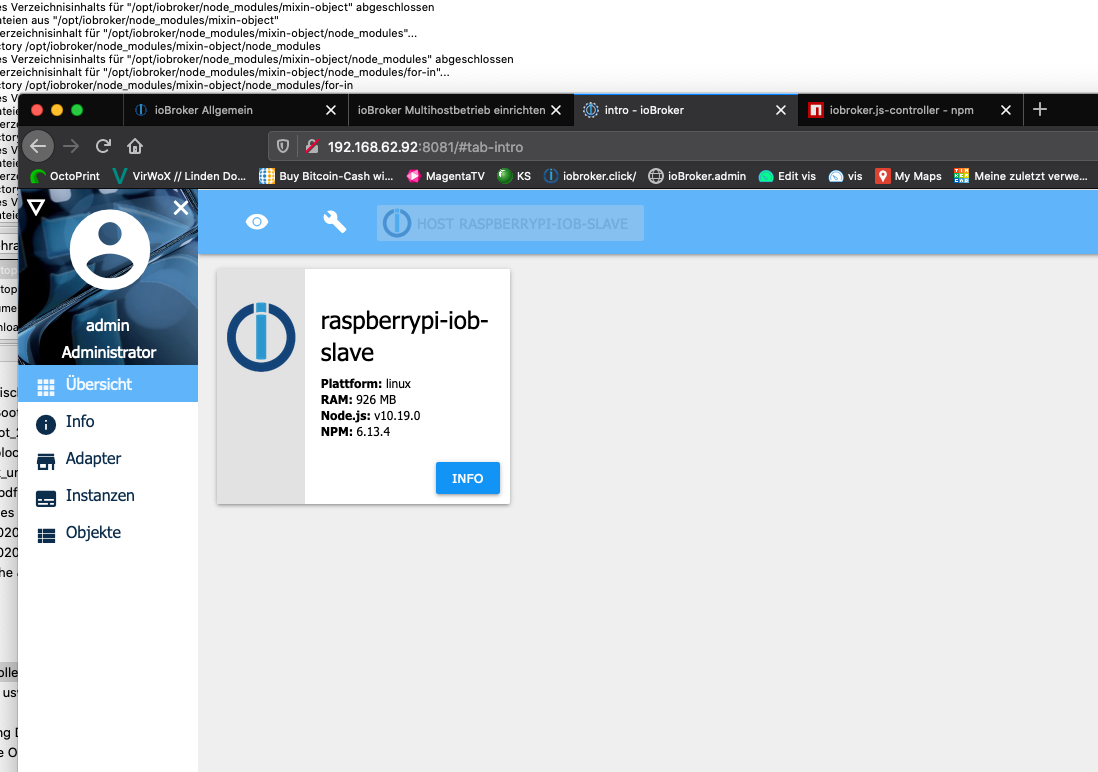
            Beim Slave finde ich aber in der Admin Übersicht kein Host!!!

            Was fehlt da?
            Bildschirmfoto 2020-02-09 um 14.10.43.png

            HomoranH 1 Reply Last reply
            0
            • K kg36304

              Sind beide im selben Netz.

              Ich habe den Slave jetzt nochmal neu aufgesetzt.

              Node und npm sowie admin sind gleich.

              Beim Slave finde ich aber in der Admin Übersicht kein Host!!!

              Was fehlt da?

              Bildschirmfoto 2020-02-09 um 14.10.43.png

              HomoranH Do not disturb
              HomoranH Do not disturb
              Homoran
              Global Moderator Administrators
              wrote on last edited by
              #12

              @kg36304 sagte in Multihost Probleme, sie finden sich nicht.:

              Was fehlt da?

              Der Reiter HOST ist nicht aktiviert:

              • links oben das dreieck anklicken
              • Checkbox HOSTS aktiviern
              • dann erscheinenden Reiter HOSTS anklicken

              kein Support per PN! - Fragen im Forum stellen - es gibt fast nichts, was nicht auch für andere interessant ist.

              Benutzt das Voting rechts unten im Beitrag wenn er euch geholfen hat.

              der Installationsfixer: curl -fsL https://iobroker.net/fix.sh | bash -

              1 Reply Last reply
              0
              • K Offline
                K Offline
                kg36304
                wrote on last edited by
                #13

                ok, sind auch gleich.

                1 Reply Last reply
                0
                • K Offline
                  K Offline
                  kg36304
                  wrote on last edited by
                  #14

                  Habe beim starten vom Multihost auf dem Master folgende Meldung:

                  pi@raspberrypi4-iob:~ $ iobroker multihost enable
                  Multihost discovery server activated on this host. If iobroker is currently not running please start befeore trying to discover this host.
                  Important: Multihost discovery works with UDP packets. Make sure they are routed correctly in your network. If you use Docker you also need to configure this correctly.
                  Discovery authentication activated.
                  Enter secret phrase for connection: 
                  Repeat secret phrase for connection: 
                  Please check the binding of redis service. By default it is only local: http://download.redis.io/redis-stable/redis.conf
                  Change "bind 127.0.0.1" to "bind 0.0.0.0" or to others.
                  Please restart ioBroker for the changes to take effect: "iobroker restart"
                  
                  
                  Multihost discovery server: enabled
                  Discovery authentication:   enabled
                  Objects:                    file on 0.0.0.0
                  States:                     redis on 127.0.0.1
                  
                  HomoranH 1 Reply Last reply
                  0
                  • K kg36304

                    Habe beim starten vom Multihost auf dem Master folgende Meldung:

                    pi@raspberrypi4-iob:~ $ iobroker multihost enable
                    Multihost discovery server activated on this host. If iobroker is currently not running please start befeore trying to discover this host.
                    Important: Multihost discovery works with UDP packets. Make sure they are routed correctly in your network. If you use Docker you also need to configure this correctly.
                    Discovery authentication activated.
                    Enter secret phrase for connection: 
                    Repeat secret phrase for connection: 
                    Please check the binding of redis service. By default it is only local: http://download.redis.io/redis-stable/redis.conf
                    Change "bind 127.0.0.1" to "bind 0.0.0.0" or to others.
                    Please restart ioBroker for the changes to take effect: "iobroker restart"
                    
                    
                    Multihost discovery server: enabled
                    Discovery authentication:   enabled
                    Objects:                    file on 0.0.0.0
                    States:                     redis on 127.0.0.1
                    
                    HomoranH Do not disturb
                    HomoranH Do not disturb
                    Homoran
                    Global Moderator Administrators
                    wrote on last edited by
                    #15

                    @kg36304 sagte in Multihost Probleme, sie finden sich nicht.:

                    Habe beim starten vom Multihost auf dem Master folgende Meldung:

                    Bitte nicht damit arbeiten - NUR mit iobroker setup custom auf dem SLAVE

                    kein Support per PN! - Fragen im Forum stellen - es gibt fast nichts, was nicht auch für andere interessant ist.

                    Benutzt das Voting rechts unten im Beitrag wenn er euch geholfen hat.

                    der Installationsfixer: curl -fsL https://iobroker.net/fix.sh | bash -

                    1 Reply Last reply
                    0
                    • K Offline
                      K Offline
                      kg36304
                      wrote on last edited by
                      #16

                      Hab es hin bekommen.

                      waren auf dem einen auf Redis und dem anderen auf File System.

                      Danke für deine Hilfe.

                      1 Reply Last reply
                      0
                      • K kg36304

                        Nö geht auch nicht, das steht jetzt drin:

                        pi@raspberrypi-iob-slave:~ $ iobroker setup custom
                        Current configuration:
                        - Objects database:
                          - Type: file
                          - Host/Unix Socket: 192.168.62.93
                          - Port: 9001
                        - States database:
                          - Type: redis
                          - Host/Unix Socket: 192.168.62.93
                          - Port: 6379
                        - Data Directory: ../../iobroker-data/
                        
                        und beim Master:
                        
                        pi@raspberrypi4-iob:~ $ iobroker setup custom
                        Current configuration:
                        - Objects database:
                          - Type: file
                          - Host/Unix Socket: 0.0.0.0
                          - Port: 9001
                        - States database:
                          - Type: redis
                          - Host/Unix Socket: 127.0.0.1
                          - Port: 6379
                        - Data Directory: ../../iobroker-data/
                        
                        Type of objects DB [(f)ile, (r)edis], default [file]: 
                        

                        Muss da nicht auch irgendwo die IP vom Master rein???

                        HomoranH Do not disturb
                        HomoranH Do not disturb
                        Homoran
                        Global Moderator Administrators
                        wrote on last edited by
                        #17

                        @kg36304 sagte in Multihost Probleme, sie finden sich nicht.:

                        pi@raspberrypi-iob-slave:~ $ iobroker setup custom
                        Current configuration:

                        • Objects database:
                          • Type: file
                          • Host/Unix Socket: 192.168.62.93
                          • Port: 9001
                        • States database:
                          • Type: redis
                          • Host/Unix Socket: 192.168.62.93
                          • Port: 6379
                        • Data Directory: ../../iobroker-data/

                        und beim Master:

                        pi@raspberrypi4-iob:~ $ iobroker setup custom
                        Current configuration:

                        • Objects database:
                          • Type: file
                          • Host/Unix Socket: 0.0.0.0
                          • Port: 9001
                        • States database:
                          • Type: redis
                          • Host/Unix Socket: 127.0.0.1
                          • Port: 6379
                        • Data Directory: ../../iobroker-data/

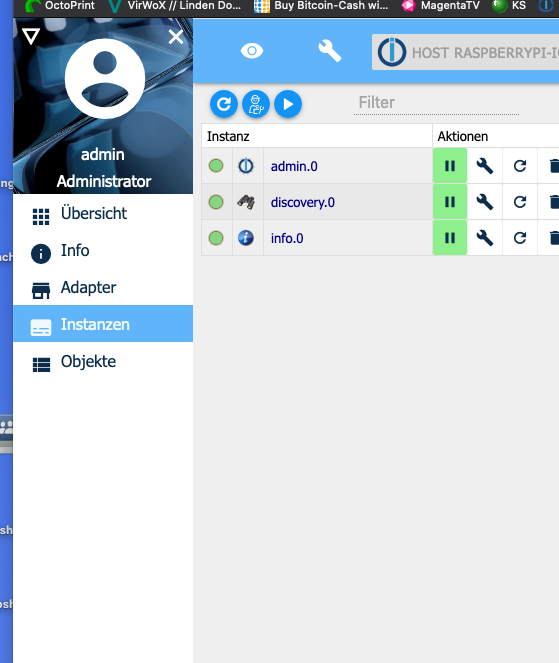
                        laut deinem Screenshot nicht

                        kein Support per PN! - Fragen im Forum stellen - es gibt fast nichts, was nicht auch für andere interessant ist.

                        Benutzt das Voting rechts unten im Beitrag wenn er euch geholfen hat.

                        der Installationsfixer: curl -fsL https://iobroker.net/fix.sh | bash -

                        1 Reply Last reply
                        0
                        Reply
                        • Reply as topic
                        Log in to reply
                        • Oldest to Newest
                        • Newest to Oldest
                        • Most Votes


                        Support us

                        ioBroker
                        Community Adapters
                        Donate
                        FAQ Cloud / IOT
                        HowTo: Node.js-Update
                        HowTo: Backup/Restore
                        Downloads
                        BLOG

                        479

                        Online

                        32.6k

                        Users

                        82.3k

                        Topics

                        1.3m

                        Posts
                        Community
                        Impressum | Datenschutz-Bestimmungen | Nutzungsbedingungen | Einwilligungseinstellungen
                        ioBroker Community 2014-2025
                        logo
                        • Login

                        • Don't have an account? Register

                        • Login or register to search.
                        • First post
                          Last post
                        0
                        • Home
                        • Recent
                        • Tags
                        • Unread 0
                        • Categories
                        • Unreplied
                        • Popular
                        • GitHub
                        • Docu
                        • Hilfe
