Skip to content
  • Home
  • Recent
  • Tags
  • 0 Unread 0
  • Categories
  • Unreplied
  • Popular
  • GitHub
  • Docu
  • Hilfe
Skins
  • Light
  • Brite
  • Cerulean
  • Cosmo
  • Flatly
  • Journal
  • Litera
  • Lumen
  • Lux
  • Materia
  • Minty
  • Morph
  • Pulse
  • Sandstone
  • Simplex
  • Sketchy
  • Spacelab
  • United
  • Yeti
  • Zephyr
  • Dark
  • Cyborg
  • Darkly
  • Quartz
  • Slate
  • Solar
  • Superhero
  • Vapor

  • Default (No Skin)
  • No Skin
Collapse
ioBroker Logo

Community Forum

donate donate
  1. ioBroker Community Home
  2. Deutsch
  3. Off Topic
  4. Grafana
  5. Hintergrund von Grafana Dashboard in VIS entfernen

NEWS

  • UPDATE 31.10.: Amazon Alexa - ioBroker Skill läuft aus ?
    apollon77A
    apollon77
    48
    3
    8.9k

  • Monatsrückblick – September 2025
    BluefoxB
    Bluefox
    13
    1
    2.3k

  • Neues Video "KI im Smart Home" - ioBroker plus n8n
    BluefoxB
    Bluefox
    16
    1
    3.5k

Hintergrund von Grafana Dashboard in VIS entfernen

Scheduled Pinned Locked Moved Grafana
vis
148 Posts 33 Posters 33.6k Views 40 Watching
  • Oldest to Newest
  • Newest to Oldest
  • Most Votes
Reply
  • Reply as topic
Log in to reply
This topic has been deleted. Only users with topic management privileges can see it.
  • T THELOH

    @rkccorian Moin!
    ich habe genau die gleichen Probleme wie du gehabt hast.
    Keinen nano zum editieren im grafana container. kein sudo, kein apt, etc.
    Nun gibts ja die Möglichkeit das Verzeichnis in dem die indiex.html liegt nach außen zu mappen.
    magst du den Inhalt der docker-compose.yml einmal zeigen?

    volumes:
    - ./grafana_data:/var/lib/grafana

    - ./grafana_public:/usr/share/grafana

    ich verzweifel bei dem Eintrag für die index.html ;)

    OliverIOO Offline
    OliverIOO Offline
    OliverIO
    wrote on last edited by OliverIO
    #85

    @theloh sagte in Hintergrund von Grafana Dashboard in VIS entfernen:

    @rkccorian Moin!
    ich habe genau die gleichen Probleme wie du gehabt hast.
    Keinen nano zum editieren im grafana container. kein sudo, kein apt, etc.
    Nun gibts ja die Möglichkeit das Verzeichnis in dem die indiex.html liegt nach außen zu mappen.
    magst du den Inhalt der docker-compose.yml einmal zeigen?

    volumes:
    - ./grafana_data:/var/lib/grafana

    - ./grafana_public:/usr/share/grafana

    ich verzweifel bei dem Eintrag für die index.html ;)

    Wenn sudo und apt bei grafana nicht funktioniert
    Vermute ich mal du hast es als docker Container installiert
    Weiter vermute ich das du die alpine Distro genommen hast
    In alpine heißt der packetmamager
    apk
    Wenn du noch kein Root bist müsste man mit
    su
    Root Rechte bekommen
    Falls du immer noch sudo brauchst dann
    apk add sudo
    So kannst dir dann auch Nano installieren

    Aber die Methode mit dem volume ist die bessere, da alle Änderungen an Dateien, die nicht in volumes liegen, sind nach dem Neustart des Containers wieder verloren

    Leider kann ich dir meine composer yml nicht zeigen, da ich erst nächste Woche wiede nach Hause komme und solange nicht schauen kann.

    Meine Adapter und Widgets
    TVProgram, SqueezeboxRPC, OpenLiga, RSSFeed, MyTime,, pi-hole2, vis-json-template, skiinfo, vis-mapwidgets, vis-2-widgets-rssfeed
    Links im Profil

    T 1 Reply Last reply
    0
    • foxriver76F foxriver76

      Einfachste Methode welche ich bislang gefunden habe: https://github.com/grafana/grafana/discussions/38165#discussioncomment-2072406

      T Online
      T Online
      THELOH
      wrote on last edited by
      #86

      @foxriver76 Könntest du die genaue Stelle in der Index.html einmal zeigen?

      foxriver76F 1 Reply Last reply
      0
      • T THELOH

        @foxriver76 Könntest du die genaue Stelle in der Index.html einmal zeigen?

        foxriver76F Offline
        foxriver76F Offline
        foxriver76
        Developer
        wrote on last edited by
        #87

        @theloh Ja, ich nehme zwar an, dass ich dir eben an anderer Stelle geantwortet habe, der Vollständigkeit halber gerne die Info auch hier.

        <!doctype html><html lang="en"><head><meta charset="utf-8"/><meta http-equiv="X-........
               height: 100%;
               flex-direction: column;
               display: flex;
               justify-content: center;
               align-items: center;
             }
        
             body.dashboard-solo { background: none; }
        
             .preloader__enter {
               opacity: 0;
               animation-name: preloader-fade-in;
               animation-iteration-count: 1;
               animation-duration: 0.9s;
               animation-delay: 1.35s;
               animation-fill-mode: forwards;
             }
        
        ......
        

        Videotutorials & mehr

        Hier könnt ihr mich unterstützen.

        T 1 Reply Last reply
        0
        • foxriver76F foxriver76

          @theloh Ja, ich nehme zwar an, dass ich dir eben an anderer Stelle geantwortet habe, der Vollständigkeit halber gerne die Info auch hier.

          <!doctype html><html lang="en"><head><meta charset="utf-8"/><meta http-equiv="X-........
                 height: 100%;
                 flex-direction: column;
                 display: flex;
                 justify-content: center;
                 align-items: center;
               }
          
               body.dashboard-solo { background: none; }
          
               .preloader__enter {
                 opacity: 0;
                 animation-name: preloader-fade-in;
                 animation-iteration-count: 1;
                 animation-duration: 0.9s;
                 animation-delay: 1.35s;
                 animation-fill-mode: forwards;
               }
          
          ......
          
          T Online
          T Online
          THELOH
          wrote on last edited by THELOH
          #88

          @foxriver76 Ich danke dir! Eingetragen und kunktioniert trotzdem nicht :(
          docker-compose bringt mich immer wieder zur Verzweifelung als normali.
          Edit: Funktioniert doch, wenn ich im Panel auf Transparent schalte.
          Ich bin Glücklich :)))))

          R 1 Reply Last reply
          0
          • OliverIOO OliverIO

            @theloh sagte in Hintergrund von Grafana Dashboard in VIS entfernen:

            @rkccorian Moin!
            ich habe genau die gleichen Probleme wie du gehabt hast.
            Keinen nano zum editieren im grafana container. kein sudo, kein apt, etc.
            Nun gibts ja die Möglichkeit das Verzeichnis in dem die indiex.html liegt nach außen zu mappen.
            magst du den Inhalt der docker-compose.yml einmal zeigen?

            volumes:
            - ./grafana_data:/var/lib/grafana

            - ./grafana_public:/usr/share/grafana

            ich verzweifel bei dem Eintrag für die index.html ;)

            Wenn sudo und apt bei grafana nicht funktioniert
            Vermute ich mal du hast es als docker Container installiert
            Weiter vermute ich das du die alpine Distro genommen hast
            In alpine heißt der packetmamager
            apk
            Wenn du noch kein Root bist müsste man mit
            su
            Root Rechte bekommen
            Falls du immer noch sudo brauchst dann
            apk add sudo
            So kannst dir dann auch Nano installieren

            Aber die Methode mit dem volume ist die bessere, da alle Änderungen an Dateien, die nicht in volumes liegen, sind nach dem Neustart des Containers wieder verloren

            Leider kann ich dir meine composer yml nicht zeigen, da ich erst nächste Woche wiede nach Hause komme und solange nicht schauen kann.

            T Online
            T Online
            THELOH
            wrote on last edited by
            #89

            @oliverio
            Das hat mir sehr geholfen und ich habe das Ganze inzwischen hinbekommen.
            Danke für die Info!

            1 Reply Last reply
            0
            • T THELOH

              @foxriver76 Ich danke dir! Eingetragen und kunktioniert trotzdem nicht :(
              docker-compose bringt mich immer wieder zur Verzweifelung als normali.
              Edit: Funktioniert doch, wenn ich im Panel auf Transparent schalte.
              Ich bin Glücklich :)))))

              R Offline
              R Offline
              RkcCorian
              wrote on last edited by
              #90

              @theloh Mit welcher Grafana-Version klappt das? Ich habe es mit v9.1.0 probiert, es hat aber nicht geklappt. Bei allen Panels habe ich Transparenz konfiguriert. Nutze die als iFrame.

              T 1 Reply Last reply
              0
              • B Offline
                B Offline
                bloop
                wrote on last edited by
                #91

                Guten Abend,
                Ich habe Grafana auf 9.3. aktualisiert, da die Oberfläche nun auch auf Deutsch verfügbar ist. Seither ist es nicht mehr möglich das Boom Theme Addon für hintergrundfreie Einbettung in die VIS zu verwenden. Ein Umweg ist es mir über die index.html gelungen. Die Hintergründe einzelner Panel bekomme ich nun transparent. Allerdings funktioniert dies nur mit dem UI Design Hell diese passt jedoch vom Design nicht mehr zu meiner VIS...
                Hat jemand eventuell ein ähnliches Problem oder sogar eine Lösung?
                Herzlichen Dank!

                T S B 3 Replies Last reply
                0
                • R RkcCorian

                  @theloh Mit welcher Grafana-Version klappt das? Ich habe es mit v9.1.0 probiert, es hat aber nicht geklappt. Bei allen Panels habe ich Transparenz konfiguriert. Nutze die als iFrame.

                  T Online
                  T Online
                  THELOH
                  wrote on last edited by
                  #92

                  @rkccorian ich nutze die 9.2.2

                  1 Reply Last reply
                  0
                  • B bloop

                    Guten Abend,
                    Ich habe Grafana auf 9.3. aktualisiert, da die Oberfläche nun auch auf Deutsch verfügbar ist. Seither ist es nicht mehr möglich das Boom Theme Addon für hintergrundfreie Einbettung in die VIS zu verwenden. Ein Umweg ist es mir über die index.html gelungen. Die Hintergründe einzelner Panel bekomme ich nun transparent. Allerdings funktioniert dies nur mit dem UI Design Hell diese passt jedoch vom Design nicht mehr zu meiner VIS...
                    Hat jemand eventuell ein ähnliches Problem oder sogar eine Lösung?
                    Herzlichen Dank!

                    T Online
                    T Online
                    THELOH
                    wrote on last edited by
                    #93

                    @bloop Hallo,
                    bei mir funktioniert es wie oben beschrieben über die index.html problemlos. Ich bette das als Iframe ein. Das Design schalte ich in meiner Vis um.
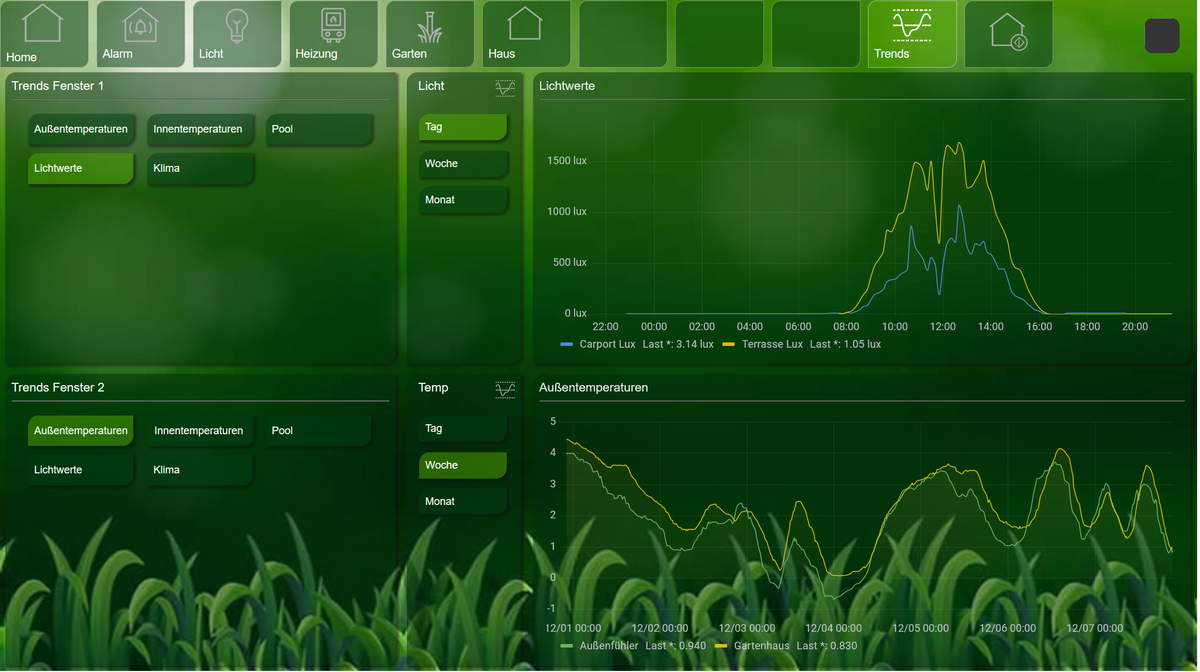
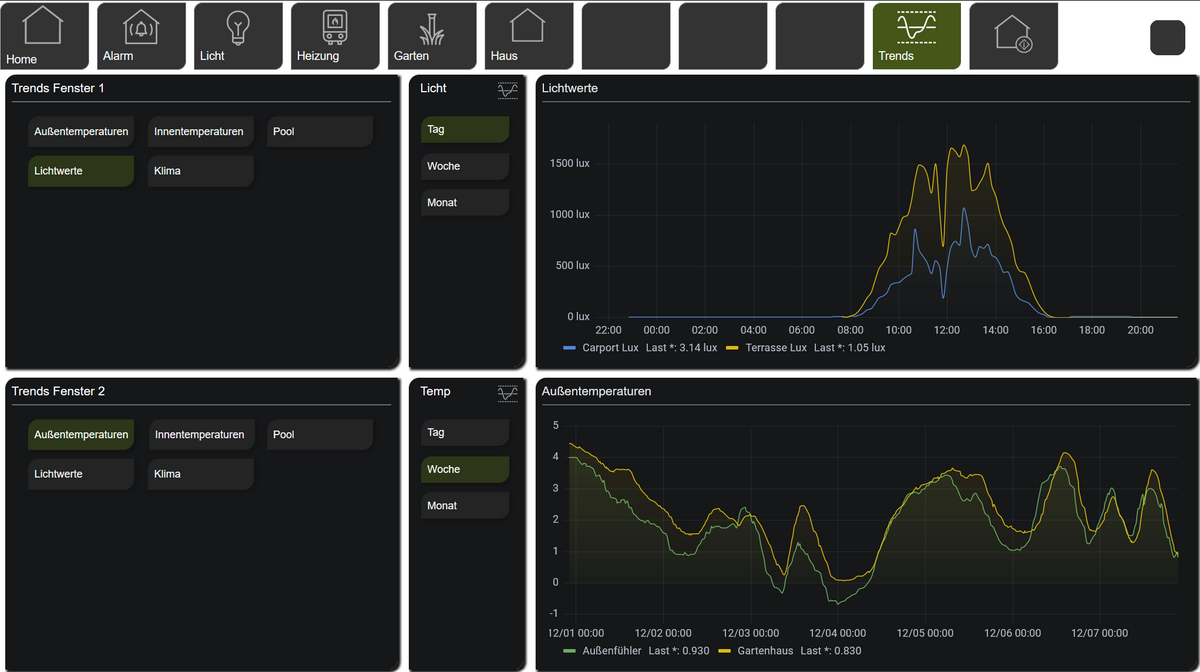
                    c09ed98f-7709-410f-b519-7caa37949860-grafik.png

                    239d75a0-261a-4cd7-b65f-fe5d3f4b9825-grafik.png

                    B 1 Reply Last reply
                    0
                    • B bloop

                      Guten Abend,
                      Ich habe Grafana auf 9.3. aktualisiert, da die Oberfläche nun auch auf Deutsch verfügbar ist. Seither ist es nicht mehr möglich das Boom Theme Addon für hintergrundfreie Einbettung in die VIS zu verwenden. Ein Umweg ist es mir über die index.html gelungen. Die Hintergründe einzelner Panel bekomme ich nun transparent. Allerdings funktioniert dies nur mit dem UI Design Hell diese passt jedoch vom Design nicht mehr zu meiner VIS...
                      Hat jemand eventuell ein ähnliches Problem oder sogar eine Lösung?
                      Herzlichen Dank!

                      S Offline
                      S Offline
                      SpacerX
                      wrote on last edited by
                      #94

                      @bloop genauso ist es.

                      Ich nutze die die Variante mit dem Laden einer mygrafana.css. Das hat bis vor kurzem auch super Funktioniert, nur beim dark.scheme klappt das eben nicht.

                      Meine Lösung ist es in der mygrafana.css folgendes ganz oben hinzu zu fügen.

                      :root {
                      	color-scheme: none !important;
                      }
                      

                      DS720|Nuc8i3BEH|Proxmox|RaspberryMatic|ioBroker|influxDB2|Grafana

                      B 1 Reply Last reply
                      0
                      • T THELOH

                        @bloop Hallo,
                        bei mir funktioniert es wie oben beschrieben über die index.html problemlos. Ich bette das als Iframe ein. Das Design schalte ich in meiner Vis um.

                        c09ed98f-7709-410f-b519-7caa37949860-grafik.png

                        239d75a0-261a-4cd7-b65f-fe5d3f4b9825-grafik.png

                        B Offline
                        B Offline
                        bloop
                        wrote on last edited by
                        #95

                        @theloh Hallo,
                        Hmmm, genau so hab ich´s auch gemacht. Funktioniert allerdings nur über die Light UI.
                        Welche Grafana Version nutzt du denn?

                        1 Reply Last reply
                        0
                        • S SpacerX

                          @bloop genauso ist es.

                          Ich nutze die die Variante mit dem Laden einer mygrafana.css. Das hat bis vor kurzem auch super Funktioniert, nur beim dark.scheme klappt das eben nicht.

                          Meine Lösung ist es in der mygrafana.css folgendes ganz oben hinzu zu fügen.

                          :root {
                          	color-scheme: none !important;
                          }
                          
                          B Offline
                          B Offline
                          bloop
                          wrote on last edited by
                          #96

                          @spacerx Danke!
                          Ich versuche mich bereits eine ganze weile daran, mein Hintergrund wird aber immer grün...
                          Würdest du mir vielleicht deine mygrafana.css zeigen?

                          1 Reply Last reply
                          0
                          • B bloop

                            Guten Abend,
                            Ich habe Grafana auf 9.3. aktualisiert, da die Oberfläche nun auch auf Deutsch verfügbar ist. Seither ist es nicht mehr möglich das Boom Theme Addon für hintergrundfreie Einbettung in die VIS zu verwenden. Ein Umweg ist es mir über die index.html gelungen. Die Hintergründe einzelner Panel bekomme ich nun transparent. Allerdings funktioniert dies nur mit dem UI Design Hell diese passt jedoch vom Design nicht mehr zu meiner VIS...
                            Hat jemand eventuell ein ähnliches Problem oder sogar eine Lösung?
                            Herzlichen Dank!

                            B Offline
                            B Offline
                            bloop
                            wrote on last edited by
                            #97

                            @bloop Lösung:
                            mygrafana.css Variante

                            @charset "UTF-8";
                             
                             :root {
                            	color-scheme: none !important;
                            }
                            .panel-container {
                                background-color: transparent !important; 
                            
                            }
                            

                            index.html:

                            <link rel="stylesheet" href="http://192.168.0.110/vis.0/mygrafana.css" type="text/css">
                            </head>
                            <body class="theme-[[ .Theme ]] [[.AppNameBodyClass]]"><style>
                            
                            body.dashboard-solo { background: none !important; }
                            

                            Lediglich die einzelnen Container werden Transparent. Somit kann Grafana auch noch in der eigenen Oberfläche angenehm verwendet werden.

                            Achtung:
                            Beim upload mit der vis Edit Oberfläche musste ich jedes mal die mygrafana.css weiterführen (mygrafana1.css...) löschen funktioniert nicht. Entsprechend muss dann auch die index.html angepasst werden.

                            Danke für die Hilfe!

                            S 1 Reply Last reply
                            0
                            • B bloop

                              @bloop Lösung:
                              mygrafana.css Variante

                              @charset "UTF-8";
                               
                               :root {
                              	color-scheme: none !important;
                              }
                              .panel-container {
                                  background-color: transparent !important; 
                              
                              }
                              

                              index.html:

                              <link rel="stylesheet" href="http://192.168.0.110/vis.0/mygrafana.css" type="text/css">
                              </head>
                              <body class="theme-[[ .Theme ]] [[.AppNameBodyClass]]"><style>
                              
                              body.dashboard-solo { background: none !important; }
                              

                              Lediglich die einzelnen Container werden Transparent. Somit kann Grafana auch noch in der eigenen Oberfläche angenehm verwendet werden.

                              Achtung:
                              Beim upload mit der vis Edit Oberfläche musste ich jedes mal die mygrafana.css weiterführen (mygrafana1.css...) löschen funktioniert nicht. Entsprechend muss dann auch die index.html angepasst werden.

                              Danke für die Hilfe!

                              S Offline
                              S Offline
                              SpacerX
                              wrote on last edited by
                              #98

                              @bloop der Vollständigkeit halber meine mygrafana.css.

                              @charset "UTF-8";
                               
                              :root {
                              	color-scheme: none !important;
                              }
                              
                              body.dashboard-solo, .panel-container, .panel-solo, .main-view {
                                 background-color: transparent !important;
                              }
                              
                              .css-1ns0gep-LegendLabel-LegendClickabel{
                                 font-size: 1.5em !important;
                              }
                              
                              .css-1pnglql-LegendLabel{
                                 font-size: 1.5em !important;	
                              }
                              
                              .pointer{
                                 width: 25px !important;
                                 height: 15px !important;
                              }
                               
                              .graph-legend-table th{
                                 color: white;
                              }
                              

                              DS720|Nuc8i3BEH|Proxmox|RaspberryMatic|ioBroker|influxDB2|Grafana

                              1 Reply Last reply
                              0
                              • R Offline
                                R Offline
                                RkcCorian
                                wrote on last edited by RkcCorian
                                #99

                                @SpacerX : Moin!
                                Ich hatte bislang bereits transparente Hintergründe in meinen Grafana v9.1.0 iFrames, über mygrafana.css, nebst Anpassung index.html. Im Wesentlichen, wie auch bereits beschrieben.
                                Nun möchte ich auch ein Update auf v9.4.3 machen und habe mir diesen Chat-Verlauf angeschaut. Leider klappt es bei mir nicht. Pfad zur mygrafana.css stimmt und hat auch vorher bereits geklappt.

                                Kannst Du bitte einen Blick drauf werfen?
                                index.html mygrafana.css

                                Vielen Dank im Voraus!

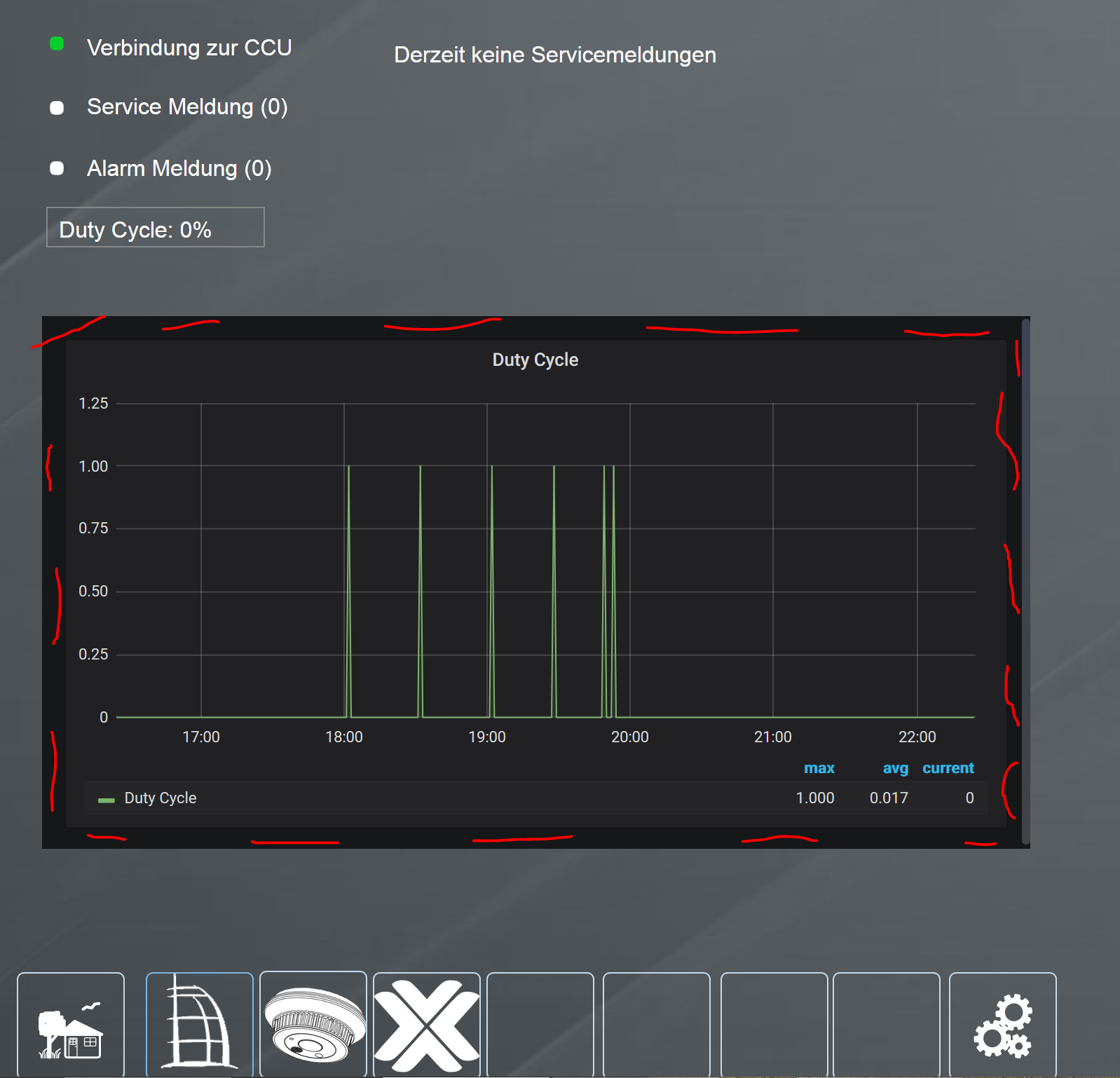
                                Gewünschtes Ergebnis (ist auch so mit v9.1.0)
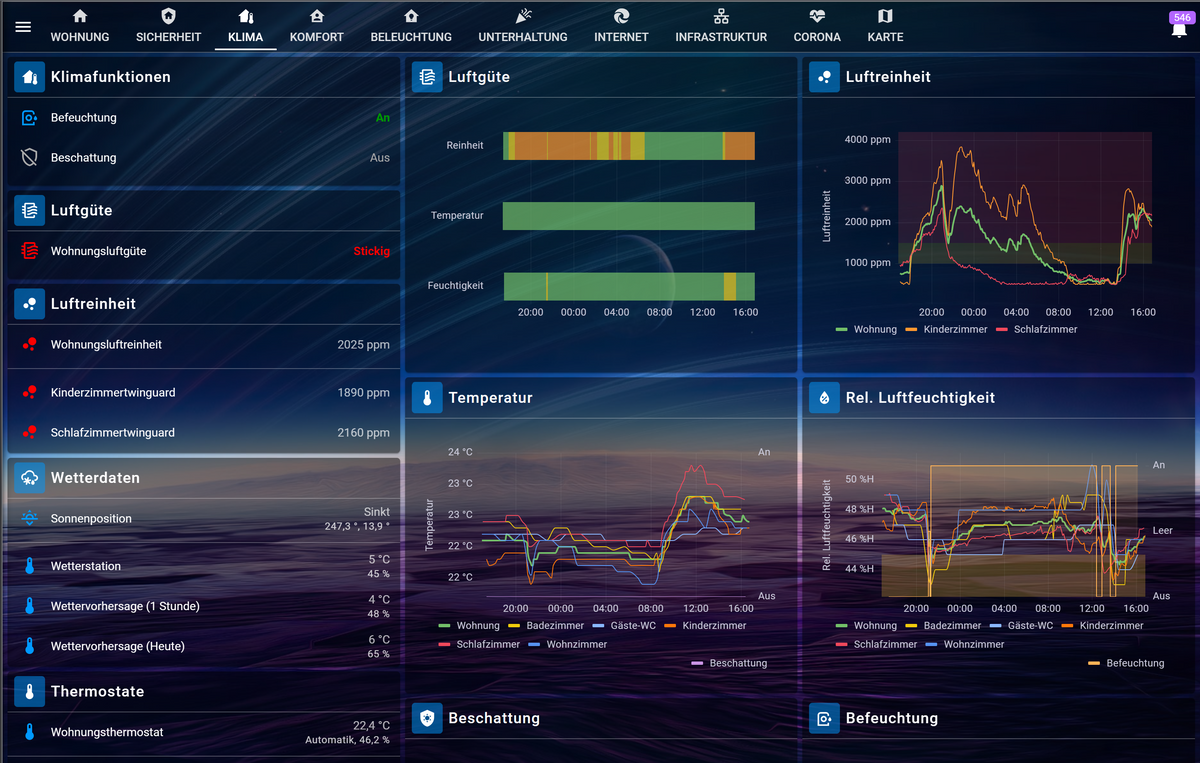
                                ee037f04-f4b9-450e-b327-55d6c3a40187-image.png

                                Ergebnis mit v9.4.3 (passend zu den angehängten Configs)
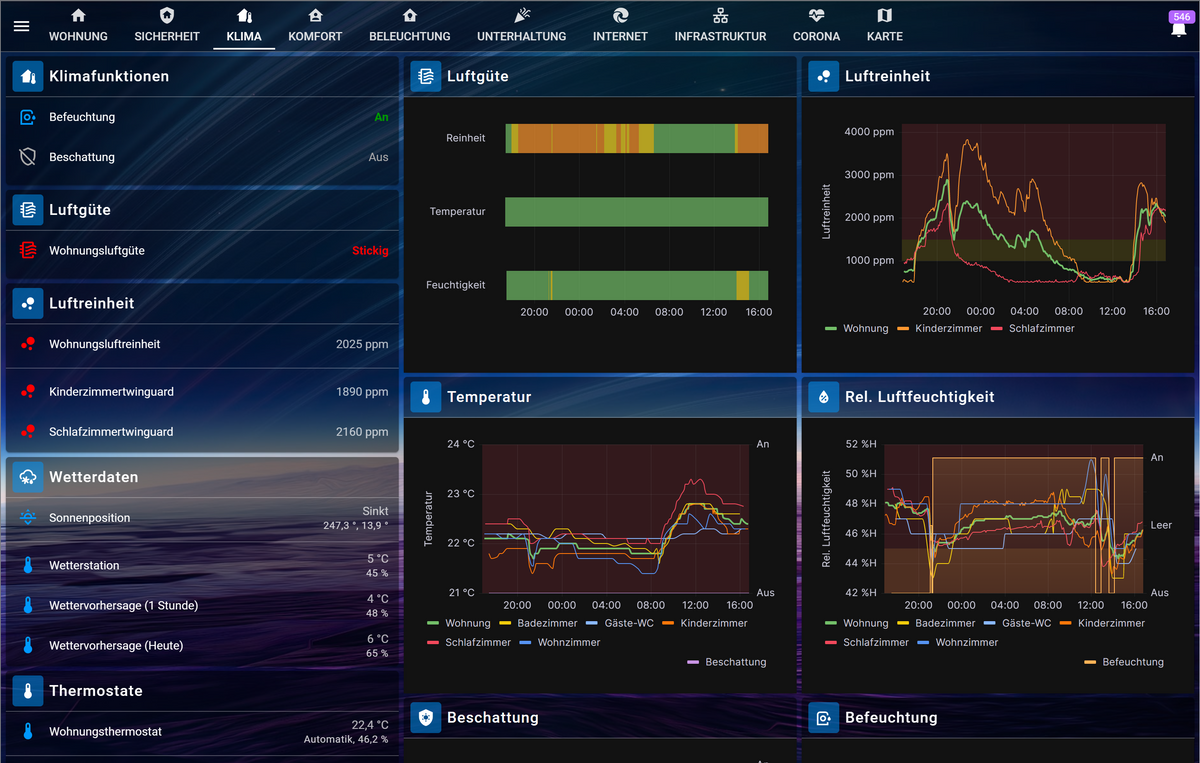
                                177ffe0b-dbce-4dec-8d6a-901f5dce081b-image.png

                                S 1 Reply Last reply
                                1
                                • R RkcCorian

                                  @SpacerX : Moin!
                                  Ich hatte bislang bereits transparente Hintergründe in meinen Grafana v9.1.0 iFrames, über mygrafana.css, nebst Anpassung index.html. Im Wesentlichen, wie auch bereits beschrieben.
                                  Nun möchte ich auch ein Update auf v9.4.3 machen und habe mir diesen Chat-Verlauf angeschaut. Leider klappt es bei mir nicht. Pfad zur mygrafana.css stimmt und hat auch vorher bereits geklappt.

                                  Kannst Du bitte einen Blick drauf werfen?
                                  index.html mygrafana.css

                                  Vielen Dank im Voraus!

                                  Gewünschtes Ergebnis (ist auch so mit v9.1.0)
                                  ee037f04-f4b9-450e-b327-55d6c3a40187-image.png

                                  Ergebnis mit v9.4.3 (passend zu den angehängten Configs)
                                  177ffe0b-dbce-4dec-8d6a-901f5dce081b-image.png

                                  S Offline
                                  S Offline
                                  SpacerX
                                  wrote on last edited by
                                  #100

                                  @rkccorian Probier mal den kompletten body Teil aus meiner css. Ich nutze in meiner Vis nur Panels.

                                  DS720|Nuc8i3BEH|Proxmox|RaspberryMatic|ioBroker|influxDB2|Grafana

                                  R 1 Reply Last reply
                                  0
                                  • S SpacerX

                                    @rkccorian Probier mal den kompletten body Teil aus meiner css. Ich nutze in meiner Vis nur Panels.

                                    R Offline
                                    R Offline
                                    RkcCorian
                                    wrote on last edited by RkcCorian
                                    #101

                                    @spacerx Ahhh, vielen Dank! Ich nutze ganze Dashboards. Folgendes geht jetzt als mygrafana.css...

                                    @charset "UTF-8";
                                    
                                    :root {
                                       color-scheme: none !important;
                                    }
                                    
                                    body {
                                       background: transparent !important;
                                    }
                                    
                                    1 Reply Last reply
                                    1
                                    • Marko_PM Offline
                                      Marko_PM Offline
                                      Marko_P
                                      wrote on last edited by Marko_P
                                      #102

                                      Also ich habe es jetzt anders gemacht

                                      ich bin nach dieser Anleitung vorgegangen

                                      https://github.com/grafana/grafana/discussions/38165

                                      • Pfad: /usr/share/grafana/public/views/index.html
                                      • in Zeile 2 (bei mir) nach ><style> suchen und einfügen
                                      :root { color-scheme: none !important; }
                                      body.dashboard-solo { background: none; }
                                      

                                      <!doctype html><html lang="de"><head>[[ if and .CSPEnabled .IsDevelopmentEnv ]]<meta http-equiv="Content-Security-Policy" content="[[.CSPContent]]"/>[[ end ]]<meta charset="utf-8"/><meta http-equiv="X-UA-Compatible" content="IE=edge,chrome=1"/><meta name="viewport" content="width=device-width"/><meta name="theme-color" content="#000"/><title>[[.AppTitle]]</title><base href="[[.AppSubUrl]]/"/><link rel="icon" type="image/png" href="[[.FavIcon]]"/><link rel="apple-touch-icon" sizes="180x180" href="[[.AppleTouchIcon]]"/><link rel="mask-icon" href="[[.ContentDeliveryURL]]public/img/grafana_mask_icon.svg" color="#F05A28"/>[[ if eq .Theme "light" ]]<link rel="stylesheet" href="[[.ContentDeliveryURL]]public/build/grafana.light.1d77523c18081c26d59e.css"/>[[ else if eq .Theme "dark" ]]<link rel="stylesheet" href="[[.ContentDeliveryURL]]public/build/grafana.dark.14180bda173a5cc72267.css"/>[[ end ]]<script nonce="[[.Nonce]]">performance.mark('frontend_boot_css_time_seconds');</script><meta name="apple-mobile-web-app-capable" content="yes"/><meta name="apple-mobile-web-app-status-bar-style" content="black"/><meta name="msapplication-TileColor" content="#2b5797"/><meta name="msapplication-config" content="public/img/browserconfig.xml"/></head><body class="theme-[[ .Theme ]] [[.AppNameBodyClass]]"><style>
                                       	:root { color-scheme: none !important; }
                                         body.dashboard-solo { background: none; }
                                         .preloader {
                                             height: 100%;
                                             flex-direction: column;
                                             display: flex;
                                             justify-content: center;
                                             align-items: center;
                                      
                                           }
                                      
                                           .preloader__enter {
                                             opacity: 0;
                                             animation-name: preloader-fade-in;
                                             animation-iteration-count: 1;
                                             animation-duration: 0.9s;
                                             animation-delay: 1.35s;
                                             animation-fill-mode: forwards;
                                           }
                                      
                                           .preloader__bounce {
                                             text-align: center;
                                             animation-name: preloader-bounce;
                                             animation-duration: 0.9s;
                                             animation-iteration-count: infinite;
                                           }
                                      
                                           .preloader__logo {
                                             display: inline-block;
                                             animation-name: preloader-squash;
                                             animation-duration: 0.9s;
                                             animation-iteration-count: infinite;
                                             width: 60px;
                                             height: 60px;
                                             background-repeat: no-repeat;
                                             background-size: contain;
                                             background-image: url('[[.LoadingLogo]]');
                                           }
                                      
                                           .preloader__text {
                                             margin-top: 16px;
                                             font-weight: 500;
                                             font-size: 14px;
                                             font-family: Sans-serif;
                                             opacity: 0;
                                             animation-name: preloader-fade-in;
                                             animation-duration: 0.9s;
                                             animation-delay: 1.8s;
                                             animation-fill-mode: forwards;
                                           }
                                      
                                           .theme-light .preloader__text {
                                             color: #52545c;
                                           }
                                      
                                           .theme-dark .preloader__text {
                                             color: #d8d9da;
                                           }
                                      
                                           @keyframes preloader-fade-in {
                                             0% {
                                               opacity: 0;
                                               /*animation-timing-function: linear;*/
                                               animation-timing-function: cubic-bezier(0, 0, 0.5, 1);
                                             }
                                             100% {
                                               opacity: 1;
                                             }
                                           }
                                      
                                           @keyframes preloader-bounce {
                                             from,
                                             to {
                                               transform: translateY(0px);
                                               animation-timing-function: cubic-bezier(0.3, 0, 0.1, 1);
                                             }
                                             50% {
                                               transform: translateY(-50px);
                                               animation-timing-function: cubic-bezier(0.9, 0, 0.7, 1);
                                             }
                                           }
                                      
                                           @keyframes preloader-squash {
                                             0% {
                                               transform: scaleX(1.3) scaleY(0.8);
                                               animation-timing-function: cubic-bezier(0.3, 0, 0.1, 1);
                                               transform-origin: bottom center;
                                             }
                                             15% {
                                               transform: scaleX(0.75) scaleY(1.25);
                                               animation-timing-function: cubic-bezier(0, 0, 0.7, 0.75);
                                               transform-origin: bottom center;
                                             }
                                             55% {
                                               transform: scaleX(1.05) scaleY(0.95);
                                               animation-timing-function: cubic-bezier(0.9, 0, 1, 1);
                                               transform-origin: top center;
                                             }
                                             95% {
                                               transform: scaleX(0.75) scaleY(1.25);
                                               animation-timing-function: cubic-bezier(0, 0, 0, 1);
                                               transform-origin: bottom center;
                                             }
                                             100% {
                                               transform: scaleX(1.3) scaleY(0.8);
                                               transform-origin: bottom center;
                                               animation-timing-function: cubic-bezier(0, 0, 0.7, 1);
                                             }
                                           }
                                      
                                           /* Fail info */
                                           .preloader__text--fail {
                                             display: none;
                                           }
                                      
                                           /* stop logo animation */
                                           .preloader--done .preloader__bounce,
                                           .preloader--done .preloader__logo {
                                             animation-name: none;
                                             display: none;
                                           }
                                      
                                           .preloader--done .preloader__logo,
                                           .preloader--done .preloader__text {
                                             display: none;
                                             color: #ff5705 !important;
                                             font-size: 15px;
                                           }
                                      
                                           .preloader--done .preloader__text--fail {
                                             display: block;
                                           }
                                      
                                           [ng\:cloak],
                                           [ng-cloak],
                                           .ng-cloak {
                                             display: none !important;
                                           }</style><div class="preloader"><div class="preloader__enter"><div class="preloader__bounce"><div class="preloader__logo"></div></div></div><div class="preloader__text">Loading Grafana</div><div class="preloader__text preloader__text--fail"><p><strong>If you're seeing this Grafana has failed to load its application files</strong><br/><br/></p><p>1. This could be caused by your reverse proxy settings.<br/><br/>2. If you host grafana under subpath make sure your grafana.ini root_url setting includes subpath. If not using a reverse proxy make sure to set serve_from_sub_path to true.<br/><br/>3. If you have a local dev build make sure you build frontend using: yarn start, or yarn build<br/><br/>4. Sometimes restarting grafana-server can help<br/><br/>5. Check if you are using a non-supported browser. For more information, refer to the list of <a href="https://grafana.com/docs/grafana/latest/installation/requirements/#supported-web-browsers">supported browsers</a>.</p></div><script nonce="[[.Nonce]]">// Check to see if browser is not supported by Grafana
                                             // Source file in app/core/utils/browser.ts & tests make edits there and copy compiled typescript here
                                             function checkBrowserCompatibility() {
                                               var isIE = navigator.userAgent.indexOf('MSIE') > -1;
                                               var isEdge = navigator.userAgent.indexOf('Edge/') > -1 || navigator.userAgent.indexOf('Edg/') > -1;
                                               var isFirefox = navigator.userAgent.toLowerCase().indexOf('firefox') > -1;
                                               var isChrome = /Chrome/.test(navigator.userAgent) && /Google Inc/.test(navigator.vendor);
                                      
                                               /* Check for
                                               <= IE11 (Trident 7)
                                               Edge <= 16
                                               Firefox <= 64
                                               Chrome <= 54
                                               */
                                               var isEdgeVersion = /Edge\/([0-9.]+)/.exec(navigator.userAgent);
                                      
                                               if (isIE && parseFloat(/Trident\/([0-9.]+)/.exec(navigator.userAgent)[1]) <= 7) {
                                                 return false;
                                               } else if (
                                                 isEdge &&
                                                 ((isEdgeVersion && parseFloat(isEdgeVersion[1]) <= 16) ||
                                                   parseFloat(/Edg\/([0-9.]+)/.exec(navigator.userAgent)[1]) <= 16)
                                               ) {
                                                 return false;
                                               } else if (isFirefox && parseFloat(/Firefox\/([0-9.]+)/.exec(navigator.userAgent)[1]) <= 64) {
                                                 return false;
                                               } else if (isChrome && parseFloat(/Chrome\/([0-9.]+)/.exec(navigator.userAgent)[1]) <= 54) {
                                                 return false;
                                               }
                                      
                                               return true;
                                             }
                                      
                                             if (!checkBrowserCompatibility()) {
                                               alert('Your browser is not fully supported, please try newer version.');
                                             }</script></div><div id="reactRoot"></div><script nonce="[[.Nonce]]">window.grafanaBootData = {
                                             user: [[.User]],
                                             settings: [[.Settings]],
                                             navTree: [[.NavTree]],
                                             themePaths: {
                                               light: '[[.ContentDeliveryURL]]public/build/grafana.light.1d77523c18081c26d59e.css',
                                               dark: '[[.ContentDeliveryURL]]public/build/grafana.dark.14180bda173a5cc72267.css'
                                             }
                                           };
                                      
                                           // Set theme to match system only on startup.
                                           // Do not react to changes in system theme after startup.
                                           if (window.grafanaBootData.user.theme === "system") {
                                             document.body.classList.remove("theme-system");
                                             var darkQuery = window.matchMedia("(prefers-color-scheme: dark)");
                                             var cssLink = document.createElement("link");
                                             cssLink.rel = 'stylesheet';
                                      
                                             if (darkQuery.matches) {
                                               document.body.classList.add("theme-dark");
                                               cssLink.href = window.grafanaBootData.themePaths.dark;
                                               window.grafanaBootData.user.lightTheme = false;
                                             } else {
                                               document.body.classList.add("theme-light");
                                               cssLink.href = window.grafanaBootData.themePaths.light;
                                               window.grafanaBootData.user.lightTheme = true;
                                             }
                                             document.head.appendChild(cssLink);
                                           }
                                      
                                           window.__grafana_load_failed = function() {
                                             var preloader = document.getElementsByClassName("preloader");
                                             if (preloader.length) {
                                               preloader[0].className = "preloader preloader--done";
                                             }
                                           }
                                      
                                           // In case the js files fails to load the code below will show an info message.
                                           window.onload = function() {
                                             if (window.__grafana_app_bundle_loaded) {
                                               return;
                                             }
                                             window.__grafana_load_failed();
                                           };
                                      
                                           [[if .ContentDeliveryURL]]
                                             window.public_cdn_path = '[[.ContentDeliveryURL]]public/build/';
                                           [[end]]
                                           [[if .Nonce]]
                                             window.nonce = '[[.Nonce]]';
                                           [[end]]</script>[[if .GoogleTagManagerId]]<script nonce="[[.Nonce]]">dataLayer = [
                                             {
                                               IsSignedIn: '[[.User.IsSignedIn]]',
                                               Email: '[[.User.Email]]',
                                               Name: '[[.User.Name]]',
                                               UserId: '[[.User.Id]]',
                                               OrgId: '[[.User.OrgId]]',
                                               OrgName: '[[.User.OrgName]]',
                                             },
                                           ];</script><noscript><iframe src="//www.googletagmanager.com/ns.html?id=[[.GoogleTagManagerId]]" height="0" width="0" style="display: none; visibility: hidden"></iframe></noscript><script nonce="[[.Nonce]]">(function (w, d, s, l, i) {
                                             w[l] = w[l] || [];
                                             w[l].push({ 'gtm.start': new Date().getTime(), event: 'gtm.js' });
                                             var f = d.getElementsByTagName(s)[0],
                                               j = d.createElement(s),
                                               dl = l != 'dataLayer' ? '&l=' + l : '';
                                             j.async = true;
                                             j.src = '//www.googletagmanager.com/gtm.js?id=' + i + dl;
                                             f.parentNode.insertBefore(j, f);
                                           })(window, document, 'script', 'dataLayer', '[[.GoogleTagManagerId]]');</script>[[end]]<script nonce="[[.Nonce]]" src="[[.ContentDeliveryURL]]public/build/runtime.abe7fb813bed3fe11f58.js"></script><script nonce="[[.Nonce]]" src="[[.ContentDeliveryURL]]public/build/8683.9259ad853ca27103e2cc.js"></script><script nonce="[[.Nonce]]" src="[[.ContentDeliveryURL]]public/build/5226.48dbd59a341e1b9072d3.js"></script><script nonce="[[.Nonce]]" src="[[.ContentDeliveryURL]]public/build/5302.4d5cb84855a9594c7d9c.js"></script><script nonce="[[.Nonce]]" src="[[.ContentDeliveryURL]]public/build/2077.a35416a524fb1433fe6e.js"></script><script nonce="[[.Nonce]]" src="[[.ContentDeliveryURL]]public/build/app.7885149575f6aa51eb86.js"></script><script nonce="[[.Nonce]]">performance.mark('frontend_boot_js_done_time_seconds');</script></body></html>
                                      

                                      1 Reply Last reply
                                      0
                                      • ? Offline
                                        ? Offline
                                        A Former User
                                        wrote on last edited by
                                        #103

                                        Moin,

                                        ich bitte schon mal um Entschuldigung, ich habe nicht alles gelesen.
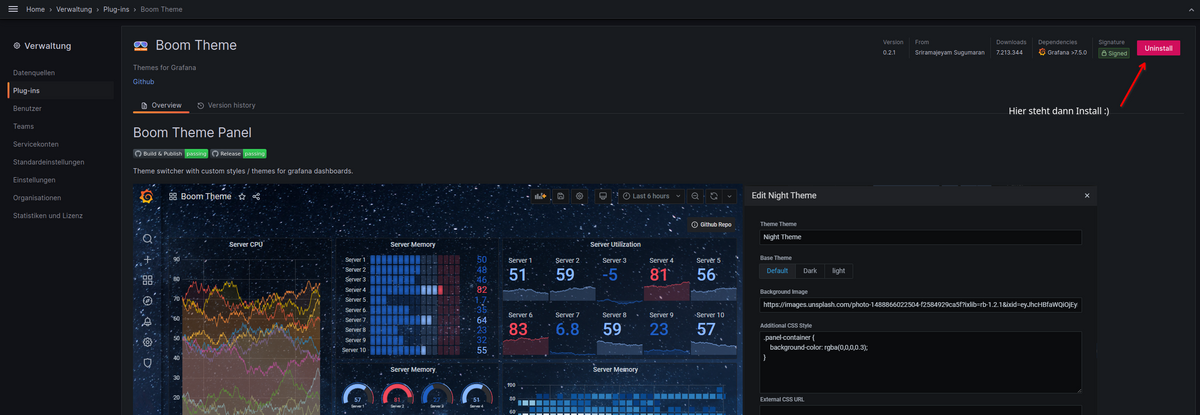
                                        Vielleicht wurde das ja schon vorgeschlagen, erwähnt, aber ich bin letztens auf ein Grafana-Plugin gestoßen, das sehr interessant ausschaut, um in Panel oder Dashboards den Hintergrund zu ändern.
                                        Vielleicht hilf es ja dem einen oder anderen :)

                                        Hier geht es zum Plugin -> https://grafana.com/grafana/plugins/yesoreyeram-boomtheme-panel/
                                        Installation ist easy
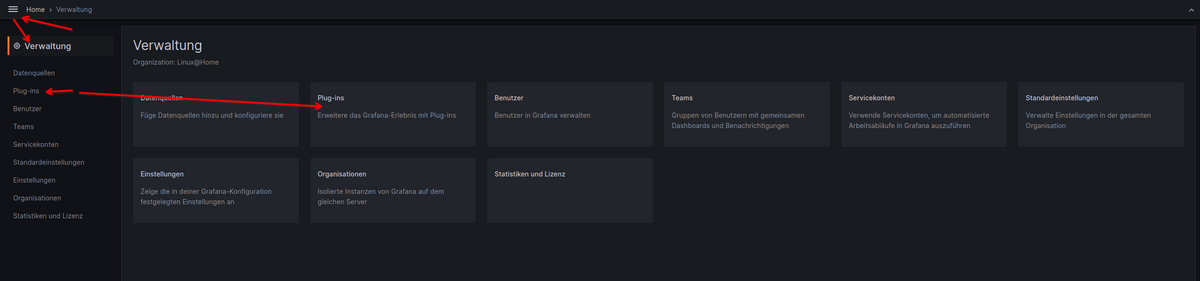
                                        70844cde-299b-4d6b-9aff-af22cea32402-grafik.png
                                        a4eb3af7-e12d-4b77-8cf4-d84f56d0797d-grafik.png
                                        4cf7300b-a647-4c0a-8b94-9e19a34f3032-grafik.png

                                        VG
                                        Bernd

                                        1 Reply Last reply
                                        0
                                        • PamfP Offline
                                          PamfP Offline
                                          Pamf
                                          wrote on last edited by
                                          #104

                                          Hat jemand von Euch unter der aktuellen Grafana-Version 10.x einen transparenten Hintergrund realisieren können? Bei mir funktioniert das Boom-Theme nicht, ebenso nicht die custom css.

                                          B 1 Reply Last reply
                                          0
                                          Reply
                                          • Reply as topic
                                          Log in to reply
                                          • Oldest to Newest
                                          • Newest to Oldest
                                          • Most Votes


                                          Support us

                                          ioBroker
                                          Community Adapters
                                          Donate

                                          840

                                          Online

                                          32.4k

                                          Users

                                          81.6k

                                          Topics

                                          1.3m

                                          Posts
                                          Community
                                          Impressum | Datenschutz-Bestimmungen | Nutzungsbedingungen | Einwilligungseinstellungen
                                          ioBroker Community 2014-2025
                                          logo
                                          • Login

                                          • Don't have an account? Register

                                          • Login or register to search.
                                          • First post
                                            Last post
                                          0
                                          • Home
                                          • Recent
                                          • Tags
                                          • Unread 0
                                          • Categories
                                          • Unreplied
                                          • Popular
                                          • GitHub
                                          • Docu
                                          • Hilfe