



Skip to content
  • Home
  • Aktuell
  • Tags
  • 0 Ungelesen 0
  • Kategorien
  • Unreplied
  • Beliebt
  • GitHub
  • Docu
  • Hilfe
Skins
  • Light
  • Brite
  • Cerulean
  • Cosmo
  • Flatly
  • Journal
  • Litera
  • Lumen
  • Lux
  • Materia
  • Minty
  • Morph
  • Pulse
  • Sandstone
  • Simplex
  • Sketchy
  • Spacelab
  • United
  • Yeti
  • Zephyr
  • Dark
  • Cyborg
  • Darkly
  • Quartz
  • Slate
  • Solar
  • Superhero
  • Vapor

  • Standard: (Kein Skin)
  • Kein Skin
Einklappen
ioBroker Logo

Community Forum

donate donate
  1. ioBroker Community Home
  2. Deutsch
  3. Tester
  4. Test Adapter ioBroker.backitup v3.1.x

NEWS

  • UPDATE 31.10.: Amazon Alexa - ioBroker Skill läuft aus ?
    apollon77A
    apollon77
    48
    3
    8.7k

  • Monatsrückblick – September 2025
    BluefoxB
    Bluefox
    13
    1
    2.2k

  • Neues Video "KI im Smart Home" - ioBroker plus n8n
    BluefoxB
    Bluefox
    16
    1
    3.2k

Test Adapter ioBroker.backitup v3.1.x

Geplant Angeheftet Gesperrt Verschoben Tester
backitupbackitup backupccuhistorymysqlredisrestorerestore backup
2.8k Beiträge 170 Kommentatoren 2.4m Aufrufe 113 Watching
  • Älteste zuerst
  • Neuste zuerst
  • Meiste Stimmen
Antworten
  • In einem neuen Thema antworten
Anmelden zum Antworten
Dieses Thema wurde gelöscht. Nur Nutzer mit entsprechenden Rechten können es sehen.
  • S smartysmart

    Weiss jemand warum die mysql Datei nur als "." (PUNKT) in der zip gespeichert wird ?
    Es ist nicht weiter schlimm, weil ich sie beim Entpacken umbenennen muss dann kann ich die Datei öffnen und hab alle Daten aber "just nice to know" ob man das fixen kann.
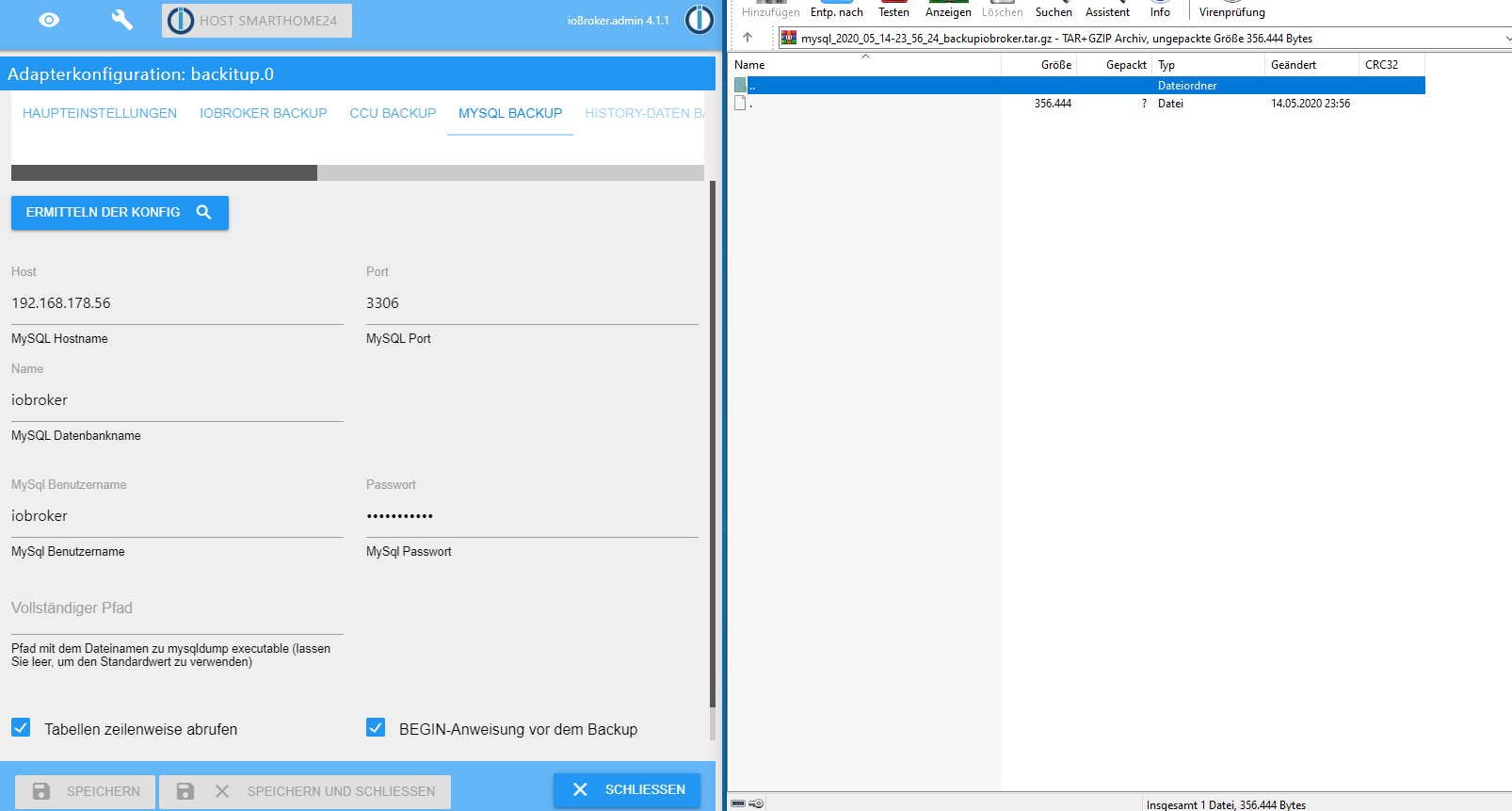
    b8d26459-92cd-4672-a7ee-5add3cc0648c-image.png

    simatecS Offline
    simatecS Offline
    simatec
    Developer Most Active
    schrieb am zuletzt editiert von
    #495

    @smartysmart
    Ist so gewollt und gür den Restore mit Backitup gedacht

    • Besuche meine Github Seite
    • Beitrag hat geholfen oder willst du mich unterstützen
    • HowTo Restore ioBroker
    S J 2 Antworten Letzte Antwort
    0
    • simatecS simatec

      @smartysmart
      Ist so gewollt und gür den Restore mit Backitup gedacht

      S Offline
      S Offline
      smartysmart
      schrieb am zuletzt editiert von
      #496

      @simatec sagte in Test Adapter Backitup v1.5.x:

      @smartysmart
      Ist so gewollt und gür den Restore mit Backitup gedacht

      Achso, der Import macht dann keine Probleme? Ja dann ist ja eh super. Dachte das wird beim Import Probleme machen.

      Top ... danke

      1 Antwort Letzte Antwort
      0
      • simatecS simatec

        @smartysmart
        Ist so gewollt und gür den Restore mit Backitup gedacht

        J Offline
        J Offline
        Jan1
        schrieb am zuletzt editiert von
        #497

        @simatec
        Gestern kam die Frage auf warum eigentlich mit CIFS arbeiten wenn doch auch NFS zur Verfügung steht. Ich konnte mich dran erinnern, dass in der Adapter Doku dazu mal ein Vergleich gestanden hatte und da ich mich weder mit dem einen noch mit dem anderen ausgekannt hatte, hab ich mich nach dem Lesen dieses Vergleich für CIFS entschieden, nur finde ich besagten Vergleich im Zusammenhang mit dem Backitup Adapter nicht mehr.
        Lange Rede kurzer Sinn, was ist denn nun die bessere Wahl wenn man von IOBroker der unter Linux läuft ein Backup auf ein NAS (in meinem Fall die Fritz) der auch unter Linux läuft sichern möchte?
        SMB sprich CIFS ist ja eigentlich ne Windows Geschichte, was dann eher für NFS sprechen würde wenn man das unter Linux macht. Gibts hier überhaupt große Unterschiede oder Vor- und Nachteile?

        simatecS 1 Antwort Letzte Antwort
        0
        • J Jan1

          @simatec
          Gestern kam die Frage auf warum eigentlich mit CIFS arbeiten wenn doch auch NFS zur Verfügung steht. Ich konnte mich dran erinnern, dass in der Adapter Doku dazu mal ein Vergleich gestanden hatte und da ich mich weder mit dem einen noch mit dem anderen ausgekannt hatte, hab ich mich nach dem Lesen dieses Vergleich für CIFS entschieden, nur finde ich besagten Vergleich im Zusammenhang mit dem Backitup Adapter nicht mehr.
          Lange Rede kurzer Sinn, was ist denn nun die bessere Wahl wenn man von IOBroker der unter Linux läuft ein Backup auf ein NAS (in meinem Fall die Fritz) der auch unter Linux läuft sichern möchte?
          SMB sprich CIFS ist ja eigentlich ne Windows Geschichte, was dann eher für NFS sprechen würde wenn man das unter Linux macht. Gibts hier überhaupt große Unterschiede oder Vor- und Nachteile?

          simatecS Offline
          simatecS Offline
          simatec
          Developer Most Active
          schrieb am zuletzt editiert von
          #498

          @Jan1
          Grundsätzlich finde ich NFS die bessere Wahl.
          Allerdings unterstützen nicht alle NAS Laufwerke NFS. Daher gibt es beide Varianten.
          Ich glaube die Fritzbox unterstützt nur CIFS.
          Es sei denn, du hast sie gepatcht und Freetz drauf laufen

          • Besuche meine Github Seite
          • Beitrag hat geholfen oder willst du mich unterstützen
          • HowTo Restore ioBroker
          1 Antwort Letzte Antwort
          1
          • D Offline
            D Offline
            deMarvin
            schrieb am zuletzt editiert von
            #499

            Hi,
            bin etwas ratlos, mein SQL-Restore will einfach nicht.
            Meine Daten:

            • Node.js v12.18.0
            • js-controller 3.14
            • NPM v6.14.4

            Mit Backitup 1.4.5 und auch 1.5.8 getestet.

            [DEBUG] [mysql] Start mysql Restore ...
            [ERROR] [mysql] Error: EPERM: operation not permitted, utime '/opt/iobroker/backups/mysql_restore_backupiobroker.sql'
            [ERROR] [mysql] mysql Restore not completed
            [EXIT] undefined **** Restore completed successfully!! ****
            

            Den Fixer hab ich schon mehrfach ausgeführt. System ist ganz frisch und auf dem neusten Stand. MariaDB-User hat alle Rechte.
            Weiß jemand weiter?

            simatecS 1 Antwort Letzte Antwort
            0
            • D deMarvin

              Hi,
              bin etwas ratlos, mein SQL-Restore will einfach nicht.
              Meine Daten:

              • Node.js v12.18.0
              • js-controller 3.14
              • NPM v6.14.4

              Mit Backitup 1.4.5 und auch 1.5.8 getestet.

              [DEBUG] [mysql] Start mysql Restore ...
              [ERROR] [mysql] Error: EPERM: operation not permitted, utime '/opt/iobroker/backups/mysql_restore_backupiobroker.sql'
              [ERROR] [mysql] mysql Restore not completed
              [EXIT] undefined **** Restore completed successfully!! ****
              

              Den Fixer hab ich schon mehrfach ausgeführt. System ist ganz frisch und auf dem neusten Stand. MariaDB-User hat alle Rechte.
              Weiß jemand weiter?

              simatecS Offline
              simatecS Offline
              simatec
              Developer Most Active
              schrieb am zuletzt editiert von
              #500

              @deMarvin
              Hast du mysqldump installiert und in Backitup den Pfad zur mysqldump angegeben?

              • Besuche meine Github Seite
              • Beitrag hat geholfen oder willst du mich unterstützen
              • HowTo Restore ioBroker
              1 Antwort Letzte Antwort
              0
              • D Offline
                D Offline
                deMarvin
                schrieb am zuletzt editiert von deMarvin
                #501

                @simatec
                Nein und um ehrlich zu sein weiß ich auch nicht wo. Dumme Frage: Wo find ich das?

                [edit1]
                Ist wohl doch installiert, wie bekommt der User iobroker jetzt Rechte dafür?
                Das Backup macht er übrigens Problemlos.

                [edit2]
                Hab mal den Pfad noch eingetragen, auch kein Erfolg. Selber Fehler wenn ich die Datenbank wiederherstellen will.

                pi@iobroker:~ $ ls -la /usr/bin/mysqldump
                -rwxr-xr-x 1 root root 3593164 Feb  2 14:33 /usr/bin/mysqldump
                

                Jeder User hat aber Rechte zum ausführen.

                simatecS 1 Antwort Letzte Antwort
                0
                • D deMarvin

                  @simatec
                  Nein und um ehrlich zu sein weiß ich auch nicht wo. Dumme Frage: Wo find ich das?

                  [edit1]
                  Ist wohl doch installiert, wie bekommt der User iobroker jetzt Rechte dafür?
                  Das Backup macht er übrigens Problemlos.

                  [edit2]
                  Hab mal den Pfad noch eingetragen, auch kein Erfolg. Selber Fehler wenn ich die Datenbank wiederherstellen will.

                  pi@iobroker:~ $ ls -la /usr/bin/mysqldump
                  -rwxr-xr-x 1 root root 3593164 Feb  2 14:33 /usr/bin/mysqldump
                  

                  Jeder User hat aber Rechte zum ausführen.

                  simatecS Offline
                  simatecS Offline
                  simatec
                  Developer Most Active
                  schrieb am zuletzt editiert von
                  #502

                  @deMarvin
                  schau mal bitte was mysql für rechte hat
                  mysql und nicht mysqldump ist für die restore zuständig.

                  Kann es selber gerade nicht testen

                  • Besuche meine Github Seite
                  • Beitrag hat geholfen oder willst du mich unterstützen
                  • HowTo Restore ioBroker
                  D 1 Antwort Letzte Antwort
                  0
                  • simatecS simatec

                    @deMarvin
                    schau mal bitte was mysql für rechte hat
                    mysql und nicht mysqldump ist für die restore zuständig.

                    Kann es selber gerade nicht testen

                    D Offline
                    D Offline
                    deMarvin
                    schrieb am zuletzt editiert von deMarvin
                    #503

                    @simatec
                    Für mysql hat auch jeder die Rechte zum ausführen:

                    pi@iobroker:~ $ ls -la /usr/bin/mysql
                    -rwxr-xr-x 1 root root 3692872 Feb  2 14:33 /usr/bin/mysql
                    

                    Alle Rechte was mysql executables betrifft:

                    pi@iobroker:~ $ ls -la /usr/bin/ | grep mysql
                    lrwxrwxrwx  1 root root           5 Feb  2 14:33 mariadb -> mysql
                    lrwxrwxrwx  1 root root          10 Feb  2 14:33 mariadb-check -> mysqlcheck
                    -rwxr-xr-x  1 root root        1446 Feb  2 14:33 msql2mysql
                    -rwxr-xr-x  1 root root     3692872 Feb  2 14:33 mysql
                    -rwxr-xr-x  1 root root      111922 Feb  2 14:33 mysqlaccess
                    -rwxr-xr-x  1 root root     3556544 Feb  2 14:33 mysqladmin
                    lrwxrwxrwx  1 root root          10 Feb  2 14:33 mysqlanalyze -> mysqlcheck
                    -rwxr-xr-x  1 root root     3738136 Feb  2 14:33 mysqlbinlog
                    -rwxr-xr-x  1 root root     3520668 Feb  2 14:33 mysqlcheck
                    -rwxr-xr-x  1 root root        4217 Feb  2 14:33 mysql_convert_table_format
                    -rwxr-xr-x  1 root root       24714 Feb  2 14:33 mysqld_multi
                    -rwxr-xr-x  1 root root       30290 Feb  2 14:33 mysqld_safe
                    -rwxr-xr-x  1 root root     3263360 Feb  2 14:33 mysqld_safe_helper
                    -rwxr-xr-x  1 root root     3593164 Feb  2 14:33 mysqldump
                    -rwxr-xr-x  1 root root        8242 Feb  2 14:33 mysqldumpslow
                    -rwxr-xr-x  1 root root    15645464 Feb  2 14:33 mysql_embedded
                    -rwxr-xr-x  1 root root        3290 Feb  2 14:33 mysql_find_rows
                    -rwxr-xr-x  1 root root        1250 Feb  2 14:33 mysql_fix_extensions
                    -rwxr-xr-x  1 root root       34942 Feb  2 14:33 mysqlhotcopy
                    -rwxr-xr-x  1 root root     3511772 Feb  2 14:33 mysqlimport
                    -rwxr-xr-x  1 root root       19839 Feb  2 14:33 mysql_install_db
                    lrwxrwxrwx  1 root root          10 Feb  2 14:33 mysqloptimize -> mysqlcheck
                    -rwxr-xr-x  1 root root     3301148 Feb  2 14:33 mysql_plugin
                    lrwxrwxrwx  1 root root          10 Feb  2 14:33 mysqlrepair -> mysqlcheck
                    -rwxr-xr-x  1 root root       51235 Jan 29 06:38 mysqlreport
                    -rwxr-xr-x  1 root root       12527 Feb  2 14:33 mysql_secure_installation
                    -rwxr-xr-x  1 root root       17482 Feb  2 14:33 mysql_setpermission
                    -rwxr-xr-x  1 root root     3510828 Feb  2 14:33 mysqlshow
                    -rwxr-xr-x  1 root root     3529044 Feb  2 14:33 mysqlslap
                    -rwxr-xr-x  1 root root     3304956 Feb  2 14:33 mysql_tzinfo_to_sql
                    -rwxr-xr-x  1 root root     3373796 Feb  2 14:33 mysql_upgrade
                    -rwxr-xr-x  1 root root     3292456 Feb  2 14:33 mysql_waitpid
                    -rwxr-xr-x  1 root root        7878 Feb  2 14:33 wsrep_sst_mysqldump
                    
                    
                    simatecS 2 Antworten Letzte Antwort
                    0
                    • D deMarvin

                      @simatec
                      Für mysql hat auch jeder die Rechte zum ausführen:

                      pi@iobroker:~ $ ls -la /usr/bin/mysql
                      -rwxr-xr-x 1 root root 3692872 Feb  2 14:33 /usr/bin/mysql
                      

                      Alle Rechte was mysql executables betrifft:

                      pi@iobroker:~ $ ls -la /usr/bin/ | grep mysql
                      lrwxrwxrwx  1 root root           5 Feb  2 14:33 mariadb -> mysql
                      lrwxrwxrwx  1 root root          10 Feb  2 14:33 mariadb-check -> mysqlcheck
                      -rwxr-xr-x  1 root root        1446 Feb  2 14:33 msql2mysql
                      -rwxr-xr-x  1 root root     3692872 Feb  2 14:33 mysql
                      -rwxr-xr-x  1 root root      111922 Feb  2 14:33 mysqlaccess
                      -rwxr-xr-x  1 root root     3556544 Feb  2 14:33 mysqladmin
                      lrwxrwxrwx  1 root root          10 Feb  2 14:33 mysqlanalyze -> mysqlcheck
                      -rwxr-xr-x  1 root root     3738136 Feb  2 14:33 mysqlbinlog
                      -rwxr-xr-x  1 root root     3520668 Feb  2 14:33 mysqlcheck
                      -rwxr-xr-x  1 root root        4217 Feb  2 14:33 mysql_convert_table_format
                      -rwxr-xr-x  1 root root       24714 Feb  2 14:33 mysqld_multi
                      -rwxr-xr-x  1 root root       30290 Feb  2 14:33 mysqld_safe
                      -rwxr-xr-x  1 root root     3263360 Feb  2 14:33 mysqld_safe_helper
                      -rwxr-xr-x  1 root root     3593164 Feb  2 14:33 mysqldump
                      -rwxr-xr-x  1 root root        8242 Feb  2 14:33 mysqldumpslow
                      -rwxr-xr-x  1 root root    15645464 Feb  2 14:33 mysql_embedded
                      -rwxr-xr-x  1 root root        3290 Feb  2 14:33 mysql_find_rows
                      -rwxr-xr-x  1 root root        1250 Feb  2 14:33 mysql_fix_extensions
                      -rwxr-xr-x  1 root root       34942 Feb  2 14:33 mysqlhotcopy
                      -rwxr-xr-x  1 root root     3511772 Feb  2 14:33 mysqlimport
                      -rwxr-xr-x  1 root root       19839 Feb  2 14:33 mysql_install_db
                      lrwxrwxrwx  1 root root          10 Feb  2 14:33 mysqloptimize -> mysqlcheck
                      -rwxr-xr-x  1 root root     3301148 Feb  2 14:33 mysql_plugin
                      lrwxrwxrwx  1 root root          10 Feb  2 14:33 mysqlrepair -> mysqlcheck
                      -rwxr-xr-x  1 root root       51235 Jan 29 06:38 mysqlreport
                      -rwxr-xr-x  1 root root       12527 Feb  2 14:33 mysql_secure_installation
                      -rwxr-xr-x  1 root root       17482 Feb  2 14:33 mysql_setpermission
                      -rwxr-xr-x  1 root root     3510828 Feb  2 14:33 mysqlshow
                      -rwxr-xr-x  1 root root     3529044 Feb  2 14:33 mysqlslap
                      -rwxr-xr-x  1 root root     3304956 Feb  2 14:33 mysql_tzinfo_to_sql
                      -rwxr-xr-x  1 root root     3373796 Feb  2 14:33 mysql_upgrade
                      -rwxr-xr-x  1 root root     3292456 Feb  2 14:33 mysql_waitpid
                      -rwxr-xr-x  1 root root        7878 Feb  2 14:33 wsrep_sst_mysqldump
                      
                      
                      simatecS Offline
                      simatecS Offline
                      simatec
                      Developer Most Active
                      schrieb am zuletzt editiert von
                      #504

                      @deMarvin
                      Ich denke da muss ich etwas umbauen ... Hatte ich beim Backup damals schon gemacht, aber beim Restore bisher nicht, da noch keine Probleme hatte.
                      Wird in der nächsten Version sein ... dann kannst du das nochmal testen

                      • Besuche meine Github Seite
                      • Beitrag hat geholfen oder willst du mich unterstützen
                      • HowTo Restore ioBroker
                      1 Antwort Letzte Antwort
                      0
                      • D deMarvin

                        @simatec
                        Für mysql hat auch jeder die Rechte zum ausführen:

                        pi@iobroker:~ $ ls -la /usr/bin/mysql
                        -rwxr-xr-x 1 root root 3692872 Feb  2 14:33 /usr/bin/mysql
                        

                        Alle Rechte was mysql executables betrifft:

                        pi@iobroker:~ $ ls -la /usr/bin/ | grep mysql
                        lrwxrwxrwx  1 root root           5 Feb  2 14:33 mariadb -> mysql
                        lrwxrwxrwx  1 root root          10 Feb  2 14:33 mariadb-check -> mysqlcheck
                        -rwxr-xr-x  1 root root        1446 Feb  2 14:33 msql2mysql
                        -rwxr-xr-x  1 root root     3692872 Feb  2 14:33 mysql
                        -rwxr-xr-x  1 root root      111922 Feb  2 14:33 mysqlaccess
                        -rwxr-xr-x  1 root root     3556544 Feb  2 14:33 mysqladmin
                        lrwxrwxrwx  1 root root          10 Feb  2 14:33 mysqlanalyze -> mysqlcheck
                        -rwxr-xr-x  1 root root     3738136 Feb  2 14:33 mysqlbinlog
                        -rwxr-xr-x  1 root root     3520668 Feb  2 14:33 mysqlcheck
                        -rwxr-xr-x  1 root root        4217 Feb  2 14:33 mysql_convert_table_format
                        -rwxr-xr-x  1 root root       24714 Feb  2 14:33 mysqld_multi
                        -rwxr-xr-x  1 root root       30290 Feb  2 14:33 mysqld_safe
                        -rwxr-xr-x  1 root root     3263360 Feb  2 14:33 mysqld_safe_helper
                        -rwxr-xr-x  1 root root     3593164 Feb  2 14:33 mysqldump
                        -rwxr-xr-x  1 root root        8242 Feb  2 14:33 mysqldumpslow
                        -rwxr-xr-x  1 root root    15645464 Feb  2 14:33 mysql_embedded
                        -rwxr-xr-x  1 root root        3290 Feb  2 14:33 mysql_find_rows
                        -rwxr-xr-x  1 root root        1250 Feb  2 14:33 mysql_fix_extensions
                        -rwxr-xr-x  1 root root       34942 Feb  2 14:33 mysqlhotcopy
                        -rwxr-xr-x  1 root root     3511772 Feb  2 14:33 mysqlimport
                        -rwxr-xr-x  1 root root       19839 Feb  2 14:33 mysql_install_db
                        lrwxrwxrwx  1 root root          10 Feb  2 14:33 mysqloptimize -> mysqlcheck
                        -rwxr-xr-x  1 root root     3301148 Feb  2 14:33 mysql_plugin
                        lrwxrwxrwx  1 root root          10 Feb  2 14:33 mysqlrepair -> mysqlcheck
                        -rwxr-xr-x  1 root root       51235 Jan 29 06:38 mysqlreport
                        -rwxr-xr-x  1 root root       12527 Feb  2 14:33 mysql_secure_installation
                        -rwxr-xr-x  1 root root       17482 Feb  2 14:33 mysql_setpermission
                        -rwxr-xr-x  1 root root     3510828 Feb  2 14:33 mysqlshow
                        -rwxr-xr-x  1 root root     3529044 Feb  2 14:33 mysqlslap
                        -rwxr-xr-x  1 root root     3304956 Feb  2 14:33 mysql_tzinfo_to_sql
                        -rwxr-xr-x  1 root root     3373796 Feb  2 14:33 mysql_upgrade
                        -rwxr-xr-x  1 root root     3292456 Feb  2 14:33 mysql_waitpid
                        -rwxr-xr-x  1 root root        7878 Feb  2 14:33 wsrep_sst_mysqldump
                        
                        
                        simatecS Offline
                        simatecS Offline
                        simatec
                        Developer Most Active
                        schrieb am zuletzt editiert von
                        #505

                        @deMarvin
                        habe da mal was zum testen für dich geändert ...
                        Versuche mal bitte mit der Version 1.5.9 aus dem Githublink.

                        https://github.com/simatec/ioBroker.backitup/tarball/dev

                        • Besuche meine Github Seite
                        • Beitrag hat geholfen oder willst du mich unterstützen
                        • HowTo Restore ioBroker
                        D 1 Antwort Letzte Antwort
                        0
                        • simatecS simatec

                          @deMarvin
                          habe da mal was zum testen für dich geändert ...
                          Versuche mal bitte mit der Version 1.5.9 aus dem Githublink.

                          https://github.com/simatec/ioBroker.backitup/tarball/dev

                          D Offline
                          D Offline
                          deMarvin
                          schrieb am zuletzt editiert von
                          #506

                          @simatec
                          Immer noch der gleiche Fehler.
                          Mir ist noch ein Bug aufgefallen. Wenn der Restore nicht funktioniert bleibt eine mysql_restore_backupiobroker.sql über, und Backitup findet keine Backups mehr. Erst wieder wenn man die Datei löscht.

                          simatecS 1 Antwort Letzte Antwort
                          0
                          • D deMarvin

                            @simatec
                            Immer noch der gleiche Fehler.
                            Mir ist noch ein Bug aufgefallen. Wenn der Restore nicht funktioniert bleibt eine mysql_restore_backupiobroker.sql über, und Backitup findet keine Backups mehr. Erst wieder wenn man die Datei löscht.

                            simatecS Offline
                            simatecS Offline
                            simatec
                            Developer Most Active
                            schrieb am zuletzt editiert von
                            #507

                            @deMarvin
                            Hast du nach der Installation über Github einen Upload gemacht und im Anschluss neugestartet?

                            • Besuche meine Github Seite
                            • Beitrag hat geholfen oder willst du mich unterstützen
                            • HowTo Restore ioBroker
                            D 1 Antwort Letzte Antwort
                            0
                            • simatecS simatec

                              @deMarvin
                              Hast du nach der Installation über Github einen Upload gemacht und im Anschluss neugestartet?

                              D Offline
                              D Offline
                              deMarvin
                              schrieb am zuletzt editiert von
                              #508

                              @simatec
                              Ja, also hab's mehrfach getestet, auch den fix nochmal laufen gelassen, funktioniert nach wie vor nicht.

                              simatecS 1 Antwort Letzte Antwort
                              0
                              • D deMarvin

                                @simatec
                                Ja, also hab's mehrfach getestet, auch den fix nochmal laufen gelassen, funktioniert nach wie vor nicht.

                                simatecS Offline
                                simatecS Offline
                                simatec
                                Developer Most Active
                                schrieb am zuletzt editiert von
                                #509

                                @deMarvin
                                Welche Version hast du installiert?
                                1.5.8?

                                • Besuche meine Github Seite
                                • Beitrag hat geholfen oder willst du mich unterstützen
                                • HowTo Restore ioBroker
                                D 1 Antwort Letzte Antwort
                                0
                                • simatecS simatec

                                  @deMarvin
                                  Welche Version hast du installiert?
                                  1.5.8?

                                  D Offline
                                  D Offline
                                  deMarvin
                                  schrieb am zuletzt editiert von
                                  #510

                                  @simatec
                                  Nein, die 1.5.9

                                  simatecS 1 Antwort Letzte Antwort
                                  0
                                  • D deMarvin

                                    @simatec
                                    Nein, die 1.5.9

                                    simatecS Offline
                                    simatecS Offline
                                    simatec
                                    Developer Most Active
                                    schrieb am zuletzt editiert von
                                    #511

                                    @deMarvin
                                    Was kommt für eine Fehlermeldung?
                                    Bitte poste mal den Log aus dem WebIf vom Backitup Restore

                                    • Besuche meine Github Seite
                                    • Beitrag hat geholfen oder willst du mich unterstützen
                                    • HowTo Restore ioBroker
                                    D 1 Antwort Letzte Antwort
                                    0
                                    • simatecS simatec

                                      @deMarvin
                                      Was kommt für eine Fehlermeldung?
                                      Bitte poste mal den Log aus dem WebIf vom Backitup Restore

                                      D Offline
                                      D Offline
                                      deMarvin
                                      schrieb am zuletzt editiert von
                                      #512

                                      @simatec

                                      ======================
                                      Log Backitup Restore:
                                      ======================
                                      
                                      [DEBUG] [mysql] Start mysql Restore ...
                                      [ERROR] [mysql] Error: EPERM: operation not permitted, utime '/opt/iobroker/backups/mysql_restore_backupiobroker.sql'
                                      [ERROR] [mysql] mysql Restore not completed
                                      [EXIT] undefined **** Restore completed successfully!! ****
                                      
                                      The log can be closed ...
                                      
                                      
                                      backitup.0	2020-06-12 11:35:56.869	info	(20101) [iobroker] backup was activated at 04:00 every 1 day(s)
                                      backitup.0	2020-06-12 11:35:56.841	warn	(20101) Cannot read log file: ReferenceError: config is not defined
                                      backitup.0	2020-06-12 11:35:56.836	debug	(20101) [EXIT] undefined
                                      backitup.0	2020-06-12 11:35:56.835	error	(20101) [ERROR] [mysql] mysql Restore not completed
                                      backitup.0	2020-06-12 11:35:56.834	error	(20101) [ERROR] [mysql] Error: EPERM: operation not permitted, utime '/opt/iobroker/backups/mysql_restore_backupiobroker.sql'
                                      backitup.0	2020-06-12 11:35:56.832	debug	(20101) [DEBUG] [mysql] Start mysql Restore ...
                                      backitup.0	2020-06-12 11:35:56.826	debug	(20101) Printing logs of previous backup
                                      backitup.0	2020-06-12 11:35:56.793	info	(20101) starting. Version 1.5.9 in /opt/iobroker/node_modules/iobroker.backitup, node: v12.18.0, js-controller: 3.1.4

                                      
                                      simatecS Thomas BraunT 3 Antworten Letzte Antwort
                                      0
                                      • D deMarvin

                                        @simatec

                                        ======================
                                        Log Backitup Restore:
                                        ======================
                                        
                                        [DEBUG] [mysql] Start mysql Restore ...
                                        [ERROR] [mysql] Error: EPERM: operation not permitted, utime '/opt/iobroker/backups/mysql_restore_backupiobroker.sql'
                                        [ERROR] [mysql] mysql Restore not completed
                                        [EXIT] undefined **** Restore completed successfully!! ****
                                        
                                        The log can be closed ...
                                        
                                        
                                        backitup.0	2020-06-12 11:35:56.869	info	(20101) [iobroker] backup was activated at 04:00 every 1 day(s)
                                        backitup.0	2020-06-12 11:35:56.841	warn	(20101) Cannot read log file: ReferenceError: config is not defined
                                        backitup.0	2020-06-12 11:35:56.836	debug	(20101) [EXIT] undefined
                                        backitup.0	2020-06-12 11:35:56.835	error	(20101) [ERROR] [mysql] mysql Restore not completed
                                        backitup.0	2020-06-12 11:35:56.834	error	(20101) [ERROR] [mysql] Error: EPERM: operation not permitted, utime '/opt/iobroker/backups/mysql_restore_backupiobroker.sql'
                                        backitup.0	2020-06-12 11:35:56.832	debug	(20101) [DEBUG] [mysql] Start mysql Restore ...
                                        backitup.0	2020-06-12 11:35:56.826	debug	(20101) Printing logs of previous backup
                                        backitup.0	2020-06-12 11:35:56.793	info	(20101) starting. Version 1.5.9 in /opt/iobroker/node_modules/iobroker.backitup, node: v12.18.0, js-controller: 3.1.4
                                        
                                        simatecS Offline
                                        simatecS Offline
                                        simatec
                                        Developer Most Active
                                        schrieb am zuletzt editiert von
                                        #513

                                        @deMarvin
                                        Du hast keine Zugriffsrechte auf das mysql backup

                                        • Besuche meine Github Seite
                                        • Beitrag hat geholfen oder willst du mich unterstützen
                                        • HowTo Restore ioBroker
                                        1 Antwort Letzte Antwort
                                        0
                                        • D deMarvin

                                          @simatec

                                          ======================
                                          Log Backitup Restore:
                                          ======================
                                          
                                          [DEBUG] [mysql] Start mysql Restore ...
                                          [ERROR] [mysql] Error: EPERM: operation not permitted, utime '/opt/iobroker/backups/mysql_restore_backupiobroker.sql'
                                          [ERROR] [mysql] mysql Restore not completed
                                          [EXIT] undefined **** Restore completed successfully!! ****
                                          
                                          The log can be closed ...
                                          
                                          
                                          backitup.0	2020-06-12 11:35:56.869	info	(20101) [iobroker] backup was activated at 04:00 every 1 day(s)
                                          backitup.0	2020-06-12 11:35:56.841	warn	(20101) Cannot read log file: ReferenceError: config is not defined
                                          backitup.0	2020-06-12 11:35:56.836	debug	(20101) [EXIT] undefined
                                          backitup.0	2020-06-12 11:35:56.835	error	(20101) [ERROR] [mysql] mysql Restore not completed
                                          backitup.0	2020-06-12 11:35:56.834	error	(20101) [ERROR] [mysql] Error: EPERM: operation not permitted, utime '/opt/iobroker/backups/mysql_restore_backupiobroker.sql'
                                          backitup.0	2020-06-12 11:35:56.832	debug	(20101) [DEBUG] [mysql] Start mysql Restore ...
                                          backitup.0	2020-06-12 11:35:56.826	debug	(20101) Printing logs of previous backup
                                          backitup.0	2020-06-12 11:35:56.793	info	(20101) starting. Version 1.5.9 in /opt/iobroker/node_modules/iobroker.backitup, node: v12.18.0, js-controller: 3.1.4
                                          
                                          simatecS Offline
                                          simatecS Offline
                                          simatec
                                          Developer Most Active
                                          schrieb am zuletzt editiert von
                                          #514

                                          @deMarvin
                                          Von welchem System gast du dieses Backup?
                                          Ist das noch eine ältere Iobroker Installation, wo iobroker noch als root lief?

                                          • Besuche meine Github Seite
                                          • Beitrag hat geholfen oder willst du mich unterstützen
                                          • HowTo Restore ioBroker
                                          1 Antwort Letzte Antwort
                                          0
                                          Antworten
                                          • In einem neuen Thema antworten
                                          Anmelden zum Antworten
                                          • Älteste zuerst
                                          • Neuste zuerst
                                          • Meiste Stimmen


                                          Support us

                                          ioBroker
                                          Community Adapters
                                          Donate

                                          890

                                          Online

                                          32.4k

                                          Benutzer

                                          81.5k

                                          Themen

                                          1.3m

                                          Beiträge
                                          Community
                                          Impressum | Datenschutz-Bestimmungen | Nutzungsbedingungen | Einwilligungseinstellungen
                                          ioBroker Community 2014-2025
                                          logo
                                          • Anmelden

                                          • Du hast noch kein Konto? Registrieren

                                          • Anmelden oder registrieren, um zu suchen
                                          • Erster Beitrag
                                            Letzter Beitrag
                                          0
                                          • Home
                                          • Aktuell
                                          • Tags
                                          • Ungelesen 0
                                          • Kategorien
                                          • Unreplied
                                          • Beliebt
                                          • GitHub
                                          • Docu
                                          • Hilfe