

Skip to content
  • Home
  • Recent
  • Tags
  • 0 Unread 0
  • Categories
  • Unreplied
  • Popular
  • GitHub
  • Docu
  • Hilfe
Skins
  • Light
  • Brite
  • Cerulean
  • Cosmo
  • Flatly
  • Journal
  • Litera
  • Lumen
  • Lux
  • Materia
  • Minty
  • Morph
  • Pulse
  • Sandstone
  • Simplex
  • Sketchy
  • Spacelab
  • United
  • Yeti
  • Zephyr
  • Dark
  • Cyborg
  • Darkly
  • Quartz
  • Slate
  • Solar
  • Superhero
  • Vapor

  • Default (No Skin)
  • No Skin
Collapse
ioBroker Logo

Community Forum

donate donate
  1. ioBroker Community Home
  2. Deutsch
  3. Tester
  4. Test Adapter ioBroker.backitup v3.1.x

NEWS

  • Monatsrückblick Januar/Februar 2026 ist online!
    BluefoxB
    Bluefox
    16
    1
    307

  • Jahresrückblick 2025 – unser neuer Blogbeitrag ist online! ✨
    BluefoxB
    Bluefox
    17
    1
    4.7k

  • Neuer Blogbeitrag: Monatsrückblick - Dezember 2025 🎄
    BluefoxB
    Bluefox
    13
    1
    1.3k

Test Adapter ioBroker.backitup v3.1.x

Scheduled Pinned Locked Moved Tester
backitupbackitup backupccuhistorymysqlredisrestorerestore backup
2.8k Posts 170 Posters 2.4m Views 113 Watching
  • Oldest to Newest
  • Newest to Oldest
  • Most Votes
Reply
  • Reply as topic
Log in to reply
This topic has been deleted. Only users with topic management privileges can see it.
  • Dr. BakteriusD Online
    Dr. BakteriusD Online
    Dr. Bakterius
    Most Active
    wrote on last edited by
    #1515

    Vielleicht wurde das folgende Problem ja schon in den letzten >684 Beiträgen behandelt?

    Wenn Backitup den Mount für das Backup nicht einbinden kann (zumindest bei einer Windowsfreigabe mit CIFS unter SMB 2.0), dann werden danach keine weiteren Backups durchgeführt. Das Datum für das nächste Backup bleibt "hängen". Man muss die Instanz neu starten damit wieder Backups in der Zukunft erfolgen.

    simatecS 1 Reply Last reply
    0
    • Dr. BakteriusD Dr. Bakterius

      Vielleicht wurde das folgende Problem ja schon in den letzten >684 Beiträgen behandelt?

      Wenn Backitup den Mount für das Backup nicht einbinden kann (zumindest bei einer Windowsfreigabe mit CIFS unter SMB 2.0), dann werden danach keine weiteren Backups durchgeführt. Das Datum für das nächste Backup bleibt "hängen". Man muss die Instanz neu starten damit wieder Backups in der Zukunft erfolgen.

      simatecS Offline
      simatecS Offline
      simatec
      Developer Most Active
      wrote on last edited by
      #1516

      @dr-bakterius Kannst du dazu bitte den Debug-Log posten

      • Besuche meine Github Seite
      • Beitrag hat geholfen oder willst du mich unterstützen
      • HowTo Restore ioBroker
      Dr. BakteriusD 1 Reply Last reply
      0
      • simatecS simatec

        @dr-bakterius Kannst du dazu bitte den Debug-Log posten

        Dr. BakteriusD Online
        Dr. BakteriusD Online
        Dr. Bakterius
        Most Active
        wrote on last edited by
        #1517

        @simatec sagte in Test Adapter Backitup v2.2.x:

        @dr-bakterius Kannst du dazu bitte den Debug-Log posten

        Klar. Ich habe mal die Backup-Zeit umgestellt und den Adapter auf 'debug' gestellt. Dann habe ich die Netzwerkverbindung zu der Windwos-Freigabe getrennt und den Backupprozess durchlaufen lassen. Hier das dazugehörende Log:

        2021-10-10 10:19:29.844 - info: backitup.0 (15968) Got terminate signal TERMINATE_YOURSELF
        2021-10-10 10:19:29.868 - info: backitup.0 (15968) cleaned everything up...
        2021-10-10 10:19:29.869 - info: backitup.0 (15968) terminating
        2021-10-10 10:19:29.871 - info: backitup.0 (15968) Terminated (ADAPTER_REQUESTED_TERMINATION): Without reason
        2021-10-10 10:19:35.299 - info: backitup.0 (14574) starting. Version 2.1.17 in /opt/iobroker/node_modules/iobroker.backitup, node: v14.17.6, js-controller: 3.3.18
        2021-10-10 10:19:35.371 - info: backitup.0 (14574) [iobroker] backup was activated at 10:25 every 1 day(s)
        2021-10-10 10:19:35.464 - info: backitup.0 (14574) [ccu] backup was activated at 10:30 every 1 day(s)
        2021-10-10 10:19:41.279 - info: backitup.0 (14574) Got terminate signal TERMINATE_YOURSELF
        2021-10-10 10:19:41.281 - info: backitup.0 (14574) cleaned everything up...
        2021-10-10 10:19:41.284 - info: backitup.0 (14574) terminating
        2021-10-10 10:19:41.286 - info: backitup.0 (14574) Terminated (ADAPTER_REQUESTED_TERMINATION): Without reason
        2021-10-10 10:19:45.423 - debug: backitup.0 (14688) Redis Objects: Use Redis connection: 127.0.0.1:9001
        2021-10-10 10:19:45.469 - debug: backitup.0 (14688) Objects client ready ... initialize now
        2021-10-10 10:19:45.471 - debug: backitup.0 (14688) Objects create System PubSub Client
        2021-10-10 10:19:45.472 - debug: backitup.0 (14688) Objects create User PubSub Client
        2021-10-10 10:19:45.473 - debug: backitup.0 (14688) Objects client initialize lua scripts
        2021-10-10 10:19:45.513 - debug: backitup.0 (14688) Objects connected to redis: 127.0.0.1:9001
        2021-10-10 10:19:45.522 - debug: backitup.0 (14688) objectDB connected
        2021-10-10 10:19:45.524 - debug: backitup.0 (14688) Redis States: Use Redis connection: 127.0.0.1:9000
        2021-10-10 10:19:45.558 - debug: backitup.0 (14688) States create System PubSub Client
        2021-10-10 10:19:45.560 - debug: backitup.0 (14688) States create User PubSub Client
        2021-10-10 10:19:45.606 - debug: backitup.0 (14688) States connected to redis: 127.0.0.1:9000
        2021-10-10 10:19:45.607 - debug: backitup.0 (14688) statesDB connected
        2021-10-10 10:19:46.210 - debug: backitup.0 (14688) Plugin sentry Do not initialize Plugin (enabled=false)
        2021-10-10 10:19:46.261 - debug: backitup.0 (14688) Plugin sentry destroyed because not initialized correctly
        2021-10-10 10:19:46.269 - info: backitup.0 (14688) starting. Version 2.1.17 in /opt/iobroker/node_modules/iobroker.backitup, node: v14.17.6, js-controller: 3.3.18
        2021-10-10 10:19:46.353 - info: backitup.0 (14688) [iobroker] backup was activated at 10:25 every 1 day(s)
        2021-10-10 10:19:46.408 - info: backitup.0 (14688) [ccu] backup was activated at 10:30 every 1 day(s)
        2021-10-10 10:19:46.432 - debug: backitup.0 (14688) noserverino option: false
        2021-10-10 10:19:46.433 - debug: backitup.0 (14688) cifs-mount command: "sudo mount -t cifs -o username=****,password=****,rw,file_mode=0777,dir_mode=0777,vers=2.0 //192.168.1.10backup/ioBroker /opt/iobroker/backups"
        2021-10-10 10:19:46.474 - debug: backitup.0 (14688) first mount attempt with smb option failed. try next mount attempt without smb option ...
        2021-10-10 10:19:46.475 - debug: backitup.0 (14688) cifs-mount command: "sudo mount -t cifs -o username=****,password=****,rw,file_mode=0777,dir_mode=0777 //192.168.1.10backup/ioBroker /opt/iobroker/backups"
        2021-10-10 10:19:46.544 - debug: backitup.0 (14688) mount successfully completed
        2021-10-10 10:19:48.558 - debug: backitup.0 (14688) detect backup file 1 from cifs: iobroker_2021_09_01-02_50_20_backupiobroker.tar.gz
        2021-10-10 10:19:48.559 - debug: backitup.0 (14688) detect backup file 2 from cifs: iobroker_2021_09_02-02_50_20_backupiobroker.tar.gz
        2021-10-10 10:19:48.560 - debug: backitup.0 (14688) detect backup file 3 from cifs: iobroker_2021_09_03-02_50_20_backupiobroker.tar.gz
        2021-10-10 10:19:48.560 - debug: backitup.0 (14688) detect backup file 4 from cifs: iobroker_2021_09_12-02_50_20_backupiobroker.tar.gz
        2021-10-10 10:19:48.560 - debug: backitup.0 (14688) detect backup file 5 from cifs: iobroker_2021_09_13-02_50_20_backupiobroker.tar.gz
        2021-10-10 10:19:48.561 - debug: backitup.0 (14688) detect backup file 6 from cifs: iobroker_2021_09_14-02_50_25_backupiobroker.tar.gz
        2021-10-10 10:19:48.561 - debug: backitup.0 (14688) detect backup file 7 from cifs: iobroker_2021_09_15-02_50_20_backupiobroker.tar.gz
        2021-10-10 10:19:48.562 - debug: backitup.0 (14688) detect backup file 8 from cifs: iobroker_2021_09_16-02_50_20_backupiobroker.tar.gz
        2021-10-10 10:19:48.562 - debug: backitup.0 (14688) detect backup file 9 from cifs: iobroker_2021_09_17-02_50_20_backupiobroker.tar.gz
        2021-10-10 10:19:48.562 - debug: backitup.0 (14688) detect backup file 10 from cifs: iobroker_2021_09_18-02_50_20_backupiobroker.tar.gz
        2021-10-10 10:19:48.563 - debug: backitup.0 (14688) detect backup file 11 from cifs: iobroker_2021_09_19-02_50_25_backupiobroker.tar.gz
        2021-10-10 10:19:48.563 - debug: backitup.0 (14688) detect backup file 12 from cifs: iobroker_2021_09_20-02_50_20_backupiobroker.tar.gz
        2021-10-10 10:19:48.564 - debug: backitup.0 (14688) detect backup file 13 from cifs: iobroker_2021_09_21-02_50_25_backupiobroker.tar.gz
        2021-10-10 10:19:48.564 - debug: backitup.0 (14688) detect backup file 14 from cifs: iobroker_2021_09_22-02_50_20_backupiobroker.tar.gz
        2021-10-10 10:19:48.564 - debug: backitup.0 (14688) detect backup file 15 from cifs: iobroker_2021_09_23-02_50_20_backupiobroker.tar.gz
        2021-10-10 10:19:48.565 - debug: backitup.0 (14688) detect backup file 16 from cifs: iobroker_2021_09_24-02_50_20_backupiobroker.tar.gz
        2021-10-10 10:19:48.565 - debug: backitup.0 (14688) detect backup file 17 from cifs: iobroker_2021_09_25-02_50_20_backupiobroker.tar.gz
        2021-10-10 10:19:48.566 - debug: backitup.0 (14688) detect backup file 18 from cifs: iobroker_2021_09_26-02_50_20_backupiobroker.tar.gz
        2021-10-10 10:19:48.567 - debug: backitup.0 (14688) detect backup file 19 from cifs: iobroker_2021_09_27-02_50_25_backupiobroker.tar.gz
        2021-10-10 10:19:48.567 - debug: backitup.0 (14688) detect backup file 20 from cifs: iobroker_2021_09_28-02_50_20_backupiobroker.tar.gz
        2021-10-10 10:19:48.568 - debug: backitup.0 (14688) detect backup file 21 from cifs: iobroker_2021_09_29-02_50_20_backupiobroker.tar.gz
        2021-10-10 10:19:48.568 - debug: backitup.0 (14688) detect backup file 22 from cifs: iobroker_2021_09_30-02_50_20_backupiobroker.tar.gz
        2021-10-10 10:19:48.569 - debug: backitup.0 (14688) detect backup file 23 from cifs: iobroker_2021_10_01-02_50_20_backupiobroker.tar.gz
        2021-10-10 10:19:48.570 - debug: backitup.0 (14688) detect backup file 24 from cifs: iobroker_2021_10_02-02_50_20_backupiobroker.tar.gz
        2021-10-10 10:19:48.570 - debug: backitup.0 (14688) detect backup file 25 from cifs: iobroker_2021_10_08-02_50_20_backupiobroker.tar.gz
        2021-10-10 10:19:48.571 - debug: backitup.0 (14688) detect backup file 26 from cifs: iobroker_2021_10_09-02_50_20_backupiobroker.tar.gz
        2021-10-10 10:19:48.571 - debug: backitup.0 (14688) detect backup file 27 from cifs: iobroker_2021_10_10-02_50_20_backupiobroker.tar.gz
        2021-10-10 10:19:48.573 - debug: backitup.0 (14688) detect last backup file: iobroker_2021_10_10-02_50_20_backupiobroker.tar.gz
        2021-10-10 10:19:56.338 - debug: backitup.0 (14688) mount activ... umount in 2 Seconds!!
        2021-10-10 10:19:58.366 - debug: backitup.0 (14688) umount successfully completed
        2021-10-10 10:25:10.232 - debug: backitup.0 (14688) Backup has started ...
        2021-10-10 10:25:20.233 - debug: backitup.0 (14688) [iobroker/mount] noserverino option: false
        2021-10-10 10:25:20.234 - debug: backitup.0 (14688) [iobroker/mount] cifs-mount command: "sudo mount -t cifs -o username=****,password=****,rw,file_mode=0777,dir_mode=0777,vers=2.0 //192.168.1.10/backup/ioBroker /opt/iobroker/backups"
        2021-10-10 10:25:26.413 - debug: backitup.0 (14688) [iobroker/mount] first mount attempt with smb option failed. try next mount attempt without smb option ...
        2021-10-10 10:25:26.414 - debug: backitup.0 (14688) [iobroker/mount] cifs-mount command: "sudo mount -t cifs -o username=****,password=****,rw,file_mode=0777,dir_mode=0777 //192.168.1.10/backup/ioBroker /opt/iobroker/backups"
        2021-10-10 10:25:32.553 - debug: backitup.0 (14688) [iobroker/mount] [undefined Error: Command failed: sudo mount -t cifs -o username=****,password=****,rw,file_mode=0777,dir_mode=0777 //192.168.1.10/backup/ioBroker /opt/iobroker/backups
        2021-10-10 10:25:32.553 - debug: backitup.0 (14688) [iobroker/mount] mount: /opt/iobroker/backups: special device //192.168.1.10/backup/ioBroker does not exist.
        2021-10-10 10:25:32.554 - debug: backitup.0 (14688) [iobroker/mount] [IGNORED] Error: Command failed: sudo mount -t cifs -o username=****,password=****,rw,file_mode=0777,dir_mode=0777 //192.168.1.10/backup/ioBroker /opt/iobroker/backups
        2021-10-10 10:25:32.555 - debug: backitup.0 (14688) [iobroker/mount] mount: /opt/iobroker/backups: special device //192.168.1.10/backup/ioBroker does not exist.
        2021-10-10 10:25:35.964 - debug: backitup.0 (14688) [iobroker/iobroker] host.iobroker 11823 states saved
        2021-10-10 10:25:35.998 - debug: backitup.0 (14688) [iobroker/iobroker] host.iobroker 11040 objects saved
        2021-10-10 10:25:41.152 - debug: backitup.0 (14688) [iobroker/iobroker] Backup created: /opt/iobroker/backups/iobroker_2021_10_10-10_25_32_backupiobroker.tar.gz
        2021-10-10 10:25:42.198 - debug: backitup.0 (14688) [iobroker/iobroker] done
        2021-10-10 10:26:22.113 - debug: backitup.0 (14688) [iobroker/mysql] Packed 19MB so far...
        2021-10-10 10:26:31.720 - debug: backitup.0 (14688) [iobroker/mysql] MySql File deleted!
        2021-10-10 10:26:31.728 - debug: backitup.0 (14688) [iobroker/mysql] done
        2021-10-10 10:26:33.365 - debug: backitup.0 (14688) [iobroker/javascripts] Backup created: /opt/iobroker/backups/javascripts_2021_10_10-10_26_32_backupiobroker.tar.gz
        2021-10-10 10:26:33.366 - debug: backitup.0 (14688) [iobroker/javascripts] done
        2021-10-10 10:26:33.672 - debug: backitup.0 (14688) [iobroker/cifs] done
        2021-10-10 10:26:34.275 - debug: backitup.0 (14688) [iobroker/clean] Backup files not deleted from /opt/iobroker/backups because some errors.
        2021-10-10 10:26:34.275 - debug: backitup.0 (14688) [iobroker/clean] done
        2021-10-10 10:26:34.600 - debug: backitup.0 (14688) sendTo "send" to system.adapter.pushover.0 from system.adapter.backitup.0
        2021-10-10 10:26:34.601 - debug: backitup.0 (14688) [iobroker/pushover] done
        2021-10-10 10:26:35.057 - debug: backitup.0 (14688) [iobroker/historyHTML] new history html values created
        2021-10-10 10:26:35.058 - debug: backitup.0 (14688) [iobroker/historyHTML] done
        2021-10-10 10:26:35.213 - debug: backitup.0 (14688) [iobroker/historyJSON] new history json values created
        2021-10-10 10:26:35.214 - debug: backitup.0 (14688) [iobroker/historyJSON] done
        

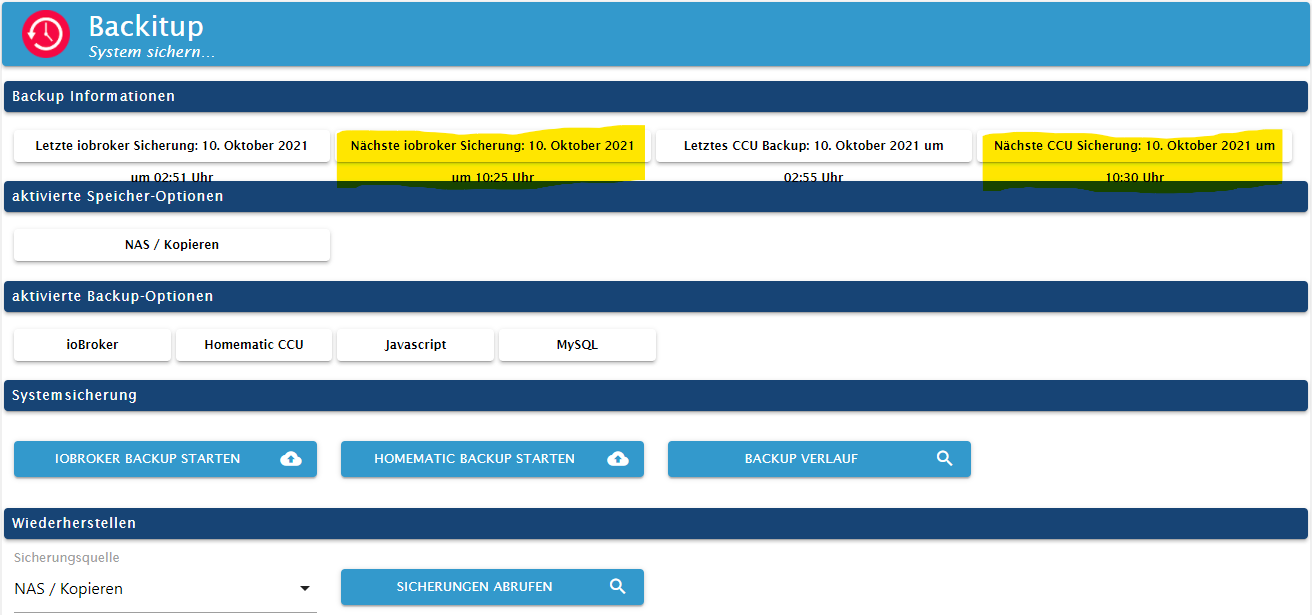
        Danach wird um 10:37 Uhr im Adapter folgendes angezeigt:
        backitup.png

        Es bleibt also der alte verstrichene Zeitpunkt erhalten und es werden keine künftigen Backups durchgeführt. Die geplante CCU-Sicherung um 10:30 Uhr wurde erst gar nicht versucht (klappt aber wenn der Mountpunkt vorhanden ist).

        simatecS 1 Reply Last reply
        0
        • Dr. BakteriusD Dr. Bakterius

          @simatec sagte in Test Adapter Backitup v2.2.x:

          @dr-bakterius Kannst du dazu bitte den Debug-Log posten

          Klar. Ich habe mal die Backup-Zeit umgestellt und den Adapter auf 'debug' gestellt. Dann habe ich die Netzwerkverbindung zu der Windwos-Freigabe getrennt und den Backupprozess durchlaufen lassen. Hier das dazugehörende Log:

          2021-10-10 10:19:29.844 - info: backitup.0 (15968) Got terminate signal TERMINATE_YOURSELF
          2021-10-10 10:19:29.868 - info: backitup.0 (15968) cleaned everything up...
          2021-10-10 10:19:29.869 - info: backitup.0 (15968) terminating
          2021-10-10 10:19:29.871 - info: backitup.0 (15968) Terminated (ADAPTER_REQUESTED_TERMINATION): Without reason
          2021-10-10 10:19:35.299 - info: backitup.0 (14574) starting. Version 2.1.17 in /opt/iobroker/node_modules/iobroker.backitup, node: v14.17.6, js-controller: 3.3.18
          2021-10-10 10:19:35.371 - info: backitup.0 (14574) [iobroker] backup was activated at 10:25 every 1 day(s)
          2021-10-10 10:19:35.464 - info: backitup.0 (14574) [ccu] backup was activated at 10:30 every 1 day(s)
          2021-10-10 10:19:41.279 - info: backitup.0 (14574) Got terminate signal TERMINATE_YOURSELF
          2021-10-10 10:19:41.281 - info: backitup.0 (14574) cleaned everything up...
          2021-10-10 10:19:41.284 - info: backitup.0 (14574) terminating
          2021-10-10 10:19:41.286 - info: backitup.0 (14574) Terminated (ADAPTER_REQUESTED_TERMINATION): Without reason
          2021-10-10 10:19:45.423 - debug: backitup.0 (14688) Redis Objects: Use Redis connection: 127.0.0.1:9001
          2021-10-10 10:19:45.469 - debug: backitup.0 (14688) Objects client ready ... initialize now
          2021-10-10 10:19:45.471 - debug: backitup.0 (14688) Objects create System PubSub Client
          2021-10-10 10:19:45.472 - debug: backitup.0 (14688) Objects create User PubSub Client
          2021-10-10 10:19:45.473 - debug: backitup.0 (14688) Objects client initialize lua scripts
          2021-10-10 10:19:45.513 - debug: backitup.0 (14688) Objects connected to redis: 127.0.0.1:9001
          2021-10-10 10:19:45.522 - debug: backitup.0 (14688) objectDB connected
          2021-10-10 10:19:45.524 - debug: backitup.0 (14688) Redis States: Use Redis connection: 127.0.0.1:9000
          2021-10-10 10:19:45.558 - debug: backitup.0 (14688) States create System PubSub Client
          2021-10-10 10:19:45.560 - debug: backitup.0 (14688) States create User PubSub Client
          2021-10-10 10:19:45.606 - debug: backitup.0 (14688) States connected to redis: 127.0.0.1:9000
          2021-10-10 10:19:45.607 - debug: backitup.0 (14688) statesDB connected
          2021-10-10 10:19:46.210 - debug: backitup.0 (14688) Plugin sentry Do not initialize Plugin (enabled=false)
          2021-10-10 10:19:46.261 - debug: backitup.0 (14688) Plugin sentry destroyed because not initialized correctly
          2021-10-10 10:19:46.269 - info: backitup.0 (14688) starting. Version 2.1.17 in /opt/iobroker/node_modules/iobroker.backitup, node: v14.17.6, js-controller: 3.3.18
          2021-10-10 10:19:46.353 - info: backitup.0 (14688) [iobroker] backup was activated at 10:25 every 1 day(s)
          2021-10-10 10:19:46.408 - info: backitup.0 (14688) [ccu] backup was activated at 10:30 every 1 day(s)
          2021-10-10 10:19:46.432 - debug: backitup.0 (14688) noserverino option: false
          2021-10-10 10:19:46.433 - debug: backitup.0 (14688) cifs-mount command: "sudo mount -t cifs -o username=****,password=****,rw,file_mode=0777,dir_mode=0777,vers=2.0 //192.168.1.10backup/ioBroker /opt/iobroker/backups"
          2021-10-10 10:19:46.474 - debug: backitup.0 (14688) first mount attempt with smb option failed. try next mount attempt without smb option ...
          2021-10-10 10:19:46.475 - debug: backitup.0 (14688) cifs-mount command: "sudo mount -t cifs -o username=****,password=****,rw,file_mode=0777,dir_mode=0777 //192.168.1.10backup/ioBroker /opt/iobroker/backups"
          2021-10-10 10:19:46.544 - debug: backitup.0 (14688) mount successfully completed
          2021-10-10 10:19:48.558 - debug: backitup.0 (14688) detect backup file 1 from cifs: iobroker_2021_09_01-02_50_20_backupiobroker.tar.gz
          2021-10-10 10:19:48.559 - debug: backitup.0 (14688) detect backup file 2 from cifs: iobroker_2021_09_02-02_50_20_backupiobroker.tar.gz
          2021-10-10 10:19:48.560 - debug: backitup.0 (14688) detect backup file 3 from cifs: iobroker_2021_09_03-02_50_20_backupiobroker.tar.gz
          2021-10-10 10:19:48.560 - debug: backitup.0 (14688) detect backup file 4 from cifs: iobroker_2021_09_12-02_50_20_backupiobroker.tar.gz
          2021-10-10 10:19:48.560 - debug: backitup.0 (14688) detect backup file 5 from cifs: iobroker_2021_09_13-02_50_20_backupiobroker.tar.gz
          2021-10-10 10:19:48.561 - debug: backitup.0 (14688) detect backup file 6 from cifs: iobroker_2021_09_14-02_50_25_backupiobroker.tar.gz
          2021-10-10 10:19:48.561 - debug: backitup.0 (14688) detect backup file 7 from cifs: iobroker_2021_09_15-02_50_20_backupiobroker.tar.gz
          2021-10-10 10:19:48.562 - debug: backitup.0 (14688) detect backup file 8 from cifs: iobroker_2021_09_16-02_50_20_backupiobroker.tar.gz
          2021-10-10 10:19:48.562 - debug: backitup.0 (14688) detect backup file 9 from cifs: iobroker_2021_09_17-02_50_20_backupiobroker.tar.gz
          2021-10-10 10:19:48.562 - debug: backitup.0 (14688) detect backup file 10 from cifs: iobroker_2021_09_18-02_50_20_backupiobroker.tar.gz
          2021-10-10 10:19:48.563 - debug: backitup.0 (14688) detect backup file 11 from cifs: iobroker_2021_09_19-02_50_25_backupiobroker.tar.gz
          2021-10-10 10:19:48.563 - debug: backitup.0 (14688) detect backup file 12 from cifs: iobroker_2021_09_20-02_50_20_backupiobroker.tar.gz
          2021-10-10 10:19:48.564 - debug: backitup.0 (14688) detect backup file 13 from cifs: iobroker_2021_09_21-02_50_25_backupiobroker.tar.gz
          2021-10-10 10:19:48.564 - debug: backitup.0 (14688) detect backup file 14 from cifs: iobroker_2021_09_22-02_50_20_backupiobroker.tar.gz
          2021-10-10 10:19:48.564 - debug: backitup.0 (14688) detect backup file 15 from cifs: iobroker_2021_09_23-02_50_20_backupiobroker.tar.gz
          2021-10-10 10:19:48.565 - debug: backitup.0 (14688) detect backup file 16 from cifs: iobroker_2021_09_24-02_50_20_backupiobroker.tar.gz
          2021-10-10 10:19:48.565 - debug: backitup.0 (14688) detect backup file 17 from cifs: iobroker_2021_09_25-02_50_20_backupiobroker.tar.gz
          2021-10-10 10:19:48.566 - debug: backitup.0 (14688) detect backup file 18 from cifs: iobroker_2021_09_26-02_50_20_backupiobroker.tar.gz
          2021-10-10 10:19:48.567 - debug: backitup.0 (14688) detect backup file 19 from cifs: iobroker_2021_09_27-02_50_25_backupiobroker.tar.gz
          2021-10-10 10:19:48.567 - debug: backitup.0 (14688) detect backup file 20 from cifs: iobroker_2021_09_28-02_50_20_backupiobroker.tar.gz
          2021-10-10 10:19:48.568 - debug: backitup.0 (14688) detect backup file 21 from cifs: iobroker_2021_09_29-02_50_20_backupiobroker.tar.gz
          2021-10-10 10:19:48.568 - debug: backitup.0 (14688) detect backup file 22 from cifs: iobroker_2021_09_30-02_50_20_backupiobroker.tar.gz
          2021-10-10 10:19:48.569 - debug: backitup.0 (14688) detect backup file 23 from cifs: iobroker_2021_10_01-02_50_20_backupiobroker.tar.gz
          2021-10-10 10:19:48.570 - debug: backitup.0 (14688) detect backup file 24 from cifs: iobroker_2021_10_02-02_50_20_backupiobroker.tar.gz
          2021-10-10 10:19:48.570 - debug: backitup.0 (14688) detect backup file 25 from cifs: iobroker_2021_10_08-02_50_20_backupiobroker.tar.gz
          2021-10-10 10:19:48.571 - debug: backitup.0 (14688) detect backup file 26 from cifs: iobroker_2021_10_09-02_50_20_backupiobroker.tar.gz
          2021-10-10 10:19:48.571 - debug: backitup.0 (14688) detect backup file 27 from cifs: iobroker_2021_10_10-02_50_20_backupiobroker.tar.gz
          2021-10-10 10:19:48.573 - debug: backitup.0 (14688) detect last backup file: iobroker_2021_10_10-02_50_20_backupiobroker.tar.gz
          2021-10-10 10:19:56.338 - debug: backitup.0 (14688) mount activ... umount in 2 Seconds!!
          2021-10-10 10:19:58.366 - debug: backitup.0 (14688) umount successfully completed
          2021-10-10 10:25:10.232 - debug: backitup.0 (14688) Backup has started ...
          2021-10-10 10:25:20.233 - debug: backitup.0 (14688) [iobroker/mount] noserverino option: false
          2021-10-10 10:25:20.234 - debug: backitup.0 (14688) [iobroker/mount] cifs-mount command: "sudo mount -t cifs -o username=****,password=****,rw,file_mode=0777,dir_mode=0777,vers=2.0 //192.168.1.10/backup/ioBroker /opt/iobroker/backups"
          2021-10-10 10:25:26.413 - debug: backitup.0 (14688) [iobroker/mount] first mount attempt with smb option failed. try next mount attempt without smb option ...
          2021-10-10 10:25:26.414 - debug: backitup.0 (14688) [iobroker/mount] cifs-mount command: "sudo mount -t cifs -o username=****,password=****,rw,file_mode=0777,dir_mode=0777 //192.168.1.10/backup/ioBroker /opt/iobroker/backups"
          2021-10-10 10:25:32.553 - debug: backitup.0 (14688) [iobroker/mount] [undefined Error: Command failed: sudo mount -t cifs -o username=****,password=****,rw,file_mode=0777,dir_mode=0777 //192.168.1.10/backup/ioBroker /opt/iobroker/backups
          2021-10-10 10:25:32.553 - debug: backitup.0 (14688) [iobroker/mount] mount: /opt/iobroker/backups: special device //192.168.1.10/backup/ioBroker does not exist.
          2021-10-10 10:25:32.554 - debug: backitup.0 (14688) [iobroker/mount] [IGNORED] Error: Command failed: sudo mount -t cifs -o username=****,password=****,rw,file_mode=0777,dir_mode=0777 //192.168.1.10/backup/ioBroker /opt/iobroker/backups
          2021-10-10 10:25:32.555 - debug: backitup.0 (14688) [iobroker/mount] mount: /opt/iobroker/backups: special device //192.168.1.10/backup/ioBroker does not exist.
          2021-10-10 10:25:35.964 - debug: backitup.0 (14688) [iobroker/iobroker] host.iobroker 11823 states saved
          2021-10-10 10:25:35.998 - debug: backitup.0 (14688) [iobroker/iobroker] host.iobroker 11040 objects saved
          2021-10-10 10:25:41.152 - debug: backitup.0 (14688) [iobroker/iobroker] Backup created: /opt/iobroker/backups/iobroker_2021_10_10-10_25_32_backupiobroker.tar.gz
          2021-10-10 10:25:42.198 - debug: backitup.0 (14688) [iobroker/iobroker] done
          2021-10-10 10:26:22.113 - debug: backitup.0 (14688) [iobroker/mysql] Packed 19MB so far...
          2021-10-10 10:26:31.720 - debug: backitup.0 (14688) [iobroker/mysql] MySql File deleted!
          2021-10-10 10:26:31.728 - debug: backitup.0 (14688) [iobroker/mysql] done
          2021-10-10 10:26:33.365 - debug: backitup.0 (14688) [iobroker/javascripts] Backup created: /opt/iobroker/backups/javascripts_2021_10_10-10_26_32_backupiobroker.tar.gz
          2021-10-10 10:26:33.366 - debug: backitup.0 (14688) [iobroker/javascripts] done
          2021-10-10 10:26:33.672 - debug: backitup.0 (14688) [iobroker/cifs] done
          2021-10-10 10:26:34.275 - debug: backitup.0 (14688) [iobroker/clean] Backup files not deleted from /opt/iobroker/backups because some errors.
          2021-10-10 10:26:34.275 - debug: backitup.0 (14688) [iobroker/clean] done
          2021-10-10 10:26:34.600 - debug: backitup.0 (14688) sendTo "send" to system.adapter.pushover.0 from system.adapter.backitup.0
          2021-10-10 10:26:34.601 - debug: backitup.0 (14688) [iobroker/pushover] done
          2021-10-10 10:26:35.057 - debug: backitup.0 (14688) [iobroker/historyHTML] new history html values created
          2021-10-10 10:26:35.058 - debug: backitup.0 (14688) [iobroker/historyHTML] done
          2021-10-10 10:26:35.213 - debug: backitup.0 (14688) [iobroker/historyJSON] new history json values created
          2021-10-10 10:26:35.214 - debug: backitup.0 (14688) [iobroker/historyJSON] done
          

          Danach wird um 10:37 Uhr im Adapter folgendes angezeigt:
          backitup.png

          Es bleibt also der alte verstrichene Zeitpunkt erhalten und es werden keine künftigen Backups durchgeführt. Die geplante CCU-Sicherung um 10:30 Uhr wurde erst gar nicht versucht (klappt aber wenn der Mountpunkt vorhanden ist).

          simatecS Offline
          simatecS Offline
          simatec
          Developer Most Active
          wrote on last edited by
          #1518

          @dr-bakterius
          OK jetzt verstehe ich dein Problem.
          Jeder Prozess während eines Backups hat eine Error Auswertung vorgesehen.
          Es gibt aber Prozesse wie z.B. der mount, wo Fehler ignoriert werden.
          In dem Fall steht das eigentlichen Backup in der Prio höher und das Backup wird lokal erstellt.

          Jetzt wäre zu überlegen, ob ich bestimmte Prozesse da konfigurierbar mache. Da muss ich mir mal Gedanken machen.

          • Besuche meine Github Seite
          • Beitrag hat geholfen oder willst du mich unterstützen
          • HowTo Restore ioBroker
          Dr. BakteriusD 1 Reply Last reply
          0
          • simatecS simatec

            @dr-bakterius
            OK jetzt verstehe ich dein Problem.
            Jeder Prozess während eines Backups hat eine Error Auswertung vorgesehen.
            Es gibt aber Prozesse wie z.B. der mount, wo Fehler ignoriert werden.
            In dem Fall steht das eigentlichen Backup in der Prio höher und das Backup wird lokal erstellt.

            Jetzt wäre zu überlegen, ob ich bestimmte Prozesse da konfigurierbar mache. Da muss ich mir mal Gedanken machen.

            Dr. BakteriusD Online
            Dr. BakteriusD Online
            Dr. Bakterius
            Most Active
            wrote on last edited by
            #1519

            @simatec Sorry, aber ich verstehe nicht was das mit der Backupplanung zu tun hat. IMHO sollte nach verstreichen der geplanten Zeit (egal ob das Backup fehlerfrei durchgeführt werden konnte oder nicht) der nächste Backupzeitpunkt geplant werden. Dann werden eben solange lokale Backups durchgeführt bis das Mountziel wieder erreichbar ist.

            simatecS 1 Reply Last reply
            0
            • Dr. BakteriusD Dr. Bakterius

              @simatec Sorry, aber ich verstehe nicht was das mit der Backupplanung zu tun hat. IMHO sollte nach verstreichen der geplanten Zeit (egal ob das Backup fehlerfrei durchgeführt werden konnte oder nicht) der nächste Backupzeitpunkt geplant werden. Dann werden eben solange lokale Backups durchgeführt bis das Mountziel wieder erreichbar ist.

              simatecS Offline
              simatecS Offline
              simatec
              Developer Most Active
              wrote on last edited by
              #1520

              @dr-bakterius
              Schaue ich mir noch mal genauer an

              • Besuche meine Github Seite
              • Beitrag hat geholfen oder willst du mich unterstützen
              • HowTo Restore ioBroker
              1 Reply Last reply
              1
              • SKBS Offline
                SKBS Offline
                SKB
                Developer Most Active
                wrote on last edited by
                #1521

                Hallo,
                ich habe zu dem Adapter auch mal eine Frage, wo ich nicht so ganz verstehe, wie dies funktioniert.
                Also, ich habe auf einem FreeNAS eine SMB Freigabe, die dem Benutzer "iobroker" gehört.
                Dies mounte ich auf dem Pi via BackItUp und "nutze sudo" wegen der Parameter.
                Sichern klappt problemlos. Jetzt würde ich gerne die influxDB auf einem anderen Server wiederherstellen.
                Dies schlägt fehl mit:

                backitup.0	2021-10-12 17:12:35.599	error	[influxDB] infuxDB Restore not completed
                backitup.0	2021-10-12 17:12:35.598	error	[influxDB] Error: EPERM: operation not permitted, utime '/opt/iobroker/backups/influxDBtmp/'
                

                Schaue ich in das Verzeichnis, wo ja gemounted wird, gehören alle Dateien "root". Weiter oben hatte ich dazu etwas gelesen, aber der Schreiber hat es wohl anders hinbekommen.

                ... wer nicht mit der Zeit geht, geht mit der Zeit ...

                Aktuelle Entwicklung: Energiefluss - erweitert (https://forum.iobroker.net/topic/64734)

                Thomas BraunT 1 Reply Last reply
                0
                • SKBS SKB

                  Hallo,
                  ich habe zu dem Adapter auch mal eine Frage, wo ich nicht so ganz verstehe, wie dies funktioniert.
                  Also, ich habe auf einem FreeNAS eine SMB Freigabe, die dem Benutzer "iobroker" gehört.
                  Dies mounte ich auf dem Pi via BackItUp und "nutze sudo" wegen der Parameter.
                  Sichern klappt problemlos. Jetzt würde ich gerne die influxDB auf einem anderen Server wiederherstellen.
                  Dies schlägt fehl mit:

                  backitup.0	2021-10-12 17:12:35.599	error	[influxDB] infuxDB Restore not completed
                  backitup.0	2021-10-12 17:12:35.598	error	[influxDB] Error: EPERM: operation not permitted, utime '/opt/iobroker/backups/influxDBtmp/'
                  

                  Schaue ich in das Verzeichnis, wo ja gemounted wird, gehören alle Dateien "root". Weiter oben hatte ich dazu etwas gelesen, aber der Schreiber hat es wohl anders hinbekommen.

                  Thomas BraunT Online
                  Thomas BraunT Online
                  Thomas Braun
                  Most Active
                  wrote on last edited by
                  #1522

                  @skb sagte in Test Adapter Backitup v2.2.x:

                  utime

                  Aus der man page:

                  Changing timestamps is permitted when: either the process has appropriate privileges, or the effective user ID equals the user ID of the file, or times is NULL and the process has write
                  permission for the file.

                  Linux-Werkzeugkasten:
                  https://forum.iobroker.net/topic/42952/der-kleine-iobroker-linux-werkzeugkasten
                  NodeJS Fixer Skript:
                  https://forum.iobroker.net/topic/68035/iob-node-fix-skript
                  iob_diag: curl -sLf -o diag.sh https://iobroker.net/diag.sh && bash diag.sh

                  SKBS 1 Reply Last reply
                  0
                  • Thomas BraunT Thomas Braun

                    @skb sagte in Test Adapter Backitup v2.2.x:

                    utime

                    Aus der man page:

                    Changing timestamps is permitted when: either the process has appropriate privileges, or the effective user ID equals the user ID of the file, or times is NULL and the process has write
                    permission for the file.

                    SKBS Offline
                    SKBS Offline
                    SKB
                    Developer Most Active
                    wrote on last edited by
                    #1523

                    @thomas-braun Ok, komme ich gerade nicht mit, wenn ich ehrlich bin.
                    Wieso ist denn der Benutzer root und nicht iobroker? Weil die ID's auf den verschiedenen Systemen unterschiedlich sind?
                    Wieso muss denn die Zeit geändert werden? Ich möchte nur eine Wiederherstellung.

                    Wenn ich das File aus dem Backup manuell in das /backups/ Verzeichnis kopiere und dann "Restore", geht es ja auch.

                    ... wer nicht mit der Zeit geht, geht mit der Zeit ...

                    Aktuelle Entwicklung: Energiefluss - erweitert (https://forum.iobroker.net/topic/64734)

                    Thomas BraunT 1 Reply Last reply
                    0
                    • SKBS SKB

                      @thomas-braun Ok, komme ich gerade nicht mit, wenn ich ehrlich bin.
                      Wieso ist denn der Benutzer root und nicht iobroker? Weil die ID's auf den verschiedenen Systemen unterschiedlich sind?
                      Wieso muss denn die Zeit geändert werden? Ich möchte nur eine Wiederherstellung.

                      Wenn ich das File aus dem Backup manuell in das /backups/ Verzeichnis kopiere und dann "Restore", geht es ja auch.

                      Thomas BraunT Online
                      Thomas BraunT Online
                      Thomas Braun
                      Most Active
                      wrote on last edited by Thomas Braun
                      #1524

                      @skb

                      Das kann damit zusammenhängen, welches Dateisystem auf dem smb-Server verwendet wird. Wenn das z. B. ntfs ist, dann kennt das die unix-Rechte nicht und das wird dann beim mount 'emuliert'.

                      Die uid's der user unterscheiden sich auf den Systemen?

                      Die utime ist der Zeitstempel, wann die Datei 'angefasst' wurde. Die darf nur der Besitzer der Datei oder root verändern.

                      Linux-Werkzeugkasten:
                      https://forum.iobroker.net/topic/42952/der-kleine-iobroker-linux-werkzeugkasten
                      NodeJS Fixer Skript:
                      https://forum.iobroker.net/topic/68035/iob-node-fix-skript
                      iob_diag: curl -sLf -o diag.sh https://iobroker.net/diag.sh && bash diag.sh

                      SKBS 1 Reply Last reply
                      0
                      • Thomas BraunT Thomas Braun

                        @skb

                        Das kann damit zusammenhängen, welches Dateisystem auf dem smb-Server verwendet wird. Wenn das z. B. ntfs ist, dann kennt das die unix-Rechte nicht und das wird dann beim mount 'emuliert'.

                        Die uid's der user unterscheiden sich auf den Systemen?

                        Die utime ist der Zeitstempel, wann die Datei 'angefasst' wurde. Die darf nur der Besitzer der Datei oder root verändern.

                        SKBS Offline
                        SKBS Offline
                        SKB
                        Developer Most Active
                        wrote on last edited by
                        #1525

                        @thomas-braun Also, es sind beides Linux Systeme. Pi und FreeNAS (jetzt TrueNAS).
                        Ja, die UID's unterscheiden sich. Daher passt dies wohl nicht ganz, oder?

                        ... wer nicht mit der Zeit geht, geht mit der Zeit ...

                        Aktuelle Entwicklung: Energiefluss - erweitert (https://forum.iobroker.net/topic/64734)

                        Thomas BraunT 1 Reply Last reply
                        0
                        • SKBS SKB

                          @thomas-braun Also, es sind beides Linux Systeme. Pi und FreeNAS (jetzt TrueNAS).
                          Ja, die UID's unterscheiden sich. Daher passt dies wohl nicht ganz, oder?

                          Thomas BraunT Online
                          Thomas BraunT Online
                          Thomas Braun
                          Most Active
                          wrote on last edited by
                          #1526

                          @skb
                          Ja, dann ist das ein anderer User, der hat dann keine Rechte an der Datei.

                          Linux-Werkzeugkasten:
                          https://forum.iobroker.net/topic/42952/der-kleine-iobroker-linux-werkzeugkasten
                          NodeJS Fixer Skript:
                          https://forum.iobroker.net/topic/68035/iob-node-fix-skript
                          iob_diag: curl -sLf -o diag.sh https://iobroker.net/diag.sh && bash diag.sh

                          SKBS 1 Reply Last reply
                          0
                          • Thomas BraunT Thomas Braun

                            @skb
                            Ja, dann ist das ein anderer User, der hat dann keine Rechte an der Datei.

                            SKBS Offline
                            SKBS Offline
                            SKB
                            Developer Most Active
                            wrote on last edited by
                            #1527

                            @thomas-braun Danke.

                            Macht es Sinn, die ID'S anzupassen, wie hier beschrieben?
                            https://www.thegeekdiary.com/how-to-correctly-change-the-uid-and-gid-of-a-user-group-in-linux/

                            ... wer nicht mit der Zeit geht, geht mit der Zeit ...

                            Aktuelle Entwicklung: Energiefluss - erweitert (https://forum.iobroker.net/topic/64734)

                            Thomas BraunT 1 Reply Last reply
                            0
                            • SKBS SKB

                              @thomas-braun Danke.

                              Macht es Sinn, die ID'S anzupassen, wie hier beschrieben?
                              https://www.thegeekdiary.com/how-to-correctly-change-the-uid-and-gid-of-a-user-group-in-linux/

                              Thomas BraunT Online
                              Thomas BraunT Online
                              Thomas Braun
                              Most Active
                              wrote on last edited by Thomas Braun
                              #1528

                              @skb Ich würde die Freigabe einfach mit anderen Optionen mounten, dann passt es wieder.

                              Mit den uid's fummelt man besser nicht rum, das gibt ganz schnell arges Kopfweh.

                              Linux-Werkzeugkasten:
                              https://forum.iobroker.net/topic/42952/der-kleine-iobroker-linux-werkzeugkasten
                              NodeJS Fixer Skript:
                              https://forum.iobroker.net/topic/68035/iob-node-fix-skript
                              iob_diag: curl -sLf -o diag.sh https://iobroker.net/diag.sh && bash diag.sh

                              SKBS 1 Reply Last reply
                              0
                              • Thomas BraunT Thomas Braun

                                @skb Ich würde die Freigabe einfach mit anderen Optionen mounten, dann passt es wieder.

                                Mit den uid's fummelt man besser nicht rum, das gibt ganz schnell arges Kopfweh.

                                SKBS Offline
                                SKBS Offline
                                SKB
                                Developer Most Active
                                wrote on last edited by
                                #1529

                                @thomas-braun Kannst Du mir bei den Optionen behilflich sein, bitte?

                                ... wer nicht mit der Zeit geht, geht mit der Zeit ...

                                Aktuelle Entwicklung: Energiefluss - erweitert (https://forum.iobroker.net/topic/64734)

                                Thomas BraunT 1 Reply Last reply
                                0
                                • SKBS SKB

                                  @thomas-braun Kannst Du mir bei den Optionen behilflich sein, bitte?

                                  Thomas BraunT Online
                                  Thomas BraunT Online
                                  Thomas Braun
                                  Most Active
                                  wrote on last edited by
                                  #1530

                                  @skb

                                  Mach einen eigenen Threda dazu auf, das passt nicht zu 'Test Adapter Backitup'.

                                  Linux-Werkzeugkasten:
                                  https://forum.iobroker.net/topic/42952/der-kleine-iobroker-linux-werkzeugkasten
                                  NodeJS Fixer Skript:
                                  https://forum.iobroker.net/topic/68035/iob-node-fix-skript
                                  iob_diag: curl -sLf -o diag.sh https://iobroker.net/diag.sh && bash diag.sh

                                  1 Reply Last reply
                                  0
                                  • liv-in-skyL Offline
                                    liv-in-skyL Offline
                                    liv-in-sky
                                    wrote on last edited by
                                    #1531

                                    frage:

                                    wenn ich unter speicherort COPY einstelle - also kein cifs (da proxmox mit mountpoint auf andere festplatte), sollten dann unter /opt/iobroker/backups die dateien gelöscht werden ?

                                    ich habe 8 backups aufheben eingestellt - im copy-pfad werden die daten nicht mehr wie 8 - das passt somit

                                    ich dachte, es sollten aber unter /opt/iobroker/backups keine dateien mehr liegen

                                    nach einem gelösten Thread wäre es sinnvoll dies in der Überschrift des ersten Posts einzutragen [gelöst]-... Bitte benutzt das Voting rechts unten im Beitrag wenn er euch geholfen hat. Forum-Tools: PicPick https://picpick.app/en/download/ und ScreenToGif https://www.screentogif.com/downloads.html

                                    simatecS 1 Reply Last reply
                                    0
                                    • liv-in-skyL liv-in-sky

                                      frage:

                                      wenn ich unter speicherort COPY einstelle - also kein cifs (da proxmox mit mountpoint auf andere festplatte), sollten dann unter /opt/iobroker/backups die dateien gelöscht werden ?

                                      ich habe 8 backups aufheben eingestellt - im copy-pfad werden die daten nicht mehr wie 8 - das passt somit

                                      ich dachte, es sollten aber unter /opt/iobroker/backups keine dateien mehr liegen

                                      simatecS Offline
                                      simatecS Offline
                                      simatec
                                      Developer Most Active
                                      wrote on last edited by
                                      #1532

                                      @liv-in-sky Bei der Copy Funktion werden die Backups lokal erstellt und bleiben auch dort bis zum erreichen der eingestellten Anzahl liegen.
                                      Copy ist im Prinzip die identische Funktion wie alle Cloud-Dienste.

                                      Gegen lokal und Copy oder Cloud würde maximal ein System auf SD-Karte sprechen.
                                      Ansonsten ist am Ende nur wichtig, dass es bei Systemcrash einen weiteren Speicherpfad gibt.

                                      • Besuche meine Github Seite
                                      • Beitrag hat geholfen oder willst du mich unterstützen
                                      • HowTo Restore ioBroker
                                      liv-in-skyL 2 Replies Last reply
                                      0
                                      • simatecS simatec

                                        @liv-in-sky Bei der Copy Funktion werden die Backups lokal erstellt und bleiben auch dort bis zum erreichen der eingestellten Anzahl liegen.
                                        Copy ist im Prinzip die identische Funktion wie alle Cloud-Dienste.

                                        Gegen lokal und Copy oder Cloud würde maximal ein System auf SD-Karte sprechen.
                                        Ansonsten ist am Ende nur wichtig, dass es bei Systemcrash einen weiteren Speicherpfad gibt.

                                        liv-in-skyL Offline
                                        liv-in-skyL Offline
                                        liv-in-sky
                                        wrote on last edited by liv-in-sky
                                        #1533

                                        @simatec

                                        moin moin - würde es keinen sinn machen, auch ein "move" einzufügen - habe mehrere instanzen (damit ich meine geänderten scripte nicht verliere) und jedesmal wird das netzwerk (bei cifs) belastet, obwohl die externe platte "dran hängt"

                                        nach einem gelösten Thread wäre es sinnvoll dies in der Überschrift des ersten Posts einzutragen [gelöst]-... Bitte benutzt das Voting rechts unten im Beitrag wenn er euch geholfen hat. Forum-Tools: PicPick https://picpick.app/en/download/ und ScreenToGif https://www.screentogif.com/downloads.html

                                        simatecS 1 Reply Last reply
                                        0
                                        • liv-in-skyL liv-in-sky

                                          @simatec

                                          moin moin - würde es keinen sinn machen, auch ein "move" einzufügen - habe mehrere instanzen (damit ich meine geänderten scripte nicht verliere) und jedesmal wird das netzwerk (bei cifs) belastet, obwohl die externe platte "dran hängt"

                                          simatecS Offline
                                          simatecS Offline
                                          simatec
                                          Developer Most Active
                                          wrote on last edited by
                                          #1534

                                          @liv-in-sky Erkläre mal bitte deine Hardware-Config ... Kann nicht so recht folgen

                                          • Besuche meine Github Seite
                                          • Beitrag hat geholfen oder willst du mich unterstützen
                                          • HowTo Restore ioBroker
                                          1 Reply Last reply
                                          0
                                          Reply
                                          • Reply as topic
                                          Log in to reply
                                          • Oldest to Newest
                                          • Newest to Oldest
                                          • Most Votes


                                          Support us

                                          ioBroker
                                          Community Adapters
                                          Donate

                                          588

                                          Online

                                          32.7k

                                          Users

                                          82.5k

                                          Topics

                                          1.3m

                                          Posts
                                          Community
                                          Impressum | Datenschutz-Bestimmungen | Nutzungsbedingungen | Einwilligungseinstellungen
                                          ioBroker Community 2014-2025
                                          logo
                                          • Login

                                          • Don't have an account? Register

                                          • Login or register to search.
                                          • First post
                                            Last post
                                          0
                                          • Home
                                          • Recent
                                          • Tags
                                          • Unread 0
                                          • Categories
                                          • Unreplied
                                          • Popular
                                          • GitHub
                                          • Docu
                                          • Hilfe