Skip to content
  • Home
  • Recent
  • Tags
  • 0 Unread 0
  • Categories
  • Unreplied
  • Popular
  • GitHub
  • Docu
  • Hilfe
Skins
  • Light
  • Brite
  • Cerulean
  • Cosmo
  • Flatly
  • Journal
  • Litera
  • Lumen
  • Lux
  • Materia
  • Minty
  • Morph
  • Pulse
  • Sandstone
  • Simplex
  • Sketchy
  • Spacelab
  • United
  • Yeti
  • Zephyr
  • Dark
  • Cyborg
  • Darkly
  • Quartz
  • Slate
  • Solar
  • Superhero
  • Vapor

  • Default (No Skin)
  • No Skin
Collapse
ioBroker Logo

Community Forum

donate donate
  1. ioBroker Community Home
  2. Deutsch
  3. Tester
  4. Test Adapter ioBroker.backitup v3.1.x

NEWS

  • Monatsrückblick Januar/Februar 2026 ist online!
    BluefoxB
    Bluefox
    12
    1
    140

  • Jahresrückblick 2025 – unser neuer Blogbeitrag ist online! ✨
    BluefoxB
    Bluefox
    17
    1
    4.3k

  • Neuer Blogbeitrag: Monatsrückblick - Dezember 2025 🎄
    BluefoxB
    Bluefox
    13
    1
    1.3k

Test Adapter ioBroker.backitup v3.1.x

Scheduled Pinned Locked Moved Tester
backitupbackitup backupccuhistorymysqlredisrestorerestore backup
2.8k Posts 170 Posters 2.4m Views 113 Watching
  • Oldest to Newest
  • Newest to Oldest
  • Most Votes
Reply
  • Reply as topic
Log in to reply
This topic has been deleted. Only users with topic management privileges can see it.
  • M MCU

    @simatec Wie kann ich denn die Daten von jarvis aus der Komplettsicherung herausholen?

    simatecS Online
    simatecS Online
    simatec
    Developer Most Active
    wrote on last edited by
    #1055

    @mcu
    Wieso Komplettsicherung? Du kannst doch die Jarvis Config separat sichern und das auch wiederherstellen

    • Besuche meine Github Seite
    • Beitrag hat geholfen oder willst du mich unterstützen
    • HowTo Restore ioBroker
    M 1 Reply Last reply
    0
    • simatecS simatec

      @mcu
      Wieso Komplettsicherung? Du kannst doch die Jarvis Config separat sichern und das auch wiederherstellen

      M Online
      M Online
      MCU
      wrote on last edited by
      #1056

      @simatec Über eine 2. Instanz?

      NUC i7 64GB mit Proxmox ---- Jarvis Infos Aktualisierungen der Doku auf Instagram verfolgen -> mcuiobroker Instagram
      Wenn Euch mein Vorschlag geholfen hat, bitte rechts "^" klicken.

      simatecS 1 Reply Last reply
      0
      • M MCU

        @simatec Über eine 2. Instanz?

        simatecS Online
        simatecS Online
        simatec
        Developer Most Active
        wrote on last edited by
        #1057

        @mcu
        Nein einfach im Menü auswählen und du hast ein separates Backup der Jarvis Config.

        Steht alles in der Readme
        https://github.com/simatec/ioBroker.backitup/blob/master/docs/de/backitup.md

        • Besuche meine Github Seite
        • Beitrag hat geholfen oder willst du mich unterstützen
        • HowTo Restore ioBroker
        M 1 Reply Last reply
        0
        • simatecS simatec

          @mcu
          Nein einfach im Menü auswählen und du hast ein separates Backup der Jarvis Config.

          Steht alles in der Readme
          https://github.com/simatec/ioBroker.backitup/blob/master/docs/de/backitup.md

          M Online
          M Online
          MCU
          wrote on last edited by MCU
          #1058

          @simatec Das mache ich ja.
          2cf0c2cb-3ac8-4d96-8b2d-e6d660d65c96-image.png
          In der config sind aber keine Daten von den DPs.

          NUC i7 64GB mit Proxmox ---- Jarvis Infos Aktualisierungen der Doku auf Instagram verfolgen -> mcuiobroker Instagram
          Wenn Euch mein Vorschlag geholfen hat, bitte rechts "^" klicken.

          simatecS 1 Reply Last reply
          0
          • M MCU

            @simatec Das mache ich ja.
            2cf0c2cb-3ac8-4d96-8b2d-e6d660d65c96-image.png
            In der config sind aber keine Daten von den DPs.

            simatecS Online
            simatecS Online
            simatec
            Developer Most Active
            wrote on last edited by
            #1059

            @mcu
            Die sollten beim restore aus der json kommen. Aber da kann @Zefau sicher mehr zu sagen.

            • Besuche meine Github Seite
            • Beitrag hat geholfen oder willst du mich unterstützen
            • HowTo Restore ioBroker
            M 1 Reply Last reply
            0
            • simatecS simatec

              @mcu
              Die sollten beim restore aus der json kommen. Aber da kann @Zefau sicher mehr zu sagen.

              M Online
              M Online
              MCU
              wrote on last edited by MCU
              #1060

              @simatec ok. Danke.
              Hab es gefunden. Ist in der Backup.json unter

              Layout-Daten unter:

              "jarvis.0.layout": {
                    "val": "[{\"title\":\"\",
              

              zu finden.

              Device -Daten unter

              "jarvis.0.devices": {
                    "val": "{\"
              

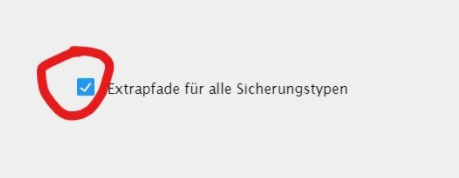
              Ich habe keine extra Datei, da ich keine Nas Kopie ausgewählt hatte. Dort kann man Extrapfade anlegen:
              ca6bbdd4-677e-4adc-a65b-08f9abd1e290-image.png

              Kann man das auch für lokal Sicherungen so einrichten?

              NUC i7 64GB mit Proxmox ---- Jarvis Infos Aktualisierungen der Doku auf Instagram verfolgen -> mcuiobroker Instagram
              Wenn Euch mein Vorschlag geholfen hat, bitte rechts "^" klicken.

              1 Reply Last reply
              0
              • simatecS Online
                simatecS Online
                simatec
                Developer Most Active
                wrote on last edited by
                #1061

                Ab sofort steht auf Github und in kürze auch im latest die Version 2.0.3 zur Verfügung.

                Changelog

                2.0.3 (04.03.2021)

                • (simatec) Promise for redis aof added
                • (simatec) BugFix Grafana restore
                • (simatec) small BugFix umount
                • Besuche meine Github Seite
                • Beitrag hat geholfen oder willst du mich unterstützen
                • HowTo Restore ioBroker
                1 Reply Last reply
                0
                • HALH Offline
                  HALH Offline
                  HAL
                  wrote on last edited by HAL
                  #1062

                  @simatec , V2.0.3 ist installiert aber ich habe Probleme bei restore von influxDB. Um mount Fehler auszuschließen, habe ich lokal eine Sicherung von iobroker, garfana und influxDB gemacht. Bei Restore von InfluxDB kommt folgender Fehler:

                  rror_outlineError: {"errno":-1,"code":"EPERM","syscall":"utime","path":"/opt/iobroker/backups/influxDBtmp/20210304T125130Z.manifest"}
                  

                  Im log steht dazu:

                  backitup.0	2021-03-04 13:57:01.872	debug	(3620) telegram-instance:
                  backitup.0	2021-03-04 13:53:41.449	debug	(3620) sendTo "restore" to system.adapter.admin.0 from system.adapter.backitup.0
                  backitup.0	2021-03-04 13:53:41.448	error	(3620) [influxDB] infuxDB Restore not completed
                  backitup.0	2021-03-04 13:53:41.447	error	(3620) [influxDB] Error: EPERM: operation not permitted, utime '/opt/iobroker/backups/influxDBtmp/20210304T125130Z.manifest'
                  backitup.0	2021-03-04 13:53:41.091	debug	(3620) [influxDB] Start infuxDB Restore ...
                  backitup.0	2021-03-04 13:53:41.090	debug	(3620) [influxDB] Created tmp directory
                  backitup.0	2021-03-04 13:53:41.085	debug	(3620) [influxDB] InfluxDB old tmp directory was successfully deleted
                  backitup.0	2021-03-04 13:53:41.080	debug	(3620) [influxDB] Try deleting the old InfluxDB tmp directory
                  backitup.0	2021-03-04 13:53:30.035	debug	(3620) sendTo "list" to system.adapter.admin.0 from system.adapter.backitup.0
                  

                  Alle Raspberry ( 5 ) gegen NUC (N100, 16GB Ram und 500GB M2 SSD, extern 2TB SSD ) mit Proxmox 8.3.3 gewechselt. Läuft absolut super !
                  (Iobroker, Grafana, Teslalogger, Nextcloud, go2rtc, PiHole, IOB-VIS2, Teslamate, homeassistant nur als test)

                  simatecS 1 Reply Last reply
                  0
                  • HALH HAL

                    @simatec , V2.0.3 ist installiert aber ich habe Probleme bei restore von influxDB. Um mount Fehler auszuschließen, habe ich lokal eine Sicherung von iobroker, garfana und influxDB gemacht. Bei Restore von InfluxDB kommt folgender Fehler:

                    rror_outlineError: {"errno":-1,"code":"EPERM","syscall":"utime","path":"/opt/iobroker/backups/influxDBtmp/20210304T125130Z.manifest"}
                    

                    Im log steht dazu:

                    backitup.0	2021-03-04 13:57:01.872	debug	(3620) telegram-instance:
                    backitup.0	2021-03-04 13:53:41.449	debug	(3620) sendTo "restore" to system.adapter.admin.0 from system.adapter.backitup.0
                    backitup.0	2021-03-04 13:53:41.448	error	(3620) [influxDB] infuxDB Restore not completed
                    backitup.0	2021-03-04 13:53:41.447	error	(3620) [influxDB] Error: EPERM: operation not permitted, utime '/opt/iobroker/backups/influxDBtmp/20210304T125130Z.manifest'
                    backitup.0	2021-03-04 13:53:41.091	debug	(3620) [influxDB] Start infuxDB Restore ...
                    backitup.0	2021-03-04 13:53:41.090	debug	(3620) [influxDB] Created tmp directory
                    backitup.0	2021-03-04 13:53:41.085	debug	(3620) [influxDB] InfluxDB old tmp directory was successfully deleted
                    backitup.0	2021-03-04 13:53:41.080	debug	(3620) [influxDB] Try deleting the old InfluxDB tmp directory
                    backitup.0	2021-03-04 13:53:30.035	debug	(3620) sendTo "list" to system.adapter.admin.0 from system.adapter.backitup.0
                    
                    simatecS Online
                    simatecS Online
                    simatec
                    Developer Most Active
                    wrote on last edited by
                    #1063

                    @hal sagte in Test Adapter Backitup v2.0.x:

                    /opt/iobroker/backups/influxDBtmp/20210304T125130Z.manifest

                    Lass mal den Fixer laufen.
                    Hier liegt ein Rechteproblem vor

                    • Besuche meine Github Seite
                    • Beitrag hat geholfen oder willst du mich unterstützen
                    • HowTo Restore ioBroker
                    HALH 1 Reply Last reply
                    0
                    • simatecS simatec

                      @hal sagte in Test Adapter Backitup v2.0.x:

                      /opt/iobroker/backups/influxDBtmp/20210304T125130Z.manifest

                      Lass mal den Fixer laufen.
                      Hier liegt ein Rechteproblem vor

                      HALH Offline
                      HALH Offline
                      HAL
                      wrote on last edited by
                      #1064

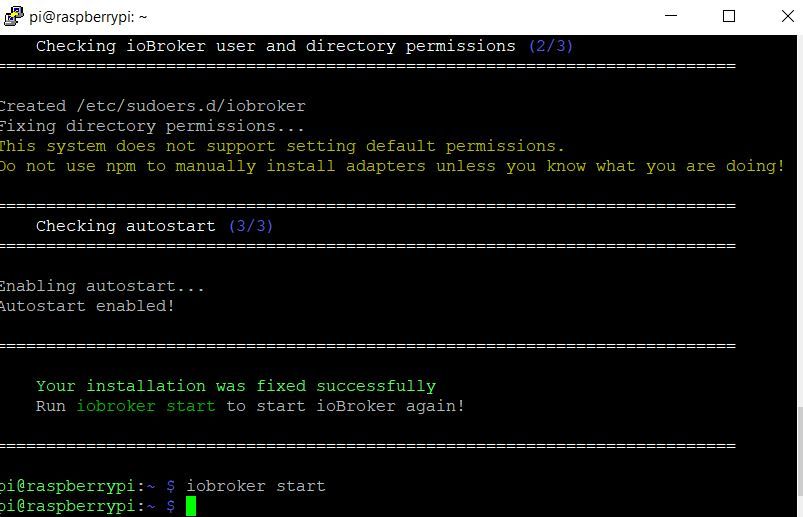
                      @simatec fixer ist gelaufen.

                      fixer.JPG

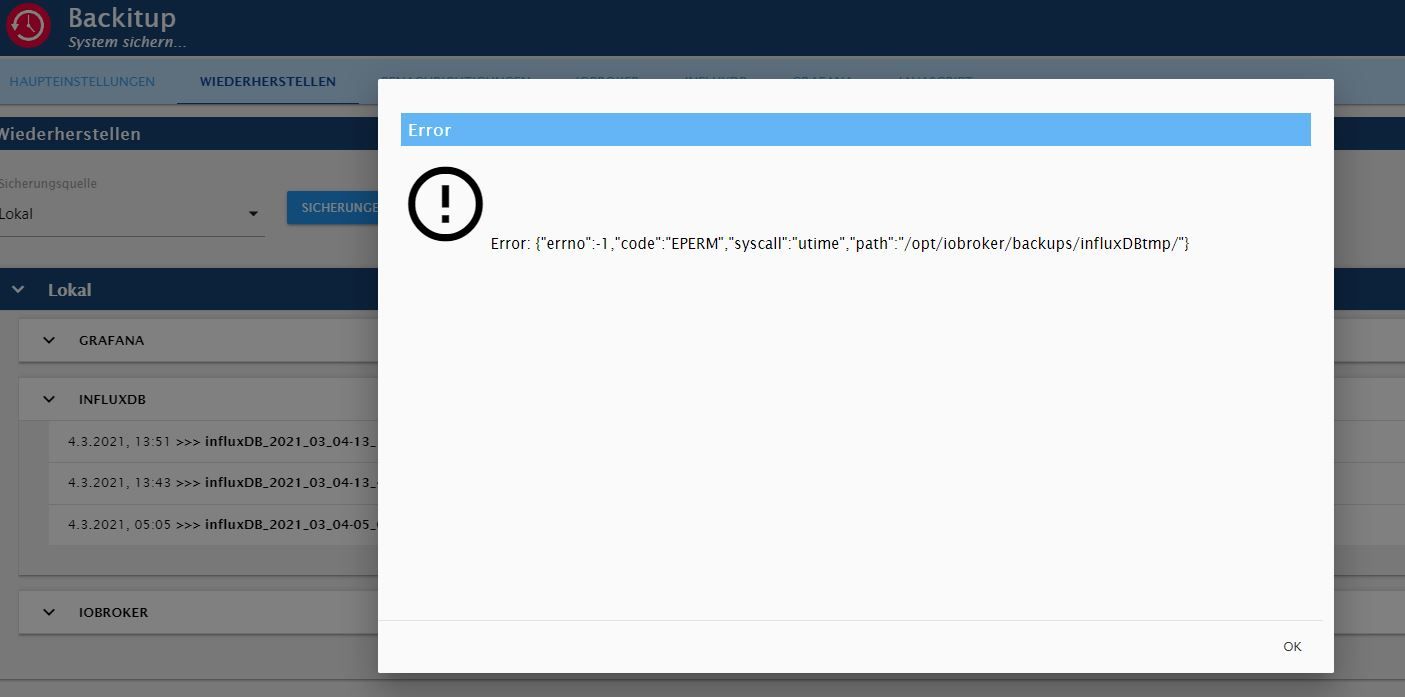
                      Aber der Fehler ist geblieben:
                      fehler.JPG

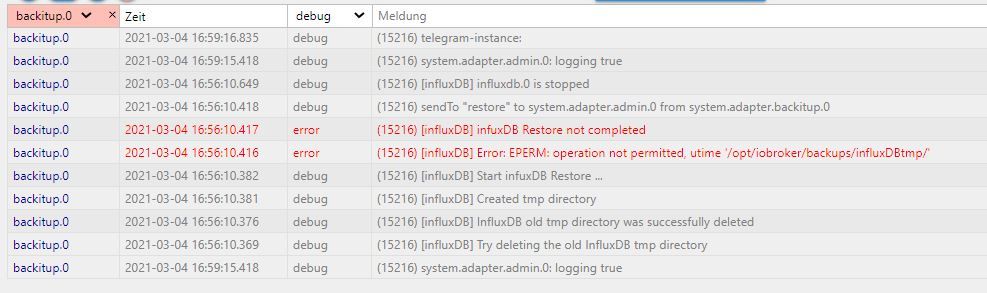
                      Log
                      log.JPG

                      Alle Raspberry ( 5 ) gegen NUC (N100, 16GB Ram und 500GB M2 SSD, extern 2TB SSD ) mit Proxmox 8.3.3 gewechselt. Läuft absolut super !
                      (Iobroker, Grafana, Teslalogger, Nextcloud, go2rtc, PiHole, IOB-VIS2, Teslamate, homeassistant nur als test)

                      simatecS F 2 Replies Last reply
                      0
                      • HALH HAL

                        @simatec fixer ist gelaufen.

                        fixer.JPG

                        Aber der Fehler ist geblieben:
                        fehler.JPG

                        Log
                        log.JPG

                        simatecS Online
                        simatecS Online
                        simatec
                        Developer Most Active
                        wrote on last edited by
                        #1065

                        @hal
                        Dann prüfe mal bitte die Rechte des Backupordners

                        • Besuche meine Github Seite
                        • Beitrag hat geholfen oder willst du mich unterstützen
                        • HowTo Restore ioBroker
                        HALH 1 Reply Last reply
                        0
                        • simatecS simatec

                          @hal
                          Dann prüfe mal bitte die Rechte des Backupordners

                          HALH Offline
                          HALH Offline
                          HAL
                          wrote on last edited by
                          #1066

                          @simatec ich installieren den Raspberry komplett neu, da ich auch noch andere Probleme bekommen habe.

                          Alle Raspberry ( 5 ) gegen NUC (N100, 16GB Ram und 500GB M2 SSD, extern 2TB SSD ) mit Proxmox 8.3.3 gewechselt. Läuft absolut super !
                          (Iobroker, Grafana, Teslalogger, Nextcloud, go2rtc, PiHole, IOB-VIS2, Teslamate, homeassistant nur als test)

                          1 Reply Last reply
                          0
                          • R Offline
                            R Offline
                            Ronniboy
                            wrote on last edited by Negalein
                            #1067

                            Hallo Zusammen,
                            ich benötige Eure Unterstützung.
                            Ich habe BACKITUP 2.0.0 installiert
                            Backup für IOBROKER,CCU und INFLUXDB funktionieren.
                            Jedoch erhalte ich bei GRAFANA folgende INFO:

                            [DEBUG] [grafana] - Start Grafana Backup ...
                            [DEBUG] [grafana] - Created grafana_tmp directory
                            [DEBUG] [grafana] - Created dashboard directory
                            [DEBUG] [grafana] - Created dashboards_manually_restore directory
                            [DEBUG] [grafana] - Created datasource directory
                            [DEBUG] [grafana] - start Grafana request ...
                            [DEBUG] [grafana] - Grafana is available ... Status: 200
                            [DEBUG] [grafana] - start Grafana backup compress ...
                            [DEBUG] [grafana] - Try deleting the Grafana tmp directory: "/opt/iobroker/backups/grafana_tmp"
                            [DEBUG] [grafana] - Grafana tmp directory "/opt/iobroker/backups/grafana_tmp" successfully deleted
                            [DEBUG] [grafana] - cannot found Grafana Backup files
                            [DEBUG] [grafana] - done
                            

                            Hat jemand eine Idee?

                            Gruß Ronald

                            simatecS 1 Reply Last reply
                            0
                            • R Ronniboy

                              Hallo Zusammen,
                              ich benötige Eure Unterstützung.
                              Ich habe BACKITUP 2.0.0 installiert
                              Backup für IOBROKER,CCU und INFLUXDB funktionieren.
                              Jedoch erhalte ich bei GRAFANA folgende INFO:

                              [DEBUG] [grafana] - Start Grafana Backup ...
                              [DEBUG] [grafana] - Created grafana_tmp directory
                              [DEBUG] [grafana] - Created dashboard directory
                              [DEBUG] [grafana] - Created dashboards_manually_restore directory
                              [DEBUG] [grafana] - Created datasource directory
                              [DEBUG] [grafana] - start Grafana request ...
                              [DEBUG] [grafana] - Grafana is available ... Status: 200
                              [DEBUG] [grafana] - start Grafana backup compress ...
                              [DEBUG] [grafana] - Try deleting the Grafana tmp directory: "/opt/iobroker/backups/grafana_tmp"
                              [DEBUG] [grafana] - Grafana tmp directory "/opt/iobroker/backups/grafana_tmp" successfully deleted
                              [DEBUG] [grafana] - cannot found Grafana Backup files
                              [DEBUG] [grafana] - done
                              

                              Hat jemand eine Idee?

                              Gruß Ronald

                              simatecS Online
                              simatecS Online
                              simatec
                              Developer Most Active
                              wrote on last edited by
                              #1068

                              @ronniboy
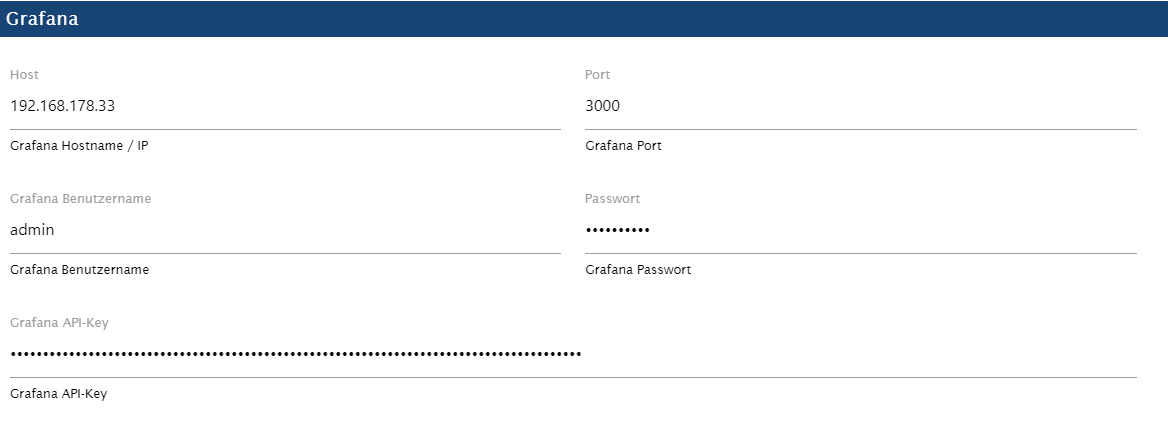
                              Zeige mal bitte deine Config für Grafana in Backitup.

                              • Besuche meine Github Seite
                              • Beitrag hat geholfen oder willst du mich unterstützen
                              • HowTo Restore ioBroker
                              R 1 Reply Last reply
                              0
                              • simatecS simatec

                                @ronniboy
                                Zeige mal bitte deine Config für Grafana in Backitup.

                                R Offline
                                R Offline
                                Ronniboy
                                wrote on last edited by
                                #1069

                                @simatec
                                vielen Dank für die schnelle Rückantwort.
                                Meinst Du das mit Configuration?GRAFANA.png

                                simatecS 1 Reply Last reply
                                0
                                • R Ronniboy

                                  @simatec
                                  vielen Dank für die schnelle Rückantwort.
                                  Meinst Du das mit Configuration?GRAFANA.png

                                  simatecS Online
                                  simatecS Online
                                  simatec
                                  Developer Most Active
                                  wrote on last edited by
                                  #1070

                                  @ronniboy
                                  Kannst du mal bitte den richtigen Log aus dem Reiter Log posten?
                                  Ich benötige mal den kompletten Log inkl. Zeitstempel

                                  • Besuche meine Github Seite
                                  • Beitrag hat geholfen oder willst du mich unterstützen
                                  • HowTo Restore ioBroker
                                  R 1 Reply Last reply
                                  0
                                  • simatecS simatec

                                    @ronniboy
                                    Kannst du mal bitte den richtigen Log aus dem Reiter Log posten?
                                    Ich benötige mal den kompletten Log inkl. Zeitstempel

                                    R Offline
                                    R Offline
                                    Ronniboy
                                    wrote on last edited by
                                    #1071

                                    @simatec
                                    hier den LOG FileLOG Grafana.txt

                                    simatecS 1 Reply Last reply
                                    0
                                    • R Ronniboy

                                      @simatec
                                      hier den LOG FileLOG Grafana.txt

                                      simatecS Online
                                      simatecS Online
                                      simatec
                                      Developer Most Active
                                      wrote on last edited by
                                      #1072

                                      @ronniboy
                                      Prüfe mal deine Zugangsdaten und deinen ApiKey. Api Key als Admin erstellen

                                      • Besuche meine Github Seite
                                      • Beitrag hat geholfen oder willst du mich unterstützen
                                      • HowTo Restore ioBroker
                                      frankthegreatF R 2 Replies Last reply
                                      0
                                      • simatecS simatec

                                        @ronniboy
                                        Prüfe mal deine Zugangsdaten und deinen ApiKey. Api Key als Admin erstellen

                                        frankthegreatF Offline
                                        frankthegreatF Offline
                                        frankthegreat
                                        wrote on last edited by
                                        #1073

                                        Hallo zusammen, nach Update von der Version 1.8.5 auf die 2.0.3 kommt folgende Fehlermeldung:

                                        backitup.0	2021-03-06 18:16:22.033	error	(1435) Error: Command failed: sudo mount -t cifs -o username=xxxxx_backup,password=****,rw,file_mode=0777,dir_mode=0777 //192.xxx.xxx.x/fritz.nas/My_Passport/Backup_ioBroker /opt/iobroker/backups mount error(121): Remote I/O error
                                        Refer to the mount.cifs(8) manual page (e.g. man mount.cifs)
                                        

                                        Bin dann mal zurück auf die 1.8.5. Die Fehlermeldung kommt aber nach wie vor.

                                        Woran könnte das liegen?

                                        simatecS 1 Reply Last reply
                                        0
                                        • frankthegreatF frankthegreat

                                          Hallo zusammen, nach Update von der Version 1.8.5 auf die 2.0.3 kommt folgende Fehlermeldung:

                                          backitup.0	2021-03-06 18:16:22.033	error	(1435) Error: Command failed: sudo mount -t cifs -o username=xxxxx_backup,password=****,rw,file_mode=0777,dir_mode=0777 //192.xxx.xxx.x/fritz.nas/My_Passport/Backup_ioBroker /opt/iobroker/backups mount error(121): Remote I/O error
                                          Refer to the mount.cifs(8) manual page (e.g. man mount.cifs)
                                          

                                          Bin dann mal zurück auf die 1.8.5. Die Fehlermeldung kommt aber nach wie vor.

                                          Woran könnte das liegen?

                                          simatecS Online
                                          simatecS Online
                                          simatec
                                          Developer Most Active
                                          wrote on last edited by
                                          #1074

                                          @frankthegreat
                                          Am mount hat sich nichts geändert. Hast du eventuell ein Update auf deiner FB gemacht?
                                          Da gab es Änderungen an der smb Version

                                          • Besuche meine Github Seite
                                          • Beitrag hat geholfen oder willst du mich unterstützen
                                          • HowTo Restore ioBroker
                                          frankthegreatF 1 Reply Last reply
                                          0
                                          Reply
                                          • Reply as topic
                                          Log in to reply
                                          • Oldest to Newest
                                          • Newest to Oldest
                                          • Most Votes


                                          Support us

                                          ioBroker
                                          Community Adapters
                                          Donate

                                          567

                                          Online

                                          32.7k

                                          Users

                                          82.4k

                                          Topics

                                          1.3m

                                          Posts
                                          Community
                                          Impressum | Datenschutz-Bestimmungen | Nutzungsbedingungen | Einwilligungseinstellungen
                                          ioBroker Community 2014-2025
                                          logo
                                          • Login

                                          • Don't have an account? Register

                                          • Login or register to search.
                                          • First post
                                            Last post
                                          0
                                          • Home
                                          • Recent
                                          • Tags
                                          • Unread 0
                                          • Categories
                                          • Unreplied
                                          • Popular
                                          • GitHub
                                          • Docu
                                          • Hilfe