Skip to content
  • Recent
  • Tags
  • 0 Unread 0
  • Categories
  • Unreplied
  • Popular
  • GitHub
  • Docu
  • Hilfe
Skins
  • Light
  • Brite
  • Cerulean
  • Cosmo
  • Flatly
  • Journal
  • Litera
  • Lumen
  • Lux
  • Materia
  • Minty
  • Morph
  • Pulse
  • Sandstone
  • Simplex
  • Sketchy
  • Spacelab
  • United
  • Yeti
  • Zephyr
  • Dark
  • Cyborg
  • Darkly
  • Quartz
  • Slate
  • Solar
  • Superhero
  • Vapor

  • Default (No Skin)
  • No Skin
Collapse
ioBroker Logo
  1. ioBroker Community Home
  2. Deutsch
  3. Hardware
  4. Valetudo auf Xiaomi Vacuum V1 installieren [hilfe]

NEWS

  • UPDATE 31.10.: Amazon Alexa - ioBroker Skill läuft aus ?
    apollon77A
    apollon77
    48
    3
    8.1k

  • Monatsrückblick – September 2025
    BluefoxB
    Bluefox
    13
    1
    1.8k

  • Neues Video "KI im Smart Home" - ioBroker plus n8n
    BluefoxB
    Bluefox
    15
    1
    2.1k

Valetudo auf Xiaomi Vacuum V1 installieren [hilfe]

Scheduled Pinned Locked Moved Hardware
xiaomivaletudofirmwareimageroot
92 Posts 15 Posters 17.1k Views 9 Watching
  • Oldest to Newest
  • Newest to Oldest
  • Most Votes
Reply
  • Reply as topic
Log in to reply
This topic has been deleted. Only users with topic management privileges can see it.
  • AlCalzoneA AlCalzone

    @WW1983 Ich habe schon eine ganze Weile RE-0.4.0 drauf ohne Probleme.

    W Offline
    W Offline
    WW1983
    wrote on last edited by
    #81

    @AlCalzone
    Danke. Dann heißt es nur noch die Installation hinbekommen!

    1 Reply Last reply
    0
    • AlCalzoneA AlCalzone

      @WW1983 Ich habe schon eine ganze Weile RE-0.4.0 drauf ohne Probleme.

      J Offline
      J Offline
      jensus11
      wrote on last edited by
      #82

      @AlCalzone Hat dein Roboter Zugang zur Außenwelt oder hast du ihm das untersagt?

      AlCalzoneA arteckA 2 Replies Last reply
      0
      • J jensus11

        @AlCalzone Hat dein Roboter Zugang zur Außenwelt oder hast du ihm das untersagt?

        AlCalzoneA Offline
        AlCalzoneA Offline
        AlCalzone
        Developer
        wrote on last edited by
        #83

        @jensus11 Ich glaube mit Valetudo gibt es gar keinen Kontakt mehr nach außen. Die App findet ihn jedenfalls nicht mehr.

        Warum `sudo` böse ist: https://forum.iobroker.net/post/17109

        1 Reply Last reply
        0
        • J jensus11

          @AlCalzone Hat dein Roboter Zugang zur Außenwelt oder hast du ihm das untersagt?

          arteckA Offline
          arteckA Offline
          arteck
          Developer Most Active
          wrote on last edited by
          #84

          @jensus11 wenn du meinst den China Kontakt.. dann ist der nicht mehr wenn du valetudo druff hast

          zigbee hab ich, zwave auch, nuc's genauso und HA auch

          MeistertrM 1 Reply Last reply
          0
          • arteckA arteck

            @jensus11 wenn du meinst den China Kontakt.. dann ist der nicht mehr wenn du valetudo druff hast

            MeistertrM Offline
            MeistertrM Offline
            Meistertr
            Developer
            wrote on last edited by
            #85

            Genau wenn valetudo drauf ist, sollte die gesamte Verbindung nach außen unterbrochen sein.

            1 Reply Last reply
            0
            • J Offline
              J Offline
              jensus11
              wrote on last edited by
              #86

              Ich hatte das Problem, dass sich der Robo 2x selber resetet hatte, dann habe ich die Verbindung nach außen geblockt und seit dem hatte ich das nicht nochmal. Die Karte wird ja im mihome Adapter auch nicht übernommen. Muss der Robo den online sein um die Karte zu ioBroker zu übertragen? Reicht doch wenn die Geräte im Netzwerk verbunden sind oder? Welche Valetudo Version ist den für den Robo V1 ratsam? Ich nutze die aktuelle 0.4.0

              1 Reply Last reply
              0
              • B Offline
                B Offline
                Beowolf
                wrote on last edited by
                #87

                Schon klar. Dieser Beitrag ist schon etwas älter.

                Wenn ich versuche Valetudo auf meinem V1 zu laden, bekomme ich immer diese Meldung.

                E:\roborock\re>valetudo-helper-miioota.exe install-firmware v11_004028.pkg
                Starting installer.
                If you experience issues, make sure to disable your firewall and/or VPN.
                Also, make sure that the robot is docked during the firmware update procedure.
                If the install still fails, try turning the robot off and back on again and/or moving the laptop closer to it.
                
                Robot discovery started...
                Scan done.
                Successfully discovered robot at 192.168.8.1
                Reading firmware image..
                Successfully read firmware image. Size: 116.09 MiB MD5Sum: d0e045aed1889165ead77d349fa981de
                
                Listing for firmware download requests on http://192.168.8.216:53568/firmware
                [2024-05-29T15:58:12.596Z] [ERROR] Error decrypting/parsing:  SyntaxError: Unexpected end of JSON input
                    at JSON.parse (<anonymous>)
                    at Codec.decodeIncomingMiioPacket (C:\snapshot\valetudo-helper-miioota\miio\Codec.js:76:32)
                    at Socket.<anonymous> (C:\snapshot\valetudo-helper-miioota\miio\MiioSocket.js:53:54)
                    at Socket.emit (node:events:526:28)
                    at UDP.onMessage [as onmessage] (node:dgram:922:8) null <Buffer >
                ERROR: Error while sending update command to robot
                Error:
                MiioTimeoutError: request timed out:{"method":"miIO.ota","params":{"mode":"normal","install":"1","app_url":"http://192.168.8.216:53568/firmware","file_md5":"d0e045aed1889165ead77d349fa981de","proc":"dnld install"},"id":2055533146}
                    at Object.onTimeoutCallback (C:\snapshot\valetudo-helper-miioota\miio\MiioSocket.js:201:32)
                    at Timeout._onTimeout (C:\snapshot\valetudo-helper-miioota\miio\MiioSocket.js:207:53)
                    at listOnTimeout (node:internal/timers:559:17)
                    at processTimers (node:internal/timers:502:7)
                
                
                Exiting..
                
                E:\roborock\re>
                

                Hat da jemand eine Idee was da nicht funktioniert?

                Grüße

                Die Natur braucht nicht unseren Schutz, sie braucht unsere Abwesenheit.

                B 1 Reply Last reply
                0
                • B Beowolf

                  Schon klar. Dieser Beitrag ist schon etwas älter.

                  Wenn ich versuche Valetudo auf meinem V1 zu laden, bekomme ich immer diese Meldung.

                  E:\roborock\re>valetudo-helper-miioota.exe install-firmware v11_004028.pkg
                  Starting installer.
                  If you experience issues, make sure to disable your firewall and/or VPN.
                  Also, make sure that the robot is docked during the firmware update procedure.
                  If the install still fails, try turning the robot off and back on again and/or moving the laptop closer to it.
                  
                  Robot discovery started...
                  Scan done.
                  Successfully discovered robot at 192.168.8.1
                  Reading firmware image..
                  Successfully read firmware image. Size: 116.09 MiB MD5Sum: d0e045aed1889165ead77d349fa981de
                  
                  Listing for firmware download requests on http://192.168.8.216:53568/firmware
                  [2024-05-29T15:58:12.596Z] [ERROR] Error decrypting/parsing:  SyntaxError: Unexpected end of JSON input
                      at JSON.parse (<anonymous>)
                      at Codec.decodeIncomingMiioPacket (C:\snapshot\valetudo-helper-miioota\miio\Codec.js:76:32)
                      at Socket.<anonymous> (C:\snapshot\valetudo-helper-miioota\miio\MiioSocket.js:53:54)
                      at Socket.emit (node:events:526:28)
                      at UDP.onMessage [as onmessage] (node:dgram:922:8) null <Buffer >
                  ERROR: Error while sending update command to robot
                  Error:
                  MiioTimeoutError: request timed out:{"method":"miIO.ota","params":{"mode":"normal","install":"1","app_url":"http://192.168.8.216:53568/firmware","file_md5":"d0e045aed1889165ead77d349fa981de","proc":"dnld install"},"id":2055533146}
                      at Object.onTimeoutCallback (C:\snapshot\valetudo-helper-miioota\miio\MiioSocket.js:201:32)
                      at Timeout._onTimeout (C:\snapshot\valetudo-helper-miioota\miio\MiioSocket.js:207:53)
                      at listOnTimeout (node:internal/timers:559:17)
                      at processTimers (node:internal/timers:502:7)
                  
                  
                  Exiting..
                  
                  E:\roborock\re>
                  

                  Hat da jemand eine Idee was da nicht funktioniert?

                  Grüße

                  B Offline
                  B Offline
                  Brokinger
                  wrote on last edited by Brokinger
                  #88

                  @beowolf
                  Schau mal unter Valetudo.cloud, für mich fehlt da spontan der response von Roboter bei Zeile 14.

                  1 Reply Last reply
                  0
                  • haselchenH Offline
                    haselchenH Offline
                    haselchen
                    Most Active
                    wrote on last edited by
                    #89

                    @beowolf

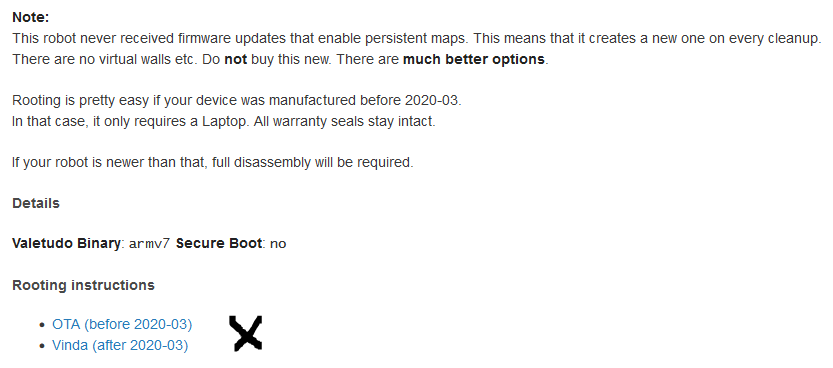
                    Vermutlich gehst Du nach dieser Anleitung?

                    https://valetudo.cloud/pages/installation/roborock.html#ota

                    Welche Methode trifft für Dich zu?
                    b1a2a85f-187d-4b51-b6bf-a9f5d854bde1-grafik.png

                    Bist Du mit dem Laptop direkt neben dem Roboter? (wegen Verbindungsabbrüche)

                    Synology DS218+ & 2 x Fujitsu Esprimo (VM/Container) + FritzBox7590 + 2 AVM 3000 Repeater & Homematic & HUE & Osram & Xiaomi, NPM 10.9.4, Nodejs 22.21.0 ,JS Controller 7.0.7 ,Admin 7.7.19

                    1 Reply Last reply
                    0
                    • B Offline
                      B Offline
                      Beowolf
                      wrote on last edited by Beowolf
                      #90

                      Danke für die Antworten. Ich habe es jetzt mit

                      .\valetudo-helper-miioota.exe install-firmware .\vacuum_2034_valetudo_re_0_10_10.pkg

                      geschafft. Der Werksreset hat beim ersten Versuch wohl nicht geklappt.

                      Jetzt habe ich "valetudo re" drauf.

                      Grüße
                      Manfred

                      Die Natur braucht nicht unseren Schutz, sie braucht unsere Abwesenheit.

                      Richard PüchlR 1 Reply Last reply
                      0
                      • B Beowolf

                        Danke für die Antworten. Ich habe es jetzt mit

                        .\valetudo-helper-miioota.exe install-firmware .\vacuum_2034_valetudo_re_0_10_10.pkg

                        geschafft. Der Werksreset hat beim ersten Versuch wohl nicht geklappt.

                        Jetzt habe ich "valetudo re" drauf.

                        Grüße
                        Manfred

                        Richard PüchlR Offline
                        Richard PüchlR Offline
                        Richard Püchl
                        wrote on last edited by
                        #91

                        Hallo, mir ist klar das die letzte Nachricht schon etwas her ist.

                        Jedoch habe ich bei der Firmware installation das Problem dass sie sich nicht instaliiert obwohl der valetudo helper meint es hat funktioniert.

                        Robot discovery started...
                        Scan done.
                        Successfully discovered robot at 192.168.8.1
                        Reading firmware image..
                        Successfully read firmware image. Size: 83.16 MiB MD5Sum: d85d97ed204d37de143b8368d69016c6
                        
                        Listing for firmware download requests on http://192.168.8.5:55065/firmware
                        Response from robot: [ 'ok' ]
                        Received firmware download request from ::ffff:192.168.8.1..
                        Received firmware download request from ::ffff:192.168.8.1..
                        
                        Download seems to have finished.
                        The robot should now install the firmware. It will take 5-10 minutes.
                        
                                If you like this application, you may want to consider donating:
                                hub.com/sponsors/Hypfer
                        Exiting..
                        

                        Danach geht der xiaomi v1 in den Update modus und danach passiert nichts mehr.

                        Hat jemand eine Idee?? Vielen Dank

                        haselchenH 1 Reply Last reply
                        0
                        • Richard PüchlR Richard Püchl

                          Hallo, mir ist klar das die letzte Nachricht schon etwas her ist.

                          Jedoch habe ich bei der Firmware installation das Problem dass sie sich nicht instaliiert obwohl der valetudo helper meint es hat funktioniert.

                          Robot discovery started...
                          Scan done.
                          Successfully discovered robot at 192.168.8.1
                          Reading firmware image..
                          Successfully read firmware image. Size: 83.16 MiB MD5Sum: d85d97ed204d37de143b8368d69016c6
                          
                          Listing for firmware download requests on http://192.168.8.5:55065/firmware
                          Response from robot: [ 'ok' ]
                          Received firmware download request from ::ffff:192.168.8.1..
                          Received firmware download request from ::ffff:192.168.8.1..
                          
                          Download seems to have finished.
                          The robot should now install the firmware. It will take 5-10 minutes.
                          
                                  If you like this application, you may want to consider donating:
                                  hub.com/sponsors/Hypfer
                          Exiting..
                          

                          Danach geht der xiaomi v1 in den Update modus und danach passiert nichts mehr.

                          Hat jemand eine Idee?? Vielen Dank

                          haselchenH Offline
                          haselchenH Offline
                          haselchen
                          Most Active
                          wrote on last edited by haselchen
                          #92

                          @richard-püchl

                          Die 5-10 Minuten hast Du abgewartet?

                          Das hast Du alles gelesen?

                          https://valetudo.cloud/pages/general/supported-robots.html#xiaomi_v1

                          Synology DS218+ & 2 x Fujitsu Esprimo (VM/Container) + FritzBox7590 + 2 AVM 3000 Repeater & Homematic & HUE & Osram & Xiaomi, NPM 10.9.4, Nodejs 22.21.0 ,JS Controller 7.0.7 ,Admin 7.7.19

                          1 Reply Last reply
                          0
                          Reply
                          • Reply as topic
                          Log in to reply
                          • Oldest to Newest
                          • Newest to Oldest
                          • Most Votes


                          Support us

                          ioBroker
                          Community Adapters
                          Donate

                          373

                          Online

                          32.4k

                          Users

                          81.4k

                          Topics

                          1.3m

                          Posts
                          Community
                          Impressum | Datenschutz-Bestimmungen | Nutzungsbedingungen
                          ioBroker Community 2014-2025
                          logo
                          • Login

                          • Don't have an account? Register

                          • Login or register to search.
                          • First post
                            Last post
                          0
                          • Recent
                          • Tags
                          • Unread 0
                          • Categories
                          • Unreplied
                          • Popular
                          • GitHub
                          • Docu
                          • Hilfe