Skip to content
  • Home
  • Aktuell
  • Tags
  • 0 Ungelesen 0
  • Kategorien
  • Unreplied
  • Beliebt
  • GitHub
  • Docu
  • Hilfe
Skins
  • Light
  • Brite
  • Cerulean
  • Cosmo
  • Flatly
  • Journal
  • Litera
  • Lumen
  • Lux
  • Materia
  • Minty
  • Morph
  • Pulse
  • Sandstone
  • Simplex
  • Sketchy
  • Spacelab
  • United
  • Yeti
  • Zephyr
  • Dark
  • Cyborg
  • Darkly
  • Quartz
  • Slate
  • Solar
  • Superhero
  • Vapor

  • Standard: (Kein Skin)
  • Kein Skin
Einklappen
ioBroker Logo

Community Forum

donate donate
  1. ioBroker Community Home
  2. Deutsch
  3. ioBroker Allgemein
  4. js-controller 2.0 ab sofort im Latest Repo

NEWS

  • UPDATE 31.10.: Amazon Alexa - ioBroker Skill läuft aus ?
    apollon77A
    apollon77
    48
    3
    8.8k

  • Monatsrückblick – September 2025
    BluefoxB
    Bluefox
    13
    1
    2.2k

  • Neues Video "KI im Smart Home" - ioBroker plus n8n
    BluefoxB
    Bluefox
    16
    1
    3.2k

js-controller 2.0 ab sofort im Latest Repo

Geplant Angeheftet Gesperrt Verschoben ioBroker Allgemein
js-controller
1.1k Beiträge 89 Kommentatoren 355.2k Aufrufe 64 Watching
  • Älteste zuerst
  • Neuste zuerst
  • Meiste Stimmen
Antworten
  • In einem neuen Thema antworten
Anmelden zum Antworten
Dieses Thema wurde gelöscht. Nur Nutzer mit entsprechenden Rechten können es sehen.
  • apollon77A apollon77

    @ilovegym sagte in js-controller 2.0 ab sofort im Latest Repo:
    ok ich checke bei mir nochmal, aber daran hab ich an sich nix gedreht ... mal schauen ...

    Wann war denn der Master wieder da genau?

    ? Offline
    ? Offline
    Ein ehemaliger Benutzer
    schrieb am zuletzt editiert von
    #839

    @apollon77 ab 11:42...
    hmm hab jetzt mal iobroker stop, und wieder gestartet, läuft.. hmm.. vielleicht hab ich nicht lange genug gewartet..

    2019-11-13 11:35:30.912  - warn: host.iobroker Multihost discovery server: service started on 0.0.0.0:50005
    2019-11-13 11:41:29.432  - info: host.iobroker iobroker.js-controller version 2.0.43 js-controller starting
    2019-11-13 11:41:29.435  - info: host.iobroker Copyright (c) 2014-2019 bluefox, 2014 hobbyquaker
    2019-11-13 11:41:29.436  - info: host.iobroker hostname: iobroker, node: v10.17.0
    2019-11-13 11:41:29.436  - info: host.iobroker ip addresses: 192.168.178.41 2001:16b8:20a3:f500:b01e:c80:4af8:2b16 fe80::9e97:b87d:9152:5695
    2019-11-13 11:41:30.270  - info: host.iobroker connected to Objects and States
    2019-11-13 11:41:30.513  - info: host.iobroker 71 instances found
    2019-11-13 11:41:30.593  - info: host.iobroker starting 64 instances
    2019-11-13 11:41:30.601  - warn: host.iobroker Multihost discovery server: service started on 0.0.0.0:50005
    2019-11-13 11:41:30.619  - info: host.iobroker instance system.adapter.admin.0 started with pid 833
    2019-11-13 11:41:34.609  - info: host.iobroker instance system.adapter.mihome.0 started with pid 855
    2019-11-13 11:41:38.609  - info: host.iobroker instance system.adapter.wifilight.0 started with pid 871
    2019-11-13 11:41:42.606  - info: host.iobroker instance system.adapter.amazon-dash.0 started with pid 887
    2019-11-13 11:41:46.607  - info: host.iobroker instance system.adapter.cloud.0 started with pid 913
    2019-11-13 11:41:50.610  - info: host.iobroker instance system.adapter.email.0 started with pid 928
    2019-11-13 11:41:54.611  - info: host.iobroker instance system.adapter.email.1 started with pid 943
    2019-11-13 11:41:58.603  - info: host.iobroker instance scheduled system.adapter.feiertage.0 0 0 * * *
    2019-11-13 11:41:58.618  - info: host.iobroker instance system.adapter.feiertage.0 started with pid 959
    2019-11-13 11:42:02.291  - info: host.iobroker instance system.adapter.feiertage.0 terminated with code 0 (NO_ERROR)
    2019-11-13 11:42:02.613  - info: host.iobroker instance system.adapter.firetv.0 started with pid 974
    2019-11-13 11:42:04.105  - error: firetv.0 (974) ID: 192.168.178.83 Error=Failure: 'device unauthorized. Please check the confirmation dialog on your device.'
    2019-11-13 11:42:04.107  - error: firetv.0 (974) ID: 192.168.178.85 Error=Failure: 'device unauthorized. Please check the confirmation dialog on your device.'
    2019-11-13 11:42:04.110  - error: firetv.0 (974) ID: 192.168.178.83 Error=Failure: 'device unauthorized. Please check the confirmation dialog on your device.'
    2019-11-13 11:42:04.111  - error: firetv.0 (974) ID: 192.168.178.85 Error=Failure: 'device unauthorized. Please check the confirmation dialog on your device.'
    2019-11-13 11:42:04.114  - error: firetv.0 (974) ID: 192.168.178.83 Error=Failure: 'device unauthorized. Please check the confirmation dialog on your device.'
    2019-11-13 11:42:04.117  - error: firetv.0 (974) ID: 192.168.178.85 Error=Failure: 'device unauthorized. Please check the confirmation dialog on your device.'
    2019-11-13 11:42:06.609  - info: host.iobroker instance system.adapter.history.0 started with pid 1004
    2019-11-13 11:42:09.594  - warn: history.0 (1004) Alias * has no target 12
    2019-11-13 11:42:10.196  - warn: host.iobroker "system.host.zweiberry" is offline
    2019-11-13 11:42:10.196  - warn: host.iobroker "system.host.zeroberry" is offline
    2019-11-13 11:42:10.196  - warn: host.iobroker "system.host.berrymotion" is offline
    2019-11-13 11:42:10.197  - warn: host.iobroker "system.host.meterberry" is offline
    2019-11-13 11:42:10.197  - warn: host.iobroker "system.host.gymberry" is offline
    2019-11-13 11:42:10.611  - info: host.iobroker instance system.adapter.info.0 started with pid 1019
    2019-11-13 11:42:14.608  - info: host.iobroker instance system.adapter.javascript.0 started with pid 1039
    2019-11-13 11:42:18.799  - info: host.iobroker instance system.adapter.mihome-vacuum.0 started with pid 1545
    2019-11-13 11:42:20.717  - info: host.iobroker Update repository "latest" under "http://download.iobroker.net/sources-dist-latest.json"
    2019-11-13 11:42:20.720  - warn: host.iobroker "system.host.zweiberry" is offline
    
    
    apollon77A 1 Antwort Letzte Antwort
    0
    • SBorgS SBorg

      @apollon77 sagte in js-controller 2.0 ab sofort im Latest Repo:

      • (Apollon77) increase object init timeout for adapter starts before complaining/stopping

      Hi,
      betraf/betrifft das auch den "no connection to objekts db"-Fehler (oder gerade eben diesen)?
      Nach Update und Start:

      2019-11-13 11:38:50.229 - warn: tr-064-community.0 (14931) no connection to objects DB
      2019-11-13 11:38:50.243 - warn: tankerkoenig.0 (14634) no connection to objects DB
      2019-11-13 11:38:53.070 - warn: terminal.0 (14825) no connection to objects DB
      2019-11-13 11:38:53.912 - warn: tuya.0 (15103) no connection to objects DB
      2019-11-13 11:38:54.282 - warn: tr-064-community.0 (14931) no connection to states DB
      2019-11-13 11:38:54.838 - warn: vis-google-fonts.0 (15350) no connection to objects DB
      2019-11-13 11:38:56.750 - warn: tankerkoenig.0 (14634) no connection to states DB
      2019-11-13 11:38:56.864 - warn: terminal.0 (14825) no connection to states DB
      2019-11-13 11:38:57.161 - info: host.Ubuntu instance scheduled system.adapter.yr.0 33 * * * *
      2019-11-13 11:38:57.201 - info: host.Ubuntu instance system.adapter.yr.0 started with pid 15851
      2019-11-13 11:38:57.437 - warn: vis.0 (15525) no connection to objects DB
      2019-11-13 11:38:57.577 - info: radar2.0 (14026) radar2 initialization started...
      2019-11-13 11:38:57.580 - info: radar2.0 (14026) radar2 starting main...
      2019-11-13 11:38:59.619 - info: host.Ubuntu instance system.adapter.fb-checkpresence.0 started with pid 16025
      2019-11-13 11:39:01.789 - warn: tuya.0 (15103) no connection to states DB
      2019-11-13 11:39:01.792 - warn: vis.0 (15525) no connection to states DB
      2019-11-13 11:39:21.444 - info: radar2.0 (14026) Connected with '0.0.0.0' for DHCP Scan
      2019-11-13 11:39:21.940 - info: radar2.0 (14026) Will try to scan BT devices: true
      2019-11-13 11:39:23.830 - info: statistics.0 (14498) starting. Version 0.2.2 in /opt/iobroker/node_modules/iobroker.statistics, node: v8.16.2
      2019-11-13 11:39:30.503 - info: statistics.0 (14498) [INFO] statistics observes 1 values after startup
      2019-11-13 11:39:30.503 - info: statistics.0 (14498) [INFO] monitor "MyOwnData.0.Wetter.Ozon.Ozonwert" as avg
      2019-11-13 11:39:30.505 - info: statistics.0 (14498) [INFO] monitor "MyOwnData.0.Wetter.Ozon.Ozonwert" as minmax
      2019-11-13 11:39:33.364 - info: sonoff.0 (14322) Starting MQTT authenticated server on port 1885
      2019-11-13 11:39:33.665 - warn: upnp.0 (15260) no connection to objects DB
      2019-11-13 11:39:33.875 - warn: web.0 (15839) no connection to objects DB
      2019-11-13 11:39:33.885 - warn: yr.0 (15851) no connection to objects DB
      ...und weitere Connect-Fehler
      

      Daraufhin habe ich nochmal in den Einstellungen geschaut, der Connection-Timeout stand da (noch) auf 2000ms.
      Dann habe ich den ioB gestoppt, den Timeout händisch mal auf 3 Sek. gestellt und seit ~ 2 h ist absolute Ruhe, kein einziger Fehler mehr. Muss ich aber noch mal über einen ganzen Tag beobachten :)

      apollon77A Offline
      apollon77A Offline
      apollon77
      schrieb am zuletzt editiert von
      #840

      @SBorg Das betrifft genau diesen. Kannst es auf 2000 in den Settings lassen. Im Code wird der verdoppelt :-) Htte also auch schon vorher ruhig gewesen sein sollen. SOnst ist dein system echt komisch und braucht lange zum "hochfahren" eines Adapter-prozesses

      Beitrag hat geholfen? Votet rechts unten im Beitrag :-) https://paypal.me/Apollon77 / https://github.com/sponsors/Apollon77

      • Debug-Log für Instanz einschalten? Admin -> Instanzen -> Expertenmodus -> Instanz aufklappen - Loglevel ändern
      • Logfiles auf Platte /opt/iobroker/log/… nutzen, Admin schneidet Zeilen ab
      SBorgS 1 Antwort Letzte Antwort
      0
      • ? Ein ehemaliger Benutzer

        @apollon77 ab 11:42...
        hmm hab jetzt mal iobroker stop, und wieder gestartet, läuft.. hmm.. vielleicht hab ich nicht lange genug gewartet..

        2019-11-13 11:35:30.912  - warn: host.iobroker Multihost discovery server: service started on 0.0.0.0:50005
        2019-11-13 11:41:29.432  - info: host.iobroker iobroker.js-controller version 2.0.43 js-controller starting
        2019-11-13 11:41:29.435  - info: host.iobroker Copyright (c) 2014-2019 bluefox, 2014 hobbyquaker
        2019-11-13 11:41:29.436  - info: host.iobroker hostname: iobroker, node: v10.17.0
        2019-11-13 11:41:29.436  - info: host.iobroker ip addresses: 192.168.178.41 2001:16b8:20a3:f500:b01e:c80:4af8:2b16 fe80::9e97:b87d:9152:5695
        2019-11-13 11:41:30.270  - info: host.iobroker connected to Objects and States
        2019-11-13 11:41:30.513  - info: host.iobroker 71 instances found
        2019-11-13 11:41:30.593  - info: host.iobroker starting 64 instances
        2019-11-13 11:41:30.601  - warn: host.iobroker Multihost discovery server: service started on 0.0.0.0:50005
        2019-11-13 11:41:30.619  - info: host.iobroker instance system.adapter.admin.0 started with pid 833
        2019-11-13 11:41:34.609  - info: host.iobroker instance system.adapter.mihome.0 started with pid 855
        2019-11-13 11:41:38.609  - info: host.iobroker instance system.adapter.wifilight.0 started with pid 871
        2019-11-13 11:41:42.606  - info: host.iobroker instance system.adapter.amazon-dash.0 started with pid 887
        2019-11-13 11:41:46.607  - info: host.iobroker instance system.adapter.cloud.0 started with pid 913
        2019-11-13 11:41:50.610  - info: host.iobroker instance system.adapter.email.0 started with pid 928
        2019-11-13 11:41:54.611  - info: host.iobroker instance system.adapter.email.1 started with pid 943
        2019-11-13 11:41:58.603  - info: host.iobroker instance scheduled system.adapter.feiertage.0 0 0 * * *
        2019-11-13 11:41:58.618  - info: host.iobroker instance system.adapter.feiertage.0 started with pid 959
        2019-11-13 11:42:02.291  - info: host.iobroker instance system.adapter.feiertage.0 terminated with code 0 (NO_ERROR)
        2019-11-13 11:42:02.613  - info: host.iobroker instance system.adapter.firetv.0 started with pid 974
        2019-11-13 11:42:04.105  - error: firetv.0 (974) ID: 192.168.178.83 Error=Failure: 'device unauthorized. Please check the confirmation dialog on your device.'
        2019-11-13 11:42:04.107  - error: firetv.0 (974) ID: 192.168.178.85 Error=Failure: 'device unauthorized. Please check the confirmation dialog on your device.'
        2019-11-13 11:42:04.110  - error: firetv.0 (974) ID: 192.168.178.83 Error=Failure: 'device unauthorized. Please check the confirmation dialog on your device.'
        2019-11-13 11:42:04.111  - error: firetv.0 (974) ID: 192.168.178.85 Error=Failure: 'device unauthorized. Please check the confirmation dialog on your device.'
        2019-11-13 11:42:04.114  - error: firetv.0 (974) ID: 192.168.178.83 Error=Failure: 'device unauthorized. Please check the confirmation dialog on your device.'
        2019-11-13 11:42:04.117  - error: firetv.0 (974) ID: 192.168.178.85 Error=Failure: 'device unauthorized. Please check the confirmation dialog on your device.'
        2019-11-13 11:42:06.609  - info: host.iobroker instance system.adapter.history.0 started with pid 1004
        2019-11-13 11:42:09.594  - warn: history.0 (1004) Alias * has no target 12
        2019-11-13 11:42:10.196  - warn: host.iobroker "system.host.zweiberry" is offline
        2019-11-13 11:42:10.196  - warn: host.iobroker "system.host.zeroberry" is offline
        2019-11-13 11:42:10.196  - warn: host.iobroker "system.host.berrymotion" is offline
        2019-11-13 11:42:10.197  - warn: host.iobroker "system.host.meterberry" is offline
        2019-11-13 11:42:10.197  - warn: host.iobroker "system.host.gymberry" is offline
        2019-11-13 11:42:10.611  - info: host.iobroker instance system.adapter.info.0 started with pid 1019
        2019-11-13 11:42:14.608  - info: host.iobroker instance system.adapter.javascript.0 started with pid 1039
        2019-11-13 11:42:18.799  - info: host.iobroker instance system.adapter.mihome-vacuum.0 started with pid 1545
        2019-11-13 11:42:20.717  - info: host.iobroker Update repository "latest" under "http://download.iobroker.net/sources-dist-latest.json"
        2019-11-13 11:42:20.720  - warn: host.iobroker "system.host.zweiberry" is offline
        
        
        apollon77A Offline
        apollon77A Offline
        apollon77
        schrieb am zuletzt editiert von
        #841

        @ilovegym Strange ... müssen wir beobachten

        Beitrag hat geholfen? Votet rechts unten im Beitrag :-) https://paypal.me/Apollon77 / https://github.com/sponsors/Apollon77

        • Debug-Log für Instanz einschalten? Admin -> Instanzen -> Expertenmodus -> Instanz aufklappen - Loglevel ändern
        • Logfiles auf Platte /opt/iobroker/log/… nutzen, Admin schneidet Zeilen ab
        ? 1 Antwort Letzte Antwort
        0
        • apollon77A apollon77

          @ilovegym Strange ... müssen wir beobachten

          ? Offline
          ? Offline
          Ein ehemaliger Benutzer
          schrieb am zuletzt editiert von
          #842

          @apollon77 ich hab das unter "kann mal vorkommen" eingestuft.. solange das nicht öfters ist.. bis jetzt sonst keine Fehler im Log und auch keine Auffälligkeiten.. von daher..

          1 Antwort Letzte Antwort
          0
          • S Offline
            S Offline
            schmid_no1
            schrieb am zuletzt editiert von
            #843

            Nabend Jungs
            Habe die Version 2.0.24 noch installiert und wollte auch auf die 2.0.43 gehen und bekomme es nicht installiert bei
            "iobroker upgrade self"
            Kommt nur
            "host is up to date"

            Iobroker update habe ich gemacht

            Kann mir jemand sagen was ich falsch mache

            GlasfaserG 1 Antwort Letzte Antwort
            0
            • S schmid_no1

              Nabend Jungs
              Habe die Version 2.0.24 noch installiert und wollte auch auf die 2.0.43 gehen und bekomme es nicht installiert bei
              "iobroker upgrade self"
              Kommt nur
              "host is up to date"

              Iobroker update habe ich gemacht

              Kann mir jemand sagen was ich falsch mache

              GlasfaserG Offline
              GlasfaserG Offline
              Glasfaser
              schrieb am zuletzt editiert von
              #844

              @schmid_no1

              Verwahrungsort

              Synology 918+ 16GB - ioBroker in Docker v9 , VISO auf Trekstor Primebook C13 13,3" , Hikvision Domkameras mit Surveillance Station .. CCU RaspberryMatic in Synology VM .. Zigbee CC2538+CC2592 .. Sonoff .. KNX .. Modbus ..

              dslraserD 1 Antwort Letzte Antwort
              0
              • GlasfaserG Glasfaser

                @schmid_no1

                Verwahrungsort

                dslraserD Offline
                dslraserD Offline
                dslraser
                Forum Testing Most Active
                schrieb am zuletzt editiert von dslraser
                #845

                @Glasfaser sagte in js-controller 2.0 ab sofort im Latest Repo:

                @schmid_no1

                Verwahrungsort

                wurde/wird mir auch im latest nicht angezeigt.

                Ich habe iobroker gestoppt (im Docker Container) mit

                pkill io
                

                das dürfte ja sonst

                iobroker stop
                

                sein

                und dann Update mit

                npm install ioBroker/ioBroker.js-controller
                

                danach ist so
                Bildschirmfoto 2019-11-13 um 18.03.08.png

                aber angeboten wird es trotzdem nicht, auch nach

                iobroker update
                

                nicht.

                Verwahrungsort
                Bildschirmfoto 2019-11-13 um 18.03.55.png

                apollon77A GlasfaserG 2 Antworten Letzte Antwort
                0
                • S Offline
                  S Offline
                  schmid_no1
                  schrieb am zuletzt editiert von schmid_no1
                  #846

                  @Glasfaser die Installation ist durchgelaufen doch leider zeigt es mir immer noch die alte Version an

                  GlasfaserG 1 Antwort Letzte Antwort
                  0
                  • S schmid_no1

                    @Glasfaser die Installation ist durchgelaufen doch leider zeigt es mir immer noch die alte Version an

                    GlasfaserG Offline
                    GlasfaserG Offline
                    Glasfaser
                    schrieb am zuletzt editiert von Glasfaser
                    #847

                    @schmid_no1

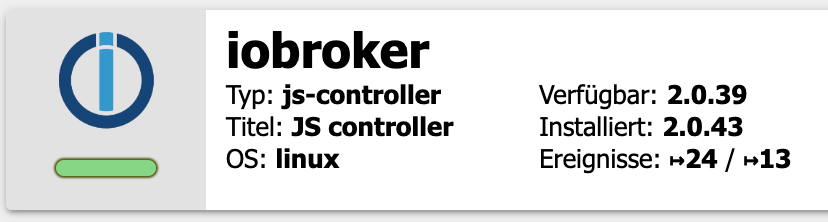
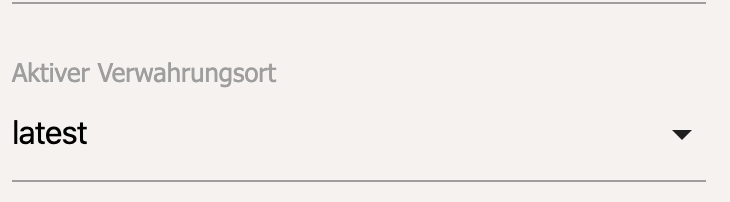
                    Was hast du gemacht ……..
                    Was ist mit dem Verwahrungsort !?

                    ……. gerade selber auf meiner Synology durchgeführt . Update wurde durchgeführt
                    Version 2.0.43

                    1.JPG

                    2.JPG

                    Synology 918+ 16GB - ioBroker in Docker v9 , VISO auf Trekstor Primebook C13 13,3" , Hikvision Domkameras mit Surveillance Station .. CCU RaspberryMatic in Synology VM .. Zigbee CC2538+CC2592 .. Sonoff .. KNX .. Modbus ..

                    S 1 Antwort Letzte Antwort
                    0
                    • GlasfaserG Glasfaser

                      @schmid_no1

                      Was hast du gemacht ……..
                      Was ist mit dem Verwahrungsort !?

                      ……. gerade selber auf meiner Synology durchgeführt . Update wurde durchgeführt
                      Version 2.0.43

                      1.JPG

                      2.JPG

                      S Offline
                      S Offline
                      schmid_no1
                      schrieb am zuletzt editiert von
                      #848

                      @Glasfaser am Verwarungsort habe ich nichts geändert, also auf lastest gelassen und dann so installiert wie du das beschrieben hast
                      Er hat mir auch im putty gesagt das die 2.0.43 installiert ist.
                      Doch wenn ich mit iobroker version frage bekomme ich 2.0.25

                      apollon77A 1 Antwort Letzte Antwort
                      0
                      • S schmid_no1

                        @Glasfaser am Verwarungsort habe ich nichts geändert, also auf lastest gelassen und dann so installiert wie du das beschrieben hast
                        Er hat mir auch im putty gesagt das die 2.0.43 installiert ist.
                        Doch wenn ich mit iobroker version frage bekomme ich 2.0.25

                        apollon77A Offline
                        apollon77A Offline
                        apollon77
                        schrieb am zuletzt editiert von
                        #849

                        @schmid_no1 „iobroker update“ mal ausgeführt?

                        Beitrag hat geholfen? Votet rechts unten im Beitrag :-) https://paypal.me/Apollon77 / https://github.com/sponsors/Apollon77

                        • Debug-Log für Instanz einschalten? Admin -> Instanzen -> Expertenmodus -> Instanz aufklappen - Loglevel ändern
                        • Logfiles auf Platte /opt/iobroker/log/… nutzen, Admin schneidet Zeilen ab
                        S 2 Antworten Letzte Antwort
                        0
                        • dslraserD dslraser

                          @Glasfaser sagte in js-controller 2.0 ab sofort im Latest Repo:

                          @schmid_no1

                          Verwahrungsort

                          wurde/wird mir auch im latest nicht angezeigt.

                          Ich habe iobroker gestoppt (im Docker Container) mit

                          pkill io
                          

                          das dürfte ja sonst

                          iobroker stop
                          

                          sein

                          und dann Update mit

                          npm install ioBroker/ioBroker.js-controller
                          

                          danach ist so
                          Bildschirmfoto 2019-11-13 um 18.03.08.png

                          aber angeboten wird es trotzdem nicht, auch nach

                          iobroker update
                          

                          nicht.

                          Verwahrungsort
                          Bildschirmfoto 2019-11-13 um 18.03.55.png

                          apollon77A Offline
                          apollon77A Offline
                          apollon77
                          schrieb am zuletzt editiert von
                          #850

                          @dslraser dann cached irgendwas bei euch das Repo file

                          Beitrag hat geholfen? Votet rechts unten im Beitrag :-) https://paypal.me/Apollon77 / https://github.com/sponsors/Apollon77

                          • Debug-Log für Instanz einschalten? Admin -> Instanzen -> Expertenmodus -> Instanz aufklappen - Loglevel ändern
                          • Logfiles auf Platte /opt/iobroker/log/… nutzen, Admin schneidet Zeilen ab
                          1 Antwort Letzte Antwort
                          0
                          • dslraserD dslraser

                            @Glasfaser sagte in js-controller 2.0 ab sofort im Latest Repo:

                            @schmid_no1

                            Verwahrungsort

                            wurde/wird mir auch im latest nicht angezeigt.

                            Ich habe iobroker gestoppt (im Docker Container) mit

                            pkill io
                            

                            das dürfte ja sonst

                            iobroker stop
                            

                            sein

                            und dann Update mit

                            npm install ioBroker/ioBroker.js-controller
                            

                            danach ist so
                            Bildschirmfoto 2019-11-13 um 18.03.08.png

                            aber angeboten wird es trotzdem nicht, auch nach

                            iobroker update
                            

                            nicht.

                            Verwahrungsort
                            Bildschirmfoto 2019-11-13 um 18.03.55.png

                            GlasfaserG Offline
                            GlasfaserG Offline
                            Glasfaser
                            schrieb am zuletzt editiert von
                            #851

                            @dslraser

                            Schalte mal die Kachel um , was kommt dann ?

                            1.JPG

                            Synology 918+ 16GB - ioBroker in Docker v9 , VISO auf Trekstor Primebook C13 13,3" , Hikvision Domkameras mit Surveillance Station .. CCU RaspberryMatic in Synology VM .. Zigbee CC2538+CC2592 .. Sonoff .. KNX .. Modbus ..

                            1 Antwort Letzte Antwort
                            0
                            • apollon77A apollon77

                              @schmid_no1 „iobroker update“ mal ausgeführt?

                              S Offline
                              S Offline
                              schmid_no1
                              schrieb am zuletzt editiert von
                              #852

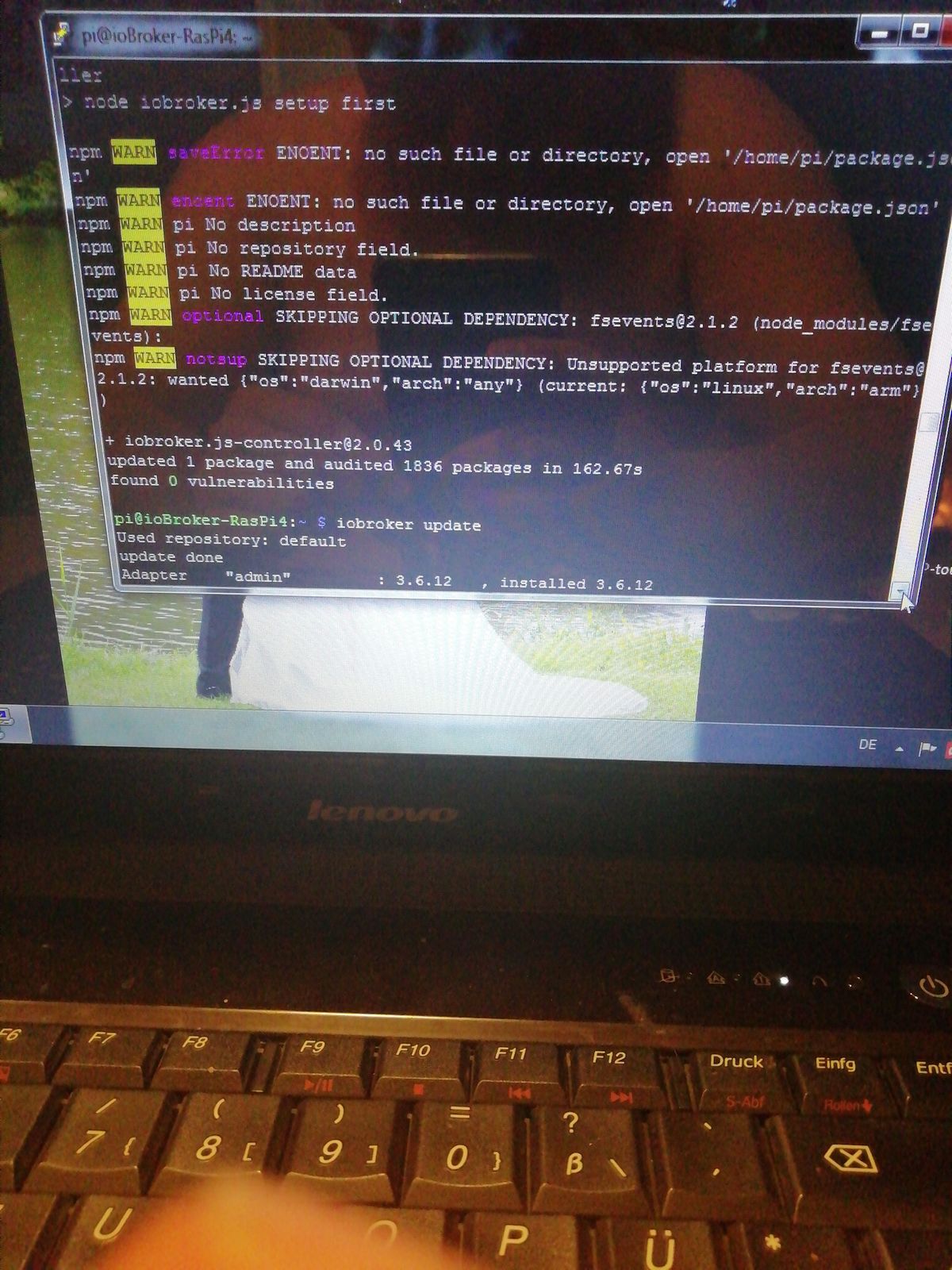
                              @apollon77 ja habe ich
                              15736681084323088722142945117821.jpg
                              Aber scheint doch nicht so sauber durchgelaufen zu sein

                              apollon77A 1 Antwort Letzte Antwort
                              0
                              • apollon77A apollon77

                                @schmid_no1 „iobroker update“ mal ausgeführt?

                                S Offline
                                S Offline
                                schmid_no1
                                schrieb am zuletzt editiert von
                                #853

                                @apollon77 wenn ich den Verwarungsort auf latest habe zeigt er mir bei verfügbar nur die 2.0.25 an

                                GlasfaserG 1 Antwort Letzte Antwort
                                0
                                • S schmid_no1

                                  @apollon77 wenn ich den Verwarungsort auf latest habe zeigt er mir bei verfügbar nur die 2.0.25 an

                                  GlasfaserG Offline
                                  GlasfaserG Offline
                                  Glasfaser
                                  schrieb am zuletzt editiert von
                                  #854

                                  @schmid_no1

                                  Kontrolliere bei dir den Eintrag :

                                  1.JPG

                                  Synology 918+ 16GB - ioBroker in Docker v9 , VISO auf Trekstor Primebook C13 13,3" , Hikvision Domkameras mit Surveillance Station .. CCU RaspberryMatic in Synology VM .. Zigbee CC2538+CC2592 .. Sonoff .. KNX .. Modbus ..

                                  S 1 Antwort Letzte Antwort
                                  0
                                  • GlasfaserG Glasfaser

                                    @schmid_no1

                                    Kontrolliere bei dir den Eintrag :

                                    1.JPG

                                    S Offline
                                    S Offline
                                    schmid_no1
                                    schrieb am zuletzt editiert von
                                    #855

                                    @Glasfaser das passt

                                    GlasfaserG 1 Antwort Letzte Antwort
                                    0
                                    • S schmid_no1

                                      @Glasfaser das passt

                                      GlasfaserG Offline
                                      GlasfaserG Offline
                                      Glasfaser
                                      schrieb am zuletzt editiert von
                                      #856

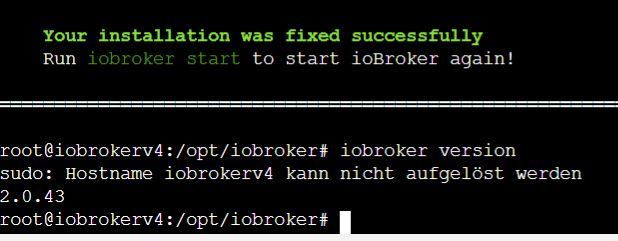
                                      @schmid_no1

                                      Zeige mal bitte

                                      iobroker version
                                      

                                      Synology 918+ 16GB - ioBroker in Docker v9 , VISO auf Trekstor Primebook C13 13,3" , Hikvision Domkameras mit Surveillance Station .. CCU RaspberryMatic in Synology VM .. Zigbee CC2538+CC2592 .. Sonoff .. KNX .. Modbus ..

                                      S 1 Antwort Letzte Antwort
                                      0
                                      • GlasfaserG Glasfaser

                                        @schmid_no1

                                        Zeige mal bitte

                                        iobroker version
                                        
                                        S Offline
                                        S Offline
                                        schmid_no1
                                        schrieb am zuletzt editiert von
                                        #857

                                        @Glasfaser im putty auch auf 2.0.25

                                        GlasfaserG 1 Antwort Letzte Antwort
                                        0
                                        • S schmid_no1

                                          @Glasfaser im putty auch auf 2.0.25

                                          GlasfaserG Offline
                                          GlasfaserG Offline
                                          Glasfaser
                                          schrieb am zuletzt editiert von
                                          #858

                                          @schmid_no1

                                          Reboot mal durchgeführt !?

                                          Synology 918+ 16GB - ioBroker in Docker v9 , VISO auf Trekstor Primebook C13 13,3" , Hikvision Domkameras mit Surveillance Station .. CCU RaspberryMatic in Synology VM .. Zigbee CC2538+CC2592 .. Sonoff .. KNX .. Modbus ..

                                          S 1 Antwort Letzte Antwort
                                          0
                                          Antworten
                                          • In einem neuen Thema antworten
                                          Anmelden zum Antworten
                                          • Älteste zuerst
                                          • Neuste zuerst
                                          • Meiste Stimmen


                                          Support us

                                          ioBroker
                                          Community Adapters
                                          Donate
                                          FAQ Cloud / IOT
                                          HowTo: Node.js-Update
                                          HowTo: Backup/Restore
                                          Downloads
                                          BLOG

                                          793

                                          Online

                                          32.4k

                                          Benutzer

                                          81.5k

                                          Themen

                                          1.3m

                                          Beiträge
                                          Community
                                          Impressum | Datenschutz-Bestimmungen | Nutzungsbedingungen | Einwilligungseinstellungen
                                          ioBroker Community 2014-2025
                                          logo
                                          • Anmelden

                                          • Du hast noch kein Konto? Registrieren

                                          • Anmelden oder registrieren, um zu suchen
                                          • Erster Beitrag
                                            Letzter Beitrag
                                          0
                                          • Home
                                          • Aktuell
                                          • Tags
                                          • Ungelesen 0
                                          • Kategorien
                                          • Unreplied
                                          • Beliebt
                                          • GitHub
                                          • Docu
                                          • Hilfe