



Skip to content
  • Home
  • Recent
  • Tags
  • 0 Unread 0
  • Categories
  • Unreplied
  • Popular
  • GitHub
  • Docu
  • Hilfe
Skins
  • Light
  • Brite
  • Cerulean
  • Cosmo
  • Flatly
  • Journal
  • Litera
  • Lumen
  • Lux
  • Materia
  • Minty
  • Morph
  • Pulse
  • Sandstone
  • Simplex
  • Sketchy
  • Spacelab
  • United
  • Yeti
  • Zephyr
  • Dark
  • Cyborg
  • Darkly
  • Quartz
  • Slate
  • Solar
  • Superhero
  • Vapor

  • Default (No Skin)
  • No Skin
Collapse
ioBroker Logo

Community Forum

donate donate
  1. ioBroker Community Home
  2. Deutsch
  3. ioBroker Allgemein
  4. OPC Adapter

NEWS

  • Weihnachtsangebot 2025! 🎄
    BluefoxB
    Bluefox
    21
    1
    945

  • UPDATE 31.10.: Amazon Alexa - ioBroker Skill läuft aus ?
    apollon77A
    apollon77
    48
    3
    9.0k

  • Monatsrückblick – September 2025
    BluefoxB
    Bluefox
    14
    1
    2.4k

OPC Adapter

Scheduled Pinned Locked Moved ioBroker Allgemein
43 Posts 16 Posters 8.7k Views 14 Watching
  • Oldest to Newest
  • Newest to Oldest
  • Most Votes
Reply
  • Reply as topic
Log in to reply
This topic has been deleted. Only users with topic management privileges can see it.
  • BluefoxB Bluefox

    @opcuaneeded
    Hallo, opcua client funktioniert, aber man kann nur 10 Variablen binden. Für mehr Variablen braucht man kommerzielle Lizenz.

    O Offline
    O Offline
    opcuaneeded
    wrote on last edited by
    #7

    @Bluefox
    Hallo Bluefox, Danke für die antwort,

    noch ein kurze frage wie kann ich konfigurieren ?!

    Screenshot 2020-11-30 123321.png

    BluefoxB 1 Reply Last reply
    0
    • O opcuaneeded

      @Bluefox
      Hallo Bluefox, Danke für die antwort,

      noch ein kurze frage wie kann ich konfigurieren ?!

      Screenshot 2020-11-30 123321.png

      BluefoxB Offline
      BluefoxB Offline
      Bluefox
      wrote on last edited by Bluefox
      #8

      @opcuaneeded iob u opcua

      O 1 Reply Last reply
      0
      • BluefoxB Bluefox

        @opcuaneeded iob u opcua

        O Offline
        O Offline
        opcuaneeded
        wrote on last edited by
        #9

        @Bluefox said in OPC Adapter:

        iob u oocua

        sorry, was bedeutet das ?

        P 1 Reply Last reply
        0
        • O opcuaneeded

          @Bluefox said in OPC Adapter:

          iob u oocua

          sorry, was bedeutet das ?

          P Offline
          P Offline
          ple
          wrote on last edited by
          #10

          @opcuaneeded
          Moin, das ist ein upload, sollte aber dann iob u opcua heißen und das einfach in der Console eingeben.
          Ich stand gerade vor dem gleichen Problem, aber die Lösung ist es leider nicht, vielleicht kann @Bluefox noch einmal drübersehen was da fehlt.

          Gruß und vielen Dank.

          Intel Nuc + Proxmox

          BluefoxB 1 Reply Last reply
          0
          • P ple

            @opcuaneeded
            Moin, das ist ein upload, sollte aber dann iob u opcua heißen und das einfach in der Console eingeben.
            Ich stand gerade vor dem gleichen Problem, aber die Lösung ist es leider nicht, vielleicht kann @Bluefox noch einmal drübersehen was da fehlt.

            Gruß und vielen Dank.

            BluefoxB Offline
            BluefoxB Offline
            Bluefox
            wrote on last edited by
            #11

            @ple ich brauche Error Meldungen aus Browser-Konsole um weiter zu kommen

            P 1 Reply Last reply
            0
            • BluefoxB Bluefox

              @ple ich brauche Error Meldungen aus Browser-Konsole um weiter zu kommen

              P Offline
              P Offline
              ple
              wrote on last edited by
              #12

              @Bluefox Ich hoffe, dass hilft weiter. Ist von Chrome

              jquery-3.2.1.min.js:3 GET http://192.168.10.10:8081/adapter/opcua/?0 404 (Not Found)
              (anonymous) @ jquery-3.2.1.min.js:3
              Te @ jquery-3.2.1.min.js:3
              append @ jquery-3.2.1.min.js:3
              C.each.C.fn.<computed> @ jquery-3.2.1.min.js:3
              (anonymous) @ admin.js:1539
              e.ready.n.navigateCheckDialog @ admin.js:1396
              e.ready.n.navigateDo @ admin.js:1440
              window.onhashchange @ admin.js:706
              hashchange (async)
              e.ready.n.navigate @ admin.js:1430
              (anonymous) @ adminInstances.js:1304
              dispatch @ jquery-3.2.1.min.js:3
              m.handle @ jquery-3.2.1.min.js:3


              Das kommt aus dem iobroker log

              host.iobroker	2020-12-14 23:20:08.190	error	startInstance opcua.0: cannot find start file!
              host.iobroker	2020-12-14 23:20:08.190	info	"system.adapter.opcua.0" enabled
              host.iobroker	2020-12-14 23:19:59.984	info	"system.adapter.opcua.0" disabled
              

              Intel Nuc + Proxmox

              BluefoxB 1 Reply Last reply
              0
              • P ple

                @Bluefox Ich hoffe, dass hilft weiter. Ist von Chrome

                jquery-3.2.1.min.js:3 GET http://192.168.10.10:8081/adapter/opcua/?0 404 (Not Found)
                (anonymous) @ jquery-3.2.1.min.js:3
                Te @ jquery-3.2.1.min.js:3
                append @ jquery-3.2.1.min.js:3
                C.each.C.fn.<computed> @ jquery-3.2.1.min.js:3
                (anonymous) @ admin.js:1539
                e.ready.n.navigateCheckDialog @ admin.js:1396
                e.ready.n.navigateDo @ admin.js:1440
                window.onhashchange @ admin.js:706
                hashchange (async)
                e.ready.n.navigate @ admin.js:1430
                (anonymous) @ adminInstances.js:1304
                dispatch @ jquery-3.2.1.min.js:3
                m.handle @ jquery-3.2.1.min.js:3


                Das kommt aus dem iobroker log

                host.iobroker	2020-12-14 23:20:08.190	error	startInstance opcua.0: cannot find start file!
                host.iobroker	2020-12-14 23:20:08.190	info	"system.adapter.opcua.0" enabled
                host.iobroker	2020-12-14 23:19:59.984	info	"system.adapter.opcua.0" disabled
                
                BluefoxB Offline
                BluefoxB Offline
                Bluefox
                wrote on last edited by
                #13

                @ple Es sieht so aus, als ob du den Adapter von github installiert hast.
                Man muss von npm installieren.
                cd /opt/iobroker
                npm i iobroker.opcua@0.4.1
                iob a opcua

                P timk1981T 2 Replies Last reply
                0
                • BluefoxB Bluefox

                  @ple Es sieht so aus, als ob du den Adapter von github installiert hast.
                  Man muss von npm installieren.
                  cd /opt/iobroker
                  npm i iobroker.opcua@0.4.1
                  iob a opcua

                  P Offline
                  P Offline
                  ple
                  wrote on last edited by
                  #14

                  @Bluefox stimmt, ich hatte von git installiert, geht das heutzutage nicht mehr? Habe leider 1 Jahr ausgesetzt und bin nicht mehr auf den neusten Stand.

                  Intel Nuc + Proxmox

                  BluefoxB 1 Reply Last reply
                  0
                  • P ple

                    @Bluefox stimmt, ich hatte von git installiert, geht das heutzutage nicht mehr? Habe leider 1 Jahr ausgesetzt und bin nicht mehr auf den neusten Stand.

                    BluefoxB Offline
                    BluefoxB Offline
                    Bluefox
                    wrote on last edited by
                    #15

                    @ple Das geht für alle Open source adapter, aber opcua ist closed source und Code liegt nicht offen auf GitHub.
                    Nur auf npm.

                    timk1981T 1 Reply Last reply
                    0
                    • BluefoxB Bluefox

                      @ple Es sieht so aus, als ob du den Adapter von github installiert hast.
                      Man muss von npm installieren.
                      cd /opt/iobroker
                      npm i iobroker.opcua@0.4.1
                      iob a opcua

                      timk1981T Offline
                      timk1981T Offline
                      timk1981
                      wrote on last edited by
                      #16

                      @Bluefox said in OPC Adapter:

                      @ple Es sieht so aus, als ob du den Adapter von github installiert hast.
                      Man muss von npm installieren.
                      cd /opt/iobroker
                      npm i iobroker.opcua@0.4.1
                      iob a opcua

                      Hallo Bluefox danke für die Info bei mir funktioniert der OPC jetzt am IoBroker. Da taucht aber auch schon die nächste frage auf. Ich nutze den OPC als Client da ich einen OPC Server auf einer B&R Steuerung laufen habe. Normale variablen wie Bool, int etc. werden perfekt angezeigt. Leider hab ich sehr viele Variablen die eine Unterstruktur haben wie z.b. Visu mit Visu_type etc.
                      Leider werden die Variablen darunter nicht aufgelistet. Da wird es wahrscheinlich keine Lösung geben ohne das ich die Variablen umschreiben muss, oder?

                      1 Reply Last reply
                      0
                      • BluefoxB Bluefox

                        @ple Das geht für alle Open source adapter, aber opcua ist closed source und Code liegt nicht offen auf GitHub.
                        Nur auf npm.

                        timk1981T Offline
                        timk1981T Offline
                        timk1981
                        wrote on last edited by
                        #17

                        @Bluefox leider ist noch in Problem aufgetaucht, das ich nicht umgehen kann. Ich kann zwar alle Variablen lesen aber ich kann keine einzige variable schreiben.

                        Benötigt man da erst die Lizenz für den OPC UA Client vom IoBroker? Der Server selber läuft auf einer B&R SPS.
                        Auf den UaExpert geht es in beide Seiten.

                        Kennt das Problem jemand?

                        Danke im Voraus.

                        Schöne grüße,
                        Tim

                        U 1 Reply Last reply
                        0
                        • BluefoxB Bluefox

                          @opcuaneeded
                          Hallo, opcua client funktioniert, aber man kann nur 10 Variablen binden. Für mehr Variablen braucht man kommerzielle Lizenz.

                          O Offline
                          O Offline
                          onweb
                          wrote on last edited by
                          #18

                          @bluefox sagte in OPC Adapter:

                          @opcuaneeded
                          Hallo, opcua client funktioniert, aber man kann nur 10 Variablen binden. Für mehr Variablen braucht man kommerzielle Lizenz.

                          Gibt es zu dieser kommerziellen Lizenz schon Infos?

                          K 1 Reply Last reply
                          0
                          • O onweb

                            @bluefox sagte in OPC Adapter:

                            @opcuaneeded
                            Hallo, opcua client funktioniert, aber man kann nur 10 Variablen binden. Für mehr Variablen braucht man kommerzielle Lizenz.

                            Gibt es zu dieser kommerziellen Lizenz schon Infos?

                            K Offline
                            K Offline
                            Kargelino
                            wrote on last edited by Kargelino
                            #19

                            Hallo liebe Gemeinde,

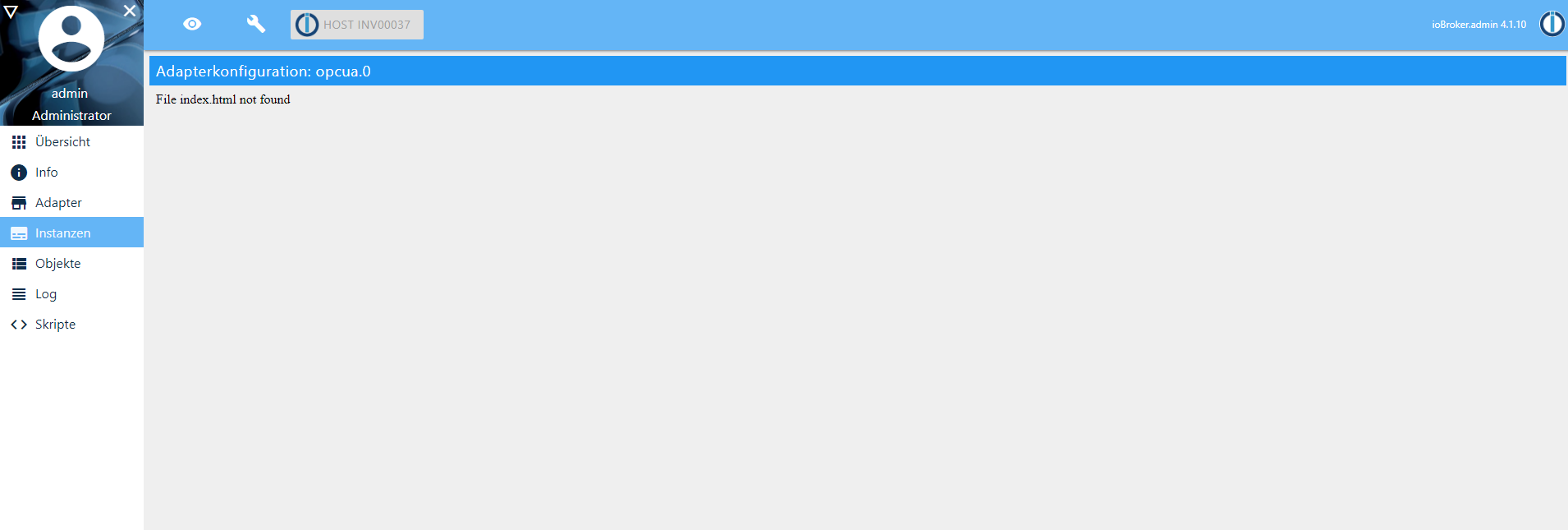
                            hab trotz der Anleitung noch immer den gleichen Fehler, kann mir irgendwer weiter helfen?
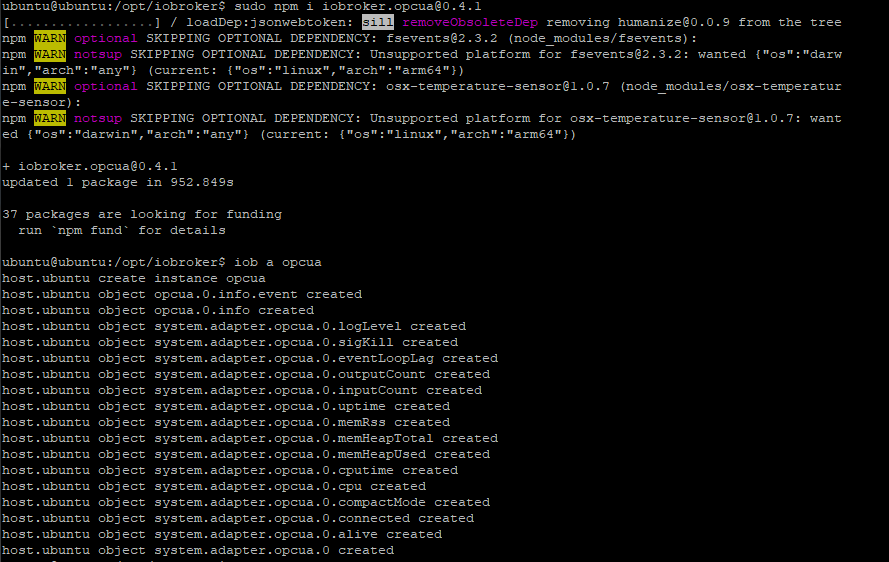
                            Bild 1.PNG
                            Bild 2.PNG
                            Vielen vielen Dank im voraus

                            Lg Max

                            Thomas BraunT 1 Reply Last reply
                            0
                            • K Kargelino

                              Hallo liebe Gemeinde,

                              hab trotz der Anleitung noch immer den gleichen Fehler, kann mir irgendwer weiter helfen?
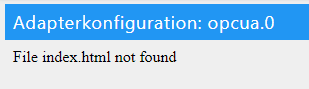
                              Bild 1.PNG
                              Bild 2.PNG
                              Vielen vielen Dank im voraus

                              Lg Max

                              Thomas BraunT Online
                              Thomas BraunT Online
                              Thomas Braun
                              Most Active
                              wrote on last edited by
                              #20

                              @kargelino Bitte Konsolentext als TEXT (in CodeTags) posten. Dann kann man das auch lesen und durchsuchen.

                              Linux-Werkzeugkasten:
                              https://forum.iobroker.net/topic/42952/der-kleine-iobroker-linux-werkzeugkasten
                              NodeJS Fixer Skript:
                              https://forum.iobroker.net/topic/68035/iob-node-fix-skript
                              iob_diag: curl -sLf -o diag.sh https://iobroker.net/diag.sh && bash diag.sh

                              K 1 Reply Last reply
                              0
                              • Thomas BraunT Thomas Braun

                                @kargelino Bitte Konsolentext als TEXT (in CodeTags) posten. Dann kann man das auch lesen und durchsuchen.

                                K Offline
                                K Offline
                                Kargelino
                                wrote on last edited by Kargelino
                                #21

                                @thomas-braun Tschuldige

                                Konsole:

                                ubuntu@ubuntu:/opt/iobroker$ sudo npm i iobroker.opcua@0.4.1
                                [..................] / loadDep:jsonwebtoken: sill removeObsoleteDep removing humanize@0.0.9 from the tree                                                                                               npm WARN optional SKIPPING OPTIONAL DEPENDENCY: fsevents@2.3.2 (node_modules/fsevents):
                                npm WARN notsup SKIPPING OPTIONAL DEPENDENCY: Unsupported platform for fsevents@2.3.2: wanted {"os":"darw                                                                                               in","arch":"any"} (current: {"os":"linux","arch":"arm64"})
                                npm WARN optional SKIPPING OPTIONAL DEPENDENCY: osx-temperature-sensor@1.0.7 (node_modules/osx-temperatur                                                                                               e-sensor):
                                npm WARN notsup SKIPPING OPTIONAL DEPENDENCY: Unsupported platform for osx-temperature-sensor@1.0.7: want                                                                                               ed {"os":"darwin","arch":"any"} (current: {"os":"linux","arch":"arm64"})
                                
                                + iobroker.opcua@0.4.1
                                updated 1 package in 952.849s
                                
                                37 packages are looking for funding
                                  run `npm fund` for details
                                
                                ubuntu@ubuntu:/opt/iobroker$ iob a opcua
                                host.ubuntu create instance opcua
                                host.ubuntu object opcua.0.info.event created
                                host.ubuntu object opcua.0.info created
                                host.ubuntu object system.adapter.opcua.0.logLevel created
                                host.ubuntu object system.adapter.opcua.0.sigKill created
                                host.ubuntu object system.adapter.opcua.0.eventLoopLag created
                                host.ubuntu object system.adapter.opcua.0.outputCount created
                                host.ubuntu object system.adapter.opcua.0.inputCount created
                                host.ubuntu object system.adapter.opcua.0.uptime created
                                host.ubuntu object system.adapter.opcua.0.memRss created
                                host.ubuntu object system.adapter.opcua.0.memHeapTotal created
                                host.ubuntu object system.adapter.opcua.0.memHeapUsed created
                                host.ubuntu object system.adapter.opcua.0.cputime created
                                host.ubuntu object system.adapter.opcua.0.cpu created
                                host.ubuntu object system.adapter.opcua.0.compactMode created
                                host.ubuntu object system.adapter.opcua.0.connected created
                                host.ubuntu object system.adapter.opcua.0.alive created
                                host.ubuntu object system.adapter.opcua.0 created
                                

                                Lg Max

                                Thomas BraunT 1 Reply Last reply
                                0
                                • K Kargelino

                                  @thomas-braun Tschuldige

                                  Konsole:

                                  ubuntu@ubuntu:/opt/iobroker$ sudo npm i iobroker.opcua@0.4.1
                                  [..................] / loadDep:jsonwebtoken: sill removeObsoleteDep removing humanize@0.0.9 from the tree                                                                                               npm WARN optional SKIPPING OPTIONAL DEPENDENCY: fsevents@2.3.2 (node_modules/fsevents):
                                  npm WARN notsup SKIPPING OPTIONAL DEPENDENCY: Unsupported platform for fsevents@2.3.2: wanted {"os":"darw                                                                                               in","arch":"any"} (current: {"os":"linux","arch":"arm64"})
                                  npm WARN optional SKIPPING OPTIONAL DEPENDENCY: osx-temperature-sensor@1.0.7 (node_modules/osx-temperatur                                                                                               e-sensor):
                                  npm WARN notsup SKIPPING OPTIONAL DEPENDENCY: Unsupported platform for osx-temperature-sensor@1.0.7: want                                                                                               ed {"os":"darwin","arch":"any"} (current: {"os":"linux","arch":"arm64"})
                                  
                                  + iobroker.opcua@0.4.1
                                  updated 1 package in 952.849s
                                  
                                  37 packages are looking for funding
                                    run `npm fund` for details
                                  
                                  ubuntu@ubuntu:/opt/iobroker$ iob a opcua
                                  host.ubuntu create instance opcua
                                  host.ubuntu object opcua.0.info.event created
                                  host.ubuntu object opcua.0.info created
                                  host.ubuntu object system.adapter.opcua.0.logLevel created
                                  host.ubuntu object system.adapter.opcua.0.sigKill created
                                  host.ubuntu object system.adapter.opcua.0.eventLoopLag created
                                  host.ubuntu object system.adapter.opcua.0.outputCount created
                                  host.ubuntu object system.adapter.opcua.0.inputCount created
                                  host.ubuntu object system.adapter.opcua.0.uptime created
                                  host.ubuntu object system.adapter.opcua.0.memRss created
                                  host.ubuntu object system.adapter.opcua.0.memHeapTotal created
                                  host.ubuntu object system.adapter.opcua.0.memHeapUsed created
                                  host.ubuntu object system.adapter.opcua.0.cputime created
                                  host.ubuntu object system.adapter.opcua.0.cpu created
                                  host.ubuntu object system.adapter.opcua.0.compactMode created
                                  host.ubuntu object system.adapter.opcua.0.connected created
                                  host.ubuntu object system.adapter.opcua.0.alive created
                                  host.ubuntu object system.adapter.opcua.0 created
                                  

                                  Lg Max

                                  Thomas BraunT Online
                                  Thomas BraunT Online
                                  Thomas Braun
                                  Most Active
                                  wrote on last edited by Thomas Braun
                                  #22

                                  @kargelino sagte in OPC Adapter:

                                  sudo npm i iobroker.opcua@0.4.1

                                  Davon abgesehen sehe ich da keine Fehler.
                                  npm wird NICHT per sudo eingeleitet, jedenfalls nicht im ioBroker-Kontext.

                                  iobroker stop 
                                  iobroker fix
                                  iobroker start
                                  

                                  npm sollte eh nicht verwendet werden. So geht es richtig (für Adapter die auch im Repo liegen):

                                  iobroker install adaptername
                                  

                                  Linux-Werkzeugkasten:
                                  https://forum.iobroker.net/topic/42952/der-kleine-iobroker-linux-werkzeugkasten
                                  NodeJS Fixer Skript:
                                  https://forum.iobroker.net/topic/68035/iob-node-fix-skript
                                  iob_diag: curl -sLf -o diag.sh https://iobroker.net/diag.sh && bash diag.sh

                                  K 1 Reply Last reply
                                  0
                                  • Thomas BraunT Thomas Braun

                                    @kargelino sagte in OPC Adapter:

                                    sudo npm i iobroker.opcua@0.4.1

                                    Davon abgesehen sehe ich da keine Fehler.
                                    npm wird NICHT per sudo eingeleitet, jedenfalls nicht im ioBroker-Kontext.

                                    iobroker stop 
                                    iobroker fix
                                    iobroker start
                                    

                                    npm sollte eh nicht verwendet werden. So geht es richtig (für Adapter die auch im Repo liegen):

                                    iobroker install adaptername
                                    
                                    K Offline
                                    K Offline
                                    Kargelino
                                    wrote on last edited by
                                    #23

                                    @thomas-braun Danke für die schnelle Antwort. Der Install Befehl hat leider auch keine Besserung gebracht. Noch immer keine index.html Seite zum Konfigurieren.
                                    LG

                                    Thomas BraunT 1 Reply Last reply
                                    0
                                    • K Kargelino

                                      @thomas-braun Danke für die schnelle Antwort. Der Install Befehl hat leider auch keine Besserung gebracht. Noch immer keine index.html Seite zum Konfigurieren.
                                      LG

                                      Thomas BraunT Online
                                      Thomas BraunT Online
                                      Thomas Braun
                                      Most Active
                                      wrote on last edited by Thomas Braun
                                      #24

                                      @kargelino

                                      cd /opt/iobroker
                                      npm install iobroker.opcua
                                      iobroker add opcua --host ubuntu
                                      

                                      Funktioniert hier.

                                      Linux-Werkzeugkasten:
                                      https://forum.iobroker.net/topic/42952/der-kleine-iobroker-linux-werkzeugkasten
                                      NodeJS Fixer Skript:
                                      https://forum.iobroker.net/topic/68035/iob-node-fix-skript
                                      iob_diag: curl -sLf -o diag.sh https://iobroker.net/diag.sh && bash diag.sh

                                      1 Reply Last reply
                                      0
                                      • timk1981T timk1981

                                        @Bluefox leider ist noch in Problem aufgetaucht, das ich nicht umgehen kann. Ich kann zwar alle Variablen lesen aber ich kann keine einzige variable schreiben.

                                        Benötigt man da erst die Lizenz für den OPC UA Client vom IoBroker? Der Server selber läuft auf einer B&R SPS.
                                        Auf den UaExpert geht es in beide Seiten.

                                        Kennt das Problem jemand?

                                        Danke im Voraus.

                                        Schöne grüße,
                                        Tim

                                        U Offline
                                        U Offline
                                        utechm
                                        wrote on last edited by
                                        #25

                                        @timk1981 said in OPC Adapter:

                                        @Bluefox leider ist noch in Problem aufgetaucht, das ich nicht umgehen kann. Ich kann zwar alle Variablen lesen aber ich kann keine einzige variable schreiben.

                                        Benötigt man da erst die Lizenz für den OPC UA Client vom IoBroker? Der Server selber läuft auf einer B&R SPS.
                                        Auf den UaExpert geht es in beide Seiten.

                                        Kennt das Problem jemand?

                                        Danke im Voraus.

                                        Schöne grüße,
                                        Tim

                                        Hallo, da es zu dieser Frage noch keine Antwort gibt, möchte ich das Thema noch einmal aufgreifen:
                                        Ich stehe gerade vor dem selben Problem, lesender Zugriff auf die Variablen eines HMI Touchpanel ist möglich, schreiben jedoch nicht. Mit UaExpert funktioniert lesen und schreiben. Habe das ganze auch noch mit einer CODESYS SPS auf einem Raspberry getestet, selbes Problem, auch nur lesender Zugriff möglich.
                                        Ebenfalls würde mich das auch noch nicht beantwortete Thema mit der Lizenz installieren, wo und wie bekomme ich diese und was kostet sie? Wenn man dem Link in der Instanz folgt gibt es auf der IoBroker Seite nirgends eine Lizenz für OPC UA.
                                        Würde mich freuen wenn es zu diesen zwei Themen mittlerweile Neuigkeiten gibt ;)
                                        ****Homematic CCU2 mit 25 Geräten am RS485 Bus und Funksensoren/ Aktoren für die Heizung, Temperaturmessung und Fernbedienungen. IoBroker auf Linux Server, mehrere Anbindungen per MQTT für Sensoren, Relaiskarten, IOs ***

                                        H 1 Reply Last reply
                                        0
                                        • U utechm

                                          @timk1981 said in OPC Adapter:

                                          @Bluefox leider ist noch in Problem aufgetaucht, das ich nicht umgehen kann. Ich kann zwar alle Variablen lesen aber ich kann keine einzige variable schreiben.

                                          Benötigt man da erst die Lizenz für den OPC UA Client vom IoBroker? Der Server selber läuft auf einer B&R SPS.
                                          Auf den UaExpert geht es in beide Seiten.

                                          Kennt das Problem jemand?

                                          Danke im Voraus.

                                          Schöne grüße,
                                          Tim

                                          Hallo, da es zu dieser Frage noch keine Antwort gibt, möchte ich das Thema noch einmal aufgreifen:
                                          Ich stehe gerade vor dem selben Problem, lesender Zugriff auf die Variablen eines HMI Touchpanel ist möglich, schreiben jedoch nicht. Mit UaExpert funktioniert lesen und schreiben. Habe das ganze auch noch mit einer CODESYS SPS auf einem Raspberry getestet, selbes Problem, auch nur lesender Zugriff möglich.
                                          Ebenfalls würde mich das auch noch nicht beantwortete Thema mit der Lizenz installieren, wo und wie bekomme ich diese und was kostet sie? Wenn man dem Link in der Instanz folgt gibt es auf der IoBroker Seite nirgends eine Lizenz für OPC UA.
                                          Würde mich freuen wenn es zu diesen zwei Themen mittlerweile Neuigkeiten gibt ;)

                                          H Offline
                                          H Offline
                                          hgpiepel
                                          wrote on last edited by
                                          #26

                                          @utechm gibt es hierzu schon eine Lösung. Ich stehe auch vor dem selben Problem. Überall ist meiner Meinung nach schreiben und lesen freigegeben aber die im Broker gesetzten Werten kommen nicht beim OPC Server an. Gab es hierzu noch einen Ansatz?

                                          1 Reply Last reply
                                          0
                                          Reply
                                          • Reply as topic
                                          Log in to reply
                                          • Oldest to Newest
                                          • Newest to Oldest
                                          • Most Votes


                                          Support us

                                          ioBroker
                                          Community Adapters
                                          Donate
                                          FAQ Cloud / IOT
                                          HowTo: Node.js-Update
                                          HowTo: Backup/Restore
                                          Downloads
                                          BLOG

                                          442

                                          Online

                                          32.5k

                                          Users

                                          81.6k

                                          Topics

                                          1.3m

                                          Posts
                                          Community
                                          Impressum | Datenschutz-Bestimmungen | Nutzungsbedingungen | Einwilligungseinstellungen
                                          ioBroker Community 2014-2025
                                          logo
                                          • Login

                                          • Don't have an account? Register

                                          • Login or register to search.
                                          • First post
                                            Last post
                                          0
                                          • Home
                                          • Recent
                                          • Tags
                                          • Unread 0
                                          • Categories
                                          • Unreplied
                                          • Popular
                                          • GitHub
                                          • Docu
                                          • Hilfe