
NEWS




Test Adapter doorio v2.1.2
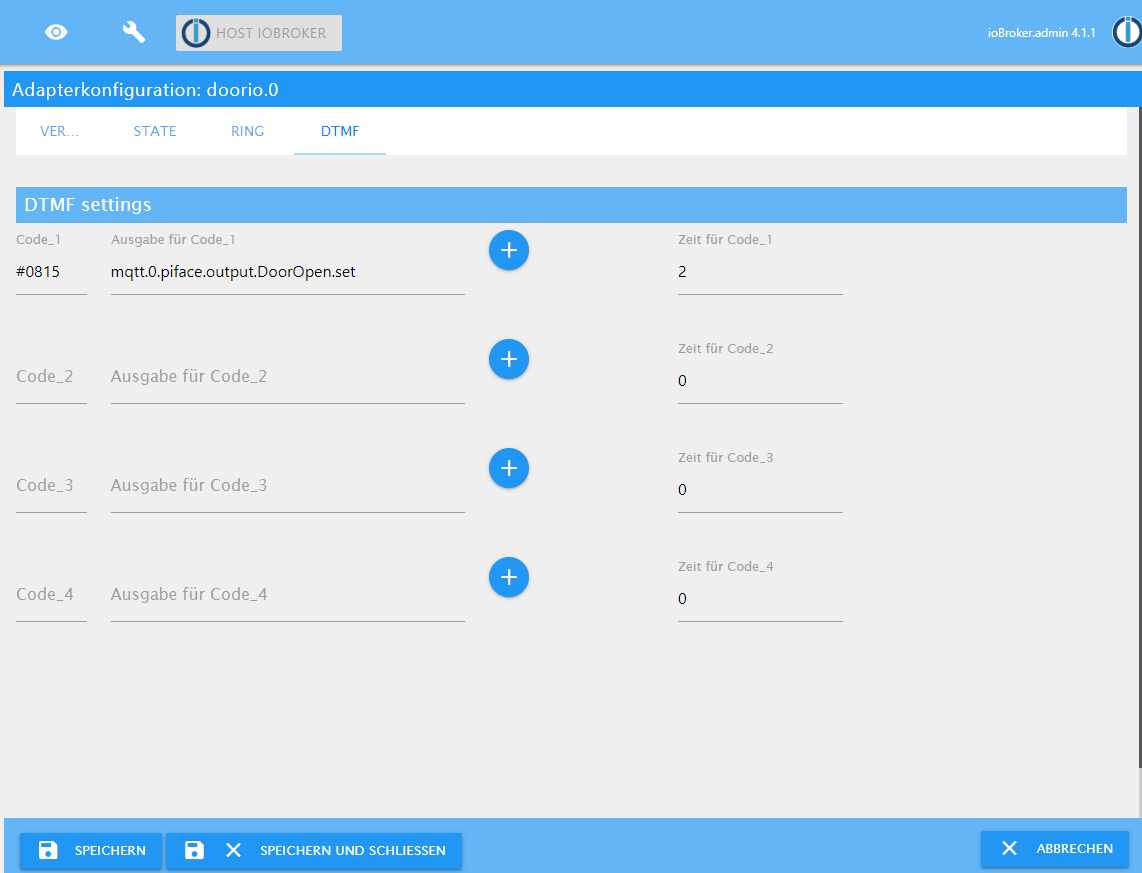
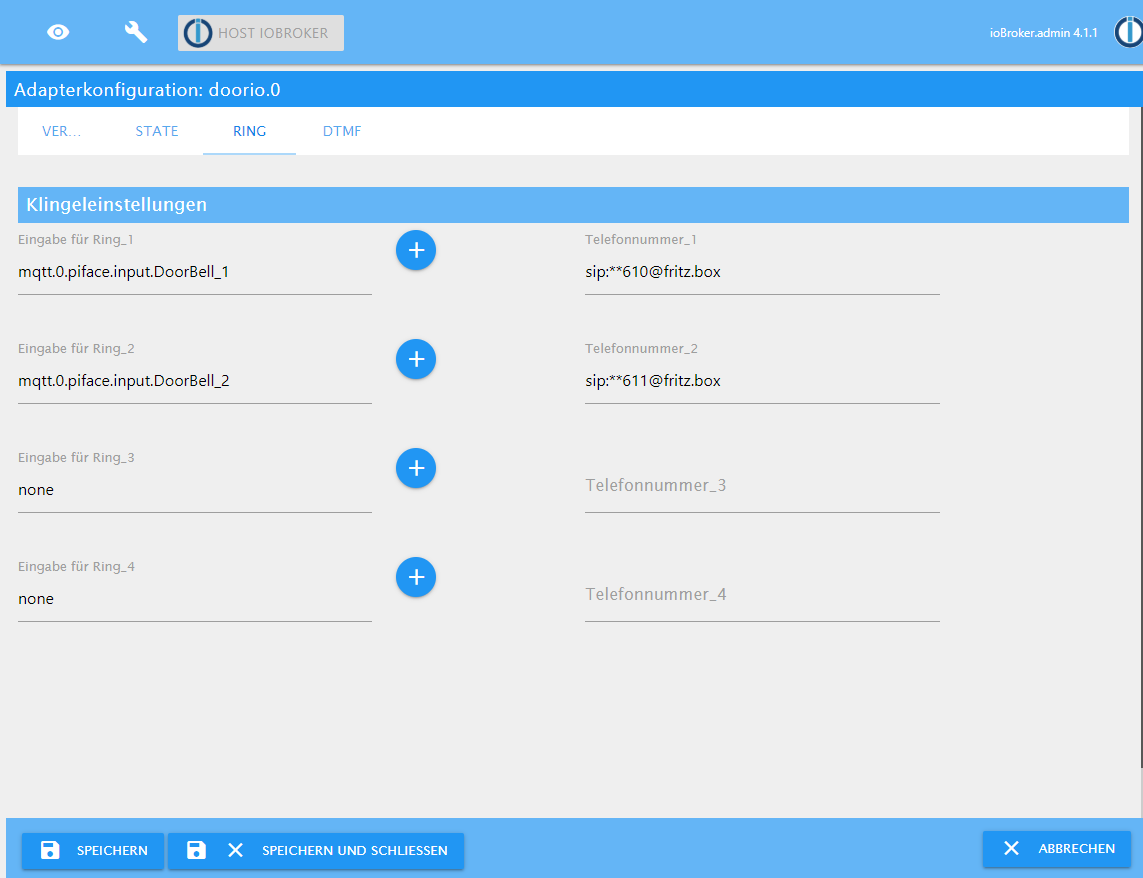
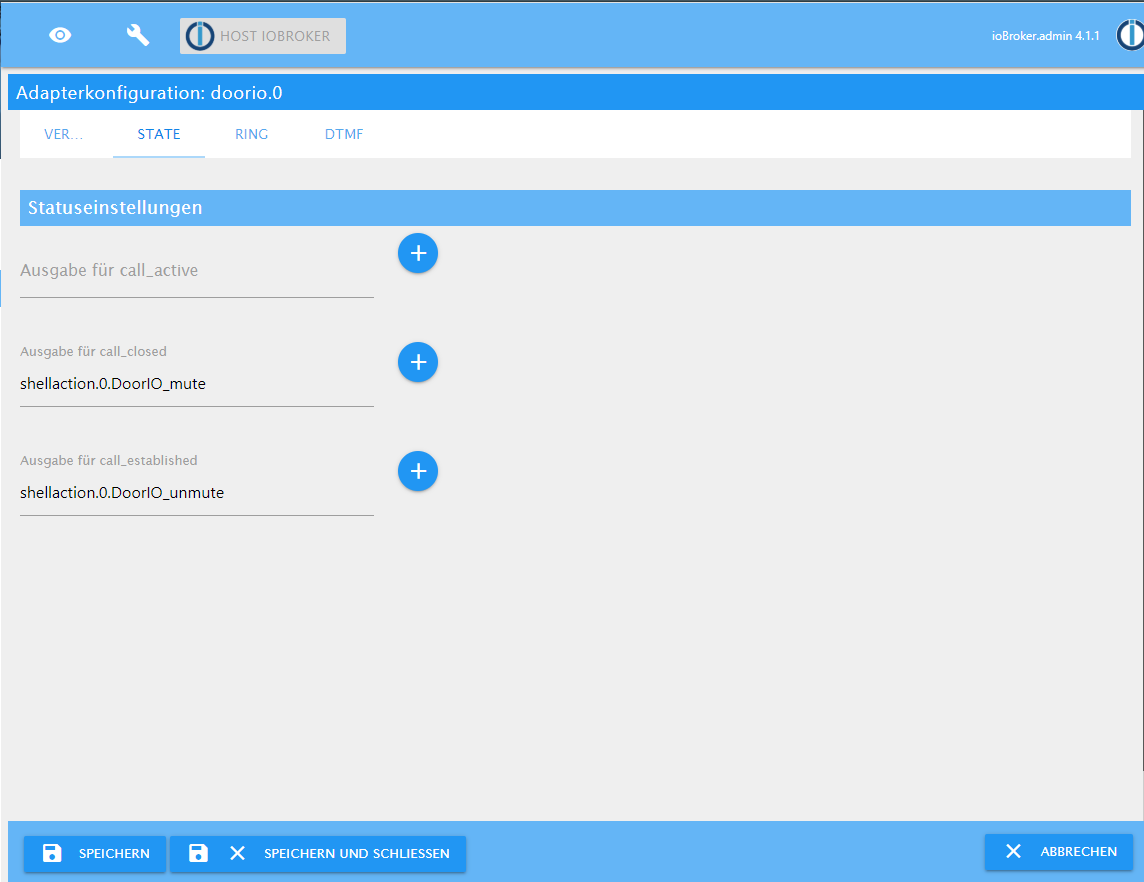
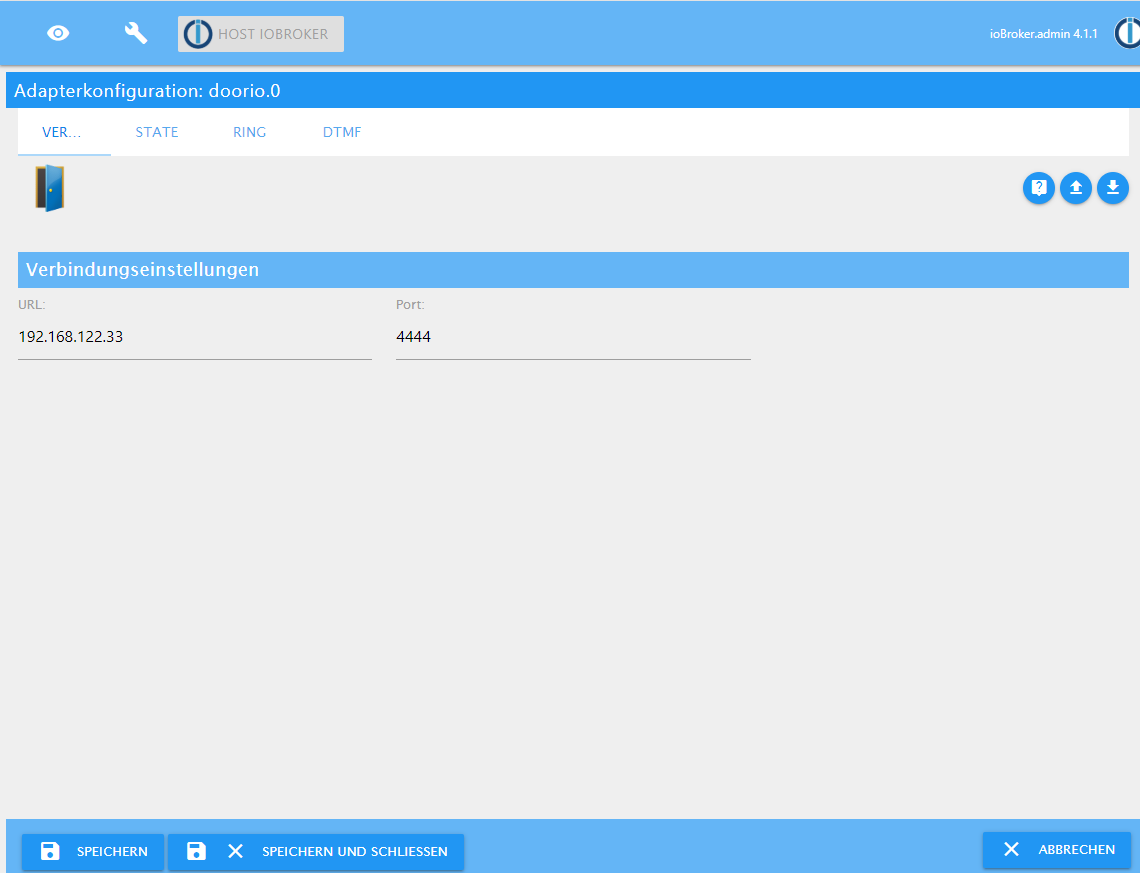
-
vielen Dank für deine schnelle Hilfe. Hab das eingepflegt. Ich kann baresip jetzt als Dienst starten, stoppen u. Status abfragen. Was leider startet baresip nicht automatisch nach einem Neustart. Muss ich da noch irgendwo was eintragen?
@MHeymann sagte in Test Adapter doorio v1.0.x:
vielen Dank für deine schnelle Hilfe. Hab das eingepflegt. Ich kann baresip jetzt als Dienst starten, stoppen u. Status abfragen. Was leider startet baresip nicht automatisch nach einem Neustart. Muss ich da noch irgendwo was eintragen?
Durch den Befehl "sudo systemctl enable baresip" startet Baresip normalerweise nach jedem Neustart.
-
@MHeymann sagte in Test Adapter doorio v1.0.x:
vielen Dank für deine schnelle Hilfe. Hab das eingepflegt. Ich kann baresip jetzt als Dienst starten, stoppen u. Status abfragen. Was leider startet baresip nicht automatisch nach einem Neustart. Muss ich da noch irgendwo was eintragen?
Durch den Befehl "sudo systemctl enable baresip" startet Baresip normalerweise nach jedem Neustart.
@Wal sagte in Test Adapter doorio v1.0.x:
systemctl
Das dachte ich eigentlich auch. Wenn ich den Pi neustarte und lasse mir den Status von baresip anzeigen bekomme ich u.a. Ausgabe.
● baresip.service - baresip
   Loaded: loaded (/etc/systemd/system/baresip.service; enabled; vendor preset: enabled)
   Active: failed (Result: exit-code) since Sat 2020-08-01 17:39:09 CEST; 21min ago
 Main PID: 521 (code=exited, status=99)

Aug 01 17:39:08 Klingel systemd[1]: Started baresip.
Aug 01 17:39:08 Klingel baresip[521]: baresip v0.6.1 Copyright (C) 2010 - 2019 Alfred E. Heggestad et al.
Aug 01 17:39:09 Klingel baresip[521]: Local network address:  IPv4=wlan0:192.168.2.26  IPv6=wlan0:fd00::b48f:f4bd:29b:a62f
Aug 01 17:39:09 Klingel baresip[521]: tcp: sock_bind: bind: Cannot assign requested address (af=10, [fd00::b48f:f4bd:29b:a62f]:5060)
Aug 01 17:39:09 Klingel baresip[521]: ua: SIP Transport failed: Cannot assign requested address
Aug 01 17:39:09 Klingel baresip[521]: ua: init failed (Cannot assign requested address)
Aug 01 17:39:09 Klingel baresip[521]: ua: stop all (forced=1)
Aug 01 17:39:09 Klingel systemd[1]: baresip.service: Main process exited, code=exited, status=99/n/a
Aug 01 17:39:09 Klingel systemd[1]: baresip.service: Failed with result 'exit-code'.
wenn ich sudo systemctl enable baresip erneut ausführe bekomme ich folgende Ausgabe:
pi@Klingel:/etc/systemd/system $ sudo systemctl enable baresip
Synchronizing state of baresip.service with SysV service script with /lib/systemd/systemd-sysv-install.
Executing: /lib/systemd/systemd-sysv-install enable baresip
update-rc.d: error: baresip Default-Start contains no runlevels, aborting.
Nach Eingabe von "systemctl start baresip" und "systemctl status baresip" funktioniert baresip.
● baresip.service - baresip
   Loaded: loaded (/etc/systemd/system/baresip.service; enabled; vendor preset: enabled)
   Active: active (running) since Sat 2020-08-01 18:06:55 CEST; 4s ago
 Main PID: 865 (baresip)
   CGroup: /system.slice/baresip.service
           └─865 /usr/bin/baresip -f /home/pi/.baresip

Aug 01 18:06:55 Klingel baresip[865]: Populated 1 audio filter
Aug 01 18:06:55 Klingel baresip[865]: Populated 1 audio filter
Aug 01 18:06:55 Klingel baresip[865]: Populated 0 video codecs
Aug 01 18:06:55 Klingel baresip[865]: Populated 0 video filters
Aug 01 18:06:55 Klingel baresip[865]: baresip is ready.
Aug 01 18:06:55 Klingel baresip[865]: Populated 0 video codecs
Aug 01 18:06:55 Klingel baresip[865]: Populated 0 video filters
Aug 01 18:06:55 Klingel baresip[865]: baresip is ready.
Aug 01 18:06:55 Klingel baresip[865]: DoorIOSIP@192.168.2.1: {0/UDP/v4} 200 OK () [1 binding]
Aug 01 18:06:55 Klingel baresip[865]: DoorIOSIP@192.168.2.1: {0/UDP/v4} 200 OK () [1 binding]
Was mache ich falsch?
-
@Wal sagte in Test Adapter doorio v1.0.x:
systemctl
Das dachte ich eigentlich auch. Wenn ich den Pi neustarte und lasse mir den Status von baresip anzeigen bekomme ich u.a. Ausgabe.
● baresip.service - baresip
   Loaded: loaded (/etc/systemd/system/baresip.service; enabled; vendor preset: enabled)
   Active: failed (Result: exit-code) since Sat 2020-08-01 17:39:09 CEST; 21min ago
 Main PID: 521 (code=exited, status=99)

Aug 01 17:39:08 Klingel systemd[1]: Started baresip.
Aug 01 17:39:08 Klingel baresip[521]: baresip v0.6.1 Copyright (C) 2010 - 2019 Alfred E. Heggestad et al.
Aug 01 17:39:09 Klingel baresip[521]: Local network address:  IPv4=wlan0:192.168.2.26  IPv6=wlan0:fd00::b48f:f4bd:29b:a62f
Aug 01 17:39:09 Klingel baresip[521]: tcp: sock_bind: bind: Cannot assign requested address (af=10, [fd00::b48f:f4bd:29b:a62f]:5060)
Aug 01 17:39:09 Klingel baresip[521]: ua: SIP Transport failed: Cannot assign requested address
Aug 01 17:39:09 Klingel baresip[521]: ua: init failed (Cannot assign requested address)
Aug 01 17:39:09 Klingel baresip[521]: ua: stop all (forced=1)
Aug 01 17:39:09 Klingel systemd[1]: baresip.service: Main process exited, code=exited, status=99/n/a
Aug 01 17:39:09 Klingel systemd[1]: baresip.service: Failed with result 'exit-code'.
wenn ich sudo systemctl enable baresip erneut ausführe bekomme ich folgende Ausgabe:
pi@Klingel:/etc/systemd/system $ sudo systemctl enable baresip
Synchronizing state of baresip.service with SysV service script with /lib/systemd/systemd-sysv-install.
Executing: /lib/systemd/systemd-sysv-install enable baresip
update-rc.d: error: baresip Default-Start contains no runlevels, aborting.
Nach Eingabe von "systemctl start baresip" und "systemctl status baresip" funktioniert baresip.
● baresip.service - baresip
   Loaded: loaded (/etc/systemd/system/baresip.service; enabled; vendor preset: enabled)
   Active: active (running) since Sat 2020-08-01 18:06:55 CEST; 4s ago
 Main PID: 865 (baresip)
   CGroup: /system.slice/baresip.service
           └─865 /usr/bin/baresip -f /home/pi/.baresip

Aug 01 18:06:55 Klingel baresip[865]: Populated 1 audio filter
Aug 01 18:06:55 Klingel baresip[865]: Populated 1 audio filter
Aug 01 18:06:55 Klingel baresip[865]: Populated 0 video codecs
Aug 01 18:06:55 Klingel baresip[865]: Populated 0 video filters
Aug 01 18:06:55 Klingel baresip[865]: baresip is ready.
Aug 01 18:06:55 Klingel baresip[865]: Populated 0 video codecs
Aug 01 18:06:55 Klingel baresip[865]: Populated 0 video filters
Aug 01 18:06:55 Klingel baresip[865]: baresip is ready.
Aug 01 18:06:55 Klingel baresip[865]: DoorIOSIP@192.168.2.1: {0/UDP/v4} 200 OK () [1 binding]
Aug 01 18:06:55 Klingel baresip[865]: DoorIOSIP@192.168.2.1: {0/UDP/v4} 200 OK () [1 binding]
Was mache ich falsch?
-
@MHeymann
schalt mal ipv6 in der cmdline.txt aus..... rootfstype=ext4 elevator=deadline fsck.repair=yes rootwait ipv6.disable=1 -
Vielen lieben Dank. Jetzt funktioniert der Start beim hochfahren.
... Dann baue ich mal weiter.
Danke :)
Na toll neues Problem :(
Im ioBroker bekomme ich folgende Fehlermeldung:
doorio.0	2020-08-01 18:50:35.102	error	(10064) uncaughtException: TypeError: Cannot read property 'val' of null
doorio.0	2020-08-01 18:50:35.096	error	(10064) TypeError: Cannot read property 'val' of null at send2Server (/opt/iobroker/node_modules/iobroker.doorio/lib/client.js:40:50) at BaresipClient.onStateChange (/opt/iobroker/node_modules
doorio.0	2020-08-01 18:50:35.090	error	(10064) uncaught exception: Cannot read property 'val' of null
doorio.0	2020-08-01 18:45:34.864	error	(4324) uncaughtException: TypeError: Cannot read property 'val' of null
doorio.0	2020-08-01 18:45:34.861	error	at processImmediate (timers.js:658:5)
doorio.0	2020-08-01 18:45:34.861	error	at tryOnImmediate (timers.js:676:5)
doorio.0	2020-08-01 18:45:34.861	error	at runCallback (timers.js:705:18)
doorio.0	2020-08-01 18:45:34.861	error	at Immediate.setImmediate (/opt/iobroker/node_modules/iobroker.js-controller/lib/adapter.js:5388:34)
doorio.0	2020-08-01 18:45:34.861	error	at Adapter.emit (events.js:198:13)
doorio.0	2020-08-01 18:45:34.861	error	at Adapter.adapter.on (/opt/iobroker/node_modules/iobroker.doorio/main.js:35:16)
doorio.0	2020-08-01 18:45:34.861	error	at BaresipClient.onStateChange (/opt/iobroker/node_modules/iobroker.doorio/lib/client.js:37:41)
doorio.0	2020-08-01 18:45:34.861	error	at send2Server (/opt/iobroker/node_modules/iobroker.doorio/lib/client.js:40:50)
doorio.0	2020-08-01 18:45:34.861	error	(4324) TypeError: Cannot read property 'val' of null
und der baresip Status dazu:
● baresip.service - baresip
   Loaded: loaded (/etc/systemd/system/baresip.service; enabled; vendor preset: enabled)
   Active: active (running) since Sat 2020-08-01 18:28:56 CEST; 18min ago
 Main PID: 479 (baresip)
   CGroup: /system.slice/baresip.service
           └─479 /usr/bin/baresip -f /home/pi/.baresip

Aug 01 18:34:10 Klingel baresip[479]: DoorIOSIP@192.168.2.1: {0/UDP/v4} 200 OK () [1 binding]
Aug 01 18:34:10 Klingel baresip[479]: DoorIOSIP@192.168.2.1: {0/UDP/v4} 200 OK () [1 binding]
Aug 01 18:38:40 Klingel baresip[479]: reg: sip:DoorIOSIP@192.168.2.1: 401 Unauthorized ()
Aug 01 18:38:40 Klingel baresip[479]: reg: sip:DoorIOSIP@192.168.2.1: 401 Unauthorized ()
Aug 01 18:39:37 Klingel baresip[479]: DoorIOSIP@192.168.2.1: {0/UDP/v4} 200 OK () [1 binding]
Aug 01 18:39:37 Klingel baresip[479]: DoorIOSIP@192.168.2.1: {0/UDP/v4} 200 OK () [1 binding]
Aug 01 18:44:07 Klingel baresip[479]: reg: sip:DoorIOSIP@192.168.2.1: 401 Unauthorized ()
Aug 01 18:44:07 Klingel baresip[479]: reg: sip:DoorIOSIP@192.168.2.1: 401 Unauthorized ()
Aug 01 18:44:44 Klingel baresip[479]: DoorIOSIP@192.168.2.1: {0/UDP/v4} 200 OK () [1 binding]
Aug 01 18:44:44 Klingel baresip[479]: DoorIOSIP@192.168.2.1: {0/UDP/v4} 200 OK () [1 binding]
Was könnte das sein?
-
Na toll neues Problem :(
Im ioBroker bekomme ich folgende Fehlermeldung:
doorio.0	2020-08-01 18:50:35.102	error	(10064) uncaughtException: TypeError: Cannot read property 'val' of null
doorio.0	2020-08-01 18:50:35.096	error	(10064) TypeError: Cannot read property 'val' of null at send2Server (/opt/iobroker/node_modules/iobroker.doorio/lib/client.js:40:50) at BaresipClient.onStateChange (/opt/iobroker/node_modules
doorio.0	2020-08-01 18:50:35.090	error	(10064) uncaught exception: Cannot read property 'val' of null
doorio.0	2020-08-01 18:45:34.864	error	(4324) uncaughtException: TypeError: Cannot read property 'val' of null
doorio.0	2020-08-01 18:45:34.861	error	at processImmediate (timers.js:658:5)
doorio.0	2020-08-01 18:45:34.861	error	at tryOnImmediate (timers.js:676:5)
doorio.0	2020-08-01 18:45:34.861	error	at runCallback (timers.js:705:18)
doorio.0	2020-08-01 18:45:34.861	error	at Immediate.setImmediate (/opt/iobroker/node_modules/iobroker.js-controller/lib/adapter.js:5388:34)
doorio.0	2020-08-01 18:45:34.861	error	at Adapter.emit (events.js:198:13)
doorio.0	2020-08-01 18:45:34.861	error	at Adapter.adapter.on (/opt/iobroker/node_modules/iobroker.doorio/main.js:35:16)
doorio.0	2020-08-01 18:45:34.861	error	at BaresipClient.onStateChange (/opt/iobroker/node_modules/iobroker.doorio/lib/client.js:37:41)
doorio.0	2020-08-01 18:45:34.861	error	at send2Server (/opt/iobroker/node_modules/iobroker.doorio/lib/client.js:40:50)
doorio.0	2020-08-01 18:45:34.861	error	(4324) TypeError: Cannot read property 'val' of null
und der baresip Status dazu:
● baresip.service - baresip
   Loaded: loaded (/etc/systemd/system/baresip.service; enabled; vendor preset: enabled)
   Active: active (running) since Sat 2020-08-01 18:28:56 CEST; 18min ago
 Main PID: 479 (baresip)
   CGroup: /system.slice/baresip.service
           └─479 /usr/bin/baresip -f /home/pi/.baresip

Aug 01 18:34:10 Klingel baresip[479]: DoorIOSIP@192.168.2.1: {0/UDP/v4} 200 OK () [1 binding]
Aug 01 18:34:10 Klingel baresip[479]: DoorIOSIP@192.168.2.1: {0/UDP/v4} 200 OK () [1 binding]
Aug 01 18:38:40 Klingel baresip[479]: reg: sip:DoorIOSIP@192.168.2.1: 401 Unauthorized ()
Aug 01 18:38:40 Klingel baresip[479]: reg: sip:DoorIOSIP@192.168.2.1: 401 Unauthorized ()
Aug 01 18:39:37 Klingel baresip[479]: DoorIOSIP@192.168.2.1: {0/UDP/v4} 200 OK () [1 binding]
Aug 01 18:39:37 Klingel baresip[479]: DoorIOSIP@192.168.2.1: {0/UDP/v4} 200 OK () [1 binding]
Aug 01 18:44:07 Klingel baresip[479]: reg: sip:DoorIOSIP@192.168.2.1: 401 Unauthorized ()
Aug 01 18:44:07 Klingel baresip[479]: reg: sip:DoorIOSIP@192.168.2.1: 401 Unauthorized ()
Aug 01 18:44:44 Klingel baresip[479]: DoorIOSIP@192.168.2.1: {0/UDP/v4} 200 OK () [1 binding]
Aug 01 18:44:44 Klingel baresip[479]: DoorIOSIP@192.168.2.1: {0/UDP/v4} 200 OK () [1 binding]
Was könnte das sein?
@MHeymann
Welche node-Version ist da installiert?which nodejs && nodejs -v && which node && node -v && which npm && npm -v && apt policy nodejs -
Na toll neues Problem :(
Im ioBroker bekomme ich folgende Fehlermeldung:
doorio.0	2020-08-01 18:50:35.102	error	(10064) uncaughtException: TypeError: Cannot read property 'val' of null
doorio.0	2020-08-01 18:50:35.096	error	(10064) TypeError: Cannot read property 'val' of null at send2Server (/opt/iobroker/node_modules/iobroker.doorio/lib/client.js:40:50) at BaresipClient.onStateChange (/opt/iobroker/node_modules
doorio.0	2020-08-01 18:50:35.090	error	(10064) uncaught exception: Cannot read property 'val' of null
doorio.0	2020-08-01 18:45:34.864	error	(4324) uncaughtException: TypeError: Cannot read property 'val' of null
doorio.0	2020-08-01 18:45:34.861	error	at processImmediate (timers.js:658:5)
doorio.0	2020-08-01 18:45:34.861	error	at tryOnImmediate (timers.js:676:5)
doorio.0	2020-08-01 18:45:34.861	error	at runCallback (timers.js:705:18)
doorio.0	2020-08-01 18:45:34.861	error	at Immediate.setImmediate (/opt/iobroker/node_modules/iobroker.js-controller/lib/adapter.js:5388:34)
doorio.0	2020-08-01 18:45:34.861	error	at Adapter.emit (events.js:198:13)
doorio.0	2020-08-01 18:45:34.861	error	at Adapter.adapter.on (/opt/iobroker/node_modules/iobroker.doorio/main.js:35:16)
doorio.0	2020-08-01 18:45:34.861	error	at BaresipClient.onStateChange (/opt/iobroker/node_modules/iobroker.doorio/lib/client.js:37:41)
doorio.0	2020-08-01 18:45:34.861	error	at send2Server (/opt/iobroker/node_modules/iobroker.doorio/lib/client.js:40:50)
doorio.0	2020-08-01 18:45:34.861	error	(4324) TypeError: Cannot read property 'val' of null
und der baresip Status dazu:
● baresip.service - baresip
   Loaded: loaded (/etc/systemd/system/baresip.service; enabled; vendor preset: enabled)
   Active: active (running) since Sat 2020-08-01 18:28:56 CEST; 18min ago
 Main PID: 479 (baresip)
   CGroup: /system.slice/baresip.service
           └─479 /usr/bin/baresip -f /home/pi/.baresip

Aug 01 18:34:10 Klingel baresip[479]: DoorIOSIP@192.168.2.1: {0/UDP/v4} 200 OK () [1 binding]
Aug 01 18:34:10 Klingel baresip[479]: DoorIOSIP@192.168.2.1: {0/UDP/v4} 200 OK () [1 binding]
Aug 01 18:38:40 Klingel baresip[479]: reg: sip:DoorIOSIP@192.168.2.1: 401 Unauthorized ()
Aug 01 18:38:40 Klingel baresip[479]: reg: sip:DoorIOSIP@192.168.2.1: 401 Unauthorized ()
Aug 01 18:39:37 Klingel baresip[479]: DoorIOSIP@192.168.2.1: {0/UDP/v4} 200 OK () [1 binding]
Aug 01 18:39:37 Klingel baresip[479]: DoorIOSIP@192.168.2.1: {0/UDP/v4} 200 OK () [1 binding]
Aug 01 18:44:07 Klingel baresip[479]: reg: sip:DoorIOSIP@192.168.2.1: 401 Unauthorized ()
Aug 01 18:44:07 Klingel baresip[479]: reg: sip:DoorIOSIP@192.168.2.1: 401 Unauthorized ()
Aug 01 18:44:44 Klingel baresip[479]: DoorIOSIP@192.168.2.1: {0/UDP/v4} 200 OK () [1 binding]
Aug 01 18:44:44 Klingel baresip[479]: DoorIOSIP@192.168.2.1: {0/UDP/v4} 200 OK () [1 binding]
Was könnte das sein?
-
@MHeymann
Welche node-Version ist da installiert?which nodejs && nodejs -v && which node && node -v && which npm && npm -v && apt policy nodejs@Thomas-Braun sagte in Test Adapter doorio v1.0.x:
@MHeymann
Welche node-Version ist da installiert?which nodejs && nodejs -v && which node && node -v && which npm && npm -v && apt policy nodejsWie Thomas vermutet, könnte es auch an der Version von node liegen.
Der Adapter ist für Node 10 u. 12, das ist i.M. Standard im ioBroker. -
@Thomas-Braun sagte in Test Adapter doorio v1.0.x:
@MHeymann
Welche node-Version ist da installiert?which nodejs && nodejs -v && which node && node -v && which npm && npm -v && apt policy nodejsWie Thomas vermutet, könnte es auch an der Version von node liegen.
Der Adapter ist für Node 10 u. 12, das ist i.M. Standard im ioBroker. -
@MHeymann
Auch richtig?
Die Ausgabe der obigen Befehlskette würde helfen...Ich würde auch auf node12 gehen.
-
@MHeymann
Auch richtig?
Die Ausgabe der obigen Befehlskette würde helfen...Ich würde auch auf node12 gehen.
Hier mal die Ausgabe.
root@ioBroker:~# which nodejs && nodejs -v && which node && node -v && which npm && npm -v && apt policy nodejs /usr/bin/nodejs v10.22.0 /usr/bin/node v10.22.0 /usr/bin/npm 6.14.6 nodejs: Installed: 10.22.0-1nodesource1 Candidate: 10.22.0-1nodesource1 Version table: *** 10.22.0-1nodesource1 500 500 https://deb.nodesource.com/node_10.x bionic/main amd64 Packages 100 /var/lib/dpkg/status 8.10.0~dfsg-2ubuntu0.4 500 500 http://archive.ubuntu.com/ubuntu bionic-updates/universe amd64 Packages 8.10.0~dfsg-2ubuntu0.2 500 500 http://archive.ubuntu.com/ubuntu bionic-security/universe amd64 Packages 8.10.0~dfsg-2 500 500 http://archive.ubuntu.com/ubuntu bionic/universe amd64 Packages -
Hier mal die Ausgabe.
root@ioBroker:~# which nodejs && nodejs -v && which node && node -v && which npm && npm -v && apt policy nodejs /usr/bin/nodejs v10.22.0 /usr/bin/node v10.22.0 /usr/bin/npm 6.14.6 nodejs: Installed: 10.22.0-1nodesource1 Candidate: 10.22.0-1nodesource1 Version table: *** 10.22.0-1nodesource1 500 500 https://deb.nodesource.com/node_10.x bionic/main amd64 Packages 100 /var/lib/dpkg/status 8.10.0~dfsg-2ubuntu0.4 500 500 http://archive.ubuntu.com/ubuntu bionic-updates/universe amd64 Packages 8.10.0~dfsg-2ubuntu0.2 500 500 http://archive.ubuntu.com/ubuntu bionic-security/universe amd64 Packages 8.10.0~dfsg-2 500 500 http://archive.ubuntu.com/ubuntu bionic/universe amd64 Packages@MHeymann
Man meldet sich nicht als root an.
Unter Ubuntu immer als normaler User und dann bei Notwendigkeit mit sudo den Befehl absetzen. -
@MHeymann
Man meldet sich nicht als root an.
Unter Ubuntu immer als normaler User und dann bei Notwendigkeit mit sudo den Befehl absetzen. -
Ok. Ist meine Testumgebung auf Proxmox. Aber ist ist ja nicht der Fehler oder?
Ok. Ist meine Testumgebung auf Proxmox. Aber ist ist ja nicht der Fehler oder?
Doch, das ist grundsätzlich ein Fehler. Das zerschießt dir u. U. die Pfade und Rechte.
Und auch in einem Testsystem arbeitet man nicht als root. -
Ok. Ist meine Testumgebung auf Proxmox. Aber ist ist ja nicht der Fehler oder?
Doch, das ist grundsätzlich ein Fehler. Das zerschießt dir u. U. die Pfade und Rechte.
Und auch in einem Testsystem arbeitet man nicht als root. -
Da hast du sicherlich recht. Aber die anderen 30 Instanzen laufen ja problemlos.
Aber die anderen 30 Instanzen laufen ja problemlos.
Heißt jetzt genau was? Die doorio-Instanz aber nicht.
Jetzt meldest du dich als USER an und jagst deniobroker fixdurch das System.
Vielleicht hast du auch baresip durch den root-login krumm installiert. -
Aber die anderen 30 Instanzen laufen ja problemlos.
Heißt jetzt genau was? Die doorio-Instanz aber nicht.
Jetzt meldest du dich als USER an und jagst deniobroker fixdurch das System.
Vielleicht hast du auch baresip durch den root-login krumm installiert.@Thomas-Braun sagte in Test Adapter doorio v1.0.x:
iobroker fix
Habe ich gemacht Fehler ist immer noch da.
Habe DoorIO im debug mode laufen lassen. Ich habe innerhalb weniger Minuten 1000de Einträge. Hatte das davor über mein Handy eingestellt und ca. eine Stunde laufen gelassen. Die Log Datei ist ca 550 MB groß. Ist das normal?
-
@Thomas-Braun sagte in Test Adapter doorio v1.0.x:
iobroker fix
Habe ich gemacht Fehler ist immer noch da.
Habe DoorIO im debug mode laufen lassen. Ich habe innerhalb weniger Minuten 1000de Einträge. Hatte das davor über mein Handy eingestellt und ca. eine Stunde laufen gelassen. Die Log Datei ist ca 550 MB groß. Ist das normal?
@MHeymann
Nein. -
Aber die anderen 30 Instanzen laufen ja problemlos.
Heißt jetzt genau was? Die doorio-Instanz aber nicht.
Jetzt meldest du dich als USER an und jagst deniobroker fixdurch das System.
Vielleicht hast du auch baresip durch den root-login krumm installiert.@Thomas-Braun sagte in Test Adapter doorio v1.0.x:
Vielleicht hast du auch baresip durch den root-login krumm installiert.
baresip läuft auf nem anderen pi.
-
@Thomas-Braun sagte in Test Adapter doorio v1.0.x:
Vielleicht hast du auch baresip durch den root-login krumm installiert.
baresip läuft auf nem anderen pi.
@MHeymann Orgelst du da auch als root rum?


Support us
354
Online32.5k
Users81.6k
Topics1.3m
Posts