




[iot] iot Adapter erfolgreich Verbunden, Steuerung per Alexa klappt nicht
-
Hallo allerseits.
In der iobroker-Welt bin ich noch recht neu und kämpfe mit der Anbindung an Alexa.
iobroker pro Account ist erstellt - bisher aber zum Testen noch ohne Lizenz
iot-Adapter ist installiert und Instanz ist grünBeim aktivieren des Skills in Alexa bekomme ich aber - nach erfolgreicher Eingabe von Mailadresse und Passwort - die Meldung „ Konten konnten nicht verknüpf werden“
hab schon alles mögliche probiert aber ich verstehe nicht warum hier keine Verknüpfung funktioniert- oder brauche ich doch zwingend eine pro-Lizenz?
Gruß
basti -
-
Hallo,
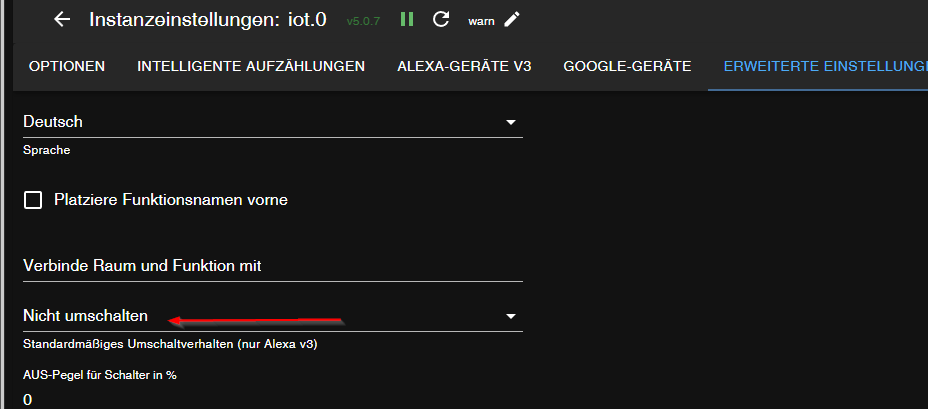
Seit dem Umstieg auf den iobroker.assisten Adapter kommt es immer wieder bei mir vor, dass ich über Alexa einen Befehl wiederholen muss, bevor entsprechend reagiert wird. In Facebook berichten auch andere Nutzer von diesem Phänomen.@DirkGr said in [iot] iot Adapter erfolgreich Verbunden, Steuerung per Alexa klappt nicht:
kommt es immer wieder bei mir vor, dass ich über Alexa einen Befehl wiederholen muss, bevor entsprechend reagiert wird
-
Ich hoffe mal, ich bin hier im richtigen thread gelandet mit folgendem Problem.
Ich habe eine iobroker pro assistant licence und bis vor ca. einem Monat konnte ich problemlos meine zigbee Temperatursensoren (Aqara Temperature and humidity sensor) und eine Lampe, die über den tuya Adapter verbunden ist, über Alexa steuern.
Aber jetzt kommt auf die Frage nach z.B. der Temperatur im Schlafzimmer direkt ein "Ich weiß nicht, was schief gelaufen ist."
In der Alexa App ist der Sensor gelistet, aber mit einem "Gerät reagiert nicht" Banner. (in den Details steht wie bisher auch "Device controlled by ioBroker".der iot Adapter ist grün, die Temperatur und Luftfeuchtigkeit sehe ich im zigbee Objektbaum korrekt und aktuell. Im Iot Adapter sehe ich das Gerät ebenfalls mit den korrekten Werten und richtigem Typ. Eine zigbee Lampe, die ich über iot eingebunden habe, lässt sich dagegen schon steuern (wenn auch nicht alle Buttons in der Alexa-App für die Helligkeit funktionieren)
Andere Geräte (z.B. über HomematicIP) funktionieren wie gewohnt.Alle Adapter sind "latest stable", die iobroker Instanz läuft auf einem RaspberryPi4
Was ich bereits versucht habe:
- iot Adapter neu starten
- iot Adapter auf Version 5.0.7 reverten
- iobroker assistant Skill in Alexa neu verknüpft
- Alexa2 Adapter neu starten
- Gerät aus iot und Alexa App entfernen und neu (unter neuem Namen) anlegen
Alexa findet das neue Gerät vom Typ "temperatursensor" und fügt es hinzu, aber es werden keine Werte angezeigt und es steht direkt wieder "Gerät reagiert nicht" da.
Das selbe Problem mit der tuya-Lampe. Lässt sich über App oder durch direktes manipulieren im Object tree steuern, aber nicht mehr über Alexa.Als alles noch funktioniert hat, habe ich im Alexa2/SmartHomeDevices für den Temperatursensor auch Werte gesehen, jetzt gibt es da nur noch 2 States: "#enabled" und "#delete".
Systemdaten:
Platform       : linux
os             : linux
Architecture   : arm
CPUs           : 4
Speed          : 1500 MHz
Model          : unknown
RAM            : 3.7 GB
System uptime  : 259d. 14:46:48
Node.js        : v22.15.0
time           : 1775721216856
timeOffset     : -120
NPM            : 10.9.2
adapters count : 601
Disk size      : 29.0 GiB
Disk free      : 18.7 GiB
Zum Test habe ich den Sensor komplett neu mit dem Namen "Karl" hinzugefügt.
iot Adapter debug startup log: (ich habe einige irrelevante Geräte und Räume aus dem Log getrimmt)2026-04-09 09:29:44.756 - debug: iot.0 (11719) Redis Objects: Use Redis connection: 127.0.0.1:9001 2026-04-09 09:29:44.813 - debug: iot.0 (11719) Objects client ready ... initialize now 2026-04-09 09:29:44.871 - debug: iot.0 (11719) Objects create System PubSub Client 2026-04-09 09:29:44.873 - debug: iot.0 (11719) Objects create User PubSub Client 2026-04-09 09:29:44.940 - debug: iot.0 (11719) Objects client initialize lua scripts 2026-04-09 09:29:44.950 - debug: iot.0 (11719) Objects connected to redis: 127.0.0.1:9001 2026-04-09 09:29:45.001 - debug: iot.0 (11719) Redis States: Use Redis connection: 127.0.0.1:9000 2026-04-09 09:29:45.155 - debug: iot.0 (11719) States create System PubSub Client 2026-04-09 09:29:45.158 - debug: iot.0 (11719) States create User PubSub Client 2026-04-09 09:29:45.351 - debug: iot.0 (11719) States connected to redis: 127.0.0.1:9000 2026-04-09 09:29:45.444 - debug: iot.0 (11719) Plugin sentry Initialize Plugin (enabled=true) 2026-04-09 09:29:46.308 - info: iot.0 (11719) starting. Version 5.0.12 in /opt/iobroker/node_modules/iobroker.iot, node: v22.15.0, js-controller: 7.0.7 2026-04-09 09:29:46.487 - info: iot.0 (11719) Connecting with a18wym7vjdl22g.iot.eu-west-1.amazonaws.com 2026-04-09 09:29:47.109 - debug: iot.0 (11719) [AlexaV3::DeviceManager]: (re)collecting devices... 2026-04-09 09:29:47.477 - info: iot.0 (11719) Connection changed: connect "i***r_e***a_de" 2026-04-09 09:29:47.649 - debug: iot.0 (11719) [ALEXA3] Starting control detection with 7855 objects... 2026-04-09 09:29:47.682 - debug: iot.0 (11719) [ALEXA3] Found 0 functionalities and 9 rooms... 2026-04-09 09:29:47.696 - debug: iot.0 (11719) [ALEXA3] collected 7855 states from categories... 2026-04-09 09:29:47.714 - debug: iot.0 (11719) [ALEXA3] collected 7855 smart names... 2026-04-09 09:29:47.738 - debug: iot.0 (11719) [ALEXA3] added alexa2.0.History.#trigger with smartName as "button" 2026-04-09 09:29:47.789 - debug: iot.0 (11719) [ALEXA3] added tuya.0.bfe654264fb820d823xnmu.22 with smartName as "dimmer" 2026-04-09 09:29:47.805 - debug: iot.0 (11719) [ALEXA3] added zigbee.0.00158d000540642d.temperature with smartName as "temperature" 2026-04-09 09:29:47.828 - debug: iot.0 (11719) [ALEXA3] collected 14 controls 2026-04-09 09:29:47.958 - debug: iot.0 (11719) [ALEXA3] Ignored control hmip.0.devices.3014F711A00010DBE98CE826 with type temperature as disabled 2026-04-09 09:29:48.148 - debug: iot.0 (11719) [ALEXA3] sorted 71 controls 2026-04-09 09:29:48.149 - debug: iot.0 (11719) [AlexaV3::DeviceManager]: type detector found 71 controls 2026-04-09 09:29:48.151 - debug: iot.0 (11719) [AlexaV3::DeviceManager]: merging controls to a device with name AlexaHistoryTrigger 2026-04-09 09:29:48.158 - debug: iot.0 (11719) [AlexaV3::DeviceManager]: "button" added to "AlexaHistoryTrigger" 2026-04-09 09:29:48.195 - debug: iot.0 (11719) [AlexaV3::DeviceManager]: merging controls to a device with name Karl 2026-04-09 09:29:48.197 - debug: iot.0 (11719) [AlexaV3::DeviceManager]: "temperature" added to "Karl" 2026-04-09 09:29:48.219 - debug: iot.0 (11719) [AlexaV3::DeviceManager]: Control of type [media] assigned to room [Schlafzimmer] has no function. Skipped. 2026-04-09 09:29:48.220 - debug: iot.0 (11719) [AlexaV3::DeviceManager]: Control of type [slider] assigned to room [Schlafzimmer] has no function. Skipped. 2026-04-09 09:29:48.220 - debug: iot.0 (11719) [AlexaV3::DeviceManager]: Control of type [button] assigned to room [Schlafzimmer] has no function. Skipped. 2026-04-09 09:29:48.220 - debug: iot.0 (11719) [AlexaV3::DeviceManager]: Control of type [slider] assigned to room [Schlafzimmer] has no function. Skipped. 2026-04-09 09:29:48.220 - debug: iot.0 (11719) [AlexaV3::DeviceManager]: Control of type [button] assigned to room [Schlafzimmer] has no function. Skipped. 2026-04-09 09:29:48.221 - debug: iot.0 (11719) [AlexaV3::DeviceManager]: Control of type [socket] assigned to room [Schlafzimmer] has no function. Skipped. 2026-04-09 09:29:48.221 - debug: iot.0 (11719) [AlexaV3::DeviceManager]: Control of type [location] assigned to room [Schlafzimmer] has no function. Skipped. 2026-04-09 09:29:48.221 - debug: iot.0 (11719) [AlexaV3::DeviceManager]: Control of type [temperature] assigned to room [Schlafzimmer] has no function. Skipped. 2026-04-09 09:29:48.223 - debug: iot.0 (11719) [AlexaV3::DeviceManager]: finished collecting devices. there is/are 15 device(s) in total 2026-04-09 09:29:48.224 - debug: iot.0 (11719) [AlexaV3::DeviceManager]: AlexaHistoryTrigger (Controls: Button) 2026-04-09 09:29:48.227 - debug: iot.0 (11719) [AlexaV3::DeviceManager]: Karl (Controls: Temperature) 2026-04-09 09:29:48.229 - debug: iot.0 (11719) [AlexaV3::DeviceManager]: registering for updates of total 21 statesAlexa2 Adapter debug JSON mit Bezug auf das "Karl" device:
{"**MOD-EDIT:Private Daten entfernt!**Wenn ich nach "Karl" Frage, kommt außer der Lautstärkeänderung vom Echo kein Signal beim iot oder Alexa2 an und sie antwortet wie gesagt nur mit "Ich weiß nicht, was schief gelaufen ist"
10kWp - 25x Hyundai HiE-S400VG - KOSTAL Plenticore Plus 8.5 - BYD BBox Premium HVS 10,2kWh
ioBroker - Raspi4 -
Ich hoffe mal, ich bin hier im richtigen thread gelandet mit folgendem Problem.
Ich habe eine iobroker pro assistant licence und bis vor ca. einem Monat konnte ich problemlos meine zigbee Temperatursensoren (Aqara Temperature and humidity sensor) und eine Lampe, die über den tuya Adapter verbunden ist, über Alexa steuern.
Aber jetzt kommt auf die Frage nach z.B. der Temperatur im Schlafzimmer direkt ein "Ich weiß nicht, was schief gelaufen ist."
In der Alexa App ist der Sensor gelistet, aber mit einem "Gerät reagiert nicht" Banner. (in den Details steht wie bisher auch "Device controlled by ioBroker".der iot Adapter ist grün, die Temperatur und Luftfeuchtigkeit sehe ich im zigbee Objektbaum korrekt und aktuell. Im Iot Adapter sehe ich das Gerät ebenfalls mit den korrekten Werten und richtigem Typ. Eine zigbee Lampe, die ich über iot eingebunden habe, lässt sich dagegen schon steuern (wenn auch nicht alle Buttons in der Alexa-App für die Helligkeit funktionieren)
Andere Geräte (z.B. über HomematicIP) funktionieren wie gewohnt.Alle Adapter sind "latest stable", die iobroker Instanz läuft auf einem RaspberryPi4
Was ich bereits versucht habe:
- iot Adapter neu starten
- iot Adapter auf Version 5.0.7 reverten
- iobroker assistant Skill in Alexa neu verknüpft
- Alexa2 Adapter neu starten
- Gerät aus iot und Alexa App entfernen und neu (unter neuem Namen) anlegen
Alexa findet das neue Gerät vom Typ "temperatursensor" und fügt es hinzu, aber es werden keine Werte angezeigt und es steht direkt wieder "Gerät reagiert nicht" da.
Das selbe Problem mit der tuya-Lampe. Lässt sich über App oder durch direktes manipulieren im Object tree steuern, aber nicht mehr über Alexa.Als alles noch funktioniert hat, habe ich im Alexa2/SmartHomeDevices für den Temperatursensor auch Werte gesehen, jetzt gibt es da nur noch 2 States: "#enabled" und "#delete".
Systemdaten:
Platform       : linux
os             : linux
Architecture   : arm
CPUs           : 4
Speed          : 1500 MHz
Model          : unknown
RAM            : 3.7 GB
System uptime  : 259d. 14:46:48
Node.js        : v22.15.0
time           : 1775721216856
timeOffset     : -120
NPM            : 10.9.2
adapters count : 601
Disk size      : 29.0 GiB
Disk free      : 18.7 GiB
Zum Test habe ich den Sensor komplett neu mit dem Namen "Karl" hinzugefügt.
iot Adapter debug startup log: (ich habe einige irrelevante Geräte und Räume aus dem Log getrimmt)2026-04-09 09:29:44.756 - debug: iot.0 (11719) Redis Objects: Use Redis connection: 127.0.0.1:9001 2026-04-09 09:29:44.813 - debug: iot.0 (11719) Objects client ready ... initialize now 2026-04-09 09:29:44.871 - debug: iot.0 (11719) Objects create System PubSub Client 2026-04-09 09:29:44.873 - debug: iot.0 (11719) Objects create User PubSub Client 2026-04-09 09:29:44.940 - debug: iot.0 (11719) Objects client initialize lua scripts 2026-04-09 09:29:44.950 - debug: iot.0 (11719) Objects connected to redis: 127.0.0.1:9001 2026-04-09 09:29:45.001 - debug: iot.0 (11719) Redis States: Use Redis connection: 127.0.0.1:9000 2026-04-09 09:29:45.155 - debug: iot.0 (11719) States create System PubSub Client 2026-04-09 09:29:45.158 - debug: iot.0 (11719) States create User PubSub Client 2026-04-09 09:29:45.351 - debug: iot.0 (11719) States connected to redis: 127.0.0.1:9000 2026-04-09 09:29:45.444 - debug: iot.0 (11719) Plugin sentry Initialize Plugin (enabled=true) 2026-04-09 09:29:46.308 - info: iot.0 (11719) starting. Version 5.0.12 in /opt/iobroker/node_modules/iobroker.iot, node: v22.15.0, js-controller: 7.0.7 2026-04-09 09:29:46.487 - info: iot.0 (11719) Connecting with a18wym7vjdl22g.iot.eu-west-1.amazonaws.com 2026-04-09 09:29:47.109 - debug: iot.0 (11719) [AlexaV3::DeviceManager]: (re)collecting devices... 2026-04-09 09:29:47.477 - info: iot.0 (11719) Connection changed: connect "i***r_e***a_de" 2026-04-09 09:29:47.649 - debug: iot.0 (11719) [ALEXA3] Starting control detection with 7855 objects... 2026-04-09 09:29:47.682 - debug: iot.0 (11719) [ALEXA3] Found 0 functionalities and 9 rooms... 2026-04-09 09:29:47.696 - debug: iot.0 (11719) [ALEXA3] collected 7855 states from categories... 2026-04-09 09:29:47.714 - debug: iot.0 (11719) [ALEXA3] collected 7855 smart names... 2026-04-09 09:29:47.738 - debug: iot.0 (11719) [ALEXA3] added alexa2.0.History.#trigger with smartName as "button" 2026-04-09 09:29:47.789 - debug: iot.0 (11719) [ALEXA3] added tuya.0.bfe654264fb820d823xnmu.22 with smartName as "dimmer" 2026-04-09 09:29:47.805 - debug: iot.0 (11719) [ALEXA3] added zigbee.0.00158d000540642d.temperature with smartName as "temperature" 2026-04-09 09:29:47.828 - debug: iot.0 (11719) [ALEXA3] collected 14 controls 2026-04-09 09:29:47.958 - debug: iot.0 (11719) [ALEXA3] Ignored control hmip.0.devices.3014F711A00010DBE98CE826 with type temperature as disabled 2026-04-09 09:29:48.148 - debug: iot.0 (11719) [ALEXA3] sorted 71 controls 2026-04-09 09:29:48.149 - debug: iot.0 (11719) [AlexaV3::DeviceManager]: type detector found 71 controls 2026-04-09 09:29:48.151 - debug: iot.0 (11719) [AlexaV3::DeviceManager]: merging controls to a device with name AlexaHistoryTrigger 2026-04-09 09:29:48.158 - debug: iot.0 (11719) [AlexaV3::DeviceManager]: "button" added to "AlexaHistoryTrigger" 2026-04-09 09:29:48.195 - debug: iot.0 (11719) [AlexaV3::DeviceManager]: merging controls to a device with name Karl 2026-04-09 09:29:48.197 - debug: iot.0 (11719) [AlexaV3::DeviceManager]: "temperature" added to "Karl" 2026-04-09 09:29:48.219 - debug: iot.0 (11719) [AlexaV3::DeviceManager]: Control of type [media] assigned to room [Schlafzimmer] has no function. Skipped. 2026-04-09 09:29:48.220 - debug: iot.0 (11719) [AlexaV3::DeviceManager]: Control of type [slider] assigned to room [Schlafzimmer] has no function. Skipped. 2026-04-09 09:29:48.220 - debug: iot.0 (11719) [AlexaV3::DeviceManager]: Control of type [button] assigned to room [Schlafzimmer] has no function. Skipped. 2026-04-09 09:29:48.220 - debug: iot.0 (11719) [AlexaV3::DeviceManager]: Control of type [slider] assigned to room [Schlafzimmer] has no function. Skipped. 2026-04-09 09:29:48.220 - debug: iot.0 (11719) [AlexaV3::DeviceManager]: Control of type [button] assigned to room [Schlafzimmer] has no function. Skipped. 2026-04-09 09:29:48.221 - debug: iot.0 (11719) [AlexaV3::DeviceManager]: Control of type [socket] assigned to room [Schlafzimmer] has no function. Skipped. 2026-04-09 09:29:48.221 - debug: iot.0 (11719) [AlexaV3::DeviceManager]: Control of type [location] assigned to room [Schlafzimmer] has no function. Skipped. 2026-04-09 09:29:48.221 - debug: iot.0 (11719) [AlexaV3::DeviceManager]: Control of type [temperature] assigned to room [Schlafzimmer] has no function. Skipped. 2026-04-09 09:29:48.223 - debug: iot.0 (11719) [AlexaV3::DeviceManager]: finished collecting devices. there is/are 15 device(s) in total 2026-04-09 09:29:48.224 - debug: iot.0 (11719) [AlexaV3::DeviceManager]: AlexaHistoryTrigger (Controls: Button) 2026-04-09 09:29:48.227 - debug: iot.0 (11719) [AlexaV3::DeviceManager]: Karl (Controls: Temperature) 2026-04-09 09:29:48.229 - debug: iot.0 (11719) [AlexaV3::DeviceManager]: registering for updates of total 21 statesAlexa2 Adapter debug JSON mit Bezug auf das "Karl" device:
{"**MOD-EDIT:Private Daten entfernt!**Wenn ich nach "Karl" Frage, kommt außer der Lautstärkeänderung vom Echo kein Signal beim iot oder Alexa2 an und sie antwortet wie gesagt nur mit "Ich weiß nicht, was schief gelaufen ist"
-
Ich will nicht abstreiten, dass das System schon seit einiger Zeit läuft - aber meines Erachtens erklärt das nicht, warum plötzlich teilweise die Verknüpfung von Geräten zwischen iot und Alexa nicht mehr richtig funktioniert.
Neuinstallation würde ich gerne noch vermeiden, aber welche Pflege für ein bislang stabiles und zuverlässiges System fehlt denn noch? OS hat aktuelle packages, Adapter sind aktuell, Node ist aktuell...10kWp - 25x Hyundai HiE-S400VG - KOSTAL Plenticore Plus 8.5 - BYD BBox Premium HVS 10,2kWh
ioBroker - Raspi4 -
Ich will nicht abstreiten, dass das System schon seit einiger Zeit läuft - aber meines Erachtens erklärt das nicht, warum plötzlich teilweise die Verknüpfung von Geräten zwischen iot und Alexa nicht mehr richtig funktioniert.
Neuinstallation würde ich gerne noch vermeiden, aber welche Pflege für ein bislang stabiles und zuverlässiges System fehlt denn noch? OS hat aktuelle packages, Adapter sind aktuell, Node ist aktuell...welche Pflege für ein bislang stabiles und zuverlässiges System fehlt denn noch?
Könnte ich dir anhand der vollständigen Ausgabe von
iob diagsagen.
MindestensNode ist aktuell...
ist aber nicht wahr, denn wir sind mittlerweile bei nodejs 22.22.2 angelangt. Jedenfalls bei 64Bit. Die 32Bit-Version ist abgekündigt, da kommt also nix mehr. Das ist auch der Anlass für meine Vermutung, dass du da den schrägen Mix aus 64Bit-Kernel und 32Bit-Userland fährst...
-
Ich hoffe mal, ich bin hier im richtigen thread gelandet mit folgendem Problem.
Ich habe eine iobroker pro assistant licence und bis vor ca. einem Monat konnte ich problemlos meine zigbee Temperatursensoren (Aqara Temperature and humidity sensor) und eine Lampe, die über den tuya Adapter verbunden ist, über Alexa steuern.
Aber jetzt kommt auf die Frage nach z.B. der Temperatur im Schlafzimmer direkt ein "Ich weiß nicht, was schief gelaufen ist."
In der Alexa App ist der Sensor gelistet, aber mit einem "Gerät reagiert nicht" Banner. (in den Details steht wie bisher auch "Device controlled by ioBroker".der iot Adapter ist grün, die Temperatur und Luftfeuchtigkeit sehe ich im zigbee Objektbaum korrekt und aktuell. Im Iot Adapter sehe ich das Gerät ebenfalls mit den korrekten Werten und richtigem Typ. Eine zigbee Lampe, die ich über iot eingebunden habe, lässt sich dagegen schon steuern (wenn auch nicht alle Buttons in der Alexa-App für die Helligkeit funktionieren)
Andere Geräte (z.B. über HomematicIP) funktionieren wie gewohnt.Alle Adapter sind "latest stable", die iobroker Instanz läuft auf einem RaspberryPi4
Was ich bereits versucht habe:
- iot Adapter neu starten
- iot Adapter auf Version 5.0.7 reverten
- iobroker assistant Skill in Alexa neu verknüpft
- Alexa2 Adapter neu starten
- Gerät aus iot und Alexa App entfernen und neu (unter neuem Namen) anlegen
Alexa findet das neue Gerät vom Typ "temperatursensor" und fügt es hinzu, aber es werden keine Werte angezeigt und es steht direkt wieder "Gerät reagiert nicht" da.
Das selbe Problem mit der tuya-Lampe. Lässt sich über App oder durch direktes manipulieren im Object tree steuern, aber nicht mehr über Alexa.Als alles noch funktioniert hat, habe ich im Alexa2/SmartHomeDevices für den Temperatursensor auch Werte gesehen, jetzt gibt es da nur noch 2 States: "#enabled" und "#delete".
Systemdaten:
Platform       : linux
os             : linux
Architecture   : arm
CPUs           : 4
Speed          : 1500 MHz
Model          : unknown
RAM            : 3.7 GB
System uptime  : 259d. 14:46:48
Node.js        : v22.15.0
time           : 1775721216856
timeOffset     : -120
NPM            : 10.9.2
adapters count : 601
Disk size      : 29.0 GiB
Disk free      : 18.7 GiB
Zum Test habe ich den Sensor komplett neu mit dem Namen "Karl" hinzugefügt.
iot Adapter debug startup log: (ich habe einige irrelevante Geräte und Räume aus dem Log getrimmt)2026-04-09 09:29:44.756 - debug: iot.0 (11719) Redis Objects: Use Redis connection: 127.0.0.1:9001 2026-04-09 09:29:44.813 - debug: iot.0 (11719) Objects client ready ... initialize now 2026-04-09 09:29:44.871 - debug: iot.0 (11719) Objects create System PubSub Client 2026-04-09 09:29:44.873 - debug: iot.0 (11719) Objects create User PubSub Client 2026-04-09 09:29:44.940 - debug: iot.0 (11719) Objects client initialize lua scripts 2026-04-09 09:29:44.950 - debug: iot.0 (11719) Objects connected to redis: 127.0.0.1:9001 2026-04-09 09:29:45.001 - debug: iot.0 (11719) Redis States: Use Redis connection: 127.0.0.1:9000 2026-04-09 09:29:45.155 - debug: iot.0 (11719) States create System PubSub Client 2026-04-09 09:29:45.158 - debug: iot.0 (11719) States create User PubSub Client 2026-04-09 09:29:45.351 - debug: iot.0 (11719) States connected to redis: 127.0.0.1:9000 2026-04-09 09:29:45.444 - debug: iot.0 (11719) Plugin sentry Initialize Plugin (enabled=true) 2026-04-09 09:29:46.308 - info: iot.0 (11719) starting. Version 5.0.12 in /opt/iobroker/node_modules/iobroker.iot, node: v22.15.0, js-controller: 7.0.7 2026-04-09 09:29:46.487 - info: iot.0 (11719) Connecting with a18wym7vjdl22g.iot.eu-west-1.amazonaws.com 2026-04-09 09:29:47.109 - debug: iot.0 (11719) [AlexaV3::DeviceManager]: (re)collecting devices... 2026-04-09 09:29:47.477 - info: iot.0 (11719) Connection changed: connect "i***r_e***a_de" 2026-04-09 09:29:47.649 - debug: iot.0 (11719) [ALEXA3] Starting control detection with 7855 objects... 2026-04-09 09:29:47.682 - debug: iot.0 (11719) [ALEXA3] Found 0 functionalities and 9 rooms... 2026-04-09 09:29:47.696 - debug: iot.0 (11719) [ALEXA3] collected 7855 states from categories... 2026-04-09 09:29:47.714 - debug: iot.0 (11719) [ALEXA3] collected 7855 smart names... 2026-04-09 09:29:47.738 - debug: iot.0 (11719) [ALEXA3] added alexa2.0.History.#trigger with smartName as "button" 2026-04-09 09:29:47.789 - debug: iot.0 (11719) [ALEXA3] added tuya.0.bfe654264fb820d823xnmu.22 with smartName as "dimmer" 2026-04-09 09:29:47.805 - debug: iot.0 (11719) [ALEXA3] added zigbee.0.00158d000540642d.temperature with smartName as "temperature" 2026-04-09 09:29:47.828 - debug: iot.0 (11719) [ALEXA3] collected 14 controls 2026-04-09 09:29:47.958 - debug: iot.0 (11719) [ALEXA3] Ignored control hmip.0.devices.3014F711A00010DBE98CE826 with type temperature as disabled 2026-04-09 09:29:48.148 - debug: iot.0 (11719) [ALEXA3] sorted 71 controls 2026-04-09 09:29:48.149 - debug: iot.0 (11719) [AlexaV3::DeviceManager]: type detector found 71 controls 2026-04-09 09:29:48.151 - debug: iot.0 (11719) [AlexaV3::DeviceManager]: merging controls to a device with name AlexaHistoryTrigger 2026-04-09 09:29:48.158 - debug: iot.0 (11719) [AlexaV3::DeviceManager]: "button" added to "AlexaHistoryTrigger" 2026-04-09 09:29:48.195 - debug: iot.0 (11719) [AlexaV3::DeviceManager]: merging controls to a device with name Karl 2026-04-09 09:29:48.197 - debug: iot.0 (11719) [AlexaV3::DeviceManager]: "temperature" added to "Karl" 2026-04-09 09:29:48.219 - debug: iot.0 (11719) [AlexaV3::DeviceManager]: Control of type [media] assigned to room [Schlafzimmer] has no function. Skipped. 2026-04-09 09:29:48.220 - debug: iot.0 (11719) [AlexaV3::DeviceManager]: Control of type [slider] assigned to room [Schlafzimmer] has no function. Skipped. 2026-04-09 09:29:48.220 - debug: iot.0 (11719) [AlexaV3::DeviceManager]: Control of type [button] assigned to room [Schlafzimmer] has no function. Skipped. 2026-04-09 09:29:48.220 - debug: iot.0 (11719) [AlexaV3::DeviceManager]: Control of type [slider] assigned to room [Schlafzimmer] has no function. Skipped. 2026-04-09 09:29:48.220 - debug: iot.0 (11719) [AlexaV3::DeviceManager]: Control of type [button] assigned to room [Schlafzimmer] has no function. Skipped. 2026-04-09 09:29:48.221 - debug: iot.0 (11719) [AlexaV3::DeviceManager]: Control of type [socket] assigned to room [Schlafzimmer] has no function. Skipped. 2026-04-09 09:29:48.221 - debug: iot.0 (11719) [AlexaV3::DeviceManager]: Control of type [location] assigned to room [Schlafzimmer] has no function. Skipped. 2026-04-09 09:29:48.221 - debug: iot.0 (11719) [AlexaV3::DeviceManager]: Control of type [temperature] assigned to room [Schlafzimmer] has no function. Skipped. 2026-04-09 09:29:48.223 - debug: iot.0 (11719) [AlexaV3::DeviceManager]: finished collecting devices. there is/are 15 device(s) in total 2026-04-09 09:29:48.224 - debug: iot.0 (11719) [AlexaV3::DeviceManager]: AlexaHistoryTrigger (Controls: Button) 2026-04-09 09:29:48.227 - debug: iot.0 (11719) [AlexaV3::DeviceManager]: Karl (Controls: Temperature) 2026-04-09 09:29:48.229 - debug: iot.0 (11719) [AlexaV3::DeviceManager]: registering for updates of total 21 statesAlexa2 Adapter debug JSON mit Bezug auf das "Karl" device:
{"**MOD-EDIT:Private Daten entfernt!**Wenn ich nach "Karl" Frage, kommt außer der Lautstärkeänderung vom Echo kein Signal beim iot oder Alexa2 an und sie antwortet wie gesagt nur mit "Ich weiß nicht, was schief gelaufen ist"
@Burnit Ist bei mir genau dasselbe. In der Alexa App sieht das dann so aus:
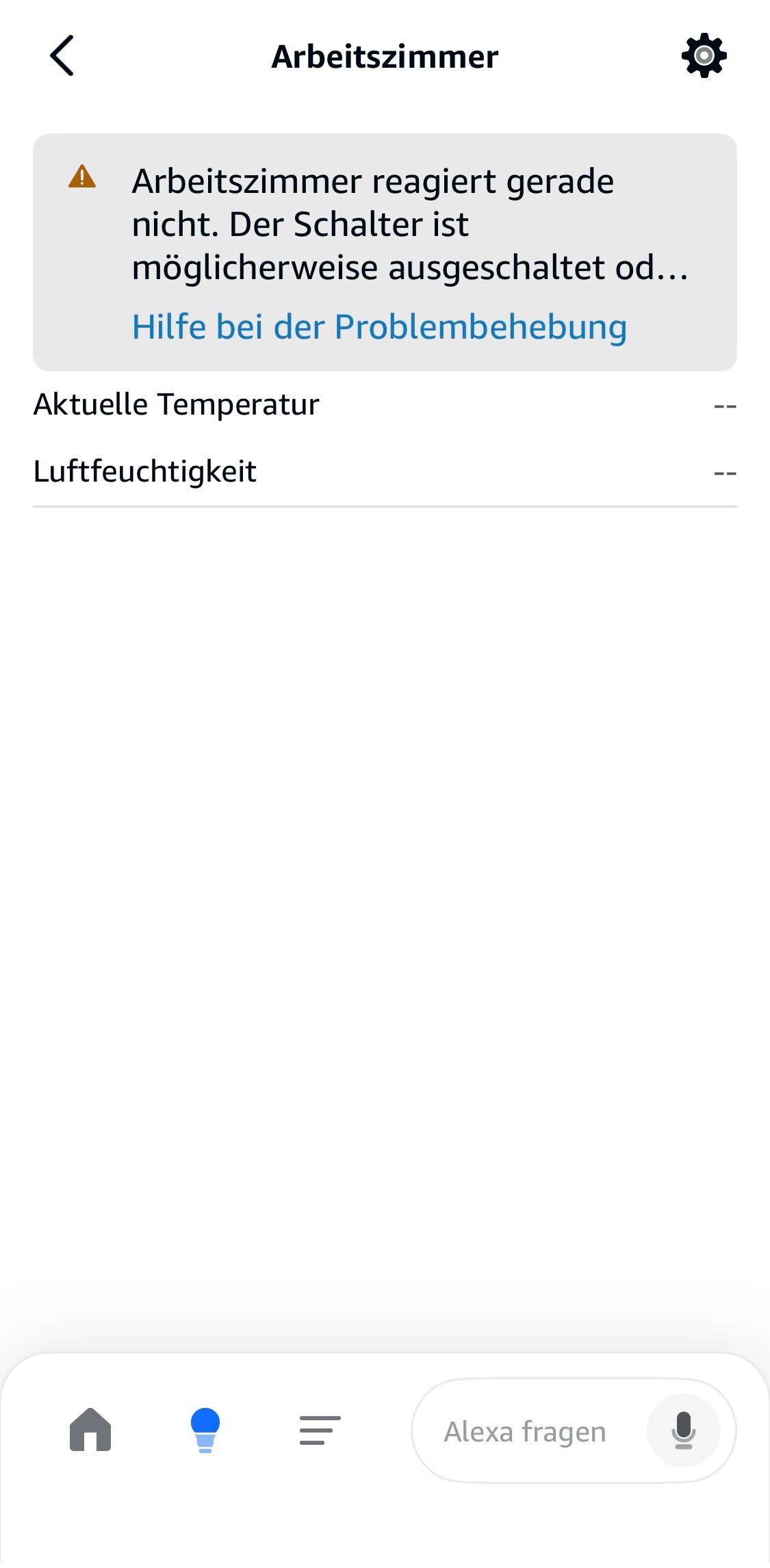
Bei mir sind es jeelink Temperatursensoren. Aber das Verhalten ist dasselbe. Ich vermute Amazon hat da mal wieder was verstellt. Zusammen mit dem Beta Launch von Alexa+ (bei dem ich allerdings nicht mitmache)
-
welche Pflege für ein bislang stabiles und zuverlässiges System fehlt denn noch?
Könnte ich dir anhand der vollständigen Ausgabe von
iob diagsagen.
MindestensNode ist aktuell...
ist aber nicht wahr, denn wir sind mittlerweile bei nodejs 22.22.2 angelangt. Jedenfalls bei 64Bit. Die 32Bit-Version ist abgekündigt, da kommt also nix mehr. Das ist auch der Anlass für meine Vermutung, dass du da den schrägen Mix aus 64Bit-Kernel und 32Bit-Userland fährst...
@Thomas-Braun danke dass Du Dir die Zeit nimmst.
Ja das stimmt Node ist so aktuell wie es mir zur Verfügung steht, aber nicht die neuste, die es gibt.veraltetes 32bit OS ist definitiv ein Knackpunkt, ich konnte bisher allerdings nicht die Zeit freischaufeln um ein komplett neues Setup zu machen (seit dem die Probleme auftraten, davor galt "never change a running system")
Insofern sind die Sicherheitswarnung bzgl. NodeJS nicht schön, aber zu erwarten.Wenn ich neu aufsetzen muss, überlege ich aber direkt das mit dem Matter Adapter zu machen - noch mal mehr dazu nachlesen.
Mir wäre dabei allerdings wohler, wenn ich das aktuelle System wieder in den "funktioniert alles" Status als Backup bekommen könnte, bevor ich das Projekt angehe...Anyway, diag Ausgabe kommt hier:
Script v.2026-01-31

*** BASE SYSTEM ***
Operating System: Raspbian GNU/Linux 11 (bullseye)
   Static hostname: raspberrypi
         Icon name: computer
            Kernel: Linux 6.1.21-v8+
      Architecture: arm64
OS is similar to: debian

Model           : Raspberry Pi 4 Model B Rev 1.2
Docker          : false
Virtualization  : none
Kernel          : aarch64
Userland        : 32 bit

Outdated 32Bit architecture detected. Only a pure 64Bit-System will be supported in the future. You will have to reinstall your operating system with full 64Bit support or upgrade to more modern hardware soon.

Systemuptime and Load:
 13:47:43 up 259 days, 18:40,  1 user,  load average: 0.21, 0.16, 0.29
CPU threads: 4


*** LIFE CYCLE STATUS ***
Debian Release codenamed 'bullseye' reached its END OF LIFE and needs to be updated to the latest stable release 'trixie' NOW!

*** RASPBERRY THROTTLING ***
Current issues:
No throttling issues detected.

Previously detected issues:
No throttling issues detected.

*** TIME AND TIMEZONES ***
               Local time: Thu 2026-04-09 13:47:43 CEST
           Universal time: Thu 2026-04-09 11:47:43 UTC
                 RTC time: n/a
                Time zone: Europe/Berlin (CEST, +0200)
System clock synchronized: yes
              NTP service: active
          RTC in local TZ: no

*** Users and Groups ***
User that called 'iob diag':
pi
HOME=/home/pi
GROUPS=pi adm dialout cdrom sudo audio video plugdev games users input render netdev gpio i2c spi iobroker

User that is running 'js-controller':
iobroker
HOME=/home/iobroker
GROUPS=iobroker tty dialout audio video plugdev bluetooth gpio i2c

*** DISPLAY-SERVER SETUP ***
Display-Server:         false
Unit display-manager.service could not be found.
Display-Manager:
Desktop:
Session:                tty

*** MEMORY ***
               total        used        free      shared  buff/cache   available
Mem:            3.8G        1.2G        1.2G        0.0K        1.4G        2.5G
Swap:            99M        2.0M         97M
Total:          3.9G        1.2G        1.3G

Active iob-Instances:   15

         3794 M total memory
         1227 M used memory
         1419 M active memory
          840 M inactive memory
         1195 M free memory
          182 M buffer memory
         1188 M swap cache
           99 M total swap
            2 M used swap
           97 M free swap

*** top - Table Of Processes  ***
top - 13:47:43 up 259 days, 18:40,  1 user,  load average: 0.21, 0.16, 0.29
Tasks: 162 total,   1 running, 161 sleeping,   0 stopped,   0 zombie
%Cpu(s):  1.4 us,  2.9 sy,  0.0 ni, 95.7 id,  0.0 wa,  0.0 hi,  0.0 si,  0.0 st
MiB Mem :   3794.3 total,   1195.0 free,   1227.9 used,   1371.4 buff/cache
MiB Swap:    100.0 total,     97.5 free,      2.5 used.   2490.1 avail Mem

*** FAILED SERVICES ***

  UNIT LOAD ACTIVE SUB DESCRIPTION
0 loaded units listed.


*** DMESG CRITICAL ERRORS ***
No critical errors detected

*** FILESYSTEM ***
Filesystem     Type      Size  Used Avail Use% Mounted on
/dev/root      ext4       29G   11G   18G  37% /
devtmpfs       devtmpfs  1.7G     0  1.7G   0% /dev
tmpfs          tmpfs     1.9G     0  1.9G   0% /dev/shm
tmpfs          tmpfs     759M  1.1M  758M   1% /run
tmpfs          tmpfs     5.0M  4.0K  5.0M   1% /run/lock
/dev/mmcblk0p1 vfat      255M   51M  205M  20% /boot
tmpfs          tmpfs     380M     0  380M   0% /run/user/1000

Messages concerning ext4 filesystem in dmesg:
[Wed Jul 23 19:06:51 2025] EXT4-fs (mmcblk0p2): INFO: recovery required on readonly filesystem
[Wed Jul 23 19:06:51 2025] EXT4-fs (mmcblk0p2): write access will be enabled during recovery
[Wed Jul 23 19:06:52 2025] EXT4-fs (mmcblk0p2): orphan cleanup on readonly fs
[Wed Jul 23 19:06:52 2025] EXT4-fs (mmcblk0p2): 26 orphan inodes deleted
[Wed Jul 23 19:06:52 2025] EXT4-fs (mmcblk0p2): recovery complete
[Wed Jul 23 19:06:52 2025] EXT4-fs (mmcblk0p2): mounted filesystem with ordered data mode. Quota mode: none.
[Wed Jul 23 19:06:52 2025] VFS: Mounted root (ext4 filesystem) readonly on device 179:2.
[Wed Jul 23 19:06:55 2025] EXT4-fs (mmcblk0p2): re-mounted. Quota mode: none.

Show mounted filesystems:
TARGET  SOURCE         FSTYPE OPTIONS
/       /dev/mmcblk0p2 ext4   rw,noatime
`-/boot /dev/mmcblk0p1 vfat   rw,relatime,fmask=0022,dmask=0022,codepage=437,iocharset=ascii,shortname=mixed,errors=remount-ro

Files in neuralgic directories:

/var:
2.5G    /var/
1.2G    /var/log/journal/a461106ebd4845f6a29afae8cd5b18c0
1.2G    /var/log/journal
1.2G    /var/log
886M    /var/lib

Archived and active journals take up 1.1G in the file system.

/opt/iobroker/backups:
1.3G    /opt/iobroker/backups/

/opt/iobroker/iobroker-data:
738M    /opt/iobroker/iobroker-data/
359M    /opt/iobroker/iobroker-data/history
196M    /opt/iobroker/iobroker-data/files
155M    /opt/iobroker/iobroker-data/backup-objects
47M     /opt/iobroker/iobroker-data/files/admin.admin

The five largest files in iobroker-data are:
26M     /opt/iobroker/iobroker-data/objects.jsonl
8.2M    /opt/iobroker/iobroker-data/files/backitup.admin/assets/index-BDfRPp5J.js
8.0M    /opt/iobroker/iobroker-data/files/daswetter.admin/assets/index-84bRrRlB.js
5.4M    /opt/iobroker/iobroker-data/files/jarvis/js/index-2c99918a.js
4.6M    /opt/iobroker/iobroker-data/files/javascript.admin/vs/language/typescript/tsWorker.js

USB-Devices by-id:
USB-Sticks - Avoid direct links to /dev/tty* in your adapter setups,
please always prefer the links 'by-id':

/dev/serial/by-id/usb-dresden_elektronik_ingenieurtechnik_GmbH_ConBee_II_DE2231566-if00

*** ZigBee Settings ***

⚠ HINT:
Your zigbee.0 COM-Port is NOT matching 'by-id'.
Please check your setting:
/dev/ttyACM0

Zigbee Network Settings on your coordinator/in nvbackup are:

zigbee.X
Extended Pan ID:
*** MASKED ***
Pan ID:
*** MASKED ***
Channel:
*** MASKED ***
Network Key:
*** MASKED ***

To unmask the settings run 'iob diag --unmask'


*** NodeJS-Installation ***

/usr/bin/nodejs         v22.15.0
/usr/bin/node           v22.15.0
/usr/bin/npm            10.9.2
/usr/bin/npx            10.9.2

✓ Node.js installation is correct

nodejs:
  Installed: 22.15.0-1nodesource1
  Candidate: 22.15.0-1nodesource1
  Version table:
 *** 22.15.0-1nodesource1 100
        100 /var/lib/dpkg/status
     12.22.12~dfsg-1~deb11u7 500
        500 http://raspbian.raspberrypi.org/raspbian bullseye/main armhf Packages

Temp directories causing deletion problem: 0
No problems detected

Errors in npm tree: 0
No problems detected

Checking for nodejs vulnerability:


██████   █████  ███    ██  ██████  ███████ ███████
██   ██ ██   ██ ████   ██ ██       ██      ██   ██
██   ██ ███████ ██ ██  ██ ██   ███ █████   ███████
██   ██ ██   ██ ██  ██ ██ ██    ██ ██      ██   ██
██████  ██   ██ ██   ████  ██████  ███████ ██   ██


The current Node.js version (v22.15.0) is vulnerable to the following CVEs:

CVE-2025-23166(high):  The C++ method SignTraits::DeriveBits() may incorrectly call ThrowException() based on user-supplied inputs when executing in a background thread, crashing the Node.js process. Such cryptographic operations are commonly applied to untrusted inputs. Thus, this mechanism potentially allows an adversary to remotely crash a Node.js runtime.
Patched versions: ^20.19.2 || ^22.15.1 || ^23.11.1 || ^24.0.2
=

CVE-2025-55130(high): A flaw in Node.js’s Permissions model allows attackers to bypass `--allow-fs-read` and `--allow-fs-write` restrictions using crafted relative symlink paths. By chaining directories and symlinks, a script granted access only to the current directory can escape the allowed path and read sensitive files. This breaks the expected isolation guarantees and enables arbitrary file read/write, leading to potential system compromise.
This vulnerability affects users of the permission model on Node.js v20,  v22,  v24, and v25.
Patched versions: ^20.20.0 || ^22.22.0 || ^24.13.0 || ^25.3.0
=

CVE-2025-55131(high): A flaw in Node.js's buffer allocation logic can expose uninitialized memory when allocations are interrupted, when using the `vm` module with the timeout option. Under specific timing conditions, buffers allocated with `Buffer.alloc` and other `TypedArray` instances like `Uint8Array` may contain leftover data from previous operations, allowing in-process secrets like tokens or passwords to leak or causing data corruption. While exploitation typically requires precise timing or in-process code execution, it can become remotely exploitable when untrusted input influences workload and timeouts, leading to potential confidentiality and integrity impact.
Patched versions: ^20.20.0 || ^22.22.0 || ^24.13.0 || ^25.3.0
=

CVE-2025-55132(low): A flaw in Node.js's permission model allows a file's access and modification timestamps to be changed via `futimes()` even when the process has only read permissions. Unlike `utimes()`, `futimes()` does not apply the expected write-permission checks, which means file metadata can be modified in read-only directories. This behavior could be used to alter timestamps in ways that obscure activity, reducing the reliability of logs. This vulnerability affects users of the permission model on Node.js v20,  v22,  v24, and v25.
Patched versions: ^20.20.0 || ^22.22.0 || ^24.13.0 || ^25.3.0
=

CVE-2025-59464(medium): A memory leak in Node.js’s OpenSSL integration occurs when converting `X.509` certificate fields to UTF-8 without freeing the allocated buffer. When applications call `socket.getPeerCertificate(true)`, each certificate field leaks memory, allowing remote clients to trigger steady memory growth through repeated TLS connections. Over time this can lead to resource exhaustion and denial of service.
Patched versions: ^20.20.0 || ^22.22.0 || ^24.13.0
=

CVE-2025-59465(high): A malformed `HTTP/2 HEADERS` frame with oversized, invalid `HPACK` data can cause Node.js to crash by triggering an unhandled `TLSSocket` error `ECONNRESET`. Instead of safely closing the connection, the process crashes, enabling a remote denial of service. This primarily affects applications that do not attach explicit error handlers to secure sockets, for example:

server.on('secureConnection', socket => {
  socket.on('error', err => {
    console.log(err)
  })
})

Patched versions: ^20.20.0 || ^22.22.0 || ^24.13.0 || ^25.3.0
=

CVE-2025-59466(medium): We have identified a bug in Node.js error handling where "Maximum call stack size exceeded" errors become uncatchable when `async_hooks.createHook()` is enabled. Instead of reaching `process.on('uncaughtException')`, the process terminates, making the crash unrecoverable. Applications that rely on `AsyncLocalStorage` (v22, v20) or `async_hooks.createHook()` (v24, v22, v20) become vulnerable to denial-of-service crashes triggered by deep recursion under specific conditions.
Patched versions: ^20.20.0 || ^22.22.0 || ^24.13.0 || ^25.3.0
=

CVE-2026-21637(high): A flaw in Node.js TLS error handling leaves `SNICallback` invocations unprotected against synchronous exceptions, while the equivalent ALPN and PSK callbacks were already addressed in CVE-2026-21637. This represents an incomplete fix of that prior vulnerability.

When an `SNICallback` throws synchronously on unexpected input the exception bypasses TLS error handlers and propagates as an uncaught exception, crashing the Node.js process.

* This vulnerability affects all Node.js versions that received the CVE-2026-21637 fix, including **20.x, 22.x, 24.x, and 25.x**, on any TLS server where `SNICallback` may throw on unexpected `servername` input.
Patched versions: ^20.20.2 || ^22.22.2 || ^24.14.1 || ^25.8.2
=

CVE-2026-21710(high): A flaw in Node.js HTTP request handling causes an uncaught `TypeError` when a request is received with a header named `__proto__` and the application accesses `req.headersDistinct`.

When this occurs, `dest["__proto__"]` resolves to `Object.prototype` rather than `undefined`, causing `.push()` to be called on a non-array. This exception is thrown synchronously inside a property getter and cannot be intercepted by `error` event listeners, meaning it cannot be handled without wrapping every `req.headersDistinct` access in a `try/catch`.

* This vulnerability affects all Node.js HTTP servers on **20.x, 22.x, 24.x, and v25.x**
Patched versions: ^20.20.2 || ^22.22.2 || ^24.14.1 || ^25.8.2
=

CVE-2026-21713(medium): A flaw in Node.js HMAC verification uses a non-constant-time comparison when validating user-provided signatures, potentially leaking timing information proportional to the number of matching bytes. Under certain threat models where high-resolution timing measurements are possible, this behavior could be exploited as a timing oracle to infer HMAC values.

Node.js already provides timing-safe comparison primitives used elsewhere in the codebase, indicating this is an oversight rather than an intentional design decision.

This vulnerability affects **20.x, 22.x, 24.x, and 25.x**.
Patched versions: ^20.20.2 || ^22.22.2 || ^24.14.1 || ^25.8.2
=

CVE-2026-21714(medium): A memory leak occurs in Node.js HTTP/2 servers when a client sends WINDOW_UPDATE frames on stream 0 (connection-level) that cause the flow control window to exceed the maximum value of 2³¹-1. The server correctly sends a GOAWAY frame, but the Http2Session object is never cleaned up.

This vulnerability affects HTTP2 users on Node.js 20, 22, 24 and 25.
Patched versions: ^20.20.2 || ^22.22.2 || ^24.14.1 || ^25.8.2
=

CVE-2026-21715(low): A flaw in Node.js Permission Model filesystem enforcement leaves `fs.realpathSync.native()` without the required read permission checks, while all comparable filesystem functions correctly enforce them.

As a result, code running under `--permission` with restricted `--allow-fs-read` can still use `fs.realpathSync.native()` to check file existence, resolve symlink targets, and enumerate filesystem paths outside of permitted directories.

This vulnerability affects **20.x, 22.x, 24.x, and 25.x** processes using the Permission Model where `--allow-fs-read` is intentionally restricted.
Patched versions: ^20.20.2 || ^22.22.2 || ^24.14.1 || ^25.8.2
=

CVE-2026-21716(low): An incomplete fix for CVE-2024-36137 leaves `FileHandle.chmod()` and `FileHandle.chown()` in the promises API without the required permission checks, while their callback-based equivalents (`fs.fchmod()`, `fs.fchown()`) were correctly patched.

As a result, code running under `--permission` with restricted `--allow-fs-write` can still use promise-based `FileHandle` methods to modify file permissions and ownership on already-open file descriptors, bypassing the intended write restrictions.

This vulnerability affects **20.x, 22.x, 24.x, and 25.x** processes using the Permission Model where `--allow-fs-write` is intentionally restricted.
Patched versions: ^20.20.2 || ^22.22.2 || ^24.14.1 || ^25.8.2
=

CVE-2026-21717(medium): A flaw in V8's string hashing mechanism causes integer-like strings to be hashed to their numeric value, making hash collisions trivially predictable. By crafting a request that causes many such collisions in V8's internal string table, an attacker can significantly degrade performance of the Node.js process.

The most common trigger is any endpoint that calls `JSON.parse()` on attacker-controlled input, as JSON parsing automatically internalizes short strings into the affected hash table.

This vulnerability affects **20.x, 22.x, 24.x, and 25.x**.
Patched versions: ^20.20.2 || ^22.22.2 || ^24.14.1 || ^25.8.2
=

Outdated 32Bit architecture detected. Only a pure 64Bit-System will be supported in the future. You will have to reinstall your operating system with full 64Bit support or upgrade to more modern hardware soon.

*** ioBroker-Installation ***

ioBroker Status
iobroker is running on this host.


Objects type: jsonl
States  type: jsonl

Hosts:
raspberrypi         raspberrypi (version: 7.0.7, hostname: raspberrypi   , alive, uptime: 1670)

Core adapters versions
js-controller:  7.0.7
admin:          7.7.22
javascript:     9.0.18

nodejs modules from github:     2
+-- iobroker.plenticore@2.3.2 (git+ssh://git@github.com/michael-egosoft/ioBroker.plenticore.git#692756c4ad83610547ac5a353734b9229e1007a6)
+-- iobroker.vis-materialdesign@0.5.94 (git+ssh://git@github.com/Scrounger/ioBroker.vis-materialdesign.git#8b7529d493f223dfc4f1d1f632553fcb35bbcc92)

Adapter State
+ system.adapter.admin.0                  : admin                 : raspberrypi                              -  enabled, port: 8081, bind: 0.0.0.0, run as: admin
+ system.adapter.alexa2.0                 : alexa2                : raspberrypi                              -  enabled
  system.adapter.alexa2.1                 : alexa2                : raspberrypi                              - disabled
+ system.adapter.backitup.0               : backitup              : raspberrypi                              -  enabled
  system.adapter.daswetter.0              : daswetter             : raspberrypi                              - disabled
  system.adapter.discovery.0              : discovery             : raspberrypi                              - disabled
  system.adapter.flot.0                   : flot                  : raspberrypi                              - disabled
+ system.adapter.history.0                : history               : raspberrypi                              -  enabled
+ system.adapter.hmip.0                   : hmip                  : raspberrypi                              -  enabled
+ system.adapter.iot.0                    : iot                   : raspberrypi                              -  enabled
+ system.adapter.javascript.0             : javascript            : raspberrypi                              -  enabled
+ system.adapter.mihome-vacuum.0          : mihome-vacuum         : raspberrypi                              -  enabled, port: 54321
  system.adapter.octoprint.0              : octoprint             : raspberrypi                              - disabled
+ system.adapter.plenticore.0             : plenticore            : raspberrypi                              -  enabled, port: 80
  system.adapter.rpi2.0                   : rpi2                  : raspberrypi                              - disabled
+ system.adapter.shelly.0                 : shelly                : raspberrypi                              -  enabled, port: 1882, bind: 0.0.0.0
+ system.adapter.sql.0                    : sql                   : raspberrypi                              -  enabled, port: 3306
+ system.adapter.tuya.0                   : tuya                  : raspberrypi                              -  enabled
  system.adapter.vis-justgage.0           : vis-justgage          : raspberrypi                              - disabled
  system.adapter.vis.0                    : vis                   : raspberrypi                              -  enabled
  system.adapter.weatherunderground.0     : weatherunderground    : raspberrypi                              -  enabled
+ system.adapter.web.0                    : web                   : raspberrypi                              -  enabled, port: 8082, bind: 0.0.0.0, run as: admin
+ system.adapter.zigbee.0                 : zigbee                : raspberrypi                              -  enabled, port: /dev/ttyACM0

+ instance is alive

Enabled adapters with bindings
+ system.adapter.admin.0                  : admin                 : raspberrypi                              -  enabled, port: 8081, bind: 0.0.0.0, run as: admin
+ system.adapter.mihome-vacuum.0          : mihome-vacuum         : raspberrypi                              -  enabled, port: 54321
+ system.adapter.plenticore.0             : plenticore            : raspberrypi                              -  enabled, port: 80
+ system.adapter.shelly.0                 : shelly                : raspberrypi                              -  enabled, port: 1882, bind: 0.0.0.0
+ system.adapter.sql.0                    : sql                   : raspberrypi                              -  enabled, port: 3306
+ system.adapter.web.0                    : web                   : raspberrypi                              -  enabled, port: 8082, bind: 0.0.0.0, run as: admin
+ system.adapter.zigbee.0                 : zigbee                : raspberrypi                              -  enabled, port: /dev/ttyACM0

ioBroker-Repositories
┌─────────┬────────────────────┬─────────────────────────────────────────────────────────┬──────────────┐
│ (index) │ name               │ url                                                     │ auto upgrade │
├─────────┼────────────────────┼─────────────────────────────────────────────────────────┼──────────────┤
│ 0       │ 'Stable (default)' │ 'http://download.iobroker.net/sources-dist.json'        │ false        │
│ 1       │ 'Beta (latest)'    │ 'http://download.iobroker.net/sources-dist-latest.json' │ false        │
└─────────┴────────────────────┴─────────────────────────────────────────────────────────┴──────────────┘

Active repo(s): Stable (default)
Upgrade policy: none

Installed ioBroker-Adapters
Used repository: Stable (default)
Adapter    "admin"        : 7.7.22   , installed 7.7.22
Adapter    "alexa2"       : 3.27.4   , installed 3.27.4
Adapter    "backitup"     : 3.3.14   , installed 3.3.14
Adapter    "daswetter"    : 4.5.3    , installed 4.5.3
Adapter    "discovery"    : 5.0.0    , installed 5.0.0
Adapter    "history"      : 3.0.1    , installed 3.0.1
Adapter    "hmip"         : 1.27.0   , installed 1.27.0
Adapter    "iot"          : 5.0.12   , installed 5.0.12
Adapter    "jarvis"       : 3.1.8    , installed 3.1.8
Adapter    "javascript"   : 9.0.18   , installed 9.0.18
Controller "js-controller": 7.0.7    , installed 7.0.7
Adapter    "mihome-vacuum": 5.2.0    , installed 5.2.0
Adapter    "octoprint"    : 5.1.0    , installed 5.1.0
Adapter    "plenticore"   : 2.2.0    , installed 2.3.1
Adapter    "rpi2"         : 3.0.2    , installed 2.4.0  [Updatable]
Adapter    "scenes"       : 4.0.4    , installed 4.0.4
Adapter    "shelly"       : 10.6.1   , installed 10.6.1
Adapter    "simple-api"   : 3.0.7    , installed 3.0.7
Adapter    "socketio"     : 7.0.8    , installed 7.0.8
Adapter    "sonoff"       : 3.3.0    , installed 3.3.0
Adapter    "sql"          : 3.0.1    , installed 3.0.1
Adapter    "tuya"         : 3.16.0   , installed 3.16.0
Adapter    "vis"          : 1.5.6    , installed 1.5.6
Adapter    "vis-justgage" : 2.1.7    , installed 2.1.7
Adapter    "vis-materialdesign": 0.5.9, installed 0.5.94
Adapter    "weatherunderground": 3.7.0, installed 3.7.0
Adapter    "web"          : 8.0.0    , installed 8.0.0
Adapter    "ws"           : 4.0.0    , installed 4.0.0
Adapter    "zigbee"       : 3.3.5    , installed 3.3.5

Objects and States
Please stand by - This may take a while
Objects:        7458
States:         6241

*** OS-Repositories and Updates ***
Hit:1 http://raspbian.raspberrypi.org/raspbian bullseye InRelease
Hit:2 http://archive.raspberrypi.org/debian bullseye InRelease
Reading package lists...
Pending systemupdates: 0

*** Listening Ports ***
Active Internet connections (only servers)
Proto Recv-Q Send-Q Local Address           Foreign Address         State       User       Inode      PID/Program name
tcp        0      0 0.0.0.0:22              0.0.0.0:*               LISTEN      0          14428      516/sshd: /usr/sbin
tcp        0      0 0.0.0.0:3306            0.0.0.0:*               LISTEN      110        12263      566/mariadbd
tcp        0      0 127.0.0.1:9001          0.0.0.0:*               LISTEN      1001       65951293   17662/iobroker.js-c
tcp        0      0 127.0.0.1:9000          0.0.0.0:*               LISTEN      1001       65953976   17662/iobroker.js-c
tcp        0      0 0.0.0.0:1882            0.0.0.0:*               LISTEN      1001       65952709   17806/io.shelly.0
tcp6       0      0 :::22                   :::*                    LISTEN      0          14430      516/sshd: /usr/sbin
tcp6       0      0 :::8081                 :::*                    LISTEN      1001       65953147   17680/io.admin.0
tcp6       0      0 :::8082                 :::*                    LISTEN      1001       65951644   17898/io.web.0
udp        0      0 0.0.0.0:68              0.0.0.0:*                           0          12145      765/dhcpcd
udp        0      0 0.0.0.0:53421           0.0.0.0:*                           1001       65952738   17837/io.mihome-vac
udp        0      0 0.0.0.0:37306           0.0.0.0:*                           108        1812       379/avahi-daemon: r
udp        0      0 0.0.0.0:6666            0.0.0.0:*                           1001       65951626   17883/io.tuya.0
udp        0      0 0.0.0.0:6667            0.0.0.0:*                           1001       65951627   17883/io.tuya.0
udp        0      0 0.0.0.0:5353            0.0.0.0:*                           108        1810       379/avahi-daemon: r
udp6       0      0 :::47389                :::*                                108        1813       379/avahi-daemon: r
udp6       0      0 :::546                  :::*                                0          12160      765/dhcpcd
udp6       0      0 :::5353                 :::*                                108        1811       379/avahi-daemon: r

*** Log File - Last 25 Lines ***

2026-04-09 13:21:24.769  - info: shelly.0 (17806) [MQTT] Device with client id "shellyplug-s-9A3EA7" connected from 192.168.178.205!
2026-04-09 13:21:26.430  - info: plenticore.0 (17944) calcMinSoC for day 1.
2026-04-09 13:21:27.154  - info: shelly.0 (17806) [MQTT] Device with client id "shellyplug-s-9A3EA7" initialized.
2026-04-09 13:21:27.459  - info: weatherunderground.0 (17868) Terminated (NO_ERROR): Without reason
2026-04-09 13:21:27.577  - info: shelly.0 (17806) [MQTT] Device with client id "shellyplug-s-801BFC" connected from 192.168.178.202!
2026-04-09 13:21:28.086  - info: host.raspberrypi instance system.adapter.weatherunderground.0 terminated with code 0 (NO_ERROR)
2026-04-09 13:21:29.182  - info: shelly.0 (17806) [MQTT] Device with client id "shellyplug-s-801BFC" initialized.
2026-04-09 13:21:26.431  - info: plenticore.0 (17944) Using forecast of day 1 for MinSoC calculation.
2026-04-09 13:21:28.967  - info: plenticore.0 (17944) calcMinSoC for day 2.
2026-04-09 13:21:29.617  - info: plenticore.0 (17944) Calculated remaining energy: 13468.548994909457 (power_plus = powerUntilSunset - daily_cons + curSoC - adapter.config.battery_capacity)
2026-04-09 13:21:35.730  - info: shelly.0 (17806) [MQTT] Device with client id "shellyplug-s-F8CD34" connected from 192.168.178.203!
2026-04-09 13:21:37.124  - info: shelly.0 (17806) [MQTT] Device with client id "shellyplug-s-F8CD34" initialized.
2026-04-09 13:22:10.112  - info: alexa2.0 (17761) Subscribing to states...
2026-04-09 13:22:10.121  - info: alexa2.0 (17761) Deleting the following states: ["Smart-Home-Devices.eb5033d8-c679-4d34-b441-2cf87545d9b0","Smart-Home-Devices.eb5033d8-c679-4d34-b441-2cf87545d9b0.#enabled","Smart-Home-Devices.eb5033d8-c679-4d34-b441-2cf87545d9b0.#delete"]
2026-04-09 13:22:12.135  - info: alexa2.0 (17761) Alexa-Push-Connection (macDms = true) established. Disable Polling
2026-04-09 13:22:28.339  - info: alexa2.0 (17761) Initialization Done ...
2026-04-09 13:36:23.416  - info: plenticore.0 (17944) got weather data from met.no with 90 elements.
2026-04-09 13:36:23.705  - info: plenticore.0 (17944) Requested weather data from kachelmannwetter.com    fc_url is https://kachelmannwetter.com/de/ajax_pub/fccompact?city_id=2945932&lang=de&units=de&tf=1&m=deu-hd
2026-04-09 13:36:23.947  - info: plenticore.0 (17944) Requested alternative weather data from kachelmannwetter.com
2026-04-09 13:36:23.955  - info: plenticore.0 (17944) Got all internal forecast data and made it available to main process.
2026-04-09 13:36:24.530  - info: plenticore.0 (17944) Read forecast data before calcMinSoC.
2026-04-09 13:36:24.916  - info: plenticore.0 (17944) calcMinSoC for day 1.
2026-04-09 13:36:24.916  - info: plenticore.0 (17944) Using forecast of day 1 for MinSoC calculation.
2026-04-09 13:36:27.074  - info: plenticore.0 (17944) calcMinSoC for day 2.
2026-04-09 13:36:27.587  - info: plenticore.0 (17944) Calculated remaining energy: 11895.37149862429 (power_plus = powerUntilSunset - daily_cons + curSoC - adapter.config.battery_capacity)
10kWp - 25x Hyundai HiE-S400VG - KOSTAL Plenticore Plus 8.5 - BYD BBox Premium HVS 10,2kWh
ioBroker - Raspi4 -
@Burnit Ist bei mir genau dasselbe. In der Alexa App sieht das dann so aus:
Bei mir sind es jeelink Temperatursensoren. Aber das Verhalten ist dasselbe. Ich vermute Amazon hat da mal wieder was verstellt. Zusammen mit dem Beta Launch von Alexa+ (bei dem ich allerdings nicht mitmache)
@Martin-Schlender wenn's natürlich wieder ein "Amazon hat was geändert" Problem ist, kann ich natürlich lange bei mir den Fehler suchen... aber ganz sicher bin ich dabei noch nicht. Hätte erwartet, dass das dann mehr Leute betrifft.
Ich habe auch keine Alexa+ -
@Martin-Schlender wenn's natürlich wieder ein "Amazon hat was geändert" Problem ist, kann ich natürlich lange bei mir den Fehler suchen... aber ganz sicher bin ich dabei noch nicht. Hätte erwartet, dass das dann mehr Leute betrifft.
Ich habe auch keine Alexa+@Burnit Ich habe das gleiche Problem mit einer Homematic IP Wetterstation (Temperatur), sonst läuft alles. Und in Github sieht man, dass das noch mehr Nutzer betrifft. Für manche hat ein "Downgrade" von IOT auf 5.0.7 das Problem wieder gelöst, bei mir nicht.
-
@Thomas-Braun danke dass Du Dir die Zeit nimmst.
Ja das stimmt Node ist so aktuell wie es mir zur Verfügung steht, aber nicht die neuste, die es gibt.veraltetes 32bit OS ist definitiv ein Knackpunkt, ich konnte bisher allerdings nicht die Zeit freischaufeln um ein komplett neues Setup zu machen (seit dem die Probleme auftraten, davor galt "never change a running system")
Insofern sind die Sicherheitswarnung bzgl. NodeJS nicht schön, aber zu erwarten.Wenn ich neu aufsetzen muss, überlege ich aber direkt das mit dem Matter Adapter zu machen - noch mal mehr dazu nachlesen.
Mir wäre dabei allerdings wohler, wenn ich das aktuelle System wieder in den "funktioniert alles" Status als Backup bekommen könnte, bevor ich das Projekt angehe...Anyway, diag Ausgabe kommt hier:
Script v.2026-01-31 *** BASE SYSTEM *** Operating System: Raspbian GNU/Linux 11 (bullseye) Static hostname: raspberrypi Icon name: computer Kernel: Linux 6.1.21-v8+ Architecture: arm64 OS is similar to: debian Model : Raspberry Pi 4 Model B Rev 1.2 Docker : false Virtualization : none Kernel : aarch64 Userland : 32 bit Outdated 32Bit architecture detected. Only a pure 64Bit-System will be supported in the future. You will have to reinstall your operating system with full 64Bit support or upgrade to more modern hardware soon. Systemuptime and Load: 13:47:43 up 259 days, 18:40, 1 user, load average: 0.21, 0.16, 0.29 CPU threads: 4 *** LIFE CYCLE STATUS *** Debian Release codenamed 'bullseye' reached its END OF LIFE and needs to be updated to the latest stable release 'trixie' NOW! *** RASPBERRY THROTTLING *** Current issues: No throttling issues detected. Previously detected issues: No throttling issues detected. *** TIME AND TIMEZONES *** Local time: Thu 2026-04-09 13:47:43 CEST Universal time: Thu 2026-04-09 11:47:43 UTC RTC time: n/a Time zone: Europe/Berlin (CEST, +0200) System clock synchronized: yes NTP service: active RTC in local TZ: no *** Users and Groups *** User that called 'iob diag': pi HOME=/home/pi GROUPS=pi adm dialout cdrom sudo audio video plugdev games users input render netdev gpio i2c spi iobroker User that is running 'js-controller': iobroker HOME=/home/iobroker GROUPS=iobroker tty dialout audio video plugdev bluetooth gpio i2c *** DISPLAY-SERVER SETUP *** Display-Server: false Unit display-manager.service could not be found. Display-Manager: Desktop: Session: tty *** MEMORY *** total used free shared buff/cache available Mem: 3.8G 1.2G 1.2G 0.0K 1.4G 2.5G Swap: 99M 2.0M 97M Total: 3.9G 1.2G 1.3G Active iob-Instances: 15 3794 M total memory 1227 M used memory 1419 M active memory 840 M inactive memory 1195 M free memory 182 M buffer memory 1188 M swap cache 99 M total swap 2 M used swap 97 M free swap *** top - Table Of Processes *** top - 13:47:43 up 259 days, 18:40, 1 user, load average: 0.21, 0.16, 0.29 Tasks: 162 total, 1 running, 161 sleeping, 0 stopped, 0 zombie %Cpu(s): 1.4 us, 2.9 sy, 0.0 ni, 95.7 id, 0.0 wa, 0.0 hi, 0.0 si, 0.0 st MiB Mem : 3794.3 total, 1195.0 free, 1227.9 used, 1371.4 buff/cache MiB Swap: 100.0 total, 97.5 free, 2.5 used. 2490.1 avail Mem *** FAILED SERVICES *** UNIT LOAD ACTIVE SUB DESCRIPTION 0 loaded units listed. *** DMESG CRITICAL ERRORS *** No critical errors detected *** FILESYSTEM *** Filesystem Type Size Used Avail Use% Mounted on /dev/root ext4 29G 11G 18G 37% / devtmpfs devtmpfs 1.7G 0 1.7G 0% /dev tmpfs tmpfs 1.9G 0 1.9G 0% /dev/shm tmpfs tmpfs 759M 1.1M 758M 1% /run tmpfs tmpfs 5.0M 4.0K 5.0M 1% /run/lock /dev/mmcblk0p1 vfat 255M 51M 205M 20% /boot tmpfs tmpfs 380M 0 380M 0% /run/user/1000 Messages concerning ext4 filesystem in dmesg: [Wed Jul 23 19:06:51 2025] EXT4-fs (mmcblk0p2): INFO: recovery required on readonly filesystem [Wed Jul 23 19:06:51 2025] EXT4-fs (mmcblk0p2): write access will be enabled during recovery [Wed Jul 23 19:06:52 2025] EXT4-fs (mmcblk0p2): orphan cleanup on readonly fs [Wed Jul 23 19:06:52 2025] EXT4-fs (mmcblk0p2): 26 orphan inodes deleted [Wed Jul 23 19:06:52 2025] EXT4-fs (mmcblk0p2): recovery complete [Wed Jul 23 19:06:52 2025] EXT4-fs (mmcblk0p2): mounted filesystem with ordered data mode. Quota mode: none. [Wed Jul 23 19:06:52 2025] VFS: Mounted root (ext4 filesystem) readonly on device 179:2. [Wed Jul 23 19:06:55 2025] EXT4-fs (mmcblk0p2): re-mounted. Quota mode: none. Show mounted filesystems: TARGET SOURCE FSTYPE OPTIONS / /dev/mmcblk0p2 ext4 rw,noatime `-/boot /dev/mmcblk0p1 vfat rw,relatime,fmask=0022,dmask=0022,codepage=437,iocharset=ascii,shortname=mixed,errors=remount-ro Files in neuralgic directories: /var: 2.5G /var/ 1.2G /var/log/journal/a461106ebd4845f6a29afae8cd5b18c0 1.2G /var/log/journal 1.2G /var/log 886M /var/lib Archived and active journals take up 1.1G in the file system. /opt/iobroker/backups: 1.3G /opt/iobroker/backups/ /opt/iobroker/iobroker-data: 738M /opt/iobroker/iobroker-data/ 359M /opt/iobroker/iobroker-data/history 196M /opt/iobroker/iobroker-data/files 155M /opt/iobroker/iobroker-data/backup-objects 47M /opt/iobroker/iobroker-data/files/admin.admin The five largest files in iobroker-data are: 26M /opt/iobroker/iobroker-data/objects.jsonl 8.2M /opt/iobroker/iobroker-data/files/backitup.admin/assets/index-BDfRPp5J.js 8.0M /opt/iobroker/iobroker-data/files/daswetter.admin/assets/index-84bRrRlB.js 5.4M /opt/iobroker/iobroker-data/files/jarvis/js/index-2c99918a.js 4.6M /opt/iobroker/iobroker-data/files/javascript.admin/vs/language/typescript/tsWorker.js USB-Devices by-id: USB-Sticks - Avoid direct links to /dev/tty* in your adapter setups, please always prefer the links 'by-id': /dev/serial/by-id/usb-dresden_elektronik_ingenieurtechnik_GmbH_ConBee_II_DE2231566-if00 *** ZigBee Settings *** ⚠ HINT: Your zigbee.0 COM-Port is NOT matching 'by-id'. Please check your setting: /dev/ttyACM0 Zigbee Network Settings on your coordinator/in nvbackup are: zigbee.X Extended Pan ID: *** MASKED *** Pan ID: *** MASKED *** Channel: *** MASKED *** Network Key: *** MASKED *** To unmask the settings run 'iob diag --unmask' *** NodeJS-Installation *** /usr/bin/nodejs v22.15.0 /usr/bin/node v22.15.0 /usr/bin/npm 10.9.2 /usr/bin/npx 10.9.2 ✓ Node.js installation is correct nodejs: Installed: 22.15.0-1nodesource1 Candidate: 22.15.0-1nodesource1 Version table: *** 22.15.0-1nodesource1 100 100 /var/lib/dpkg/status 12.22.12~dfsg-1~deb11u7 500 500 http://raspbian.raspberrypi.org/raspbian bullseye/main armhf Packages Temp directories causing deletion problem: 0 No problems detected Errors in npm tree: 0 No problems detected Checking for nodejs vulnerability: ██████ █████ ███ ██ ██████ ███████ ███████ ██ ██ ██ ██ ████ ██ ██ ██ ██ ██ ██ ██ ███████ ██ ██ ██ ██ ███ █████ ███████ ██ ██ ██ ██ ██ ██ ██ ██ ██ ██ ██ ██ ██████ ██ ██ ██ ████ ██████ ███████ ██ ██ The current Node.js version (v22.15.0) is vulnerable to the following CVEs: CVE-2025-23166(high): The C++ method SignTraits::DeriveBits() may incorrectly call ThrowException() based on user-supplied inputs when executing in a background thread, crashing the Node.js process. Such cryptographic operations are commonly applied to untrusted inputs. Thus, this mechanism potentially allows an adversary to remotely crash a Node.js runtime. Patched versions: ^20.19.2 || ^22.15.1 || ^23.11.1 || ^24.0.2 = CVE-2025-55130(high): A flaw in Node.js’s Permissions model allows attackers to bypass `--allow-fs-read` and `--allow-fs-write` restrictions using crafted relative symlink paths. By chaining directories and symlinks, a script granted access only to the current directory can escape the allowed path and read sensitive files. This breaks the expected isolation guarantees and enables arbitrary file read/write, leading to potential system compromise. This vulnerability affects users of the permission model on Node.js v20, v22, v24, and v25. Patched versions: ^20.20.0 || ^22.22.0 || ^24.13.0 || ^25.3.0 = CVE-2025-55131(high): A flaw in Node.js's buffer allocation logic can expose uninitialized memory when allocations are interrupted, when using the `vm` module with the timeout option. Under specific timing conditions, buffers allocated with `Buffer.alloc` and other `TypedArray` instances like `Uint8Array` may contain leftover data from previous operations, allowing in-process secrets like tokens or passwords to leak or causing data corruption. While exploitation typically requires precise timing or in-process code execution, it can become remotely exploitable when untrusted input influences workload and timeouts, leading to potential confidentiality and integrity impact. Patched versions: ^20.20.0 || ^22.22.0 || ^24.13.0 || ^25.3.0 = CVE-2025-55132(low): A flaw in Node.js's permission model allows a file's access and modification timestamps to be changed via `futimes()` even when the process has only read permissions. Unlike `utimes()`, `futimes()` does not apply the expected write-permission checks, which means file metadata can be modified in read-only directories. This behavior could be used to alter timestamps in ways that obscure activity, reducing the reliability of logs. This vulnerability affects users of the permission model on Node.js v20, v22, v24, and v25. Patched versions: ^20.20.0 || ^22.22.0 || ^24.13.0 || ^25.3.0 = CVE-2025-59464(medium): A memory leak in Node.js’s OpenSSL integration occurs when converting `X.509` certificate fields to UTF-8 without freeing the allocated buffer. When applications call `socket.getPeerCertificate(true)`, each certificate field leaks memory, allowing remote clients to trigger steady memory growth through repeated TLS connections. Over time this can lead to resource exhaustion and denial of service. Patched versions: ^20.20.0 || ^22.22.0 || ^24.13.0 = CVE-2025-59465(high): A malformed `HTTP/2 HEADERS` frame with oversized, invalid `HPACK` data can cause Node.js to crash by triggering an unhandled `TLSSocket` error `ECONNRESET`. Instead of safely closing the connection, the process crashes, enabling a remote denial of service. This primarily affects applications that do not attach explicit error handlers to secure sockets, for example: server.on('secureConnection', socket => { socket.on('error', err => { console.log(err) }) }) Patched versions: ^20.20.0 || ^22.22.0 || ^24.13.0 || ^25.3.0 = CVE-2025-59466(medium): We have identified a bug in Node.js error handling where "Maximum call stack size exceeded" errors become uncatchable when `async_hooks.createHook()` is enabled. Instead of reaching `process.on('uncaughtException')`, the process terminates, making the crash unrecoverable. Applications that rely on `AsyncLocalStorage` (v22, v20) or `async_hooks.createHook()` (v24, v22, v20) become vulnerable to denial-of-service crashes triggered by deep recursion under specific conditions. Patched versions: ^20.20.0 || ^22.22.0 || ^24.13.0 || ^25.3.0 = CVE-2026-21637(high): A flaw in Node.js TLS error handling leaves `SNICallback` invocations unprotected against synchronous exceptions, while the equivalent ALPN and PSK callbacks were already addressed in CVE-2026-21637. This represents an incomplete fix of that prior vulnerability. When an `SNICallback` throws synchronously on unexpected input the exception bypasses TLS error handlers and propagates as an uncaught exception, crashing the Node.js process. * This vulnerability affects all Node.js versions that received the CVE-2026-21637 fix, including **20.x, 22.x, 24.x, and 25.x**, on any TLS server where `SNICallback` may throw on unexpected `servername` input. Patched versions: ^20.20.2 || ^22.22.2 || ^24.14.1 || ^25.8.2 = CVE-2026-21710(high): A flaw in Node.js HTTP request handling causes an uncaught `TypeError` when a request is received with a header named `__proto__` and the application accesses `req.headersDistinct`. When this occurs, `dest["__proto__"]` resolves to `Object.prototype` rather than `undefined`, causing `.push()` to be called on a non-array. This exception is thrown synchronously inside a property getter and cannot be intercepted by `error` event listeners, meaning it cannot be handled without wrapping every `req.headersDistinct` access in a `try/catch`. * This vulnerability affects all Node.js HTTP servers on **20.x, 22.x, 24.x, and v25.x** Patched versions: ^20.20.2 || ^22.22.2 || ^24.14.1 || ^25.8.2 = CVE-2026-21713(medium): A flaw in Node.js HMAC verification uses a non-constant-time comparison when validating user-provided signatures, potentially leaking timing information proportional to the number of matching bytes. Under certain threat models where high-resolution timing measurements are possible, this behavior could be exploited as a timing oracle to infer HMAC values. Node.js already provides timing-safe comparison primitives used elsewhere in the codebase, indicating this is an oversight rather than an intentional design decision. This vulnerability affects **20.x, 22.x, 24.x, and 25.x**. Patched versions: ^20.20.2 || ^22.22.2 || ^24.14.1 || ^25.8.2 = CVE-2026-21714(medium): A memory leak occurs in Node.js HTTP/2 servers when a client sends WINDOW_UPDATE frames on stream 0 (connection-level) that cause the flow control window to exceed the maximum value of 2³¹-1. The server correctly sends a GOAWAY frame, but the Http2Session object is never cleaned up. This vulnerability affects HTTP2 users on Node.js 20, 22, 24 and 25. Patched versions: ^20.20.2 || ^22.22.2 || ^24.14.1 || ^25.8.2 = CVE-2026-21715(low): A flaw in Node.js Permission Model filesystem enforcement leaves `fs.realpathSync.native()` without the required read permission checks, while all comparable filesystem functions correctly enforce them. As a result, code running under `--permission` with restricted `--allow-fs-read` can still use `fs.realpathSync.native()` to check file existence, resolve symlink targets, and enumerate filesystem paths outside of permitted directories. This vulnerability affects **20.x, 22.x, 24.x, and 25.x** processes using the Permission Model where `--allow-fs-read` is intentionally restricted. Patched versions: ^20.20.2 || ^22.22.2 || ^24.14.1 || ^25.8.2 = CVE-2026-21716(low): An incomplete fix for CVE-2024-36137 leaves `FileHandle.chmod()` and `FileHandle.chown()` in the promises API without the required permission checks, while their callback-based equivalents (`fs.fchmod()`, `fs.fchown()`) were correctly patched. As a result, code running under `--permission` with restricted `--allow-fs-write` can still use promise-based `FileHandle` methods to modify file permissions and ownership on already-open file descriptors, bypassing the intended write restrictions. This vulnerability affects **20.x, 22.x, 24.x, and 25.x** processes using the Permission Model where `--allow-fs-write` is intentionally restricted. Patched versions: ^20.20.2 || ^22.22.2 || ^24.14.1 || ^25.8.2 = CVE-2026-21717(medium): A flaw in V8's string hashing mechanism causes integer-like strings to be hashed to their numeric value, making hash collisions trivially predictable. By crafting a request that causes many such collisions in V8's internal string table, an attacker can significantly degrade performance of the Node.js process. The most common trigger is any endpoint that calls `JSON.parse()` on attacker-controlled input, as JSON parsing automatically internalizes short strings into the affected hash table. This vulnerability affects **20.x, 22.x, 24.x, and 25.x**. Patched versions: ^20.20.2 || ^22.22.2 || ^24.14.1 || ^25.8.2 = Outdated 32Bit architecture detected. Only a pure 64Bit-System will be supported in the future. You will have to reinstall your operating system with full 64Bit support or upgrade to more modern hardware soon. *** ioBroker-Installation *** ioBroker Status iobroker is running on this host. Objects type: jsonl States type: jsonl Hosts: raspberrypi raspberrypi (version: 7.0.7, hostname: raspberrypi , alive, uptime: 1670) Core adapters versions js-controller: 7.0.7 admin: 7.7.22 javascript: 9.0.18 nodejs modules from github: 2 +-- iobroker.plenticore@2.3.2 (git+ssh://git@github.com/michael-egosoft/ioBroker.plenticore.git#692756c4ad83610547ac5a353734b9229e1007a6) +-- iobroker.vis-materialdesign@0.5.94 (git+ssh://git@github.com/Scrounger/ioBroker.vis-materialdesign.git#8b7529d493f223dfc4f1d1f632553fcb35bbcc92) Adapter State + system.adapter.admin.0 : admin : raspberrypi - enabled, port: 8081, bind: 0.0.0.0, run as: admin + system.adapter.alexa2.0 : alexa2 : raspberrypi - enabled system.adapter.alexa2.1 : alexa2 : raspberrypi - disabled + system.adapter.backitup.0 : backitup : raspberrypi - enabled system.adapter.daswetter.0 : daswetter : raspberrypi - disabled system.adapter.discovery.0 : discovery : raspberrypi - disabled system.adapter.flot.0 : flot : raspberrypi - disabled + system.adapter.history.0 : history : raspberrypi - enabled + system.adapter.hmip.0 : hmip : raspberrypi - enabled + system.adapter.iot.0 : iot : raspberrypi - enabled + system.adapter.javascript.0 : javascript : raspberrypi - enabled + system.adapter.mihome-vacuum.0 : mihome-vacuum : raspberrypi - enabled, port: 54321 system.adapter.octoprint.0 : octoprint : raspberrypi - disabled + system.adapter.plenticore.0 : plenticore : raspberrypi - enabled, port: 80 system.adapter.rpi2.0 : rpi2 : raspberrypi - disabled + system.adapter.shelly.0 : shelly : raspberrypi - enabled, port: 1882, bind: 0.0.0.0 + system.adapter.sql.0 : sql : raspberrypi - enabled, port: 3306 + system.adapter.tuya.0 : tuya : raspberrypi - enabled system.adapter.vis-justgage.0 : vis-justgage : raspberrypi - disabled system.adapter.vis.0 : vis : raspberrypi - enabled system.adapter.weatherunderground.0 : weatherunderground : raspberrypi - enabled + system.adapter.web.0 : web : raspberrypi - enabled, port: 8082, bind: 0.0.0.0, run as: admin + system.adapter.zigbee.0 : zigbee : raspberrypi - enabled, port: /dev/ttyACM0 + instance is alive Enabled adapters with bindings + system.adapter.admin.0 : admin : raspberrypi - enabled, port: 8081, bind: 0.0.0.0, run as: admin + system.adapter.mihome-vacuum.0 : mihome-vacuum : raspberrypi - enabled, port: 54321 + system.adapter.plenticore.0 : plenticore : raspberrypi - enabled, port: 80 + system.adapter.shelly.0 : shelly : raspberrypi - enabled, port: 1882, bind: 0.0.0.0 + system.adapter.sql.0 : sql : raspberrypi - enabled, port: 3306 + system.adapter.web.0 : web : raspberrypi - enabled, port: 8082, bind: 0.0.0.0, run as: admin + system.adapter.zigbee.0 : zigbee : raspberrypi - enabled, port: /dev/ttyACM0 ioBroker-Repositories ┌─────────┬────────────────────┬─────────────────────────────────────────────────────────┬──────────────┐ │ (index) │ name │ url │ auto upgrade │ ├─────────┼────────────────────┼─────────────────────────────────────────────────────────┼──────────────┤ │ 0 │ 'Stable (default)' │ 'http://download.iobroker.net/sources-dist.json' │ false │ │ 1 │ 'Beta (latest)' │ 'http://download.iobroker.net/sources-dist-latest.json' │ false │ └─────────┴────────────────────┴─────────────────────────────────────────────────────────┴──────────────┘ Active repo(s): Stable (default) Upgrade policy: none Installed ioBroker-Adapters Used repository: Stable (default) Adapter "admin" : 7.7.22 , installed 7.7.22 Adapter "alexa2" : 3.27.4 , installed 3.27.4 Adapter "backitup" : 3.3.14 , installed 3.3.14 Adapter "daswetter" : 4.5.3 , installed 4.5.3 Adapter "discovery" : 5.0.0 , installed 5.0.0 Adapter "history" : 3.0.1 , installed 3.0.1 Adapter "hmip" : 1.27.0 , installed 1.27.0 Adapter "iot" : 5.0.12 , installed 5.0.12 Adapter "jarvis" : 3.1.8 , installed 3.1.8 Adapter "javascript" : 9.0.18 , installed 9.0.18 Controller "js-controller": 7.0.7 , installed 7.0.7 Adapter "mihome-vacuum": 5.2.0 , installed 5.2.0 Adapter "octoprint" : 5.1.0 , installed 5.1.0 Adapter "plenticore" : 2.2.0 , installed 2.3.1 Adapter "rpi2" : 3.0.2 , installed 2.4.0 [Updatable] Adapter "scenes" : 4.0.4 , installed 4.0.4 Adapter "shelly" : 10.6.1 , installed 10.6.1 Adapter "simple-api" : 3.0.7 , installed 3.0.7 Adapter "socketio" : 7.0.8 , installed 7.0.8 Adapter "sonoff" : 3.3.0 , installed 3.3.0 Adapter "sql" : 3.0.1 , installed 3.0.1 Adapter "tuya" : 3.16.0 , installed 3.16.0 Adapter "vis" : 1.5.6 , installed 1.5.6 Adapter "vis-justgage" : 2.1.7 , installed 2.1.7 Adapter "vis-materialdesign": 0.5.9, installed 0.5.94 Adapter "weatherunderground": 3.7.0, installed 3.7.0 Adapter "web" : 8.0.0 , installed 8.0.0 Adapter "ws" : 4.0.0 , installed 4.0.0 Adapter "zigbee" : 3.3.5 , installed 3.3.5 Objects and States Please stand by - This may take a while Objects: 7458 States: 6241 *** OS-Repositories and Updates *** Hit:1 http://raspbian.raspberrypi.org/raspbian bullseye InRelease Hit:2 http://archive.raspberrypi.org/debian bullseye InRelease Reading package lists... Pending systemupdates: 0 *** Listening Ports *** Active Internet connections (only servers) Proto Recv-Q Send-Q Local Address Foreign Address State User Inode PID/Program name tcp 0 0 0.0.0.0:22 0.0.0.0:* LISTEN 0 14428 516/sshd: /usr/sbin tcp 0 0 0.0.0.0:3306 0.0.0.0:* LISTEN 110 12263 566/mariadbd tcp 0 0 127.0.0.1:9001 0.0.0.0:* LISTEN 1001 65951293 17662/iobroker.js-c tcp 0 0 127.0.0.1:9000 0.0.0.0:* LISTEN 1001 65953976 17662/iobroker.js-c tcp 0 0 0.0.0.0:1882 0.0.0.0:* LISTEN 1001 65952709 17806/io.shelly.0 tcp6 0 0 :::22 :::* LISTEN 0 14430 516/sshd: /usr/sbin tcp6 0 0 :::8081 :::* LISTEN 1001 65953147 17680/io.admin.0 tcp6 0 0 :::8082 :::* LISTEN 1001 65951644 17898/io.web.0 udp 0 0 0.0.0.0:68 0.0.0.0:* 0 12145 765/dhcpcd udp 0 0 0.0.0.0:53421 0.0.0.0:* 1001 65952738 17837/io.mihome-vac udp 0 0 0.0.0.0:37306 0.0.0.0:* 108 1812 379/avahi-daemon: r udp 0 0 0.0.0.0:6666 0.0.0.0:* 1001 65951626 17883/io.tuya.0 udp 0 0 0.0.0.0:6667 0.0.0.0:* 1001 65951627 17883/io.tuya.0 udp 0 0 0.0.0.0:5353 0.0.0.0:* 108 1810 379/avahi-daemon: r udp6 0 0 :::47389 :::* 108 1813 379/avahi-daemon: r udp6 0 0 :::546 :::* 0 12160 765/dhcpcd udp6 0 0 :::5353 :::* 108 1811 379/avahi-daemon: r *** Log File - Last 25 Lines *** 2026-04-09 13:21:24.769 - info: shelly.0 (17806) [MQTT] Device with client id "shellyplug-s-9A3EA7" connected from 192.168.178.205! 2026-04-09 13:21:26.430 - info: plenticore.0 (17944) calcMinSoC for day 1. 2026-04-09 13:21:27.154 - info: shelly.0 (17806) [MQTT] Device with client id "shellyplug-s-9A3EA7" initialized. 2026-04-09 13:21:27.459 - info: weatherunderground.0 (17868) Terminated (NO_ERROR): Without reason 2026-04-09 13:21:27.577 - info: shelly.0 (17806) [MQTT] Device with client id "shellyplug-s-801BFC" connected from 192.168.178.202! 2026-04-09 13:21:28.086 - info: host.raspberrypi instance system.adapter.weatherunderground.0 terminated with code 0 (NO_ERROR) 2026-04-09 13:21:29.182 - info: shelly.0 (17806) [MQTT] Device with client id "shellyplug-s-801BFC" initialized. 2026-04-09 13:21:26.431 - info: plenticore.0 (17944) Using forecast of day 1 for MinSoC calculation. 2026-04-09 13:21:28.967 - info: plenticore.0 (17944) calcMinSoC for day 2. 2026-04-09 13:21:29.617 - info: plenticore.0 (17944) Calculated remaining energy: 13468.548994909457 (power_plus = powerUntilSunset - daily_cons + curSoC - adapter.config.battery_capacity) 2026-04-09 13:21:35.730 - info: shelly.0 (17806) [MQTT] Device with client id "shellyplug-s-F8CD34" connected from 192.168.178.203! 2026-04-09 13:21:37.124 - info: shelly.0 (17806) [MQTT] Device with client id "shellyplug-s-F8CD34" initialized. 2026-04-09 13:22:10.112 - info: alexa2.0 (17761) Subscribing to states... 2026-04-09 13:22:10.121 - info: alexa2.0 (17761) Deleting the following states: ["Smart-Home-Devices.eb5033d8-c679-4d34-b441-2cf87545d9b0","Smart-Home-Devices.eb5033d8-c679-4d34-b441-2cf87545d9b0.#enabled","Smart-Home-Devices.eb5033d8-c679-4d34-b441-2cf87545d9b0.#delete"] 2026-04-09 13:22:12.135 - info: alexa2.0 (17761) Alexa-Push-Connection (macDms = true) established. Disable Polling 2026-04-09 13:22:28.339 - info: alexa2.0 (17761) Initialization Done ... 2026-04-09 13:36:23.416 - info: plenticore.0 (17944) got weather data from met.no with 90 elements. 2026-04-09 13:36:23.705 - info: plenticore.0 (17944) Requested weather data from kachelmannwetter.com fc_url is https://kachelmannwetter.com/de/ajax_pub/fccompact?city_id=2945932&lang=de&units=de&tf=1&m=deu-hd 2026-04-09 13:36:23.947 - info: plenticore.0 (17944) Requested alternative weather data from kachelmannwetter.com 2026-04-09 13:36:23.955 - info: plenticore.0 (17944) Got all internal forecast data and made it available to main process. 2026-04-09 13:36:24.530 - info: plenticore.0 (17944) Read forecast data before calcMinSoC. 2026-04-09 13:36:24.916 - info: plenticore.0 (17944) calcMinSoC for day 1. 2026-04-09 13:36:24.916 - info: plenticore.0 (17944) Using forecast of day 1 for MinSoC calculation. 2026-04-09 13:36:27.074 - info: plenticore.0 (17944) calcMinSoC for day 2. 2026-04-09 13:36:27.587 - info: plenticore.0 (17944) Calculated remaining energy: 11895.37149862429 (power_plus = powerUntilSunset - daily_cons + curSoC - adapter.config.battery_capacity)Raspbian GNU/Linux 11 (bullseye)
Bring das auf Release 13 'trixie'. Geht aber bei
Kernel          : aarch64
Userland        : 32 bit
und
/dev/mmcblk0p1 vfat 255M 51M 205M 20% /bootNUR per kompletter Neuinstallation, die Änderungen sind zu groß für ein inline-upgrade. Bei dieser Neuinstallation dann gleich einen anderen user als 'pi' für den default user verwenden.
[Wed Jul 23 19:06:52 2025] EXT4-fs (mmcblk0p2): 26 orphan inodes deleted
Deine SD-Karte ist wurmstichig. Auch hier: Neuinstallation auf einem neuen Datenträger.
In dem neuen System kannst du dann auch das angehen:
Your zigbee.0 COM-Port is NOT matching 'by-id'.
Mit aktuellem System würdest du auch die Sicherheitslücken adressieren:
Checking for nodejs vulnerability:


██████   █████  ███    ██  ██████  ███████ ███████
██   ██ ██   ██ ████   ██ ██       ██      ██   ██
██   ██ ███████ ██ ██  ██ ██   ███ █████   ███████
██   ██ ██   ██ ██  ██ ██ ██    ██ ██      ██   ██
██████  ██   ██ ██   ████  ██████  ███████ ██   ██


The current Node.js version (v22.15.0) is vulnerable to the following CVEs:
Um eine komplette Neuinstallation kommst du also nicht herum.
-
@Burnit Ich habe das gleiche Problem mit einer Homematic IP Wetterstation (Temperatur), sonst läuft alles. Und in Github sieht man, dass das noch mehr Nutzer betrifft. Für manche hat ein "Downgrade" von IOT auf 5.0.7 das Problem wieder gelöst, bei mir nicht.
@Ahnungsbefreit vielleicht war ich beim ersten Versuch nur zu ungeduldig, aber mittlerweile geht es mit der 5.0.7 wieder.
Ich habe das Thermometer aus der iot Instanz gelöscht und auch aus Alexa entfernt.
Dann auf 5.0.7 zurück und ein paar Minuten gewartet. Dann dort das Gerät neu angelegt und Alexa eine Gerätesuche machen lassen. Geräte wurden gefunden und nochmal ein paar Minuten gewartet - jetzt gehen alle diese Zigbee Temperaturesensoren wieder.Meine Tuya Lampe geht weiterhin nicht, aber vielleicht hilft auch da ein Entfernen und neu hinzufügen.
-
Hallo,
ich habe das gleiche Problem. Alle meine Temperatursensoren (Zigbee + Homematic) lassen sich aktuell nicht über Alexa abfragen. Auch ein entfernen und neu hinzufügen der Geräte aus dem IOT und Alexa hat nichts gebracht. Ich nutze die Version v5.0.12 des IOT Adapters.Gruß
-
Hallo,
ich habe das gleiche Problem. Alle meine Temperatursensoren (Zigbee + Homematic) lassen sich aktuell nicht über Alexa abfragen. Auch ein entfernen und neu hinzufügen der Geräte aus dem IOT und Alexa hat nichts gebracht. Ich nutze die Version v5.0.12 des IOT Adapters.Gruß
@Joker971-0
Die funktioniert:echad@chet:~ $ iob version iot 6.0.3 echad@chet:~ $ -
Ok danke, werde ich probieren.
-
So das war erfolgreich, vielen Dank.
-
@Joker971-0
Die funktioniert:echad@chet:~ $ iob version iot 6.0.3 echad@chet:~ $@Joker971-0
Die funktioniert:echad@chet:~ $ iob version iot 6.0.3 echad@chet:~ $Merci - die 6.0.3 hat es bei mir auch gelöst. Installiert, Alexa nach neuen Geräten suchen lassen und danach geht es wieder. Ich habe explizit nichts irgendwo gelöscht.



Hey! Du scheinst an dieser Unterhaltung interessiert zu sein, hast aber noch kein Konto.
Hast du es satt, bei jedem Besuch durch die gleichen Beiträge zu scrollen? Wenn du dich für ein Konto anmeldest, kommst du immer genau dorthin zurück, wo du zuvor warst, und kannst dich über neue Antworten benachrichtigen lassen (entweder per E-Mail oder Push-Benachrichtigung). Du kannst auch Lesezeichen speichern und Beiträge positiv bewerten, um anderen Community-Mitgliedern deine Wertschätzung zu zeigen.
Mit deinem Input könnte dieser Beitrag noch besser werden 💗
Registrieren Anmelden221
Online33.0k
Benutzer83.6k
Themen1.3m
Beiträge