Skip to content
  • Home
  • Recent
  • Tags
  • 0 Unread 0
  • Categories
  • Unreplied
  • Popular
  • GitHub
  • Docu
  • Hilfe
Skins
  • Light
  • Brite
  • Cerulean
  • Cosmo
  • Flatly
  • Journal
  • Litera
  • Lumen
  • Lux
  • Materia
  • Minty
  • Morph
  • Pulse
  • Sandstone
  • Simplex
  • Sketchy
  • Spacelab
  • United
  • Yeti
  • Zephyr
  • Dark
  • Cyborg
  • Darkly
  • Quartz
  • Slate
  • Solar
  • Superhero
  • Vapor

  • Default (No Skin)
  • No Skin
Collapse
ioBroker Logo

Community Forum

donate donate
  1. ioBroker Community Home
  2. Deutsch
  3. Tester
  4. [Aufruf] fullyBrowser Adapter

NEWS

  • Jahresrückblick 2025 – unser neuer Blogbeitrag ist online! ✨
    BluefoxB
    Bluefox
    17
    1
    3.3k

  • Neuer Blogbeitrag: Monatsrückblick - Dezember 2025 🎄
    BluefoxB
    Bluefox
    13
    1
    1.1k

  • Weihnachtsangebot 2025! 🎄
    BluefoxB
    Bluefox
    25
    1
    2.4k

[Aufruf] fullyBrowser Adapter

Scheduled Pinned Locked Moved Tester
fullybrowserfullybrowser adapter
289 Posts 45 Posters 51.4k Views 26 Watching
  • Oldest to Newest
  • Newest to Oldest
  • Most Votes
Reply
  • Reply as topic
Log in to reply
This topic has been deleted. Only users with topic management privileges can see it.
  • K Offline
    K Offline
    Kueppert
    wrote on last edited by
    #85

    Hallo zusammen,

    ich erhalten beim Update vom fullyBrowser über die Katze immer eine npm-Fehlermeldung:

    ! ````
    $ ./iobroker url "https://github.com/arteck/ioBroker.fullybrowser/tarball/master" fullybrowser
    install https://github.com/arteck/ioBroker.fullybrowser/tarball/master
    npm install https://github.com/arteck/ioBroker.fullybrowser/tarball/master --production --save --prefix "/opt/iobroker" (System call)
    npm
    ERR! path /root/.npm/_logsnpm
    ERR! code EACCESnpm ERR! errno -13
    npm ERR! syscall
    scandir
    npm ERR! Error: EACCES: permission denied, scandir '/root/.npm/_logs'npm
    ERR! at Error (native)npm ERR! { Error: EACCES: permission denied, scandir '/root/.npm/_logs'
    npm
    ERR! at Error (native)npm ERR! stack: 'Error: EACCES: permission denied, scandir '/root/.npm/_logs'\n at Error (native)',
    npm

    ERR! errno: -13,npm ERR! code: 'EACCES',
    npm ERR! syscall: 'scandir',
    npm ERR! path: '/root/.npm/_logs' }
    npm ERR!
    npm ERR! The operation was rejected by your operating system.
    npm ERR! It is likely you do not have the permissions to access this file as the current user
    npm ERR!
    npm ERR! If you believe this might be a permissions issue, please double-check the
    npm ERR! permissions of the file and its containing directories, or try running
    npm ERR! the command again as root/Administrator (though this is not recommended).
    glob error { Error: EACCES: permission denied, scandir '/root/.npm/_logs'
    at Error (native)
    stack: 'Error: EACCES: permission denied, scandir '/root/.npm/_logs'\n at Error (native)',
    errno: -13,
    code: 'EACCES',
    syscall: 'scandir',
    path: '/root/.npm/_logs' }

    ! npm ERR! path /root/.npm/_cacache/index-v5/f6/d3/856f4e146dc3e8cb995652c4d6a1e16806d6bca7e87878fd9046e55ea74fnpm ERR! code EACCES
    npm ERR! errno -13
    npm ERR! syscall open
    npm ERR! Error: EACCES: permission denied, open '/root/.npm/_cacache/index-v5/f6/d3/856f4e146dc3e8cb995652c4d6a1e16806d6bca7e87878fd9046e55ea74f'
    npm ERR! at Error (native)
    npm ERR! { Error: EACCES: permission denied, open '/root/.npm/_cacache/index-v5/f6/d3/856f4e146dc3e8cb995652c4d6a1e16806d6bca7e87878fd9046e55ea74f'
    npm ERR! at Error (native)
    npm ERR! cause:
    npm ERR! { Error: EACCES: permission denied, open '/root/.npm/_cacache/index-v5/f6/d3/856f4e146dc3e8cb995652c4d6a1e16806d6bca7e87878fd9046e55ea74f'
    npm ERR! at Error (native)
    npm ERR! errno: -13,
    npm ERR! code: 'EACCES',
    npm ERR! syscall: 'open',
    npm ERR! path: '/root/.npm/_cacache/index-v5/f6/d3/856f4e146dc3e8cb995652c4d6a1e16806d6bca7e87878fd9046e55ea74f' },
    npm ERR! isOperational: true,
    npm ERR! stack: 'Error: EACCES: permission denied, open '/root/.npm/_cacache/index-v5/f6/d3/856f4e146dc3e8cb995652c4d6a1e16806d6bca7e87878fd9046e55ea74f'\n at Error (native)',
    npm ERR! errno: -13,
    npm ERR! code: 'EACCES',
    npm ERR! syscall: 'open',
    npm ERR! path: '/root/.npm/_cacache/index-v5/f6/d3/856f4e146dc3e8cb995652c4d6a1e16806d6bca7e87878fd9046e55ea74f' }
    npm ERR!
    npm ERR! The operation was rejected by your operating system.
    npm ERR! It is likely you do not have the permissions to access this file as the current user
    npm ERR!
    npm ERR! If you believe this might be a permissions issue, please double-check the
    npm ERR! permissions of the file and its containing directories, or try running
    npm ERR! the command again as root/Administrator (though this is not recommended).
    ! npm
    WARN svg-inline-react@1.0.3 requires a peer of react@^0.14.0 || ^15.0.0 but none is installed. You must install peer dependencies yourself.
    npm WARN
    optional SKIPPING OPTIONAL DEPENDENCY: xpc-connection@0.1.4 (node_modules/xpc-connection):npm WARN notsup SKIPPING OPTIONAL DEPENDENCY: Unsupported platform for xpc-connection@0.1.4: wanted {"os":"darwin","arch":"any"} (current: {"os":"linux","arch":"x64"})
    ! npm
    WARN optional
    SKIPPING OPTIONAL DEPENDENCY: @abandonware/bluetooth-hci-socket@0.5.3-1 (node_modules/@abandonware/bluetooth-hci-socket):
    npm
    WARN optional SKIPPING OPTIONAL DEPENDENCY: @abandonware/bluetooth-hci-socket@0.5.3-1 preinstall: npm install node-pre-gypnpm WARN optional SKIPPING OPTIONAL DEPENDENCY: Exit status 243
    ! got /opt/iobroker/node_modules/iobroker.fullybrowser/admin
    upload [3] fullybrowser.admin /opt/iobroker/node_modules/iobroker.fullybrowser/admin/words.js words.js application/javascript
    upload [2] fullybrowser.admin /opt/iobroker/node_modules/iobroker.fullybrowser/admin/index_m.html index_m.html text/html
    upload [1] fullybrowser.admin /opt/iobroker/node_modules/iobroker.fullybrowser/admin/index.html index.html text/html
    upload [0] fullybrowser.admin /opt/iobroker/node_modules/iobroker.fullybrowser/admin/fully.png fully.png image/png
    process exited with code 0

    
    Mit npm hab ich sonst nie Probleme. Hab auch keinen user - bei mir läuft alles über root (so sollte es zumindest sein). Mir ist bisher auch bei keinem anderen Update/Installation über die Katze diese Fehlermeldung aufgefallen.
    
    Jemand ne Idee?
    
    Gemäß Adapter-Übersicht hat das Update auf aktuell 0.0.10 aber geklappt…

    UDM Pro, Intel NUC - ioBroker in Proxmox-VM, PiHole+Grafana&Influx+TasmoAdmin in LXCs, Raspberry Pi3 (als CCU), Zigbee-Stick Sonoff, Synology DS918+

    1 Reply Last reply
    0
    • K Offline
      K Offline
      Kueppert
      wrote on last edited by
      #86

      Hi Arti,

      womit setzt du / würdest du Helligkeit auf 0 setzen? Über den Adapter geht es ja nicht (bei mir, is nix in den Objekten dazu). Mit dem PAW-Adapter? Den hatte ich jetzt nicht mehr in Nutzung wegen deinem neuen Adapter.

      Danke und Grüße, Thorsten

      UDM Pro, Intel NUC - ioBroker in Proxmox-VM, PiHole+Grafana&Influx+TasmoAdmin in LXCs, Raspberry Pi3 (als CCU), Zigbee-Stick Sonoff, Synology DS918+

      1 Reply Last reply
      0
      • H Offline
        H Offline
        hanswurst0815
        wrote on last edited by
        #87

        Mahlzeit,

        Ich habe den fullybrower Adapter eben das erste mal installiert. Hatte auch eine Fehlermeldung, aber der Adapter taucht trotzdem in der Liste auf.

        Ebenfalls v 0.0.10. Aber irgendwie bekomme ich es nicht zum laufen. Also die angelegte Instanz ist im Run, aber ich kann das eingerichtete Tablet nicht steuern. Bekomme auch unter Objekten/Info bei Status einen Error

        13438_fullybrowser.jpg

        Obwohl die Verbindung zum Tablet ja scheinbar aufgebaut wurde.

        Hat jemand eine Idee?

        1 Reply Last reply
        0
        • metaxaM Offline
          metaxaM Offline
          metaxa
          wrote on last edited by
          #88

          @hanswurst0815:

          Hat jemand eine Idee? `
          Passwort hast du im Fully auf deinem Device angegeben und auch im Adapter (ioBroker) eingetragen?

          LG, mxa

          1 Reply Last reply
          0
          • arteckA Offline
            arteckA Offline
            arteck
            Developer Most Active
            wrote on last edited by
            #89

            sagmal wofür schreiben wir Wiki oder Doku

            https://github.com/arteck/iobroker.fullybrowser/wiki

            zigbee hab ich, zwave auch, nuc's genauso und HA auch

            1 Reply Last reply
            0
            • arteckA Offline
              arteckA Offline
              arteck
              Developer Most Active
              wrote on last edited by
              #90

              @Kueppert:

              Hi Arti,

              womit setzt du / würdest du Helligkeit auf 0 setzen? Über den Adapter geht es ja nicht (bei mir, is nix in den Objekten dazu). Mit dem PAW-Adapter? Den hatte ich jetzt nicht mehr in Nutzung wegen deinem neuen Adapter.

              Danke und Grüße, Thorsten `

              na klar geht das … wenn das nicht gehtn würde.. hätte ich den Adapter nicht geschrieben.. ich brauch die Funktion ;) ;)

              https://github.com/arteck/iobroker.full ... e-absetzen

              zigbee hab ich, zwave auch, nuc's genauso und HA auch

              1 Reply Last reply
              0
              • H Offline
                H Offline
                hanswurst0815
                wrote on last edited by
                #91

                @metaxa:

                @hanswurst0815:

                Hat jemand eine Idee? `
                Passwort hast du im Fully auf deinem Device angegeben und auch im Adapter (ioBroker) eingetragen?

                LG, mxa `

                Ja, das habe ich natürlich gemacht. Mehrfach…

                @arteck:

                sagmal wofür schreiben wir Wiki oder Doku

                https://github.com/arteck/iobroker.fullybrowser/wiki `

                Auch die Doku habe ich vorher durchgelesen und den Browser extakt so eingestellt

                1 Reply Last reply
                0
                • arteckA Offline
                  arteckA Offline
                  arteck
                  Developer Most Active
                  wrote on last edited by
                  #92

                  was passiert wenn du die Adresse im Browser eingibst..

                  zigbee hab ich, zwave auch, nuc's genauso und HA auch

                  1 Reply Last reply
                  0
                  • H Offline
                    H Offline
                    hanswurst0815
                    wrote on last edited by
                    #93

                    Also, was ich jetzt herausgefunden habe….

                    Ich habe jetzt das PW testweise auf ein Hochsicherheitspasswort geändert: 12345

                    und siehe da, es geht. ich habe es dann wieder zurück auf ein Passwort bestehend aus Buchstaben, Zahlen und Sonderzeichen geändert.

                    Und dann geht es wieder nicht mehr. Dieses Spiel habe ich jetzt zur sicherheit mehrere Male getestet. Sobald ich ein sicheres Passwort gewählt habe, geht es nicht mehr.

                    Über den normalen Browser gings mit meinem ursprünglichen Passwort.

                    1 Reply Last reply
                    1
                    • WebrangerW Offline
                      WebrangerW Offline
                      Webranger
                      wrote on last edited by
                      #94

                      @arteck:

                      @Kueppert:

                      Hi Arti,

                      womit setzt du / würdest du Helligkeit auf 0 setzen? Über den Adapter geht es ja nicht (bei mir, is nix in den Objekten dazu). Mit dem PAW-Adapter? Den hatte ich jetzt nicht mehr in Nutzung wegen deinem neuen Adapter.

                      Danke und Grüße, Thorsten `

                      na klar geht das … wenn das nicht gehtn würde.. hätte ich den Adapter nicht geschrieben.. ich brauch die Funktion ;) ;)

                      https://github.com/arteck/iobroker.full ... e-absetzen `

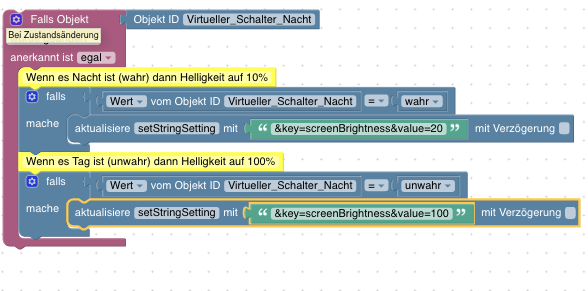
                      Ich bekomme das im BLockly nicht hin.

                      2958_bildschirmfoto_2018-12-30_um_13.12.50.png

                      Das script schreibt den Befehl zwar in den Datenpunkt aber schickt ihn nicht weiter zum Fullytablet.

                      Muss ich da noch was anderes ausführen oder anderen Befehl für nehmen?

                      Gruss

                      edit

                      Fehler selber gefunden wenn ich "steuere" nehme geht es.

                      2958_bildschirmfoto_2018-12-30_um_13.17.58.png

                      Schönen Sonntag euch noch.

                      Gruss Danyel

                      Intel NUC Celeron, Xiaomi Gateway, Fritzbox 7590, XS1

                      1 Reply Last reply
                      0
                      • ChaotC Offline
                        ChaotC Offline
                        Chaot
                        wrote on last edited by
                        #95

                        So wie es scheint ist das Problem mit dem Ladezustand behoben.

                        Aber ich habe jetzt ein Problem mit meinem Ladescript.

                        Das Gerät lädt auf 80% und schaltet sich ab.

                        Dann fängt es an alle 3-4 Minuten den Ladestecker kurz ein und sofort wieder auszuschalten.

                        Hat jemand eine Idee woran das jetzt liegen könnte?

                        Mit der vorherigen Lösung hat er das nicht gemacht.

                        const idBatt = 'fullybrowser.0.192_168_8_225.Info.batteryLevel'; // Batterielevel in %
                        const idPlug = 'sonoff.0.Ladestecker.POWER'; // Ladegerät ein
                        const idVis = 'Vis.Batterieanzeige'; // Für Vis
                        
                        createState(idVis, 0, {
                        type: 'number',
                        min: 0,
                        max: 7,
                        role: 'level',
                        states: {
                        0: 'leer',
                        1: '20 %',
                        2: '40 %',
                        3: '60 %',
                        4: '80 %',
                        5: 'voll',
                        6: 'Ladegerät'
                        } 
                        });
                        
                        var level = getState(idBatt).val;
                        var plug = getState(idPlug).val;
                        
                        function batt() {
                        var state = 5; // full 80 %
                        if(level <= 79) state = 4; // 79 %
                        if(level <= 60) state = 3; // 60 %
                        if(level <= 40) state = 2; // 40 %
                        if(level <= 30) state = 1; // 20 %
                        if(level <= 22) state = 0; // empty 20 %
                        if(plug) state = 6; // Ladegerät ein
                        setState(idVis, state, true);
                        if(level >= 80 && plug) setState(idPlug, false);
                        if(level <= 30 && !plug) setState(idPlug, true);
                        }
                        
                        batt(); // Skriptstart
                        
                        on(idBatt, function(dp) {
                        level = dp.state.val;
                        batt();
                        });
                        
                        on(idPlug, function(dp) {
                        plug = dp.state.val;
                        batt();
                        });
                        

                        ioBroker auf NUC unter Proxmox; VIS: 12" Touchscreen und 17" Touch; Lichtsteuerung, Thermometer und Sensoren: Tasmota (39); Ambiente Beleuchtung: WLED (9); Heizung: DECT Thermostate (9) an Fritz 6690; EMS-ESP; 1 Echo V2; 3 Echo DOT; 1 Echo Connect; 2 Echo Show 5; Unifi Ap-Ac Lite.

                        1 Reply Last reply
                        0
                        • G Offline
                          G Offline
                          Georgius
                          wrote on last edited by
                          #96

                          Schalt mal ein debug in die Zeile "if(level >= 80 && plug) setState(idPlug, false);"

                          1 Reply Last reply
                          0
                          • ChaotC Offline
                            ChaotC Offline
                            Chaot
                            wrote on last edited by
                            #97

                            Ok, und wie mache ich das?

                            ioBroker auf NUC unter Proxmox; VIS: 12" Touchscreen und 17" Touch; Lichtsteuerung, Thermometer und Sensoren: Tasmota (39); Ambiente Beleuchtung: WLED (9); Heizung: DECT Thermostate (9) an Fritz 6690; EMS-ESP; 1 Echo V2; 3 Echo DOT; 1 Echo Connect; 2 Echo Show 5; Unifi Ap-Ac Lite.

                            1 Reply Last reply
                            0
                            • G Offline
                              G Offline
                              Georgius
                              wrote on last edited by
                              #98

                              Kann ich auch nicht sagen, mach es mal in Blocky und schau dann wie das JS dann aussieht.

                              1 Reply Last reply
                              0
                              • ChaotC Offline
                                ChaotC Offline
                                Chaot
                                wrote on last edited by
                                #99

                                Ja, aber das Script läuft ja normalerweise.

                                Im Originalzustand hole ich direkt aus Fully (separates Script) den Akkuwert und schreibe den dann in einen Datenpunkt.

                                Diesen Datenpunkt frage ich dann mit dem Script ab und es lädt zwischen 20 und 80%.

                                Erst wenn ich den Datenpunkt dann auf den Datenpunkt vom Adapter lege gibt es das seltsame Verhalten.

                                ioBroker auf NUC unter Proxmox; VIS: 12" Touchscreen und 17" Touch; Lichtsteuerung, Thermometer und Sensoren: Tasmota (39); Ambiente Beleuchtung: WLED (9); Heizung: DECT Thermostate (9) an Fritz 6690; EMS-ESP; 1 Echo V2; 3 Echo DOT; 1 Echo Connect; 2 Echo Show 5; Unifi Ap-Ac Lite.

                                1 Reply Last reply
                                0
                                • G Offline
                                  G Offline
                                  Georgius
                                  wrote on last edited by
                                  #100

                                  Darum sollt man eben schauen was der Skript wirklich ausliest.

                                  1 Reply Last reply
                                  0
                                  • ChaotC Offline
                                    ChaotC Offline
                                    Chaot
                                    wrote on last edited by
                                    #101

                                    Also:

                                    Script 1 zum Auslesen des Akkustands und in einen Datenpunkt schreiben - funktioniert

                                    var request = require('request');
                                    var link = "http://192.168.8.XXX:2323/?cmd=deviceInfo&type=json&password=XXXX";
                                    var state = "javascript.0.Allgemein.Akku_Tablet"/*Akku_Tablet*/;
                                    
                                    function fully() {
                                        request(link, function(error,response, body) {
                                            if(error) log('Fehler request: ' + error, 'error');
                                            else {
                                                objects = JSON.parse(body);
                                                bat = objects.batteryLevel;
                                                setState(state, bat);
                                                log ("batteryLevel = " + bat);
                                            }    
                                        });
                                    }
                                    
                                    fully();
                                    schedule('*/10 * * * *', fully);
                                    

                                    Script 2 zum Laden aus diesem Datenpunkt - funktioniert

                                    const idBatt = 'javascript.0.Allgemein.Akku_Tablet'; // Batterielevel in %
                                    const idPlug = 'sonoff.0.Ladestecker.POWER'; // Ladegerät ein
                                    const idVis = 'Vis.Batterieanzeige'; // Für Vis
                                    
                                    createState(idVis, 0, {
                                    type: 'number',
                                    min: 0,
                                    max: 7,
                                    role: 'level',
                                    states: {
                                    0: 'leer',
                                    1: '20 %',
                                    2: '40 %',
                                    3: '60 %',
                                    4: '80 %',
                                    5: 'voll',
                                    6: 'Ladegerät'
                                    } 
                                    });
                                    
                                    var level = getState(idBatt).val;
                                    var plug = getState(idPlug).val;
                                    
                                    function batt() {
                                    var state = 5; // full 80 %
                                    if(level <= 79) state = 4; // 79 %
                                    if(level <= 60) state = 3; // 60 %
                                    if(level <= 40) state = 2; // 40 %
                                    if(level <= 30) state = 1; // 20 %
                                    if(level <= 22) state = 0; // empty 20 %
                                    if(plug) state = 6; // Ladegerät ein
                                    setState(idVis, state, true);
                                    if(level >= 80 && plug) setState(idPlug, false);
                                    if(level <= 30 && !plug) setState(idPlug, true);
                                    }
                                    
                                    batt(); // Skriptstart
                                    
                                    on(idBatt, function(dp) {
                                    level = dp.state.val;
                                    batt();
                                    });
                                    
                                    on(idPlug, function(dp) {
                                    plug = dp.state.val;
                                    batt();
                                    });
                                    

                                    Script 3 zum Auslesen und Laden aus dem Fully Adapter - funktioniert nicht:

                                    const idBatt = 'fullybrowser.0.192_168_8_225.Info.batteryLevel'; // Batterielevel in %
                                    const idPlug = 'sonoff.0.Ladestecker.POWER'; // Ladegerät ein
                                    const idVis = 'Vis.Batterieanzeige'; // Für Vis
                                    
                                    createState(idVis, 0, {
                                    type: 'number',
                                    min: 0,
                                    max: 7,
                                    role: 'level',
                                    states: {
                                    0: 'leer',
                                    1: '20 %',
                                    2: '40 %',
                                    3: '60 %',
                                    4: '80 %',
                                    5: 'voll',
                                    6: 'Ladegerät'
                                    } 
                                    });
                                    
                                    var level = getState(idBatt).val;
                                    var plug = getState(idPlug).val;
                                    
                                    function batt() {
                                    var state = 5; // full 80 %
                                    if(level <= 79) state = 4; // 79 %
                                    if(level <= 60) state = 3; // 60 %
                                    if(level <= 40) state = 2; // 40 %
                                    if(level <= 30) state = 1; // 20 %
                                    if(level <= 22) state = 0; // empty 20 %
                                    if(plug) state = 6; // Ladegerät ein
                                    setState(idVis, state, true);
                                    if(level >= 80 && plug) setState(idPlug, false);
                                    if(level <= 30 && !plug) setState(idPlug, true);
                                    }
                                    
                                    batt(); // Skriptstart
                                    
                                    on(idBatt, function(dp) {
                                    level = dp.state.val;
                                    batt();
                                    });
                                    
                                    on(idPlug, function(dp) {
                                    plug = dp.state.val;
                                    batt();
                                    });
                                    

                                    Script 2 und 3 Unterscheiden sich nur im abgefragten Datenpunkt in Zeile 1

                                    ioBroker auf NUC unter Proxmox; VIS: 12" Touchscreen und 17" Touch; Lichtsteuerung, Thermometer und Sensoren: Tasmota (39); Ambiente Beleuchtung: WLED (9); Heizung: DECT Thermostate (9) an Fritz 6690; EMS-ESP; 1 Echo V2; 3 Echo DOT; 1 Echo Connect; 2 Echo Show 5; Unifi Ap-Ac Lite.

                                    1 Reply Last reply
                                    0
                                    • JB_SullivanJ Offline
                                      JB_SullivanJ Offline
                                      JB_Sullivan
                                      wrote on last edited by
                                      #102

                                      Ich glaube bei Sonoff musst du auf POWER1 gehen damit er schaltet

                                      ioBroker (since 2018) auf Intel Core i3-5005U NUC und Windwos10 Pro

                                      1 Reply Last reply
                                      0
                                      • ChaotC Offline
                                        ChaotC Offline
                                        Chaot
                                        wrote on last edited by
                                        #103

                                        Nö, schalten macht er ja korrekt.

                                        Die beiden oberen Scripte funktionieren ja seit 2 Monaten.

                                        Lediglich wenn ich den Akkustand aus dem Adapter hole anstatt direkt schaltet er so komisch das er bei 80% ausschaltet und dann anfängt alle paar Minuten kurz einzuschalten (ca. 30 Sekunden).

                                        ioBroker auf NUC unter Proxmox; VIS: 12" Touchscreen und 17" Touch; Lichtsteuerung, Thermometer und Sensoren: Tasmota (39); Ambiente Beleuchtung: WLED (9); Heizung: DECT Thermostate (9) an Fritz 6690; EMS-ESP; 1 Echo V2; 3 Echo DOT; 1 Echo Connect; 2 Echo Show 5; Unifi Ap-Ac Lite.

                                        1 Reply Last reply
                                        0
                                        • arteckA Offline
                                          arteckA Offline
                                          arteck
                                          Developer Most Active
                                          wrote on last edited by
                                          #104

                                          meine fresse machst du das komplizziert

                                          aber egal

                                          const idBatt = 'fullybrowser.0.192_168_8_225.Info.batteryLevel'; // Batterielevel in %
                                          const idPlug = 'sonoff.0.Ladestecker.POWER'; // Ladegerät ein
                                          const idVis = 'Vis.Batterieanzeige'; // Für Vis
                                          
                                          createState(idVis, 0, {
                                            type: 'number',
                                            min: 0,
                                            max: 7,
                                            role: 'level',
                                            states: {
                                              0: 'leer',
                                              1: '20 %',
                                              2: '40 %',
                                              3: '60 %',
                                              4: '80 %',
                                              5: 'voll',
                                              6: 'Ladegerät'
                                            } 
                                          });
                                          
                                          var level = getState(idBatt).val;
                                          var plug = getState(idPlug).val;
                                          
                                          function batt() {
                                            var state = 5; // full 80 %
                                          
                                            if(level <= 79) state = 4; // 79 %
                                            if(level <= 60) state = 3; // 60 %
                                            if(level <= 40) state = 2; // 40 %
                                            if(level <= 30) state = 1; // 20 %
                                            if(level <= 22) state = 0; // empty 20 %
                                          
                                            if(plug) state = 6; // Ladegerät ein
                                          
                                            setState(idVis, state, true);
                                          
                                            if(level >= 80 && plug) {
                                              log('------------level ' + level + 'plug ' + plug);
                                              setState(idPlug, false);
                                            } 
                                          
                                            if(level <= 30 && !plug) {
                                              log('------------level ' + level + 'plug ' + plug);
                                              setState(idPlug, true);
                                            }
                                          }
                                          
                                          batt(); // Skriptstart
                                          
                                          on(idBatt, function(dp) {
                                            level = dp.state.val;
                                            batt();
                                          });
                                          
                                          on(idPlug, function(dp) {
                                            plug = dp.state.val;
                                            batt();
                                          });
                                          

                                          lass mal laufen .. und schau was das Log sagt

                                          zigbee hab ich, zwave auch, nuc's genauso und HA auch

                                          1 Reply Last reply
                                          0
                                          Reply
                                          • Reply as topic
                                          Log in to reply
                                          • Oldest to Newest
                                          • Newest to Oldest
                                          • Most Votes


                                          Support us

                                          ioBroker
                                          Community Adapters
                                          Donate

                                          664

                                          Online

                                          32.7k

                                          Users

                                          82.3k

                                          Topics

                                          1.3m

                                          Posts
                                          Community
                                          Impressum | Datenschutz-Bestimmungen | Nutzungsbedingungen | Einwilligungseinstellungen
                                          ioBroker Community 2014-2025
                                          logo
                                          • Login

                                          • Don't have an account? Register

                                          • Login or register to search.
                                          • First post
                                            Last post
                                          0
                                          • Home
                                          • Recent
                                          • Tags
                                          • Unread 0
                                          • Categories
                                          • Unreplied
                                          • Popular
                                          • GitHub
                                          • Docu
                                          • Hilfe