Skip to content
  • Home
  • Recent
  • Tags
  • 0 Unread 0
  • Categories
  • Unreplied
  • Popular
  • GitHub
  • Docu
  • Hilfe
Skins
  • Light
  • Brite
  • Cerulean
  • Cosmo
  • Flatly
  • Journal
  • Litera
  • Lumen
  • Lux
  • Materia
  • Minty
  • Morph
  • Pulse
  • Sandstone
  • Simplex
  • Sketchy
  • Spacelab
  • United
  • Yeti
  • Zephyr
  • Dark
  • Cyborg
  • Darkly
  • Quartz
  • Slate
  • Solar
  • Superhero
  • Vapor

  • Default (No Skin)
  • No Skin
Collapse
ioBroker Logo

Community Forum

donate donate
  1. ioBroker Community Home
  2. Deutsch
  3. Tester
  4. [Aufruf] fullyBrowser Adapter

NEWS

  • Jahresrückblick 2025 – unser neuer Blogbeitrag ist online! ✨
    BluefoxB
    Bluefox
    17
    1
    3.3k

  • Neuer Blogbeitrag: Monatsrückblick - Dezember 2025 🎄
    BluefoxB
    Bluefox
    13
    1
    1.1k

  • Weihnachtsangebot 2025! 🎄
    BluefoxB
    Bluefox
    25
    1
    2.4k

[Aufruf] fullyBrowser Adapter

Scheduled Pinned Locked Moved Tester
fullybrowserfullybrowser adapter
289 Posts 45 Posters 51.4k Views 26 Watching
  • Oldest to Newest
  • Newest to Oldest
  • Most Votes
Reply
  • Reply as topic
Log in to reply
This topic has been deleted. Only users with topic management privileges can see it.
  • WebrangerW Offline
    WebrangerW Offline
    Webranger
    wrote on last edited by
    #6

    Gerade mal getestet.

    Leider startet der Adapter nicht und in den LOGs finde ich das:

    host.debian-iobroker	2018-12-12 19:14:26.442	error	instance system.adapter.fullyBrowser.0 terminated with code 1 ()
    Caught	2018-12-12 19:14:26.442	error	by controller[0]: at startup (bootstrap_node.js:153:9)
    Caught	2018-12-12 19:14:26.441	error	by controller[0]: at run (bootstrap_node.js:387:7)
    Caught	2018-12-12 19:14:26.441	error	by controller[0]: at Module.runMain (module.js:611:10)
    Caught	2018-12-12 19:14:26.441	error	by controller[0]: at Function.Module._load (module.js:445:3)
    Caught	2018-12-12 19:14:26.441	error	by controller[0]: at tryModuleLoad (module.js:453:12)
    Caught	2018-12-12 19:14:26.440	error	by controller[0]: at Module.load (module.js:494:32)
    Caught	2018-12-12 19:14:26.440	error	by controller[0]: at Object.Module._extensions..js (module.js:586:10)
    Caught	2018-12-12 19:14:26.440	error	by controller[0]: at Module._compile (module.js:549:28)
    Caught	2018-12-12 19:14:26.440	error	by controller[0]: at Object.runInThisContext (vm.js:97:10)
    Caught	2018-12-12 19:14:26.440	error	by controller[0]: at createScript (vm.js:56:10)
    Caught	2018-12-12 19:14:26.440	error	by controller[0]: SyntaxError: Illegal break statement
    Caught	2018-12-12 19:14:26.439	error	by controller[0]: ^^^^^
    Caught	2018-12-12 19:14:26.439	error	by controller[0]: break;
    Caught	2018-12-12 19:14:26.438	error	by controller[0]: /opt/iobroker/node_modules/iobroker.fullyBrowser/main.js:118
    

    Intel NUC Celeron, Xiaomi Gateway, Fritzbox 7590, XS1

    1 Reply Last reply
    0
    • MicM Offline
      MicM Offline
      Mic
      Developer
      wrote on last edited by
      #7

      Danke Arteck.

      Hab Dir schon auf die PM geantwortet mit Auszug aus dem Error-Log.

      1 Reply Last reply
      0
      • MicM Offline
        MicM Offline
        Mic
        Developer
        wrote on last edited by
        #8

        @Kueppert:

        Den Port den ich einstellen muß… Finde ich im Kiosk browser? Kannst da zb den Standart Port eintragen? Wäre für Beginner einfacher ;)

        Und Passwort? Was für ein Passwort o.O `

        Findest Du hier in meinem Script-Thread: viewtopic.php?f=21&t=19105

        @Mic:

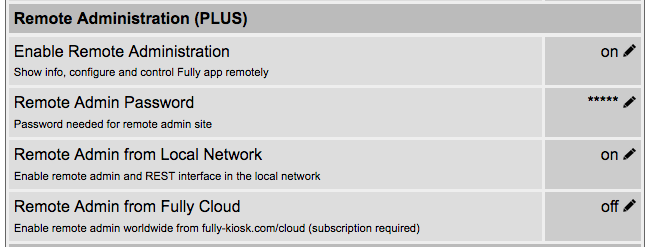
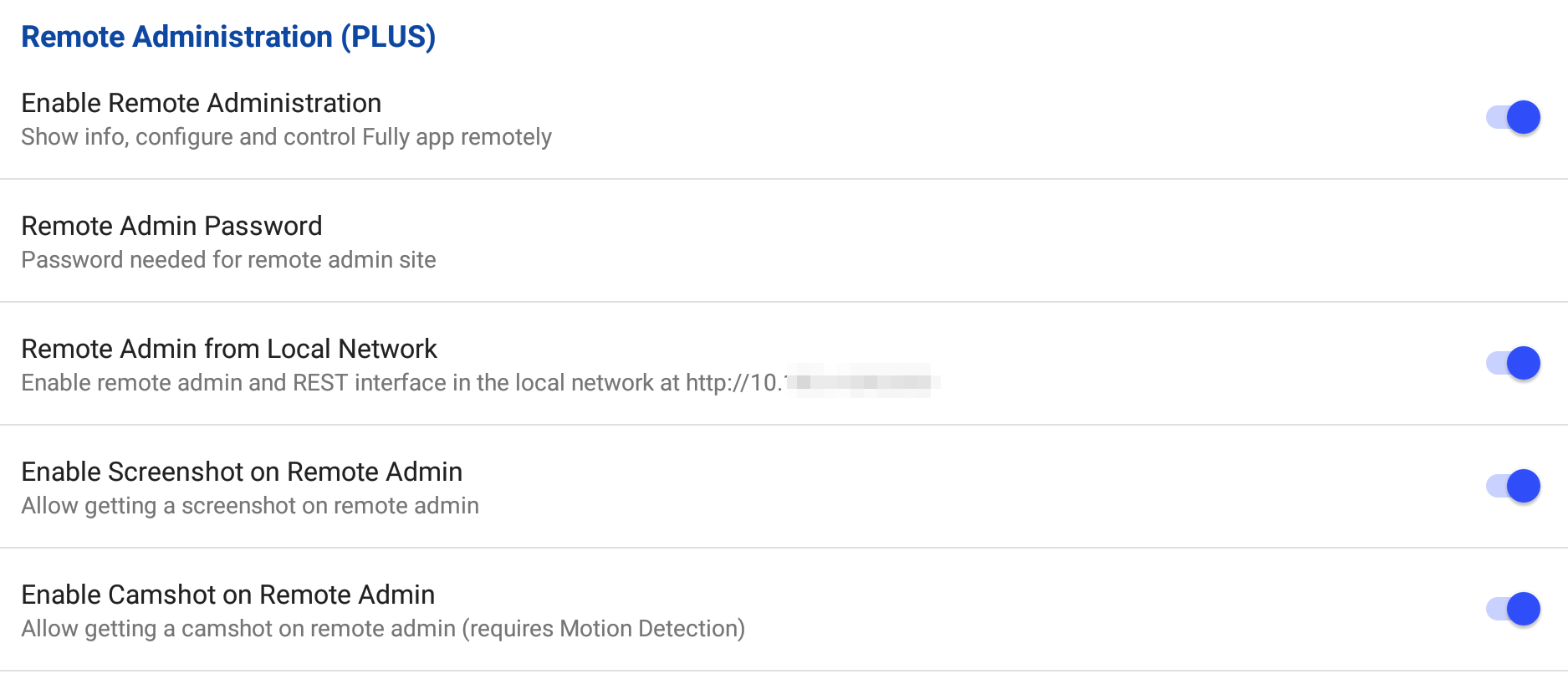
        Voraussetzung für das Script ist, dass Ihr die "Plus-Version" vom Fully Browser verwendet und in den Settings im Untermenü "Remote Administration (PLUS)" den Punkt "Enable Remote Administration" aktiviert und unter "Remote Admin Password" ein Passwort setzt. "Remote Admin from Local Network" muss ebenso aktiviert sein, dort steht dann auch die URL, die Ihr dann im Browser testen könnt und im Script die IP-Adresse entsprechend einträgt. `
        6940_fully5.png

        1 Reply Last reply
        0
        • WebrangerW Offline
          WebrangerW Offline
          Webranger
          wrote on last edited by
          #9

          @Mic:

          fully5.png `

          Darf ich fragen welche version das ist von Fully?

          Ich hab die 1.21.9 am laufen und bei mir sieht das so aus:

          2958_bildschirmfoto_2018-12-12_um_19.49.28.png

          edit1:

          Mal ein update auf die 1.28.1 gemacht aber macht es nicht besser!

          edit2:

          Das script von mic läuft ohne probleme.

          Intel NUC Celeron, Xiaomi Gateway, Fritzbox 7590, XS1

          1 Reply Last reply
          0
          • MicM Offline
            MicM Offline
            Mic
            Developer
            wrote on last edited by
            #10

            @ringdingringding:

            Darf ich fragen welche version das ist von Fully? `

            Die aktuelle 1.28.1.

            Der Adapter geht bei mir auch noch nicht aufgrund der besagten Fehlermeldungen.

            1 Reply Last reply
            0
            • WebrangerW Offline
              WebrangerW Offline
              Webranger
              wrote on last edited by
              #11

              @Mic:

              Der Adapter geht bei mir auch noch nicht aufgrund der besagten Fehlermeldungen. `

              Gleiche Fehlermeldung wie bei mir?

              Intel NUC Celeron, Xiaomi Gateway, Fritzbox 7590, XS1

              1 Reply Last reply
              0
              • ChaotC Offline
                ChaotC Offline
                Chaot
                wrote on last edited by
                #12

                Bei mir scheitert es nach wie vor schon bei der Installation:

                iobroker	2018-12-12 21:31:36.077	info	exit 0
                iobroker	2018-12-12 21:31:35.979	info	upload [0] fullyBrowser.admin /opt/iobroker/node_modules/iobroker.fullyBrowser/admin/fully.png fully.png image/png
                iobroker	2018-12-12 21:31:35.920	info	upload [1] fullyBrowser.admin /opt/iobroker/node_modules/iobroker.fullyBrowser/admin/index.html index.html text/html
                iobroker	2018-12-12 21:31:35.859	info	upload [2] fullyBrowser.admin /opt/iobroker/node_modules/iobroker.fullyBrowser/admin/index_m.html index_m.html text/html
                iobroker	2018-12-12 21:31:35.786	info	upload [3] fullyBrowser.admin /opt/iobroker/node_modules/iobroker.fullyBrowser/admin/words.js words.js application/javascript
                iobroker	2018-12-12 21:31:35.759	info	got /opt/iobroker/node_modules/iobroker.fullyBrowser/admin
                iobroker	2018-12-12 21:31:35.686	info	WARN notsup SKIPPING OPTIONAL DEPENDENCY: Unsupported platform for fsevents@1.2.4: wanted {"os":"darwin","arch":"any"} (current: {"os":"linux","arch":"x64"})
                iobroker	2018-12-12 21:31:35.684	info	npm WARN optional SKIPPING OPTIONAL DEPENDENCY: fsevents@1.2.4 (node_modules/fsevents):npm
                iobroker	2018-12-12 21:31:35.682	info	WARN svg-inline-react@1.0.3 requires a peer of react@^0.14.0 || ^15.0.0 but none is installed. You must install peer dependencies yourself.
                iobroker	2018-12-12 21:31:35.681	info	WARN svg-inline-react@1.0.3 requires a peer of react@^0.14.0 || ^15.0.0 but none is installed. You must install peer dependencies yourself.npm
                iobroker	2018-12-12 21:31:35.679	info	npm
                host.haus	2018-12-12 21:31:02.584	info	instance system.adapter.tvspielfilm.0 terminated with code 0 (OK)
                iobroker	2018-12-12 21:30:25.199	info	npm install https://github.com/arteck/iobroker.fullyBrowser/tarball/master --production --save --prefix "/opt/iobroker" (System call)
                iobroker	2018-12-12 21:30:24.566	info	install https://github.com/arteck/iobroker.fullyBrowser/tarball/master
                iobroker	2018-12-12 21:30:24.076	info	url "https://github.com/arteck/iobroker.fullyBrowser"
                

                Das klingt irgendwie als müsste ich da was nachinstallieren. Aber ich kann nicht so richtig erkennen was ich da brauche.

                Dazu kommt noch die Meldung:

                host.haus	2018-12-12 21:31:36.473	info	Update repository "latest" under "http://download.iobroker.net/sources-dist-latest.json"
                

                für die ich keine Erklärung finde. Die URL ist ja eingetragen. Also sollte das doch automatisch klappen.

                ioBroker auf NUC unter Proxmox; VIS: 12" Touchscreen und 17" Touch; Lichtsteuerung, Thermometer und Sensoren: Tasmota (39); Ambiente Beleuchtung: WLED (9); Heizung: DECT Thermostate (9) an Fritz 6690; EMS-ESP; 1 Echo V2; 3 Echo DOT; 1 Echo Connect; 2 Echo Show 5; Unifi Ap-Ac Lite.

                1 Reply Last reply
                0
                • G Offline
                  G Offline
                  Georgius
                  wrote on last edited by
                  #13

                  Das sind nur Infos, keine Errors. Auch ein Exit 0.

                  Sollte alles funktionieren.

                  1 Reply Last reply
                  0
                  • MicM Offline
                    MicM Offline
                    Mic
                    Developer
                    wrote on last edited by
                    #14

                    @ringdingringding:

                    Gleiche Fehlermeldung wie bei mir? `

                    So sieht es aus, hat arteck aber schon bekommen.

                    ! ````
                    2018-12-12 19:08:50.588 - info: host.ctioBroker object change system.adapter.fullyBrowser.0
                    2018-12-12 19:08:51.381 - error: Caught by controller[0]: /opt/iobroker/node_modules/iobroker.fullyBrowser/main.js:118
                    2018-12-12 19:08:51.382 - error: Caught by controller[0]: break;
                    2018-12-12 19:08:51.382 - error: Caught by controller[0]: ^^^^^
                    2018-12-12 19:08:51.382 - error: Caught by controller[0]: SyntaxError: Illegal break statement
                    2018-12-12 19:08:51.382 - error: Caught by controller[0]: at createScript (vm.js:80:10)
                    2018-12-12 19:08:51.382 - error: Caught by controller[0]: at Object.runInThisContext (vm.js:139:10)
                    2018-12-12 19:08:51.382 - error: Caught by controller[0]: at Module._compile (module.js:617:28)
                    2018-12-12 19:08:51.382 - error: Caught by controller[0]: at Object.Module._extensions..js (module.js:664:10)
                    2018-12-12 19:08:51.382 - error: Caught by controller[0]: at Module.load (module.js:566:32)
                    2018-12-12 19:08:51.382 - error: Caught by controller[0]: at tryModuleLoad (module.js:506:12)
                    2018-12-12 19:08:51.382 - error: Caught by controller[0]: at Function.Module._load (module.js:498:3)
                    2018-12-12 19:08:51.382 - error: Caught by controller[0]: at Function.Module.runMain (module.js:694:10)
                    2018-12-12 19:08:51.382 - error: Caught by controller[0]: at startup (bootstrap_node.js:204:16)
                    2018-12-12 19:08:51.383 - error: Caught by controller[0]: at bootstrap_node.js:625:3
                    2018-12-12 19:08:51.383 - error: host.ctioBroker instance system.adapter.fullyBrowser.0 terminated with code 1 ()
                    2018-12-12 19:08:51.383 - info: host.ctioBroker Do not restart adapter system.adapter.fullyBrowser.0 because disabled or deleted
                    2018-12-12 19:08:52.613 - info: host.ctioBroker object change system.adapter.fullyBrowser.0
                    2018-12-12 19:08:52.614 - info: host.ctioBroker "system.adapter.fullyBrowser.0" enabled
                    2018-12-12 19:08:52.627 - info: host.ctioBroker instance system.adapter.fullyBrowser.0 started with pid 768
                    2018-12-12 19:08:52.775 - error: Caught by controller[0]: /opt/iobroker/node_modules/iobroker.fullyBrowser/main.js:118
                    2018-12-12 19:08:52.775 - error: Caught by controller[0]: break;
                    2018-12-12 19:08:52.775 - error: Caught by controller[0]: ^^^^^
                    2018-12-12 19:08:52.775 - error: Caught by controller[0]: SyntaxError: Illegal break statement
                    2018-12-12 19:08:52.775 - error: Caught by controller[0]: at createScript (vm.js:80:10)
                    2018-12-12 19:08:52.775 - error: Caught by controller[0]: at Object.runInThisContext (vm.js:139:10)
                    2018-12-12 19:08:52.775 - error: Caught by controller[0]: at Module._compile (module.js:617:28)
                    2018-12-12 19:08:52.775 - error: Caught by controller[0]: at Object.Module._extensions..js (module.js:664:10)
                    2018-12-12 19:08:52.775 - error: Caught by controller[0]: at Module.load (module.js:566:32)
                    2018-12-12 19:08:52.776 - error: Caught by controller[0]: at tryModuleLoad (module.js:506:12)
                    2018-12-12 19:08:52.776 - error: Caught by controller[0]: at Function.Module._load (module.js:498:3)
                    2018-12-12 19:08:52.776 - error: Caught by controller[0]: at Function.Module.runMain (module.js:694:10)
                    2018-12-12 19:08:52.776 - error: Caught by controller[0]: at startup (bootstrap_node.js:204:16)
                    2018-12-12 19:08:52.776 - error: Caught by controller[0]: at bootstrap_node.js:625:3
                    2018-12-12 19:08:52.776 - error: host.ctioBroker instance system.adapter.fullyBrowser.0 terminated with code 1 ()
                    2018-12-12 19:08:52.776 - info: host.ctioBroker Restart adapter system.adapter.fullyBrowser.0 because enabled
                    2018-12-12 19:08:53.645 - info: host.ctioBroker instance system.adapter.ical.0 terminated with code 0 (OK)

                    1 Reply Last reply
                    0
                    • ChaotC Offline
                      ChaotC Offline
                      Chaot
                      wrote on last edited by
                      #15

                      Ja, exit 0 sehe ich ja auch. Aber dann müsste der Adapter doch in den Instanzen auftauchen oder verstehe ich das falsch?

                      ioBroker auf NUC unter Proxmox; VIS: 12" Touchscreen und 17" Touch; Lichtsteuerung, Thermometer und Sensoren: Tasmota (39); Ambiente Beleuchtung: WLED (9); Heizung: DECT Thermostate (9) an Fritz 6690; EMS-ESP; 1 Echo V2; 3 Echo DOT; 1 Echo Connect; 2 Echo Show 5; Unifi Ap-Ac Lite.

                      1 Reply Last reply
                      0
                      • G Offline
                        G Offline
                        Georgius
                        wrote on last edited by
                        #16

                        Wenn Du die Kachelansicht hast nochmal so tun als ob Du den Adapter installieren willst. Also die 3 Punkte und dann links unten das + Zeichen. Dann wird eine Instanz angelegt.

                        1 Reply Last reply
                        0
                        • ChaotC Offline
                          ChaotC Offline
                          Chaot
                          wrote on last edited by
                          #17

                          Danke.

                          Jetzt mit Fehlermeldung:

                          host.haus	2018-12-13 06:44:53.758	error	instance system.adapter.fullyBrowser.0 terminated with code 1 ()
                          Caught	2018-12-13 06:44:53.758	error	by controller[0]: at bootstrap_node.js:625:3
                          Caught	2018-12-13 06:44:53.758	error	by controller[0]: at startup (bootstrap_node.js:204:16)
                          Caught	2018-12-13 06:44:53.758	error	by controller[0]: at Function.Module.runMain (module.js:694:10)
                          Caught	2018-12-13 06:44:53.758	error	by controller[0]: at Function.Module._load (module.js:498:3)
                          Caught	2018-12-13 06:44:53.758	error	by controller[0]: at tryModuleLoad (module.js:506:12)
                          Caught	2018-12-13 06:44:53.758	error	by controller[0]: at Module.load (module.js:566:32)
                          Caught	2018-12-13 06:44:53.758	error	by controller[0]: at Object.Module._extensions..js (module.js:664:10)
                          Caught	2018-12-13 06:44:53.758	error	by controller[0]: at Module._compile (module.js:617:28)
                          Caught	2018-12-13 06:44:53.757	error	by controller[0]: at Object.runInThisContext (vm.js:139:10)
                          Caught	2018-12-13 06:44:53.757	error	by controller[0]: at createScript (vm.js:80:10)
                          Caught	2018-12-13 06:44:53.757	error	by controller[0]: SyntaxError: Illegal break statement
                          Caught	2018-12-13 06:44:53.757	error	by controller[0]: ^^^^^
                          Caught	2018-12-13 06:44:53.757	error	by controller[0]: break;
                          Caught	2018-12-13 06:44:53.757	error	by controller[0]: /opt/iobroker/node_modules/iobroker.fullyBrowser/main.js:118
                          host.haus	2018-12-13 06:44:53.559	info	instance system.adapter.fullyBrowser.0 started with pid 8663
                          

                          ioBroker auf NUC unter Proxmox; VIS: 12" Touchscreen und 17" Touch; Lichtsteuerung, Thermometer und Sensoren: Tasmota (39); Ambiente Beleuchtung: WLED (9); Heizung: DECT Thermostate (9) an Fritz 6690; EMS-ESP; 1 Echo V2; 3 Echo DOT; 1 Echo Connect; 2 Echo Show 5; Unifi Ap-Ac Lite.

                          1 Reply Last reply
                          0
                          • arteckA Offline
                            arteckA Offline
                            arteck
                            Developer Most Active
                            wrote on last edited by
                            #18

                            jaha..schon korrigiert…

                            hab noch auf die schnelle eine Änderung gemacht ..copy...paste.. bäm ..fehler ;)

                            doku fehlt auch noch.. ich weiss

                            zigbee hab ich, zwave auch, nuc's genauso und HA auch

                            1 Reply Last reply
                            0
                            • WebrangerW Offline
                              WebrangerW Offline
                              Webranger
                              wrote on last edited by
                              #19

                              Dann werde ich heute Abend noch mal testen

                              Intel NUC Celeron, Xiaomi Gateway, Fritzbox 7590, XS1

                              1 Reply Last reply
                              0
                              • ChaotC Offline
                                ChaotC Offline
                                Chaot
                                wrote on last edited by
                                #20

                                Ich bekomme bei der Installation immer noch die 0.0.6 und den gleichen Fehler

                                ioBroker auf NUC unter Proxmox; VIS: 12" Touchscreen und 17" Touch; Lichtsteuerung, Thermometer und Sensoren: Tasmota (39); Ambiente Beleuchtung: WLED (9); Heizung: DECT Thermostate (9) an Fritz 6690; EMS-ESP; 1 Echo V2; 3 Echo DOT; 1 Echo Connect; 2 Echo Show 5; Unifi Ap-Ac Lite.

                                1 Reply Last reply
                                0
                                • arteckA Offline
                                  arteckA Offline
                                  arteck
                                  Developer Most Active
                                  wrote on last edited by
                                  #21

                                  so jetzt die Version ist immer noch die 0.0.6

                                  zigbee hab ich, zwave auch, nuc's genauso und HA auch

                                  1 Reply Last reply
                                  0
                                  • ChaotC Offline
                                    ChaotC Offline
                                    Chaot
                                    wrote on last edited by
                                    #22

                                    Ok, läuft bei mir aktuell ohne Fehlermeldung.

                                    Alle Daten scheinen vorhanden.

                                    Allerdings hat sich das jetzt irgendwie mit meinem Ladescript überschnitten. Da frage ich den Akkustand direkt ab und Fully verweigert jetzt scheinbar die Verbindung.

                                    Macht nichts, da ich ja zur Abfrage jetzt den Adapter nutzen kann.

                                    ioBroker auf NUC unter Proxmox; VIS: 12" Touchscreen und 17" Touch; Lichtsteuerung, Thermometer und Sensoren: Tasmota (39); Ambiente Beleuchtung: WLED (9); Heizung: DECT Thermostate (9) an Fritz 6690; EMS-ESP; 1 Echo V2; 3 Echo DOT; 1 Echo Connect; 2 Echo Show 5; Unifi Ap-Ac Lite.

                                    1 Reply Last reply
                                    0
                                    • ChaotC Offline
                                      ChaotC Offline
                                      Chaot
                                      wrote on last edited by
                                      #23

                                      Bei mir läuft der Adapter mittlerweile länger Zeit störungsfrei.

                                      Ich nutze ihn allerdings derzeit nur um den Akku zu laden.

                                      Die restlichen Datenpunkte werde ich mir nach und nach erarbeiten.

                                      Mein Wunsch wäre noch eine Einstellmöglichkeit der Bildschirmhelligkeit.

                                      Ich habe gemerkt das durch diverse Updates jedes mal ein Reload erfolgt wenn der Screensaver abgeschaltet wird.

                                      Deshalb würde ich gerne per Script die Bildschirmhelligkeit steuern.

                                      Unter /?cmd=listSettings&cat=settingsDeviceManagement ist der Punkt aufgeführt.

                                      In den Objekten erscheint er allerdings nur als "Info".

                                      Somit würde ich einfach Fully ständig in der View lassen und nur den Bildschirm verschieden hell bis ganz dunkel steuern (Über Astro Script).

                                      Dadurch umgehe ich den Screensaver und den damit verbundenen lästigen Reload.

                                      ioBroker auf NUC unter Proxmox; VIS: 12" Touchscreen und 17" Touch; Lichtsteuerung, Thermometer und Sensoren: Tasmota (39); Ambiente Beleuchtung: WLED (9); Heizung: DECT Thermostate (9) an Fritz 6690; EMS-ESP; 1 Echo V2; 3 Echo DOT; 1 Echo Connect; 2 Echo Show 5; Unifi Ap-Ac Lite.

                                      1 Reply Last reply
                                      0
                                      • MicM Offline
                                        MicM Offline
                                        Mic
                                        Developer
                                        wrote on last edited by
                                        #24

                                        Werde ich auch gleich noch mal testen.

                                        Wer kann mir denn als quasi "Github"-Newbie erklären, wie ich bei einem Projekt, das nicht von mir ist, die Readme-Datei bearbeiten kann als "Vorschlag"? Denn dann kann ich da gerne schon mal das ganze beschreiben, ähnlich wie bei meinem Fully-Script im Forum-Thread, halt in Englisch.

                                        1 Reply Last reply
                                        0
                                        • umbmU Offline
                                          umbmU Offline
                                          umbm
                                          wrote on last edited by
                                          #25

                                          @Mic:

                                          Wer kann mir denn als quasi "Github"-Newbie erklären, wie ich bei einem Projekt, das nicht von mir ist, die Readme-Datei bearbeiten kann als "Vorschlag"? Denn dann kann ich da gerne schon mal das ganze beschreiben, ähnlich wie bei meinem Fully-Script im Forum-Thread, halt in Englisch. `

                                          Wenn das Projekt nicht deins ist, kannst du auf GitHub nichts bearbeiten sondern nur im Projekt ein https://github.com/arteck/iobroker.fullyBrowser/issues öffnen und darin dem Inhaber das mitteilen, was du möchtest.

                                          1 Reply Last reply
                                          0
                                          Reply
                                          • Reply as topic
                                          Log in to reply
                                          • Oldest to Newest
                                          • Newest to Oldest
                                          • Most Votes


                                          Support us

                                          ioBroker
                                          Community Adapters
                                          Donate

                                          657

                                          Online

                                          32.7k

                                          Users

                                          82.3k

                                          Topics

                                          1.3m

                                          Posts
                                          Community
                                          Impressum | Datenschutz-Bestimmungen | Nutzungsbedingungen | Einwilligungseinstellungen
                                          ioBroker Community 2014-2025
                                          logo
                                          • Login

                                          • Don't have an account? Register

                                          • Login or register to search.
                                          • First post
                                            Last post
                                          0
                                          • Home
                                          • Recent
                                          • Tags
                                          • Unread 0
                                          • Categories
                                          • Unreplied
                                          • Popular
                                          • GitHub
                                          • Docu
                                          • Hilfe