
NEWS




Javascript Adapter lässt sich nicht mehr installieren.
-
Dann schreib klip und klar was du gegen mich hast. `
Ich habe nichts gegen Dich und das auch nie behauptet - ansonsten wo.Ich habe was gegen die Art und Weise Deines Auftretens/Schreibens.
Du wurdest freundlich nach Infos gefragt und polterst los wie sonstwas.
Ich saug mir sowas nicht aus den Fingern. Das ist Fakt. `
@Menne:Hauptsache erstmal einen klein halten und ducken lassen….ist leider nicht nur in diesem Forum so. `
Finde den „Fehler“Ich brauche mir so eine Unterstellung nicht bieten lassen `
Und wo habe ich Dir was unterstellt?Du schreibst, die npm-Anleitung sei falsch, also können alle User danach nicht erfolgreich installiert haben.
Gleiches schreibst Du zur ioBroker-Anleitung. Also kann meine Installation auch nicht laufen (keine meiner 6 Installationen nach der neuen Ankeitung).
Also was willst Du?
Von unterwegs getippert
-
Wisst ihr was, ich habe kein Bock mehr.
Im Endeffekt wurde hier nicht weiter geholfen.
Nur auf den evtl. Fehler mit dem "L" herumgetrampelt, den ich leider hier gepostet habe.
Macht weiter so.
so long
Bitte mein Account löschen !!!
-
Im Endeffekt wurde hier nicht weiter geholfen. `
Hast du die Vorschläge denn mal ausprobiert und das Ergebnis hier gepostet? Ich hab dazu jedenfalls keine Rückmeldung gesehen an der man ansetzen könnte.Und diese "vermeintlichen Fehler" können gut und gerne die Ursache für Probleme sein, sonst würden wir nicht nachfragen :|
Da du aber scheinbar davon überzeugt bist, dass es unbedingt ein kleines l sein muss, ohne zu erklären warum, kann man dir damit leider nicht helfen.
-
Es lief ebend durch und nehme das "L"zurück.
Das Thema sollte nun beendet sein.
Folgendes ist mir aufgefallen:
Ich hatte gestern geschrieben, das sich iobroker nicht stoppen lies.
"Hier stand Müll" erledigt
Hoffentlich führt das nicht wieder zur großen Diskussion.
-
OK,OK,
erledigt. Weil er es beim ersten mal wieder den Stop Befehl nicht angenommen hat und meinte das der daemon nicht läuft.
Obwohl er lief habe ich ihn nochmal gestartet. Ich konnte das ja am webif sehen. Jetzt geht es.
-
Da haben wir ihn wieder:
$ ./iobroker add javascript 0 --host bpi-iobroker
NPM version: 6.4.1
npm install iobroker.javascript --production --save --prefix "/opt/iobroker" (System call)
npm
 WARN deprecated coffee-script@1.12.7: CoffeeScript on NPM has moved to "coffeescript" (no hyphen)
npm
 ERR! path /root/.npm/_logsnpm ERR! code EACCES
npm ERR! errno -13
npm ERR! syscall scandir

npm ERR! Error: EACCES: permission denied, scandir '/root/.npm/_logs'npm ERR!  { Error: EACCES: permission denied, scandir '/root/.npm/_logs'
npm ERR!   stack: 'Error: EACCES: permission denied, scandir \'/root/.npm/_logs\'',
npm ERR!   errno: -13,
npm ERR!   code: 'EACCES',
npm ERR!   syscall: 'scandir',

npm ERR!
   path: '/root/.npm/_logs' }npm ERR!
npm ERR! The operation was rejected by your operating system.
npm ERR! It is likely you do not have the permissions to access this file as the current user
npm ERR!
npm ERR! If you believe this might be a permissions issue, please double-check the
npm ERR! permissions of the file and its containing directories, or try running
npm ERR! the command again as root/Administrator (though this is not recommended).

glob error { Error: EACCES: permission denied, scandir '/root/.npm/_logs'  stack: 'Error: EACCES: permission denied, scandir \'/root/.npm/_logs\'',
  errno: -13,
  code: 'EACCES',
  syscall: 'scandir',
  path: '/root/.npm/_logs' }

npm
 ERR! path /root/.npm/_cacache/index-v5/fc/ee/fc3e1dd6706bd557d2840d92ff10cdd6928b92fb8c46d2195dfbd8d4b2benpm ERR! code EACCES
npm ERR!
 errno -13npm ERR! syscall open

npm ERR! Error: EACCES: permission denied, open '/root/.npm/_cacache/index-v5/fc/ee/fc3e1dd6706bd557d2840d92ff10cdd6928b92fb8c46d2195dfbd8d4b2be'npm ERR!  { Error: EACCES: permission denied, open '/root/.npm/_cacache/index-v5/fc/ee/fc3e1dd6706bd557d2840d92ff10cdd6928b92fb8c46d2195dfbd8d4b2be'
npm ERR!   cause:
npm ERR!    { Error: EACCES: permission denied, open '/root/.npm/_cacache/index-v5/fc/ee/fc3e1dd6706bd557d2840d92ff10cdd6928b92fb8c46d2195dfbd8d4b2be'
npm ERR!      errno: -13,
npm ERR!
      code: 'EACCES',npm ERR!      syscall: 'open',
npm ERR!      path: '/root/.npm/_cacache/index-v5/fc/ee/fc3e1dd6706bd557d2840d92ff10cdd6928b92fb8c46d2195dfbd8d4b2be' },
npm ERR!   isOperational: true,
npm ERR!   stack: 'Error: EACCES: permission denied, open \'/root/.npm/_cacache/index-v5/fc/ee/fc3e1dd6706bd557d2840d92ff10cdd6928b92fb8c46d2195dfbd8d4b2be\'',
npm ERR!   errno: -13,
npm ERR!   code: 'EACCES',

npm ERR!   syscall: 'open',npm ERR!   path: '/root/.npm/_cacache/index-v5/fc/ee/fc3e1dd6706bd557d2840d92ff10cdd6928b92fb8c46d2195dfbd8d4b2be' }

npm ERR! npm ERR! The operation was rejected by your operating system.
npm
ERR! It is likely you do not have the permissions to access this file as the current usernpm ERR!
npm ERR! If you believe this might be a permissions issue, please double-check the
npm ERR! permissions of the file and its containing directories, or try running
npm ERR! the command again as root/Administrator (though this is not recommended).

npm
 ERR! code ELIFECYCLEnpm ERR! errno 243

npm ERR! iobroker.javascript@4.0.2 postinstall: `node ./install/installTypings.js`npm ERR! Exit status 243
npm ERR!
npm ERR! Failed at the iobroker.javascript@4.0.2 postinstall script.
npm ERR! This is probably not a problem with npm. There is likely additional logging output above.

npm ERR! A complete log of this run can be found in:npm ERR!     /root/.npm/_logs/2018-12-05T16_02_39_949Z-debug.log

ERROR: host.bpi-iobroker Cannot install iobroker.javascript: 243
ERROR: process exited with code 25
Ganz einfach über den Adapter installiert…
...auf der Konsole nichts gemacht.
6 Adapter vorher mit Erfolg installiert
-
Ohne Patzig zu werden (nicht das es wieder falsch verstanden wird)
Selbstverständlich über den script.
User pi
-
Dein Befehl wurde eingegeben und nochmals installiert.
Diesmal vom Git-Hub
$ ./iobroker url "https://github.com/ioBroker/ioBroker.javascript/tarball/master" javascript --debug
install https://github.com/ioBroker/ioBroker.javascript/tarball/master
npm install https://github.com/ioBroker/ioBroker.javascript/tarball/master --production --save --prefix "/opt/iobroker" (System call)
npm
 WARN deprecated coffee-script@1.12.7: CoffeeScript on NPM has moved to "coffeescript" (no hyphen)
> iobroker.javascript@4.0.2 postinstall /opt/iobroker/node_modules/iobroker.javascript
> node ./install/installTypings.js

installing NodeJS typings...
npm
 ERR! path /root/.npm/_logsnpm ERR! code EACCES
npm ERR! errno -13
npm ERR! syscall scandir

npm ERR! Error: EACCES: permission denied, scandir '/root/.npm/_logs'npm ERR!  { Error: EACCES: permission denied, scandir '/root/.npm/_logs'
npm ERR!   stack: 'Error: EACCES: permission denied, scandir \'/root/.npm/_logs\'',
npm ERR!   errno: -13,
npm ERR!   code: 'EACCES',
npm ERR!   syscall: 'scandir',
npm ERR!   path: '/root/.npm/_logs' }

npm ERR! npm ERR! The operation was rejected by your operating system.
npm ERR! It is likely you do not have the permissions to access this file as the current user
npm ERR!
npm ERR! If you believe this might be a permissions issue, please double-check the
npm ERR! permissions of the file and its containing directories, or try running
npm ERR! the command again as root/Administrator (though this is not recommended).

glob error { Error: EACCES: permission denied, scandir '/root/.npm/_logs'  stack: 'Error: EACCES: permission denied, scandir \'/root/.npm/_logs\'',
  errno: -13,
  code: 'EACCES',
  syscall: 'scandir',
  path: '/root/.npm/_logs' }

npm ERR! path /root/.npm/_cacache/index-v5/fc/ee/fc3e1dd6706bd557d2840d92ff10cdd6928b92fb8c46d2195dfbd8d4b2benpm ERR! code EACCES
npm ERR! errno -13
npm ERR!
 syscall opennpm ERR! Error: EACCES: permission denied, open '/root/.npm/_cacache/index-v5/fc/ee/fc3e1dd6706bd557d2840d92ff10cdd6928b92fb8c46d2195dfbd8d4b2be'
npm ERR!  { Error: EACCES: permission denied, open '/root/.npm/_cacache/index-v5/fc/ee/fc3e1dd6706bd557d2840d92ff10cdd6928b92fb8c46d2195dfbd8d4b2be'
npm ERR!   cause:
npm ERR!    { Error: EACCES: permission denied, open '/root/.npm/_cacache/index-v5/fc/ee/fc3e1dd6706bd557d2840d92ff10cdd6928b92fb8c46d2195dfbd8d4b2be'
npm ERR!      errno: -13,
npm ERR!      code: 'EACCES',
npm ERR!      syscall: 'open',
npm ERR!      path: '/root/.npm/_cacache/index-v5/fc/ee/fc3e1dd6706bd557d2840d92ff10cdd6928b92fb8c46d2195dfbd8d4b2be' },
npm ERR!   isOperational: true,
npm ERR!   stack: 'Error: EACCES: permission denied, open \'/root/.npm/_cacache/index-v5/fc/ee/fc3e1dd6706bd557d2840d92ff10cdd6928b92fb8c46d2195dfbd8d4b2be\'',
npm ERR!   errno: -13,
npm ERR!   code: 'EACCES',

npm ERR!   syscall: 'open',npm ERR!   path: '/root/.npm/_cacache/index-v5/fc/ee/fc3e1dd6706bd557d2840d92ff10cdd6928b92fb8c46d2195dfbd8d4b2be' }
npm ERR!
npm ERR! The operation was rejected by your operating system.
npm ERR! It is likely you do not have the permissions to access this file as the current user
npm ERR!
npm ERR! If you believe this might be a permissions issue, please double-check the
npm ERR! permissions of the file and its containing directories, or try running
npm ERR! the command again as root/Administrator (though this is not recommended).

npm
 ERR! code ELIFECYCLEnpm ERR! errno 243

npm ERR! iobroker.javascript@4.0.2 postinstall: `node ./install/installTypings.js`npm ERR! Exit status 243
npm ERR!
npm ERR! Failed at the iobroker.javascript@4.0.2 postinstall script.
npm ERR! This is probably not a problem with npm. There is likely additional logging output above.

npm ERR! A complete log of this run can be found in:npm ERR!     /root/.npm/_logs/2018-12-05T16_15_30_736Z-debug.log

ERROR: host.bpi-iobroker Cannot install https://github.com/ioBroker/ioBroker.javascript/tarball/master: 243
ERROR: process exited with code 25
Irgendwie drehen wir uns im Kreis
Dieser Befehl wurde zum installieren von iobroker benutzt:
curl -sL https://raw.githubusercontent.com/ioBro … staller.sh | bash -
-
Irgendwie drehen wir uns im Kreis
Und da haben wir es wieder :roll:> Diesmal vom Git-Hub `
Warum machst du bei der Fehlersuche parallel Dinge, nach denen du nicht gefragt wurdest?Etwas Geduld bitte, ich habe hier kein System an dem ich es schnell selbst ausprobieren kann.
Bitte folgendes probieren:
sudo chown -R pi:pi /home/pi/.npmJavaScript über Admin installieren. Ergebnis hier posten.
Geht das nicht, dann
sudo chown -R iobroker:iobroker /home/iobroker/.npmwieder JavaScript über Admin installieren. Ergebnis hier posten.
Geht das auch nicht, dann bitte nochmal melden.
-
> Warum machst du bei der Fehlersuche parallel Dinge, nach denen du nicht gefragt wurdest?Jawohl Sir
…konnte ich mir nicht verkneifen. :D
-
Mit chown -R pi:pi /home/pi/.npm
$ ./iobroker add javascript 0 --host bpi-iobroker
NPM version: 6.4.1
npm install iobroker.javascript --production --save --prefix "/opt/iobroker" (System call)
npm
 WARN deprecated coffee-script@1.12.7: CoffeeScript on NPM has moved to "coffeescript" (no hyphen)
npm
 ERR! path /root/.npm/_logsnpm ERR! code EACCES
npm ERR! errno -13
npm ERR! syscall scandir

npm ERR! Error: EACCES: permission denied, scandir '/root/.npm/_logs'npm ERR!  { Error: EACCES: permission denied, scandir '/root/.npm/_logs'
npm ERR!   stack: 'Error: EACCES: permission denied, scandir \'/root/.npm/_logs\'',
npm ERR!   errno: -13,
npm ERR!   code: 'EACCES',
npm ERR!   syscall: 'scandir',
npm ERR!   path: '/root/.npm/_logs' }

npm ERR! npm ERR! The operation was rejected by your operating system.
npm ERR! It is likely you do not have the permissions to access this file as the current user
npm ERR!
npm ERR! If you believe this might be a permissions issue, please double-check the
npm ERR! permissions of the file and its containing directories, or try running

npm ERR! the command again as root/Administrator (though this is not recommended).
glob error { Error: EACCES: permission denied, scandir '/root/.npm/_logs'  stack: 'Error: EACCES: permission denied, scandir \'/root/.npm/_logs\'',
  errno: -13,
  code: 'EACCES',
  syscall: 'scandir',
  path: '/root/.npm/_logs' }

npm
 ERR! path /root/.npm/_cacache/index-v5/fc/ee/fc3e1dd6706bd557d2840d92ff10cdd6928b92fb8c46d2195dfbd8d4b2benpm ERR! code EACCES
npm ERR! errno -13
npm ERR! syscall open

npm ERR! Error: EACCES: permission denied, open '/root/.npm/_cacache/index-v5/fc/ee/fc3e1dd6706bd557d2840d92ff10cdd6928b92fb8c46d2195dfbd8d4b2be'npm ERR!  { Error: EACCES: permission denied, open '/root/.npm/_cacache/index-v5/fc/ee/fc3e1dd6706bd557d2840d92ff10cdd6928b92fb8c46d2195dfbd8d4b2be'
npm
ERR!   cause: npm ERR!    { Error: EACCES: permission denied, open '/root/.npm/_cacache/index-v5/fc/ee/fc3e1dd6706bd557d2840d92ff10cdd6928b92fb8c46d2195dfbd8d4b2be'
npm ERR!      errno: -13,
npm ERR!      code: 'EACCES',
npm ERR!      syscall: 'open',
npm ERR!      path: '/root/.npm/_cacache/index-v5/fc/ee/fc3e1dd6706bd557d2840d92ff10cdd6928b92fb8c46d2195dfbd8d4b2be' },
npm ERR!   isOperational: true,
npm ERR!   stack: 'Error: EACCES: permission denied, open \'/root/.npm/_cacache/index-v5/fc/ee/fc3e1dd6706bd557d2840d92ff10cdd6928b92fb8c46d2195dfbd8d4b2be\'',
npm ERR!   errno: -13,
npm ERR!   code: 'EACCES',
npm ERR!   syscall: 'open',
npm ERR!   path: '/root/.npm/_cacache/index-v5/fc/ee/fc3e1dd6706bd557d2840d92ff10cdd6928b92fb8c46d2195dfbd8d4b2be' }
npm ERR!
npm
 ERR! The operation was rejected by your operating system.npm ERR! It is likely you do not have the permissions to access this file as the current user
npm ERR!
npm ERR! If you believe this might be a permissions issue, please double-check the
npm ERR! permissions of the file and its containing directories, or try running
npm ERR! the command again as root/Administrator (though this is not recommended).

npm
 ERR! code ELIFECYCLE
npm ERR! errno 243
npm ERR! iobroker.javascript@4.0.2 postinstall: `node ./install/installTypings.js`npm ERR! Exit status 243
npm ERR!
npm ERR! Failed at the iobroker.javascript@4.0.2 postinstall script.
npm ERR! This is probably not a problem with npm. There is likely additional logging output above.

npm ERR! A complete log of this run can be found in:npm ERR!     /root/.npm/_logs/2018-12-05T16_38_06_223Z-debug.log

ERROR: host.bpi-iobroker Cannot install iobroker.javascript: 243
ERROR: process exited with code 25
Mit chown -R iobroker:iobroker /home/iobroker/.npm
$ ./iobroker add javascript 0 --host bpi-iobroker NPM version: 6.4.1 npm install iobroker.javascript --production --save --prefix "/opt/iobroker" (System call) npm WARN deprecated coffee-script@1.12.7: CoffeeScript on NPM has moved to "coffeescript" (no hyphen) npm ERR! path /root/.npm/_logsnpm ERR! code EACCES npm ERR! errno -13 npm ERR! syscall scandir npm ERR! Error: EACCES: permission denied, scandir '/root/.npm/_logs'npm ERR! { Error: EACCES: permission denied, scandir '/root/.npm/_logs' npm ERR! stack: 'Error: EACCES: permission denied, scandir \'/root/.npm/_logs\'', npm ERR! errno: -13, npm ERR! code: 'EACCES', npm ERR! syscall: 'scandir', npm ERR! path: '/root/.npm/_logs' } npm ERR! npm ERR! The operation was rejected by your operating system. npm ERR! It is likely you do not have the permissions to access this file as the current user npm ERR! npm ERR! If you believe this might be a permissions issue, please double-check the npm ERR! permissions of the file and its containing directories, or try running npm ERR! the command again as root/Administrator (though this is not recommended). glob error { Error: EACCES: permission denied, scandir '/root/.npm/_logs' stack: 'Error: EACCES: permission denied, scandir \'/root/.npm/_logs\'', errno: -13, code: 'EACCES', syscall: 'scandir', path: '/root/.npm/_logs' } npm ERR! path /root/.npm/_cacache/index-v5/fc/ee/fc3e1dd6706bd557d2840d92ff10cdd6928b92fb8c46d2195dfbd8d4b2benpm ERR! code EACCES npm ERR! errno -13 npm ERR! syscall open npm ERR! Error: EACCES: permission denied, open '/root/.npm/_cacache/index-v5/fc/ee/fc3e1dd6706bd557d2840d92ff10cdd6928b92fb8c46d2195dfbd8d4b2be'npm ERR! { Error: EACCES: permission denied, open '/root/.npm/_cacache/index-v5/fc/ee/fc3e1dd6706bd557d2840d92ff10cdd6928b92fb8c46d2195dfbd8d4b2be' npm ERR! cause: npm ERR! { Error: EACCES: permission denied, open '/root/.npm/_cacache/index-v5/fc/ee/fc3e1dd6706bd557d2840d92ff10cdd6928b92fb8c46d2195dfbd8d4b2be' npm ERR! errno: -13, npm ERR! code: 'EACCES', npm ERR! syscall: 'open', npm ERR! path: '/root/.npm/_cacache/index-v5/fc/ee/fc3e1dd6706bd557d2840d92ff10cdd6928b92fb8c46d2195dfbd8d4b2be' }, npm ERR! isOperational: true, npm ERR! stack: 'Error: EACCES: permission denied, open \'/root/.npm/_cacache/index-v5/fc/ee/fc3e1dd6706bd557d2840d92ff10cdd6928b92fb8c46d2195dfbd8d4b2be\'', npm ERR! errno: -13, npm ERR! code: 'EACCES', npm ERR! syscall: 'open', npm ERR! path: '/root/.npm/_cacache/index-v5/fc/ee/fc3e1dd6706bd557d2840d92ff10cdd6928b92fb8c46d2195dfbd8d4b2be' } npm ERR! npm ERR! The operation was rejected by your operating system. npm ERR! It is likely you do not have the permissions to access this file as the current usernpm ERR! npm ERR! If you believe this might be a permissions issue, please double-check the npm ERR! permissions of the file and its containing directories, or try running npm ERR! the command again as root/Administrator (though this is not recommended). npm ERR! code ELIFECYCLEnpm ERR! errno 243 npm ERR! iobroker.javascript@4.0.2 postinstall: `node ./install/installTypings.js`npm ERR! Exit status 243 npm ERR! npm ERR! Failed at the iobroker.javascript@4.0.2 postinstall script. npm ERR! This is probably not a problem with npm. There is likely additional logging output above. npm ERR! A complete log of this run can be found in:npm ERR! /root/.npm/_logs/2018-12-05T16_41_13_634Z-debug.log ERROR: host.bpi-iobroker Cannot install iobroker.javascript: 243 ERROR: process exited with code 25 -
OK,
übrigens bin ich als root angemeldet. Daher oben kein Sudo davor.
-
OK,
übrigens bin ich als root angemeldet. Daher oben kein Sudo davor. `
Bei mir hatte folgendes im meinem Docker Container geholfen :
cd /opt/iobroker
npm install iobroker.javascript@4.0.1
iobroker update javascript
Gesendet von iPhone mit Tapatalk
-
Das habe ich gestern schon probiert, habe es ebend nochmals versucht….
root@bpi-iobroker:/# npm install iobroker.javascript@4.0.1
npm WARN deprecated coffee-script@1.12.7: CoffeeScript on NPM has moved to "coffeescript" (no hyphen)

> iobroker.javascript@4.0.1 postinstall /node_modules/iobroker.javascript
> node ./install/installTypings.js

installing NodeJS typings...
npm ERR! path /root/.npm/_logs
npm ERR! code EACCES
npm ERR! errno -13
npm ERR! syscall scandir
npm ERR! Error: EACCES: permission denied, scandir '/root/.npm/_logs'
npm ERR!  { Error: EACCES: permission denied, scandir '/root/.npm/_logs'
npm ERR!   stack: 'Error: EACCES: permission denied, scandir \'/root/.npm/_logs\'',
npm ERR!   errno: -13,
npm ERR!   code: 'EACCES',
npm ERR!   syscall: 'scandir',
npm ERR!   path: '/root/.npm/_logs' }
npm ERR!
npm ERR! The operation was rejected by your operating system.
npm ERR! It is likely you do not have the permissions to access this file as the current user
npm ERR!
npm ERR! If you believe this might be a permissions issue, please double-check the
npm ERR! permissions of the file and its containing directories, or try running
npm ERR! the command again as root/Administrator (though this is not recommended).
glob error { Error: EACCES: permission denied, scandir '/root/.npm/_logs'
  stack: 'Error: EACCES: permission denied, scandir \'/root/.npm/_logs\'',
  errno: -13,
  code: 'EACCES',
  syscall: 'scandir',
  path: '/root/.npm/_logs' }
npm ERR! path /root/.npm/_cacache/index-v5/fc/ee/fc3e1dd6706bd557d2840d92ff10cdd6928b92fb8c46d2195dfbd8d4b2be
npm ERR! code EACCES
npm ERR! errno -13
npm ERR! syscall open
npm ERR! Error: EACCES: permission denied, open '/root/.npm/_cacache/index-v5/fc/ee/fc3e1dd6706bd557d2840d92ff10cdd6928b92fb8c46d2195dfbd8d4b2be'
npm ERR!  { Error: EACCES: permission denied, open '/root/.npm/_cacache/index-v5/fc/ee/fc3e1dd6706bd557d2840d92ff10cdd6928b92fb8c46d2195dfbd8d4b2be'
npm ERR!   cause:
npm ERR!    { Error: EACCES: permission denied, open '/root/.npm/_cacache/index-v5/fc/ee/fc3e1dd6706bd557d2840d92ff10cdd6928b92fb8c46d2195dfbd8d4b2be'
npm ERR!      errno: -13,
npm ERR!      code: 'EACCES',
npm ERR!      syscall: 'open',
npm ERR!      path: '/root/.npm/_cacache/index-v5/fc/ee/fc3e1dd6706bd557d2840d92ff10cdd6928b92fb8c46d2195dfbd8d4b2be' },
npm ERR!   isOperational: true,
npm ERR!   stack: 'Error: EACCES: permission denied, open \'/root/.npm/_cacache/index-v5/fc/ee/fc3e1dd6706bd557d2840d92ff10cdd6928b92fb8c46d2195dfbd8d4b2be\'',
npm ERR!   errno: -13,
npm ERR!   code: 'EACCES',
npm ERR!   syscall: 'open',
npm ERR!   path: '/root/.npm/_cacache/index-v5/fc/ee/fc3e1dd6706bd557d2840d92ff10cdd6928b92fb8c46d2195dfbd8d4b2be' }
npm ERR!
npm ERR! The operation was rejected by your operating system.
npm ERR! It is likely you do not have the permissions to access this file as the current user
npm ERR!
npm ERR! If you believe this might be a permissions issue, please double-check the
npm ERR! permissions of the file and its containing directories, or try running
npm ERR! the command again as root/Administrator (though this is not recommended).
npm WARN enoent ENOENT: no such file or directory, open '/package.json'
npm WARN !invalid#1 No description
npm WARN !invalid#1 No repository field.
npm WARN !invalid#1 No README data
npm WARN !invalid#1 No license field.

npm ERR! code ELIFECYCLE
npm ERR! errno 243
npm ERR! iobroker.javascript@4.0.1 postinstall: `node ./install/installTypings.js`
npm ERR! Exit status 243
npm ERR!
npm ERR! Failed at the iobroker.javascript@4.0.1 postinstall script.
npm ERR! This is probably not a problem with npm. There is likely additional logging output above.

npm ERR! A complete log of this run can be found in:
npm ERR!     /root/.npm/_logs/2018-12-05T17_13_26_786Z-debug.log
root@bpi-iobroker:/#
Tja
-
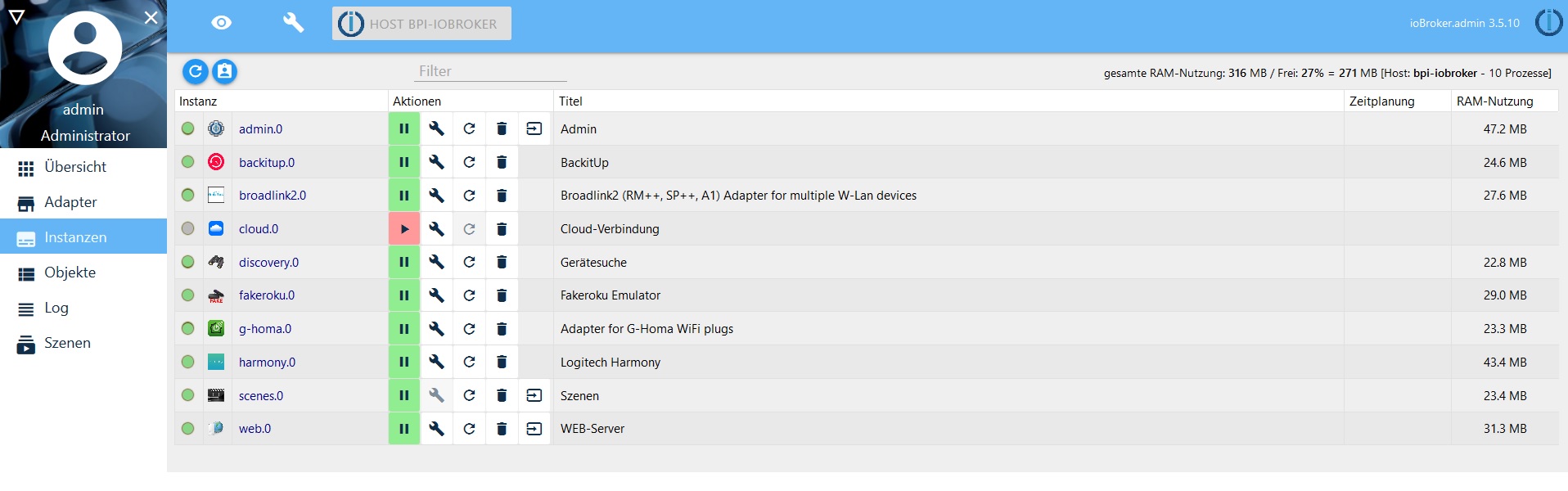
Diese Adapter sind derzeit schon installiert.
Nur Java steigt aus.
Web und Scenes Adapter gingen auch ebend zu installieren. Bleibt für mich nur der Java übrig.
Mehr brauche ich derzeit nicht. Nur für Licht, Geräte, Tasten und Aktionen Steuerung via Alexa.
…und dazu brauche ich noch die Scripte.
6260_io.jpg -
Ich weiß woran es liegt, die Frage ist jedoch, wie es zu beheben ist.
Auf die Gefahr hin, dass ich nerve… ich benötige möglichst detaillierte Informationen von dir.
Du installierst auf einem RasPi (bzw. Derivat davon), richtig?
Das OS ist Raspbian?
Wenn du die Installationsroutine ausführst (curl ...), als welcher User startest du sie?
Führe bitte folgendes aus:
ps aux | grep js-controllerWelcher User steht in der Zeile mit iobroker.js-controller (ganz vorne)?
Als welcher User warst du angemeldet, als du versucht hast, manuell javascript zu installieren (npm install …)?



675
Online32.7k
Users82.3k
Topics1.3m
Posts