




Javascript Adapter lässt sich nicht mehr installieren.
-
OK,OK,
erledigt. Weil er es beim ersten mal wieder den Stop Befehl nicht angenommen hat und meinte das der daemon nicht läuft.
Obwohl er lief habe ich ihn nochmal gestartet. Ich konnte das ja am webif sehen. Jetzt geht es.
-
Da haben wir ihn wieder:
$ ./iobroker add javascript 0 --host bpi-iobroker
NPM version: 6.4.1
npm install iobroker.javascript --production --save --prefix "/opt/iobroker" (System call)
npm
 WARN deprecated coffee-script@1.12.7: CoffeeScript on NPM has moved to "coffeescript" (no hyphen)
npm
 ERR! path /root/.npm/_logsnpm ERR! code EACCES
npm ERR! errno -13
npm ERR! syscall scandir

npm ERR! Error: EACCES: permission denied, scandir '/root/.npm/_logs'npm ERR!  { Error: EACCES: permission denied, scandir '/root/.npm/_logs'
npm ERR!   stack: 'Error: EACCES: permission denied, scandir \'/root/.npm/_logs\'',
npm ERR!   errno: -13,
npm ERR!   code: 'EACCES',
npm ERR!   syscall: 'scandir',

npm ERR!
   path: '/root/.npm/_logs' }npm ERR!
npm ERR! The operation was rejected by your operating system.
npm ERR! It is likely you do not have the permissions to access this file as the current user
npm ERR!
npm ERR! If you believe this might be a permissions issue, please double-check the
npm ERR! permissions of the file and its containing directories, or try running
npm ERR! the command again as root/Administrator (though this is not recommended).

glob error { Error: EACCES: permission denied, scandir '/root/.npm/_logs'  stack: 'Error: EACCES: permission denied, scandir \'/root/.npm/_logs\'',
  errno: -13,
  code: 'EACCES',
  syscall: 'scandir',
  path: '/root/.npm/_logs' }

npm
 ERR! path /root/.npm/_cacache/index-v5/fc/ee/fc3e1dd6706bd557d2840d92ff10cdd6928b92fb8c46d2195dfbd8d4b2benpm ERR! code EACCES
npm ERR!
 errno -13npm ERR! syscall open

npm ERR! Error: EACCES: permission denied, open '/root/.npm/_cacache/index-v5/fc/ee/fc3e1dd6706bd557d2840d92ff10cdd6928b92fb8c46d2195dfbd8d4b2be'npm ERR!  { Error: EACCES: permission denied, open '/root/.npm/_cacache/index-v5/fc/ee/fc3e1dd6706bd557d2840d92ff10cdd6928b92fb8c46d2195dfbd8d4b2be'
npm ERR!   cause:
npm ERR!    { Error: EACCES: permission denied, open '/root/.npm/_cacache/index-v5/fc/ee/fc3e1dd6706bd557d2840d92ff10cdd6928b92fb8c46d2195dfbd8d4b2be'
npm ERR!      errno: -13,
npm ERR!
      code: 'EACCES',npm ERR!      syscall: 'open',
npm ERR!      path: '/root/.npm/_cacache/index-v5/fc/ee/fc3e1dd6706bd557d2840d92ff10cdd6928b92fb8c46d2195dfbd8d4b2be' },
npm ERR!   isOperational: true,
npm ERR!   stack: 'Error: EACCES: permission denied, open \'/root/.npm/_cacache/index-v5/fc/ee/fc3e1dd6706bd557d2840d92ff10cdd6928b92fb8c46d2195dfbd8d4b2be\'',
npm ERR!   errno: -13,
npm ERR!   code: 'EACCES',

npm ERR!   syscall: 'open',npm ERR!   path: '/root/.npm/_cacache/index-v5/fc/ee/fc3e1dd6706bd557d2840d92ff10cdd6928b92fb8c46d2195dfbd8d4b2be' }

npm ERR! npm ERR! The operation was rejected by your operating system.
npm
ERR! It is likely you do not have the permissions to access this file as the current usernpm ERR!
npm ERR! If you believe this might be a permissions issue, please double-check the
npm ERR! permissions of the file and its containing directories, or try running
npm ERR! the command again as root/Administrator (though this is not recommended).

npm
 ERR! code ELIFECYCLEnpm ERR! errno 243

npm ERR! iobroker.javascript@4.0.2 postinstall: `node ./install/installTypings.js`npm ERR! Exit status 243
npm ERR!
npm ERR! Failed at the iobroker.javascript@4.0.2 postinstall script.
npm ERR! This is probably not a problem with npm. There is likely additional logging output above.

npm ERR! A complete log of this run can be found in:npm ERR!     /root/.npm/_logs/2018-12-05T16_02_39_949Z-debug.log

ERROR: host.bpi-iobroker Cannot install iobroker.javascript: 243
ERROR: process exited with code 25
Ganz einfach über den Adapter installiert…
...auf der Konsole nichts gemacht.
6 Adapter vorher mit Erfolg installiert
-
Ohne Patzig zu werden (nicht das es wieder falsch verstanden wird)
Selbstverständlich über den script.
User pi
-
Dein Befehl wurde eingegeben und nochmals installiert.
Diesmal vom Git-Hub
$ ./iobroker url "https://github.com/ioBroker/ioBroker.javascript/tarball/master" javascript --debug
install https://github.com/ioBroker/ioBroker.javascript/tarball/master
npm install https://github.com/ioBroker/ioBroker.javascript/tarball/master --production --save --prefix "/opt/iobroker" (System call)
npm
 WARN deprecated coffee-script@1.12.7: CoffeeScript on NPM has moved to "coffeescript" (no hyphen)
> iobroker.javascript@4.0.2 postinstall /opt/iobroker/node_modules/iobroker.javascript
> node ./install/installTypings.js

installing NodeJS typings...
npm
 ERR! path /root/.npm/_logsnpm ERR! code EACCES
npm ERR! errno -13
npm ERR! syscall scandir

npm ERR! Error: EACCES: permission denied, scandir '/root/.npm/_logs'npm ERR!  { Error: EACCES: permission denied, scandir '/root/.npm/_logs'
npm ERR!   stack: 'Error: EACCES: permission denied, scandir \'/root/.npm/_logs\'',
npm ERR!   errno: -13,
npm ERR!   code: 'EACCES',
npm ERR!   syscall: 'scandir',
npm ERR!   path: '/root/.npm/_logs' }

npm ERR! npm ERR! The operation was rejected by your operating system.
npm ERR! It is likely you do not have the permissions to access this file as the current user
npm ERR!
npm ERR! If you believe this might be a permissions issue, please double-check the
npm ERR! permissions of the file and its containing directories, or try running
npm ERR! the command again as root/Administrator (though this is not recommended).

glob error { Error: EACCES: permission denied, scandir '/root/.npm/_logs'  stack: 'Error: EACCES: permission denied, scandir \'/root/.npm/_logs\'',
  errno: -13,
  code: 'EACCES',
  syscall: 'scandir',
  path: '/root/.npm/_logs' }

npm ERR! path /root/.npm/_cacache/index-v5/fc/ee/fc3e1dd6706bd557d2840d92ff10cdd6928b92fb8c46d2195dfbd8d4b2benpm ERR! code EACCES
npm ERR! errno -13
npm ERR!
 syscall opennpm ERR! Error: EACCES: permission denied, open '/root/.npm/_cacache/index-v5/fc/ee/fc3e1dd6706bd557d2840d92ff10cdd6928b92fb8c46d2195dfbd8d4b2be'
npm ERR!  { Error: EACCES: permission denied, open '/root/.npm/_cacache/index-v5/fc/ee/fc3e1dd6706bd557d2840d92ff10cdd6928b92fb8c46d2195dfbd8d4b2be'
npm ERR!   cause:
npm ERR!    { Error: EACCES: permission denied, open '/root/.npm/_cacache/index-v5/fc/ee/fc3e1dd6706bd557d2840d92ff10cdd6928b92fb8c46d2195dfbd8d4b2be'
npm ERR!      errno: -13,
npm ERR!      code: 'EACCES',
npm ERR!      syscall: 'open',
npm ERR!      path: '/root/.npm/_cacache/index-v5/fc/ee/fc3e1dd6706bd557d2840d92ff10cdd6928b92fb8c46d2195dfbd8d4b2be' },
npm ERR!   isOperational: true,
npm ERR!   stack: 'Error: EACCES: permission denied, open \'/root/.npm/_cacache/index-v5/fc/ee/fc3e1dd6706bd557d2840d92ff10cdd6928b92fb8c46d2195dfbd8d4b2be\'',
npm ERR!   errno: -13,
npm ERR!   code: 'EACCES',

npm ERR!   syscall: 'open',npm ERR!   path: '/root/.npm/_cacache/index-v5/fc/ee/fc3e1dd6706bd557d2840d92ff10cdd6928b92fb8c46d2195dfbd8d4b2be' }
npm ERR!
npm ERR! The operation was rejected by your operating system.
npm ERR! It is likely you do not have the permissions to access this file as the current user
npm ERR!
npm ERR! If you believe this might be a permissions issue, please double-check the
npm ERR! permissions of the file and its containing directories, or try running
npm ERR! the command again as root/Administrator (though this is not recommended).

npm
 ERR! code ELIFECYCLEnpm ERR! errno 243

npm ERR! iobroker.javascript@4.0.2 postinstall: `node ./install/installTypings.js`npm ERR! Exit status 243
npm ERR!
npm ERR! Failed at the iobroker.javascript@4.0.2 postinstall script.
npm ERR! This is probably not a problem with npm. There is likely additional logging output above.

npm ERR! A complete log of this run can be found in:npm ERR!     /root/.npm/_logs/2018-12-05T16_15_30_736Z-debug.log

ERROR: host.bpi-iobroker Cannot install https://github.com/ioBroker/ioBroker.javascript/tarball/master: 243
ERROR: process exited with code 25
Irgendwie drehen wir uns im Kreis
Dieser Befehl wurde zum installieren von iobroker benutzt:
curl -sL https://raw.githubusercontent.com/ioBro … staller.sh | bash -
-
Irgendwie drehen wir uns im Kreis
Und da haben wir es wieder :roll:> Diesmal vom Git-Hub `
Warum machst du bei der Fehlersuche parallel Dinge, nach denen du nicht gefragt wurdest?Etwas Geduld bitte, ich habe hier kein System an dem ich es schnell selbst ausprobieren kann.
Bitte folgendes probieren:
sudo chown -R pi:pi /home/pi/.npmJavaScript über Admin installieren. Ergebnis hier posten.
Geht das nicht, dann
sudo chown -R iobroker:iobroker /home/iobroker/.npmwieder JavaScript über Admin installieren. Ergebnis hier posten.
Geht das auch nicht, dann bitte nochmal melden.
-
> Warum machst du bei der Fehlersuche parallel Dinge, nach denen du nicht gefragt wurdest?Jawohl Sir
…konnte ich mir nicht verkneifen. :D
-
Mit chown -R pi:pi /home/pi/.npm
$ ./iobroker add javascript 0 --host bpi-iobroker
NPM version: 6.4.1
npm install iobroker.javascript --production --save --prefix "/opt/iobroker" (System call)
npm
 WARN deprecated coffee-script@1.12.7: CoffeeScript on NPM has moved to "coffeescript" (no hyphen)
npm
 ERR! path /root/.npm/_logsnpm ERR! code EACCES
npm ERR! errno -13
npm ERR! syscall scandir

npm ERR! Error: EACCES: permission denied, scandir '/root/.npm/_logs'npm ERR!  { Error: EACCES: permission denied, scandir '/root/.npm/_logs'
npm ERR!   stack: 'Error: EACCES: permission denied, scandir \'/root/.npm/_logs\'',
npm ERR!   errno: -13,
npm ERR!   code: 'EACCES',
npm ERR!   syscall: 'scandir',
npm ERR!   path: '/root/.npm/_logs' }

npm ERR! npm ERR! The operation was rejected by your operating system.
npm ERR! It is likely you do not have the permissions to access this file as the current user
npm ERR!
npm ERR! If you believe this might be a permissions issue, please double-check the
npm ERR! permissions of the file and its containing directories, or try running

npm ERR! the command again as root/Administrator (though this is not recommended).
glob error { Error: EACCES: permission denied, scandir '/root/.npm/_logs'  stack: 'Error: EACCES: permission denied, scandir \'/root/.npm/_logs\'',
  errno: -13,
  code: 'EACCES',
  syscall: 'scandir',
  path: '/root/.npm/_logs' }

npm
 ERR! path /root/.npm/_cacache/index-v5/fc/ee/fc3e1dd6706bd557d2840d92ff10cdd6928b92fb8c46d2195dfbd8d4b2benpm ERR! code EACCES
npm ERR! errno -13
npm ERR! syscall open

npm ERR! Error: EACCES: permission denied, open '/root/.npm/_cacache/index-v5/fc/ee/fc3e1dd6706bd557d2840d92ff10cdd6928b92fb8c46d2195dfbd8d4b2be'npm ERR!  { Error: EACCES: permission denied, open '/root/.npm/_cacache/index-v5/fc/ee/fc3e1dd6706bd557d2840d92ff10cdd6928b92fb8c46d2195dfbd8d4b2be'
npm
ERR!   cause: npm ERR!    { Error: EACCES: permission denied, open '/root/.npm/_cacache/index-v5/fc/ee/fc3e1dd6706bd557d2840d92ff10cdd6928b92fb8c46d2195dfbd8d4b2be'
npm ERR!      errno: -13,
npm ERR!      code: 'EACCES',
npm ERR!      syscall: 'open',
npm ERR!      path: '/root/.npm/_cacache/index-v5/fc/ee/fc3e1dd6706bd557d2840d92ff10cdd6928b92fb8c46d2195dfbd8d4b2be' },
npm ERR!   isOperational: true,
npm ERR!   stack: 'Error: EACCES: permission denied, open \'/root/.npm/_cacache/index-v5/fc/ee/fc3e1dd6706bd557d2840d92ff10cdd6928b92fb8c46d2195dfbd8d4b2be\'',
npm ERR!   errno: -13,
npm ERR!   code: 'EACCES',
npm ERR!   syscall: 'open',
npm ERR!   path: '/root/.npm/_cacache/index-v5/fc/ee/fc3e1dd6706bd557d2840d92ff10cdd6928b92fb8c46d2195dfbd8d4b2be' }
npm ERR!
npm
 ERR! The operation was rejected by your operating system.npm ERR! It is likely you do not have the permissions to access this file as the current user
npm ERR!
npm ERR! If you believe this might be a permissions issue, please double-check the
npm ERR! permissions of the file and its containing directories, or try running
npm ERR! the command again as root/Administrator (though this is not recommended).

npm
 ERR! code ELIFECYCLE
npm ERR! errno 243
npm ERR! iobroker.javascript@4.0.2 postinstall: `node ./install/installTypings.js`npm ERR! Exit status 243
npm ERR!
npm ERR! Failed at the iobroker.javascript@4.0.2 postinstall script.
npm ERR! This is probably not a problem with npm. There is likely additional logging output above.

npm ERR! A complete log of this run can be found in:npm ERR!     /root/.npm/_logs/2018-12-05T16_38_06_223Z-debug.log

ERROR: host.bpi-iobroker Cannot install iobroker.javascript: 243
ERROR: process exited with code 25
Mit chown -R iobroker:iobroker /home/iobroker/.npm
$ ./iobroker add javascript 0 --host bpi-iobroker NPM version: 6.4.1 npm install iobroker.javascript --production --save --prefix "/opt/iobroker" (System call) npm WARN deprecated coffee-script@1.12.7: CoffeeScript on NPM has moved to "coffeescript" (no hyphen) npm ERR! path /root/.npm/_logsnpm ERR! code EACCES npm ERR! errno -13 npm ERR! syscall scandir npm ERR! Error: EACCES: permission denied, scandir '/root/.npm/_logs'npm ERR! { Error: EACCES: permission denied, scandir '/root/.npm/_logs' npm ERR! stack: 'Error: EACCES: permission denied, scandir \'/root/.npm/_logs\'', npm ERR! errno: -13, npm ERR! code: 'EACCES', npm ERR! syscall: 'scandir', npm ERR! path: '/root/.npm/_logs' } npm ERR! npm ERR! The operation was rejected by your operating system. npm ERR! It is likely you do not have the permissions to access this file as the current user npm ERR! npm ERR! If you believe this might be a permissions issue, please double-check the npm ERR! permissions of the file and its containing directories, or try running npm ERR! the command again as root/Administrator (though this is not recommended). glob error { Error: EACCES: permission denied, scandir '/root/.npm/_logs' stack: 'Error: EACCES: permission denied, scandir \'/root/.npm/_logs\'', errno: -13, code: 'EACCES', syscall: 'scandir', path: '/root/.npm/_logs' } npm ERR! path /root/.npm/_cacache/index-v5/fc/ee/fc3e1dd6706bd557d2840d92ff10cdd6928b92fb8c46d2195dfbd8d4b2benpm ERR! code EACCES npm ERR! errno -13 npm ERR! syscall open npm ERR! Error: EACCES: permission denied, open '/root/.npm/_cacache/index-v5/fc/ee/fc3e1dd6706bd557d2840d92ff10cdd6928b92fb8c46d2195dfbd8d4b2be'npm ERR! { Error: EACCES: permission denied, open '/root/.npm/_cacache/index-v5/fc/ee/fc3e1dd6706bd557d2840d92ff10cdd6928b92fb8c46d2195dfbd8d4b2be' npm ERR! cause: npm ERR! { Error: EACCES: permission denied, open '/root/.npm/_cacache/index-v5/fc/ee/fc3e1dd6706bd557d2840d92ff10cdd6928b92fb8c46d2195dfbd8d4b2be' npm ERR! errno: -13, npm ERR! code: 'EACCES', npm ERR! syscall: 'open', npm ERR! path: '/root/.npm/_cacache/index-v5/fc/ee/fc3e1dd6706bd557d2840d92ff10cdd6928b92fb8c46d2195dfbd8d4b2be' }, npm ERR! isOperational: true, npm ERR! stack: 'Error: EACCES: permission denied, open \'/root/.npm/_cacache/index-v5/fc/ee/fc3e1dd6706bd557d2840d92ff10cdd6928b92fb8c46d2195dfbd8d4b2be\'', npm ERR! errno: -13, npm ERR! code: 'EACCES', npm ERR! syscall: 'open', npm ERR! path: '/root/.npm/_cacache/index-v5/fc/ee/fc3e1dd6706bd557d2840d92ff10cdd6928b92fb8c46d2195dfbd8d4b2be' } npm ERR! npm ERR! The operation was rejected by your operating system. npm ERR! It is likely you do not have the permissions to access this file as the current usernpm ERR! npm ERR! If you believe this might be a permissions issue, please double-check the npm ERR! permissions of the file and its containing directories, or try running npm ERR! the command again as root/Administrator (though this is not recommended). npm ERR! code ELIFECYCLEnpm ERR! errno 243 npm ERR! iobroker.javascript@4.0.2 postinstall: `node ./install/installTypings.js`npm ERR! Exit status 243 npm ERR! npm ERR! Failed at the iobroker.javascript@4.0.2 postinstall script. npm ERR! This is probably not a problem with npm. There is likely additional logging output above. npm ERR! A complete log of this run can be found in:npm ERR! /root/.npm/_logs/2018-12-05T16_41_13_634Z-debug.log ERROR: host.bpi-iobroker Cannot install iobroker.javascript: 243 ERROR: process exited with code 25 -
OK,
übrigens bin ich als root angemeldet. Daher oben kein Sudo davor.
-
OK,
übrigens bin ich als root angemeldet. Daher oben kein Sudo davor. `
Bei mir hatte folgendes im meinem Docker Container geholfen :
cd /opt/iobroker
npm install iobroker.javascript@4.0.1
iobroker update javascript
Gesendet von iPhone mit Tapatalk
-
Das habe ich gestern schon probiert, habe es ebend nochmals versucht….
root@bpi-iobroker:/# npm install iobroker.javascript@4.0.1
npm WARN deprecated coffee-script@1.12.7: CoffeeScript on NPM has moved to "coffeescript" (no hyphen)

> iobroker.javascript@4.0.1 postinstall /node_modules/iobroker.javascript
> node ./install/installTypings.js

installing NodeJS typings...
npm ERR! path /root/.npm/_logs
npm ERR! code EACCES
npm ERR! errno -13
npm ERR! syscall scandir
npm ERR! Error: EACCES: permission denied, scandir '/root/.npm/_logs'
npm ERR!  { Error: EACCES: permission denied, scandir '/root/.npm/_logs'
npm ERR!   stack: 'Error: EACCES: permission denied, scandir \'/root/.npm/_logs\'',
npm ERR!   errno: -13,
npm ERR!   code: 'EACCES',
npm ERR!   syscall: 'scandir',
npm ERR!   path: '/root/.npm/_logs' }
npm ERR!
npm ERR! The operation was rejected by your operating system.
npm ERR! It is likely you do not have the permissions to access this file as the current user
npm ERR!
npm ERR! If you believe this might be a permissions issue, please double-check the
npm ERR! permissions of the file and its containing directories, or try running
npm ERR! the command again as root/Administrator (though this is not recommended).
glob error { Error: EACCES: permission denied, scandir '/root/.npm/_logs'
  stack: 'Error: EACCES: permission denied, scandir \'/root/.npm/_logs\'',
  errno: -13,
  code: 'EACCES',
  syscall: 'scandir',
  path: '/root/.npm/_logs' }
npm ERR! path /root/.npm/_cacache/index-v5/fc/ee/fc3e1dd6706bd557d2840d92ff10cdd6928b92fb8c46d2195dfbd8d4b2be
npm ERR! code EACCES
npm ERR! errno -13
npm ERR! syscall open
npm ERR! Error: EACCES: permission denied, open '/root/.npm/_cacache/index-v5/fc/ee/fc3e1dd6706bd557d2840d92ff10cdd6928b92fb8c46d2195dfbd8d4b2be'
npm ERR!  { Error: EACCES: permission denied, open '/root/.npm/_cacache/index-v5/fc/ee/fc3e1dd6706bd557d2840d92ff10cdd6928b92fb8c46d2195dfbd8d4b2be'
npm ERR!   cause:
npm ERR!    { Error: EACCES: permission denied, open '/root/.npm/_cacache/index-v5/fc/ee/fc3e1dd6706bd557d2840d92ff10cdd6928b92fb8c46d2195dfbd8d4b2be'
npm ERR!      errno: -13,
npm ERR!      code: 'EACCES',
npm ERR!      syscall: 'open',
npm ERR!      path: '/root/.npm/_cacache/index-v5/fc/ee/fc3e1dd6706bd557d2840d92ff10cdd6928b92fb8c46d2195dfbd8d4b2be' },
npm ERR!   isOperational: true,
npm ERR!   stack: 'Error: EACCES: permission denied, open \'/root/.npm/_cacache/index-v5/fc/ee/fc3e1dd6706bd557d2840d92ff10cdd6928b92fb8c46d2195dfbd8d4b2be\'',
npm ERR!   errno: -13,
npm ERR!   code: 'EACCES',
npm ERR!   syscall: 'open',
npm ERR!   path: '/root/.npm/_cacache/index-v5/fc/ee/fc3e1dd6706bd557d2840d92ff10cdd6928b92fb8c46d2195dfbd8d4b2be' }
npm ERR!
npm ERR! The operation was rejected by your operating system.
npm ERR! It is likely you do not have the permissions to access this file as the current user
npm ERR!
npm ERR! If you believe this might be a permissions issue, please double-check the
npm ERR! permissions of the file and its containing directories, or try running
npm ERR! the command again as root/Administrator (though this is not recommended).
npm WARN enoent ENOENT: no such file or directory, open '/package.json'
npm WARN !invalid#1 No description
npm WARN !invalid#1 No repository field.
npm WARN !invalid#1 No README data
npm WARN !invalid#1 No license field.

npm ERR! code ELIFECYCLE
npm ERR! errno 243
npm ERR! iobroker.javascript@4.0.1 postinstall: `node ./install/installTypings.js`
npm ERR! Exit status 243
npm ERR!
npm ERR! Failed at the iobroker.javascript@4.0.1 postinstall script.
npm ERR! This is probably not a problem with npm. There is likely additional logging output above.

npm ERR! A complete log of this run can be found in:
npm ERR!     /root/.npm/_logs/2018-12-05T17_13_26_786Z-debug.log
root@bpi-iobroker:/#
Tja
-
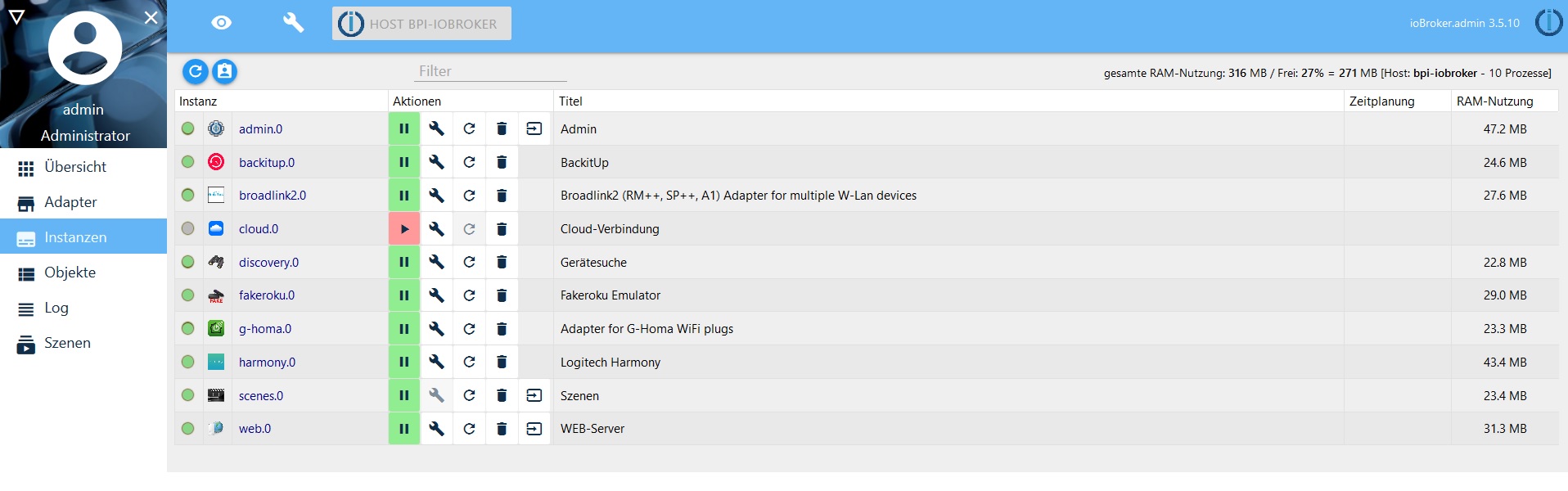
Diese Adapter sind derzeit schon installiert.
Nur Java steigt aus.
Web und Scenes Adapter gingen auch ebend zu installieren. Bleibt für mich nur der Java übrig.
Mehr brauche ich derzeit nicht. Nur für Licht, Geräte, Tasten und Aktionen Steuerung via Alexa.
…und dazu brauche ich noch die Scripte.
6260_io.jpg -
Ich weiß woran es liegt, die Frage ist jedoch, wie es zu beheben ist.
Auf die Gefahr hin, dass ich nerve… ich benötige möglichst detaillierte Informationen von dir.
Du installierst auf einem RasPi (bzw. Derivat davon), richtig?
Das OS ist Raspbian?
Wenn du die Installationsroutine ausführst (curl ...), als welcher User startest du sie?
Führe bitte folgendes aus:
ps aux | grep js-controllerWelcher User steht in der Zeile mit iobroker.js-controller (ganz vorne)?
Als welcher User warst du angemeldet, als du versucht hast, manuell javascript zu installieren (npm install …)?
-
Ich installiere auf einen Banana pi M2
OS Minimal-Raspbian
Installiert als root
root@bpi-iobroker:/opt/iobroker# ps aux | grep js-controller
iobroker  7264 73.0  2.4  80780 24868 ?        Rsl  19:14   0:01 iobroker.js-controller
root      7271  0.0  0.0   4364   848 pts/0    S+   19:14   0:00 grep js-controller
root     10456  1.3  5.7 152544 59244 ?        Ssl  16:37   2:07 iobroker.js-controller
root@bpi-iobroker:/opt/iobroker#
Ich hatte root bisher nicht abgemeldet.
Ist ja nur eigenartig, das sich die anderen Adapter installieren ließen
-
Ich bin kein NPM Experte, aber folgendes kannst ja nochmals versuchen.
cd /opt/iobroker
npm install iobroker.javascript --unsafe-perm
iobroker upload javascript
<size size="85">Edit: Fehlerhafte Befehle korrigiert, Problematische Befehle entfernt. (AlCalzone)</size>
-
Dein JS-Controller läuft 2x, hat vermutlich mit der systemd und den start/stop-Experimenten zu tun.
Kannst du die Kiste mal sauber neu starten? Erst dann kann man sicher sein, unter welchem User ioBroker tatsächlich läuft.
Prüfe danach bitte nochmal die Ausgabe von dem Befehl.
Wenn es iobroker ist, dann probier bitte nochmal die Installation über das Webinterface.
Sofern es wirklich root ist, weiß ich, welche Änderung am JS-Adapter nötig ist.
Das Postinstall-Skript will nämlich auch "npm install" ausführen, läuft auch unter dem User root, aber mit verringerten Rechten. Deswegen haben die ganzen Permission-Geschichten nicht gegriffen.
Du kannst dann als Workaround den Adapter folgendermaßen manuell installieren:
cd /opt/iobroker npm i iobroker.javascript --unsafe-perm -
@tstueben - Bitte informier dich erst mal über die Befehle, die du hier postest:
-
npm config set … setzt unsafe-perm für alle Installationen in ioBroker auf true. Das untergräbt alle Sicherheitsanstrengungen, die wir in letzter Zeit unternommen haben. Bitte nicht!
-
"npm install iobroker.javascript@4.0.1 unsafe-perm=true" ist kein richtiger Befehl. Siehe mein anderer Kommentar. Außerdem ist inzwischen 4.0.2 verfügbar
-
"iobroker update javascript" ist Unfug.
-
-
root@bpi-iobroker:/opt/iobroker# npm install iobroker.javascript@4.0.1  unsafe-p                  erm=true
npm ERR! code EINVALIDTAGNAME
npm ERR! Invalid tag name "unsafe-perm=true": Tags may not have any characters t                  hat encodeURIComponent encodes.

npm ERR! A complete log of this run can be found in:
npm ERR!     /root/.npm/_logs/2018-12-05T18_22_16_681Z-debug.log
root@bpi-iobroker:/opt/iobroker#
root@bpi-iobroker:/opt/iobroker# root@bpi-iobroker:/opt/iobroker#
bash: root@bpi-iobroker:/opt/iobroker#: Datei oder Verzeichnis nicht gefunden
root@bpi-iobroker:/opt/iobroker# npm install iobroker.javascript@4.0.1  unsafe-perm=true
npm ERR! code EINVALIDTAGNAME
npm ERR! Invalid tag name "unsafe-perm=true": Tags may not have any characters that encodeURIComponent encodes.

npm ERR! A complete log of this run can be found in:
npm ERR!     /root/.npm/_logs/2018-12-05T18_25_18_797Z-debug.log
root@bpi-iobroker:/opt/iobroker#
root@bpi-iobroker:/opt/iobroker# npm config set unsafe-perm true root@bpi-iobroker:/opt/iobroker# npm install iobroker.javascript@4.0.1 npm WARN deprecated coffee-script@1.12.7: CoffeeScript on NPM has moved to "coffeescript" (no hyphen) > iobroker.javascript@4.0.1 postinstall /opt/iobroker/node_modules/iobroker.javascript > node ./install/installTypings.js installing NodeJS typings... npm notice created a lockfile as package-lock.json. You should commit this file. + @types/node@8.10.38 added 9 packages from 53 contributors and audited 10 packages in 6.901s found 0 vulnerabilities + iobroker.javascript@4.0.1 added 15 packages from 52 contributors and audited 2942 packages in 84.428s found 40 vulnerabilities (28 low, 12 high) run `npm audit fix` to fix them, or `npm audit` for details root@bpi-iobroker:/opt/iobroker# iobroker update javascript Used repository: javascript update done root@bpi-iobroker:/opt/iobroker#Das zweite funzte, aber beim hochladen in der vorletzten Zeile ein Fehler.
Javascrpt wird als installiert angezeigt,ist aber nicht in Instanzen vertreten.
Upload
$ ./iobroker upload javascript got /opt/iobroker/node_modules/iobroker.javascript/admin upload [100] javascript.admin /opt/iobroker/node_modules/iobroker.javascript/admin/vs/basic-languages/redshift/redshift.js vs/basic-languages/redshift/redshift.js application/javascript upload [90] javascript.admin /opt/iobroker/node_modules/iobroker.javascript/admin/vs/basic-languages/objective-c/objective-c.js vs/basic-languages/objective-c/objective-c.js application/javascript upload [80] javascript.admin /opt/iobroker/node_modules/iobroker.javascript/admin/vs/basic-languages/go/go.js vs/basic-languages/go/go.js application/javascript upload [70] javascript.admin /opt/iobroker/node_modules/iobroker.javascript/admin/vendor/socket.io.js vendor/socket.io.js application/javascript upload [60] javascript.admin /opt/iobroker/node_modules/iobroker.javascript/admin/static/css/main.cd153a24.chunk.css static/css/main.cd153a24.chunk.css text/css upload [50] javascript.admin /opt/iobroker/node_modules/iobroker.javascript/admin/google-blockly/own/msg/it.js google-blockly/own/msg/it.js application/javascript upload [40] javascript.admin /opt/iobroker/node_modules/iobroker.javascript/admin/google-blockly/own/blocks_timeout.js google-blockly/own/blocks_timeout.js application/javascript upload [30] javascript.admin /opt/iobroker/node_modules/iobroker.javascript/admin/google-blockly/msg/js/pl.js google-blockly/msg/js/pl.js application/javascript upload [20] javascript.admin /opt/iobroker/node_modules/iobroker.javascript/admin/google-blockly/media/quote0.png google-blockly/media/quote0.png image/png upload [19] javascript.admin /opt/iobroker/node_modules/iobroker.javascript/admin/google-blockly/media/handopen.cur google-blockly/media/handopen.cur application/octet-stream upload [18] javascript.admin /opt/iobroker/node_modules/iobroker.javascript/admin/google-blockly/media/handdelete.cur google-blockly/media/handdelete.cur application/octet-stream upload [17] javascript.admin /opt/iobroker/node_modules/iobroker.javascript/admin/google-blockly/media/handclosed.cur google-blockly/media/handclosed.cur application/octet-stream upload [16] javascript.admin /opt/iobroker/node_modules/iobroker.javascript/admin/google-blockly/media/disconnect.wav google-blockly/media/disconnect.wav audio/x-wav upload [15] javascript.admin /opt/iobroker/node_modules/iobroker.javascript/admin/google-blockly/media/disconnect.ogg google-blockly/media/disconnect.ogg audio/ogg upload [14] javascript.admin /opt/iobroker/node_modules/iobroker.javascript/admin/google-blockly/media/disconnect.mp3 google-blockly/media/disconnect.mp3 audio/mpeg upload [13] javascript.admin /opt/iobroker/node_modules/iobroker.javascript/admin/google-blockly/media/delete.wav google-blockly/media/delete.wav audio/x-wav upload [12] javascript.admin /opt/iobroker/node_modules/iobroker.javascript/admin/google-blockly/media/delete.ogg google-blockly/media/delete.ogg audio/ogg upload [11] javascript.admin /opt/iobroker/node_modules/iobroker.javascript/admin/google-blockly/media/delete.mp3 google-blockly/media/delete.mp3 audio/mpeg upload [10] javascript.admin /opt/iobroker/node_modules/iobroker.javascript/admin/google-blockly/media/click.wav google-blockly/media/click.wav audio/x-wav upload [9] javascript.admin /opt/iobroker/node_modules/iobroker.javascript/admin/google-blockly/media/click.ogg google-blockly/media/click.ogg audio/ogg upload [8] javascript.admin /opt/iobroker/node_modules/iobroker.javascript/admin/google-blockly/media/click.mp3 google-blockly/media/click.mp3 audio/mpeg upload [7] javascript.admin /opt/iobroker/node_modules/iobroker.javascript/admin/google-blockly/media/1x1.gif google-blockly/media/1x1.gif image/gif upload [6] javascript.admin /opt/iobroker/node_modules/iobroker.javascript/admin/google-blockly/javascript_compressed.js google-blockly/javascript_compressed.js application/javascript upload [5] javascript.admin /opt/iobroker/node_modules/iobroker.javascript/admin/google-blockly/blocks_compressed.js google-blockly/blocks_compressed.js application/javascript upload [4] javascript.admin /opt/iobroker/node_modules/iobroker.javascript/admin/google-blockly/blockly_compressed.js google-blockly/blockly_compressed.js application/javascript upload [3] javascript.admin /opt/iobroker/node_modules/iobroker.javascript/admin/google-blockly/LICENSE google-blockly/LICENSE application/octet-stream upload [2] javascript.admin /opt/iobroker/node_modules/iobroker.javascript/admin/favicon.ico favicon.ico image/x-icon upload [1] javascript.admin /opt/iobroker/node_modules/iobroker.javascript/admin/asset-manifest.json asset-manifest.json application/json upload [0] javascript.admin /opt/iobroker/node_modules/iobroker.javascript/admin/adminWords.js adminWords.js application/javascript ERROR: system.adapter.javascript does not exist process exited with code 0 -
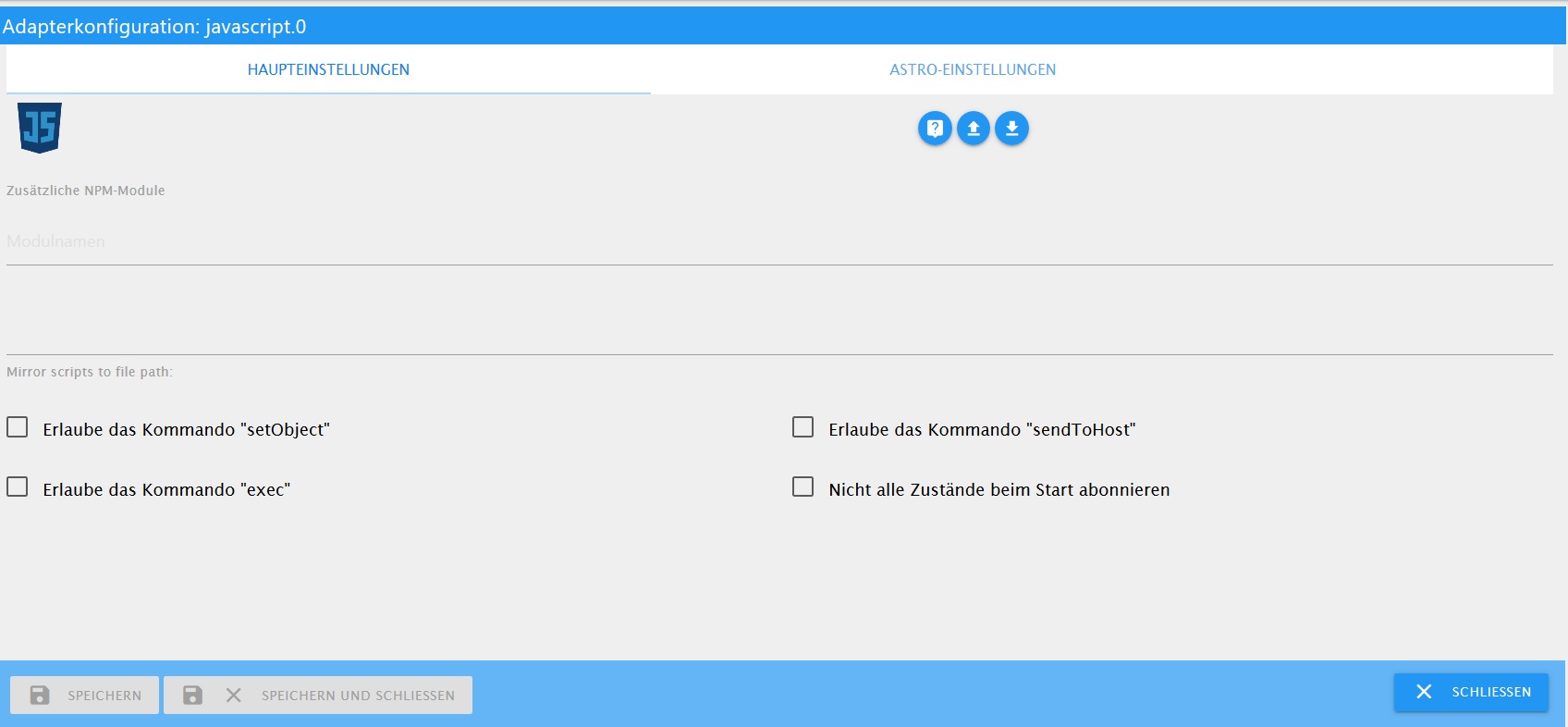
Jetzt nochmals über Admin drüber installiert….läuft.
Schwere Geburt
6260_ja.jpg


Hey! Du scheinst an dieser Unterhaltung interessiert zu sein, hast aber noch kein Konto.
Hast du es satt, bei jedem Besuch durch die gleichen Beiträge zu scrollen? Wenn du dich für ein Konto anmeldest, kommst du immer genau dorthin zurück, wo du zuvor warst, und kannst dich über neue Antworten benachrichtigen lassen (entweder per E-Mail oder Push-Benachrichtigung). Du kannst auch Lesezeichen speichern und Beiträge positiv bewerten, um anderen Community-Mitgliedern deine Wertschätzung zu zeigen.
Mit deinem Input könnte dieser Beitrag noch besser werden 💗
Registrieren Anmelden459
Online33.0k
Benutzer83.6k
Themen1.3m
Beiträge