Skip to content
  • Home
  • Recent
  • Tags
  • 0 Unread 0
  • Categories
  • Unreplied
  • Popular
  • GitHub
  • Docu
  • Hilfe
Skins
  • Light
  • Brite
  • Cerulean
  • Cosmo
  • Flatly
  • Journal
  • Litera
  • Lumen
  • Lux
  • Materia
  • Minty
  • Morph
  • Pulse
  • Sandstone
  • Simplex
  • Sketchy
  • Spacelab
  • United
  • Yeti
  • Zephyr
  • Dark
  • Cyborg
  • Darkly
  • Quartz
  • Slate
  • Solar
  • Superhero
  • Vapor

  • Default (No Skin)
  • No Skin
Collapse
ioBroker Logo

Community Forum

donate donate
  1. ioBroker Community Home
  2. Deutsch
  3. ioBroker Allgemein
  4. ROCK64, ioBroker.zigbee Problem mit CC2531

NEWS

  • Jahresrückblick 2025 – unser neuer Blogbeitrag ist online! ✨
    BluefoxB
    Bluefox
    16
    1
    1.8k

  • Neuer Blogbeitrag: Monatsrückblick - Dezember 2025 🎄
    BluefoxB
    Bluefox
    13
    1
    892

  • Weihnachtsangebot 2025! 🎄
    BluefoxB
    Bluefox
    25
    1
    2.1k

ROCK64, ioBroker.zigbee Problem mit CC2531

Scheduled Pinned Locked Moved ioBroker Allgemein
26 Posts 9 Posters 5.2k Views
  • Oldest to Newest
  • Newest to Oldest
  • Most Votes
Reply
  • Reply as topic
Log in to reply
This topic has been deleted. Only users with topic management privileges can see it.
  • H Offline
    H Offline
    hahne
    wrote on last edited by
    #1

    Guten Tag,

    habe mir einen geflashten CC2531 besorgt und wollte ein Paar Xiaomi Sensoren damit abfragen. Habe den Stick an meinen ROCK64 angeschlossen.

    Habe daraufhin ioBroker.ZigBee installiert.

    Als Port habe ich erstmal wie im Wiki angegeben /dev/ttyACM0 angegeben.

    Im ioBroker Log erhalte ich dann folgendes:

    zigbee.0 2018-08-05 16:00:48.024 error Error while starting zigbee-shepherd!. Error: Error: No such file or directory, cannot open /dev/ttyACM0

    zigbee.0 2018-08-05 16:00:48.002 info Starting zigbee-shepherd

    zigbee.0 2018-08-05 15:59:47.884 info Start on port: /dev/ttyACM0 with panID 6754

    zigbee.0 2018-08-05 15:59:47.869 info starting. Version 0.6.0 in /opt/iobroker/node_modules/iobroker.zigbee, node: v8.11.3

    Hier mal ein paar Weitere Infos:

    "dmesg" sagt:

    [ 1881.838529] usb 4-1: USB disconnect, device number 2

    [ 1884.018422] usb 4-1: new full-speed USB device number 3 using xhci-hcd

    [ 1884.147990] usb 4-1: New USB device found, idVendor=0451, idProduct=16a8, bcdDevice= 0.09

    [ 1884.148003] usb 4-1: New USB device strings: Mfr=1, Product=2, SerialNumber=3

    [ 1884.148011] usb 4-1: Product: TI CC2531 USB CDC

    [ 1884.148018] usb 4-1: Manufacturer: Texas Instruments

    [ 1884.148025] usb 4-1: SerialNumber: __0X00124B0012023031

    "lsusb" sagt:

    Bus 005 Device 001: ID 1d6b:0003 Linux Foundation 3.0 root hub

    Bus 004 Device 002: ID 0451:16a8 Texas Instruments, Inc.

    Bus 004 Device 001: ID 1d6b:0002 Linux Foundation 2.0 root hub

    Bus 003 Device 001: ID 1d6b:0001 Linux Foundation 1.1 root hub

    Bus 002 Device 002: ID 1f75:0903 Innostor Technology Corporation

    Bus 002 Device 001: ID 1d6b:0002 Linux Foundation 2.0 root hub

    Bus 001 Device 001: ID 1d6b:0002 Linux Foundation 2.0 root hub

    "serialport-list" sagt:

    /dev/ttyS2

    /dev/ttyS0

    /dev/ttyS1

    /dev/ttyS3

    Kann mir da eventuell wer Helfen?

    Vielen Dank

    1 Reply Last reply
    0
    • arteckA Offline
      arteckA Offline
      arteck
      Developer Most Active
      wrote on last edited by
      #2

      installiere den Adapter nochmal aus meiner Repo https://github.com/arteck/ioBroker.zigbee

      zigbee hab ich, zwave auch, nuc's genauso und HA auch

      1 Reply Last reply
      0
      • H Offline
        H Offline
        hahne
        wrote on last edited by
        #3

        Hab ich versucht.

        Gleicher Fehler.

        Wenn ich z.B. "ls -l /dev/ttyACM0" eingebe bekomme ich Folgendes im LOG:

        root@ioBroker-Rock64:~# ls -l /dev/ttyACM0

        ls: cannot access '/dev/ttyACM0': No such file or directory

        Ich weiß nicht mal welchen Port ich angeben soll. Hat wer eine Idee?

        1 Reply Last reply
        0
        • paul53P Offline
          paul53P Offline
          paul53
          wrote on last edited by
          #4

          Was ergibt ?

          ls -l /dev/tty*
          

          Bitte verzichtet auf Chat-Nachrichten, denn die Handhabung ist grauenhaft !
          Produktiv: RPi 2 mit S.USV, HM-MOD-RPI und SLC-USB-Stick mit root fs

          1 Reply Last reply
          0
          • H Offline
            H Offline
            hahne
            wrote on last edited by
            #5

            Wenn ich das Eingebe kommt:

            ! crw-rw-rw- 1 root tty 5, 0 Aug 6 20:37 /dev/tty
            ! crw–w---- 1 root tty 4, 0 Aug 6 20:37 /dev/tty0
            ! crw--w---- 1 root tty 4, 1 Aug 6 20:37 /dev/tty1
            ! crw--w---- 1 root tty 4, 10 Aug 6 20:37 /dev/tty10
            ! crw--w---- 1 root tty 4, 11 Aug 6 20:37 /dev/tty11
            ! crw--w---- 1 root tty 4, 12 Aug 6 20:37 /dev/tty12
            ! crw--w---- 1 root tty 4, 13 Aug 6 20:37 /dev/tty13
            ! crw--w---- 1 root tty 4, 14 Aug 6 20:37 /dev/tty14
            ! crw--w---- 1 root tty 4, 15 Aug 6 20:37 /dev/tty15
            ! crw--w---- 1 root tty 4, 16 Aug 6 20:37 /dev/tty16
            ! crw--w---- 1 root tty 4, 17 Aug 6 20:37 /dev/tty17
            ! crw--w---- 1 root tty 4, 18 Aug 6 20:37 /dev/tty18
            ! crw--w---- 1 root tty 4, 19 Aug 6 20:37 /dev/tty19
            ! crw--w---- 1 root tty 4, 2 Aug 6 20:37 /dev/tty2
            ! crw--w---- 1 root tty 4, 20 Aug 6 20:37 /dev/tty20
            ! crw--w---- 1 root tty 4, 21 Aug 6 20:37 /dev/tty21
            ! crw--w---- 1 root tty 4, 22 Aug 6 20:37 /dev/tty22
            ! crw--w---- 1 root tty 4, 23 Aug 6 20:37 /dev/tty23
            ! crw--w---- 1 root tty 4, 24 Aug 6 20:37 /dev/tty24
            ! crw--w---- 1 root tty 4, 25 Aug 6 20:37 /dev/tty25
            ! crw--w---- 1 root tty 4, 26 Aug 6 20:37 /dev/tty26
            ! crw--w---- 1 root tty 4, 27 Aug 6 20:37 /dev/tty27
            ! crw--w---- 1 root tty 4, 28 Aug 6 20:37 /dev/tty28
            ! crw--w---- 1 root tty 4, 29 Aug 6 20:37 /dev/tty29
            ! crw--w---- 1 root tty 4, 3 Aug 6 20:37 /dev/tty3
            ! crw--w---- 1 root tty 4, 30 Aug 6 20:37 /dev/tty30
            ! crw--w---- 1 root tty 4, 31 Aug 6 20:37 /dev/tty31
            ! crw--w---- 1 root tty 4, 32 Aug 6 20:37 /dev/tty32
            ! crw--w---- 1 root tty 4, 33 Aug 6 20:37 /dev/tty33
            ! crw--w---- 1 root tty 4, 34 Aug 6 20:37 /dev/tty34
            ! crw--w---- 1 root tty 4, 35 Aug 6 20:37 /dev/tty35
            ! crw--w---- 1 root tty 4, 36 Aug 6 20:37 /dev/tty36
            ! crw--w---- 1 root tty 4, 37 Aug 6 20:37 /dev/tty37
            ! crw--w---- 1 root tty 4, 38 Aug 6 20:37 /dev/tty38
            ! crw--w---- 1 root tty 4, 39 Aug 6 20:37 /dev/tty39
            ! crw--w---- 1 root tty 4, 4 Aug 6 20:37 /dev/tty4
            ! crw--w---- 1 root tty 4, 40 Aug 6 20:37 /dev/tty40
            ! crw--w---- 1 root tty 4, 41 Aug 6 20:37 /dev/tty41
            ! crw--w---- 1 root tty 4, 42 Aug 6 20:37 /dev/tty42
            ! crw--w---- 1 root tty 4, 43 Aug 6 20:37 /dev/tty43
            ! crw--w---- 1 root tty 4, 44 Aug 6 20:37 /dev/tty44
            ! crw--w---- 1 root tty 4, 45 Aug 6 20:37 /dev/tty45
            ! crw--w---- 1 root tty 4, 46 Aug 6 20:37 /dev/tty46
            ! crw--w---- 1 root tty 4, 47 Aug 6 20:37 /dev/tty47
            ! crw--w---- 1 root tty 4, 48 Aug 6 20:37 /dev/tty48
            ! crw--w---- 1 root tty 4, 49 Aug 6 20:37 /dev/tty49
            ! crw--w---- 1 root tty 4, 5 Aug 6 20:37 /dev/tty5
            ! crw--w---- 1 root tty 4, 50 Aug 6 20:37 /dev/tty50
            ! crw--w---- 1 root tty 4, 51 Aug 6 20:37 /dev/tty51
            ! crw--w---- 1 root tty 4, 52 Aug 6 20:37 /dev/tty52
            ! crw--w---- 1 root tty 4, 53 Aug 6 20:37 /dev/tty53
            ! crw--w---- 1 root tty 4, 54 Aug 6 20:37 /dev/tty54
            ! crw--w---- 1 root tty 4, 55 Aug 6 20:37 /dev/tty55
            ! crw--w---- 1 root tty 4, 56 Aug 6 20:37 /dev/tty56
            ! crw--w---- 1 root tty 4, 57 Aug 6 20:37 /dev/tty57
            ! crw--w---- 1 root tty 4, 58 Aug 6 20:37 /dev/tty58
            ! crw--w---- 1 root tty 4, 59 Aug 6 20:37 /dev/tty59
            ! crw--w---- 1 root tty 4, 6 Aug 6 20:37 /dev/tty6
            ! crw--w---- 1 root tty 4, 60 Aug 6 20:37 /dev/tty60
            ! crw--w---- 1 root tty 4, 61 Aug 6 20:37 /dev/tty61
            ! crw--w---- 1 root tty 4, 62 Aug 6 20:37 /dev/tty62
            ! crw--w---- 1 root tty 4, 63 Aug 6 20:37 /dev/tty63
            ! crw--w---- 1 root tty 4, 7 Aug 6 20:37 /dev/tty7
            ! crw--w---- 1 root tty 4, 8 Aug 6 20:37 /dev/tty8
            ! crw--w---- 1 root tty 4, 9 Aug 6 20:37 /dev/tty9
            ! crw------- 1 root root 3, 0 Aug 6 20:37 /dev/ttyp0
            ! crw------- 1 root root 3, 1 Aug 6 20:37 /dev/ttyp1
            ! crw------- 1 root root 3, 2 Aug 6 20:37 /dev/ttyp2
            ! crw------- 1 root root 3, 3 Aug 6 20:37 /dev/ttyp3
            ! crw------- 1 root root 3, 4 Aug 6 20:37 /dev/ttyp4
            ! crw------- 1 root root 3, 5 Aug 6 20:37 /dev/ttyp5
            ! crw------- 1 root root 3, 6 Aug 6 20:37 /dev/ttyp6
            ! crw------- 1 root root 3, 7 Aug 6 20:37 /dev/ttyp7
            ! crw------- 1 root root 3, 8 Aug 6 20:37 /dev/ttyp8
            ! crw------- 1 root root 3, 9 Aug 6 20:37 /dev/ttyp9
            ! crw------- 1 root root 3, 10 Aug 6 20:37 /dev/ttypa
            ! crw------- 1 root root 3, 11 Aug 6 20:37 /dev/ttypb
            ! crw------- 1 root root 3, 12 Aug 6 20:37 /dev/ttypc
            ! crw------- 1 root root 3, 13 Aug 6 20:37 /dev/ttypd
            ! crw------- 1 root root 3, 14 Aug 6 20:37 /dev/ttype
            ! crw------- 1 root root 3, 15 Aug 6 20:37 /dev/ttypf
            ! crw-rw---- 1 root dialout 4, 64 Aug 6 20:37 /dev/ttyS0
            ! crw-rw---- 1 root dialout 4, 65 Aug 6 20:37 /dev/ttyS1
            ! crw--w---- 1 root tty 4, 66 Aug 6 20:37 /dev/ttyS2
            ! crw-rw---- 1 root dialout 4, 67 Aug 6 20:37 /dev/ttyS3

            1 Reply Last reply
            0
            • H Offline
              H Offline
              hawi1981
              wrote on last edited by
              #6

              Hallo,

              hast du das Problem mit dem Rock64 lösen können? Habe das gleiche Problem

              1 Reply Last reply
              0
              • J Offline
                J Offline
                J Riemann
                wrote on last edited by
                #7

                Versuch es mal mit folgender Zeile ob der Stick erkannt wird:

                ls -la /dev/serial/by-id/
                

                ****Viele Grüße!

                Jörg****

                1 Reply Last reply
                0
                • H Offline
                  H Offline
                  hawi1981
                  wrote on last edited by
                  #8

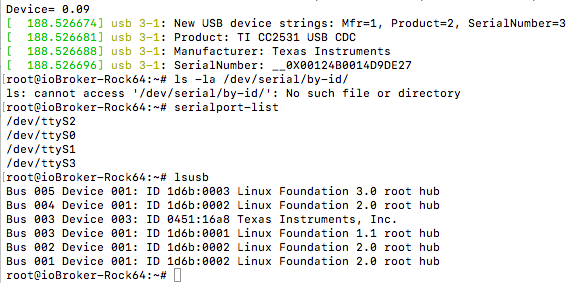
                  Nein er wird wohl nicht erkannt.
                  8679_cc2531.png

                  Er scheint erkannt zu werden, aber nicht richtig installiert zu sein. Im Bild ein paar Befehle, wo man es gut sieht.

                  1 Reply Last reply
                  0
                  • J Offline
                    J Offline
                    J Riemann
                    wrote on last edited by
                    #9

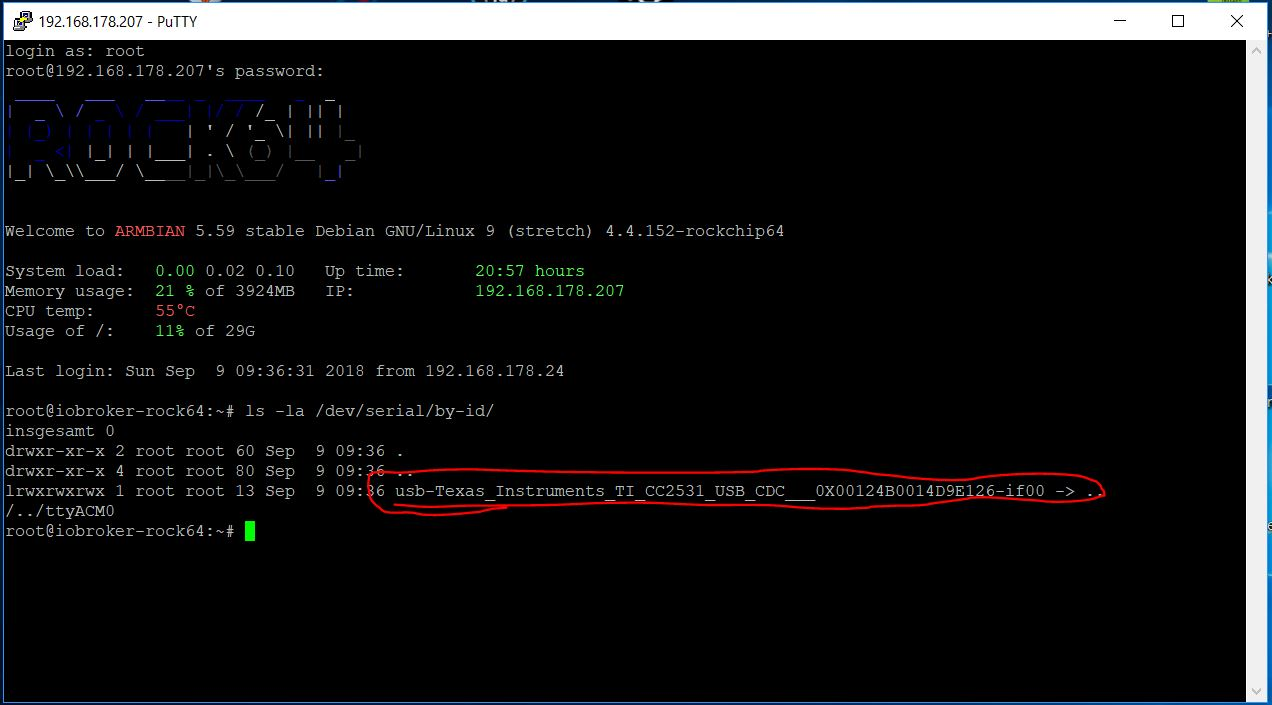
                    Ich habe heute mein System auf einem Rock64 aufgebaut und kann das Probem nicht bestätigen.

                    Bei mir funktioniert alles ohne Problem!

                    6696_rock64.png

                    ****Viele Grüße!

                    Jörg****

                    1 Reply Last reply
                    0
                    • B Offline
                      B Offline
                      Beezy
                      wrote on last edited by
                      #10

                      Hab auch das Problem das es nicht geht.

                      Ich habe das Image von der iobroker Seite laufen.

                      Du auch?

                      1 Reply Last reply
                      0
                      • J Offline
                        J Offline
                        J Riemann
                        wrote on last edited by
                        #11

                        Nein, ich habe das System komplett selbst aufgebaut.

                        ****Viele Grüße!

                        Jörg****

                        1 Reply Last reply
                        0
                        • H Offline
                          H Offline
                          hawi1981
                          wrote on last edited by
                          #12

                          Ich habe auch das Image von der Iobroker Seite. Vielleicht feht dort noch ein wichtigen Paket?

                          1 Reply Last reply
                          0
                          • paul53P Offline
                            paul53P Offline
                            paul53
                            wrote on last edited by
                            #13

                            @hawi1981:

                            das Image von der Iobroker Seite. Vielleicht feht dort noch ein wichtigen Paket? `
                            Jörg verwendet ein jüngeres https://dl.armbian.com/rock64/archive/ (Debian stretch), das allerdings mit Desktop daher kommt.

                            Bitte verzichtet auf Chat-Nachrichten, denn die Handhabung ist grauenhaft !
                            Produktiv: RPi 2 mit S.USV, HM-MOD-RPI und SLC-USB-Stick mit root fs

                            1 Reply Last reply
                            0
                            • HomoranH Do not disturb
                              HomoranH Do not disturb
                              Homoran
                              Global Moderator Administrators
                              wrote on last edited by
                              #14

                              Ich hab es nicht mehr ganz im Kopf, aber ich glaube das letzte Rock64 Image war ein nightly build.

                              Da läuft nicht alles sauber, war aber die erste Implementation des gefixten NAND-SATA-Install.

                              Was mir damals nicht bewusst war ist, dass man beim update im nightly branch bleibt :(

                              Gruß

                              Rainer

                              kein Support per PN! - Fragen im Forum stellen - es gibt fast nichts, was nicht auch für andere interessant ist.

                              Benutzt das Voting rechts unten im Beitrag wenn er euch geholfen hat.

                              der Installationsfixer: curl -fsL https://iobroker.net/fix.sh | bash -

                              1 Reply Last reply
                              0
                              • paul53P Offline
                                paul53P Offline
                                paul53
                                wrote on last edited by
                                #15

                                Ich würde die https://dl.armbian.com/rock64/archive/test/ von heute (ist ohne Desktop) verwenden, testen, ob der Zigbee-Stick erkannt wird und anschließend Nodejs und ioBroker nach http://www.iobroker.net/docu/?page_id=5106&lang=de#Installation_Nodejs installieren.

                                Bitte verzichtet auf Chat-Nachrichten, denn die Handhabung ist grauenhaft !
                                Produktiv: RPi 2 mit S.USV, HM-MOD-RPI und SLC-USB-Stick mit root fs

                                1 Reply Last reply
                                0
                                • H Offline
                                  H Offline
                                  hawi1981
                                  wrote on last edited by
                                  #16

                                  Klingt gut, sobald du sagst, dass es funktioniert, ziehe ich nach :D

                                  1 Reply Last reply
                                  0
                                  • paul53P Offline
                                    paul53P Offline
                                    paul53
                                    wrote on last edited by
                                    #17

                                    @hawi1981:

                                    sobald du sagst, dass es funktioniert, ziehe ich nach `
                                    Das kann ich nicht sagen, denn ich habe weder einen Rock64 noch einen Zigbee-Stick.
                                    @paul53:

                                    Ich würde … `

                                    Bitte verzichtet auf Chat-Nachrichten, denn die Handhabung ist grauenhaft !
                                    Produktiv: RPi 2 mit S.USV, HM-MOD-RPI und SLC-USB-Stick mit root fs

                                    1 Reply Last reply
                                    0
                                    • J Offline
                                      J Offline
                                      J Riemann
                                      wrote on last edited by
                                      #18

                                      Ich verwende „Armbian Stretch desktop legacy kernel 4.4.y“ direkt von der Armbian-Downloadseite: https://www.armbian.com/rock64/

                                      Anschl. habe ich Node, NodeJs und Npm sowie iobroker nach Anleitung installiert.

                                      Ich hatte vorher das aktuellste Image von Rainer getestet, aber irgendwie wollte es nicht laufen. Somit habe ich mich für den kompletten „Eigenbau“ entschieden.

                                      ****Viele Grüße!

                                      Jörg****

                                      1 Reply Last reply
                                      0
                                      • H Offline
                                        H Offline
                                        hawi1981
                                        wrote on last edited by
                                        #19

                                        @paul53:

                                        Ich würde die https://dl.armbian.com/rock64/archive/test/ von heute (ist ohne Desktop) verwenden, testen, ob der Zigbee-Stick erkannt wird und anschließend Nodejs und ioBroker nach http://www.iobroker.net/docu/?page_id=5106&lang=de#Installation_Nodejs installieren. `

                                        HAbe mir gestern die Zeit genommen und so wie beschrieben meinen Rock64 neu aufgesetzt. Hatt alles super funktioniert und der Stick funktioniert auch. Als angenehmer nebeneffekt funktioniert bei mir jetzt auch mein Bluetooth Stick, den ich vorher auch nicht richtig zum laufen bekommen habe. Danke an alle :D


                                        1 Reply Last reply
                                        0
                                        • paul53P Offline
                                          paul53P Offline
                                          paul53
                                          wrote on last edited by
                                          #20

                                          @hawi1981:

                                          wie beschrieben meinen Rock64 neu aufgesetzt. Hatt alles super funktioniert `
                                          ioBroker startet nach Reboot auch automatisch ?

                                          Du hast keine https://forum.iobroker.net/viewtopic.php?f=34&t=7019&start=360#p176897 nach Reboot ?

                                          Bitte verzichtet auf Chat-Nachrichten, denn die Handhabung ist grauenhaft !
                                          Produktiv: RPi 2 mit S.USV, HM-MOD-RPI und SLC-USB-Stick mit root fs

                                          1 Reply Last reply
                                          0
                                          Reply
                                          • Reply as topic
                                          Log in to reply
                                          • Oldest to Newest
                                          • Newest to Oldest
                                          • Most Votes


                                          Support us

                                          ioBroker
                                          Community Adapters
                                          Donate
                                          FAQ Cloud / IOT
                                          HowTo: Node.js-Update
                                          HowTo: Backup/Restore
                                          Downloads
                                          BLOG

                                          755

                                          Online

                                          32.6k

                                          Users

                                          82.1k

                                          Topics

                                          1.3m

                                          Posts
                                          Community
                                          Impressum | Datenschutz-Bestimmungen | Nutzungsbedingungen | Einwilligungseinstellungen
                                          ioBroker Community 2014-2025
                                          logo
                                          • Login

                                          • Don't have an account? Register

                                          • Login or register to search.
                                          • First post
                                            Last post
                                          0
                                          • Home
                                          • Recent
                                          • Tags
                                          • Unread 0
                                          • Categories
                                          • Unreplied
                                          • Popular
                                          • GitHub
                                          • Docu
                                          • Hilfe