
NEWS




Zigbee Stick
-
ls: Zugriff auf '/dev/serial/by-id/' nicht möglich: Datei oder Verzeichnis nicht gefundenDas Terminal rufe ich im Docker auf ist das richtig
das ist die Antwort die ich erhalte
-
Du wirst dem Container noch zugriff auf das USB device geben müssen.
Ich hab den Container auf nem Ubuntu laufen da hab ich die beiden folgenden Parameter am docker run angefügt.
--privileged -v /dev:/devDamit hat dann der Container Zugriff auf das dev-Verzeichnis. Das kann/sollte auch auf das konkrete device eingeschränkt werden.
Keine Ahnung, wie der mount volume Parameter beim NAS untergebracht wird, da mußt du mal schauen.
-
bash: --privileged: Kommando nicht gefunden.Er kennt den Befehl erst gar nicht. :roll:
-
Nein, das ist kein Befehl, sondern ein Parameter beim Befehl docker run
Auf meinem Ubuntu sieht der komplette Befehl so aus:
docker run -it -p 8081:8081 -p 1885:1885 -p 2001:2001 -p 8082:8082 -p 8084:8084 --privileged -v /dev:/dev -v ~/iobroker:/opt/iobroker --name iobroker buanet/iobrokerDie Port Routerei ist natürlich abhängig von deinen individuellen Gegebenheiten. Wichtig für dich wäre nur der Teil –privileged -v /dev:/dev der dafür sorgt, dass das Host-Vulume /dev in den Container als /dev getappt wird.
-
Alo bei mir wird der Zigbee Stick erkannt ist also auf grün.
Möchte ich jetzt ein Gerät einlernen passiert nichts und im log steht das:
Caught	2018-09-08 15:55:45.036	error	by controller[69]: Sat, 08 Sep 2018 13:55:44 GMT zigbee:controller info zigbee-shepherd stopped undefined
Caught	2018-09-08 15:55:45.036	error	by controller[68]: Sat, 08 Sep 2018 13:55:23 GMT zigbee-shepherd:msgHdlr IND <-- ZDO:stateChangeInd
Caught	2018-09-08 15:55:45.036	error	by controller[67]: Sat, 08 Sep 2018 13:55:23 GMT cc-znp:AREQ <-- ZDO:stateChangeInd, { state: 1 }
Caught	2018-09-08 15:55:45.036	error	by controller[66]: Sat, 08 Sep 2018 13:55:23 GMT cc-znp:SRSP <-- ZDO:startupFromApp, { status: 1 }
Caught	2018-09-08 15:55:45.034	error	by controller[65]: Sat, 08 Sep 2018 13:55:22 GMT cc-znp:SREQ --> ZDO:startupFromApp, { startdelay: 100 }
Caught	2018-09-08 15:55:45.034	error	by controller[64]: Sat, 08 Sep 2018 13:55:22 GMT zigbee-shepherd:request REQ --> ZDO:startupFromApp
Caught	2018-09-08 15:55:45.034	error	by controller[63]: Sat, 08 Sep 2018 13:55:22 GMT zigbee-shepherd:init Start the ZNP as a coordinator...
Caught	2018-09-08 15:55:45.034	error	by controller[62]: Sat, 08 Sep 2018 13:55:22 GMT zigbee-shepherd:request RSP <-- SAPI:getDeviceInfo
Caught	2018-09-08 15:55:45.034	error	by controller[61]: Sat, 08 Sep 2018 13:55:22 GMT cc-znp:SRSP <-- SAPI:getDeviceInfo, { param: 0, value: <buffer 00/0d/06=""> }
Caught	2018-09-08 15:55:45.034	error	by controller[60]: Sat, 08 Sep 2018 13:55:22 GMT cc-znp:SREQ --> SAPI:getDeviceInfo, { param: 0 }
Caught	2018-09-08 15:55:45.034	error	by controller[59]: Sat, 08 Sep 2018 13:55:22 GMT zigbee-shepherd:request REQ --> SAPI:getDeviceInfo
Caught	2018-09-08 15:55:45.034	error	by controller[58]: Sat, 08 Sep 2018 13:55:22 GMT zigbee-shepherd:request RSP <-- SYS:osalNvWrite, status: 0
Caught	2018-09-08 15:55:45.034	error	by controller[57]: Sat, 08 Sep 2018 13:55:22 GMT cc-znp:SRSP <-- SYS:osalNvWrite, { status: 0 }
Caught	2018-09-08 15:55:45.034	error	by controller[56]: Sat, 08 Sep 2018 13:55:22 GMT cc-znp:SREQ --> SYS:osalNvWrite, { id: 3840, offset: 0, len: 1, value: [ 85 ] }
Caught	2018-09-08 15:55:45.033	error	by controller[55]: Sat, 08 Sep 2018 13:55:22 GMT zigbee-shepherd:request REQ --> SYS:osalNvWrite
Caught	2018-09-08 15:55:45.033	error	by controller[54]: Sat, 08 Sep 2018 13:55:22 GMT zigbee-shepherd:request RSP <-- SYS:osalNvItemInit, status: 9
Caught	2018-09-08 15:55:45.033	error	by controller[53]: Sat, 08 Sep 2018 13:55:22 GMT cc-znp:SRSP <-- SYS:osalNvItemInit, { status: 9 }
Caught	2018-09-08 15:55:45.033	error	by controller[52]: Sat, 08 Sep 2018 13:55:22 GMT cc-znp:SREQ --> SYS:osalNvItemInit, { id: 3840, len: 1, initlen: 1, initvalue: [ 0 ] }
Caught	2018-09-08 15:55:45.032	error	by controller[51]: Sat, 08 Sep 2018 13:55:22 GMT zigbee-shepherd:request REQ --> SYS:osalNvItemInit
Caught	2018-09-08 15:55:45.032	error	by controller[50]: Sat, 08 Sep 2018 13:55:22 GMT zigbee-shepherd:request RSP <-- SAPI:writeConfiguration, status: 0
Caught	2018-09-08 15:55:45.032	error	by controller[49]: Sat, 08 Sep 2018 13:55:22 GMT cc-znp:SRSP <-- SAPI:writeConfiguration, { status: 0 }
Caught	2018-09-08 15:55:45.032	error	by controller[48]: Sat, 08 Sep 2018 13:55:22 GMT cc-znp:SREQ --> SAPI:writeConfiguration, { configid: 143, len: 1, value: [ 1 ] }
Caught	2018-09-08 15:55:45.031	error	by controller[47]: Sat, 08 Sep 2018 13:55:22 GMT zigbee-shepherd:request REQ --> SAPI:writeConfiguration
Caught	2018-09-08 15:55:45.031	error	by controller[46]: Sat, 08 Sep 2018 13:55:22 GMT zigbee-shepherd:request RSP <-- SYS:osalNvWrite, status: 0
Caught	2018-09-08 15:55:45.031	error	by controller[45]: Sat, 08 Sep 2018 13:55:22 GMT cc-znp:SRSP <-- SYS:osalNvWrite, { status: 0 }
Caught	2018-09-08 15:55:45.031	error	by controller[44]: Sat, 08 Sep 2018 13:55:22 GMT cc-znp:SREQ --> SYS:osalNvWrite, { id: 257, offset: 0, len: 32, value: [ 255, 255, 255, 255, 255, 255, 255, 255, 90, 105, 103, 66, 101, 101, 65, 108,
Caught	2018-09-08 15:55:45.031	error	by controller[43]: Sat, 08 Sep 2018 13:55:22 GMT zigbee-shepherd:request REQ --> SYS:osalNvWrite
Caught	2018-09-08 15:55:45.031	error	by controller[42]: Sat, 08 Sep 2018 13:55:22 GMT zigbee-shepherd:request RSP <-- SAPI:writeConfiguration, status: 0
Caught	2018-09-08 15:55:45.031	error	by controller[41]: Sat, 08 Sep 2018 13:55:22 GMT cc-znp:SRSP <-- SAPI:writeConfiguration, { status: 0 }
Caught	2018-09-08 15:55:45.031	error	by controller[40]: Sat, 08 Sep 2018 13:55:22 GMT cc-znp:SREQ --> SAPI:writeConfiguration, { configid: 99, len: 1, value: [ 0 ] }
Caught	2018-09-08 15:55:45.031	error	by controller[39]: Sat, 08 Sep 2018 13:55:22 GMT zigbee-shepherd:request REQ --> SAPI:writeConfiguration
Caught	2018-09-08 15:55:45.030	error	by controller[38]: Sat, 08 Sep 2018 13:55:22 GMT zigbee-shepherd:request RSP <-- SAPI:writeConfiguration, status: 0
Caught	2018-09-08 15:55:45.029	error	by controller[37]: Sat, 08 Sep 2018 13:55:22 GMT cc-znp:SRSP <-- SAPI:writeConfiguration, { status: 0 }
Caught	2018-09-08 15:55:45.029	error	by controller[36]: Sat, 08 Sep 2018 13:55:22 GMT cc-znp:SREQ --> SAPI:writeConfiguration, { configid: 98, len: 16, value: [ 1, 3, 5, 7, 9, 11, 13, 15, 0, 2, 4, 6, 8, 10, 12, 13 ] }
Caught	2018-09-08 15:55:45.029	error	by controller[35]: Sat, 08 Sep 2018 13:55:22 GMT zigbee-shepherd:request REQ --> SAPI:writeConfiguration
Caught	2018-09-08 15:55:45.029	error	by controller[34]: Sat, 08 Sep 2018 13:55:22 GMT zigbee-shepherd:request RSP <-- SAPI:writeConfiguration, status: 0
Caught	2018-09-08 15:55:45.029	error	by controller[33]: Sat, 08 Sep 2018 13:55:22 GMT cc-znp:SRSP <-- SAPI:writeConfiguration, { status: 0 }
Caught	2018-09-08 15:55:45.029	error	by controller[32]: Sat, 08 Sep 2018 13:55:22 GMT cc-znp:SREQ --> SAPI:writeConfiguration, { configid: 135, len: 1, value: [ 0 ] }
Caught	2018-09-08 15:55:45.029	error	by controller[31]: Sat, 08 Sep 2018 13:55:22 GMT zigbee-shepherd:request REQ --> SAPI:writeConfiguration
Caught	2018-09-08 15:55:45.029	error	by controller[30]: Sat, 08 Sep 2018 13:55:22 GMT zigbee-shepherd:request RSP <-- SAPI:writeConfiguration, status: 0
Caught	2018-09-08 15:55:45.029	error	by controller[29]: Sat, 08 Sep 2018 13:55:22 GMT cc-znp:SRSP <-- SAPI:writeConfiguration, { status: 0 }
Caught	2018-09-08 15:55:45.029	error	by controller[28]: Sat, 08 Sep 2018 13:55:22 GMT cc-znp:SREQ --> SAPI:writeConfiguration, { configid: 132, len: 4, value: [ 0, 0, 0, 0 ] }
Caught	2018-09-08 15:55:45.029	error	by controller[27]: Sat, 08 Sep 2018 13:55:22 GMT zigbee-shepherd:request REQ --> SAPI:writeConfiguration
Caught	2018-09-08 15:55:45.028	error	by controller[26]: Sat, 08 Sep 2018 13:55:22 GMT zigbee-shepherd:request RSP <-- SAPI:writeConfiguration, status: 0
Caught	2018-09-08 15:55:45.028	error	by controller[25]: Sat, 08 Sep 2018 13:55:22 GMT cc-znp:SRSP <-- SAPI:writeConfiguration, { status: 0 }
Caught	2018-09-08 15:55:45.028	error	by controller[24]: Sat, 08 Sep 2018 13:55:22 GMT cc-znp:SREQ --> SAPI:writeConfiguration, { configid: 45, len: 8, value: [ 221, 221, 221, 221, 221, 221, 221, 221 ] }
Caught	2018-09-08 15:55:45.028	error	by controller[23]: Sat, 08 Sep 2018 13:55:22 GMT zigbee-shepherd:request REQ --> SAPI:writeConfiguration
Caught	2018-09-08 15:55:45.028	error	by controller[22]: Sat, 08 Sep 2018 13:55:22 GMT zigbee-shepherd:request RSP <-- SAPI:writeConfiguration, status: 0
Caught	2018-09-08 15:55:45.028	error	by controller[22]: Sat, 08 Sep 2018 13:55:22 GMT cc-znp:SRSP <-- SAPI:writeConfiguration, { status: 0 }
Caught	2018-09-08 15:55:45.028	error	by controller[21]: Sat, 08 Sep 2018 13:55:22 GMT cc-znp:SREQ --> SAPI:writeConfiguration, { configid: 131, len: 2, value: [ 98, 26 ] }
Caught	2018-09-08 15:55:45.028	error	by controller[20]: Sat, 08 Sep 2018 13:55:22 GMT zigbee-shepherd:request REQ --> SAPI:writeConfiguration
Caught	2018-09-08 15:55:45.028	error	by controller[19]: Sat, 08 Sep 2018 13:55:22 GMT zigbee-shepherd:request RSP <-- SYS:resetReq
Caught	2018-09-08 15:55:45.028	error	by controller[19]: Sat, 08 Sep 2018 13:55:22 GMT zigbee-shepherd:msgHdlr IND <-- SYS:resetInd
Caught	2018-09-08 15:55:45.028	error	by controller[19]: Sat, 08 Sep 2018 13:55:22 GMT cc-znp:AREQ <-- SYS:resetInd, { reason: 0, transportrev: 2, productid: 0, majorrel: 2, minorrel: 6, hwrev: 3 }
Caught	2018-09-08 15:55:45.027	error	by controller[18]: Sat, 08 Sep 2018 13:55:21 GMT cc-znp:AREQ --> SYS:resetReq, { type: 1 }
Caught	2018-09-08 15:55:45.027	error	by controller[17]: Sat, 08 Sep 2018 13:55:21 GMT zigbee-shepherd:request REQ --> SYS:resetReq
Caught	2018-09-08 15:55:45.027	error	by controller[16]: Sat, 08 Sep 2018 13:55:21 GMT zigbee-shepherd:request RSP <-- SAPI:writeConfiguration, status: 0
Caught	2018-09-08 15:55:45.027	error	by controller[15]: Sat, 08 Sep 2018 13:55:21 GMT cc-znp:SRSP <-- SAPI:writeConfiguration, { status: 0 }
Caught	2018-09-08 15:55:45.027	error	by controller[14]: Sat, 08 Sep 2018 13:55:21 GMT cc-znp:SREQ --> SAPI:writeConfiguration, { configid: 3, len: 1, value: [ 2 ] }
Caught	2018-09-08 15:55:45.027	error	by controller[13]: Sat, 08 Sep 2018 13:55:21 GMT zigbee-shepherd:request REQ --> SAPI:writeConfiguration
Caught	2018-09-08 15:55:45.027	error	by controller[12]: Sat, 08 Sep 2018 13:55:21 GMT zigbee-shepherd:request RSP <-- SYS:resetReq
Caught	2018-09-08 15:55:45.027	error	by controller[12]: Sat, 08 Sep 2018 13:55:21 GMT zigbee-shepherd:msgHdlr IND <-- SYS:resetInd
Caught	2018-09-08 15:55:45.027	error	by controller[12]: Sat, 08 Sep 2018 13:55:21 GMT cc-znp:AREQ <-- SYS:resetInd, { reason: 0, transportrev: 2, productid: 0, majorrel: 2, minorrel: 6, hwrev: 3 }
Caught	2018-09-08 15:55:45.027	error	by controller[11]: Sat, 08 Sep 2018 13:55:20 GMT cc-znp:AREQ --> SYS:resetReq, { type: 1 }
Caught	2018-09-08 15:55:45.027	error	by controller[10]: Sat, 08 Sep 2018 13:55:20 GMT zigbee-shepherd:request REQ --> SYS:resetReq
Caught	2018-09-08 15:55:45.026	error	by controller[9]: Sat, 08 Sep 2018 13:55:20 GMT zigbee-shepherd Starting a hardware reset...
Caught	2018-09-08 15:55:45.026	error	by controller[8]: Sat, 08 Sep 2018 13:55:20 GMT zigbee-shepherd:init Non-Volatile memory is changed.
Caught	2018-09-08 15:55:45.026	error	by controller[7]: Sat, 08 Sep 2018 13:55:20 GMT zigbee-shepherd:request RSP <-- SYS:osalNvRead, status: 2
Caught	2018-09-08 15:55:45.026	error	by controller[6]: Sat, 08 Sep 2018 13:55:20 GMT cc-znp:SRSP <-- SYS:osalNvRead, { status: 2, len: 0, value: <buffer> }
Caught	2018-09-08 15:55:45.026	error	by controller[5]: Sat, 08 Sep 2018 13:55:20 GMT cc-znp:SREQ --> SYS:osalNvRead, { id: 3840, offset: 0, len: 1, value: [ 85 ] }
Caught	2018-09-08 15:55:45.026	error	by controller[4]: Sat, 08 Sep 2018 13:55:20 GMT zigbee-shepherd:request REQ --> SYS:osalNvRead
Caught	2018-09-08 15:55:45.026	error	by controller[3]: Sat, 08 Sep 2018 13:55:20 GMT cc-znp The serialport /dev/ttyACM0 is opened.
Caught	2018-09-08 15:55:45.025	error	by controller[2]: Sat, 08 Sep 2018 13:55:20 GMT zigbee-shepherd:init zigbee-shepherd booting...
Caught	2018-09-08 15:55:45.025	error	by controller[1]: Sat, 08 Sep 2018 13:55:20 GMT zigbee:controller info Starting zigbee-shepherd undefined</buffer></buffer>
was läuft da schief?
-
> Nein, das ist kein Befehl, sondern ein Parameter beim Befehl
Hi,wo trage ich das denn ein, ich finde das nicht. :oops:
-
wo trage ich das denn ein, ich finde das nicht `
Wie gesagt, ich hab kein synology, aber wenn ich raten darf:
https://www.synology.com/de-de/knowledg … _container
7. Volume
-
Alo bei mir wird der Zigbee Stick erkannt ist also auf grün.
Möchte ich jetzt ein Gerät einlernen passiert nichts und im log steht das: `
Wie hast Du das denn gemacht?
-
wo trage ich das denn ein, ich finde das nicht `
Wie gesagt, ich hab kein synology, aber wenn ich raten darf:
https://www.synology.com/de-de/knowledg … _container
7. Volume `
Der Stick ist ja erst gar nicht da. Im Windows rechner wird er sofort erkannt in der nas nicht -
Du musst ihn auch an den Container weiterreichen, dazu gibt es 2 Möglichkeiten :
-
den docker Container mit "hohen Zugriffsrechten" ausführen
-
beim erstellen des Container den USB Port weitergeben, die kan man nicht im GUI machen nur Commando Line
Greetz
Dutch
Sent from my iPhone using Tapatalk
-
-
> 1) den docker Container mit "hohen Zugriffsrechten" ausführenHabe ich gemacht,wie komme ich denn jetzt an den stick ran um den com port auszulesen.
Der Stick wird aber in der nas nicht angezeigt :?:
-
Hast du Mal auf der console die USB device abgefragt?
Zur den Stick Mal raus, 10 sek warten und wieder rein..
Dan auf der console Mal "dmesg" eingeben.
Was kommt dann?
Sent from my iPhone using Tapatalk
-
Ich verzweifle auch grade am Zigbee Stick.
Wie kann ich denn feststellen ob die Syno den überhaupt erkannt hat?
Logischerweise ist der Zigbee Adapter gelb weil ich keine Ahnung habe was da als Com Anschluss rein muss.
Sorry bin ein Linux Noob und möchte das auch bleiben :lol:
-
Also nachdem ich den NPM auf die aktuelle Version 6.5.0 gepatcht hab (npm install -g npm@latest), wird der stick im Adapter (nach Neustart iobroker) erkannt. Der NPM vom Docker is im Standard steinalt (3.10.10). Daten trudeln jetzt auch ein. Sieht soweit ganz gut aus! :-)
-
Hast du es geschafft den Stick auf der Synology unter Docker zum laufen zu bringen?
Ich habe das Image von Buanet und stehe gerade an.
Stick steckt in der Synology. Hat am Anfang eine grüne LED gehabt. Diese ist jetzt aber aus.
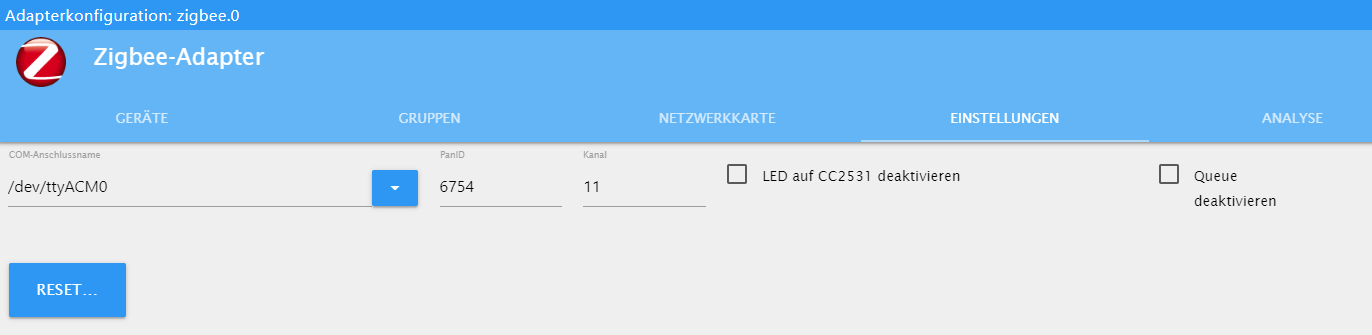
Bekomme folgende Fehlermeldung, und der Adapter möchte sich immer starten.
host.ioBroker	2019-04-09 13:56:54.731	info	Restart adapter system.adapter.zigbee.0 because enabled
host.ioBroker	2019-04-09 13:56:54.731	error	instance system.adapter.zigbee.0 terminated with code 1 ()
host.ioBroker	2019-04-09 13:56:54.731	error	Caught by controller[0]: at Object.Module._extensions..js (module.js:664:10)
host.ioBroker	2019-04-09 13:56:54.731	error	Caught by controller[0]: at Module._compile (module.js:653:30)
host.ioBroker	2019-04-09 13:56:54.731	error	Caught by controller[0]: at Object.<anonymous> (/opt/iobroker/node_modules/serialport/lib/bindings/linux.js:2:36)
host.ioBroker	2019-04-09 13:56:54.731	error	Caught by controller[0]: at bindings (/opt/iobroker/node_modules/bindings/bindings.js:81:44)
host.ioBroker	2019-04-09 13:56:54.731	error	Caught by controller[0]: at require (internal/module.js:11:18)
host.ioBroker	2019-04-09 13:56:54.731	error	Caught by controller[0]: at Module.require (module.js:597:17)
host.ioBroker	2019-04-09 13:56:54.731	error	Caught by controller[0]: at Function.Module._load (module.js:498:3)
host.ioBroker	2019-04-09 13:56:54.731	error	Caught by controller[0]: at tryModuleLoad (module.js:506:12)
host.ioBroker	2019-04-09 13:56:54.731	error	Caught by controller[0]: at Module.load (module.js:566:32)
host.ioBroker	2019-04-09 13:56:54.731	error	Caught by controller[0]: at Object.Module._extensions..node (module.js:682:18)
host.ioBroker	2019-04-09 13:56:54.731	error	Caught by controller[0]: the module (for instance, using `npm rebuild` or `npm install`).
host.ioBroker	2019-04-09 13:56:54.731	error	Caught by controller[0]: NODE_MODULE_VERSION 57. Please try re-compiling or re-installing
host.ioBroker	2019-04-09 13:56:54.731	error	Caught by controller[0]: NODE_MODULE_VERSION 48. This version of Node.js requires
host.ioBroker	2019-04-09 13:56:54.731	error	Caught by controller[0]: was compiled against a different Node.js version using
host.ioBroker	2019-04-09 13:56:54.731	error	Caught by controller[0]: Error: The module '/opt/iobroker/node_modules/serialport/build/Release/serialport.node'
host.ioBroker	2019-04-09 13:56:54.730	error	Caught by controller[0]: ^
host.ioBroker	2019-04-09 13:56:54.730	error	Caught by controller[0]: throw e
host.ioBroker	2019-04-09 13:56:54.730	error	Caught by controller[0]: /opt/iobroker/node_modules/bindings/bindings.js:88
host.ioBroker	2019-04-09 13:56:54.301	info	instance system.adapter.zigbee.0 started with pid 2441
Kannst du mir Tipps geben?
-
hast du im Terminal vom Docker für ioBroker nachgesehen ob er auch auf /dev/ttyACM0 ist ?





659
Online32.7k
Users82.4k
Topics1.3m
Posts