




[Gelöst]npm Fehler
-
Hallo zusammen,
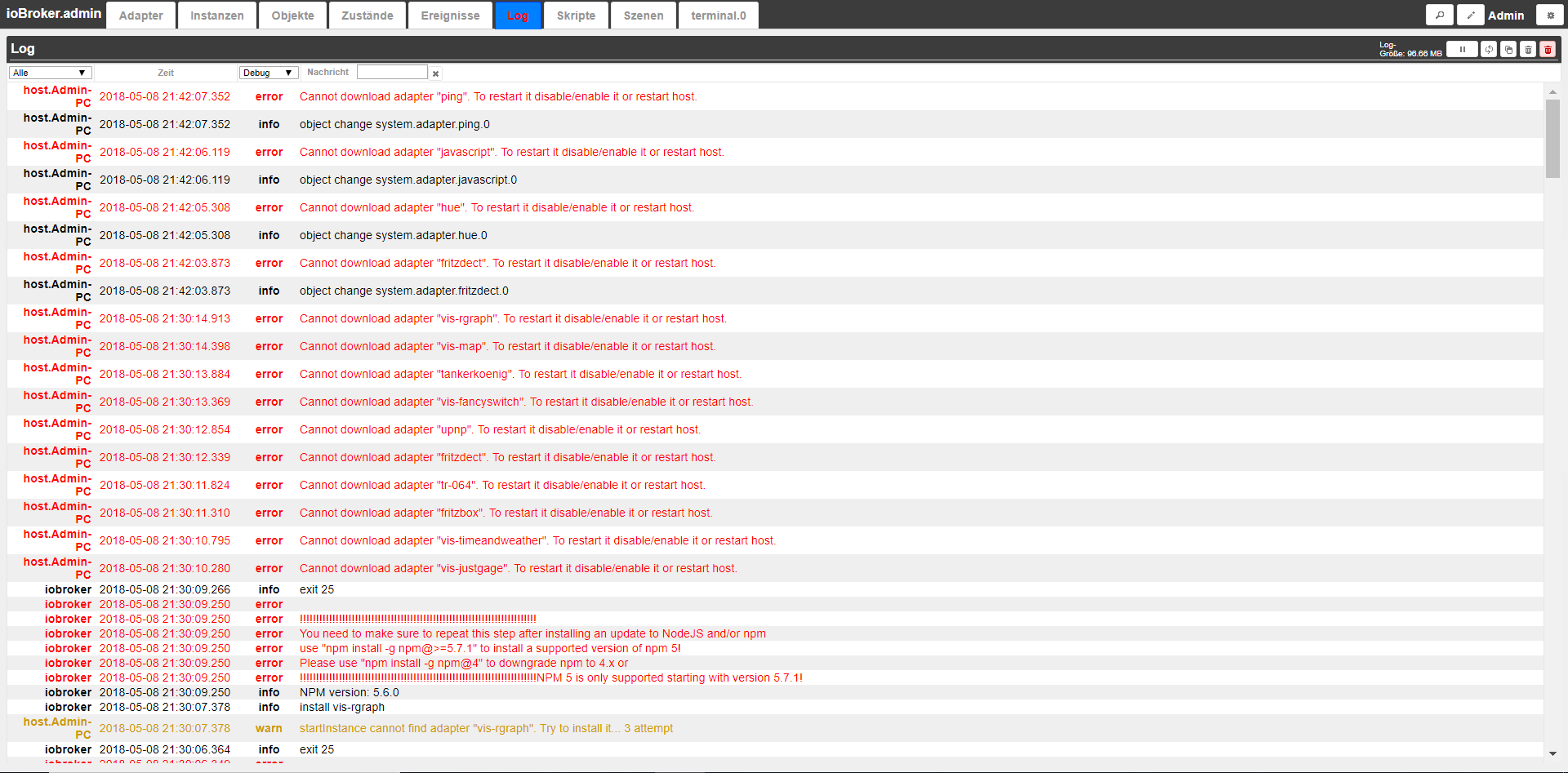
ich erhalte folgenden Fehler nachdem ich aus dem Urlaub wieder da bin.
2018-05-08 21:15:20.098	info	iobroker install ping
host.Admin-PC	2018-05-08 21:15:20.098	warn	startInstance cannot find adapter "ping". Try to install it... 2 attempt
host.Admin-PC	2018-05-08 21:15:19.084	info	iobroker exit 25
host.Admin-PC	2018-05-08 21:15:19.068	error	iobroker !!!!!!!!!!!!!!!!!!!!!!!!!!!!!!!!!!!!!!!!!!!!!!!!!!!!!!!!!!!!!!!!!!!!!!!!!NPM 5 is only supported starting with version 5.7.1! Please use "npm install -g npm@4" to downgrade npm to 4.x or use
host.Admin-PC	2018-05-08 21:15:19.068	info	iobroker NPM version: 5.6.0
host.Admin-PC	2018-05-08 21:15:17.134	info	iobroker install vis-weather
host.Admin-PC	2018-05-08 21:15:17.134	warn	startInstance cannot find adapter "vis-weather". Try to install it... 1 attempt
host.Admin-PC	2018-05-08 21:15:16.120	info	iobroker exit 25
host.Admin-PC	2018-05-08 21:15:16.120	error	iobroker !!!!!!!!!!!!!!!!!!!!!!!!!!!!!!!!!!!!!!!!!!!!!!!!!!!!!!!!!!!!!!!!!!!!!!!!!NPM 5 is only supported starting with version 5.7.1! Please use "npm install -g npm@4" to downgrade npm to 4.x or use
host.Admin-PC	2018-05-08 21:15:16.120	info	iobroker NPM version: 5.6.0
host.Admin-PC	2018-05-08 21:15:14.154	info	iobroker install javascript
host.Admin-PC	2018-05-08 21:15:14.154	warn	startInstance cannot find adapter "javascript". Try to install it... 1 attempt
host.Admin-PC	2018-05-08 21:15:13.140	info	iobroker exit 25
host.Admin-PC	2018-05-08 21:15:13.124	error	iobroker Please use "npm install -g npm@4" to downgrade npm to 4.x or use "npm install -g npm@>=5.7.1" to install a supported version of npm 5! You need to make sure to repeat this step after installi
host.Admin-PC	2018-05-08 21:15:13.124	error	iobroker !!!!!!!!!!!!!!!!!!!!!!!!!!!!!!!!!!!!!!!!!!!!!!!!!!!!!!!!!!!!!!!!!!!!!!!!!NPM 5 is only supported starting with version 5.7.1!
host.Admin-PC	2018-05-08 21:15:13.124	info	iobroker NPM version: 5.6.0
host.Admin-PC	2018-05-08 21:15:11.143	info	iobroker install vis-hqwidgets
host.Admin-PC	2018-05-08 21:15:11.143	warn	startInstance cannot find adapter "vis-hqwidgets". Try to install it... 1 attempt
host.Admin-PC	2018-05-08 21:15:10.129	info	iobroker exit 25
host.Admin-PC	2018-05-08 21:15:10.129	error	iobroker !!!!!!!!!!!!!!!!!!!!!!!!!!!!!!!!!!!!!!!!!!!!!!!!!!!!!!!!!!!!!!!!!!!!!!!!!NPM 5 is only supported starting with version 5.7.1! Please use "npm install -g npm@4" to downgrade npm to 4.x or use
host.Admin-PC	2018-05-08 21:15:10.129	info	iobroker NPM version: 5.6.0
host.Admin-PC	2018-05-08 21:15:08.164	info	iobroker install sony-bravia
host.Admin-PC	2018-05-08 21:15:08.164	warn	startInstance cannot find adapter "sony-bravia". Try to install it... 1 attempt
host.Admin-PC	2018-05-08 21:15:07.150	info	iobroker exit 25
host.Admin-PC	2018-05-08 21:15:07.134	error	iobroker Please use "npm install -g npm@4" to downgrade npm to 4.x or use "npm install -g npm@>=5.7.1" to install a supported version of npm 5! You need to make sure to repeat this step after installi
host.Admin-PC	2018-05-08 21:15:07.134	error	iobroker !!!!!!!!!!!!!!!!!!!!!!!!!!!!!!!!!!!!!!!!!!!!!!!!!!!!!!!!!!!!!!!!!!!!!!!!!NPM 5 is only supported starting with version 5.7.1!
host.Admin-PC	2018-05-08 21:15:07.134	info	iobroker NPM version: 5.6.0
host.Admin-PC	2018-05-08 21:15:05.106	info	iobroker install sonos
host.Admin-PC	2018-05-08 21:15:05.106	warn	startInstance cannot find adapter "sonos". Try to install it... 1 attempt
iobroker	2018-05-08 21:15:04.076	info	exit 25
iobroker	2018-05-08 21:15:04.076	error
iobroker	2018-05-08 21:15:04.076	error	!!!!!!!!!!!!!!!!!!!!!!!!!!!!!!!!!!!!!!!!!!!!!!!!!!!!!!!!!!!!!!!!!!!!!!!!!
iobroker	2018-05-08 21:15:04.076	error	You need to make sure to repeat this step after installing an update to NodeJS and/or npm
iobroker	2018-05-08 21:15:04.076	error	use "npm install -g npm@>=5.7.1" to install a supported version of npm 5!
iobroker	2018-05-08 21:15:04.076	error	Please use "npm install -g npm@4" to downgrade npm to 4.x or
iobroker	2018-05-08 21:15:04.076	error	!!!!!!!!!!!!!!!!!!!!!!!!!!!!!!!!!!!!!!!!!!!!!!!!!!!!!!!!!!!!!!!!!!!!!!!!!NPM 5 is only supported starting with version 5.7.1!
iobroker	2018-05-08 21:15:04.076	info	NPM version: 5.6.0
iobroker	2018-05-08 21:15:02.111	info	install vis
host.Admin-PC	2018-05-08 21:15:02.111	warn	startInstance cannot find adapter "vis". Try to install it... 1 attempt
iobroker	2018-05-08 21:15:01.097	info	exit 25
iobroker	2018-05-08 21:15:01.097	error
iobroker	2018-05-08 21:15:01.097	error	!!!!!!!!!!!!!!!!!!!!!!!!!!!!!!!!!!!!!!!!!!!!!!!!!!!!!!!!!!!!!!!!!!!!!!!!!
iobroker	2018-05-08 21:15:01.097	error	You need to make sure to repeat this step after installing an update to NodeJS and/or npm
iobroker	2018-05-08 21:15:01.097	error	use "npm install -g npm@>=5.7.1" to install a supported version of npm 5!
iobroker	2018-05-08 21:15:01.097	error	NPM 5 is only supported starting with version 5.7.1!Please use "npm install -g npm@4" to downgrade npm to 4.x or
iobroker	2018-05-08 21:15:01.097	error	!!!!!!!!!!!!!!!!!!!!!!!!!!!!!!!!!!!!!!!!!!!!!!!!!!!!!!!!!!!!!!!!!!!!!!!!!
iobroker	2018-05-08 21:15:01.097	info	NPM version: 5.6.0
iobroker	2018-05-08 21:14:59.162	info	install hue
host.Admin-PC	2018-05-08 21:14:59.162	warn	startInstance cannot find adapter "hue". Try to install it... 1 attempt
iobroker	2018-05-08 21:14:58.148	info	exit 25
iobroker	2018-05-08 21:14:58.133	error
iobroker	2018-05-08 21:14:58.133	error	!!!!!!!!!!!!!!!!!!!!!!!!!!!!!!!!!!!!!!!!!!!!!!!!!!!!!!!!!!!!!!!!!!!!!!!!!
iobroker	2018-05-08 21:14:58.133	error	You need to make sure to repeat this step after installing an update to NodeJS and/or npm
iobroker	2018-05-08 21:14:58.133	error	Please use "npm install -g npm@4" to downgrade npm to 4.x or use "npm install -g npm@>=5.7.1" to install a supported version of npm 5!
iobroker	2018-05-08 21:14:58.133	error
iobroker	2018-05-08 21:14:58.133	error	!!!!!!!!!!!!!!!!!!!!!!!!!!!!!!!!!!!!!!!!!!!!!!!!!!!!!!!!!!!!!!!!!!!!!!!!!NPM 5 is only supported starting with version 5.7.1!
iobroker	2018-05-08 21:14:58.133	info	NPM version: 5.6.0
iobroker	2018-05-08 21:14:56.183	info	install ping
host.Admin-PC	2018-05-08 21:14:56.183	warn	startInstance cannot find adapter "ping". Try to install it... 1 attempt
iobroker	2018-05-08 21:14:55.169	info	exit 25
iobroker	2018-05-08 21:14:55.169	error
iobroker	2018-05-08 21:14:55.169	error	!!!!!!!!!!!!!!!!!!!!!!!!!!!!!!!!!!!!!!!!!!!!!!!!!!!!!!!!!!!!!!!!!!!!!!!!!
iobroker	2018-05-08 21:14:55.169	error	You need to make sure to repeat this step after installing an update to NodeJS and/or npm
iobroker	2018-05-08 21:14:55.169	error	use "npm install -g npm@>=5.7.1" to install a supported version of npm 5!
iobroker	2018-05-08 21:14:55.169	error	Please use "npm install -g npm@4" to downgrade npm to 4.x or
iobroker	2018-05-08 21:14:55.169	error	!!!!!!!!!!!!!!!!!!!!!!!!!!!!!!!!!!!!!!!!!!!!!!!!!!!!!!!!!!!!!!!!!!!!!!!!!NPM 5 is only supported starting with version 5.7.1!
iobroker	2018-05-08 21:14:55.169	info	NPM version: 5.6.0
iobroker	2018-05-08 21:14:53.063	info	install sayit
host.Admin-PC	2018-05-08 21:14:53.063	warn	startInstance cannot find adapter "sayit". Try to install it... 1 attempt
iobroker	2018-05-08 21:14:52.049	info	exit 25
iobroker	2018-05-08 21:14:52.033	error
iobroker	2018-05-08 21:14:52.033	error	!!!!!!!!!!!!!!!!!!!!!!!!!!!!!!!!!!!!!!!!!!!!!!!!!!!!!!!!!!!!!!!!!!!!!!!!!
iobroker	2018-05-08 21:14:52.033	error	You need to make sure to repeat this step after installing an update to NodeJS and/or npm
iobroker	2018-05-08 21:14:52.033	error	Please use "npm install -g npm@4" to downgrade npm to 4.x or use "npm install -g npm@>=5.7.1" to install a supported version of npm 5!
iobroker	2018-05-08 21:14:52.033	error
iobroker	2018-05-08 21:14:52.033	error	!!!!!!!!!!!!!!!!!!!!!!!!!!!!!!!!!!!!!!!!!!!!!!!!!!!!!!!!!!!!!!!!!!!!!!!!!NPM 5 is only supported starting with version 5.7.1!
iobroker	2018-05-08 21:14:52.033	info	NPM version: 5.6.0
iobroker	2018-05-08 21:14:50.099	info	install firetv
host.Admin-PC	2018-05-08 21:14:50.099	warn	startInstance cannot find adapter "firetv". Try to install it... 1 attempt
iobroker	2018-05-08 21:14:49.085	info	exit 25
iobroker	2018-05-08 21:14:49.085	error
iobroker	2018-05-08 21:14:49.085	error	!!!!!!!!!!!!!!!!!!!!!!!!!!!!!!!!!!!!!!!!!!!!!!!!!!!!!!!!!!!!!!!!!!!!!!!!!
iobroker	2018-05-08 21:14:49.085	error	You need to make sure to repeat this step after installing an update to NodeJS and/or npm
iobroker	2018-05-08 21:14:49.085	error	use "npm install -g npm@>=5.7.1" to install a supported version of npm 5!
iobroker	2018-05-08 21:14:49.085	error	Please use "npm install -g npm@4" to downgrade npm to 4.x or
iobroker	2018-05-08 21:14:49.085	error	!!!!!!!!!!!!!!!!!!!!!!!!!!!!!!!!!!!!!!!!!!!!!!!!!!!!!!!!!!!!!!!!!!!!!!!!!NPM 5 is only supported starting with version 5.7.1!
iobroker	2018-05-08 21:14:49.085	info	NPM version: 5.6.0
iobroker	2018-05-08 21:14:47.166	info	install rickshaw
host.Admin-PC	2018-05-08 21:14:47.166	warn	startInstance cannot find adapter "rickshaw". Try to install it... 2 attempt
iobroker	2018-05-08 21:14:46.152	info	exit 25
iobroker	2018-05-08 21:14:46.136	error
iobroker	2018-05-08 21:14:46.136	error	!!!!!!!!!!!!!!!!!!!!!!!!!!!!!!!!!!!!!!!!!!!!!!!!!!!!!!!!!!!!!!!!!!!!!!!!!
iobroker	2018-05-08 21:14:46.136	error	You need to make sure to repeat this step after installing an update to NodeJS and/or npm
iobroker	2018-05-08 21:14:46.136	error	Please use "npm install -g npm@4" to downgrade npm to 4.x or use "npm install -g npm@>=5.7.1" to install a supported version of npm 5!
iobroker	2018-05-08 21:14:46.136	error
iobroker	2018-05-08 21:14:46.136	error	!!!!!!!!!!!!!!!!!!!!!!!!!!!!!!!!!!!!!!!!!!!!!!!!!!!!!!!!!!!!!!!!!!!!!!!!!NPM 5 is only supported starting with version 5.7.1!
iobroker	2018-05-08 21:14:46.136	info	NPM version: 5.6.0
iobroker	2018-05-08 21:14:44.218	info	install scenes
host.Admin-PC	2018-05-08 21:14:44.218	warn	startInstance cannot find adapter "scenes". Try to install it... 1 attempt
iobroker	2018-05-08 21:14:43.211	info	exit 25
iobroker	2018-05-08 21:14:43.200	error	!!!!!!!!!!!!!!!!!!!!!!!!!!!!!!!!!!!!!!!!!!!!!!!!!!!!!!!!!!!!!!!!!!!!!!!!!
iobroker	2018-05-08 21:14:43.200	error
iobroker	2018-05-08 21:14:43.200	error	You need to make sure to repeat this step after installing an update to NodeJS and/or npm
iobroker	2018-05-08 21:14:43.200	error	use "npm install -g npm@>=5.7.1" to install a supported version of npm 5!
iobroker	2018-05-08 21:14:43.200	error	NPM 5 is only supported starting with version 5.7.1!Please use "npm install -g npm@4" to downgrade npm to 4.x or
iobroker	2018-05-08 21:14:43.200	error	!!!!!!!!!!!!!!!!!!!!!!!!!!!!!!!!!!!!!!!!!!!!!!!!!!!!!!!!!!!!!!!!!!!!!!!!!
iobroker	2018-05-08 21:14:43.200	info	NPM version: 5.6.0
iobroker	2018-05-08 21:14:41.171	info	install flot
host.Admin-PC	2018-05-08 21:14:41.171	warn	startInstance cannot find adapter "flot". Try to install it... 2 attempt
iobroker	2018-05-08 21:14:40.171	info	exit 25
iobroker	2018-05-08 21:14:40.158	error
iobroker	2018-05-08 21:14:40.158	error	!!!!!!!!!!!!!!!!!!!!!!!!!!!!!!!!!!!!!!!!!!!!!!!!!!!!!!!!!!!!!!!!!!!!!!!!!
iobroker	2018-05-08 21:14:40.158	error	You need to make sure to repeat this step after installing an update to NodeJS and/or npm
iobroker	2018-05-08 21:14:40.158	error	use "npm install -g npm@>=5.7.1" to install a supported version of npm 5!
iobroker	2018-05-08 21:14:40.158	error	Please use "npm install -g npm@4" to downgrade npm to 4.x or
iobroker	2018-05-08 21:14:40.158	error	!!!!!!!!!!!!!!!!!!!!!!!!!!!!!!!!!!!!!!!!!!!!!!!!!!!!!!!!!!!!!!!!!!!!!!!!!NPM 5 is only supported starting with version 5.7.1!
iobroker	2018-05-08 21:14:40.158	info	NPM version: 5.6.0
iobroker	2018-05-08 21:14:38.182	info	install daswetter
host.Admin-PC	2018-05-08 21:14:38.182	warn	startInstance cannot find adapter "daswetter". Try to install it... 1 attempt
iobroker	2018-05-08 21:14:37.181	info	exit 25
iobroker	2018-05-08 21:14:37.167	error	!!!!!!!!!!!!!!!!!!!!!!!!!!!!!!!!!!!!!!!!!!!!!!!!!!!!!!!!!!!!!!!!!!!!!!!!!
iobroker	2018-05-08 21:14:37.167	error
iobroker	2018-05-08 21:14:37.167	error	You need to make sure to repeat this step after installing an update to NodeJS and/or npm
iobroker	2018-05-08 21:14:37.167	error	use "npm install -g npm@>=5.7.1" to install a supported version of npm 5!
iobroker	2018-05-08 21:14:37.167	error	NPM 5 is only supported starting with version 5.7.1!Please use "npm install -g npm@4" to downgrade npm to 4.x or
iobroker	2018-05-08 21:14:37.167	error	!!!!!!!!!!!!!!!!!!!!!!!!!!!!!!!!!!!!!!!!!!!!!!!!!!!!!!!!!!!!!!!!!!!!!!!!!
iobroker	2018-05-08 21:14:37.166	info	NPM version: 5.6.0
iobroker	2018-05-08 21:14:35.241	info	install radar
host.Admin-PC	2018-05-08 21:14:35.241	warn	startInstance cannot find adapter "radar". Try to install it... 1 attempt
iobroker	2018-05-08 21:14:34.241	info	exit 25
iobroker	2018-05-08 21:14:34.233	error
iobroker	2018-05-08 21:14:34.233	error	!!!!!!!!!!!!!!!!!!!!!!!!!!!!!!!!!!!!!!!!!!!!!!!!!!!!!!!!!!!!!!!!!!!!!!!!!
iobroker	2018-05-08 21:14:34.233	error	You need to make sure to repeat this step after installing an update to NodeJS and/or npm
iobroker	2018-05-08 21:14:34.233	error	use "npm install -g npm@>=5.7.1" to install a supported version of npm 5!
iobroker	2018-05-08 21:14:34.233	error	Please use "npm install -g npm@4" to downgrade npm to 4.x or
iobroker	2018-05-08 21:14:34.233	error	!!!!!!!!!!!!!!!!!!!!!!!!!!!!!!!!!!!!!!!!!!!!!!!!!!!!!!!!!!!!!!!!!!!!!!!!!NPM 5 is only supported starting with version 5.7.1!
iobroker	2018-05-08 21:14:34.232	info	NPM version: 5.6.0
iobroker	2018-05-08 21:14:32.259	info	install terminal
host.Admin-PC	2018-05-08 21:14:32.259	warn	startInstance cannot find adapter "terminal". Try to install it... 1 attempt
iobroker	2018-05-08 21:14:31.259	info	exit 25
iobroker	2018-05-08 21:14:31.213	error	!!!!!!!!!!!!!!!!!!!!!!!!!!!!!!!!!!!!!!!!!!!!!!!!!!!!!!!!!!!!!!!!!!!!!!!!!
iobroker	2018-05-08 21:14:31.213	error
iobroker	2018-05-08 21:14:31.213	error	You need to make sure to repeat this step after installing an update to NodeJS and/or npm
iobroker	2018-05-08 21:14:31.213	error	use "npm install -g npm@>=5.7.1" to install a supported version of npm 5!
iobroker	2018-05-08 21:14:31.213	error	NPM 5 is only supported starting with version 5.7.1!Please use "npm install -g npm@4" to downgrade npm to 4.x or
iobroker	2018-05-08 21:14:31.213	error	!!!!!!!!!!!!!!!!!!!!!!!!!!!!!!!!!!!!!!!!!!!!!!!!!!!!!!!!!!!!!!!!!!!!!!!!!
iobroker	2018-05-08 21:14:31.212	info	NPM version: 5.6.0
iobroker	2018-05-08 21:14:28.891	info	install web
host.Admin-PC	2018-05-08 21:14:28.891	warn	startInstance cannot find adapter "web". Try to install it... 1 attempt
iobroker	2018-05-08 21:14:27.890	info	exit 25
iobroker	2018-05-08 21:14:27.882	error
iobroker	2018-05-08 21:14:27.882	error	!!!!!!!!!!!!!!!!!!!!!!!!!!!!!!!!!!!!!!!!!!!!!!!!!!!!!!!!!!!!!!!!!!!!!!!!!
iobroker	2018-05-08 21:14:27.882	error	You need to make sure to repeat this step after installing an update to NodeJS and/or npm
iobroker	2018-05-08 21:14:27.882	error	use "npm install -g npm@>=5.7.1" to install a supported version of npm 5!
iobroker	2018-05-08 21:14:27.882	error	Please use "npm install -g npm@4" to downgrade npm to 4.x or
iobroker	2018-05-08 21:14:27.882	error	!!!!!!!!!!!!!!!!!!!!!!!!!!!!!!!!!!!!!!!!!!!!!!!!!!!!!!!!!!!!!!!!!!!!!!!!!NPM 5 is only supported starting with version 5.7.1!
iobroker	2018-05-08 21:14:27.882	info	NPM version: 5.6.0
discovery.0	2018-05-08 21:14:26.758	info	starting. Version 1.1.0 in C:/ioBroker/node_modules/iobroker.discovery, node: v8.11.0
host.Admin-PC	2018-05-08 21:14:26.000	info	instance system.adapter.discovery.0 started with pid 7668
admin.0	2018-05-08 21:14:25.998	info	Repository received successfully.
iobroker	2018-05-08 21:14:25.609	info	install rickshaw
host.Admin-PC	2018-05-08 21:14:25.609	warn	startInstance cannot find adapter "rickshaw". Try to install it... 1 attempt
host.Admin-PC	2018-05-08 21:14:24.678	info	Update repository "default" under "http://download.iobroker.net/sources-dist.json"
admin.0	2018-05-08 21:14:24.668	info	Request actual repository...
admin.0	2018-05-08 21:14:24.597	info	Use link "http://localhost:8081" to configure.
admin.0	2018-05-08 21:14:24.597	info	http server listening on port 8081
iobroker	2018-05-08 21:14:24.608	info	exit 25
iobroker	2018-05-08 21:14:24.597	error
iobroker	2018-05-08 21:14:24.597	error	!!!!!!!!!!!!!!!!!!!!!!!!!!!!!!!!!!!!!!!!!!!!!!!!!!!!!!!!!!!!!!!!!!!!!!!!!
iobroker	2018-05-08 21:14:24.597	error	You need to make sure to repeat this step after installing an update to NodeJS and/or npm
iobroker	2018-05-08 21:14:24.597	error	use "npm install -g npm@>=5.7.1" to install a supported version of npm 5!
iobroker	2018-05-08 21:14:24.597	error	Please use "npm install -g npm@4" to downgrade npm to 4.x or
iobroker	2018-05-08 21:14:24.597	error	!!!!!!!!!!!!!!!!!!!!!!!!!!!!!!!!!!!!!!!!!!!!!!!!!!!!!!!!!!!!!!!!!!!!!!!!!NPM 5 is only supported starting with version 5.7.1!
iobroker	2018-05-08 21:14:24.596	info	NPM version: 5.6.0
admin.0	2018-05-08 21:14:24.552	info	received all objects
admin.0	2018-05-08 21:14:24.146	info	received all states
admin.0	2018-05-08 21:14:23.590	info	requesting all objects
admin.0	2018-05-08 21:14:23.589	info	requesting all states
admin.0	2018-05-08 21:14:23.576	info	starting. Version 2.0.9 in C:/ioBroker/node_modules/iobroker.admin, node: v8.11.0
host.Admin-PC	2018-05-08 21:14:22.002	info	instance system.adapter.admin.0 started with pid 5500
host.Admin-PC	2018-05-08 21:14:21.975	info	starting 24 instances
iobroker	2018-05-08 21:14:21.965	info	install flot
host.Admin-PC	2018-05-08 21:14:21.965	warn	startInstance cannot find adapter "flot". Try to install it... 1 attempt
host.Admin-PC	2018-05-08 21:14:21.957	info	33 instances found
host.Admin-PC	2018-05-08 21:14:21.947	info	InMemoryDB connected
host.Admin-PC	2018-05-08 21:14:21.939	info	inMem-objects listening on port 9001
host.Admin-PC	2018-05-08 21:14:21.814	info	inMem-states listening on port 9000
host.Admin-PC	2018-05-08 21:14:21.761	info	ip addresses: 192.168.178.115
host.Admin-PC	2018-05-08 21:14:21.758	info	hostname: Admin-PC, node: v8.11.0
host.Admin-PC	2018-05-08 21:14:21.757	info	Copyright (c) 2014-2018 bluefox, 2014 hobbyquaker
host.Admin-PC	2018-05-08 21:14:21.755	info	iobroker.js-controller version 1.4.2 js-controller starting
iobroker	2018-05-08 21:12:54.241	info	exit 25
iobroker	2018-05-08 21:12:54.217	error
iobroker	2018-05-08 21:12:54.217	error	!!!!!!!!!!!!!!!!!!!!!!!!!!!!!!!!!!!!!!!!!!!!!!!!!!!!!!!!!!!!!!!!!!!!!!!!!
iobroker	2018-05-08 21:12:54.217	error	You need to make sure to repeat this step after installing an update to NodeJS and/or npm
iobroker	2018-05-08 21:12:54.217	error	use "npm install -g npm@>=5.7.1" to install a supported version of npm 5!
iobroker	2018-05-08 21:12:54.217	error	Please use "npm install -g npm@4" to downgrade npm to 4.x or
iobroker	2018-05-08 21:12:54.217	error	!!!!!!!!!!!!!!!!!!!!!!!!!!!!!!!!!!!!!!!!!!!!!!!!!!!!!!!!!!!!!!!!!!!!!!!!!NPM 5 is only supported starting with version 5.7.1!
iobroker	2018-05-08 21:12:54.217	info	NPM version: 5.6.0
iobroker	2018-05-08 21:12:51.059	info	install vis-metro
host.Admin-PC	2018-05-08 21:12:51.059	warn	startInstance cannot find adapter "vis-metro". Try to install it... 2 attempt
iobroker	2018-05-08 21:12:50.056	info	exit 25
iobroker	2018-05-08 21:12:50.046	error
iobroker	2018-05-08 21:12:50.046	error	You need to make sure to repeat this step after installing an update to NodeJS and/or npm!!!!!!!!!!!!!!!!!!!!!!!!!!!!!!!!!!!!!!!!!!!!!!!!!!!!!!!!!!!!!!!!!!!!!!!!!
iobroker	2018-05-08 21:12:50.046	error
iobroker	2018-05-08 21:12:50.046	error	use "npm install -g npm@>=5.7.1" to install a supported version of npm 5!
iobroker	2018-05-08 21:12:50.046	error	NPM 5 is only supported starting with version 5.7.1!Please use "npm install -g npm@4" to downgrade npm to 4.x or
iobroker	2018-05-08 21:12:50.046	error	!!!!!!!!!!!!!!!!!!!!!!!!!!!!!!!!!!!!!!!!!!!!!!!!!!!!!!!!!!!!!!!!!!!!!!!!!
iobroker	2018-05-08 21:12:50.046	info	NPM version: 5.6.0
iobroker	2018-05-08 21:12:47.450	info	install vis-map
host.Admin-PC	2018-05-08 21:12:47.450	warn	startInstance cannot find adapter "vis-map". Try to install it... 1 attempt
iobroker	2018-05-08 21:12:46.448	info	exit 25
iobroker	2018-05-08 21:12:46.439	error
iobroker	2018-05-08 21:12:46.439	error	You need to make sure to repeat this step after installing an update to NodeJS and/or npm!!!!!!!!!!!!!!!!!!!!!!!!!!!!!!!!!!!!!!!!!!!!!!!!!!!!!!!!!!!!!!!!!!!!!!!!!
iobroker	2018-05-08 21:12:46.439	error
iobroker	2018-05-08 21:12:46.439	error	use "npm install -g npm@>=5.7.1" to install a supported version of npm 5!
iobroker	2018-05-08 21:12:46.439	error	Please use "npm install -g npm@4" to downgrade npm to 4.x or
iobroker	2018-05-08 21:12:46.439	error	!!!!!!!!!!!!!!!!!!!!!!!!!!!!!!!!!!!!!!!!!!!!!!!!!!!!!!!!!!!!!!!!!!!!!!!!!NPM 5 is only supported starting with version 5.7.1!
iobroker	2018-05-08 21:12:46.438	info	NPM version: 5.6.0
iobroker	2018-05-08 21:12:43.684	info	install vis-hqwidgets
host.Admin-PC	2018-05-08 21:12:43.684	warn	startInstance cannot find adapter "vis-hqwidgets". Try to install it... 3 attempt
iobroker	2018-05-08 21:12:42.682	info	exit 25
iobroker	2018-05-08 21:12:42.672	error
iobroker	2018-05-08 21:12:42.672	error	!!!!!!!!!!!!!!!!!!!!!!!!!!!!!!!!!!!!!!!!!!!!!!!!!!!!!!!!!!!!!!!!!!!!!!!!!
iobroker	2018-05-08 21:12:42.672	error	You need to make sure to repeat this step after installing an update to NodeJS and/or npm
iobroker	2018-05-08 21:12:42.672	error	use "npm install -g npm@>=5.7.1" to install a supported version of npm 5!
iobroker	2018-05-08 21:12:42.672	error	NPM 5 is only supported starting with version 5.7.1!Please use "npm install -g npm@4" to downgrade npm to 4.x or
iobroker	2018-05-08 21:12:42.672	error	!!!!!!!!!!!!!!!!!!!!!!!!!!!!!!!!!!!!!!!!!!!!!!!!!!!!!!!!!!!!!!!!!!!!!!!!!
iobroker	2018-05-08 21:12:42.671	info	NPM version: 5.6.0
iobroker	2018-05-08 21:12:39.837	info	install tankerkoenig
host.Admin-PC	2018-05-08 21:12:39.837	warn	startInstance cannot find adapter "tankerkoenig". Try to install it... 1 attempt
iobroker	2018-05-08 21:12:38.834	info	exit 25
iobroker	2018-05-08 21:12:38.827	error
iobroker	2018-05-08 21:12:38.827	error	!!!!!!!!!!!!!!!!!!!!!!!!!!!!!!!!!!!!!!!!!!!!!!!!!!!!!!!!!!!!!!!!!!!!!!!!!
iobroker	2018-05-08 21:12:38.827	error	You need to make sure to repeat this step after installing an update to NodeJS and/or npm
iobroker	2018-05-08 21:12:38.827	error	use "npm install -g npm@>=5.7.1" to install a supported version of npm 5!
iobroker	2018-05-08 21:12:38.827	error	Please use "npm install -g npm@4" to downgrade npm to 4.x or
iobroker	2018-05-08 21:12:38.827	error	!!!!!!!!!!!!!!!!!!!!!!!!!!!!!!!!!!!!!!!!!!!!!!!!!!!!!!!!!!!!!!!!!!!!!!!!!NPM 5 is only supported starting with version 5.7.1!
iobroker	2018-05-08 21:12:38.826	info	NPM version: 5.6.0
iobroker	2018-05-08 21:12:35.295	info	install vis-colorpicker
host.Admin-PC	2018-05-08 21:12:35.295	warn	startInstance cannot find adapter "vis-colorpicker". Try to install it... 2 attempt
iobroker	2018-05-08 21:12:34.292	info	exit 25
iobroker	2018-05-08 21:12:34.286	error
iobroker	2018-05-08 21:12:34.286	error	!!!!!!!!!!!!!!!!!!!!!!!!!!!!!!!!!!!!!!!!!!!!!!!!!!!!!!!!!!!!!!!!!!!!!!!!!
iobroker	2018-05-08 21:12:34.286	error	You need to make sure to repeat this step after installing an update to NodeJS and/or npm
iobroker	2018-05-08 21:12:34.286	error	use "npm install -g npm@>=5.7.1" to install a supported version of npm 5!
iobroker	2018-05-08 21:12:34.286	error	Please use "npm install -g npm@4" to downgrade npm to 4.x or
iobroker	2018-05-08 21:12:34.286	error	!!!!!!!!!!!!!!!!!!!!!!!!!!!!!!!!!!!!!!!!!!!!!!!!!!!!!!!!!!!!!!!!!!!!!!!!!NPM 5 is only supported starting with version 5.7.1!
iobroker	2018-05-08 21:12:34.285	info	NPM version: 5.6.0
iobroker	2018-05-08 21:12:31.523	info	install sony-bravia
host.Admin-PC	2018-05-08 21:12:31.523	warn	startInstance cannot find adapter "sony-bravia". Try to install it... 3 attempt
iobroker	2018-05-08 21:12:30.521	info	exit 25
iobroker	2018-05-08 21:12:30.511	error	!!!!!!!!!!!!!!!!!!!!!!!!!!!!!!!!!!!!!!!!!!!!!!!!!!!!!!!!!!!!!!!!!!!!!!!!!
iobroker	2018-05-08 21:12:30.511	error
iobroker	2018-05-08 21:12:30.511	error	You need to make sure to repeat this step after installing an update to NodeJS and/or npm
iobroker	2018-05-08 21:12:30.511	error	use "npm install -g npm@>=5.7.1" to install a supported version of npm 5!
iobroker	2018-05-08 21:12:30.511	error	NPM 5 is only supported starting with version 5.7.1!Please use "npm install -g npm@4" to downgrade npm to 4.x or
iobroker	2018-05-08 21:12:30.511	error	!!!!!!!!!!!!!!!!!!!!!!!!!!!!!!!!!!!!!!!!!!!!!!!!!!!!!!!!!!!!!!!!!!!!!!!!!
iobroker	2018-05-08 21:12:30.510	info	NPM version: 5.6.0
iobroker	2018-05-08 21:12:27.990	info	install vis-fancyswitch
host.Admin-PC	2018-05-08 21:12:27.990	warn	startInstance cannot find adapter "vis-fancyswitch". Try to install it... 1 attempt
iobroker	2018-05-08 21:12:26.988	info	exit 25
iobroker	2018-05-08 21:12:26.980	error
iobroker	2018-05-08 21:12:26.980	error	!!!!!!!!!!!!!!!!!!!!!!!!!!!!!!!!!!!!!!!!!!!!!!!!!!!!!!!!!!!!!!!!!!!!!!!!!
iobroker	2018-05-08 21:12:26.980	error	You need to make sure to repeat this step after installing an update to NodeJS and/or npm
iobroker	2018-05-08 21:12:26.980	error	use "npm install -g npm@>=5.7.1" to install a supported version of npm 5!
iobroker	2018-05-08 21:12:26.980	error	Please use "npm install -g npm@4" to downgrade npm to 4.x or
iobroker	2018-05-08 21:12:26.980	error	!!!!!!!!!!!!!!!!!!!!!!!!!!!!!!!!!!!!!!!!!!!!!!!!!!!!!!!!!!!!!!!!!!!!!!!!!NPM 5 is only supported starting with version 5.7.1!
iobroker	2018-05-08 21:12:26.980	info	NPM version: 5.6.0
iobroker	2018-05-08 21:12:24.434	info	install sonos
host.Admin-PC	2018-05-08 21:12:24.434	warn	startInstance cannot find adapter "sonos". Try to install it... 3 attempt
iobroker	2018-05-08 21:12:23.431	info	exit 25
iobroker	2018-05-08 21:12:23.418	error	!!!!!!!!!!!!!!!!!!!!!!!!!!!!!!!!!!!!!!!!!!!!!!!!!!!!!!!!!!!!!!!!!!!!!!!!!
iobroker	2018-05-08 21:12:23.418	error
iobroker	2018-05-08 21:12:23.418	error	You need to make sure to repeat this step after installing an update to NodeJS and/or npm
iobroker	2018-05-08 21:12:23.418	error	use "npm install -g npm@>=5.7.1" to install a supported version of npm 5!
iobroker	2018-05-08 21:12:23.418	error	NPM 5 is only supported starting with version 5.7.1!Please use "npm install -g npm@4" to downgrade npm to 4.x or
iobroker	2018-05-08 21:12:23.418	error	!!!!!!!!!!!!!!!!!!!!!!!!!!!!!!!!!!!!!!!!!!!!!!!!!!!!!!!!!!!!!!!!!!!!!!!!!
iobroker	2018-05-08 21:12:23.418	info	NPM version: 5.6.0
iobroker	2018-05-08 21:12:20.830	info	install upnp
kein Adapter startet mehr.
nmp -v
5.7.1
Hat jemand von euch eine Idee ?
Gruß
Damich
-
Hallo,
alle Adapter sind aktuell, habe ich gerade geprüft.
6512_error1.png
6512_error2.png -
nmp -v
5.7.1 `
Da passt aber was nicht … ~~<link_text text="https://uploads.tapatalk-cdn.com/201805 ... 80de2d.jpg">https://uploads.tapatalk-cdn.com/20180508/71f04f7b3df3b6efe7869af3f080de2d.jpg</link_text>" />
~~<link_text text="https://uploads.tapatalk-cdn.com/201805 ... 80de2d.jpg">https://uploads.tapatalk-cdn.com/20180508/71f04f7b3df3b6efe7869af3f080de2d.jpg</link_text>" />Prüfe das bitte nochmal.
Gruß,
Eric
Von unterwegs getippert~~
-
Hallo,
Falls da wirklich etwas nicht stimmen sollte, wie würde dann ein clean install von npm funktionieren ?
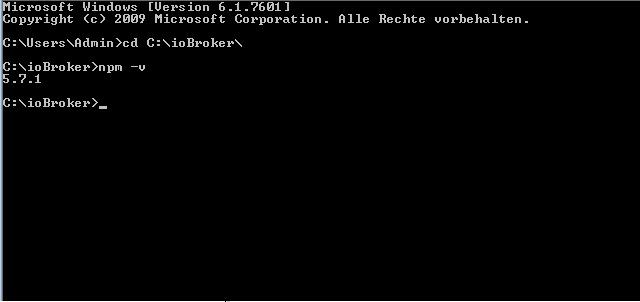
habe es so noch einmal geprüft:
6512_error_3.png -
Ich hab das jetzt schon öfter gelesen… und immer ist es die 5.6.0, die fälschlicherweise erkannt wird... Bin mir gerade nicht sicher, ob es auch immer Windows ist.
Welche Version vom JS-Controller hast du? Ich erinnere mich, dass wir die Meldung mal angepasst haben, sollte etwas anders aussehen als in deinem Screenshot.
-
Das komisch ist auch der Befehl "npm i -g npm@>=5.7.1" läuft durch und wird auch erkannt. Aber die Admin Console scheint was anderes zu erkennen.
Problem nach einem Neustart, das alle Adapter nicht mehr als installiert angezeigt werden, sind aber in der Instanzen Übersicht noch drin.
-
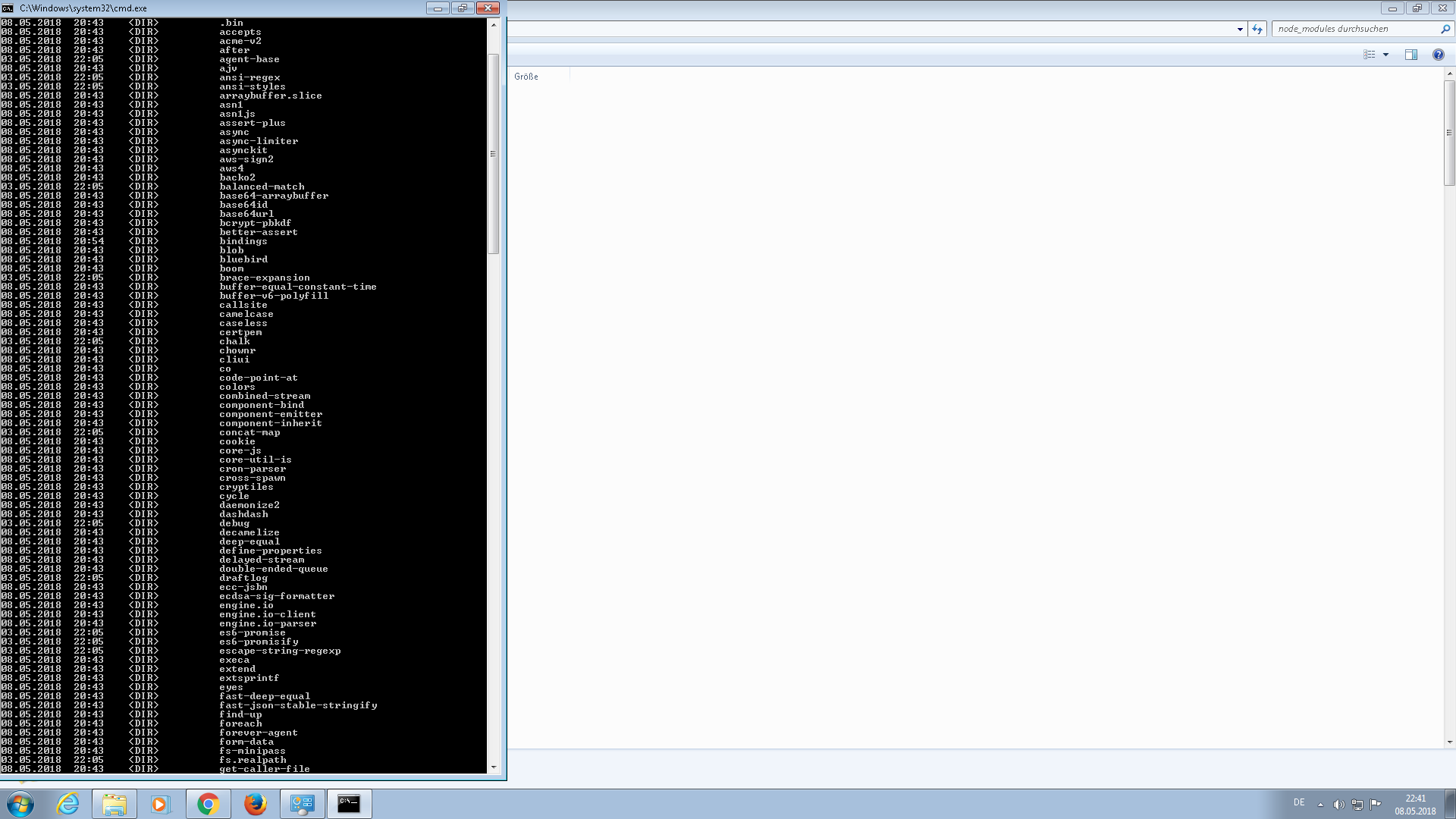
Findest du die entsprechenden Adapterordner noch in c:\iobroker\node_modules ?
Dann kannst du in jedem davon mal
npm install --productionausführen und es sollte ohne den Check nochmal installiert werden.
Aber mal ehrlich: Einfach so (im Urlaub) passiert das nicht. Du hast doch irgendein Update installiert, ich tippe auf einen JS-Controller, der noch nicht als stable freigegeben wurde?!
-
Hallo,
nein da befindet sich auch kein Adapter Ordner mehr drin.
Das war nicht der fall, kann sich das npm Paket selber aktualisieren?
Aber mal ehrlich: Einfach so (im Urlaub) passiert das nicht. Du hast doch irgendein Update installiert, ich tippe auf einen JS-Controller, der noch nicht als stable freigegeben wurde?! `
Gruß
Damich
6512_error4.png -
Das war nicht der fall, kann sich das npm Paket selber aktualisieren? `
iobroker bzw. die Adapter werden nicht einfach so aktualisiert bzw. neu installiert. Da muss zumindest ein Update, Installation, Backup, o.ä. manuell angestoßen worden sein.Hallo,
nein da befindet sich auch kein Adapter Ordner mehr drin. `
Das sehe ich auf deinem Screenshot aber nicht, weil du nicht bis "i" runtergescrollt hast ;) Die Ordner beginnen alle mit "iobroker."…
Und wenn die wirklich nicht mehr da sind, im Ordner C:\iobroker für jeden fehlenden Adapter
npm install iobroker.adaptername --productionausführen, wobei du natürlich adaptername durch den Adapternamen ersetzen musst.
-
-
Hallo,
Dann musst du die Adapter wohl so installieren wie ich im letzten Post beschrieben habe. Kanns aber immer noch nicht nachvollziehen :?
Oder aktualisiere NPM nochmal:
npm i -g npm@latestIch hab 5.8.0 und es wird 5.8.0 erkannt `
Danke für die schnelle und freundliche Hilfe. Jetzt funktioniert alles wieder.
Gruß
Damich
-
Hallo,
nein bei mir wird jetzt per Terminal 5.6.0 angezeigt, was laut Debug nicht reichen würde da es ja mindestens 5.7.1 sein soll.
Verstehe auch nicht was da schief läuft. Aber die Hauptsache ist das alle Adapter erstmal laufen. Eine genauere Fehlersuche werde ich dann am Wochenende machen.
Gruß
Damich



Hey! Du scheinst an dieser Unterhaltung interessiert zu sein, hast aber noch kein Konto.
Hast du es satt, bei jedem Besuch durch die gleichen Beiträge zu scrollen? Wenn du dich für ein Konto anmeldest, kommst du immer genau dorthin zurück, wo du zuvor warst, und kannst dich über neue Antworten benachrichtigen lassen (entweder per E-Mail oder Push-Benachrichtigung). Du kannst auch Lesezeichen speichern und Beiträge positiv bewerten, um anderen Community-Mitgliedern deine Wertschätzung zu zeigen.
Mit deinem Input könnte dieser Beitrag noch besser werden 💗
Registrieren Anmelden431
Online33.0k
Benutzer83.6k
Themen1.3m
Beiträge