




BSB-LAN Adapter Funktioniert nach iobroker update nicht.
-
======== Start marking the full check here =========
Skript v.2023-04-16

*** BASE SYSTEM ***
Model           : Raspberry Pi 4 Model B Rev 1.4
Architecture    : aarch64
Docker          : false
Virtualization  : none
Distributor ID: Debian
Description:    Debian GNU/Linux 11 (bullseye)
Release:        11
Codename:       bullseye

PRETTY_NAME="Debian GNU/Linux 11 (bullseye)"
NAME="Debian GNU/Linux"
VERSION_ID="11"
VERSION="11 (bullseye)"
VERSION_CODENAME=bullseye
ID=debian
HOME_URL="https://www.debian.org/"
SUPPORT_URL="https://www.debian.org/support"
BUG_REPORT_URL="https://bugs.debian.org/"

Systemuptime and Load:
 09:48:21 up 22:50,  1 user,  load average: 0.28, 0.28, 0.18
CPU threads: 4

Raspberry only:
throttled=0x0
Other values than 0x0 hint to temperature/voltage problems
temp=46.2'C
volt=0.9060V

*** Time and Time Zones ***
               Local time: Mon 2023-05-29 09:48:21 CEST
           Universal time: Mon 2023-05-29 07:48:21 UTC
                 RTC time: n/a
                Time zone: Europe/Berlin (CEST, +0200)
System clock synchronized: yes
              NTP service: active
          RTC in local TZ: no

*** User and Groups ***
pi
/home/pi
pi adm dialout cdrom sudo audio video plugdev games users input render netdev gpio i2c spi iobroker

*** X-Server-Setup ***
X-Server:       false
Desktop:
Terminal:       tty
Boot Target:    multi-user.target

*** MEMORY ***
               total        used        free      shared  buff/cache   available
Mem:            7.6G        409M        6.5G        1.0M        738M        7.1G
Swap:            99M          0B         99M
Total:          7.7G        409M        6.6G

         7635 M total memory
          409 M used memory
          637 M active memory
          391 M inactive memory
         6487 M free memory
           65 M buffer memory
          672 M swap cache
           99 M total swap
            0 M used swap
           99 M free swap

Raspberry only:
oom events: 0
lifetime oom required: 0 Mbytes
total time in oom handler: 0 ms
max time spent in oom handler: 0 ms

*** FILESYSTEM ***
Filesystem     Type      Size  Used Avail Use% Mounted on
/dev/root      ext4      230G  2.9G  217G   2% /
devtmpfs       devtmpfs  3.5G     0  3.5G   0% /dev
tmpfs          tmpfs     3.8G     0  3.8G   0% /dev/shm
tmpfs          tmpfs     1.5G  1.1M  1.5G   1% /run
tmpfs          tmpfs     5.0M  4.0K  5.0M   1% /run/lock
/dev/sda1      vfat      255M   51M  205M  20% /boot
tmpfs          tmpfs     764M     0  764M   0% /run/user/1000

Messages concerning ext4 filesystem in dmesg:
[Sun May 28 10:57:27 2023] Kernel command line: coherent_pool=1M 8250.nr_uarts=0 snd_bcm2835.enable_headphones=0 snd_bcm2835.enable_headphones=1 snd_bcm2835.enable_hdmi=1 snd_bcm2835.enable_hdmi=0  smsc95xx.macaddr=DC:A6:32:C2:4C:1A vc_mem.mem_base=0x3eb00000 vc_mem.mem_size=0x3ff00000  console=ttyS0,115200 console=tty1 root=PARTUUID=84ea2d7e-02 rootfstype=ext4 fsck.repair=yes rootwait
[Sun May 28 10:57:29 2023] EXT4-fs (sda2): mounted filesystem with ordered data mode. Quota mode: none.
[Sun May 28 10:57:29 2023] VFS: Mounted root (ext4 filesystem) readonly on device 8:2.
[Sun May 28 10:57:30 2023] EXT4-fs (sda2): re-mounted. Quota mode: none.

Show mounted filesystems (real ones only):
TARGET  SOURCE    FSTYPE OPTIONS
/       /dev/sda2 ext4   rw,noatime
`-/boot /dev/sda1 vfat   rw,relatime,fmask=0022,dmask=0022,codepage=437,iocharset=ascii,shortname=mixed,errors=remount-ro

Files in neuralgic directories:

/var:
488M    /var/
183M    /var/cache
178M    /var/cache/apt
155M    /var/lib
130M    /var/lib/apt/lists

Archived and active journals take up 48.0M in the file system.

/opt/iobroker/backups:
4.7M    /opt/iobroker/backups/

/opt/iobroker/iobroker-data:
47M     /opt/iobroker/iobroker-data/
17M     /opt/iobroker/iobroker-data/backup-objects
15M     /opt/iobroker/iobroker-data/files
13M     /opt/iobroker/iobroker-data/files/admin.admin/custom/static/js
13M     /opt/iobroker/iobroker-data/files/admin.admin/custom/static

The five largest files in iobroker-data are:
11M     /opt/iobroker/iobroker-data/objects.jsonl
6.3M    /opt/iobroker/iobroker-data/files/admin.admin/custom/static/js/vendors-node_modules_iobroker_adapter-react-v5_assets_devices_parseNames_js-node_modules_iobr-99c23e.847b8ad9.chunk.js.map
5.3M    /opt/iobroker/iobroker-data/states.jsonl
2.8M    /opt/iobroker/iobroker-data/files/admin.admin/custom/static/js/vendors-node_modules_iobroker_adapter-react-v5_assets_devices_parseNames_js-node_modules_iobr-99c23e.847b8ad9.chunk.js
1.6M    /opt/iobroker/iobroker-data/files/admin.admin/custom/static/js/vendors-node_modules_mui_material_Accordion_index_js-node_modules_mui_material_AccordionDetai-57e02d.0886b730.chunk.js.map

*** NodeJS-Installation ***

/usr/bin/nodejs         v18.16.0
/usr/local/bin/node             v18.16.0
/usr/local/bin/npm              9.6.7
/usr/local/bin/npx              9.6.7
*** nodejs is NOT correctly installed ***

nodejs:
  Installed: 18.16.0-deb-1nodesource1
  Candidate: 18.16.0-deb-1nodesource1
  Version table:
 *** 18.16.0-deb-1nodesource1 500
        500 https://deb.nodesource.com/node_18.x bullseye/main arm64 Packages
        100 /var/lib/dpkg/status
     12.22.12~dfsg-1~deb11u4 500
        500 http://security.debian.org/debian-security bullseye-security/main arm64 Packages
     12.22.12~dfsg-1~deb11u3 500
        500 http://deb.debian.org/debian bullseye/main arm64 Packages

Temp directories causing npm8 problem: 0
No problems detected

*** ioBroker-Installation ***

ioBroker Status
iobroker is running on this host.


Objects type: jsonl
States  type: jsonl

MULTIHOSTSERVICE/enabled: false

Core adapters versions
js-controller:  4.0.24
admin:          6.3.5
javascript:     "javascript" not found

Adapters from github:   0

Adapter State
+ system.adapter.admin.0                  : admin                 : iobroker-2                               -  enabled, port: 8081, bind: 0.0.0.0, run as: admin
+ system.adapter.backitup.0               : backitup              : iobroker-2                               -  enabled
+ system.adapter.bsblan.0                 : bsblan                : iobroker-2                               -  enabled
+ system.adapter.discovery.0              : discovery             : iobroker-2                               -  enabled

+ instance is alive

Enabled adapters with bindings
+ system.adapter.admin.0                  : admin                 : iobroker-2                               -  enabled, port: 8081, bind: 0.0.0.0, run as: admin

ioBroker-Repositories
stable        : http://download.iobroker.net/sources-dist.json
beta          : http://download.iobroker.net/sources-dist-latest.json

Active repo(s): stable

Installed ioBroker-Instances
Used repository: stable
Adapter    "admin"        : 6.3.5    , installed 6.3.5
Adapter    "backitup"     : 2.6.19   , installed 2.6.19
Adapter    "bsblan"       : 0.2.2    , installed 0.2.2
Adapter    "discovery"    : 3.1.0    , installed 3.1.0
Controller "js-controller": 4.0.24   , installed 4.0.24

Objects and States
Please stand by - This may take a while
Objects:        156
States:         118

*** OS-Repositories and Updates ***
Hit:1 http://archive.raspberrypi.org/debian bullseye InRelease
Hit:2 http://security.debian.org/debian-security bullseye-security InRelease
Hit:3 http://deb.debian.org/debian bullseye InRelease
Hit:4 https://deb.nodesource.com/node_18.x bullseye InRelease
Hit:5 http://deb.debian.org/debian bullseye-updates InRelease
Reading package lists...
Pending Updates: 0

*** Listening Ports ***
Active Internet connections (only servers)
Proto Recv-Q Send-Q Local Address           Foreign Address         State       User       Inode      PID/Program name
tcp        0      0 127.0.0.1:9001          0.0.0.0:*               LISTEN      1001       14523      507/iobroker.js-con
tcp        0      0 127.0.0.1:9000          0.0.0.0:*               LISTEN      1001       14530      507/iobroker.js-con
tcp        0      0 0.0.0.0:22              0.0.0.0:*               LISTEN      0          1524       535/sshd: /usr/sbin
tcp6       0      0 :::22                   :::*                    LISTEN      0          1526       535/sshd: /usr/sbin
tcp6       0      0 :::8081                 :::*                    LISTEN      1001       14108      590/io.admin.0
udp        0      0 0.0.0.0:52747           0.0.0.0:*                           108        14452      396/avahi-daemon: r
udp        0      0 0.0.0.0:68              0.0.0.0:*                           0          14563      789/dhcpcd
udp        0      0 0.0.0.0:5353            0.0.0.0:*                           108        14450      396/avahi-daemon: r
udp6       0      0 :::60850                :::*                                108        14453      396/avahi-daemon: r
udp6       0      0 :::546                  :::*                                0          14574      789/dhcpcd
udp6       0      0 :::5353                 :::*                                108        14451      396/avahi-daemon: r

*** Log File - Last 25 Lines ***

    at Request.emit (node:events:513:28)
    at Request.onRequestError (/opt/iobroker/node_modules/request/request.js:877:8)
    at ClientRequest.emit (node:events:525:35)
    at Socket.socketOnData (node:_http_client:551:9)
    at Socket.emit (node:events:513:28)
    at addChunk (node:internal/streams/readable:324:12)
    at readableAddChunk (node:internal/streams/readable:297:9)
    at Readable.push (node:internal/streams/readable:234:10)
    at TCP.onStreamRead (node:internal/stream_base_commons:190:23)
2023-05-29 09:49:07.666  - info: bsblan.0 (1017) Setup new objects (700) ...
2023-05-29 09:49:08.773  - error: bsblan.0 (1017) Error: Parse Error: Invalid header value char
2023-05-29 09:49:08.773  - error: bsblan.0 (1017) RequestError: Error: Parse Error: Invalid header value char
    at new RequestError (/opt/iobroker/node_modules/request-promise-core/lib/errors.js:14:15)
    at plumbing.callback (/opt/iobroker/node_modules/request-promise-core/lib/plumbing.js:87:29)
    at Request.RP$callback [as _callback] (/opt/iobroker/node_modules/request-promise-core/lib/plumbing.js:46:31)
    at self.callback (/opt/iobroker/node_modules/request/request.js:185:22)
    at Request.emit (node:events:513:28)
    at Request.onRequestError (/opt/iobroker/node_modules/request/request.js:877:8)
    at ClientRequest.emit (node:events:525:35)
    at Socket.socketOnData (node:_http_client:551:9)
    at Socket.emit (node:events:513:28)
    at addChunk (node:internal/streams/readable:324:12)
    at readableAddChunk (node:internal/streams/readable:297:9)
    at Readable.push (node:internal/streams/readable:234:10)
    at TCP.onStreamRead (node:internal/stream_base_commons:190:23)
============ Mark until here for C&P =============
iob diag has finished.
Press any key for a summary
======================= SUMMARY =======================
                     v.2023-04-16


Operatingsystem:        Debian GNU/Linux 11 (bullseye)
Kernel:                 6.1.29-v8+
Installation:           Native
Timezone:               Europe/Berlin (CEST, +0200)
User-ID:                1000
X-Server:               false
Boot Target:            multi-user.target

Pending OS-Updates:     0
Pending iob updates:    0

Nodejs-Installation:    /usr/bin/nodejs         v18.16.0
                        /usr/local/bin/node             v18.16.0
                        /usr/local/bin/npm              9.6.7
                        /usr/local/bin/npx              9.6.7

Recommended versions are nodejs 18.x.y and npm 9.x.y
*** nodejs is NOT correctly installed ***

MEMORY:
               total        used        free      shared  buff/cache   available
Mem:            7.6G        411M        6.5G        1.0M        738M        7.1G
Swap:            99M          0B         99M
Total:          7.7G        411M        6.6G

Active iob-Instances:   5
Active repo(s): stable

ioBroker Core:          js-controller           4.0.24
                        admin                   6.3.5

ioBroker Status:        iobroker is running on this host.


Objects type: jsonl
States  type: jsonl

Status admin and web instance:
+ system.adapter.admin.0                  : admin                 : iobroker-2                               -  enabled, port: 8081, bind: 0.0.0.0, run as: admin

Objects:                156
States:                 118

Size of iob-Database:

11M     /opt/iobroker/iobroker-data/objects.jsonl
5.3M    /opt/iobroker/iobroker-data/states.jsonl


=================== END OF SUMMARY ====================
pi@iobroker-2:~ $
-
@thomas-braun
Hallo, wie und wo kann man das Erkennen?
Vielen Dank schon mal für die Info: -
@thomas-braun
Hallo, wie und wo kann man das Erkennen?
Vielen Dank schon mal für die Info:An der entsprechenden Meldung von
iob diag?Nodejs-Installation: /usr/bin/nodejs v18.16.0 /usr/local/bin/node v18.16.0 /usr/local/bin/npm 9.6.7 /usr/local/bin/npx 9.6.7 Recommended versions are nodejs 18.x.y and npm 9.x.y *** nodejs is NOT correctly installed ***Lösch den Kram einfach aus den falschen Verzeichnissen und installier nodejs nie anders als via Paketmanager 'apt'.
iob stop sudo rm /usr/local/bin/n* sudo reboot -
An der entsprechenden Meldung von
iob diag?Nodejs-Installation: /usr/bin/nodejs v18.16.0 /usr/local/bin/node v18.16.0 /usr/local/bin/npm 9.6.7 /usr/local/bin/npx 9.6.7 Recommended versions are nodejs 18.x.y and npm 9.x.y *** nodejs is NOT correctly installed ***Lösch den Kram einfach aus den falschen Verzeichnissen und installier nodejs nie anders als via Paketmanager 'apt'.
iob stop sudo rm /usr/local/bin/n* sudo reboot@thomas-braun
Vielen Dank, aber warum ist das immer nach einer Neuinstallation, habe es x-mal versucht.
Ich bin wohl zu alt dafür.
Schönes rest WoEnd noch. -
@thomas-braun
Vielen Dank, aber warum ist das immer nach einer Neuinstallation, habe es x-mal versucht.
Ich bin wohl zu alt dafür.
Schönes rest WoEnd noch.@fischerjedd sagte in BSB-LAN Adapter Funktioniert nach iobroker update nicht.:
aber warum ist das immer nach einer Neuinstallation, habe es x-mal versucht.
Du machst irgendwas anders als vorgesehen.
Schau in meiner Signatur nach wie man nodejs (und auch andere Softwarepakete) richtig via Paketmanager installiert. Leider sind halt auch viele dämliche/falsche/behämmerteAnleitungenMachwerke draußen unterwegs. -
@fischerjedd sagte in BSB-LAN Adapter Funktioniert nach iobroker update nicht.:
aber warum ist das immer nach einer Neuinstallation, habe es x-mal versucht.
Du machst irgendwas anders als vorgesehen.
Schau in meiner Signatur nach wie man nodejs (und auch andere Softwarepakete) richtig via Paketmanager installiert. Leider sind halt auch viele dämliche/falsche/behämmerteAnleitungenMachwerke draußen unterwegs.@thomas-braun
OK werde ich so machen.
Vielen Dank nochmal für die schnelle Hilfe. -
@thomas-braun
OK werde ich so machen.
Vielen Dank nochmal für die schnelle Hilfe.@fischerjedd
======== Start marking the full check here =========
Skript v.2023-04-16

*** BASE SYSTEM ***
Model           : Raspberry Pi 4 Model B Rev 1.4
Architecture    : aarch64
Docker          : false
Virtualization  : none
Distributor ID: Debian
Description:    Debian GNU/Linux 11 (bullseye)
Release:        11
Codename:       bullseye

PRETTY_NAME="Debian GNU/Linux 11 (bullseye)"
NAME="Debian GNU/Linux"
VERSION_ID="11"
VERSION="11 (bullseye)"
VERSION_CODENAME=bullseye
ID=debian
HOME_URL="https://www.debian.org/"
SUPPORT_URL="https://www.debian.org/support"
BUG_REPORT_URL="https://bugs.debian.org/"

Systemuptime and Load:
 11:20:51 up 18 min,  3 users,  load average: 0.22, 0.23, 0.21
CPU threads: 4

Raspberry only:
throttled=0x0
Other values than 0x0 hint to temperature/voltage problems
temp=47.2'C
volt=0.9060V

*** Time and Time Zones ***
               Local time: Mon 2023-05-29 11:20:52 CEST
           Universal time: Mon 2023-05-29 09:20:52 UTC
                 RTC time: n/a
                Time zone: Europe/Berlin (CEST, +0200)
System clock synchronized: yes
              NTP service: active
          RTC in local TZ: no

*** User and Groups ***
pi
/home/pi
pi adm dialout cdrom sudo audio video plugdev games users input render netdev gpio i2c spi iobroker

*** X-Server-Setup ***
X-Server:       false
Desktop:
Terminal:       tty
Boot Target:    multi-user.target

*** MEMORY ***
               total        used        free      shared  buff/cache   available
Mem:            7.6G        365M        6.7G        1.0M        540M        7.2G
Swap:            99M          0B         99M
Total:          7.7G        365M        6.8G

         7635 M total memory
          365 M used memory
          503 M active memory
          299 M inactive memory
         6729 M free memory
           28 M buffer memory
          512 M swap cache
           99 M total swap
            0 M used swap
           99 M free swap

Raspberry only:
oom events: 0
lifetime oom required: 0 Mbytes
total time in oom handler: 0 ms
max time spent in oom handler: 0 ms

*** FILESYSTEM ***
Filesystem     Type      Size  Used Avail Use% Mounted on
/dev/root      ext4      230G  2.8G  217G   2% /
devtmpfs       devtmpfs  3.5G     0  3.5G   0% /dev
tmpfs          tmpfs     3.8G     0  3.8G   0% /dev/shm
tmpfs          tmpfs     1.5G  1.2M  1.5G   1% /run
tmpfs          tmpfs     5.0M  4.0K  5.0M   1% /run/lock
/dev/sda1      vfat      255M   51M  205M  20% /boot
tmpfs          tmpfs     764M     0  764M   0% /run/user/1000

Messages concerning ext4 filesystem in dmesg:
[Mon May 29 11:01:58 2023] Kernel command line: coherent_pool=1M 8250.nr_uarts=0 snd_bcm2835.enable_headphones=0 snd_bcm2835.enable_headphones=1 snd_bcm2835.enable_hdmi=1 snd_bcm2835.enable_hdmi=0  smsc95xx.macaddr=DC:A6:32:C2:4C:1A vc_mem.mem_base=0x3eb00000 vc_mem.mem_size=0x3ff00000  console=ttyS0,115200 console=tty1 root=PARTUUID=84ea2d7e-02 rootfstype=ext4 fsck.repair=yes rootwait
[Mon May 29 11:02:00 2023] EXT4-fs (sda2): mounted filesystem with ordered data mode. Quota mode: none.
[Mon May 29 11:02:00 2023] VFS: Mounted root (ext4 filesystem) readonly on device 8:2.
[Mon May 29 11:02:01 2023] EXT4-fs (sda2): re-mounted. Quota mode: none.

Show mounted filesystems (real ones only):
TARGET  SOURCE    FSTYPE OPTIONS
/       /dev/sda2 ext4   rw,noatime
`-/boot /dev/sda1 vfat   rw,relatime,fmask=0022,dmask=0022,codepage=437,iocharset=ascii,shortname=mixed,errors=remount-ro

Files in neuralgic directories:

/var:
513M    /var/
183M    /var/cache
178M    /var/cache/apt
155M    /var/lib
130M    /var/lib/apt/lists

Archived and active journals take up 72.0M in the file system.

/opt/iobroker/backups:
4.7M    /opt/iobroker/backups/

/opt/iobroker/iobroker-data:
36M     /opt/iobroker/iobroker-data/
17M     /opt/iobroker/iobroker-data/backup-objects
15M     /opt/iobroker/iobroker-data/files
13M     /opt/iobroker/iobroker-data/files/admin.admin/custom/static/js
13M     /opt/iobroker/iobroker-data/files/admin.admin/custom/static

The five largest files in iobroker-data are:
6.3M    /opt/iobroker/iobroker-data/files/admin.admin/custom/static/js/vendors-node_modules_iobroker_adapter-react-v5_assets_devices_parseNames_js-node_modules_iobr-99c23e.847b8ad9.chunk.js.map
4.2M    /opt/iobroker/iobroker-data/objects.jsonl
2.8M    /opt/iobroker/iobroker-data/files/admin.admin/custom/static/js/vendors-node_modules_iobroker_adapter-react-v5_assets_devices_parseNames_js-node_modules_iobr-99c23e.847b8ad9.chunk.js
1.6M    /opt/iobroker/iobroker-data/files/admin.admin/custom/static/js/vendors-node_modules_mui_material_Accordion_index_js-node_modules_mui_material_AccordionDetai-57e02d.0886b730.chunk.js.map
1.1M    /opt/iobroker/iobroker-data/backup-objects/2023-05-29_08-57_objects.jsonl.gz

*** NodeJS-Installation ***

/usr/bin/nodejs         v18.16.0
/usr/bin/node           v18.16.0
/usr/bin/npm            9.5.1
/usr/bin/npx            9.5.1


nodejs:
  Installed: 18.16.0-deb-1nodesource1
  Candidate: 18.16.0-deb-1nodesource1
  Version table:
 *** 18.16.0-deb-1nodesource1 500
        500 https://deb.nodesource.com/node_18.x bullseye/main arm64 Packages
        100 /var/lib/dpkg/status
     12.22.12~dfsg-1~deb11u4 500
        500 http://security.debian.org/debian-security bullseye-security/main arm64 Packages
     12.22.12~dfsg-1~deb11u3 500
        500 http://deb.debian.org/debian bullseye/main arm64 Packages

Temp directories causing npm8 problem: 0
No problems detected

*** ioBroker-Installation ***

ioBroker Status
iobroker is running on this host.


Objects type: jsonl
States  type: jsonl

MULTIHOSTSERVICE/enabled: false

Core adapters versions
js-controller:  4.0.24
admin:          6.3.5
javascript:     "javascript" not found

Adapters from github:   0

Adapter State
+ system.adapter.admin.0                  : admin                 : iobroker-2                               -  enabled, port: 8081, bind: 0.0.0.0, run as: admin
+ system.adapter.backitup.0               : backitup              : iobroker-2                               -  enabled
+ system.adapter.bsblan.0                 : bsblan                : iobroker-2                               -  enabled
+ system.adapter.discovery.0              : discovery             : iobroker-2                               -  enabled

+ instance is alive

Enabled adapters with bindings
+ system.adapter.admin.0                  : admin                 : iobroker-2                               -  enabled, port: 8081, bind: 0.0.0.0, run as: admin

ioBroker-Repositories
stable        : http://download.iobroker.net/sources-dist.json
beta          : http://download.iobroker.net/sources-dist-latest.json

Active repo(s): stable

Installed ioBroker-Instances
Used repository: stable
Adapter    "admin"        : 6.3.5    , installed 6.3.5
Adapter    "backitup"     : 2.6.19   , installed 2.6.19
Adapter    "bsblan"       : 0.2.2    , installed 0.2.2
Adapter    "discovery"    : 3.1.0    , installed 3.1.0
Controller "js-controller": 4.0.24   , installed 4.0.24

Objects and States
Please stand by - This may take a while
Objects:        156
States:         118

*** OS-Repositories and Updates ***
Hit:1 http://security.debian.org/debian-security bullseye-security InRelease
Hit:2 http://deb.debian.org/debian bullseye InRelease
Hit:3 http://archive.raspberrypi.org/debian bullseye InRelease
Hit:4 http://deb.debian.org/debian bullseye-updates InRelease
Hit:5 https://deb.nodesource.com/node_18.x bullseye InRelease
Reading package lists...
Pending Updates: 0

*** Listening Ports ***
Active Internet connections (only servers)
Proto Recv-Q Send-Q Local Address           Foreign Address         State       User       Inode      PID/Program name
tcp        0      0 127.0.0.1:9001          0.0.0.0:*               LISTEN      1001       12288      507/iobroker.js-con
tcp        0      0 127.0.0.1:9000          0.0.0.0:*               LISTEN      1001       15367      507/iobroker.js-con
tcp        0      0 0.0.0.0:22              0.0.0.0:*               LISTEN      0          12755      541/sshd: /usr/sbin
tcp6       0      0 :::8081                 :::*                    LISTEN      1001       15479      591/io.admin.0
tcp6       0      0 :::22                   :::*                    LISTEN      0          12766      541/sshd: /usr/sbin
udp        0      0 0.0.0.0:5353            0.0.0.0:*                           108        12623      398/avahi-daemon: r
udp        0      0 0.0.0.0:34353           0.0.0.0:*                           108        12625      398/avahi-daemon: r
udp        0      0 0.0.0.0:68              0.0.0.0:*                           0          1707       790/dhcpcd
udp6       0      0 :::45951                :::*                                108        12626      398/avahi-daemon: r
udp6       0      0 :::5353                 :::*                                108        12624      398/avahi-daemon: r
udp6       0      0 :::546                  :::*                                0          15415      790/dhcpcd

*** Log File - Last 25 Lines ***

    at Request.emit (node:events:513:28)
    at Request.onRequestError (/opt/iobroker/node_modules/request/request.js:877:8)
    at ClientRequest.emit (node:events:525:35)
    at Socket.socketOnData (node:_http_client:551:9)
    at Socket.emit (node:events:513:28)
    at addChunk (node:internal/streams/readable:324:12)
    at readableAddChunk (node:internal/streams/readable:297:9)
    at Readable.push (node:internal/streams/readable:234:10)
    at TCP.onStreamRead (node:internal/stream_base_commons:190:23)
2023-05-29 11:21:37.557  - info: bsblan.0 (4314) Setup new objects (700) ...
2023-05-29 11:21:38.587  - error: bsblan.0 (4314) Error: Parse Error: Invalid header value char
2023-05-29 11:21:38.587  - error: bsblan.0 (4314) RequestError: Error: Parse Error: Invalid header value char
    at new RequestError (/opt/iobroker/node_modules/request-promise-core/lib/errors.js:14:15)
    at plumbing.callback (/opt/iobroker/node_modules/request-promise-core/lib/plumbing.js:87:29)
    at Request.RP$callback [as _callback] (/opt/iobroker/node_modules/request-promise-core/lib/plumbing.js:46:31)
    at self.callback (/opt/iobroker/node_modules/request/request.js:185:22)
    at Request.emit (node:events:513:28)
    at Request.onRequestError (/opt/iobroker/node_modules/request/request.js:877:8)
    at ClientRequest.emit (node:events:525:35)
    at Socket.socketOnData (node:_http_client:551:9)
    at Socket.emit (node:events:513:28)
    at addChunk (node:internal/streams/readable:324:12)
    at readableAddChunk (node:internal/streams/readable:297:9)
    at Readable.push (node:internal/streams/readable:234:10)
    at TCP.onStreamRead (node:internal/stream_base_commons:190:23)
============ Mark until here for C&P =============
iob diag has finished.
Press any key for a summary
======================= SUMMARY =======================
                     v.2023-04-16


Operatingsystem:        Debian GNU/Linux 11 (bullseye)
Kernel:                 6.1.29-v8+
Installation:           Native
Timezone:               Europe/Berlin (CEST, +0200)
User-ID:                1000
X-Server:               false
Boot Target:            multi-user.target

Pending OS-Updates:     0
Pending iob updates:    0

Nodejs-Installation:    /usr/bin/nodejs         v18.16.0
                        /usr/bin/node           v18.16.0
                        /usr/bin/npm            9.5.1
                        /usr/bin/npx            9.5.1

Recommended versions are nodejs 18.x.y and npm 9.x.y
Your nodejs installation is correct

MEMORY:
               total        used        free      shared  buff/cache   available
Mem:            7.6G        362M        6.7G        1.0M        541M        7.2G
Swap:            99M          0B         99M
Total:          7.7G        362M        6.8G

Active iob-Instances:   5
Active repo(s): stable

ioBroker Core:          js-controller           4.0.24
                        admin                   6.3.5

ioBroker Status:        iobroker is running on this host.


Objects type: jsonl
States  type: jsonl

Status admin and web instance:
+ system.adapter.admin.0                  : admin                 : iobroker-2                               -  enabled, port: 8081, bind: 0.0.0.0, run as: admin

Objects:                156
States:                 118

Size of iob-Database:

4.2M    /opt/iobroker/iobroker-data/objects.jsonl
476K    /opt/iobroker/iobroker-data/states.jsonl


=================== END OF SUMMARY ====================
pi@iobroker-2:~ $
-
@fischerjedd
======== Start marking the full check here =========
Skript v.2023-04-16

*** BASE SYSTEM ***
Model           : Raspberry Pi 4 Model B Rev 1.4
Architecture    : aarch64
Docker          : false
Virtualization  : none
Distributor ID: Debian
Description:    Debian GNU/Linux 11 (bullseye)
Release:        11
Codename:       bullseye

PRETTY_NAME="Debian GNU/Linux 11 (bullseye)"
NAME="Debian GNU/Linux"
VERSION_ID="11"
VERSION="11 (bullseye)"
VERSION_CODENAME=bullseye
ID=debian
HOME_URL="https://www.debian.org/"
SUPPORT_URL="https://www.debian.org/support"
BUG_REPORT_URL="https://bugs.debian.org/"

Systemuptime and Load:
 11:20:51 up 18 min,  3 users,  load average: 0.22, 0.23, 0.21
CPU threads: 4

Raspberry only:
throttled=0x0
Other values than 0x0 hint to temperature/voltage problems
temp=47.2'C
volt=0.9060V

*** Time and Time Zones ***
               Local time: Mon 2023-05-29 11:20:52 CEST
           Universal time: Mon 2023-05-29 09:20:52 UTC
                 RTC time: n/a
                Time zone: Europe/Berlin (CEST, +0200)
System clock synchronized: yes
              NTP service: active
          RTC in local TZ: no

*** User and Groups ***
pi
/home/pi
pi adm dialout cdrom sudo audio video plugdev games users input render netdev gpio i2c spi iobroker

*** X-Server-Setup ***
X-Server:       false
Desktop:
Terminal:       tty
Boot Target:    multi-user.target

*** MEMORY ***
               total        used        free      shared  buff/cache   available
Mem:            7.6G        365M        6.7G        1.0M        540M        7.2G
Swap:            99M          0B         99M
Total:          7.7G        365M        6.8G

         7635 M total memory
          365 M used memory
          503 M active memory
          299 M inactive memory
         6729 M free memory
           28 M buffer memory
          512 M swap cache
           99 M total swap
            0 M used swap
           99 M free swap

Raspberry only:
oom events: 0
lifetime oom required: 0 Mbytes
total time in oom handler: 0 ms
max time spent in oom handler: 0 ms

*** FILESYSTEM ***
Filesystem     Type      Size  Used Avail Use% Mounted on
/dev/root      ext4      230G  2.8G  217G   2% /
devtmpfs       devtmpfs  3.5G     0  3.5G   0% /dev
tmpfs          tmpfs     3.8G     0  3.8G   0% /dev/shm
tmpfs          tmpfs     1.5G  1.2M  1.5G   1% /run
tmpfs          tmpfs     5.0M  4.0K  5.0M   1% /run/lock
/dev/sda1      vfat      255M   51M  205M  20% /boot
tmpfs          tmpfs     764M     0  764M   0% /run/user/1000

Messages concerning ext4 filesystem in dmesg:
[Mon May 29 11:01:58 2023] Kernel command line: coherent_pool=1M 8250.nr_uarts=0 snd_bcm2835.enable_headphones=0 snd_bcm2835.enable_headphones=1 snd_bcm2835.enable_hdmi=1 snd_bcm2835.enable_hdmi=0  smsc95xx.macaddr=DC:A6:32:C2:4C:1A vc_mem.mem_base=0x3eb00000 vc_mem.mem_size=0x3ff00000  console=ttyS0,115200 console=tty1 root=PARTUUID=84ea2d7e-02 rootfstype=ext4 fsck.repair=yes rootwait
[Mon May 29 11:02:00 2023] EXT4-fs (sda2): mounted filesystem with ordered data mode. Quota mode: none.
[Mon May 29 11:02:00 2023] VFS: Mounted root (ext4 filesystem) readonly on device 8:2.
[Mon May 29 11:02:01 2023] EXT4-fs (sda2): re-mounted. Quota mode: none.

Show mounted filesystems (real ones only):
TARGET  SOURCE    FSTYPE OPTIONS
/       /dev/sda2 ext4   rw,noatime
`-/boot /dev/sda1 vfat   rw,relatime,fmask=0022,dmask=0022,codepage=437,iocharset=ascii,shortname=mixed,errors=remount-ro

Files in neuralgic directories:

/var:
513M    /var/
183M    /var/cache
178M    /var/cache/apt
155M    /var/lib
130M    /var/lib/apt/lists

Archived and active journals take up 72.0M in the file system.

/opt/iobroker/backups:
4.7M    /opt/iobroker/backups/

/opt/iobroker/iobroker-data:
36M     /opt/iobroker/iobroker-data/
17M     /opt/iobroker/iobroker-data/backup-objects
15M     /opt/iobroker/iobroker-data/files
13M     /opt/iobroker/iobroker-data/files/admin.admin/custom/static/js
13M     /opt/iobroker/iobroker-data/files/admin.admin/custom/static

The five largest files in iobroker-data are:
6.3M    /opt/iobroker/iobroker-data/files/admin.admin/custom/static/js/vendors-node_modules_iobroker_adapter-react-v5_assets_devices_parseNames_js-node_modules_iobr-99c23e.847b8ad9.chunk.js.map
4.2M    /opt/iobroker/iobroker-data/objects.jsonl
2.8M    /opt/iobroker/iobroker-data/files/admin.admin/custom/static/js/vendors-node_modules_iobroker_adapter-react-v5_assets_devices_parseNames_js-node_modules_iobr-99c23e.847b8ad9.chunk.js
1.6M    /opt/iobroker/iobroker-data/files/admin.admin/custom/static/js/vendors-node_modules_mui_material_Accordion_index_js-node_modules_mui_material_AccordionDetai-57e02d.0886b730.chunk.js.map
1.1M    /opt/iobroker/iobroker-data/backup-objects/2023-05-29_08-57_objects.jsonl.gz

*** NodeJS-Installation ***

/usr/bin/nodejs         v18.16.0
/usr/bin/node           v18.16.0
/usr/bin/npm            9.5.1
/usr/bin/npx            9.5.1


nodejs:
  Installed: 18.16.0-deb-1nodesource1
  Candidate: 18.16.0-deb-1nodesource1
  Version table:
 *** 18.16.0-deb-1nodesource1 500
        500 https://deb.nodesource.com/node_18.x bullseye/main arm64 Packages
        100 /var/lib/dpkg/status
     12.22.12~dfsg-1~deb11u4 500
        500 http://security.debian.org/debian-security bullseye-security/main arm64 Packages
     12.22.12~dfsg-1~deb11u3 500
        500 http://deb.debian.org/debian bullseye/main arm64 Packages

Temp directories causing npm8 problem: 0
No problems detected

*** ioBroker-Installation ***

ioBroker Status
iobroker is running on this host.


Objects type: jsonl
States  type: jsonl

MULTIHOSTSERVICE/enabled: false

Core adapters versions
js-controller:  4.0.24
admin:          6.3.5
javascript:     "javascript" not found

Adapters from github:   0

Adapter State
+ system.adapter.admin.0                  : admin                 : iobroker-2                               -  enabled, port: 8081, bind: 0.0.0.0, run as: admin
+ system.adapter.backitup.0               : backitup              : iobroker-2                               -  enabled
+ system.adapter.bsblan.0                 : bsblan                : iobroker-2                               -  enabled
+ system.adapter.discovery.0              : discovery             : iobroker-2                               -  enabled

+ instance is alive

Enabled adapters with bindings
+ system.adapter.admin.0                  : admin                 : iobroker-2                               -  enabled, port: 8081, bind: 0.0.0.0, run as: admin

ioBroker-Repositories
stable        : http://download.iobroker.net/sources-dist.json
beta          : http://download.iobroker.net/sources-dist-latest.json

Active repo(s): stable

Installed ioBroker-Instances
Used repository: stable
Adapter    "admin"        : 6.3.5    , installed 6.3.5
Adapter    "backitup"     : 2.6.19   , installed 2.6.19
Adapter    "bsblan"       : 0.2.2    , installed 0.2.2
Adapter    "discovery"    : 3.1.0    , installed 3.1.0
Controller "js-controller": 4.0.24   , installed 4.0.24

Objects and States
Please stand by - This may take a while
Objects:        156
States:         118

*** OS-Repositories and Updates ***
Hit:1 http://security.debian.org/debian-security bullseye-security InRelease
Hit:2 http://deb.debian.org/debian bullseye InRelease
Hit:3 http://archive.raspberrypi.org/debian bullseye InRelease
Hit:4 http://deb.debian.org/debian bullseye-updates InRelease
Hit:5 https://deb.nodesource.com/node_18.x bullseye InRelease
Reading package lists...
Pending Updates: 0

*** Listening Ports ***
Active Internet connections (only servers)
Proto Recv-Q Send-Q Local Address           Foreign Address         State       User       Inode      PID/Program name
tcp        0      0 127.0.0.1:9001          0.0.0.0:*               LISTEN      1001       12288      507/iobroker.js-con
tcp        0      0 127.0.0.1:9000          0.0.0.0:*               LISTEN      1001       15367      507/iobroker.js-con
tcp        0      0 0.0.0.0:22              0.0.0.0:*               LISTEN      0          12755      541/sshd: /usr/sbin
tcp6       0      0 :::8081                 :::*                    LISTEN      1001       15479      591/io.admin.0
tcp6       0      0 :::22                   :::*                    LISTEN      0          12766      541/sshd: /usr/sbin
udp        0      0 0.0.0.0:5353            0.0.0.0:*                           108        12623      398/avahi-daemon: r
udp        0      0 0.0.0.0:34353           0.0.0.0:*                           108        12625      398/avahi-daemon: r
udp        0      0 0.0.0.0:68              0.0.0.0:*                           0          1707       790/dhcpcd
udp6       0      0 :::45951                :::*                                108        12626      398/avahi-daemon: r
udp6       0      0 :::5353                 :::*                                108        12624      398/avahi-daemon: r
udp6       0      0 :::546                  :::*                                0          15415      790/dhcpcd

*** Log File - Last 25 Lines ***

    at Request.emit (node:events:513:28)
    at Request.onRequestError (/opt/iobroker/node_modules/request/request.js:877:8)
    at ClientRequest.emit (node:events:525:35)
    at Socket.socketOnData (node:_http_client:551:9)
    at Socket.emit (node:events:513:28)
    at addChunk (node:internal/streams/readable:324:12)
    at readableAddChunk (node:internal/streams/readable:297:9)
    at Readable.push (node:internal/streams/readable:234:10)
    at TCP.onStreamRead (node:internal/stream_base_commons:190:23)
2023-05-29 11:21:37.557  - info: bsblan.0 (4314) Setup new objects (700) ...
2023-05-29 11:21:38.587  - error: bsblan.0 (4314) Error: Parse Error: Invalid header value char
2023-05-29 11:21:38.587  - error: bsblan.0 (4314) RequestError: Error: Parse Error: Invalid header value char
    at new RequestError (/opt/iobroker/node_modules/request-promise-core/lib/errors.js:14:15)
    at plumbing.callback (/opt/iobroker/node_modules/request-promise-core/lib/plumbing.js:87:29)
    at Request.RP$callback [as _callback] (/opt/iobroker/node_modules/request-promise-core/lib/plumbing.js:46:31)
    at self.callback (/opt/iobroker/node_modules/request/request.js:185:22)
    at Request.emit (node:events:513:28)
    at Request.onRequestError (/opt/iobroker/node_modules/request/request.js:877:8)
    at ClientRequest.emit (node:events:525:35)
    at Socket.socketOnData (node:_http_client:551:9)
    at Socket.emit (node:events:513:28)
    at addChunk (node:internal/streams/readable:324:12)
    at readableAddChunk (node:internal/streams/readable:297:9)
    at Readable.push (node:internal/streams/readable:234:10)
    at TCP.onStreamRead (node:internal/stream_base_commons:190:23)
============ Mark until here for C&P =============
iob diag has finished.
Press any key for a summary
======================= SUMMARY =======================
                     v.2023-04-16


Operatingsystem:        Debian GNU/Linux 11 (bullseye)
Kernel:                 6.1.29-v8+
Installation:           Native
Timezone:               Europe/Berlin (CEST, +0200)
User-ID:                1000
X-Server:               false
Boot Target:            multi-user.target

Pending OS-Updates:     0
Pending iob updates:    0

Nodejs-Installation:    /usr/bin/nodejs         v18.16.0
                        /usr/bin/node           v18.16.0
                        /usr/bin/npm            9.5.1
                        /usr/bin/npx            9.5.1

Recommended versions are nodejs 18.x.y and npm 9.x.y
Your nodejs installation is correct

MEMORY:
               total        used        free      shared  buff/cache   available
Mem:            7.6G        362M        6.7G        1.0M        541M        7.2G
Swap:            99M          0B         99M
Total:          7.7G        362M        6.8G

Active iob-Instances:   5
Active repo(s): stable

ioBroker Core:          js-controller           4.0.24
                        admin                   6.3.5

ioBroker Status:        iobroker is running on this host.


Objects type: jsonl
States  type: jsonl

Status admin and web instance:
+ system.adapter.admin.0                  : admin                 : iobroker-2                               -  enabled, port: 8081, bind: 0.0.0.0, run as: admin

Objects:                156
States:                 118

Size of iob-Database:

4.2M    /opt/iobroker/iobroker-data/objects.jsonl
476K    /opt/iobroker/iobroker-data/states.jsonl


=================== END OF SUMMARY ====================
pi@iobroker-2:~ $
@fischerjedd
Ich mag es ja gar nicht sagen...
OK der Fehler mit nodejs ist weg, aber bsb-lan, da ist dieselbe Reaktion, auch nach
dem Deinstall und neu Install mit Neustart. -
@fischerjedd
Ich mag es ja gar nicht sagen...
OK der Fehler mit nodejs ist weg, aber bsb-lan, da ist dieselbe Reaktion, auch nach
dem Deinstall und neu Install mit Neustart.@fischerjedd
In dem Protokoll stehtRequestError: Fehler: Parse-Fehler: Ungültiger Header-Wert char bei neuem RequestError (/opt/iobroker/node_modules/request-promise-core/lib/errors.js:14:15) bei plumbing.callback (/opt/iobroker/node_modules/ request-promise-core/lib/plumbing.js:87:29) bei Request.RP$callback [als _callback] (/opt/iobroker/node_modules/request-promise-core/lib/plumbing.js:46:31) bei self.callback (/opt/iobroker/node_modules/request/request.js:185:22) bei Request.emit (node:events:513:28) bei Request.onRequestError (/opt/iobroker/node_modules/request/request .js:877:8) bei ClientRequest.emit (node:events:525:35) bei Socket.socketOnData (node:_http_client:551:9) bei Socket.emit (node:events:513:28) bei addChunk (node :internal/streams/readable:324:12) bei readableAddChunk (Knoten:internal/streams/readable:297:9) bei Readable.push (Knoten:internal/streams/readable:234:10) bei TCP.onStreamRead (node:internal/stream_base_commons:190:23) -
@fischerjedd
In dem Protokoll stehtRequestError: Fehler: Parse-Fehler: Ungültiger Header-Wert char bei neuem RequestError (/opt/iobroker/node_modules/request-promise-core/lib/errors.js:14:15) bei plumbing.callback (/opt/iobroker/node_modules/ request-promise-core/lib/plumbing.js:87:29) bei Request.RP$callback [als _callback] (/opt/iobroker/node_modules/request-promise-core/lib/plumbing.js:46:31) bei self.callback (/opt/iobroker/node_modules/request/request.js:185:22) bei Request.emit (node:events:513:28) bei Request.onRequestError (/opt/iobroker/node_modules/request/request .js:877:8) bei ClientRequest.emit (node:events:525:35) bei Socket.socketOnData (node:_http_client:551:9) bei Socket.emit (node:events:513:28) bei addChunk (node :internal/streams/readable:324:12) bei readableAddChunk (Knoten:internal/streams/readable:297:9) bei Readable.push (Knoten:internal/streams/readable:234:10) bei TCP.onStreamRead (node:internal/stream_base_commons:190:23)@fischerjedd
Natürlich alles in rotin Schwarz
Neue Objekte einrichten (700) .. -
@fischerjedd
Natürlich alles in rotin Schwarz
Neue Objekte einrichten (700) ..Dann ist jetzt zumindest die Basis sauber und du kannst dich auf den Adapter konzentrieren.
Wie sehen die Einstellungen da aus und wie sieht ein Start des Adapters im Logfile aus?
-
Dann ist jetzt zumindest die Basis sauber und du kannst dich auf den Adapter konzentrieren.
Wie sehen die Einstellungen da aus und wie sieht ein Start des Adapters im Logfile aus?
@thomas-braun
ÄÄÄÄÄh wo, wie, was...
Ich oute mich als dau -
@thomas-braun
ÄÄÄÄÄh wo, wie, was...
Ich oute mich als dauIrgendwas musst du ja beim Adapter an Einstellungen getätigt haben.
Das Log schaut man sich am besten so aniob logs --watch | uniqund startet den Adapter/die Instanz dann neu. Ausgaben im Logfile dann hier, in CodeTags eingebettet, reinkopieren.
-
Irgendwas musst du ja beim Adapter an Einstellungen getätigt haben.
Das Log schaut man sich am besten so aniob logs --watch | uniqund startet den Adapter/die Instanz dann neu. Ausgaben im Logfile dann hier, in CodeTags eingebettet, reinkopieren.
@thomas-braun
2023-05-29 11:42:04.780 - error: bsblan.0 (10434) Error: Parse Error: Invalid header value char
2023-05-29 11:42:04.781 - error: bsblan.0 (10434) RequestError: Error: Parse Error: Invalid header value char
at new RequestError (/opt/iobroker/node_modules/request-promise-core/lib/errors.js:14:15)
at plumbing.callback (/opt/iobroker/node_modules/request-promise-core/lib/plumbing.js:87:29)
at Request.RP$callback [as _callback] (/opt/iobroker/node_modules/request-promise-core/lib/plumbing.js:46:31)
at self.callback (/opt/iobroker/node_modules/request/request.js:185:22)
at Request.emit (node:events:513:28)
at Request.onRequestError (/opt/iobroker/node_modules/request/request.js:877:8)
at ClientRequest.emit (node:events:525:35)
at Socket.socketOnData (node:_http_client:551:9)
at Socket.emit (node:events:513:28)
at addChunk (node:internal/streams/readable:324:12)
at readableAddChunk (node:internal/streams/readable:297:9)
at Readable.push (node:internal/streams/readable:234:10)
at TCP.onStreamRead (node:internal/stream_base_commons:190:23)
2023-05-29 11:42:14.802 - info: bsblan.0 (10434) Setup new objects (700) ...
2023-05-29 11:42:16.913 - error: bsblan.0 (10434) Error: Parse Error: Invalid header value char
2023-05-29 11:42:16.914 - error: bsblan.0 (10434) RequestError: Error: Parse Error: Invalid header value char
at new RequestError (/opt/iobroker/node_modules/request-promise-core/lib/errors.js:14:15)
at plumbing.callback (/opt/iobroker/node_modules/request-promise-core/lib/plumbing.js:87:29)
at Request.RP$callback [as _callback] (/opt/iobroker/node_modules/request-promise-core/lib/plumbing.js:46:31)
at self.callback (/opt/iobroker/node_modules/request/request.js:185:22)
at Request.emit (node:events:513:28)
at Request.onRequestError (/opt/iobroker/node_modules/request/request.js:877:8)
at ClientRequest.emit (node:events:525:35)
at Socket.socketOnData (node:_http_client:551:9)
at Socket.emit (node:events:513:28)
at addChunk (node:internal/streams/readable:324:12)
at readableAddChunk (node:internal/streams/readable:297:9)
at Readable.push (node:internal/streams/readable:234:10)
at TCP.onStreamRead (node:internal/stream_base_commons:190:23)
2023-05-29 11:42:16.913 - error: bsblan.0 (10434) Error: Parse Error: Invalid header value char
2023-05-29 11:42:16.914 - error: bsblan.0 (10434) RequestError: Error: Parse Error: Invalid header value char
at new RequestError (/opt/iobroker/node_modules/request-promise-core/lib/errors.js:14:15)
at plumbing.callback (/opt/iobroker/node_modules/request-promise-core/lib/plumbing.js:87:29)
at Request.RP$callback [as _callback] (/opt/iobroker/node_modules/request-promise-core/lib/plumbing.js:46:31)
at self.callback (/opt/iobroker/node_modules/request/request.js:185:22)
at Request.emit (node:events:513:28)
at Request.onRequestError (/opt/iobroker/node_modules/request/request.js:877:8)
at ClientRequest.emit (node:events:525:35)
at Socket.socketOnData (node:_http_client:551:9)
at Socket.emit (node:events:513:28)
at addChunk (node:internal/streams/readable:324:12)
at readableAddChunk (node:internal/streams/readable:297:9)
at Readable.push (node:internal/streams/readable:234:10)
at TCP.onStreamRead (node:internal/stream_base_commons:190:23) -
@thomas-braun
2023-05-29 11:42:04.780 - error: bsblan.0 (10434) Error: Parse Error: Invalid header value char
2023-05-29 11:42:04.781 - error: bsblan.0 (10434) RequestError: Error: Parse Error: Invalid header value char
at new RequestError (/opt/iobroker/node_modules/request-promise-core/lib/errors.js:14:15)
at plumbing.callback (/opt/iobroker/node_modules/request-promise-core/lib/plumbing.js:87:29)
at Request.RP$callback [as _callback] (/opt/iobroker/node_modules/request-promise-core/lib/plumbing.js:46:31)
at self.callback (/opt/iobroker/node_modules/request/request.js:185:22)
at Request.emit (node:events:513:28)
at Request.onRequestError (/opt/iobroker/node_modules/request/request.js:877:8)
at ClientRequest.emit (node:events:525:35)
at Socket.socketOnData (node:_http_client:551:9)
at Socket.emit (node:events:513:28)
at addChunk (node:internal/streams/readable:324:12)
at readableAddChunk (node:internal/streams/readable:297:9)
at Readable.push (node:internal/streams/readable:234:10)
at TCP.onStreamRead (node:internal/stream_base_commons:190:23)
2023-05-29 11:42:14.802 - info: bsblan.0 (10434) Setup new objects (700) ...
2023-05-29 11:42:16.913 - error: bsblan.0 (10434) Error: Parse Error: Invalid header value char
2023-05-29 11:42:16.914 - error: bsblan.0 (10434) RequestError: Error: Parse Error: Invalid header value char
at new RequestError (/opt/iobroker/node_modules/request-promise-core/lib/errors.js:14:15)
at plumbing.callback (/opt/iobroker/node_modules/request-promise-core/lib/plumbing.js:87:29)
at Request.RP$callback [as _callback] (/opt/iobroker/node_modules/request-promise-core/lib/plumbing.js:46:31)
at self.callback (/opt/iobroker/node_modules/request/request.js:185:22)
at Request.emit (node:events:513:28)
at Request.onRequestError (/opt/iobroker/node_modules/request/request.js:877:8)
at ClientRequest.emit (node:events:525:35)
at Socket.socketOnData (node:_http_client:551:9)
at Socket.emit (node:events:513:28)
at addChunk (node:internal/streams/readable:324:12)
at readableAddChunk (node:internal/streams/readable:297:9)
at Readable.push (node:internal/streams/readable:234:10)
at TCP.onStreamRead (node:internal/stream_base_commons:190:23)
2023-05-29 11:42:16.913 - error: bsblan.0 (10434) Error: Parse Error: Invalid header value char
2023-05-29 11:42:16.914 - error: bsblan.0 (10434) RequestError: Error: Parse Error: Invalid header value char
at new RequestError (/opt/iobroker/node_modules/request-promise-core/lib/errors.js:14:15)
at plumbing.callback (/opt/iobroker/node_modules/request-promise-core/lib/plumbing.js:87:29)
at Request.RP$callback [as _callback] (/opt/iobroker/node_modules/request-promise-core/lib/plumbing.js:46:31)
at self.callback (/opt/iobroker/node_modules/request/request.js:185:22)
at Request.emit (node:events:513:28)
at Request.onRequestError (/opt/iobroker/node_modules/request/request.js:877:8)
at ClientRequest.emit (node:events:525:35)
at Socket.socketOnData (node:_http_client:551:9)
at Socket.emit (node:events:513:28)
at addChunk (node:internal/streams/readable:324:12)
at readableAddChunk (node:internal/streams/readable:297:9)
at Readable.push (node:internal/streams/readable:234:10)
at TCP.onStreamRead (node:internal/stream_base_commons:190:23)In CodeTags, damit man das auch lesen kann.
-
In CodeTags, damit man das auch lesen kann.
@thomas-braun
noch nie gemacht
so29.05.2023 00:00:09.078 - Info : bsblan.0 (1017) Neue Objekte einrichten (700) ...
29.05.2023 00:00:10.326 – Fehler : bsblan.0 (1017) Fehler: Analysefehler: Ungültiger Header-Wert char
29.05.2023 00:00:10.326 – Fehler : bsblan.0 (1017) RequestError: Fehler: Parse-Fehler: Ungültiger Header-Wert char
bei neuem RequestError (/opt/iobroker/node_modules/request-promise-core/lib/errors.js:14:15)
unter plumbing.callback (/opt/iobroker/node_modules/request-promise-core/lib/plumbing.js:87:29)
bei Request.RP$callback [as _callback] (/opt/iobroker/node_modules/request-promise-core/lib/plumbing.js:46:31)
unter self.callback (/opt/iobroker/node_modules/request/request.js:185:22)
bei Request.emit (node:events:513:28)
unter Request.onRequestError (/opt/iobroker/node_modules/request/request.js:877:8)
bei ClientRequest.emit (node:events:525:35)
bei Socket.socketOnData (node:_http_client:551:9)
bei Socket.emit (node:events:513:28)
bei addChunk (node:internal/streams/readable:324:12)
bei readableAddChunk (node:internal/streams/readable:297:9)
bei Readable.push (node:internal/streams/readable:234:10)
bei TCP.onStreamRead (node:internal/stream_base_commons:190:23)
29.05.2023 00:00:21.344 - Info : bsblan.0 (1017) Neue Objekte einrichten (700) ...
29.05.2023 00:00:22.374 – Fehler : bsblan.0 (1017) Fehler: Analysefehler: Ungültiger Header-Wert char
29.05.2023 00:00:22.375 – Fehler : bsblan.0 (1017) RequestError: Fehler: Parse-Fehler: Ungültiger Header-Wert char
bei neuem RequestError (/opt/iobroker/node_modules/request-promise-core/lib/errors.js:14:15)
unter plumbing.callback (/opt/iobroker/node_modules/request-promise-core/lib/plumbing.js:87:29)
bei Request.RP$callback [as _callback] (/opt/iobroker/node_modules/request-promise-core/lib/plumbing.js:46:31)
unter self.callback (/opt/iobroker/node_modules/request/request.js:185:22)
bei Request.emit (node:events:513:28)
unter Request.onRequestError (/opt/iobroker/node_modules/request/request.js:877:8)
bei ClientRequest.emit (node:events:525:35)
bei Socket.socketOnData (node:_http_client:551:9)
bei Socket.emit (node:events:513:28)
bei addChunk (node:internal/streams/readable:324:12)
bei readableAddChunk (node:internal/streams/readable:297:9)
bei Readable.push (node:internal/streams/readable:234:10)
bei TCP.onStreamRead (node:internal/stream_base_commons:190:23)
29.05.2023 00:00:33.392 - Info : bsblan.0 (1017) Neue Objekte einrichten (700) ... -
@thomas-braun
noch nie gemacht
so29.05.2023 00:00:09.078 - Info : bsblan.0 (1017) Neue Objekte einrichten (700) ...
29.05.2023 00:00:10.326 – Fehler : bsblan.0 (1017) Fehler: Analysefehler: Ungültiger Header-Wert char
29.05.2023 00:00:10.326 – Fehler : bsblan.0 (1017) RequestError: Fehler: Parse-Fehler: Ungültiger Header-Wert char
bei neuem RequestError (/opt/iobroker/node_modules/request-promise-core/lib/errors.js:14:15)
unter plumbing.callback (/opt/iobroker/node_modules/request-promise-core/lib/plumbing.js:87:29)
bei Request.RP$callback [as _callback] (/opt/iobroker/node_modules/request-promise-core/lib/plumbing.js:46:31)
unter self.callback (/opt/iobroker/node_modules/request/request.js:185:22)
bei Request.emit (node:events:513:28)
unter Request.onRequestError (/opt/iobroker/node_modules/request/request.js:877:8)
bei ClientRequest.emit (node:events:525:35)
bei Socket.socketOnData (node:_http_client:551:9)
bei Socket.emit (node:events:513:28)
bei addChunk (node:internal/streams/readable:324:12)
bei readableAddChunk (node:internal/streams/readable:297:9)
bei Readable.push (node:internal/streams/readable:234:10)
bei TCP.onStreamRead (node:internal/stream_base_commons:190:23)
29.05.2023 00:00:21.344 - Info : bsblan.0 (1017) Neue Objekte einrichten (700) ...
29.05.2023 00:00:22.374 – Fehler : bsblan.0 (1017) Fehler: Analysefehler: Ungültiger Header-Wert char
29.05.2023 00:00:22.375 – Fehler : bsblan.0 (1017) RequestError: Fehler: Parse-Fehler: Ungültiger Header-Wert char
bei neuem RequestError (/opt/iobroker/node_modules/request-promise-core/lib/errors.js:14:15)
unter plumbing.callback (/opt/iobroker/node_modules/request-promise-core/lib/plumbing.js:87:29)
bei Request.RP$callback [as _callback] (/opt/iobroker/node_modules/request-promise-core/lib/plumbing.js:46:31)
unter self.callback (/opt/iobroker/node_modules/request/request.js:185:22)
bei Request.emit (node:events:513:28)
unter Request.onRequestError (/opt/iobroker/node_modules/request/request.js:877:8)
bei ClientRequest.emit (node:events:525:35)
bei Socket.socketOnData (node:_http_client:551:9)
bei Socket.emit (node:events:513:28)
bei addChunk (node:internal/streams/readable:324:12)
bei readableAddChunk (node:internal/streams/readable:297:9)
bei Readable.push (node:internal/streams/readable:234:10)
bei TCP.onStreamRead (node:internal/stream_base_commons:190:23)
29.05.2023 00:00:33.392 - Info : bsblan.0 (1017) Neue Objekte einrichten (700) ...Nein.
Schau hier rein:https://forum.iobroker.net/topic/51555/hinweise-für-gute-forenbeiträge
-
@fischerjedd
In dem Protokoll stehtRequestError: Fehler: Parse-Fehler: Ungültiger Header-Wert char bei neuem RequestError (/opt/iobroker/node_modules/request-promise-core/lib/errors.js:14:15) bei plumbing.callback (/opt/iobroker/node_modules/ request-promise-core/lib/plumbing.js:87:29) bei Request.RP$callback [als _callback] (/opt/iobroker/node_modules/request-promise-core/lib/plumbing.js:46:31) bei self.callback (/opt/iobroker/node_modules/request/request.js:185:22) bei Request.emit (node:events:513:28) bei Request.onRequestError (/opt/iobroker/node_modules/request/request .js:877:8) bei ClientRequest.emit (node:events:525:35) bei Socket.socketOnData (node:_http_client:551:9) bei Socket.emit (node:events:513:28) bei addChunk (node :internal/streams/readable:324:12) bei readableAddChunk (Knoten:internal/streams/readable:297:9) bei Readable.push (Knoten:internal/streams/readable:234:10) bei TCP.onStreamRead (node:internal/stream_base_commons:190:23)@fischerjedd sagte in BSB-LAN Adapter Funktioniert nach iobroker update nicht.:
@fischerjedd
In dem Protokoll stehtDazu habe ich ganz am Anfang etwas geschrieben !
@glasfaser sagte in BSB-LAN Adapter Funktioniert nach iobroker update nicht.:
Stelle in der Instanz die Logstufe auf DEBUG .
Starte den Adapter und zeige hier die Log Ausgabe davon !EDIT :
Expertenmodus ..... dann auf den Bleistift ... von Info auf Debug ändern .
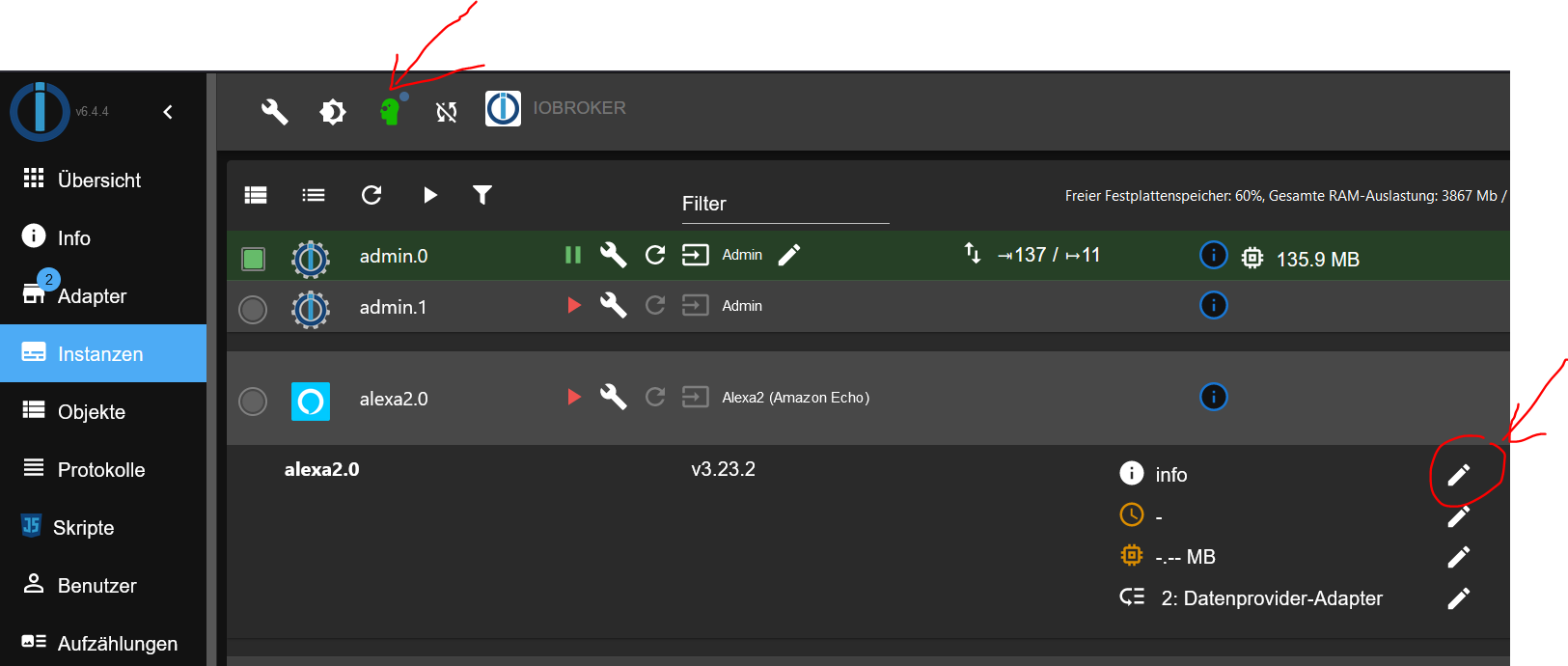
-
@fischerjedd sagte in BSB-LAN Adapter Funktioniert nach iobroker update nicht.:
@fischerjedd
In dem Protokoll stehtDazu habe ich ganz am Anfang etwas geschrieben !
@glasfaser sagte in BSB-LAN Adapter Funktioniert nach iobroker update nicht.:
Stelle in der Instanz die Logstufe auf DEBUG .
Starte den Adapter und zeige hier die Log Ausgabe davon !EDIT :
Expertenmodus ..... dann auf den Bleistift ... von Info auf Debug ändern .
@glasfaser
Super erklärt, jetzt habe ich dussel es auch kapiert. -
@glasfaser
Super erklärt, jetzt habe ich dussel es auch kapiert.Warum ändert sich die Sprache im logfile von Englisch auf Deutsch?
Übersetzungsautomatiken im Browser aktiv? Aber das dürfte das LogFile nicht tangieren.Vielleicht führt das auch zu den 'invalid header value char' Meldungen...
2023-05-29 11:42:04.780 - error: bsblan.0 (10434) Error: Parse Error: Invalid header value char 2023-05-29 11:42:04.781 - error: bsblan.0 (10434) RequestError: Error: Parse Error: Invalid header value char


Hey! Du scheinst an dieser Unterhaltung interessiert zu sein, hast aber noch kein Konto.
Hast du es satt, bei jedem Besuch durch die gleichen Beiträge zu scrollen? Wenn du dich für ein Konto anmeldest, kommst du immer genau dorthin zurück, wo du zuvor warst, und kannst dich über neue Antworten benachrichtigen lassen (entweder per E-Mail oder Push-Benachrichtigung). Du kannst auch Lesezeichen speichern und Beiträge positiv bewerten, um anderen Community-Mitgliedern deine Wertschätzung zu zeigen.
Mit deinem Input könnte dieser Beitrag noch besser werden 💗
Registrieren AnmeldenSupport us
376
Online33.0k
Benutzer83.4k
Themen1.3m
Beiträge