




Nach Update node.js bleibt ble.0 rot
-
Nachdem ich wegen eines anderen Problems node.js auf die aktuelle Version gebracht habe bleibt der ble.0-Adapter rot. Das Protokoll gibt aus
2023-05-21 13:53:23.129	error	Terminating because A dependency requires a rebuild.
2023-05-21 13:53:21.689	info	starting scanner process...
2023-05-21 13:53:21.646	info	monitored services: fe95
2023-05-21 13:53:21.643	info	enabled plugins: mi-flora, _default
2023-05-21 13:53:21.640	info	loaded plugins: Xiaomi, mi-flora, ruuvi-tag, _default
2023-05-21 13:53:21.533	info	starting. Version 0.13.0 in /opt/iobroker/node_modules/iobroker.ble, node: v18.16.0, js-controller: 4.0.24
2023-05-21 13:53:21.108	debug	States connected to redis: 127.0.0.1:9000
2023-05-21 13:53:21.081	debug	States create User PubSub Client
2023-05-21 13:53:21.079	debug	States create System PubSub Client
2023-05-21 13:53:21.041	debug	Redis States: Use Redis connection: 127.0.0.1:9000
2023-05-21 13:53:20.903	debug	Objects connected to redis: 127.0.0.1:9001
2023-05-21 13:53:20.886	debug	Objects client initialize lua scripts
2023-05-21 13:53:20.841	debug	Objects create User PubSub Client
2023-05-21 13:53:20.837	debug	Objects create System PubSub Client
2023-05-21 13:53:20.833	debug	Objects client ready ... initialize now
2023-05-21 13:53:20.750	debug	Redis Objects: Use Redis connection: 127.0.0.1:9001
Ein von Hand angestoßenes rebuild wurde erfolgreich abgeschlossen, der Adapter bleibt aber rot.
Der Host gibt im Protokoll aus:
2023-05-21 13:53:23.227	info	Rebuild for adapter system.adapter.ble.0 not successful in 3 tries. Adapter will not be restarted again. Please execute "npm install --production" in adapter directory manually.
2023-05-21 13:53:23.226	info	instance system.adapter.ble.0 requested a rebuild of its dependencies and will be restarted after that is done.
Ich habe dann im Verzeichnis ./opt/iobroker/iobroker-data/files/ble.admin den Befehlt "npm install --production" ausgeführt. Der Adapter bleibt dennoch rot. Auch eine Neuinstallation des Adapters führte nicht zum Erfolg. Es kamen die gleichen Infos vom Adapter und Host wie oben.
Hat jemand eine Idee, wie ich den Adapter wieder ans Laufen kriege?
@mipl sagte in Nach Update node.js bleibt ble.0 rot:
Nachdem ich wegen eines anderen Problems node.js auf die aktuelle Version gebracht habe bleibt der ble.0-Adapter rot.
-
Nachdem ich wegen eines anderen Problems node.js auf die aktuelle Version gebracht habe bleibt der ble.0-Adapter rot. Das Protokoll gibt aus
2023-05-21 13:53:23.129	error	Terminating because A dependency requires a rebuild.
2023-05-21 13:53:21.689	info	starting scanner process...
2023-05-21 13:53:21.646	info	monitored services: fe95
2023-05-21 13:53:21.643	info	enabled plugins: mi-flora, _default
2023-05-21 13:53:21.640	info	loaded plugins: Xiaomi, mi-flora, ruuvi-tag, _default
2023-05-21 13:53:21.533	info	starting. Version 0.13.0 in /opt/iobroker/node_modules/iobroker.ble, node: v18.16.0, js-controller: 4.0.24
2023-05-21 13:53:21.108	debug	States connected to redis: 127.0.0.1:9000
2023-05-21 13:53:21.081	debug	States create User PubSub Client
2023-05-21 13:53:21.079	debug	States create System PubSub Client
2023-05-21 13:53:21.041	debug	Redis States: Use Redis connection: 127.0.0.1:9000
2023-05-21 13:53:20.903	debug	Objects connected to redis: 127.0.0.1:9001
2023-05-21 13:53:20.886	debug	Objects client initialize lua scripts
2023-05-21 13:53:20.841	debug	Objects create User PubSub Client
2023-05-21 13:53:20.837	debug	Objects create System PubSub Client
2023-05-21 13:53:20.833	debug	Objects client ready ... initialize now
2023-05-21 13:53:20.750	debug	Redis Objects: Use Redis connection: 127.0.0.1:9001
Ein von Hand angestoßenes rebuild wurde erfolgreich abgeschlossen, der Adapter bleibt aber rot.
Der Host gibt im Protokoll aus:
2023-05-21 13:53:23.227	info	Rebuild for adapter system.adapter.ble.0 not successful in 3 tries. Adapter will not be restarted again. Please execute "npm install --production" in adapter directory manually.
2023-05-21 13:53:23.226	info	instance system.adapter.ble.0 requested a rebuild of its dependencies and will be restarted after that is done.
Ich habe dann im Verzeichnis ./opt/iobroker/iobroker-data/files/ble.admin den Befehlt "npm install --production" ausgeführt. Der Adapter bleibt dennoch rot. Auch eine Neuinstallation des Adapters führte nicht zum Erfolg. Es kamen die gleichen Infos vom Adapter und Host wie oben.
Hat jemand eine Idee, wie ich den Adapter wieder ans Laufen kriege?
@mipl sagte in Nach Update node.js bleibt ble.0 rot:
Ich habe dann im Verzeichnis ./opt/iobroker/iobroker-data/files/ble.admin den Befehlt "npm install --production" ausgeführt.
Das ist ja auch doppelt falsch.
Das muss in /opt/iobroker/node_modules/iobroker.ble ausgeführt werden. Der Befehl lautet auch
npm install --omit=devSo aus der Erinnerung heraus.
-
@mipl sagte in Nach Update node.js bleibt ble.0 rot:
Nachdem ich wegen eines anderen Problems node.js auf die aktuelle Version gebracht habe bleibt der ble.0-Adapter rot.
@glasfaser
ok, danke für den Link.
Habe in /opt/iobroker/node_modules/@abandonware/bluetooth-hci-socket/package.json die Änderung vorgenommen. Host neu gestartet. ble.0 bleibt aber rot.Muss ich jetzt wie @Thomas-Braun schreibt noch den Befehl "npm install --omit=dev" in /opt/iobroker/node_modules/iobroker.ble ausführen oder hab' ich mit dem "doppelt falsch" alles zerschossen?
-
@glasfaser
ok, danke für den Link.
Habe in /opt/iobroker/node_modules/@abandonware/bluetooth-hci-socket/package.json die Änderung vorgenommen. Host neu gestartet. ble.0 bleibt aber rot.Muss ich jetzt wie @Thomas-Braun schreibt noch den Befehl "npm install --omit=dev" in /opt/iobroker/node_modules/iobroker.ble ausführen oder hab' ich mit dem "doppelt falsch" alles zerschossen?
Mach mal.
-
Mach mal.
-
@thomas-braun
bin dran, aber scheint sich aufgehängt zu haben.....Woran machst du das fest?
-
Woran machst du das fest?
@thomas-braun
steht seit ca. 30 Min beinpm install --omit=dev (##################) ⠴ reify:usb: http fetch GET 200 https://registry.npmjs.org/usb/-/usb-1.9.2.tgz 5562ms (cache miss)habe mal Return gedrückt und:
client_loop: send disconnect: Broken pipetch GET 200 https://registry.npmjs.org/usb/-/usb-1.9.2.tgz 5562ms (cache miss)starte nochmal
-
Woran machst du das fest?
@thomas-braun
cool, ble.0 ist nun grün. Super-Dank an Dich.Ohne das Forum würde ich solche Aktionen aber nicht lösen können - geht ja schon ziemlich in die Tiefe.
-
@thomas-braun
cool, ble.0 ist nun grün. Super-Dank an Dich.Ohne das Forum würde ich solche Aktionen aber nicht lösen können - geht ja schon ziemlich in die Tiefe.
@mipl
Leider ist die Sache doch noch nicht gelöst, da ble.0 keine Bluetooth-Geräte mehr findet. Ich habe daher den Adapter nochmal neu aufgesetzt, doch dann blieb "Verbindung zu Gerät oder Dienst" wieder auf rot. Habe dann nochmal "/opt/iobroker/node_modules/iobroker.ble $ npm install --omit=dev" laufen lassen und nun meldet ble.0:2023-05-21 21:18:25.177 error Cannot find module '../build/Release/bluetooth_hci_socket.node' Require stack: - /opt/iobroker/node_modules/iobroker.ble/node_modules/@abandonware/bluetooth-hci-socket/lib/native.js - /opt/iobroker/node_modules/iobroker.ble/node_modules/@abandonware/bluetooth-hci-socket/index.js - /opt/iobroker/node_modules/iobroker.ble/node_modules/@abandonware/noble/lib/hci-socket/hci.js - /opt/iobroker/node_modules/iobroker.ble/node_modules/@abandonware/noble/lib/hci-socket/bindings.js - /opt/iobroker/node_modules/iobroker.ble/node_modules/@abandonware/noble/lib/resolve-bindings.js - /opt/iobroker/node_modules/iobroker.ble/node_modules/@abandonware/noble/with-custom-binding.js - /opt/iobroker/node_modules/iobroker.ble/node_modules/@abandonware/noble/index.js - /opt/iobroker/node_modules/iobroker.ble/build/scanProcess.js 2023-05-21 21:18:23.911 info starting scanner process... 2023-05-21 21:18:23.816 info monitored services: fe95 2023-05-21 21:18:23.812 info enabled plugins: mi-flora, _default 2023-05-21 21:18:23.809 info loaded plugins: Xiaomi, mi-flora, ruuvi-tag, _default 2023-05-21 21:18:23.635 info starting. Version 0.13.0 in /opt/iobroker/node_modules/iobroker.ble, node: v18.16.0, js-controller: 4.0.24 2023-05-21 21:18:23.084 debug States connected to redis: 127.0.0.1:9000 2023-05-21 21:18:23.053 debug States create User PubSub Client 2023-05-21 21:18:23.050 debug States create System PubSub Client 2023-05-21 21:18:23.030 debug Redis States: Use Redis connection: 127.0.0.1:9000 2023-05-21 21:18:22.982 debug Objects connected to redis: 127.0.0.1:9001 2023-05-21 21:18:22.960 debug Objects client initialize lua scripts 2023-05-21 21:18:22.895 debug Objects create User PubSub Client 2023-05-21 21:18:22.892 debug Objects create System PubSub Client 2023-05-21 21:18:22.886 debug Objects client ready ... initialize now 2023-05-21 21:18:22.786 debug Redis Objects: Use Redis connection: 127.0.0.1:9001Könnt Ihr mir da nochmal helfen?
hcitool scan liefert nur:
hcitool scan
Scanning ...
        60:6B:BD:C9:B7:8A       DTVBluetooth
bluetoothctl scan on dagegen:
Discovery started
[CHG] Controller B8:27:EB:2F:F7:DF Discovering: yes
[NEW] Device 64:D2:C4:9E:53:ED 64-D2-C4-9E-53-ED
[NEW] Device 0D:EF:F1:B2:CD:46 0D-EF-F1-B2-CD-46
[NEW] Device 7E:DF:89:22:DD:BB 7E-DF-89-22-DD-BB
[NEW] Device 80:EA:CA:89:46:DA Flower care
[NEW] Device 1F:7B:4F:0A:D2:CE 1F-7B-4F-0A-D2-CE
[NEW] Device 40:CB:C0:B1:B8:3C 40-CB-C0-B1-B8-3C
[NEW] Device E6:75:4C:F2:20:4F Eve Room AAE4
[NEW] Device 80:EA:CA:89:44:05 Flower care
[NEW] Device C4:7C:8D:6D:3B:A3 Flower care
[NEW] Device F8:77:B8:1D:07:58 F8-77-B8-1D-07-58
[NEW] Device 60:6B:BD:C9:B7:8A DTVBluetooth
[CHG] Device 0D:EF:F1:B2:CD:46 RSSI: -75
[CHG] Device 80:EA:CA:89:46:DA ServiceData Key: 0000fe95-0000-1000-8000-00805f9b34fb
[CHG] Device 80:EA:CA:89:46:DA ServiceData Value:
  71 20 98 00 e1 da 46 89 ca ea 80 0d 04 10 02 ea  q ....F.........
  00                                               .
[CHG] Device 80:EA:CA:89:44:05 ServiceData Key: 0000fe95-0000-1000-8000-00805f9b34fb
[CHG] Device 80:EA:CA:89:44:05 ServiceData Value:
  71 20 98 00 e3 05 44 89 ca ea 80 0d 08 10 01 3f  q ....D........?
[CHG] Device C4:7C:8D:6D:3B:A3 ServiceData Key: 0000fe95-0000-1000-8000-00805f9b34fb
[CHG] Device C4:7C:8D:6D:3B:A3 ServiceData Value:
  71 20 98 00 5d a3 3b 6d 8d 7c c4 0d 04 10 02 f2  q ..].;m.|......
  00                                               .
[CHG] Device 1F:7B:4F:0A:D2:CE RSSI: -62
[CHG] Device 64:D2:C4:9E:53:ED RSSI: -86
[CHG] Device 0D:EF:F1:B2:CD:46 RSSI: -86
[CHG] Device 80:EA:CA:89:46:DA RSSI: -75
[CHG] Device 80:EA:CA:89:46:DA ServiceData Key: 0000fe95-0000-1000-8000-00805f9b34fb
[CHG] Device 80:EA:CA:89:46:DA ServiceData Value:
  71 20 98 00 e2 da 46 89 ca ea 80 0d 07 10 03 61  q ....F........a
  00 00                                            ..
[CHG] Device 80:EA:CA:89:44:05 ServiceData Key: 0000fe95-0000-1000-8000-00805f9b34fb
[CHG] Device 80:EA:CA:89:44:05 ServiceData Value:
  71 20 98 00 e5 05 44 89 ca ea 80 0d 04 10 02 e0  q ....D.........
  00                                               .
[CHG] Device F8:77:B8:1D:07:58 RSSI: -92
[CHG] Device C4:7C:8D:6D:3B:A3 ServiceData Key: 0000fe95-0000-1000-8000-00805f9b34fb
[CHG] Device C4:7C:8D:6D:3B:A3 ServiceData Value:
  71 20 98 00 5f a3 3b 6d 8d 7c c4 0d 08 10 01 3f  q .._.;m.|.....?
[CHG] Device 60:6B:BD:C9:B7:8A RSSI: -69
[CHG] Device 1F:7B:4F:0A:D2:CE RSSI: -53
[CHG] Device 40:CB:C0:B1:B8:3C RSSI: -63
[CHG] Device C4:7C:8D:6D:3B:A3 ServiceData Key: 0000fe95-0000-1000-8000-00805f9b34fb
[CHG] Device C4:7C:8D:6D:3B:A3 ServiceData Value:
  71 20 98 00 60 a3 3b 6d 8d 7c c4 0d 09 10 02 d1  q ..`.;m.|......
  00                                               .
[CHG] Device 80:EA:CA:89:44:05 RSSI: -80
[CHG] Device 80:EA:CA:89:44:05 ServiceData Key: 0000fe95-0000-1000-8000-00805f9b34fb
und jede Menge weitere Geräte. Da sind auch die Flower-Care-Geräte dabei, um die es mir geht.
-
@mipl
Leider ist die Sache doch noch nicht gelöst, da ble.0 keine Bluetooth-Geräte mehr findet. Ich habe daher den Adapter nochmal neu aufgesetzt, doch dann blieb "Verbindung zu Gerät oder Dienst" wieder auf rot. Habe dann nochmal "/opt/iobroker/node_modules/iobroker.ble $ npm install --omit=dev" laufen lassen und nun meldet ble.0:2023-05-21 21:18:25.177 error Cannot find module '../build/Release/bluetooth_hci_socket.node' Require stack: - /opt/iobroker/node_modules/iobroker.ble/node_modules/@abandonware/bluetooth-hci-socket/lib/native.js - /opt/iobroker/node_modules/iobroker.ble/node_modules/@abandonware/bluetooth-hci-socket/index.js - /opt/iobroker/node_modules/iobroker.ble/node_modules/@abandonware/noble/lib/hci-socket/hci.js - /opt/iobroker/node_modules/iobroker.ble/node_modules/@abandonware/noble/lib/hci-socket/bindings.js - /opt/iobroker/node_modules/iobroker.ble/node_modules/@abandonware/noble/lib/resolve-bindings.js - /opt/iobroker/node_modules/iobroker.ble/node_modules/@abandonware/noble/with-custom-binding.js - /opt/iobroker/node_modules/iobroker.ble/node_modules/@abandonware/noble/index.js - /opt/iobroker/node_modules/iobroker.ble/build/scanProcess.js 2023-05-21 21:18:23.911 info starting scanner process... 2023-05-21 21:18:23.816 info monitored services: fe95 2023-05-21 21:18:23.812 info enabled plugins: mi-flora, _default 2023-05-21 21:18:23.809 info loaded plugins: Xiaomi, mi-flora, ruuvi-tag, _default 2023-05-21 21:18:23.635 info starting. Version 0.13.0 in /opt/iobroker/node_modules/iobroker.ble, node: v18.16.0, js-controller: 4.0.24 2023-05-21 21:18:23.084 debug States connected to redis: 127.0.0.1:9000 2023-05-21 21:18:23.053 debug States create User PubSub Client 2023-05-21 21:18:23.050 debug States create System PubSub Client 2023-05-21 21:18:23.030 debug Redis States: Use Redis connection: 127.0.0.1:9000 2023-05-21 21:18:22.982 debug Objects connected to redis: 127.0.0.1:9001 2023-05-21 21:18:22.960 debug Objects client initialize lua scripts 2023-05-21 21:18:22.895 debug Objects create User PubSub Client 2023-05-21 21:18:22.892 debug Objects create System PubSub Client 2023-05-21 21:18:22.886 debug Objects client ready ... initialize now 2023-05-21 21:18:22.786 debug Redis Objects: Use Redis connection: 127.0.0.1:9001Könnt Ihr mir da nochmal helfen?
hcitool scan liefert nur:
hcitool scan
Scanning ...
        60:6B:BD:C9:B7:8A       DTVBluetooth
bluetoothctl scan on dagegen:
Discovery started
[CHG] Controller B8:27:EB:2F:F7:DF Discovering: yes
[NEW] Device 64:D2:C4:9E:53:ED 64-D2-C4-9E-53-ED
[NEW] Device 0D:EF:F1:B2:CD:46 0D-EF-F1-B2-CD-46
[NEW] Device 7E:DF:89:22:DD:BB 7E-DF-89-22-DD-BB
[NEW] Device 80:EA:CA:89:46:DA Flower care
[NEW] Device 1F:7B:4F:0A:D2:CE 1F-7B-4F-0A-D2-CE
[NEW] Device 40:CB:C0:B1:B8:3C 40-CB-C0-B1-B8-3C
[NEW] Device E6:75:4C:F2:20:4F Eve Room AAE4
[NEW] Device 80:EA:CA:89:44:05 Flower care
[NEW] Device C4:7C:8D:6D:3B:A3 Flower care
[NEW] Device F8:77:B8:1D:07:58 F8-77-B8-1D-07-58
[NEW] Device 60:6B:BD:C9:B7:8A DTVBluetooth
[CHG] Device 0D:EF:F1:B2:CD:46 RSSI: -75
[CHG] Device 80:EA:CA:89:46:DA ServiceData Key: 0000fe95-0000-1000-8000-00805f9b34fb
[CHG] Device 80:EA:CA:89:46:DA ServiceData Value:
  71 20 98 00 e1 da 46 89 ca ea 80 0d 04 10 02 ea  q ....F.........
  00                                               .
[CHG] Device 80:EA:CA:89:44:05 ServiceData Key: 0000fe95-0000-1000-8000-00805f9b34fb
[CHG] Device 80:EA:CA:89:44:05 ServiceData Value:
  71 20 98 00 e3 05 44 89 ca ea 80 0d 08 10 01 3f  q ....D........?
[CHG] Device C4:7C:8D:6D:3B:A3 ServiceData Key: 0000fe95-0000-1000-8000-00805f9b34fb
[CHG] Device C4:7C:8D:6D:3B:A3 ServiceData Value:
  71 20 98 00 5d a3 3b 6d 8d 7c c4 0d 04 10 02 f2  q ..].;m.|......
  00                                               .
[CHG] Device 1F:7B:4F:0A:D2:CE RSSI: -62
[CHG] Device 64:D2:C4:9E:53:ED RSSI: -86
[CHG] Device 0D:EF:F1:B2:CD:46 RSSI: -86
[CHG] Device 80:EA:CA:89:46:DA RSSI: -75
[CHG] Device 80:EA:CA:89:46:DA ServiceData Key: 0000fe95-0000-1000-8000-00805f9b34fb
[CHG] Device 80:EA:CA:89:46:DA ServiceData Value:
  71 20 98 00 e2 da 46 89 ca ea 80 0d 07 10 03 61  q ....F........a
  00 00                                            ..
[CHG] Device 80:EA:CA:89:44:05 ServiceData Key: 0000fe95-0000-1000-8000-00805f9b34fb
[CHG] Device 80:EA:CA:89:44:05 ServiceData Value:
  71 20 98 00 e5 05 44 89 ca ea 80 0d 04 10 02 e0  q ....D.........
  00                                               .
[CHG] Device F8:77:B8:1D:07:58 RSSI: -92
[CHG] Device C4:7C:8D:6D:3B:A3 ServiceData Key: 0000fe95-0000-1000-8000-00805f9b34fb
[CHG] Device C4:7C:8D:6D:3B:A3 ServiceData Value:
  71 20 98 00 5f a3 3b 6d 8d 7c c4 0d 08 10 01 3f  q .._.;m.|.....?
[CHG] Device 60:6B:BD:C9:B7:8A RSSI: -69
[CHG] Device 1F:7B:4F:0A:D2:CE RSSI: -53
[CHG] Device 40:CB:C0:B1:B8:3C RSSI: -63
[CHG] Device C4:7C:8D:6D:3B:A3 ServiceData Key: 0000fe95-0000-1000-8000-00805f9b34fb
[CHG] Device C4:7C:8D:6D:3B:A3 ServiceData Value:
  71 20 98 00 60 a3 3b 6d 8d 7c c4 0d 09 10 02 d1  q ..`.;m.|......
  00                                               .
[CHG] Device 80:EA:CA:89:44:05 RSSI: -80
[CHG] Device 80:EA:CA:89:44:05 ServiceData Key: 0000fe95-0000-1000-8000-00805f9b34fb
und jede Menge weitere Geräte. Da sind auch die Flower-Care-Geräte dabei, um die es mir geht.
Keine Ahnung was du da jetzt fabriziert hast.
Aber den Haken in den Einstellungen hast du gesetzt?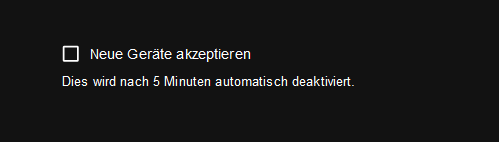
Muss man nicht auch Xiaomi aktivieren?
-
Keine Ahnung was du da jetzt fabriziert hast.
Aber den Haken in den Einstellungen hast du gesetzt?Muss man nicht auch Xiaomi aktivieren?
@thomas-braun
ja, nach der Neuinstallation des Adapters hatte ich das aktiviert. Der Haken ist jetzt nicht gesetzt. Wenn ich es jetzt aktiviere kann ich nicht "speichern und schließen" wählen.Habe als als aktive Plugins mi-flora eingetragen, wie ich es vorher hatte. Habe mir die Einstellungen extra vor Neuinstallation notiert.
-
@thomas-braun
ja, nach der Neuinstallation des Adapters hatte ich das aktiviert. Der Haken ist jetzt nicht gesetzt. Wenn ich es jetzt aktiviere kann ich nicht "speichern und schließen" wählen.Habe als als aktive Plugins mi-flora eingetragen, wie ich es vorher hatte. Habe mir die Einstellungen extra vor Neuinstallation notiert.
@mipl sagte in Nach Update node.js bleibt ble.0 rot:
abe als als aktive Plugins mi-flora eingetragen, wie ich es vorher hatte.
läuft jetzt allgemein unter
xiaomi
https://github.com/AlCalzone/ioBroker.ble -
@mipl sagte in Nach Update node.js bleibt ble.0 rot:
abe als als aktive Plugins mi-flora eingetragen, wie ich es vorher hatte.
läuft jetzt allgemein unter
xiaomi
https://github.com/AlCalzone/ioBroker.ble@crunchip
danke für den Hinweis - habe ich geändert und nochmal neue Geräte akzeptieren aktiviert. Adapter bleibt aber weiter auf gelb - gibt ja auch massiv viele fehlende module lt. Protokoll:error Cannot find module '../build/Release/bluetooth_hci_socket.node'Require stack:- /opt/iobroker/node_modules/iobroker.ble/node_modules/@abandonware/bluetooth-hci-socket/lib/native.js- /opt/iobroker/node_modules/iobroker.ble/node_modules/@abandonware/bluetooth-hci-socket/index.js- /opt/iobroker/node_modules/iobroker.ble/node_modules/@abandonware/noble/lib/hci-socket/hci.js- /opt/iobroker/node_modules/iobroker.ble/node_modules/@abandonware/noble/lib/hci-socket/bindings.js- /opt/iobroker/node_modules/iobroker.ble/node_modules/@abandonware/noble/lib/resolve-bindings.js- /opt/iobroker/node_modules/iobroker.ble/node_modules/@abandonware/noble/with-custom-binding.js- /opt/iobroker/node_modules/iobroker.ble/node_modules/@abandonware/noble/index.js- /opt/iobroker/node_modules/iobroker.ble/build/scanProcess.js -
@crunchip
danke für den Hinweis - habe ich geändert und nochmal neue Geräte akzeptieren aktiviert. Adapter bleibt aber weiter auf gelb - gibt ja auch massiv viele fehlende module lt. Protokoll:error Cannot find module '../build/Release/bluetooth_hci_socket.node'Require stack:- /opt/iobroker/node_modules/iobroker.ble/node_modules/@abandonware/bluetooth-hci-socket/lib/native.js- /opt/iobroker/node_modules/iobroker.ble/node_modules/@abandonware/bluetooth-hci-socket/index.js- /opt/iobroker/node_modules/iobroker.ble/node_modules/@abandonware/noble/lib/hci-socket/hci.js- /opt/iobroker/node_modules/iobroker.ble/node_modules/@abandonware/noble/lib/hci-socket/bindings.js- /opt/iobroker/node_modules/iobroker.ble/node_modules/@abandonware/noble/lib/resolve-bindings.js- /opt/iobroker/node_modules/iobroker.ble/node_modules/@abandonware/noble/with-custom-binding.js- /opt/iobroker/node_modules/iobroker.ble/node_modules/@abandonware/noble/index.js- /opt/iobroker/node_modules/iobroker.ble/build/scanProcess.jsDe/Reinstallier den Adapter nochmal sauber.
-
De/Reinstallier den Adapter nochmal sauber.
@thomas-braun
habe in dem Beitrag von AlCalzone gesehen, dass noch Pakete installiert werden müssen. Das mache ich gerade und arbeite mich durch den Artikel durch. Brauche also noch einen Moment. -
De/Reinstallier den Adapter nochmal sauber.
@thomas-braun
habe den Adapter gelöscht und neu installiert. Hier der Log zur Neuinstallation:$ iobroker add ble 0 --host raspberrypi --debug host.raspberrypi create instance ble host.raspberrypi object system.adapter.ble.0.alive created host.raspberrypi object system.adapter.ble.0.connected created host.raspberrypi object system.adapter.ble.0.compactMode created host.raspberrypi object system.adapter.ble.0.cpu created host.raspberrypi object system.adapter.ble.0.cputime created host.raspberrypi object system.adapter.ble.0.memHeapTotal created host.raspberrypi object system.adapter.ble.0.memRss created host.raspberrypi object system.adapter.ble.0.uptime created host.raspberrypi object system.adapter.ble.0.outputCount created host.raspberrypi object system.adapter.ble.0.eventLoopLag created host.raspberrypi object system.adapter.ble.0.sigKill created host.raspberrypi object ble.0.info.driverState created host.raspberrypi object ble.0.options created host.raspberrypi object ble.0.options.allowNewDevices created host.raspberrypi Set default value of ble.0.info.connection: false host.raspberrypi Set default value of ble.0.info.driverState: poweredOff host.raspberrypi Set default value of ble.0.options.allowNewDevices: false host.raspberrypi object system.adapter.ble.0 created Process exited with code 0Das Ergebnis ist jedoch das Gleiche. Der Adapter bleibt gelb und die Error-Message existiert weiterhin.
-
@thomas-braun
habe den Adapter gelöscht und neu installiert. Hier der Log zur Neuinstallation:$ iobroker add ble 0 --host raspberrypi --debug host.raspberrypi create instance ble host.raspberrypi object system.adapter.ble.0.alive created host.raspberrypi object system.adapter.ble.0.connected created host.raspberrypi object system.adapter.ble.0.compactMode created host.raspberrypi object system.adapter.ble.0.cpu created host.raspberrypi object system.adapter.ble.0.cputime created host.raspberrypi object system.adapter.ble.0.memHeapTotal created host.raspberrypi object system.adapter.ble.0.memRss created host.raspberrypi object system.adapter.ble.0.uptime created host.raspberrypi object system.adapter.ble.0.outputCount created host.raspberrypi object system.adapter.ble.0.eventLoopLag created host.raspberrypi object system.adapter.ble.0.sigKill created host.raspberrypi object ble.0.info.driverState created host.raspberrypi object ble.0.options created host.raspberrypi object ble.0.options.allowNewDevices created host.raspberrypi Set default value of ble.0.info.connection: false host.raspberrypi Set default value of ble.0.info.driverState: poweredOff host.raspberrypi Set default value of ble.0.options.allowNewDevices: false host.raspberrypi object system.adapter.ble.0 created Process exited with code 0Das Ergebnis ist jedoch das Gleiche. Der Adapter bleibt gelb und die Error-Message existiert weiterhin.
-
@thomas-braun
npm ls:iobroker.inst@3.0.0 /opt/iobroker ├── @abandonware/bluetooth-hci-socket@0.5.3-8 extraneous ├── @abandonware/noble@1.9.2-15 extraneous ├── @types/caseless@0.12.2 extraneous ├── @types/request@2.48.8 extraneous ├── @types/tough-cookie@4.0.2 extraneous ├── alcalzone-shared@4.0.1 extraneous ├── coffeescript@1.12.7 extraneous ├── iobroker-react-components@1.0.0 extraneous ├── iobroker.admin@6.3.5 ├── iobroker.backitup@2.6.19 ├── iobroker.ble@0.13.0 ├── iobroker.discovery@3.1.0 ├── iobroker.flot@1.11.0 ├── iobroker.hue@3.7.1 ├── iobroker.icons-mfd-png@1.1.0 ├── iobroker.javascript@6.1.4 ├── iobroker.js-controller@4.0.24 ├── iobroker.meross@1.14.0 ├── iobroker.modbus@5.0.11 ├── iobroker.mqtt@4.0.7 ├── iobroker.ping@1.5.3 ├── iobroker.sql@2.2.0 ├── iobroker.vis-hqwidgets@1.3.0 ├── iobroker.vis-inventwo@3.3.1 ├── iobroker.vis@1.4.15 ├── iobroker.web@4.3.0 ├── iobroker.whatsapp-cmb@0.2.2 ├── iobroker.yahka@0.13.1 ├── iobroker.zigbee@1.8.10 ├── jsonata@1.8.6 extraneous ├── node-addon-api@3.2.1 extraneous ├── node-inspect@2.0.0 extraneous ├── picocolors@1.0.0 extraneous ├── suncalc2@1.8.1 extraneous ├── typescript@4.7.4 extraneous ├── usb@1.9.2 extraneous ├── virtual-tsc@0.6.2 extraneous └── wake_on_lan@1.0.0 extraneousAdapter bleibt nach Neustart des Rechners gelb. Protokoll ble.0:
info	Now accepting new devices
error	Cannot find module '../build/Release/bluetooth_hci_socket.node'Require stack:- /opt/iobroker/node_modules/iobroker.ble/node_modules/@abandonware/bluetooth-hci-socket/lib/native.js- /opt/iobroker/node_modules/iobroker.ble/node_modules/@abandonware/bluetooth-hci-socket/index.js- /opt/iobroker/node_modules/iobroker.ble/node_modules/@abandonware/noble/lib/hci-socket/hci.js- /opt/iobroker/node_modules/iobroker.ble/node_modules/@abandonware/noble/lib/hci-socket/bindings.js- /opt/iobroker/node_modules/iobroker.ble/node_modules/@abandonware/noble/lib/resolve-bindings.js- /opt/iobroker/node_modules/iobroker.ble/node_modules/@abandonware/noble/with-custom-binding.js- /opt/iobroker/node_modules/iobroker.ble/node_modules/@abandonware/noble/index.js- /opt/iobroker/node_modules/iobroker.ble/build/scanProcess.js
info	starting scanner process...
info	monitored services: fe95
info	enabled plugins: Xiaomi, _default
info	loaded plugins: Xiaomi, mi-flora, ruuvi-tag, _default
info	starting. Version 0.13.0 in /opt/iobroker/node_modules/iobroker.ble, node: v18.16.0, js-controller: 4.0.24
now accepting new devices ist neu
-
@thomas-braun
habe den Adapter gelöscht und neu installiert. Hier der Log zur Neuinstallation:$ iobroker add ble 0 --host raspberrypi --debug host.raspberrypi create instance ble host.raspberrypi object system.adapter.ble.0.alive created host.raspberrypi object system.adapter.ble.0.connected created host.raspberrypi object system.adapter.ble.0.compactMode created host.raspberrypi object system.adapter.ble.0.cpu created host.raspberrypi object system.adapter.ble.0.cputime created host.raspberrypi object system.adapter.ble.0.memHeapTotal created host.raspberrypi object system.adapter.ble.0.memRss created host.raspberrypi object system.adapter.ble.0.uptime created host.raspberrypi object system.adapter.ble.0.outputCount created host.raspberrypi object system.adapter.ble.0.eventLoopLag created host.raspberrypi object system.adapter.ble.0.sigKill created host.raspberrypi object ble.0.info.driverState created host.raspberrypi object ble.0.options created host.raspberrypi object ble.0.options.allowNewDevices created host.raspberrypi Set default value of ble.0.info.connection: false host.raspberrypi Set default value of ble.0.info.driverState: poweredOff host.raspberrypi Set default value of ble.0.options.allowNewDevices: false host.raspberrypi object system.adapter.ble.0 created Process exited with code 0Das Ergebnis ist jedoch das Gleiche. Der Adapter bleibt gelb und die Error-Message existiert weiterhin.
@mipl sagte in Nach Update node.js bleibt ble.0 rot:
Der Adapter bleibt gelb
If the adapter starts but won't connect to your bluetooth hardware, please check the info.driverState state in ioBroker. If it is unauthorized, you need to give node additional permissions. For Linux, this is as simple as
sudo setcap cap_net_raw+eip $(eval readlink -f `which node`)which requires libcap2-bin to be installed.
-
@mipl sagte in Nach Update node.js bleibt ble.0 rot:
Der Adapter bleibt gelb
If the adapter starts but won't connect to your bluetooth hardware, please check the info.driverState state in ioBroker. If it is unauthorized, you need to give node additional permissions. For Linux, this is as simple as
sudo setcap cap_net_raw+eip $(eval readlink -f `which node`)which requires libcap2-bin to be installed.



Hey! Du scheinst an dieser Unterhaltung interessiert zu sein, hast aber noch kein Konto.
Hast du es satt, bei jedem Besuch durch die gleichen Beiträge zu scrollen? Wenn du dich für ein Konto anmeldest, kommst du immer genau dorthin zurück, wo du zuvor warst, und kannst dich über neue Antworten benachrichtigen lassen (entweder per E-Mail oder Push-Benachrichtigung). Du kannst auch Lesezeichen speichern und Beiträge positiv bewerten, um anderen Community-Mitgliedern deine Wertschätzung zu zeigen.
Mit deinem Input könnte dieser Beitrag noch besser werden 💗
Registrieren Anmelden226
Online33.0k
Benutzer83.5k
Themen1.3m
Beiträge