




[gelöst] Ausführung trotz Triggern Zeitplan
-
Sieht ganz so aus das deine Variable Liste_PV den Wert verloren hat.
Starte mal deine JavaScript Instanz neu. -
@woupi sagte in Ausführung trotz Triggern Zeitplan:
s kommt jetzt direkt ein Fehler das der DP nicht gefunden wird, er ist aber da:
was steht denn in den angemeckerten Stellen im Code in der js-Ansicht?
@woupi sagte in Ausführung trotz Triggern Zeitplan:
Und jetzt auch die Fehler von vor ändern des Zeitplans:
@woupi sagte in Ausführung trotz Triggern Zeitplan:
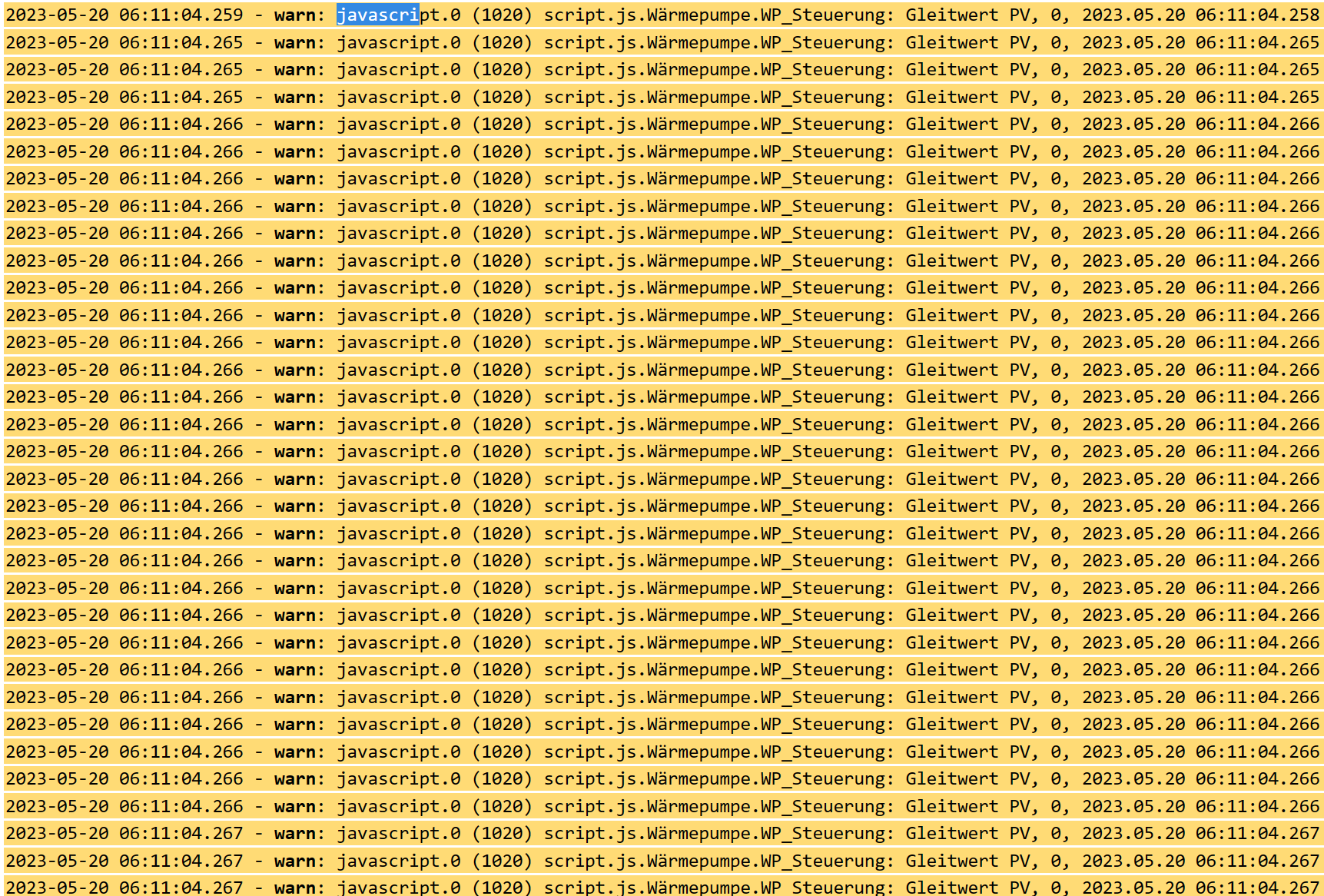
rror: Cannot read property 'push' of null
da existiert was nicht!
was sagt
iob diag
Langversion bitte, ich hab da ne Befürchtung@homoran sagte in Ausführung trotz Triggern Zeitplan:
was steht denn in den angemeckerten Stellen im Code in der js-Ansicht?
Liste_PV = getState("0_userdata.0.WP.Liste_PV_Mittelwert").val;@homoran sagte in Ausführung trotz Triggern Zeitplan:
was sagt iob diag
Langversion bitte, ich hab da ne BefürchtungSorry, wenn ich doof frage, meinst du den log komplett?
NUC10i3, Proxmox, VM Ubuntu iobroker, lxc ubuntu influxdb, grafana, lxc ubuntu SAE, lxc ubuntu MotionEye, WP Panasonic Jeisha 5kW mit Heishamon, Shelly 2.5 und 2pm Rolladensteuerung, OpenWB Wallbox
-
Sieht ganz so aus das deine Variable Liste_PV den Wert verloren hat.
Starte mal deine JavaScript Instanz neu. -
@homoran sagte in Ausführung trotz Triggern Zeitplan:
was steht denn in den angemeckerten Stellen im Code in der js-Ansicht?
Liste_PV = getState("0_userdata.0.WP.Liste_PV_Mittelwert").val;@homoran sagte in Ausführung trotz Triggern Zeitplan:
was sagt iob diag
Langversion bitte, ich hab da ne BefürchtungSorry, wenn ich doof frage, meinst du den log komplett?
@woupi sagte in Ausführung trotz Triggern Zeitplan:
meinst du den log komplett?
die komplette Ausgabe, nicht nur das Summary
-
@woupi sagte in Ausführung trotz Triggern Zeitplan:
meinst du den log komplett?
die komplette Ausgabe, nicht nur das Summary
@homoran sagte in Ausführung trotz Triggern Zeitplan:
@woupi sagte in Ausführung trotz Triggern Zeitplan:
meinst du den log komplett?
die komplette Ausgabe, nicht nur das Summary
Sorry, keine Ahnung was Du genau meinst. Ich habe gerade versucht den curent log unter "log Herunterladen" hierein zu kopieren. Zu Lang.
NUC10i3, Proxmox, VM Ubuntu iobroker, lxc ubuntu influxdb, grafana, lxc ubuntu SAE, lxc ubuntu MotionEye, WP Panasonic Jeisha 5kW mit Heishamon, Shelly 2.5 und 2pm Rolladensteuerung, OpenWB Wallbox
-
@homoran sagte in Ausführung trotz Triggern Zeitplan:
@woupi sagte in Ausführung trotz Triggern Zeitplan:
meinst du den log komplett?
die komplette Ausgabe, nicht nur das Summary
Sorry, keine Ahnung was Du genau meinst. Ich habe gerade versucht den curent log unter "log Herunterladen" hierein zu kopieren. Zu Lang.
iob diagausführen und den Output nach dem ersten Tastendruck vollständig hier rein kopieren.
-
iob diagausführen und den Output nach dem ersten Tastendruck vollständig hier rein kopieren.
bernhard@iobroker:~$ iob diag
iobroker [command]

Commands:
  iobroker setup                                               Setup ioBroker
  iobroker start [all|<adapter>.<instance>]                    Starts the js-con                                                                               troller or a specified adapter instance
  iobroker stop [<adapter>.<instance>]                         stops the js-cont                                                                               roller or a specified adapter instance
  iobroker restart [<adapter>.<instance>]                      Restarts js-contr                                                                               oller or a specified adapter instance  [aliases: r]
  iobroker debug <adapter>[.<instance>]                        Starts a Node.js                                                                                debugging session for the adapter instance
  iobroker info                                                Shows the host in                                                                               fo
  iobroker logs [<adapter>]                                    Monitor log
  iobroker add <adapter> [desiredNumber]                       Add instance of a                                                                               dapter  [aliases: a]
  iobroker install <adapter>                                   Installs a specif                                                                               ied adapter  [aliases: i]
  iobroker rebuild [<module>]                                  Rebuild all nativ                                                                               e modules or path
  iobroker url <url> [<name>]                                  Install adapter f                                                                               rom specified url, e.g. GitHub
  iobroker del <adapter>                                       Remove adapter an                                                                               d all instances from this host  [aliases: delete]
  iobroker del <adapter>.<instance>                            Remove adapter in                                                                               stance  [aliases: delete]
  iobroker update [<repositoryUrl>]                            Update repository                                                                                and list adapters
  iobroker upgrade                                             Upgrade managemen                                                                               t
  iobroker upload [all|<adapter>]                              Upload management                                                                                 [aliases: u]
  iobroker object                                              Object management                                                                                 [aliases: o]
  iobroker state                                               State management                                                                                 [aliases: s]
  iobroker message <adapter>[.instance] <command> [<message>]  Send message to a                                                                               dapter instance/s
  iobroker list <type> [<filter>]                              List all entries,                                                                                like objects
  iobroker chmod <mode> <file>                                 Change file right                                                                               s
  iobroker chown <user> <group> <file>                         Change file owner                                                                               ship
  iobroker touch <file>                                        Touch file
  iobroker rm <file>                                           Remove file
  iobroker file                                                File management
  iobroker user                                                User commands
  iobroker group                                               group management
  iobroker host <hostname>                                     Set host to given                                                                                hostname
  iobroker set <adapter>.<instance>                            Change settings o                                                                               f adapter config
  iobroker license <license.file or license.text>              Update license by                                                                                given file
  iobroker cert                                                Certificate manag                                                                               ement
  iobroker clean <yes>                                         Clears all object                                                                               s and states
  iobroker backup                                              Create backup
  iobroker restore <backup name or path>                       Restore a specifi                                                                               ed backup
  iobroker validate <backup name or path>                      Validate a specif                                                                               ied backup
  iobroker status [all|<adapter>.<instance>]                   Status of ioBroke                                                                               r or adapter instance  [aliases: isrun]
  iobroker repo [<name>]                                       Show repo informa                                                                               tion
  iobroker uuid                                                Show uuid of the                                                                                installation  [aliases: id]
  iobroker unsetup                                             Reset license, in                                                                               stallation secret and language
  iobroker fix                                                 Execute the insta                                                                               llation fixer script, this updates your ioBroker installation
  iobroker multihost                                           Multihost managem                                                                               ent
  iobroker compact                                             compact group man                                                                               agement
  iobroker plugin                                              Plugin management
  iobroker version [<adapter>]                                 Show version of j                                                                               s-controller or specified adapter  [aliases: v]

Options:
  --help  Show help  [boolean]
bernhard@iobroker:~$
Ich glaube, dass war nicht das was Du meintest, oder?
NUC10i3, Proxmox, VM Ubuntu iobroker, lxc ubuntu influxdb, grafana, lxc ubuntu SAE, lxc ubuntu MotionEye, WP Panasonic Jeisha 5kW mit Heishamon, Shelly 2.5 und 2pm Rolladensteuerung, OpenWB Wallbox
-
bernhard@iobroker:~$ iob diag
iobroker [command]

Commands:
  iobroker setup                                               Setup ioBroker
  iobroker start [all|<adapter>.<instance>]                    Starts the js-con                                                                               troller or a specified adapter instance
  iobroker stop [<adapter>.<instance>]                         stops the js-cont                                                                               roller or a specified adapter instance
  iobroker restart [<adapter>.<instance>]                      Restarts js-contr                                                                               oller or a specified adapter instance  [aliases: r]
  iobroker debug <adapter>[.<instance>]                        Starts a Node.js                                                                                debugging session for the adapter instance
  iobroker info                                                Shows the host in                                                                               fo
  iobroker logs [<adapter>]                                    Monitor log
  iobroker add <adapter> [desiredNumber]                       Add instance of a                                                                               dapter  [aliases: a]
  iobroker install <adapter>                                   Installs a specif                                                                               ied adapter  [aliases: i]
  iobroker rebuild [<module>]                                  Rebuild all nativ                                                                               e modules or path
  iobroker url <url> [<name>]                                  Install adapter f                                                                               rom specified url, e.g. GitHub
  iobroker del <adapter>                                       Remove adapter an                                                                               d all instances from this host  [aliases: delete]
  iobroker del <adapter>.<instance>                            Remove adapter in                                                                               stance  [aliases: delete]
  iobroker update [<repositoryUrl>]                            Update repository                                                                                and list adapters
  iobroker upgrade                                             Upgrade managemen                                                                               t
  iobroker upload [all|<adapter>]                              Upload management                                                                                 [aliases: u]
  iobroker object                                              Object management                                                                                 [aliases: o]
  iobroker state                                               State management                                                                                 [aliases: s]
  iobroker message <adapter>[.instance] <command> [<message>]  Send message to a                                                                               dapter instance/s
  iobroker list <type> [<filter>]                              List all entries,                                                                                like objects
  iobroker chmod <mode> <file>                                 Change file right                                                                               s
  iobroker chown <user> <group> <file>                         Change file owner                                                                               ship
  iobroker touch <file>                                        Touch file
  iobroker rm <file>                                           Remove file
  iobroker file                                                File management
  iobroker user                                                User commands
  iobroker group                                               group management
  iobroker host <hostname>                                     Set host to given                                                                                hostname
  iobroker set <adapter>.<instance>                            Change settings o                                                                               f adapter config
  iobroker license <license.file or license.text>              Update license by                                                                                given file
  iobroker cert                                                Certificate manag                                                                               ement
  iobroker clean <yes>                                         Clears all object                                                                               s and states
  iobroker backup                                              Create backup
  iobroker restore <backup name or path>                       Restore a specifi                                                                               ed backup
  iobroker validate <backup name or path>                      Validate a specif                                                                               ied backup
  iobroker status [all|<adapter>.<instance>]                   Status of ioBroke                                                                               r or adapter instance  [aliases: isrun]
  iobroker repo [<name>]                                       Show repo informa                                                                               tion
  iobroker uuid                                                Show uuid of the                                                                                installation  [aliases: id]
  iobroker unsetup                                             Reset license, in                                                                               stallation secret and language
  iobroker fix                                                 Execute the insta                                                                               llation fixer script, this updates your ioBroker installation
  iobroker multihost                                           Multihost managem                                                                               ent
  iobroker compact                                             compact group man                                                                               agement
  iobroker plugin                                              Plugin management
  iobroker version [<adapter>]                                 Show version of j                                                                               s-controller or specified adapter  [aliases: v]

Options:
  --help  Show help  [boolean]
bernhard@iobroker:~$
Ich glaube, dass war nicht das was Du meintest, oder?
@woupi sagte in Ausführung trotz Triggern Zeitplan:
dass war nicht das was Du meintest
doch!
wie alt ist deine Installation? -
@woupi sagte in Ausführung trotz Triggern Zeitplan:
dass war nicht das was Du meintest
doch!
wie alt ist deine Installation? -
bernhard@iobroker:~$ iob diag
iobroker [command]

Commands:
  iobroker setup                                               Setup ioBroker
  iobroker start [all|<adapter>.<instance>]                    Starts the js-con                                                                               troller or a specified adapter instance
  iobroker stop [<adapter>.<instance>]                         stops the js-cont                                                                               roller or a specified adapter instance
  iobroker restart [<adapter>.<instance>]                      Restarts js-contr                                                                               oller or a specified adapter instance  [aliases: r]
  iobroker debug <adapter>[.<instance>]                        Starts a Node.js                                                                                debugging session for the adapter instance
  iobroker info                                                Shows the host in                                                                               fo
  iobroker logs [<adapter>]                                    Monitor log
  iobroker add <adapter> [desiredNumber]                       Add instance of a                                                                               dapter  [aliases: a]
  iobroker install <adapter>                                   Installs a specif                                                                               ied adapter  [aliases: i]
  iobroker rebuild [<module>]                                  Rebuild all nativ                                                                               e modules or path
  iobroker url <url> [<name>]                                  Install adapter f                                                                               rom specified url, e.g. GitHub
  iobroker del <adapter>                                       Remove adapter an                                                                               d all instances from this host  [aliases: delete]
  iobroker del <adapter>.<instance>                            Remove adapter in                                                                               stance  [aliases: delete]
  iobroker update [<repositoryUrl>]                            Update repository                                                                                and list adapters
  iobroker upgrade                                             Upgrade managemen                                                                               t
  iobroker upload [all|<adapter>]                              Upload management                                                                                 [aliases: u]
  iobroker object                                              Object management                                                                                 [aliases: o]
  iobroker state                                               State management                                                                                 [aliases: s]
  iobroker message <adapter>[.instance] <command> [<message>]  Send message to a                                                                               dapter instance/s
  iobroker list <type> [<filter>]                              List all entries,                                                                                like objects
  iobroker chmod <mode> <file>                                 Change file right                                                                               s
  iobroker chown <user> <group> <file>                         Change file owner                                                                               ship
  iobroker touch <file>                                        Touch file
  iobroker rm <file>                                           Remove file
  iobroker file                                                File management
  iobroker user                                                User commands
  iobroker group                                               group management
  iobroker host <hostname>                                     Set host to given                                                                                hostname
  iobroker set <adapter>.<instance>                            Change settings o                                                                               f adapter config
  iobroker license <license.file or license.text>              Update license by                                                                                given file
  iobroker cert                                                Certificate manag                                                                               ement
  iobroker clean <yes>                                         Clears all object                                                                               s and states
  iobroker backup                                              Create backup
  iobroker restore <backup name or path>                       Restore a specifi                                                                               ed backup
  iobroker validate <backup name or path>                      Validate a specif                                                                               ied backup
  iobroker status [all|<adapter>.<instance>]                   Status of ioBroke                                                                               r or adapter instance  [aliases: isrun]
  iobroker repo [<name>]                                       Show repo informa                                                                               tion
  iobroker uuid                                                Show uuid of the                                                                                installation  [aliases: id]
  iobroker unsetup                                             Reset license, in                                                                               stallation secret and language
  iobroker fix                                                 Execute the insta                                                                               llation fixer script, this updates your ioBroker installation
  iobroker multihost                                           Multihost managem                                                                               ent
  iobroker compact                                             compact group man                                                                               agement
  iobroker plugin                                              Plugin management
  iobroker version [<adapter>]                                 Show version of j                                                                               s-controller or specified adapter  [aliases: v]

Options:
  --help  Show help  [boolean]
bernhard@iobroker:~$
Ich glaube, dass war nicht das was Du meintest, oder?
Doch. Aber dein System ist zu alt...
iob stop
iob fix
iob start
Wenn der ioBroker wieder läuft nochmal
iob diag -
@woupi dann ist was faul
curl -sLf -o diag.sh https://iobroker.net/diag.sh && bash diag.shEdit
erst einmal Thomas' Weg!! -
Doch. Aber dein System ist zu alt...
iob stop
iob fix
iob start
Wenn der ioBroker wieder läuft nochmal
iob diag======== Start marking the full check here ========= Skript v.2023-04-16 *** BASE SYSTEM *** Architecture : x86_64 Docker : false Virtualization : kvm Distributor ID: Ubuntu Description: Ubuntu 20.04.6 LTS Release: 20.04 Codename: focal NAME="Ubuntu" VERSION="20.04.6 LTS (Focal Fossa)" ID=ubuntu ID_LIKE=debian PRETTY_NAME="Ubuntu 20.04.6 LTS" VERSION_ID="20.04" HOME_URL="https://www.ubuntu.com/" SUPPORT_URL="https://help.ubuntu.com/" BUG_REPORT_URL="https://bugs.launchpad.net/ubuntu/" PRIVACY_POLICY_URL="https://www.ubuntu.com/legal/terms-and-policies/privacy-policy" VERSION_CODENAME=focal UBUNTU_CODENAME=focal Systemuptime and Load: 21:24:21 up 7 days, 4:35, 1 user, load average: 0.57, 0.76, 0.88 CPU threads: 8 *** Time and Time Zones *** Local time: Sat 2023-05-20 21:24:21 CEST Universal time: Sat 2023-05-20 19:24:21 UTC RTC time: Sat 2023-05-20 19:24:22 Time zone: Europe/Berlin (CEST, +0200) System clock synchronized: yes NTP service: active RTC in local TZ: no *** User and Groups *** bernhard /home/bernhard bernhard adm cdrom sudo dip plugdev lxd iobroker *** X-Server-Setup *** X-Server: false Desktop: Terminal: tty Boot Target: graphical.target *** MEMORY *** total used free shared buff/cache available Mem: 8.0G 1.0G 5.0G 1.0M 2.0G 6.6G Swap: 1.2G 0B 1.2G Total: 9.2G 1.0G 6.2G 7957 M total memory 1032 M used memory 1717 M active memory 817 M inactive memory 4954 M free memory 267 M buffer memory 1702 M swap cache 1224 M total swap 0 M used swap 1224 M free swap *** FILESYSTEM *** Filesystem Type Size Used Avail Use% Mounted on udev devtmpfs 3.9G 0 3.9G 0% /dev tmpfs tmpfs 796M 1.2M 795M 1% /run /dev/mapper/ubuntu--vg-ubuntu--lv ext4 49G 13G 34G 28% / tmpfs tmpfs 3.9G 0 3.9G 0% /dev/shm tmpfs tmpfs 5.0M 0 5.0M 0% /run/lock tmpfs tmpfs 3.9G 0 3.9G 0% /sys/fs/cgroup /dev/sda2 ext4 974M 209M 699M 23% /boot /dev/loop1 squashfs 56M 56M 0 100% /snap/core18/2745 /dev/loop0 squashfs 56M 56M 0 100% /snap/core18/2721 /dev/loop4 squashfs 92M 92M 0 100% /snap/lxd/24061 /dev/loop5 squashfs 54M 54M 0 100% /snap/snapd/19122 /dev/loop3 squashfs 64M 64M 0 100% /snap/core20/1879 /dev/loop6 squashfs 92M 92M 0 100% /snap/lxd/23991 /dev/loop7 squashfs 54M 54M 0 100% /snap/snapd/18933 /dev/loop8 squashfs 64M 64M 0 100% /snap/core20/1891 tmpfs tmpfs 796M 0 796M 0% /run/user/1000 Messages concerning ext4 filesystem in dmesg: [Sat May 13 16:48:29 2023] EXT4-fs (dm-0): mounted filesystem with ordered data mode. Opts: (null) [Sat May 13 16:48:30 2023] EXT4-fs (dm-0): re-mounted. Opts: (null) [Sat May 13 16:48:32 2023] EXT4-fs (sda2): mounted filesystem with ordered data mode. Opts: (null) Show mounted filesystems (real ones only): TARGET SOURCE FSTYPE OPTIONS / /dev/mapper/ubuntu--vg-ubuntu--lv ext4 rw,relatime |-/sys/kernel/tracing tracefs tracefs rw,nosuid,nodev,noexec,relatime |-/boot /dev/sda2 ext4 rw,relatime |-/snap/core18/2745 /dev/loop1 squashfs ro,nodev,relatime |-/snap/core18/2721 /dev/loop0 squashfs ro,nodev,relatime |-/snap/lxd/24061 /dev/loop4 squashfs ro,nodev,relatime |-/snap/snapd/19122 /dev/loop5 squashfs ro,nodev,relatime |-/snap/core20/1879 /dev/loop3 squashfs ro,nodev,relatime |-/snap/lxd/23991 /dev/loop6 squashfs ro,nodev,relatime |-/snap/snapd/18933 /dev/loop7 squashfs ro,nodev,relatime `-/snap/core20/1891 /dev/loop8 squashfs ro,nodev,relatime Files in neuralgic directories: /var: 5.3G /var/ 4.0G /var/log/journal/b8deab8c07c0438d8db0cb002e27450e 4.0G /var/log/journal 4.0G /var/log 1.2G /var/lib Archived and active journals take up 3.9G in the file system. /opt/iobroker/backups: 121M /opt/iobroker/backups/ /opt/iobroker/iobroker-data: 649M /opt/iobroker/iobroker-data/ 380M /opt/iobroker/iobroker-data/files 110M /opt/iobroker/iobroker-data/backup-objects 78M /opt/iobroker/iobroker-data/files/icons-open-icon-library-png 76M /opt/iobroker/iobroker-data/history The five largest files in iobroker-data are: 15M /opt/iobroker/iobroker-data/objects.jsonl 15M /opt/iobroker/iobroker-data/files/telegram.admin/rules/static/js/vendors-node_modules_iobroker_adapter-react-v5_assets_devices_parseNames_d_ts-node_modules_io-1d9f06.44fe4a3f.chunk.js.map 7.2M /opt/iobroker/iobroker-data/files/telegram.admin/rules/static/js/vendors-node_modules_iobroker_adapter-react-v5_assets_devices_parseNames_d_ts-node_modules_io-1d9f06.44fe4a3f.chunk.js 6.9M /opt/iobroker/iobroker-data/files/telegram.admin/custom/static/js/vendors-node_modules_mui_icons-material_esm_index_js.8fdf8cb7.chunk.js.map 6.9M /opt/iobroker/iobroker-data/files/javascript.admin/static/js/610.de0231c9.chunk.js.map *** NodeJS-Installation *** /usr/bin/nodejs v14.21.3 /usr/bin/node v14.21.3 /usr/bin/npm 6.14.18 /usr/bin/npx 6.14.18 nodejs: Installed: 14.21.3-deb-1nodesource1 Candidate: 14.21.3-deb-1nodesource1 Version table: *** 14.21.3-deb-1nodesource1 500 500 https://deb.nodesource.com/node_14.x focal/main amd64 Packages 100 /var/lib/dpkg/status 10.19.0~dfsg-3ubuntu1 500 500 http://de.archive.ubuntu.com/ubuntu focal/universe amd64 Packages Temp directories causing npm8 problem: 0 No problems detected *** ioBroker-Installation *** ioBroker Status iobroker is running on this host. Objects type: jsonl States type: jsonl MULTIHOSTSERVICE/enabled: false Core adapters versions js-controller: 4.0.24 admin: 6.3.5 javascript: 6.1.4 npm ERR! peer dep missing: buffer@>=6.0.3, required by crc@4.1.1 Adapters from github: 18 Adapter State + system.adapter.admin.0 : admin : iobroker - enabled, port: 8081, bind: 0.0.0.0, run as: admin system.adapter.backitup.0 : backitup : iobroker - enabled system.adapter.ble.0 : ble : iobroker - enabled system.adapter.cloud.0 : cloud : iobroker - enabled system.adapter.daswetter.0 : daswetter : iobroker - enabled system.adapter.discovery.0 : discovery : iobroker - enabled system.adapter.energiefluss.0 : energiefluss : iobroker - enabled system.adapter.flot.0 : flot : iobroker - enabled system.adapter.fritzdect.0 : fritzdect : iobroker - enabled system.adapter.ical.0 : ical : iobroker - enabled system.adapter.icons-addictive-flavour-png.0: icons-addictive-flavour-png: iobroker - enabled system.adapter.icons-fatcow-hosting.0 : icons-fatcow-hosting : iobroker - enabled system.adapter.icons-icons8.0 : icons-icons8 : iobroker - enabled system.adapter.icons-material-png.0 : icons-material-png : iobroker - enabled system.adapter.icons-material-svg.0 : icons-material-svg : iobroker - enabled system.adapter.icons-mfd-png.0 : icons-mfd-png : iobroker - enabled system.adapter.icons-mfd-svg.0 : icons-mfd-svg : iobroker - enabled system.adapter.icons-open-icon-library-png.0: icons-open-icon-library-png: iobroker - enabled system.adapter.icons-ultimate-png.0 : icons-ultimate-png : iobroker - enabled + system.adapter.influxdb.1 : influxdb : iobroker - enabled, port: 8086 + system.adapter.influxdb.2 : influxdb : iobroker - enabled, port: 8086 + system.adapter.influxdb.3 : influxdb : iobroker - enabled, port: 8086 system.adapter.info.0 : info : iobroker - enabled + system.adapter.javascript.0 : javascript : iobroker - enabled system.adapter.mielecloudservice.0 : mielecloudservice : iobroker - enabled + system.adapter.modbus.0 : modbus : iobroker - enabled + system.adapter.modbus.1 : modbus : iobroker - enabled system.adapter.modbus.2 : modbus : iobroker - enabled system.adapter.mqtt.0 : mqtt : iobroker - enabled, port: 1883, bind: 0.0.0.0 system.adapter.mqtt.1 : mqtt : iobroker - enabled, port: 1883, bind: 0.0.0.0 system.adapter.netatmo.0 : netatmo : iobroker - enabled + system.adapter.node-red.0 : node-red : iobroker - enabled, port: 1880, bind: 0.0.0.0 system.adapter.openweathermap.0 : openweathermap : iobroker - enabled system.adapter.shelly.0 : shelly : iobroker - enabled, port: 1882, bind: 0.0.0.0 system.adapter.shuttercontrol.0 : shuttercontrol : iobroker - enabled system.adapter.simple-api.0 : simple-api : iobroker - enabled, port: 8087, bind: 0.0.0.0, run as: admin system.adapter.sma-em.0 : sma-em : iobroker - enabled system.adapter.socketio.0 : socketio : iobroker - enabled, port: 8084, bind: 0.0.0.0, run as: admin system.adapter.sourceanalytix.0 : sourceanalytix : iobroker - enabled + system.adapter.telegram.0 : telegram : iobroker - enabled, port: 8443, bind: 0.0.0.0 system.adapter.trashschedule.0 : trashschedule : iobroker - enabled system.adapter.vis-hqwidgets.0 : vis-hqwidgets : iobroker - enabled system.adapter.vis-icontwo.0 : vis-icontwo : iobroker - enabled system.adapter.vis-inventwo.0 : vis-inventwo : iobroker - enabled system.adapter.vis-jqui-mfd.0 : vis-jqui-mfd : iobroker - enabled system.adapter.vis-map.0 : vis-map : iobroker - enabled system.adapter.vis-metro.0 : vis-metro : iobroker - enabled system.adapter.vis-timeandweather.0 : vis-timeandweather : iobroker - enabled system.adapter.vis-weather.0 : vis-weather : iobroker - enabled system.adapter.vis.0 : vis : iobroker - enabled system.adapter.vw-connect.0 : vw-connect : iobroker - enabled system.adapter.vw-connect.1 : vw-connect : iobroker - enabled system.adapter.weatherunderground.0 : weatherunderground : iobroker - enabled system.adapter.web.0 : web : iobroker - enabled, port: 8082, bind: 0.0.0.0, run as: admin system.adapter.web.1 : web : iobroker - enabled, port: 8083, bind: 0.0.0.0, run as: admin + system.adapter.whatsapp-cmb.0 : whatsapp-cmb : iobroker - enabled + instance is alive Enabled adapters with bindings + system.adapter.admin.0 : admin : iobroker - enabled, port: 8081, bind: 0.0.0.0, run as: admin + system.adapter.influxdb.1 : influxdb : iobroker - enabled, port: 8086 + system.adapter.influxdb.2 : influxdb : iobroker - enabled, port: 8086 + system.adapter.influxdb.3 : influxdb : iobroker - enabled, port: 8086 system.adapter.mqtt.0 : mqtt : iobroker - enabled, port: 1883, bind: 0.0.0.0 system.adapter.mqtt.1 : mqtt : iobroker - enabled, port: 1883, bind: 0.0.0.0 + system.adapter.node-red.0 : node-red : iobroker - enabled, port: 1880, bind: 0.0.0.0 system.adapter.shelly.0 : shelly : iobroker - enabled, port: 1882, bind: 0.0.0.0 system.adapter.simple-api.0 : simple-api : iobroker - enabled, port: 8087, bind: 0.0.0.0, run as: admin system.adapter.socketio.0 : socketio : iobroker - enabled, port: 8084, bind: 0.0.0.0, run as: admin + system.adapter.telegram.0 : telegram : iobroker - enabled, port: 8443, bind: 0.0.0.0 system.adapter.web.0 : web : iobroker - enabled, port: 8082, bind: 0.0.0.0, run as: admin system.adapter.web.1 : web : iobroker - enabled, port: 8083, bind: 0.0.0.0, run as: admin ioBroker-Repositories stable : http://download.iobroker.net/sources-dist.json beta : http://download.iobroker.net/sources-dist-latest.json Active repo(s): stable Installed ioBroker-Instances Used repository: stable Adapter "admin" : 6.3.5 , installed 6.3.5 Adapter "backitup" : 2.6.19 , installed 2.6.19 Adapter "ble" : 0.13.0 , installed 0.13.0 Adapter "cloud" : 4.3.0 , installed 4.3.0 Adapter "daswetter" : 3.1.8 , installed 3.1.8 Adapter "discovery" : 3.1.0 , installed 3.1.0 Adapter "flot" : 1.11.0 , installed 1.11.0 Adapter "fritzdect" : 2.2.6 , installed 2.2.6 Adapter "ical" : 1.13.2 , installed 1.13.2 Adapter "icons-addictive-flavour-png": 0.1.0, installed 0.1.0 Adapter "icons-fatcow-hosting": 0.1.0, installed 0.1.0 Adapter "icons-icons8" : 0.0.1 , installed 0.0.1 Adapter "icons-material-png": 0.1.0, installed 0.1.0 Adapter "icons-material-svg": 0.1.0, installed 0.1.0 Adapter "icons-mfd-png": 1.1.0 , installed 1.1.0 Adapter "icons-mfd-svg": 1.1.0 , installed 1.1.0 Adapter "icons-open-icon-library-png": 0.1.2, installed 0.1.3 Adapter "icons-ultimate-png": 1.0.1, installed 1.0.1 Adapter "influxdb" : 3.2.0 , installed 3.2.0 Adapter "info" : 1.9.26 , installed 1.9.26 Adapter "javascript" : 6.1.4 , installed 6.1.4 Controller "js-controller": 4.0.24 , installed 4.0.24 Adapter "mielecloudservice": 6.5.4, installed 6.5.4 Adapter "modbus" : 5.0.11 , installed 5.0.11 Adapter "mqtt" : 4.0.7 , installed 4.0.7 Adapter "mqtt-client" : 1.6.3 , installed 1.6.3 Adapter "netatmo" : 2.0.5 , installed 2.0.5 Adapter "node-red" : 4.0.0 , installed 4.0.0 Adapter "openweathermap": 0.3.3 , installed 0.3.3 Adapter "shelly" : 6.3.1 , installed 6.3.1 Adapter "shuttercontrol": 1.4.29 , installed 1.4.29 Adapter "simple-api" : 2.7.2 , installed 2.7.2 Adapter "socketio" : 4.2.0 , installed 4.2.0 Adapter "telegram" : 1.15.2 , installed 1.15.2 Adapter "trashschedule": 2.2.0 , installed 2.2.0 Adapter "vis" : 1.4.16 , installed 1.4.16 Adapter "vis-hqwidgets": 1.3.0 , installed 1.3.0 Adapter "vis-icontwo" : 0.93.0 , installed 0.93.0 Adapter "vis-inventwo" : 3.3.1 , installed 3.3.1 Adapter "vis-jqui-mfd" : 1.0.12 , installed 1.0.12 Adapter "vis-map" : 1.0.4 , installed 1.0.4 Adapter "vis-metro" : 1.2.0 , installed 1.2.0 Adapter "vis-timeandweather": 1.2.2, installed 1.2.2 Adapter "vis-weather" : 2.5.6 , installed 2.5.6 Adapter "vw-connect" : 0.0.67 , installed 0.0.67 Adapter "weatherunderground": 3.4.2, installed 3.4.2 Adapter "web" : 4.3.0 , installed 4.3.0 Adapter "whatsapp-cmb" : 0.2.3 , installed 0.2.3 Adapter "ws" : 1.3.0 , installed 1.3.0 Objects and States Please stand by - This may take a while Objects: 14226 States: 12802 *** OS-Repositories and Updates *** Hit:1 http://de.archive.ubuntu.com/ubuntu focal InRelease Hit:2 http://de.archive.ubuntu.com/ubuntu focal-updates InRelease Hit:3 http://de.archive.ubuntu.com/ubuntu focal-backports InRelease Hit:4 https://deb.nodesource.com/node_14.x focal InRelease Hit:5 http://de.archive.ubuntu.com/ubuntu focal-security InRelease Reading package lists... Pending Updates: 1 *** Listening Ports *** Active Internet connections (only servers) Proto Recv-Q Send-Q Local Address Foreign Address State User Inode PID/Program name tcp 0 0 127.0.0.1:9000 0.0.0.0:* LISTEN 1001 12560150 53281/iobroker.js-c tcp 0 0 127.0.0.1:9001 0.0.0.0:* LISTEN 1001 12560149 53281/iobroker.js-c tcp 0 0 0.0.0.0:111 0.0.0.0:* LISTEN 0 15672 1/init tcp 0 0 127.0.0.53:53 0.0.0.0:* LISTEN 101 23980 706/systemd-resolve tcp 0 0 0.0.0.0:22 0.0.0.0:* LISTEN 0 27180 776/sshd: /usr/sbin tcp 0 0 0.0.0.0:1880 0.0.0.0:* LISTEN 1001 12558229 53440/node-red tcp6 0 0 :::111 :::* LISTEN 0 17744 1/init tcp6 0 0 :::8081 :::* LISTEN 1001 12560197 53316/io.admin.0 tcp6 0 0 :::22 :::* LISTEN 0 27193 776/sshd: /usr/sbin udp 0 0 127.0.0.53:53 0.0.0.0:* 101 23979 706/systemd-resolve udp 0 0 192.168.1.133:68 0.0.0.0:* 100 8733747 704/systemd-network udp 0 0 0.0.0.0:111 0.0.0.0:* 0 17741 1/init udp6 0 0 :::111 :::* 0 16735 1/init udp6 0 0 fe80::24bc:3cff:fe9:546 :::* 100 23013 704/systemd-network *** Log File - Last 25 Lines *** 2023-05-20 21:24:36.460 - info: admin.0 (53316) failed connection to socket.io from ::ffff:192.168.1.108: Passport was not initialized 2023-05-20 21:24:37.727 - info: admin.0 (53316) failed connection to socket.io from ::ffff:192.168.1.108: Passport was not initialized 2023-05-20 21:24:37.779 - info: admin.0 (53316) failed connection to socket.io from ::ffff:192.168.1.108: Passport was not initialized 2023-05-20 21:24:39.334 - info: host.iobroker instance system.adapter.mielecloudservice.0 started with pid 53732 2023-05-20 21:24:40.099 - info: mielecloudservice.0 (53732) starting. Version 6.5.4 in /opt/iobroker/node_modules/iobroker.mielecloudservice, node: v14.21.3, js-controller: 4.0.24 2023-05-20 21:24:40.111 - info: mielecloudservice.0 (53732) Login attempt #1 @Miele-API 2023-05-20 21:24:40.450 - info: mielecloudservice.0 (53732) Access token expires on: 19.6.2023, 21:24:00 2023-05-20 21:24:40.450 - info: mielecloudservice.0 (53732) Registering for all appliance events at Miele API. 2023-05-20 21:24:40.452 - info: mielecloudservice.0 (53732) Initializing SSE watchdog. 2023-05-20 21:24:40.523 - info: mielecloudservice.0 (53732) Server Sent Events-Connection has been established @Miele-API. 2023-05-20 21:24:40.778 - info: mielecloudservice.0 (53732) Sorry. No programs to add for device: Trockner (000125877256). Reason: Device 000125877256 is not in the correct state. 2023-05-20 21:24:43.363 - info: host.iobroker instance scheduled system.adapter.weatherunderground.0 2 * * * * 2023-05-20 21:24:43.372 - info: host.iobroker instance system.adapter.weatherunderground.0 started with pid 53771 2023-05-20 21:24:44.256 - info: weatherunderground.0 (53771) starting. Version 3.4.2 in /opt/iobroker/node_modules/iobroker.weatherunderground, node: v14.21.3, js-controller: 4.0.24 2023-05-20 21:24:44.860 - info: weatherunderground.0 (53771) WUnderground API returned 204, no data available. The configured station might be offline 2023-05-20 21:24:45.240 - error: weatherunderground.0 (53771) No current observation data found in response 2023-05-20 21:24:47.323 - info: host.iobroker instance scheduled system.adapter.ical.0 0,30 * * * * 2023-05-20 21:24:47.331 - info: host.iobroker instance system.adapter.ical.0 started with pid 53798 2023-05-20 21:24:48.222 - info: ical.0 (53798) starting. Version 1.13.2 in /opt/iobroker/node_modules/iobroker.ical, node: v14.21.3, js-controller: 4.0.24 2023-05-20 21:24:48.772 - info: weatherunderground.0 (53771) Terminated (NO_ERROR): Without reason 2023-05-20 21:24:49.313 - info: host.iobroker instance system.adapter.weatherunderground.0 terminated with code 0 (NO_ERROR) 2023-05-20 21:24:49.761 - info: ical.0 (53798) processing URL: Müll https://calendar.google.com/calendar/ical/s.w.bernhard%40gmail.com/private-21faa25aa0eb243313582d9996cb7327/basic.ics 2023-05-20 21:24:51.326 - info: host.iobroker instance scheduled system.adapter.openweathermap.0 23 * * * * 2023-05-20 21:24:51.338 - info: host.iobroker instance system.adapter.openweathermap.0 started with pid 54645 2023-05-20 21:24:52.137 - info: openweathermap.0 (54645) starting. Version 0.3.3 in /opt/iobroker/node_modules/iobroker.openweathermap, node: v14.21.3, js-controller: 4.0.24 ============ Mark until here for C&P ============= iob diag has finished. Press any key for a summaryNUC10i3, Proxmox, VM Ubuntu iobroker, lxc ubuntu influxdb, grafana, lxc ubuntu SAE, lxc ubuntu MotionEye, WP Panasonic Jeisha 5kW mit Heishamon, Shelly 2.5 und 2pm Rolladensteuerung, OpenWB Wallbox
-
======== Start marking the full check here ========= Skript v.2023-04-16 *** BASE SYSTEM *** Architecture : x86_64 Docker : false Virtualization : kvm Distributor ID: Ubuntu Description: Ubuntu 20.04.6 LTS Release: 20.04 Codename: focal NAME="Ubuntu" VERSION="20.04.6 LTS (Focal Fossa)" ID=ubuntu ID_LIKE=debian PRETTY_NAME="Ubuntu 20.04.6 LTS" VERSION_ID="20.04" HOME_URL="https://www.ubuntu.com/" SUPPORT_URL="https://help.ubuntu.com/" BUG_REPORT_URL="https://bugs.launchpad.net/ubuntu/" PRIVACY_POLICY_URL="https://www.ubuntu.com/legal/terms-and-policies/privacy-policy" VERSION_CODENAME=focal UBUNTU_CODENAME=focal Systemuptime and Load: 21:24:21 up 7 days, 4:35, 1 user, load average: 0.57, 0.76, 0.88 CPU threads: 8 *** Time and Time Zones *** Local time: Sat 2023-05-20 21:24:21 CEST Universal time: Sat 2023-05-20 19:24:21 UTC RTC time: Sat 2023-05-20 19:24:22 Time zone: Europe/Berlin (CEST, +0200) System clock synchronized: yes NTP service: active RTC in local TZ: no *** User and Groups *** bernhard /home/bernhard bernhard adm cdrom sudo dip plugdev lxd iobroker *** X-Server-Setup *** X-Server: false Desktop: Terminal: tty Boot Target: graphical.target *** MEMORY *** total used free shared buff/cache available Mem: 8.0G 1.0G 5.0G 1.0M 2.0G 6.6G Swap: 1.2G 0B 1.2G Total: 9.2G 1.0G 6.2G 7957 M total memory 1032 M used memory 1717 M active memory 817 M inactive memory 4954 M free memory 267 M buffer memory 1702 M swap cache 1224 M total swap 0 M used swap 1224 M free swap *** FILESYSTEM *** Filesystem Type Size Used Avail Use% Mounted on udev devtmpfs 3.9G 0 3.9G 0% /dev tmpfs tmpfs 796M 1.2M 795M 1% /run /dev/mapper/ubuntu--vg-ubuntu--lv ext4 49G 13G 34G 28% / tmpfs tmpfs 3.9G 0 3.9G 0% /dev/shm tmpfs tmpfs 5.0M 0 5.0M 0% /run/lock tmpfs tmpfs 3.9G 0 3.9G 0% /sys/fs/cgroup /dev/sda2 ext4 974M 209M 699M 23% /boot /dev/loop1 squashfs 56M 56M 0 100% /snap/core18/2745 /dev/loop0 squashfs 56M 56M 0 100% /snap/core18/2721 /dev/loop4 squashfs 92M 92M 0 100% /snap/lxd/24061 /dev/loop5 squashfs 54M 54M 0 100% /snap/snapd/19122 /dev/loop3 squashfs 64M 64M 0 100% /snap/core20/1879 /dev/loop6 squashfs 92M 92M 0 100% /snap/lxd/23991 /dev/loop7 squashfs 54M 54M 0 100% /snap/snapd/18933 /dev/loop8 squashfs 64M 64M 0 100% /snap/core20/1891 tmpfs tmpfs 796M 0 796M 0% /run/user/1000 Messages concerning ext4 filesystem in dmesg: [Sat May 13 16:48:29 2023] EXT4-fs (dm-0): mounted filesystem with ordered data mode. Opts: (null) [Sat May 13 16:48:30 2023] EXT4-fs (dm-0): re-mounted. Opts: (null) [Sat May 13 16:48:32 2023] EXT4-fs (sda2): mounted filesystem with ordered data mode. Opts: (null) Show mounted filesystems (real ones only): TARGET SOURCE FSTYPE OPTIONS / /dev/mapper/ubuntu--vg-ubuntu--lv ext4 rw,relatime |-/sys/kernel/tracing tracefs tracefs rw,nosuid,nodev,noexec,relatime |-/boot /dev/sda2 ext4 rw,relatime |-/snap/core18/2745 /dev/loop1 squashfs ro,nodev,relatime |-/snap/core18/2721 /dev/loop0 squashfs ro,nodev,relatime |-/snap/lxd/24061 /dev/loop4 squashfs ro,nodev,relatime |-/snap/snapd/19122 /dev/loop5 squashfs ro,nodev,relatime |-/snap/core20/1879 /dev/loop3 squashfs ro,nodev,relatime |-/snap/lxd/23991 /dev/loop6 squashfs ro,nodev,relatime |-/snap/snapd/18933 /dev/loop7 squashfs ro,nodev,relatime `-/snap/core20/1891 /dev/loop8 squashfs ro,nodev,relatime Files in neuralgic directories: /var: 5.3G /var/ 4.0G /var/log/journal/b8deab8c07c0438d8db0cb002e27450e 4.0G /var/log/journal 4.0G /var/log 1.2G /var/lib Archived and active journals take up 3.9G in the file system. /opt/iobroker/backups: 121M /opt/iobroker/backups/ /opt/iobroker/iobroker-data: 649M /opt/iobroker/iobroker-data/ 380M /opt/iobroker/iobroker-data/files 110M /opt/iobroker/iobroker-data/backup-objects 78M /opt/iobroker/iobroker-data/files/icons-open-icon-library-png 76M /opt/iobroker/iobroker-data/history The five largest files in iobroker-data are: 15M /opt/iobroker/iobroker-data/objects.jsonl 15M /opt/iobroker/iobroker-data/files/telegram.admin/rules/static/js/vendors-node_modules_iobroker_adapter-react-v5_assets_devices_parseNames_d_ts-node_modules_io-1d9f06.44fe4a3f.chunk.js.map 7.2M /opt/iobroker/iobroker-data/files/telegram.admin/rules/static/js/vendors-node_modules_iobroker_adapter-react-v5_assets_devices_parseNames_d_ts-node_modules_io-1d9f06.44fe4a3f.chunk.js 6.9M /opt/iobroker/iobroker-data/files/telegram.admin/custom/static/js/vendors-node_modules_mui_icons-material_esm_index_js.8fdf8cb7.chunk.js.map 6.9M /opt/iobroker/iobroker-data/files/javascript.admin/static/js/610.de0231c9.chunk.js.map *** NodeJS-Installation *** /usr/bin/nodejs v14.21.3 /usr/bin/node v14.21.3 /usr/bin/npm 6.14.18 /usr/bin/npx 6.14.18 nodejs: Installed: 14.21.3-deb-1nodesource1 Candidate: 14.21.3-deb-1nodesource1 Version table: *** 14.21.3-deb-1nodesource1 500 500 https://deb.nodesource.com/node_14.x focal/main amd64 Packages 100 /var/lib/dpkg/status 10.19.0~dfsg-3ubuntu1 500 500 http://de.archive.ubuntu.com/ubuntu focal/universe amd64 Packages Temp directories causing npm8 problem: 0 No problems detected *** ioBroker-Installation *** ioBroker Status iobroker is running on this host. Objects type: jsonl States type: jsonl MULTIHOSTSERVICE/enabled: false Core adapters versions js-controller: 4.0.24 admin: 6.3.5 javascript: 6.1.4 npm ERR! peer dep missing: buffer@>=6.0.3, required by crc@4.1.1 Adapters from github: 18 Adapter State + system.adapter.admin.0 : admin : iobroker - enabled, port: 8081, bind: 0.0.0.0, run as: admin system.adapter.backitup.0 : backitup : iobroker - enabled system.adapter.ble.0 : ble : iobroker - enabled system.adapter.cloud.0 : cloud : iobroker - enabled system.adapter.daswetter.0 : daswetter : iobroker - enabled system.adapter.discovery.0 : discovery : iobroker - enabled system.adapter.energiefluss.0 : energiefluss : iobroker - enabled system.adapter.flot.0 : flot : iobroker - enabled system.adapter.fritzdect.0 : fritzdect : iobroker - enabled system.adapter.ical.0 : ical : iobroker - enabled system.adapter.icons-addictive-flavour-png.0: icons-addictive-flavour-png: iobroker - enabled system.adapter.icons-fatcow-hosting.0 : icons-fatcow-hosting : iobroker - enabled system.adapter.icons-icons8.0 : icons-icons8 : iobroker - enabled system.adapter.icons-material-png.0 : icons-material-png : iobroker - enabled system.adapter.icons-material-svg.0 : icons-material-svg : iobroker - enabled system.adapter.icons-mfd-png.0 : icons-mfd-png : iobroker - enabled system.adapter.icons-mfd-svg.0 : icons-mfd-svg : iobroker - enabled system.adapter.icons-open-icon-library-png.0: icons-open-icon-library-png: iobroker - enabled system.adapter.icons-ultimate-png.0 : icons-ultimate-png : iobroker - enabled + system.adapter.influxdb.1 : influxdb : iobroker - enabled, port: 8086 + system.adapter.influxdb.2 : influxdb : iobroker - enabled, port: 8086 + system.adapter.influxdb.3 : influxdb : iobroker - enabled, port: 8086 system.adapter.info.0 : info : iobroker - enabled + system.adapter.javascript.0 : javascript : iobroker - enabled system.adapter.mielecloudservice.0 : mielecloudservice : iobroker - enabled + system.adapter.modbus.0 : modbus : iobroker - enabled + system.adapter.modbus.1 : modbus : iobroker - enabled system.adapter.modbus.2 : modbus : iobroker - enabled system.adapter.mqtt.0 : mqtt : iobroker - enabled, port: 1883, bind: 0.0.0.0 system.adapter.mqtt.1 : mqtt : iobroker - enabled, port: 1883, bind: 0.0.0.0 system.adapter.netatmo.0 : netatmo : iobroker - enabled + system.adapter.node-red.0 : node-red : iobroker - enabled, port: 1880, bind: 0.0.0.0 system.adapter.openweathermap.0 : openweathermap : iobroker - enabled system.adapter.shelly.0 : shelly : iobroker - enabled, port: 1882, bind: 0.0.0.0 system.adapter.shuttercontrol.0 : shuttercontrol : iobroker - enabled system.adapter.simple-api.0 : simple-api : iobroker - enabled, port: 8087, bind: 0.0.0.0, run as: admin system.adapter.sma-em.0 : sma-em : iobroker - enabled system.adapter.socketio.0 : socketio : iobroker - enabled, port: 8084, bind: 0.0.0.0, run as: admin system.adapter.sourceanalytix.0 : sourceanalytix : iobroker - enabled + system.adapter.telegram.0 : telegram : iobroker - enabled, port: 8443, bind: 0.0.0.0 system.adapter.trashschedule.0 : trashschedule : iobroker - enabled system.adapter.vis-hqwidgets.0 : vis-hqwidgets : iobroker - enabled system.adapter.vis-icontwo.0 : vis-icontwo : iobroker - enabled system.adapter.vis-inventwo.0 : vis-inventwo : iobroker - enabled system.adapter.vis-jqui-mfd.0 : vis-jqui-mfd : iobroker - enabled system.adapter.vis-map.0 : vis-map : iobroker - enabled system.adapter.vis-metro.0 : vis-metro : iobroker - enabled system.adapter.vis-timeandweather.0 : vis-timeandweather : iobroker - enabled system.adapter.vis-weather.0 : vis-weather : iobroker - enabled system.adapter.vis.0 : vis : iobroker - enabled system.adapter.vw-connect.0 : vw-connect : iobroker - enabled system.adapter.vw-connect.1 : vw-connect : iobroker - enabled system.adapter.weatherunderground.0 : weatherunderground : iobroker - enabled system.adapter.web.0 : web : iobroker - enabled, port: 8082, bind: 0.0.0.0, run as: admin system.adapter.web.1 : web : iobroker - enabled, port: 8083, bind: 0.0.0.0, run as: admin + system.adapter.whatsapp-cmb.0 : whatsapp-cmb : iobroker - enabled + instance is alive Enabled adapters with bindings + system.adapter.admin.0 : admin : iobroker - enabled, port: 8081, bind: 0.0.0.0, run as: admin + system.adapter.influxdb.1 : influxdb : iobroker - enabled, port: 8086 + system.adapter.influxdb.2 : influxdb : iobroker - enabled, port: 8086 + system.adapter.influxdb.3 : influxdb : iobroker - enabled, port: 8086 system.adapter.mqtt.0 : mqtt : iobroker - enabled, port: 1883, bind: 0.0.0.0 system.adapter.mqtt.1 : mqtt : iobroker - enabled, port: 1883, bind: 0.0.0.0 + system.adapter.node-red.0 : node-red : iobroker - enabled, port: 1880, bind: 0.0.0.0 system.adapter.shelly.0 : shelly : iobroker - enabled, port: 1882, bind: 0.0.0.0 system.adapter.simple-api.0 : simple-api : iobroker - enabled, port: 8087, bind: 0.0.0.0, run as: admin system.adapter.socketio.0 : socketio : iobroker - enabled, port: 8084, bind: 0.0.0.0, run as: admin + system.adapter.telegram.0 : telegram : iobroker - enabled, port: 8443, bind: 0.0.0.0 system.adapter.web.0 : web : iobroker - enabled, port: 8082, bind: 0.0.0.0, run as: admin system.adapter.web.1 : web : iobroker - enabled, port: 8083, bind: 0.0.0.0, run as: admin ioBroker-Repositories stable : http://download.iobroker.net/sources-dist.json beta : http://download.iobroker.net/sources-dist-latest.json Active repo(s): stable Installed ioBroker-Instances Used repository: stable Adapter "admin" : 6.3.5 , installed 6.3.5 Adapter "backitup" : 2.6.19 , installed 2.6.19 Adapter "ble" : 0.13.0 , installed 0.13.0 Adapter "cloud" : 4.3.0 , installed 4.3.0 Adapter "daswetter" : 3.1.8 , installed 3.1.8 Adapter "discovery" : 3.1.0 , installed 3.1.0 Adapter "flot" : 1.11.0 , installed 1.11.0 Adapter "fritzdect" : 2.2.6 , installed 2.2.6 Adapter "ical" : 1.13.2 , installed 1.13.2 Adapter "icons-addictive-flavour-png": 0.1.0, installed 0.1.0 Adapter "icons-fatcow-hosting": 0.1.0, installed 0.1.0 Adapter "icons-icons8" : 0.0.1 , installed 0.0.1 Adapter "icons-material-png": 0.1.0, installed 0.1.0 Adapter "icons-material-svg": 0.1.0, installed 0.1.0 Adapter "icons-mfd-png": 1.1.0 , installed 1.1.0 Adapter "icons-mfd-svg": 1.1.0 , installed 1.1.0 Adapter "icons-open-icon-library-png": 0.1.2, installed 0.1.3 Adapter "icons-ultimate-png": 1.0.1, installed 1.0.1 Adapter "influxdb" : 3.2.0 , installed 3.2.0 Adapter "info" : 1.9.26 , installed 1.9.26 Adapter "javascript" : 6.1.4 , installed 6.1.4 Controller "js-controller": 4.0.24 , installed 4.0.24 Adapter "mielecloudservice": 6.5.4, installed 6.5.4 Adapter "modbus" : 5.0.11 , installed 5.0.11 Adapter "mqtt" : 4.0.7 , installed 4.0.7 Adapter "mqtt-client" : 1.6.3 , installed 1.6.3 Adapter "netatmo" : 2.0.5 , installed 2.0.5 Adapter "node-red" : 4.0.0 , installed 4.0.0 Adapter "openweathermap": 0.3.3 , installed 0.3.3 Adapter "shelly" : 6.3.1 , installed 6.3.1 Adapter "shuttercontrol": 1.4.29 , installed 1.4.29 Adapter "simple-api" : 2.7.2 , installed 2.7.2 Adapter "socketio" : 4.2.0 , installed 4.2.0 Adapter "telegram" : 1.15.2 , installed 1.15.2 Adapter "trashschedule": 2.2.0 , installed 2.2.0 Adapter "vis" : 1.4.16 , installed 1.4.16 Adapter "vis-hqwidgets": 1.3.0 , installed 1.3.0 Adapter "vis-icontwo" : 0.93.0 , installed 0.93.0 Adapter "vis-inventwo" : 3.3.1 , installed 3.3.1 Adapter "vis-jqui-mfd" : 1.0.12 , installed 1.0.12 Adapter "vis-map" : 1.0.4 , installed 1.0.4 Adapter "vis-metro" : 1.2.0 , installed 1.2.0 Adapter "vis-timeandweather": 1.2.2, installed 1.2.2 Adapter "vis-weather" : 2.5.6 , installed 2.5.6 Adapter "vw-connect" : 0.0.67 , installed 0.0.67 Adapter "weatherunderground": 3.4.2, installed 3.4.2 Adapter "web" : 4.3.0 , installed 4.3.0 Adapter "whatsapp-cmb" : 0.2.3 , installed 0.2.3 Adapter "ws" : 1.3.0 , installed 1.3.0 Objects and States Please stand by - This may take a while Objects: 14226 States: 12802 *** OS-Repositories and Updates *** Hit:1 http://de.archive.ubuntu.com/ubuntu focal InRelease Hit:2 http://de.archive.ubuntu.com/ubuntu focal-updates InRelease Hit:3 http://de.archive.ubuntu.com/ubuntu focal-backports InRelease Hit:4 https://deb.nodesource.com/node_14.x focal InRelease Hit:5 http://de.archive.ubuntu.com/ubuntu focal-security InRelease Reading package lists... Pending Updates: 1 *** Listening Ports *** Active Internet connections (only servers) Proto Recv-Q Send-Q Local Address Foreign Address State User Inode PID/Program name tcp 0 0 127.0.0.1:9000 0.0.0.0:* LISTEN 1001 12560150 53281/iobroker.js-c tcp 0 0 127.0.0.1:9001 0.0.0.0:* LISTEN 1001 12560149 53281/iobroker.js-c tcp 0 0 0.0.0.0:111 0.0.0.0:* LISTEN 0 15672 1/init tcp 0 0 127.0.0.53:53 0.0.0.0:* LISTEN 101 23980 706/systemd-resolve tcp 0 0 0.0.0.0:22 0.0.0.0:* LISTEN 0 27180 776/sshd: /usr/sbin tcp 0 0 0.0.0.0:1880 0.0.0.0:* LISTEN 1001 12558229 53440/node-red tcp6 0 0 :::111 :::* LISTEN 0 17744 1/init tcp6 0 0 :::8081 :::* LISTEN 1001 12560197 53316/io.admin.0 tcp6 0 0 :::22 :::* LISTEN 0 27193 776/sshd: /usr/sbin udp 0 0 127.0.0.53:53 0.0.0.0:* 101 23979 706/systemd-resolve udp 0 0 192.168.1.133:68 0.0.0.0:* 100 8733747 704/systemd-network udp 0 0 0.0.0.0:111 0.0.0.0:* 0 17741 1/init udp6 0 0 :::111 :::* 0 16735 1/init udp6 0 0 fe80::24bc:3cff:fe9:546 :::* 100 23013 704/systemd-network *** Log File - Last 25 Lines *** 2023-05-20 21:24:36.460 - info: admin.0 (53316) failed connection to socket.io from ::ffff:192.168.1.108: Passport was not initialized 2023-05-20 21:24:37.727 - info: admin.0 (53316) failed connection to socket.io from ::ffff:192.168.1.108: Passport was not initialized 2023-05-20 21:24:37.779 - info: admin.0 (53316) failed connection to socket.io from ::ffff:192.168.1.108: Passport was not initialized 2023-05-20 21:24:39.334 - info: host.iobroker instance system.adapter.mielecloudservice.0 started with pid 53732 2023-05-20 21:24:40.099 - info: mielecloudservice.0 (53732) starting. Version 6.5.4 in /opt/iobroker/node_modules/iobroker.mielecloudservice, node: v14.21.3, js-controller: 4.0.24 2023-05-20 21:24:40.111 - info: mielecloudservice.0 (53732) Login attempt #1 @Miele-API 2023-05-20 21:24:40.450 - info: mielecloudservice.0 (53732) Access token expires on: 19.6.2023, 21:24:00 2023-05-20 21:24:40.450 - info: mielecloudservice.0 (53732) Registering for all appliance events at Miele API. 2023-05-20 21:24:40.452 - info: mielecloudservice.0 (53732) Initializing SSE watchdog. 2023-05-20 21:24:40.523 - info: mielecloudservice.0 (53732) Server Sent Events-Connection has been established @Miele-API. 2023-05-20 21:24:40.778 - info: mielecloudservice.0 (53732) Sorry. No programs to add for device: Trockner (000125877256). Reason: Device 000125877256 is not in the correct state. 2023-05-20 21:24:43.363 - info: host.iobroker instance scheduled system.adapter.weatherunderground.0 2 * * * * 2023-05-20 21:24:43.372 - info: host.iobroker instance system.adapter.weatherunderground.0 started with pid 53771 2023-05-20 21:24:44.256 - info: weatherunderground.0 (53771) starting. Version 3.4.2 in /opt/iobroker/node_modules/iobroker.weatherunderground, node: v14.21.3, js-controller: 4.0.24 2023-05-20 21:24:44.860 - info: weatherunderground.0 (53771) WUnderground API returned 204, no data available. The configured station might be offline 2023-05-20 21:24:45.240 - error: weatherunderground.0 (53771) No current observation data found in response 2023-05-20 21:24:47.323 - info: host.iobroker instance scheduled system.adapter.ical.0 0,30 * * * * 2023-05-20 21:24:47.331 - info: host.iobroker instance system.adapter.ical.0 started with pid 53798 2023-05-20 21:24:48.222 - info: ical.0 (53798) starting. Version 1.13.2 in /opt/iobroker/node_modules/iobroker.ical, node: v14.21.3, js-controller: 4.0.24 2023-05-20 21:24:48.772 - info: weatherunderground.0 (53771) Terminated (NO_ERROR): Without reason 2023-05-20 21:24:49.313 - info: host.iobroker instance system.adapter.weatherunderground.0 terminated with code 0 (NO_ERROR) 2023-05-20 21:24:49.761 - info: ical.0 (53798) processing URL: Müll https://calendar.google.com/calendar/ical/s.w.bernhard%40gmail.com/private-21faa25aa0eb243313582d9996cb7327/basic.ics 2023-05-20 21:24:51.326 - info: host.iobroker instance scheduled system.adapter.openweathermap.0 23 * * * * 2023-05-20 21:24:51.338 - info: host.iobroker instance system.adapter.openweathermap.0 started with pid 54645 2023-05-20 21:24:52.137 - info: openweathermap.0 (54645) starting. Version 0.3.3 in /opt/iobroker/node_modules/iobroker.openweathermap, node: v14.21.3, js-controller: 4.0.24 ============ Mark until here for C&P ============= iob diag has finished. Press any key for a summary@woupi sagte in Ausführung trotz Triggern Zeitplan:
Ansich nichts wirklich wildes.
Nurnodejs v14.21.3
solltest du auf nodejs@18 updaten.
Linux-Werkzeugkasten:
https://forum.iobroker.net/topic/42952/der-kleine-iobroker-linux-werkzeugkasten
NodeJS Fixer Skript:
https://forum.iobroker.net/topic/68035/iob-node-fix-skript
iob_diag: curl -sLf -o diag.sh https://iobroker.net/diag.sh && bash diag.sh -
@woupi sagte in Ausführung trotz Triggern Zeitplan:
Ansich nichts wirklich wildes.
Nurnodejs v14.21.3
solltest du auf nodejs@18 updaten.
Ok, vielen Dank, werde ich morgen Früh gleich erledigen.
Wie oft sollte man das mit dem iob fix erledigen?
NUC10i3, Proxmox, VM Ubuntu iobroker, lxc ubuntu influxdb, grafana, lxc ubuntu SAE, lxc ubuntu MotionEye, WP Panasonic Jeisha 5kW mit Heishamon, Shelly 2.5 und 2pm Rolladensteuerung, OpenWB Wallbox
-
Ok, vielen Dank, werde ich morgen Früh gleich erledigen.
Wie oft sollte man das mit dem iob fix erledigen?
@woupi sagte in Ausführung trotz Triggern Zeitplan:
Wie oft sollte man das mit dem iob fix erledigen?
Kann man ab und an mal machen.
-
@woupi sagte in Ausführung trotz Triggern Zeitplan:
Ansich nichts wirklich wildes.
Nurnodejs v14.21.3
solltest du auf nodejs@18 updaten.
@thomas-braun sagte in Ausführung trotz Triggern Zeitplan:
@woupi sagte in Ausführung trotz Triggern Zeitplan:
Ansich nichts wirklich wildes.
Nurnodejs v14.21.3
solltest du auf nodejs@18 updaten.
ich hab auch nichts gesehen, hatte orphans vermutet oder RO
Lediglich
@woupi sagte in Ausführung trotz Triggern Zeitplan:
Adapters from github: 18
-
@woupi sagte in Ausführung trotz Triggern Zeitplan:
Wie oft sollte man das mit dem iob fix erledigen?
Kann man ab und an mal machen.
Danke, so lernt man jeden Tag was dazu, auch in dem fast Rentenalter

NUC10i3, Proxmox, VM Ubuntu iobroker, lxc ubuntu influxdb, grafana, lxc ubuntu SAE, lxc ubuntu MotionEye, WP Panasonic Jeisha 5kW mit Heishamon, Shelly 2.5 und 2pm Rolladensteuerung, OpenWB Wallbox
-
@thomas-braun sagte in Ausführung trotz Triggern Zeitplan:
@woupi sagte in Ausführung trotz Triggern Zeitplan:
Ansich nichts wirklich wildes.
Nurnodejs v14.21.3
solltest du auf nodejs@18 updaten.
ich hab auch nichts gesehen, hatte orphans vermutet oder RO
Lediglich
@woupi sagte in Ausführung trotz Triggern Zeitplan:
Adapters from github: 18
-
Danke, so lernt man jeden Tag was dazu, auch in dem fast Rentenalter
-
@tt-tom sagte in Ausführung trotz Triggern Zeitplan:
Sieht ganz so aus das deine Variable Liste_PV den Wert verloren hat.
Starte mal deine JavaScript Instanz neu.Ok, habe ich gemacht, Not found kommt aber direkt wieder.
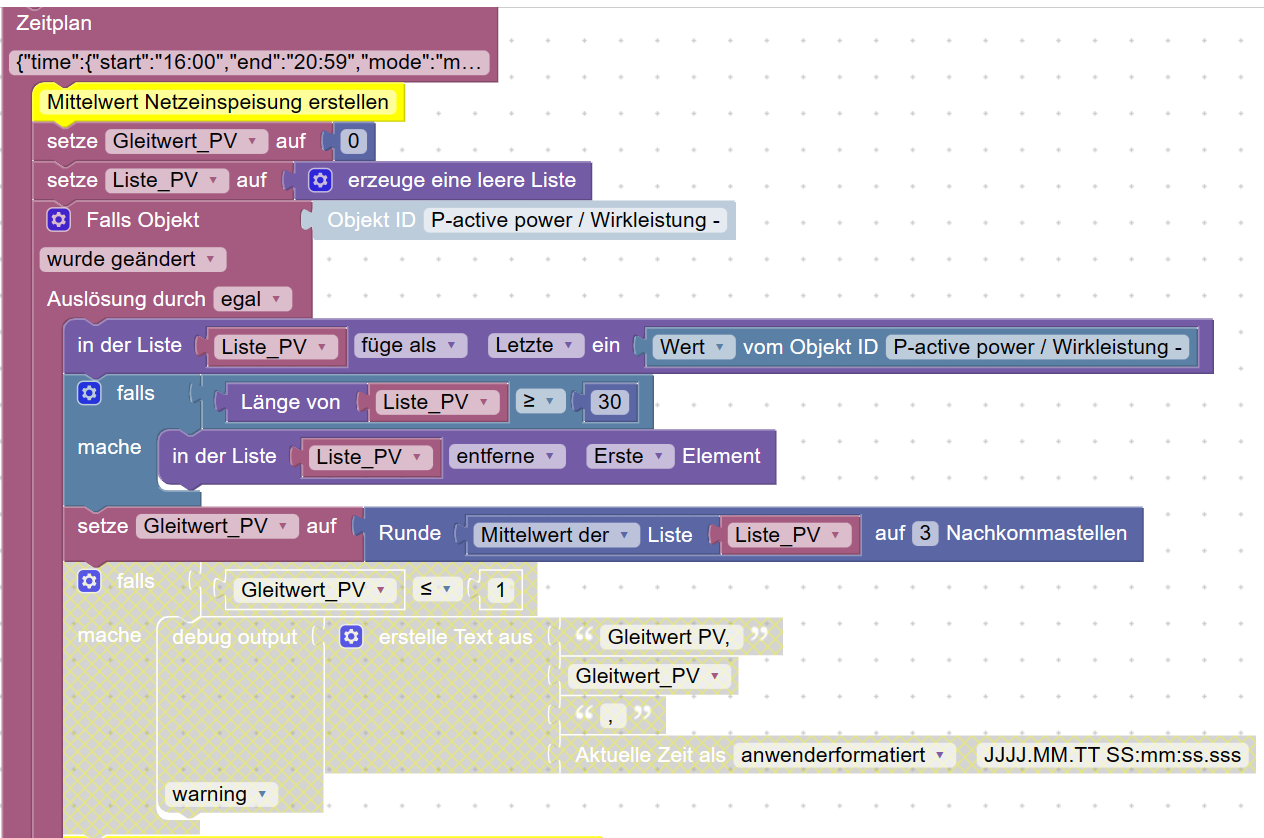
Du setzt die Variable mit dem Datenpunkt und möchtest du zwei Schritte weiter die Variable als Liste nutzen, das geht nicht. Du musst beim setzten der Variable Liste _PV eine leere Liste erzeugen. Dann kannst du die Variable auch als Liste nutzen.
Zum Schluss schreibt man die Liste in den Datenpunkt.
Gruß Tom
Wenn meine Hilfe erfolgreich war, benutze bitte das Voting unten rechts im Beitrag
Public Transport
https://github.com/tt-tom17/ioBroker.public-transport
https://github.com/tt-tom17/ioBroker.public-transport/wikiNSPanel Adapter Wiki
https://github.com/ticaki/ioBroker.nspanel-lovelace-ui/wiki

Hey! Du scheinst an dieser Unterhaltung interessiert zu sein, hast aber noch kein Konto.
Hast du es satt, bei jedem Besuch durch die gleichen Beiträge zu scrollen? Wenn du dich für ein Konto anmeldest, kommst du immer genau dorthin zurück, wo du zuvor warst, und kannst dich über neue Antworten benachrichtigen lassen (entweder per E-Mail oder Push-Benachrichtigung). Du kannst auch Lesezeichen speichern und Beiträge positiv bewerten, um anderen Community-Mitgliedern deine Wertschätzung zu zeigen.
Mit deinem Input könnte dieser Beitrag noch besser werden 💗
Registrieren AnmeldenSupport us
246
Online33.0k
Benutzende83.7k
Themen1.3m
Beiträge