Skip to content
  • Home
  • Aktuell
  • Tags
  • 0 Ungelesen 0
  • Kategorien
  • Unreplied
  • Beliebt
  • GitHub
  • Docu
  • Hilfe
Skins
  • Light
  • Brite
  • Cerulean
  • Cosmo
  • Flatly
  • Journal
  • Litera
  • Lumen
  • Lux
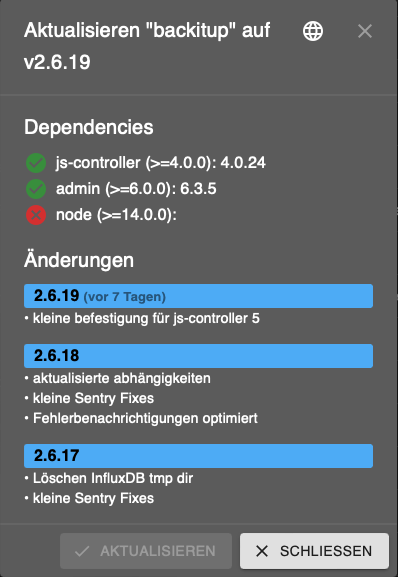
  • Materia
  • Minty
  • Morph
  • Pulse
  • Sandstone
  • Simplex
  • Sketchy
  • Spacelab
  • United
  • Yeti
  • Zephyr
  • Dark
  • Cyborg
  • Darkly
  • Quartz
  • Slate
  • Solar
  • Superhero
  • Vapor

  • Standard: (Kein Skin)
  • Kein Skin
Einklappen
ioBroker Logo

Community Forum

donate donate
  1. ioBroker Community Home
  2. Deutsch
  3. Einsteigerfragen
  4. Installation
  5. node.js downgrade auf bestimmte version

NEWS

  • Weihnachtsangebot 2025! 🎄
    BluefoxB
    Bluefox
    12
    1
    331

  • UPDATE 31.10.: Amazon Alexa - ioBroker Skill läuft aus ?
    apollon77A
    apollon77
    48
    3
    8.9k

  • Monatsrückblick – September 2025
    BluefoxB
    Bluefox
    14
    1
    2.3k

node.js downgrade auf bestimmte version

Geplant Angeheftet Gesperrt Verschoben Installation
node.js 16.19.0
33 Beiträge 8 Kommentatoren 4.0k Aufrufe 6 Watching
  • Älteste zuerst
  • Neuste zuerst
  • Meiste Stimmen
Antworten
  • In einem neuen Thema antworten
Anmelden zum Antworten
Dieses Thema wurde gelöscht. Nur Nutzer mit entsprechenden Rechten können es sehen.
  • R Robbi12

    Kann ich jetzt leider nicht mehr sagen. Ich habe das alte Backup eingespielt. Mit diesem funktioniert es ja

    Danke trotzdem

    Thomas BraunT Online
    Thomas BraunT Online
    Thomas Braun
    Most Active
    schrieb am zuletzt editiert von
    #15

    @robbi12 sagte in node.js downgrade auf bestimmte version:

    Danke trotzdem

    Danke auch das du zur Fehlersuche so aktiv beiträgst.

    Linux-Werkzeugkasten:
    https://forum.iobroker.net/topic/42952/der-kleine-iobroker-linux-werkzeugkasten
    NodeJS Fixer Skript:
    https://forum.iobroker.net/topic/68035/iob-node-fix-skript
    iob_diag: curl -sLf -o diag.sh https://iobroker.net/diag.sh && bash diag.sh

    1 Antwort Letzte Antwort
    0
    • R Robbi12

      Das ist der Fehlercode. Und wenn ich wüsste an was es liegt dann würde ich es sagen.

      Drum frage ich aber auch. Und der Hinweis auf gute Kommentare bringt mich auch nicht weiter.

      Eigentlich war meine Frage wie ich auf die eine spezielle node.js Version downgraden kann. Da kam nichts. Dann hätte ich es ausprobiert und ich hätte eine Antwort gegeben.

      Ich mach es jetzt anders. Ich spiele das Backup ein, update und stelle meine Sachen (selber schuld dass ich kein backup von denen machte) wieder ein.

      HomoranH Nicht stören
      HomoranH Nicht stören
      Homoran
      Global Moderator Administrators
      schrieb am zuletzt editiert von
      #16

      @robbi12 sagte in node.js downgrade auf bestimmte version:

      wie ich auf die eine spezielle node.js Version downgraden kann. Da kam nichts.

      weil das nicht zur Behbung geführt hätte, sondern wahrscheinlich mehr angerichtet hätte.

      Um das aber substantiell untermauern zu können, hätten wir die angefragten Informationen für/aus dem damaligen Zustand gebraucht.

      Inzwischen ist mehrmals umoperiert worden, so dass der damalige Zustand wohl nicht mehr zweifelsfrei hergestellt werden kann.
      Die Community lebt davon, dass solche "seltsamen Phänomene" aufgeklärt werden, um bei ähnlich gelagerten Fällen besser reagieren zu können,

      kein Support per PN! - Fragen im Forum stellen - es gibt fast nichts, was nicht auch für andere interessant ist.

      Benutzt das Voting rechts unten im Beitrag wenn er euch geholfen hat.

      der Installationsfixer: curl -fsL https://iobroker.net/fix.sh | bash -

      1 Antwort Letzte Antwort
      0
      • HomoranH Homoran

        @robbi12 sagte in node.js downgrade auf bestimmte version:

        Also danke für eure Mühe.
        Kann geschlossen werden.

        willst du uns wirklich so dumm sterben lassen?

        Außer Nachfragen nach Fakten haben wir höchstens noch Zweifel an deiner Theorie beigetragen.

        Leider sind diese Fakten nicht gekommen, aber auf einmal ist es doch nicht die node-Version gewesen?

        Was war es denn?

        @robbi12 sagte in node.js downgrade auf bestimmte version:

        Ich verstehe es gar nicht.

        und auch da können wir ohne Fakten kein Licht ins Dunkel bringen.

        https://forum.iobroker.net/topic/51555/hinweise-für-gute-forenbeiträge/1

        S Offline
        S Offline
        searcher57
        schrieb am zuletzt editiert von
        #17

        @homoran
        Hallo!
        Aus Unwissenheit habe ich die neueste Version 18.14.2 von Node.js aus dem Netz installiert. Da ich mich nun etwas mehr informiert habe, frage ich auch, soll ich besser auf die stable Version 16.19.1 zu downgraden? Macht das Sinn, obwohl ich bisher keine Probleme hatte? Wenn es besser wäre, wie gehe ich dann vor, oder soll ich warten, bis v18.xxx stable ist?

        Gruß Rainer

        <raspberrypi
        Plattform
        linux
        Betriebssystem
        linux
        Architektur
        arm64
        CPUs
        4
        Geschwindigkeit
        1800 MHz
        Modell
        Cortex-A72
        RAM
        1.81 GB
        System-Betriebszeit
        15:12:19
        Node.js
        v18.14.2 (Die Version v18.x von Node.js wird derzeit nicht vollständig unterstützt. - Empfohlene Version v16.19.1)>

        Thomas BraunT 1 Antwort Letzte Antwort
        0
        • S searcher57

          @homoran
          Hallo!
          Aus Unwissenheit habe ich die neueste Version 18.14.2 von Node.js aus dem Netz installiert. Da ich mich nun etwas mehr informiert habe, frage ich auch, soll ich besser auf die stable Version 16.19.1 zu downgraden? Macht das Sinn, obwohl ich bisher keine Probleme hatte? Wenn es besser wäre, wie gehe ich dann vor, oder soll ich warten, bis v18.xxx stable ist?

          Gruß Rainer

          <raspberrypi
          Plattform
          linux
          Betriebssystem
          linux
          Architektur
          arm64
          CPUs
          4
          Geschwindigkeit
          1800 MHz
          Modell
          Cortex-A72
          RAM
          1.81 GB
          System-Betriebszeit
          15:12:19
          Node.js
          v18.14.2 (Die Version v18.x von Node.js wird derzeit nicht vollständig unterstützt. - Empfohlene Version v16.19.1)>

          Thomas BraunT Online
          Thomas BraunT Online
          Thomas Braun
          Most Active
          schrieb am zuletzt editiert von
          #18

          @searcher57

          Wenn es ansonsten sauber installiert wurde und keine Probleme macht würde ich es so lassen. Die 18 wird wohl in absehbarer Zeit ohnehin zur neuen Empfehlung werden.

          Linux-Werkzeugkasten:
          https://forum.iobroker.net/topic/42952/der-kleine-iobroker-linux-werkzeugkasten
          NodeJS Fixer Skript:
          https://forum.iobroker.net/topic/68035/iob-node-fix-skript
          iob_diag: curl -sLf -o diag.sh https://iobroker.net/diag.sh && bash diag.sh

          S 1 Antwort Letzte Antwort
          0
          • Thomas BraunT Thomas Braun

            @searcher57

            Wenn es ansonsten sauber installiert wurde und keine Probleme macht würde ich es so lassen. Die 18 wird wohl in absehbarer Zeit ohnehin zur neuen Empfehlung werden.

            S Offline
            S Offline
            searcher57
            schrieb am zuletzt editiert von
            #19

            @thomas-braun

            Ok!
            Vielen Dank für deine schnelle Antwort!

            Schönen Sonntag noch!

            Thomas BraunT 1 Antwort Letzte Antwort
            0
            • S searcher57

              @thomas-braun

              Ok!
              Vielen Dank für deine schnelle Antwort!

              Schönen Sonntag noch!

              Thomas BraunT Online
              Thomas BraunT Online
              Thomas Braun
              Most Active
              schrieb am zuletzt editiert von
              #20

              @searcher57

              Wobei sich

              Node.js aus dem Netz installiert.

              falsch anhört. Das wird nicht aus dem Netz installiert sondern über den Paketmanager.

              iob diag
              

              sagt?

              Linux-Werkzeugkasten:
              https://forum.iobroker.net/topic/42952/der-kleine-iobroker-linux-werkzeugkasten
              NodeJS Fixer Skript:
              https://forum.iobroker.net/topic/68035/iob-node-fix-skript
              iob_diag: curl -sLf -o diag.sh https://iobroker.net/diag.sh && bash diag.sh

              X 1 Antwort Letzte Antwort
              0
              • Thomas BraunT Thomas Braun

                @searcher57

                Wobei sich

                Node.js aus dem Netz installiert.

                falsch anhört. Das wird nicht aus dem Netz installiert sondern über den Paketmanager.

                iob diag
                

                sagt?

                X Offline
                X Offline
                Xanon
                schrieb am zuletzt editiert von
                #21

                Hallo ich habe ein ähnliches Problem.
                Habe auf dem Raspberry auf Node v18.16.0 aktualisiert und es sah zuerst alles ok aus.
                Nun gibt es Adapter Updates, welche ROT dargestellt werden und ich Node>= 14 installieren soll.
                Ich gehe davon aus, das Node 18.16.0 nicht unterstützt wird.
                Oder liegt es an einem anderen Problem?

                Nun möchte ich gerne wieder auf v16 downgraden.
                Habe mit dem Befehl url -sL https://deb.nodesource.com/setup_16.x | sudo -E bash - versucht, welchen ich auch fürs update genommen habe (natürlich mit 18 statt 16) aber das system sagt das ich eine aktuellere Version installiert habe.

                Wie bekomme ich nun die 16 installiert / ge-downgraded ?

                ======== Start marking the full check here =========
                
                
                Skript v.2023-04-16
                
                *** BASE SYSTEM ***
                Model		: Raspberry Pi 3 Model B Rev 1.2
                Architecture    : armv7l
                Docker          : false
                Virtualization  : none
                Distributor ID:	Raspbian
                Description:	Raspbian GNU/Linux 11 (bullseye)
                Release:	11
                Codename:	bullseye
                
                PRETTY_NAME="Raspbian GNU/Linux 11 (bullseye)"
                NAME="Raspbian GNU/Linux"
                VERSION_ID="11"
                VERSION="11 (bullseye)"
                VERSION_CODENAME=bullseye
                ID=raspbian
                ID_LIKE=debian
                HOME_URL="http://www.raspbian.org/"
                SUPPORT_URL="http://www.raspbian.org/RaspbianForums"
                BUG_REPORT_URL="http://www.raspbian.org/RaspbianBugs"
                
                Systemuptime and Load:
                19:57:32 up 26 min,  2 users,  load average: 0.37, 0.69, 1.13
                CPU threads: 4
                
                Raspberry only:
                throttled=0x0
                Other values than 0x0 hint to temperature/voltage problems
                temp=49.4'C
                volt=1.2750V
                
                *** Time and Time Zones ***
                              Local time: Thu 2023-04-27 19:57:32 CEST
                          Universal time: Thu 2023-04-27 17:57:32 UTC
                                RTC time: n/a
                               Time zone: Europe/Berlin (CEST, +0200)
                System clock synchronized: yes
                             NTP service: active
                         RTC in local TZ: no
                
                *** User and Groups ***
                heller
                /home/heller
                heller adm dialout cdrom sudo audio video plugdev games users input render netdev gpio i2c spi iobroker
                
                *** X-Server-Setup ***
                X-Server: 	false
                Desktop: 	
                Terminal: 	tty
                Boot Target: 	multi-user.target
                
                *** MEMORY ***
                              total        used        free      shared  buff/cache   available
                Mem:            921M        601M        134M        0.0K        185M        262M
                Swap:            99M         97M        2.0M
                Total:          1.0G        699M        137M
                
                         921 M total memory
                         601 M used memory
                         214 M active memory
                         502 M inactive memory
                         134 M free memory
                          20 M buffer memory
                         165 M swap cache
                          99 M total swap
                          97 M used swap
                           2 M free swap
                
                Raspberry only:
                oom events: 0
                lifetime oom required: 0 Mbytes
                total time in oom handler: 0 ms
                max time spent in oom handler: 0 ms
                
                *** FILESYSTEM ***
                Filesystem     Type      Size  Used Avail Use% Mounted on
                /dev/root      ext4       15G  4.7G  9.1G  35% /
                devtmpfs       devtmpfs  333M     0  333M   0% /dev
                tmpfs          tmpfs     461M     0  461M   0% /dev/shm
                tmpfs          tmpfs     185M  708K  184M   1% /run
                tmpfs          tmpfs     5.0M  4.0K  5.0M   1% /run/lock
                /dev/mmcblk0p1 vfat      253M   52M  202M  21% /boot
                tmpfs          tmpfs      93M     0   93M   0% /run/user/1000
                
                Messages concerning ext4 filesystem in dmesg:
                [Thu Apr 27 19:30:59 2023] Kernel command line: coherent_pool=1M 8250.nr_uarts=0 snd_bcm2835.enable_headphones=0 snd_bcm2835.enable_headphones=1 snd_bcm2835.enable_hdmi=1 snd_bcm2835.enable_hdmi=0 video=Composite-1:720x480@60i vc_mem.mem_base=0x3ec00000 vc_mem.mem_size=0x40000000  console=ttyS0,115200 console=tty1 root=PARTUUID=c33d7f5c-02 rootfstype=ext4 fsck.repair=yes rootwait
                [Thu Apr 27 19:31:02 2023] EXT4-fs (mmcblk0p2): mounted filesystem with ordered data mode. Quota mode: none.
                [Thu Apr 27 19:31:02 2023] VFS: Mounted root (ext4 filesystem) readonly on device 179:2.
                [Thu Apr 27 19:31:05 2023] EXT4-fs (mmcblk0p2): re-mounted. Quota mode: none.
                
                Show mounted filesystems (real ones only):
                TARGET  SOURCE         FSTYPE OPTIONS
                /       /dev/mmcblk0p2 ext4   rw,noatime
                `-/boot /dev/mmcblk0p1 vfat   rw,relatime,fmask=0022,dmask=0022,codepage=437,iocharset=ascii,shortname=mixed,flush,errors=remount-ro
                
                Files in neuralgic directories:
                
                /var:
                1.2G	/var/
                852M	/var/log
                849M	/var/log/journal/4bb29cc478b1455eaa86e30d2ee62b87
                849M	/var/log/journal
                163M	/var/cache
                
                Archived and active journals take up 848.3M in the file system.
                
                /opt/iobroker/backups:
                231M	/opt/iobroker/backups/
                
                /opt/iobroker/iobroker-data:
                236M	/opt/iobroker/iobroker-data/
                173M	/opt/iobroker/iobroker-data/files
                51M	/opt/iobroker/iobroker-data/files/javascript.admin
                45M	/opt/iobroker/iobroker-data/backup-objects
                32M	/opt/iobroker/iobroker-data/files/javascript.admin/static/js
                
                The five largest files in iobroker-data are:
                19M	/opt/iobroker/iobroker-data/files/iot.admin/static/js/main.904d455f.js.map
                14M	/opt/iobroker/iobroker-data/objects.jsonl
                8.1M	/opt/iobroker/iobroker-data/files/iot.admin/static/js/main.904d455f.js
                6.9M	/opt/iobroker/iobroker-data/files/javascript.admin/static/js/610.de0231c9.chunk.js.map
                6.3M	/opt/iobroker/iobroker-data/files/admin.admin/custom/static/js/vendors-node_modules_iobroker_adapter-react-v5_assets_devices_parseNames_js-node_modules_iobr-99c23e.847b8ad9.chunk.js.map
                
                *** NodeJS-Installation ***
                
                /usr/bin/nodejs 	v18.16.0
                /usr/bin/node 		v18.16.0
                /usr/bin/npm 		9.5.1
                /usr/bin/npx 		9.5.1
                
                
                nodejs:
                 Installed: 18.16.0-deb-1nodesource1
                 Candidate: 18.16.0-deb-1nodesource1
                 Version table:
                *** 18.16.0-deb-1nodesource1 500
                       500 https://deb.nodesource.com/node_18.x bullseye/main armhf Packages
                       100 /var/lib/dpkg/status
                    12.22.12~dfsg-1~deb11u3 500
                       500 http://raspbian.raspberrypi.org/raspbian bullseye/main armhf Packages
                
                Temp directories causing npm8 problem: 0
                No problems detected
                
                *** ioBroker-Installation ***
                
                ioBroker Status
                iobroker is running on this host.
                
                
                Objects type: jsonl
                States  type: jsonl
                
                MULTIHOSTSERVICE/enabled: false
                
                Core adapters versions
                js-controller: 	4.0.24
                admin: 		6.3.5
                javascript: 	6.1.4
                
                Adapters from github: 	1
                
                Adapter State
                + system.adapter.admin.0                  : admin                 : helleriobroker                           -  enabled, compact disabled, port: 8081, bind: 0.0.0.0, run as: admin
                + system.adapter.alexa2.0                 : alexa2                : helleriobroker                           -  enabled, compact disabled
                + system.adapter.backitup.0               : backitup              : helleriobroker                           -  enabled, compact disabled
                 system.adapter.daswetter.0              : daswetter             : helleriobroker                           -  enabled, compact disabled
                 system.adapter.discovery.0              : discovery             : helleriobroker                           - disabled, compact disabled
                 system.adapter.history.0                : history               : helleriobroker                           - disabled, compact disabled
                + system.adapter.hmip.0                   : hmip                  : helleriobroker                           -  enabled, compact disabled
                + system.adapter.hue.0                    : hue                   : helleriobroker                           -  enabled, compact disabled, port: 443
                + system.adapter.info.0                   : info                  : helleriobroker                           -  enabled, compact disabled
                + system.adapter.iot.0                    : iot                   : helleriobroker                           -  enabled, compact disabled
                + system.adapter.javascript.0             : javascript            : helleriobroker                           -  enabled, compact disabled
                + system.adapter.meross.0                 : meross                : helleriobroker                           -  enabled, compact disabled
                 system.adapter.simple-api.0             : simple-api            : helleriobroker                           - disabled, compact disabled, port: 8087, bind: 0.0.0.0, run as: admin
                + system.adapter.sonos.0                  : sonos                 : helleriobroker                           -  enabled, compact disabled
                + system.adapter.tankerkoenig.0           : tankerkoenig          : helleriobroker                           -  enabled, compact disabled
                + system.adapter.tuya.0                   : tuya                  : helleriobroker                           -  enabled, compact disabled
                 system.adapter.vis.0                    : vis                   : helleriobroker                           -  enabled, compact disabled
                 system.adapter.weatherunderground.0     : weatherunderground    : helleriobroker                           -  enabled, compact disabled
                + system.adapter.web.0                    : web                   : helleriobroker                           -  enabled, compact disabled, port: 8082, bind: 0.0.0.0, run as: admin
                + system.adapter.zigbee.0                 : zigbee                : helleriobroker                           -  enabled, compact disabled, port: /dev/serial/by-id/usb-Silicon_Labs_Sonoff_Zigbee_3.0_USB_Dongle_Plus_0001-if00-port0
                
                + instance is alive
                
                Enabled adapters with bindings
                + system.adapter.admin.0                  : admin                 : helleriobroker                           -  enabled, compact disabled, port: 8081, bind: 0.0.0.0, run as: admin
                + system.adapter.hue.0                    : hue                   : helleriobroker                           -  enabled, compact disabled, port: 443
                + system.adapter.web.0                    : web                   : helleriobroker                           -  enabled, compact disabled, port: 8082, bind: 0.0.0.0, run as: admin
                + system.adapter.zigbee.0                 : zigbee                : helleriobroker                           -  enabled, compact disabled, port: /dev/serial/by-id/usb-Silicon_Labs_Sonoff_Zigbee_3.0_USB_Dongle_Plus_0001-if00-port0
                
                ioBroker-Repositories
                stable        : http://download.iobroker.net/sources-dist.json
                beta          : http://download.iobroker.net/sources-dist-latest.json
                
                Active repo(s): stable
                
                Installed ioBroker-Instances
                Used repository: stable
                Adapter    "admin"        : 6.3.5    , installed 6.3.5
                Adapter    "alexa2"       : 3.23.2   , installed 3.23.2
                Adapter    "backitup"     : 2.6.19   , installed 2.6.16 [Updatable]
                Adapter    "daswetter"    : 3.1.8    , installed 3.1.7  [Updatable]
                Adapter    "discovery"    : 3.1.0    , installed 3.1.0
                Adapter    "history"      : 2.2.4    , installed 2.2.4
                Adapter    "hmip"         : 1.20.0   , installed 1.20.0
                Adapter    "hue"          : 3.7.1    , installed 3.7.1
                Adapter    "info"         : 1.9.26   , installed 1.9.19 [Updatable]
                Adapter    "iot"          : 1.14.2   , installed 1.14.2
                Adapter    "javascript"   : 6.1.4    , installed 6.1.4
                Controller "js-controller": 4.0.24   , installed 4.0.24
                Adapter    "meross"       : 1.14.0   , installed 1.14.0
                Adapter    "simple-api"   : 2.7.2    , installed 2.7.2
                Adapter    "socketio"     : 4.2.0    , installed 4.2.0
                Adapter    "sonos"        : 2.2.3    , installed 2.2.3
                Adapter    "tankerkoenig" : 3.3.7    , installed 3.3.7
                Adapter    "tuya"         : 3.13.1   , installed 3.13.1
                Adapter    "vis"          : 1.4.16   , installed 1.4.16
                Adapter    "weatherunderground": 3.4.2, installed 3.4.2
                Adapter    "web"          : 4.3.0    , installed 4.3.0
                Adapter    "ws"           : 1.3.0    , installed 1.3.0
                Adapter    "zigbee"       : 1.8.10   , installed 1.8.10
                
                Objects and States
                Please stand by - This may take a while
                Objects: 	10655
                States: 	9070
                
                *** OS-Repositories and Updates ***
                Hit:1 http://archive.raspberrypi.org/debian bullseye InRelease
                Hit:2 http://raspbian.raspberrypi.org/raspbian bullseye InRelease
                Hit:3 https://deb.nodesource.com/node_18.x bullseye InRelease
                Reading package lists...
                Pending Updates: 0
                
                *** Listening Ports ***
                Active Internet connections (only servers)
                Proto Recv-Q Send-Q Local Address           Foreign Address         State       User       Inode      PID/Program name    
                tcp        0      0 0.0.0.0:22              0.0.0.0:*               LISTEN      0          12720      503/sshd: /usr/sbin 
                tcp        0      0 127.0.0.1:9001          0.0.0.0:*               LISTEN      1001       26594      3544/iobroker.js-co 
                tcp        0      0 127.0.0.1:9000          0.0.0.0:*               LISTEN      1001       26601      3544/iobroker.js-co 
                tcp6       0      0 :::22                   :::*                    LISTEN      0          12722      503/sshd: /usr/sbin 
                tcp6       0      0 :::8081                 :::*                    LISTEN      1001       28437      3562/io.admin.0     
                tcp6       0      0 :::8082                 :::*                    LISTEN      1001       30011      3758/io.web.0       
                tcp6       0      0 :::3500                 :::*                    LISTEN      1001       30928      3659/io.sonos.0     
                udp        0      0 0.0.0.0:6666            0.0.0.0:*                           1001       30041      3697/io.tuya.0      
                udp        0      0 0.0.0.0:6667            0.0.0.0:*                           1001       30042      3697/io.tuya.0      
                udp        0      0 0.0.0.0:68              0.0.0.0:*                           0          11887      693/dhcpcd          
                udp        0      0 0.0.0.0:40545           0.0.0.0:*                           108        11803      386/avahi-daemon: r 
                udp        0      0 0.0.0.0:5353            0.0.0.0:*                           108        11801      386/avahi-daemon: r 
                udp6       0      0 :::546                  :::*                                0          14175      693/dhcpcd          
                udp6       0      0 :::40631                :::*                                108        11804      386/avahi-daemon: r 
                udp6       0      0 :::5353                 :::*                                108        11802      386/avahi-daemon: r 
                
                *** Log File - Last 25 Lines ***


                crunchipC DJMarc75D HomoranH 3 Antworten Letzte Antwort
                0
                • X Xanon

                  Hallo ich habe ein ähnliches Problem.
                  Habe auf dem Raspberry auf Node v18.16.0 aktualisiert und es sah zuerst alles ok aus.
                  Nun gibt es Adapter Updates, welche ROT dargestellt werden und ich Node>= 14 installieren soll.
                  Ich gehe davon aus, das Node 18.16.0 nicht unterstützt wird.
                  Oder liegt es an einem anderen Problem?

                  Nun möchte ich gerne wieder auf v16 downgraden.
                  Habe mit dem Befehl url -sL https://deb.nodesource.com/setup_16.x | sudo -E bash - versucht, welchen ich auch fürs update genommen habe (natürlich mit 18 statt 16) aber das system sagt das ich eine aktuellere Version installiert habe.

                  Wie bekomme ich nun die 16 installiert / ge-downgraded ?

                  ======== Start marking the full check here =========
                  
                  
                  Skript v.2023-04-16
                  
                  *** BASE SYSTEM ***
                  Model		: Raspberry Pi 3 Model B Rev 1.2
                  Architecture    : armv7l
                  Docker          : false
                  Virtualization  : none
                  Distributor ID:	Raspbian
                  Description:	Raspbian GNU/Linux 11 (bullseye)
                  Release:	11
                  Codename:	bullseye
                  
                  PRETTY_NAME="Raspbian GNU/Linux 11 (bullseye)"
                  NAME="Raspbian GNU/Linux"
                  VERSION_ID="11"
                  VERSION="11 (bullseye)"
                  VERSION_CODENAME=bullseye
                  ID=raspbian
                  ID_LIKE=debian
                  HOME_URL="http://www.raspbian.org/"
                  SUPPORT_URL="http://www.raspbian.org/RaspbianForums"
                  BUG_REPORT_URL="http://www.raspbian.org/RaspbianBugs"
                  
                  Systemuptime and Load:
                  19:57:32 up 26 min,  2 users,  load average: 0.37, 0.69, 1.13
                  CPU threads: 4
                  
                  Raspberry only:
                  throttled=0x0
                  Other values than 0x0 hint to temperature/voltage problems
                  temp=49.4'C
                  volt=1.2750V
                  
                  *** Time and Time Zones ***
                                Local time: Thu 2023-04-27 19:57:32 CEST
                            Universal time: Thu 2023-04-27 17:57:32 UTC
                                  RTC time: n/a
                                 Time zone: Europe/Berlin (CEST, +0200)
                  System clock synchronized: yes
                               NTP service: active
                           RTC in local TZ: no
                  
                  *** User and Groups ***
                  heller
                  /home/heller
                  heller adm dialout cdrom sudo audio video plugdev games users input render netdev gpio i2c spi iobroker
                  
                  *** X-Server-Setup ***
                  X-Server: 	false
                  Desktop: 	
                  Terminal: 	tty
                  Boot Target: 	multi-user.target
                  
                  *** MEMORY ***
                                total        used        free      shared  buff/cache   available
                  Mem:            921M        601M        134M        0.0K        185M        262M
                  Swap:            99M         97M        2.0M
                  Total:          1.0G        699M        137M
                  
                           921 M total memory
                           601 M used memory
                           214 M active memory
                           502 M inactive memory
                           134 M free memory
                            20 M buffer memory
                           165 M swap cache
                            99 M total swap
                            97 M used swap
                             2 M free swap
                  
                  Raspberry only:
                  oom events: 0
                  lifetime oom required: 0 Mbytes
                  total time in oom handler: 0 ms
                  max time spent in oom handler: 0 ms
                  
                  *** FILESYSTEM ***
                  Filesystem     Type      Size  Used Avail Use% Mounted on
                  /dev/root      ext4       15G  4.7G  9.1G  35% /
                  devtmpfs       devtmpfs  333M     0  333M   0% /dev
                  tmpfs          tmpfs     461M     0  461M   0% /dev/shm
                  tmpfs          tmpfs     185M  708K  184M   1% /run
                  tmpfs          tmpfs     5.0M  4.0K  5.0M   1% /run/lock
                  /dev/mmcblk0p1 vfat      253M   52M  202M  21% /boot
                  tmpfs          tmpfs      93M     0   93M   0% /run/user/1000
                  
                  Messages concerning ext4 filesystem in dmesg:
                  [Thu Apr 27 19:30:59 2023] Kernel command line: coherent_pool=1M 8250.nr_uarts=0 snd_bcm2835.enable_headphones=0 snd_bcm2835.enable_headphones=1 snd_bcm2835.enable_hdmi=1 snd_bcm2835.enable_hdmi=0 video=Composite-1:720x480@60i vc_mem.mem_base=0x3ec00000 vc_mem.mem_size=0x40000000  console=ttyS0,115200 console=tty1 root=PARTUUID=c33d7f5c-02 rootfstype=ext4 fsck.repair=yes rootwait
                  [Thu Apr 27 19:31:02 2023] EXT4-fs (mmcblk0p2): mounted filesystem with ordered data mode. Quota mode: none.
                  [Thu Apr 27 19:31:02 2023] VFS: Mounted root (ext4 filesystem) readonly on device 179:2.
                  [Thu Apr 27 19:31:05 2023] EXT4-fs (mmcblk0p2): re-mounted. Quota mode: none.
                  
                  Show mounted filesystems (real ones only):
                  TARGET  SOURCE         FSTYPE OPTIONS
                  /       /dev/mmcblk0p2 ext4   rw,noatime
                  `-/boot /dev/mmcblk0p1 vfat   rw,relatime,fmask=0022,dmask=0022,codepage=437,iocharset=ascii,shortname=mixed,flush,errors=remount-ro
                  
                  Files in neuralgic directories:
                  
                  /var:
                  1.2G	/var/
                  852M	/var/log
                  849M	/var/log/journal/4bb29cc478b1455eaa86e30d2ee62b87
                  849M	/var/log/journal
                  163M	/var/cache
                  
                  Archived and active journals take up 848.3M in the file system.
                  
                  /opt/iobroker/backups:
                  231M	/opt/iobroker/backups/
                  
                  /opt/iobroker/iobroker-data:
                  236M	/opt/iobroker/iobroker-data/
                  173M	/opt/iobroker/iobroker-data/files
                  51M	/opt/iobroker/iobroker-data/files/javascript.admin
                  45M	/opt/iobroker/iobroker-data/backup-objects
                  32M	/opt/iobroker/iobroker-data/files/javascript.admin/static/js
                  
                  The five largest files in iobroker-data are:
                  19M	/opt/iobroker/iobroker-data/files/iot.admin/static/js/main.904d455f.js.map
                  14M	/opt/iobroker/iobroker-data/objects.jsonl
                  8.1M	/opt/iobroker/iobroker-data/files/iot.admin/static/js/main.904d455f.js
                  6.9M	/opt/iobroker/iobroker-data/files/javascript.admin/static/js/610.de0231c9.chunk.js.map
                  6.3M	/opt/iobroker/iobroker-data/files/admin.admin/custom/static/js/vendors-node_modules_iobroker_adapter-react-v5_assets_devices_parseNames_js-node_modules_iobr-99c23e.847b8ad9.chunk.js.map
                  
                  *** NodeJS-Installation ***
                  
                  /usr/bin/nodejs 	v18.16.0
                  /usr/bin/node 		v18.16.0
                  /usr/bin/npm 		9.5.1
                  /usr/bin/npx 		9.5.1
                  
                  
                  nodejs:
                   Installed: 18.16.0-deb-1nodesource1
                   Candidate: 18.16.0-deb-1nodesource1
                   Version table:
                  *** 18.16.0-deb-1nodesource1 500
                         500 https://deb.nodesource.com/node_18.x bullseye/main armhf Packages
                         100 /var/lib/dpkg/status
                      12.22.12~dfsg-1~deb11u3 500
                         500 http://raspbian.raspberrypi.org/raspbian bullseye/main armhf Packages
                  
                  Temp directories causing npm8 problem: 0
                  No problems detected
                  
                  *** ioBroker-Installation ***
                  
                  ioBroker Status
                  iobroker is running on this host.
                  
                  
                  Objects type: jsonl
                  States  type: jsonl
                  
                  MULTIHOSTSERVICE/enabled: false
                  
                  Core adapters versions
                  js-controller: 	4.0.24
                  admin: 		6.3.5
                  javascript: 	6.1.4
                  
                  Adapters from github: 	1
                  
                  Adapter State
                  + system.adapter.admin.0                  : admin                 : helleriobroker                           -  enabled, compact disabled, port: 8081, bind: 0.0.0.0, run as: admin
                  + system.adapter.alexa2.0                 : alexa2                : helleriobroker                           -  enabled, compact disabled
                  + system.adapter.backitup.0               : backitup              : helleriobroker                           -  enabled, compact disabled
                   system.adapter.daswetter.0              : daswetter             : helleriobroker                           -  enabled, compact disabled
                   system.adapter.discovery.0              : discovery             : helleriobroker                           - disabled, compact disabled
                   system.adapter.history.0                : history               : helleriobroker                           - disabled, compact disabled
                  + system.adapter.hmip.0                   : hmip                  : helleriobroker                           -  enabled, compact disabled
                  + system.adapter.hue.0                    : hue                   : helleriobroker                           -  enabled, compact disabled, port: 443
                  + system.adapter.info.0                   : info                  : helleriobroker                           -  enabled, compact disabled
                  + system.adapter.iot.0                    : iot                   : helleriobroker                           -  enabled, compact disabled
                  + system.adapter.javascript.0             : javascript            : helleriobroker                           -  enabled, compact disabled
                  + system.adapter.meross.0                 : meross                : helleriobroker                           -  enabled, compact disabled
                   system.adapter.simple-api.0             : simple-api            : helleriobroker                           - disabled, compact disabled, port: 8087, bind: 0.0.0.0, run as: admin
                  + system.adapter.sonos.0                  : sonos                 : helleriobroker                           -  enabled, compact disabled
                  + system.adapter.tankerkoenig.0           : tankerkoenig          : helleriobroker                           -  enabled, compact disabled
                  + system.adapter.tuya.0                   : tuya                  : helleriobroker                           -  enabled, compact disabled
                   system.adapter.vis.0                    : vis                   : helleriobroker                           -  enabled, compact disabled
                   system.adapter.weatherunderground.0     : weatherunderground    : helleriobroker                           -  enabled, compact disabled
                  + system.adapter.web.0                    : web                   : helleriobroker                           -  enabled, compact disabled, port: 8082, bind: 0.0.0.0, run as: admin
                  + system.adapter.zigbee.0                 : zigbee                : helleriobroker                           -  enabled, compact disabled, port: /dev/serial/by-id/usb-Silicon_Labs_Sonoff_Zigbee_3.0_USB_Dongle_Plus_0001-if00-port0
                  
                  + instance is alive
                  
                  Enabled adapters with bindings
                  + system.adapter.admin.0                  : admin                 : helleriobroker                           -  enabled, compact disabled, port: 8081, bind: 0.0.0.0, run as: admin
                  + system.adapter.hue.0                    : hue                   : helleriobroker                           -  enabled, compact disabled, port: 443
                  + system.adapter.web.0                    : web                   : helleriobroker                           -  enabled, compact disabled, port: 8082, bind: 0.0.0.0, run as: admin
                  + system.adapter.zigbee.0                 : zigbee                : helleriobroker                           -  enabled, compact disabled, port: /dev/serial/by-id/usb-Silicon_Labs_Sonoff_Zigbee_3.0_USB_Dongle_Plus_0001-if00-port0
                  
                  ioBroker-Repositories
                  stable        : http://download.iobroker.net/sources-dist.json
                  beta          : http://download.iobroker.net/sources-dist-latest.json
                  
                  Active repo(s): stable
                  
                  Installed ioBroker-Instances
                  Used repository: stable
                  Adapter    "admin"        : 6.3.5    , installed 6.3.5
                  Adapter    "alexa2"       : 3.23.2   , installed 3.23.2
                  Adapter    "backitup"     : 2.6.19   , installed 2.6.16 [Updatable]
                  Adapter    "daswetter"    : 3.1.8    , installed 3.1.7  [Updatable]
                  Adapter    "discovery"    : 3.1.0    , installed 3.1.0
                  Adapter    "history"      : 2.2.4    , installed 2.2.4
                  Adapter    "hmip"         : 1.20.0   , installed 1.20.0
                  Adapter    "hue"          : 3.7.1    , installed 3.7.1
                  Adapter    "info"         : 1.9.26   , installed 1.9.19 [Updatable]
                  Adapter    "iot"          : 1.14.2   , installed 1.14.2
                  Adapter    "javascript"   : 6.1.4    , installed 6.1.4
                  Controller "js-controller": 4.0.24   , installed 4.0.24
                  Adapter    "meross"       : 1.14.0   , installed 1.14.0
                  Adapter    "simple-api"   : 2.7.2    , installed 2.7.2
                  Adapter    "socketio"     : 4.2.0    , installed 4.2.0
                  Adapter    "sonos"        : 2.2.3    , installed 2.2.3
                  Adapter    "tankerkoenig" : 3.3.7    , installed 3.3.7
                  Adapter    "tuya"         : 3.13.1   , installed 3.13.1
                  Adapter    "vis"          : 1.4.16   , installed 1.4.16
                  Adapter    "weatherunderground": 3.4.2, installed 3.4.2
                  Adapter    "web"          : 4.3.0    , installed 4.3.0
                  Adapter    "ws"           : 1.3.0    , installed 1.3.0
                  Adapter    "zigbee"       : 1.8.10   , installed 1.8.10
                  
                  Objects and States
                  Please stand by - This may take a while
                  Objects: 	10655
                  States: 	9070
                  
                  *** OS-Repositories and Updates ***
                  Hit:1 http://archive.raspberrypi.org/debian bullseye InRelease
                  Hit:2 http://raspbian.raspberrypi.org/raspbian bullseye InRelease
                  Hit:3 https://deb.nodesource.com/node_18.x bullseye InRelease
                  Reading package lists...
                  Pending Updates: 0
                  
                  *** Listening Ports ***
                  Active Internet connections (only servers)
                  Proto Recv-Q Send-Q Local Address           Foreign Address         State       User       Inode      PID/Program name    
                  tcp        0      0 0.0.0.0:22              0.0.0.0:*               LISTEN      0          12720      503/sshd: /usr/sbin 
                  tcp        0      0 127.0.0.1:9001          0.0.0.0:*               LISTEN      1001       26594      3544/iobroker.js-co 
                  tcp        0      0 127.0.0.1:9000          0.0.0.0:*               LISTEN      1001       26601      3544/iobroker.js-co 
                  tcp6       0      0 :::22                   :::*                    LISTEN      0          12722      503/sshd: /usr/sbin 
                  tcp6       0      0 :::8081                 :::*                    LISTEN      1001       28437      3562/io.admin.0     
                  tcp6       0      0 :::8082                 :::*                    LISTEN      1001       30011      3758/io.web.0       
                  tcp6       0      0 :::3500                 :::*                    LISTEN      1001       30928      3659/io.sonos.0     
                  udp        0      0 0.0.0.0:6666            0.0.0.0:*                           1001       30041      3697/io.tuya.0      
                  udp        0      0 0.0.0.0:6667            0.0.0.0:*                           1001       30042      3697/io.tuya.0      
                  udp        0      0 0.0.0.0:68              0.0.0.0:*                           0          11887      693/dhcpcd          
                  udp        0      0 0.0.0.0:40545           0.0.0.0:*                           108        11803      386/avahi-daemon: r 
                  udp        0      0 0.0.0.0:5353            0.0.0.0:*                           108        11801      386/avahi-daemon: r 
                  udp6       0      0 :::546                  :::*                                0          14175      693/dhcpcd          
                  udp6       0      0 :::40631                :::*                                108        11804      386/avahi-daemon: r 
                  udp6       0      0 :::5353                 :::*                                108        11802      386/avahi-daemon: r 
                  
                  *** Log File - Last 25 Lines ***


                  crunchipC Abwesend
                  crunchipC Abwesend
                  crunchip
                  Forum Testing Most Active
                  schrieb am zuletzt editiert von
                  #22

                  @xanon sagte in node.js downgrade auf bestimmte version:

                  Nun gibt es Adapter Updates, welche ROT dargestellt werden

                  die da wären?

                  umgestiegen von Proxmox auf Unraid

                  X 1 Antwort Letzte Antwort
                  0
                  • crunchipC crunchip

                    @xanon sagte in node.js downgrade auf bestimmte version:

                    Nun gibt es Adapter Updates, welche ROT dargestellt werden

                    die da wären?

                    X Offline
                    X Offline
                    Xanon
                    schrieb am zuletzt editiert von Xanon
                    #23

                    @crunchip

                    • BackItUp

                    und

                    • Informationsseite

                    90.png
                    100.png

                    1 Antwort Letzte Antwort
                    0
                    • X Xanon

                      Hallo ich habe ein ähnliches Problem.
                      Habe auf dem Raspberry auf Node v18.16.0 aktualisiert und es sah zuerst alles ok aus.
                      Nun gibt es Adapter Updates, welche ROT dargestellt werden und ich Node>= 14 installieren soll.
                      Ich gehe davon aus, das Node 18.16.0 nicht unterstützt wird.
                      Oder liegt es an einem anderen Problem?

                      Nun möchte ich gerne wieder auf v16 downgraden.
                      Habe mit dem Befehl url -sL https://deb.nodesource.com/setup_16.x | sudo -E bash - versucht, welchen ich auch fürs update genommen habe (natürlich mit 18 statt 16) aber das system sagt das ich eine aktuellere Version installiert habe.

                      Wie bekomme ich nun die 16 installiert / ge-downgraded ?

                      ======== Start marking the full check here =========
                      
                      
                      Skript v.2023-04-16
                      
                      *** BASE SYSTEM ***
                      Model		: Raspberry Pi 3 Model B Rev 1.2
                      Architecture    : armv7l
                      Docker          : false
                      Virtualization  : none
                      Distributor ID:	Raspbian
                      Description:	Raspbian GNU/Linux 11 (bullseye)
                      Release:	11
                      Codename:	bullseye
                      
                      PRETTY_NAME="Raspbian GNU/Linux 11 (bullseye)"
                      NAME="Raspbian GNU/Linux"
                      VERSION_ID="11"
                      VERSION="11 (bullseye)"
                      VERSION_CODENAME=bullseye
                      ID=raspbian
                      ID_LIKE=debian
                      HOME_URL="http://www.raspbian.org/"
                      SUPPORT_URL="http://www.raspbian.org/RaspbianForums"
                      BUG_REPORT_URL="http://www.raspbian.org/RaspbianBugs"
                      
                      Systemuptime and Load:
                      19:57:32 up 26 min,  2 users,  load average: 0.37, 0.69, 1.13
                      CPU threads: 4
                      
                      Raspberry only:
                      throttled=0x0
                      Other values than 0x0 hint to temperature/voltage problems
                      temp=49.4'C
                      volt=1.2750V
                      
                      *** Time and Time Zones ***
                                    Local time: Thu 2023-04-27 19:57:32 CEST
                                Universal time: Thu 2023-04-27 17:57:32 UTC
                                      RTC time: n/a
                                     Time zone: Europe/Berlin (CEST, +0200)
                      System clock synchronized: yes
                                   NTP service: active
                               RTC in local TZ: no
                      
                      *** User and Groups ***
                      heller
                      /home/heller
                      heller adm dialout cdrom sudo audio video plugdev games users input render netdev gpio i2c spi iobroker
                      
                      *** X-Server-Setup ***
                      X-Server: 	false
                      Desktop: 	
                      Terminal: 	tty
                      Boot Target: 	multi-user.target
                      
                      *** MEMORY ***
                                    total        used        free      shared  buff/cache   available
                      Mem:            921M        601M        134M        0.0K        185M        262M
                      Swap:            99M         97M        2.0M
                      Total:          1.0G        699M        137M
                      
                               921 M total memory
                               601 M used memory
                               214 M active memory
                               502 M inactive memory
                               134 M free memory
                                20 M buffer memory
                               165 M swap cache
                                99 M total swap
                                97 M used swap
                                 2 M free swap
                      
                      Raspberry only:
                      oom events: 0
                      lifetime oom required: 0 Mbytes
                      total time in oom handler: 0 ms
                      max time spent in oom handler: 0 ms
                      
                      *** FILESYSTEM ***
                      Filesystem     Type      Size  Used Avail Use% Mounted on
                      /dev/root      ext4       15G  4.7G  9.1G  35% /
                      devtmpfs       devtmpfs  333M     0  333M   0% /dev
                      tmpfs          tmpfs     461M     0  461M   0% /dev/shm
                      tmpfs          tmpfs     185M  708K  184M   1% /run
                      tmpfs          tmpfs     5.0M  4.0K  5.0M   1% /run/lock
                      /dev/mmcblk0p1 vfat      253M   52M  202M  21% /boot
                      tmpfs          tmpfs      93M     0   93M   0% /run/user/1000
                      
                      Messages concerning ext4 filesystem in dmesg:
                      [Thu Apr 27 19:30:59 2023] Kernel command line: coherent_pool=1M 8250.nr_uarts=0 snd_bcm2835.enable_headphones=0 snd_bcm2835.enable_headphones=1 snd_bcm2835.enable_hdmi=1 snd_bcm2835.enable_hdmi=0 video=Composite-1:720x480@60i vc_mem.mem_base=0x3ec00000 vc_mem.mem_size=0x40000000  console=ttyS0,115200 console=tty1 root=PARTUUID=c33d7f5c-02 rootfstype=ext4 fsck.repair=yes rootwait
                      [Thu Apr 27 19:31:02 2023] EXT4-fs (mmcblk0p2): mounted filesystem with ordered data mode. Quota mode: none.
                      [Thu Apr 27 19:31:02 2023] VFS: Mounted root (ext4 filesystem) readonly on device 179:2.
                      [Thu Apr 27 19:31:05 2023] EXT4-fs (mmcblk0p2): re-mounted. Quota mode: none.
                      
                      Show mounted filesystems (real ones only):
                      TARGET  SOURCE         FSTYPE OPTIONS
                      /       /dev/mmcblk0p2 ext4   rw,noatime
                      `-/boot /dev/mmcblk0p1 vfat   rw,relatime,fmask=0022,dmask=0022,codepage=437,iocharset=ascii,shortname=mixed,flush,errors=remount-ro
                      
                      Files in neuralgic directories:
                      
                      /var:
                      1.2G	/var/
                      852M	/var/log
                      849M	/var/log/journal/4bb29cc478b1455eaa86e30d2ee62b87
                      849M	/var/log/journal
                      163M	/var/cache
                      
                      Archived and active journals take up 848.3M in the file system.
                      
                      /opt/iobroker/backups:
                      231M	/opt/iobroker/backups/
                      
                      /opt/iobroker/iobroker-data:
                      236M	/opt/iobroker/iobroker-data/
                      173M	/opt/iobroker/iobroker-data/files
                      51M	/opt/iobroker/iobroker-data/files/javascript.admin
                      45M	/opt/iobroker/iobroker-data/backup-objects
                      32M	/opt/iobroker/iobroker-data/files/javascript.admin/static/js
                      
                      The five largest files in iobroker-data are:
                      19M	/opt/iobroker/iobroker-data/files/iot.admin/static/js/main.904d455f.js.map
                      14M	/opt/iobroker/iobroker-data/objects.jsonl
                      8.1M	/opt/iobroker/iobroker-data/files/iot.admin/static/js/main.904d455f.js
                      6.9M	/opt/iobroker/iobroker-data/files/javascript.admin/static/js/610.de0231c9.chunk.js.map
                      6.3M	/opt/iobroker/iobroker-data/files/admin.admin/custom/static/js/vendors-node_modules_iobroker_adapter-react-v5_assets_devices_parseNames_js-node_modules_iobr-99c23e.847b8ad9.chunk.js.map
                      
                      *** NodeJS-Installation ***
                      
                      /usr/bin/nodejs 	v18.16.0
                      /usr/bin/node 		v18.16.0
                      /usr/bin/npm 		9.5.1
                      /usr/bin/npx 		9.5.1
                      
                      
                      nodejs:
                       Installed: 18.16.0-deb-1nodesource1
                       Candidate: 18.16.0-deb-1nodesource1
                       Version table:
                      *** 18.16.0-deb-1nodesource1 500
                             500 https://deb.nodesource.com/node_18.x bullseye/main armhf Packages
                             100 /var/lib/dpkg/status
                          12.22.12~dfsg-1~deb11u3 500
                             500 http://raspbian.raspberrypi.org/raspbian bullseye/main armhf Packages
                      
                      Temp directories causing npm8 problem: 0
                      No problems detected
                      
                      *** ioBroker-Installation ***
                      
                      ioBroker Status
                      iobroker is running on this host.
                      
                      
                      Objects type: jsonl
                      States  type: jsonl
                      
                      MULTIHOSTSERVICE/enabled: false
                      
                      Core adapters versions
                      js-controller: 	4.0.24
                      admin: 		6.3.5
                      javascript: 	6.1.4
                      
                      Adapters from github: 	1
                      
                      Adapter State
                      + system.adapter.admin.0                  : admin                 : helleriobroker                           -  enabled, compact disabled, port: 8081, bind: 0.0.0.0, run as: admin
                      + system.adapter.alexa2.0                 : alexa2                : helleriobroker                           -  enabled, compact disabled
                      + system.adapter.backitup.0               : backitup              : helleriobroker                           -  enabled, compact disabled
                       system.adapter.daswetter.0              : daswetter             : helleriobroker                           -  enabled, compact disabled
                       system.adapter.discovery.0              : discovery             : helleriobroker                           - disabled, compact disabled
                       system.adapter.history.0                : history               : helleriobroker                           - disabled, compact disabled
                      + system.adapter.hmip.0                   : hmip                  : helleriobroker                           -  enabled, compact disabled
                      + system.adapter.hue.0                    : hue                   : helleriobroker                           -  enabled, compact disabled, port: 443
                      + system.adapter.info.0                   : info                  : helleriobroker                           -  enabled, compact disabled
                      + system.adapter.iot.0                    : iot                   : helleriobroker                           -  enabled, compact disabled
                      + system.adapter.javascript.0             : javascript            : helleriobroker                           -  enabled, compact disabled
                      + system.adapter.meross.0                 : meross                : helleriobroker                           -  enabled, compact disabled
                       system.adapter.simple-api.0             : simple-api            : helleriobroker                           - disabled, compact disabled, port: 8087, bind: 0.0.0.0, run as: admin
                      + system.adapter.sonos.0                  : sonos                 : helleriobroker                           -  enabled, compact disabled
                      + system.adapter.tankerkoenig.0           : tankerkoenig          : helleriobroker                           -  enabled, compact disabled
                      + system.adapter.tuya.0                   : tuya                  : helleriobroker                           -  enabled, compact disabled
                       system.adapter.vis.0                    : vis                   : helleriobroker                           -  enabled, compact disabled
                       system.adapter.weatherunderground.0     : weatherunderground    : helleriobroker                           -  enabled, compact disabled
                      + system.adapter.web.0                    : web                   : helleriobroker                           -  enabled, compact disabled, port: 8082, bind: 0.0.0.0, run as: admin
                      + system.adapter.zigbee.0                 : zigbee                : helleriobroker                           -  enabled, compact disabled, port: /dev/serial/by-id/usb-Silicon_Labs_Sonoff_Zigbee_3.0_USB_Dongle_Plus_0001-if00-port0
                      
                      + instance is alive
                      
                      Enabled adapters with bindings
                      + system.adapter.admin.0                  : admin                 : helleriobroker                           -  enabled, compact disabled, port: 8081, bind: 0.0.0.0, run as: admin
                      + system.adapter.hue.0                    : hue                   : helleriobroker                           -  enabled, compact disabled, port: 443
                      + system.adapter.web.0                    : web                   : helleriobroker                           -  enabled, compact disabled, port: 8082, bind: 0.0.0.0, run as: admin
                      + system.adapter.zigbee.0                 : zigbee                : helleriobroker                           -  enabled, compact disabled, port: /dev/serial/by-id/usb-Silicon_Labs_Sonoff_Zigbee_3.0_USB_Dongle_Plus_0001-if00-port0
                      
                      ioBroker-Repositories
                      stable        : http://download.iobroker.net/sources-dist.json
                      beta          : http://download.iobroker.net/sources-dist-latest.json
                      
                      Active repo(s): stable
                      
                      Installed ioBroker-Instances
                      Used repository: stable
                      Adapter    "admin"        : 6.3.5    , installed 6.3.5
                      Adapter    "alexa2"       : 3.23.2   , installed 3.23.2
                      Adapter    "backitup"     : 2.6.19   , installed 2.6.16 [Updatable]
                      Adapter    "daswetter"    : 3.1.8    , installed 3.1.7  [Updatable]
                      Adapter    "discovery"    : 3.1.0    , installed 3.1.0
                      Adapter    "history"      : 2.2.4    , installed 2.2.4
                      Adapter    "hmip"         : 1.20.0   , installed 1.20.0
                      Adapter    "hue"          : 3.7.1    , installed 3.7.1
                      Adapter    "info"         : 1.9.26   , installed 1.9.19 [Updatable]
                      Adapter    "iot"          : 1.14.2   , installed 1.14.2
                      Adapter    "javascript"   : 6.1.4    , installed 6.1.4
                      Controller "js-controller": 4.0.24   , installed 4.0.24
                      Adapter    "meross"       : 1.14.0   , installed 1.14.0
                      Adapter    "simple-api"   : 2.7.2    , installed 2.7.2
                      Adapter    "socketio"     : 4.2.0    , installed 4.2.0
                      Adapter    "sonos"        : 2.2.3    , installed 2.2.3
                      Adapter    "tankerkoenig" : 3.3.7    , installed 3.3.7
                      Adapter    "tuya"         : 3.13.1   , installed 3.13.1
                      Adapter    "vis"          : 1.4.16   , installed 1.4.16
                      Adapter    "weatherunderground": 3.4.2, installed 3.4.2
                      Adapter    "web"          : 4.3.0    , installed 4.3.0
                      Adapter    "ws"           : 1.3.0    , installed 1.3.0
                      Adapter    "zigbee"       : 1.8.10   , installed 1.8.10
                      
                      Objects and States
                      Please stand by - This may take a while
                      Objects: 	10655
                      States: 	9070
                      
                      *** OS-Repositories and Updates ***
                      Hit:1 http://archive.raspberrypi.org/debian bullseye InRelease
                      Hit:2 http://raspbian.raspberrypi.org/raspbian bullseye InRelease
                      Hit:3 https://deb.nodesource.com/node_18.x bullseye InRelease
                      Reading package lists...
                      Pending Updates: 0
                      
                      *** Listening Ports ***
                      Active Internet connections (only servers)
                      Proto Recv-Q Send-Q Local Address           Foreign Address         State       User       Inode      PID/Program name    
                      tcp        0      0 0.0.0.0:22              0.0.0.0:*               LISTEN      0          12720      503/sshd: /usr/sbin 
                      tcp        0      0 127.0.0.1:9001          0.0.0.0:*               LISTEN      1001       26594      3544/iobroker.js-co 
                      tcp        0      0 127.0.0.1:9000          0.0.0.0:*               LISTEN      1001       26601      3544/iobroker.js-co 
                      tcp6       0      0 :::22                   :::*                    LISTEN      0          12722      503/sshd: /usr/sbin 
                      tcp6       0      0 :::8081                 :::*                    LISTEN      1001       28437      3562/io.admin.0     
                      tcp6       0      0 :::8082                 :::*                    LISTEN      1001       30011      3758/io.web.0       
                      tcp6       0      0 :::3500                 :::*                    LISTEN      1001       30928      3659/io.sonos.0     
                      udp        0      0 0.0.0.0:6666            0.0.0.0:*                           1001       30041      3697/io.tuya.0      
                      udp        0      0 0.0.0.0:6667            0.0.0.0:*                           1001       30042      3697/io.tuya.0      
                      udp        0      0 0.0.0.0:68              0.0.0.0:*                           0          11887      693/dhcpcd          
                      udp        0      0 0.0.0.0:40545           0.0.0.0:*                           108        11803      386/avahi-daemon: r 
                      udp        0      0 0.0.0.0:5353            0.0.0.0:*                           108        11801      386/avahi-daemon: r 
                      udp6       0      0 :::546                  :::*                                0          14175      693/dhcpcd          
                      udp6       0      0 :::40631                :::*                                108        11804      386/avahi-daemon: r 
                      udp6       0      0 :::5353                 :::*                                108        11802      386/avahi-daemon: r 
                      
                      *** Log File - Last 25 Lines ***


                      DJMarc75D Offline
                      DJMarc75D Offline
                      DJMarc75
                      schrieb am zuletzt editiert von
                      #24

                      @xanon Ausgabe zu

                      iob diag
                      

                      zeigen

                      Lehrling seit 1975 !!!
                      Beitrag geholfen ? dann gerne ein upvote rechts unten im Beitrag klicken ;)
                      https://forum.iobroker.net/topic/51555/hinweise-f%C3%BCr-gute-forenbeitr%C3%A4ge

                      X 1 Antwort Letzte Antwort
                      0
                      • DJMarc75D DJMarc75

                        @xanon Ausgabe zu

                        iob diag
                        

                        zeigen

                        X Offline
                        X Offline
                        Xanon
                        schrieb am zuletzt editiert von
                        #25

                        @djmarc75
                        hab ich doch schon
                        unter Spoiler

                        DJMarc75D 1 Antwort Letzte Antwort
                        0
                        • X Xanon

                          @djmarc75
                          hab ich doch schon
                          unter Spoiler

                          DJMarc75D Offline
                          DJMarc75D Offline
                          DJMarc75
                          schrieb am zuletzt editiert von
                          #26

                          @xanon jo, unter Spoiler schaut nicht jeder, aber bei den vielen Adaptern mit 1GB Ram wird das eh nix.
                          Bin da mal lieber raus.
                          Viel Glück

                          Lehrling seit 1975 !!!
                          Beitrag geholfen ? dann gerne ein upvote rechts unten im Beitrag klicken ;)
                          https://forum.iobroker.net/topic/51555/hinweise-f%C3%BCr-gute-forenbeitr%C3%A4ge

                          X 1 Antwort Letzte Antwort
                          0
                          • DJMarc75D DJMarc75

                            @xanon jo, unter Spoiler schaut nicht jeder, aber bei den vielen Adaptern mit 1GB Ram wird das eh nix.
                            Bin da mal lieber raus.
                            Viel Glück

                            X Offline
                            X Offline
                            Xanon
                            schrieb am zuletzt editiert von
                            #27

                            @djmarc75
                            Alles gut :-)

                            Ja ich weiss ist schon echt am Kämpfen, aber er läuft sonst ohne Probleme 😜

                            1 Antwort Letzte Antwort
                            0
                            • X Xanon

                              Hallo ich habe ein ähnliches Problem.
                              Habe auf dem Raspberry auf Node v18.16.0 aktualisiert und es sah zuerst alles ok aus.
                              Nun gibt es Adapter Updates, welche ROT dargestellt werden und ich Node>= 14 installieren soll.
                              Ich gehe davon aus, das Node 18.16.0 nicht unterstützt wird.
                              Oder liegt es an einem anderen Problem?

                              Nun möchte ich gerne wieder auf v16 downgraden.
                              Habe mit dem Befehl url -sL https://deb.nodesource.com/setup_16.x | sudo -E bash - versucht, welchen ich auch fürs update genommen habe (natürlich mit 18 statt 16) aber das system sagt das ich eine aktuellere Version installiert habe.

                              Wie bekomme ich nun die 16 installiert / ge-downgraded ?

                              ======== Start marking the full check here =========
                              
                              
                              Skript v.2023-04-16
                              
                              *** BASE SYSTEM ***
                              Model		: Raspberry Pi 3 Model B Rev 1.2
                              Architecture    : armv7l
                              Docker          : false
                              Virtualization  : none
                              Distributor ID:	Raspbian
                              Description:	Raspbian GNU/Linux 11 (bullseye)
                              Release:	11
                              Codename:	bullseye
                              
                              PRETTY_NAME="Raspbian GNU/Linux 11 (bullseye)"
                              NAME="Raspbian GNU/Linux"
                              VERSION_ID="11"
                              VERSION="11 (bullseye)"
                              VERSION_CODENAME=bullseye
                              ID=raspbian
                              ID_LIKE=debian
                              HOME_URL="http://www.raspbian.org/"
                              SUPPORT_URL="http://www.raspbian.org/RaspbianForums"
                              BUG_REPORT_URL="http://www.raspbian.org/RaspbianBugs"
                              
                              Systemuptime and Load:
                              19:57:32 up 26 min,  2 users,  load average: 0.37, 0.69, 1.13
                              CPU threads: 4
                              
                              Raspberry only:
                              throttled=0x0
                              Other values than 0x0 hint to temperature/voltage problems
                              temp=49.4'C
                              volt=1.2750V
                              
                              *** Time and Time Zones ***
                                            Local time: Thu 2023-04-27 19:57:32 CEST
                                        Universal time: Thu 2023-04-27 17:57:32 UTC
                                              RTC time: n/a
                                             Time zone: Europe/Berlin (CEST, +0200)
                              System clock synchronized: yes
                                           NTP service: active
                                       RTC in local TZ: no
                              
                              *** User and Groups ***
                              heller
                              /home/heller
                              heller adm dialout cdrom sudo audio video plugdev games users input render netdev gpio i2c spi iobroker
                              
                              *** X-Server-Setup ***
                              X-Server: 	false
                              Desktop: 	
                              Terminal: 	tty
                              Boot Target: 	multi-user.target
                              
                              *** MEMORY ***
                                            total        used        free      shared  buff/cache   available
                              Mem:            921M        601M        134M        0.0K        185M        262M
                              Swap:            99M         97M        2.0M
                              Total:          1.0G        699M        137M
                              
                                       921 M total memory
                                       601 M used memory
                                       214 M active memory
                                       502 M inactive memory
                                       134 M free memory
                                        20 M buffer memory
                                       165 M swap cache
                                        99 M total swap
                                        97 M used swap
                                         2 M free swap
                              
                              Raspberry only:
                              oom events: 0
                              lifetime oom required: 0 Mbytes
                              total time in oom handler: 0 ms
                              max time spent in oom handler: 0 ms
                              
                              *** FILESYSTEM ***
                              Filesystem     Type      Size  Used Avail Use% Mounted on
                              /dev/root      ext4       15G  4.7G  9.1G  35% /
                              devtmpfs       devtmpfs  333M     0  333M   0% /dev
                              tmpfs          tmpfs     461M     0  461M   0% /dev/shm
                              tmpfs          tmpfs     185M  708K  184M   1% /run
                              tmpfs          tmpfs     5.0M  4.0K  5.0M   1% /run/lock
                              /dev/mmcblk0p1 vfat      253M   52M  202M  21% /boot
                              tmpfs          tmpfs      93M     0   93M   0% /run/user/1000
                              
                              Messages concerning ext4 filesystem in dmesg:
                              [Thu Apr 27 19:30:59 2023] Kernel command line: coherent_pool=1M 8250.nr_uarts=0 snd_bcm2835.enable_headphones=0 snd_bcm2835.enable_headphones=1 snd_bcm2835.enable_hdmi=1 snd_bcm2835.enable_hdmi=0 video=Composite-1:720x480@60i vc_mem.mem_base=0x3ec00000 vc_mem.mem_size=0x40000000  console=ttyS0,115200 console=tty1 root=PARTUUID=c33d7f5c-02 rootfstype=ext4 fsck.repair=yes rootwait
                              [Thu Apr 27 19:31:02 2023] EXT4-fs (mmcblk0p2): mounted filesystem with ordered data mode. Quota mode: none.
                              [Thu Apr 27 19:31:02 2023] VFS: Mounted root (ext4 filesystem) readonly on device 179:2.
                              [Thu Apr 27 19:31:05 2023] EXT4-fs (mmcblk0p2): re-mounted. Quota mode: none.
                              
                              Show mounted filesystems (real ones only):
                              TARGET  SOURCE         FSTYPE OPTIONS
                              /       /dev/mmcblk0p2 ext4   rw,noatime
                              `-/boot /dev/mmcblk0p1 vfat   rw,relatime,fmask=0022,dmask=0022,codepage=437,iocharset=ascii,shortname=mixed,flush,errors=remount-ro
                              
                              Files in neuralgic directories:
                              
                              /var:
                              1.2G	/var/
                              852M	/var/log
                              849M	/var/log/journal/4bb29cc478b1455eaa86e30d2ee62b87
                              849M	/var/log/journal
                              163M	/var/cache
                              
                              Archived and active journals take up 848.3M in the file system.
                              
                              /opt/iobroker/backups:
                              231M	/opt/iobroker/backups/
                              
                              /opt/iobroker/iobroker-data:
                              236M	/opt/iobroker/iobroker-data/
                              173M	/opt/iobroker/iobroker-data/files
                              51M	/opt/iobroker/iobroker-data/files/javascript.admin
                              45M	/opt/iobroker/iobroker-data/backup-objects
                              32M	/opt/iobroker/iobroker-data/files/javascript.admin/static/js
                              
                              The five largest files in iobroker-data are:
                              19M	/opt/iobroker/iobroker-data/files/iot.admin/static/js/main.904d455f.js.map
                              14M	/opt/iobroker/iobroker-data/objects.jsonl
                              8.1M	/opt/iobroker/iobroker-data/files/iot.admin/static/js/main.904d455f.js
                              6.9M	/opt/iobroker/iobroker-data/files/javascript.admin/static/js/610.de0231c9.chunk.js.map
                              6.3M	/opt/iobroker/iobroker-data/files/admin.admin/custom/static/js/vendors-node_modules_iobroker_adapter-react-v5_assets_devices_parseNames_js-node_modules_iobr-99c23e.847b8ad9.chunk.js.map
                              
                              *** NodeJS-Installation ***
                              
                              /usr/bin/nodejs 	v18.16.0
                              /usr/bin/node 		v18.16.0
                              /usr/bin/npm 		9.5.1
                              /usr/bin/npx 		9.5.1
                              
                              
                              nodejs:
                               Installed: 18.16.0-deb-1nodesource1
                               Candidate: 18.16.0-deb-1nodesource1
                               Version table:
                              *** 18.16.0-deb-1nodesource1 500
                                     500 https://deb.nodesource.com/node_18.x bullseye/main armhf Packages
                                     100 /var/lib/dpkg/status
                                  12.22.12~dfsg-1~deb11u3 500
                                     500 http://raspbian.raspberrypi.org/raspbian bullseye/main armhf Packages
                              
                              Temp directories causing npm8 problem: 0
                              No problems detected
                              
                              *** ioBroker-Installation ***
                              
                              ioBroker Status
                              iobroker is running on this host.
                              
                              
                              Objects type: jsonl
                              States  type: jsonl
                              
                              MULTIHOSTSERVICE/enabled: false
                              
                              Core adapters versions
                              js-controller: 	4.0.24
                              admin: 		6.3.5
                              javascript: 	6.1.4
                              
                              Adapters from github: 	1
                              
                              Adapter State
                              + system.adapter.admin.0                  : admin                 : helleriobroker                           -  enabled, compact disabled, port: 8081, bind: 0.0.0.0, run as: admin
                              + system.adapter.alexa2.0                 : alexa2                : helleriobroker                           -  enabled, compact disabled
                              + system.adapter.backitup.0               : backitup              : helleriobroker                           -  enabled, compact disabled
                               system.adapter.daswetter.0              : daswetter             : helleriobroker                           -  enabled, compact disabled
                               system.adapter.discovery.0              : discovery             : helleriobroker                           - disabled, compact disabled
                               system.adapter.history.0                : history               : helleriobroker                           - disabled, compact disabled
                              + system.adapter.hmip.0                   : hmip                  : helleriobroker                           -  enabled, compact disabled
                              + system.adapter.hue.0                    : hue                   : helleriobroker                           -  enabled, compact disabled, port: 443
                              + system.adapter.info.0                   : info                  : helleriobroker                           -  enabled, compact disabled
                              + system.adapter.iot.0                    : iot                   : helleriobroker                           -  enabled, compact disabled
                              + system.adapter.javascript.0             : javascript            : helleriobroker                           -  enabled, compact disabled
                              + system.adapter.meross.0                 : meross                : helleriobroker                           -  enabled, compact disabled
                               system.adapter.simple-api.0             : simple-api            : helleriobroker                           - disabled, compact disabled, port: 8087, bind: 0.0.0.0, run as: admin
                              + system.adapter.sonos.0                  : sonos                 : helleriobroker                           -  enabled, compact disabled
                              + system.adapter.tankerkoenig.0           : tankerkoenig          : helleriobroker                           -  enabled, compact disabled
                              + system.adapter.tuya.0                   : tuya                  : helleriobroker                           -  enabled, compact disabled
                               system.adapter.vis.0                    : vis                   : helleriobroker                           -  enabled, compact disabled
                               system.adapter.weatherunderground.0     : weatherunderground    : helleriobroker                           -  enabled, compact disabled
                              + system.adapter.web.0                    : web                   : helleriobroker                           -  enabled, compact disabled, port: 8082, bind: 0.0.0.0, run as: admin
                              + system.adapter.zigbee.0                 : zigbee                : helleriobroker                           -  enabled, compact disabled, port: /dev/serial/by-id/usb-Silicon_Labs_Sonoff_Zigbee_3.0_USB_Dongle_Plus_0001-if00-port0
                              
                              + instance is alive
                              
                              Enabled adapters with bindings
                              + system.adapter.admin.0                  : admin                 : helleriobroker                           -  enabled, compact disabled, port: 8081, bind: 0.0.0.0, run as: admin
                              + system.adapter.hue.0                    : hue                   : helleriobroker                           -  enabled, compact disabled, port: 443
                              + system.adapter.web.0                    : web                   : helleriobroker                           -  enabled, compact disabled, port: 8082, bind: 0.0.0.0, run as: admin
                              + system.adapter.zigbee.0                 : zigbee                : helleriobroker                           -  enabled, compact disabled, port: /dev/serial/by-id/usb-Silicon_Labs_Sonoff_Zigbee_3.0_USB_Dongle_Plus_0001-if00-port0
                              
                              ioBroker-Repositories
                              stable        : http://download.iobroker.net/sources-dist.json
                              beta          : http://download.iobroker.net/sources-dist-latest.json
                              
                              Active repo(s): stable
                              
                              Installed ioBroker-Instances
                              Used repository: stable
                              Adapter    "admin"        : 6.3.5    , installed 6.3.5
                              Adapter    "alexa2"       : 3.23.2   , installed 3.23.2
                              Adapter    "backitup"     : 2.6.19   , installed 2.6.16 [Updatable]
                              Adapter    "daswetter"    : 3.1.8    , installed 3.1.7  [Updatable]
                              Adapter    "discovery"    : 3.1.0    , installed 3.1.0
                              Adapter    "history"      : 2.2.4    , installed 2.2.4
                              Adapter    "hmip"         : 1.20.0   , installed 1.20.0
                              Adapter    "hue"          : 3.7.1    , installed 3.7.1
                              Adapter    "info"         : 1.9.26   , installed 1.9.19 [Updatable]
                              Adapter    "iot"          : 1.14.2   , installed 1.14.2
                              Adapter    "javascript"   : 6.1.4    , installed 6.1.4
                              Controller "js-controller": 4.0.24   , installed 4.0.24
                              Adapter    "meross"       : 1.14.0   , installed 1.14.0
                              Adapter    "simple-api"   : 2.7.2    , installed 2.7.2
                              Adapter    "socketio"     : 4.2.0    , installed 4.2.0
                              Adapter    "sonos"        : 2.2.3    , installed 2.2.3
                              Adapter    "tankerkoenig" : 3.3.7    , installed 3.3.7
                              Adapter    "tuya"         : 3.13.1   , installed 3.13.1
                              Adapter    "vis"          : 1.4.16   , installed 1.4.16
                              Adapter    "weatherunderground": 3.4.2, installed 3.4.2
                              Adapter    "web"          : 4.3.0    , installed 4.3.0
                              Adapter    "ws"           : 1.3.0    , installed 1.3.0
                              Adapter    "zigbee"       : 1.8.10   , installed 1.8.10
                              
                              Objects and States
                              Please stand by - This may take a while
                              Objects: 	10655
                              States: 	9070
                              
                              *** OS-Repositories and Updates ***
                              Hit:1 http://archive.raspberrypi.org/debian bullseye InRelease
                              Hit:2 http://raspbian.raspberrypi.org/raspbian bullseye InRelease
                              Hit:3 https://deb.nodesource.com/node_18.x bullseye InRelease
                              Reading package lists...
                              Pending Updates: 0
                              
                              *** Listening Ports ***
                              Active Internet connections (only servers)
                              Proto Recv-Q Send-Q Local Address           Foreign Address         State       User       Inode      PID/Program name    
                              tcp        0      0 0.0.0.0:22              0.0.0.0:*               LISTEN      0          12720      503/sshd: /usr/sbin 
                              tcp        0      0 127.0.0.1:9001          0.0.0.0:*               LISTEN      1001       26594      3544/iobroker.js-co 
                              tcp        0      0 127.0.0.1:9000          0.0.0.0:*               LISTEN      1001       26601      3544/iobroker.js-co 
                              tcp6       0      0 :::22                   :::*                    LISTEN      0          12722      503/sshd: /usr/sbin 
                              tcp6       0      0 :::8081                 :::*                    LISTEN      1001       28437      3562/io.admin.0     
                              tcp6       0      0 :::8082                 :::*                    LISTEN      1001       30011      3758/io.web.0       
                              tcp6       0      0 :::3500                 :::*                    LISTEN      1001       30928      3659/io.sonos.0     
                              udp        0      0 0.0.0.0:6666            0.0.0.0:*                           1001       30041      3697/io.tuya.0      
                              udp        0      0 0.0.0.0:6667            0.0.0.0:*                           1001       30042      3697/io.tuya.0      
                              udp        0      0 0.0.0.0:68              0.0.0.0:*                           0          11887      693/dhcpcd          
                              udp        0      0 0.0.0.0:40545           0.0.0.0:*                           108        11803      386/avahi-daemon: r 
                              udp        0      0 0.0.0.0:5353            0.0.0.0:*                           108        11801      386/avahi-daemon: r 
                              udp6       0      0 :::546                  :::*                                0          14175      693/dhcpcd          
                              udp6       0      0 :::40631                :::*                                108        11804      386/avahi-daemon: r 
                              udp6       0      0 :::5353                 :::*                                108        11802      386/avahi-daemon: r 
                              
                              *** Log File - Last 25 Lines ***


                              HomoranH Nicht stören
                              HomoranH Nicht stören
                              Homoran
                              Global Moderator Administrators
                              schrieb am zuletzt editiert von
                              #28

                              @xanon sagte in node.js downgrade auf bestimmte version:

                              Nun gibt es Adapter Updates, welche ROT dargestellt werden und ich Node>= 14 installieren soll.
                              Ich gehe davon aus, das Node 18.16.0 nicht unterstützt wird.

                              18 ist >= 14!

                              kein Support per PN! - Fragen im Forum stellen - es gibt fast nichts, was nicht auch für andere interessant ist.

                              Benutzt das Voting rechts unten im Beitrag wenn er euch geholfen hat.

                              der Installationsfixer: curl -fsL https://iobroker.net/fix.sh | bash -

                              X 1 Antwort Letzte Antwort
                              0
                              • HomoranH Homoran

                                @xanon sagte in node.js downgrade auf bestimmte version:

                                Nun gibt es Adapter Updates, welche ROT dargestellt werden und ich Node>= 14 installieren soll.
                                Ich gehe davon aus, das Node 18.16.0 nicht unterstützt wird.

                                18 ist >= 14!

                                X Offline
                                X Offline
                                Xanon
                                schrieb am zuletzt editiert von
                                #29

                                @homoran
                                ich weiss, daher meine Frage, was ich da machen kann.
                                Oder stehe ich jetzt auf dem schlauch?🤷‍♂️

                                HomoranH 1 Antwort Letzte Antwort
                                0
                                • X Xanon

                                  @homoran
                                  ich weiss, daher meine Frage, was ich da machen kann.
                                  Oder stehe ich jetzt auf dem schlauch?🤷‍♂️

                                  HomoranH Nicht stören
                                  HomoranH Nicht stören
                                  Homoran
                                  Global Moderator Administrators
                                  schrieb am zuletzt editiert von
                                  #30

                                  @xanon da muss (noch) was anderes nicht stimmen!

                                  reine Vermutung:
                                  dein RAM und auch dein SWAPNsind aufgebraucht.
                                  Entweder ist das schon das Problem, oder möglicherweise ist irgend ein vorheriger Schritt wegen des RAM Mangels nicht vollständig fertig geworden.

                                  kein Support per PN! - Fragen im Forum stellen - es gibt fast nichts, was nicht auch für andere interessant ist.

                                  Benutzt das Voting rechts unten im Beitrag wenn er euch geholfen hat.

                                  der Installationsfixer: curl -fsL https://iobroker.net/fix.sh | bash -

                                  X 1 Antwort Letzte Antwort
                                  0
                                  • HomoranH Homoran

                                    @xanon da muss (noch) was anderes nicht stimmen!

                                    reine Vermutung:
                                    dein RAM und auch dein SWAPNsind aufgebraucht.
                                    Entweder ist das schon das Problem, oder möglicherweise ist irgend ein vorheriger Schritt wegen des RAM Mangels nicht vollständig fertig geworden.

                                    X Offline
                                    X Offline
                                    Xanon
                                    schrieb am zuletzt editiert von
                                    #31

                                    @homoran
                                    OK danke für deine Antwort.
                                    Hast du vielleicht noch ne Idee, was ich machen könnte, ausser mir nen neuen Raspberry zuzulegen 😬


                                    HomoranH Thomas BraunT 2 Antworten Letzte Antwort
                                    0
                                    • X Xanon

                                      @homoran
                                      OK danke für deine Antwort.
                                      Hast du vielleicht noch ne Idee, was ich machen könnte, ausser mir nen neuen Raspberry zuzulegen 😬

                                      HomoranH Nicht stören
                                      HomoranH Nicht stören
                                      Homoran
                                      Global Moderator Administrators
                                      schrieb am zuletzt editiert von
                                      #32

                                      @xanon sagte in node.js downgrade auf bestimmte version:

                                      ausser mir nen neuen Raspberry zuzulegen

                                      bei 1GB ist bei etwa 10 Instanzen Schluss.
                                      wenn dann z.B. Backitup noch startet ist ruckzuck alles incl. Reserve aka Swap, auf 0.

                                      Ein anderer Rechner wäre also unbedingt zu empfehlen.

                                      Ob bei dir noch etwas zu retten ist, und die Ursache zu finden ist, kann ich dir nicht sagen.

                                      Vielleicht hat @Thomas-Braun heute noch keinen hoffnungslosen Fall gehabt und nimmt sich diesen hier.
                                      Allerdings ist das näcjste Problem bei deiner Konstellation nicht weit.

                                      kein Support per PN! - Fragen im Forum stellen - es gibt fast nichts, was nicht auch für andere interessant ist.

                                      Benutzt das Voting rechts unten im Beitrag wenn er euch geholfen hat.

                                      der Installationsfixer: curl -fsL https://iobroker.net/fix.sh | bash -

                                      1 Antwort Letzte Antwort
                                      0
                                      • X Xanon

                                        @homoran
                                        OK danke für deine Antwort.
                                        Hast du vielleicht noch ne Idee, was ich machen könnte, ausser mir nen neuen Raspberry zuzulegen 😬

                                        Thomas BraunT Online
                                        Thomas BraunT Online
                                        Thomas Braun
                                        Most Active
                                        schrieb am zuletzt editiert von
                                        #33

                                        @xanon

                                        Zieh die Adapter auf die aktuellste Version hoch.

                                        iobroker update 
                                        iobroker upgrade 
                                        

                                        Linux-Werkzeugkasten:
                                        https://forum.iobroker.net/topic/42952/der-kleine-iobroker-linux-werkzeugkasten
                                        NodeJS Fixer Skript:
                                        https://forum.iobroker.net/topic/68035/iob-node-fix-skript
                                        iob_diag: curl -sLf -o diag.sh https://iobroker.net/diag.sh && bash diag.sh

                                        1 Antwort Letzte Antwort
                                        0
                                        Antworten
                                        • In einem neuen Thema antworten
                                        Anmelden zum Antworten
                                        • Älteste zuerst
                                        • Neuste zuerst
                                        • Meiste Stimmen


                                        Support us

                                        ioBroker
                                        Community Adapters
                                        Donate

                                        423

                                        Online

                                        32.5k

                                        Benutzer

                                        81.6k

                                        Themen

                                        1.3m

                                        Beiträge
                                        Community
                                        Impressum | Datenschutz-Bestimmungen | Nutzungsbedingungen | Einwilligungseinstellungen
                                        ioBroker Community 2014-2025
                                        logo
                                        • Anmelden

                                        • Du hast noch kein Konto? Registrieren

                                        • Anmelden oder registrieren, um zu suchen
                                        • Erster Beitrag
                                          Letzter Beitrag
                                        0
                                        • Home
                                        • Aktuell
                                        • Tags
                                        • Ungelesen 0
                                        • Kategorien
                                        • Unreplied
                                        • Beliebt
                                        • GitHub
                                        • Docu
                                        • Hilfe