



Skip to content
  • Home
  • Aktuell
  • Tags
  • 0 Ungelesen 0
  • Kategorien
  • Unreplied
  • Beliebt
  • GitHub
  • Docu
  • Hilfe
Skins
  • Light
  • Brite
  • Cerulean
  • Cosmo
  • Flatly
  • Journal
  • Litera
  • Lumen
  • Lux
  • Materia
  • Minty
  • Morph
  • Pulse
  • Sandstone
  • Simplex
  • Sketchy
  • Spacelab
  • United
  • Yeti
  • Zephyr
  • Dark
  • Cyborg
  • Darkly
  • Quartz
  • Slate
  • Solar
  • Superhero
  • Vapor

  • Standard: (Kein Skin)
  • Kein Skin
Einklappen
ioBroker Logo

Community Forum

donate donate
  1. ioBroker Community Home
  2. Deutsch
  3. Einsteigerfragen
  4. Installation
  5. iobroker lässt sich nicht mehr starten
NEWS

  • Jahresrückblick 2025 – unser neuer Blogbeitrag ist online! ✨
    BluefoxB
    Bluefox
    17
    1
    2.0k

  • Neuer Blogbeitrag: Monatsrückblick - Dezember 2025 🎄
    BluefoxB
    Bluefox
    13
    1
    925

  • Weihnachtsangebot 2025! 🎄
    BluefoxB
    Bluefox
    25
    1
    2.2k

iobroker lässt sich nicht mehr starten

Geplant Angeheftet Gesperrt Verschoben Installation
106 Beiträge 4 Kommentatoren 8.7k Aufrufe 3 Watching
  • Älteste zuerst
  • Neuste zuerst
  • Meiste Stimmen
Antworten
  • In einem neuen Thema antworten
Anmelden zum Antworten
Dieses Thema wurde gelöscht. Nur Nutzer mit entsprechenden Rechten können es sehen.
  • B balu67

    @thomas-braun
    ok, jetzt steht 18 drin und die Datei ist gespeichert

    HomoranH Nicht stören
    HomoranH Nicht stören
    Homoran
    Global Moderator Administrators
    schrieb am zuletzt editiert von
    #55

    @balu67 dann nochmal sudo apt update

    kein Support per PN! - Fragen im Forum stellen - es gibt fast nichts, was nicht auch für andere interessant ist.

    Benutzt das Voting rechts unten im Beitrag wenn er euch geholfen hat.

    der Installationsfixer: curl -fsL https://iobroker.net/fix.sh | bash -

    B 1 Antwort Letzte Antwort
    0
    • HomoranH Homoran

      @balu67 dann nochmal sudo apt update

      B Offline
      B Offline
      balu67
      schrieb am zuletzt editiert von
      #56

      @homoran

      al@Raspberry:~ $ sudo apt update
      OK:1 http://archive.raspberrypi.org/debian bullseye InRelease
      OK:2 http://deb.debian.org/debian bullseye InRelease                                           
      OK:3 http://deb.debian.org/debian bullseye-updates InRelease                                   
      OK:4 https://packages.grafana.com/oss/deb stable InRelease                                     
      OK:5 http://security.debian.org/debian-security bullseye-security InRelease                    
      OK:6 https://repos.influxdata.com/debian stable InRelease                                      
      Holen:7 https://deb.nodesource.com/node_18.x bullseye InRelease [4.586 B]   
      Holen:8 https://deb.nodesource.com/node_18.x bullseye/main armhf Packages [786 B]
      Holen:9 https://deb.nodesource.com/node_18.x bullseye/main arm64 Packages [776 B]
      Es wurden 6.148 B in 2 s geholt (3.223 B/s).
      Paketlisten werden gelesen... Fertig
      Abhängigkeitsbaum wird aufgebaut... Fertig
      Statusinformationen werden eingelesen... Fertig
      Aktualisierung für 1 Paket verfügbar. Führen Sie »apt list --upgradable« aus, um es anzuzeigen.
      
      B HomoranH 2 Antworten Letzte Antwort
      0
      • B balu67

        @homoran

        al@Raspberry:~ $ sudo apt update
        OK:1 http://archive.raspberrypi.org/debian bullseye InRelease
        OK:2 http://deb.debian.org/debian bullseye InRelease                                           
        OK:3 http://deb.debian.org/debian bullseye-updates InRelease                                   
        OK:4 https://packages.grafana.com/oss/deb stable InRelease                                     
        OK:5 http://security.debian.org/debian-security bullseye-security InRelease                    
        OK:6 https://repos.influxdata.com/debian stable InRelease                                      
        Holen:7 https://deb.nodesource.com/node_18.x bullseye InRelease [4.586 B]   
        Holen:8 https://deb.nodesource.com/node_18.x bullseye/main armhf Packages [786 B]
        Holen:9 https://deb.nodesource.com/node_18.x bullseye/main arm64 Packages [776 B]
        Es wurden 6.148 B in 2 s geholt (3.223 B/s).
        Paketlisten werden gelesen... Fertig
        Abhängigkeitsbaum wird aufgebaut... Fertig
        Statusinformationen werden eingelesen... Fertig
        Aktualisierung für 1 Paket verfügbar. Führen Sie »apt list --upgradable« aus, um es anzuzeigen.
        
        B Offline
        B Offline
        balu67
        schrieb am zuletzt editiert von
        #57

        jetzt iobroker fix

        und dann

        iobroker start ?

        1 Antwort Letzte Antwort
        0
        • B balu67

          @homoran

          al@Raspberry:~ $ sudo apt update
          OK:1 http://archive.raspberrypi.org/debian bullseye InRelease
          OK:2 http://deb.debian.org/debian bullseye InRelease                                           
          OK:3 http://deb.debian.org/debian bullseye-updates InRelease                                   
          OK:4 https://packages.grafana.com/oss/deb stable InRelease                                     
          OK:5 http://security.debian.org/debian-security bullseye-security InRelease                    
          OK:6 https://repos.influxdata.com/debian stable InRelease                                      
          Holen:7 https://deb.nodesource.com/node_18.x bullseye InRelease [4.586 B]   
          Holen:8 https://deb.nodesource.com/node_18.x bullseye/main armhf Packages [786 B]
          Holen:9 https://deb.nodesource.com/node_18.x bullseye/main arm64 Packages [776 B]
          Es wurden 6.148 B in 2 s geholt (3.223 B/s).
          Paketlisten werden gelesen... Fertig
          Abhängigkeitsbaum wird aufgebaut... Fertig
          Statusinformationen werden eingelesen... Fertig
          Aktualisierung für 1 Paket verfügbar. Führen Sie »apt list --upgradable« aus, um es anzuzeigen.
          
          HomoranH Nicht stören
          HomoranH Nicht stören
          Homoran
          Global Moderator Administrators
          schrieb am zuletzt editiert von
          #58

          @balu67 sudo apt upgrade

          und wenn das durch ist
          iob diag

          kein Support per PN! - Fragen im Forum stellen - es gibt fast nichts, was nicht auch für andere interessant ist.

          Benutzt das Voting rechts unten im Beitrag wenn er euch geholfen hat.

          der Installationsfixer: curl -fsL https://iobroker.net/fix.sh | bash -

          B 1 Antwort Letzte Antwort
          0
          • HomoranH Homoran

            @balu67 sudo apt upgrade

            und wenn das durch ist
            iob diag

            B Offline
            B Offline
            balu67
            schrieb am zuletzt editiert von balu67
            #59
            Skript v.2023-04-16
            
            *** BASE SYSTEM ***
            Model		: Raspberry Pi 4 Model B Rev 1.5
            Architecture    : aarch64
            Docker          : false
            Virtualization  : none
            Distributor ID:	Debian
            Description:	Debian GNU/Linux 11 (bullseye)
            Release:	11
            Codename:	bullseye
            
            PRETTY_NAME="Debian GNU/Linux 11 (bullseye)"
            NAME="Debian GNU/Linux"
            VERSION_ID="11"
            VERSION="11 (bullseye)"
            VERSION_CODENAME=bullseye
            ID=debian
            HOME_URL="https://www.debian.org/"
            SUPPORT_URL="https://www.debian.org/support"
            BUG_REPORT_URL="https://bugs.debian.org/"
            
            Systemuptime and Load:
             10:01:12 up 29 min,  2 users,  load average: 0.45, 0.59, 0.46
            CPU threads: 4
            
            Raspberry only:
            throttled=0x0
            Other values than 0x0 hint to temperature/voltage problems
            temp=41.3'C
            volt=0.9460V
            
            *** Time and Time Zones ***
                           Local time: Mon 2023-04-24 10:01:12 CEST
                       Universal time: Mon 2023-04-24 08:01:12 UTC
                             RTC time: n/a
                            Time zone: Europe/Berlin (CEST, +0200)
            System clock synchronized: yes
                          NTP service: active
                      RTC in local TZ: no
            
            *** User and Groups ***
            al
            /home/al
            al adm dialout cdrom sudo audio video plugdev games users input render netdev lpadmin gpio i2c spi iobroker
            
            *** X-Server-Setup ***
            X-Server: 	true
            Desktop: 	LXDE-pi
            Terminal: 	x11
            Boot Target: 	graphical.target
            
            *** MEMORY ***
                           total        used        free      shared  buff/cache   available
            Mem:            3.8G        895M        2.0G         35M        918M        2.8G
            Swap:            99M          0B         99M
            Total:          3.9G        895M        2.1G
            
                     3794 M total memory
                      895 M used memory
                     1263 M active memory
                      395 M inactive memory
                     1980 M free memory
                       58 M buffer memory
                      860 M swap cache
                       99 M total swap
                        0 M used swap
                       99 M free swap
            
            Raspberry only:
            oom events: 0
            lifetime oom required: 0 Mbytes
            total time in oom handler: 0 ms
            max time spent in oom handler: 0 ms
            
            *** FILESYSTEM ***
            Filesystem     Type      Size  Used Avail Use% Mounted on
            /dev/root      ext4       29G  9.6G   19G  35% /
            devtmpfs       devtmpfs  1.7G     0  1.7G   0% /dev
            tmpfs          tmpfs     1.9G     0  1.9G   0% /dev/shm
            tmpfs          tmpfs     759M  1.3M  758M   1% /run
            tmpfs          tmpfs     5.0M  4.0K  5.0M   1% /run/lock
            /dev/mmcblk0p1 vfat      255M   31M  225M  13% /boot
            tmpfs          tmpfs     380M   20K  380M   1% /run/user/1000
            
            Messages concerning ext4 filesystem in dmesg:
            [Mon Apr 24 09:31:16 2023] Kernel command line: coherent_pool=1M 8250.nr_uarts=0 snd_bcm2835.enable_headphones=0 snd_bcm2835.enable_headphones=1 snd_bcm2835.enable_hdmi=1 snd_bcm2835.enable_hdmi=0  smsc95xx.macaddr=E4:5F:01:FD:FE:39 vc_mem.mem_base=0x3ec00000 vc_mem.mem_size=0x40000000  console=ttyS0,115200 console=tty1 root=PARTUUID=9be8b122-02 rootfstype=ext4 fsck.repair=yes rootwait quiet splash plymouth.ignore-serial-consoles
            [Mon Apr 24 09:31:17 2023] EXT4-fs (mmcblk0p2): mounted filesystem with ordered data mode. Quota mode: none.
            [Mon Apr 24 09:31:17 2023] VFS: Mounted root (ext4 filesystem) readonly on device 179:2.
            [Mon Apr 24 09:31:19 2023] EXT4-fs (mmcblk0p2): re-mounted. Quota mode: none.
            
            Show mounted filesystems (real ones only):
            TARGET  SOURCE         FSTYPE OPTIONS
            /       /dev/mmcblk0p2 ext4   rw,noatime
            `-/boot /dev/mmcblk0p1 vfat   rw,relatime,fmask=0022,dmask=0022,codepage=437,iocharset=ascii,shortname=mixed,errors=remount-ro
            
            Files in neuralgic directories:
            
            /var:
            4.0G	/var/
            3.3G	/var/log
            2.9G	/var/log/journal/20caf098a3be48108459316835c16c60
            2.9G	/var/log/journal
            304M	/var/cache
            
            Archived and active journals take up 2.8G in the file system.
            
            /opt/iobroker/backups:
            24M	/opt/iobroker/backups/
            
            /opt/iobroker/iobroker-data:
            585M	/opt/iobroker/iobroker-data/
            446M	/opt/iobroker/iobroker-data/history
            99M	/opt/iobroker/iobroker-data/files
            59M	/opt/iobroker/iobroker-data/history/20230328
            58M	/opt/iobroker/iobroker-data/history/20230329
            
            The five largest files in iobroker-data are:
            9.4M	/opt/iobroker/iobroker-data/history/20230401/history.shelly.0.SHEM#244CAB418C05#1.Emeter0.Power.json
            9.3M	/opt/iobroker/iobroker-data/history/20230406/history.shelly.0.SHEM#244CAB418C05#1.Emeter0.Power.json
            9.3M	/opt/iobroker/iobroker-data/history/20230405/history.shelly.0.SHEM#244CAB418C05#1.Emeter0.Power.json
            9.3M	/opt/iobroker/iobroker-data/history/20230404/history.shelly.0.SHEM#244CAB418C05#1.Emeter0.Power.json
            9.3M	/opt/iobroker/iobroker-data/history/20230402/history.shelly.0.SHEM#244CAB418C05#1.Emeter0.Power.json
            
            *** NodeJS-Installation ***
            
            /usr/bin/nodejs 	v16.20.0
            /usr/bin/node 		v16.20.0
            /usr/bin/npm 		8.19.4
            /usr/bin/npx 		8.19.4
            
            
            nodejs:
              Installed: 16.20.0-deb-1nodesource1
              Candidate: 18.16.0-deb-1nodesource1
              Version table:
                 18.16.0-deb-1nodesource1 500
                    500 https://deb.nodesource.com/node_18.x bullseye/main arm64 Packages
             *** 16.20.0-deb-1nodesource1 100
                    100 /var/lib/dpkg/status
                 12.22.12~dfsg-1~deb11u3 500
                    500 http://security.debian.org/debian-security bullseye-security/main arm64 Packages
                 12.22.5~dfsg-2~11u1 500
                    500 http://deb.debian.org/debian bullseye/main arm64 Packages
            
            Temp directories causing npm8 problem: 0
            No problems detected
            
            *** ioBroker-Installation ***
            
            ioBroker Status
            iobroker is running on this host.
            
            
            Objects type: jsonl
            States  type: jsonl
            
            MULTIHOSTSERVICE/enabled: false
            
            Core adapters versions
            js-controller: 	4.0.24
            admin: 		6.3.5
            javascript: 	6.1.4
            
            Adapters from github: 	0
            
            Adapter State
            + system.adapter.admin.0                  : admin                 : Raspberry                                -  enabled, port: 8081, bind: 0.0.0.0, run as: admin
            + system.adapter.backitup.0               : backitup              : Raspberry                                -  enabled
            + system.adapter.discovery.0              : discovery             : Raspberry                                -  enabled
            + system.adapter.echarts.0                : echarts               : Raspberry                                -  enabled
            + system.adapter.history.0                : history               : Raspberry                                -  enabled
            + system.adapter.influxdb.0               : influxdb              : Raspberry                                -  enabled, port: 8086
            + system.adapter.javascript.0             : javascript            : Raspberry                                -  enabled
            + system.adapter.panasonic-comfort-cloud.0: panasonic-comfort-cloud: Raspberry                                -  enabled
            + system.adapter.shelly.0                 : shelly                : Raspberry                                -  enabled, port: 1882, bind: 0.0.0.0
            
            + instance is alive
            
            Enabled adapters with bindings
            + system.adapter.admin.0                  : admin                 : Raspberry                                -  enabled, port: 8081, bind: 0.0.0.0, run as: admin
            + system.adapter.influxdb.0               : influxdb              : Raspberry                                -  enabled, port: 8086
            + system.adapter.shelly.0                 : shelly                : Raspberry                                -  enabled, port: 1882, bind: 0.0.0.0
            
            ioBroker-Repositories
            stable        : http://download.iobroker.net/sources-dist.json
            beta          : http://download.iobroker.net/sources-dist-latest.json
            
            Active repo(s): stable
            
            Installed ioBroker-Instances
            Used repository: stable
            Adapter    "admin"        : 6.3.5    , installed 6.3.5
            Adapter    "backitup"     : 2.6.16   , installed 2.5.12 [Updatable]
            Adapter    "discovery"    : 3.1.0    , installed 3.1.0
            Adapter    "echarts"      : 1.0.12   , installed 1.0.12
            Adapter    "history"      : 2.2.4    , installed 2.2.4
            Adapter    "influxdb"     : 3.2.0    , installed 3.2.0
            Adapter    "javascript"   : 6.1.4    , installed 6.1.4
            Controller "js-controller": 4.0.24   , installed 4.0.24
            Adapter    "panasonic-comfort-cloud": 2.1.0, installed 2.1.0
            Adapter    "shelly"       : 6.3.1    , installed 6.3.1
            
            Objects and States
            Please stand by - This may take a while
            Objects: 	548
            States: 	425
            
            *** OS-Repositories and Updates ***
            Hit:1 http://deb.debian.org/debian bullseye InRelease
            Hit:2 http://deb.debian.org/debian bullseye-updates InRelease
            Hit:3 http://security.debian.org/debian-security bullseye-security InRelease
            Hit:4 http://archive.raspberrypi.org/debian bullseye InRelease
            Hit:5 https://repos.influxdata.com/debian stable InRelease
            Hit:6 https://deb.nodesource.com/node_18.x bullseye InRelease
            Hit:7 https://packages.grafana.com/oss/deb stable InRelease
            Reading package lists...
            Pending Updates: 1
            
            *** Listening Ports ***
            Active Internet connections (only servers)
            Proto Recv-Q Send-Q Local Address           Foreign Address         State       User       Inode      PID/Program name    
            tcp        0      0 0.0.0.0:22              0.0.0.0:*               LISTEN      0          13870      581/sshd: /usr/sbin 
            tcp        0      0 127.0.0.1:631           0.0.0.0:*               LISTEN      0          15088      539/cupsd           
            tcp        0      0 127.0.0.1:9000          0.0.0.0:*               LISTEN      1001       18015      775/iobroker.js-con 
            tcp        0      0 127.0.0.1:9001          0.0.0.0:*               LISTEN      1001       17989      775/iobroker.js-con 
            tcp        0      0 0.0.0.0:5900            0.0.0.0:*               LISTEN      0          1869       565/vncserver-x11-c 
            tcp        0      0 0.0.0.0:1882            0.0.0.0:*               LISTEN      1001       20615      2165/io.shelly.0    
            tcp        0      0 127.0.0.1:8088          0.0.0.0:*               LISTEN      116        15362      551/influxd         
            tcp6       0      0 :::22                   :::*                    LISTEN      0          13872      581/sshd: /usr/sbin 
            tcp6       0      0 :::3000                 :::*                    LISTEN      117        17865      544/grafana         
            tcp6       0      0 ::1:631                 :::*                    LISTEN      0          15087      539/cupsd           
            tcp6       0      0 :::5900                 :::*                    LISTEN      0          1868       565/vncserver-x11-c 
            tcp6       0      0 :::8086                 :::*                    LISTEN      116        15442      551/influxd         
            tcp6       0      0 :::8081                 :::*                    LISTEN      1001       18789      1561/io.admin.0     
            udp        0      0 0.0.0.0:68              0.0.0.0:*                           0          15368      476/dhcpcd          
            udp        0      0 0.0.0.0:631             0.0.0.0:*                           0          13932      614/cups-browsed    
            udp        0      0 0.0.0.0:46198           0.0.0.0:*                           108        13803      397/avahi-daemon: r 
            udp        0      0 0.0.0.0:5353            0.0.0.0:*                           108        13801      397/avahi-daemon: r 
            udp6       0      0 :::50982                :::*                                108        13804      397/avahi-daemon: r 
            udp6       0      0 :::546                  :::*                                0          15379      476/dhcpcd          
            udp6       0      0 :::5353                 :::*                                108        13802      397/avahi-daemon: r 
            
            *** Log File - Last 25 Lines ***
            
             / "{\"error\":\"timeout\"}\n""
            2023-04-24 09:57:37.921  - info: influxdb.0 (2111) Discard point that had error for shelly.0.SHEM#244CAB418C05#1.Emeter0.Power, error-count=10
            2023-04-24 09:57:38.924  - warn: influxdb.0 (2111) Error on writePoint("{"value":0,"time":"2023-04-24T07:57:28.911Z","from":"system.adapter.influxdb.0","q":0,"ack":true}): Error: {"error":"timeout"}
             / "{\"error\":\"timeout\"}\n""
            2023-04-24 09:57:38.925  - info: influxdb.0 (2111) Add point that had error for shelly.0.SHEM#244CAB418C05#1.Emeter0.Power to buffer again, error-count=1
            2023-04-24 09:57:39.922  - warn: influxdb.0 (2111) Error on writePoint("{"value":0,"time":"2023-04-24T07:57:29.912Z","from":"system.adapter.influxdb.0","q":0,"ack":true}): Error: {"error":"timeout"}
             / "{\"error\":\"timeout\"}\n""
            2023-04-24 09:57:39.922  - info: influxdb.0 (2111) Add point that had error for shelly.0.SHEM#244CAB418C05#1.Emeter0.Power to buffer again, error-count=2
            2023-04-24 09:57:40.921  - warn: influxdb.0 (2111) Error on writePoint("{"value":0,"time":"2023-04-24T07:57:30.913Z","from":"system.adapter.influxdb.0","q":0,"ack":true}): Error: {"error":"timeout"}
             / "{\"error\":\"timeout\"}\n""
            2023-04-24 09:57:40.922  - info: influxdb.0 (2111) Add point that had error for shelly.0.SHEM#244CAB418C05#1.Emeter0.Power to buffer again, error-count=3
            2023-04-24 09:57:41.924  - warn: influxdb.0 (2111) Error on writePoint("{"value":0,"time":"2023-04-24T07:57:31.915Z","from":"system.adapter.influxdb.0","q":0,"ack":true}): Error: {"error":"timeout"}
             / "{\"error\":\"timeout\"}\n""
            2023-04-24 09:57:41.924  - info: influxdb.0 (2111) Add point that had error for shelly.0.SHEM#244CAB418C05#1.Emeter0.Power to buffer again, error-count=4
            2023-04-24 09:57:42.930  - warn: influxdb.0 (2111) Error on writePoint("{"value":0,"time":"2023-04-24T07:57:32.918Z","from":"system.adapter.influxdb.0","q":0,"ack":true}): Error: {"error":"timeout"}
             / "{\"error\":\"timeout\"}\n""
            2023-04-24 09:57:42.931  - info: influxdb.0 (2111) Add point that had error for shelly.0.SHEM#244CAB418C05#1.Emeter0.Power to buffer again, error-count=5
            2023-04-24 09:57:43.928  - warn: influxdb.0 (2111) Error on writePoint("{"value":0,"time":"2023-04-24T07:57:33.920Z","from":"system.adapter.influxdb.0","q":0,"ack":true}): Error: {"error":"timeout"}
             / "{\"error\":\"timeout\"}\n""
            2023-04-24 09:57:43.928  - info: influxdb.0 (2111) Add point that had error for shelly.0.SHEM#244CAB418C05#1.Emeter0.Power to buffer again, error-count=6
            2023-04-24 09:57:44.929  - warn: influxdb.0 (2111) Error on writePoint("{"value":0,"time":"2023-04-24T07:57:34.921Z","from":"system.adapter.influxdb.0","q":0,"ack":true}): Error: {"error":"timeout"}
             / "{\"error\":\"timeout\"}\n""
            2023-04-24 09:57:44.930  - info: influxdb.0 (2111) Add point that had error for shelly.0.SHEM#244CAB418C05#1.Emeter0.Power to buffer again, error-count=7
            2023-04-24 09:57:51.533  - info: panasonic-comfort-cloud.0 (2229) state panasonic-comfort-cloud.0.info.connection changed: true (ack = true)
            2023-04-24 09:57:53.328  - info: panasonic-comfort-cloud.0 (2229) state panasonic-comfort-cloud.0.Wohnzimmer .insideTemperature changed: 22 (ack = true)
            
            
            HomoranH 1 Antwort Letzte Antwort
            0
            • B balu67
              Skript v.2023-04-16
              
              *** BASE SYSTEM ***
              Model		: Raspberry Pi 4 Model B Rev 1.5
              Architecture    : aarch64
              Docker          : false
              Virtualization  : none
              Distributor ID:	Debian
              Description:	Debian GNU/Linux 11 (bullseye)
              Release:	11
              Codename:	bullseye
              
              PRETTY_NAME="Debian GNU/Linux 11 (bullseye)"
              NAME="Debian GNU/Linux"
              VERSION_ID="11"
              VERSION="11 (bullseye)"
              VERSION_CODENAME=bullseye
              ID=debian
              HOME_URL="https://www.debian.org/"
              SUPPORT_URL="https://www.debian.org/support"
              BUG_REPORT_URL="https://bugs.debian.org/"
              
              Systemuptime and Load:
               10:01:12 up 29 min,  2 users,  load average: 0.45, 0.59, 0.46
              CPU threads: 4
              
              Raspberry only:
              throttled=0x0
              Other values than 0x0 hint to temperature/voltage problems
              temp=41.3'C
              volt=0.9460V
              
              *** Time and Time Zones ***
                             Local time: Mon 2023-04-24 10:01:12 CEST
                         Universal time: Mon 2023-04-24 08:01:12 UTC
                               RTC time: n/a
                              Time zone: Europe/Berlin (CEST, +0200)
              System clock synchronized: yes
                            NTP service: active
                        RTC in local TZ: no
              
              *** User and Groups ***
              al
              /home/al
              al adm dialout cdrom sudo audio video plugdev games users input render netdev lpadmin gpio i2c spi iobroker
              
              *** X-Server-Setup ***
              X-Server: 	true
              Desktop: 	LXDE-pi
              Terminal: 	x11
              Boot Target: 	graphical.target
              
              *** MEMORY ***
                             total        used        free      shared  buff/cache   available
              Mem:            3.8G        895M        2.0G         35M        918M        2.8G
              Swap:            99M          0B         99M
              Total:          3.9G        895M        2.1G
              
                       3794 M total memory
                        895 M used memory
                       1263 M active memory
                        395 M inactive memory
                       1980 M free memory
                         58 M buffer memory
                        860 M swap cache
                         99 M total swap
                          0 M used swap
                         99 M free swap
              
              Raspberry only:
              oom events: 0
              lifetime oom required: 0 Mbytes
              total time in oom handler: 0 ms
              max time spent in oom handler: 0 ms
              
              *** FILESYSTEM ***
              Filesystem     Type      Size  Used Avail Use% Mounted on
              /dev/root      ext4       29G  9.6G   19G  35% /
              devtmpfs       devtmpfs  1.7G     0  1.7G   0% /dev
              tmpfs          tmpfs     1.9G     0  1.9G   0% /dev/shm
              tmpfs          tmpfs     759M  1.3M  758M   1% /run
              tmpfs          tmpfs     5.0M  4.0K  5.0M   1% /run/lock
              /dev/mmcblk0p1 vfat      255M   31M  225M  13% /boot
              tmpfs          tmpfs     380M   20K  380M   1% /run/user/1000
              
              Messages concerning ext4 filesystem in dmesg:
              [Mon Apr 24 09:31:16 2023] Kernel command line: coherent_pool=1M 8250.nr_uarts=0 snd_bcm2835.enable_headphones=0 snd_bcm2835.enable_headphones=1 snd_bcm2835.enable_hdmi=1 snd_bcm2835.enable_hdmi=0  smsc95xx.macaddr=E4:5F:01:FD:FE:39 vc_mem.mem_base=0x3ec00000 vc_mem.mem_size=0x40000000  console=ttyS0,115200 console=tty1 root=PARTUUID=9be8b122-02 rootfstype=ext4 fsck.repair=yes rootwait quiet splash plymouth.ignore-serial-consoles
              [Mon Apr 24 09:31:17 2023] EXT4-fs (mmcblk0p2): mounted filesystem with ordered data mode. Quota mode: none.
              [Mon Apr 24 09:31:17 2023] VFS: Mounted root (ext4 filesystem) readonly on device 179:2.
              [Mon Apr 24 09:31:19 2023] EXT4-fs (mmcblk0p2): re-mounted. Quota mode: none.
              
              Show mounted filesystems (real ones only):
              TARGET  SOURCE         FSTYPE OPTIONS
              /       /dev/mmcblk0p2 ext4   rw,noatime
              `-/boot /dev/mmcblk0p1 vfat   rw,relatime,fmask=0022,dmask=0022,codepage=437,iocharset=ascii,shortname=mixed,errors=remount-ro
              
              Files in neuralgic directories:
              
              /var:
              4.0G	/var/
              3.3G	/var/log
              2.9G	/var/log/journal/20caf098a3be48108459316835c16c60
              2.9G	/var/log/journal
              304M	/var/cache
              
              Archived and active journals take up 2.8G in the file system.
              
              /opt/iobroker/backups:
              24M	/opt/iobroker/backups/
              
              /opt/iobroker/iobroker-data:
              585M	/opt/iobroker/iobroker-data/
              446M	/opt/iobroker/iobroker-data/history
              99M	/opt/iobroker/iobroker-data/files
              59M	/opt/iobroker/iobroker-data/history/20230328
              58M	/opt/iobroker/iobroker-data/history/20230329
              
              The five largest files in iobroker-data are:
              9.4M	/opt/iobroker/iobroker-data/history/20230401/history.shelly.0.SHEM#244CAB418C05#1.Emeter0.Power.json
              9.3M	/opt/iobroker/iobroker-data/history/20230406/history.shelly.0.SHEM#244CAB418C05#1.Emeter0.Power.json
              9.3M	/opt/iobroker/iobroker-data/history/20230405/history.shelly.0.SHEM#244CAB418C05#1.Emeter0.Power.json
              9.3M	/opt/iobroker/iobroker-data/history/20230404/history.shelly.0.SHEM#244CAB418C05#1.Emeter0.Power.json
              9.3M	/opt/iobroker/iobroker-data/history/20230402/history.shelly.0.SHEM#244CAB418C05#1.Emeter0.Power.json
              
              *** NodeJS-Installation ***
              
              /usr/bin/nodejs 	v16.20.0
              /usr/bin/node 		v16.20.0
              /usr/bin/npm 		8.19.4
              /usr/bin/npx 		8.19.4
              
              
              nodejs:
                Installed: 16.20.0-deb-1nodesource1
                Candidate: 18.16.0-deb-1nodesource1
                Version table:
                   18.16.0-deb-1nodesource1 500
                      500 https://deb.nodesource.com/node_18.x bullseye/main arm64 Packages
               *** 16.20.0-deb-1nodesource1 100
                      100 /var/lib/dpkg/status
                   12.22.12~dfsg-1~deb11u3 500
                      500 http://security.debian.org/debian-security bullseye-security/main arm64 Packages
                   12.22.5~dfsg-2~11u1 500
                      500 http://deb.debian.org/debian bullseye/main arm64 Packages
              
              Temp directories causing npm8 problem: 0
              No problems detected
              
              *** ioBroker-Installation ***
              
              ioBroker Status
              iobroker is running on this host.
              
              
              Objects type: jsonl
              States  type: jsonl
              
              MULTIHOSTSERVICE/enabled: false
              
              Core adapters versions
              js-controller: 	4.0.24
              admin: 		6.3.5
              javascript: 	6.1.4
              
              Adapters from github: 	0
              
              Adapter State
              + system.adapter.admin.0                  : admin                 : Raspberry                                -  enabled, port: 8081, bind: 0.0.0.0, run as: admin
              + system.adapter.backitup.0               : backitup              : Raspberry                                -  enabled
              + system.adapter.discovery.0              : discovery             : Raspberry                                -  enabled
              + system.adapter.echarts.0                : echarts               : Raspberry                                -  enabled
              + system.adapter.history.0                : history               : Raspberry                                -  enabled
              + system.adapter.influxdb.0               : influxdb              : Raspberry                                -  enabled, port: 8086
              + system.adapter.javascript.0             : javascript            : Raspberry                                -  enabled
              + system.adapter.panasonic-comfort-cloud.0: panasonic-comfort-cloud: Raspberry                                -  enabled
              + system.adapter.shelly.0                 : shelly                : Raspberry                                -  enabled, port: 1882, bind: 0.0.0.0
              
              + instance is alive
              
              Enabled adapters with bindings
              + system.adapter.admin.0                  : admin                 : Raspberry                                -  enabled, port: 8081, bind: 0.0.0.0, run as: admin
              + system.adapter.influxdb.0               : influxdb              : Raspberry                                -  enabled, port: 8086
              + system.adapter.shelly.0                 : shelly                : Raspberry                                -  enabled, port: 1882, bind: 0.0.0.0
              
              ioBroker-Repositories
              stable        : http://download.iobroker.net/sources-dist.json
              beta          : http://download.iobroker.net/sources-dist-latest.json
              
              Active repo(s): stable
              
              Installed ioBroker-Instances
              Used repository: stable
              Adapter    "admin"        : 6.3.5    , installed 6.3.5
              Adapter    "backitup"     : 2.6.16   , installed 2.5.12 [Updatable]
              Adapter    "discovery"    : 3.1.0    , installed 3.1.0
              Adapter    "echarts"      : 1.0.12   , installed 1.0.12
              Adapter    "history"      : 2.2.4    , installed 2.2.4
              Adapter    "influxdb"     : 3.2.0    , installed 3.2.0
              Adapter    "javascript"   : 6.1.4    , installed 6.1.4
              Controller "js-controller": 4.0.24   , installed 4.0.24
              Adapter    "panasonic-comfort-cloud": 2.1.0, installed 2.1.0
              Adapter    "shelly"       : 6.3.1    , installed 6.3.1
              
              Objects and States
              Please stand by - This may take a while
              Objects: 	548
              States: 	425
              
              *** OS-Repositories and Updates ***
              Hit:1 http://deb.debian.org/debian bullseye InRelease
              Hit:2 http://deb.debian.org/debian bullseye-updates InRelease
              Hit:3 http://security.debian.org/debian-security bullseye-security InRelease
              Hit:4 http://archive.raspberrypi.org/debian bullseye InRelease
              Hit:5 https://repos.influxdata.com/debian stable InRelease
              Hit:6 https://deb.nodesource.com/node_18.x bullseye InRelease
              Hit:7 https://packages.grafana.com/oss/deb stable InRelease
              Reading package lists...
              Pending Updates: 1
              
              *** Listening Ports ***
              Active Internet connections (only servers)
              Proto Recv-Q Send-Q Local Address           Foreign Address         State       User       Inode      PID/Program name    
              tcp        0      0 0.0.0.0:22              0.0.0.0:*               LISTEN      0          13870      581/sshd: /usr/sbin 
              tcp        0      0 127.0.0.1:631           0.0.0.0:*               LISTEN      0          15088      539/cupsd           
              tcp        0      0 127.0.0.1:9000          0.0.0.0:*               LISTEN      1001       18015      775/iobroker.js-con 
              tcp        0      0 127.0.0.1:9001          0.0.0.0:*               LISTEN      1001       17989      775/iobroker.js-con 
              tcp        0      0 0.0.0.0:5900            0.0.0.0:*               LISTEN      0          1869       565/vncserver-x11-c 
              tcp        0      0 0.0.0.0:1882            0.0.0.0:*               LISTEN      1001       20615      2165/io.shelly.0    
              tcp        0      0 127.0.0.1:8088          0.0.0.0:*               LISTEN      116        15362      551/influxd         
              tcp6       0      0 :::22                   :::*                    LISTEN      0          13872      581/sshd: /usr/sbin 
              tcp6       0      0 :::3000                 :::*                    LISTEN      117        17865      544/grafana         
              tcp6       0      0 ::1:631                 :::*                    LISTEN      0          15087      539/cupsd           
              tcp6       0      0 :::5900                 :::*                    LISTEN      0          1868       565/vncserver-x11-c 
              tcp6       0      0 :::8086                 :::*                    LISTEN      116        15442      551/influxd         
              tcp6       0      0 :::8081                 :::*                    LISTEN      1001       18789      1561/io.admin.0     
              udp        0      0 0.0.0.0:68              0.0.0.0:*                           0          15368      476/dhcpcd          
              udp        0      0 0.0.0.0:631             0.0.0.0:*                           0          13932      614/cups-browsed    
              udp        0      0 0.0.0.0:46198           0.0.0.0:*                           108        13803      397/avahi-daemon: r 
              udp        0      0 0.0.0.0:5353            0.0.0.0:*                           108        13801      397/avahi-daemon: r 
              udp6       0      0 :::50982                :::*                                108        13804      397/avahi-daemon: r 
              udp6       0      0 :::546                  :::*                                0          15379      476/dhcpcd          
              udp6       0      0 :::5353                 :::*                                108        13802      397/avahi-daemon: r 
              
              *** Log File - Last 25 Lines ***
              
               / "{\"error\":\"timeout\"}\n""
              2023-04-24 09:57:37.921  - info: influxdb.0 (2111) Discard point that had error for shelly.0.SHEM#244CAB418C05#1.Emeter0.Power, error-count=10
              2023-04-24 09:57:38.924  - warn: influxdb.0 (2111) Error on writePoint("{"value":0,"time":"2023-04-24T07:57:28.911Z","from":"system.adapter.influxdb.0","q":0,"ack":true}): Error: {"error":"timeout"}
               / "{\"error\":\"timeout\"}\n""
              2023-04-24 09:57:38.925  - info: influxdb.0 (2111) Add point that had error for shelly.0.SHEM#244CAB418C05#1.Emeter0.Power to buffer again, error-count=1
              2023-04-24 09:57:39.922  - warn: influxdb.0 (2111) Error on writePoint("{"value":0,"time":"2023-04-24T07:57:29.912Z","from":"system.adapter.influxdb.0","q":0,"ack":true}): Error: {"error":"timeout"}
               / "{\"error\":\"timeout\"}\n""
              2023-04-24 09:57:39.922  - info: influxdb.0 (2111) Add point that had error for shelly.0.SHEM#244CAB418C05#1.Emeter0.Power to buffer again, error-count=2
              2023-04-24 09:57:40.921  - warn: influxdb.0 (2111) Error on writePoint("{"value":0,"time":"2023-04-24T07:57:30.913Z","from":"system.adapter.influxdb.0","q":0,"ack":true}): Error: {"error":"timeout"}
               / "{\"error\":\"timeout\"}\n""
              2023-04-24 09:57:40.922  - info: influxdb.0 (2111) Add point that had error for shelly.0.SHEM#244CAB418C05#1.Emeter0.Power to buffer again, error-count=3
              2023-04-24 09:57:41.924  - warn: influxdb.0 (2111) Error on writePoint("{"value":0,"time":"2023-04-24T07:57:31.915Z","from":"system.adapter.influxdb.0","q":0,"ack":true}): Error: {"error":"timeout"}
               / "{\"error\":\"timeout\"}\n""
              2023-04-24 09:57:41.924  - info: influxdb.0 (2111) Add point that had error for shelly.0.SHEM#244CAB418C05#1.Emeter0.Power to buffer again, error-count=4
              2023-04-24 09:57:42.930  - warn: influxdb.0 (2111) Error on writePoint("{"value":0,"time":"2023-04-24T07:57:32.918Z","from":"system.adapter.influxdb.0","q":0,"ack":true}): Error: {"error":"timeout"}
               / "{\"error\":\"timeout\"}\n""
              2023-04-24 09:57:42.931  - info: influxdb.0 (2111) Add point that had error for shelly.0.SHEM#244CAB418C05#1.Emeter0.Power to buffer again, error-count=5
              2023-04-24 09:57:43.928  - warn: influxdb.0 (2111) Error on writePoint("{"value":0,"time":"2023-04-24T07:57:33.920Z","from":"system.adapter.influxdb.0","q":0,"ack":true}): Error: {"error":"timeout"}
               / "{\"error\":\"timeout\"}\n""
              2023-04-24 09:57:43.928  - info: influxdb.0 (2111) Add point that had error for shelly.0.SHEM#244CAB418C05#1.Emeter0.Power to buffer again, error-count=6
              2023-04-24 09:57:44.929  - warn: influxdb.0 (2111) Error on writePoint("{"value":0,"time":"2023-04-24T07:57:34.921Z","from":"system.adapter.influxdb.0","q":0,"ack":true}): Error: {"error":"timeout"}
               / "{\"error\":\"timeout\"}\n""
              2023-04-24 09:57:44.930  - info: influxdb.0 (2111) Add point that had error for shelly.0.SHEM#244CAB418C05#1.Emeter0.Power to buffer again, error-count=7
              2023-04-24 09:57:51.533  - info: panasonic-comfort-cloud.0 (2229) state panasonic-comfort-cloud.0.info.connection changed: true (ack = true)
              2023-04-24 09:57:53.328  - info: panasonic-comfort-cloud.0 (2229) state panasonic-comfort-cloud.0.Wohnzimmer .insideTemperature changed: 22 (ack = true)
              
              
              HomoranH Nicht stören
              HomoranH Nicht stören
              Homoran
              Global Moderator Administrators
              schrieb am zuletzt editiert von Homoran
              #60

              @balu67 sagte in iobroker lässt sich nicht mehr starten:

              Desktop: LXDE-pi

              du hast ja immer noch einen Desktop

              @balu67 sagte in iobroker lässt sich nicht mehr starten:

              usr/bin/nodejs v16.20.0

              und node v16

              ich hab auch dein sudo apt upgrade nicht zu sehen bekommen

              Pending Updates: 1

              wahrscheinlich ist es nicht gelaufen!

              kein Support per PN! - Fragen im Forum stellen - es gibt fast nichts, was nicht auch für andere interessant ist.

              Benutzt das Voting rechts unten im Beitrag wenn er euch geholfen hat.

              der Installationsfixer: curl -fsL https://iobroker.net/fix.sh | bash -

              B 1 Antwort Letzte Antwort
              0
              • HomoranH Homoran

                @balu67 sagte in iobroker lässt sich nicht mehr starten:

                Desktop: LXDE-pi

                du hast ja immer noch einen Desktop

                @balu67 sagte in iobroker lässt sich nicht mehr starten:

                usr/bin/nodejs v16.20.0

                und node v16

                ich hab auch dein sudo apt upgrade nicht zu sehen bekommen

                Pending Updates: 1

                wahrscheinlich ist es nicht gelaufen!

                B Offline
                B Offline
                balu67
                schrieb am zuletzt editiert von
                #61

                @homoran said in iobroker lässt sich nicht mehr starten:

                ich hab auch dein sudo apt upgrade nicht zu sehen bekommen

                doch

                al@Raspberry:~ $ sudo apt update
                OK:1 http://security.debian.org/debian-security bullseye-security InRelease
                OK:2 https://repos.influxdata.com/debian stable InRelease 
                OK:3 http://archive.raspberrypi.org/debian bullseye InRelease
                OK:4 http://deb.debian.org/debian bullseye InRelease      
                OK:5 http://deb.debian.org/debian bullseye-updates InRelease
                OK:6 https://packages.grafana.com/oss/deb stable InRelease
                OK:7 https://deb.nodesource.com/node_18.x bullseye InRelease
                Paketlisten werden gelesen... Fertig                      
                Abhängigkeitsbaum wird aufgebaut... Fertig
                Statusinformationen werden eingelesen... Fertig
                Aktualisierung für 1 Paket verfügbar. Führen Sie »apt list --upgradable« aus, um es anzuzeigen.
                
                
                Thomas BraunT HomoranH 2 Antworten Letzte Antwort
                0
                • B balu67

                  @homoran said in iobroker lässt sich nicht mehr starten:

                  ich hab auch dein sudo apt upgrade nicht zu sehen bekommen

                  doch

                  al@Raspberry:~ $ sudo apt update
                  OK:1 http://security.debian.org/debian-security bullseye-security InRelease
                  OK:2 https://repos.influxdata.com/debian stable InRelease 
                  OK:3 http://archive.raspberrypi.org/debian bullseye InRelease
                  OK:4 http://deb.debian.org/debian bullseye InRelease      
                  OK:5 http://deb.debian.org/debian bullseye-updates InRelease
                  OK:6 https://packages.grafana.com/oss/deb stable InRelease
                  OK:7 https://deb.nodesource.com/node_18.x bullseye InRelease
                  Paketlisten werden gelesen... Fertig                      
                  Abhängigkeitsbaum wird aufgebaut... Fertig
                  Statusinformationen werden eingelesen... Fertig
                  Aktualisierung für 1 Paket verfügbar. Führen Sie »apt list --upgradable« aus, um es anzuzeigen.
                  
                  
                  Thomas BraunT Online
                  Thomas BraunT Online
                  Thomas Braun
                  Most Active
                  schrieb am zuletzt editiert von
                  #62

                  @balu67

                  iob stop
                  sudo apt full-upgrade
                  iob fix
                  sudo reboot
                  

                  Linux-Werkzeugkasten:
                  https://forum.iobroker.net/topic/42952/der-kleine-iobroker-linux-werkzeugkasten
                  NodeJS Fixer Skript:
                  https://forum.iobroker.net/topic/68035/iob-node-fix-skript
                  iob_diag: curl -sLf -o diag.sh https://iobroker.net/diag.sh && bash diag.sh

                  1 Antwort Letzte Antwort
                  0
                  • B balu67

                    @homoran said in iobroker lässt sich nicht mehr starten:

                    ich hab auch dein sudo apt upgrade nicht zu sehen bekommen

                    doch

                    al@Raspberry:~ $ sudo apt update
                    OK:1 http://security.debian.org/debian-security bullseye-security InRelease
                    OK:2 https://repos.influxdata.com/debian stable InRelease 
                    OK:3 http://archive.raspberrypi.org/debian bullseye InRelease
                    OK:4 http://deb.debian.org/debian bullseye InRelease      
                    OK:5 http://deb.debian.org/debian bullseye-updates InRelease
                    OK:6 https://packages.grafana.com/oss/deb stable InRelease
                    OK:7 https://deb.nodesource.com/node_18.x bullseye InRelease
                    Paketlisten werden gelesen... Fertig                      
                    Abhängigkeitsbaum wird aufgebaut... Fertig
                    Statusinformationen werden eingelesen... Fertig
                    Aktualisierung für 1 Paket verfügbar. Führen Sie »apt list --upgradable« aus, um es anzuzeigen.
                    
                    
                    HomoranH Nicht stören
                    HomoranH Nicht stören
                    Homoran
                    Global Moderator Administrators
                    schrieb am zuletzt editiert von
                    #63

                    @balu67 sagte in iobroker lässt sich nicht mehr starten:

                    doch

                    Nein!

                    das ist

                    @balu67 sagte in iobroker lässt sich nicht mehr starten:

                    sudo apt update

                    kein Support per PN! - Fragen im Forum stellen - es gibt fast nichts, was nicht auch für andere interessant ist.

                    Benutzt das Voting rechts unten im Beitrag wenn er euch geholfen hat.

                    der Installationsfixer: curl -fsL https://iobroker.net/fix.sh | bash -

                    B 1 Antwort Letzte Antwort
                    0
                    • HomoranH Homoran

                      @balu67 sagte in iobroker lässt sich nicht mehr starten:

                      doch

                      Nein!

                      das ist

                      @balu67 sagte in iobroker lässt sich nicht mehr starten:

                      sudo apt update

                      B Offline
                      B Offline
                      balu67
                      schrieb am zuletzt editiert von
                      #64

                      @homoran said in iobroker lässt sich nicht mehr starten:

                      @balu67 sagte in iobroker lässt sich nicht mehr starten:

                      doch

                      Nein!

                      das ist

                      @balu67 sagte in iobroker lässt sich nicht mehr starten:

                      sudo apt update

                      mann, bin ich bescheuert

                      B 1 Antwort Letzte Antwort
                      0
                      • B balu67

                        @homoran said in iobroker lässt sich nicht mehr starten:

                        @balu67 sagte in iobroker lässt sich nicht mehr starten:

                        doch

                        Nein!

                        das ist

                        @balu67 sagte in iobroker lässt sich nicht mehr starten:

                        sudo apt update

                        mann, bin ich bescheuert

                        B Offline
                        B Offline
                        balu67
                        schrieb am zuletzt editiert von
                        #65

                        leider keine Veränderung, nur das intro kommt

                        al@Raspberry:/opt $ iob fix
                        library: loaded
                        Library version=2022-12-09
                        
                        ==========================================================================
                        
                            Welcome to the ioBroker installation fixer!
                            Script version: 2023-04-02
                            
                            You might need to enter your password a couple of times.
                        
                        ==========================================================================
                        
                        
                        ==========================================================================
                            Installing prerequisites (1/5)
                        ==========================================================================
                        
                        OK:1 http://deb.debian.org/debian bullseye InRelease
                        Holen:2 http://deb.debian.org/debian bullseye-updates InRelease [44,1 kB]      
                        OK:3 http://security.debian.org/debian-security bullseye-security InRelease    
                        OK:4 http://archive.raspberrypi.org/debian bullseye InRelease                  
                        OK:5 https://repos.influxdata.com/debian stable InRelease                      
                        OK:6 https://deb.nodesource.com/node_18.x bullseye InRelease                   
                        OK:7 https://packages.grafana.com/oss/deb stable InRelease                     
                        Es wurden 44,1 kB in 2 s geholt (25,3 kB/s).               
                        Paketlisten werden gelesen... Fertig
                        Installed gcc-c++
                        
                        ==========================================================================
                            Checking ioBroker user and directory permissions (2/5)
                        ==========================================================================
                        
                        Created /etc/sudoers.d/iobroker
                        Fixing directory permissions...
                        
                        ==========================================================================
                            Check and cleanup npm temporary directories (3/5)
                        ==========================================================================
                        
                        Done.
                        
                        ==========================================================================
                            Database maintenance (4/5)
                        ==========================================================================
                        
                        Checking for uncompressed JSONL databases... This might take a while!
                        
                        Compressing /opt/iobroker/iobroker-data/states.jsonl
                        Compressing /opt/iobroker/iobroker-data/objects.jsonl
                        Compressed 2 JSONL files. Done
                        
                        ==========================================================================
                            Checking autostart (5/5)
                        ==========================================================================
                        
                        Enabling autostart...
                        Autostart enabled!
                        
                        ==========================================================================
                        
                            Your installation was fixed successfully
                            Run iobroker start to start ioBroker again!
                        
                        ==========================================================================
                        
                        
                        crunchipC HomoranH 2 Antworten Letzte Antwort
                        0
                        • B balu67

                          leider keine Veränderung, nur das intro kommt

                          al@Raspberry:/opt $ iob fix
                          library: loaded
                          Library version=2022-12-09
                          
                          ==========================================================================
                          
                              Welcome to the ioBroker installation fixer!
                              Script version: 2023-04-02
                              
                              You might need to enter your password a couple of times.
                          
                          ==========================================================================
                          
                          
                          ==========================================================================
                              Installing prerequisites (1/5)
                          ==========================================================================
                          
                          OK:1 http://deb.debian.org/debian bullseye InRelease
                          Holen:2 http://deb.debian.org/debian bullseye-updates InRelease [44,1 kB]      
                          OK:3 http://security.debian.org/debian-security bullseye-security InRelease    
                          OK:4 http://archive.raspberrypi.org/debian bullseye InRelease                  
                          OK:5 https://repos.influxdata.com/debian stable InRelease                      
                          OK:6 https://deb.nodesource.com/node_18.x bullseye InRelease                   
                          OK:7 https://packages.grafana.com/oss/deb stable InRelease                     
                          Es wurden 44,1 kB in 2 s geholt (25,3 kB/s).               
                          Paketlisten werden gelesen... Fertig
                          Installed gcc-c++
                          
                          ==========================================================================
                              Checking ioBroker user and directory permissions (2/5)
                          ==========================================================================
                          
                          Created /etc/sudoers.d/iobroker
                          Fixing directory permissions...
                          
                          ==========================================================================
                              Check and cleanup npm temporary directories (3/5)
                          ==========================================================================
                          
                          Done.
                          
                          ==========================================================================
                              Database maintenance (4/5)
                          ==========================================================================
                          
                          Checking for uncompressed JSONL databases... This might take a while!
                          
                          Compressing /opt/iobroker/iobroker-data/states.jsonl
                          Compressing /opt/iobroker/iobroker-data/objects.jsonl
                          Compressed 2 JSONL files. Done
                          
                          ==========================================================================
                              Checking autostart (5/5)
                          ==========================================================================
                          
                          Enabling autostart...
                          Autostart enabled!
                          
                          ==========================================================================
                          
                              Your installation was fixed successfully
                              Run iobroker start to start ioBroker again!
                          
                          ==========================================================================
                          
                          
                          crunchipC Offline
                          crunchipC Offline
                          crunchip
                          Forum Testing Most Active
                          schrieb am zuletzt editiert von crunchip
                          #66

                          @balu67 sagte in iobroker lässt sich nicht mehr starten:

                          Run iobroker start to start ioBroker again

                          hast du das eingegeben?

                          umgestiegen von Proxmox auf Unraid

                          B 1 Antwort Letzte Antwort
                          0
                          • B balu67

                            leider keine Veränderung, nur das intro kommt

                            al@Raspberry:/opt $ iob fix
                            library: loaded
                            Library version=2022-12-09
                            
                            ==========================================================================
                            
                                Welcome to the ioBroker installation fixer!
                                Script version: 2023-04-02
                                
                                You might need to enter your password a couple of times.
                            
                            ==========================================================================
                            
                            
                            ==========================================================================
                                Installing prerequisites (1/5)
                            ==========================================================================
                            
                            OK:1 http://deb.debian.org/debian bullseye InRelease
                            Holen:2 http://deb.debian.org/debian bullseye-updates InRelease [44,1 kB]      
                            OK:3 http://security.debian.org/debian-security bullseye-security InRelease    
                            OK:4 http://archive.raspberrypi.org/debian bullseye InRelease                  
                            OK:5 https://repos.influxdata.com/debian stable InRelease                      
                            OK:6 https://deb.nodesource.com/node_18.x bullseye InRelease                   
                            OK:7 https://packages.grafana.com/oss/deb stable InRelease                     
                            Es wurden 44,1 kB in 2 s geholt (25,3 kB/s).               
                            Paketlisten werden gelesen... Fertig
                            Installed gcc-c++
                            
                            ==========================================================================
                                Checking ioBroker user and directory permissions (2/5)
                            ==========================================================================
                            
                            Created /etc/sudoers.d/iobroker
                            Fixing directory permissions...
                            
                            ==========================================================================
                                Check and cleanup npm temporary directories (3/5)
                            ==========================================================================
                            
                            Done.
                            
                            ==========================================================================
                                Database maintenance (4/5)
                            ==========================================================================
                            
                            Checking for uncompressed JSONL databases... This might take a while!
                            
                            Compressing /opt/iobroker/iobroker-data/states.jsonl
                            Compressing /opt/iobroker/iobroker-data/objects.jsonl
                            Compressed 2 JSONL files. Done
                            
                            ==========================================================================
                                Checking autostart (5/5)
                            ==========================================================================
                            
                            Enabling autostart...
                            Autostart enabled!
                            
                            ==========================================================================
                            
                                Your installation was fixed successfully
                                Run iobroker start to start ioBroker again!
                            
                            ==========================================================================
                            
                            
                            HomoranH Nicht stören
                            HomoranH Nicht stören
                            Homoran
                            Global Moderator Administrators
                            schrieb am zuletzt editiert von
                            #67

                            @balu67 sagte in iobroker lässt sich nicht mehr starten:

                            leider keine Veränderung, nur das intro kommt

                            bei iob diag?

                            kein Support per PN! - Fragen im Forum stellen - es gibt fast nichts, was nicht auch für andere interessant ist.

                            Benutzt das Voting rechts unten im Beitrag wenn er euch geholfen hat.

                            der Installationsfixer: curl -fsL https://iobroker.net/fix.sh | bash -

                            B 1 Antwort Letzte Antwort
                            0
                            • crunchipC crunchip

                              @balu67 sagte in iobroker lässt sich nicht mehr starten:

                              Run iobroker start to start ioBroker again

                              hast du das eingegeben?

                              B Offline
                              B Offline
                              balu67
                              schrieb am zuletzt editiert von
                              #68

                              @crunchip said in iobroker lässt sich nicht mehr starten:

                              hast du das eingegeben?

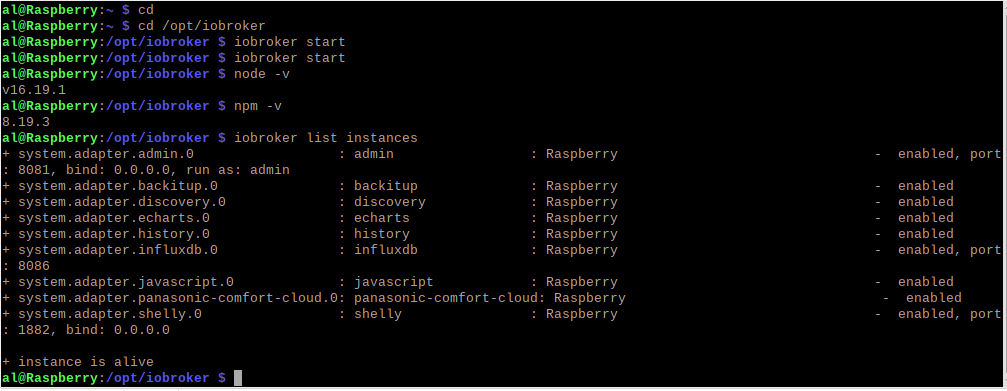
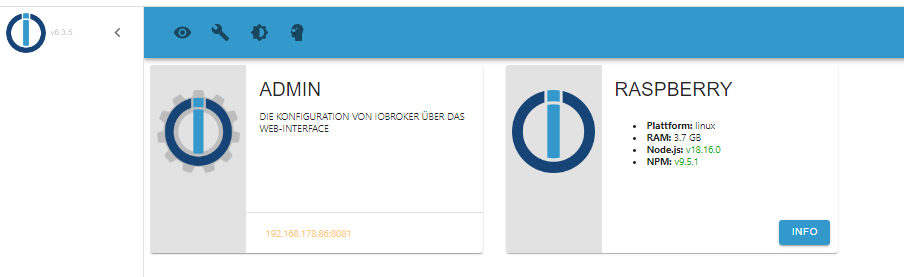
                              ja, hab ich, kommt aber nur das
                              1df1cb9d-3019-48c6-817a-bf1550e71c9c-image.png

                              Thomas BraunT crunchipC 2 Antworten Letzte Antwort
                              0
                              • B balu67

                                @crunchip said in iobroker lässt sich nicht mehr starten:

                                hast du das eingegeben?

                                ja, hab ich, kommt aber nur das
                                1df1cb9d-3019-48c6-817a-bf1550e71c9c-image.png

                                Thomas BraunT Online
                                Thomas BraunT Online
                                Thomas Braun
                                Most Active
                                schrieb am zuletzt editiert von
                                #69

                                @balu67

                                Kiste neugestartet?

                                iob diag
                                

                                sagt?

                                Linux-Werkzeugkasten:
                                https://forum.iobroker.net/topic/42952/der-kleine-iobroker-linux-werkzeugkasten
                                NodeJS Fixer Skript:
                                https://forum.iobroker.net/topic/68035/iob-node-fix-skript
                                iob_diag: curl -sLf -o diag.sh https://iobroker.net/diag.sh && bash diag.sh

                                1 Antwort Letzte Antwort
                                0
                                • HomoranH Homoran

                                  @balu67 sagte in iobroker lässt sich nicht mehr starten:

                                  leider keine Veränderung, nur das intro kommt

                                  bei iob diag?

                                  B Offline
                                  B Offline
                                  balu67
                                  schrieb am zuletzt editiert von
                                  #70

                                  @homoran said in iobroker lässt sich nicht mehr starten:

                                  bei iob diag?

                                  Skript v.2023-04-16
                                  
                                  *** BASE SYSTEM ***
                                  Model		: Raspberry Pi 4 Model B Rev 1.5
                                  Architecture    : aarch64
                                  Docker          : false
                                  Virtualization  : none
                                  Distributor ID:	Debian
                                  Description:	Debian GNU/Linux 11 (bullseye)
                                  Release:	11
                                  Codename:	bullseye
                                  
                                  PRETTY_NAME="Debian GNU/Linux 11 (bullseye)"
                                  NAME="Debian GNU/Linux"
                                  VERSION_ID="11"
                                  VERSION="11 (bullseye)"
                                  VERSION_CODENAME=bullseye
                                  ID=debian
                                  HOME_URL="https://www.debian.org/"
                                  SUPPORT_URL="https://www.debian.org/support"
                                  BUG_REPORT_URL="https://bugs.debian.org/"
                                  
                                  Systemuptime and Load:
                                   14:51:31 up  4:26,  2 users,  load average: 0.68, 0.49, 0.21
                                  CPU threads: 4
                                  
                                  Raspberry only:
                                  throttled=0x0
                                  Other values than 0x0 hint to temperature/voltage problems
                                  temp=42.8'C
                                  volt=0.9460V
                                  
                                  *** Time and Time Zones ***
                                                 Local time: Mon 2023-04-24 14:51:31 CEST
                                             Universal time: Mon 2023-04-24 12:51:31 UTC
                                                   RTC time: n/a
                                                  Time zone: Europe/Berlin (CEST, +0200)
                                  System clock synchronized: yes
                                                NTP service: active
                                            RTC in local TZ: no
                                  
                                  *** User and Groups ***
                                  al
                                  /home/al
                                  al adm dialout cdrom sudo audio video plugdev games users input render netdev lpadmin gpio i2c spi iobroker
                                  
                                  *** X-Server-Setup ***
                                  X-Server: 	true
                                  Desktop: 	LXDE-pi
                                  Terminal: 	x11
                                  Boot Target: 	graphical.target
                                  
                                  *** MEMORY ***
                                                 total        used        free      shared  buff/cache   available
                                  Mem:            3.8G        950M        1.5G         41M        1.3G        2.8G
                                  Swap:            99M          0B         99M
                                  Total:          3.9G        950M        1.6G
                                  
                                           3794 M total memory
                                            950 M used memory
                                           1447 M active memory
                                            590 M inactive memory
                                           1525 M free memory
                                            135 M buffer memory
                                           1183 M swap cache
                                             99 M total swap
                                              0 M used swap
                                             99 M free swap
                                  
                                  Raspberry only:
                                  oom events: 0
                                  lifetime oom required: 0 Mbytes
                                  total time in oom handler: 0 ms
                                  max time spent in oom handler: 0 ms
                                  
                                  *** FILESYSTEM ***
                                  Filesystem     Type      Size  Used Avail Use% Mounted on
                                  /dev/root      ext4       29G  9.6G   19G  35% /
                                  devtmpfs       devtmpfs  1.7G     0  1.7G   0% /dev
                                  tmpfs          tmpfs     1.9G     0  1.9G   0% /dev/shm
                                  tmpfs          tmpfs     759M  1.3M  758M   1% /run
                                  tmpfs          tmpfs     5.0M  4.0K  5.0M   1% /run/lock
                                  /dev/mmcblk0p1 vfat      255M   31M  225M  13% /boot
                                  tmpfs          tmpfs     380M   20K  380M   1% /run/user/1000
                                  
                                  Messages concerning ext4 filesystem in dmesg:
                                  [Mon Apr 24 10:25:07 2023] Kernel command line: coherent_pool=1M 8250.nr_uarts=0 snd_bcm2835.enable_headphones=0 snd_bcm2835.enable_headphones=1 snd_bcm2835.enable_hdmi=1 snd_bcm2835.enable_hdmi=0  smsc95xx.macaddr=E4:5F:01:FD:FE:39 vc_mem.mem_base=0x3ec00000 vc_mem.mem_size=0x40000000  console=ttyS0,115200 console=tty1 root=PARTUUID=9be8b122-02 rootfstype=ext4 fsck.repair=yes rootwait quiet splash plymouth.ignore-serial-consoles
                                  [Mon Apr 24 10:25:08 2023] EXT4-fs (mmcblk0p2): mounted filesystem with ordered data mode. Quota mode: none.
                                  [Mon Apr 24 10:25:08 2023] VFS: Mounted root (ext4 filesystem) readonly on device 179:2.
                                  [Mon Apr 24 10:25:10 2023] EXT4-fs (mmcblk0p2): re-mounted. Quota mode: none.
                                  
                                  Show mounted filesystems (real ones only):
                                  TARGET  SOURCE         FSTYPE OPTIONS
                                  /       /dev/mmcblk0p2 ext4   rw,noatime
                                  `-/boot /dev/mmcblk0p1 vfat   rw,relatime,fmask=0022,dmask=0022,codepage=437,iocharset=ascii,shortname=mixed,errors=remount-ro
                                  
                                  Files in neuralgic directories:
                                  
                                  /var:
                                  4.0G	/var/
                                  3.4G	/var/log
                                  3.0G	/var/log/journal/20caf098a3be48108459316835c16c60
                                  3.0G	/var/log/journal
                                  304M	/var/cache
                                  
                                  Archived and active journals take up 2.9G in the file system.
                                  
                                  /opt/iobroker/backups:
                                  24M	/opt/iobroker/backups/
                                  
                                  /opt/iobroker/iobroker-data:
                                  580M	/opt/iobroker/iobroker-data/
                                  447M	/opt/iobroker/iobroker-data/history
                                  99M	/opt/iobroker/iobroker-data/files
                                  59M	/opt/iobroker/iobroker-data/history/20230328
                                  58M	/opt/iobroker/iobroker-data/history/20230329
                                  
                                  The five largest files in iobroker-data are:
                                  9.4M	/opt/iobroker/iobroker-data/history/20230401/history.shelly.0.SHEM#244CAB418C05#1.Emeter0.Power.json
                                  9.3M	/opt/iobroker/iobroker-data/history/20230406/history.shelly.0.SHEM#244CAB418C05#1.Emeter0.Power.json
                                  9.3M	/opt/iobroker/iobroker-data/history/20230405/history.shelly.0.SHEM#244CAB418C05#1.Emeter0.Power.json
                                  9.3M	/opt/iobroker/iobroker-data/history/20230404/history.shelly.0.SHEM#244CAB418C05#1.Emeter0.Power.json
                                  9.3M	/opt/iobroker/iobroker-data/history/20230402/history.shelly.0.SHEM#244CAB418C05#1.Emeter0.Power.json
                                  
                                  *** NodeJS-Installation ***
                                  
                                  /usr/bin/nodejs 	v18.16.0
                                  /usr/bin/node 		v18.16.0
                                  /usr/bin/npm 		9.5.1
                                  /usr/bin/npx 		9.5.1
                                  
                                  
                                  nodejs:
                                    Installed: 18.16.0-deb-1nodesource1
                                    Candidate: 18.16.0-deb-1nodesource1
                                    Version table:
                                   *** 18.16.0-deb-1nodesource1 500
                                          500 https://deb.nodesource.com/node_18.x bullseye/main arm64 Packages
                                          100 /var/lib/dpkg/status
                                       12.22.12~dfsg-1~deb11u3 500
                                          500 http://security.debian.org/debian-security bullseye-security/main arm64 Packages
                                       12.22.5~dfsg-2~11u1 500
                                          500 http://deb.debian.org/debian bullseye/main arm64 Packages
                                  
                                  Temp directories causing npm8 problem: 0
                                  No problems detected
                                  
                                  *** ioBroker-Installation ***
                                  
                                  ioBroker Status
                                  iobroker is running on this host.
                                  
                                  
                                  Objects type: jsonl
                                  States  type: jsonl
                                  
                                  MULTIHOSTSERVICE/enabled: false
                                  
                                  Core adapters versions
                                  js-controller: 	4.0.24
                                  admin: 		6.3.5
                                  javascript: 	6.1.4
                                  
                                  Adapters from github: 	0
                                  
                                  Adapter State
                                  + system.adapter.admin.0                  : admin                 : Raspberry                                -  enabled, port: 8081, bind: 0.0.0.0, run as: admin
                                  + system.adapter.backitup.0               : backitup              : Raspberry                                -  enabled
                                  + system.adapter.discovery.0              : discovery             : Raspberry                                -  enabled
                                  + system.adapter.echarts.0                : echarts               : Raspberry                                -  enabled
                                  + system.adapter.history.0                : history               : Raspberry                                -  enabled
                                  + system.adapter.influxdb.0               : influxdb              : Raspberry                                -  enabled, port: 8086
                                  + system.adapter.javascript.0             : javascript            : Raspberry                                -  enabled
                                  + system.adapter.panasonic-comfort-cloud.0: panasonic-comfort-cloud: Raspberry                                -  enabled
                                  + system.adapter.shelly.0                 : shelly                : Raspberry                                -  enabled, port: 1882, bind: 0.0.0.0
                                  
                                  + instance is alive
                                  
                                  Enabled adapters with bindings
                                  + system.adapter.admin.0                  : admin                 : Raspberry                                -  enabled, port: 8081, bind: 0.0.0.0, run as: admin
                                  + system.adapter.influxdb.0               : influxdb              : Raspberry                                -  enabled, port: 8086
                                  + system.adapter.shelly.0                 : shelly                : Raspberry                                -  enabled, port: 1882, bind: 0.0.0.0
                                  
                                  ioBroker-Repositories
                                  stable        : http://download.iobroker.net/sources-dist.json
                                  beta          : http://download.iobroker.net/sources-dist-latest.json
                                  
                                  Active repo(s): stable
                                  
                                  Installed ioBroker-Instances
                                  Used repository: stable
                                  Adapter    "admin"        : 6.3.5    , installed 6.3.5
                                  Adapter    "backitup"     : 2.6.16   , installed 2.5.12 [Updatable]
                                  Adapter    "discovery"    : 3.1.0    , installed 3.1.0
                                  Adapter    "echarts"      : 1.0.12   , installed 1.0.12
                                  Adapter    "history"      : 2.2.4    , installed 2.2.4
                                  Adapter    "influxdb"     : 3.2.0    , installed 3.2.0
                                  Adapter    "javascript"   : 6.1.4    , installed 6.1.4
                                  Controller "js-controller": 4.0.24   , installed 4.0.24
                                  Adapter    "panasonic-comfort-cloud": 2.1.0, installed 2.1.0
                                  Adapter    "shelly"       : 6.3.1    , installed 6.3.1
                                  
                                  Objects and States
                                  Please stand by - This may take a while
                                  Objects: 	548
                                  States: 	426
                                  
                                  *** OS-Repositories and Updates ***
                                  Hit:1 http://security.debian.org/debian-security bullseye-security InRelease
                                  Hit:2 https://packages.grafana.com/oss/deb stable InRelease
                                  Hit:3 https://deb.nodesource.com/node_18.x bullseye InRelease
                                  Hit:4 http://deb.debian.org/debian bullseye InRelease
                                  Hit:5 http://archive.raspberrypi.org/debian bullseye InRelease
                                  Hit:6 http://deb.debian.org/debian bullseye-updates InRelease
                                  Hit:7 https://repos.influxdata.com/debian stable InRelease
                                  Reading package lists...
                                  Pending Updates: 0
                                  
                                  *** Listening Ports ***
                                  Active Internet connections (only servers)
                                  Proto Recv-Q Send-Q Local Address           Foreign Address         State       User       Inode      PID/Program name    
                                  tcp        0      0 127.0.0.1:631           0.0.0.0:*               LISTEN      0          15485      534/cupsd           
                                  tcp        0      0 127.0.0.1:9000          0.0.0.0:*               LISTEN      1001       123254     6824/iobroker.js-co 
                                  tcp        0      0 127.0.0.1:9001          0.0.0.0:*               LISTEN      1001       123247     6824/iobroker.js-co 
                                  tcp        0      0 0.0.0.0:22              0.0.0.0:*               LISTEN      0          14033      583/sshd: /usr/sbin 
                                  tcp        0      0 127.0.0.1:8088          0.0.0.0:*               LISTEN      116        1848       554/influxd         
                                  tcp        0      0 0.0.0.0:1882            0.0.0.0:*               LISTEN      1001       122473     6917/io.shelly.0    
                                  tcp        0      0 0.0.0.0:5900            0.0.0.0:*               LISTEN      0          15495      567/vncserver-x11-c 
                                  tcp6       0      0 :::3000                 :::*                    LISTEN      117        15946      542/grafana         
                                  tcp6       0      0 :::22                   :::*                    LISTEN      0          14044      583/sshd: /usr/sbin 
                                  tcp6       0      0 :::5900                 :::*                    LISTEN      0          15494      567/vncserver-x11-c 
                                  tcp6       0      0 ::1:631                 :::*                    LISTEN      0          15484      534/cupsd           
                                  tcp6       0      0 :::8086                 :::*                    LISTEN      116        15042      554/influxd         
                                  tcp6       0      0 :::8081                 :::*                    LISTEN      1001       121728     6842/io.admin.0     
                                  udp        0      0 0.0.0.0:45059           0.0.0.0:*                           108        13969      403/avahi-daemon: r 
                                  udp        0      0 0.0.0.0:68              0.0.0.0:*                           0          15531      477/dhcpcd          
                                  udp        0      0 0.0.0.0:631             0.0.0.0:*                           0          15522      616/cups-browsed    
                                  udp        0      0 0.0.0.0:5353            0.0.0.0:*                           108        13967      403/avahi-daemon: r 
                                  udp6       0      0 :::546                  :::*                                0          15550      477/dhcpcd          
                                  udp6       0      0 :::35639                :::*                                108        13970      403/avahi-daemon: r 
                                  udp6       0      0 :::5353                 :::*                                108        13968      403/avahi-daemon: r 
                                  
                                  *** Log File - Last 25 Lines ***
                                  
                                  2023-04-24 14:47:28.051  - info: javascript.0 (6902) requesting all objects
                                  2023-04-24 14:47:28.425  - info: javascript.0 (6902) received all objects
                                  2023-04-24 14:47:28.467  - info: javascript.0 (6902) received all states
                                  2023-04-24 14:47:28.494  - info: host.Raspberry instance system.adapter.shelly.0 started with pid 6917
                                  2023-04-24 14:47:28.567  - info: javascript.0 (6902) Start javascript script.js.Test
                                  2023-04-24 14:47:28.632  - info: javascript.0 (6902) script.js.Test: registered 1 subscription, 0 schedules, 0 messages, 0 logs and 0 file subscriptions
                                  2023-04-24 14:47:30.990  - info: shelly.0 (6917) starting. Version 6.3.1 in /opt/iobroker/node_modules/iobroker.shelly, node: v18.16.0, js-controller: 4.0.24
                                  2023-04-24 14:47:31.209  - info: shelly.0 (6917) Starting in MQTT mode. Listening on 0.0.0.0:1882 (QoS 0)
                                  2023-04-24 14:47:32.475  - info: host.Raspberry instance system.adapter.discovery.0 started with pid 6932
                                  2023-04-24 14:47:34.385  - info: discovery.0 (6932) starting. Version 3.1.0 in /opt/iobroker/node_modules/iobroker.discovery, node: v18.16.0, js-controller: 4.0.24
                                  2023-04-24 14:47:36.472  - info: host.Raspberry instance system.adapter.backitup.0 started with pid 6947
                                  2023-04-24 14:47:38.590  - info: backitup.0 (6947) starting. Version 2.5.12 in /opt/iobroker/node_modules/iobroker.backitup, node: v18.16.0, js-controller: 4.0.24
                                  2023-04-24 14:47:38.700  - info: backitup.0 (6947) [iobroker] backup was activated at 02:40 every 1 day(s)
                                  2023-04-24 14:47:39.424  - info: shelly.0 (6917) [MQTT] Device with client id "shellyem-244CAB418C05" connected!
                                  2023-04-24 14:47:40.479  - info: host.Raspberry instance system.adapter.echarts.0 started with pid 6962
                                  2023-04-24 14:47:42.480  - info: echarts.0 (6962) starting. Version 1.0.12 in /opt/iobroker/node_modules/iobroker.echarts, node: v18.16.0, js-controller: 4.0.24
                                  2023-04-24 14:47:43.124  - info: shelly.0 (6917) [MQTT] Device with client id "shellyplug-s-4022D880D8D8" connected!
                                  2023-04-24 14:47:44.472  - info: host.Raspberry instance system.adapter.panasonic-comfort-cloud.0 started with pid 6977
                                  2023-04-24 14:47:46.305  - info: panasonic-comfort-cloud.0 (6977) starting. Version 2.1.0 in /opt/iobroker/node_modules/iobroker.panasonic-comfort-cloud, node: v18.16.0, js-controller: 4.0.24
                                  2023-04-24 14:47:46.514  - info: panasonic-comfort-cloud.0 (6977) state panasonic-comfort-cloud.0.info.connection changed: false (ack = true)
                                  2023-04-24 14:47:48.970  - info: shelly.0 (6917) [MQTT] Device with client id "shellyplus1pm-a8032ab5f934" connected!
                                  2023-04-24 14:47:51.127  - info: panasonic-comfort-cloud.0 (6977) Login successful.
                                  2023-04-24 14:47:51.145  - info: panasonic-comfort-cloud.0 (6977) state panasonic-comfort-cloud.0.info.connection changed: true (ack = true)
                                  2023-04-24 14:50:28.444  - info: admin.0 (6842) ==> Connected system.user.admin from ::ffff:192.168.178.28
                                  2023-04-24 14:52:20.614  - info: admin.0 (6842) <== Disconnect system.user.admin from ::ffff:192.168.178.28 admin
                                  
                                  
                                  B Thomas BraunT 2 Antworten Letzte Antwort
                                  0
                                  • B balu67

                                    @homoran said in iobroker lässt sich nicht mehr starten:

                                    bei iob diag?

                                    Skript v.2023-04-16
                                    
                                    *** BASE SYSTEM ***
                                    Model		: Raspberry Pi 4 Model B Rev 1.5
                                    Architecture    : aarch64
                                    Docker          : false
                                    Virtualization  : none
                                    Distributor ID:	Debian
                                    Description:	Debian GNU/Linux 11 (bullseye)
                                    Release:	11
                                    Codename:	bullseye
                                    
                                    PRETTY_NAME="Debian GNU/Linux 11 (bullseye)"
                                    NAME="Debian GNU/Linux"
                                    VERSION_ID="11"
                                    VERSION="11 (bullseye)"
                                    VERSION_CODENAME=bullseye
                                    ID=debian
                                    HOME_URL="https://www.debian.org/"
                                    SUPPORT_URL="https://www.debian.org/support"
                                    BUG_REPORT_URL="https://bugs.debian.org/"
                                    
                                    Systemuptime and Load:
                                     14:51:31 up  4:26,  2 users,  load average: 0.68, 0.49, 0.21
                                    CPU threads: 4
                                    
                                    Raspberry only:
                                    throttled=0x0
                                    Other values than 0x0 hint to temperature/voltage problems
                                    temp=42.8'C
                                    volt=0.9460V
                                    
                                    *** Time and Time Zones ***
                                                   Local time: Mon 2023-04-24 14:51:31 CEST
                                               Universal time: Mon 2023-04-24 12:51:31 UTC
                                                     RTC time: n/a
                                                    Time zone: Europe/Berlin (CEST, +0200)
                                    System clock synchronized: yes
                                                  NTP service: active
                                              RTC in local TZ: no
                                    
                                    *** User and Groups ***
                                    al
                                    /home/al
                                    al adm dialout cdrom sudo audio video plugdev games users input render netdev lpadmin gpio i2c spi iobroker
                                    
                                    *** X-Server-Setup ***
                                    X-Server: 	true
                                    Desktop: 	LXDE-pi
                                    Terminal: 	x11
                                    Boot Target: 	graphical.target
                                    
                                    *** MEMORY ***
                                                   total        used        free      shared  buff/cache   available
                                    Mem:            3.8G        950M        1.5G         41M        1.3G        2.8G
                                    Swap:            99M          0B         99M
                                    Total:          3.9G        950M        1.6G
                                    
                                             3794 M total memory
                                              950 M used memory
                                             1447 M active memory
                                              590 M inactive memory
                                             1525 M free memory
                                              135 M buffer memory
                                             1183 M swap cache
                                               99 M total swap
                                                0 M used swap
                                               99 M free swap
                                    
                                    Raspberry only:
                                    oom events: 0
                                    lifetime oom required: 0 Mbytes
                                    total time in oom handler: 0 ms
                                    max time spent in oom handler: 0 ms
                                    
                                    *** FILESYSTEM ***
                                    Filesystem     Type      Size  Used Avail Use% Mounted on
                                    /dev/root      ext4       29G  9.6G   19G  35% /
                                    devtmpfs       devtmpfs  1.7G     0  1.7G   0% /dev
                                    tmpfs          tmpfs     1.9G     0  1.9G   0% /dev/shm
                                    tmpfs          tmpfs     759M  1.3M  758M   1% /run
                                    tmpfs          tmpfs     5.0M  4.0K  5.0M   1% /run/lock
                                    /dev/mmcblk0p1 vfat      255M   31M  225M  13% /boot
                                    tmpfs          tmpfs     380M   20K  380M   1% /run/user/1000
                                    
                                    Messages concerning ext4 filesystem in dmesg:
                                    [Mon Apr 24 10:25:07 2023] Kernel command line: coherent_pool=1M 8250.nr_uarts=0 snd_bcm2835.enable_headphones=0 snd_bcm2835.enable_headphones=1 snd_bcm2835.enable_hdmi=1 snd_bcm2835.enable_hdmi=0  smsc95xx.macaddr=E4:5F:01:FD:FE:39 vc_mem.mem_base=0x3ec00000 vc_mem.mem_size=0x40000000  console=ttyS0,115200 console=tty1 root=PARTUUID=9be8b122-02 rootfstype=ext4 fsck.repair=yes rootwait quiet splash plymouth.ignore-serial-consoles
                                    [Mon Apr 24 10:25:08 2023] EXT4-fs (mmcblk0p2): mounted filesystem with ordered data mode. Quota mode: none.
                                    [Mon Apr 24 10:25:08 2023] VFS: Mounted root (ext4 filesystem) readonly on device 179:2.
                                    [Mon Apr 24 10:25:10 2023] EXT4-fs (mmcblk0p2): re-mounted. Quota mode: none.
                                    
                                    Show mounted filesystems (real ones only):
                                    TARGET  SOURCE         FSTYPE OPTIONS
                                    /       /dev/mmcblk0p2 ext4   rw,noatime
                                    `-/boot /dev/mmcblk0p1 vfat   rw,relatime,fmask=0022,dmask=0022,codepage=437,iocharset=ascii,shortname=mixed,errors=remount-ro
                                    
                                    Files in neuralgic directories:
                                    
                                    /var:
                                    4.0G	/var/
                                    3.4G	/var/log
                                    3.0G	/var/log/journal/20caf098a3be48108459316835c16c60
                                    3.0G	/var/log/journal
                                    304M	/var/cache
                                    
                                    Archived and active journals take up 2.9G in the file system.
                                    
                                    /opt/iobroker/backups:
                                    24M	/opt/iobroker/backups/
                                    
                                    /opt/iobroker/iobroker-data:
                                    580M	/opt/iobroker/iobroker-data/
                                    447M	/opt/iobroker/iobroker-data/history
                                    99M	/opt/iobroker/iobroker-data/files
                                    59M	/opt/iobroker/iobroker-data/history/20230328
                                    58M	/opt/iobroker/iobroker-data/history/20230329
                                    
                                    The five largest files in iobroker-data are:
                                    9.4M	/opt/iobroker/iobroker-data/history/20230401/history.shelly.0.SHEM#244CAB418C05#1.Emeter0.Power.json
                                    9.3M	/opt/iobroker/iobroker-data/history/20230406/history.shelly.0.SHEM#244CAB418C05#1.Emeter0.Power.json
                                    9.3M	/opt/iobroker/iobroker-data/history/20230405/history.shelly.0.SHEM#244CAB418C05#1.Emeter0.Power.json
                                    9.3M	/opt/iobroker/iobroker-data/history/20230404/history.shelly.0.SHEM#244CAB418C05#1.Emeter0.Power.json
                                    9.3M	/opt/iobroker/iobroker-data/history/20230402/history.shelly.0.SHEM#244CAB418C05#1.Emeter0.Power.json
                                    
                                    *** NodeJS-Installation ***
                                    
                                    /usr/bin/nodejs 	v18.16.0
                                    /usr/bin/node 		v18.16.0
                                    /usr/bin/npm 		9.5.1
                                    /usr/bin/npx 		9.5.1
                                    
                                    
                                    nodejs:
                                      Installed: 18.16.0-deb-1nodesource1
                                      Candidate: 18.16.0-deb-1nodesource1
                                      Version table:
                                     *** 18.16.0-deb-1nodesource1 500
                                            500 https://deb.nodesource.com/node_18.x bullseye/main arm64 Packages
                                            100 /var/lib/dpkg/status
                                         12.22.12~dfsg-1~deb11u3 500
                                            500 http://security.debian.org/debian-security bullseye-security/main arm64 Packages
                                         12.22.5~dfsg-2~11u1 500
                                            500 http://deb.debian.org/debian bullseye/main arm64 Packages
                                    
                                    Temp directories causing npm8 problem: 0
                                    No problems detected
                                    
                                    *** ioBroker-Installation ***
                                    
                                    ioBroker Status
                                    iobroker is running on this host.
                                    
                                    
                                    Objects type: jsonl
                                    States  type: jsonl
                                    
                                    MULTIHOSTSERVICE/enabled: false
                                    
                                    Core adapters versions
                                    js-controller: 	4.0.24
                                    admin: 		6.3.5
                                    javascript: 	6.1.4
                                    
                                    Adapters from github: 	0
                                    
                                    Adapter State
                                    + system.adapter.admin.0                  : admin                 : Raspberry                                -  enabled, port: 8081, bind: 0.0.0.0, run as: admin
                                    + system.adapter.backitup.0               : backitup              : Raspberry                                -  enabled
                                    + system.adapter.discovery.0              : discovery             : Raspberry                                -  enabled
                                    + system.adapter.echarts.0                : echarts               : Raspberry                                -  enabled
                                    + system.adapter.history.0                : history               : Raspberry                                -  enabled
                                    + system.adapter.influxdb.0               : influxdb              : Raspberry                                -  enabled, port: 8086
                                    + system.adapter.javascript.0             : javascript            : Raspberry                                -  enabled
                                    + system.adapter.panasonic-comfort-cloud.0: panasonic-comfort-cloud: Raspberry                                -  enabled
                                    + system.adapter.shelly.0                 : shelly                : Raspberry                                -  enabled, port: 1882, bind: 0.0.0.0
                                    
                                    + instance is alive
                                    
                                    Enabled adapters with bindings
                                    + system.adapter.admin.0                  : admin                 : Raspberry                                -  enabled, port: 8081, bind: 0.0.0.0, run as: admin
                                    + system.adapter.influxdb.0               : influxdb              : Raspberry                                -  enabled, port: 8086
                                    + system.adapter.shelly.0                 : shelly                : Raspberry                                -  enabled, port: 1882, bind: 0.0.0.0
                                    
                                    ioBroker-Repositories
                                    stable        : http://download.iobroker.net/sources-dist.json
                                    beta          : http://download.iobroker.net/sources-dist-latest.json
                                    
                                    Active repo(s): stable
                                    
                                    Installed ioBroker-Instances
                                    Used repository: stable
                                    Adapter    "admin"        : 6.3.5    , installed 6.3.5
                                    Adapter    "backitup"     : 2.6.16   , installed 2.5.12 [Updatable]
                                    Adapter    "discovery"    : 3.1.0    , installed 3.1.0
                                    Adapter    "echarts"      : 1.0.12   , installed 1.0.12
                                    Adapter    "history"      : 2.2.4    , installed 2.2.4
                                    Adapter    "influxdb"     : 3.2.0    , installed 3.2.0
                                    Adapter    "javascript"   : 6.1.4    , installed 6.1.4
                                    Controller "js-controller": 4.0.24   , installed 4.0.24
                                    Adapter    "panasonic-comfort-cloud": 2.1.0, installed 2.1.0
                                    Adapter    "shelly"       : 6.3.1    , installed 6.3.1
                                    
                                    Objects and States
                                    Please stand by - This may take a while
                                    Objects: 	548
                                    States: 	426
                                    
                                    *** OS-Repositories and Updates ***
                                    Hit:1 http://security.debian.org/debian-security bullseye-security InRelease
                                    Hit:2 https://packages.grafana.com/oss/deb stable InRelease
                                    Hit:3 https://deb.nodesource.com/node_18.x bullseye InRelease
                                    Hit:4 http://deb.debian.org/debian bullseye InRelease
                                    Hit:5 http://archive.raspberrypi.org/debian bullseye InRelease
                                    Hit:6 http://deb.debian.org/debian bullseye-updates InRelease
                                    Hit:7 https://repos.influxdata.com/debian stable InRelease
                                    Reading package lists...
                                    Pending Updates: 0
                                    
                                    *** Listening Ports ***
                                    Active Internet connections (only servers)
                                    Proto Recv-Q Send-Q Local Address           Foreign Address         State       User       Inode      PID/Program name    
                                    tcp        0      0 127.0.0.1:631           0.0.0.0:*               LISTEN      0          15485      534/cupsd           
                                    tcp        0      0 127.0.0.1:9000          0.0.0.0:*               LISTEN      1001       123254     6824/iobroker.js-co 
                                    tcp        0      0 127.0.0.1:9001          0.0.0.0:*               LISTEN      1001       123247     6824/iobroker.js-co 
                                    tcp        0      0 0.0.0.0:22              0.0.0.0:*               LISTEN      0          14033      583/sshd: /usr/sbin 
                                    tcp        0      0 127.0.0.1:8088          0.0.0.0:*               LISTEN      116        1848       554/influxd         
                                    tcp        0      0 0.0.0.0:1882            0.0.0.0:*               LISTEN      1001       122473     6917/io.shelly.0    
                                    tcp        0      0 0.0.0.0:5900            0.0.0.0:*               LISTEN      0          15495      567/vncserver-x11-c 
                                    tcp6       0      0 :::3000                 :::*                    LISTEN      117        15946      542/grafana         
                                    tcp6       0      0 :::22                   :::*                    LISTEN      0          14044      583/sshd: /usr/sbin 
                                    tcp6       0      0 :::5900                 :::*                    LISTEN      0          15494      567/vncserver-x11-c 
                                    tcp6       0      0 ::1:631                 :::*                    LISTEN      0          15484      534/cupsd           
                                    tcp6       0      0 :::8086                 :::*                    LISTEN      116        15042      554/influxd         
                                    tcp6       0      0 :::8081                 :::*                    LISTEN      1001       121728     6842/io.admin.0     
                                    udp        0      0 0.0.0.0:45059           0.0.0.0:*                           108        13969      403/avahi-daemon: r 
                                    udp        0      0 0.0.0.0:68              0.0.0.0:*                           0          15531      477/dhcpcd          
                                    udp        0      0 0.0.0.0:631             0.0.0.0:*                           0          15522      616/cups-browsed    
                                    udp        0      0 0.0.0.0:5353            0.0.0.0:*                           108        13967      403/avahi-daemon: r 
                                    udp6       0      0 :::546                  :::*                                0          15550      477/dhcpcd          
                                    udp6       0      0 :::35639                :::*                                108        13970      403/avahi-daemon: r 
                                    udp6       0      0 :::5353                 :::*                                108        13968      403/avahi-daemon: r 
                                    
                                    *** Log File - Last 25 Lines ***
                                    
                                    2023-04-24 14:47:28.051  - info: javascript.0 (6902) requesting all objects
                                    2023-04-24 14:47:28.425  - info: javascript.0 (6902) received all objects
                                    2023-04-24 14:47:28.467  - info: javascript.0 (6902) received all states
                                    2023-04-24 14:47:28.494  - info: host.Raspberry instance system.adapter.shelly.0 started with pid 6917
                                    2023-04-24 14:47:28.567  - info: javascript.0 (6902) Start javascript script.js.Test
                                    2023-04-24 14:47:28.632  - info: javascript.0 (6902) script.js.Test: registered 1 subscription, 0 schedules, 0 messages, 0 logs and 0 file subscriptions
                                    2023-04-24 14:47:30.990  - info: shelly.0 (6917) starting. Version 6.3.1 in /opt/iobroker/node_modules/iobroker.shelly, node: v18.16.0, js-controller: 4.0.24
                                    2023-04-24 14:47:31.209  - info: shelly.0 (6917) Starting in MQTT mode. Listening on 0.0.0.0:1882 (QoS 0)
                                    2023-04-24 14:47:32.475  - info: host.Raspberry instance system.adapter.discovery.0 started with pid 6932
                                    2023-04-24 14:47:34.385  - info: discovery.0 (6932) starting. Version 3.1.0 in /opt/iobroker/node_modules/iobroker.discovery, node: v18.16.0, js-controller: 4.0.24
                                    2023-04-24 14:47:36.472  - info: host.Raspberry instance system.adapter.backitup.0 started with pid 6947
                                    2023-04-24 14:47:38.590  - info: backitup.0 (6947) starting. Version 2.5.12 in /opt/iobroker/node_modules/iobroker.backitup, node: v18.16.0, js-controller: 4.0.24
                                    2023-04-24 14:47:38.700  - info: backitup.0 (6947) [iobroker] backup was activated at 02:40 every 1 day(s)
                                    2023-04-24 14:47:39.424  - info: shelly.0 (6917) [MQTT] Device with client id "shellyem-244CAB418C05" connected!
                                    2023-04-24 14:47:40.479  - info: host.Raspberry instance system.adapter.echarts.0 started with pid 6962
                                    2023-04-24 14:47:42.480  - info: echarts.0 (6962) starting. Version 1.0.12 in /opt/iobroker/node_modules/iobroker.echarts, node: v18.16.0, js-controller: 4.0.24
                                    2023-04-24 14:47:43.124  - info: shelly.0 (6917) [MQTT] Device with client id "shellyplug-s-4022D880D8D8" connected!
                                    2023-04-24 14:47:44.472  - info: host.Raspberry instance system.adapter.panasonic-comfort-cloud.0 started with pid 6977
                                    2023-04-24 14:47:46.305  - info: panasonic-comfort-cloud.0 (6977) starting. Version 2.1.0 in /opt/iobroker/node_modules/iobroker.panasonic-comfort-cloud, node: v18.16.0, js-controller: 4.0.24
                                    2023-04-24 14:47:46.514  - info: panasonic-comfort-cloud.0 (6977) state panasonic-comfort-cloud.0.info.connection changed: false (ack = true)
                                    2023-04-24 14:47:48.970  - info: shelly.0 (6917) [MQTT] Device with client id "shellyplus1pm-a8032ab5f934" connected!
                                    2023-04-24 14:47:51.127  - info: panasonic-comfort-cloud.0 (6977) Login successful.
                                    2023-04-24 14:47:51.145  - info: panasonic-comfort-cloud.0 (6977) state panasonic-comfort-cloud.0.info.connection changed: true (ack = true)
                                    2023-04-24 14:50:28.444  - info: admin.0 (6842) ==> Connected system.user.admin from ::ffff:192.168.178.28
                                    2023-04-24 14:52:20.614  - info: admin.0 (6842) <== Disconnect system.user.admin from ::ffff:192.168.178.28 admin
                                    
                                    
                                    B Offline
                                    B Offline
                                    balu67
                                    schrieb am zuletzt editiert von
                                    #71

                                    und noch das summary

                                    ======================= SUMMARY =======================
                                    		     v.2023-04-16
                                    
                                    
                                    Operatingsystem: 	Debian GNU/Linux 11 (bullseye)
                                    Kernel: 		6.1.21-v8+
                                    Installation: 		Native
                                    Timezone: 		Europe/Berlin (CEST, +0200)
                                    User-ID: 		1000
                                    X-Server: 		true
                                    Boot Target: 		graphical.target
                                    
                                    Pending OS-Updates: 	0
                                    Pending iob updates: 	1
                                    
                                    Nodejs-Installation: 	/usr/bin/nodejs 	v18.16.0
                                    			/usr/bin/node 		v18.16.0
                                    			/usr/bin/npm 		9.5.1
                                    			/usr/bin/npx 		9.5.1
                                    
                                    Recommended versions are nodejs 18.x.y and npm 9.x.y
                                    Your nodejs installation is correct
                                    
                                    MEMORY: 
                                                   total        used        free      shared  buff/cache   available
                                    Mem:            3.8G        961M        1.5G         35M        1.3G        2.8G
                                    Swap:            99M          0B         99M
                                    Total:          3.9G        961M        1.6G
                                    
                                    Active iob-Instances: 	10
                                    Active repo(s): stable
                                    
                                    ioBroker Core: 		js-controller 		4.0.24
                                    			admin 			6.3.5
                                    
                                    ioBroker Status: 	iobroker is running on this host.
                                    
                                    
                                    Objects type: jsonl
                                    States  type: jsonl
                                    
                                    Status admin and web instance:
                                    + system.adapter.admin.0                  : admin                 : Raspberry                                -  enabled, port: 8081, bind: 0.0.0.0, run as: admin
                                    
                                    Objects: 		548
                                    States: 		426
                                    
                                    Size of iob-Database:
                                    
                                    7.3M	/opt/iobroker/iobroker-data/objects.jsonl
                                    296K	/opt/iobroker/iobroker-data/states.jsonl


                                    =================== END OF SUMMARY ====================
                                    
                                    1 Antwort Letzte Antwort
                                    0
                                    • B balu67

                                      @crunchip said in iobroker lässt sich nicht mehr starten:

                                      hast du das eingegeben?

                                      ja, hab ich, kommt aber nur das
                                      1df1cb9d-3019-48c6-817a-bf1550e71c9c-image.png

                                      crunchipC Offline
                                      crunchipC Offline
                                      crunchip
                                      Forum Testing Most Active
                                      schrieb am zuletzt editiert von
                                      #72

                                      @balu67 sieht mir eher nach nem Browsercache Fehler aus

                                      umgestiegen von Proxmox auf Unraid

                                      B 1 Antwort Letzte Antwort
                                      0
                                      • B balu67

                                        @homoran said in iobroker lässt sich nicht mehr starten:

                                        bei iob diag?

                                        Skript v.2023-04-16
                                        
                                        *** BASE SYSTEM ***
                                        Model		: Raspberry Pi 4 Model B Rev 1.5
                                        Architecture    : aarch64
                                        Docker          : false
                                        Virtualization  : none
                                        Distributor ID:	Debian
                                        Description:	Debian GNU/Linux 11 (bullseye)
                                        Release:	11
                                        Codename:	bullseye
                                        
                                        PRETTY_NAME="Debian GNU/Linux 11 (bullseye)"
                                        NAME="Debian GNU/Linux"
                                        VERSION_ID="11"
                                        VERSION="11 (bullseye)"
                                        VERSION_CODENAME=bullseye
                                        ID=debian
                                        HOME_URL="https://www.debian.org/"
                                        SUPPORT_URL="https://www.debian.org/support"
                                        BUG_REPORT_URL="https://bugs.debian.org/"
                                        
                                        Systemuptime and Load:
                                         14:51:31 up  4:26,  2 users,  load average: 0.68, 0.49, 0.21
                                        CPU threads: 4
                                        
                                        Raspberry only:
                                        throttled=0x0
                                        Other values than 0x0 hint to temperature/voltage problems
                                        temp=42.8'C
                                        volt=0.9460V
                                        
                                        *** Time and Time Zones ***
                                                       Local time: Mon 2023-04-24 14:51:31 CEST
                                                   Universal time: Mon 2023-04-24 12:51:31 UTC
                                                         RTC time: n/a
                                                        Time zone: Europe/Berlin (CEST, +0200)
                                        System clock synchronized: yes
                                                      NTP service: active
                                                  RTC in local TZ: no
                                        
                                        *** User and Groups ***
                                        al
                                        /home/al
                                        al adm dialout cdrom sudo audio video plugdev games users input render netdev lpadmin gpio i2c spi iobroker
                                        
                                        *** X-Server-Setup ***
                                        X-Server: 	true
                                        Desktop: 	LXDE-pi
                                        Terminal: 	x11
                                        Boot Target: 	graphical.target
                                        
                                        *** MEMORY ***
                                                       total        used        free      shared  buff/cache   available
                                        Mem:            3.8G        950M        1.5G         41M        1.3G        2.8G
                                        Swap:            99M          0B         99M
                                        Total:          3.9G        950M        1.6G
                                        
                                                 3794 M total memory
                                                  950 M used memory
                                                 1447 M active memory
                                                  590 M inactive memory
                                                 1525 M free memory
                                                  135 M buffer memory
                                                 1183 M swap cache
                                                   99 M total swap
                                                    0 M used swap
                                                   99 M free swap
                                        
                                        Raspberry only:
                                        oom events: 0
                                        lifetime oom required: 0 Mbytes
                                        total time in oom handler: 0 ms
                                        max time spent in oom handler: 0 ms
                                        
                                        *** FILESYSTEM ***
                                        Filesystem     Type      Size  Used Avail Use% Mounted on
                                        /dev/root      ext4       29G  9.6G   19G  35% /
                                        devtmpfs       devtmpfs  1.7G     0  1.7G   0% /dev
                                        tmpfs          tmpfs     1.9G     0  1.9G   0% /dev/shm
                                        tmpfs          tmpfs     759M  1.3M  758M   1% /run
                                        tmpfs          tmpfs     5.0M  4.0K  5.0M   1% /run/lock
                                        /dev/mmcblk0p1 vfat      255M   31M  225M  13% /boot
                                        tmpfs          tmpfs     380M   20K  380M   1% /run/user/1000
                                        
                                        Messages concerning ext4 filesystem in dmesg:
                                        [Mon Apr 24 10:25:07 2023] Kernel command line: coherent_pool=1M 8250.nr_uarts=0 snd_bcm2835.enable_headphones=0 snd_bcm2835.enable_headphones=1 snd_bcm2835.enable_hdmi=1 snd_bcm2835.enable_hdmi=0  smsc95xx.macaddr=E4:5F:01:FD:FE:39 vc_mem.mem_base=0x3ec00000 vc_mem.mem_size=0x40000000  console=ttyS0,115200 console=tty1 root=PARTUUID=9be8b122-02 rootfstype=ext4 fsck.repair=yes rootwait quiet splash plymouth.ignore-serial-consoles
                                        [Mon Apr 24 10:25:08 2023] EXT4-fs (mmcblk0p2): mounted filesystem with ordered data mode. Quota mode: none.
                                        [Mon Apr 24 10:25:08 2023] VFS: Mounted root (ext4 filesystem) readonly on device 179:2.
                                        [Mon Apr 24 10:25:10 2023] EXT4-fs (mmcblk0p2): re-mounted. Quota mode: none.
                                        
                                        Show mounted filesystems (real ones only):
                                        TARGET  SOURCE         FSTYPE OPTIONS
                                        /       /dev/mmcblk0p2 ext4   rw,noatime
                                        `-/boot /dev/mmcblk0p1 vfat   rw,relatime,fmask=0022,dmask=0022,codepage=437,iocharset=ascii,shortname=mixed,errors=remount-ro
                                        
                                        Files in neuralgic directories:
                                        
                                        /var:
                                        4.0G	/var/
                                        3.4G	/var/log
                                        3.0G	/var/log/journal/20caf098a3be48108459316835c16c60
                                        3.0G	/var/log/journal
                                        304M	/var/cache
                                        
                                        Archived and active journals take up 2.9G in the file system.
                                        
                                        /opt/iobroker/backups:
                                        24M	/opt/iobroker/backups/
                                        
                                        /opt/iobroker/iobroker-data:
                                        580M	/opt/iobroker/iobroker-data/
                                        447M	/opt/iobroker/iobroker-data/history
                                        99M	/opt/iobroker/iobroker-data/files
                                        59M	/opt/iobroker/iobroker-data/history/20230328
                                        58M	/opt/iobroker/iobroker-data/history/20230329
                                        
                                        The five largest files in iobroker-data are:
                                        9.4M	/opt/iobroker/iobroker-data/history/20230401/history.shelly.0.SHEM#244CAB418C05#1.Emeter0.Power.json
                                        9.3M	/opt/iobroker/iobroker-data/history/20230406/history.shelly.0.SHEM#244CAB418C05#1.Emeter0.Power.json
                                        9.3M	/opt/iobroker/iobroker-data/history/20230405/history.shelly.0.SHEM#244CAB418C05#1.Emeter0.Power.json
                                        9.3M	/opt/iobroker/iobroker-data/history/20230404/history.shelly.0.SHEM#244CAB418C05#1.Emeter0.Power.json
                                        9.3M	/opt/iobroker/iobroker-data/history/20230402/history.shelly.0.SHEM#244CAB418C05#1.Emeter0.Power.json
                                        
                                        *** NodeJS-Installation ***
                                        
                                        /usr/bin/nodejs 	v18.16.0
                                        /usr/bin/node 		v18.16.0
                                        /usr/bin/npm 		9.5.1
                                        /usr/bin/npx 		9.5.1
                                        
                                        
                                        nodejs:
                                          Installed: 18.16.0-deb-1nodesource1
                                          Candidate: 18.16.0-deb-1nodesource1
                                          Version table:
                                         *** 18.16.0-deb-1nodesource1 500
                                                500 https://deb.nodesource.com/node_18.x bullseye/main arm64 Packages
                                                100 /var/lib/dpkg/status
                                             12.22.12~dfsg-1~deb11u3 500
                                                500 http://security.debian.org/debian-security bullseye-security/main arm64 Packages
                                             12.22.5~dfsg-2~11u1 500
                                                500 http://deb.debian.org/debian bullseye/main arm64 Packages
                                        
                                        Temp directories causing npm8 problem: 0
                                        No problems detected
                                        
                                        *** ioBroker-Installation ***
                                        
                                        ioBroker Status
                                        iobroker is running on this host.
                                        
                                        
                                        Objects type: jsonl
                                        States  type: jsonl
                                        
                                        MULTIHOSTSERVICE/enabled: false
                                        
                                        Core adapters versions
                                        js-controller: 	4.0.24
                                        admin: 		6.3.5
                                        javascript: 	6.1.4
                                        
                                        Adapters from github: 	0
                                        
                                        Adapter State
                                        + system.adapter.admin.0                  : admin                 : Raspberry                                -  enabled, port: 8081, bind: 0.0.0.0, run as: admin
                                        + system.adapter.backitup.0               : backitup              : Raspberry                                -  enabled
                                        + system.adapter.discovery.0              : discovery             : Raspberry                                -  enabled
                                        + system.adapter.echarts.0                : echarts               : Raspberry                                -  enabled
                                        + system.adapter.history.0                : history               : Raspberry                                -  enabled
                                        + system.adapter.influxdb.0               : influxdb              : Raspberry                                -  enabled, port: 8086
                                        + system.adapter.javascript.0             : javascript            : Raspberry                                -  enabled
                                        + system.adapter.panasonic-comfort-cloud.0: panasonic-comfort-cloud: Raspberry                                -  enabled
                                        + system.adapter.shelly.0                 : shelly                : Raspberry                                -  enabled, port: 1882, bind: 0.0.0.0
                                        
                                        + instance is alive
                                        
                                        Enabled adapters with bindings
                                        + system.adapter.admin.0                  : admin                 : Raspberry                                -  enabled, port: 8081, bind: 0.0.0.0, run as: admin
                                        + system.adapter.influxdb.0               : influxdb              : Raspberry                                -  enabled, port: 8086
                                        + system.adapter.shelly.0                 : shelly                : Raspberry                                -  enabled, port: 1882, bind: 0.0.0.0
                                        
                                        ioBroker-Repositories
                                        stable        : http://download.iobroker.net/sources-dist.json
                                        beta          : http://download.iobroker.net/sources-dist-latest.json
                                        
                                        Active repo(s): stable
                                        
                                        Installed ioBroker-Instances
                                        Used repository: stable
                                        Adapter    "admin"        : 6.3.5    , installed 6.3.5
                                        Adapter    "backitup"     : 2.6.16   , installed 2.5.12 [Updatable]
                                        Adapter    "discovery"    : 3.1.0    , installed 3.1.0
                                        Adapter    "echarts"      : 1.0.12   , installed 1.0.12
                                        Adapter    "history"      : 2.2.4    , installed 2.2.4
                                        Adapter    "influxdb"     : 3.2.0    , installed 3.2.0
                                        Adapter    "javascript"   : 6.1.4    , installed 6.1.4
                                        Controller "js-controller": 4.0.24   , installed 4.0.24
                                        Adapter    "panasonic-comfort-cloud": 2.1.0, installed 2.1.0
                                        Adapter    "shelly"       : 6.3.1    , installed 6.3.1
                                        
                                        Objects and States
                                        Please stand by - This may take a while
                                        Objects: 	548
                                        States: 	426
                                        
                                        *** OS-Repositories and Updates ***
                                        Hit:1 http://security.debian.org/debian-security bullseye-security InRelease
                                        Hit:2 https://packages.grafana.com/oss/deb stable InRelease
                                        Hit:3 https://deb.nodesource.com/node_18.x bullseye InRelease
                                        Hit:4 http://deb.debian.org/debian bullseye InRelease
                                        Hit:5 http://archive.raspberrypi.org/debian bullseye InRelease
                                        Hit:6 http://deb.debian.org/debian bullseye-updates InRelease
                                        Hit:7 https://repos.influxdata.com/debian stable InRelease
                                        Reading package lists...
                                        Pending Updates: 0
                                        
                                        *** Listening Ports ***
                                        Active Internet connections (only servers)
                                        Proto Recv-Q Send-Q Local Address           Foreign Address         State       User       Inode      PID/Program name    
                                        tcp        0      0 127.0.0.1:631           0.0.0.0:*               LISTEN      0          15485      534/cupsd           
                                        tcp        0      0 127.0.0.1:9000          0.0.0.0:*               LISTEN      1001       123254     6824/iobroker.js-co 
                                        tcp        0      0 127.0.0.1:9001          0.0.0.0:*               LISTEN      1001       123247     6824/iobroker.js-co 
                                        tcp        0      0 0.0.0.0:22              0.0.0.0:*               LISTEN      0          14033      583/sshd: /usr/sbin 
                                        tcp        0      0 127.0.0.1:8088          0.0.0.0:*               LISTEN      116        1848       554/influxd         
                                        tcp        0      0 0.0.0.0:1882            0.0.0.0:*               LISTEN      1001       122473     6917/io.shelly.0    
                                        tcp        0      0 0.0.0.0:5900            0.0.0.0:*               LISTEN      0          15495      567/vncserver-x11-c 
                                        tcp6       0      0 :::3000                 :::*                    LISTEN      117        15946      542/grafana         
                                        tcp6       0      0 :::22                   :::*                    LISTEN      0          14044      583/sshd: /usr/sbin 
                                        tcp6       0      0 :::5900                 :::*                    LISTEN      0          15494      567/vncserver-x11-c 
                                        tcp6       0      0 ::1:631                 :::*                    LISTEN      0          15484      534/cupsd           
                                        tcp6       0      0 :::8086                 :::*                    LISTEN      116        15042      554/influxd         
                                        tcp6       0      0 :::8081                 :::*                    LISTEN      1001       121728     6842/io.admin.0     
                                        udp        0      0 0.0.0.0:45059           0.0.0.0:*                           108        13969      403/avahi-daemon: r 
                                        udp        0      0 0.0.0.0:68              0.0.0.0:*                           0          15531      477/dhcpcd          
                                        udp        0      0 0.0.0.0:631             0.0.0.0:*                           0          15522      616/cups-browsed    
                                        udp        0      0 0.0.0.0:5353            0.0.0.0:*                           108        13967      403/avahi-daemon: r 
                                        udp6       0      0 :::546                  :::*                                0          15550      477/dhcpcd          
                                        udp6       0      0 :::35639                :::*                                108        13970      403/avahi-daemon: r 
                                        udp6       0      0 :::5353                 :::*                                108        13968      403/avahi-daemon: r 
                                        
                                        *** Log File - Last 25 Lines ***
                                        
                                        2023-04-24 14:47:28.051  - info: javascript.0 (6902) requesting all objects
                                        2023-04-24 14:47:28.425  - info: javascript.0 (6902) received all objects
                                        2023-04-24 14:47:28.467  - info: javascript.0 (6902) received all states
                                        2023-04-24 14:47:28.494  - info: host.Raspberry instance system.adapter.shelly.0 started with pid 6917
                                        2023-04-24 14:47:28.567  - info: javascript.0 (6902) Start javascript script.js.Test
                                        2023-04-24 14:47:28.632  - info: javascript.0 (6902) script.js.Test: registered 1 subscription, 0 schedules, 0 messages, 0 logs and 0 file subscriptions
                                        2023-04-24 14:47:30.990  - info: shelly.0 (6917) starting. Version 6.3.1 in /opt/iobroker/node_modules/iobroker.shelly, node: v18.16.0, js-controller: 4.0.24
                                        2023-04-24 14:47:31.209  - info: shelly.0 (6917) Starting in MQTT mode. Listening on 0.0.0.0:1882 (QoS 0)
                                        2023-04-24 14:47:32.475  - info: host.Raspberry instance system.adapter.discovery.0 started with pid 6932
                                        2023-04-24 14:47:34.385  - info: discovery.0 (6932) starting. Version 3.1.0 in /opt/iobroker/node_modules/iobroker.discovery, node: v18.16.0, js-controller: 4.0.24
                                        2023-04-24 14:47:36.472  - info: host.Raspberry instance system.adapter.backitup.0 started with pid 6947
                                        2023-04-24 14:47:38.590  - info: backitup.0 (6947) starting. Version 2.5.12 in /opt/iobroker/node_modules/iobroker.backitup, node: v18.16.0, js-controller: 4.0.24
                                        2023-04-24 14:47:38.700  - info: backitup.0 (6947) [iobroker] backup was activated at 02:40 every 1 day(s)
                                        2023-04-24 14:47:39.424  - info: shelly.0 (6917) [MQTT] Device with client id "shellyem-244CAB418C05" connected!
                                        2023-04-24 14:47:40.479  - info: host.Raspberry instance system.adapter.echarts.0 started with pid 6962
                                        2023-04-24 14:47:42.480  - info: echarts.0 (6962) starting. Version 1.0.12 in /opt/iobroker/node_modules/iobroker.echarts, node: v18.16.0, js-controller: 4.0.24
                                        2023-04-24 14:47:43.124  - info: shelly.0 (6917) [MQTT] Device with client id "shellyplug-s-4022D880D8D8" connected!
                                        2023-04-24 14:47:44.472  - info: host.Raspberry instance system.adapter.panasonic-comfort-cloud.0 started with pid 6977
                                        2023-04-24 14:47:46.305  - info: panasonic-comfort-cloud.0 (6977) starting. Version 2.1.0 in /opt/iobroker/node_modules/iobroker.panasonic-comfort-cloud, node: v18.16.0, js-controller: 4.0.24
                                        2023-04-24 14:47:46.514  - info: panasonic-comfort-cloud.0 (6977) state panasonic-comfort-cloud.0.info.connection changed: false (ack = true)
                                        2023-04-24 14:47:48.970  - info: shelly.0 (6917) [MQTT] Device with client id "shellyplus1pm-a8032ab5f934" connected!
                                        2023-04-24 14:47:51.127  - info: panasonic-comfort-cloud.0 (6977) Login successful.
                                        2023-04-24 14:47:51.145  - info: panasonic-comfort-cloud.0 (6977) state panasonic-comfort-cloud.0.info.connection changed: true (ack = true)
                                        2023-04-24 14:50:28.444  - info: admin.0 (6842) ==> Connected system.user.admin from ::ffff:192.168.178.28
                                        2023-04-24 14:52:20.614  - info: admin.0 (6842) <== Disconnect system.user.admin from ::ffff:192.168.178.28 admin
                                        
                                        
                                        Thomas BraunT Online
                                        Thomas BraunT Online
                                        Thomas Braun
                                        Most Active
                                        schrieb am zuletzt editiert von
                                        #73

                                        @balu67 sagte in iobroker lässt sich nicht mehr starten:

                                        X-Server: true Desktop: LXDE-pi

                                        Keinen Desktop!

                                        Linux-Werkzeugkasten:
                                        https://forum.iobroker.net/topic/42952/der-kleine-iobroker-linux-werkzeugkasten
                                        NodeJS Fixer Skript:
                                        https://forum.iobroker.net/topic/68035/iob-node-fix-skript
                                        iob_diag: curl -sLf -o diag.sh https://iobroker.net/diag.sh && bash diag.sh

                                        B 1 Antwort Letzte Antwort
                                        0
                                        • crunchipC crunchip

                                          @balu67 sieht mir eher nach nem Browsercache Fehler aus

                                          B Offline
                                          B Offline
                                          balu67
                                          schrieb am zuletzt editiert von
                                          #74

                                          @crunchip said in iobroker lässt sich nicht mehr starten:

                                          @balu67 sieht mir eher nach nem Browsercache Fehler aus

                                          was kann ich noch machen?

                                          HomoranH 1 Antwort Letzte Antwort
                                          0
                                          Antworten
                                          • In einem neuen Thema antworten
                                          Anmelden zum Antworten
                                          • Älteste zuerst
                                          • Neuste zuerst
                                          • Meiste Stimmen


                                          Support us

                                          ioBroker
                                          Community Adapters
                                          Donate

                                          499

                                          Online

                                          32.6k

                                          Benutzer

                                          82.2k

                                          Themen

                                          1.3m

                                          Beiträge
                                          Community
                                          Impressum | Datenschutz-Bestimmungen | Nutzungsbedingungen | Einwilligungseinstellungen
                                          ioBroker Community 2014-2025
                                          logo
                                          • Anmelden

                                          • Du hast noch kein Konto? Registrieren

                                          • Anmelden oder registrieren, um zu suchen
                                          • Erster Beitrag
                                            Letzter Beitrag
                                          0
                                          • Home
                                          • Aktuell
                                          • Tags
                                          • Ungelesen 0
                                          • Kategorien
                                          • Unreplied
                                          • Beliebt
                                          • GitHub
                                          • Docu
                                          • Hilfe
