




[gelöst] Pimatic - Werte von externen socket.io oder webapi einlesen und senden?
-
Nun habe ich als alter Pimatic-User endlich euer Projekt gefunden, soetwas habe ich lange gesucht!
Nur leider funktioniert der Pimatic-adapter nicht bei mir, er verbindet sich kurz, und nach einer Sekunde gibt es leider ein Disconnetct.
Ich werde gerade erst warm mit IO.Broker, vlt. aknn mir jemand helfen den Pimaticadapter zum laufen zu bekommen.
Liebe Grüße Saturion
Hier ein Auszug aus der Log:
! ````
host.raspberrypi 2017-03-24 01:29:21.248 error instance system.adapter.pimatic.0 terminated with code 0 (OK)
pimatic.0 2017-03-24 01:29:20.331 debug Connect: http://localhost:80/?username=admin&password=xxx
pimatic.0 2017-03-24 01:29:20.331 debug Schedule restart: 10
pimatic.0 2017-03-24 01:29:20.330 info starting. Version 0.1.1 in /opt/iobroker/node_modules/iobroker.pimatic, node: v4.6.2
host.raspberrypi 2017-03-24 01:29:16.503 info instance system.adapter.pimatic.0 started with pid 2712
host.raspberrypi 2017-03-24 01:29:15.501 info Restart adapter system.adapter.pimatic.0 because enabled
host.raspberrypi 2017-03-24 01:29:15.495 error instance system.adapter.pimatic.0 terminated with code 0 (OK)
pimatic.0 2017-03-24 01:29:14.495 debug Connect: http://localhost:80/?username=admin&password=xxx
pimatic.0 2017-03-24 01:29:14.494 debug Schedule restart: 10
pimatic.0 2017-03-24 01:29:14.494 info starting. Version 0.1.1 in /opt/iobroker/node_modules/iobroker.pimatic, node: v4.6.2
host.raspberrypi 2017-03-24 01:29:11.189 info instance system.adapter.pimatic.0 started with pid 2701
host.raspberrypi 2017-03-24 01:29:10.172 info Restart adapter system.adapter.pimatic.0 because enabled
host.raspberrypi 2017-03-24 01:29:10.171 error instance system.adapter.pimatic.0 terminated with code 0 (OK)
pimatic.0 2017-03-24 01:29:09.079 debug Connect: http://localhost:80/?username=admin&password=xxx
pimatic.0 2017-03-24 01:29:09.078 debug Schedule restart: 10
pimatic.0 2017-03-24 01:29:09.077 info starting. Version 0.1.1 in /opt/iobroker/node_modules/iobroker.pimatic, node: v4.6.2
host.raspberrypi 2017-03-24 01:29:06.065 info instance system.adapter.pimatic.0 started with pid 2685
host.raspberrypi 2017-03-24 01:29:05.047 info Restart adapter system.adapter.pimatic.0 because enabled
host.raspberrypi 2017-03-24 01:29:05.046 error instance system.adapter.pimatic.0 terminated with code 0 (OK)
pimatic.0 2017-03-24 01:29:03.935 debug Connect: http://localhost:80/?username=admin&password=xxx
pimatic.0 2017-03-24 01:29:03.934 debug Schedule restart: 10
pimatic.0 2017-03-24 01:29:03.933 info starting. Version 0.1.1 in /opt/iobroker/node_modules/iobroker.pimatic, node: v4.6.2
host.raspberrypi 2017-03-24 01:29:00.068 info instance system.adapter.pimatic.0 started with pid 2675
host.raspberrypi 2017-03-24 01:28:59.049 info Restart adapter system.adapter.pimatic.0 because enabled
host.raspberrypi 2017-03-24 01:28:59.048 error instance system.adapter.pimatic.0 terminated with code 0 (OK)
pimatic.0 2017-03-24 01:28:57.899 debug Connect: http://localhost:80/?username=admin&password=xxx
pimatic.0 2017-03-24 01:28:57.898 debug Schedule restart: 10
pimatic.0 2017-03-24 01:28:57.898 info starting. Version 0.1.1 in /opt/iobroker/node_modules/iobroker.pimatic, node: v4.6.2
host.raspberrypi 2017-03-24 01:28:53.852 info instance system.adapter.pimatic.0 started with pid 2665
host.raspberrypi 2017-03-24 01:28:52.841 info Restart adapter system.adapter.pimatic.0 because enabled
host.raspberrypi 2017-03-24 01:28:52.834 error instance system.adapter.pimatic.0 terminated with code 0 (OK)
pimatic.0 2017-03-24 01:28:47.418 debug Connect: http://localhost:80/?username=admin&password=xxx
pimatic.0 2017-03-24 01:28:47.417 debug Schedule restart: 10
pimatic.0 2017-03-24 01:28:47.416 info starting. Version 0.1.1 in /opt/iobroker/node_modules/iobroker.pimatic, node: v4.6.2
host.raspberrypi 2017-03-24 01:28:44.100 info instance system.adapter.pimatic.0 started with pid 2655
host.raspberrypi 2017-03-24 01:28:43.091 info Restart adapter system.adapter.pimatic.0 because enabled
host.raspberrypi 2017-03-24 01:28:43.090 error instance system.adapter.pimatic.0 terminated with code 0 (OK)
pimatic.0 2017-03-24 01:28:41.960 debug Connect: http://localhost:80/?username=admin&password=xxx
pimatic.0 2017-03-24 01:28:41.959 debug Schedule restart: 10
pimatic.0 2017-03-24 01:28:41.959 info starting. Version 0.1.1 in /opt/iobroker/node_modules/iobroker.pimatic, node: v4.6.2
host.raspberrypi 2017-03-24 01:28:37.908 info instance system.adapter.pimatic.0 started with pid 2639
host.raspberrypi 2017-03-24 01:28:36.889 info Restart adapter system.adapter.pimatic.0 because enabled
host.raspberrypi 2017-03-24 01:28:36.888 error instance system.adapter.pimatic.0 terminated with code 0 (OK)
pimatic.0 2017-03-24 01:28:33.389 debug Connect: http://localhost:80/?username=admin&password=xxx
pimatic.0 2017-03-24 01:28:33.388 debug Schedule restart: 10
pimatic.0 2017-03-24 01:28:33.388 info starting. Version 0.1.1 in /opt/iobroker/node_modules/iobroker.pimatic, node: v4.6.2
host.raspberrypi 2017-03-24 01:28:30.293 info instance system.adapter.pimatic.0 started with pid 2629
host.raspberrypi 2017-03-24 01:28:29.274 info Restart adapter system.adapter.pimatic.0 because enabled
host.raspberrypi 2017-03-24 01:28:29.273 error instance system.adapter.pimatic.0 terminated with code 0 (OK)
pimatic.0 2017-03-24 01:28:29.213 debug inMem message pimatic.0.* pimatic.0.info.connection val=true, ack=true, ts=1490315308694, q=0, from=system.adapter.pimatic.0, lc=1490315308694
pimatic.0 2017-03-24 01:28:29.171 info cleaned everything up...
pimatic.0 2017-03-24 01:28:29.170 info disconnected
pimatic.0 2017-03-24 01:28:29.141 error at Decoder.add (/opt/iobroker/node_modules/iobroker.pimatic/node_modules/socket.io-client/node_modules/socket.io-parser/index.js:246:12)
pimatic.0 2017-03-24 01:28:29.141 error at Decoder.Emitter.emit (/opt/iobroker/node_modules/iobroker.pimatic/node_modules/socket.io-client/node_modules/socket.io-parser/node_modules/component-emitter/index.js:134:20)
pimatic.0 2017-03-24 01:28:29.141 error at Decoder. (/opt/iobroker/node_modules/iobroker.pimatic/node_modules/socket.io-client/node_modules/component-bind/index.js:21:15)
pimatic.0 2017-03-24 01:28:29.141 error at Manager.ondecoded (/opt/iobroker/node_modules/iobroker.pimatic/node_modules/socket.io-client/lib/manager.js:332:8)
pimatic.0 2017-03-24 01:28:29.141 error at Manager.Emitter.emit (/opt/iobroker/node_modules/iobroker.pimatic/node_modules/socket.io-client/node_modules/component-emitter/index.js:133:20)
pimatic.0 2017-03-24 01:28:29.141 error at Manager. (/opt/iobroker/node_modules/iobroker.pimatic/node_modules/socket.io-client/node_modules/component-bind/index.js:21:15)
pimatic.0 2017-03-24 01:28:29.141 error at Socket.onpacket (/opt/iobroker/node_modules/iobroker.pimatic/node_modules/socket.io-client/lib/socket.js:228:12)
pimatic.0 2017-03-24 01:28:29.141 error at Socket.onevent (/opt/iobroker/node_modules/iobroker.pimatic/node_modules/socket.io-client/lib/socket.js:270:10)
pimatic.0 2017-03-24 01:28:29.141 error at Socket.Emitter.emit (/opt/iobroker/node_modules/iobroker.pimatic/node_modules/socket.io-client/node_modules/component-emitter/index.js:133:20)
pimatic.0 2017-03-24 01:28:29.141 error at Socket. (/opt/iobroker/node_modules/iobroker.pimatic/main.js:512:50)
pimatic.0 2017-03-24 01:28:29.141 error TypeError: Cannot read property 'mapping' of undefined
pimatic.0 2017-03-24 01:28:29.126 error uncaught exception: Cannot read property 'mapping' of undefined
pimatic.0 2017-03-24 01:28:29.101 warn Unknown state: pimatic.0.devices.umluftmodusd
pimatic.0 2017-03-24 01:28:29.100 warn Unknown state: pimatic.0.devices.umluftmodusc
pimatic.0 2017-03-24 01:28:29.098 warn Unknown state: pimatic.0.devices.umluftmodusb
pimatic.0 2017-03-24 01:28:29.098 warn Unknown state: pimatic.0.devices.umluftmodusa
pimatic.0 2017-03-24 01:28:29.097 warn Unknown state: pimatic.0.devices.heizmatte1stat
pimatic.0 2017-03-24 01:28:29.097 warn Unknown state: pimatic.0.devices.heizmatte1
pimatic.0 2017-03-24 01:28:29.095 warn Unknown state: pimatic.0.devices.esp2-hum
pimatic.0 2017-03-24 01:28:29.094 warn Unknown state: pimatic.0.devices.esp2-tem
pimatic.0 2017-03-24 01:28:29.094 warn Unknown state: pimatic.0.devices.esp3-hum
pimatic.0 2017-03-24 01:28:29.092 warn Unknown state: pimatic.0.devices.esp3-tem
pimatic.0 2017-03-24 01:28:28.693 info connected
pimatic.0 2017-03-24 01:28:26.691 debug Connect: http://localhost:80/?username=admin&password=xxx
pimatic.0 2017-03-24 01:28:26.656 debug Schedule restart: 10
pimatic.0 2017-03-24 01:28:26.602 info starting. Version 0.1.1 in /opt/iobroker/node_modules/iobroker.pimatic, node: v4.6.2
pimatic.0 2017-03-24 01:28:26.542 debug statesDB connected
pimatic.0 2017-03-24 01:28:26.411 debug objectDB connected
host.raspberrypi 2017-03-24 01:28:22.770 info instance system.adapter.pimatic.0 started with pid 2619
host.raspberrypi 2017-03-24 01:28:22.750 info object change system.adapter.pimatic.0
host.raspberrypi 2017-03-24 01:28:21.907 info instance system.adapter.pimatic.0 terminated with code 0 (OK)
pimatic.0 2017-03-24 01:28:21.854 info cleaned everything up...
pimatic.0 2017-03-24 01:28:21.838 debug inMem message pimatic.0.* pimatic.0.info.connection val=true, ack=true, ts=1490315301308, q=0, from=system.adapter.pimatic.0, lc=1490315301308
pimatic.0 2017-03-24 01:28:21.792 info cleaned everything up...
pimatic.0 2017-03-24 01:28:21.791 info disconnected
pimatic.0 2017-03-24 01:28:21.759 error at Decoder.add (/opt/iobroker/node_modules/iobroker.pimatic/node_modules/socket.io-client/node_modules/socket.io-parser/index.js:246:12)
pimatic.0 2017-03-24 01:28:21.759 error at Decoder.Emitter.emit (/opt/iobroker/node_modules/iobroker.pimatic/node_modules/socket.io-client/node_modules/socket.io-parser/node_modules/component-emitter/index.js:134:20)
pimatic.0 2017-03-24 01:28:21.759 error at Decoder. (/opt/iobroker/node_modules/iobroker.pimatic/node_modules/socket.io-client/node_modules/component-bind/index.js:21:15)
pimatic.0 2017-03-24 01:28:21.759 error at Manager.ondecoded (/opt/iobroker/node_modules/iobroker.pimatic/node_modules/socket.io-client/lib/manager.js:332:8)
pimatic.0 2017-03-24 01:28:21.759 error at Manager.Emitter.emit (/opt/iobroker/node_modules/iobroker.pimatic/node_modules/socket.io-client/node_modules/component-emitter/index.js:133:20)
pimatic.0 2017-03-24 01:28:21.759 error at Manager. (/opt/iobroker/node_modules/iobroker.pimatic/node_modules/socket.io-client/node_modules/component-bind/index.js:21:15)
pimatic.0 2017-03-24 01:28:21.759 error at Socket.onpacket (/opt/iobroker/node_modules/iobroker.pimatic/node_modules/socket.io-client/lib/socket.js:228:12)
pimatic.0 2017-03-24 01:28:21.759 error at Socket.onevent (/opt/iobroker/node_modules/iobroker.pimatic/node_modules/socket.io-client/lib/socket.js:270:10)
pimatic.0 2017-03-24 01:28:21.759 error at Socket.Emitter.emit (/opt/iobroker/node_modules/iobroker.pimatic/node_modules/socket.io-client/node_modules/component-emitter/index.js:133:20)
pimatic.0 2017-03-24 01:28:21.759 error at Socket. (/opt/iobroker/node_modules/iobroker.pimatic/main.js:512:50)
pimatic.0 2017-03-24 01:28:21.759 error TypeError: Cannot read property 'mapping' of undefined
pimatic.0 2017-03-24 01:28:21.743 error uncaught exception: Cannot read property 'mapping' of undefined
pimatic.0 2017-03-24 01:28:21.716 warn Unknown state: pimatic.0.devices.umluftmodusd
pimatic.0 2017-03-24 01:28:21.715 warn Unknown state: pimatic.0.devices.umluftmodusc
pimatic.0 2017-03-24 01:28:21.713 warn Unknown state: pimatic.0.devices.umluftmodusb
pimatic.0 2017-03-24 01:28:21.713 warn Unknown state: pimatic.0.devices.umluftmodusa
pimatic.0 2017-03-24 01:28:21.712 warn Unknown state: pimatic.0.devices.heizmatte1stat
pimatic.0 2017-03-24 01:28:21.712 warn Unknown state: pimatic.0.devices.heizmatte1
pimatic.0 2017-03-24 01:28:21.711 warn Unknown state: pimatic.0.devices.esp2-hum
pimatic.0 2017-03-24 01:28:21.709 warn Unknown state: pimatic.0.devices.esp2-tem
pimatic.0 2017-03-24 01:28:21.708 warn Unknown state: pimatic.0.devices.esp3-hum
pimatic.0 2017-03-24 01:28:21.707 warn Unknown state: pimatic.0.devices.esp3-tem
host.raspberrypi 2017-03-24 01:28:21.752 info stopInstance system.adapter.pimatic.0 killing pid 2609
host.raspberrypi 2017-03-24 01:28:21.751 info stopInstance system.adapter.pimatic.0
host.raspberrypi 2017-03-24 01:28:21.745 info object change system.adapter.pimatic.0
pimatic.0 2017-03-24 01:28:21.308 info connected
pimatic.0 2017-03-24 01:28:20.819 debug Connect: http://localhost:80/?username=admin&password=xxx
pimatic.0 2017-03-24 01:28:20.783 debug Schedule restar -
Ich werde heute Abend fixen, bis jetzt aber kann man einfach folgendes ausprobieren:
die Zeile https://github.com/ioBroker/ioBroker.pi … in.js#L512
damit zu ersetzen
if (objects[state._id].native && objects[state._id].native.mapping) -
Hallo,
ich arbeite schon lange mit Pimatic und habe die Vorteile des Systems schätzen gelernt. Da ich aber auch gerne neues entdecke und durch die Mulithostingoption iOBroker einen großen Vorteil bietet habe ich mal den Versuch gestartet über den Adapter meine komplette Pimatic Installation in iOBroker zu bekommen. Das hat erstaunlich gut funktioniert. Kompliment dafür!
Eine Kleinigkeit ist mir allerdings aufgefallen: Pimatic verwendet das Device "Presence" um An/Abwesenheiten anzeigen zu können. An und für sich ideal um es im iOBroker Mobile UI über den "Show boolean value:" Wert anzeigen zu lassen.
Der Adapter übernimmt beim Einlesen der Pimatic Devices für die presence devices aber auch (Bug oder feature?) ein Attribut "role" der als Eintrag "inicator.presence" erhält. Durch dieses Attribut wird im Mobile UI das Objekt nicht angezeigt. Wenn ich hingegen manuell das komplette Attribut lösche und den MobileUI relode dann wird das presence Objekt dargestellt.
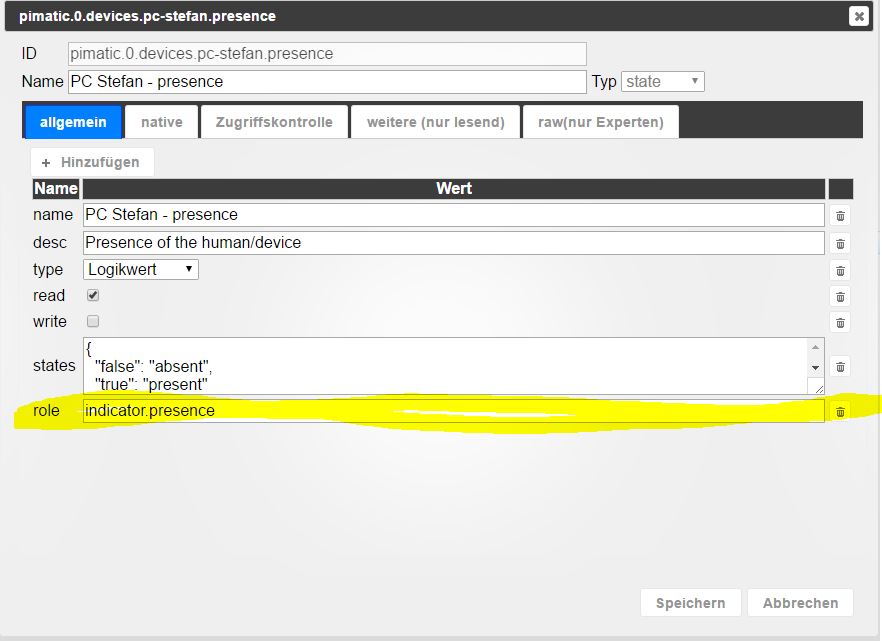
(Leider scheint das manuelle Löschen hier nicht zum Erfolg zu führen da bei jeder Aktualisierung das Attribut vom Pimatic Adapter neu geholt und ergänzt wird - und damit im Mobile UI das Objekt wieder verschwindet)
Besten Dank
Michael
-
Hi,
Ich vervolge gespannt dieses topic da ich immernoch auf der suche bin nach einer guten einbindung vom RFXCOM device.
Im moment habe ich das sehr umstaendlich geloest mittels MQTT und domoticz (da domoticz perfect RFXCOM unterstuetzt).
Zum test pimatic installiert und der adaper macht was er soll, sehr schoen. Doch leider is auch bei PMATIC der RFXCOM sehr schlecht unterstuetzt.
Da der adapter in der basis aber auch JSON liest und darueber schaltet frage ich mich ab ob dies nicht auch die richtige basis waere fuer einen domoticz adapter ?!
Domoticz hat auch eine API, diese functioniert 2 ledig:
-
Per JSON jetzige daten auslesen wie devices oder switches
-
Per URL command devices steuern
in der basis klinkt das genau gleich wie die loesung fuer PIMATIC ?
Mit diesem befehl z.b. liest man alle devices + stats aus: "http://192.168.1.152:8080/json.htm?type=devices"
Das ergibt folgende tabelle :
!
{ "ActTime" : 1493551691, "ServerTime" : "2017-04-30 13:28:11", "Sunrise" : "06:01", "Sunset" : "20:57", "result" : [ { "AddjMulti" : 1.0, "AddjMulti2" : 1.0, "AddjValue" : 0.0, "AddjValue2" : 0.0, "BatteryLevel" : 255, "CustomImage" : 0, "Data" : "On", "Description" : "", "Favorite" : 1, "HardwareID" : 3, "HardwareName" : "RFXCom", "HardwareType" : "RFXCOM - RFXtrx433 USB 433.92MHz Transceiver", "HardwareTypeVal" : 1, "HaveDimmer" : false, "HaveGroupCmd" : true, "HaveTimeout" : false, "ID" : "65", "Image" : "Light", "IsSubDevice" : false, "LastUpdate" : "2017-04-30 13:20:40", "Level" : 0, "LevelInt" : 0, "MaxDimLevel" : 0, "Name" : "Woonkamer_Kast", "Notifications" : "false", "PlanID" : "0", "PlanIDs" : [ 0 ], "Protected" : false, "ShowNotifications" : true, "SignalLevel" : "-", "Status" : "On", "StrParam1" : "", "StrParam2" : "", "SubType" : "ARC", "SwitchType" : "On/Off", "SwitchTypeVal" : 0, "Timers" : "false", "Type" : "Lighting 1", "TypeImg" : "lightbulb", "Unit" : 1, "Used" : 1, "UsedByCamera" : false, "XOffset" : "0", "YOffset" : "0", "idx" : "1" }, { "AddjMulti" : 1.0, "AddjMulti2" : 1.0, "AddjValue" : 0.0, "AddjValue2" : 0.0, "BatteryLevel" : 255, "CustomImage" : 0, "Data" : "Off", "Description" : "", "Favorite" : 1, "HardwareID" : 3, "HardwareName" : "RFXCom", "HardwareType" : "RFXCOM - RFXtrx433 USB 433.92MHz Transceiver", "HardwareTypeVal" : 1, "HaveDimmer" : false, "HaveGroupCmd" : true, "HaveTimeout" : false, "ID" : "65", "Image" : "Light", "IsSubDevice" : false, "LastUpdate" : "2017-04-28 22:53:16", "Level" : 0, "LevelInt" : 0, "MaxDimLevel" : 0, "Name" : "Woonkamer_Raam", "Notifications" : "false", "PlanID" : "0", "PlanIDs" : [ 0 ], "Protected" : false, "ShowNotifications" : true, "SignalLevel" : "-", "Status" : "Off", "StrParam1" : "", "StrParam2" : "", "SubType" : "ARC", "SwitchType" : "On/Off", "SwitchTypeVal" : 0, "Timers" : "false", "Type" : "Lighting 1", "TypeImg" : "lightbulb", "Unit" : 2, "Used" : 1, "UsedByCamera" : false, "XOffset" : "0", "YOffset" : "0", "idx" : "2" }, { "AddjMulti" : 1.0, "AddjMulti2" : 1.0, "AddjValue" : 0.0, "AddjValue2" : 0.0, "BatteryLevel" : 255, "CustomImage" : 0, "Data" : "Off", "Description" : "", "Favorite" : 0, "HardwareID" : 3, "HardwareName" : "RFXCom", "HardwareType" : "RFXCOM - RFXtrx433 USB 433.92MHz Transceiver", "HardwareTypeVal" : 1, "HaveDimmer" : false, "HaveGroupCmd" : true, "HaveTimeout" : false, "ID" : "65", "Image" : "Light", "IsSubDevice" : false, "LastUpdate" : "2016-10-22 19:40:54", "Level" : 0, "LevelInt" : 0, "MaxDimLevel" : 0, "Name" : "Woonkamer_Raam_2", "Notifications" : "false", "PlanID" : "0", "PlanIDs" : [ 0 ], "Protected" : false, "ShowNotifications" : true, "SignalLevel" : "-", "Status" : "Off", "StrParam1" : "", "StrParam2" : "", "SubType" : "ARC", "SwitchType" : "On/Off", "SwitchTypeVal" : 0, "Timers" : "false", "Type" : "Lighting 1", "TypeImg" : "lightbulb", "Unit" : 3, "Used" : 1, "UsedByCamera" : false, "XOffset" : "0", "YOffset" : "0", "idx" : "3" }, { "AddjMulti" : 1.0, "AddjMulti2" : 1.0, "AddjValue" : 0.0, "AddjValue2" : 0.0, "BatteryLevel" : 255, "CustomImage" : 0, "Data" : "On", "Description" : "", "Favorite" : 0, "HardwareID" : 3, "HardwareName" : "RFXCom", "HardwareType" : "RFXCOM - RFXtrx433 USB 433.92MHz Transceiver", "HardwareTypeVal" : 1, "HaveDimmer" : true, "HaveGroupCmd" : true, "HaveTimeout" : false, "ID" : "1010101", "Image" : "Light", "InternalState" : "On", "IsSubDevice" : false, "LastUpdate" : "2016-12-03 11:18:23", "Level" : 0, "LevelInt" : 0, "MaxDimLevel" : 15, "Name" : "Deurbel_Ring", "Notifications" : "false", "PlanID" : "0", "PlanIDs" : [ 0 ], "Protected" : false, "ShowNotifications" : true, "SignalLevel" : "-", "Status" : "", "StrParam1" : "", "StrParam2" : "", "SubType" : "AC", "SwitchType" : "Push On Button", "SwitchTypeVal" : 9, "Timers" : "false", "Type" : "Lighting 2", "TypeImg" : "push", "Unit" : 1, "Used" : 1, "UsedByCamera" : false, "XOffset" : "0", "YOffset" : "0", "idx" : "5" }, { "AddjMulti" : 1.0, "AddjMulti2" : 1.0, "AddjValue" : 0.0, "AddjValue2" : 0.0, "BatteryLevel" : 255, "CustomImage" : 0, "Data" : "On", "Description" : "", "Favorite" : 1, "HardwareID" : 3, "HardwareName" : "RFXCom", "HardwareType" : "RFXCOM - RFXtrx433 USB 433.92MHz Transceiver", "HardwareTypeVal" : 1, "HaveDimmer" : true, "HaveGroupCmd" : true, "HaveTimeout" : false, "ID" : "1010102", "Image" : "Light", "InternalState" : "On", "IsSubDevice" : false, "LastUpdate" : "2016-12-03 11:10:26", "Level" : 0, "LevelInt" : 0, "MaxDimLevel" : 15, "Name" : "Deurbel_Jazz", "Notifications" : "false", "PlanID" : "0", "PlanIDs" : [ 0 ], "Protected" : false, "ShowNotifications" : true, "SignalLevel" : "-", "Status" : "", "StrParam1" : "", "StrParam2" : "", "SubType" : "AC", "SwitchType" : "Push On Button", "SwitchTypeVal" : 9, "Timers" : "false", "Type" : "Lighting 2", "TypeImg" : "push", "Unit" : 1, "Used" : 1, "UsedByCamera" : false, "XOffset" : "0", "YOffset" : "0", "idx" : "6" }, { "AddjMulti" : 1.0, "AddjMulti2" : 1.0, "AddjValue" : 0.0, "AddjValue2" : 0.0, "BatteryLevel" : 255, "CustomImage" : 0, "Data" : "On", "Description" : "", "Favorite" : 0, "HardwareID" : 3, "HardwareName" : "RFXCom", "HardwareType" : "RFXCOM - RFXtrx433 USB 433.92MHz Transceiver", "HardwareTypeVal" : 1, "HaveDimmer" : true, "HaveGroupCmd" : true, "HaveTimeout" : false, "ID" : "1010103", "Image" : "Light", "InternalState" : "On", "IsSubDevice" : false, "LastUpdate" : "2016-09-25 12:16:48", "Level" : 0, "LevelInt" : 0, "MaxDimLevel" : 15, "Name" : "Deurbel_Bird", "Notifications" : "false", "PlanID" : "0", "PlanIDs" : [ 0 ], "Protected" : false, "ShowNotifications" : true, "SignalLevel" : "-", "Status" : "", "StrParam1" : "", "StrParam2" : "", "SubType" : "AC", "SwitchType" : "Push On Button", "SwitchTypeVal" : 9, "Timers" : "false", "Type" : "Lighting 2", "TypeImg" : "push", "Unit" : 1, "Used" : 1, "UsedByCamera" : false, "XOffset" : "0", "YOffset" : "0", "idx" : "7" }, { "AddjMulti" : 1.0, "AddjMulti2" : 1.0, "AddjValue" : 0.0, "AddjValue2" : 0.0, "BatteryLevel" : 255, "CustomImage" : 0, "Data" : "On", "Description" : "", "Favorite" : 0, "HardwareID" : 3, "HardwareName" : "RFXCom", "HardwareType" : "RFXCOM - RFXtrx433 USB 433.92MHz Transceiver", "HardwareTypeVal" : 1, "HaveDimmer" : true, "HaveGroupCmd" : true, "HaveTimeout" : false, "ID" : "1010104", "Image" : "Light", "InternalState" : "On", "IsSubDevice" : false, "LastUpdate" : "2016-12-10 11:05:31", "Level" : 0, "LevelInt" : 0, "MaxDimLevel" : 15, "Name" : "Deurbel_DingDong", "Notifications" : "false", "PlanID" : "0", "PlanIDs" : [ 0 ], "Protected" : false, "ShowNotifications" : true, "SignalLevel" : "-", "Status" : "", "StrParam1" : "", "StrParam2" : "", "SubType" : "AC", "SwitchType" : "Push On Button", "SwitchTypeVal" : 9, "Timers" : "false", "Type" : "Lighting 2", "TypeImg" : "push", "Unit" : 1, "Used" : 1, "UsedByCamera" : false, "XOffset" : "0", "YOffset" : "0", "idx" : "8" }, { "AddjMulti" : 1.0, "AddjMulti2" : 1.0, "AddjValue" : 0.0, "AddjValue2" : 0.0, "BatteryLevel" : 255, "CustomImage" : 0, "Data" : "", "Description" : "", "Favorite" : 0, "HardwareID" : 3, "HardwareName" : "RFXCom", "HardwareType" : "RFXCOM - RFXtrx433 USB 433.92MHz Transceiver", "HardwareTypeVal" : 1, "HaveDimmer" : true, "HaveGroupCmd" : true, "HaveTimeout" : false, "ID" : "1040F70", "Image" : "Light", "IsSubDevice" : false, "LastUpdate" : "2016-12-03 10:56:44", "Level" : 0, "LevelInt" : 0, "MaxDimLevel" : 15, "Name" : "Unknown", "Notifications" : "false", "PlanID" : "0", "PlanIDs" : [ 0 ], "Protected" : false, "ShowNotifications" : true, "SignalLevel" : 0, "Status" : "", "StrParam1" : "", "StrParam2" : "", "SubType" : "AC", "SwitchType" : "On/Off", "SwitchTypeVal" : 0, "Timers" : "false", "Type" : "Lighting 2", "TypeImg" : "lightbulb", "Unit" : 11, "Used" : 0, "UsedByCamera" : false, "XOffset" : "0", "YOffset" : "0", "idx" : "17" }, { "AddjMulti" : 1.0, "AddjMulti2" : 1.0, "AddjValue" : 0.0, "AddjValue2" : 0.0, "BatteryLevel" : 255, "CustomImage" : 0, "Data" : "On", "Description" : "", "Favorite" : 0, "HardwareID" : 3, "HardwareName" : "RFXCom", "HardwareType" : "RFXCOM - RFXtrx433 USB 433.92MHz Transceiver", "HardwareTypeVal" : 1, "HaveDimmer" : true, "HaveGroupCmd" : true, "HaveTimeout" : false, "ID" : "14879AA", "Image" : "Light", "IsSubDevice" : false, "LastUpdate" : "2017-04-30 12:22:29", "Level" : 0, "LevelInt" : 0, "MaxDimLevel" : 15, "Name" : "Deurbel", "Notifications" : "false", "PlanID" : "0", "PlanIDs" : [ 0 ], "Protected" : false, "ShowNotifications" : true, "SignalLevel" : 7, "Status" : "", "StrParam1" : "", "StrParam2" : "", "SubType" : "AC", "SwitchType" : "Doorbell", "SwitchTypeVal" : 1, "Timers" : "false", "Type" : "Lighting 2", "TypeImg" : "doorbell", "Unit" : 1, "Used" : 1, "UsedByCamera" : false, "XOffset" : "0", "YOffset" : "0", "idx" : "19" }, { "AddjMulti" : 1.0, "AddjMulti2" : 1.0, "AddjValue" : 0.0, "AddjValue2" : 0.0, "BatteryLevel" : 255, "CustomImage" : 0, "Data" : "", "Description" : "", "Favorite" : 0, "HardwareID" : 3, "HardwareName" : "RFXCom", "HardwareType" : "RFXCOM - RFXtrx433 USB 433.92MHz Transceiver", "HardwareTypeVal" : 1, "HaveDimmer" : true, "HaveGroupCmd" : true, "HaveTimeout" : false, "ID" : "1487960", "Image" : "Light", "IsSubDevice" : false, "LastUpdate" : "2017-04-28 22:45:56", "Level" : 0, "LevelInt" : 0, "MaxDimLevel" : 15, "Name" : "Unknown", "Notifications" : "false", "PlanID" : "0", "PlanIDs" : [ 0 ], "Protected" : false, "ShowNotifications" : true, "SignalLevel" : 0, "Status" : "", "StrParam1" : "", "StrParam2" : "", "SubType" : "AC", "SwitchType" : "On/Off", "SwitchTypeVal" : 0, "Timers" : "false", "Type" : "Lighting 2", "TypeImg" : "lightbulb", "Unit" : 11, "Used" : 0, "UsedByCamera" : false, "XOffset" : "0", "YOffset" : "0", "idx" : "20" } ], "status" : "OK", "title" : "Devices" } !Man kan die devices dan auch per URL commando steuern, hier z.b. meine turklingel:
http://192.168.1.152:8081/json.htm?type=command¶m=switchlight&idx=6&switchcmd=OnAlso wie man sieht schalte ich hiermit die idx=6 welche meine turklingel JAZZ abspielt
Ich frage mich also ab ob wir die PIMATIX logic des adapter umschreiben koennte fuer Domoticz.
Wen jah brauchte ich ein bischen start hilfe, testen und installation kan ich machen und wen ich weis wor auch mit dem adapter und configurationen spielen.
Wen das machbar is werde ich einen neuen tread eroeffnen, schuldigung fuer diese offtopic frage hier.
Domoticz API erklaehrung: https://www.domoticz.com/wiki/Domoticz_API/JSON_URL%27s
Wen wir das machen koennten wuerde mich das sehr freuen und neben FHEM/PIMATIC wuerde auch Domoticz dan zu den standard binding fuer iobroker gehoeren.
Greetz,
Dutch
-
-
Hi,
Ich vervolge gespannt dieses topic da ich immernoch auf der suche bin nach einer guten einbindung vom RFXCOM device.
Im moment habe ich das sehr umstaendlich geloest mittels MQTT und domoticz (da domoticz perfect RFXCOM unterstuetzt).
Zum test pimatic installiert und der adaper macht was er soll, sehr schoen. Doch leider is auch bei PMATIC der RFXCOM sehr schlecht unterstuetzt.
Da der adapter in der basis aber auch JSON liest und darueber schaltet frage ich mich ab ob dies nicht auch die richtige basis waere fuer einen domoticz adapter ?!
Domoticz hat auch eine API, diese functioniert 2 ledig:
-
Per JSON jetzige daten auslesen wie devices oder switches
-
Per URL command devices steuern
in der basis klinkt das genau gleich wie die loesung fuer PIMATIC ?
Mit diesem befehl z.b. liest man alle devices + stats aus: "http://192.168.1.152:8080/json.htm?type=devices"
Das ergibt folgende tabelle :
!
{ "ActTime" : 1493551691, "ServerTime" : "2017-04-30 13:28:11", "Sunrise" : "06:01", "Sunset" : "20:57", "result" : [ { "AddjMulti" : 1.0, "AddjMulti2" : 1.0, "AddjValue" : 0.0, "AddjValue2" : 0.0, "BatteryLevel" : 255, "CustomImage" : 0, "Data" : "On", "Description" : "", "Favorite" : 1, "HardwareID" : 3, "HardwareName" : "RFXCom", "HardwareType" : "RFXCOM - RFXtrx433 USB 433.92MHz Transceiver", "HardwareTypeVal" : 1, "HaveDimmer" : false, "HaveGroupCmd" : true, "HaveTimeout" : false, "ID" : "65", "Image" : "Light", "IsSubDevice" : false, "LastUpdate" : "2017-04-30 13:20:40", "Level" : 0, "LevelInt" : 0, "MaxDimLevel" : 0, "Name" : "Woonkamer_Kast", "Notifications" : "false", "PlanID" : "0", "PlanIDs" : [ 0 ], "Protected" : false, "ShowNotifications" : true, "SignalLevel" : "-", "Status" : "On", "StrParam1" : "", "StrParam2" : "", "SubType" : "ARC", "SwitchType" : "On/Off", "SwitchTypeVal" : 0, "Timers" : "false", "Type" : "Lighting 1", "TypeImg" : "lightbulb", "Unit" : 1, "Used" : 1, "UsedByCamera" : false, "XOffset" : "0", "YOffset" : "0", "idx" : "1" }, { "AddjMulti" : 1.0, "AddjMulti2" : 1.0, "AddjValue" : 0.0, "AddjValue2" : 0.0, "BatteryLevel" : 255, "CustomImage" : 0, "Data" : "Off", "Description" : "", "Favorite" : 1, "HardwareID" : 3, "HardwareName" : "RFXCom", "HardwareType" : "RFXCOM - RFXtrx433 USB 433.92MHz Transceiver", "HardwareTypeVal" : 1, "HaveDimmer" : false, "HaveGroupCmd" : true, "HaveTimeout" : false, "ID" : "65", "Image" : "Light", "IsSubDevice" : false, "LastUpdate" : "2017-04-28 22:53:16", "Level" : 0, "LevelInt" : 0, "MaxDimLevel" : 0, "Name" : "Woonkamer_Raam", "Notifications" : "false", "PlanID" : "0", "PlanIDs" : [ 0 ], "Protected" : false, "ShowNotifications" : true, "SignalLevel" : "-", "Status" : "Off", "StrParam1" : "", "StrParam2" : "", "SubType" : "ARC", "SwitchType" : "On/Off", "SwitchTypeVal" : 0, "Timers" : "false", "Type" : "Lighting 1", "TypeImg" : "lightbulb", "Unit" : 2, "Used" : 1, "UsedByCamera" : false, "XOffset" : "0", "YOffset" : "0", "idx" : "2" }, { "AddjMulti" : 1.0, "AddjMulti2" : 1.0, "AddjValue" : 0.0, "AddjValue2" : 0.0, "BatteryLevel" : 255, "CustomImage" : 0, "Data" : "Off", "Description" : "", "Favorite" : 0, "HardwareID" : 3, "HardwareName" : "RFXCom", "HardwareType" : "RFXCOM - RFXtrx433 USB 433.92MHz Transceiver", "HardwareTypeVal" : 1, "HaveDimmer" : false, "HaveGroupCmd" : true, "HaveTimeout" : false, "ID" : "65", "Image" : "Light", "IsSubDevice" : false, "LastUpdate" : "2016-10-22 19:40:54", "Level" : 0, "LevelInt" : 0, "MaxDimLevel" : 0, "Name" : "Woonkamer_Raam_2", "Notifications" : "false", "PlanID" : "0", "PlanIDs" : [ 0 ], "Protected" : false, "ShowNotifications" : true, "SignalLevel" : "-", "Status" : "Off", "StrParam1" : "", "StrParam2" : "", "SubType" : "ARC", "SwitchType" : "On/Off", "SwitchTypeVal" : 0, "Timers" : "false", "Type" : "Lighting 1", "TypeImg" : "lightbulb", "Unit" : 3, "Used" : 1, "UsedByCamera" : false, "XOffset" : "0", "YOffset" : "0", "idx" : "3" }, { "AddjMulti" : 1.0, "AddjMulti2" : 1.0, "AddjValue" : 0.0, "AddjValue2" : 0.0, "BatteryLevel" : 255, "CustomImage" : 0, "Data" : "On", "Description" : "", "Favorite" : 0, "HardwareID" : 3, "HardwareName" : "RFXCom", "HardwareType" : "RFXCOM - RFXtrx433 USB 433.92MHz Transceiver", "HardwareTypeVal" : 1, "HaveDimmer" : true, "HaveGroupCmd" : true, "HaveTimeout" : false, "ID" : "1010101", "Image" : "Light", "InternalState" : "On", "IsSubDevice" : false, "LastUpdate" : "2016-12-03 11:18:23", "Level" : 0, "LevelInt" : 0, "MaxDimLevel" : 15, "Name" : "Deurbel_Ring", "Notifications" : "false", "PlanID" : "0", "PlanIDs" : [ 0 ], "Protected" : false, "ShowNotifications" : true, "SignalLevel" : "-", "Status" : "", "StrParam1" : "", "StrParam2" : "", "SubType" : "AC", "SwitchType" : "Push On Button", "SwitchTypeVal" : 9, "Timers" : "false", "Type" : "Lighting 2", "TypeImg" : "push", "Unit" : 1, "Used" : 1, "UsedByCamera" : false, "XOffset" : "0", "YOffset" : "0", "idx" : "5" }, { "AddjMulti" : 1.0, "AddjMulti2" : 1.0, "AddjValue" : 0.0, "AddjValue2" : 0.0, "BatteryLevel" : 255, "CustomImage" : 0, "Data" : "On", "Description" : "", "Favorite" : 1, "HardwareID" : 3, "HardwareName" : "RFXCom", "HardwareType" : "RFXCOM - RFXtrx433 USB 433.92MHz Transceiver", "HardwareTypeVal" : 1, "HaveDimmer" : true, "HaveGroupCmd" : true, "HaveTimeout" : false, "ID" : "1010102", "Image" : "Light", "InternalState" : "On", "IsSubDevice" : false, "LastUpdate" : "2016-12-03 11:10:26", "Level" : 0, "LevelInt" : 0, "MaxDimLevel" : 15, "Name" : "Deurbel_Jazz", "Notifications" : "false", "PlanID" : "0", "PlanIDs" : [ 0 ], "Protected" : false, "ShowNotifications" : true, "SignalLevel" : "-", "Status" : "", "StrParam1" : "", "StrParam2" : "", "SubType" : "AC", "SwitchType" : "Push On Button", "SwitchTypeVal" : 9, "Timers" : "false", "Type" : "Lighting 2", "TypeImg" : "push", "Unit" : 1, "Used" : 1, "UsedByCamera" : false, "XOffset" : "0", "YOffset" : "0", "idx" : "6" }, { "AddjMulti" : 1.0, "AddjMulti2" : 1.0, "AddjValue" : 0.0, "AddjValue2" : 0.0, "BatteryLevel" : 255, "CustomImage" : 0, "Data" : "On", "Description" : "", "Favorite" : 0, "HardwareID" : 3, "HardwareName" : "RFXCom", "HardwareType" : "RFXCOM - RFXtrx433 USB 433.92MHz Transceiver", "HardwareTypeVal" : 1, "HaveDimmer" : true, "HaveGroupCmd" : true, "HaveTimeout" : false, "ID" : "1010103", "Image" : "Light", "InternalState" : "On", "IsSubDevice" : false, "LastUpdate" : "2016-09-25 12:16:48", "Level" : 0, "LevelInt" : 0, "MaxDimLevel" : 15, "Name" : "Deurbel_Bird", "Notifications" : "false", "PlanID" : "0", "PlanIDs" : [ 0 ], "Protected" : false, "ShowNotifications" : true, "SignalLevel" : "-", "Status" : "", "StrParam1" : "", "StrParam2" : "", "SubType" : "AC", "SwitchType" : "Push On Button", "SwitchTypeVal" : 9, "Timers" : "false", "Type" : "Lighting 2", "TypeImg" : "push", "Unit" : 1, "Used" : 1, "UsedByCamera" : false, "XOffset" : "0", "YOffset" : "0", "idx" : "7" }, { "AddjMulti" : 1.0, "AddjMulti2" : 1.0, "AddjValue" : 0.0, "AddjValue2" : 0.0, "BatteryLevel" : 255, "CustomImage" : 0, "Data" : "On", "Description" : "", "Favorite" : 0, "HardwareID" : 3, "HardwareName" : "RFXCom", "HardwareType" : "RFXCOM - RFXtrx433 USB 433.92MHz Transceiver", "HardwareTypeVal" : 1, "HaveDimmer" : true, "HaveGroupCmd" : true, "HaveTimeout" : false, "ID" : "1010104", "Image" : "Light", "InternalState" : "On", "IsSubDevice" : false, "LastUpdate" : "2016-12-10 11:05:31", "Level" : 0, "LevelInt" : 0, "MaxDimLevel" : 15, "Name" : "Deurbel_DingDong", "Notifications" : "false", "PlanID" : "0", "PlanIDs" : [ 0 ], "Protected" : false, "ShowNotifications" : true, "SignalLevel" : "-", "Status" : "", "StrParam1" : "", "StrParam2" : "", "SubType" : "AC", "SwitchType" : "Push On Button", "SwitchTypeVal" : 9, "Timers" : "false", "Type" : "Lighting 2", "TypeImg" : "push", "Unit" : 1, "Used" : 1, "UsedByCamera" : false, "XOffset" : "0", "YOffset" : "0", "idx" : "8" }, { "AddjMulti" : 1.0, "AddjMulti2" : 1.0, "AddjValue" : 0.0, "AddjValue2" : 0.0, "BatteryLevel" : 255, "CustomImage" : 0, "Data" : "", "Description" : "", "Favorite" : 0, "HardwareID" : 3, "HardwareName" : "RFXCom", "HardwareType" : "RFXCOM - RFXtrx433 USB 433.92MHz Transceiver", "HardwareTypeVal" : 1, "HaveDimmer" : true, "HaveGroupCmd" : true, "HaveTimeout" : false, "ID" : "1040F70", "Image" : "Light", "IsSubDevice" : false, "LastUpdate" : "2016-12-03 10:56:44", "Level" : 0, "LevelInt" : 0, "MaxDimLevel" : 15, "Name" : "Unknown", "Notifications" : "false", "PlanID" : "0", "PlanIDs" : [ 0 ], "Protected" : false, "ShowNotifications" : true, "SignalLevel" : 0, "Status" : "", "StrParam1" : "", "StrParam2" : "", "SubType" : "AC", "SwitchType" : "On/Off", "SwitchTypeVal" : 0, "Timers" : "false", "Type" : "Lighting 2", "TypeImg" : "lightbulb", "Unit" : 11, "Used" : 0, "UsedByCamera" : false, "XOffset" : "0", "YOffset" : "0", "idx" : "17" }, { "AddjMulti" : 1.0, "AddjMulti2" : 1.0, "AddjValue" : 0.0, "AddjValue2" : 0.0, "BatteryLevel" : 255, "CustomImage" : 0, "Data" : "On", "Description" : "", "Favorite" : 0, "HardwareID" : 3, "HardwareName" : "RFXCom", "HardwareType" : "RFXCOM - RFXtrx433 USB 433.92MHz Transceiver", "HardwareTypeVal" : 1, "HaveDimmer" : true, "HaveGroupCmd" : true, "HaveTimeout" : false, "ID" : "14879AA", "Image" : "Light", "IsSubDevice" : false, "LastUpdate" : "2017-04-30 12:22:29", "Level" : 0, "LevelInt" : 0, "MaxDimLevel" : 15, "Name" : "Deurbel", "Notifications" : "false", "PlanID" : "0", "PlanIDs" : [ 0 ], "Protected" : false, "ShowNotifications" : true, "SignalLevel" : 7, "Status" : "", "StrParam1" : "", "StrParam2" : "", "SubType" : "AC", "SwitchType" : "Doorbell", "SwitchTypeVal" : 1, "Timers" : "false", "Type" : "Lighting 2", "TypeImg" : "doorbell", "Unit" : 1, "Used" : 1, "UsedByCamera" : false, "XOffset" : "0", "YOffset" : "0", "idx" : "19" }, { "AddjMulti" : 1.0, "AddjMulti2" : 1.0, "AddjValue" : 0.0, "AddjValue2" : 0.0, "BatteryLevel" : 255, "CustomImage" : 0, "Data" : "", "Description" : "", "Favorite" : 0, "HardwareID" : 3, "HardwareName" : "RFXCom", "HardwareType" : "RFXCOM - RFXtrx433 USB 433.92MHz Transceiver", "HardwareTypeVal" : 1, "HaveDimmer" : true, "HaveGroupCmd" : true, "HaveTimeout" : false, "ID" : "1487960", "Image" : "Light", "IsSubDevice" : false, "LastUpdate" : "2017-04-28 22:45:56", "Level" : 0, "LevelInt" : 0, "MaxDimLevel" : 15, "Name" : "Unknown", "Notifications" : "false", "PlanID" : "0", "PlanIDs" : [ 0 ], "Protected" : false, "ShowNotifications" : true, "SignalLevel" : 0, "Status" : "", "StrParam1" : "", "StrParam2" : "", "SubType" : "AC", "SwitchType" : "On/Off", "SwitchTypeVal" : 0, "Timers" : "false", "Type" : "Lighting 2", "TypeImg" : "lightbulb", "Unit" : 11, "Used" : 0, "UsedByCamera" : false, "XOffset" : "0", "YOffset" : "0", "idx" : "20" } ], "status" : "OK", "title" : "Devices" } !Man kan die devices dan auch per URL commando steuern, hier z.b. meine turklingel:
http://192.168.1.152:8081/json.htm?type=command¶m=switchlight&idx=6&switchcmd=OnAlso wie man sieht schalte ich hiermit die idx=6 welche meine turklingel JAZZ abspielt
Ich frage mich also ab ob wir die PIMATIX logic des adapter umschreiben koennte fuer Domoticz.
Wen jah brauchte ich ein bischen start hilfe, testen und installation kan ich machen und wen ich weis wor auch mit dem adapter und configurationen spielen.
Wen das machbar is werde ich einen neuen tread eroeffnen, schuldigung fuer diese offtopic frage hier.
Domoticz API erklaehrung: https://www.domoticz.com/wiki/Domoticz_API/JSON_URL%27s
Wen wir das machen koennten wuerde mich das sehr freuen und neben FHEM/PIMATIC wuerde auch Domoticz dan zu den standard binding fuer iobroker gehoeren.
Greetz,
Dutch `
Mache neuen Thread auf, da es auf jeden Fall möglich ist. Wie ich schon gesagt habe, es gibt nur das Problem mit Update. Pollen wird natürlich gehen und bei 30 Variablen wird systematisch auch nicht belastete sein. Vielleicht nebenbei auch Domoticz fragen, dass die Server Side Events unterstützen?Das wird dann perfekte Lösung sein.
-
-
Hallo,
ich arbeite schon lange mit Pimatic und habe die Vorteile des Systems schätzen gelernt. Da ich aber auch gerne neues entdecke und durch die Mulithostingoption iOBroker einen großen Vorteil bietet habe ich mal den Versuch gestartet über den Adapter meine komplette Pimatic Installation in iOBroker zu bekommen. Das hat erstaunlich gut funktioniert. Kompliment dafür!
Eine Kleinigkeit ist mir allerdings aufgefallen: Pimatic verwendet das Device "Presence" um An/Abwesenheiten anzeigen zu können. An und für sich ideal um es im iOBroker Mobile UI über den "Show boolean value:" Wert anzeigen zu lassen.
Der Adapter übernimmt beim Einlesen der Pimatic Devices für die presence devices aber auch (Bug oder feature?) ein Attribut "role" der als Eintrag "inicator.presence" erhält. Durch dieses Attribut wird im Mobile UI das Objekt nicht angezeigt. Wenn ich hingegen manuell das komplette Attribut lösche und den MobileUI relode dann wird das presence Objekt dargestellt.
presence.jpg
(Leider scheint das manuelle Löschen hier nicht zum Erfolg zu führen da bei jeder Aktualisierung das Attribut vom Pimatic Adapter neu geholt und ergänzt wird - und damit im Mobile UI das Objekt wieder verschwindet)
Besten Dank
Michael `
Bitte die neue Version in latest repository testen. -
Hallo,
habe den Pimatic Adapter 0.1.5 instaliert aber er bringt keine Verbindung zur Pimatic.
Verbunden mit Host und Lebenszeichen : wahr
Verbunden mit Pimatic: falsch
Liegt es an Pimatic oder am Adapter?
Was braucht ihr für Infos um mir helfen zu können?
Danke mfg karl78
-
Super das hat auf Anhieb funktioniert.
Vielen Dank für die schnelle Hilfe, großes Kompliment! `
Hallo Zusammen,
bin gerade seit 1 Tag am testen und bereits sehr begeistert.
Ich habe Pimatic am laufen und auch den Adapter installiert.
Es werden auch alle Werte eingelesen.
Ist es möglich auch Werte zu schreiben, um z.B. ein Licht in Pimatic einzuschalten?
Muss dafür ein Objekt angelegt werden? Wenn ich im Moment schalten möchte, kommt diese Fehlermeldung:
pimatic.0 2019-01-12 21:54:01.821 warn State "pimatic.0.devices.sonoff5" is read only
Zweite Fehlermeldung:
Cannot write "pimatic.0.devices.WohnzimmerFenster.temperatureSetpoint": Error: User not found at UserManager.hasPermissionBoolean (/home/pi/pimatic-app/node_modules/pimatic/lib/users.coffee:81:15)
Kurze Hilfe wäre super!
Tolle Software!
Gruß Klaus

Hey! Du scheinst an dieser Unterhaltung interessiert zu sein, hast aber noch kein Konto.
Hast du es satt, bei jedem Besuch durch die gleichen Beiträge zu scrollen? Wenn du dich für ein Konto anmeldest, kommst du immer genau dorthin zurück, wo du zuvor warst, und kannst dich über neue Antworten benachrichtigen lassen (entweder per E-Mail oder Push-Benachrichtigung). Du kannst auch Lesezeichen speichern und Beiträge positiv bewerten, um anderen Community-Mitgliedern deine Wertschätzung zu zeigen.
Mit deinem Input könnte dieser Beitrag noch besser werden 💗
Registrieren Anmelden481
Online33.0k
Benutzer83.6k
Themen1.3m
Beiträge