



- ioBroker Community Home
- Deutsch
- Hardware
- IR Lesekopf/NodeMCU per MQTT einbinden [gelöst ...]
NEWS
IR Lesekopf/NodeMCU per MQTT einbinden [gelöst ...]
-
Hi, ich habe mal das Script so weit angepasst, das auch die Datenpunkte in 0_userdata.0 erstellt werden und gleichzeitig mit den Daten gefüllt werden. Du musst natürlich wieder den Datenpunkt im Trigger anpassen und ein neues Blockly erstellen. bis .....
<xml xmlns="https://developers.google.com/blockly/xml"> <variables> <variable id="o^VE=q/EJxRCU@p=Nq({">Verbrauch</variable> <variable id="=PjH*5J}WCH}|GQxuE!Q">Bezug</variable> <variable id="5=hKGU(m$i[]qc3syZjS">Tag</variable> <variable id="nEj.:^1A]V^!5`$(P9)$">Woche</variable> <variable id="X{v.JNv2M`1iHjL[)X,l">Monat</variable> <variable id="g;{.pi%+DV4VUngk~p{g">Jahr</variable> <variable id="yK^u+S#}N~|IeJsi~VAh">aktuell</variable> </variables> <block type="create" id="swB_9{Mg2QcF?v|UMaP#" x="-387" y="-887"> <field name="NAME">0_userdata.0.Stromzähler.Verbrauch</field> <value name="VALUE"> <block type="math_number" id="Z+;(E`E9+ht]r5cCHBr1"> <field name="NUM">0</field> </block> </value> <value name="COMMON"> <block type="text" id="zn9`[(J+$[cPEt,=~Ahf"> <field name="TEXT">{"name": "Stromzähler.Verbrauch","type": "number","write": false}</field> </block> </value> <next> <block type="create" id="@@dkn1^I6xwn%lT;FaGl"> <field name="NAME">0_userdata.0.Stromzähler.Bezug</field> <value name="VALUE"> <block type="math_number" id="zNwvnTY:ED2GEu1}}]GB"> <field name="NUM">0</field> </block> </value> <value name="COMMON"> <block type="text" id=",W|sROdfU{#e~dwwRXDL"> <field name="TEXT">{"name": "Stromzähler.Bezug","type": "number","write": false}</field> </block> </value> <next> <block type="create" id="4!zi^L_C:oLPi4=q[ds("> <field name="NAME">0_userdata.0.Stromzähler.Tag</field> <value name="VALUE"> <block type="math_number" id="1L@11cJjD}Lxo`Fibkzu"> <field name="NUM">0</field> </block> </value> <value name="COMMON"> <block type="text" id="^z*;3w$8_?xMfzNlpb/T"> <field name="TEXT">{"name": "Stromzähler.Tag","type": "number","write": false}</field> </block> </value> <next> <block type="create" id="I@0cfJ_XxN:}X)4a/LvU"> <field name="NAME">0_userdata.0.Stromzähler.Woche</field> <value name="VALUE"> <block type="math_number" id="g8+k1NFq%,O0Px@EmZ6A"> <field name="NUM">0</field> </block> </value> <value name="COMMON"> <block type="text" id="h?$B]udPY|CJoThsd]@%"> <field name="TEXT">{"name": "Stromzähler.Woche","type": "number","write": false}</field> </block> </value> <next> <block type="create" id="FbJ8*Z?Ax/B+zh;(cI?Z"> <field name="NAME">0_userdata.0.Stromzähler.Monat</field> <value name="VALUE"> <block type="math_number" id="F*nx^%Bs[_.XcoWC,?*["> <field name="NUM">0</field> </block> </value> <value name="COMMON"> <block type="text" id="5%@E`W$mBtxGhqa|a_V3"> <field name="TEXT">{"name": "Stromzähler.Monat","type": "number","write": false}</field> </block> </value> <next> <block type="create" id="IDH01F2+`~$8}vCq~/)k"> <field name="NAME">0_userdata.0.Stromzähler.Jahr</field> <value name="VALUE"> <block type="math_number" id="wtoBF)t/Qr%^Wa8Thmac"> <field name="NUM">0</field> </block> </value> <value name="COMMON"> <block type="text" id="x+u[]cxcg_/OU`zY7INL"> <field name="TEXT">{"name": "Stromzähler.Jahr","type": "number","write": false}</field> </block> </value> <next> <block type="create" id="q*9KBLu?K}gL2bnrM^kE"> <field name="NAME">0_userdata.0.Stromzähler.Aktuell</field> <value name="VALUE"> <block type="math_number" id="ujd+dCs:F$C6dY^TE-Y#"> <field name="NUM">0</field> </block> </value> <value name="COMMON"> <block type="text" id="i4dWZV|-U8*%Q?EA(iJt"> <field name="TEXT">{"name": "Stromzähler.Aktuell","type": "number","write": false}</field> </block> </value> <next> <block type="on_ext" id="p~c_9Fq1{DWv5J%;1?1H"> <mutation xmlns="http://www.w3.org/1999/xhtml" items="1"></mutation> <field name="CONDITION">ne</field> <field name="ACK_CONDITION"></field> <value name="OID0"> <shadow type="field_oid" id="?g1f{w5n!;pGTzeI_1Fs"> <field name="oid">default</field> </shadow> <block type="field_oid" id="z=GDvQkiX8NSAqoo#H=w"> <field name="oid">mqtt.0.smartmeter.tele.SENSOR</field> </block> </value> <statement name="STATEMENT"> <block type="variables_set" id="h|nP.?B6J~_AHedSv8W,"> <field name="VAR" id="o^VE=q/EJxRCU@p=Nq({">Verbrauch</field> <value name="VALUE"> <block type="get_attr" id="z:S4j%{$(p.V2z~;jxIk"> <value name="PATH"> <shadow type="text" id="3q5lsf*K_:RzQ50%;Gtr"> <field name="TEXT">LK13BE.total_verbrauch</field> </shadow> </value> <value name="OBJECT"> <block type="on_source" id="MpJ$Vt{.;lSjqx%E^ds$"> <field name="ATTR">state.val</field> </block> </value> </block> </value> <next> <block type="variables_set" id="#9fup9f@*R{k{RtGXtL6"> <field name="VAR" id="=PjH*5J}WCH}|GQxuE!Q">Bezug</field> <value name="VALUE"> <block type="get_attr" id="wL;#00(`iyvo[+sZRHs8"> <value name="PATH"> <shadow type="text" id="f$YA%UVCBi;0uSW#4vIF"> <field name="TEXT">LK13BE.total_bezug</field> </shadow> </value> <value name="OBJECT"> <block type="on_source" id="[mABeLHqbSh/bSOB6=3A"> <field name="ATTR">state.val</field> </block> </value> </block> </value> <next> <block type="variables_set" id="@8JF|C[)BUok^dYPTUV0"> <field name="VAR" id="5=hKGU(m$i[]qc3syZjS">Tag</field> <value name="VALUE"> <block type="get_attr" id="Ub(E,s/}j9]`]OT_acZe"> <value name="PATH"> <shadow type="text" id="iJbuA,L=]-y[0N)oxP!P"> <field name="TEXT">LK13BE.total_1d</field> </shadow> </value> <value name="OBJECT"> <block type="on_source" id="I^?]oLjj|=#6$:Q^,*2M"> <field name="ATTR">state.val</field> </block> </value> </block> </value> <next> <block type="variables_set" id="9/QxF-kOgB;O}Bc5Xh(1"> <field name="VAR" id="nEj.:^1A]V^!5`$(P9)$">Woche</field> <value name="VALUE"> <block type="get_attr" id="3fPETP1./.EtewfIXaku"> <value name="PATH"> <shadow type="text" id="?6DJyU??z:IW1b!u:[G!"> <field name="TEXT">LK13BE.total_7d</field> </shadow> </value> <value name="OBJECT"> <block type="on_source" id="8Dt.@1I2Q4KI3zZe:31u"> <field name="ATTR">state.val</field> </block> </value> </block> </value> <next> <block type="variables_set" id="],~%EPk!h#r4@Qb,jQy4"> <field name="VAR" id="X{v.JNv2M`1iHjL[)X,l">Monat</field> <value name="VALUE"> <block type="get_attr" id="!@0){e]9}dslL.mAt#iW"> <value name="PATH"> <shadow type="text" id=",1^ABSgaOzDzThe9vS!R"> <field name="TEXT">LK13BE.total_30d</field> </shadow> </value> <value name="OBJECT"> <block type="on_source" id="G07M2~-0O?%k|pz0k]9m"> <field name="ATTR">state.val</field> </block> </value> </block> </value> <next> <block type="variables_set" id="B_n8`nexqS`m.TNt%icY"> <field name="VAR" id="g;{.pi%+DV4VUngk~p{g">Jahr</field> <value name="VALUE"> <block type="get_attr" id="5C*EM*^TV^3p0XY.bIsR"> <value name="PATH"> <shadow type="text" id="nwlkj11|MiQrd(;CR1FR"> <field name="TEXT">LK13BE.total_365d</field> </shadow> </value> <value name="OBJECT"> <block type="on_source" id="V$hMSK+C%s7usXF5(MlK"> <field name="ATTR">state.val</field> </block> </value> </block> </value> <next> <block type="variables_set" id="LkJtt}8`3K:V=*Q*oZln"> <field name="VAR" id="yK^u+S#}N~|IeJsi~VAh">aktuell</field> <value name="VALUE"> <block type="get_attr" id="*ovm[7(U%[}E=x^YeUgS"> <value name="PATH"> <shadow type="text" id="ao+m:*3H=8Pj(%2N$d-O"> <field name="TEXT">LK13BE.current</field> </shadow> </value> <value name="OBJECT"> <block type="on_source" id="v8$PYhv_^cHXK%EqZ]/E"> <field name="ATTR">state.val</field> </block> </value> </block> </value> <next> <block type="debug" id="(vG/K[#x+!Yx-`14uihw"> <field name="Severity">log</field> <value name="TEXT"> <shadow type="text" id="MAp?W)hbI1Ne[[Ac;F7#"> <field name="TEXT">test</field> </shadow> <block type="text_join" id="q1~t(B|Y()[K{E(5XU%c"> <mutation items="15"></mutation> <value name="ADD0"> <block type="text" id="m=;?FK(d/O~Gn5NJv$J1"> <field name="TEXT">Verbrauch: </field> </block> </value> <value name="ADD1"> <block type="variables_get" id="*LYJsz5::!Lj,C}RecMB"> <field name="VAR" id="o^VE=q/EJxRCU@p=Nq({">Verbrauch</field> </block> </value> <value name="ADD2"> <block type="text" id="G;_iEBNv|EN^w|Jx.h2t"> <field name="TEXT">kWh, Bezug: </field> </block> </value> <value name="ADD3"> <block type="variables_get" id="hPfi%a4o~M!k($e-qHs}"> <field name="VAR" id="=PjH*5J}WCH}|GQxuE!Q">Bezug</field> </block> </value> <value name="ADD4"> <block type="text" id="Z7_R?9d!NZE]^$uOk3X*"> <field name="TEXT">kWh, Tag: </field> </block> </value> <value name="ADD5"> <block type="variables_get" id="Pbo(V,@myxz|Or.BwGiz"> <field name="VAR" id="5=hKGU(m$i[]qc3syZjS">Tag</field> </block> </value> <value name="ADD6"> <block type="text" id="5AjV=}^D:43Ul[kwlTk?"> <field name="TEXT">kWh, Woche: </field> </block> </value> <value name="ADD7"> <block type="variables_get" id="B0Vh]vU2LxerJvTd])f#"> <field name="VAR" id="nEj.:^1A]V^!5`$(P9)$">Woche</field> </block> </value> <value name="ADD8"> <block type="text" id="h2W^qqx{8[wl3|/JO|OX"> <field name="TEXT">kWh, Monat: </field> </block> </value> <value name="ADD9"> <block type="variables_get" id="~31KxaBkABZTf-uI4Hu#"> <field name="VAR" id="X{v.JNv2M`1iHjL[)X,l">Monat</field> </block> </value> <value name="ADD10"> <block type="text" id="=3z(ofW`9TqEP.xsU-ED"> <field name="TEXT">kWh, Jahr: </field> </block> </value> <value name="ADD11"> <block type="variables_get" id="0W-RZ_Em4t$Sy`FARv+Z"> <field name="VAR" id="g;{.pi%+DV4VUngk~p{g">Jahr</field> </block> </value> <value name="ADD12"> <block type="text" id="Ty(JV^J0(_X}qAjRj;)m"> <field name="TEXT">kWh, aktuell: </field> </block> </value> <value name="ADD13"> <block type="variables_get" id="EzerXBpL(,s_|$n_*G]q"> <field name="VAR" id="yK^u+S#}N~|IeJsi~VAh">aktuell</field> </block> </value> <value name="ADD14"> <block type="text" id="K`P{T/@{b2ImK0Nr2o!m"> <field name="TEXT">W</field> </block> </value> </block> </value> <next> <block type="update" id="J{{TRb8Hbkwqn{GzXpS9"> <mutation xmlns="http://www.w3.org/1999/xhtml" delay_input="false"></mutation> <field name="OID">0_userdata.0.Stromzähler.Aktuell</field> <field name="WITH_DELAY">FALSE</field> <value name="VALUE"> <block type="variables_get" id="7Xn;#P#@kY?Qep9!SRrN"> <field name="VAR" id="yK^u+S#}N~|IeJsi~VAh">aktuell</field> </block> </value> <next> <block type="update" id="d|;[[W#h-3Ec*#8(1]Ag"> <mutation xmlns="http://www.w3.org/1999/xhtml" delay_input="false"></mutation> <field name="OID">0_userdata.0.Stromzähler.Bezug</field> <field name="WITH_DELAY">FALSE</field> <value name="VALUE"> <block type="variables_get" id="9B2g/E=Y:JwGJ2sur_Xj"> <field name="VAR" id="=PjH*5J}WCH}|GQxuE!Q">Bezug</field> </block> </value> <next> <block type="update" id="vjeAJCkDo4LC=cG}Pp|1"> <mutation xmlns="http://www.w3.org/1999/xhtml" delay_input="false"></mutation> <field name="OID">0_userdata.0.Stromzähler.Verbrauch</field> <field name="WITH_DELAY">FALSE</field> <value name="VALUE"> <block type="variables_get" id="ZO@m6Igkuar$n2kv!)4I"> <field name="VAR" id="o^VE=q/EJxRCU@p=Nq({">Verbrauch</field> </block> </value> <next> <block type="update" id="?]s]x8W5R*Z4H@c!n,Ed"> <mutation xmlns="http://www.w3.org/1999/xhtml" delay_input="false"></mutation> <field name="OID">0_userdata.0.Stromzähler.Tag</field> <field name="WITH_DELAY">FALSE</field> <value name="VALUE"> <block type="variables_get" id="8Tog%1HU,h;xpLpR4g*/"> <field name="VAR" id="5=hKGU(m$i[]qc3syZjS">Tag</field> </block> </value> <next> <block type="update" id="[C}otI+VqMX-j}()w;Ef"> <mutation xmlns="http://www.w3.org/1999/xhtml" delay_input="false"></mutation> <field name="OID">0_userdata.0.Stromzähler.Woche</field> <field name="WITH_DELAY">FALSE</field> <value name="VALUE"> <block type="variables_get" id="34,v5Nuuu$uYNiVa$17l"> <field name="VAR" id="nEj.:^1A]V^!5`$(P9)$">Woche</field> </block> </value> <next> <block type="update" id="Ktm|6bOs,wz}YfQJZCfe"> <mutation xmlns="http://www.w3.org/1999/xhtml" delay_input="false"></mutation> <field name="OID">0_userdata.0.Stromzähler.Monat</field> <field name="WITH_DELAY">FALSE</field> <value name="VALUE"> <block type="variables_get" id="hRG#*ND:XMA7GY4*KNG,"> <field name="VAR" id="X{v.JNv2M`1iHjL[)X,l">Monat</field> </block> </value> <next> <block type="update" id="WvkJ)0hP@ul#3@+`NS+X"> <mutation xmlns="http://www.w3.org/1999/xhtml" delay_input="false"></mutation> <field name="OID">0_userdata.0.Stromzähler.Jahr</field> <field name="WITH_DELAY">FALSE</field> <value name="VALUE"> <block type="variables_get" id="r~a(;`J.J#J]d46FXz@q"> <field name="VAR" id="g;{.pi%+DV4VUngk~p{g">Jahr</field> </block> </value> </block> </next> </block> </next> </block> </next> </block> </next> </block> </next> </block> </next> </block> </next> </block> </next> </block> </next> </block> </next> </block> </next> </block> </next> </block> </next> </block> </next> </block> </statement> </block> </next> </block> </next> </block> </next> </block> </next> </block> </next> </block> </next> </block> </next> </block> </xml>Gruß Tom
https://github.com/tt-tom17
Wenn meine Hilfe erfolgreich war, benutze bitte das Voting unten rechts im BeitragNSPanel Script Wiki
https://github.com/joBr99/nspanel-lovelace-ui/wikiNSPanel Adapter Wiki
https://github.com/ticaki/ioBroker.nspanel-lovelace-ui/wiki -
@tt-tom
Vielen Dank für Deine Hilfe, ich wäre nie soweit gekommen. Ich muss jetzt aber schluss machen, muss morgen wieder früh raus. Ich würde aber morgen gerne weiter machen, würde mich auch gerne noch belesen, denn so wie es aussieht, habe ich so gut wie keinen blassen Schimmer.
Ich hatte immer die Gosund Smart Steckdose vor Augen, die hatte ich mit Tasmota geflasht und perr MQTT über den Sonoff Adapter, mit den IoBroker verbunden und da konnte ich, die Verbrauchswerte gleich sehen. Danke nochmal für Deine Hilfe und Geduld :)@kurt_88,
der Sonoff-Adapter reicht für die Anzeige, man braucht kein Skript.03:33:03.404 MQT: tele/Haus.Stromzähler/SENSOR = {"Time":"2023-01-27T03:33:03","MT175":{"E_in":20623.0,"E_in_HT":10016.0,"E_in_NT":10606.0,"E_out":0.0,"P":0.00,"L1":0.00,"L2":0.00,"L3":0.00,"Server_ID":"09014953330004370815"}}zeig mal diese Zeile bei dir.
Edit: habe gesehen das deine Sensorzeile korrekt ist, der Sonoff-Adapter müsste es Anzeigen d.h. Tasmota ist/war richtig eingestellt.
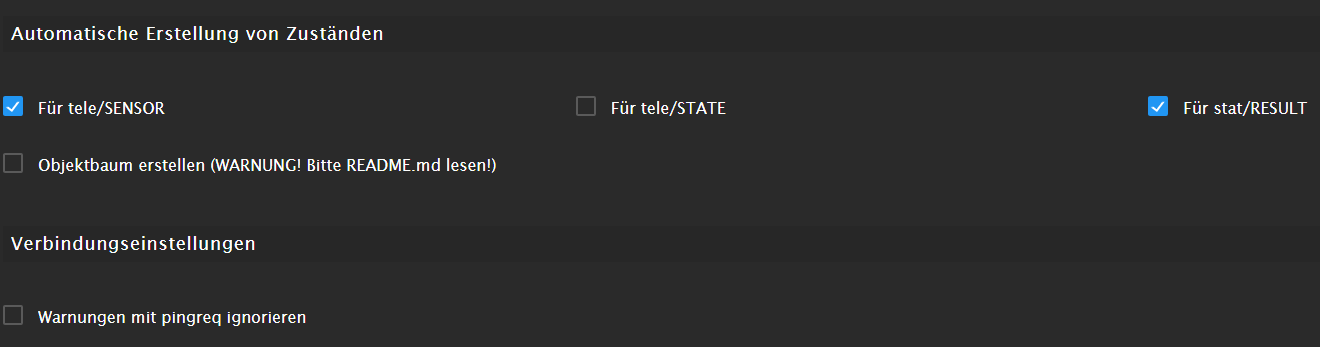
Hier meine Konfig für den Sonoff-Adapter:
-
@kurt_88,
der Sonoff-Adapter reicht für die Anzeige, man braucht kein Skript.03:33:03.404 MQT: tele/Haus.Stromzähler/SENSOR = {"Time":"2023-01-27T03:33:03","MT175":{"E_in":20623.0,"E_in_HT":10016.0,"E_in_NT":10606.0,"E_out":0.0,"P":0.00,"L1":0.00,"L2":0.00,"L3":0.00,"Server_ID":"09014953330004370815"}}zeig mal diese Zeile bei dir.
Edit: habe gesehen das deine Sensorzeile korrekt ist, der Sonoff-Adapter müsste es Anzeigen d.h. Tasmota ist/war richtig eingestellt.
Hier meine Konfig für den Sonoff-Adapter:

Hi,
Eine Frage, werden die Werte bei Sonoff in einzelne Datenpunkte geschrieben oder als JSON abgelegt?
Gruß Tom
https://github.com/tt-tom17
Wenn meine Hilfe erfolgreich war, benutze bitte das Voting unten rechts im BeitragNSPanel Script Wiki
https://github.com/joBr99/nspanel-lovelace-ui/wikiNSPanel Adapter Wiki
https://github.com/ticaki/ioBroker.nspanel-lovelace-ui/wiki -
Hi,
Eine Frage, werden die Werte bei Sonoff in einzelne Datenpunkte geschrieben oder als JSON abgelegt?
@tt-tom ,
einzelne Datenpunkte.
Du siehst die MQTT-Nachricht von Tasmota und die wird im Sonoff-Adapter mit der Einstellung "Für tele/Sensor" in einzelne Datenpunkte gewandelt. -
@tt-tom ,
einzelne Datenpunkte.
Du siehst die MQTT-Nachricht von Tasmota und die wird im Sonoff-Adapter mit der Einstellung "Für tele/Sensor" in einzelne Datenpunkte gewandelt.Okay, dann muss @kurt_88 nochmal seine Einstellung prüfen, denn er hat keine Werte gefunden.
Da ich den Adapter nicht kenne, habe ich ihm mein Weg vorgeschlagen.Gruß Tom
https://github.com/tt-tom17
Wenn meine Hilfe erfolgreich war, benutze bitte das Voting unten rechts im BeitragNSPanel Script Wiki
https://github.com/joBr99/nspanel-lovelace-ui/wikiNSPanel Adapter Wiki
https://github.com/ticaki/ioBroker.nspanel-lovelace-ui/wiki -
-
@tt-tom
Hallo Zusammen,Bei mir scheint es anders zu sein. Ich habe keine Datenpunkte unter Sonoff, aber auch kein Sensor Datenpunkt, anbei mal die Screenshots.
Viele Grüße
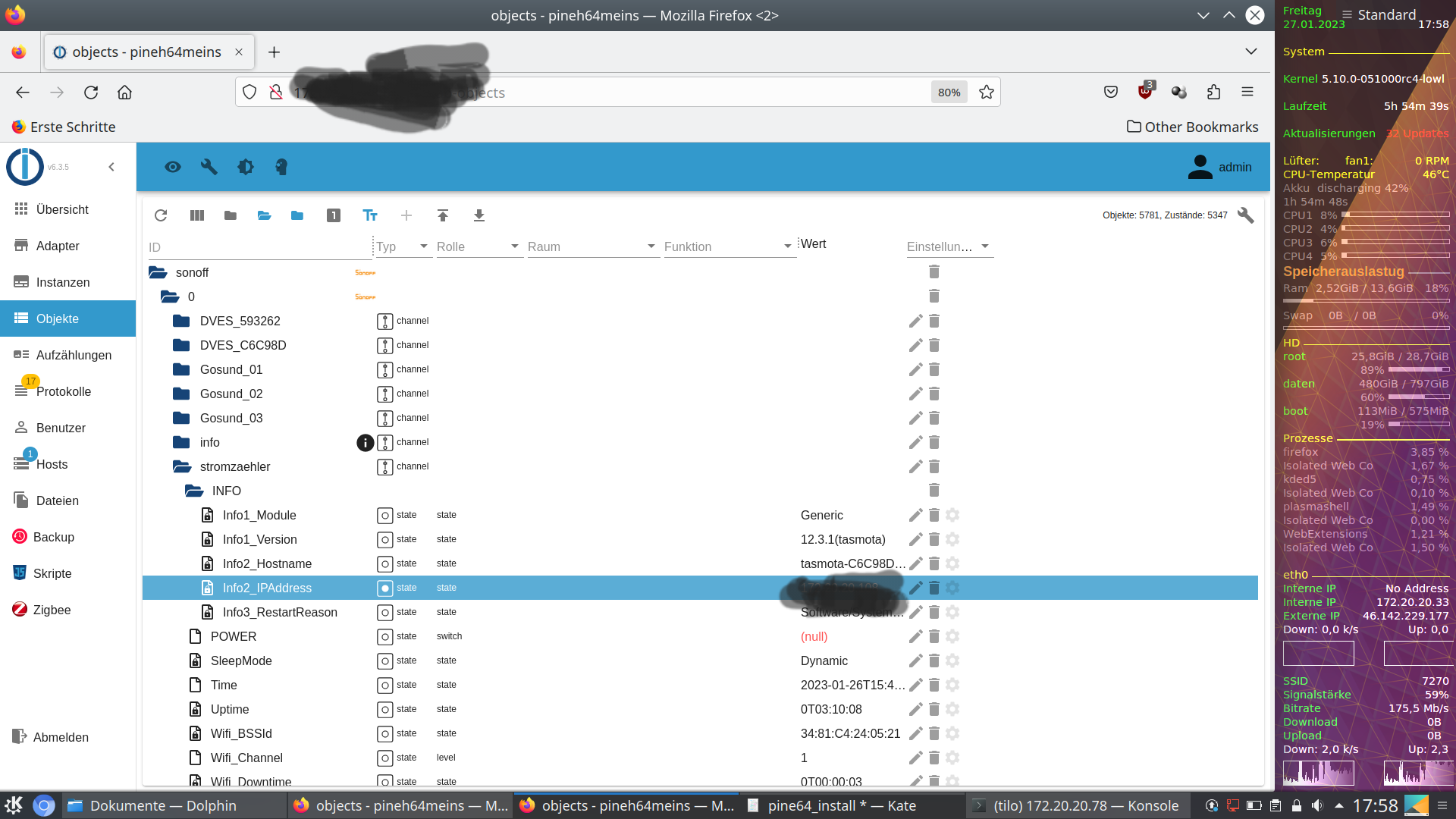
@kurt_88 ,
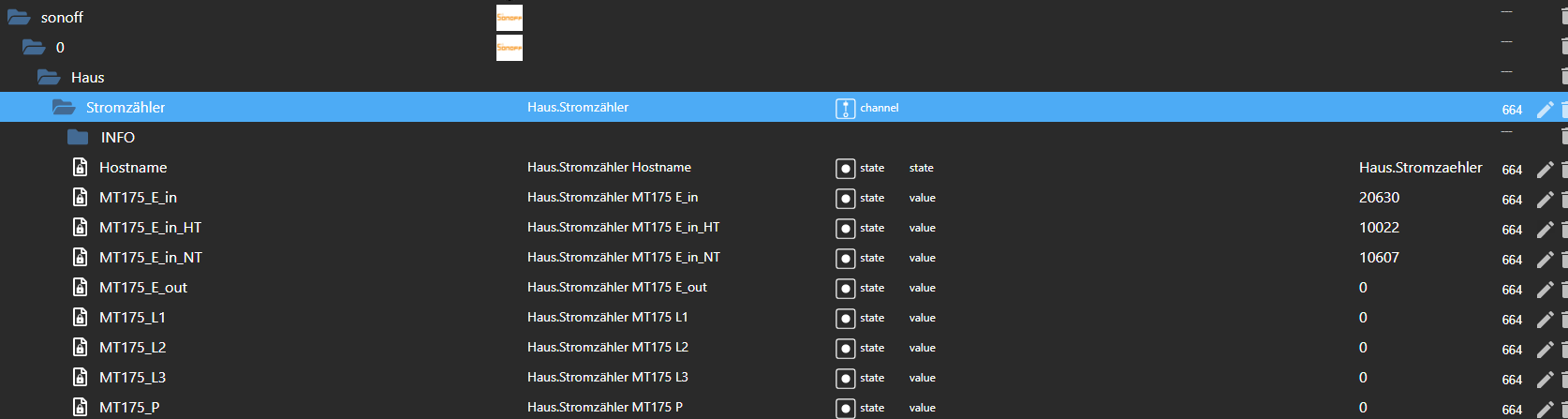
so sieht es bei mir aus mit der MQTT-Nachricht:18:08:03.406 MQT: tele/Haus.Stromzähler/SENSOR = {"Time":"2023-01-27T18:08:03","MT175":{"E_in":20630.0,"E_in_HT":10022.0,"E_in_NT":10607.0,"E_out":0.0,"P":0.00,"L1":0.00,"L2":0.00,"L3":0.00,"Server_ID":"090149533330000815"}}
-
Hi, ich habe mal das Script so weit angepasst, das auch die Datenpunkte in 0_userdata.0 erstellt werden und gleichzeitig mit den Daten gefüllt werden. Du musst natürlich wieder den Datenpunkt im Trigger anpassen und ein neues Blockly erstellen. bis .....
<xml xmlns="https://developers.google.com/blockly/xml"> <variables> <variable id="o^VE=q/EJxRCU@p=Nq({">Verbrauch</variable> <variable id="=PjH*5J}WCH}|GQxuE!Q">Bezug</variable> <variable id="5=hKGU(m$i[]qc3syZjS">Tag</variable> <variable id="nEj.:^1A]V^!5`$(P9)$">Woche</variable> <variable id="X{v.JNv2M`1iHjL[)X,l">Monat</variable> <variable id="g;{.pi%+DV4VUngk~p{g">Jahr</variable> <variable id="yK^u+S#}N~|IeJsi~VAh">aktuell</variable> </variables> <block type="create" id="swB_9{Mg2QcF?v|UMaP#" x="-387" y="-887"> <field name="NAME">0_userdata.0.Stromzähler.Verbrauch</field> <value name="VALUE"> <block type="math_number" id="Z+;(E`E9+ht]r5cCHBr1"> <field name="NUM">0</field> </block> </value> <value name="COMMON"> <block type="text" id="zn9`[(J+$[cPEt,=~Ahf"> <field name="TEXT">{"name": "Stromzähler.Verbrauch","type": "number","write": false}</field> </block> </value> <next> <block type="create" id="@@dkn1^I6xwn%lT;FaGl"> <field name="NAME">0_userdata.0.Stromzähler.Bezug</field> <value name="VALUE"> <block type="math_number" id="zNwvnTY:ED2GEu1}}]GB"> <field name="NUM">0</field> </block> </value> <value name="COMMON"> <block type="text" id=",W|sROdfU{#e~dwwRXDL"> <field name="TEXT">{"name": "Stromzähler.Bezug","type": "number","write": false}</field> </block> </value> <next> <block type="create" id="4!zi^L_C:oLPi4=q[ds("> <field name="NAME">0_userdata.0.Stromzähler.Tag</field> <value name="VALUE"> <block type="math_number" id="1L@11cJjD}Lxo`Fibkzu"> <field name="NUM">0</field> </block> </value> <value name="COMMON"> <block type="text" id="^z*;3w$8_?xMfzNlpb/T"> <field name="TEXT">{"name": "Stromzähler.Tag","type": "number","write": false}</field> </block> </value> <next> <block type="create" id="I@0cfJ_XxN:}X)4a/LvU"> <field name="NAME">0_userdata.0.Stromzähler.Woche</field> <value name="VALUE"> <block type="math_number" id="g8+k1NFq%,O0Px@EmZ6A"> <field name="NUM">0</field> </block> </value> <value name="COMMON"> <block type="text" id="h?$B]udPY|CJoThsd]@%"> <field name="TEXT">{"name": "Stromzähler.Woche","type": "number","write": false}</field> </block> </value> <next> <block type="create" id="FbJ8*Z?Ax/B+zh;(cI?Z"> <field name="NAME">0_userdata.0.Stromzähler.Monat</field> <value name="VALUE"> <block type="math_number" id="F*nx^%Bs[_.XcoWC,?*["> <field name="NUM">0</field> </block> </value> <value name="COMMON"> <block type="text" id="5%@E`W$mBtxGhqa|a_V3"> <field name="TEXT">{"name": "Stromzähler.Monat","type": "number","write": false}</field> </block> </value> <next> <block type="create" id="IDH01F2+`~$8}vCq~/)k"> <field name="NAME">0_userdata.0.Stromzähler.Jahr</field> <value name="VALUE"> <block type="math_number" id="wtoBF)t/Qr%^Wa8Thmac"> <field name="NUM">0</field> </block> </value> <value name="COMMON"> <block type="text" id="x+u[]cxcg_/OU`zY7INL"> <field name="TEXT">{"name": "Stromzähler.Jahr","type": "number","write": false}</field> </block> </value> <next> <block type="create" id="q*9KBLu?K}gL2bnrM^kE"> <field name="NAME">0_userdata.0.Stromzähler.Aktuell</field> <value name="VALUE"> <block type="math_number" id="ujd+dCs:F$C6dY^TE-Y#"> <field name="NUM">0</field> </block> </value> <value name="COMMON"> <block type="text" id="i4dWZV|-U8*%Q?EA(iJt"> <field name="TEXT">{"name": "Stromzähler.Aktuell","type": "number","write": false}</field> </block> </value> <next> <block type="on_ext" id="p~c_9Fq1{DWv5J%;1?1H"> <mutation xmlns="http://www.w3.org/1999/xhtml" items="1"></mutation> <field name="CONDITION">ne</field> <field name="ACK_CONDITION"></field> <value name="OID0"> <shadow type="field_oid" id="?g1f{w5n!;pGTzeI_1Fs"> <field name="oid">default</field> </shadow> <block type="field_oid" id="z=GDvQkiX8NSAqoo#H=w"> <field name="oid">mqtt.0.smartmeter.tele.SENSOR</field> </block> </value> <statement name="STATEMENT"> <block type="variables_set" id="h|nP.?B6J~_AHedSv8W,"> <field name="VAR" id="o^VE=q/EJxRCU@p=Nq({">Verbrauch</field> <value name="VALUE"> <block type="get_attr" id="z:S4j%{$(p.V2z~;jxIk"> <value name="PATH"> <shadow type="text" id="3q5lsf*K_:RzQ50%;Gtr"> <field name="TEXT">LK13BE.total_verbrauch</field> </shadow> </value> <value name="OBJECT"> <block type="on_source" id="MpJ$Vt{.;lSjqx%E^ds$"> <field name="ATTR">state.val</field> </block> </value> </block> </value> <next> <block type="variables_set" id="#9fup9f@*R{k{RtGXtL6"> <field name="VAR" id="=PjH*5J}WCH}|GQxuE!Q">Bezug</field> <value name="VALUE"> <block type="get_attr" id="wL;#00(`iyvo[+sZRHs8"> <value name="PATH"> <shadow type="text" id="f$YA%UVCBi;0uSW#4vIF"> <field name="TEXT">LK13BE.total_bezug</field> </shadow> </value> <value name="OBJECT"> <block type="on_source" id="[mABeLHqbSh/bSOB6=3A"> <field name="ATTR">state.val</field> </block> </value> </block> </value> <next> <block type="variables_set" id="@8JF|C[)BUok^dYPTUV0"> <field name="VAR" id="5=hKGU(m$i[]qc3syZjS">Tag</field> <value name="VALUE"> <block type="get_attr" id="Ub(E,s/}j9]`]OT_acZe"> <value name="PATH"> <shadow type="text" id="iJbuA,L=]-y[0N)oxP!P"> <field name="TEXT">LK13BE.total_1d</field> </shadow> </value> <value name="OBJECT"> <block type="on_source" id="I^?]oLjj|=#6$:Q^,*2M"> <field name="ATTR">state.val</field> </block> </value> </block> </value> <next> <block type="variables_set" id="9/QxF-kOgB;O}Bc5Xh(1"> <field name="VAR" id="nEj.:^1A]V^!5`$(P9)$">Woche</field> <value name="VALUE"> <block type="get_attr" id="3fPETP1./.EtewfIXaku"> <value name="PATH"> <shadow type="text" id="?6DJyU??z:IW1b!u:[G!"> <field name="TEXT">LK13BE.total_7d</field> </shadow> </value> <value name="OBJECT"> <block type="on_source" id="8Dt.@1I2Q4KI3zZe:31u"> <field name="ATTR">state.val</field> </block> </value> </block> </value> <next> <block type="variables_set" id="],~%EPk!h#r4@Qb,jQy4"> <field name="VAR" id="X{v.JNv2M`1iHjL[)X,l">Monat</field> <value name="VALUE"> <block type="get_attr" id="!@0){e]9}dslL.mAt#iW"> <value name="PATH"> <shadow type="text" id=",1^ABSgaOzDzThe9vS!R"> <field name="TEXT">LK13BE.total_30d</field> </shadow> </value> <value name="OBJECT"> <block type="on_source" id="G07M2~-0O?%k|pz0k]9m"> <field name="ATTR">state.val</field> </block> </value> </block> </value> <next> <block type="variables_set" id="B_n8`nexqS`m.TNt%icY"> <field name="VAR" id="g;{.pi%+DV4VUngk~p{g">Jahr</field> <value name="VALUE"> <block type="get_attr" id="5C*EM*^TV^3p0XY.bIsR"> <value name="PATH"> <shadow type="text" id="nwlkj11|MiQrd(;CR1FR"> <field name="TEXT">LK13BE.total_365d</field> </shadow> </value> <value name="OBJECT"> <block type="on_source" id="V$hMSK+C%s7usXF5(MlK"> <field name="ATTR">state.val</field> </block> </value> </block> </value> <next> <block type="variables_set" id="LkJtt}8`3K:V=*Q*oZln"> <field name="VAR" id="yK^u+S#}N~|IeJsi~VAh">aktuell</field> <value name="VALUE"> <block type="get_attr" id="*ovm[7(U%[}E=x^YeUgS"> <value name="PATH"> <shadow type="text" id="ao+m:*3H=8Pj(%2N$d-O"> <field name="TEXT">LK13BE.current</field> </shadow> </value> <value name="OBJECT"> <block type="on_source" id="v8$PYhv_^cHXK%EqZ]/E"> <field name="ATTR">state.val</field> </block> </value> </block> </value> <next> <block type="debug" id="(vG/K[#x+!Yx-`14uihw"> <field name="Severity">log</field> <value name="TEXT"> <shadow type="text" id="MAp?W)hbI1Ne[[Ac;F7#"> <field name="TEXT">test</field> </shadow> <block type="text_join" id="q1~t(B|Y()[K{E(5XU%c"> <mutation items="15"></mutation> <value name="ADD0"> <block type="text" id="m=;?FK(d/O~Gn5NJv$J1"> <field name="TEXT">Verbrauch: </field> </block> </value> <value name="ADD1"> <block type="variables_get" id="*LYJsz5::!Lj,C}RecMB"> <field name="VAR" id="o^VE=q/EJxRCU@p=Nq({">Verbrauch</field> </block> </value> <value name="ADD2"> <block type="text" id="G;_iEBNv|EN^w|Jx.h2t"> <field name="TEXT">kWh, Bezug: </field> </block> </value> <value name="ADD3"> <block type="variables_get" id="hPfi%a4o~M!k($e-qHs}"> <field name="VAR" id="=PjH*5J}WCH}|GQxuE!Q">Bezug</field> </block> </value> <value name="ADD4"> <block type="text" id="Z7_R?9d!NZE]^$uOk3X*"> <field name="TEXT">kWh, Tag: </field> </block> </value> <value name="ADD5"> <block type="variables_get" id="Pbo(V,@myxz|Or.BwGiz"> <field name="VAR" id="5=hKGU(m$i[]qc3syZjS">Tag</field> </block> </value> <value name="ADD6"> <block type="text" id="5AjV=}^D:43Ul[kwlTk?"> <field name="TEXT">kWh, Woche: </field> </block> </value> <value name="ADD7"> <block type="variables_get" id="B0Vh]vU2LxerJvTd])f#"> <field name="VAR" id="nEj.:^1A]V^!5`$(P9)$">Woche</field> </block> </value> <value name="ADD8"> <block type="text" id="h2W^qqx{8[wl3|/JO|OX"> <field name="TEXT">kWh, Monat: </field> </block> </value> <value name="ADD9"> <block type="variables_get" id="~31KxaBkABZTf-uI4Hu#"> <field name="VAR" id="X{v.JNv2M`1iHjL[)X,l">Monat</field> </block> </value> <value name="ADD10"> <block type="text" id="=3z(ofW`9TqEP.xsU-ED"> <field name="TEXT">kWh, Jahr: </field> </block> </value> <value name="ADD11"> <block type="variables_get" id="0W-RZ_Em4t$Sy`FARv+Z"> <field name="VAR" id="g;{.pi%+DV4VUngk~p{g">Jahr</field> </block> </value> <value name="ADD12"> <block type="text" id="Ty(JV^J0(_X}qAjRj;)m"> <field name="TEXT">kWh, aktuell: </field> </block> </value> <value name="ADD13"> <block type="variables_get" id="EzerXBpL(,s_|$n_*G]q"> <field name="VAR" id="yK^u+S#}N~|IeJsi~VAh">aktuell</field> </block> </value> <value name="ADD14"> <block type="text" id="K`P{T/@{b2ImK0Nr2o!m"> <field name="TEXT">W</field> </block> </value> </block> </value> <next> <block type="update" id="J{{TRb8Hbkwqn{GzXpS9"> <mutation xmlns="http://www.w3.org/1999/xhtml" delay_input="false"></mutation> <field name="OID">0_userdata.0.Stromzähler.Aktuell</field> <field name="WITH_DELAY">FALSE</field> <value name="VALUE"> <block type="variables_get" id="7Xn;#P#@kY?Qep9!SRrN"> <field name="VAR" id="yK^u+S#}N~|IeJsi~VAh">aktuell</field> </block> </value> <next> <block type="update" id="d|;[[W#h-3Ec*#8(1]Ag"> <mutation xmlns="http://www.w3.org/1999/xhtml" delay_input="false"></mutation> <field name="OID">0_userdata.0.Stromzähler.Bezug</field> <field name="WITH_DELAY">FALSE</field> <value name="VALUE"> <block type="variables_get" id="9B2g/E=Y:JwGJ2sur_Xj"> <field name="VAR" id="=PjH*5J}WCH}|GQxuE!Q">Bezug</field> </block> </value> <next> <block type="update" id="vjeAJCkDo4LC=cG}Pp|1"> <mutation xmlns="http://www.w3.org/1999/xhtml" delay_input="false"></mutation> <field name="OID">0_userdata.0.Stromzähler.Verbrauch</field> <field name="WITH_DELAY">FALSE</field> <value name="VALUE"> <block type="variables_get" id="ZO@m6Igkuar$n2kv!)4I"> <field name="VAR" id="o^VE=q/EJxRCU@p=Nq({">Verbrauch</field> </block> </value> <next> <block type="update" id="?]s]x8W5R*Z4H@c!n,Ed"> <mutation xmlns="http://www.w3.org/1999/xhtml" delay_input="false"></mutation> <field name="OID">0_userdata.0.Stromzähler.Tag</field> <field name="WITH_DELAY">FALSE</field> <value name="VALUE"> <block type="variables_get" id="8Tog%1HU,h;xpLpR4g*/"> <field name="VAR" id="5=hKGU(m$i[]qc3syZjS">Tag</field> </block> </value> <next> <block type="update" id="[C}otI+VqMX-j}()w;Ef"> <mutation xmlns="http://www.w3.org/1999/xhtml" delay_input="false"></mutation> <field name="OID">0_userdata.0.Stromzähler.Woche</field> <field name="WITH_DELAY">FALSE</field> <value name="VALUE"> <block type="variables_get" id="34,v5Nuuu$uYNiVa$17l"> <field name="VAR" id="nEj.:^1A]V^!5`$(P9)$">Woche</field> </block> </value> <next> <block type="update" id="Ktm|6bOs,wz}YfQJZCfe"> <mutation xmlns="http://www.w3.org/1999/xhtml" delay_input="false"></mutation> <field name="OID">0_userdata.0.Stromzähler.Monat</field> <field name="WITH_DELAY">FALSE</field> <value name="VALUE"> <block type="variables_get" id="hRG#*ND:XMA7GY4*KNG,"> <field name="VAR" id="X{v.JNv2M`1iHjL[)X,l">Monat</field> </block> </value> <next> <block type="update" id="WvkJ)0hP@ul#3@+`NS+X"> <mutation xmlns="http://www.w3.org/1999/xhtml" delay_input="false"></mutation> <field name="OID">0_userdata.0.Stromzähler.Jahr</field> <field name="WITH_DELAY">FALSE</field> <value name="VALUE"> <block type="variables_get" id="r~a(;`J.J#J]d46FXz@q"> <field name="VAR" id="g;{.pi%+DV4VUngk~p{g">Jahr</field> </block> </value> </block> </next> </block> </next> </block> </next> </block> </next> </block> </next> </block> </next> </block> </next> </block> </next> </block> </next> </block> </next> </block> </next> </block> </next> </block> </next> </block> </next> </block> </statement> </block> </next> </block> </next> </block> </next> </block> </next> </block> </next> </block> </next> </block> </next> </block> </xml> -
@kurt_88 ,
so sieht es bei mir aus mit der MQTT-Nachricht:18:08:03.406 MQT: tele/Haus.Stromzähler/SENSOR = {"Time":"2023-01-27T18:08:03","MT175":{"E_in":20630.0,"E_in_HT":10022.0,"E_in_NT":10607.0,"E_out":0.0,"P":0.00,"L1":0.00,"L2":0.00,"L3":0.00,"Server_ID":"090149533330000815"}}
-
@tt-tom
Hallo,
Danke für das angepasste Script, habe es jetzt importiert und dir Datenpunkte wurden angelegt.Viele Grüße
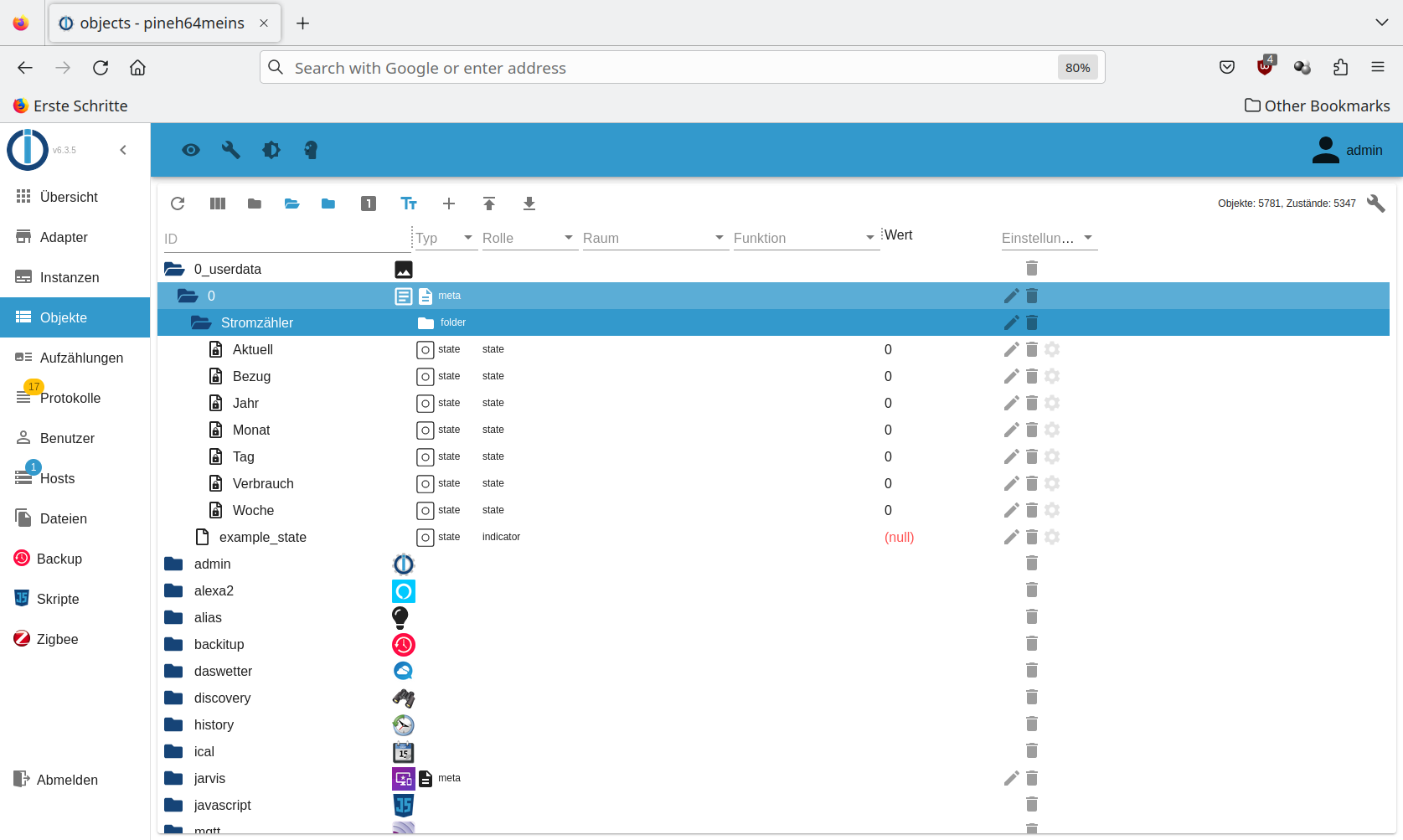
Und läuft jetzt so wie gewünscht?
Gruß Tom
https://github.com/tt-tom17
Wenn meine Hilfe erfolgreich war, benutze bitte das Voting unten rechts im BeitragNSPanel Script Wiki
https://github.com/joBr99/nspanel-lovelace-ui/wikiNSPanel Adapter Wiki
https://github.com/ticaki/ioBroker.nspanel-lovelace-ui/wiki -
Leider nicht so richrig, ich bekomme bei Wert nur einen 0 angezeigt, oder muss ich da noch was visualisieren? Anbei der Screeshot.
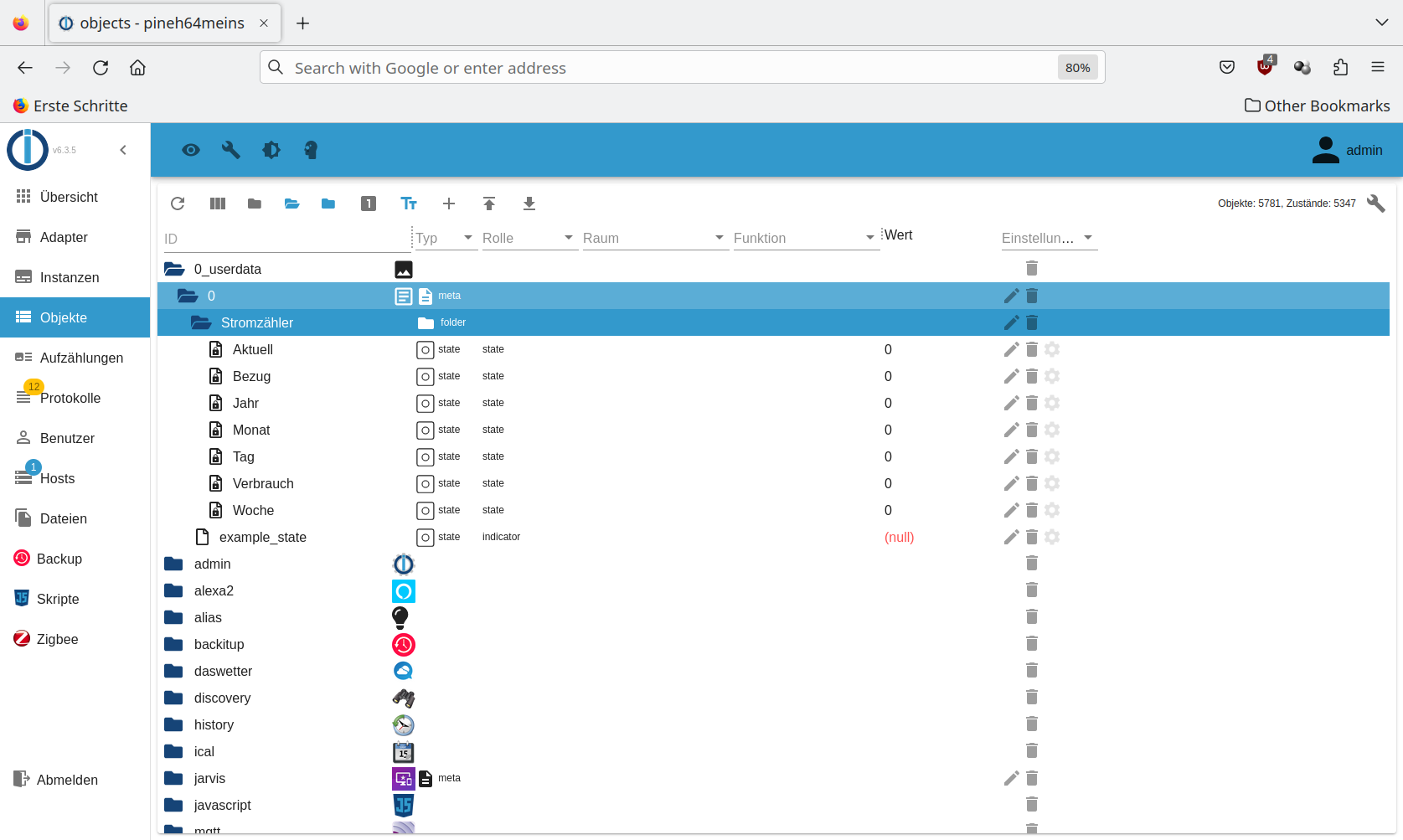
Viele Grüße
Gruß Tom
https://github.com/tt-tom17
Wenn meine Hilfe erfolgreich war, benutze bitte das Voting unten rechts im BeitragNSPanel Script Wiki
https://github.com/joBr99/nspanel-lovelace-ui/wikiNSPanel Adapter Wiki
https://github.com/ticaki/ioBroker.nspanel-lovelace-ui/wiki -
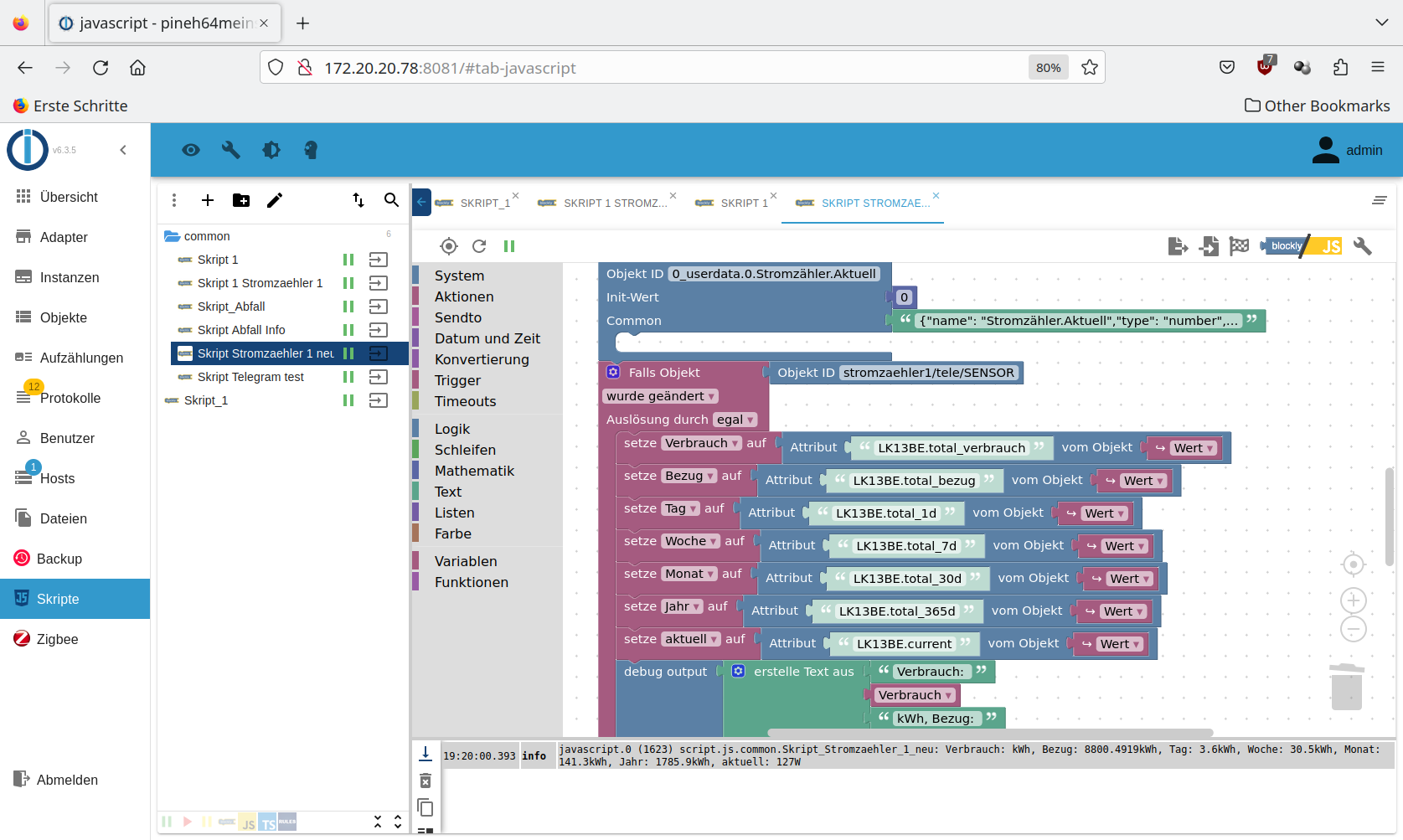
Ja, ich habe auch nocmal die richtige Zuordnung der Objekt-ID überprüft, siehe Screenshot.

Anbei das Log vom Scipt und da stehen auch die richtigen Werte drin.
javascript.0 2023-01-27 19:20:00.407 info State value to set for "0_userdata.0.Stromzähler.Verbrauch" has to be type "number" but received type "object" javascript.0 2023-01-27 19:20:00.393 info script.js.common.Skript_Stromzaehler_1_neu: Verbrauch: kWh, Bezug: 8800.4919kWh, Tag: 3.6kWh, Woche: 30.5kWh, Monat: 141.3kWh, Jahr: 1785.9kWh, aktuell: 127W javascript.0 2023-01-27 19:20:00.391 info script.js.common.Skript_1_Stromzaehler_1: test javascript.0 2023-01-27 19:20:00.390 info script.js.common.Skript_1: Verbrauch: kWh, Bezug: 8800.4919kWh, Tag: 3.6kWh, Woche: 30.5kWh, Monat: 141.3kWh, Jahr: 1785.9kWh, aktuell: 127WViele Grüße
-
Ja, ich habe auch nocmal die richtige Zuordnung der Objekt-ID überprüft, siehe Screenshot.
Anbei das Log vom Scipt und da stehen auch die richtigen Werte drin.
javascript.0 2023-01-27 19:20:00.407 info State value to set for "0_userdata.0.Stromzähler.Verbrauch" has to be type "number" but received type "object" javascript.0 2023-01-27 19:20:00.393 info script.js.common.Skript_Stromzaehler_1_neu: Verbrauch: kWh, Bezug: 8800.4919kWh, Tag: 3.6kWh, Woche: 30.5kWh, Monat: 141.3kWh, Jahr: 1785.9kWh, aktuell: 127W javascript.0 2023-01-27 19:20:00.391 info script.js.common.Skript_1_Stromzaehler_1: test javascript.0 2023-01-27 19:20:00.390 info script.js.common.Skript_1: Verbrauch: kWh, Bezug: 8800.4919kWh, Tag: 3.6kWh, Woche: 30.5kWh, Monat: 141.3kWh, Jahr: 1785.9kWh, aktuell: 127WViele Grüße
@kurt_88
Tipp so nebenbei: Keine Umlaute verwenden. Kann funktionieren, muss aber nicht.
0_userdata.0.Stromzähler.Verbrauch"Any fool can write code that a computer can understand. Good programmers write code that humans can understand." (Martin Fowler, "Refactoring")
Proxmox 9.1.1 LXC|8 GB|Core i7-6700
HmIP|ZigBee|Tasmota|Unifi
Zabbix Certified Specialist
Konnte ich Dir helfen? Dann benutze bitte das Voting unten rechts im Beitrag -
Ja, ich habe auch nocmal die richtige Zuordnung der Objekt-ID überprüft, siehe Screenshot.

Anbei das Log vom Scipt und da stehen auch die richtigen Werte drin.
javascript.0 2023-01-27 19:20:00.407 info State value to set for "0_userdata.0.Stromzähler.Verbrauch" has to be type "number" but received type "object" javascript.0 2023-01-27 19:20:00.393 info script.js.common.Skript_Stromzaehler_1_neu: Verbrauch: kWh, Bezug: 8800.4919kWh, Tag: 3.6kWh, Woche: 30.5kWh, Monat: 141.3kWh, Jahr: 1785.9kWh, aktuell: 127W javascript.0 2023-01-27 19:20:00.391 info script.js.common.Skript_1_Stromzaehler_1: test javascript.0 2023-01-27 19:20:00.390 info script.js.common.Skript_1: Verbrauch: kWh, Bezug: 8800.4919kWh, Tag: 3.6kWh, Woche: 30.5kWh, Monat: 141.3kWh, Jahr: 1785.9kWh, aktuell: 127WViele Grüße
du musst den ersten "Setze" Eintrag noch anpassen: dem muss bei dir anders heissen.
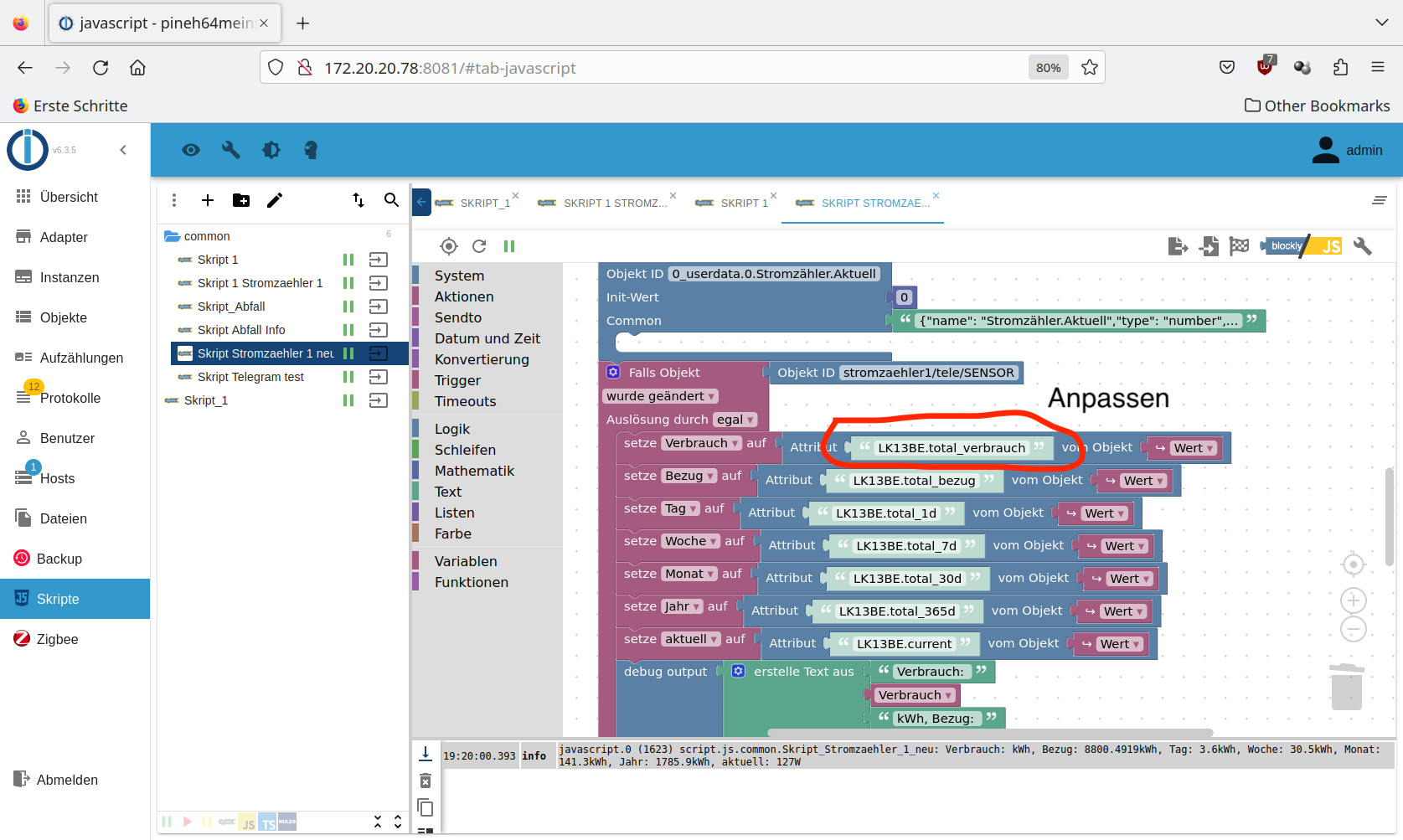
Edit: habe gesehen das es bei dir so heisst LK13BE.total_eingespeist.
Gruß Tom
https://github.com/tt-tom17
Wenn meine Hilfe erfolgreich war, benutze bitte das Voting unten rechts im BeitragNSPanel Script Wiki
https://github.com/joBr99/nspanel-lovelace-ui/wikiNSPanel Adapter Wiki
https://github.com/ticaki/ioBroker.nspanel-lovelace-ui/wiki -
du musst den ersten "Setze" Eintrag noch anpassen: dem muss bei dir anders heissen.

Edit: habe gesehen das es bei dir so heisst LK13BE.total_eingespeist.
Stop bitte mal die alten Scripte, sonst kommt es zu Fehler. ggf. auch löschen.
Gruß Tom
https://github.com/tt-tom17
Wenn meine Hilfe erfolgreich war, benutze bitte das Voting unten rechts im BeitragNSPanel Script Wiki
https://github.com/joBr99/nspanel-lovelace-ui/wikiNSPanel Adapter Wiki
https://github.com/ticaki/ioBroker.nspanel-lovelace-ui/wiki -
@kurt_88
Tipp so nebenbei: Keine Umlaute verwenden. Kann funktionieren, muss aber nicht.
0_userdata.0.Stromzähler.Verbrauch@codierknecht
Hallo,danke für den Tipp mit den Umlauten, jetzt bekomme ich die Werte angezeigt.
Viele Grüße
-
@codierknecht
Hallo,danke für den Tipp mit den Umlauten, jetzt bekomme ich die Werte angezeigt.
Viele Grüße
schön wenn es jetzt läuft, weiter viel Spass mit iobrocker
Gruß Tom
https://github.com/tt-tom17
Wenn meine Hilfe erfolgreich war, benutze bitte das Voting unten rechts im BeitragNSPanel Script Wiki
https://github.com/joBr99/nspanel-lovelace-ui/wikiNSPanel Adapter Wiki
https://github.com/ticaki/ioBroker.nspanel-lovelace-ui/wiki -
Danke, danke, jetzt bekomme ich eine Verbrauchsanzeige :) Muss nur noch den einen Wert prüfen (Verbrauch). Anbei ein Screenshot.
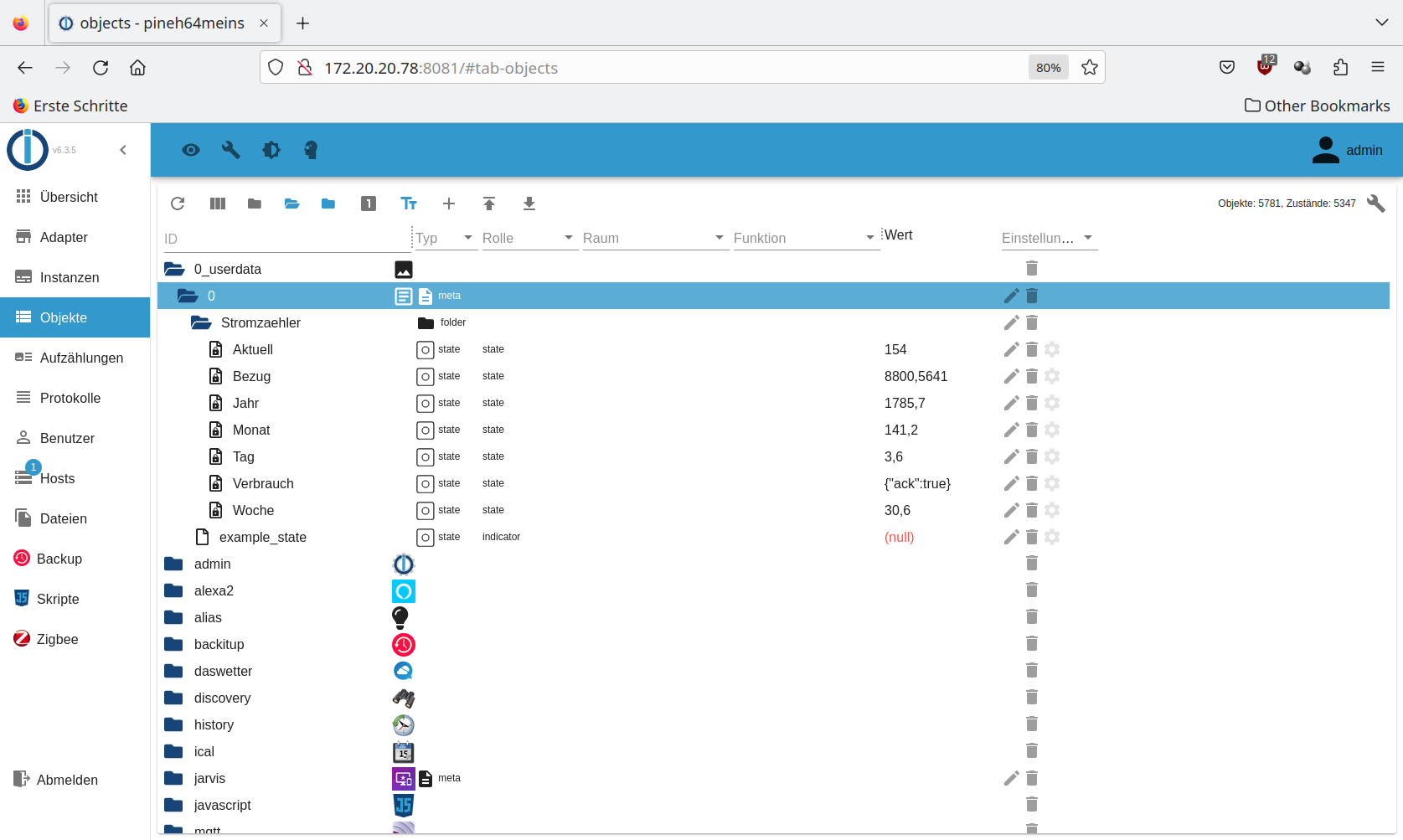
Viele Grüße

@kurt_88 ich glaube du musst Bezug und Verbrauch tauschen
Gruß Tom
https://github.com/tt-tom17
Wenn meine Hilfe erfolgreich war, benutze bitte das Voting unten rechts im BeitragNSPanel Script Wiki
https://github.com/joBr99/nspanel-lovelace-ui/wikiNSPanel Adapter Wiki
https://github.com/ticaki/ioBroker.nspanel-lovelace-ui/wiki
