




Update auf neue Nodejs klappt nicht
-
Ja, nehme http://
Habe gerade nochmal den "alten" Container gestartet, den erreiche ich sofort über die URL. Habe ihn dann wieder gestoppt und den "neuen" Container gestartet, den erreich eich nicht?
@bergi_37
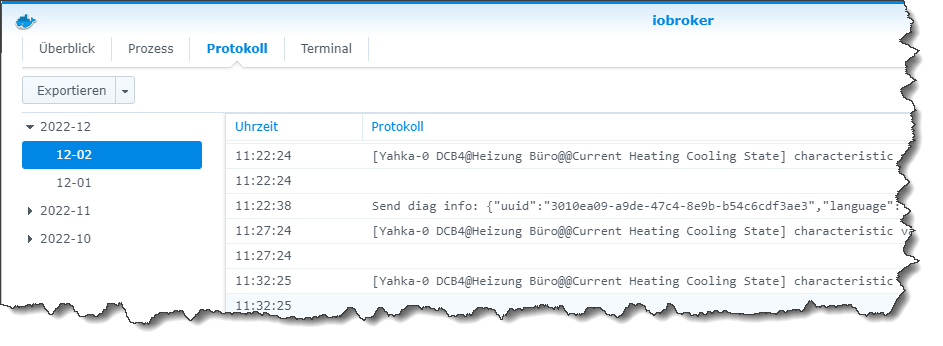
Wenn Du den neuen Contaier gestartet hast und in der Syno doppelklickst ... steht dort etwas im Protokoll?
"Any fool can write code that a computer can understand. Good programmers write code that humans can understand." (Martin Fowler, "Refactoring")
Proxmox 9.1.1 LXC|8 GB|Core i7-6700
HmIP|ZigBee|Tasmota|Unifi
Zabbix Certified Specialist
Konnte ich Dir helfen? Dann benutze bitte das Voting unten rechts im Beitrag -
@bergi_37
Wenn Du den neuen Contaier gestartet hast und in der Syno doppelklickst ... steht dort etwas im Protokoll?
Lese nur nebenbei ...
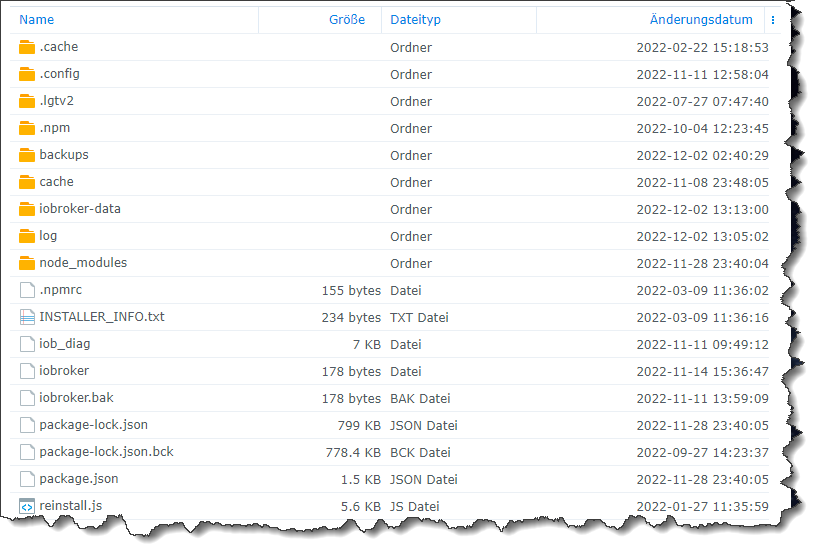
Wo kommt denn bei einem neuen Container , wo noch nie ein Mount wa , das her vom 12.11 !?

Synology 918+ 16GB - ioBroker in Docker v9 , VISO auf Trekstor Primebook C13 13,3" , Hikvision Domkameras mit Surveillance Station .. CCU RaspberryMatic in Synology VM .. Zigbee CC2538+CC2592 .. Sonoff .. KNX .. Modbus ..
-
Lese nur nebenbei ...
Wo kommt denn bei einem neuen Container , wo noch nie ein Mount wa , das her vom 12.11 !?
@glasfaser
Der Screenshot ist mit Sicherheit nach dem ersten Start seines neuen Containers mit Mount entstanden.
Das steckt ja im Image drin ... sieht bei meinem aktiven ioB ähnlich aus.
-
Bei mir im Protokoll steht das hier:
--------------------------------------------------------------------------------
-------------------------     2022-12-02 13:22:47      -------------------------
--------------------------------------------------------------------------------
-----                                                                      -----
----- ██╗  ██████╗  ██████╗  ██████╗   ██████╗  ██╗  ██╗ ███████╗ ██████╗  -----
----- ██║ ██╔═══██╗ ██╔══██╗ ██╔══██╗ ██╔═══██╗ ██║ ██╔╝ ██╔════╝ ██╔══██╗ -----
----- ██║ ██║   ██║ ██████╔╝ ██████╔╝ ██║   ██║ █████╔╝  █████╗   ██████╔╝ -----
----- ██║ ██║   ██║ ██╔══██╗ ██╔══██╗ ██║   ██║ ██╔═██╗  ██╔══╝   ██╔══██╗ -----
----- ██║ ╚██████╔╝ ██████╔╝ ██║  ██║ ╚██████╔╝ ██║  ██╗ ███████╗ ██║  ██║ -----
----- ╚═╝  ╚═════╝  ╚═════╝  ╚═╝  ╚═╝  ╚═════╝  ╚═╝  ╚═╝ ╚══════╝ ╚═╝  ╚═╝ -----
-----                                                                      -----
-----              Welcome to your ioBroker Docker container!              -----
-----                    Startupscript is now running!                     -----
-----                          Please be patient!                          -----
--------------------------------------------------------------------------------


--------------------------------------------------------------------------------
-----                          System Information                          -----
-----                    arch:                x86_64                       -----
-----                    hostname:            buanet-iobroker2             -----
-----                                                                      -----
-----                          Version Information                         -----
-----                    image:               v7.1.2                       -----
-----                    build:               2022-11-12T20:56:04+00:00    -----
-----                    node:                v16.18.1                     -----
-----                    npm:                 8.19.2                       -----
-----                                                                      -----

-----                        Environment Variables                         -----
-----                    SETGID:              1000                         -----
-----                    SETUID:              1000                         -----
--------------------------------------------------------------------------------

 --------------------------------------------------------------------------------
-----                  Step 1 of 5: Preparing container                   -----
--------------------------------------------------------------------------------

This is not the first run of this container. Skipping first run preparation.

--------------------------------------------------------------------------------
-----             Step 2 of 5: Detecting ioBroker installation             -----
--------------------------------------------------------------------------------

Existing installation of ioBroker detected in "/opt/iobroker".
--------------------------------------------------------------------------------

-----             Step 3 of 5: Checking ioBroker installation              -----

--------------------------------------------------------------------------------

(Re)setting permissions (This might take a while! Please be patient!)... Done.

 Fixing "sudo-bug" by replacing sudo with gosu... Done.

Hostname in ioBroker matches the hostname of this container.

No action required.

--------------------------------------------------------------------------------
-----                Step 4 of 5: Applying special settings                -----
--------------------------------------------------------------------------------

Some adapters have special requirements/ settings which can be activated by the use of environment variables.
For more information see ioBroker Docker Image Docs (https://docs.buanet.de/iobroker-docker-image/docs/).

--------------------------------------------------------------------------------
-----                    Step 5 of 5: ioBroker startup                     -----
--------------------------------------------------------------------------------

 Starting ioBroker...

 ##### #### ### ## # iobroker.js-controller log output # ## ### #### #####
host.buanet-iobroker2 check instance "system.adapter.admin.0" for host "buanet-iobroker2"
host.buanet-iobroker2 check instance "system.adapter.discovery.0" for host "buanet-iobroker2"
host.buanet-iobroker2 check instance "system.adapter.backitup.0" for host "buanet-iobroker2"
Mehr ist dann nicht...da kommt nix mehr zu...
-
In den Einstellungen der beiden Container habe ich eine Unstimmigkeit gefunden.
Im "alten" steht bei "Netzwerk": host
Im "neuen" steht bei "Netzwerk": bridge
Ist das richtig? Ich habe das nicht eingetragen. Oder kann /muss ich das im "neuen" ändern?
-
Bei mir im Protokoll steht das hier:
--------------------------------------------------------------------------------
-------------------------     2022-12-02 13:22:47      -------------------------
--------------------------------------------------------------------------------
-----                                                                      -----
----- ██╗  ██████╗  ██████╗  ██████╗   ██████╗  ██╗  ██╗ ███████╗ ██████╗  -----
----- ██║ ██╔═══██╗ ██╔══██╗ ██╔══██╗ ██╔═══██╗ ██║ ██╔╝ ██╔════╝ ██╔══██╗ -----
----- ██║ ██║   ██║ ██████╔╝ ██████╔╝ ██║   ██║ █████╔╝  █████╗   ██████╔╝ -----
----- ██║ ██║   ██║ ██╔══██╗ ██╔══██╗ ██║   ██║ ██╔═██╗  ██╔══╝   ██╔══██╗ -----
----- ██║ ╚██████╔╝ ██████╔╝ ██║  ██║ ╚██████╔╝ ██║  ██╗ ███████╗ ██║  ██║ -----
----- ╚═╝  ╚═════╝  ╚═════╝  ╚═╝  ╚═╝  ╚═════╝  ╚═╝  ╚═╝ ╚══════╝ ╚═╝  ╚═╝ -----
-----                                                                      -----
-----              Welcome to your ioBroker Docker container!              -----
-----                    Startupscript is now running!                     -----
-----                          Please be patient!                          -----
--------------------------------------------------------------------------------


--------------------------------------------------------------------------------
-----                          System Information                          -----
-----                    arch:                x86_64                       -----
-----                    hostname:            buanet-iobroker2             -----
-----                                                                      -----
-----                          Version Information                         -----
-----                    image:               v7.1.2                       -----
-----                    build:               2022-11-12T20:56:04+00:00    -----
-----                    node:                v16.18.1                     -----
-----                    npm:                 8.19.2                       -----
-----                                                                      -----

-----                        Environment Variables                         -----
-----                    SETGID:              1000                         -----
-----                    SETUID:              1000                         -----
--------------------------------------------------------------------------------

 --------------------------------------------------------------------------------
-----                  Step 1 of 5: Preparing container                   -----
--------------------------------------------------------------------------------

This is not the first run of this container. Skipping first run preparation.

--------------------------------------------------------------------------------
-----             Step 2 of 5: Detecting ioBroker installation             -----
--------------------------------------------------------------------------------

Existing installation of ioBroker detected in "/opt/iobroker".
--------------------------------------------------------------------------------

-----             Step 3 of 5: Checking ioBroker installation              -----

--------------------------------------------------------------------------------

(Re)setting permissions (This might take a while! Please be patient!)... Done.

 Fixing "sudo-bug" by replacing sudo with gosu... Done.

Hostname in ioBroker matches the hostname of this container.

No action required.

--------------------------------------------------------------------------------
-----                Step 4 of 5: Applying special settings                -----
--------------------------------------------------------------------------------

Some adapters have special requirements/ settings which can be activated by the use of environment variables.
For more information see ioBroker Docker Image Docs (https://docs.buanet.de/iobroker-docker-image/docs/).

--------------------------------------------------------------------------------
-----                    Step 5 of 5: ioBroker startup                     -----
--------------------------------------------------------------------------------

 Starting ioBroker...

 ##### #### ### ## # iobroker.js-controller log output # ## ### #### #####
host.buanet-iobroker2 check instance "system.adapter.admin.0" for host "buanet-iobroker2"
host.buanet-iobroker2 check instance "system.adapter.discovery.0" for host "buanet-iobroker2"
host.buanet-iobroker2 check instance "system.adapter.backitup.0" for host "buanet-iobroker2"
Mehr ist dann nicht...da kommt nix mehr zu...
-
In den Einstellungen der beiden Container habe ich eine Unstimmigkeit gefunden.
Im "alten" steht bei "Netzwerk": host
Im "neuen" steht bei "Netzwerk": bridge
Ist das richtig? Ich habe das nicht eingetragen. Oder kann /muss ich das im "neuen" ändern?
@bergi_37 sagte in Update auf neue Nodejs klappt nicht:
In den Einstellungen der beiden Container habe ich eine Unstimmigkeit gefunden.
Im "alten" steht bei "Netzwerk": host
Im "neuen" steht bei "Netzwerk": bridge
Ist das richtig? Ich habe das nicht eingetragen. Oder kann /muss ich das im "neuen" ändern?
Das kannst Du im Nachhinein nicht ändern.
Schmeiß den Container wieder weg, baue einen neuen und wähle dort den "Host-Mode"
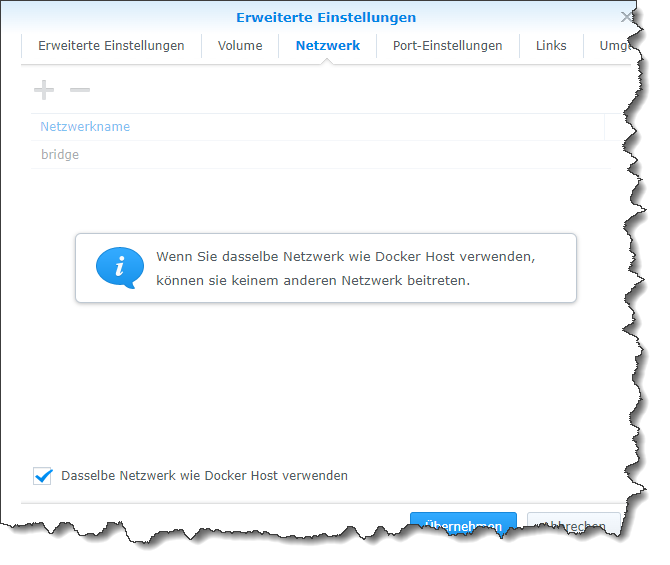
Das erklärt zumindest, warum Du nicht drauf kommst: Du hast ja keine Ports freigegeben ;-)
-
Teste mal mit einem neuen Image ohne Mount , was ist dann !?
Auch mal einen anderen Browser mal genutzt ...
Ich hbe bei den Images "latest" genommen. Das ist doch korrekt oder benötige ich für die Synology ein bestimmtes Image?
-
Ich hbe bei den Images "latest" genommen. Das ist doch korrekt oder benötige ich für die Synology ein bestimmtes Image?
@bergi_37 sagte in Update auf neue Nodejs klappt nicht:
Ich hbe bei den Images "latest" genommen. Das ist doch korrekt oder benötige ich für die Synology ein bestimmtes Image?
Das nehme ich auch immer. Wird im Tutorial auch so empfohlen.
-
Ich hbe bei den Images "latest" genommen. Das ist doch korrekt oder benötige ich für die Synology ein bestimmtes Image?
Nein ... alles gut .. es gibt kein spezielles.
Hast du auch das gemacht !?
@codierknecht sagte in Update auf neue Nodejs klappt nicht:
aue einen neuen und wähle dort den "Host-Mode"
-
Ich hbe bei den Images "latest" genommen. Das ist doch korrekt oder benötige ich für die Synology ein bestimmtes Image?
@bergi_37
Der erste Start dauert dann locker mal 15 Minuten - bitte nicht ungeduldig werden ;-) -
@codierknecht said in Update auf neue Nodejs klappt nicht:
docker\iobroker
Ok, Halleluja, es hat geklappt....sehe jetzt die Startseite vom ioB...soll ich das "Erstes ioBroker-Setup" jetzt durchführen?
Kann ich danach dann "meine alten Daten" mit dem Backup Tool zurückspielen?
-
@codierknecht said in Update auf neue Nodejs klappt nicht:
docker\iobroker
Ok, Halleluja, es hat geklappt....sehe jetzt die Startseite vom ioB...soll ich das "Erstes ioBroker-Setup" jetzt durchführen?
Kann ich danach dann "meine alten Daten" mit dem Backup Tool zurückspielen?
@bergi_37 sagte in Update auf neue Nodejs klappt nicht:
Ok, Halleluja, es hat geklappt....sehe jetzt die Startseite vom ioB...soll ich das "Erstes ioBroker-Setup" jetzt durchführen?
Ja!
Kann ich danach dann "meine alten Daten" mit dem Backup Tool zurückspielen?
Ja! Wenn Du weißt wo Deine Backups liegen.
Und da Du ja jetzt weißt wie es geht und worauf zu achten ist, brauchst Du Dich eigentlich nicht mehr mit der Konsole herumschlagen.
- Container stoppen
- Neues Image ziehen
- Neuen Container einrichten (gleicher Mount-Point, gleiche Einstellungen) und starten
Dazu sind Container gedacht.
-
@codierknecht said in Update auf neue Nodejs klappt nicht:
docker\iobroker
Ok, Halleluja, es hat geklappt....sehe jetzt die Startseite vom ioB...soll ich das "Erstes ioBroker-Setup" jetzt durchführen?
Kann ich danach dann "meine alten Daten" mit dem Backup Tool zurückspielen?
@bergi_37
Und? Backup drin? Kiste läuft? -
@bergi_37
Und? Backup drin? Kiste läuft?Nee, noch nicht. Hatte heute leider keine Zeit mehr. Kann frühestens Montag weiter machen.
Versuche gerade das Backup des altenn Containers irgendwie/irgendwo auf meiner Synology zu speichern, damit ich es im neuen Container einspielen kann. Da muss ich mich erstmal "durchkämpfen" und lesen...
-
Nee, noch nicht. Hatte heute leider keine Zeit mehr. Kann frühestens Montag weiter machen.
Versuche gerade das Backup des altenn Containers irgendwie/irgendwo auf meiner Synology zu speichern, damit ich es im neuen Container einspielen kann. Da muss ich mich erstmal "durchkämpfen" und lesen...
@bergi_37 Viel Erfolg!
-
So, habe jetzt ein backup erstellt und es wieder aufgespielt. Leider kann ich die das Interface nun nicht mehr öffnen.
Das Backup hatte ich auf Google Drive hochgeladen. Keine Ahnung ob die MB Größe passt, oder ob da schon beim Backup erstellen etwas schief gelaufen ist:

Bevor ich das Backup eingespielt hatte, hatte ich die Ersteinrichtung des ioB durchgeführt. Danach ein Neustart des Dockers und der ioB ist ganz normal gestartet und ich konnte aufs Interface zugreifen. Jetzt nach dem Backup leider nicht mehr:
Im Protokoll wird folgendes angezeigt:
--------------------------------------------------------------------------------
-------------------------     2022-12-05 11:54:33      -------------------------
--------------------------------------------------------------------------------
-----                                                                      -----
----- ██╗  ██████╗  ██████╗  ██████╗   ██████╗  ██╗  ██╗ ███████╗ ██████╗  -----
----- ██║ ██╔═══██╗ ██╔══██╗ ██╔══██╗ ██╔═══██╗ ██║ ██╔╝ ██╔════╝ ██╔══██╗ -----
----- ██║ ██║   ██║ ██████╔╝ ██████╔╝ ██║   ██║ █████╔╝  █████╗   ██████╔╝ -----
----- ██║ ██║   ██║ ██╔══██╗ ██╔══██╗ ██║   ██║ ██╔═██╗  ██╔══╝   ██╔══██╗ -----
----- ██║ ╚██████╔╝ ██████╔╝ ██║  ██║ ╚██████╔╝ ██║  ██╗ ███████╗ ██║  ██║ -----
----- ╚═╝  ╚═════╝  ╚═════╝  ╚═╝  ╚═╝  ╚═════╝  ╚═╝  ╚═╝ ╚══════╝ ╚═╝  ╚═╝ -----
-----                                                                      -----
-----              Welcome to your ioBroker Docker container!              -----
-----                    Startupscript is now running!                     -----
-----                          Please be patient!                          -----
--------------------------------------------------------------------------------

--------------------------------------------------------------------------------
-----                          System Information                          -----
-----                    arch:                x86_64                       -----
-----                    hostname:            buanet-iobroker2             -----
-----                                                                      -----
-----                          Version Information                         -----
-----                    image:               v7.1.2                       -----
-----                    build:               2022-11-12T20:56:04+00:00    -----
-----                    node:                v16.18.1                     -----
-----                    npm:                 8.19.2                       -----
-----                                                                      -----
-----                        Environment Variables                         -----
-----                    SETGID:              1000                         -----
-----                    SETUID:              1000                         -----
--------------------------------------------------------------------------------

--------------------------------------------------------------------------------
-----                  Step 1 of 5: Preparing container                   -----
--------------------------------------------------------------------------------
This is not the first run of this container. Skipping first run preparation.

--------------------------------------------------------------------------------
-----             Step 2 of 5: Detecting ioBroker installation             -----
--------------------------------------------------------------------------------
Existing installation of ioBroker detected in "/opt/iobroker".

--------------------------------------------------------------------------------
-----             Step 3 of 5: Checking ioBroker installation              -----
--------------------------------------------------------------------------------
(Re)setting permissions (This might take a while! Please be patient!)... Done.
Fixing "sudo-bug" by replacing sudo with gosu... Done.
Hostname in ioBroker matches the hostname of this container.
No action required.

--------------------------------------------------------------------------------
-----                Step 4 of 5: Applying special settings                -----
--------------------------------------------------------------------------------
Some adapters have special requirements/ settings which can be activated by the use of environment variables.
For more information see ioBroker Docker Image Docs (https://docs.buanet.de/iobroker-docker-image/docs/).
--------------------------------------------------------------------------------
-----                    Step 5 of 5: ioBroker startup                     -----
-------------------------------------------------------------------------------
Starting ioBroker...

##### #### ### ## # iobroker.js-controller log output # ## ### #### #####
================================== > LOG REDIRECT system.adapter.admin.0 => true [starting]
================================== > LOG REDIRECT system.adapter.jarvis.0 => true [starting]
host.buanet-iobroker1 check instance "system.adapter.admin.0" for host "buanet-iobroker2"
host.buanet-iobroker1 check instance "system.adapter.javascript.0" for host "buanet-iobroker2"
host.buanet-iobroker1 check instance "system.adapter.scenes.0" for host "buanet-iobroker2"
host.buanet-iobroker1 check instance "system.adapter.tr-064.0" for host "buanet-iobroker2"
host.buanet-iobroker1 check instance "system.adapter.sonos.0" for host "buanet-iobroker2"
host.buanet-iobroker1 check instance "system.adapter.hue.0" for host "buanet-iobroker2"
host.buanet-iobroker1 check instance "system.adapter.synology.0" for host "buanet-iobroker2"
host.buanet-iobroker1 check instance "system.adapter.mihome-vacuum.0" for host "buanet-iobroker2"
host.buanet-iobroker1 check instance "system.adapter.alexa2.0" for host "buanet-iobroker2"
host.buanet-iobroker1 check instance "system.adapter.hmip.0" for host "buanet-iobroker2"
host.buanet-iobroker1 check instance "system.adapter.ical.0" for host "buanet-iobroker2"
host.buanet-iobroker1 check instance "system.adapter.ical.1" for host "buanet-iobroker2"
host.buanet-iobroker1 check instance "system.adapter.ical.2" for host "buanet-iobroker2"
host.buanet-iobroker1 check instance "system.adapter.discovery.0" for host "buanet-iobroker2"
host.buanet-iobroker1 check instance "system.adapter.backitup.0" for host "buanet-iobroker2"
host.buanet-iobroker1 check instance "system.adapter.emby.0" for host "buanet-iobroker2"
host.buanet-iobroker1 check instance "system.adapter.web.0" for host "buanet-iobroker2"
host.buanet-iobroker1 check instance "system.adapter.vis.0" for host "buanet-iobroker2"
host.buanet-iobroker1 check instance "system.adapter.jarvis.0" for host "buanet-iobroker2"
host.buanet-iobroker1 check instance "system.adapter.blueconnect.0" for host "buanet-iobroker2"
host.buanet-iobroker1 check instance "system.adapter.countdown.0" for host "buanet-iobroker2"
host.buanet-iobroker1 check instance "system.adapter.daswetter.0" for host "buanet-iobroker2"
host.buanet-iobroker1 check instance "system.adapter.dwd.0" for host "buanet-iobroker2"
host.buanet-iobroker1 check instance "system.adapter.fb-checkpresence.0" for host "buanet-iobroker2"
host.buanet-iobroker1 check instance "system.adapter.hs100.0" for host "buanet-iobroker2"
host.buanet-iobroker1 check instance "system.adapter.info.0" for host "buanet-iobroker2"
host.buanet-iobroker1 check instance "system.adapter.iot.0" for host "buanet-iobroker2"
host.buanet-iobroker1 check instance "system.adapter.simple-api.0" for host "buanet-iobroker2"
host.buanet-iobroker1 check instance "system.adapter.systeminfo.0" for host "buanet-iobroker2"
host.buanet-iobroker1 check instance "system.adapter.tankerkoenig.0" for host "buanet-iobroker2"
host.buanet-iobroker1 check instance "system.adapter.trashschedule.0" for host "buanet-iobroker2"
host.buanet-iobroker1 check instance "system.adapter.upnp.0" for host "buanet-iobroker2"
host.buanet-iobroker1 check instance "system.adapter.vis-colorpicker.0" for host "buanet-iobroker2"
host.buanet-iobroker1 check instance "system.adapter.vis-inventwo.0" for host "buanet-iobroker2"
host.buanet-iobroker1 check instance "system.adapter.vis-jqui-mfd.0" for host "buanet-iobroker2"
host.buanet-iobroker1 check instance "system.adapter.vis-material.0" for host "buanet-iobroker2"
host.buanet-iobroker1 check instance "system.adapter.vis-metro.0" for host "buanet-iobroker2"
host.buanet-iobroker1 check instance "system.adapter.vis-timeandweather.0" for host "buanet-iobroker2"
host.buanet-iobroker1 check instance "system.adapter.vodafone-speedtest.0" for host "buanet-iobroker2"
host.buanet-iobroker1 check instance "system.adapter.vw-connect.0" for host "buanet-iobroker2"
host.buanet-iobroker1 check instance "system.adapter.web-speedy.0" for host "buanet-iobroker2"
host.buanet-iobroker1 check instance "system.adapter.yahka.0" for host "buanet-iobroker2"
Mir ist aufegfallen, dass "nur" 2 Prozesse laufen?!

Jemand ne Idee?
-
So, habe jetzt ein backup erstellt und es wieder aufgespielt. Leider kann ich die das Interface nun nicht mehr öffnen.
Das Backup hatte ich auf Google Drive hochgeladen. Keine Ahnung ob die MB Größe passt, oder ob da schon beim Backup erstellen etwas schief gelaufen ist:
Bevor ich das Backup eingespielt hatte, hatte ich die Ersteinrichtung des ioB durchgeführt. Danach ein Neustart des Dockers und der ioB ist ganz normal gestartet und ich konnte aufs Interface zugreifen. Jetzt nach dem Backup leider nicht mehr:
Im Protokoll wird folgendes angezeigt:
--------------------------------------------------------------------------------
-------------------------     2022-12-05 11:54:33      -------------------------
--------------------------------------------------------------------------------
-----                                                                      -----
----- ██╗  ██████╗  ██████╗  ██████╗   ██████╗  ██╗  ██╗ ███████╗ ██████╗  -----
----- ██║ ██╔═══██╗ ██╔══██╗ ██╔══██╗ ██╔═══██╗ ██║ ██╔╝ ██╔════╝ ██╔══██╗ -----
----- ██║ ██║   ██║ ██████╔╝ ██████╔╝ ██║   ██║ █████╔╝  █████╗   ██████╔╝ -----
----- ██║ ██║   ██║ ██╔══██╗ ██╔══██╗ ██║   ██║ ██╔═██╗  ██╔══╝   ██╔══██╗ -----
----- ██║ ╚██████╔╝ ██████╔╝ ██║  ██║ ╚██████╔╝ ██║  ██╗ ███████╗ ██║  ██║ -----
----- ╚═╝  ╚═════╝  ╚═════╝  ╚═╝  ╚═╝  ╚═════╝  ╚═╝  ╚═╝ ╚══════╝ ╚═╝  ╚═╝ -----
-----                                                                      -----
-----              Welcome to your ioBroker Docker container!              -----
-----                    Startupscript is now running!                     -----
-----                          Please be patient!                          -----
--------------------------------------------------------------------------------

--------------------------------------------------------------------------------
-----                          System Information                          -----
-----                    arch:                x86_64                       -----
-----                    hostname:            buanet-iobroker2             -----
-----                                                                      -----
-----                          Version Information                         -----
-----                    image:               v7.1.2                       -----
-----                    build:               2022-11-12T20:56:04+00:00    -----
-----                    node:                v16.18.1                     -----
-----                    npm:                 8.19.2                       -----
-----                                                                      -----
-----                        Environment Variables                         -----
-----                    SETGID:              1000                         -----
-----                    SETUID:              1000                         -----
--------------------------------------------------------------------------------

--------------------------------------------------------------------------------
-----                  Step 1 of 5: Preparing container                   -----
--------------------------------------------------------------------------------
This is not the first run of this container. Skipping first run preparation.

--------------------------------------------------------------------------------
-----             Step 2 of 5: Detecting ioBroker installation             -----
--------------------------------------------------------------------------------
Existing installation of ioBroker detected in "/opt/iobroker".

--------------------------------------------------------------------------------
-----             Step 3 of 5: Checking ioBroker installation              -----
--------------------------------------------------------------------------------
(Re)setting permissions (This might take a while! Please be patient!)... Done.
Fixing "sudo-bug" by replacing sudo with gosu... Done.
Hostname in ioBroker matches the hostname of this container.
No action required.

--------------------------------------------------------------------------------
-----                Step 4 of 5: Applying special settings                -----
--------------------------------------------------------------------------------
Some adapters have special requirements/ settings which can be activated by the use of environment variables.
For more information see ioBroker Docker Image Docs (https://docs.buanet.de/iobroker-docker-image/docs/).
--------------------------------------------------------------------------------
-----                    Step 5 of 5: ioBroker startup                     -----
-------------------------------------------------------------------------------
Starting ioBroker...

##### #### ### ## # iobroker.js-controller log output # ## ### #### #####
================================== > LOG REDIRECT system.adapter.admin.0 => true [starting]
================================== > LOG REDIRECT system.adapter.jarvis.0 => true [starting]
host.buanet-iobroker1 check instance "system.adapter.admin.0" for host "buanet-iobroker2"
host.buanet-iobroker1 check instance "system.adapter.javascript.0" for host "buanet-iobroker2"
host.buanet-iobroker1 check instance "system.adapter.scenes.0" for host "buanet-iobroker2"
host.buanet-iobroker1 check instance "system.adapter.tr-064.0" for host "buanet-iobroker2"
host.buanet-iobroker1 check instance "system.adapter.sonos.0" for host "buanet-iobroker2"
host.buanet-iobroker1 check instance "system.adapter.hue.0" for host "buanet-iobroker2"
host.buanet-iobroker1 check instance "system.adapter.synology.0" for host "buanet-iobroker2"
host.buanet-iobroker1 check instance "system.adapter.mihome-vacuum.0" for host "buanet-iobroker2"
host.buanet-iobroker1 check instance "system.adapter.alexa2.0" for host "buanet-iobroker2"
host.buanet-iobroker1 check instance "system.adapter.hmip.0" for host "buanet-iobroker2"
host.buanet-iobroker1 check instance "system.adapter.ical.0" for host "buanet-iobroker2"
host.buanet-iobroker1 check instance "system.adapter.ical.1" for host "buanet-iobroker2"
host.buanet-iobroker1 check instance "system.adapter.ical.2" for host "buanet-iobroker2"
host.buanet-iobroker1 check instance "system.adapter.discovery.0" for host "buanet-iobroker2"
host.buanet-iobroker1 check instance "system.adapter.backitup.0" for host "buanet-iobroker2"
host.buanet-iobroker1 check instance "system.adapter.emby.0" for host "buanet-iobroker2"
host.buanet-iobroker1 check instance "system.adapter.web.0" for host "buanet-iobroker2"
host.buanet-iobroker1 check instance "system.adapter.vis.0" for host "buanet-iobroker2"
host.buanet-iobroker1 check instance "system.adapter.jarvis.0" for host "buanet-iobroker2"
host.buanet-iobroker1 check instance "system.adapter.blueconnect.0" for host "buanet-iobroker2"
host.buanet-iobroker1 check instance "system.adapter.countdown.0" for host "buanet-iobroker2"
host.buanet-iobroker1 check instance "system.adapter.daswetter.0" for host "buanet-iobroker2"
host.buanet-iobroker1 check instance "system.adapter.dwd.0" for host "buanet-iobroker2"
host.buanet-iobroker1 check instance "system.adapter.fb-checkpresence.0" for host "buanet-iobroker2"
host.buanet-iobroker1 check instance "system.adapter.hs100.0" for host "buanet-iobroker2"
host.buanet-iobroker1 check instance "system.adapter.info.0" for host "buanet-iobroker2"
host.buanet-iobroker1 check instance "system.adapter.iot.0" for host "buanet-iobroker2"
host.buanet-iobroker1 check instance "system.adapter.simple-api.0" for host "buanet-iobroker2"
host.buanet-iobroker1 check instance "system.adapter.systeminfo.0" for host "buanet-iobroker2"
host.buanet-iobroker1 check instance "system.adapter.tankerkoenig.0" for host "buanet-iobroker2"
host.buanet-iobroker1 check instance "system.adapter.trashschedule.0" for host "buanet-iobroker2"
host.buanet-iobroker1 check instance "system.adapter.upnp.0" for host "buanet-iobroker2"
host.buanet-iobroker1 check instance "system.adapter.vis-colorpicker.0" for host "buanet-iobroker2"
host.buanet-iobroker1 check instance "system.adapter.vis-inventwo.0" for host "buanet-iobroker2"
host.buanet-iobroker1 check instance "system.adapter.vis-jqui-mfd.0" for host "buanet-iobroker2"
host.buanet-iobroker1 check instance "system.adapter.vis-material.0" for host "buanet-iobroker2"
host.buanet-iobroker1 check instance "system.adapter.vis-metro.0" for host "buanet-iobroker2"
host.buanet-iobroker1 check instance "system.adapter.vis-timeandweather.0" for host "buanet-iobroker2"
host.buanet-iobroker1 check instance "system.adapter.vodafone-speedtest.0" for host "buanet-iobroker2"
host.buanet-iobroker1 check instance "system.adapter.vw-connect.0" for host "buanet-iobroker2"
host.buanet-iobroker1 check instance "system.adapter.web-speedy.0" for host "buanet-iobroker2"
host.buanet-iobroker1 check instance "system.adapter.yahka.0" for host "buanet-iobroker2"
Mir ist aufegfallen, dass "nur" 2 Prozesse laufen?!
Jemand ne Idee?
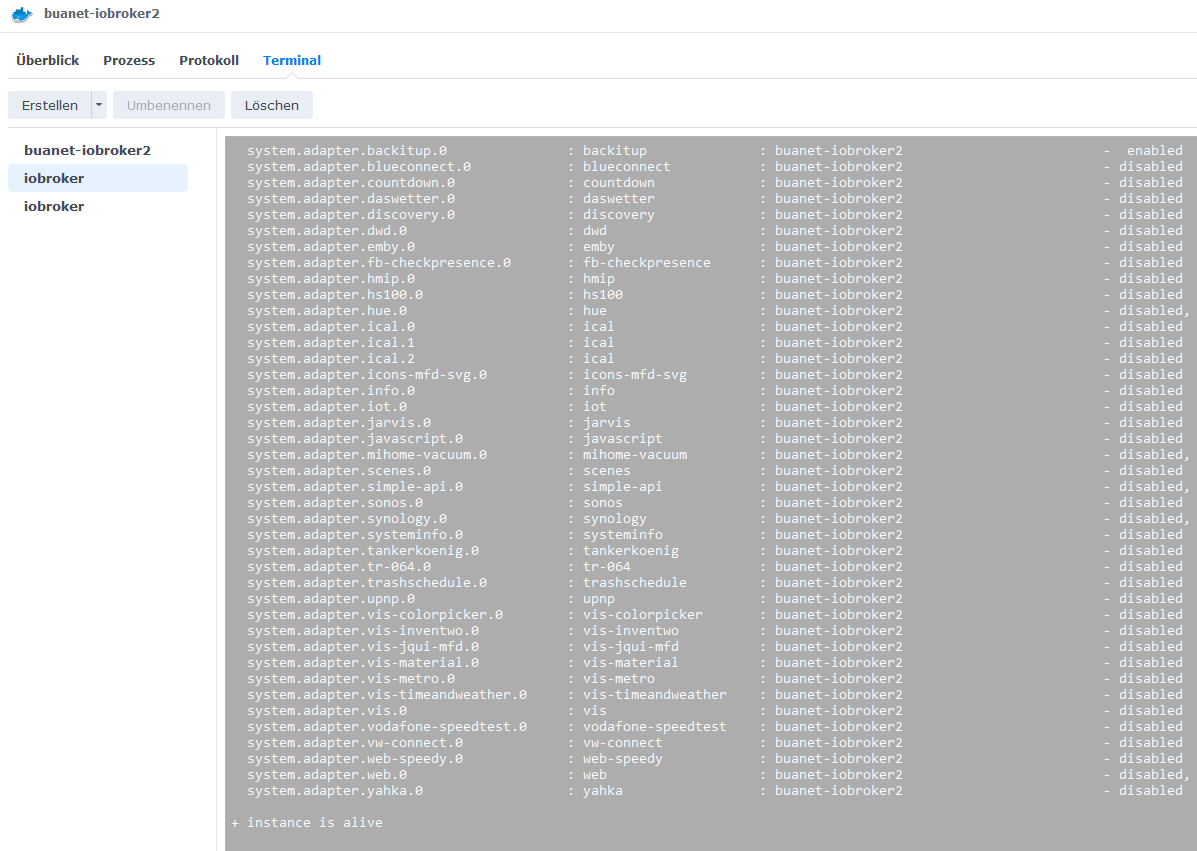
iobroker status iobroker list instances -
iobroker status iobroker list instances@thomas-braun said in Update auf neue Nodejs klappt nicht:
Ich habe die beiden Befehle im Terminal eingegeben, richtig?!
iobroker status:
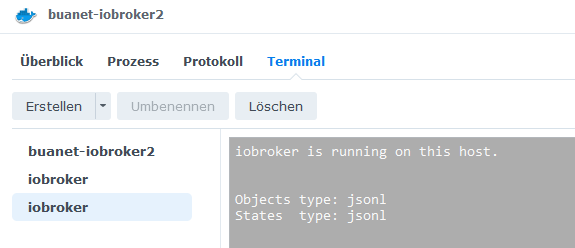
iobroker list instances:
-
@thomas-braun said in Update auf neue Nodejs klappt nicht:
Ich habe die beiden Befehle im Terminal eingegeben, richtig?!
iobroker status:
iobroker list instances:
Bitte keine Screenshots, Text in CodeTags eingebettet hier rein.



Hey! Du scheinst an dieser Unterhaltung interessiert zu sein, hast aber noch kein Konto.
Hast du es satt, bei jedem Besuch durch die gleichen Beiträge zu scrollen? Wenn du dich für ein Konto anmeldest, kommst du immer genau dorthin zurück, wo du zuvor warst, und kannst dich über neue Antworten benachrichtigen lassen (entweder per E-Mail oder Push-Benachrichtigung). Du kannst auch Lesezeichen speichern und Beiträge positiv bewerten, um anderen Community-Mitgliedern deine Wertschätzung zu zeigen.
Mit deinem Input könnte dieser Beitrag noch besser werden 💗
Registrieren Anmelden389
Online33.0k
Benutzer83.5k
Themen1.3m
Beiträge