




Update auf neue Nodejs klappt nicht
-
@codierknecht said in Update auf neue Nodejs klappt nicht:
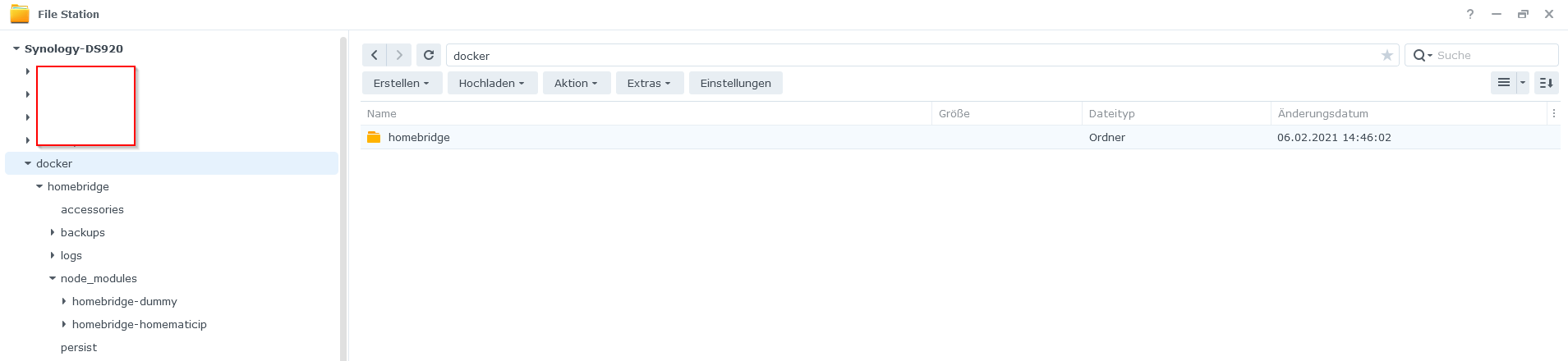
Hm, da ist bei mir kein Ordner?
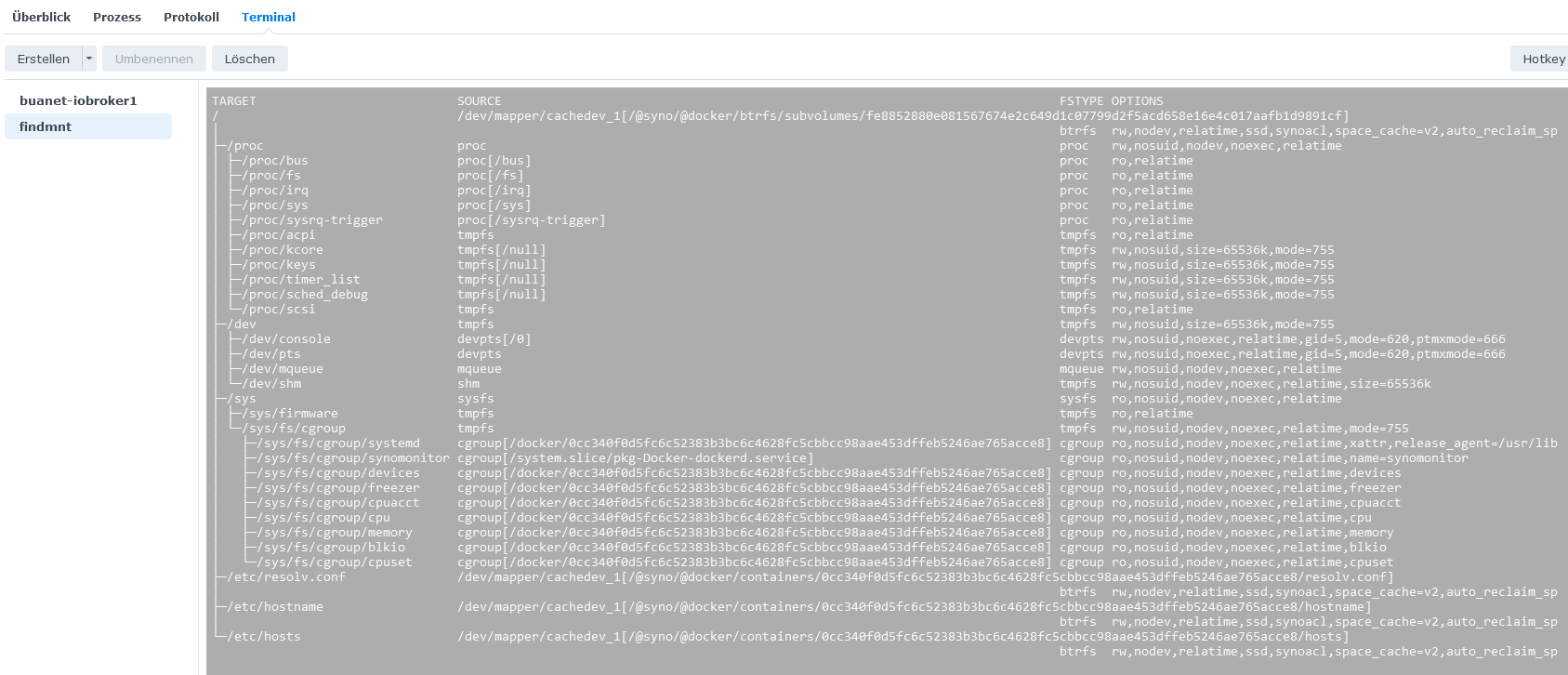
Und findmnt zeigt das hier:
@bergi_37
Alter Schwede - das scheint dann aber schon etwas in die Jahre gekommen zu sein
Hast Du ein aktuelles Backup?
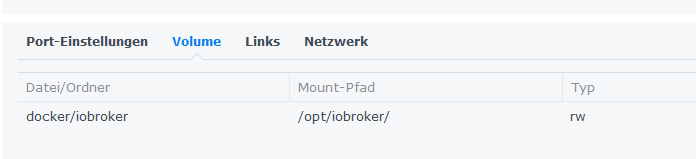
Leg doch mal unter "docker" ein neues Verzeichnis "iobroker" an und mounte das für den Container nach "/opt/iobroker/".
Damit sollte der ioB zumindest schon mal starten und erreichbar sein. -
Ok, habe den Ordner angelegt und auch den Mount Punkt.
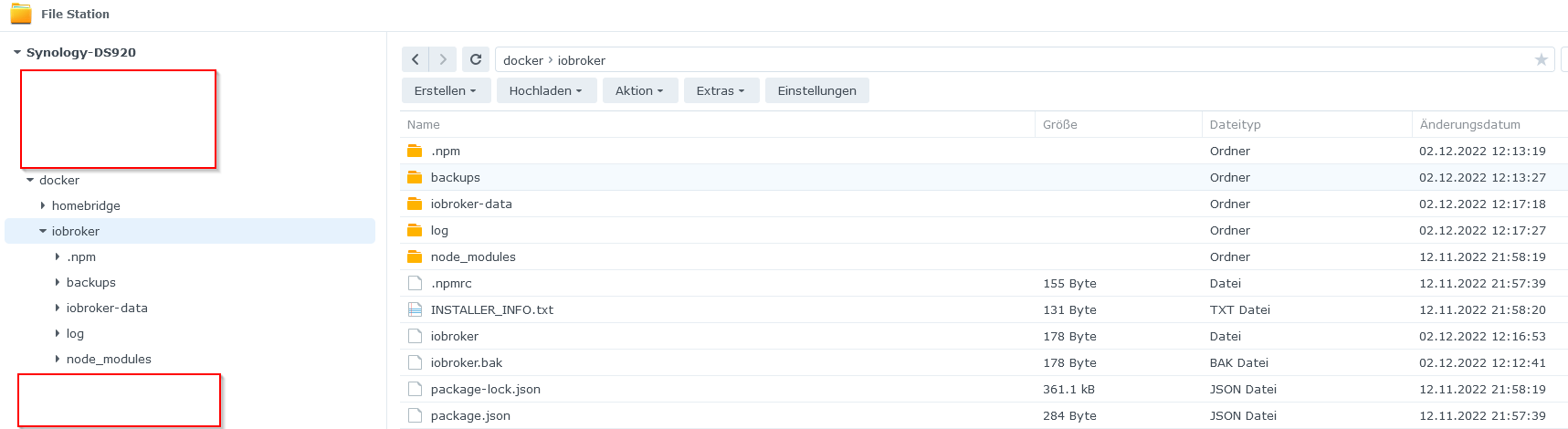
Das sind die gestarteten Prozesse:
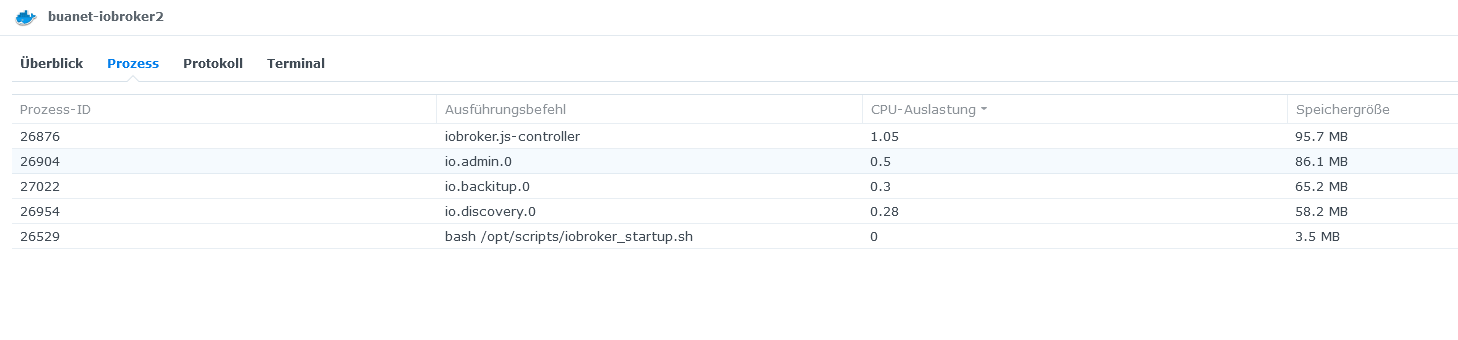
Habe den Container dann neu gestartet. Das steht im Protokoll:
--------------------------------------------------------------------------------

-------------------------     2022-12-02 11:07:00      -------------------------

--------------------------------------------------------------------------------

-----                                                                      -----

----- ██╗  ██████╗  ██████╗  ██████╗   ██████╗  ██╗  ██╗ ███████╗ ██████╗  -----

----- ██║ ██╔═══██╗ ██╔══██╗ ██╔══██╗ ██╔═══██╗ ██║ ██╔╝ ██╔════╝ ██╔══██╗ -----

----- ██║ ██║   ██║ ██████╔╝ ██████╔╝ ██║   ██║ █████╔╝  █████╗   ██████╔╝ -----

----- ██║ ██║   ██║ ██╔══██╗ ██╔══██╗ ██║   ██║ ██╔═██╗  ██╔══╝   ██╔══██╗ -----

----- ██║ ╚██████╔╝ ██████╔╝ ██║  ██║ ╚██████╔╝ ██║  ██╗ ███████╗ ██║  ██║ -----

----- ╚═╝  ╚═════╝  ╚═════╝  ╚═╝  ╚═╝  ╚═════╝  ╚═╝  ╚═╝ ╚══════╝ ╚═╝  ╚═╝ -----

-----                                                                      -----

-----              Welcome to your ioBroker Docker container!              -----

-----                    Startupscript is now running!                     -----

-----                          Please be patient!                          -----

--------------------------------------------------------------------------------


--------------------------------------------------------------------------------

-----                          System Information                          -----

-----                    arch:                x86_64                       -----

-----                    hostname:            buanet-iobroker2             -----

-----                                                                      -----

-----                          Version Information                         -----

-----                    image:               v7.1.2                       -----

-----                    build:               2022-11-12T20:56:04+00:00    -----

-----                    node:                v16.18.1                     -----

-----                    npm:                 8.19.2                       -----

-----                                                                      -----

-----                        Environment Variables                         -----

-----                    SETGID:              1000                         -----

-----                    SETUID:              1000                         -----

--------------------------------------------------------------------------------


--------------------------------------------------------------------------------

-----                  Step 1 of 5: Preparing container                   -----

--------------------------------------------------------------------------------


Updating Linux packages on first run...

(Reading database ...
(Reading database ... 5%
(Reading database ... 10%
(Reading database ... 15%
(Reading database ... 20%
(Reading database ... 25%
(Reading database ... 30%
(Reading database ... 35%
(Reading database ... 40%
(Reading database ... 45%
(Reading database ... 50%
(Reading database ... 55%
(Reading database ... 60%
(Reading database ... 65%
(Reading database ... 70%
(Reading database ... 75%
(Reading database ... 80%
(Reading database ... 85%
(Reading database ... 90%
(Reading database ... 95%
(Reading database ... 100%
(Reading database ... 29424 files and directories currently installed.)

Preparing to unpack .../libk5crypto3_1.18.3-6+deb11u3_amd64.deb ...

Unpacking libk5crypto3:amd64 (1.18.3-6+deb11u3) over (1.18.3-6+deb11u2) ...

Setting up libk5crypto3:amd64 (1.18.3-6+deb11u3) ...

(Reading database ...
(Reading database ... 5%
(Reading database ... 10%
(Reading database ... 15%
(Reading database ... 20%
(Reading database ... 25%
(Reading database ... 30%
(Reading database ... 35%
(Reading database ... 40%
(Reading database ... 45%
(Reading database ... 50%
(Reading database ... 55%
(Reading database ... 60%
(Reading database ... 65%
(Reading database ... 70%
(Reading database ... 75%
(Reading database ... 80%
(Reading database ... 85%
(Reading database ... 90%
(Reading database ... 95%
(Reading database ... 100%
(Reading database ... 29424 files and directories currently installed.)

Preparing to unpack .../libkrb5support0_1.18.3-6+deb11u3_amd64.deb ...

Unpacking libkrb5support0:amd64 (1.18.3-6+deb11u3) over (1.18.3-6+deb11u2) ...

Setting up libkrb5support0:amd64 (1.18.3-6+deb11u3) ...

(Reading database ...
(Reading database ... 5%
(Reading database ... 10%
(Reading database ... 15%
(Reading database ... 20%
(Reading database ... 25%
(Reading database ... 30%
(Reading database ... 35%
(Reading database ... 40%
(Reading database ... 45%
(Reading database ... 50%
(Reading database ... 55%
(Reading database ... 60%
(Reading database ... 65%
(Reading database ... 70%
(Reading database ... 75%
(Reading database ... 80%
(Reading database ... 85%
(Reading database ... 90%
(Reading database ... 95%
(Reading database ... 100%
(Reading database ... 29424 files and directories currently installed.)

Preparing to unpack .../libkrb5-3_1.18.3-6+deb11u3_amd64.deb ...

Unpacking libkrb5-3:amd64 (1.18.3-6+deb11u3) over (1.18.3-6+deb11u2) ...

Setting up libkrb5-3:amd64 (1.18.3-6+deb11u3) ...

(Reading database ...
(Reading database ... 5%
(Reading database ... 10%
(Reading database ... 15%
(Reading database ... 20%
(Reading database ... 25%
(Reading database ... 30%
(Reading database ... 35%
(Reading database ... 40%
(Reading database ... 45%
(Reading database ... 50%
(Reading database ... 55%
(Reading database ... 60%
(Reading database ... 65%
(Reading database ... 70%
(Reading database ... 75%
(Reading database ... 80%
(Reading database ... 85%
(Reading database ... 90%
(Reading database ... 95%
(Reading database ... 100%
(Reading database ... 29424 files and directories currently installed.)

Preparing to unpack .../libgssapi-krb5-2_1.18.3-6+deb11u3_amd64.deb ...

Unpacking libgssapi-krb5-2:amd64 (1.18.3-6+deb11u3) over (1.18.3-6+deb11u2) ...

Setting up libgssapi-krb5-2:amd64 (1.18.3-6+deb11u3) ...

Processing triggers for libc-bin (2.31-13+deb11u5) ...

Done.


Registering maintenance script as command... Done.


--------------------------------------------------------------------------------

-----             Step 2 of 5: Detecting ioBroker installation             -----
Aber ich kann den ioB nicht erreichen?!
-
Ok, habe den Ordner angelegt und auch den Mount Punkt.
Das sind die gestarteten Prozesse:
Habe den Container dann neu gestartet. Das steht im Protokoll:
--------------------------------------------------------------------------------

-------------------------     2022-12-02 11:07:00      -------------------------

--------------------------------------------------------------------------------

-----                                                                      -----

----- ██╗  ██████╗  ██████╗  ██████╗   ██████╗  ██╗  ██╗ ███████╗ ██████╗  -----

----- ██║ ██╔═══██╗ ██╔══██╗ ██╔══██╗ ██╔═══██╗ ██║ ██╔╝ ██╔════╝ ██╔══██╗ -----

----- ██║ ██║   ██║ ██████╔╝ ██████╔╝ ██║   ██║ █████╔╝  █████╗   ██████╔╝ -----

----- ██║ ██║   ██║ ██╔══██╗ ██╔══██╗ ██║   ██║ ██╔═██╗  ██╔══╝   ██╔══██╗ -----

----- ██║ ╚██████╔╝ ██████╔╝ ██║  ██║ ╚██████╔╝ ██║  ██╗ ███████╗ ██║  ██║ -----

----- ╚═╝  ╚═════╝  ╚═════╝  ╚═╝  ╚═╝  ╚═════╝  ╚═╝  ╚═╝ ╚══════╝ ╚═╝  ╚═╝ -----

-----                                                                      -----

-----              Welcome to your ioBroker Docker container!              -----

-----                    Startupscript is now running!                     -----

-----                          Please be patient!                          -----

--------------------------------------------------------------------------------


--------------------------------------------------------------------------------

-----                          System Information                          -----

-----                    arch:                x86_64                       -----

-----                    hostname:            buanet-iobroker2             -----

-----                                                                      -----

-----                          Version Information                         -----

-----                    image:               v7.1.2                       -----

-----                    build:               2022-11-12T20:56:04+00:00    -----

-----                    node:                v16.18.1                     -----

-----                    npm:                 8.19.2                       -----

-----                                                                      -----

-----                        Environment Variables                         -----

-----                    SETGID:              1000                         -----

-----                    SETUID:              1000                         -----

--------------------------------------------------------------------------------


--------------------------------------------------------------------------------

-----                  Step 1 of 5: Preparing container                   -----

--------------------------------------------------------------------------------


Updating Linux packages on first run...

(Reading database ...
(Reading database ... 5%
(Reading database ... 10%
(Reading database ... 15%
(Reading database ... 20%
(Reading database ... 25%
(Reading database ... 30%
(Reading database ... 35%
(Reading database ... 40%
(Reading database ... 45%
(Reading database ... 50%
(Reading database ... 55%
(Reading database ... 60%
(Reading database ... 65%
(Reading database ... 70%
(Reading database ... 75%
(Reading database ... 80%
(Reading database ... 85%
(Reading database ... 90%
(Reading database ... 95%
(Reading database ... 100%
(Reading database ... 29424 files and directories currently installed.)

Preparing to unpack .../libk5crypto3_1.18.3-6+deb11u3_amd64.deb ...

Unpacking libk5crypto3:amd64 (1.18.3-6+deb11u3) over (1.18.3-6+deb11u2) ...

Setting up libk5crypto3:amd64 (1.18.3-6+deb11u3) ...

(Reading database ...
(Reading database ... 5%
(Reading database ... 10%
(Reading database ... 15%
(Reading database ... 20%
(Reading database ... 25%
(Reading database ... 30%
(Reading database ... 35%
(Reading database ... 40%
(Reading database ... 45%
(Reading database ... 50%
(Reading database ... 55%
(Reading database ... 60%
(Reading database ... 65%
(Reading database ... 70%
(Reading database ... 75%
(Reading database ... 80%
(Reading database ... 85%
(Reading database ... 90%
(Reading database ... 95%
(Reading database ... 100%
(Reading database ... 29424 files and directories currently installed.)

Preparing to unpack .../libkrb5support0_1.18.3-6+deb11u3_amd64.deb ...

Unpacking libkrb5support0:amd64 (1.18.3-6+deb11u3) over (1.18.3-6+deb11u2) ...

Setting up libkrb5support0:amd64 (1.18.3-6+deb11u3) ...

(Reading database ...
(Reading database ... 5%
(Reading database ... 10%
(Reading database ... 15%
(Reading database ... 20%
(Reading database ... 25%
(Reading database ... 30%
(Reading database ... 35%
(Reading database ... 40%
(Reading database ... 45%
(Reading database ... 50%
(Reading database ... 55%
(Reading database ... 60%
(Reading database ... 65%
(Reading database ... 70%
(Reading database ... 75%
(Reading database ... 80%
(Reading database ... 85%
(Reading database ... 90%
(Reading database ... 95%
(Reading database ... 100%
(Reading database ... 29424 files and directories currently installed.)

Preparing to unpack .../libkrb5-3_1.18.3-6+deb11u3_amd64.deb ...

Unpacking libkrb5-3:amd64 (1.18.3-6+deb11u3) over (1.18.3-6+deb11u2) ...

Setting up libkrb5-3:amd64 (1.18.3-6+deb11u3) ...

(Reading database ...
(Reading database ... 5%
(Reading database ... 10%
(Reading database ... 15%
(Reading database ... 20%
(Reading database ... 25%
(Reading database ... 30%
(Reading database ... 35%
(Reading database ... 40%
(Reading database ... 45%
(Reading database ... 50%
(Reading database ... 55%
(Reading database ... 60%
(Reading database ... 65%
(Reading database ... 70%
(Reading database ... 75%
(Reading database ... 80%
(Reading database ... 85%
(Reading database ... 90%
(Reading database ... 95%
(Reading database ... 100%
(Reading database ... 29424 files and directories currently installed.)

Preparing to unpack .../libgssapi-krb5-2_1.18.3-6+deb11u3_amd64.deb ...

Unpacking libgssapi-krb5-2:amd64 (1.18.3-6+deb11u3) over (1.18.3-6+deb11u2) ...

Setting up libgssapi-krb5-2:amd64 (1.18.3-6+deb11u3) ...

Processing triggers for libc-bin (2.31-13+deb11u5) ...

Done.


Registering maintenance script as command... Done.


--------------------------------------------------------------------------------

-----             Step 2 of 5: Detecting ioBroker installation             -----
Aber ich kann den ioB nicht erreichen?!
Sieht doch schon mal gut aus ;-)
@bergi_37 sagte in Update auf neue Nodejs klappt nicht:
Aber ich kann den ioB nicht erreichen?!
Kriegst Du eine Fehlermeldung?
Horcht bei Dir etwas anderes auf den Port 8081?
Mit welchem Port bist Du bisher da rangekommen?
Hast Du den 8081 in der Firewall blockiert? -
Also bisher bin im mit dem "alten" Conatainer immer über die http://xxx.xxx.xxx.xx:8081/ drauf gekommen.
Der "alte" Container ist gestoppt.
Habe keine Fehlermeldung bekommen. Nur das was in dem Protokll steht.
@bergi_37
Na dann warte noch bis er komplett fertig ist ... dort steht ja am EndeStep 2 of 5BTW: Du brauchst hier Deine interne IP nicht zu verschleiern. Die existiert nur in Deinem Netz und sieht bei fast allen nahezu identisch aus (192.168.178.x:8081)
-
@bergi_37
Was sagt denn der Browser? -
Fehlermeldung im Firefox:
Fehler: Verbindung fehlgeschlagen Firefox kann keine Verbindung zu dem Server unter 192.168.178.99:8081 aufbauen.@bergi_37
Du nimmst aber schon http:// und nicht https:// ? -
@bergi_37
Du nimmst aber schon http:// und nicht https:// ? -
Ja, nehme http://
Habe gerade nochmal den "alten" Container gestartet, den erreiche ich sofort über die URL. Habe ihn dann wieder gestoppt und den "neuen" Container gestartet, den erreich eich nicht?
@bergi_37
Wenn Du den neuen Contaier gestartet hast und in der Syno doppelklickst ... steht dort etwas im Protokoll?
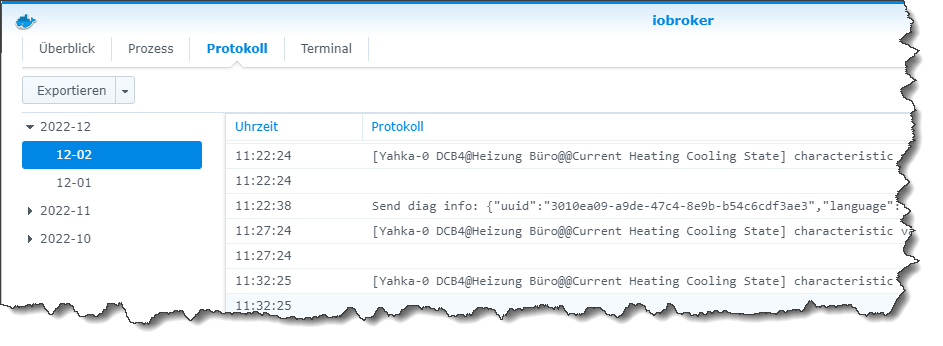
"Any fool can write code that a computer can understand. Good programmers write code that humans can understand." (Martin Fowler, "Refactoring")
Proxmox 9.1.1 LXC|8 GB|Core i7-6700
HmIP|ZigBee|Tasmota|Unifi
Zabbix Certified Specialist
Konnte ich Dir helfen? Dann benutze bitte das Voting unten rechts im Beitrag -
@bergi_37
Wenn Du den neuen Contaier gestartet hast und in der Syno doppelklickst ... steht dort etwas im Protokoll?
Lese nur nebenbei ...
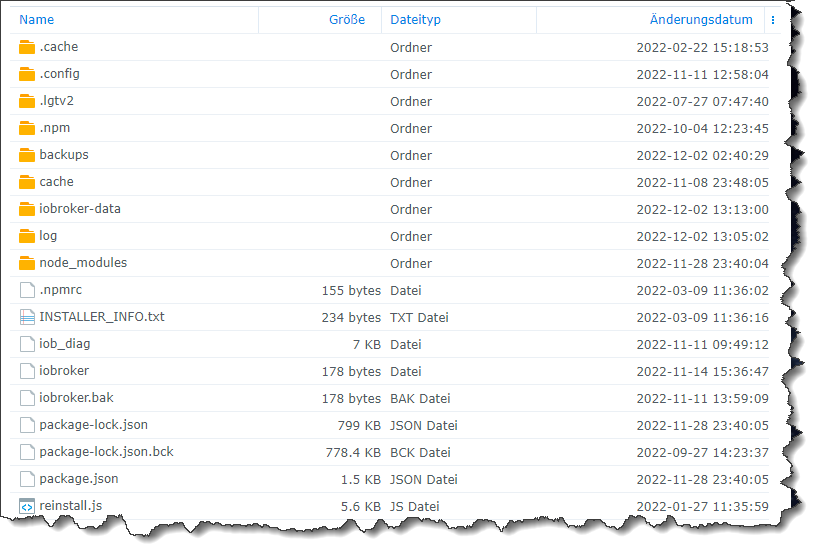
Wo kommt denn bei einem neuen Container , wo noch nie ein Mount wa , das her vom 12.11 !?

Synology 918+ 16GB - ioBroker in Docker v9 , VISO auf Trekstor Primebook C13 13,3" , Hikvision Domkameras mit Surveillance Station .. CCU RaspberryMatic in Synology VM .. Zigbee CC2538+CC2592 .. Sonoff .. KNX .. Modbus ..
-
Lese nur nebenbei ...
Wo kommt denn bei einem neuen Container , wo noch nie ein Mount wa , das her vom 12.11 !?
@glasfaser
Der Screenshot ist mit Sicherheit nach dem ersten Start seines neuen Containers mit Mount entstanden.
Das steckt ja im Image drin ... sieht bei meinem aktiven ioB ähnlich aus.
-
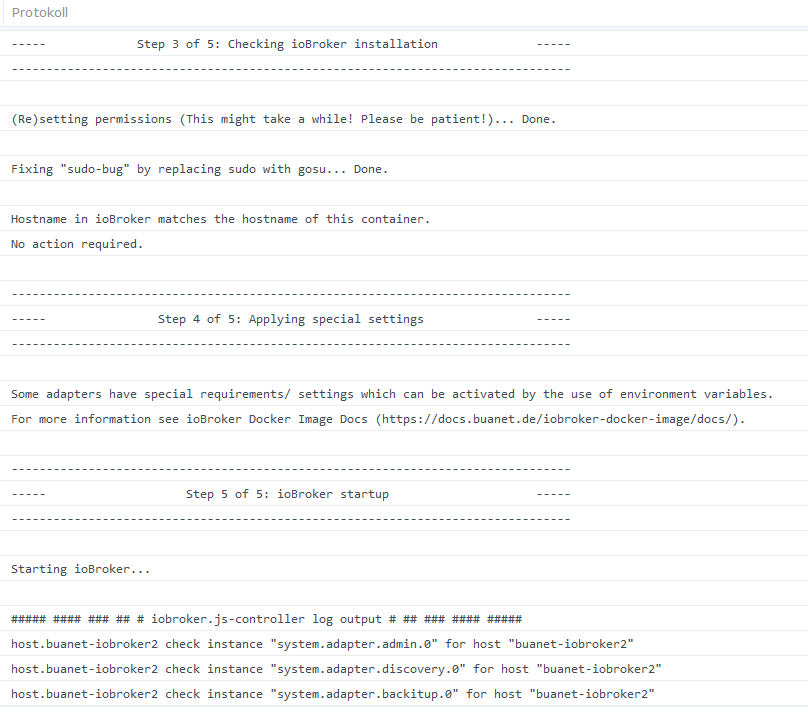
Bei mir im Protokoll steht das hier:
--------------------------------------------------------------------------------
-------------------------     2022-12-02 13:22:47      -------------------------
--------------------------------------------------------------------------------
-----                                                                      -----
----- ██╗  ██████╗  ██████╗  ██████╗   ██████╗  ██╗  ██╗ ███████╗ ██████╗  -----
----- ██║ ██╔═══██╗ ██╔══██╗ ██╔══██╗ ██╔═══██╗ ██║ ██╔╝ ██╔════╝ ██╔══██╗ -----
----- ██║ ██║   ██║ ██████╔╝ ██████╔╝ ██║   ██║ █████╔╝  █████╗   ██████╔╝ -----
----- ██║ ██║   ██║ ██╔══██╗ ██╔══██╗ ██║   ██║ ██╔═██╗  ██╔══╝   ██╔══██╗ -----
----- ██║ ╚██████╔╝ ██████╔╝ ██║  ██║ ╚██████╔╝ ██║  ██╗ ███████╗ ██║  ██║ -----
----- ╚═╝  ╚═════╝  ╚═════╝  ╚═╝  ╚═╝  ╚═════╝  ╚═╝  ╚═╝ ╚══════╝ ╚═╝  ╚═╝ -----
-----                                                                      -----
-----              Welcome to your ioBroker Docker container!              -----
-----                    Startupscript is now running!                     -----
-----                          Please be patient!                          -----
--------------------------------------------------------------------------------


--------------------------------------------------------------------------------
-----                          System Information                          -----
-----                    arch:                x86_64                       -----
-----                    hostname:            buanet-iobroker2             -----
-----                                                                      -----
-----                          Version Information                         -----
-----                    image:               v7.1.2                       -----
-----                    build:               2022-11-12T20:56:04+00:00    -----
-----                    node:                v16.18.1                     -----
-----                    npm:                 8.19.2                       -----
-----                                                                      -----

-----                        Environment Variables                         -----
-----                    SETGID:              1000                         -----
-----                    SETUID:              1000                         -----
--------------------------------------------------------------------------------

 --------------------------------------------------------------------------------
-----                  Step 1 of 5: Preparing container                   -----
--------------------------------------------------------------------------------

This is not the first run of this container. Skipping first run preparation.

--------------------------------------------------------------------------------
-----             Step 2 of 5: Detecting ioBroker installation             -----
--------------------------------------------------------------------------------

Existing installation of ioBroker detected in "/opt/iobroker".
--------------------------------------------------------------------------------

-----             Step 3 of 5: Checking ioBroker installation              -----

--------------------------------------------------------------------------------

(Re)setting permissions (This might take a while! Please be patient!)... Done.

 Fixing "sudo-bug" by replacing sudo with gosu... Done.

Hostname in ioBroker matches the hostname of this container.

No action required.

--------------------------------------------------------------------------------
-----                Step 4 of 5: Applying special settings                -----
--------------------------------------------------------------------------------

Some adapters have special requirements/ settings which can be activated by the use of environment variables.
For more information see ioBroker Docker Image Docs (https://docs.buanet.de/iobroker-docker-image/docs/).

--------------------------------------------------------------------------------
-----                    Step 5 of 5: ioBroker startup                     -----
--------------------------------------------------------------------------------

 Starting ioBroker...

 ##### #### ### ## # iobroker.js-controller log output # ## ### #### #####
host.buanet-iobroker2 check instance "system.adapter.admin.0" for host "buanet-iobroker2"
host.buanet-iobroker2 check instance "system.adapter.discovery.0" for host "buanet-iobroker2"
host.buanet-iobroker2 check instance "system.adapter.backitup.0" for host "buanet-iobroker2"
Mehr ist dann nicht...da kommt nix mehr zu...
-
In den Einstellungen der beiden Container habe ich eine Unstimmigkeit gefunden.
Im "alten" steht bei "Netzwerk": host
Im "neuen" steht bei "Netzwerk": bridge
Ist das richtig? Ich habe das nicht eingetragen. Oder kann /muss ich das im "neuen" ändern?
-
Bei mir im Protokoll steht das hier:
--------------------------------------------------------------------------------
-------------------------     2022-12-02 13:22:47      -------------------------
--------------------------------------------------------------------------------
-----                                                                      -----
----- ██╗  ██████╗  ██████╗  ██████╗   ██████╗  ██╗  ██╗ ███████╗ ██████╗  -----
----- ██║ ██╔═══██╗ ██╔══██╗ ██╔══██╗ ██╔═══██╗ ██║ ██╔╝ ██╔════╝ ██╔══██╗ -----
----- ██║ ██║   ██║ ██████╔╝ ██████╔╝ ██║   ██║ █████╔╝  █████╗   ██████╔╝ -----
----- ██║ ██║   ██║ ██╔══██╗ ██╔══██╗ ██║   ██║ ██╔═██╗  ██╔══╝   ██╔══██╗ -----
----- ██║ ╚██████╔╝ ██████╔╝ ██║  ██║ ╚██████╔╝ ██║  ██╗ ███████╗ ██║  ██║ -----
----- ╚═╝  ╚═════╝  ╚═════╝  ╚═╝  ╚═╝  ╚═════╝  ╚═╝  ╚═╝ ╚══════╝ ╚═╝  ╚═╝ -----
-----                                                                      -----
-----              Welcome to your ioBroker Docker container!              -----
-----                    Startupscript is now running!                     -----
-----                          Please be patient!                          -----
--------------------------------------------------------------------------------


--------------------------------------------------------------------------------
-----                          System Information                          -----
-----                    arch:                x86_64                       -----
-----                    hostname:            buanet-iobroker2             -----
-----                                                                      -----
-----                          Version Information                         -----
-----                    image:               v7.1.2                       -----
-----                    build:               2022-11-12T20:56:04+00:00    -----
-----                    node:                v16.18.1                     -----
-----                    npm:                 8.19.2                       -----
-----                                                                      -----

-----                        Environment Variables                         -----
-----                    SETGID:              1000                         -----
-----                    SETUID:              1000                         -----
--------------------------------------------------------------------------------

 --------------------------------------------------------------------------------
-----                  Step 1 of 5: Preparing container                   -----
--------------------------------------------------------------------------------

This is not the first run of this container. Skipping first run preparation.

--------------------------------------------------------------------------------
-----             Step 2 of 5: Detecting ioBroker installation             -----
--------------------------------------------------------------------------------

Existing installation of ioBroker detected in "/opt/iobroker".
--------------------------------------------------------------------------------

-----             Step 3 of 5: Checking ioBroker installation              -----

--------------------------------------------------------------------------------

(Re)setting permissions (This might take a while! Please be patient!)... Done.

 Fixing "sudo-bug" by replacing sudo with gosu... Done.

Hostname in ioBroker matches the hostname of this container.

No action required.

--------------------------------------------------------------------------------
-----                Step 4 of 5: Applying special settings                -----
--------------------------------------------------------------------------------

Some adapters have special requirements/ settings which can be activated by the use of environment variables.
For more information see ioBroker Docker Image Docs (https://docs.buanet.de/iobroker-docker-image/docs/).

--------------------------------------------------------------------------------
-----                    Step 5 of 5: ioBroker startup                     -----
--------------------------------------------------------------------------------

 Starting ioBroker...

 ##### #### ### ## # iobroker.js-controller log output # ## ### #### #####
host.buanet-iobroker2 check instance "system.adapter.admin.0" for host "buanet-iobroker2"
host.buanet-iobroker2 check instance "system.adapter.discovery.0" for host "buanet-iobroker2"
host.buanet-iobroker2 check instance "system.adapter.backitup.0" for host "buanet-iobroker2"
Mehr ist dann nicht...da kommt nix mehr zu...
-
In den Einstellungen der beiden Container habe ich eine Unstimmigkeit gefunden.
Im "alten" steht bei "Netzwerk": host
Im "neuen" steht bei "Netzwerk": bridge
Ist das richtig? Ich habe das nicht eingetragen. Oder kann /muss ich das im "neuen" ändern?
@bergi_37 sagte in Update auf neue Nodejs klappt nicht:
In den Einstellungen der beiden Container habe ich eine Unstimmigkeit gefunden.
Im "alten" steht bei "Netzwerk": host
Im "neuen" steht bei "Netzwerk": bridge
Ist das richtig? Ich habe das nicht eingetragen. Oder kann /muss ich das im "neuen" ändern?
Das kannst Du im Nachhinein nicht ändern.
Schmeiß den Container wieder weg, baue einen neuen und wähle dort den "Host-Mode"
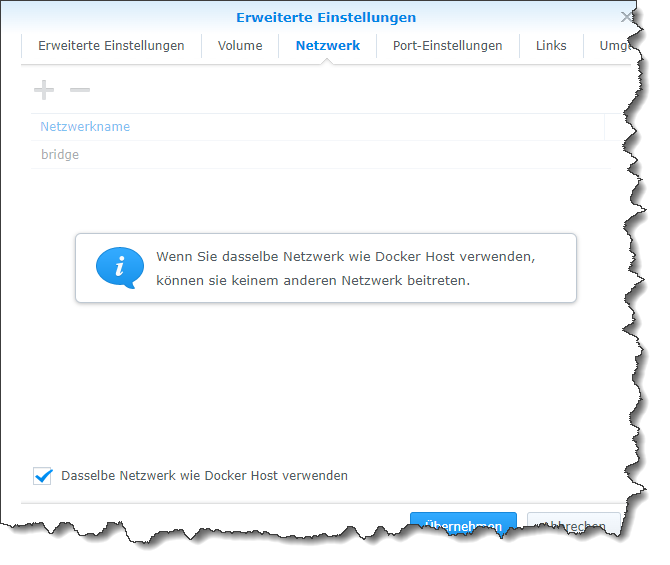
Das erklärt zumindest, warum Du nicht drauf kommst: Du hast ja keine Ports freigegeben ;-)
-
Teste mal mit einem neuen Image ohne Mount , was ist dann !?
Auch mal einen anderen Browser mal genutzt ...
Ich hbe bei den Images "latest" genommen. Das ist doch korrekt oder benötige ich für die Synology ein bestimmtes Image?
-
Ich hbe bei den Images "latest" genommen. Das ist doch korrekt oder benötige ich für die Synology ein bestimmtes Image?
@bergi_37 sagte in Update auf neue Nodejs klappt nicht:
Ich hbe bei den Images "latest" genommen. Das ist doch korrekt oder benötige ich für die Synology ein bestimmtes Image?
Das nehme ich auch immer. Wird im Tutorial auch so empfohlen.
-
Ich hbe bei den Images "latest" genommen. Das ist doch korrekt oder benötige ich für die Synology ein bestimmtes Image?
Nein ... alles gut .. es gibt kein spezielles.
Hast du auch das gemacht !?
@codierknecht sagte in Update auf neue Nodejs klappt nicht:
aue einen neuen und wähle dort den "Host-Mode"


Hey! Du scheinst an dieser Unterhaltung interessiert zu sein, hast aber noch kein Konto.
Hast du es satt, bei jedem Besuch durch die gleichen Beiträge zu scrollen? Wenn du dich für ein Konto anmeldest, kommst du immer genau dorthin zurück, wo du zuvor warst, und kannst dich über neue Antworten benachrichtigen lassen (entweder per E-Mail oder Push-Benachrichtigung). Du kannst auch Lesezeichen speichern und Beiträge positiv bewerten, um anderen Community-Mitgliedern deine Wertschätzung zu zeigen.
Mit deinem Input könnte dieser Beitrag noch besser werden 💗
Registrieren Anmelden372
Online33.0k
Benutzer83.5k
Themen1.3m
Beiträge