




SONOFF Adapter in Kollision mit MQTT Adapter
-
Sorry, dies habe ich mittlerweile wieder verschwitzt, habe es aber bereits korrigiert.
Ich bin hier bei den Aktualisierungen massiv in Verzug, aber habe echt Bammel vor den Anpassungen.
Der Bammel ist berechtigt.
Der Adapter wurde optimiert für min. JS Controller 3.3.x
Hilft nichts. Da musste mal ran an das Ganze. -
Sorry, dies habe ich mittlerweile wieder verschwitzt, habe es aber bereits korrigiert.
Ich bin hier bei den Aktualisierungen massiv in Verzug, aber habe echt Bammel vor den Anpassungen.
Wie oft machst du Edit in deinem Beitrag ... das ist KÄSE !!
Das ist neu ...
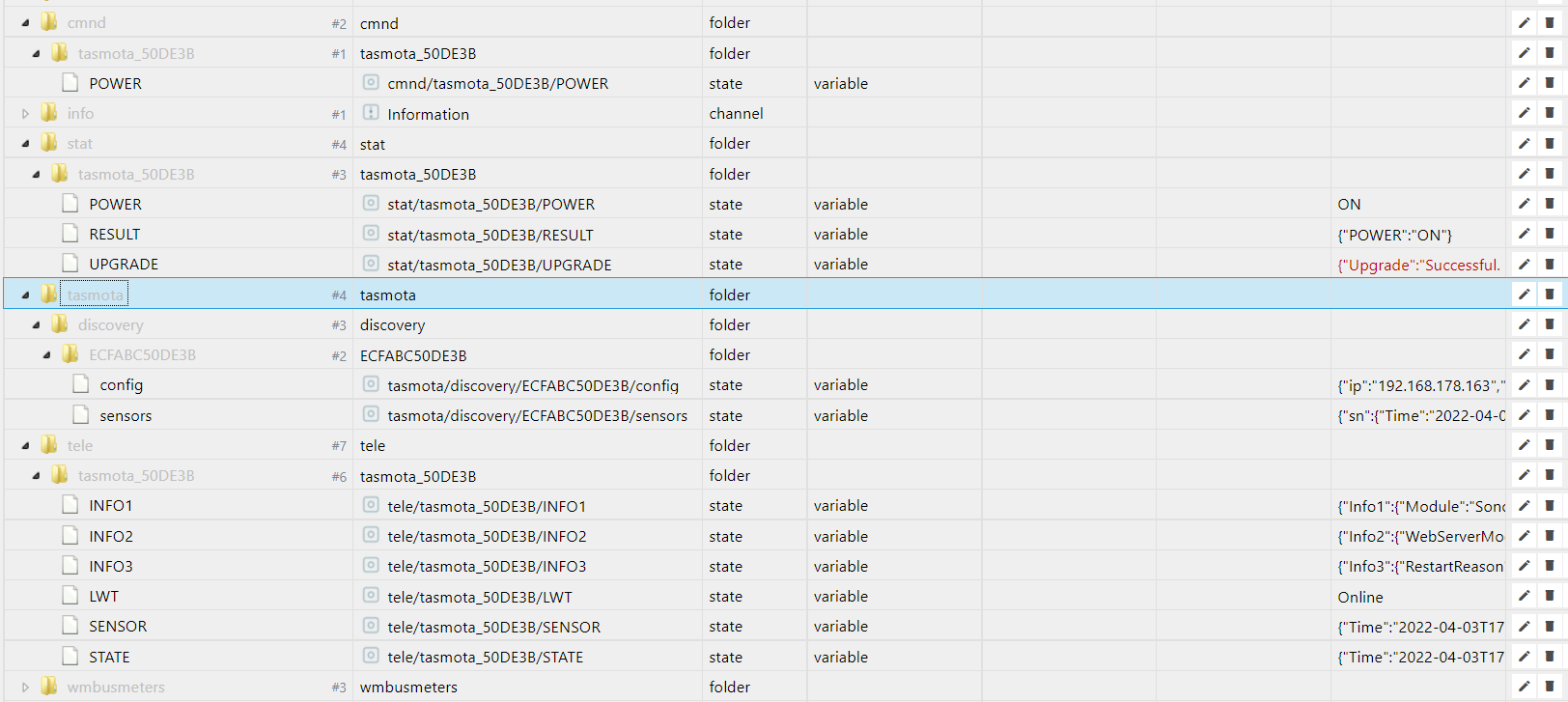
und die IP Falsch !?
-
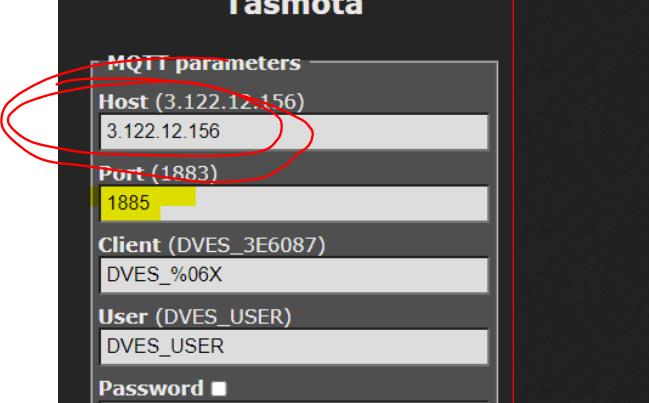
Sorry, aber welcher Benutzer und Kennwort ist hier einzutragen ? mqtt ? Eigenes PW ?
Danke
-
Sorry, aber welcher Benutzer und Kennwort ist hier einzutragen ? mqtt ? Eigenes PW ?
Danke
@goetschhofer sagte in SONOFF Adapter in Kollision mit MQTT Adapter:
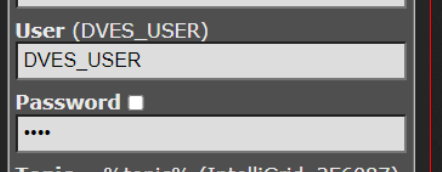
Sorry, aber welcher Benutzer und Kennwort ist hier einzutragen ?
-
@goetschhofer sagte in SONOFF Adapter in Kollision mit MQTT Adapter:
Sorry, aber welcher Benutzer und Kennwort ist hier einzutragen ?
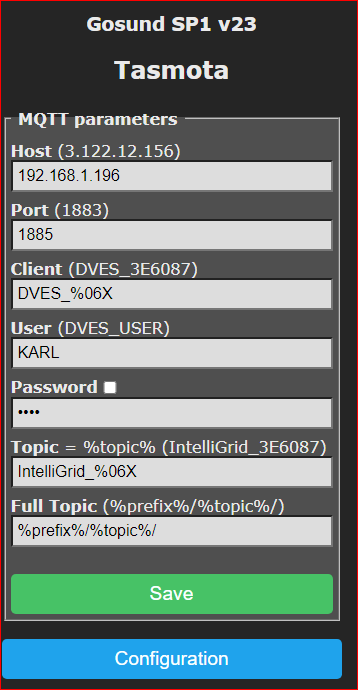
Habe jetzt die IP-Adresse geändert, BN + PW nochmals neu vergeben, Restart gemacht, aber es will noch nicht.
Habe auch den MQTT Adapter mit Port: 1883 im Einsatz.
Danke
sonoff.0 2022-11-26 19:08:43.454 silly States system redis pmessage system.adapter.sonoff.0.logLevel/system.adapter.sonoff.0.logLevel:{"val":"silly","ack":true,"ts":1669486123413,"q":0,"from":"system.adapter.sonoff.0","lc":1669483231514} sonoff.0 2022-11-26 19:08:43.438 debug stateChange sonoff.0.info.connection: {"val":"","ack":true,"ts":1669486123434,"q":0,"from":"system.adapter.sonoff.0","user":"system.user.admin","lc":1669323779944} sonoff.0 2022-11-26 19:08:43.436 silly States user redis pmessage sonoff.0.*/sonoff.0.info.connection:{"val":"","ack":true,"ts":1669486123434,"q":0,"from":"system.adapter.sonoff.0","user":"system.user.admin","lc":1669323779944} sonoff.0 2022-11-26 19:08:43.426 info Starting MQTT authenticated server on port 1885 sonoff.0 2022-11-26 19:08:43.401 info starting. Version 2.5.1 in /opt/iobroker/node_modules/iobroker.sonoff, node: v12.22.7, js-controller: 3.2.16 sonoff.0 2022-11-26 19:08:43.337 debug Plugin sentry Initialize Plugin (enabled=true) sonoff.0 2022-11-26 19:08:43.247 debug statesDB connected sonoff.0 2022-11-26 19:08:43.246 debug States connected to redis: 127.0.0.1:9000 sonoff.0 2022-11-26 19:08:43.200 debug States create User PubSub Client sonoff.0 2022-11-26 19:08:43.200 debug States create System PubSub Client sonoff.0 2022-11-26 19:08:43.196 debug Redis States: Use Redis connection: 127.0.0.1:9000 sonoff.0 2022-11-26 19:08:43.196 debug objectDB connected sonoff.0 2022-11-26 19:08:43.194 silly redis psubscribe cfg.o.system.user.* sonoff.0 2022-11-26 19:08:43.193 debug Objects connected to redis: 127.0.0.1:9001 sonoff.0 2022-11-26 19:08:43.184 debug Objects client initialize lua scripts sonoff.0 2022-11-26 19:08:43.184 debug Objects create User PubSub Client sonoff.0 2022-11-26 19:08:43.183 debug Objects create System PubSub Client sonoff.0 2022-11-26 19:08:43.182 debug Objects client ready ... initialize now sonoff.0 2022-11-26 19:08:43.171 debug Redis Objects: Use Redis connection: 127.0.0.1:9001 sonoff.0 2022-11-26 19:08:41.853 info Terminated (ADAPTER_REQUESTED_TERMINATION): Without reason sonoff.0 2022-11-26 19:08:41.852 debug Plugin sentry destroyed sonoff.0 2022-11-26 19:08:41.852 info terminating sonoff.0 2022-11-26 19:08:41.851 info Got terminate signal TERMINATE_YOURSELF sonoff.0 2022-11-26 19:08:41.851 silly States system redis pmessage system.adapter.sonoff.0.sigKill/system.adapter.sonoff.0.sigKill:{"val":-1,"ack":false,"ts":1669486121850,"q":0,"from":"system.host.IOBROKER","lc":1669486121850} -
Habe jetzt die IP-Adresse geändert, BN + PW nochmals neu vergeben, Restart gemacht, aber es will noch nicht.
Habe auch den MQTT Adapter mit Port: 1883 im Einsatz.
Danke
sonoff.0 2022-11-26 19:08:43.454 silly States system redis pmessage system.adapter.sonoff.0.logLevel/system.adapter.sonoff.0.logLevel:{"val":"silly","ack":true,"ts":1669486123413,"q":0,"from":"system.adapter.sonoff.0","lc":1669483231514} sonoff.0 2022-11-26 19:08:43.438 debug stateChange sonoff.0.info.connection: {"val":"","ack":true,"ts":1669486123434,"q":0,"from":"system.adapter.sonoff.0","user":"system.user.admin","lc":1669323779944} sonoff.0 2022-11-26 19:08:43.436 silly States user redis pmessage sonoff.0.*/sonoff.0.info.connection:{"val":"","ack":true,"ts":1669486123434,"q":0,"from":"system.adapter.sonoff.0","user":"system.user.admin","lc":1669323779944} sonoff.0 2022-11-26 19:08:43.426 info Starting MQTT authenticated server on port 1885 sonoff.0 2022-11-26 19:08:43.401 info starting. Version 2.5.1 in /opt/iobroker/node_modules/iobroker.sonoff, node: v12.22.7, js-controller: 3.2.16 sonoff.0 2022-11-26 19:08:43.337 debug Plugin sentry Initialize Plugin (enabled=true) sonoff.0 2022-11-26 19:08:43.247 debug statesDB connected sonoff.0 2022-11-26 19:08:43.246 debug States connected to redis: 127.0.0.1:9000 sonoff.0 2022-11-26 19:08:43.200 debug States create User PubSub Client sonoff.0 2022-11-26 19:08:43.200 debug States create System PubSub Client sonoff.0 2022-11-26 19:08:43.196 debug Redis States: Use Redis connection: 127.0.0.1:9000 sonoff.0 2022-11-26 19:08:43.196 debug objectDB connected sonoff.0 2022-11-26 19:08:43.194 silly redis psubscribe cfg.o.system.user.* sonoff.0 2022-11-26 19:08:43.193 debug Objects connected to redis: 127.0.0.1:9001 sonoff.0 2022-11-26 19:08:43.184 debug Objects client initialize lua scripts sonoff.0 2022-11-26 19:08:43.184 debug Objects create User PubSub Client sonoff.0 2022-11-26 19:08:43.183 debug Objects create System PubSub Client sonoff.0 2022-11-26 19:08:43.182 debug Objects client ready ... initialize now sonoff.0 2022-11-26 19:08:43.171 debug Redis Objects: Use Redis connection: 127.0.0.1:9001 sonoff.0 2022-11-26 19:08:41.853 info Terminated (ADAPTER_REQUESTED_TERMINATION): Without reason sonoff.0 2022-11-26 19:08:41.852 debug Plugin sentry destroyed sonoff.0 2022-11-26 19:08:41.852 info terminating sonoff.0 2022-11-26 19:08:41.851 info Got terminate signal TERMINATE_YOURSELF sonoff.0 2022-11-26 19:08:41.851 silly States system redis pmessage system.adapter.sonoff.0.sigKill/system.adapter.sonoff.0.sigKill:{"val":-1,"ack":false,"ts":1669486121850,"q":0,"from":"system.host.IOBROKER","lc":1669486121850}Im Log ist nichts zu erkennen.
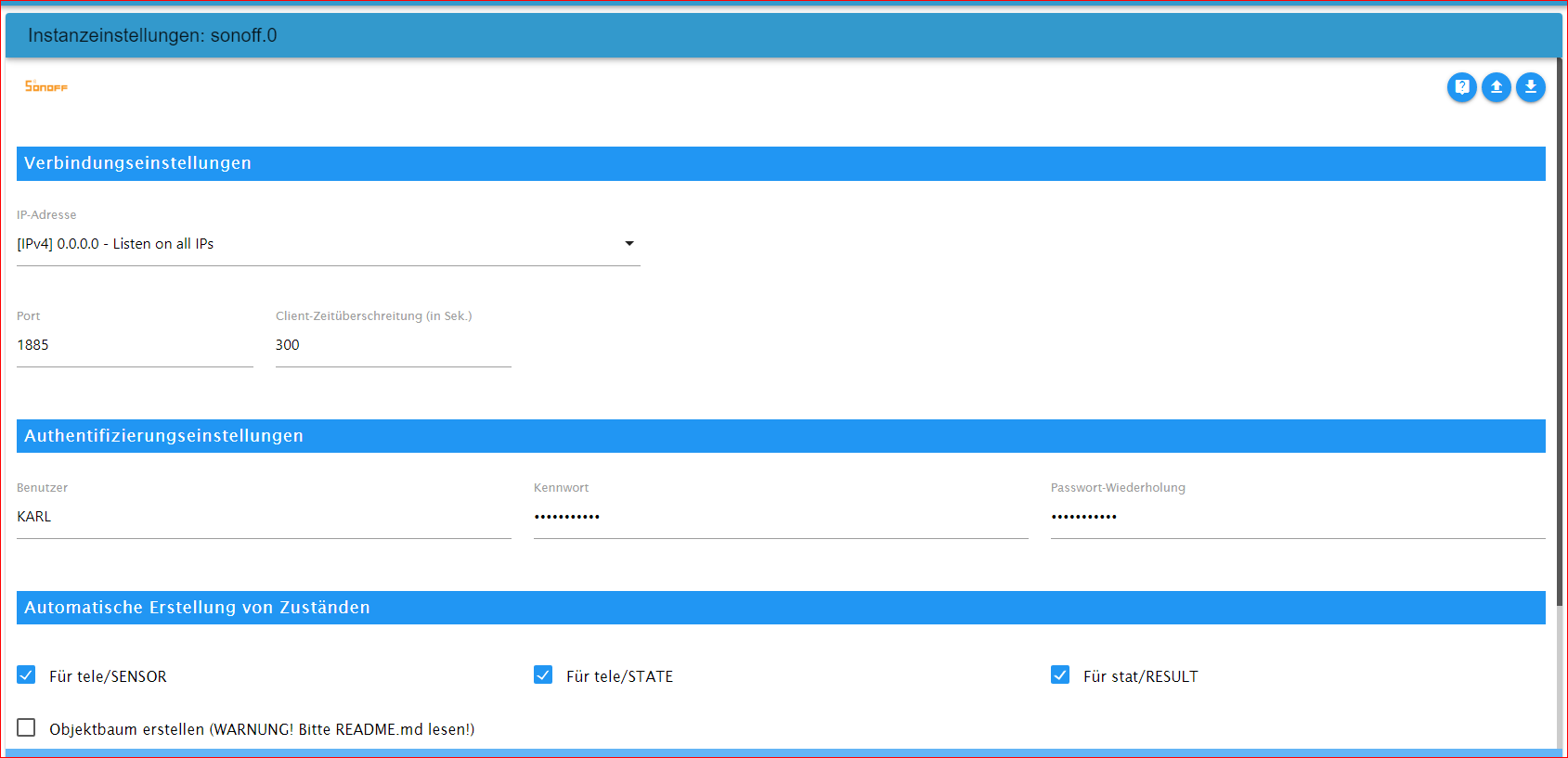
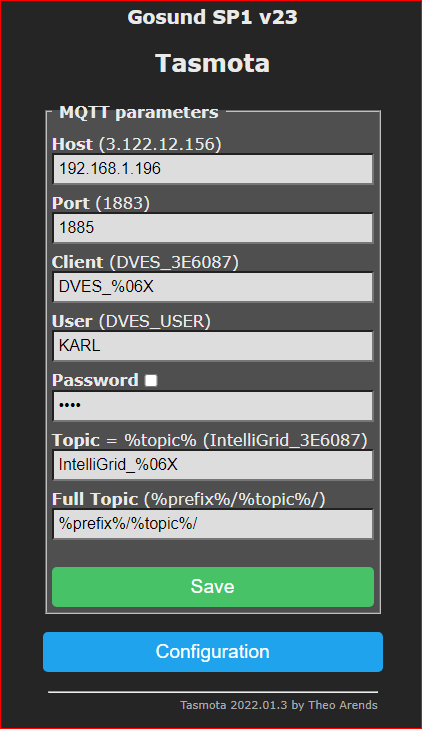
Zeige Screenshot von
-Instanzeinstellung Sonoff
-Sonoff Steckdose Mqtt Einstellung -
Habe jetzt die IP-Adresse geändert, BN + PW nochmals neu vergeben, Restart gemacht, aber es will noch nicht.
Habe auch den MQTT Adapter mit Port: 1883 im Einsatz.
Danke
sonoff.0 2022-11-26 19:08:43.454 silly States system redis pmessage system.adapter.sonoff.0.logLevel/system.adapter.sonoff.0.logLevel:{"val":"silly","ack":true,"ts":1669486123413,"q":0,"from":"system.adapter.sonoff.0","lc":1669483231514} sonoff.0 2022-11-26 19:08:43.438 debug stateChange sonoff.0.info.connection: {"val":"","ack":true,"ts":1669486123434,"q":0,"from":"system.adapter.sonoff.0","user":"system.user.admin","lc":1669323779944} sonoff.0 2022-11-26 19:08:43.436 silly States user redis pmessage sonoff.0.*/sonoff.0.info.connection:{"val":"","ack":true,"ts":1669486123434,"q":0,"from":"system.adapter.sonoff.0","user":"system.user.admin","lc":1669323779944} sonoff.0 2022-11-26 19:08:43.426 info Starting MQTT authenticated server on port 1885 sonoff.0 2022-11-26 19:08:43.401 info starting. Version 2.5.1 in /opt/iobroker/node_modules/iobroker.sonoff, node: v12.22.7, js-controller: 3.2.16 sonoff.0 2022-11-26 19:08:43.337 debug Plugin sentry Initialize Plugin (enabled=true) sonoff.0 2022-11-26 19:08:43.247 debug statesDB connected sonoff.0 2022-11-26 19:08:43.246 debug States connected to redis: 127.0.0.1:9000 sonoff.0 2022-11-26 19:08:43.200 debug States create User PubSub Client sonoff.0 2022-11-26 19:08:43.200 debug States create System PubSub Client sonoff.0 2022-11-26 19:08:43.196 debug Redis States: Use Redis connection: 127.0.0.1:9000 sonoff.0 2022-11-26 19:08:43.196 debug objectDB connected sonoff.0 2022-11-26 19:08:43.194 silly redis psubscribe cfg.o.system.user.* sonoff.0 2022-11-26 19:08:43.193 debug Objects connected to redis: 127.0.0.1:9001 sonoff.0 2022-11-26 19:08:43.184 debug Objects client initialize lua scripts sonoff.0 2022-11-26 19:08:43.184 debug Objects create User PubSub Client sonoff.0 2022-11-26 19:08:43.183 debug Objects create System PubSub Client sonoff.0 2022-11-26 19:08:43.182 debug Objects client ready ... initialize now sonoff.0 2022-11-26 19:08:43.171 debug Redis Objects: Use Redis connection: 127.0.0.1:9001 sonoff.0 2022-11-26 19:08:41.853 info Terminated (ADAPTER_REQUESTED_TERMINATION): Without reason sonoff.0 2022-11-26 19:08:41.852 debug Plugin sentry destroyed sonoff.0 2022-11-26 19:08:41.852 info terminating sonoff.0 2022-11-26 19:08:41.851 info Got terminate signal TERMINATE_YOURSELF sonoff.0 2022-11-26 19:08:41.851 silly States system redis pmessage system.adapter.sonoff.0.sigKill/system.adapter.sonoff.0.sigKill:{"val":-1,"ack":false,"ts":1669486121850,"q":0,"from":"system.host.IOBROKER","lc":1669486121850}@goetschhofer sagte in SONOFF Adapter in Kollision mit MQTT Adapter:
Habe jetzt die IP-Adresse geändert, BN + PW nochmals neu vergeben
die müssen aber identisch sein im sonoff Adapter als auch auf deinen Geräten, wenn der sonoff auf 1885 steht, dann lass das so und eben auch bei den Geräten so eingeben
-
Im Log ist nichts zu erkennen.
Zeige Screenshot von
-Instanzeinstellung Sonoff
-Sonoff Steckdose Mqtt Einstellung@glasfaser said in SONOFF Adapter in Kollision mit MQTT Adapter:
Im Log ist nichts zu erkennen.
Zeige Screenshot von
-Instanzeinstellung Sonoff
-Sonoff Steckdose Mqtt EinstellungVerständnisfrage: Wenn man mehrere Sonoff-Stockdosen einsetzt, muss man dafür jeweils einen Sonoff-Adapter anlegen und wird da jeweils der gleiche Port verwendet ?
Könnte man die Steckdose auch über den mqtt-Adapter verbinden und auslesen ? Nur wird hier ja der Port: 1883 schon verwendet.Vielen Dank
Warum zeigt er hier einen Port: 9000 u. 9001 ?
	2022-11-26 22:18:50.721	debug	States connected to redis: 127.0.0.1:9000

sonoff.0
2022-11-26 22:18:50.717	debug	States create User PubSub Client

sonoff.0
2022-11-26 22:18:50.716	debug	States create System PubSub Client

sonoff.0
2022-11-26 22:18:50.712	debug	Redis States: Use Redis connection: 127.0.0.1:9000

sonoff.0
2022-11-26 22:18:50.712	debug	objectDB connected

sonoff.0
2022-11-26 22:18:50.709	silly	redis psubscribe cfg.o.system.user.*

sonoff.0
2022-11-26 22:18:50.708	debug	Objects connected to redis: 127.0.0.1:9001

sonoff.0
2022-11-26 22:18:50.697	debug	Objects client initialize lua scripts

sonoff.0
2022-11-26 22:18:50.696	debug	Objects create User PubSub Client

sonoff.0
2022-11-26 22:18:50.696	debug	Objects create System PubSub Client

sonoff.0
2022-11-26 22:18:50.695	debug	Objects client ready ... initialize now

sonoff.0
2022-11-26 22:18:50.681	debug	Redis Objects: Use Redis connection: 127.0.0.1:9001
2022-11-26 22:23:15.457 silly States system redis pmessage system.adapter.sonoff.0.logLevel/system.adapter.sonoff.0.logLevel:{"val":"silly","ack":true,"ts":1669497795417,"q":0,"from":"system.adapter.sonoff.0","lc":1669483231514} sonoff.0 2022-11-26 22:23:15.437 debug stateChange sonoff.0.info.connection: {"val":"","ack":true,"ts":1669497795435,"q":0,"from":"system.adapter.sonoff.0","user":"system.user.admin","lc":1669323779944} sonoff.0 2022-11-26 22:23:15.436 silly States user redis pmessage sonoff.0.*/sonoff.0.info.connection:{"val":"","ack":true,"ts":1669497795435,"q":0,"from":"system.adapter.sonoff.0","user":"system.user.admin","lc":1669323779944} sonoff.0 2022-11-26 22:23:15.427 info Starting MQTT authenticated server on port 1885 sonoff.0 2022-11-26 22:23:15.405 info starting. Version 2.5.1 in /opt/iobroker/node_modules/iobroker.sonoff, node: v12.22.7, js-controller: 3.2.16 sonoff.0 2022-11-26 22:23:15.340 debug Plugin sentry Initialize Plugin (enabled=true) sonoff.0 2022-11-26 22:23:15.263 debug statesDB connected sonoff.0 2022-11-26 22:23:15.262 debug States connected to redis: 127.0.0.1:9000 sonoff.0 2022-11-26 22:23:15.258 debug States create User PubSub Client sonoff.0 2022-11-26 22:23:15.258 debug States create System PubSub Client sonoff.0 2022-11-26 22:23:15.254 debug Redis States: Use Redis connection: 127.0.0.1:9000 sonoff.0 2022-11-26 22:23:15.253 debug objectDB connected sonoff.0 2022-11-26 22:23:15.251 silly redis psubscribe cfg.o.system.user.* sonoff.0 2022-11-26 22:23:15.249 debug Objects connected to redis: 127.0.0.1:9001 sonoff.0 2022-11-26 22:23:15.238 debug Objects client initialize lua scripts sonoff.0 2022-11-26 22:23:15.237 debug Objects create User PubSub Client sonoff.0 2022-11-26 22:23:15.237 debug Objects create System PubSub Client sonoff.0 2022-11-26 22:23:15.236 debug Objects client ready ... initialize now sonoff.0 2022-11-26 22:23:15.219 debug Redis Objects: Use Redis connection: 127.0.0.1:9001 sonoff.0 2022-11-26 22:23:08.600 info Terminated (ADAPTER_REQUESTED_TERMINATION): Without reason sonoff.0 2022-11-26 22:23:08.600 debug Plugin sentry destroyed sonoff.0 2022-11-26 22:23:08.600 info terminating sonoff.0 2022-11-26 22:23:08.599 info Got terminate signal TERMINATE_YOURSELF sonoff.0 2022-11-26 22:23:08.598 silly States system redis pmessage system.adapter.sonoff.0.sigKill/system.adapter.sonoff.0.sigKill:{"val":-1,"ack":false,"ts":1669497788597,"q":0,"from":"system.host.IOBROKER","lc":1669497788597} -
@goetschhofer sagte in SONOFF Adapter in Kollision mit MQTT Adapter:
Habe jetzt die IP-Adresse geändert, BN + PW nochmals neu vergeben
die müssen aber identisch sein im sonoff Adapter als auch auf deinen Geräten, wenn der sonoff auf 1885 steht, dann lass das so und eben auch bei den Geräten so eingeben
@crunchip said in SONOFF Adapter in Kollision mit MQTT Adapter:
@goetschhofer sagte in SONOFF Adapter in Kollision mit MQTT Adapter:
Habe jetzt die IP-Adresse geändert, BN + PW nochmals neu vergeben
die müssen aber identisch sein im sonoff Adapter als auch auf deinen Geräten, wenn der sonoff auf 1885 steht, dann lass das so und eben auch bei den Geräten so eingeben
Ja, die PW habe ich nochmals neu eingegeben, sind ident.
-
@crunchip said in SONOFF Adapter in Kollision mit MQTT Adapter:
@goetschhofer sagte in SONOFF Adapter in Kollision mit MQTT Adapter:
Habe jetzt die IP-Adresse geändert, BN + PW nochmals neu vergeben
die müssen aber identisch sein im sonoff Adapter als auch auf deinen Geräten, wenn der sonoff auf 1885 steht, dann lass das so und eben auch bei den Geräten so eingeben
Ja, die PW habe ich nochmals neu eingegeben, sind ident.
Port ist immer der gleiche bei den Dosen einzugeben.
Genauso wie User und Passwort .
Du brauchst nur 1 Sonoff Adapter. Die Datenpunkte werden automatisch angelegt .
Ich hab 13 von den Gosund Dosen.Dosen und Sonoff Adapter haben beide die gleichen Ports und User und Passwort (um das nochmal deutlich zu machen )
-
Port ist immer der gleiche bei den Dosen einzugeben.
Genauso wie User und Passwort .
Du brauchst nur 1 Sonoff Adapter. Die Datenpunkte werden automatisch angelegt .
Ich hab 13 von den Gosund Dosen.Dosen und Sonoff Adapter haben beide die gleichen Ports und User und Passwort (um das nochmal deutlich zu machen )
@haselchen
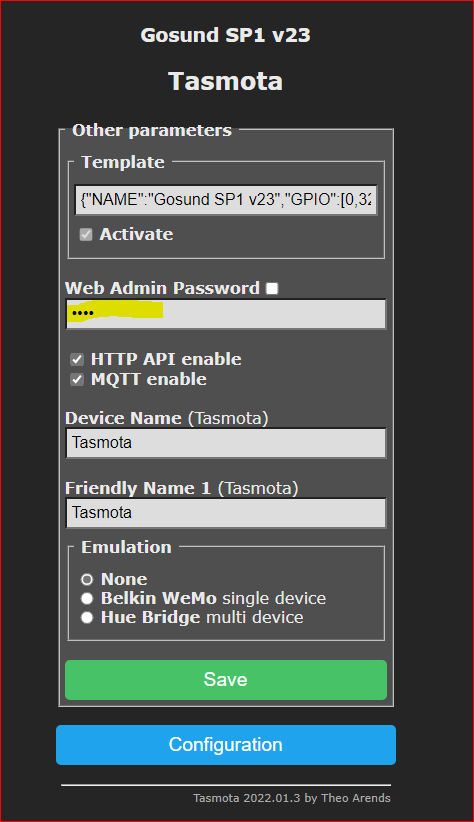
Vielen Dank für die Klarstellung.Welche Bedeutung hat dieses Webadmin PW ? Habe ich nicht eingegeben.
Hier habe ich die Fehlermeldung in der console auf der Steckdose
22:30:20.453 MQT: Attempting connection...
22:30:20.672 MQT: Connect failed to 192.168.1.196:1885, rc -2. Retry in 120 sec22:28:55.589 RSL: SENSOR = {"Time":"2022-11-26T22:28:55","ENERGY":{"TotalStartTime":"2022-11-26T18:09:02","Total":3.284,"Yesterday":0.000,"Today":0.000,"Period": 0,"Power": 0,"ApparentPower": 0,"ReactivePower": 0,"Factor":0.00,"Voltage":218,"Current":0.000}} 22:29:05.598 RSL: STATE = {"Time":"2022-11-26T22:29:05","Uptime":"0T00:12:08","UptimeSec":728,"Heap":26,"SleepMode":"Dynamic","Sleep":50,"LoadAvg":19,"MqttCount":0,"POWER":"ON","Wifi":{"AP":1,"SSId":"FRITZ!Box 7590 US-2,4 GHz","BSSId":"DC:39:6F:DB:30:7F","Channel":6,"Mode":"11n","RSSI":100,"Signal":-47,"LinkCount":1,"Downtime":"0T00:00:03"}} 22:29:05.607 RSL: SENSOR = {"Time":"2022-11-26T22:29:05","ENERGY":{"TotalStartTime":"2022-11-26T18:09:02","Total":3.284,"Yesterday":0.000,"Today":0.000,"Period": 0,"Power": 0,"ApparentPower": 0,"ReactivePower": 0,"Factor":0.00,"Voltage":218,"Current":0.000}} 22:29:15.590 RSL: STATE = {"Time":"2022-11-26T22:29:15","Uptime":"0T00:12:18","UptimeSec":738,"Heap":26,"SleepMode":"Dynamic","Sleep":50,"LoadAvg":19,"MqttCount":0,"POWER":"ON","Wifi":{"AP":1,"SSId":"FRITZ!Box 7590 US-2,4 GHz","BSSId":"DC:39:6F:DB:30:7F","Channel":6,"Mode":"11n","RSSI":100,"Signal":-47,"LinkCount":1,"Downtime":"0T00:00:03"}} 22:29:15.599 RSL: SENSOR = {"Time":"2022-11-26T22:29:15","ENERGY":{"TotalStartTime":"2022-11-26T18:09:02","Total":3.284,"Yesterday":0.000,"Today":0.000,"Period": 0,"Power": 0,"ApparentPower": 0,"ReactivePower": 0,"Factor":0.00,"Voltage":218,"Current":0.000}} 22:29:25.607 RSL: STATE = {"Time":"2022-11-26T22:29:25","Uptime":"0T00:12:28","UptimeSec":748,"Heap":26,"SleepMode":"Dynamic","Sleep":50,"LoadAvg":19,"MqttCount":0,"POWER":"ON","Wifi":{"AP":1,"SSId":"FRITZ!Box 7590 US-2,4 GHz","BSSId":"DC:39:6F:DB:30:7F","Channel":6,"Mode":"11n","RSSI":100,"Signal":-49,"LinkCount":1,"Downtime":"0T00:00:03"}} 22:29:25.616 RSL: SENSOR = {"Time":"2022-11-26T22:29:25","ENERGY":{"TotalStartTime":"2022-11-26T18:09:02","Total":3.284,"Yesterday":0.000,"Today":0.000,"Period": 0,"Power": 0,"ApparentPower": 0,"ReactivePower": 0,"Factor":0.00,"Voltage":218,"Current":0.000}} 22:29:35.610 RSL: STATE = {"Time":"2022-11-26T22:29:35","Uptime":"0T00:12:38","UptimeSec":758,"Heap":26,"SleepMode":"Dynamic","Sleep":50,"LoadAvg":19,"MqttCount":0,"POWER":"ON","Wifi":{"AP":1,"SSId":"FRITZ!Box 7590 US-2,4 GHz","BSSId":"DC:39:6F:DB:30:7F","Channel":6,"Mode":"11n","RSSI":100,"Signal":-49,"LinkCount":1,"Downtime":"0T00:00:03"}} 22:29:35.619 RSL: SENSOR = {"Time":"2022-11-26T22:29:35","ENERGY":{"TotalStartTime":"2022-11-26T18:09:02","Total":3.284,"Yesterday":0.000,"Today":0.000,"Period": 0,"Power": 0,"ApparentPower": 0,"ReactivePower": 0,"Factor":0.00,"Voltage":219,"Current":0.000}} 22:29:45.595 RSL: STATE = {"Time":"2022-11-26T22:29:45","Uptime":"0T00:12:48","UptimeSec":768,"Heap":26,"SleepMode":"Dynamic","Sleep":50,"LoadAvg":19,"MqttCount":0,"POWER":"ON","Wifi":{"AP":1,"SSId":"FRITZ!Box 7590 US-2,4 GHz","BSSId":"DC:39:6F:DB:30:7F","Channel":6,"Mode":"11n","RSSI":100,"Signal":-50,"LinkCount":1,"Downtime":"0T00:00:03"}} 22:29:45.603 RSL: SENSOR = {"Time":"2022-11-26T22:29:45","ENERGY":{"TotalStartTime":"2022-11-26T18:09:02","Total":3.284,"Yesterday":0.000,"Today":0.000,"Period": 0,"Power": 0,"ApparentPower": 0,"ReactivePower": 0,"Factor":0.00,"Voltage":218,"Current":0.000}} 22:29:55.588 RSL: STATE = {"Time":"2022-11-26T22:29:55","Uptime":"0T00:12:58","UptimeSec":778,"Heap":26,"SleepMode":"Dynamic","Sleep":50,"LoadAvg":19,"MqttCount":0,"POWER":"ON","Wifi":{"AP":1,"SSId":"FRITZ!Box 7590 US-2,4 GHz","BSSId":"DC:39:6F:DB:30:7F","Channel":6,"Mode":"11n","RSSI":100,"Signal":-49,"LinkCount":1,"Downtime":"0T00:00:03"}} 22:29:55.597 RSL: SENSOR = {"Time":"2022-11-26T22:29:55","ENERGY":{"TotalStartTime":"2022-11-26T18:09:02","Total":3.284,"Yesterday":0.000,"Today":0.000,"Period": 0,"Power": 0,"ApparentPower": 0,"ReactivePower": 0,"Factor":0.00,"Voltage":218,"Current":0.000}} 22:30:05.565 RSL: STATE = {"Time":"2022-11-26T22:30:05","Uptime":"0T00:13:08","UptimeSec":788,"Heap":26,"SleepMode":"Dynamic","Sleep":50,"LoadAvg":19,"MqttCount":0,"POWER":"ON","Wifi":{"AP":1,"SSId":"FRITZ!Box 7590 US-2,4 GHz","BSSId":"DC:39:6F:DB:30:7F","Channel":6,"Mode":"11n","RSSI":100,"Signal":-48,"LinkCount":1,"Downtime":"0T00:00:03"}} 22:30:05.574 RSL: SENSOR = {"Time":"2022-11-26T22:30:05","ENERGY":{"TotalStartTime":"2022-11-26T18:09:02","Total":3.284,"Yesterday":0.000,"Today":0.000,"Period": 0,"Power": 0,"ApparentPower": 0,"ReactivePower": 0,"Factor":0.00,"Voltage":219,"Current":0.000}} 22:30:15.581 RSL: STATE = {"Time":"2022-11-26T22:30:15","Uptime":"0T00:13:18","UptimeSec":798,"Heap":26,"SleepMode":"Dynamic","Sleep":50,"LoadAvg":19,"MqttCount":0,"POWER":"ON","Wifi":{"AP":1,"SSId":"FRITZ!Box 7590 US-2,4 GHz","BSSId":"DC:39:6F:DB:30:7F","Channel":6,"Mode":"11n","RSSI":100,"Signal":-45,"LinkCount":1,"Downtime":"0T00:00:03"}} 22:30:15.590 RSL: SENSOR = {"Time":"2022-11-26T22:30:15","ENERGY":{"TotalStartTime":"2022-11-26T18:09:02","Total":3.284,"Yesterday":0.000,"Today":0.000,"Period": 0,"Power": 0,"ApparentPower": 0,"ReactivePower": 0,"Factor":0.00,"Voltage":218,"Current":0.000}} 22:30:20.453 MQT: Attempting connection... 22:30:20.672 MQT: Connect failed to 192.168.1.196:1885, rc -2. Retry in 120 sec 22:30:25.591 RSL: STATE = {"Time":"2022-11-26T22:30:25","Uptime":"0T00:13:28","UptimeSec":808,"Heap":26,"SleepMode":"Dynamic","Sleep":50,"LoadAvg":19,"MqttCount":0,"POWER":"ON","Wifi":{"AP":1,"SSId":"FRITZ!Box 7590 US-2,4 GHz","BSSId":"DC:39:6F:DB:30:7F","Channel":6,"Mode":"11n","RSSI":100,"Signal":-46,"LinkCount":1,"Downtime":"0T00:00:03"}} 22:30:25.600 RSL: SENSOR = {"Time":"2022-11-26T22:30:25","ENERGY":{"TotalStartTime":"2022-11-26T18:09:02","Total":3.284,"Yesterday":0.000,"Today":0.000,"Period": 0,"Power": 0,"ApparentPower": 0,"ReactivePower": 0,"Factor":0.00,"Voltage":218,"Current":0.000}} 22:30:35.607 RSL: STATE = {"Time":"2022-11-26T22:30:35","Uptime":"0T00:13:38","UptimeSec":818,"Heap":26,"SleepMode":"Dynamic","Sleep":50,"LoadAvg":19,"MqttCount":0,"POWER":"ON","Wifi":{"AP":1,"SSId":"FRITZ!Box 7590 US-2,4 GHz","BSSId":"DC:39:6F:DB:30:7F","Channel":6,"Mode":"11n","RSSI":100,"Signal":-46,"LinkCount":1,"Downtime":"0T00:00:03"}} 22:30:35.616 RSL: SENSOR = {"Time":"2022-11-26T22:30:35","ENERGY":{"TotalStartTime":"2022-11-26T18:09:02","Total":3.284,"Yesterday":0.000,"Today":0.000,"Period": 0,"Power": 0,"ApparentPower": 0,"ReactivePower": 0,"Factor":0.00,"Voltage":219,"Current":0.000}} -
@haselchen
Vielen Dank für die Klarstellung.Welche Bedeutung hat dieses Webadmin PW ? Habe ich nicht eingegeben.
Hier habe ich die Fehlermeldung in der console auf der Steckdose
22:30:20.453 MQT: Attempting connection...
22:30:20.672 MQT: Connect failed to 192.168.1.196:1885, rc -2. Retry in 120 sec22:28:55.589 RSL: SENSOR = {"Time":"2022-11-26T22:28:55","ENERGY":{"TotalStartTime":"2022-11-26T18:09:02","Total":3.284,"Yesterday":0.000,"Today":0.000,"Period": 0,"Power": 0,"ApparentPower": 0,"ReactivePower": 0,"Factor":0.00,"Voltage":218,"Current":0.000}} 22:29:05.598 RSL: STATE = {"Time":"2022-11-26T22:29:05","Uptime":"0T00:12:08","UptimeSec":728,"Heap":26,"SleepMode":"Dynamic","Sleep":50,"LoadAvg":19,"MqttCount":0,"POWER":"ON","Wifi":{"AP":1,"SSId":"FRITZ!Box 7590 US-2,4 GHz","BSSId":"DC:39:6F:DB:30:7F","Channel":6,"Mode":"11n","RSSI":100,"Signal":-47,"LinkCount":1,"Downtime":"0T00:00:03"}} 22:29:05.607 RSL: SENSOR = {"Time":"2022-11-26T22:29:05","ENERGY":{"TotalStartTime":"2022-11-26T18:09:02","Total":3.284,"Yesterday":0.000,"Today":0.000,"Period": 0,"Power": 0,"ApparentPower": 0,"ReactivePower": 0,"Factor":0.00,"Voltage":218,"Current":0.000}} 22:29:15.590 RSL: STATE = {"Time":"2022-11-26T22:29:15","Uptime":"0T00:12:18","UptimeSec":738,"Heap":26,"SleepMode":"Dynamic","Sleep":50,"LoadAvg":19,"MqttCount":0,"POWER":"ON","Wifi":{"AP":1,"SSId":"FRITZ!Box 7590 US-2,4 GHz","BSSId":"DC:39:6F:DB:30:7F","Channel":6,"Mode":"11n","RSSI":100,"Signal":-47,"LinkCount":1,"Downtime":"0T00:00:03"}} 22:29:15.599 RSL: SENSOR = {"Time":"2022-11-26T22:29:15","ENERGY":{"TotalStartTime":"2022-11-26T18:09:02","Total":3.284,"Yesterday":0.000,"Today":0.000,"Period": 0,"Power": 0,"ApparentPower": 0,"ReactivePower": 0,"Factor":0.00,"Voltage":218,"Current":0.000}} 22:29:25.607 RSL: STATE = {"Time":"2022-11-26T22:29:25","Uptime":"0T00:12:28","UptimeSec":748,"Heap":26,"SleepMode":"Dynamic","Sleep":50,"LoadAvg":19,"MqttCount":0,"POWER":"ON","Wifi":{"AP":1,"SSId":"FRITZ!Box 7590 US-2,4 GHz","BSSId":"DC:39:6F:DB:30:7F","Channel":6,"Mode":"11n","RSSI":100,"Signal":-49,"LinkCount":1,"Downtime":"0T00:00:03"}} 22:29:25.616 RSL: SENSOR = {"Time":"2022-11-26T22:29:25","ENERGY":{"TotalStartTime":"2022-11-26T18:09:02","Total":3.284,"Yesterday":0.000,"Today":0.000,"Period": 0,"Power": 0,"ApparentPower": 0,"ReactivePower": 0,"Factor":0.00,"Voltage":218,"Current":0.000}} 22:29:35.610 RSL: STATE = {"Time":"2022-11-26T22:29:35","Uptime":"0T00:12:38","UptimeSec":758,"Heap":26,"SleepMode":"Dynamic","Sleep":50,"LoadAvg":19,"MqttCount":0,"POWER":"ON","Wifi":{"AP":1,"SSId":"FRITZ!Box 7590 US-2,4 GHz","BSSId":"DC:39:6F:DB:30:7F","Channel":6,"Mode":"11n","RSSI":100,"Signal":-49,"LinkCount":1,"Downtime":"0T00:00:03"}} 22:29:35.619 RSL: SENSOR = {"Time":"2022-11-26T22:29:35","ENERGY":{"TotalStartTime":"2022-11-26T18:09:02","Total":3.284,"Yesterday":0.000,"Today":0.000,"Period": 0,"Power": 0,"ApparentPower": 0,"ReactivePower": 0,"Factor":0.00,"Voltage":219,"Current":0.000}} 22:29:45.595 RSL: STATE = {"Time":"2022-11-26T22:29:45","Uptime":"0T00:12:48","UptimeSec":768,"Heap":26,"SleepMode":"Dynamic","Sleep":50,"LoadAvg":19,"MqttCount":0,"POWER":"ON","Wifi":{"AP":1,"SSId":"FRITZ!Box 7590 US-2,4 GHz","BSSId":"DC:39:6F:DB:30:7F","Channel":6,"Mode":"11n","RSSI":100,"Signal":-50,"LinkCount":1,"Downtime":"0T00:00:03"}} 22:29:45.603 RSL: SENSOR = {"Time":"2022-11-26T22:29:45","ENERGY":{"TotalStartTime":"2022-11-26T18:09:02","Total":3.284,"Yesterday":0.000,"Today":0.000,"Period": 0,"Power": 0,"ApparentPower": 0,"ReactivePower": 0,"Factor":0.00,"Voltage":218,"Current":0.000}} 22:29:55.588 RSL: STATE = {"Time":"2022-11-26T22:29:55","Uptime":"0T00:12:58","UptimeSec":778,"Heap":26,"SleepMode":"Dynamic","Sleep":50,"LoadAvg":19,"MqttCount":0,"POWER":"ON","Wifi":{"AP":1,"SSId":"FRITZ!Box 7590 US-2,4 GHz","BSSId":"DC:39:6F:DB:30:7F","Channel":6,"Mode":"11n","RSSI":100,"Signal":-49,"LinkCount":1,"Downtime":"0T00:00:03"}} 22:29:55.597 RSL: SENSOR = {"Time":"2022-11-26T22:29:55","ENERGY":{"TotalStartTime":"2022-11-26T18:09:02","Total":3.284,"Yesterday":0.000,"Today":0.000,"Period": 0,"Power": 0,"ApparentPower": 0,"ReactivePower": 0,"Factor":0.00,"Voltage":218,"Current":0.000}} 22:30:05.565 RSL: STATE = {"Time":"2022-11-26T22:30:05","Uptime":"0T00:13:08","UptimeSec":788,"Heap":26,"SleepMode":"Dynamic","Sleep":50,"LoadAvg":19,"MqttCount":0,"POWER":"ON","Wifi":{"AP":1,"SSId":"FRITZ!Box 7590 US-2,4 GHz","BSSId":"DC:39:6F:DB:30:7F","Channel":6,"Mode":"11n","RSSI":100,"Signal":-48,"LinkCount":1,"Downtime":"0T00:00:03"}} 22:30:05.574 RSL: SENSOR = {"Time":"2022-11-26T22:30:05","ENERGY":{"TotalStartTime":"2022-11-26T18:09:02","Total":3.284,"Yesterday":0.000,"Today":0.000,"Period": 0,"Power": 0,"ApparentPower": 0,"ReactivePower": 0,"Factor":0.00,"Voltage":219,"Current":0.000}} 22:30:15.581 RSL: STATE = {"Time":"2022-11-26T22:30:15","Uptime":"0T00:13:18","UptimeSec":798,"Heap":26,"SleepMode":"Dynamic","Sleep":50,"LoadAvg":19,"MqttCount":0,"POWER":"ON","Wifi":{"AP":1,"SSId":"FRITZ!Box 7590 US-2,4 GHz","BSSId":"DC:39:6F:DB:30:7F","Channel":6,"Mode":"11n","RSSI":100,"Signal":-45,"LinkCount":1,"Downtime":"0T00:00:03"}} 22:30:15.590 RSL: SENSOR = {"Time":"2022-11-26T22:30:15","ENERGY":{"TotalStartTime":"2022-11-26T18:09:02","Total":3.284,"Yesterday":0.000,"Today":0.000,"Period": 0,"Power": 0,"ApparentPower": 0,"ReactivePower": 0,"Factor":0.00,"Voltage":218,"Current":0.000}} 22:30:20.453 MQT: Attempting connection... 22:30:20.672 MQT: Connect failed to 192.168.1.196:1885, rc -2. Retry in 120 sec 22:30:25.591 RSL: STATE = {"Time":"2022-11-26T22:30:25","Uptime":"0T00:13:28","UptimeSec":808,"Heap":26,"SleepMode":"Dynamic","Sleep":50,"LoadAvg":19,"MqttCount":0,"POWER":"ON","Wifi":{"AP":1,"SSId":"FRITZ!Box 7590 US-2,4 GHz","BSSId":"DC:39:6F:DB:30:7F","Channel":6,"Mode":"11n","RSSI":100,"Signal":-46,"LinkCount":1,"Downtime":"0T00:00:03"}} 22:30:25.600 RSL: SENSOR = {"Time":"2022-11-26T22:30:25","ENERGY":{"TotalStartTime":"2022-11-26T18:09:02","Total":3.284,"Yesterday":0.000,"Today":0.000,"Period": 0,"Power": 0,"ApparentPower": 0,"ReactivePower": 0,"Factor":0.00,"Voltage":218,"Current":0.000}} 22:30:35.607 RSL: STATE = {"Time":"2022-11-26T22:30:35","Uptime":"0T00:13:38","UptimeSec":818,"Heap":26,"SleepMode":"Dynamic","Sleep":50,"LoadAvg":19,"MqttCount":0,"POWER":"ON","Wifi":{"AP":1,"SSId":"FRITZ!Box 7590 US-2,4 GHz","BSSId":"DC:39:6F:DB:30:7F","Channel":6,"Mode":"11n","RSSI":100,"Signal":-46,"LinkCount":1,"Downtime":"0T00:00:03"}} 22:30:35.616 RSL: SENSOR = {"Time":"2022-11-26T22:30:35","ENERGY":{"TotalStartTime":"2022-11-26T18:09:02","Total":3.284,"Yesterday":0.000,"Today":0.000,"Period": 0,"Power": 0,"ApparentPower": 0,"ReactivePower": 0,"Factor":0.00,"Voltage":219,"Current":0.000}}Wie sehen deine Einstellungen im Sonoff Adapter aus?
-
@haselchen
Vielen Dank für die Klarstellung.Welche Bedeutung hat dieses Webadmin PW ? Habe ich nicht eingegeben.
Hier habe ich die Fehlermeldung in der console auf der Steckdose
22:30:20.453 MQT: Attempting connection...
22:30:20.672 MQT: Connect failed to 192.168.1.196:1885, rc -2. Retry in 120 sec22:28:55.589 RSL: SENSOR = {"Time":"2022-11-26T22:28:55","ENERGY":{"TotalStartTime":"2022-11-26T18:09:02","Total":3.284,"Yesterday":0.000,"Today":0.000,"Period": 0,"Power": 0,"ApparentPower": 0,"ReactivePower": 0,"Factor":0.00,"Voltage":218,"Current":0.000}} 22:29:05.598 RSL: STATE = {"Time":"2022-11-26T22:29:05","Uptime":"0T00:12:08","UptimeSec":728,"Heap":26,"SleepMode":"Dynamic","Sleep":50,"LoadAvg":19,"MqttCount":0,"POWER":"ON","Wifi":{"AP":1,"SSId":"FRITZ!Box 7590 US-2,4 GHz","BSSId":"DC:39:6F:DB:30:7F","Channel":6,"Mode":"11n","RSSI":100,"Signal":-47,"LinkCount":1,"Downtime":"0T00:00:03"}} 22:29:05.607 RSL: SENSOR = {"Time":"2022-11-26T22:29:05","ENERGY":{"TotalStartTime":"2022-11-26T18:09:02","Total":3.284,"Yesterday":0.000,"Today":0.000,"Period": 0,"Power": 0,"ApparentPower": 0,"ReactivePower": 0,"Factor":0.00,"Voltage":218,"Current":0.000}} 22:29:15.590 RSL: STATE = {"Time":"2022-11-26T22:29:15","Uptime":"0T00:12:18","UptimeSec":738,"Heap":26,"SleepMode":"Dynamic","Sleep":50,"LoadAvg":19,"MqttCount":0,"POWER":"ON","Wifi":{"AP":1,"SSId":"FRITZ!Box 7590 US-2,4 GHz","BSSId":"DC:39:6F:DB:30:7F","Channel":6,"Mode":"11n","RSSI":100,"Signal":-47,"LinkCount":1,"Downtime":"0T00:00:03"}} 22:29:15.599 RSL: SENSOR = {"Time":"2022-11-26T22:29:15","ENERGY":{"TotalStartTime":"2022-11-26T18:09:02","Total":3.284,"Yesterday":0.000,"Today":0.000,"Period": 0,"Power": 0,"ApparentPower": 0,"ReactivePower": 0,"Factor":0.00,"Voltage":218,"Current":0.000}} 22:29:25.607 RSL: STATE = {"Time":"2022-11-26T22:29:25","Uptime":"0T00:12:28","UptimeSec":748,"Heap":26,"SleepMode":"Dynamic","Sleep":50,"LoadAvg":19,"MqttCount":0,"POWER":"ON","Wifi":{"AP":1,"SSId":"FRITZ!Box 7590 US-2,4 GHz","BSSId":"DC:39:6F:DB:30:7F","Channel":6,"Mode":"11n","RSSI":100,"Signal":-49,"LinkCount":1,"Downtime":"0T00:00:03"}} 22:29:25.616 RSL: SENSOR = {"Time":"2022-11-26T22:29:25","ENERGY":{"TotalStartTime":"2022-11-26T18:09:02","Total":3.284,"Yesterday":0.000,"Today":0.000,"Period": 0,"Power": 0,"ApparentPower": 0,"ReactivePower": 0,"Factor":0.00,"Voltage":218,"Current":0.000}} 22:29:35.610 RSL: STATE = {"Time":"2022-11-26T22:29:35","Uptime":"0T00:12:38","UptimeSec":758,"Heap":26,"SleepMode":"Dynamic","Sleep":50,"LoadAvg":19,"MqttCount":0,"POWER":"ON","Wifi":{"AP":1,"SSId":"FRITZ!Box 7590 US-2,4 GHz","BSSId":"DC:39:6F:DB:30:7F","Channel":6,"Mode":"11n","RSSI":100,"Signal":-49,"LinkCount":1,"Downtime":"0T00:00:03"}} 22:29:35.619 RSL: SENSOR = {"Time":"2022-11-26T22:29:35","ENERGY":{"TotalStartTime":"2022-11-26T18:09:02","Total":3.284,"Yesterday":0.000,"Today":0.000,"Period": 0,"Power": 0,"ApparentPower": 0,"ReactivePower": 0,"Factor":0.00,"Voltage":219,"Current":0.000}} 22:29:45.595 RSL: STATE = {"Time":"2022-11-26T22:29:45","Uptime":"0T00:12:48","UptimeSec":768,"Heap":26,"SleepMode":"Dynamic","Sleep":50,"LoadAvg":19,"MqttCount":0,"POWER":"ON","Wifi":{"AP":1,"SSId":"FRITZ!Box 7590 US-2,4 GHz","BSSId":"DC:39:6F:DB:30:7F","Channel":6,"Mode":"11n","RSSI":100,"Signal":-50,"LinkCount":1,"Downtime":"0T00:00:03"}} 22:29:45.603 RSL: SENSOR = {"Time":"2022-11-26T22:29:45","ENERGY":{"TotalStartTime":"2022-11-26T18:09:02","Total":3.284,"Yesterday":0.000,"Today":0.000,"Period": 0,"Power": 0,"ApparentPower": 0,"ReactivePower": 0,"Factor":0.00,"Voltage":218,"Current":0.000}} 22:29:55.588 RSL: STATE = {"Time":"2022-11-26T22:29:55","Uptime":"0T00:12:58","UptimeSec":778,"Heap":26,"SleepMode":"Dynamic","Sleep":50,"LoadAvg":19,"MqttCount":0,"POWER":"ON","Wifi":{"AP":1,"SSId":"FRITZ!Box 7590 US-2,4 GHz","BSSId":"DC:39:6F:DB:30:7F","Channel":6,"Mode":"11n","RSSI":100,"Signal":-49,"LinkCount":1,"Downtime":"0T00:00:03"}} 22:29:55.597 RSL: SENSOR = {"Time":"2022-11-26T22:29:55","ENERGY":{"TotalStartTime":"2022-11-26T18:09:02","Total":3.284,"Yesterday":0.000,"Today":0.000,"Period": 0,"Power": 0,"ApparentPower": 0,"ReactivePower": 0,"Factor":0.00,"Voltage":218,"Current":0.000}} 22:30:05.565 RSL: STATE = {"Time":"2022-11-26T22:30:05","Uptime":"0T00:13:08","UptimeSec":788,"Heap":26,"SleepMode":"Dynamic","Sleep":50,"LoadAvg":19,"MqttCount":0,"POWER":"ON","Wifi":{"AP":1,"SSId":"FRITZ!Box 7590 US-2,4 GHz","BSSId":"DC:39:6F:DB:30:7F","Channel":6,"Mode":"11n","RSSI":100,"Signal":-48,"LinkCount":1,"Downtime":"0T00:00:03"}} 22:30:05.574 RSL: SENSOR = {"Time":"2022-11-26T22:30:05","ENERGY":{"TotalStartTime":"2022-11-26T18:09:02","Total":3.284,"Yesterday":0.000,"Today":0.000,"Period": 0,"Power": 0,"ApparentPower": 0,"ReactivePower": 0,"Factor":0.00,"Voltage":219,"Current":0.000}} 22:30:15.581 RSL: STATE = {"Time":"2022-11-26T22:30:15","Uptime":"0T00:13:18","UptimeSec":798,"Heap":26,"SleepMode":"Dynamic","Sleep":50,"LoadAvg":19,"MqttCount":0,"POWER":"ON","Wifi":{"AP":1,"SSId":"FRITZ!Box 7590 US-2,4 GHz","BSSId":"DC:39:6F:DB:30:7F","Channel":6,"Mode":"11n","RSSI":100,"Signal":-45,"LinkCount":1,"Downtime":"0T00:00:03"}} 22:30:15.590 RSL: SENSOR = {"Time":"2022-11-26T22:30:15","ENERGY":{"TotalStartTime":"2022-11-26T18:09:02","Total":3.284,"Yesterday":0.000,"Today":0.000,"Period": 0,"Power": 0,"ApparentPower": 0,"ReactivePower": 0,"Factor":0.00,"Voltage":218,"Current":0.000}} 22:30:20.453 MQT: Attempting connection... 22:30:20.672 MQT: Connect failed to 192.168.1.196:1885, rc -2. Retry in 120 sec 22:30:25.591 RSL: STATE = {"Time":"2022-11-26T22:30:25","Uptime":"0T00:13:28","UptimeSec":808,"Heap":26,"SleepMode":"Dynamic","Sleep":50,"LoadAvg":19,"MqttCount":0,"POWER":"ON","Wifi":{"AP":1,"SSId":"FRITZ!Box 7590 US-2,4 GHz","BSSId":"DC:39:6F:DB:30:7F","Channel":6,"Mode":"11n","RSSI":100,"Signal":-46,"LinkCount":1,"Downtime":"0T00:00:03"}} 22:30:25.600 RSL: SENSOR = {"Time":"2022-11-26T22:30:25","ENERGY":{"TotalStartTime":"2022-11-26T18:09:02","Total":3.284,"Yesterday":0.000,"Today":0.000,"Period": 0,"Power": 0,"ApparentPower": 0,"ReactivePower": 0,"Factor":0.00,"Voltage":218,"Current":0.000}} 22:30:35.607 RSL: STATE = {"Time":"2022-11-26T22:30:35","Uptime":"0T00:13:38","UptimeSec":818,"Heap":26,"SleepMode":"Dynamic","Sleep":50,"LoadAvg":19,"MqttCount":0,"POWER":"ON","Wifi":{"AP":1,"SSId":"FRITZ!Box 7590 US-2,4 GHz","BSSId":"DC:39:6F:DB:30:7F","Channel":6,"Mode":"11n","RSSI":100,"Signal":-46,"LinkCount":1,"Downtime":"0T00:00:03"}} 22:30:35.616 RSL: SENSOR = {"Time":"2022-11-26T22:30:35","ENERGY":{"TotalStartTime":"2022-11-26T18:09:02","Total":3.284,"Yesterday":0.000,"Today":0.000,"Period": 0,"Power": 0,"ApparentPower": 0,"ReactivePower": 0,"Factor":0.00,"Voltage":219,"Current":0.000}}@goetschhofer Läuft dein ioBroker auf der 192.168.1.196 ?
Und woher hast du die Tasmota Version. Die Kennung kenne ich zwar, habe sie aber noch nie in freier Wildbahn gesehen.ioBroker auf NUC unter Proxmox; VIS: 12" Touchscreen und 17" Touch; Lichtsteuerung, Thermometer und Sensoren: Tasmota (39); Ambiente Beleuchtung: WLED (9); Heizung: DECT Thermostate (9) an Fritz 6690; EMS-ESP; 1 Echo V2; 3 Echo DOT; 1 Echo Connect; 2 Echo Show 5; Unifi Ap-Ac Lite.
-
@goetschhofer Läuft dein ioBroker auf der 192.168.1.196 ?
Und woher hast du die Tasmota Version. Die Kennung kenne ich zwar, habe sie aber noch nie in freier Wildbahn gesehen.@chaot @haselchen @Glasfaser @crunchip
Sorry, habe jetzt den Fehler gefunden, hier habe ich mir selbst eine Falle gestellt.

Ich habe bei host die IP-Adresse der Steckdose eingetragen, anstatt die IP-Adresse des ioBrokers.Ab Min. 14:30, bei Min.19:33 hat es klick gemacht.

https://www.youtube.com/watch?v=16V87HQTz3MIn diesem Video wird auch erläutert, wie man die Steckdose kalibriert.
Macht ihr eine Kalibrierung in der Console ? Ab Min. 15:30VoltageSet
PowerSet
CurrentSetVielen Dank an Alle.
-
@goetschhofer Läuft dein ioBroker auf der 192.168.1.196 ?
Und woher hast du die Tasmota Version. Die Kennung kenne ich zwar, habe sie aber noch nie in freier Wildbahn gesehen.@chaot: Und woher hast du die Tasmota Version. Die Kennung kenne ich zwar, habe sie aber noch nie in freier Wildbahn gesehen.
Ich habe die Steckdose von der FH-Kiel erhalten, da ich hier am Projekt IntelliGrid mitmache.
-
@chaot @haselchen @Glasfaser @crunchip
Sorry, habe jetzt den Fehler gefunden, hier habe ich mir selbst eine Falle gestellt.
Ich habe bei host die IP-Adresse der Steckdose eingetragen, anstatt die IP-Adresse des ioBrokers.Ab Min. 14:30, bei Min.19:33 hat es klick gemacht.
https://www.youtube.com/watch?v=16V87HQTz3MIn diesem Video wird auch erläutert, wie man die Steckdose kalibriert.
Macht ihr eine Kalibrierung in der Console ? Ab Min. 15:30VoltageSet
PowerSet
CurrentSetVielen Dank an Alle.
Kalibrierung habe ich über eine Profi Strom Meßsteckdose gemacht .
Und dann ein Gerät eingesteckt , welches z.B. 100 Watt verbraucht . Das geht am Einfachsten. -
@chaot: Und woher hast du die Tasmota Version. Die Kennung kenne ich zwar, habe sie aber noch nie in freier Wildbahn gesehen.
Ich habe die Steckdose von der FH-Kiel erhalten, da ich hier am Projekt IntelliGrid mitmache.
@goetschhofer Du solltest der Dose ein Update verpassen. Die Firmware da drauf ist fast ein Jahr alt und soweit ich mich erinnere wurde da dann noch einiges gemacht im Bereich der Strommessung. Klär das aber kurz mit denen ab ob sie die Firmware für ihre Zwecke angepasst haben.
Kalibrierung ist notwendig. Sinnvollerweise mit einer 60 oder 100 W Glühbirne. Mit einer LED ist das nicht so genau. Zumindest bei mir gab es da nach oben hin recht große Abweichungen.
Im Idealfall wird die Glühbirne noch vorher ausgemessen. Aber in der Realität weichen die Dosen sowieso um ein paar Prozent ab. Deshalb ist das hier nicht so zwingend.ioBroker auf NUC unter Proxmox; VIS: 12" Touchscreen und 17" Touch; Lichtsteuerung, Thermometer und Sensoren: Tasmota (39); Ambiente Beleuchtung: WLED (9); Heizung: DECT Thermostate (9) an Fritz 6690; EMS-ESP; 1 Echo V2; 3 Echo DOT; 1 Echo Connect; 2 Echo Show 5; Unifi Ap-Ac Lite.
-
@goetschhofer Du solltest der Dose ein Update verpassen. Die Firmware da drauf ist fast ein Jahr alt und soweit ich mich erinnere wurde da dann noch einiges gemacht im Bereich der Strommessung. Klär das aber kurz mit denen ab ob sie die Firmware für ihre Zwecke angepasst haben.
Kalibrierung ist notwendig. Sinnvollerweise mit einer 60 oder 100 W Glühbirne. Mit einer LED ist das nicht so genau. Zumindest bei mir gab es da nach oben hin recht große Abweichungen.
Im Idealfall wird die Glühbirne noch vorher ausgemessen. Aber in der Realität weichen die Dosen sowieso um ein paar Prozent ab. Deshalb ist das hier nicht so zwingend.@chaot @haselchen
Danke für den Hinweis auf die veraltete Firmware und Kalibrierung. -
@goetschhofer Läuft dein ioBroker auf der 192.168.1.196 ?
Und woher hast du die Tasmota Version. Die Kennung kenne ich zwar, habe sie aber noch nie in freier Wildbahn gesehen.@chaot sagte in SONOFF Adapter in Kollision mit MQTT Adapter:
Und woher hast du die Tasmota Version. Die Kennung kenne ich zwar, habe sie aber noch nie in freier Wildbahn gesehen.
Ich habe tatsächlich auch ein paar Geräte mit dieser Kennung. Ich hab keine Ahnung, wie das zustande kam. Hab's aber auch nicht weiter verfolgt.
-
@chaot sagte in SONOFF Adapter in Kollision mit MQTT Adapter:
Und woher hast du die Tasmota Version. Die Kennung kenne ich zwar, habe sie aber noch nie in freier Wildbahn gesehen.
Ich habe tatsächlich auch ein paar Geräte mit dieser Kennung. Ich hab keine Ahnung, wie das zustande kam. Hab's aber auch nicht weiter verfolgt.
@1topf Ich habe mal nachgeschaut. Das ist eine alte 10.x Firmware von Anfang Januar 2022. Da wurde scheinbar ganz kurz diese Kennung ausgerollt. Mittlerweile ist man aberscheinbar wieder zurück zur fotlaufenden Nummer. Aktuell bei 12.2.x
ioBroker auf NUC unter Proxmox; VIS: 12" Touchscreen und 17" Touch; Lichtsteuerung, Thermometer und Sensoren: Tasmota (39); Ambiente Beleuchtung: WLED (9); Heizung: DECT Thermostate (9) an Fritz 6690; EMS-ESP; 1 Echo V2; 3 Echo DOT; 1 Echo Connect; 2 Echo Show 5; Unifi Ap-Ac Lite.





Hey! Du scheinst an dieser Unterhaltung interessiert zu sein, hast aber noch kein Konto.
Hast du es satt, bei jedem Besuch durch die gleichen Beiträge zu scrollen? Wenn du dich für ein Konto anmeldest, kommst du immer genau dorthin zurück, wo du zuvor warst, und kannst dich über neue Antworten benachrichtigen lassen (entweder per E-Mail oder Push-Benachrichtigung). Du kannst auch Lesezeichen speichern und Beiträge positiv bewerten, um anderen Community-Mitgliedern deine Wertschätzung zu zeigen.
Mit deinem Input könnte dieser Beitrag noch besser werden 💗
Registrieren Anmelden339
Online33.0k
Benutzer83.5k
Themen1.3m
Beiträge