




Geöst Alexa2 Fehler nach Pi-Hole DHCP Server geändert
-
Mit dem iobroker hat das nichts zu tun, das ist ein Knoten im Netzwerk-Setup.
-
@codierknecht ja habe den DNS Server eine IP gegeben im Router
@marcel-drzal sagte in Alexa2 Fehler nach Pi-Hole DHCP Server geändert:
@codierknecht ja habe den DNS Server eine IP gegeben im Router
Ich kann da nicht ganz folgen.
Du hast dem DNS Deiner Proxmox gesagt, dass der Router die Namen auflöst?
Kann ja nicht - Dein Router löst doch keine öffentlichen Domainnamen in IP's auf.Ich kenne Proxmox nicht.
Hat das 'nen eigenen DNS? Kannst Du dem sagen, dass der Primary "1.1.1.1" und der Secondary "8.8.8.8" sein soll?@marcel-drzal sagte in Alexa2 Fehler nach Pi-Hole DHCP Server geändert:
Habe schon Fix versucht. geht auch nicht
Das Netzwerkproblem kann der ioBroker auch nicht lösen ;-)
-
Ich weiß nicht was du da genau wie und wo eingestellt hast.
War aber offenbar falsch und die Namensauflösung funktioniert nicht mehr.Danke noch mal
DNS Server in Proxmox nicht umgestellt.
es kann so einfach sein
noch eine Frage, die Version v16.17.1 ist die richtige? da ich auf dem Rasperry die v16.17.0 habe?
-
Danke noch mal
DNS Server in Proxmox nicht umgestellt.
es kann so einfach sein
noch eine Frage, die Version v16.17.1 ist die richtige? da ich auf dem Rasperry die v16.17.0 habe?
@marcel-drzal sagte in Alexa2 Fehler nach Pi-Hole DHCP Server geändert:
noch eine Frage, die Version v16.17.1 ist die richtige? da ich auf dem Rasperry die v16.17.0 habe?
Meine sind jedenfalls neuer:
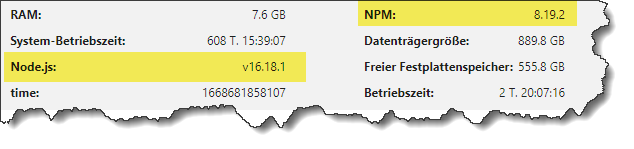
Update schadet nicht - gibt sonst wieder Mecker vom Chef ;-)
-
Danke noch mal
DNS Server in Proxmox nicht umgestellt.
es kann so einfach sein
noch eine Frage, die Version v16.17.1 ist die richtige? da ich auf dem Rasperry die v16.17.0 habe?
Spiel halt Updates regelmäßig per üblichem Vorgehen ein.
sudo apt update
sudo apt full-upgrade
Schwupps, schon ist sie Kiste auf aktuellem Stand.
-
Spiel halt Updates regelmäßig per üblichem Vorgehen ein.
sudo apt update
sudo apt full-upgrade
Schwupps, schon ist sie Kiste auf aktuellem Stand.
@thomas-braun sagte in Geöst Alexa2 Fehler nach Pi-Hole DHCP Server geändert:
sudo apt update
pi@pi-Slave1:/ $ sudo apt-get update
Hit:1 http://archive.raspberrypi.org/debian bullseye InRelease
Hit:2 http://deb.debian.org/debian bullseye InRelease
Get:3 http://security.debian.org/debian-security bullseye-security InRelease [48.4 kB]
Hit:4 http://deb.debian.org/debian bullseye-updates InRelease
Err:2 http://deb.debian.org/debian bullseye InRelease
  Splitting up /var/lib/apt/lists/deb.debian.org_debian_dists_bullseye_InRelease into data and signature failed
Hit:5 https://deb.nodesource.com/node_16.x bullseye InRelease
Get:6 http://security.debian.org/debian-security bullseye-security/main arm64 Packages [196 kB]
Get:7 http://security.debian.org/debian-security bullseye-security/main armhf Packages [197 kB]
Get:8 http://security.debian.org/debian-security bullseye-security/main Translation-en [130 kB]
Err:5 https://deb.nodesource.com/node_16.x bullseye InRelease
  Splitting up /var/lib/apt/lists/deb.nodesource.com_node%5f16.x_dists_bullseye_InRelease into data and signature failed
Fetched 571 kB in 3s (182 kB/s)
Reading package lists... Error!
W: An error occurred during the signature verification. The repository is not updated and the previous index files will be used. GPG error: http://deb.debian.org/debian bullseye InRelease: Splitting up /var/lib/apt/lists/deb.debian.org_debian_dists_bullseye_InRelease into data and signature failed
W: An error occurred during the signature verification. The repository is not updated and the previous index files will be used. GPG error: https://deb.nodesource.com/node_16.x bullseye InRelease: Splitting up /var/lib/apt/lists/deb.nodesource.com_node%5f16.x_dists_bullseye_InRelease into data and signature failed
W: Failed to fetch http://deb.debian.org/debian/dists/bullseye/InRelease  Splitting up /var/lib/apt/lists/deb.debian.org_debian_dists_bullseye_InRelease into data and signature failed
W: Failed to fetch https://deb.nodesource.com/node_16.x/dists/bullseye/InRelease  Splitting up /var/lib/apt/lists/deb.nodesource.com_node%5f16.x_dists_bullseye_InRelease into data and signature failed
W: Some index files failed to download. They have been ignored, or old ones used instead.
E: Splitting of clearsigned file /var/lib/apt/lists/deb.debian.org_debian_dists_bullseye_InRelease failed as it doesn't contain all expected parts
E: The package lists or status file could not be parsed or opened.
pi@pi-Slave1:/ $ sudo apt update
Hit:1 http://security.debian.org/debian-security bullseye-security InRelease
Hit:2 http://deb.debian.org/debian bullseye InRelease
Hit:3 http://deb.debian.org/debian bullseye-updates InRelease
Hit:4 http://archive.raspberrypi.org/debian bullseye InRelease
Err:2 http://deb.debian.org/debian bullseye InRelease
  Splitting up /var/lib/apt/lists/deb.debian.org_debian_dists_bullseye_InRelease into data and signature failed
Hit:5 https://deb.nodesource.com/node_16.x bullseye InRelease
Err:5 https://deb.nodesource.com/node_16.x bullseye InRelease
  Splitting up /var/lib/apt/lists/deb.nodesource.com_node%5f16.x_dists_bullseye_InRelease into data and signature failed
Reading package lists... Error!
W: An error occurred during the signature verification. The repository is not updated and the previous index files will be used. GPG error: http://deb.debian.org/debian bullseye InRelease: Splitting up /var/lib/apt/lists/deb.debian.org_debian_dists_bullseye_InRelease into data and signature failed
W: An error occurred during the signature verification. The repository is not updated and the previous index files will be used. GPG error: https://deb.nodesource.com/node_16.x bullseye InRelease: Splitting up /var/lib/apt/lists/deb.nodesource.com_node%5f16.x_dists_bullseye_InRelease into data and signature failed
W: Failed to fetch http://deb.debian.org/debian/dists/bullseye/InRelease  Splitting up /var/lib/apt/lists/deb.debian.org_debian_dists_bullseye_InRelease into data and signature failed
W: Failed to fetch https://deb.nodesource.com/node_16.x/dists/bullseye/InRelease  Splitting up /var/lib/apt/lists/deb.nodesource.com_node%5f16.x_dists_bullseye_InRelease into data and signature failed
W: Some index files failed to download. They have been ignored, or old ones used instead.
E: Splitting of clearsigned file /var/lib/apt/lists/deb.debian.org_debian_dists_bullseye_InRelease failed as it doesn't contain all expected parts
E: The package lists or status file could not be parsed or opened.
pi@pi-Slave1:/ $


sudo apt full-upgrade
Hit:1 http://archive.raspberrypi.org/debian bullseye InRelease
Hit:2 https://deb.nodesource.com/node_16.x bullseye InRelease
Hit:3 http://deb.debian.org/debian bullseye InRelease
Hit:4 http://deb.debian.org/debian bullseye-updates InRelease
Err:2 https://deb.nodesource.com/node_16.x bullseye InRelease
  Splitting up /var/lib/apt/lists/deb.nodesource.com_node%5f16.x_dists_bullseye_InRelease into data and signature failed
Err:3 http://deb.debian.org/debian bullseye InRelease
  Splitting up /var/lib/apt/lists/deb.debian.org_debian_dists_bullseye_InRelease into data and signature failed
Hit:5 http://security.debian.org/debian-security bullseye-security InRelease
Reading package lists... Error!
W: An error occurred during the signature verification. The repository is not updated and the previous index files will be used. GPG error: https://deb.nodesource.com/node_16.x bullseye InRelease: Splitting up /var/lib/apt/lists/deb.nodesource.com_node%5f16.x_dists_bullseye_InRelease into data and signature failed
W: An error occurred during the signature verification. The repository is not updated and the previous index files will be used. GPG error: http://deb.debian.org/debian bullseye InRelease: Splitting up /var/lib/apt/lists/deb.debian.org_debian_dists_bullseye_InRelease into data and signature failed
W: Failed to fetch http://deb.debian.org/debian/dists/bullseye/InRelease  Splitting up /var/lib/apt/lists/deb.debian.org_debian_dists_bullseye_InRelease into data and signature failed
W: Failed to fetch https://deb.nodesource.com/node_16.x/dists/bullseye/InRelease  Splitting up /var/lib/apt/lists/deb.nodesource.com_node%5f16.x_dists_bullseye_InRelease into data and signature failed
W: Some index files failed to download. They have been ignored, or old ones used instead.
E: Splitting of clearsigned file /var/lib/apt/lists/deb.debian.org_debian_dists_bullseye_InRelease failed as it doesn't contain all expected parts
E: The package lists or status file could not be parsed or opened.
Reading package lists... Error!
E: Splitting of clearsigned file /var/lib/apt/lists/deb.debian.org_debian_dists_bullseye_InRelease failed as it doesn't contain all expected parts
E: The package lists or status file could not be parsed or opened.
pi@pi-Slave1:~ $
pi@pi-Slave1:/etc/network $ sudo systemctl status dhcpcd ● dhcpcd.service - DHCP Client Daemon Loaded: loaded (/lib/systemd/system/dhcpcd.service; enabled; vendor preset> Active: active (running) since Wed 2022-11-16 17:39:53 CET; 18h ago Docs: man:dhcpcd(8) Process: 411 ExecStart=/usr/sbin/dhcpcd -b -q (code=exited, status=0/SUCCES> Main PID: 469 (dhcpcd) Tasks: 2 (limit: 779) CPU: 14.446s CGroup: /system.slice/dhcpcd.service ├─469 /usr/sbin/dhcpcd -b -q └─548 wpa_supplicant -B -c/etc/wpa_supplicant/wpa_supplicant.conf > Nov 17 11:34:35 pi-Slave1 dhcpcd[469]: eth0: Router Advertisement from fe80::3e> Nov 17 11:34:39 pi-Slave1 dhcpcd[469]: eth0: Router Advertisement from fe80::3e> Nov 17 11:34:43 pi-Slave1 dhcpcd[469]: eth0: Router Advertisement from fe80::3e> Nov 17 11:36:27 pi-Slave1 dhcpcd[469]: eth0: Router Advertisement from fe80::3e> Nov 17 11:45:36 pi-Slave1 dhcpcd[469]: eth0: Router Advertisement from fe80::3e> Nov 17 11:51:27 pi-Slave1 dhcpcd[469]: eth0: Router Advertisement from fe80::3e> Nov 17 11:52:39 pi-Slave1 dhcpcd[469]: eth0: Router Advertisement from fe80::3e> Nov 17 11:57:00 pi-Slave1 dhcpcd[469]: eth0: Router Advertisement from fe80::3e> Nov 17 12:06:24 pi-Slave1 dhcpcd[469]: eth0: Router Advertisement from fe80::3e> Nov 17 12:06:27 pi-Slave1 dhcpcd[469]: eth0: Router Advertisement from fe80::3e> lines 1-22/22 (END) ● dhcpcd.service - DHCP Client Daemon Loaded: loaded (/lib/systemd/system/dhcpcd.service; enabled; vendor preset: enabled) Active: active (running) since Wed 2022-11-16 17:39:53 CET; 18h ago Docs: man:dhcpcd(8) Process: 411 ExecStart=/usr/sbin/dhcpcd -b -q (code=exited, status=0/SUCCESS) Main PID: 469 (dhcpcd) Tasks: 2 (limit: 779) CPU: 14.446s CGroup: /system.slice/dhcpcd.service ├─469 /usr/sbin/dhcpcd -b -q └─548 wpa_supplicant -B -c/etc/wpa_supplicant/wpa_supplicant.conf -iwlan0 Nov 17 11:34:35 pi-Slave1 dhcpcd[469]: eth0: Router Advertisement from fe80::3ea6:2fff:fee0:916e Nov 17 11:34:39 pi-Slave1 dhcpcd[469]: eth0: Router Advertisement from fe80::3ea6:2fff:fee0:916e Nov 17 11:34:43 pi-Slave1 dhcpcd[469]: eth0: Router Advertisement from fe80::3ea6:2fff:fee0:916e Nov 17 11:36:27 pi-Slave1 dhcpcd[469]: eth0: Router Advertisement from fe80::3ea6:2fff:fee0:916e Nov 17 11:45:36 pi-Slave1 dhcpcd[469]: eth0: Router Advertisement from fe80::3ea6:2fff:fee0:916e Nov 17 11:51:27 pi-Slave1 dhcpcd[469]: eth0: Router Advertisement from fe80::3ea6:2fff:fee0:916e Nov 17 11:52:39 pi-Slave1 dhcpcd[469]: eth0: Router Advertisement from fe80::3ea6:2fff:fee0:916e Nov 17 11:57:00 pi-Slave1 dhcpcd[469]: eth0: Router Advertisement from fe80::3ea6:2fff:fee0:916e Nov 17 12:06:24 pi-Slave1 dhcpcd[469]: eth0: Router Advertisement from fe80::3ea6:2fff:fee0:916e Nov 17 12:06:27 pi-Slave1 dhcpcd[469]: eth0: Router Advertisement from fe80::3ea6:2fff:fee0:916e ~auf meinen Raspi, Hier stell ich doch keinen DHCP ein oder? wo schau ich das nach?
-
@thomas-braun sagte in Geöst Alexa2 Fehler nach Pi-Hole DHCP Server geändert:
sudo apt update
pi@pi-Slave1:/ $ sudo apt-get update
Hit:1 http://archive.raspberrypi.org/debian bullseye InRelease
Hit:2 http://deb.debian.org/debian bullseye InRelease
Get:3 http://security.debian.org/debian-security bullseye-security InRelease [48.4 kB]
Hit:4 http://deb.debian.org/debian bullseye-updates InRelease
Err:2 http://deb.debian.org/debian bullseye InRelease
  Splitting up /var/lib/apt/lists/deb.debian.org_debian_dists_bullseye_InRelease into data and signature failed
Hit:5 https://deb.nodesource.com/node_16.x bullseye InRelease
Get:6 http://security.debian.org/debian-security bullseye-security/main arm64 Packages [196 kB]
Get:7 http://security.debian.org/debian-security bullseye-security/main armhf Packages [197 kB]
Get:8 http://security.debian.org/debian-security bullseye-security/main Translation-en [130 kB]
Err:5 https://deb.nodesource.com/node_16.x bullseye InRelease
  Splitting up /var/lib/apt/lists/deb.nodesource.com_node%5f16.x_dists_bullseye_InRelease into data and signature failed
Fetched 571 kB in 3s (182 kB/s)
Reading package lists... Error!
W: An error occurred during the signature verification. The repository is not updated and the previous index files will be used. GPG error: http://deb.debian.org/debian bullseye InRelease: Splitting up /var/lib/apt/lists/deb.debian.org_debian_dists_bullseye_InRelease into data and signature failed
W: An error occurred during the signature verification. The repository is not updated and the previous index files will be used. GPG error: https://deb.nodesource.com/node_16.x bullseye InRelease: Splitting up /var/lib/apt/lists/deb.nodesource.com_node%5f16.x_dists_bullseye_InRelease into data and signature failed
W: Failed to fetch http://deb.debian.org/debian/dists/bullseye/InRelease  Splitting up /var/lib/apt/lists/deb.debian.org_debian_dists_bullseye_InRelease into data and signature failed
W: Failed to fetch https://deb.nodesource.com/node_16.x/dists/bullseye/InRelease  Splitting up /var/lib/apt/lists/deb.nodesource.com_node%5f16.x_dists_bullseye_InRelease into data and signature failed
W: Some index files failed to download. They have been ignored, or old ones used instead.
E: Splitting of clearsigned file /var/lib/apt/lists/deb.debian.org_debian_dists_bullseye_InRelease failed as it doesn't contain all expected parts
E: The package lists or status file could not be parsed or opened.
pi@pi-Slave1:/ $ sudo apt update
Hit:1 http://security.debian.org/debian-security bullseye-security InRelease
Hit:2 http://deb.debian.org/debian bullseye InRelease
Hit:3 http://deb.debian.org/debian bullseye-updates InRelease
Hit:4 http://archive.raspberrypi.org/debian bullseye InRelease
Err:2 http://deb.debian.org/debian bullseye InRelease
  Splitting up /var/lib/apt/lists/deb.debian.org_debian_dists_bullseye_InRelease into data and signature failed
Hit:5 https://deb.nodesource.com/node_16.x bullseye InRelease
Err:5 https://deb.nodesource.com/node_16.x bullseye InRelease
  Splitting up /var/lib/apt/lists/deb.nodesource.com_node%5f16.x_dists_bullseye_InRelease into data and signature failed
Reading package lists... Error!
W: An error occurred during the signature verification. The repository is not updated and the previous index files will be used. GPG error: http://deb.debian.org/debian bullseye InRelease: Splitting up /var/lib/apt/lists/deb.debian.org_debian_dists_bullseye_InRelease into data and signature failed
W: An error occurred during the signature verification. The repository is not updated and the previous index files will be used. GPG error: https://deb.nodesource.com/node_16.x bullseye InRelease: Splitting up /var/lib/apt/lists/deb.nodesource.com_node%5f16.x_dists_bullseye_InRelease into data and signature failed
W: Failed to fetch http://deb.debian.org/debian/dists/bullseye/InRelease  Splitting up /var/lib/apt/lists/deb.debian.org_debian_dists_bullseye_InRelease into data and signature failed
W: Failed to fetch https://deb.nodesource.com/node_16.x/dists/bullseye/InRelease  Splitting up /var/lib/apt/lists/deb.nodesource.com_node%5f16.x_dists_bullseye_InRelease into data and signature failed
W: Some index files failed to download. They have been ignored, or old ones used instead.
E: Splitting of clearsigned file /var/lib/apt/lists/deb.debian.org_debian_dists_bullseye_InRelease failed as it doesn't contain all expected parts
E: The package lists or status file could not be parsed or opened.
pi@pi-Slave1:/ $


sudo apt full-upgrade
Hit:1 http://archive.raspberrypi.org/debian bullseye InRelease
Hit:2 https://deb.nodesource.com/node_16.x bullseye InRelease
Hit:3 http://deb.debian.org/debian bullseye InRelease
Hit:4 http://deb.debian.org/debian bullseye-updates InRelease
Err:2 https://deb.nodesource.com/node_16.x bullseye InRelease
  Splitting up /var/lib/apt/lists/deb.nodesource.com_node%5f16.x_dists_bullseye_InRelease into data and signature failed
Err:3 http://deb.debian.org/debian bullseye InRelease
  Splitting up /var/lib/apt/lists/deb.debian.org_debian_dists_bullseye_InRelease into data and signature failed
Hit:5 http://security.debian.org/debian-security bullseye-security InRelease
Reading package lists... Error!
W: An error occurred during the signature verification. The repository is not updated and the previous index files will be used. GPG error: https://deb.nodesource.com/node_16.x bullseye InRelease: Splitting up /var/lib/apt/lists/deb.nodesource.com_node%5f16.x_dists_bullseye_InRelease into data and signature failed
W: An error occurred during the signature verification. The repository is not updated and the previous index files will be used. GPG error: http://deb.debian.org/debian bullseye InRelease: Splitting up /var/lib/apt/lists/deb.debian.org_debian_dists_bullseye_InRelease into data and signature failed
W: Failed to fetch http://deb.debian.org/debian/dists/bullseye/InRelease  Splitting up /var/lib/apt/lists/deb.debian.org_debian_dists_bullseye_InRelease into data and signature failed
W: Failed to fetch https://deb.nodesource.com/node_16.x/dists/bullseye/InRelease  Splitting up /var/lib/apt/lists/deb.nodesource.com_node%5f16.x_dists_bullseye_InRelease into data and signature failed
W: Some index files failed to download. They have been ignored, or old ones used instead.
E: Splitting of clearsigned file /var/lib/apt/lists/deb.debian.org_debian_dists_bullseye_InRelease failed as it doesn't contain all expected parts
E: The package lists or status file could not be parsed or opened.
Reading package lists... Error!
E: Splitting of clearsigned file /var/lib/apt/lists/deb.debian.org_debian_dists_bullseye_InRelease failed as it doesn't contain all expected parts
E: The package lists or status file could not be parsed or opened.
pi@pi-Slave1:~ $
pi@pi-Slave1:/etc/network $ sudo systemctl status dhcpcd ● dhcpcd.service - DHCP Client Daemon Loaded: loaded (/lib/systemd/system/dhcpcd.service; enabled; vendor preset> Active: active (running) since Wed 2022-11-16 17:39:53 CET; 18h ago Docs: man:dhcpcd(8) Process: 411 ExecStart=/usr/sbin/dhcpcd -b -q (code=exited, status=0/SUCCES> Main PID: 469 (dhcpcd) Tasks: 2 (limit: 779) CPU: 14.446s CGroup: /system.slice/dhcpcd.service ├─469 /usr/sbin/dhcpcd -b -q └─548 wpa_supplicant -B -c/etc/wpa_supplicant/wpa_supplicant.conf > Nov 17 11:34:35 pi-Slave1 dhcpcd[469]: eth0: Router Advertisement from fe80::3e> Nov 17 11:34:39 pi-Slave1 dhcpcd[469]: eth0: Router Advertisement from fe80::3e> Nov 17 11:34:43 pi-Slave1 dhcpcd[469]: eth0: Router Advertisement from fe80::3e> Nov 17 11:36:27 pi-Slave1 dhcpcd[469]: eth0: Router Advertisement from fe80::3e> Nov 17 11:45:36 pi-Slave1 dhcpcd[469]: eth0: Router Advertisement from fe80::3e> Nov 17 11:51:27 pi-Slave1 dhcpcd[469]: eth0: Router Advertisement from fe80::3e> Nov 17 11:52:39 pi-Slave1 dhcpcd[469]: eth0: Router Advertisement from fe80::3e> Nov 17 11:57:00 pi-Slave1 dhcpcd[469]: eth0: Router Advertisement from fe80::3e> Nov 17 12:06:24 pi-Slave1 dhcpcd[469]: eth0: Router Advertisement from fe80::3e> Nov 17 12:06:27 pi-Slave1 dhcpcd[469]: eth0: Router Advertisement from fe80::3e> lines 1-22/22 (END) ● dhcpcd.service - DHCP Client Daemon Loaded: loaded (/lib/systemd/system/dhcpcd.service; enabled; vendor preset: enabled) Active: active (running) since Wed 2022-11-16 17:39:53 CET; 18h ago Docs: man:dhcpcd(8) Process: 411 ExecStart=/usr/sbin/dhcpcd -b -q (code=exited, status=0/SUCCESS) Main PID: 469 (dhcpcd) Tasks: 2 (limit: 779) CPU: 14.446s CGroup: /system.slice/dhcpcd.service ├─469 /usr/sbin/dhcpcd -b -q └─548 wpa_supplicant -B -c/etc/wpa_supplicant/wpa_supplicant.conf -iwlan0 Nov 17 11:34:35 pi-Slave1 dhcpcd[469]: eth0: Router Advertisement from fe80::3ea6:2fff:fee0:916e Nov 17 11:34:39 pi-Slave1 dhcpcd[469]: eth0: Router Advertisement from fe80::3ea6:2fff:fee0:916e Nov 17 11:34:43 pi-Slave1 dhcpcd[469]: eth0: Router Advertisement from fe80::3ea6:2fff:fee0:916e Nov 17 11:36:27 pi-Slave1 dhcpcd[469]: eth0: Router Advertisement from fe80::3ea6:2fff:fee0:916e Nov 17 11:45:36 pi-Slave1 dhcpcd[469]: eth0: Router Advertisement from fe80::3ea6:2fff:fee0:916e Nov 17 11:51:27 pi-Slave1 dhcpcd[469]: eth0: Router Advertisement from fe80::3ea6:2fff:fee0:916e Nov 17 11:52:39 pi-Slave1 dhcpcd[469]: eth0: Router Advertisement from fe80::3ea6:2fff:fee0:916e Nov 17 11:57:00 pi-Slave1 dhcpcd[469]: eth0: Router Advertisement from fe80::3ea6:2fff:fee0:916e Nov 17 12:06:24 pi-Slave1 dhcpcd[469]: eth0: Router Advertisement from fe80::3ea6:2fff:fee0:916e Nov 17 12:06:27 pi-Slave1 dhcpcd[469]: eth0: Router Advertisement from fe80::3ea6:2fff:fee0:916e ~auf meinen Raspi, Hier stell ich doch keinen DHCP ein oder? wo schau ich das nach?
Nee, da sind deine Repos falsch. Kann das aber im Moment nicht gut nachvollziehen, da am Handy unterwegs.
-
Systemdata Bitte Ausfüllen Hardwaresystem: NUC/Pi3/etc. Arbeitsspeicher: 1GB Festplattenart: SD-Karte/SSD/HDD Betriebssystem: Ubuntu/Windows/Mac Node-Version: v16.17.1 Nodejs-Version: v16.17.1 NPM-Version: v8.15.0 Installationsart: Skript/Manuell Image genutzt: Ja/Nein Ort/Name der Imagedatei: Link Hallo Zusammen,
ich habe den Pasperry Pi auf einen Container Proxmox umgezogen.
Soweit habe ich die neue DHCP Adresse überall eingetragen.
Jetzt bekomme ich eine Fehlermeldung bei dem Alexa2 Adapter.Nun habe ich den Alexa 2 Adapter gelscht, und kann ihn nicht mehr Installieren.
marcel@iobroker:/opt/iobroker$ iob upgrade self
Server Configured backup period 120 is larger than the supported maximum of 35791 minutes. Defaulting to 120 minutes.
Server Configured backup period 120 is larger than the supported maximum of 35791 minutes. Defaulting to 120 minutes.
Host    "iobroker"       is up to date.
marcel@iobroker:/opt/iobroker$ iob start
marcel@iobroker:/opt/iobroker$
marcel@iobroker:/opt/iobroker$
marcel@iobroker:/opt/iobroker$
marcel@iobroker:/opt/iobroker$ sudo apt update
[sudo] password for marcel:
Err:1 http://security.debian.org/debian-security bullseye-security InRelease
  Temporary failure resolving 'security.debian.org'
Err:2 https://repos.influxdata.com/debian buster InRelease
  Temporary failure resolving 'repos.influxdata.com'
Err:3 https://deb.nodesource.com/node_16.x bullseye InRelease
  Temporary failure resolving 'deb.nodesource.com'
Err:4 https://dl.yarnpkg.com/debian stable InRelease
  Temporary failure resolving 'dl.yarnpkg.com'
Err:5 http://deb.debian.org/debian bullseye InRelease
  Temporary failure resolving 'deb.debian.org'
Err:6 http://deb.debian.org/debian bullseye-updates InRelease
  Temporary failure resolving 'deb.debian.org'
Reading package lists... Done
Building dependency tree... Done
Reading state information... Done
All packages are up to date.
W: Failed to fetch http://deb.debian.org/debian/dists/bullseye/InRelease  Temporary failure resolving 'deb.debian.org'
W: Failed to fetch http://deb.debian.org/debian/dists/bullseye-updates/InRelease  Temporary failure resolving 'deb.debian.org'
W: Failed to fetch http://security.debian.org/debian-security/dists/bullseye-security/InRelease  Temporary failure resolving 'security.debian.org'
W: Failed to fetch https://repos.influxdata.com/debian/dists/buster/InRelease  Temporary failure resolving 'repos.influxdata.com'
W: Failed to fetch https://deb.nodesource.com/node_16.x/dists/bullseye/InRelease  Temporary failure resolving 'deb.nodesource.com'
W: Failed to fetch https://dl.yarnpkg.com/debian/dists/stable/InRelease  Temporary failure resolving 'dl.yarnpkg.com'
W: Some index files failed to download. They have been ignored, or old ones used instead.
marcel@iobroker:/opt/iobroker$ uname -m && test -f /opt/scripts/.docker_config/.thisisdocker && echo "Docker-Installation" || echo "Kein Docker" && type -P nodejs node npm && nodejs -v && node -v && npm -v && iob -v && whoami && groups && echo $XDG_SESSION_TYPE && echo $DESKTOP_SESSION && pwd && sudo apt update &> /dev/null && sudo apt update && apt policy nodejs
x86_64
Kein Docker
/usr/bin/nodejs
/usr/bin/node
/usr/bin/npm
v16.17.1
v16.17.1
8.15.0
4.0.23
marcel
marcel sudo iobroker
tty

/opt/iobroker
Err:1 http://security.debian.org/debian-security bullseye-security InRelease
  Temporary failure resolving 'security.debian.org'
Err:2 https://repos.influxdata.com/debian buster InRelease
  Temporary failure resolving 'repos.influxdata.com'
Err:3 https://deb.nodesource.com/node_16.x bullseye InRelease
  Temporary failure resolving 'deb.nodesource.com'
Err:4 http://deb.debian.org/debian bullseye InRelease
  Temporary failure resolving 'deb.debian.org'
Err:5 https://dl.yarnpkg.com/debian stable InRelease
  Temporary failure resolving 'dl.yarnpkg.com'
Err:6 http://deb.debian.org/debian bullseye-updates InRelease
  Temporary failure resolving 'deb.debian.org'
Reading package lists... Done
Building dependency tree... Done
Reading state information... Done
All packages are up to date.
W: Failed to fetch http://deb.debian.org/debian/dists/bullseye/InRelease  Temporary failure resolving 'deb.debian.org'
W: Failed to fetch http://deb.debian.org/debian/dists/bullseye-updates/InRelease  Temporary failure resolving 'deb.debian.org'
W: Failed to fetch http://security.debian.org/debian-security/dists/bullseye-security/InRelease  Temporary failure resolving 'security.debian.org'
W: Failed to fetch https://repos.influxdata.com/debian/dists/buster/InRelease  Temporary failure resolving 'repos.influxdata.com'
W: Failed to fetch https://deb.nodesource.com/node_16.x/dists/bullseye/InRelease  Temporary failure resolving 'deb.nodesource.com'
W: Failed to fetch https://dl.yarnpkg.com/debian/dists/stable/InRelease  Temporary failure resolving 'dl.yarnpkg.com'
W: Some index files failed to download. They have been ignored, or old ones used instead.
nodejs:
  Installed: 16.17.1-deb-1nodesource1
  Candidate: 16.17.1-deb-1nodesource1
  Version table:
 *** 16.17.1-deb-1nodesource1 500
        500 https://deb.nodesource.com/node_16.x bullseye/main amd64 Packages
        100 /var/lib/dpkg/status
     12.22.12~dfsg-1~deb11u1 500
        500 http://security.debian.org/debian-security bullseye-security/main amd64 Packages
     12.22.5~dfsg-2~11u1 500
        500 http://deb.debian.org/debian bullseye/main amd64 Packages
marcel@iobroker:/opt/iobroker$
folgedne Fehlermelung erhalte ich im iOBroker bei der Installation:
$ iobroker add alexa2 auto --host iobroker --debug

NPM version: 8.15.0

Installing iobroker.alexa2@3.21.0... (System call)

**npm ERR! code ETARGET

host.iobroker Cannot install iobroker.alexa2@3.21.0: 1

ERROR: Process exited with code 25**
Ich hoffe ihr könnt mir helfen.
sudo rm /var/lib/apt/lists/* dann ging es
-
sudo rm /var/lib/apt/lists/* dann ging es
-
@thomas-braun sagte in Geöst Alexa2 Fehler nach Pi-Hole DHCP Server geändert:
sudo apt update
bei Rasperry Pi-Slave
pi@pi-Slave1:~ $ sudo apt update
Hit:1 http://archive.raspberrypi.org/debian bullseye InRelease
Hit:2 https://deb.nodesource.com/node_16.x bullseye InRelease
Hit:3 http://security.debian.org/debian-security bullseye-security InRelease
Hit:4 http://deb.debian.org/debian bullseye InRelease
Hit:5 http://deb.debian.org/debian bullseye-updates InRelease
Reading package lists... Done
Building dependency tree... Done
Reading state information... Done
All packages are up to date.
pi@pi-Slave1:~ $ df -h
Filesystem      Size  Used Avail Use% Mounted on
/dev/root        29G  4.0G   24G  15% /
devtmpfs        325M     0  325M   0% /dev
tmpfs           455M     0  455M   0% /dev/shm
tmpfs           182M  1.1M  181M   1% /run
tmpfs           5.0M  4.0K  5.0M   1% /run/lock
/dev/mmcblk0p1  255M   31M  225M  12% /boot
tmpfs            91M   20K   91M   1% /run/user/1000
bei Rasperry pi-Test
pi@pi-Test:~ $ sudo apt update
OK:1 http://archive.raspberrypi.org/debian buster InRelease
OK:2 http://raspbian.raspberrypi.org/raspbian buster InRelease
OK:3 https://deb.nodesource.com/node_16.x bullseye InRelease
Paketlisten werden gelesen... Fertig
Abhängigkeitsbaum wird aufgebaut.
Statusinformationen werden eingelesen.... Fertig
Alle Pakete sind aktuell.
pi@pi-Test:~ $ df -h
Dateisystem    Größe Benutzt Verf. Verw% Eingehängt auf
/dev/root        30G    4,5G   24G   17% /
devtmpfs        430M       0  430M    0% /dev
tmpfs           462M       0  462M    0% /dev/shm
tmpfs           462M     12M  450M    3% /run
tmpfs           5,0M    4,0K  5,0M    1% /run/lock
tmpfs           462M       0  462M    0% /sys/fs/cgroup
/dev/mmcblk0p1  253M     49M  204M   20% /boot
tmpfs            93M       0   93M    0% /run/user/1000
pi@pi-Test:~ $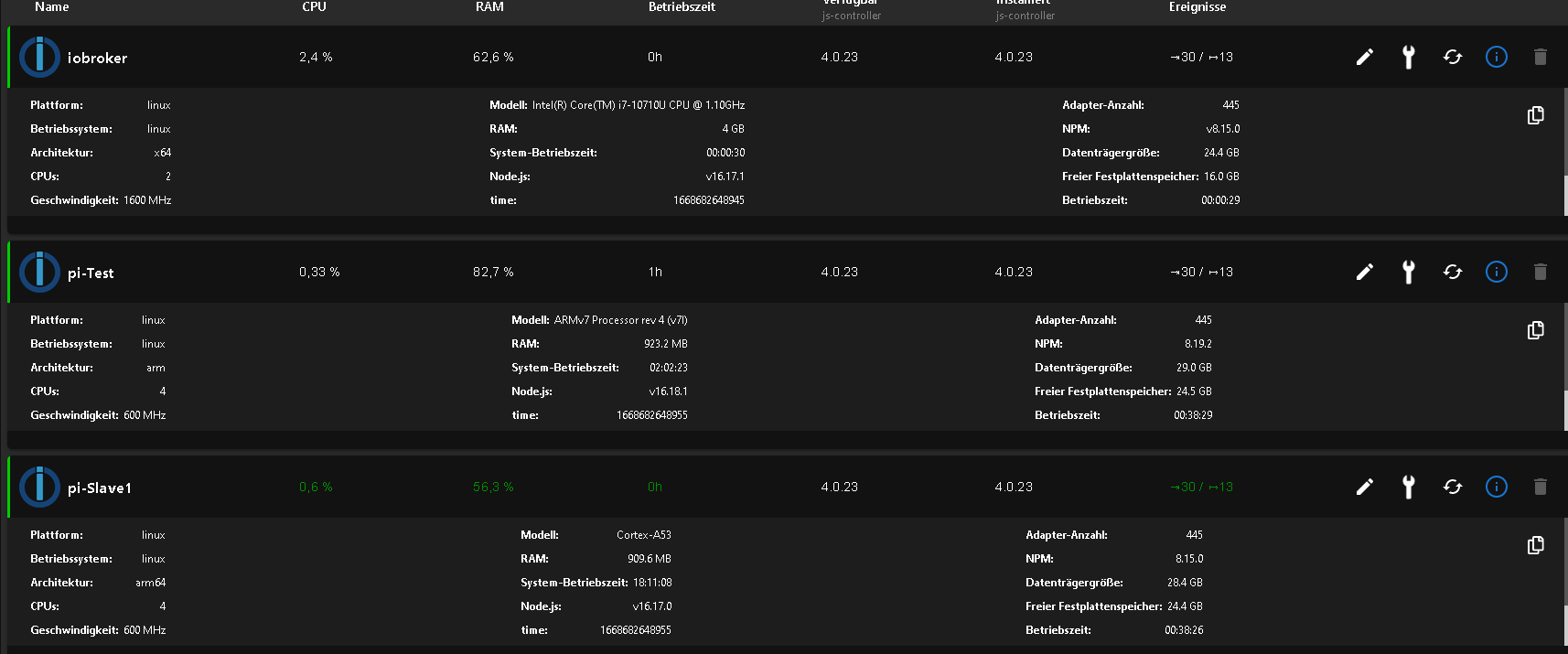
-
@thomas-braun sagte in Geöst Alexa2 Fehler nach Pi-Hole DHCP Server geändert:
sudo apt update
bei Rasperry Pi-Slave
pi@pi-Slave1:~ $ sudo apt update
Hit:1 http://archive.raspberrypi.org/debian bullseye InRelease
Hit:2 https://deb.nodesource.com/node_16.x bullseye InRelease
Hit:3 http://security.debian.org/debian-security bullseye-security InRelease
Hit:4 http://deb.debian.org/debian bullseye InRelease
Hit:5 http://deb.debian.org/debian bullseye-updates InRelease
Reading package lists... Done
Building dependency tree... Done
Reading state information... Done
All packages are up to date.
pi@pi-Slave1:~ $ df -h
Filesystem      Size  Used Avail Use% Mounted on
/dev/root        29G  4.0G   24G  15% /
devtmpfs        325M     0  325M   0% /dev
tmpfs           455M     0  455M   0% /dev/shm
tmpfs           182M  1.1M  181M   1% /run
tmpfs           5.0M  4.0K  5.0M   1% /run/lock
/dev/mmcblk0p1  255M   31M  225M  12% /boot
tmpfs            91M   20K   91M   1% /run/user/1000
bei Rasperry pi-Test
pi@pi-Test:~ $ sudo apt update OK:1 http://archive.raspberrypi.org/debian buster InRelease OK:2 http://raspbian.raspberrypi.org/raspbian buster InRelease OK:3 https://deb.nodesource.com/node_16.x bullseye InRelease Paketlisten werden gelesen... Fertig Abhängigkeitsbaum wird aufgebaut. Statusinformationen werden eingelesen.... Fertig Alle Pakete sind aktuell. pi@pi-Test:~ $ df -h Dateisystem Größe Benutzt Verf. Verw% Eingehängt auf /dev/root 30G 4,5G 24G 17% / devtmpfs 430M 0 430M 0% /dev tmpfs 462M 0 462M 0% /dev/shm tmpfs 462M 12M 450M 3% /run tmpfs 5,0M 4,0K 5,0M 1% /run/lock tmpfs 462M 0 462M 0% /sys/fs/cgroup /dev/mmcblk0p1 253M 49M 204M 20% /boot tmpfs 93M 0 93M 0% /run/user/1000 pi@pi-Test:~ $@marcel-drzal sagte in Geöst Alexa2 Fehler nach Pi-Hole DHCP Server geändert:
Aufpi-Teststimmt die nodesource-Quelle nicht, wenn da als OS buster läuft. Die release names sollen übereinstimmen.Und auf dem dritten System schaut es wie aus?
-
Nee, da sind deine Repos falsch. Kann das aber im Moment nicht gut nachvollziehen, da am Handy unterwegs.
sudo nano /etc/apt/sources.list
vom Pik-Slave
deb http://deb.debian.org/debian bullseye main contrib non-free
deb http://security.debian.org/debian-security bullseye-security main contrib non-free
deb http://deb.debian.org/debian bullseye-updates main contrib non-free
# Uncomment deb-src lines below then 'apt-get update' to enable 'apt-get source'
#deb-src http://deb.debian.org/debian bullseye main contrib non-free
#deb-src http://security.debian.org/debian-security bullseye-security main contrib non-free
#deb-src http://deb.debian.org/debian bullseye-updates main contrib non-free
vom Pi-Test
deb http://raspbian.raspberrypi.org/raspbian/ buster main contrib non-free rpi # Uncomment line below then 'apt-get update' to enable 'apt-get source' #deb-src http://raspbian.raspberrypi.org/raspbian/ buster main contrib non-free rpi -
sudo nano /etc/apt/sources.list
vom Pik-Slave
deb http://deb.debian.org/debian bullseye main contrib non-free
deb http://security.debian.org/debian-security bullseye-security main contrib non-free
deb http://deb.debian.org/debian bullseye-updates main contrib non-free
# Uncomment deb-src lines below then 'apt-get update' to enable 'apt-get source'
#deb-src http://deb.debian.org/debian bullseye main contrib non-free
#deb-src http://security.debian.org/debian-security bullseye-security main contrib non-free
#deb-src http://deb.debian.org/debian bullseye-updates main contrib non-free
vom Pi-Test
deb http://raspbian.raspberrypi.org/raspbian/ buster main contrib non-free rpi # Uncomment line below then 'apt-get update' to enable 'apt-get source' #deb-src http://raspbian.raspberrypi.org/raspbian/ buster main contrib non-free rpi@marcel-drzal
Was ist das für eine Datei? -
@marcel-drzal
Was ist das für eine Datei?sudo nano /etc/apt/sources.list -
@marcel-drzal
Was ist das für eine Datei?@thomas-braun Gibt es einen unterschied zwischen
apt
apt-get? -
sudo nano /etc/apt/sources.list -
@thomas-braun Gibt es einen unterschied zwischen
apt
apt-get?@marcel-drzal sagte in Geöst Alexa2 Fehler nach Pi-Hole DHCP Server geändert:
Gibt es einen unterschied zwischen
apt
apt-get?Ja, gibt es.
aptist neuer und tickt etwas anders alsapt-get.
Das ist wiederum stabiler und für skripte besser geeignet. -
@thomas-braun sagte in Geöst Alexa2 Fehler nach Pi-Hole DHCP Server geändert:
/etc/apt/sources.list.d/nodesource.list auf pi-Test?
Pi Test
#deb [signed-by=/usr/share/keyrings/nodesource.gpg] https://deb.nodesource.com/node_14.x buster main #deb-src [signed-by=/usr/share/keyrings/nodesource.gpg] https://deb.nodesource.com/node_14.x buster$ deb [signed-by=/usr/share/keyrings/nodesource.gpg] https://deb.nodesource.com/node_16.x bullseye ma$ deb-src [signed-by=/usr/share/keyrings/nodesource.gpg] https://deb.nodesource.com/node_16.x bullsey$ -
@thomas-braun sagte in Geöst Alexa2 Fehler nach Pi-Hole DHCP Server geändert:
/etc/apt/sources.list.d/nodesource.list auf pi-Test?
Pi Test
#deb [signed-by=/usr/share/keyrings/nodesource.gpg] https://deb.nodesource.com/node_14.x buster main #deb-src [signed-by=/usr/share/keyrings/nodesource.gpg] https://deb.nodesource.com/node_14.x buster$ deb [signed-by=/usr/share/keyrings/nodesource.gpg] https://deb.nodesource.com/node_16.x bullseye ma$ deb-src [signed-by=/usr/share/keyrings/nodesource.gpg] https://deb.nodesource.com/node_16.x bullsey$Auf dem Host läuft aber
buster
Dann muss auch in die .list-Files buster rein.Die Datei ist offenbar mal falsch von Hand editiert worden. Die auskommentierten Zeilen zu nodejs@14 sind richtig.
-
@marcel-drzal
Was ist das für eine Datei?sudo nano /etc/apt/sources.list


Hey! Du scheinst an dieser Unterhaltung interessiert zu sein, hast aber noch kein Konto.
Hast du es satt, bei jedem Besuch durch die gleichen Beiträge zu scrollen? Wenn du dich für ein Konto anmeldest, kommst du immer genau dorthin zurück, wo du zuvor warst, und kannst dich über neue Antworten benachrichtigen lassen (entweder per E-Mail oder Push-Benachrichtigung). Du kannst auch Lesezeichen speichern und Beiträge positiv bewerten, um anderen Community-Mitgliedern deine Wertschätzung zu zeigen.
Mit deinem Input könnte dieser Beitrag noch besser werden 💗
Registrieren AnmeldenSupport us
398
Online33.0k
Benutzer83.6k
Themen1.3m
Beiträge