



Skip to content
  • Home
  • Aktuell
  • Tags
  • 0 Ungelesen 0
  • Kategorien
  • Unreplied
  • Beliebt
  • GitHub
  • Docu
  • Hilfe
Skins
  • Light
  • Brite
  • Cerulean
  • Cosmo
  • Flatly
  • Journal
  • Litera
  • Lumen
  • Lux
  • Materia
  • Minty
  • Morph
  • Pulse
  • Sandstone
  • Simplex
  • Sketchy
  • Spacelab
  • United
  • Yeti
  • Zephyr
  • Dark
  • Cyborg
  • Darkly
  • Quartz
  • Slate
  • Solar
  • Superhero
  • Vapor

  • Standard: (Kein Skin)
  • Kein Skin
Einklappen
ioBroker Logo

Community Forum

donate donate
  1. ioBroker Community Home
  2. Deutsch
  3. ioBroker Allgemein
  4. Innogy Adapter im lokalen Netzt bleibt Gelb

NEWS

  • Neuer Blogbeitrag: Monatsrückblick - Dezember 2025 🎄
    BluefoxB
    Bluefox
    11
    1
    511

  • Weihnachtsangebot 2025! 🎄
    BluefoxB
    Bluefox
    24
    1
    1.7k

  • UPDATE 31.10.: Amazon Alexa - ioBroker Skill läuft aus ?
    apollon77A
    apollon77
    48
    3
    9.6k

Innogy Adapter im lokalen Netzt bleibt Gelb

Geplant Angeheftet Gesperrt Verschoben ioBroker Allgemein
118 Beiträge 5 Kommentatoren 12.6k Aufrufe 4 Watching
  • Älteste zuerst
  • Neuste zuerst
  • Meiste Stimmen
Antworten
  • In einem neuen Thema antworten
Anmelden zum Antworten
Dieses Thema wurde gelöscht. Nur Nutzer mit entsprechenden Rechten können es sehen.
  • S scout1978

    @thomas-braun
    Ja Entschuldigung. Möchtest Du das Ergebnis aus der Konsole? Was sind CodeTags?

    Thomas BraunT Online
    Thomas BraunT Online
    Thomas Braun
    Most Active
    schrieb am zuletzt editiert von
    #7

    @scout1978 sagte in Innogy Adapter im lokalen Netzt bleibt Gelb:

    Möchtest Du das Ergebnis aus der Konsole? Was sind CodeTags?

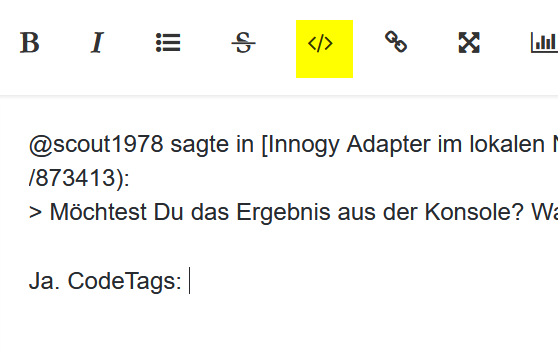
    Ja. CodeTags:
    42b5b5af-6423-4f3a-973a-e57612666ae5-grafik.png

    Text zwischen die Steuerzeichen kopieren.

    Linux-Werkzeugkasten:
    https://forum.iobroker.net/topic/42952/der-kleine-iobroker-linux-werkzeugkasten
    NodeJS Fixer Skript:
    https://forum.iobroker.net/topic/68035/iob-node-fix-skript
    iob_diag: curl -sLf -o diag.sh https://iobroker.net/diag.sh && bash diag.sh

    S 1 Antwort Letzte Antwort
    0
    • Thomas BraunT Thomas Braun

      @scout1978 sagte in Innogy Adapter im lokalen Netzt bleibt Gelb:

      Möchtest Du das Ergebnis aus der Konsole? Was sind CodeTags?

      Ja. CodeTags:
      42b5b5af-6423-4f3a-973a-e57612666ae5-grafik.png

      Text zwischen die Steuerzeichen kopieren.

      S Offline
      S Offline
      scout1978
      schrieb am zuletzt editiert von Homoran
      #8

      @thomas-braun

      uname -m && type -P nodejs node npm && nodejs -v && node -v && npm -v && iob -v                                       && whoami && groups && pwd && sudo apt update &> /dev/null && sudo apt update &&                                       apt policy nodejs
      aarch64
      /usr/bin/nodejs
      /usr/bin/node
      /usr/bin/npm
      v16.17.0
      v16.17.0
      8.15.0
      4.0.23
      pi
      pi adm dialout cdrom sudo audio video plugdev games users input render netdev gp                                      io i2c spi iobroker
      /home/pi
      Hit:1 http://security.debian.org/debian-security bullseye-security InRelease
      Hit:2 http://deb.debian.org/debian bullseye-updates InRelease
      Hit:3 https://phoscon.de/apt/deconz bullseye InRelease
      Hit:4 http://archive.raspberrypi.org/debian bullseye InRelease
      Hit:5 https://repos.influxdata.com/debian bullseye InRelease
      Hit:6 https://deb.nodesource.com/node_16.x bullseye InRelease
      Hit:7 https://packages.grafana.com/oss/deb stable InRelease
      Reading package lists... Done
      Building dependency tree... Done
      Reading state information... Done
      13 packages can be upgraded. Run 'apt list --upgradable' to see them.
      W: Target Packages (main/binary-arm64/Packages) is configured multiple times in                                       /etc/apt/sources.list.d/grafana.list:1 and /etc/apt/sources.list.d/grafana.list:                                      2
      W: Target Packages (main/binary-armhf/Packages) is configured multiple times in                                       /etc/apt/sources.list.d/grafana.list:1 and /etc/apt/sources.list.d/grafana.list:                                      2
      W: Target Packages (main/binary-all/Packages) is configured multiple times in /e                                      tc/apt/sources.list.d/grafana.list:1 and /etc/apt/sources.list.d/grafana.list:2
      W: Target Translations (main/i18n/Translation-en_GB) is configured multiple time                                      s in /etc/apt/sources.list.d/grafana.list:1 and /etc/apt/sources.list.d/grafana.                                      list:2
      W: Target Translations (main/i18n/Translation-en) is configured multiple times i                                      n /etc/apt/sources.list.d/grafana.list:1 and /etc/apt/sources.list.d/grafana.lis                                      t:2
      W: Target Packages (main/binary-arm64/Packages) is configured multiple times in                                       /etc/apt/sources.list.d/grafana.list:1 and /etc/apt/sources.list.d/grafana.list:                                      3
      W: Target Packages (main/binary-armhf/Packages) is configured multiple times in                                       /etc/apt/sources.list.d/grafana.list:1 and /etc/apt/sources.list.d/grafana.list:                                      3
      W: Target Packages (main/binary-all/Packages) is configured multiple times in /e                                      tc/apt/sources.list.d/grafana.list:1 and /etc/apt/sources.list.d/grafana.list:3
      W: Target Translations (main/i18n/Translation-en_GB) is configured multiple time                                      s in /etc/apt/sources.list.d/grafana.list:1 and /etc/apt/sources.list.d/grafana.                                      list:3
      W: Target Translations (main/i18n/Translation-en) is configured multiple times i                                      n /etc/apt/sources.list.d/grafana.list:1 and /etc/apt/sources.list.d/grafana.lis                                      t:3
      W: Target Packages (main/binary-arm64/Packages) is configured multiple times in                                       /etc/apt/sources.list.d/grafana.list:1 and /etc/apt/sources.list.d/grafana.list:                                      2
      W: Target Packages (main/binary-armhf/Packages) is configured multiple times in                                       /etc/apt/sources.list.d/grafana.list:1 and /etc/apt/sources.list.d/grafana.list:                                      2
      W: Target Packages (main/binary-all/Packages) is configured multiple times in /e                                      tc/apt/sources.list.d/grafana.list:1 and /etc/apt/sources.list.d/grafana.list:2
      W: Target Translations (main/i18n/Translation-en_GB) is configured multiple time                                      s in /etc/apt/sources.list.d/grafana.list:1 and /etc/apt/sources.list.d/grafana.                                      list:2
      W: Target Translations (main/i18n/Translation-en) is configured multiple times i                                      n /etc/apt/sources.list.d/grafana.list:1 and /etc/apt/sources.list.d/grafana.lis                                      t:2
      W: Target Packages (main/binary-arm64/Packages) is configured multiple times in                                       /etc/apt/sources.list.d/grafana.list:1 and /etc/apt/sources.list.d/grafana.list:                                      3
      W: Target Packages (main/binary-armhf/Packages) is configured multiple times in                                       /etc/apt/sources.list.d/grafana.list:1 and /etc/apt/sources.list.d/grafana.list:                                      3
      W: Target Packages (main/binary-all/Packages) is configured multiple times in /e                                      tc/apt/sources.list.d/grafana.list:1 and /etc/apt/sources.list.d/grafana.list:3
      W: Target Translations (main/i18n/Translation-en_GB) is configured multiple time                                      s in /etc/apt/sources.list.d/grafana.list:1 and /etc/apt/sources.list.d/grafana.                                      list:3
      W: Target Translations (main/i18n/Translation-en) is configured multiple times i                                      n /etc/apt/sources.list.d/grafana.list:1 and /etc/apt/sources.list.d/grafana.lis                                      t:3
      nodejs:
       Installed: 16.17.0-deb-1nodesource1
       Candidate: 16.17.1-deb-1nodesource1
       Version table:
          16.17.1-deb-1nodesource1 500
             500 https://deb.nodesource.com/node_16.x bullseye/main arm64 Packages
      *** 16.17.0-deb-1nodesource1 100
             100 /var/lib/dpkg/status
          12.22.12~dfsg-1~deb11u1 500
             500 http://security.debian.org/debian-security bullseye-security/main ar                                      m64 Packages
      pi@raspberrypi-Iobroker:~ $ uname -m && type -P nodejs node npm && nodejs -v && node -v && npm -v && iob -v                                       && whoami && groups && pwd && sudo apt update &> /dev/null && sudo apt update &&                                       apt policy nodejs
      aarch64
      /usr/bin/nodejs
      /usr/bin/node
      /usr/bin/npm
      v16.17.0
      v16.17.0
      8.15.0
      4.0.23
      pi
      pi adm dialout cdrom sudo audio video plugdev games users input render netdev gp                                      io i2c spi iobroker
      /home/pi
      Hit:1 http://security.debian.org/debian-security bullseye-security InRelease
      Hit:2 http://deb.debian.org/debian bullseye-updates InRelease
      Hit:3 https://phoscon.de/apt/deconz bullseye InRelease
      Hit:4 http://archive.raspberrypi.org/debian bullseye InRelease
      Hit:5 https://repos.influxdata.com/debian bullseye InRelease
      Hit:6 https://deb.nodesource.com/node_16.x bullseye InRelease
      Hit:7 https://packages.grafana.com/oss/deb stable InRelease
      Reading package lists... Done
      Building dependency tree... Done
      Reading state information... Done
      13 packages can be upgraded. Run 'apt list --upgradable' to see them.
      W: Target Packages (main/binary-arm64/Packages) is configured multiple times in                                       /etc/apt/sources.list.d/grafana.list:1 and /etc/apt/sources.list.d/grafana.list:                                      2
      W: Target Packages (main/binary-armhf/Packages) is configured multiple times in                                       /etc/apt/sources.list.d/grafana.list:1 and /etc/apt/sources.list.d/grafana.list:                                      ^C@raspberrypi-Iobroker:~ $.debian.org/debian-security bullseye-security/main ar
      pi@raspberrypi-Iobroker:~ $
      
      
      Thomas BraunT 1 Antwort Letzte Antwort
      0
      • S scout1978

        @thomas-braun

        uname -m && type -P nodejs node npm && nodejs -v && node -v && npm -v && iob -v                                       && whoami && groups && pwd && sudo apt update &> /dev/null && sudo apt update &&                                       apt policy nodejs
        aarch64
        /usr/bin/nodejs
        /usr/bin/node
        /usr/bin/npm
        v16.17.0
        v16.17.0
        8.15.0
        4.0.23
        pi
        pi adm dialout cdrom sudo audio video plugdev games users input render netdev gp                                      io i2c spi iobroker
        /home/pi
        Hit:1 http://security.debian.org/debian-security bullseye-security InRelease
        Hit:2 http://deb.debian.org/debian bullseye-updates InRelease
        Hit:3 https://phoscon.de/apt/deconz bullseye InRelease
        Hit:4 http://archive.raspberrypi.org/debian bullseye InRelease
        Hit:5 https://repos.influxdata.com/debian bullseye InRelease
        Hit:6 https://deb.nodesource.com/node_16.x bullseye InRelease
        Hit:7 https://packages.grafana.com/oss/deb stable InRelease
        Reading package lists... Done
        Building dependency tree... Done
        Reading state information... Done
        13 packages can be upgraded. Run 'apt list --upgradable' to see them.
        W: Target Packages (main/binary-arm64/Packages) is configured multiple times in                                       /etc/apt/sources.list.d/grafana.list:1 and /etc/apt/sources.list.d/grafana.list:                                      2
        W: Target Packages (main/binary-armhf/Packages) is configured multiple times in                                       /etc/apt/sources.list.d/grafana.list:1 and /etc/apt/sources.list.d/grafana.list:                                      2
        W: Target Packages (main/binary-all/Packages) is configured multiple times in /e                                      tc/apt/sources.list.d/grafana.list:1 and /etc/apt/sources.list.d/grafana.list:2
        W: Target Translations (main/i18n/Translation-en_GB) is configured multiple time                                      s in /etc/apt/sources.list.d/grafana.list:1 and /etc/apt/sources.list.d/grafana.                                      list:2
        W: Target Translations (main/i18n/Translation-en) is configured multiple times i                                      n /etc/apt/sources.list.d/grafana.list:1 and /etc/apt/sources.list.d/grafana.lis                                      t:2
        W: Target Packages (main/binary-arm64/Packages) is configured multiple times in                                       /etc/apt/sources.list.d/grafana.list:1 and /etc/apt/sources.list.d/grafana.list:                                      3
        W: Target Packages (main/binary-armhf/Packages) is configured multiple times in                                       /etc/apt/sources.list.d/grafana.list:1 and /etc/apt/sources.list.d/grafana.list:                                      3
        W: Target Packages (main/binary-all/Packages) is configured multiple times in /e                                      tc/apt/sources.list.d/grafana.list:1 and /etc/apt/sources.list.d/grafana.list:3
        W: Target Translations (main/i18n/Translation-en_GB) is configured multiple time                                      s in /etc/apt/sources.list.d/grafana.list:1 and /etc/apt/sources.list.d/grafana.                                      list:3
        W: Target Translations (main/i18n/Translation-en) is configured multiple times i                                      n /etc/apt/sources.list.d/grafana.list:1 and /etc/apt/sources.list.d/grafana.lis                                      t:3
        W: Target Packages (main/binary-arm64/Packages) is configured multiple times in                                       /etc/apt/sources.list.d/grafana.list:1 and /etc/apt/sources.list.d/grafana.list:                                      2
        W: Target Packages (main/binary-armhf/Packages) is configured multiple times in                                       /etc/apt/sources.list.d/grafana.list:1 and /etc/apt/sources.list.d/grafana.list:                                      2
        W: Target Packages (main/binary-all/Packages) is configured multiple times in /e                                      tc/apt/sources.list.d/grafana.list:1 and /etc/apt/sources.list.d/grafana.list:2
        W: Target Translations (main/i18n/Translation-en_GB) is configured multiple time                                      s in /etc/apt/sources.list.d/grafana.list:1 and /etc/apt/sources.list.d/grafana.                                      list:2
        W: Target Translations (main/i18n/Translation-en) is configured multiple times i                                      n /etc/apt/sources.list.d/grafana.list:1 and /etc/apt/sources.list.d/grafana.lis                                      t:2
        W: Target Packages (main/binary-arm64/Packages) is configured multiple times in                                       /etc/apt/sources.list.d/grafana.list:1 and /etc/apt/sources.list.d/grafana.list:                                      3
        W: Target Packages (main/binary-armhf/Packages) is configured multiple times in                                       /etc/apt/sources.list.d/grafana.list:1 and /etc/apt/sources.list.d/grafana.list:                                      3
        W: Target Packages (main/binary-all/Packages) is configured multiple times in /e                                      tc/apt/sources.list.d/grafana.list:1 and /etc/apt/sources.list.d/grafana.list:3
        W: Target Translations (main/i18n/Translation-en_GB) is configured multiple time                                      s in /etc/apt/sources.list.d/grafana.list:1 and /etc/apt/sources.list.d/grafana.                                      list:3
        W: Target Translations (main/i18n/Translation-en) is configured multiple times i                                      n /etc/apt/sources.list.d/grafana.list:1 and /etc/apt/sources.list.d/grafana.lis                                      t:3
        nodejs:
         Installed: 16.17.0-deb-1nodesource1
         Candidate: 16.17.1-deb-1nodesource1
         Version table:
            16.17.1-deb-1nodesource1 500
               500 https://deb.nodesource.com/node_16.x bullseye/main arm64 Packages
        *** 16.17.0-deb-1nodesource1 100
               100 /var/lib/dpkg/status
            12.22.12~dfsg-1~deb11u1 500
               500 http://security.debian.org/debian-security bullseye-security/main ar                                      m64 Packages
        pi@raspberrypi-Iobroker:~ $ uname -m && type -P nodejs node npm && nodejs -v && node -v && npm -v && iob -v                                       && whoami && groups && pwd && sudo apt update &> /dev/null && sudo apt update &&                                       apt policy nodejs
        aarch64
        /usr/bin/nodejs
        /usr/bin/node
        /usr/bin/npm
        v16.17.0
        v16.17.0
        8.15.0
        4.0.23
        pi
        pi adm dialout cdrom sudo audio video plugdev games users input render netdev gp                                      io i2c spi iobroker
        /home/pi
        Hit:1 http://security.debian.org/debian-security bullseye-security InRelease
        Hit:2 http://deb.debian.org/debian bullseye-updates InRelease
        Hit:3 https://phoscon.de/apt/deconz bullseye InRelease
        Hit:4 http://archive.raspberrypi.org/debian bullseye InRelease
        Hit:5 https://repos.influxdata.com/debian bullseye InRelease
        Hit:6 https://deb.nodesource.com/node_16.x bullseye InRelease
        Hit:7 https://packages.grafana.com/oss/deb stable InRelease
        Reading package lists... Done
        Building dependency tree... Done
        Reading state information... Done
        13 packages can be upgraded. Run 'apt list --upgradable' to see them.
        W: Target Packages (main/binary-arm64/Packages) is configured multiple times in                                       /etc/apt/sources.list.d/grafana.list:1 and /etc/apt/sources.list.d/grafana.list:                                      2
        W: Target Packages (main/binary-armhf/Packages) is configured multiple times in                                       /etc/apt/sources.list.d/grafana.list:1 and /etc/apt/sources.list.d/grafana.list:                                      ^C@raspberrypi-Iobroker:~ $.debian.org/debian-security bullseye-security/main ar
        pi@raspberrypi-Iobroker:~ $
        
        
        Thomas BraunT Online
        Thomas BraunT Online
        Thomas Braun
        Most Active
        schrieb am zuletzt editiert von Thomas Braun
        #9

        @scout1978 sagte in Innogy Adapter im lokalen Netzt bleibt Gelb:

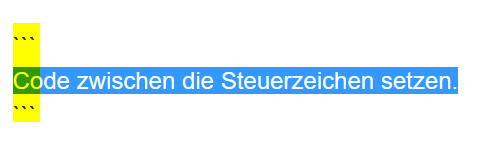
        OT, aber lösch die Doublette in der Datei /etc/apt/sources.list.d/grafana.list
        3e3957d5-5884-4dfa-b9fd-6ca27262f41b-grafik.png ```

        Linux-Werkzeugkasten:
        https://forum.iobroker.net/topic/42952/der-kleine-iobroker-linux-werkzeugkasten
        NodeJS Fixer Skript:
        https://forum.iobroker.net/topic/68035/iob-node-fix-skript
        iob_diag: curl -sLf -o diag.sh https://iobroker.net/diag.sh && bash diag.sh

        S 1 Antwort Letzte Antwort
        0
        • Thomas BraunT Thomas Braun

          @scout1978 sagte in Innogy Adapter im lokalen Netzt bleibt Gelb:

          OT, aber lösch die Doublette in der Datei /etc/apt/sources.list.d/grafana.list

          3e3957d5-5884-4dfa-b9fd-6ca27262f41b-grafik.png ```

          S Offline
          S Offline
          scout1978
          schrieb am zuletzt editiert von
          #10

          @thomas-braun
          Muss die Doublette gleich raus? Das wird dann für mich nämlich schon die nächte Baustelle. Bin da nicht so ganz firm.Brauchst du den Code nochmals in den Klammern?

          Thomas BraunT HomoranH 2 Antworten Letzte Antwort
          0
          • S scout1978

            @thomas-braun
            Muss die Doublette gleich raus? Das wird dann für mich nämlich schon die nächte Baustelle. Bin da nicht so ganz firm.Brauchst du den Code nochmals in den Klammern?

            Thomas BraunT Online
            Thomas BraunT Online
            Thomas Braun
            Most Active
            schrieb am zuletzt editiert von
            #11

            @scout1978

            Lösch die Zeile halt einfach raus.
            Mit nano z.B.

            sudo nano  /etc/apt/sources.list.d/grafana.list
            

            Linux-Werkzeugkasten:
            https://forum.iobroker.net/topic/42952/der-kleine-iobroker-linux-werkzeugkasten
            NodeJS Fixer Skript:
            https://forum.iobroker.net/topic/68035/iob-node-fix-skript
            iob_diag: curl -sLf -o diag.sh https://iobroker.net/diag.sh && bash diag.sh

            S 1 Antwort Letzte Antwort
            0
            • Thomas BraunT Thomas Braun

              @scout1978

              Lösch die Zeile halt einfach raus.
              Mit nano z.B.

              sudo nano  /etc/apt/sources.list.d/grafana.list
              
              S Offline
              S Offline
              scout1978
              schrieb am zuletzt editiert von
              #12

              @thomas-braun said in Innogy Adapter im lokalen Netzt bleibt Gelb:

              sudo nano /etc/apt/sources.list.d/grafana.list

              ok hat geklappt

              Thomas BraunT 1 Antwort Letzte Antwort
              0
              • S scout1978

                @thomas-braun said in Innogy Adapter im lokalen Netzt bleibt Gelb:

                sudo nano /etc/apt/sources.list.d/grafana.list

                ok hat geklappt

                Thomas BraunT Online
                Thomas BraunT Online
                Thomas Braun
                Most Active
                schrieb am zuletzt editiert von
                #13

                @scout1978

                Dann patch jetzt dein System durch, inkl. upgrade von nodejs.

                iob stop
                sudo apt update
                sudo apt full-upgrade
                sudo reboot
                

                Linux-Werkzeugkasten:
                https://forum.iobroker.net/topic/42952/der-kleine-iobroker-linux-werkzeugkasten
                NodeJS Fixer Skript:
                https://forum.iobroker.net/topic/68035/iob-node-fix-skript
                iob_diag: curl -sLf -o diag.sh https://iobroker.net/diag.sh && bash diag.sh

                1 Antwort Letzte Antwort
                0
                • S scout1978

                  @thomas-braun
                  Muss die Doublette gleich raus? Das wird dann für mich nämlich schon die nächte Baustelle. Bin da nicht so ganz firm.Brauchst du den Code nochmals in den Klammern?

                  HomoranH Nicht stören
                  HomoranH Nicht stören
                  Homoran
                  Global Moderator Administrators
                  schrieb am zuletzt editiert von Homoran
                  #14

                  @scout1978 sagte in Innogy Adapter im lokalen Netzt bleibt Gelb:

                  Brauchst du den Code nochmals in den Klammern?

                  der "Fehler" war nach dem @Thomas-Braun keine neue Zeile für di code-tags zu nehmen. hab ich gerade korrigiert

                  kein Support per PN! - Fragen im Forum stellen - es gibt fast nichts, was nicht auch für andere interessant ist.

                  Benutzt das Voting rechts unten im Beitrag wenn er euch geholfen hat.

                  der Installationsfixer: curl -fsL https://iobroker.net/fix.sh | bash -

                  1 Antwort Letzte Antwort
                  0
                  • S Offline
                    S Offline
                    scout1978
                    schrieb am zuletzt editiert von
                    #15

                    @thomas-braun
                    Jetzt hab ich ausversehen node Js v18.11.0 erwischt, muss erst wieder zurück finden

                    Thomas BraunT 1 Antwort Letzte Antwort
                    0
                    • S scout1978

                      @thomas-braun
                      Jetzt hab ich ausversehen node Js v18.11.0 erwischt, muss erst wieder zurück finden

                      Thomas BraunT Online
                      Thomas BraunT Online
                      Thomas Braun
                      Most Active
                      schrieb am zuletzt editiert von Thomas Braun
                      #16

                      @scout1978
                      Wer hat denn IRGENDWAS von nodejs18 geschrieben?
                      Das ist in deinen Quellen überhaupt nicht aktiv gewesen, das KANNST du gar nicht 'erwischen'.

                      Du solltest NUR die vier Zeilen abarbeiten. Dann wäre die aktuelle Version von node16 eingespielt worden.

                      Linux-Werkzeugkasten:
                      https://forum.iobroker.net/topic/42952/der-kleine-iobroker-linux-werkzeugkasten
                      NodeJS Fixer Skript:
                      https://forum.iobroker.net/topic/68035/iob-node-fix-skript
                      iob_diag: curl -sLf -o diag.sh https://iobroker.net/diag.sh && bash diag.sh

                      S 1 Antwort Letzte Antwort
                      0
                      • Thomas BraunT Thomas Braun

                        @scout1978
                        Wer hat denn IRGENDWAS von nodejs18 geschrieben?
                        Das ist in deinen Quellen überhaupt nicht aktiv gewesen, das KANNST du gar nicht 'erwischen'.

                        Du solltest NUR die vier Zeilen abarbeiten. Dann wäre die aktuelle Version von node16 eingespielt worden.

                        S Offline
                        S Offline
                        scout1978
                        schrieb am zuletzt editiert von
                        #17

                        @thomas-braun
                        alles erledigt node Js aktuell und die 4 Zeilen abgearbeitet

                        Thomas BraunT 1 Antwort Letzte Antwort
                        0
                        • S scout1978

                          @thomas-braun
                          alles erledigt node Js aktuell und die 4 Zeilen abgearbeitet

                          Thomas BraunT Online
                          Thomas BraunT Online
                          Thomas Braun
                          Most Active
                          schrieb am zuletzt editiert von Thomas Braun
                          #18

                          @scout1978

                          Nix nacherzählen, Fakten liefern:

                          
                          uname -m && type -P nodejs node npm && nodejs -v && node -v && npm -v && iob -v && whoami && groups && pwd && sudo apt update &> /dev/null && sudo apt update && apt policy nodejs
                          

                          Linux-Werkzeugkasten:
                          https://forum.iobroker.net/topic/42952/der-kleine-iobroker-linux-werkzeugkasten
                          NodeJS Fixer Skript:
                          https://forum.iobroker.net/topic/68035/iob-node-fix-skript
                          iob_diag: curl -sLf -o diag.sh https://iobroker.net/diag.sh && bash diag.sh

                          S 1 Antwort Letzte Antwort
                          0
                          • Thomas BraunT Thomas Braun

                            @scout1978

                            Nix nacherzählen, Fakten liefern:

                            
                            uname -m && type -P nodejs node npm && nodejs -v && node -v && npm -v && iob -v && whoami && groups && pwd && sudo apt update &> /dev/null && sudo apt update && apt policy nodejs
                            
                            S Offline
                            S Offline
                            scout1978
                            schrieb am zuletzt editiert von
                            #19

                            @thomas-braun

                            :~ $ uname -m && type -P nodejs node npm && nodejs -v && node -v && npm -v && iob -v && whoami && groups && pwd && sudo apt update &> /dev/null && sudo apt update && apt policy nodejs
                            aarch64
                            /usr/bin/nodejs
                            /usr/local/bin/node
                            /usr/local/bin/npm
                            v18.11.0
                            v16.18.0
                            8.19.2
                            4.0.23
                            pi
                            pi adm dialout cdrom sudo audio video plugdev games users input render netdev gpio i2c spi iobroker
                            /home/pi
                            Hit:1 http://security.debian.org/debian-security bullseye-security InRelease
                            Hit:2 http://deb.debian.org/debian bullseye-updates InRelease
                            Hit:3 https://repos.influxdata.com/debian bullseye InRelease
                            Hit:4 http://archive.raspberrypi.org/debian bullseye InRelease
                            Hit:5 https://deb.nodesource.com/node_16.x bullseye InRelease
                            Hit:6 https://phoscon.de/apt/deconz bullseye InRelease
                            Hit:7 https://packages.grafana.com/oss/deb stable InRelease
                            Reading package lists... Done
                            Building dependency tree... Done
                            Reading state information... Done
                            All packages are up to date.
                            nodejs:
                              Installed: 18.11.0-deb-1nodesource1
                              Candidate: 18.11.0-deb-1nodesource1
                              Version table:
                             *** 18.11.0-deb-1nodesource1 100
                                    100 /var/lib/dpkg/status
                                 16.17.1-deb-1nodesource1 500
                                    500 https://deb.nodesource.com/node_16.x bullseye/main arm64 Packages
                                 12.22.12~dfsg-1~deb11u1 500
                                    500 http://security.debian.org/debian-security bullseye-security/main arm64 Packages
                            pi@raspberrypi-Iobroker:~ $ :~ $ uname -m && type -P nodejs node npm && nodejs -v && node -v && npm -v && iob -v && whoami && groups && pwd && sudo apt update &> /dev/null && sudo apt update && apt policy nodejs
                            aarch64
                            /usr/bin/nodejs
                            /usr/local/bin/node
                            /usr/local/bin/npm
                            v18.11.0
                            v16.18.0
                            8.19.2
                            4.0.23
                            pi
                            pi adm dialout cdrom sudo audio video plugdev games users input render netdev gpio i2c spi iobroker
                            /home/pi
                            Hit:1 http://security.debian.org/debian-security bullseye-security InRelease
                            Hit:2 http://deb.debian.org/debian bullseye-updates InRelease
                            Hit:3 https://repos.influxdata.com/debian bullseye InRelease
                            Hit:4 http://archive.raspberrypi.org/debian bullseye InRelease
                            Hit:5 https://deb.nodesource.com/node_16.x bullseye InRelease
                            Hit:6 https://phoscon.de/apt/deconz bullseye InRelease
                            Hit:7 https://packages.grafana.com/oss/deb stable InRelease
                            Reading package lists... Done
                            Building dependency tree... Done
                            pi@raspberrypi-Iobroker:~ $.debian.org/debian-security bullseye-
                            
                            Thomas BraunT 1 Antwort Letzte Antwort
                            0
                            • S scout1978

                              @thomas-braun

                              :~ $ uname -m && type -P nodejs node npm && nodejs -v && node -v && npm -v && iob -v && whoami && groups && pwd && sudo apt update &> /dev/null && sudo apt update && apt policy nodejs
                              aarch64
                              /usr/bin/nodejs
                              /usr/local/bin/node
                              /usr/local/bin/npm
                              v18.11.0
                              v16.18.0
                              8.19.2
                              4.0.23
                              pi
                              pi adm dialout cdrom sudo audio video plugdev games users input render netdev gpio i2c spi iobroker
                              /home/pi
                              Hit:1 http://security.debian.org/debian-security bullseye-security InRelease
                              Hit:2 http://deb.debian.org/debian bullseye-updates InRelease
                              Hit:3 https://repos.influxdata.com/debian bullseye InRelease
                              Hit:4 http://archive.raspberrypi.org/debian bullseye InRelease
                              Hit:5 https://deb.nodesource.com/node_16.x bullseye InRelease
                              Hit:6 https://phoscon.de/apt/deconz bullseye InRelease
                              Hit:7 https://packages.grafana.com/oss/deb stable InRelease
                              Reading package lists... Done
                              Building dependency tree... Done
                              Reading state information... Done
                              All packages are up to date.
                              nodejs:
                                Installed: 18.11.0-deb-1nodesource1
                                Candidate: 18.11.0-deb-1nodesource1
                                Version table:
                               *** 18.11.0-deb-1nodesource1 100
                                      100 /var/lib/dpkg/status
                                   16.17.1-deb-1nodesource1 500
                                      500 https://deb.nodesource.com/node_16.x bullseye/main arm64 Packages
                                   12.22.12~dfsg-1~deb11u1 500
                                      500 http://security.debian.org/debian-security bullseye-security/main arm64 Packages
                              pi@raspberrypi-Iobroker:~ $ :~ $ uname -m && type -P nodejs node npm && nodejs -v && node -v && npm -v && iob -v && whoami && groups && pwd && sudo apt update &> /dev/null && sudo apt update && apt policy nodejs
                              aarch64
                              /usr/bin/nodejs
                              /usr/local/bin/node
                              /usr/local/bin/npm
                              v18.11.0
                              v16.18.0
                              8.19.2
                              4.0.23
                              pi
                              pi adm dialout cdrom sudo audio video plugdev games users input render netdev gpio i2c spi iobroker
                              /home/pi
                              Hit:1 http://security.debian.org/debian-security bullseye-security InRelease
                              Hit:2 http://deb.debian.org/debian bullseye-updates InRelease
                              Hit:3 https://repos.influxdata.com/debian bullseye InRelease
                              Hit:4 http://archive.raspberrypi.org/debian bullseye InRelease
                              Hit:5 https://deb.nodesource.com/node_16.x bullseye InRelease
                              Hit:6 https://phoscon.de/apt/deconz bullseye InRelease
                              Hit:7 https://packages.grafana.com/oss/deb stable InRelease
                              Reading package lists... Done
                              Building dependency tree... Done
                              pi@raspberrypi-Iobroker:~ $.debian.org/debian-security bullseye-
                              
                              Thomas BraunT Online
                              Thomas BraunT Online
                              Thomas Braun
                              Most Active
                              schrieb am zuletzt editiert von
                              #20

                              @scout1978

                              Kannst du mir mal sagen wie du jetzt node18.11.0 und 16.18.0 'installiert' hast?

                              Linux-Werkzeugkasten:
                              https://forum.iobroker.net/topic/42952/der-kleine-iobroker-linux-werkzeugkasten
                              NodeJS Fixer Skript:
                              https://forum.iobroker.net/topic/68035/iob-node-fix-skript
                              iob_diag: curl -sLf -o diag.sh https://iobroker.net/diag.sh && bash diag.sh

                              1 Antwort Letzte Antwort
                              0
                              • S Offline
                                S Offline
                                scout1978
                                schrieb am zuletzt editiert von
                                #21

                                @thomas-braun
                                nein

                                Thomas BraunT 1 Antwort Letzte Antwort
                                0
                                • S scout1978

                                  @thomas-braun
                                  nein

                                  Thomas BraunT Online
                                  Thomas BraunT Online
                                  Thomas Braun
                                  Most Active
                                  schrieb am zuletzt editiert von
                                  #22

                                  @scout1978

                                  Warum nicht? Ist doch erst wenige Minuten her.

                                  Linux-Werkzeugkasten:
                                  https://forum.iobroker.net/topic/42952/der-kleine-iobroker-linux-werkzeugkasten
                                  NodeJS Fixer Skript:
                                  https://forum.iobroker.net/topic/68035/iob-node-fix-skript
                                  iob_diag: curl -sLf -o diag.sh https://iobroker.net/diag.sh && bash diag.sh

                                  S 1 Antwort Letzte Antwort
                                  0
                                  • Thomas BraunT Thomas Braun

                                    @scout1978

                                    Warum nicht? Ist doch erst wenige Minuten her.

                                    S Offline
                                    S Offline
                                    scout1978
                                    schrieb am zuletzt editiert von
                                    #23

                                    @thomas-braun
                                    So lieber Thomas wie du wohl festgestellt hast bin ich kein Profi, und hangel mich hier irgendwie durch.
                                    Vielen Dank für Deine Hilfe aber ich glaube auf die Art komme ich hier nicht weiter.

                                    Thomas BraunT 1 Antwort Letzte Antwort
                                    0
                                    • S scout1978

                                      @thomas-braun
                                      So lieber Thomas wie du wohl festgestellt hast bin ich kein Profi, und hangel mich hier irgendwie durch.
                                      Vielen Dank für Deine Hilfe aber ich glaube auf die Art komme ich hier nicht weiter.

                                      Thomas BraunT Online
                                      Thomas BraunT Online
                                      Thomas Braun
                                      Most Active
                                      schrieb am zuletzt editiert von
                                      #24

                                      @scout1978

                                      Wie bist du denn zu den beiden Versionen gehangelt?
                                      Irgendeine Anleitung befolgt? Welche? Von alleine kommt der Kram ja nicht auf dein System.

                                      Linux-Werkzeugkasten:
                                      https://forum.iobroker.net/topic/42952/der-kleine-iobroker-linux-werkzeugkasten
                                      NodeJS Fixer Skript:
                                      https://forum.iobroker.net/topic/68035/iob-node-fix-skript
                                      iob_diag: curl -sLf -o diag.sh https://iobroker.net/diag.sh && bash diag.sh

                                      S 1 Antwort Letzte Antwort
                                      0
                                      • Thomas BraunT Thomas Braun

                                        @scout1978

                                        Wie bist du denn zu den beiden Versionen gehangelt?
                                        Irgendeine Anleitung befolgt? Welche? Von alleine kommt der Kram ja nicht auf dein System.

                                        S Offline
                                        S Offline
                                        scout1978
                                        schrieb am zuletzt editiert von
                                        #25

                                        @thomas-braun
                                        Habe wie im Iobroker Masterkurs das update gemacht und die falsche Version eingegeben.Danach nach einem Youtube Video versucht das wieder zu ändern.

                                        Thomas BraunT 1 Antwort Letzte Antwort
                                        0
                                        • S scout1978

                                          @thomas-braun
                                          Habe wie im Iobroker Masterkurs das update gemacht und die falsche Version eingegeben.Danach nach einem Youtube Video versucht das wieder zu ändern.

                                          Thomas BraunT Online
                                          Thomas BraunT Online
                                          Thomas Braun
                                          Most Active
                                          schrieb am zuletzt editiert von Thomas Braun
                                          #26

                                          @scout1978

                                          Das yt-Machwerk führt zu jedenfalls zu großem Quatsch.

                                          Zieh es danach wieder gerade:

                                          https://forum.iobroker.net/topic/35090/howto-nodejs-installation-und-upgrades-unter-debian

                                          Linux-Werkzeugkasten:
                                          https://forum.iobroker.net/topic/42952/der-kleine-iobroker-linux-werkzeugkasten
                                          NodeJS Fixer Skript:
                                          https://forum.iobroker.net/topic/68035/iob-node-fix-skript
                                          iob_diag: curl -sLf -o diag.sh https://iobroker.net/diag.sh && bash diag.sh

                                          S 1 Antwort Letzte Antwort
                                          0
                                          Antworten
                                          • In einem neuen Thema antworten
                                          Anmelden zum Antworten
                                          • Älteste zuerst
                                          • Neuste zuerst
                                          • Meiste Stimmen


                                          Support us

                                          ioBroker
                                          Community Adapters
                                          Donate
                                          FAQ Cloud / IOT
                                          HowTo: Node.js-Update
                                          HowTo: Backup/Restore
                                          Downloads
                                          BLOG

                                          416

                                          Online

                                          32.5k

                                          Benutzer

                                          81.8k

                                          Themen

                                          1.3m

                                          Beiträge
                                          Community
                                          Impressum | Datenschutz-Bestimmungen | Nutzungsbedingungen | Einwilligungseinstellungen
                                          ioBroker Community 2014-2025
                                          logo
                                          • Anmelden

                                          • Du hast noch kein Konto? Registrieren

                                          • Anmelden oder registrieren, um zu suchen
                                          • Erster Beitrag
                                            Letzter Beitrag
                                          0
                                          • Home
                                          • Aktuell
                                          • Tags
                                          • Ungelesen 0
                                          • Kategorien
                                          • Unreplied
                                          • Beliebt
                                          • GitHub
                                          • Docu
                                          • Hilfe