Skip to content
  • Home
  • Aktuell
  • Tags
  • 0 Ungelesen 0
  • Kategorien
  • Unreplied
  • Beliebt
  • GitHub
  • Docu
  • Hilfe
Skins
  • Light
  • Brite
  • Cerulean
  • Cosmo
  • Flatly
  • Journal
  • Litera
  • Lumen
  • Lux
  • Materia
  • Minty
  • Morph
  • Pulse
  • Sandstone
  • Simplex
  • Sketchy
  • Spacelab
  • United
  • Yeti
  • Zephyr
  • Dark
  • Cyborg
  • Darkly
  • Quartz
  • Slate
  • Solar
  • Superhero
  • Vapor

  • Standard: (Kein Skin)
  • Kein Skin
Einklappen
ioBroker Logo

Community Forum

donate donate
  1. ioBroker Community Home
  2. Deutsch
  3. ioBroker Allgemein
  4. [gelöst] Jeelink funktioniert nach Update nicht mehr

NEWS

  • Jahresrückblick 2025 – unser neuer Blogbeitrag ist online! ✨
    BluefoxB
    Bluefox
    14
    1
    207

  • Neuer Blogbeitrag: Monatsrückblick - Dezember 2025 🎄
    BluefoxB
    Bluefox
    13
    1
    578

  • Weihnachtsangebot 2025! 🎄
    BluefoxB
    Bluefox
    25
    1
    1.8k

[gelöst] Jeelink funktioniert nach Update nicht mehr

Geplant Angeheftet Gesperrt Verschoben ioBroker Allgemein
jeelink-adapterupdates
78 Beiträge 3 Kommentatoren 6.7k Aufrufe 3 Watching
  • Älteste zuerst
  • Neuste zuerst
  • Meiste Stimmen
Antworten
  • In einem neuen Thema antworten
Anmelden zum Antworten
Dieses Thema wurde gelöscht. Nur Nutzer mit entsprechenden Rechten können es sehen.
  • GregorSG GregorS

    @glasfaser
    Habe noch eine Frage wegen den Updates.
    Ich habe Probleme mit dem sourceanalytix - Adapter.
    Version 0.4.8 ist installiert, aber es gibt die Version 0.4.14.
    Es wird mir kein Update angeboten.
    Er taucht auch nicht mehr in der Liste der Adapter auf.
    Erst wenn ich auf "Beta" umstelle taucht der Adapter auf - und auch zig Andere zum updaten.

    Empfiehlt es sich den Adapter aus "Beta" upzudaten?

    GlasfaserG Online
    GlasfaserG Online
    Glasfaser
    schrieb am zuletzt editiert von
    #46

    @gregors sagte in Jeelink funktioniert nach Update nicht mehr:

    Ich habe Probleme mit dem sourceanalytix - Adapter.

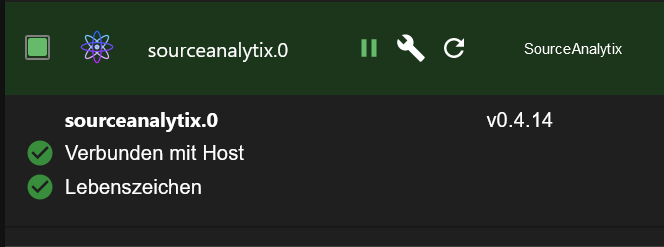
    Wie crunchip im Thread sourceanalytix schreibt kannst du Ihn installieren ,
    habe Ihn auch
    58fe7f58-8299-49cc-a10f-6c1314766e1a-grafik.png

    Synology 918+ 16GB - ioBroker in Docker v9 , VISO auf Trekstor Primebook C13 13,3" , Hikvision Domkameras mit Surveillance Station .. CCU RaspberryMatic in Synology VM .. Zigbee CC2538+CC2592 .. Sonoff .. KNX .. Modbus ..

    GregorSG 1 Antwort Letzte Antwort
    0
    • GlasfaserG Glasfaser

      @gregors sagte in Jeelink funktioniert nach Update nicht mehr:

      Ich habe Probleme mit dem sourceanalytix - Adapter.

      Wie crunchip im Thread sourceanalytix schreibt kannst du Ihn installieren ,
      habe Ihn auch

      58fe7f58-8299-49cc-a10f-6c1314766e1a-grafik.png

      GregorSG Offline
      GregorSG Offline
      GregorS
      schrieb am zuletzt editiert von
      #47

      @glasfaser

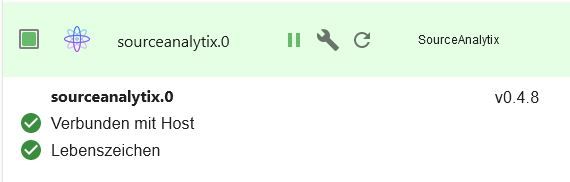
      Habe Ihn auch, aber in einer alten Version.
      sa.JPG
      Sollte ihn drüberinstallieren, aber ich konnte nicht.
      Daraufhin habe ich erstmal das System aktualisiert.
      Ich sehe die Version 0.4.14 nur im Beta

      INTEL NUC i7, Sonoff, hmIP, AVM, Jeelink, T-Link, Alexa, Saia-Burgess, uvm.

      GlasfaserG Thomas BraunT 2 Antworten Letzte Antwort
      0
      • GregorSG GregorS

        @glasfaser

        Habe Ihn auch, aber in einer alten Version.
        sa.JPG
        Sollte ihn drüberinstallieren, aber ich konnte nicht.
        Daraufhin habe ich erstmal das System aktualisiert.
        Ich sehe die Version 0.4.14 nur im Beta

        GlasfaserG Online
        GlasfaserG Online
        Glasfaser
        schrieb am zuletzt editiert von
        #48

        @gregors sagte in Jeelink funktioniert nach Update nicht mehr:

        Ich sehe die Version 0.4.14 nur im Beta

        Ja , ist Beta .... aber in Ordnung !

        Synology 918+ 16GB - ioBroker in Docker v9 , VISO auf Trekstor Primebook C13 13,3" , Hikvision Domkameras mit Surveillance Station .. CCU RaspberryMatic in Synology VM .. Zigbee CC2538+CC2592 .. Sonoff .. KNX .. Modbus ..

        1 Antwort Letzte Antwort
        0
        • GregorSG GregorS

          @glasfaser

          Habe Ihn auch, aber in einer alten Version.
          sa.JPG
          Sollte ihn drüberinstallieren, aber ich konnte nicht.
          Daraufhin habe ich erstmal das System aktualisiert.
          Ich sehe die Version 0.4.14 nur im Beta

          Thomas BraunT Online
          Thomas BraunT Online
          Thomas Braun
          Most Active
          schrieb am zuletzt editiert von
          #49

          @gregors

          Richtig:

          sourceanalytix	
          github:	0.4.14
          latest:	0.4.14 for 5 months
          stable:	-.-.-
          

          Linux-Werkzeugkasten:
          https://forum.iobroker.net/topic/42952/der-kleine-iobroker-linux-werkzeugkasten
          NodeJS Fixer Skript:
          https://forum.iobroker.net/topic/68035/iob-node-fix-skript
          iob_diag: curl -sLf -o diag.sh https://iobroker.net/diag.sh && bash diag.sh

          GregorSG 2 Antworten Letzte Antwort
          0
          • Thomas BraunT Thomas Braun

            @gregors

            Richtig:

            sourceanalytix	
            github:	0.4.14
            latest:	0.4.14 for 5 months
            stable:	-.-.-
            
            GregorSG Offline
            GregorSG Offline
            GregorS
            schrieb am zuletzt editiert von
            #50

            @thomas-braun
            @Glasfaser

            Dann werde ich mich mal trauen.

            Danke euch Beiden :+1:

            INTEL NUC i7, Sonoff, hmIP, AVM, Jeelink, T-Link, Alexa, Saia-Burgess, uvm.

            1 Antwort Letzte Antwort
            1
            • Thomas BraunT Thomas Braun

              @gregors

              Richtig:

              sourceanalytix	
              github:	0.4.14
              latest:	0.4.14 for 5 months
              stable:	-.-.-
              
              GregorSG Offline
              GregorSG Offline
              GregorS
              schrieb am zuletzt editiert von
              #51

              @thomas-braun

              Das klappt leider nicht

              $ iobroker upgrade sourceanalytix@0.4.14
              
              Update sourceanalytix from @0.4.8 to @0.4.14
              
              NPM version: 8.11.0
              
              Installing iobroker.sourceanalytix@0.4.14... (System call)
              
              host.TinkerboardS Cannot install iobroker.sourceanalytix@0.4.14: 217
              
              ERROR: Process exited with code 25
              

              INTEL NUC i7, Sonoff, hmIP, AVM, Jeelink, T-Link, Alexa, Saia-Burgess, uvm.

              GlasfaserG 1 Antwort Letzte Antwort
              0
              • GregorSG GregorS

                @thomas-braun

                Das klappt leider nicht

                $ iobroker upgrade sourceanalytix@0.4.14
                
                Update sourceanalytix from @0.4.8 to @0.4.14
                
                NPM version: 8.11.0
                
                Installing iobroker.sourceanalytix@0.4.14... (System call)
                
                host.TinkerboardS Cannot install iobroker.sourceanalytix@0.4.14: 217
                
                ERROR: Process exited with code 25
                
                GlasfaserG Online
                GlasfaserG Online
                Glasfaser
                schrieb am zuletzt editiert von Glasfaser
                #52

                @gregors sagte in [gelöst] Jeelink funktioniert nach Update nicht mehr:

                iobroker upgrade sourceanalytix@0.4.14

                Mache :

                iobroker upgrade sourceanalytix@0.4.14 --debug
                

                dann das Log hier einstellen

                dann kommt das gleiche Spielchen wie oben

                das Verzeichniss löschen

                Synology 918+ 16GB - ioBroker in Docker v9 , VISO auf Trekstor Primebook C13 13,3" , Hikvision Domkameras mit Surveillance Station .. CCU RaspberryMatic in Synology VM .. Zigbee CC2538+CC2592 .. Sonoff .. KNX .. Modbus ..

                GregorSG GlasfaserG 2 Antworten Letzte Antwort
                0
                • GlasfaserG Glasfaser

                  @gregors sagte in [gelöst] Jeelink funktioniert nach Update nicht mehr:

                  iobroker upgrade sourceanalytix@0.4.14

                  Mache :

                  iobroker upgrade sourceanalytix@0.4.14 --debug
                  

                  dann das Log hier einstellen

                  dann kommt das gleiche Spielchen wie oben

                  das Verzeichniss löschen

                  GregorSG Offline
                  GregorSG Offline
                  GregorS
                  schrieb am zuletzt editiert von
                  #53

                  @glasfaser

                  Da hast du recht

                  Would you like to upgrade sourceanalytix from @0.4.8 to @0.4.14 now? [(y)es, (n)o]: y
                  Update sourceanalytix from @0.4.8 to @0.4.14
                  NPM version: 8.11.0
                  Installing iobroker.sourceanalytix@0.4.14... (System call)
                  npm ERR! code ENOTEMPTY
                  npm ERR! syscall rename
                  npm ERR! path /opt/iobroker/node_modules/@alcalzone/esbuild-register
                  npm ERR! dest /opt/iobroker/node_modules/@alcalzone/.esbuild-register-qrNYIdBC
                  npm ERR! errno -39
                  npm ERR! ENOTEMPTY: directory not empty, rename '/opt/iobroker/node_modules/@alcalzone/esbuild-register' -> '/opt/iobroker/node_modules/@alcalzone/.esbuild-register-qrNYIdBC'
                  
                  npm ERR! A complete log of this run can be found in:
                  npm ERR!     /home/iobroker/.npm/_logs/2022-08-15T19_48_54_720Z-debug-0.log
                  host.TinkerboardS Cannot install iobroker.sourceanalytix@0.4.14: 217


                  INTEL NUC i7, Sonoff, hmIP, AVM, Jeelink, T-Link, Alexa, Saia-Burgess, uvm.

                  Thomas BraunT 1 Antwort Letzte Antwort
                  0
                  • GregorSG GregorS

                    @glasfaser

                    Da hast du recht

                    Would you like to upgrade sourceanalytix from @0.4.8 to @0.4.14 now? [(y)es, (n)o]: y
                    Update sourceanalytix from @0.4.8 to @0.4.14
                    NPM version: 8.11.0
                    Installing iobroker.sourceanalytix@0.4.14... (System call)
                    npm ERR! code ENOTEMPTY
                    npm ERR! syscall rename
                    npm ERR! path /opt/iobroker/node_modules/@alcalzone/esbuild-register
                    npm ERR! dest /opt/iobroker/node_modules/@alcalzone/.esbuild-register-qrNYIdBC
                    npm ERR! errno -39
                    npm ERR! ENOTEMPTY: directory not empty, rename '/opt/iobroker/node_modules/@alcalzone/esbuild-register' -> '/opt/iobroker/node_modules/@alcalzone/.esbuild-register-qrNYIdBC'
                    
                    npm ERR! A complete log of this run can be found in:
                    npm ERR!     /home/iobroker/.npm/_logs/2022-08-15T19_48_54_720Z-debug-0.log
                    host.TinkerboardS Cannot install iobroker.sourceanalytix@0.4.14: 217
                    
                    
                    Thomas BraunT Online
                    Thomas BraunT Online
                    Thomas Braun
                    Most Active
                    schrieb am zuletzt editiert von Thomas Braun
                    #54

                    @gregors sagte in [gelöst] Jeelink funktioniert nach Update nicht mehr:

                    /opt/iobroker/node_modules/@alcalzone/

                    Gleiches/ähnliches Spiel wie eben.

                    cd /opt/iobroker/node_modules/@alcalzone/
                    for i in $(ls -d .[^.]*-*/); do rm -rf ${i%%/}; done
                    

                    Linux-Werkzeugkasten:
                    https://forum.iobroker.net/topic/42952/der-kleine-iobroker-linux-werkzeugkasten
                    NodeJS Fixer Skript:
                    https://forum.iobroker.net/topic/68035/iob-node-fix-skript
                    iob_diag: curl -sLf -o diag.sh https://iobroker.net/diag.sh && bash diag.sh

                    GregorSG 1 Antwort Letzte Antwort
                    0
                    • Thomas BraunT Thomas Braun

                      @gregors sagte in [gelöst] Jeelink funktioniert nach Update nicht mehr:

                      /opt/iobroker/node_modules/@alcalzone/

                      Gleiches/ähnliches Spiel wie eben.

                      cd /opt/iobroker/node_modules/@alcalzone/
                      for i in $(ls -d .[^.]*-*/); do rm -rf ${i%%/}; done
                      
                      GregorSG Offline
                      GregorSG Offline
                      GregorS
                      schrieb am zuletzt editiert von
                      #55

                      @thomas-braun
                      Das hat leider nicht funktioniert.
                      Versuche es morgen nochmal

                      INTEL NUC i7, Sonoff, hmIP, AVM, Jeelink, T-Link, Alexa, Saia-Burgess, uvm.

                      Thomas BraunT 1 Antwort Letzte Antwort
                      0
                      • GregorSG GregorS

                        @thomas-braun
                        Das hat leider nicht funktioniert.
                        Versuche es morgen nochmal

                        Thomas BraunT Online
                        Thomas BraunT Online
                        Thomas Braun
                        Most Active
                        schrieb am zuletzt editiert von
                        #56

                        @gregors sagte in [gelöst] Jeelink funktioniert nach Update nicht mehr:

                        Das hat leider nicht funktioniert.

                        Das heißt konkret?

                        Linux-Werkzeugkasten:
                        https://forum.iobroker.net/topic/42952/der-kleine-iobroker-linux-werkzeugkasten
                        NodeJS Fixer Skript:
                        https://forum.iobroker.net/topic/68035/iob-node-fix-skript
                        iob_diag: curl -sLf -o diag.sh https://iobroker.net/diag.sh && bash diag.sh

                        1 Antwort Letzte Antwort
                        0
                        • GlasfaserG Glasfaser

                          @gregors sagte in [gelöst] Jeelink funktioniert nach Update nicht mehr:

                          iobroker upgrade sourceanalytix@0.4.14

                          Mache :

                          iobroker upgrade sourceanalytix@0.4.14 --debug
                          

                          dann das Log hier einstellen

                          dann kommt das gleiche Spielchen wie oben

                          das Verzeichniss löschen

                          GlasfaserG Online
                          GlasfaserG Online
                          Glasfaser
                          schrieb am zuletzt editiert von
                          #57

                          @GregorS
                          ??

                          Was kommt jetzt bei

                          iobroker upgrade sourceanalytix@0.4.14 --debug
                          

                          immer noch ein Fehler / Verzeichniss zum löschen

                          Synology 918+ 16GB - ioBroker in Docker v9 , VISO auf Trekstor Primebook C13 13,3" , Hikvision Domkameras mit Surveillance Station .. CCU RaspberryMatic in Synology VM .. Zigbee CC2538+CC2592 .. Sonoff .. KNX .. Modbus ..

                          GregorSG 1 Antwort Letzte Antwort
                          0
                          • GlasfaserG Glasfaser

                            @GregorS
                            ??

                            Was kommt jetzt bei

                            iobroker upgrade sourceanalytix@0.4.14 --debug
                            

                            immer noch ein Fehler / Verzeichniss zum löschen

                            GregorSG Offline
                            GregorSG Offline
                            GregorS
                            schrieb am zuletzt editiert von
                            #58

                            @glasfaser

                            Hier der Log:

                            Would you like to upgrade sourceanalytix from @0.4.8 to @0.4.14 now? [(y)es, (n)o]: y
                            Update sourceanalytix from @0.4.8 to @0.4.14
                            NPM version: 8.11.0
                            Installing iobroker.sourceanalytix@0.4.14... (System call)
                            npm ERR! code ENOTEMPTY
                            npm ERR! syscall rename
                            npm ERR! path /opt/iobroker/node_modules/@colors/colors
                            npm ERR! dest /opt/iobroker/node_modules/@colors/.colors-Zv02J9SN
                            npm ERR! errno -39
                            npm ERR! ENOTEMPTY: directory not empty, rename '/opt/iobroker/node_modules/@colors/colors' -> '/opt/iobroker/node_modules/@colors/.colors-Zv02J9SN'
                            
                            npm ERR! A complete log of this run can be found in:
                            npm ERR!     /home/iobroker/.npm/_logs/2022-08-16T12_32_44_939Z-debug-0.log
                            host.TinkerboardS Cannot install iobroker.sourceanalytix@0.4.14: 217
                            pi@TinkerboardS:~$ cd /opt/iobroker/node_modules/@colors/
                            pi@TinkerboardS:/opt/iobroker/node_modules/@colors$ for i in $(ls -d .[^.]*-*/); do rm -rf ${i%%/}; done
                            pi@TinkerboardS:/opt/iobroker/node_modules/@colors$ iobroker upgrade sourceanalytix@0.4.14 --debug
                            
                            
                            Would you like to upgrade sourceanalytix from @0.4.8 to @0.4.14 now? [(y)es, (n)o]: y
                            Update sourceanalytix from @0.4.8 to @0.4.14
                            NPM version: 8.11.0
                            Installing iobroker.sourceanalytix@0.4.14... (System call)
                            npm ERR! code ENOTEMPTY
                            npm ERR! syscall rename
                            npm ERR! path /opt/iobroker/node_modules/@dabh/diagnostics
                            npm ERR! dest /opt/iobroker/node_modules/@dabh/.diagnostics-LBJVuZ6t
                            npm ERR! errno -39
                            npm ERR! ENOTEMPTY: directory not empty, rename '/opt/iobroker/node_modules/@dabh/diagnostics' -> '/opt/iobroker/node_modules/@dabh/.diagnostics-LBJVuZ6t'
                            
                            npm ERR! A complete log of this run can be found in:
                            npm ERR!     /home/iobroker/.npm/_logs/2022-08-16T12_39_01_396Z-debug-0.log
                            host.TinkerboardS Cannot install iobroker.sourceanalytix@0.4.14: 217
                            pi@TinkerboardS:/opt/iobroker/node_modules/@colors$ cd
                            pi@TinkerboardS:~$ cd /opt/iobroker/node_modules/@dabh/
                            pi@TinkerboardS:/opt/iobroker/node_modules/@dabh$ for i in $(ls -d .[^.]*-*/); do rm -rf ${i%%/}; done
                            pi@TinkerboardS:/opt/iobroker/node_modules/@dabh$ iobroker upgrade sourceanalytix@0.4.14 --debug
                            
                            
                            Would you like to upgrade sourceanalytix from @0.4.8 to @0.4.14 now? [(y)es, (n)o]: y
                            Update sourceanalytix from @0.4.8 to @0.4.14
                            NPM version: 8.11.0
                            Installing iobroker.sourceanalytix@0.4.14... (System call)
                            npm ERR! code ENOTEMPTY
                            npm ERR! syscall rename
                            npm ERR! path /opt/iobroker/node_modules/@datalust/winston-seq
                            npm ERR! dest /opt/iobroker/node_modules/@datalust/.winston-seq-NYIlhsqy
                            npm ERR! errno -39
                            npm ERR! ENOTEMPTY: directory not empty, rename '/opt/iobroker/node_modules/@datalust/winston-seq' -> '/opt/iobroker/node_modules/@datalust/.winston-seq-NYIlhsqy'
                            
                            npm ERR! A complete log of this run can be found in:
                            npm ERR!     /home/iobroker/.npm/_logs/2022-08-16T12_41_32_253Z-debug-0.log
                            host.TinkerboardS Cannot install iobroker.sourceanalytix@0.4.14: 217
                            pi@TinkerboardS:/opt/iobroker/node_modules/@dabh$


                            Habe es mehrfach versucht, aber immer wieder andere Verzeichnisse zum löschen.

                            INTEL NUC i7, Sonoff, hmIP, AVM, Jeelink, T-Link, Alexa, Saia-Burgess, uvm.

                            GlasfaserG 2 Antworten Letzte Antwort
                            0
                            • GregorSG GregorS

                              @glasfaser

                              Hier der Log:

                              Would you like to upgrade sourceanalytix from @0.4.8 to @0.4.14 now? [(y)es, (n)o]: y
                              Update sourceanalytix from @0.4.8 to @0.4.14
                              NPM version: 8.11.0
                              Installing iobroker.sourceanalytix@0.4.14... (System call)
                              npm ERR! code ENOTEMPTY
                              npm ERR! syscall rename
                              npm ERR! path /opt/iobroker/node_modules/@colors/colors
                              npm ERR! dest /opt/iobroker/node_modules/@colors/.colors-Zv02J9SN
                              npm ERR! errno -39
                              npm ERR! ENOTEMPTY: directory not empty, rename '/opt/iobroker/node_modules/@colors/colors' -> '/opt/iobroker/node_modules/@colors/.colors-Zv02J9SN'
                              
                              npm ERR! A complete log of this run can be found in:
                              npm ERR!     /home/iobroker/.npm/_logs/2022-08-16T12_32_44_939Z-debug-0.log
                              host.TinkerboardS Cannot install iobroker.sourceanalytix@0.4.14: 217
                              pi@TinkerboardS:~$ cd /opt/iobroker/node_modules/@colors/
                              pi@TinkerboardS:/opt/iobroker/node_modules/@colors$ for i in $(ls -d .[^.]*-*/); do rm -rf ${i%%/}; done
                              pi@TinkerboardS:/opt/iobroker/node_modules/@colors$ iobroker upgrade sourceanalytix@0.4.14 --debug
                              
                              
                              Would you like to upgrade sourceanalytix from @0.4.8 to @0.4.14 now? [(y)es, (n)o]: y
                              Update sourceanalytix from @0.4.8 to @0.4.14
                              NPM version: 8.11.0
                              Installing iobroker.sourceanalytix@0.4.14... (System call)
                              npm ERR! code ENOTEMPTY
                              npm ERR! syscall rename
                              npm ERR! path /opt/iobroker/node_modules/@dabh/diagnostics
                              npm ERR! dest /opt/iobroker/node_modules/@dabh/.diagnostics-LBJVuZ6t
                              npm ERR! errno -39
                              npm ERR! ENOTEMPTY: directory not empty, rename '/opt/iobroker/node_modules/@dabh/diagnostics' -> '/opt/iobroker/node_modules/@dabh/.diagnostics-LBJVuZ6t'
                              
                              npm ERR! A complete log of this run can be found in:
                              npm ERR!     /home/iobroker/.npm/_logs/2022-08-16T12_39_01_396Z-debug-0.log
                              host.TinkerboardS Cannot install iobroker.sourceanalytix@0.4.14: 217
                              pi@TinkerboardS:/opt/iobroker/node_modules/@colors$ cd
                              pi@TinkerboardS:~$ cd /opt/iobroker/node_modules/@dabh/
                              pi@TinkerboardS:/opt/iobroker/node_modules/@dabh$ for i in $(ls -d .[^.]*-*/); do rm -rf ${i%%/}; done
                              pi@TinkerboardS:/opt/iobroker/node_modules/@dabh$ iobroker upgrade sourceanalytix@0.4.14 --debug
                              
                              
                              Would you like to upgrade sourceanalytix from @0.4.8 to @0.4.14 now? [(y)es, (n)o]: y
                              Update sourceanalytix from @0.4.8 to @0.4.14
                              NPM version: 8.11.0
                              Installing iobroker.sourceanalytix@0.4.14... (System call)
                              npm ERR! code ENOTEMPTY
                              npm ERR! syscall rename
                              npm ERR! path /opt/iobroker/node_modules/@datalust/winston-seq
                              npm ERR! dest /opt/iobroker/node_modules/@datalust/.winston-seq-NYIlhsqy
                              npm ERR! errno -39
                              npm ERR! ENOTEMPTY: directory not empty, rename '/opt/iobroker/node_modules/@datalust/winston-seq' -> '/opt/iobroker/node_modules/@datalust/.winston-seq-NYIlhsqy'
                              
                              npm ERR! A complete log of this run can be found in:
                              npm ERR!     /home/iobroker/.npm/_logs/2022-08-16T12_41_32_253Z-debug-0.log
                              host.TinkerboardS Cannot install iobroker.sourceanalytix@0.4.14: 217
                              pi@TinkerboardS:/opt/iobroker/node_modules/@dabh$


                              Habe es mehrfach versucht, aber immer wieder andere Verzeichnisse zum löschen.

                              GlasfaserG Online
                              GlasfaserG Online
                              Glasfaser
                              schrieb am zuletzt editiert von
                              #59

                              @gregors sagte in [gelöst] Jeelink funktioniert nach Update nicht mehr:

                              Habe es mehrfach versucht, aber immer wieder andere Verzeichnisse zum löschen.

                              Da können schon einige dabei sein ... wird schon bald zu Ende sein :)

                              Synology 918+ 16GB - ioBroker in Docker v9 , VISO auf Trekstor Primebook C13 13,3" , Hikvision Domkameras mit Surveillance Station .. CCU RaspberryMatic in Synology VM .. Zigbee CC2538+CC2592 .. Sonoff .. KNX .. Modbus ..

                              1 Antwort Letzte Antwort
                              0
                              • GregorSG GregorS

                                @glasfaser

                                Hier der Log:

                                Would you like to upgrade sourceanalytix from @0.4.8 to @0.4.14 now? [(y)es, (n)o]: y
                                Update sourceanalytix from @0.4.8 to @0.4.14
                                NPM version: 8.11.0
                                Installing iobroker.sourceanalytix@0.4.14... (System call)
                                npm ERR! code ENOTEMPTY
                                npm ERR! syscall rename
                                npm ERR! path /opt/iobroker/node_modules/@colors/colors
                                npm ERR! dest /opt/iobroker/node_modules/@colors/.colors-Zv02J9SN
                                npm ERR! errno -39
                                npm ERR! ENOTEMPTY: directory not empty, rename '/opt/iobroker/node_modules/@colors/colors' -> '/opt/iobroker/node_modules/@colors/.colors-Zv02J9SN'
                                
                                npm ERR! A complete log of this run can be found in:
                                npm ERR!     /home/iobroker/.npm/_logs/2022-08-16T12_32_44_939Z-debug-0.log
                                host.TinkerboardS Cannot install iobroker.sourceanalytix@0.4.14: 217
                                pi@TinkerboardS:~$ cd /opt/iobroker/node_modules/@colors/
                                pi@TinkerboardS:/opt/iobroker/node_modules/@colors$ for i in $(ls -d .[^.]*-*/); do rm -rf ${i%%/}; done
                                pi@TinkerboardS:/opt/iobroker/node_modules/@colors$ iobroker upgrade sourceanalytix@0.4.14 --debug
                                
                                
                                Would you like to upgrade sourceanalytix from @0.4.8 to @0.4.14 now? [(y)es, (n)o]: y
                                Update sourceanalytix from @0.4.8 to @0.4.14
                                NPM version: 8.11.0
                                Installing iobroker.sourceanalytix@0.4.14... (System call)
                                npm ERR! code ENOTEMPTY
                                npm ERR! syscall rename
                                npm ERR! path /opt/iobroker/node_modules/@dabh/diagnostics
                                npm ERR! dest /opt/iobroker/node_modules/@dabh/.diagnostics-LBJVuZ6t
                                npm ERR! errno -39
                                npm ERR! ENOTEMPTY: directory not empty, rename '/opt/iobroker/node_modules/@dabh/diagnostics' -> '/opt/iobroker/node_modules/@dabh/.diagnostics-LBJVuZ6t'
                                
                                npm ERR! A complete log of this run can be found in:
                                npm ERR!     /home/iobroker/.npm/_logs/2022-08-16T12_39_01_396Z-debug-0.log
                                host.TinkerboardS Cannot install iobroker.sourceanalytix@0.4.14: 217
                                pi@TinkerboardS:/opt/iobroker/node_modules/@colors$ cd
                                pi@TinkerboardS:~$ cd /opt/iobroker/node_modules/@dabh/
                                pi@TinkerboardS:/opt/iobroker/node_modules/@dabh$ for i in $(ls -d .[^.]*-*/); do rm -rf ${i%%/}; done
                                pi@TinkerboardS:/opt/iobroker/node_modules/@dabh$ iobroker upgrade sourceanalytix@0.4.14 --debug
                                
                                
                                Would you like to upgrade sourceanalytix from @0.4.8 to @0.4.14 now? [(y)es, (n)o]: y
                                Update sourceanalytix from @0.4.8 to @0.4.14
                                NPM version: 8.11.0
                                Installing iobroker.sourceanalytix@0.4.14... (System call)
                                npm ERR! code ENOTEMPTY
                                npm ERR! syscall rename
                                npm ERR! path /opt/iobroker/node_modules/@datalust/winston-seq
                                npm ERR! dest /opt/iobroker/node_modules/@datalust/.winston-seq-NYIlhsqy
                                npm ERR! errno -39
                                npm ERR! ENOTEMPTY: directory not empty, rename '/opt/iobroker/node_modules/@datalust/winston-seq' -> '/opt/iobroker/node_modules/@datalust/.winston-seq-NYIlhsqy'
                                
                                npm ERR! A complete log of this run can be found in:
                                npm ERR!     /home/iobroker/.npm/_logs/2022-08-16T12_41_32_253Z-debug-0.log
                                host.TinkerboardS Cannot install iobroker.sourceanalytix@0.4.14: 217
                                pi@TinkerboardS:/opt/iobroker/node_modules/@dabh$


                                Habe es mehrfach versucht, aber immer wieder andere Verzeichnisse zum löschen.

                                GlasfaserG Online
                                GlasfaserG Online
                                Glasfaser
                                schrieb am zuletzt editiert von
                                #60

                                @gregors sagte in [gelöst] Jeelink funktioniert nach Update nicht mehr:

                                /opt/iobroker/node_modules/@datalust/.winston-seq-NYIlhsqy

                                Du kannst auch nur das angemekerte immer nur löschen , dann bracust du nicht in den Verzeichnissen immer umher springen ..

                                rm -r /opt/iobroker/node_modules/@datalust/.winston-seq-NYIlhsqy
                                

                                Synology 918+ 16GB - ioBroker in Docker v9 , VISO auf Trekstor Primebook C13 13,3" , Hikvision Domkameras mit Surveillance Station .. CCU RaspberryMatic in Synology VM .. Zigbee CC2538+CC2592 .. Sonoff .. KNX .. Modbus ..

                                GregorSG 1 Antwort Letzte Antwort
                                0
                                • GlasfaserG Glasfaser

                                  @gregors sagte in [gelöst] Jeelink funktioniert nach Update nicht mehr:

                                  /opt/iobroker/node_modules/@datalust/.winston-seq-NYIlhsqy

                                  Du kannst auch nur das angemekerte immer nur löschen , dann bracust du nicht in den Verzeichnissen immer umher springen ..

                                  rm -r /opt/iobroker/node_modules/@datalust/.winston-seq-NYIlhsqy
                                  
                                  GregorSG Offline
                                  GregorSG Offline
                                  GregorS
                                  schrieb am zuletzt editiert von
                                  #61

                                  @glasfaser
                                  Ist schonmal eine Erleichterung.
                                  Habe ich das Prozedre jetzt jedesmal wenn ich ein Update mache?

                                  INTEL NUC i7, Sonoff, hmIP, AVM, Jeelink, T-Link, Alexa, Saia-Burgess, uvm.

                                  GlasfaserG Thomas BraunT 2 Antworten Letzte Antwort
                                  0
                                  • GregorSG GregorS

                                    @glasfaser
                                    Ist schonmal eine Erleichterung.
                                    Habe ich das Prozedre jetzt jedesmal wenn ich ein Update mache?

                                    GlasfaserG Online
                                    GlasfaserG Online
                                    Glasfaser
                                    schrieb am zuletzt editiert von
                                    #62

                                    @gregors sagte in [gelöst] Jeelink funktioniert nach Update nicht mehr:

                                    Habe ich das Prozedre jetzt jedesmal wenn ich ein Update mache?

                                    Nein nur jetzt .

                                    Synology 918+ 16GB - ioBroker in Docker v9 , VISO auf Trekstor Primebook C13 13,3" , Hikvision Domkameras mit Surveillance Station .. CCU RaspberryMatic in Synology VM .. Zigbee CC2538+CC2592 .. Sonoff .. KNX .. Modbus ..

                                    GregorSG 1 Antwort Letzte Antwort
                                    0
                                    • GregorSG GregorS

                                      @glasfaser
                                      Ist schonmal eine Erleichterung.
                                      Habe ich das Prozedre jetzt jedesmal wenn ich ein Update mache?

                                      Thomas BraunT Online
                                      Thomas BraunT Online
                                      Thomas Braun
                                      Most Active
                                      schrieb am zuletzt editiert von
                                      #63

                                      @gregors sagte in [gelöst] Jeelink funktioniert nach Update nicht mehr:

                                      Habe ich das Prozedre jetzt jedesmal wenn ich ein Update mache?

                                      Nicht mehr für diese Verzeichnisse.
                                      Andere Adapter = andere Verzeichnisse. Kann also auch in Zukunft nochmal auftauchen.

                                      Linux-Werkzeugkasten:
                                      https://forum.iobroker.net/topic/42952/der-kleine-iobroker-linux-werkzeugkasten
                                      NodeJS Fixer Skript:
                                      https://forum.iobroker.net/topic/68035/iob-node-fix-skript
                                      iob_diag: curl -sLf -o diag.sh https://iobroker.net/diag.sh && bash diag.sh

                                      GregorSG 1 Antwort Letzte Antwort
                                      0
                                      • Thomas BraunT Thomas Braun

                                        @gregors sagte in [gelöst] Jeelink funktioniert nach Update nicht mehr:

                                        Habe ich das Prozedre jetzt jedesmal wenn ich ein Update mache?

                                        Nicht mehr für diese Verzeichnisse.
                                        Andere Adapter = andere Verzeichnisse. Kann also auch in Zukunft nochmal auftauchen.

                                        GregorSG Offline
                                        GregorSG Offline
                                        GregorS
                                        schrieb am zuletzt editiert von
                                        #64

                                        @thomas-braun
                                        :cry: :cry: :cry:

                                        INTEL NUC i7, Sonoff, hmIP, AVM, Jeelink, T-Link, Alexa, Saia-Burgess, uvm.

                                        Thomas BraunT 1 Antwort Letzte Antwort
                                        0
                                        • GregorSG GregorS

                                          @thomas-braun
                                          :cry: :cry: :cry:

                                          Thomas BraunT Online
                                          Thomas BraunT Online
                                          Thomas Braun
                                          Most Active
                                          schrieb am zuletzt editiert von
                                          #65

                                          @gregors

                                          Wird aber mit jedem Update weniger.

                                          Linux-Werkzeugkasten:
                                          https://forum.iobroker.net/topic/42952/der-kleine-iobroker-linux-werkzeugkasten
                                          NodeJS Fixer Skript:
                                          https://forum.iobroker.net/topic/68035/iob-node-fix-skript
                                          iob_diag: curl -sLf -o diag.sh https://iobroker.net/diag.sh && bash diag.sh

                                          GregorSG 1 Antwort Letzte Antwort
                                          0
                                          Antworten
                                          • In einem neuen Thema antworten
                                          Anmelden zum Antworten
                                          • Älteste zuerst
                                          • Neuste zuerst
                                          • Meiste Stimmen


                                          Support us

                                          ioBroker
                                          Community Adapters
                                          Donate
                                          FAQ Cloud / IOT
                                          HowTo: Node.js-Update
                                          HowTo: Backup/Restore
                                          Downloads
                                          BLOG

                                          902

                                          Online

                                          32.5k

                                          Benutzer

                                          81.8k

                                          Themen

                                          1.3m

                                          Beiträge
                                          Community
                                          Impressum | Datenschutz-Bestimmungen | Nutzungsbedingungen | Einwilligungseinstellungen
                                          ioBroker Community 2014-2025
                                          logo
                                          • Anmelden

                                          • Du hast noch kein Konto? Registrieren

                                          • Anmelden oder registrieren, um zu suchen
                                          • Erster Beitrag
                                            Letzter Beitrag
                                          0
                                          • Home
                                          • Aktuell
                                          • Tags
                                          • Ungelesen 0
                                          • Kategorien
                                          • Unreplied
                                          • Beliebt
                                          • GitHub
                                          • Docu
                                          • Hilfe