




[Vorlage] LightControl
-
Thread zum Skript LightControl: https://github.com/Pittini/iobroker-LightControl
iobroker-LightControl - ALPHAVERSION
Lichtsteuerung für Leuchtmittel unterschiedlicher Hersteller
Features
- Gruppierung beliebig vieler Lampen/Leuchtmittel
- Verwendung gemischter Lampen/Farbsystemen und Umrechnung der Farbsysteme (Hex,Rgb,Hsl,Xy)
- Möglichkeit der Zuweisung von defaultwerten zu jedem Leuchtmittel
- Ramping (langsame Änderung der Helligkeit bis Zielwert) für on und off
- AutoOff nach Zeit / Kein off bei Bewegung
- AutoOn bei Bewegung
- Override on (Putzlicht)
- Adaptive Helligkeit
- Adaptive Farbtemperatur
-
Hat noch jemand das Problem, dass das Licht zu unbestimmter Zeit wieder ausgeht ?
Trotz Bewegung und "bei Bewegung eingeschaltet bleiben" ?@rudi-ment said in [Vorlage] LightControl:
Hat noch jemand das Problem, dass das Licht zu unbestimmter Zeit wieder ausgeht ?
Trotz Bewegung und "bei Bewegung eingeschaltet bleiben" ?Ausserdem scheint die Zeit auch gar nicht zu passen.
Die steht auf 30 min.
Trotzdem schaltet die Lampe gefühlt - wann sie will aus. -
@pittini hallo, wird es davon mal einen Adapter geben oder wird es lediglich als Skript bleiben?
grüße
-
Ich habe nach meinem ersten erfolglosen Anlauf nun einen Zweiten gestartet. Leider bekomme ich das Skript nicht zum laufen. Die Bewegungsmelder Stati werden erkannt, jedoch wird das Licht unabhängig davon scheinbar wahllos ein und ausgeschaltet.
Ich würde mich freuen, wenn sich mal jemand meine Konfiguration ansehen könnte.
const praefix = "0_userdata.0.LightControl2_2" // Skriptordner
const LuxSensor = ""; // Datenpunkt des globalen Luxsensors, wird verwendet wenn in der Gruppe kein gesonderter definiert wird
const IsPresenceDp = ""; // Datenpunkt für Anwesenheit (true/false)
const PresenceCountDp = ""; // Datenpunkt für Anwesenheitszähler
const logging = true; // Logging an/aus
const RampSteps = 10; //Wieviele Schritte zum dimmen? Bitte nicht zu hoch setzen, wird zwar smoother, kann aber zu timing Problemen führen wenn gleichzeitig eine kurze Zeit in den Objekten gewählt.

const minCt = 2700; //Regelbereich für Farbtemperatur in Kelvin für Adaptive Ct
const maxCt = 6500;//Regelbereich für Farbtemperatur in Kelvin für Adaptive Ct
const minBri = 10; //Mindesthelligkeit für AdaptiveBri

const LightGroups = {
    0: {
        description: "FlurEG+OG1",
        lights: {
            0: {
                description: "StrahlerEG+OG1",
                power: { oid: "shelly.0.SHDM-2#E0980695AD36#1.lights.Switch", onVal: true, offVal: false },
                bri: { oid: "shelly.0.SHDM-2#E0980695AD36#1.lights.brightness", minVal: 0, maxVal: 100, defaultVal: 100 },
                ct: { oid: "", minVal: null, maxVal: null },
                sat: { oid: "", minVal: null, maxVal: null },
                modeswitch: { oid: "", whiteModeVal: false, colorModeVal: true },
                color: { oid: "", type: "", default: "" }
            },
        },
        sensors: {
            0: { id: 'mihome.0.devices.sensor_motion_aq2_158d0002ea1b58.state', motionVal: true, noMotionVal: false },
            1: { id: 'mihome.0.devices.sensor_motion_aq2_158d0004aca6b9.state', motionVal: true, noMotionVal: false }
        }
    },
     1: {
        description: "FlurOG2+OG3",
        lights: {
            0: {
                description: "StrahlerOG2+OG3",
                power: { oid: "shelly.0.SHDM-2#C45BBE5645E3#1.lights.Switch", onVal: true, offVal: false },
                bri: { oid: "shelly.0.SHDM-2#C45BBE5645E3#1.lights.brightness", minVal: 0, maxVal: 100, defaultVal: 100 },
                ct: { oid: "", minVal: null, maxVal: null },
                sat: { oid: "", minVal: null, maxVal: null },
                modeswitch: { oid: "", whiteModeVal: false, colorModeVal: true },
                color: { oid: "", type: "", default: "" }
            },
        },
        sensors: {
            0: { id: 'mihome.0.devices.sensor_motion_aq2_158d0002ebffca.state', motionVal: true, noMotionVal: false }
        }
    },
    2: {
        description: "Esszimmer",
        lights: {
            0: {
                description: "SpotsDecke",
                power: { oid: "shelly.0.SHSW-1#98CDAC2E4B10#1.Relay0.Switch", onVal: true, offVal: false },
                bri: { oid: "", minVal: 0, maxVal: 100, defaultVal: 100 },
                ct: { oid: "", minVal: null, maxVal: null },
                sat: { oid: "", minVal: null, maxVal: null },
                modeswitch: { oid: "", whiteModeVal: false, colorModeVal: true },
                color: { oid: "", type: "", default: "" }
            },
        },
        sensors: {
            0: { id: 'hm-rpc.1.000C1D898D631A.1.PRESENCE_DETECTION_STATE', motionVal: true, noMotionVal: false },
            1: { id: 'mihome.0.devices.sensor_motion_aq2_158d0002ec30dd.state', motionVal: true, noMotionVal: false }
        }
    },
};
Habe mich eben durch die entsprechenden Räume bewegt ohne dass die Lampen geschaltet wurden und dabei folgendes log erzeugt:
2022-04-29 11:02:21.231 - info: javascript.0 (412) script.js.common.Licht.Esszimmer_Lightcontrol: Triggered linked Sensor mihome.0.devices.sensor_motion_aq2_158d0002ea1b58.state new value is true 2022-04-29 11:02:21.232 - info: javascript.0 (412) script.js.common.Licht.Esszimmer_Lightcontrol: Reaching SummarizeSensors, Group=0 2022-04-29 11:02:21.233 - info: javascript.0 (412) script.js.common.Licht.Esszimmer_Lightcontrol: Gruppe=0 Sensor 0 with target mihome.0.devices.sensor_motion_aq2_158d0002ea1b58.state has value true 2022-04-29 11:02:21.233 - info: javascript.0 (412) script.js.common.Licht.Esszimmer_Lightcontrol: Summarized IsMotion for Group 0 = true 2022-04-29 11:02:21.239 - info: javascript.0 (412) script.js.common.Licht.Esszimmer_Lightcontrol: Reaching Controller, Group=0 Property1=isMotion NewVal=true OldVal=false 2022-04-29 11:02:27.224 - info: javascript.0 (412) script.js.common.Licht.Esszimmer_Lightcontrol: Triggered linked Sensor mihome.0.devices.sensor_motion_aq2_158d0004aca6b9.state new value is true 2022-04-29 11:02:27.224 - info: javascript.0 (412) script.js.common.Licht.Esszimmer_Lightcontrol: Reaching SummarizeSensors, Group=0 2022-04-29 11:02:27.224 - info: javascript.0 (412) script.js.common.Licht.Esszimmer_Lightcontrol: Gruppe=0 Sensor 0 with target mihome.0.devices.sensor_motion_aq2_158d0002ea1b58.state has value true 2022-04-29 11:02:27.225 - info: javascript.0 (412) script.js.common.Licht.Esszimmer_Lightcontrol: Gruppe=0 Sensor 1 with target mihome.0.devices.sensor_motion_aq2_158d0004aca6b9.state has value true 2022-04-29 11:02:27.225 - info: javascript.0 (412) script.js.common.Licht.Esszimmer_Lightcontrol: Summarized IsMotion for Group 0 = true 2022-04-29 11:02:31.767 - info: javascript.0 (412) script.js.common.Licht.Esszimmer_Lightcontrol: Triggered linked Sensor mihome.0.devices.sensor_motion_aq2_158d0002ebffca.state new value is true 2022-04-29 11:02:31.768 - info: javascript.0 (412) script.js.common.Licht.Esszimmer_Lightcontrol: Reaching SummarizeSensors, Group=1 2022-04-29 11:02:31.768 - info: javascript.0 (412) script.js.common.Licht.Esszimmer_Lightcontrol: Gruppe=1 Sensor 0 with target mihome.0.devices.sensor_motion_aq2_158d0002ebffca.state has value true 2022-04-29 11:02:31.768 - info: javascript.0 (412) script.js.common.Licht.Esszimmer_Lightcontrol: Summarized IsMotion for Group 1 = true 2022-04-29 11:02:31.769 - info: javascript.0 (412) script.js.common.Licht.Esszimmer_Lightcontrol: Reaching Controller, Group=1 Property1=isMotion NewVal=true OldVal=false 2022-04-29 11:02:59.980 - info: javascript.0 (412) script.js.common.Licht.Esszimmer_Lightcontrol: Triggered linked Sensor mihome.0.devices.sensor_motion_aq2_158d0002ec30dd.state new value is true 2022-04-29 11:02:59.981 - info: javascript.0 (412) script.js.common.Licht.Esszimmer_Lightcontrol: Reaching SummarizeSensors, Group=2 2022-04-29 11:02:59.981 - info: javascript.0 (412) script.js.common.Licht.Esszimmer_Lightcontrol: Gruppe=2 Sensor 0 with target hm-rpc.1.000C1D898D631A.1.PRESENCE_DETECTION_STATE has value true 2022-04-29 11:02:59.981 - info: javascript.0 (412) script.js.common.Licht.Esszimmer_Lightcontrol: Gruppe=2 Sensor 1 with target mihome.0.devices.sensor_motion_aq2_158d0002ec30dd.state has value true 2022-04-29 11:02:59.982 - info: javascript.0 (412) script.js.common.Licht.Esszimmer_Lightcontrol: Summarized IsMotion for Group 2 = true 2022-04-29 11:03:05.866 - info: javascript.0 (412) script.js.common.Licht.Esszimmer_Lightcontrol: adaptiveCtLinear=5264 adaptiveCtSolar=5648 adaptiveCtSolarInterpolated=4998 adaptiveCtTimed=0 2022-04-29 11:04:05.866 - info: javascript.0 (412) script.js.common.Licht.Esszimmer_Lightcontrol: adaptiveCtLinear=5273 adaptiveCtSolar=5664 adaptiveCtSolarInterpolated=5010 adaptiveCtTimed=0 -
Ich habe nach meinem ersten erfolglosen Anlauf nun einen Zweiten gestartet. Leider bekomme ich das Skript nicht zum laufen. Die Bewegungsmelder Stati werden erkannt, jedoch wird das Licht unabhängig davon scheinbar wahllos ein und ausgeschaltet.
Ich würde mich freuen, wenn sich mal jemand meine Konfiguration ansehen könnte.
const praefix = "0_userdata.0.LightControl2_2" // Skriptordner
const LuxSensor = ""; // Datenpunkt des globalen Luxsensors, wird verwendet wenn in der Gruppe kein gesonderter definiert wird
const IsPresenceDp = ""; // Datenpunkt für Anwesenheit (true/false)
const PresenceCountDp = ""; // Datenpunkt für Anwesenheitszähler
const logging = true; // Logging an/aus
const RampSteps = 10; //Wieviele Schritte zum dimmen? Bitte nicht zu hoch setzen, wird zwar smoother, kann aber zu timing Problemen führen wenn gleichzeitig eine kurze Zeit in den Objekten gewählt.

const minCt = 2700; //Regelbereich für Farbtemperatur in Kelvin für Adaptive Ct
const maxCt = 6500;//Regelbereich für Farbtemperatur in Kelvin für Adaptive Ct
const minBri = 10; //Mindesthelligkeit für AdaptiveBri

const LightGroups = {
    0: {
        description: "FlurEG+OG1",
        lights: {
            0: {
                description: "StrahlerEG+OG1",
                power: { oid: "shelly.0.SHDM-2#E0980695AD36#1.lights.Switch", onVal: true, offVal: false },
                bri: { oid: "shelly.0.SHDM-2#E0980695AD36#1.lights.brightness", minVal: 0, maxVal: 100, defaultVal: 100 },
                ct: { oid: "", minVal: null, maxVal: null },
                sat: { oid: "", minVal: null, maxVal: null },
                modeswitch: { oid: "", whiteModeVal: false, colorModeVal: true },
                color: { oid: "", type: "", default: "" }
            },
        },
        sensors: {
            0: { id: 'mihome.0.devices.sensor_motion_aq2_158d0002ea1b58.state', motionVal: true, noMotionVal: false },
            1: { id: 'mihome.0.devices.sensor_motion_aq2_158d0004aca6b9.state', motionVal: true, noMotionVal: false }
        }
    },
     1: {
        description: "FlurOG2+OG3",
        lights: {
            0: {
                description: "StrahlerOG2+OG3",
                power: { oid: "shelly.0.SHDM-2#C45BBE5645E3#1.lights.Switch", onVal: true, offVal: false },
                bri: { oid: "shelly.0.SHDM-2#C45BBE5645E3#1.lights.brightness", minVal: 0, maxVal: 100, defaultVal: 100 },
                ct: { oid: "", minVal: null, maxVal: null },
                sat: { oid: "", minVal: null, maxVal: null },
                modeswitch: { oid: "", whiteModeVal: false, colorModeVal: true },
                color: { oid: "", type: "", default: "" }
            },
        },
        sensors: {
            0: { id: 'mihome.0.devices.sensor_motion_aq2_158d0002ebffca.state', motionVal: true, noMotionVal: false }
        }
    },
    2: {
        description: "Esszimmer",
        lights: {
            0: {
                description: "SpotsDecke",
                power: { oid: "shelly.0.SHSW-1#98CDAC2E4B10#1.Relay0.Switch", onVal: true, offVal: false },
                bri: { oid: "", minVal: 0, maxVal: 100, defaultVal: 100 },
                ct: { oid: "", minVal: null, maxVal: null },
                sat: { oid: "", minVal: null, maxVal: null },
                modeswitch: { oid: "", whiteModeVal: false, colorModeVal: true },
                color: { oid: "", type: "", default: "" }
            },
        },
        sensors: {
            0: { id: 'hm-rpc.1.000C1D898D631A.1.PRESENCE_DETECTION_STATE', motionVal: true, noMotionVal: false },
            1: { id: 'mihome.0.devices.sensor_motion_aq2_158d0002ec30dd.state', motionVal: true, noMotionVal: false }
        }
    },
};
Habe mich eben durch die entsprechenden Räume bewegt ohne dass die Lampen geschaltet wurden und dabei folgendes log erzeugt:
2022-04-29 11:02:21.231 - info: javascript.0 (412) script.js.common.Licht.Esszimmer_Lightcontrol: Triggered linked Sensor mihome.0.devices.sensor_motion_aq2_158d0002ea1b58.state new value is true 2022-04-29 11:02:21.232 - info: javascript.0 (412) script.js.common.Licht.Esszimmer_Lightcontrol: Reaching SummarizeSensors, Group=0 2022-04-29 11:02:21.233 - info: javascript.0 (412) script.js.common.Licht.Esszimmer_Lightcontrol: Gruppe=0 Sensor 0 with target mihome.0.devices.sensor_motion_aq2_158d0002ea1b58.state has value true 2022-04-29 11:02:21.233 - info: javascript.0 (412) script.js.common.Licht.Esszimmer_Lightcontrol: Summarized IsMotion for Group 0 = true 2022-04-29 11:02:21.239 - info: javascript.0 (412) script.js.common.Licht.Esszimmer_Lightcontrol: Reaching Controller, Group=0 Property1=isMotion NewVal=true OldVal=false 2022-04-29 11:02:27.224 - info: javascript.0 (412) script.js.common.Licht.Esszimmer_Lightcontrol: Triggered linked Sensor mihome.0.devices.sensor_motion_aq2_158d0004aca6b9.state new value is true 2022-04-29 11:02:27.224 - info: javascript.0 (412) script.js.common.Licht.Esszimmer_Lightcontrol: Reaching SummarizeSensors, Group=0 2022-04-29 11:02:27.224 - info: javascript.0 (412) script.js.common.Licht.Esszimmer_Lightcontrol: Gruppe=0 Sensor 0 with target mihome.0.devices.sensor_motion_aq2_158d0002ea1b58.state has value true 2022-04-29 11:02:27.225 - info: javascript.0 (412) script.js.common.Licht.Esszimmer_Lightcontrol: Gruppe=0 Sensor 1 with target mihome.0.devices.sensor_motion_aq2_158d0004aca6b9.state has value true 2022-04-29 11:02:27.225 - info: javascript.0 (412) script.js.common.Licht.Esszimmer_Lightcontrol: Summarized IsMotion for Group 0 = true 2022-04-29 11:02:31.767 - info: javascript.0 (412) script.js.common.Licht.Esszimmer_Lightcontrol: Triggered linked Sensor mihome.0.devices.sensor_motion_aq2_158d0002ebffca.state new value is true 2022-04-29 11:02:31.768 - info: javascript.0 (412) script.js.common.Licht.Esszimmer_Lightcontrol: Reaching SummarizeSensors, Group=1 2022-04-29 11:02:31.768 - info: javascript.0 (412) script.js.common.Licht.Esszimmer_Lightcontrol: Gruppe=1 Sensor 0 with target mihome.0.devices.sensor_motion_aq2_158d0002ebffca.state has value true 2022-04-29 11:02:31.768 - info: javascript.0 (412) script.js.common.Licht.Esszimmer_Lightcontrol: Summarized IsMotion for Group 1 = true 2022-04-29 11:02:31.769 - info: javascript.0 (412) script.js.common.Licht.Esszimmer_Lightcontrol: Reaching Controller, Group=1 Property1=isMotion NewVal=true OldVal=false 2022-04-29 11:02:59.980 - info: javascript.0 (412) script.js.common.Licht.Esszimmer_Lightcontrol: Triggered linked Sensor mihome.0.devices.sensor_motion_aq2_158d0002ec30dd.state new value is true 2022-04-29 11:02:59.981 - info: javascript.0 (412) script.js.common.Licht.Esszimmer_Lightcontrol: Reaching SummarizeSensors, Group=2 2022-04-29 11:02:59.981 - info: javascript.0 (412) script.js.common.Licht.Esszimmer_Lightcontrol: Gruppe=2 Sensor 0 with target hm-rpc.1.000C1D898D631A.1.PRESENCE_DETECTION_STATE has value true 2022-04-29 11:02:59.981 - info: javascript.0 (412) script.js.common.Licht.Esszimmer_Lightcontrol: Gruppe=2 Sensor 1 with target mihome.0.devices.sensor_motion_aq2_158d0002ec30dd.state has value true 2022-04-29 11:02:59.982 - info: javascript.0 (412) script.js.common.Licht.Esszimmer_Lightcontrol: Summarized IsMotion for Group 2 = true 2022-04-29 11:03:05.866 - info: javascript.0 (412) script.js.common.Licht.Esszimmer_Lightcontrol: adaptiveCtLinear=5264 adaptiveCtSolar=5648 adaptiveCtSolarInterpolated=4998 adaptiveCtTimed=0 2022-04-29 11:04:05.866 - info: javascript.0 (412) script.js.common.Licht.Esszimmer_Lightcontrol: adaptiveCtLinear=5273 adaptiveCtSolar=5664 adaptiveCtSolarInterpolated=5010 adaptiveCtTimed=0 -
@passuff Das Log is ja soweit ok, es hat erkannt was Du gemacht hast. Aber es hat nix geschaltet. Zeig doch mal nen Screenshot wo ich Deine settings für Gruppe 0 oder 1 seh, vorallem die settings für Bewegungsreaktionen.
@pittini
Ich habe den Fehler gefunden. Wenn man keinen Lux Sensor definiert(weder global noch innerhalb eines Raumes), funktioniert das Skript nicht.
Könnte man eventuell für die Zukunft ändern. Ich habe jetzt einen globalen Fake Datenpunkt angelegt und es funktioniert. -
Folgendes Szenario:
Das Licht im Wohnzimmer wird über AutoOnMotion eingeschaltet, wenn es die Helligkeit erfordert.
Das Licht im Wohnzimmer wird über AutoOffTimed nach 120s ausgeschaltet.
Wenn jemand den Lichtschalter manuell betätigt, greift leider das Auto OffTimed nicht, da Power in diesem Fall false zeigt, obwohl der Lichtschalter betätigt ist.
Gibt es eine Möglichkeit auf den Schalter zu triggern und somit auch die AutoOffTimed Funktion zu nutzen, wenn das Licht manuell eingeschaltet wurde? -
Folgendes Szenario:
Das Licht im Wohnzimmer wird über AutoOnMotion eingeschaltet, wenn es die Helligkeit erfordert.
Das Licht im Wohnzimmer wird über AutoOffTimed nach 120s ausgeschaltet.
Wenn jemand den Lichtschalter manuell betätigt, greift leider das Auto OffTimed nicht, da Power in diesem Fall false zeigt, obwohl der Lichtschalter betätigt ist.
Gibt es eine Möglichkeit auf den Schalter zu triggern und somit auch die AutoOffTimed Funktion zu nutzen, wenn das Licht manuell eingeschaltet wurde?@passuff sagte in [Vorlage] LightControl:
Folgendes Szenario:
Das Licht im Wohnzimmer wird über AutoOnMotion eingeschaltet, wenn es die Helligkeit erfordert.
Das Licht im Wohnzimmer wird über AutoOffTimed nach 120s ausgeschaltet.
Wenn jemand den Lichtschalter manuell betätigt, greift leider das Auto OffTimed nicht, da Power in diesem Fall false zeigt, obwohl der Lichtschalter betätigt ist.
Gibt es eine Möglichkeit auf den Schalter zu triggern und somit auch die AutoOffTimed Funktion zu nutzen, wenn das Licht manuell eingeschaltet wurde?Der Lichtschalter darf halt nicht die Lampe(n) direkt schalten, sondern den entsprechenden Power Datenpunkt vom Skript, dann funktioniert das einwandfrei, hab ich hier in etlichen Räumen so.
-
@passuff sagte in [Vorlage] LightControl:
Folgendes Szenario:
Das Licht im Wohnzimmer wird über AutoOnMotion eingeschaltet, wenn es die Helligkeit erfordert.
Das Licht im Wohnzimmer wird über AutoOffTimed nach 120s ausgeschaltet.
Wenn jemand den Lichtschalter manuell betätigt, greift leider das Auto OffTimed nicht, da Power in diesem Fall false zeigt, obwohl der Lichtschalter betätigt ist.
Gibt es eine Möglichkeit auf den Schalter zu triggern und somit auch die AutoOffTimed Funktion zu nutzen, wenn das Licht manuell eingeschaltet wurde?Der Lichtschalter darf halt nicht die Lampe(n) direkt schalten, sondern den entsprechenden Power Datenpunkt vom Skript, dann funktioniert das einwandfrei, hab ich hier in etlichen Räumen so.
Ich möchte gerne die Helligkeit in Abhängigkeit der Uhrzeit einstellen. Ich habe mit einem zusätzlichen Skript den Datenpunkt bri im root und testweise auch im Ordner AutoOnMotion überschrieben. Leider haben diese keinen Einfluss auf die Helligkeit. Sind diese nur für die adaptive Helligkeit zuständig? Einen Einfluss auf die Helligkeit habe ich nur bei der Skript Variable defaultVal: feststellen können, doch leider weiß ich nicht wie ich diese extern beschreiben kann.
Ich würde mich freuen wenn mir jemand erklären könnte, wie das mit der Helligkeit funktionier (nicht adaptiv!). -
Ich möchte gerne die Helligkeit in Abhängigkeit der Uhrzeit einstellen. Ich habe mit einem zusätzlichen Skript den Datenpunkt bri im root und testweise auch im Ordner AutoOnMotion überschrieben. Leider haben diese keinen Einfluss auf die Helligkeit. Sind diese nur für die adaptive Helligkeit zuständig? Einen Einfluss auf die Helligkeit habe ich nur bei der Skript Variable defaultVal: feststellen können, doch leider weiß ich nicht wie ich diese extern beschreiben kann.
Ich würde mich freuen wenn mir jemand erklären könnte, wie das mit der Helligkeit funktionier (nicht adaptiv!).@passuff Wenn Du adaptive Helligkeit aktiviert hast, hat bri keinen Einfluß mehr, wär auch sinnfrei. Ansonsten bist mit dem bri in der Raumroot schon am richtigen Platz, das funktioniert hier auch einwandfrei. Die defaulVal Skriptvariable kann und soll nicht extern gesetzt werden, diese dient dazu unterschiedlich helle Lampen beim einschalten auf ungefähr gleiche Helligkeit bringen zu können.
-
@passuff Wenn Du adaptive Helligkeit aktiviert hast, hat bri keinen Einfluß mehr, wär auch sinnfrei. Ansonsten bist mit dem bri in der Raumroot schon am richtigen Platz, das funktioniert hier auch einwandfrei. Die defaulVal Skriptvariable kann und soll nicht extern gesetzt werden, diese dient dazu unterschiedlich helle Lampen beim einschalten auf ungefähr gleiche Helligkeit bringen zu können.
@pittini Mal eine Frage - im Script steht:
const LuxSensor = 'linkeddevices.0.Klima.Draussen.brightness'; // Datenpunkt des globalen Luxsensors, wird verwendet wenn in der Gruppe kein gesonderter definiert wirdIch habe massenhaft Luxsensorer, finde aber nicht die Syntax für das Einbinden in die Gruppen. Wie macht man das?
Christian
-
@pittini Mal eine Frage - im Script steht:
const LuxSensor = 'linkeddevices.0.Klima.Draussen.brightness'; // Datenpunkt des globalen Luxsensors, wird verwendet wenn in der Gruppe kein gesonderter definiert wirdIch habe massenhaft Luxsensorer, finde aber nicht die Syntax für das Einbinden in die Gruppen. Wie macht man das?
Christian
-
@pittini Mal eine Frage - im Script steht:
const LuxSensor = 'linkeddevices.0.Klima.Draussen.brightness'; // Datenpunkt des globalen Luxsensors, wird verwendet wenn in der Gruppe kein gesonderter definiert wirdIch habe massenhaft Luxsensorer, finde aber nicht die Syntax für das Einbinden in die Gruppen. Wie macht man das?
Christian
@ch90045 sagte in [Vorlage] LightControl:
@pittini Mal eine Frage - im Script steht:
const LuxSensor = 'linkeddevices.0.Klima.Draussen.brightness'; // Datenpunkt des globalen Luxsensors, wird verwendet wenn in der Gruppe kein gesonderter definiert wirdIch habe massenhaft Luxsensorer, finde aber nicht die Syntax für das Einbinden in die Gruppen. Wie macht man das?
Christian
Jede Raumgruppe hat nen Datenpunkt LuxSensorOid. Da halt eintragen.
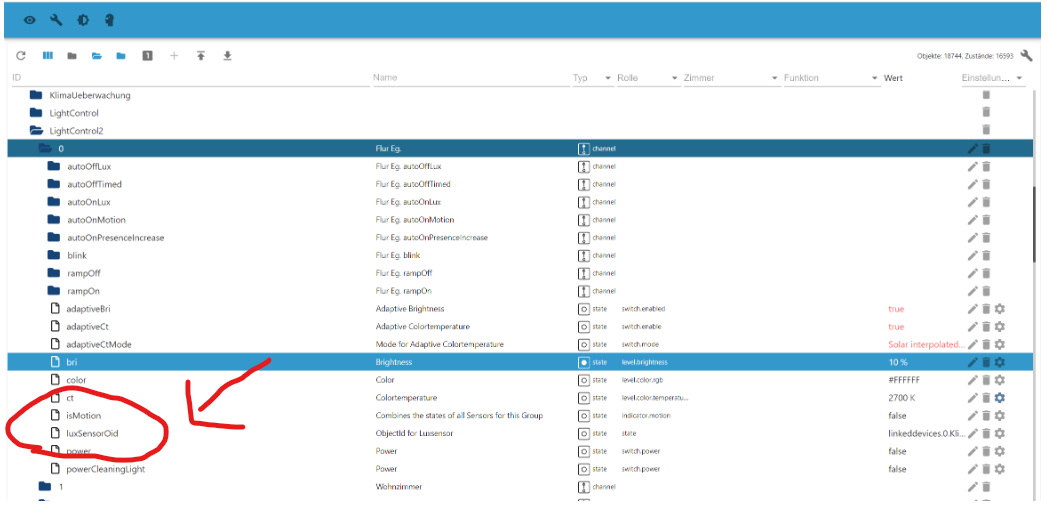
-
@ch90045 sagte in [Vorlage] LightControl:
@pittini Mal eine Frage - im Script steht:
const LuxSensor = 'linkeddevices.0.Klima.Draussen.brightness'; // Datenpunkt des globalen Luxsensors, wird verwendet wenn in der Gruppe kein gesonderter definiert wirdIch habe massenhaft Luxsensorer, finde aber nicht die Syntax für das Einbinden in die Gruppen. Wie macht man das?
Christian
Jede Raumgruppe hat nen Datenpunkt LuxSensorOid. Da halt eintragen.
-
@pittini Danke erst einmal, dass du da rein schaust - was mich wundert, ist, dass bei mir an der Stelle der Bewegungsmelder drin steht:
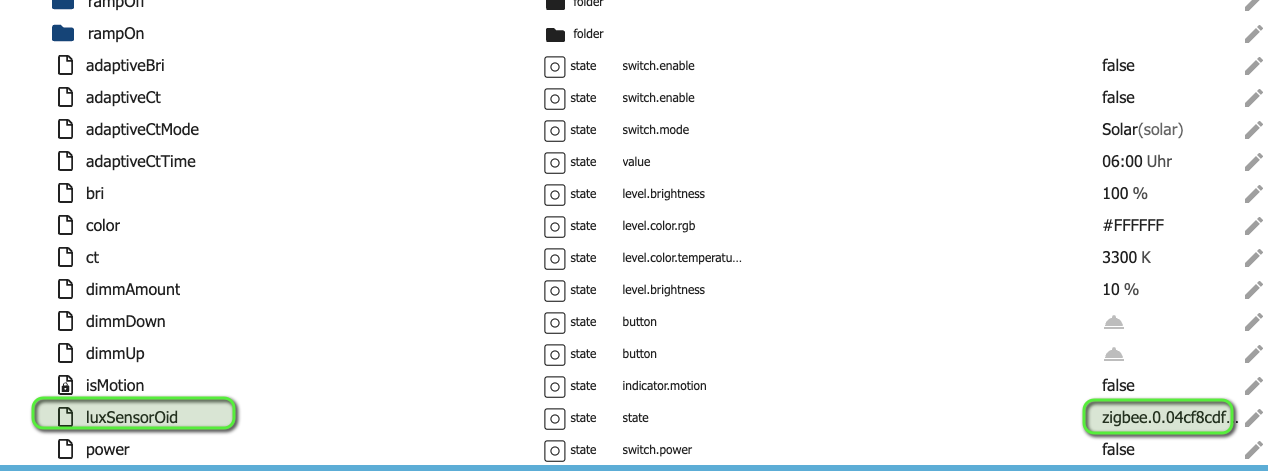
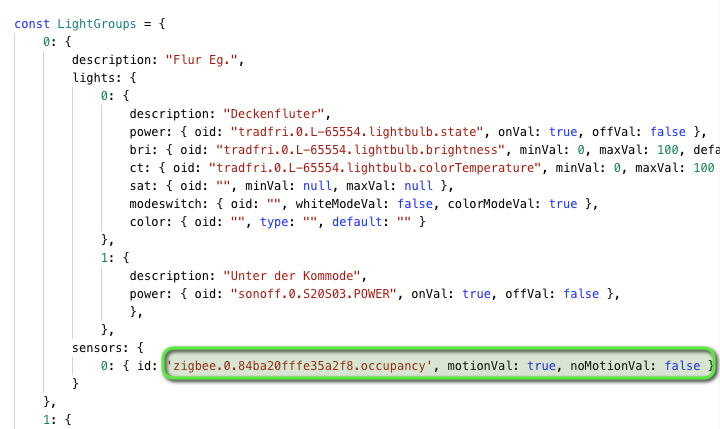
das ist aber kein Helligkeitssensor:
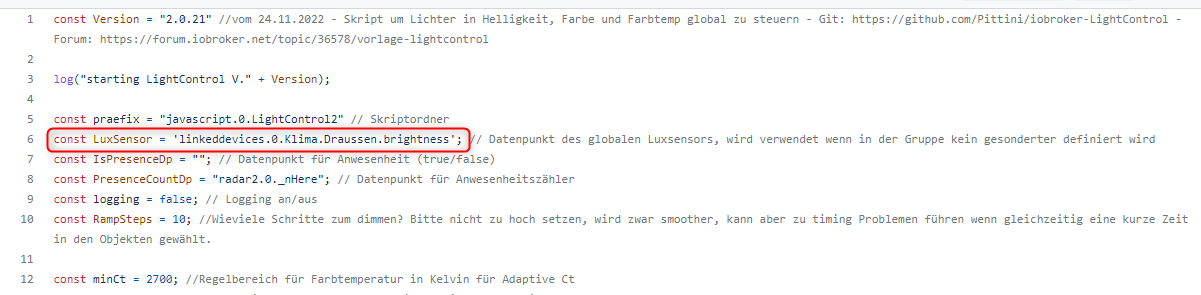
@ch90045 Hi, dann wird wohl dein globaler LuxSensor falsch definiert sein.
BTW: Darfst gerne auch den LightControl Adapter testen: https://github.com/Schmakus/ioBroker.lightcontrol.git
Dev of LightControl Adapter, Contributor of HUE and DoorBird Adapter
-
@ch90045 Hi, dann wird wohl dein globaler LuxSensor falsch definiert sein.
BTW: Darfst gerne auch den LightControl Adapter testen: https://github.com/Schmakus/ioBroker.lightcontrol.git
-
@ch90045 Steht im Datenpunkt tatsächlich der BWM? Leider ist es aus deinem Screenshot nicht ganz ersichtlich. So wie ich das sehe steht in diesem Datenpunkt genau der Sensor, welchen du als globaler LuxSensor am Anfang des Scripts definiert hast?! Und das wäre korrekt. Wenn du nun einen individuellen Sensor definieren möchtest, muss du in den Datenpunkt einfach die ID des jeweiligen Lichtsensors eintragen.
-
@ch90045 Steht im Datenpunkt tatsächlich der BWM? Leider ist es aus deinem Screenshot nicht ganz ersichtlich. So wie ich das sehe steht in diesem Datenpunkt genau der Sensor, welchen du als globaler LuxSensor am Anfang des Scripts definiert hast?! Und das wäre korrekt. Wenn du nun einen individuellen Sensor definieren möchtest, muss du in den Datenpunkt einfach die ID des jeweiligen Lichtsensors eintragen.
Hallo zusammen,
ich tue mich leider auch mit dem Skript und Bewegungsmeldern schwer. Hatte das vor ein paar Monaten schon mal getestet aber hab es nicht hinbekommen und jetzt hänge ich da leider schon wieder. Generell danke für die großartige Arbeit auch in den anderen Projekten (heating...)
Also ich habe eigentlich erstmal eine super einfache Konfiguration wieder zum Testen aufgebaut, die Lampe kann ich schalten und dimmen, der BWM erkennt auch die Bewegung aber er schaltet nicht. Auch im Debug-Log wird Bewegung erkannt aber nicht eingeschaltet.
Hier im Thread tauchte vor kurzem auf, dass man mindestens einen LUX-Messer haben muss. Ich habe keinen aber einen Fake-Dummy-Dateneintrag gemacht. Vielleicht liegt da das Problem, daher mal ein paar Screenshots, Codes...Das ist mein derzeitiges Setting, relativ reduziert. Ich habe auch schon die beiden Konstanten mit Präsenz gefüllt und wieder raus genommen und auch die Settings in der Lightgroup durchgespielt. Eventuell habe ich aber dort auch ein Verständnisproblem.
const Version = "2.0.21" //vom 24.11.2022 - Skript um Lichter in Helligkeit, Farbe und Farbtemp global zu steuern - Git: https://github.com/Pittini/iobroker-LightControl - Forum: https://forum.iobroker.net/topic/36578/vorlage-lightcontrol

log("starting LightControl V." + Version);

const praefix = "javascript.0.LightControl2" // Skriptordner
const LuxSensor = "0_userdata.0.Test.lux"; // Datenpunkt des globalen Luxsensors, wird verwendet wenn in der Gruppe kein gesonderter definiert wird
const IsPresenceDp = ""; // Datenpunkt für Anwesenheit (true/false)
const PresenceCountDp = ""; // Datenpunkt für Anwesenheitszähler
const logging = true; // Logging an/aus
const RampSteps = 10; //Wieviele Schritte zum dimmen? Bitte nicht zu hoch setzen, wird zwar smoother, kann aber zu timing Problemen führen wenn gleichzeitig eine kurze Zeit in den Objekten gewählt.

const minCt = 2700; //Regelbereich für Farbtemperatur in Kelvin für Adaptive Ct
const maxCt = 6500;//Regelbereich für Farbtemperatur in Kelvin für Adaptive Ct
const minBri = 10; //Mindesthelligkeit für AdaptiveBri

const LightGroups = {

    0:{
        description: "EG.Flur_Mitte.Deckenleuchte",
          lights: {
              0: {
                  description: "Deckenleuchte",
                  power: { oid: "alias.0.Erdgeschoss.Flur_Mitte.Licht.Deckenleuchte.on", onVal: true, offVal: false },
                  bri: { oid: "alias.0.Erdgeschoss.Flur_Mitte.Licht.Deckenleuchte.dimmer", minVal: 0, maxVal: 100, defaultVal: 80 },
                  ct: { oid: "", minVal: 454, maxVal: 250 },
                  sat: { oid: "", minVal: null, maxVal: null },
                  modeswitch: { oid: "", whiteModeVal: false, colorModeVal: true },
                  color: { oid: "", type: "", default: "" }
              }
          },
          sensors: {
            0: { id: 'alias.0.Erdgeschoss.Flur_Mitte.Anwesenheit.Bewegungsmelder.motion', motionVal: true, noMotionVal: false }
        }
    }
 };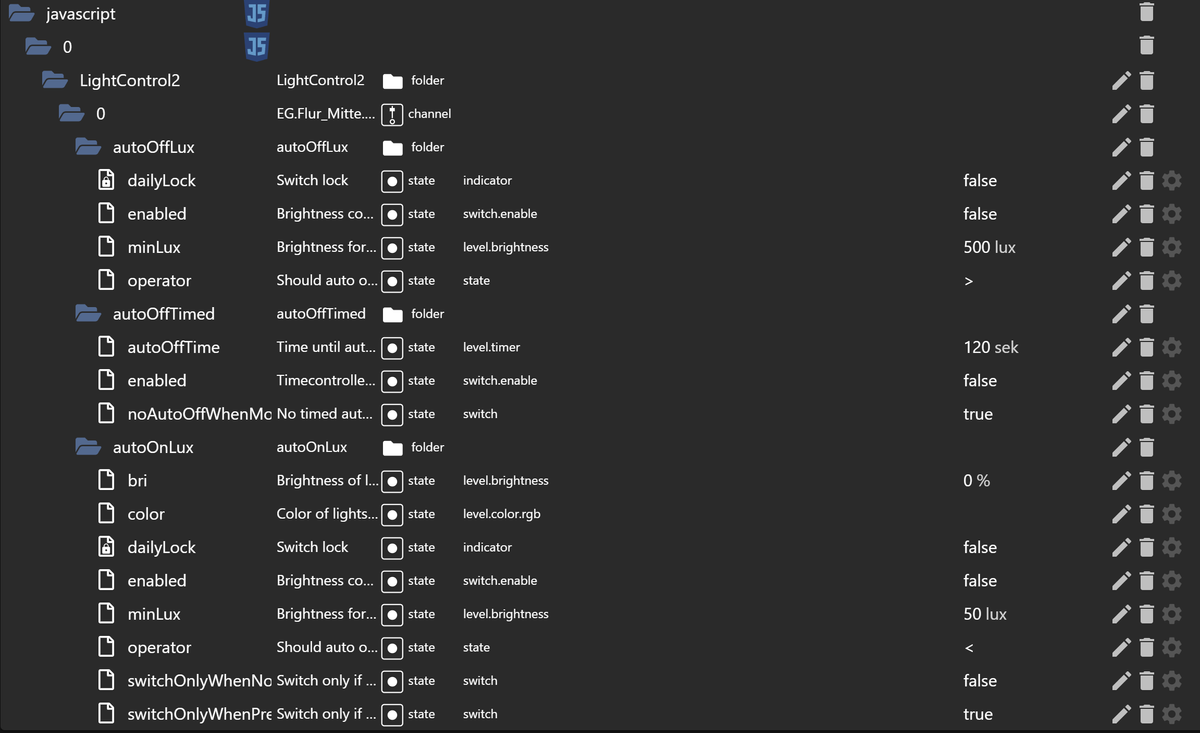
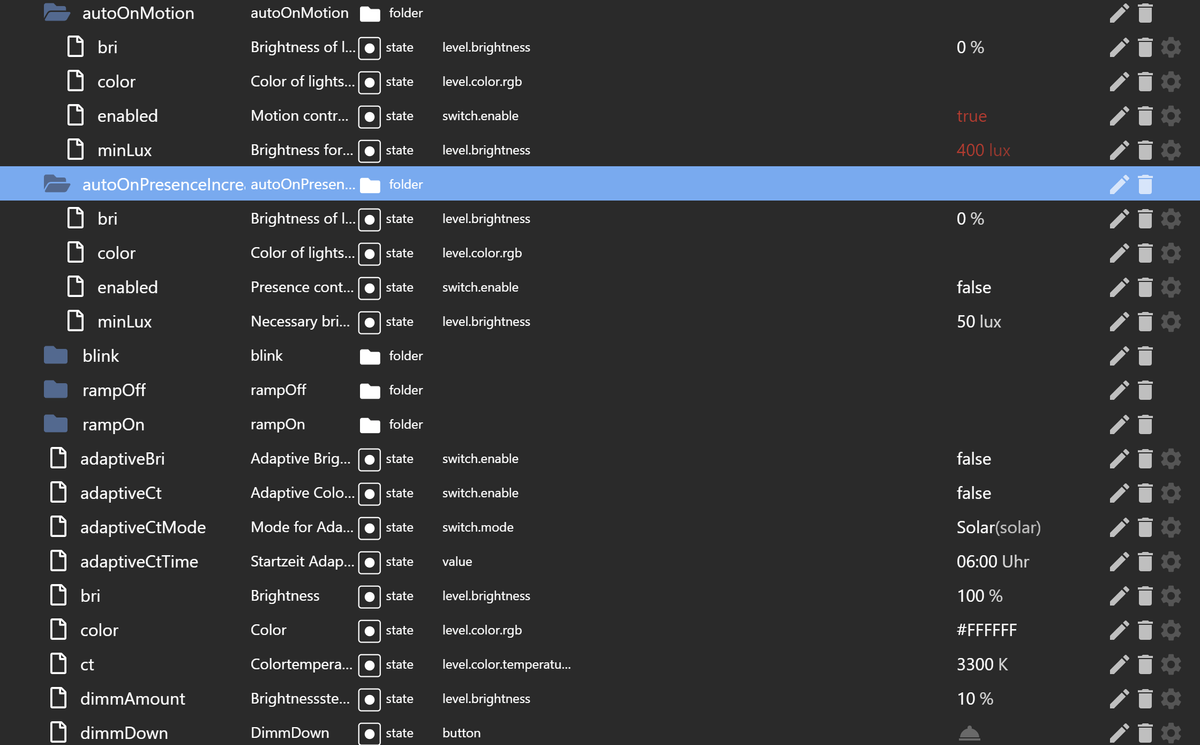
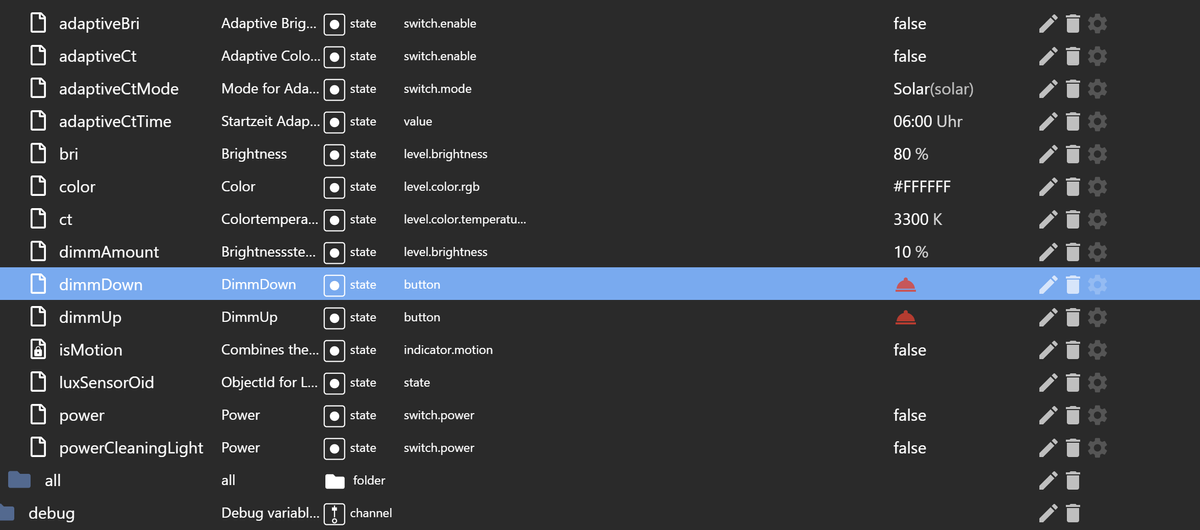
Das ist mein Fake Datenpunkt für LUX (number).

Den habe ich extra auf 50 Lux gesetzt und dann komme ich auch zu meinen Verständnisfragen, alle beziehen sich auf die Objekte unterhalb AutoOnMotion.
Mein globaler FakeLux sagt, es sind 50 lux überall.
Heisst minLux = 400, dass er nur bei über 400 LUX anschaltet? Das wäre für mich unlogisch, da er ja im Dunkeln anschalten soll und der Wert dann eher maxLux heißen müsste. Ich habe aber sowohl größer 50 als auch kleiner 50 getestet.Dann dort bri=0. Ist das der Wert mit dem die Lampe angeht? Dann würde sie ja dunkel bleiben.... Habe hier aber auch schon 80 stehen gehabt, klappt irgendwie nicht.
Sorry, ich werde natürlich, wenn notwendig Lichtsensoren besorgen, allerdings wollte ich im ersten Step meine alten Behelfsskripte für die BWMs loswerden und solange die nicht funktionieren komme ich gar nicht zum weiter testen für die anderen schönen Auto-Funktionen im Skript.
Hier das Debug-Log. Ich hab das Skript frisch gestartet, kurz gewartet und bin einmal zum BWM gelaufen. Lampe war vorher aus und ist nicht angegangen.
Um 18:31 habe ich die Lampe über die Visualisierung angemacht und auch die Helligkeit angepasst.Wenn mir jetzt jemand die BWMs ans Laufen bekommt und die beiden, vermutlich recht einfachen Fragen beantwortet, dann wäre es top.
16.1.2023, 18:29:30.478	[info ]: javascript.0 (356398) Start javascript script.js.common.Licht.LightControl
16.1.2023, 18:29:30.490	[info ]: javascript.0 (356398) script.js.common.Licht.LightControl: starting LightControl V.2.0.21
16.1.2023, 18:29:30.491	[info ]: javascript.0 (356398) script.js.common.Licht.LightControl: registered 0 subscriptions, 0 schedules, 0 messages, 0 logs and 0 file subscriptions
16.1.2023, 18:29:30.494	[info ]: javascript.0 (356398) script.js.common.Licht.LightControl: Reaching DoAllTheSensorThings
16.1.2023, 18:29:30.594	[info ]: javascript.0 (356398) script.js.common.Licht.LightControl: Init:Datapoint javascript.0.LightControl2.0.power still exists, skipping creation and reading data
16.1.2023, 18:29:30.595	[info ]: javascript.0 (356398) script.js.common.Licht.LightControl: Init: Read data from:javascript.0.LightControl2.0.power, value is false
16.1.2023, 18:29:30.596	[info ]: javascript.0 (356398) script.js.common.Licht.LightControl: Init:Datapoint javascript.0.LightControl2.0.dimmUp still exists, skipping creation and reading data
16.1.2023, 18:29:30.597	[info ]: javascript.0 (356398) script.js.common.Licht.LightControl: Init: Read data from:javascript.0.LightControl2.0.dimmUp, value is true
16.1.2023, 18:29:30.599	[info ]: javascript.0 (356398) script.js.common.Licht.LightControl: Init:Datapoint javascript.0.LightControl2.0.dimmDown still exists, skipping creation and reading data
16.1.2023, 18:29:30.599	[info ]: javascript.0 (356398) script.js.common.Licht.LightControl: Init: Read data from:javascript.0.LightControl2.0.dimmDown, value is true
16.1.2023, 18:29:30.601	[info ]: javascript.0 (356398) script.js.common.Licht.LightControl: Init:Datapoint javascript.0.LightControl2.0.dimmAmount still exists, skipping creation and reading data
16.1.2023, 18:29:30.602	[info ]: javascript.0 (356398) script.js.common.Licht.LightControl: Init: Read data from:javascript.0.LightControl2.0.dimmAmount, value is 10
16.1.2023, 18:29:30.603	[info ]: javascript.0 (356398) script.js.common.Licht.LightControl: Init:Datapoint javascript.0.LightControl2.0.bri still exists, skipping creation and reading data
16.1.2023, 18:29:30.603	[info ]: javascript.0 (356398) script.js.common.Licht.LightControl: Init: Read data from:javascript.0.LightControl2.0.bri, value is 80
16.1.2023, 18:29:30.605	[info ]: javascript.0 (356398) script.js.common.Licht.LightControl: Init:Datapoint javascript.0.LightControl2.0.ct still exists, skipping creation and reading data
16.1.2023, 18:29:30.605	[info ]: javascript.0 (356398) script.js.common.Licht.LightControl: Init: Read data from:javascript.0.LightControl2.0.ct, value is 3300
16.1.2023, 18:29:30.607	[info ]: javascript.0 (356398) script.js.common.Licht.LightControl: Init:Datapoint javascript.0.LightControl2.0.color still exists, skipping creation and reading data
16.1.2023, 18:29:30.607	[info ]: javascript.0 (356398) script.js.common.Licht.LightControl: Init: Read data from:javascript.0.LightControl2.0.color, value is #FFFFFF
16.1.2023, 18:29:30.609	[info ]: javascript.0 (356398) script.js.common.Licht.LightControl: Init:Datapoint javascript.0.LightControl2.0.luxSensorOid still exists, skipping creation and reading data
16.1.2023, 18:29:30.609	[info ]: javascript.0 (356398) script.js.common.Licht.LightControl: Init: Read data from:javascript.0.LightControl2.0.luxSensorOid, value is
16.1.2023, 18:29:30.610	[info ]: javascript.0 (356398) script.js.common.Licht.LightControl: Reaching DoAllTheLuxSensorThings for Group0 prop=
16.1.2023, 18:29:30.610	[info ]: javascript.0 (356398) script.js.common.Licht.LightControl: No Luxsensor for 0 defined, skip handling
16.1.2023, 18:29:30.611	[info ]: javascript.0 (356398) script.js.common.Licht.LightControl: Init:Datapoint javascript.0.LightControl2.0.adaptiveBri still exists, skipping creation and reading data
16.1.2023, 18:29:30.612	[info ]: javascript.0 (356398) script.js.common.Licht.LightControl: Init: Read data from:javascript.0.LightControl2.0.adaptiveBri, value is false
16.1.2023, 18:29:30.613	[info ]: javascript.0 (356398) script.js.common.Licht.LightControl: Init:Datapoint javascript.0.LightControl2.0.adaptiveCt still exists, skipping creation and reading data
16.1.2023, 18:29:30.614	[info ]: javascript.0 (356398) script.js.common.Licht.LightControl: Init: Read data from:javascript.0.LightControl2.0.adaptiveCt, value is false
16.1.2023, 18:29:30.615	[info ]: javascript.0 (356398) script.js.common.Licht.LightControl: Init:Datapoint javascript.0.LightControl2.0.adaptiveCtMode still exists, skipping creation and reading data
16.1.2023, 18:29:30.615	[info ]: javascript.0 (356398) script.js.common.Licht.LightControl: Init: Read data from:javascript.0.LightControl2.0.adaptiveCtMode, value is solar
16.1.2023, 18:29:30.616	[info ]: javascript.0 (356398) script.js.common.Licht.LightControl: Init:Datapoint javascript.0.LightControl2.0.adaptiveCtTime still exists, skipping creation and reading data
16.1.2023, 18:29:30.617	[info ]: javascript.0 (356398) script.js.common.Licht.LightControl: Init: Read data from:javascript.0.LightControl2.0.adaptiveCtTime, value is 06:00
16.1.2023, 18:29:30.617	[info ]: javascript.0 (356398) script.js.common.Licht.LightControl: Init:Datapoint javascript.0.LightControl2.0.powerCleaningLight still exists, skipping creation and reading data
16.1.2023, 18:29:30.618	[info ]: javascript.0 (356398) script.js.common.Licht.LightControl: Init: Read data from:javascript.0.LightControl2.0.powerCleaningLight, value is false
16.1.2023, 18:29:30.619	[info ]: javascript.0 (356398) script.js.common.Licht.LightControl: Init:Datapoint javascript.0.LightControl2.0.isMotion still exists, skipping creation and reading data
16.1.2023, 18:29:30.619	[info ]: javascript.0 (356398) script.js.common.Licht.LightControl: Init: Read data from:javascript.0.LightControl2.0.isMotion, value is false
16.1.2023, 18:29:30.620	[info ]: javascript.0 (356398) script.js.common.Licht.LightControl: Init: Datapoint javascript.0.LightControl2.0.autoOffTimed.enabled still exists, skipping creation and reading data
16.1.2023, 18:29:30.621	[info ]: javascript.0 (356398) script.js.common.Licht.LightControl: Init: Datapoint javascript.0.LightControl2.0.autoOffTimed.autoOffTime still exists, skipping creation and reading data
16.1.2023, 18:29:30.622	[info ]: javascript.0 (356398) script.js.common.Licht.LightControl: Init: Datapoint javascript.0.LightControl2.0.autoOffTimed.noAutoOffWhenMotion still exists, skipping creation and reading data
16.1.2023, 18:29:30.623	[info ]: javascript.0 (356398) script.js.common.Licht.LightControl: Init: Datapoint javascript.0.LightControl2.0.autoOffLux.enabled still exists, skipping creation and reading data
16.1.2023, 18:29:30.623	[info ]: javascript.0 (356398) script.js.common.Licht.LightControl: Init: Datapoint javascript.0.LightControl2.0.autoOffLux.minLux still exists, skipping creation and reading data
16.1.2023, 18:29:30.624	[info ]: javascript.0 (356398) script.js.common.Licht.LightControl: Init: Datapoint javascript.0.LightControl2.0.autoOffLux.dailyLock still exists, skipping creation and reading data
16.1.2023, 18:29:30.625	[info ]: javascript.0 (356398) script.js.common.Licht.LightControl: Init: Datapoint javascript.0.LightControl2.0.autoOffLux.operator still exists, skipping creation and reading data
16.1.2023, 18:29:30.626	[info ]: javascript.0 (356398) script.js.common.Licht.LightControl: Init: Datapoint javascript.0.LightControl2.0.autoOnMotion.enabled still exists, skipping creation and reading data
16.1.2023, 18:29:30.640	[info ]: javascript.0 (356398) script.js.common.Licht.LightControl: Init: Datapoint javascript.0.LightControl2.0.autoOnMotion.minLux still exists, skipping creation and reading data
16.1.2023, 18:29:30.663	[info ]: javascript.0 (356398) script.js.common.Licht.LightControl: Init: Datapoint javascript.0.LightControl2.0.autoOnMotion.bri still exists, skipping creation and reading data
16.1.2023, 18:29:30.664	[info ]: javascript.0 (356398) script.js.common.Licht.LightControl: Init: Datapoint javascript.0.LightControl2.0.autoOnMotion.color still exists, skipping creation and reading data
16.1.2023, 18:29:30.666	[info ]: javascript.0 (356398) script.js.common.Licht.LightControl: Init: Datapoint javascript.0.LightControl2.0.autoOnLux.enabled still exists, skipping creation and reading data
16.1.2023, 18:29:30.667	[info ]: javascript.0 (356398) script.js.common.Licht.LightControl: Init: Datapoint javascript.0.LightControl2.0.autoOnLux.minLux still exists, skipping creation and reading data
16.1.2023, 18:29:30.668	[info ]: javascript.0 (356398) script.js.common.Licht.LightControl: Init: Datapoint javascript.0.LightControl2.0.autoOnLux.bri still exists, skipping creation and reading data
16.1.2023, 18:29:30.668	[info ]: javascript.0 (356398) script.js.common.Licht.LightControl: Init: Datapoint javascript.0.LightControl2.0.autoOnLux.color still exists, skipping creation and reading data
16.1.2023, 18:29:30.669	[info ]: javascript.0 (356398) script.js.common.Licht.LightControl: Init: Datapoint javascript.0.LightControl2.0.autoOnLux.switchOnlyWhenPresence still exists, skipping creation and reading data
16.1.2023, 18:29:30.670	[info ]: javascript.0 (356398) script.js.common.Licht.LightControl: Init: Datapoint javascript.0.LightControl2.0.autoOnLux.switchOnlyWhenNoPresence still exists, skipping creation and reading data
16.1.2023, 18:29:30.671	[info ]: javascript.0 (356398) script.js.common.Licht.LightControl: Init: Datapoint javascript.0.LightControl2.0.autoOnLux.dailyLock still exists, skipping creation and reading data
16.1.2023, 18:29:30.672	[info ]: javascript.0 (356398) script.js.common.Licht.LightControl: Init: Datapoint javascript.0.LightControl2.0.autoOnLux.operator still exists, skipping creation and reading data
16.1.2023, 18:29:30.673	[info ]: javascript.0 (356398) script.js.common.Licht.LightControl: Init: Datapoint javascript.0.LightControl2.0.autoOnPresenceIncrease.enabled still exists, skipping creation and reading data
16.1.2023, 18:29:30.674	[info ]: javascript.0 (356398) script.js.common.Licht.LightControl: Init: Datapoint javascript.0.LightControl2.0.autoOnPresenceIncrease.minLux still exists, skipping creation and reading data
16.1.2023, 18:29:30.676	[info ]: javascript.0 (356398) script.js.common.Licht.LightControl: Init: Datapoint javascript.0.LightControl2.0.autoOnPresenceIncrease.bri still exists, skipping creation and reading data
16.1.2023, 18:29:30.678	[info ]: javascript.0 (356398) script.js.common.Licht.LightControl: Init: Datapoint javascript.0.LightControl2.0.autoOnPresenceIncrease.color still exists, skipping creation and reading data
16.1.2023, 18:29:30.680	[info ]: javascript.0 (356398) script.js.common.Licht.LightControl: Init: Datapoint javascript.0.LightControl2.0.rampOn.enabled still exists, skipping creation and reading data
16.1.2023, 18:29:30.682	[info ]: javascript.0 (356398) script.js.common.Licht.LightControl: Init: Datapoint javascript.0.LightControl2.0.rampOn.time still exists, skipping creation and reading data
16.1.2023, 18:29:30.684	[info ]: javascript.0 (356398) script.js.common.Licht.LightControl: Init: Datapoint javascript.0.LightControl2.0.rampOn.switchOutletsLast still exists, skipping creation and reading data
16.1.2023, 18:29:30.685	[info ]: javascript.0 (356398) script.js.common.Licht.LightControl: Init: Datapoint javascript.0.LightControl2.0.rampOff.enabled still exists, skipping creation and reading data
16.1.2023, 18:29:30.686	[info ]: javascript.0 (356398) script.js.common.Licht.LightControl: Init: Datapoint javascript.0.LightControl2.0.rampOff.time still exists, skipping creation and reading data
16.1.2023, 18:29:30.687	[info ]: javascript.0 (356398) script.js.common.Licht.LightControl: Init: Datapoint javascript.0.LightControl2.0.rampOff.switchOutletsLast still exists, skipping creation and reading data
16.1.2023, 18:29:30.688	[info ]: javascript.0 (356398) script.js.common.Licht.LightControl: Init: Datapoint javascript.0.LightControl2.0.blink.enabled still exists, skipping creation and reading data
16.1.2023, 18:29:30.689	[info ]: javascript.0 (356398) script.js.common.Licht.LightControl: Init: Datapoint javascript.0.LightControl2.0.blink.frequency still exists, skipping creation and reading data
16.1.2023, 18:29:30.690	[info ]: javascript.0 (356398) script.js.common.Licht.LightControl: Init: Datapoint javascript.0.LightControl2.0.blink.blinks still exists, skipping creation and reading data
16.1.2023, 18:29:30.691	[info ]: javascript.0 (356398) script.js.common.Licht.LightControl: Init: Datapoint javascript.0.LightControl2.0.blink.bri still exists, skipping creation and reading data
16.1.2023, 18:29:30.692	[info ]: javascript.0 (356398) script.js.common.Licht.LightControl: Init: Datapoint javascript.0.LightControl2.0.blink.color still exists, skipping creation and reading data
16.1.2023, 18:29:30.694	[info ]: javascript.0 (356398) script.js.common.Licht.LightControl: Init: Datapoint javascript.0.LightControl2.all.power still exists, skipping creation and setting trigger
16.1.2023, 18:29:30.695	[info ]: javascript.0 (356398) script.js.common.Licht.LightControl: Init: Datapoint javascript.0.LightControl2.all.anyOn still exists, skipping creation and setting trigger
16.1.2023, 18:29:30.696	[info ]: javascript.0 (356398) script.js.common.Licht.LightControl: Init: Created 0 Datapoints
16.1.2023, 18:29:30.696	[info ]: javascript.0 (356398) script.js.common.Licht.LightControl: adaptiveCtLinear=0 adaptiveCtSolar=0 adaptiveCtSolarInterpolated=0 adaptiveCtTimed=0
16.1.2023, 18:30:07.385	[info ]: javascript.0 (356398) script.js.common.Licht.LightControl: Triggered linked Sensor alias.0.Erdgeschoss.Flur_Mitte.Anwesenheit.Bewegungsmelder.motion new value is true
16.1.2023, 18:30:07.386	[info ]: javascript.0 (356398) script.js.common.Licht.LightControl: Reaching SummarizeSensors, Group=0
16.1.2023, 18:30:07.386	[info ]: javascript.0 (356398) script.js.common.Licht.LightControl: Gruppe=0 Sensor 0 with target alias.0.Erdgeschoss.Flur_Mitte.Anwesenheit.Bewegungsmelder.motion has value true
16.1.2023, 18:30:07.386	[info ]: javascript.0 (356398) script.js.common.Licht.LightControl: Summarized IsMotion for Group 0 = true
16.1.2023, 18:30:07.387	[info ]: javascript.0 (356398) script.js.common.Licht.LightControl: Reaching Controller, Group=0 Property1=isMotion NewVal=true OldVal=false
16.1.2023, 18:30:30.697	[info ]: javascript.0 (356398) script.js.common.Licht.LightControl: adaptiveCtLinear=0 adaptiveCtSolar=0 adaptiveCtSolarInterpolated=0 adaptiveCtTimed=0
16.1.2023, 18:30:49.798	[info ]: javascript.0 (356398) script.js.common.Licht.LightControl: Triggered linked Sensor alias.0.Erdgeschoss.Flur_Mitte.Anwesenheit.Bewegungsmelder.motion new value is false
16.1.2023, 18:30:49.798	[info ]: javascript.0 (356398) script.js.common.Licht.LightControl: Reaching SummarizeSensors, Group=0
16.1.2023, 18:30:49.798	[info ]: javascript.0 (356398) script.js.common.Licht.LightControl: Summarized IsMotion for Group 0 = false
16.1.2023, 18:30:49.800	[info ]: javascript.0 (356398) script.js.common.Licht.LightControl: Reaching Controller, Group=0 Property1=isMotion NewVal=false OldVal=true
16.1.2023, 18:31:04.467	[info ]: javascript.0 (356398) script.js.common.Licht.LightControl: Reaching Controller, Group=0 Property1=power NewVal=true OldVal=false
16.1.2023, 18:31:04.468	[info ]: javascript.0 (356398) script.js.common.Licht.LightControl: Reaching GroupPowerOnOff for Group 0 (EG.Flur_Mitte.Deckenleuchte), OnOff=true rampOn=false - {"enabled":false,"time":10,"switchOutletsLast":true} rampOff=false - {"enabled":false,"time":10,"switchOutletsLast":false}
16.1.2023, 18:31:04.468	[info ]: javascript.0 (356398) script.js.common.Licht.LightControl: SimpleGroupPowerOnOff: Normales anschalten ohne Ramping für EG.Flur_Mitte.Deckenleuchte
16.1.2023, 18:31:04.475	[info ]: javascript.0 (356398) script.js.common.Licht.LightControl: Reaching Light States anyOn and Masterswitch
16.1.2023, 18:31:04.477	[info ]: javascript.0 (356398) script.js.common.Licht.LightControl: Reaching Light States anyOn and Masterswitch
16.1.2023, 18:31:04.479	[info ]: javascript.0 (356398) script.js.common.Licht.LightControl: Reaching powerOnAfterCare for Group 0 bri=80 ct=3300 color=#FFFFFF
16.1.2023, 18:31:04.479	[info ]: javascript.0 (356398) script.js.common.Licht.LightControl: Now setting bri to 80% for Group EG.Flur_Mitte.Deckenleuchte
16.1.2023, 18:31:04.479	[info ]: javascript.0 (356398) script.js.common.Licht.LightControl: Reaching SetBrightness, Group=0 Brightness=80
16.1.2023, 18:31:04.571	[info ]: javascript.0 (356398) script.js.common.Licht.LightControl: Reaching SetColor for Group 0 power=true Color=#FFFFFF
16.1.2023, 18:31:04.571	[info ]: javascript.0 (356398) script.js.common.Licht.LightControl: Reaching WhiteSubstituteColor for Group0 = EG.Flur_Mitte.Deckenleuchte LightGroups[Group].power=true LightGroups[Group].color =#FFFFFF
16.1.2023, 18:31:04.571	[info ]: javascript.0 (356398) script.js.common.Licht.LightControl: Reaching SetColorMode for Group 0
16.1.2023, 18:31:04.571	[info ]: javascript.0 (356398) script.js.common.Licht.LightControl: Reaching SetCt, Group=0 Ct=3300
16.1.2023, 18:31:14.219	[info ]: javascript.0 (356398) script.js.common.Licht.LightControl: Reaching Controller, Group=0 Property1=bri NewVal=11 OldVal=80
16.1.2023, 18:31:14.219	[info ]: javascript.0 (356398) script.js.common.Licht.LightControl: Reaching SetBrightness, Group=0 Brightness=11
16.1.2023, 18:31:15.224	[info ]: javascript.0 (356398) script.js.common.Licht.LightControl: Reaching Controller, Group=0 Property1=bri NewVal=41 OldVal=11
16.1.2023, 18:31:15.224	[info ]: javascript.0 (356398) script.js.common.Licht.LightControl: Reaching SetBrightness, Group=0 Brightness=41
16.1.2023, 18:31:18.245	[info ]: javascript.0 (356398) script.js.common.Licht.LightControl: Reaching Controller, Group=0 Property1=bri NewVal=1 OldVal=41
16.1.2023, 18:31:18.245	[info ]: javascript.0 (356398) script.js.common.Licht.LightControl: Reaching SetBrightness, Group=0 Brightness=1
16.1.2023, 18:31:24.003	[info ]: javascript.0 (356398) script.js.common.Licht.LightControl: Reaching Controller, Group=0 Property1=bri NewVal=91 OldVal=2
16.1.2023, 18:31:24.003	[info ]: javascript.0 (356398) script.js.common.Licht.LightControl: Reaching SetBrightness, Group=0 Brightness=91
16.1.2023, 18:31:30.697	[info ]: javascript.0 (356398) script.js.common.Licht.LightControl: adaptiveCtLinear=0 adaptiveCtSolar=0 adaptiveCtSolarInterpolated=0 adaptiveCtTimed=0





Hey! Du scheinst an dieser Unterhaltung interessiert zu sein, hast aber noch kein Konto.
Hast du es satt, bei jedem Besuch durch die gleichen Beiträge zu scrollen? Wenn du dich für ein Konto anmeldest, kommst du immer genau dorthin zurück, wo du zuvor warst, und kannst dich über neue Antworten benachrichtigen lassen (entweder per E-Mail oder Push-Benachrichtigung). Du kannst auch Lesezeichen speichern und Beiträge positiv bewerten, um anderen Community-Mitgliedern deine Wertschätzung zu zeigen.
Mit deinem Input könnte dieser Beitrag noch besser werden 💗
Registrieren AnmeldenSupport us
442
Online33.0k
Benutzende83.7k
Themen1.3m
Beiträge