
NEWS




VIS 1.14.5 lässt sich nicht installieren
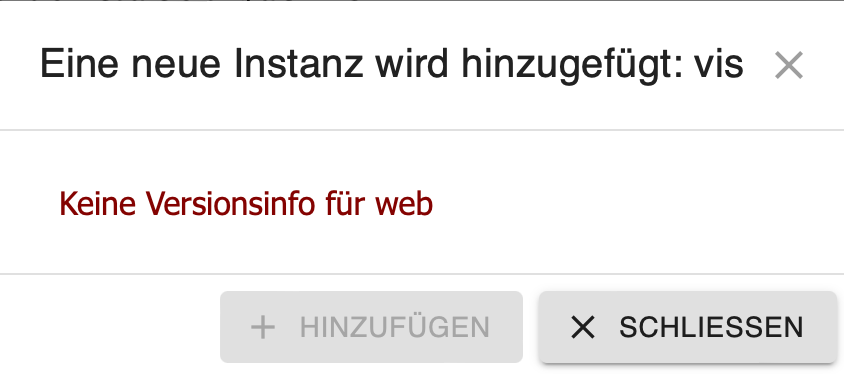
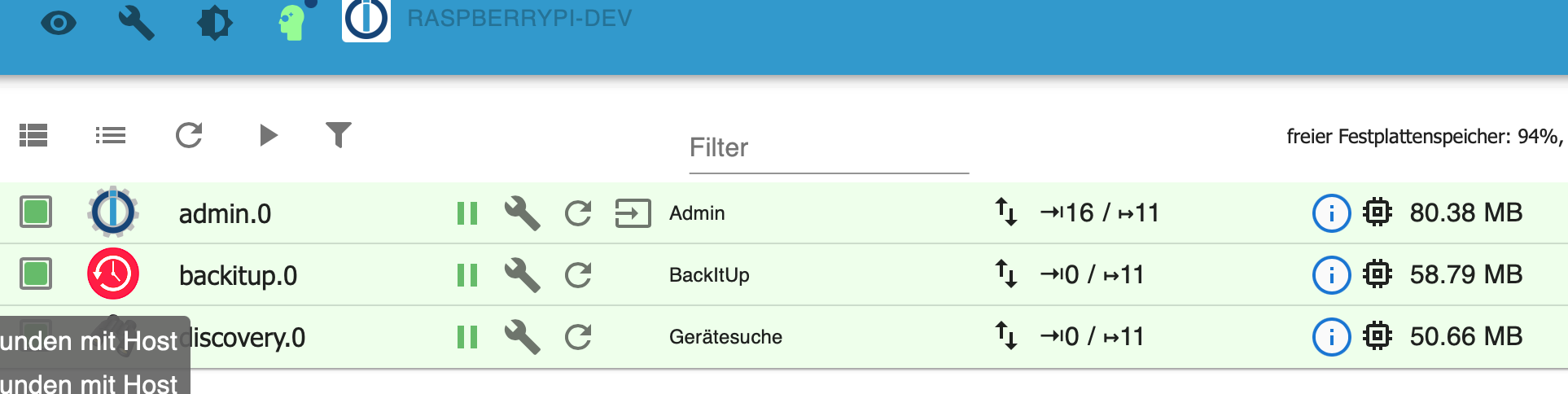
-
@legro said in VIS 1.14.5 lässt sich nicht installieren:
Durch die neue Version von BackItUp funktioniert nunmehr auch bei mir der Kniff, zuvor eine alte Version mittels iobroker Install vis@<Version> zu installieren, um anschließend ein erfolgreiches Restore hinzubekommen
Es war niemals und bei keiner BackitUp Version notwendig, eine alte Version zu installieren!
Wurde VIS zum richtigen Zeitpunkt installiert, war alles OK!
@einstein67 sagte in VIS 1.14.5 lässt sich nicht installieren:
@legro said in VIS 1.14.5 lässt sich nicht installieren:
Durch die neue Version von BackItUp funktioniert nunmehr auch bei mir der Kniff, zuvor eine alte Version mittels iobroker Install vis@<Version> zu installieren, um anschließend ein erfolgreiches Restore hinzubekommen
Es war niemals und bei keiner BackitUp Version notwendig, eine alte Version zu installieren!
Wurde VIS zum richtigen Zeitpunkt installiert, war alles OK!
Das sollte dann vielleicht irgendwo prominent in der Dokumentation stehen, oder?
-
@einstein67 sagte in VIS 1.14.5 lässt sich nicht installieren:
@legro said in VIS 1.14.5 lässt sich nicht installieren:
Durch die neue Version von BackItUp funktioniert nunmehr auch bei mir der Kniff, zuvor eine alte Version mittels iobroker Install vis@<Version> zu installieren, um anschließend ein erfolgreiches Restore hinzubekommen
Es war niemals und bei keiner BackitUp Version notwendig, eine alte Version zu installieren!
Wurde VIS zum richtigen Zeitpunkt installiert, war alles OK!
Das sollte dann vielleicht irgendwo prominent in der Dokumentation stehen, oder?
-
@homoran sagte in VIS 1.14.5 lässt sich nicht installieren:
@andygr42 sagte in VIS 1.14.5 lässt sich nicht installieren:
Das sollte dann vielleicht irgendwo prominent in der Dokumentation stehen, oder?
was soll wo weswegen stehen?
Das man idealerweise bei einem Restore VIS vorher installiert. Ich hab ein par Anleitungen quergelesen und der Punkt tauchte nirgendwo auf. Wenn ich hier im Thread zwischen den Zeilen richtig lese, scheint dieses Problem mit VIS ja nicht so ganz neu zu sein?
-
@homoran sagte in VIS 1.14.5 lässt sich nicht installieren:
@andygr42 sagte in VIS 1.14.5 lässt sich nicht installieren:
Das sollte dann vielleicht irgendwo prominent in der Dokumentation stehen, oder?
was soll wo weswegen stehen?
Das man idealerweise bei einem Restore VIS vorher installiert. Ich hab ein par Anleitungen quergelesen und der Punkt tauchte nirgendwo auf. Wenn ich hier im Thread zwischen den Zeilen richtig lese, scheint dieses Problem mit VIS ja nicht so ganz neu zu sein?
@andygr42 sagte in VIS 1.14.5 lässt sich nicht installieren:
Das man idealerweise bei einem Restore VIS vorher installiert.
das passiert wenn jemand hier im Forum massiv solche Falschinformationen streut!
Das scheint im Moment bei ganz wenigen Installationen vereinzelt aufgetreten zu sein, aufgrund einer mir noch nicht bekannten Konstellation.
und nochmal!
wie bereits mehrfach geschrieben: es liegt definitiv nicht an backitup!
Backitup behandelt alle Instanzen gleich. @simatec hätte viel zu tun, jeden neuen und sogar unbekannten Adapter einzeln in backitup einzupflegen.
Das auftreten dieses Phänomens ausschließlich bei vis zeigt, dass die Ursache woanders zu suchen ist.wie bereits früher geschrieben
https://forum.iobroker.net/post/815603
@andygr42 sagte in VIS 1.14.5 lässt sich nicht installieren:
Wenn ich hier im Thread zwischen den Zeilen richtig lese, scheint dieses Problem mit VIS ja nicht so ganz neu zu sein?
nicht zwischen den Zeilen lesen, da wird leider trotz Richtigstellung immer nochsehr viel Blödsinn gestreut, sondern genau lesen!
es tritt (geschätzt) seit 2-3 Wochen auf!
ist für eine Ursachenforschung ohne ausreichende Informationen sehr neuFür den Workaround bei den seltenen Fällen mit Problemen ist dieser Thread. Da hat @crunchip bereits ganz zu Beginn die notwendigen Schritte ausführlich beschrieben
-
@andygr42 sagte in VIS 1.14.5 lässt sich nicht installieren:
Das man idealerweise bei einem Restore VIS vorher installiert.
das passiert wenn jemand hier im Forum massiv solche Falschinformationen streut!
Das scheint im Moment bei ganz wenigen Installationen vereinzelt aufgetreten zu sein, aufgrund einer mir noch nicht bekannten Konstellation.
und nochmal!
wie bereits mehrfach geschrieben: es liegt definitiv nicht an backitup!
Backitup behandelt alle Instanzen gleich. @simatec hätte viel zu tun, jeden neuen und sogar unbekannten Adapter einzeln in backitup einzupflegen.
Das auftreten dieses Phänomens ausschließlich bei vis zeigt, dass die Ursache woanders zu suchen ist.wie bereits früher geschrieben
https://forum.iobroker.net/post/815603
@andygr42 sagte in VIS 1.14.5 lässt sich nicht installieren:
Wenn ich hier im Thread zwischen den Zeilen richtig lese, scheint dieses Problem mit VIS ja nicht so ganz neu zu sein?
nicht zwischen den Zeilen lesen, da wird leider trotz Richtigstellung immer nochsehr viel Blödsinn gestreut, sondern genau lesen!
es tritt (geschätzt) seit 2-3 Wochen auf!
ist für eine Ursachenforschung ohne ausreichende Informationen sehr neuFür den Workaround bei den seltenen Fällen mit Problemen ist dieser Thread. Da hat @crunchip bereits ganz zu Beginn die notwendigen Schritte ausführlich beschrieben
@homoran sagte in VIS 1.14.5 lässt sich nicht installieren:
es tritt (geschätzt) seit 2-3 Wochen auf!
-
@homoran sagte in VIS 1.14.5 lässt sich nicht installieren:
es tritt (geschätzt) seit 2-3 Wochen auf!
Danke!
ich hab jetzt keine Ahnung, ob es da um dieses Problem geht, aber unten steht
solved, after "iobroker install vis@1.4.5" no error occured and vis was installed correctly. Following update to 1.4.14 without any problems or errors.
und leider hier auch keine Infos über das jeweilige System
-
Danke!
ich hab jetzt keine Ahnung, ob es da um dieses Problem geht, aber unten steht
solved, after "iobroker install vis@1.4.5" no error occured and vis was installed correctly. Following update to 1.4.14 without any problems or errors.
und leider hier auch keine Infos über das jeweilige System
Der Fehler ist nie behoben worden, daher tritt er auch weiterhin auf. Ist mit einer neuen JS-Controller Version aufgetreten. Apollon77 hatte mir damals den Workaround mit dem Downgrade gegeben und mich gebeten, das Issue zu erstellen.
-
Der Fehler ist nie behoben worden, daher tritt er auch weiterhin auf. Ist mit einer neuen JS-Controller Version aufgetreten. Apollon77 hatte mir damals den Workaround mit dem Downgrade gegeben und mich gebeten, das Issue zu erstellen.
@ofbeqnpolkkl6mby5e13 Nochmals Danke!
für alle Punkte!also sehe ich das als die Bestätigung dass die Behauptung der Fehler läge in backitup definitiv falsch ist.
Vielleicht stoßen wir @apollon77 hier nochmal an, ob er herausfinden konnte ob es an vis oder am Controller liegt.
(Meine Vermutung als Beobachter ist eher der Controller)Auchbschön, dass du es an dem Versionswechsel des Controllers festmachen konntest.
solche Informationen habe ich hier vergeblich nachgefragt
-
@ofbeqnpolkkl6mby5e13 Nochmals Danke!
für alle Punkte!also sehe ich das als die Bestätigung dass die Behauptung der Fehler läge in backitup definitiv falsch ist.
Vielleicht stoßen wir @apollon77 hier nochmal an, ob er herausfinden konnte ob es an vis oder am Controller liegt.
(Meine Vermutung als Beobachter ist eher der Controller)Auchbschön, dass du es an dem Versionswechsel des Controllers festmachen konntest.
solche Informationen habe ich hier vergeblich nachgefragtIch gucke mal, ob ich den Thread hier im Forum finde.
Edit:
https://forum.iobroker.net/topic/52208/js-controller-4-0-jetzt-im-beta-latest/537(iobroker-Backitup verwendet die Backup-Funktion des JS-Controllers)
-
Ich gucke mal, ob ich den Thread hier im Forum finde.
Edit:
https://forum.iobroker.net/topic/52208/js-controller-4-0-jetzt-im-beta-latest/537(iobroker-Backitup verwendet die Backup-Funktion des JS-Controllers)
-
Vielleicht bin ich auch etwas empfindlich, aber der Umgangston hier motiviert mich nicht gerade.
Falls jemand etwas damit anfangen kann, ich habe noch alle Logs seit der Grundinstallation vor 4 Tagen. Inkl. Restore.
@andygr42 sagte in VIS 1.14.5 lässt sich nicht installieren:
Vielleicht bin ich auch etwas empfindlich, aber der Umgangston hier motiviert mich nicht gerade.
Wenn man mehrere Tage erfolglos versucht die Desinformation zu verhindern und dann wie befürchtet die Folgen der Falschinformationen sichtbar werden, wird leider auch Der Ton etwas härter um deutlich zu machen, dass weitere Falschinformationen hier unerwünscht sind!
ich hoffe dass die Hinweise von @oFbEQnpoLKKl6mbY5e13 jetzt reichen, dass endlich wieder Sachlichkeit einkehrt.
Danke für dein Angebot, ggf. werden wir darauf zurückkommen
-
@andygr42 sagte in VIS 1.14.5 lässt sich nicht installieren:
Vielleicht bin ich auch etwas empfindlich, aber der Umgangston hier motiviert mich nicht gerade.
Wenn man mehrere Tage erfolglos versucht die Desinformation zu verhindern und dann wie befürchtet die Folgen der Falschinformationen sichtbar werden, wird leider auch Der Ton etwas härter um deutlich zu machen, dass weitere Falschinformationen hier unerwünscht sind!
ich hoffe dass die Hinweise von @oFbEQnpoLKKl6mbY5e13 jetzt reichen, dass endlich wieder Sachlichkeit einkehrt.
Danke für dein Angebot, ggf. werden wir darauf zurückkommen
@homoran Ok, verständlich. Ich habe nochmal ein par Tests gemacht. Mein Odroid C4 ist ja frei.
-
System: DietPi minimal (Debian
BusterBullseye) + OpenSSH -
curl -sL https://iobroker.net/install.sh | bash - (Installer version: 2022-06-03)
Gemäß Apollons Post von vor knapp 20h wurde (wahrscheinlich) Node 16 installiert.
Platform : linux os : linux Architecture : arm64 CPUs : 4 Speed : 2100 MHz Model : Cortex-A55 RAM : 3.6 GB System uptime : 00:01:24 Node.js : v16.15.1 time : 1655553283840 timeOffset : -60 adapters count : NPM : v8.11.0 Disk size : 14.3 GiB Disk free : 12.8 GiB Used repository: stable Adapter "admin" : 5.3.8 , installed 5.3.8 Adapter "backitup" : 2.4.9 , installed 2.4.9 Adapter "discovery" : 3.0.3 , installed 3.0.3 Controller "js-controller": 4.0.23 , installed 4.0.23- iobroker install vis
host.DietPi install adapter web upload [16] web.admin /opt/iobroker/node_modules/iobroker.web/admin/asset-manifest.json asset-manifest.json application/json upload [15] web.admin /opt/iobroker/node_modules/iobroker.web/admin/favicon.ico favicon.ico image/vnd.microsoft.icon upload [14] web.admin /opt/iobroker/node_modules/iobroker.web/admin/index_m.html index_m.html text/html upload [13] web.admin /opt/iobroker/node_modules/iobroker.web/admin/manifest.json manifest.json application/json upload [12] web.admin /opt/iobroker/node_modules/iobroker.web/admin/static/css/2.faf2f676.chunk.css static/css/2.faf2f676.chunk.css text/css upload [11] web.admin /opt/iobroker/node_modules/iobroker.web/admin/static/css/2.faf2f676.chunk.css.map static/css/2.faf2f676.chunk.css.map application/json upload [10] web.admin /opt/iobroker/node_modules/iobroker.web/admin/static/css/main.e2d673ee.chunk.css static/css/main.e2d673ee.chunk.css text/css upload [9] web.admin /opt/iobroker/node_modules/iobroker.web/admin/static/css/main.e2d673ee.chunk.css.map static/css/main.e2d673ee.chunk.css.map application/json upload [8] web.admin /opt/iobroker/node_modules/iobroker.web/admin/static/js/2.b1d56998.chunk.js static/js/2.b1d56998.chunk.js application/javascript upload [7] web.admin /opt/iobroker/node_modules/iobroker.web/admin/static/js/2.b1d56998.chunk.js.LICENSE.txt static/js/2.b1d56998.chunk.js.LICENSE.txt text/plain upload [6] web.admin /opt/iobroker/node_modules/iobroker.web/admin/static/js/2.b1d56998.chunk.js.map static/js/2.b1d56998.chunk.js.map application/json upload [5] web.admin /opt/iobroker/node_modules/iobroker.web/admin/static/js/main.034751df.chunk.js static/js/main.034751df.chunk.js application/javascript upload [4] web.admin /opt/iobroker/node_modules/iobroker.web/admin/static/js/main.034751df.chunk.js.map static/js/main.034751df.chunk.js.map application/json upload [3] web.admin /opt/iobroker/node_modules/iobroker.web/admin/static/js/runtime-main.7278cf1c.js static/js/runtime-main.7278cf1c.js application/javascript upload [2] web.admin /opt/iobroker/node_modules/iobroker.web/admin/static/js/runtime-main.7278cf1c.js.map static/js/runtime-main.7278cf1c.js.map application/json upload [1] web.admin /opt/iobroker/node_modules/iobroker.web/admin/static/media/le.eb63b1db.png static/media/le.eb63b1db.png image/png upload [0] web.admin /opt/iobroker/node_modules/iobroker.web/admin/web.png web.png image/png upload [396] web /opt/iobroker/node_modules/iobroker.web/www/admin/img/admin.png admin/img/admin.png image/png upload [350] web /opt/iobroker/node_modules/iobroker.web/www/lib/css/themes/jquery-ui/blitzer/images/ui-bg_highlight-soft_15_cc0000_1x100.png lib/css/themes/jquery-ui/blitzer/images/ui-bg_highlight-soft_15_cc0000_1x100.png image/png upload [300] web /opt/iobroker/node_modules/iobroker.web/www/lib/css/themes/jquery-ui/custom-light/jquery-ui.theme.min.css lib/css/themes/jquery-ui/custom-light/jquery-ui.theme.min.css text/css upload [250] web /opt/iobroker/node_modules/iobroker.web/www/lib/css/themes/jquery-ui/eggplant/images/ui-bg_highlight-soft_100_eae6ea_1x100.png lib/css/themes/jquery-ui/eggplant/images/ui-bg_highlight-soft_100_eae6ea_1x100.png image/png upload [200] web /opt/iobroker/node_modules/iobroker.web/www/lib/css/themes/jquery-ui/hot-sneaks/images/ui-bg_flat_75_ba9217_40x100.png lib/css/themes/jquery-ui/hot-sneaks/images/ui-bg_flat_75_ba9217_40x100.png image/png upload [150] web /opt/iobroker/node_modules/iobroker.web/www/lib/css/themes/jquery-ui/redmond/images/ui-bg_glass_85_dfeffc_1x400.png lib/css/themes/jquery-ui/redmond/images/ui-bg_glass_85_dfeffc_1x400.png image/png upload [100] web /opt/iobroker/node_modules/iobroker.web/www/lib/css/themes/jquery-ui/sunny/images/ui-bg_diagonals-medium_20_d34d17_40x40.png lib/css/themes/jquery-ui/sunny/images/ui-bg_diagonals-medium_20_d34d17_40x40.png image/png upload [90] web /opt/iobroker/node_modules/iobroker.web/www/lib/css/themes/jquery-ui/sunny/images/ui-icons_bd7b00_256x240.png lib/css/themes/jquery-ui/sunny/images/ui-icons_bd7b00_256x240.png image/png upload [80] web /opt/iobroker/node_modules/iobroker.web/www/lib/css/themes/jquery-ui/ui-darkness/images/ui-bg_flat_50_5c5c5c_40x100.png lib/css/themes/jquery-ui/ui-darkness/images/ui-bg_flat_50_5c5c5c_40x100.png image/png upload [70] web /opt/iobroker/node_modules/iobroker.web/www/lib/css/themes/jquery-ui/ui-darkness/images/ui-icons_a83300_256x240.png lib/css/themes/jquery-ui/ui-darkness/images/ui-icons_a83300_256x240.png image/png upload [60] web /opt/iobroker/node_modules/iobroker.web/www/lib/css/themes/jquery-ui/ui-lightness/images/ui-bg_glass_100_fdf5ce_1x400.png lib/css/themes/jquery-ui/ui-lightness/images/ui-bg_glass_100_fdf5ce_1x400.png image/png upload [50] web /opt/iobroker/node_modules/iobroker.web/www/lib/css/themes/jquery-ui/ui-lightness/jquery-ui.css lib/css/themes/jquery-ui/ui-lightness/jquery-ui.css text/css upload [40] web /opt/iobroker/node_modules/iobroker.web/www/lib/css/themes/jquery-ui/vader/images/ui-bg_inset-soft_15_121212_1x100.png lib/css/themes/jquery-ui/vader/images/ui-bg_inset-soft_15_121212_1x100.png image/png upload [30] web /opt/iobroker/node_modules/iobroker.web/www/lib/css/themes/jquery-ui/vader/theme.css lib/css/themes/jquery-ui/vader/theme.css text/css upload [20] web /opt/iobroker/node_modules/iobroker.web/www/lib/js/jquery-1.11.2.min.js lib/js/jquery-1.11.2.min.js application/javascript upload [19] web /opt/iobroker/node_modules/iobroker.web/www/lib/js/jquery-1.11.2.min.map lib/js/jquery-1.11.2.min.map application/json upload [18] web /opt/iobroker/node_modules/iobroker.web/www/lib/js/jquery-3.2.1.min.js lib/js/jquery-3.2.1.min.js application/javascript upload [17] web /opt/iobroker/node_modules/iobroker.web/www/lib/js/jquery-3.2.1.min.map lib/js/jquery-3.2.1.min.map application/json upload [16] web /opt/iobroker/node_modules/iobroker.web/www/lib/js/jquery-ui-1.10.3.full.min.js lib/js/jquery-ui-1.10.3.full.min.js application/javascript upload [15] web /opt/iobroker/node_modules/iobroker.web/www/lib/js/jquery-ui-1.11.3.full.min.js lib/js/jquery-ui-1.11.3.full.min.js application/javascript upload [14] web /opt/iobroker/node_modules/iobroker.web/www/lib/js/jquery-ui-1.11.4.full.min.js lib/js/jquery-ui-1.11.4.full.min.js application/javascript upload [13] web /opt/iobroker/node_modules/iobroker.web/www/lib/js/jquery-ui.1.11.2.slider.min.js lib/js/jquery-ui.1.11.2.slider.min.js application/javascript upload [12] web /opt/iobroker/node_modules/iobroker.web/www/lib/js/jquery-ui.min.js lib/js/jquery-ui.min.js application/javascript upload [11] web /opt/iobroker/node_modules/iobroker.web/www/lib/js/jquery.fancytree-all.min.js lib/js/jquery.fancytree-all.min.js application/javascript upload [10] web /opt/iobroker/node_modules/iobroker.web/www/lib/js/jquery.fancytree-all.min.js.map lib/js/jquery.fancytree-all.min.js.map application/json upload [9] web /opt/iobroker/node_modules/iobroker.web/www/lib/js/jquery.jqGrid-4.5.4.min.js lib/js/jquery.jqGrid-4.5.4.min.js application/javascript upload [8] web /opt/iobroker/node_modules/iobroker.web/www/lib/js/loStorage.js lib/js/loStorage.js application/javascript upload [7] web /opt/iobroker/node_modules/iobroker.web/www/lib/js/materialize.js lib/js/materialize.js application/javascript upload [6] web /opt/iobroker/node_modules/iobroker.web/www/lib/js/materialize.js.map lib/js/materialize.js.map application/json upload [5] web /opt/iobroker/node_modules/iobroker.web/www/lib/js/selectID.js lib/js/selectID.js application/javascript upload [4] web /opt/iobroker/node_modules/iobroker.web/www/lib/js/showdown.min.js lib/js/showdown.min.js application/javascript upload [3] web /opt/iobroker/node_modules/iobroker.web/www/lib/js/socket.io.js lib/js/socket.io.js application/javascript upload [2] web /opt/iobroker/node_modules/iobroker.web/www/lib/js/translate.js lib/js/translate.js application/javascript upload [1] web /opt/iobroker/node_modules/iobroker.web/www/login/favicon.ico login/favicon.ico image/vnd.microsoft.icon upload [0] web /opt/iobroker/node_modules/iobroker.web/www/login/index.html login/index.html text/html host.DietPi object system.adapter.web created/updated host.DietPi create instance web host.DietPi object system.adapter.web.0.alive created host.DietPi object system.adapter.web.0.connected created host.DietPi object system.adapter.web.0.compactMode created host.DietPi object system.adapter.web.0.cpu created host.DietPi object system.adapter.web.0.cputime created host.DietPi object system.adapter.web.0.memHeapUsed created host.DietPi object system.adapter.web.0.memHeapTotal created host.DietPi object system.adapter.web.0.memRss created host.DietPi object system.adapter.web.0.uptime created host.DietPi object system.adapter.web.0.inputCount created host.DietPi object system.adapter.web.0.outputCount created host.DietPi object system.adapter.web.0.eventLoopLag created host.DietPi object system.adapter.web.0.sigKill created host.DietPi object system.adapter.web.0.logLevel created host.DietPi object system.adapter.web.upload created host.DietPi object web.0 created host.DietPi object web.0.info created host.DietPi object web.0.info.connected created host.DietPi object web.0.info.connection created host.DietPi Set default value of web.0.info.connected: host.DietPi Set default value of web.0.info.connection: false host.DietPi object system.adapter.web.0 created host.DietPi object system.adapter.vis created/updated- VIS läuft. Interessante Frage, woher kommt simple-api??? Dazu noch in einer Version die aktueller ist als die Quelle?
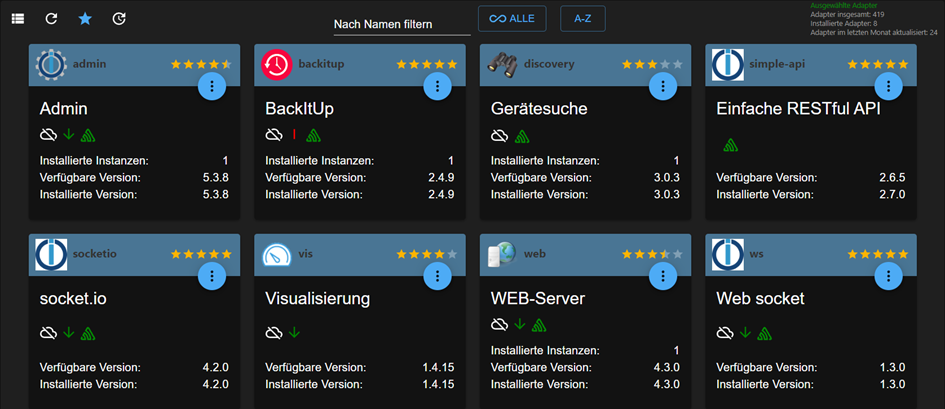
- Restore
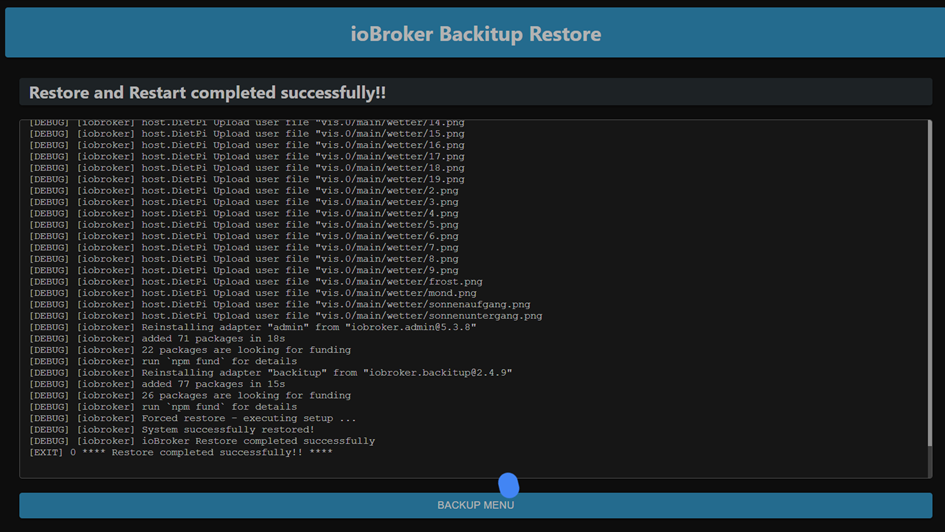
- Ab hier sind iobroker VIS/Admin mausetot
2022-06-18 12:47:50.986 - info: host.DietPi iobroker.js-controller version 4.0.23 js-controller starting 2022-06-18 12:47:50.995 - info: host.DietPi Copyright (c) 2014-2022 bluefox, 2014 hobbyquaker 2022-06-18 12:47:50.997 - info: host.DietPi hostname: DietPi, node: v16.15.1 2022-06-18 12:47:50.999 - info: host.DietPi ip addresses: 192.168.67.53 fe80::21e:6ff:fe48:fb2 2022-06-18 12:47:51.461 - info: host.DietPi connected to Objects and States 2022-06-18 12:47:51.502 - info: host.DietPi added notifications configuration of host 2022-06-18 12:47:52.047 - info: host.DietPi 3 instances found 2022-06-18 12:47:52.061 - info: host.DietPi starting 3 instances 2022-06-18 12:47:52.137 - info: host.DietPi instance system.adapter.admin.0 started with pid 1845 2022-06-18 12:47:54.991 - info: admin.0 (1845) starting. Version 5.3.8 in /opt/iobroker/node_modules/iobroker.admin, node: v16.15.1, js-controller: 4.0.23 2022-06-18 12:47:55.078 - info: admin.0 (1845) requesting all states 2022-06-18 12:47:55.079 - info: admin.0 (1845) requesting all objects 2022-06-18 12:47:55.211 - info: admin.0 (1845) received all objects 2022-06-18 12:47:55.239 - warn: admin.0 (1845) Repository cannot be read: Active repo - stable 2022-06-18 12:47:55.240 - warn: admin.0 (1845) Active repository "stable cannot be read 2022-06-18 12:47:55.413 - info: admin.0 (1845) http server listening on port 8081 2022-06-18 12:47:55.415 - info: admin.0 (1845) Use link "http://localhost:8081" to configure. 2022-06-18 12:47:56.151 - info: host.DietPi instance system.adapter.discovery.0 started with pid 1860 2022-06-18 12:47:58.465 - info: discovery.0 (1860) starting. Version 3.0.3 in /opt/iobroker/node_modules/iobroker.discovery, node: v16.15.1, js-controller: 4.0.23 2022-06-18 12:48:00.193 - info: host.DietPi instance system.adapter.backitup.0 started with pid 1875 2022-06-18 12:48:02.706 - info: backitup.0 (1875) starting. Version 2.4.9 in /opt/iobroker/node_modules/iobroker.backitup, node: v16.15.1, js-controller: 4.0.23 2022-06-18 12:48:02.832 - info: backitup.0 (1875) [iobroker] backup was activated at 02:40 every 1 day(s) 2022-06-18 12:56:47.533 - info: vis.0 (2506) starting. Version 1.4.15 in /opt/iobroker/node_modules/iobroker.vis, node: v16.15.1, js-controller: 4.0.23 2022-06-18 12:56:47.613 - info: vis.0 (2506) Changes in index.html detected => update cache.manifest 2022-06-18 12:56:47.627 - error: vis.0 (2506) No license found for vis. Please get one on https://iobroker.net ! 2022-06-18 12:56:47.646 - info: vis.0 (2506) config.js changed. Upload. 2022-06-18 12:56:47.720 - info: vis.0 (2506) Changes in index.html detected => update cache.manifest 2022-06-18 12:56:47.735 - info: vis.0 (2506) Upload vis anew, while changes detected... 2022-06-18 12:56:52.318 - info: vis.0 (2506) Uploaded. 0 2022-06-18 12:56:52.870 - info: vis.0 (2506) Terminated (NO_ERROR): Without reason 2022-06-18 12:57:24.417 - info: host.DietPi instance system.adapter.web.0 started with pid 2552 2022-06-18 12:57:26.990 - info: web.0 (2552) starting. Version 4.3.0 in /opt/iobroker/node_modules/iobroker.web, node: v16.15.1, js-controller: 4.0.23 2022-06-18 12:57:27.271 - info: web.0 (2552) socket.io server listening on port 8082 2022-06-18 12:57:27.283 - info: web.0 (2552) http server listening on port 8082 2022-06-18 13:01:45.918 - info: host.DietPi Updating repository "stable" under "http://download.iobroker.net/sources-dist.json" 2022-06-18 13:11:31.190 - info: backitup.0 (1875) cleaned everything up... 2022-06-18 13:11:31.188 - info: host.DietPi received SIGTERM 2022-06-18 13:11:31.188 - info: admin.0 (1845) terminating http server on port 8081 2022-06-18 13:11:31.196 - info: host.DietPi stopInstance system.adapter.admin.0 (force=false, process=true) 2022-06-18 13:11:31.198 - info: host.DietPi stopInstance system.adapter.discovery.0 (force=false, process=true) 2022-06-18 13:11:31.199 - info: host.DietPi stopInstance system.adapter.backitup.0 (force=false, process=true) 2022-06-18 13:11:31.199 - info: host.DietPi stopInstance system.adapter.web.0 (force=false, process=true) 2022-06-18 13:11:31.226 - info: discovery.0 (1860) Got terminate signal TERMINATE_YOURSELF 2022-06-18 13:11:31.234 - info: host.DietPi stopInstance system.adapter.admin.0 send kill signal 2022-06-18 13:11:31.240 - info: host.DietPi stopInstance system.adapter.discovery.0 send kill signal 2022-06-18 13:11:31.230 - info: admin.0 (1845) Got terminate signal TERMINATE_YOURSELF 2022-06-18 13:11:31.241 - info: host.DietPi stopInstance system.adapter.backitup.0 send kill signal 2022-06-18 13:11:31.242 - info: host.DietPi stopInstance system.adapter.web.0 send kill signal 2022-06-18 13:11:31.237 - info: web.0 (2552) Got terminate signal TERMINATE_YOURSELF 2022-06-18 13:11:31.235 - info: discovery.0 (1860) Terminated (START_IMMEDIATELY_AFTER_STOP): Without reason 2022-06-18 13:11:31.239 - info: backitup.0 (1875) Got terminate signal TERMINATE_YOURSELF 2022-06-18 13:11:31.248 - info: admin.0 (1845) Terminated (START_IMMEDIATELY_AFTER_STOP): Without reason 2022-06-18 13:11:31.250 - info: backitup.0 (1875) Terminated (START_IMMEDIATELY_AFTER_STOP): Without reason 2022-06-18 13:11:31.303 - info: web.0 (2552) terminated http server on port 8082 2022-06-18 13:11:31.357 - info: web.0 (2552) Terminated (START_IMMEDIATELY_AFTER_STOP): Without reason 2022-06-18 13:11:31.884 - info: host.DietPi instance system.adapter.discovery.0 terminated with code 156 (START_IMMEDIATELY_AFTER_STOP) 2022-06-18 13:11:31.889 - info: host.DietPi instance system.adapter.admin.0 terminated with code 156 (START_IMMEDIATELY_AFTER_STOP) 2022-06-18 13:11:31.912 - info: host.DietPi instance system.adapter.backitup.0 terminated with code 156 (START_IMMEDIATELY_AFTER_STOP) 2022-06-18 13:11:31.961 - info: host.DietPi instance system.adapter.web.0 terminated with code 156 (START_IMMEDIATELY_AFTER_STOP) 2022-06-18 13:11:31.962 - info: host.DietPi All instances are stopped. 2022-06-18 13:11:32.055 - info: host.DietPi terminated 2022-06-18 13:14:19.784 - info: host.gt-iob01 iobroker.js-controller version 4.0.23 js-controller starting 2022-06-18 13:14:19.794 - info: host.gt-iob01 Copyright (c) 2014-2022 bluefox, 2014 hobbyquaker 2022-06-18 13:14:19.796 - info: host.gt-iob01 hostname: gt-iob01, node: v16.15.1 2022-06-18 13:14:19.797 - info: host.gt-iob01 ip addresses: 192.168.67.53 fe80::21e:6ff:fe48:fb2 2022-06-18 13:14:21.894 - info: host.gt-iob01 connected to Objects and States 2022-06-18 13:14:22.012 - info: host.gt-iob01 added notifications configuration of host 2022-06-18 13:14:22.016 - info: host.gt-iob01 Node.js version has changed from 14.19.3 to 16.15.1 2022-06-18 13:14:22.090 - info: host.gt-iob01 Successfully updated capabilities "cap_net_admin, cap_net_bind_service, cap_net_raw" for /usr/bin/node 2022-06-18 13:14:23.050 - info: host.gt-iob01 Delete host system.host.DietPi 2022-06-18 13:14:23.288 - info: host.gt-iob01 38 instances found 2022-06-18 13:14:23.320 - warn: host.gt-iob01 does not start any instances on this host- iobroker restart / system reboot
2022-06-18 13:19:56.925 - info: host.gt-iob01 received SIGTERM 2022-06-18 13:19:56.991 - info: host.gt-iob01 terminated 2022-06-18 13:19:59.820 - info: host.gt-iob01 iobroker.js-controller version 4.0.23 js-controller starting 2022-06-18 13:19:59.830 - info: host.gt-iob01 Copyright (c) 2014-2022 bluefox, 2014 hobbyquaker 2022-06-18 13:19:59.832 - info: host.gt-iob01 hostname: gt-iob01, node: v16.15.1 2022-06-18 13:19:59.833 - info: host.gt-iob01 ip addresses: 192.168.67.53 fe80::21e:6ff:fe48:fb2 2022-06-18 13:20:01.943 - info: host.gt-iob01 connected to Objects and States 2022-06-18 13:20:02.060 - info: host.gt-iob01 added notifications configuration of host 2022-06-18 13:20:03.097 - info: host.gt-iob01 38 instances found 2022-06-18 13:20:03.131 - warn: host.gt-iob01 does not start any instances on this host -
-
@homoran Ok, verständlich. Ich habe nochmal ein par Tests gemacht. Mein Odroid C4 ist ja frei.
-
System: DietPi minimal (Debian
BusterBullseye) + OpenSSH -
curl -sL https://iobroker.net/install.sh | bash - (Installer version: 2022-06-03)
Gemäß Apollons Post von vor knapp 20h wurde (wahrscheinlich) Node 16 installiert.
Platform : linux os : linux Architecture : arm64 CPUs : 4 Speed : 2100 MHz Model : Cortex-A55 RAM : 3.6 GB System uptime : 00:01:24 Node.js : v16.15.1 time : 1655553283840 timeOffset : -60 adapters count : NPM : v8.11.0 Disk size : 14.3 GiB Disk free : 12.8 GiB Used repository: stable Adapter "admin" : 5.3.8 , installed 5.3.8 Adapter "backitup" : 2.4.9 , installed 2.4.9 Adapter "discovery" : 3.0.3 , installed 3.0.3 Controller "js-controller": 4.0.23 , installed 4.0.23- iobroker install vis
host.DietPi install adapter web upload [16] web.admin /opt/iobroker/node_modules/iobroker.web/admin/asset-manifest.json asset-manifest.json application/json upload [15] web.admin /opt/iobroker/node_modules/iobroker.web/admin/favicon.ico favicon.ico image/vnd.microsoft.icon upload [14] web.admin /opt/iobroker/node_modules/iobroker.web/admin/index_m.html index_m.html text/html upload [13] web.admin /opt/iobroker/node_modules/iobroker.web/admin/manifest.json manifest.json application/json upload [12] web.admin /opt/iobroker/node_modules/iobroker.web/admin/static/css/2.faf2f676.chunk.css static/css/2.faf2f676.chunk.css text/css upload [11] web.admin /opt/iobroker/node_modules/iobroker.web/admin/static/css/2.faf2f676.chunk.css.map static/css/2.faf2f676.chunk.css.map application/json upload [10] web.admin /opt/iobroker/node_modules/iobroker.web/admin/static/css/main.e2d673ee.chunk.css static/css/main.e2d673ee.chunk.css text/css upload [9] web.admin /opt/iobroker/node_modules/iobroker.web/admin/static/css/main.e2d673ee.chunk.css.map static/css/main.e2d673ee.chunk.css.map application/json upload [8] web.admin /opt/iobroker/node_modules/iobroker.web/admin/static/js/2.b1d56998.chunk.js static/js/2.b1d56998.chunk.js application/javascript upload [7] web.admin /opt/iobroker/node_modules/iobroker.web/admin/static/js/2.b1d56998.chunk.js.LICENSE.txt static/js/2.b1d56998.chunk.js.LICENSE.txt text/plain upload [6] web.admin /opt/iobroker/node_modules/iobroker.web/admin/static/js/2.b1d56998.chunk.js.map static/js/2.b1d56998.chunk.js.map application/json upload [5] web.admin /opt/iobroker/node_modules/iobroker.web/admin/static/js/main.034751df.chunk.js static/js/main.034751df.chunk.js application/javascript upload [4] web.admin /opt/iobroker/node_modules/iobroker.web/admin/static/js/main.034751df.chunk.js.map static/js/main.034751df.chunk.js.map application/json upload [3] web.admin /opt/iobroker/node_modules/iobroker.web/admin/static/js/runtime-main.7278cf1c.js static/js/runtime-main.7278cf1c.js application/javascript upload [2] web.admin /opt/iobroker/node_modules/iobroker.web/admin/static/js/runtime-main.7278cf1c.js.map static/js/runtime-main.7278cf1c.js.map application/json upload [1] web.admin /opt/iobroker/node_modules/iobroker.web/admin/static/media/le.eb63b1db.png static/media/le.eb63b1db.png image/png upload [0] web.admin /opt/iobroker/node_modules/iobroker.web/admin/web.png web.png image/png upload [396] web /opt/iobroker/node_modules/iobroker.web/www/admin/img/admin.png admin/img/admin.png image/png upload [350] web /opt/iobroker/node_modules/iobroker.web/www/lib/css/themes/jquery-ui/blitzer/images/ui-bg_highlight-soft_15_cc0000_1x100.png lib/css/themes/jquery-ui/blitzer/images/ui-bg_highlight-soft_15_cc0000_1x100.png image/png upload [300] web /opt/iobroker/node_modules/iobroker.web/www/lib/css/themes/jquery-ui/custom-light/jquery-ui.theme.min.css lib/css/themes/jquery-ui/custom-light/jquery-ui.theme.min.css text/css upload [250] web /opt/iobroker/node_modules/iobroker.web/www/lib/css/themes/jquery-ui/eggplant/images/ui-bg_highlight-soft_100_eae6ea_1x100.png lib/css/themes/jquery-ui/eggplant/images/ui-bg_highlight-soft_100_eae6ea_1x100.png image/png upload [200] web /opt/iobroker/node_modules/iobroker.web/www/lib/css/themes/jquery-ui/hot-sneaks/images/ui-bg_flat_75_ba9217_40x100.png lib/css/themes/jquery-ui/hot-sneaks/images/ui-bg_flat_75_ba9217_40x100.png image/png upload [150] web /opt/iobroker/node_modules/iobroker.web/www/lib/css/themes/jquery-ui/redmond/images/ui-bg_glass_85_dfeffc_1x400.png lib/css/themes/jquery-ui/redmond/images/ui-bg_glass_85_dfeffc_1x400.png image/png upload [100] web /opt/iobroker/node_modules/iobroker.web/www/lib/css/themes/jquery-ui/sunny/images/ui-bg_diagonals-medium_20_d34d17_40x40.png lib/css/themes/jquery-ui/sunny/images/ui-bg_diagonals-medium_20_d34d17_40x40.png image/png upload [90] web /opt/iobroker/node_modules/iobroker.web/www/lib/css/themes/jquery-ui/sunny/images/ui-icons_bd7b00_256x240.png lib/css/themes/jquery-ui/sunny/images/ui-icons_bd7b00_256x240.png image/png upload [80] web /opt/iobroker/node_modules/iobroker.web/www/lib/css/themes/jquery-ui/ui-darkness/images/ui-bg_flat_50_5c5c5c_40x100.png lib/css/themes/jquery-ui/ui-darkness/images/ui-bg_flat_50_5c5c5c_40x100.png image/png upload [70] web /opt/iobroker/node_modules/iobroker.web/www/lib/css/themes/jquery-ui/ui-darkness/images/ui-icons_a83300_256x240.png lib/css/themes/jquery-ui/ui-darkness/images/ui-icons_a83300_256x240.png image/png upload [60] web /opt/iobroker/node_modules/iobroker.web/www/lib/css/themes/jquery-ui/ui-lightness/images/ui-bg_glass_100_fdf5ce_1x400.png lib/css/themes/jquery-ui/ui-lightness/images/ui-bg_glass_100_fdf5ce_1x400.png image/png upload [50] web /opt/iobroker/node_modules/iobroker.web/www/lib/css/themes/jquery-ui/ui-lightness/jquery-ui.css lib/css/themes/jquery-ui/ui-lightness/jquery-ui.css text/css upload [40] web /opt/iobroker/node_modules/iobroker.web/www/lib/css/themes/jquery-ui/vader/images/ui-bg_inset-soft_15_121212_1x100.png lib/css/themes/jquery-ui/vader/images/ui-bg_inset-soft_15_121212_1x100.png image/png upload [30] web /opt/iobroker/node_modules/iobroker.web/www/lib/css/themes/jquery-ui/vader/theme.css lib/css/themes/jquery-ui/vader/theme.css text/css upload [20] web /opt/iobroker/node_modules/iobroker.web/www/lib/js/jquery-1.11.2.min.js lib/js/jquery-1.11.2.min.js application/javascript upload [19] web /opt/iobroker/node_modules/iobroker.web/www/lib/js/jquery-1.11.2.min.map lib/js/jquery-1.11.2.min.map application/json upload [18] web /opt/iobroker/node_modules/iobroker.web/www/lib/js/jquery-3.2.1.min.js lib/js/jquery-3.2.1.min.js application/javascript upload [17] web /opt/iobroker/node_modules/iobroker.web/www/lib/js/jquery-3.2.1.min.map lib/js/jquery-3.2.1.min.map application/json upload [16] web /opt/iobroker/node_modules/iobroker.web/www/lib/js/jquery-ui-1.10.3.full.min.js lib/js/jquery-ui-1.10.3.full.min.js application/javascript upload [15] web /opt/iobroker/node_modules/iobroker.web/www/lib/js/jquery-ui-1.11.3.full.min.js lib/js/jquery-ui-1.11.3.full.min.js application/javascript upload [14] web /opt/iobroker/node_modules/iobroker.web/www/lib/js/jquery-ui-1.11.4.full.min.js lib/js/jquery-ui-1.11.4.full.min.js application/javascript upload [13] web /opt/iobroker/node_modules/iobroker.web/www/lib/js/jquery-ui.1.11.2.slider.min.js lib/js/jquery-ui.1.11.2.slider.min.js application/javascript upload [12] web /opt/iobroker/node_modules/iobroker.web/www/lib/js/jquery-ui.min.js lib/js/jquery-ui.min.js application/javascript upload [11] web /opt/iobroker/node_modules/iobroker.web/www/lib/js/jquery.fancytree-all.min.js lib/js/jquery.fancytree-all.min.js application/javascript upload [10] web /opt/iobroker/node_modules/iobroker.web/www/lib/js/jquery.fancytree-all.min.js.map lib/js/jquery.fancytree-all.min.js.map application/json upload [9] web /opt/iobroker/node_modules/iobroker.web/www/lib/js/jquery.jqGrid-4.5.4.min.js lib/js/jquery.jqGrid-4.5.4.min.js application/javascript upload [8] web /opt/iobroker/node_modules/iobroker.web/www/lib/js/loStorage.js lib/js/loStorage.js application/javascript upload [7] web /opt/iobroker/node_modules/iobroker.web/www/lib/js/materialize.js lib/js/materialize.js application/javascript upload [6] web /opt/iobroker/node_modules/iobroker.web/www/lib/js/materialize.js.map lib/js/materialize.js.map application/json upload [5] web /opt/iobroker/node_modules/iobroker.web/www/lib/js/selectID.js lib/js/selectID.js application/javascript upload [4] web /opt/iobroker/node_modules/iobroker.web/www/lib/js/showdown.min.js lib/js/showdown.min.js application/javascript upload [3] web /opt/iobroker/node_modules/iobroker.web/www/lib/js/socket.io.js lib/js/socket.io.js application/javascript upload [2] web /opt/iobroker/node_modules/iobroker.web/www/lib/js/translate.js lib/js/translate.js application/javascript upload [1] web /opt/iobroker/node_modules/iobroker.web/www/login/favicon.ico login/favicon.ico image/vnd.microsoft.icon upload [0] web /opt/iobroker/node_modules/iobroker.web/www/login/index.html login/index.html text/html host.DietPi object system.adapter.web created/updated host.DietPi create instance web host.DietPi object system.adapter.web.0.alive created host.DietPi object system.adapter.web.0.connected created host.DietPi object system.adapter.web.0.compactMode created host.DietPi object system.adapter.web.0.cpu created host.DietPi object system.adapter.web.0.cputime created host.DietPi object system.adapter.web.0.memHeapUsed created host.DietPi object system.adapter.web.0.memHeapTotal created host.DietPi object system.adapter.web.0.memRss created host.DietPi object system.adapter.web.0.uptime created host.DietPi object system.adapter.web.0.inputCount created host.DietPi object system.adapter.web.0.outputCount created host.DietPi object system.adapter.web.0.eventLoopLag created host.DietPi object system.adapter.web.0.sigKill created host.DietPi object system.adapter.web.0.logLevel created host.DietPi object system.adapter.web.upload created host.DietPi object web.0 created host.DietPi object web.0.info created host.DietPi object web.0.info.connected created host.DietPi object web.0.info.connection created host.DietPi Set default value of web.0.info.connected: host.DietPi Set default value of web.0.info.connection: false host.DietPi object system.adapter.web.0 created host.DietPi object system.adapter.vis created/updated- VIS läuft. Interessante Frage, woher kommt simple-api??? Dazu noch in einer Version die aktueller ist als die Quelle?
- Restore
- Ab hier sind iobroker VIS/Admin mausetot
2022-06-18 12:47:50.986 - info: host.DietPi iobroker.js-controller version 4.0.23 js-controller starting 2022-06-18 12:47:50.995 - info: host.DietPi Copyright (c) 2014-2022 bluefox, 2014 hobbyquaker 2022-06-18 12:47:50.997 - info: host.DietPi hostname: DietPi, node: v16.15.1 2022-06-18 12:47:50.999 - info: host.DietPi ip addresses: 192.168.67.53 fe80::21e:6ff:fe48:fb2 2022-06-18 12:47:51.461 - info: host.DietPi connected to Objects and States 2022-06-18 12:47:51.502 - info: host.DietPi added notifications configuration of host 2022-06-18 12:47:52.047 - info: host.DietPi 3 instances found 2022-06-18 12:47:52.061 - info: host.DietPi starting 3 instances 2022-06-18 12:47:52.137 - info: host.DietPi instance system.adapter.admin.0 started with pid 1845 2022-06-18 12:47:54.991 - info: admin.0 (1845) starting. Version 5.3.8 in /opt/iobroker/node_modules/iobroker.admin, node: v16.15.1, js-controller: 4.0.23 2022-06-18 12:47:55.078 - info: admin.0 (1845) requesting all states 2022-06-18 12:47:55.079 - info: admin.0 (1845) requesting all objects 2022-06-18 12:47:55.211 - info: admin.0 (1845) received all objects 2022-06-18 12:47:55.239 - warn: admin.0 (1845) Repository cannot be read: Active repo - stable 2022-06-18 12:47:55.240 - warn: admin.0 (1845) Active repository "stable cannot be read 2022-06-18 12:47:55.413 - info: admin.0 (1845) http server listening on port 8081 2022-06-18 12:47:55.415 - info: admin.0 (1845) Use link "http://localhost:8081" to configure. 2022-06-18 12:47:56.151 - info: host.DietPi instance system.adapter.discovery.0 started with pid 1860 2022-06-18 12:47:58.465 - info: discovery.0 (1860) starting. Version 3.0.3 in /opt/iobroker/node_modules/iobroker.discovery, node: v16.15.1, js-controller: 4.0.23 2022-06-18 12:48:00.193 - info: host.DietPi instance system.adapter.backitup.0 started with pid 1875 2022-06-18 12:48:02.706 - info: backitup.0 (1875) starting. Version 2.4.9 in /opt/iobroker/node_modules/iobroker.backitup, node: v16.15.1, js-controller: 4.0.23 2022-06-18 12:48:02.832 - info: backitup.0 (1875) [iobroker] backup was activated at 02:40 every 1 day(s) 2022-06-18 12:56:47.533 - info: vis.0 (2506) starting. Version 1.4.15 in /opt/iobroker/node_modules/iobroker.vis, node: v16.15.1, js-controller: 4.0.23 2022-06-18 12:56:47.613 - info: vis.0 (2506) Changes in index.html detected => update cache.manifest 2022-06-18 12:56:47.627 - error: vis.0 (2506) No license found for vis. Please get one on https://iobroker.net ! 2022-06-18 12:56:47.646 - info: vis.0 (2506) config.js changed. Upload. 2022-06-18 12:56:47.720 - info: vis.0 (2506) Changes in index.html detected => update cache.manifest 2022-06-18 12:56:47.735 - info: vis.0 (2506) Upload vis anew, while changes detected... 2022-06-18 12:56:52.318 - info: vis.0 (2506) Uploaded. 0 2022-06-18 12:56:52.870 - info: vis.0 (2506) Terminated (NO_ERROR): Without reason 2022-06-18 12:57:24.417 - info: host.DietPi instance system.adapter.web.0 started with pid 2552 2022-06-18 12:57:26.990 - info: web.0 (2552) starting. Version 4.3.0 in /opt/iobroker/node_modules/iobroker.web, node: v16.15.1, js-controller: 4.0.23 2022-06-18 12:57:27.271 - info: web.0 (2552) socket.io server listening on port 8082 2022-06-18 12:57:27.283 - info: web.0 (2552) http server listening on port 8082 2022-06-18 13:01:45.918 - info: host.DietPi Updating repository "stable" under "http://download.iobroker.net/sources-dist.json" 2022-06-18 13:11:31.190 - info: backitup.0 (1875) cleaned everything up... 2022-06-18 13:11:31.188 - info: host.DietPi received SIGTERM 2022-06-18 13:11:31.188 - info: admin.0 (1845) terminating http server on port 8081 2022-06-18 13:11:31.196 - info: host.DietPi stopInstance system.adapter.admin.0 (force=false, process=true) 2022-06-18 13:11:31.198 - info: host.DietPi stopInstance system.adapter.discovery.0 (force=false, process=true) 2022-06-18 13:11:31.199 - info: host.DietPi stopInstance system.adapter.backitup.0 (force=false, process=true) 2022-06-18 13:11:31.199 - info: host.DietPi stopInstance system.adapter.web.0 (force=false, process=true) 2022-06-18 13:11:31.226 - info: discovery.0 (1860) Got terminate signal TERMINATE_YOURSELF 2022-06-18 13:11:31.234 - info: host.DietPi stopInstance system.adapter.admin.0 send kill signal 2022-06-18 13:11:31.240 - info: host.DietPi stopInstance system.adapter.discovery.0 send kill signal 2022-06-18 13:11:31.230 - info: admin.0 (1845) Got terminate signal TERMINATE_YOURSELF 2022-06-18 13:11:31.241 - info: host.DietPi stopInstance system.adapter.backitup.0 send kill signal 2022-06-18 13:11:31.242 - info: host.DietPi stopInstance system.adapter.web.0 send kill signal 2022-06-18 13:11:31.237 - info: web.0 (2552) Got terminate signal TERMINATE_YOURSELF 2022-06-18 13:11:31.235 - info: discovery.0 (1860) Terminated (START_IMMEDIATELY_AFTER_STOP): Without reason 2022-06-18 13:11:31.239 - info: backitup.0 (1875) Got terminate signal TERMINATE_YOURSELF 2022-06-18 13:11:31.248 - info: admin.0 (1845) Terminated (START_IMMEDIATELY_AFTER_STOP): Without reason 2022-06-18 13:11:31.250 - info: backitup.0 (1875) Terminated (START_IMMEDIATELY_AFTER_STOP): Without reason 2022-06-18 13:11:31.303 - info: web.0 (2552) terminated http server on port 8082 2022-06-18 13:11:31.357 - info: web.0 (2552) Terminated (START_IMMEDIATELY_AFTER_STOP): Without reason 2022-06-18 13:11:31.884 - info: host.DietPi instance system.adapter.discovery.0 terminated with code 156 (START_IMMEDIATELY_AFTER_STOP) 2022-06-18 13:11:31.889 - info: host.DietPi instance system.adapter.admin.0 terminated with code 156 (START_IMMEDIATELY_AFTER_STOP) 2022-06-18 13:11:31.912 - info: host.DietPi instance system.adapter.backitup.0 terminated with code 156 (START_IMMEDIATELY_AFTER_STOP) 2022-06-18 13:11:31.961 - info: host.DietPi instance system.adapter.web.0 terminated with code 156 (START_IMMEDIATELY_AFTER_STOP) 2022-06-18 13:11:31.962 - info: host.DietPi All instances are stopped. 2022-06-18 13:11:32.055 - info: host.DietPi terminated 2022-06-18 13:14:19.784 - info: host.gt-iob01 iobroker.js-controller version 4.0.23 js-controller starting 2022-06-18 13:14:19.794 - info: host.gt-iob01 Copyright (c) 2014-2022 bluefox, 2014 hobbyquaker 2022-06-18 13:14:19.796 - info: host.gt-iob01 hostname: gt-iob01, node: v16.15.1 2022-06-18 13:14:19.797 - info: host.gt-iob01 ip addresses: 192.168.67.53 fe80::21e:6ff:fe48:fb2 2022-06-18 13:14:21.894 - info: host.gt-iob01 connected to Objects and States 2022-06-18 13:14:22.012 - info: host.gt-iob01 added notifications configuration of host 2022-06-18 13:14:22.016 - info: host.gt-iob01 Node.js version has changed from 14.19.3 to 16.15.1 2022-06-18 13:14:22.090 - info: host.gt-iob01 Successfully updated capabilities "cap_net_admin, cap_net_bind_service, cap_net_raw" for /usr/bin/node 2022-06-18 13:14:23.050 - info: host.gt-iob01 Delete host system.host.DietPi 2022-06-18 13:14:23.288 - info: host.gt-iob01 38 instances found 2022-06-18 13:14:23.320 - warn: host.gt-iob01 does not start any instances on this host- iobroker restart / system reboot
2022-06-18 13:19:56.925 - info: host.gt-iob01 received SIGTERM 2022-06-18 13:19:56.991 - info: host.gt-iob01 terminated 2022-06-18 13:19:59.820 - info: host.gt-iob01 iobroker.js-controller version 4.0.23 js-controller starting 2022-06-18 13:19:59.830 - info: host.gt-iob01 Copyright (c) 2014-2022 bluefox, 2014 hobbyquaker 2022-06-18 13:19:59.832 - info: host.gt-iob01 hostname: gt-iob01, node: v16.15.1 2022-06-18 13:19:59.833 - info: host.gt-iob01 ip addresses: 192.168.67.53 fe80::21e:6ff:fe48:fb2 2022-06-18 13:20:01.943 - info: host.gt-iob01 connected to Objects and States 2022-06-18 13:20:02.060 - info: host.gt-iob01 added notifications configuration of host 2022-06-18 13:20:03.097 - info: host.gt-iob01 38 instances found 2022-06-18 13:20:03.131 - warn: host.gt-iob01 does not start any instances on this host@andygr42 Danke!
Ich denke es könnten noch folgende Infos helfen:
Versionen von:- node
- npm
- controller
- admin
- vis
jeweils von dem System aus dem das Backup stammt und aus der Neuinstallation bevor die Versionen des Backups restored wurden.
ich denke die letzteren Daten der Adapter sind aufcdem einen Screenshot
-
-
@andygr42 Danke!
Ich denke es könnten noch folgende Infos helfen:
Versionen von:- node
- npm
- controller
- admin
- vis
jeweils von dem System aus dem das Backup stammt und aus der Neuinstallation bevor die Versionen des Backups restored wurden.
ich denke die letzteren Daten der Adapter sind aufcdem einen Screenshot
Wenn ich mir das so genau notiert hätte... Vor dem Backup am 15.06. habe ich noch ein vollständiges iobroker Update gemacht, kurz davor node / npm
Ich gehe mal beim Altsystem aus von:
-
node 14.19.3
-
Listenpunktnpm 6.14.17
-
controller 4.0.23 (sicher)
-
admin + vis die am 15.06. verfügbare Version, also 1.4.15 und 5.3.8
Die Neuinstallation hatte:
-
admin 5.3.8
-
vis 1.4.15
-
backitup 2.4.9
-
Wenn ich mir das so genau notiert hätte... Vor dem Backup am 15.06. habe ich noch ein vollständiges iobroker Update gemacht, kurz davor node / npm
Ich gehe mal beim Altsystem aus von:
-
node 14.19.3
-
Listenpunktnpm 6.14.17
-
controller 4.0.23 (sicher)
-
admin + vis die am 15.06. verfügbare Version, also 1.4.15 und 5.3.8
Die Neuinstallation hatte:
-
admin 5.3.8
-
vis 1.4.15
-
backitup 2.4.9
Da ich die SD Card nach der Grundinstallation von iobroker gecloned hatte, hab ich noch schnell einen Restore ohne vorherige VIS Installation durchgeführt. Ergebnis ist das gleich.
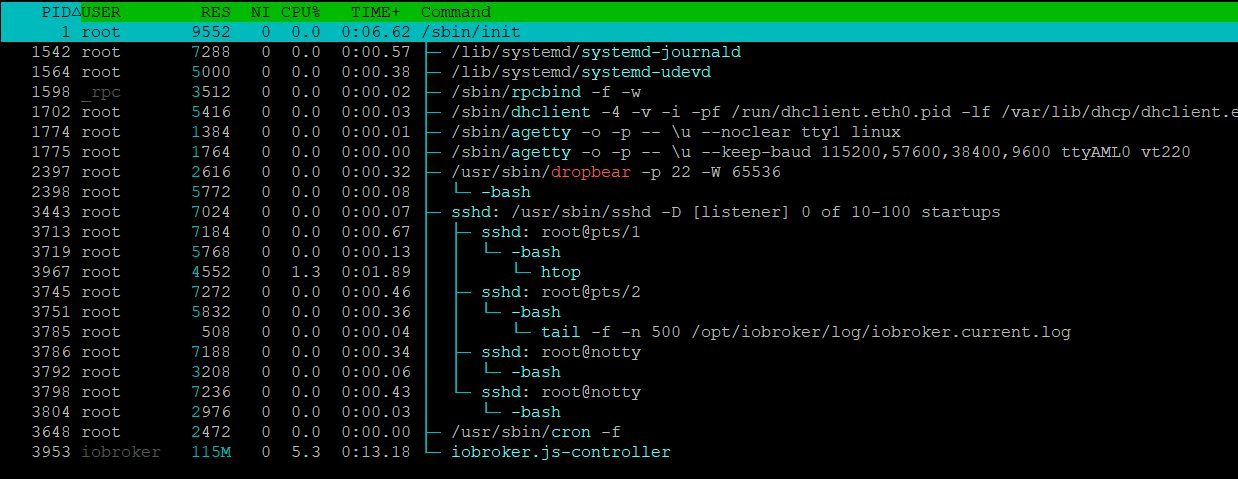
P.S.: bevor wieder jemand rumnörgelt: root ist der default user nach der DietPi installation. Für diesen Test hatte ich NULL Lust das zu ändern, zumal ich die Installation eh in dev/null entsorge
-
-
Da ich die SD Card nach der Grundinstallation von iobroker gecloned hatte, hab ich noch schnell einen Restore ohne vorherige VIS Installation durchgeführt. Ergebnis ist das gleich.
P.S.: bevor wieder jemand rumnörgelt: root ist der default user nach der DietPi installation. Für diesen Test hatte ich NULL Lust das zu ändern, zumal ich die Installation eh in dev/null entsorge
Dieser Beitrag wurde gelöscht! -
[[topic:post-is-deleted]]
-
Da ich die SD Card nach der Grundinstallation von iobroker gecloned hatte, hab ich noch schnell einen Restore ohne vorherige VIS Installation durchgeführt. Ergebnis ist das gleich.
P.S.: bevor wieder jemand rumnörgelt: root ist der default user nach der DietPi installation. Für diesen Test hatte ich NULL Lust das zu ändern, zumal ich die Installation eh in dev/null entsorge
Nochmal getestet mit node 14.19.3 und npm 6.14.17. Restore direkt nach Grundinstallation, gleiches Ergebnis
root@DietPi:~# iobroker restore /opt/iobroker/backups/iobroker_2022_06_15-12_59_11_backupiobroker.tar.gz
iobroker controller daemon is not running
host.DietPi OK.
Removing current installation of iobroker.admin
removed 20 packages in 14.114s

37 packages are looking for funding
  run `npm fund` for details

Removing current installation of iobroker.backitup
removed 123 packages in 12.346s

30 packages are looking for funding
  run `npm fund` for details

Removing current installation of iobroker.discovery
removed 45 packages in 9.411s

18 packages are looking for funding
  run `npm fund` for details

host.DietPi Clear all objects and states...
clean 133 objects...
clean 95 states...
host.DietPi done.
host.DietPi Processed 0/11820 objects
host.DietPi Processed 200/11820 objects
host.DietPi Processed 400/11820 objects
host.DietPi Processed 600/11820 objects
host.DietPi Processed 800/11820 objects
host.DietPi Processed 1000/11820 objects
host.DietPi Processed 1200/11820 objects
host.DietPi Processed 1400/11820 objects
host.DietPi Processed 1600/11820 objects
host.DietPi Processed 1800/11820 objects
host.DietPi Processed 2000/11820 objects
host.DietPi Processed 2200/11820 objects
host.DietPi Processed 2400/11820 objects
host.DietPi Processed 2600/11820 objects
host.DietPi Processed 2800/11820 objects
host.DietPi Processed 3000/11820 objects
host.DietPi Processed 3200/11820 objects
host.DietPi Processed 3400/11820 objects
host.DietPi Processed 3600/11820 objects
host.DietPi Processed 3800/11820 objects
host.DietPi Processed 4000/11820 objects
host.DietPi Processed 4200/11820 objects
host.DietPi Processed 4400/11820 objects
host.DietPi Processed 4600/11820 objects
host.DietPi Processed 4800/11820 objects
host.DietPi Processed 5000/11820 objects
host.DietPi Processed 5200/11820 objects
host.DietPi Processed 5400/11820 objects
host.DietPi Processed 5600/11820 objects
host.DietPi Processed 5800/11820 objects
host.DietPi Processed 6000/11820 objects
host.DietPi Processed 6200/11820 objects
host.DietPi Processed 6400/11820 objects
host.DietPi Processed 6600/11820 objects
host.DietPi Processed 6800/11820 objects
host.DietPi Processed 7000/11820 objects
host.DietPi Processed 7200/11820 objects
host.DietPi Processed 7400/11820 objects
host.DietPi Processed 7600/11820 objects
host.DietPi Processed 7800/11820 objects
host.DietPi Processed 8000/11820 objects
host.DietPi Processed 8200/11820 objects
host.DietPi Processed 8400/11820 objects
host.DietPi Processed 8600/11820 objects
host.DietPi Processed 8800/11820 objects
host.DietPi Processed 9000/11820 objects
host.DietPi Processed 9200/11820 objects
host.DietPi Processed 9400/11820 objects
host.DietPi Processed 9600/11820 objects
host.DietPi Processed 9800/11820 objects
host.DietPi Processed 10000/11820 objects
host.DietPi Processed 10200/11820 objects
host.DietPi Processed 10400/11820 objects
host.DietPi Processed 10600/11820 objects
host.DietPi Processed 10800/11820 objects
host.DietPi Processed 11000/11820 objects
host.DietPi Processed 11200/11820 objects
host.DietPi Processed 11400/11820 objects
host.DietPi Processed 11600/11820 objects
host.DietPi Processed 11800/11820 objects
11820 objects restored.
host.DietPi Processed 0/13655 states
host.DietPi Processed 200/13655 states
host.DietPi Processed 400/13655 states
host.DietPi Processed 600/13655 states
host.DietPi Processed 800/13655 states
host.DietPi Processed 1000/13655 states
host.DietPi Processed 1200/13655 states
host.DietPi Processed 1400/13655 states
host.DietPi Processed 1600/13655 states
host.DietPi Processed 1800/13655 states
host.DietPi Processed 2000/13655 states
host.DietPi Processed 2200/13655 states
host.DietPi Processed 2400/13655 states
host.DietPi Processed 2600/13655 states
host.DietPi Processed 2800/13655 states
host.DietPi Processed 3000/13655 states
host.DietPi Processed 3200/13655 states
host.DietPi Processed 3400/13655 states
host.DietPi Processed 3600/13655 states
host.DietPi Processed 3800/13655 states
host.DietPi Processed 4000/13655 states
host.DietPi Processed 4200/13655 states
host.DietPi Processed 4400/13655 states
host.DietPi Processed 4600/13655 states
host.DietPi Processed 4800/13655 states
host.DietPi Processed 5000/13655 states
host.DietPi Processed 5200/13655 states
host.DietPi Processed 5400/13655 states
host.DietPi Processed 5600/13655 states
host.DietPi Processed 5800/13655 states
host.DietPi Processed 6000/13655 states
host.DietPi Processed 6200/13655 states
host.DietPi Processed 6400/13655 states
host.DietPi Processed 6600/13655 states
host.DietPi Processed 6800/13655 states
host.DietPi Processed 7000/13655 states
host.DietPi Processed 7200/13655 states
host.DietPi Processed 7400/13655 states
host.DietPi Processed 7600/13655 states
host.DietPi Processed 7800/13655 states
host.DietPi Processed 8000/13655 states
host.DietPi Processed 8200/13655 states
host.DietPi Processed 8400/13655 states
host.DietPi Processed 8600/13655 states
host.DietPi Processed 8800/13655 states
host.DietPi Processed 9000/13655 states
host.DietPi Processed 9200/13655 states
host.DietPi Processed 9400/13655 states
host.DietPi Processed 9600/13655 states
host.DietPi Processed 9800/13655 states
host.DietPi Processed 10000/13655 states
host.DietPi Processed 10200/13655 states
host.DietPi Processed 10400/13655 states
host.DietPi Processed 10600/13655 states
host.DietPi Processed 10800/13655 states
host.DietPi Processed 11000/13655 states
host.DietPi Processed 11200/13655 states
host.DietPi Processed 11400/13655 states
host.DietPi Processed 11600/13655 states
host.DietPi Processed 11800/13655 states
host.DietPi Processed 12000/13655 states
host.DietPi Processed 12200/13655 states
host.DietPi Processed 12400/13655 states
host.DietPi Processed 12600/13655 states
host.DietPi Processed 12800/13655 states
host.DietPi Processed 13000/13655 states
host.DietPi Processed 13200/13655 states
host.DietPi Processed 13400/13655 states
host.DietPi Processed 13600/13655 states
13655 states restored.
host.DietPi Upload user file "vis/css/vis-common-user.css
host.DietPi Upload user file "vis.0/main/devices/98980_cleaning_512x512.png
host.DietPi Upload user file "vis.0/main/devices/connect.png
host.DietPi Upload user file "vis.0/main/devices/mihome-vacuum.png
host.DietPi Upload user file "vis.0/main/devices/onkyo.png
host.DietPi Upload user file "vis.0/main/devices/symfonisk.png
host.DietPi Upload user file "vis.0/main/icons/100561_link_250x250.png
host.DietPi Upload user file "vis.0/main/icons/100561_unlink_250x250.png
host.DietPi Upload user file "vis.0/main/icons/104986_bar_256x256.png
host.DietPi Upload user file "vis.0/main/icons/106592_cloud_512x512.png
host.DietPi Upload user file "vis.0/main/icons/13448_light_128x128.png
host.DietPi Upload user file "vis.0/main/icons/136457_button_256x256.png
host.DietPi Upload user file "vis.0/main/icons/136482_button_256x256.png
host.DietPi Upload user file "vis.0/main/icons/136522_button_256x256.png
host.DietPi Upload user file "vis.0/main/icons/149245_socket_128x128.png
host.DietPi Upload user file "vis.0/main/icons/1548937392324-ds_sonos_591x591_black.png
host.DietPi Upload user file "vis.0/main/icons/17988_player_256x256.png
host.DietPi Upload user file "vis.0/main/icons/17995_stepforwardnormalred_256x256.png
host.DietPi Upload user file "vis.0/main/icons/18006_stop_256x256.png
host.DietPi Upload user file "vis.0/main/icons/1828404.png
host.DietPi Upload user file "vis.0/main/icons/23885_charge_24x24.png
host.DietPi Upload user file "vis.0/main/icons/24094_read_128x128.png
host.DietPi Upload user file "vis.0/main/icons/264745_sound_256x256.png
host.DietPi Upload user file "vis.0/main/icons/273967_yellow_256x256.png
host.DietPi Upload user file "vis.0/main/icons/274063_energy_256x256.png
host.DietPi Upload user file "vis.0/main/icons/274065_earth_256x256.png
host.DietPi Upload user file "vis.0/main/icons/274112_yellow_256x256.png
host.DietPi Upload user file "vis.0/main/icons/27785_movie_256x256.png
host.DietPi Upload user file "vis.0/main/icons/27792_popcorn_256x256.png
host.DietPi Upload user file "vis.0/main/icons/299299_pitivi_128x128.png
host.DietPi Upload user file "vis.0/main/icons/299994_system_128x128.png
host.DietPi Upload user file "vis.0/main/icons/300011_charging_128x128.png
host.DietPi Upload user file "vis.0/main/icons/38985_food_255x255.png
host.DietPi Upload user file "vis.0/main/icons/39194_battery_48x48.png
host.DietPi Upload user file "vis.0/main/icons/411j1k1u9yL.png
host.DietPi Upload user file "vis.0/main/icons/42609_chart_256x256.png
host.DietPi Upload user file "vis.0/main/icons/447110_battery_48x48.png
host.DietPi Upload user file "vis.0/main/icons/447166_battery_48x48.png
host.DietPi Upload user file "vis.0/main/icons/447265_battery_48x48.png
host.DietPi Upload user file "vis.0/main/icons/447396_battery_48x48.png
host.DietPi Upload user file "vis.0/main/icons/447567_battery_48x48.png
host.DietPi Upload user file "vis.0/main/icons/45753_home_128x128.png
host.DietPi Upload user file "vis.0/main/icons/52211_mediaplayer_128x128.png
host.DietPi Upload user file "vis.0/main/icons/53435_8_256x256.png
host.DietPi Upload user file "vis.0/main/icons/576813_flurry_128x128.png
host.DietPi Upload user file "vis.0/main/icons/614509_network_512x512.png
host.DietPi Upload user file "vis.0/main/icons/618525_netflix_320x320.png
host.DietPi Upload user file "vis.0/main/icons/71HqVEIDBNL.png
host.DietPi Upload user file "vis.0/main/icons/74478_wifi_512x512.png
host.DietPi Upload user file "vis.0/main/icons/753321_field_512x512.png
host.DietPi Upload user file "vis.0/main/icons/770358_temperature_512x512.png
host.DietPi Upload user file "vis.0/main/icons/79017_disk_256x256.png
host.DietPi Upload user file "vis.0/main/icons/79140_sleep_256x256.png
host.DietPi Upload user file "vis.0/main/icons/79516_green_80x80.png
host.DietPi Upload user file "vis.0/main/icons/79517_alert_64x64.png
host.DietPi Upload user file "vis.0/main/icons/79525_play_64x64.png
host.DietPi Upload user file "vis.0/main/icons/79542_alert_64x64.png
host.DietPi Upload user file "vis.0/main/icons/79553_alert_64x64.png
host.DietPi Upload user file "vis.0/main/icons/79557_info_64x64.png
host.DietPi Upload user file "vis.0/main/icons/805658_water_512x512.png
host.DietPi Upload user file "vis.0/main/icons/822238_tap_512x512.png
host.DietPi Upload user file "vis.0/main/icons/8472_gear_256x256.png
host.DietPi Upload user file "vis.0/main/icons/8502_green_256x256.png
host.DietPi Upload user file "vis.0/main/icons/87260_cat_256x256.png
host.DietPi Upload user file "vis.0/main/icons/92419_battery_512x512.png
host.DietPi Upload user file "vis.0/main/icons/CO2.jpg
host.DietPi Upload user file "vis.0/main/icons/IAQ-Index.jpg
host.DietPi Upload user file "vis.0/main/icons/LQI.jpg
host.DietPi Upload user file "vis.0/main/icons/Landroid.png
host.DietPi Upload user file "vis.0/main/icons/Zisterne.png
host.DietPi Upload user file "vis.0/main/icons/devices/18530_water_128x128.png
host.DietPi Upload user file "vis.0/main/icons/devices/98980_cleaning_512x512.png
host.DietPi Upload user file "vis.0/main/icons/devices/mihome-vacuum.png
host.DietPi Upload user file "vis.0/main/icons/door-closed-green.png
host.DietPi Upload user file "vis.0/main/icons/door-open-red.png
host.DietPi Upload user file "vis.0/main/icons/frost.png
host.DietPi Upload user file "vis.0/main/icons/garden.png
host.DietPi Upload user file "vis.0/main/icons/hitze.png
host.DietPi Upload user file "vis.0/main/icons/home_garden/170917_home_256x256.png
host.DietPi Upload user file "vis.0/main/icons/home_garden/aqi.png
host.DietPi Upload user file "vis.0/main/icons/mihome-vacuum.png
host.DietPi Upload user file "vis.0/main/icons/play-pause-stop/blue_TD80.png
host.DietPi Upload user file "vis.0/main/icons/play-pause-stop/blue_TVS80.png
host.DietPi Upload user file "vis.0/main/icons/play-pause-stop/blue_night_256x256.png
host.DietPi Upload user file "vis.0/main/icons/play-pause-stop/blue_play_rec_256x256.png
host.DietPi Upload user file "vis.0/main/icons/play-pause-stop/gray_cancel_rec_256x256.png
host.DietPi Upload user file "vis.0/main/icons/play-pause-stop/gray_home_rec_256x256.png
host.DietPi Upload user file "vis.0/main/icons/play-pause-stop/green_play_downStop_256x256.png
host.DietPi Upload user file "vis.0/main/icons/play-pause-stop/green_play_down_256x256.png
host.DietPi Upload user file "vis.0/main/icons/play-pause-stop/green_play_rec_256x256.png
host.DietPi Upload user file "vis.0/main/icons/play-pause-stop/green_play_upStop_256x256.png
host.DietPi Upload user file "vis.0/main/icons/play-pause-stop/green_play_up_256x256.png
host.DietPi Upload user file "vis.0/main/icons/play-pause-stop/orange_pauseplay_rec_256x256.png
host.DietPi Upload user file "vis.0/main/icons/play-pause-stop/orange_sun50_256x256.png
host.DietPi Upload user file "vis.0/main/icons/play-pause-stop/orange_sun80_256x256.png
host.DietPi Upload user file "vis.0/main/icons/play-pause-stop/orange_sun_256x256.png
host.DietPi Upload user file "vis.0/main/icons/play-pause-stop/orange_sunset80.png
host.DietPi Upload user file "vis.0/main/icons/play-pause-stop/red_pause_rec_256x256.png
host.DietPi Upload user file "vis.0/main/icons/play-pause-stop/yellow_sun50.png
host.DietPi Upload user file "vis.0/main/icons/spotify-icon-2.png
host.DietPi Upload user file "vis.0/main/icons/sturm.png
host.DietPi Upload user file "vis.0/main/mond/0.png
host.DietPi Upload user file "vis.0/main/mond/1.png
host.DietPi Upload user file "vis.0/main/mond/10.png
host.DietPi Upload user file "vis.0/main/mond/11.png
host.DietPi Upload user file "vis.0/main/mond/12.png
host.DietPi Upload user file "vis.0/main/mond/13.png
host.DietPi Upload user file "vis.0/main/mond/14.png
host.DietPi Upload user file "vis.0/main/mond/15.png
host.DietPi Upload user file "vis.0/main/mond/16.png
host.DietPi Upload user file "vis.0/main/mond/17.png
host.DietPi Upload user file "vis.0/main/mond/18.png
host.DietPi Upload user file "vis.0/main/mond/19.png
host.DietPi Upload user file "vis.0/main/mond/2.png
host.DietPi Upload user file "vis.0/main/mond/20.png
host.DietPi Upload user file "vis.0/main/mond/21.png
host.DietPi Upload user file "vis.0/main/mond/22.png
host.DietPi Upload user file "vis.0/main/mond/23.png
host.DietPi Upload user file "vis.0/main/mond/24.png
host.DietPi Upload user file "vis.0/main/mond/25.png
host.DietPi Upload user file "vis.0/main/mond/26.png
host.DietPi Upload user file "vis.0/main/mond/27.png
host.DietPi Upload user file "vis.0/main/mond/28.png
host.DietPi Upload user file "vis.0/main/mond/29.png
host.DietPi Upload user file "vis.0/main/mond/3.png
host.DietPi Upload user file "vis.0/main/mond/4.png
host.DietPi Upload user file "vis.0/main/mond/5.png
host.DietPi Upload user file "vis.0/main/mond/6.png
host.DietPi Upload user file "vis.0/main/mond/7.png
host.DietPi Upload user file "vis.0/main/mond/8.png
host.DietPi Upload user file "vis.0/main/mond/9.png
host.DietPi Upload user file "vis.0/main/nuki/0.png
host.DietPi Upload user file "vis.0/main/nuki/1.png
host.DietPi Upload user file "vis.0/main/nuki/2.png
host.DietPi Upload user file "vis.0/main/nuki/253.png
host.DietPi Upload user file "vis.0/main/nuki/254.png
host.DietPi Upload user file "vis.0/main/nuki/3.png
host.DietPi Upload user file "vis.0/main/nuki/4.png
host.DietPi Upload user file "vis.0/main/nuki/5.png
host.DietPi Upload user file "vis.0/main/nuki/6.png
host.DietPi Upload user file "vis.0/main/nuki/7.png
host.DietPi Upload user file "vis.0/main/nuki/nuki-locked.png
host.DietPi Upload user file "vis.0/main/nuki/nuki-plain.png
host.DietPi Upload user file "vis.0/main/nuki/nuki-unlocked.png
host.DietPi Upload user file "vis.0/main/state/network01/false.png
host.DietPi Upload user file "vis.0/main/state/network01/true.png
host.DietPi Upload user file "vis.0/main/state/power01/false.png
host.DietPi Upload user file "vis.0/main/state/power01/true.png
host.DietPi Upload user file "vis.0/main/vis-user.css
host.DietPi Upload user file "vis.0/main/vis-views.json
host.DietPi Upload user file "vis.0/main/wetter/1.png
host.DietPi Upload user file "vis.0/main/wetter/10.png
host.DietPi Upload user file "vis.0/main/wetter/11.png
host.DietPi Upload user file "vis.0/main/wetter/12.png
host.DietPi Upload user file "vis.0/main/wetter/13.png
host.DietPi Upload user file "vis.0/main/wetter/14.png
host.DietPi Upload user file "vis.0/main/wetter/15.png
host.DietPi Upload user file "vis.0/main/wetter/16.png
host.DietPi Upload user file "vis.0/main/wetter/17.png
host.DietPi Upload user file "vis.0/main/wetter/18.png
host.DietPi Upload user file "vis.0/main/wetter/19.png
host.DietPi Upload user file "vis.0/main/wetter/2.png
host.DietPi Upload user file "vis.0/main/wetter/3.png
host.DietPi Upload user file "vis.0/main/wetter/4.png
host.DietPi Upload user file "vis.0/main/wetter/5.png
host.DietPi Upload user file "vis.0/main/wetter/6.png
host.DietPi Upload user file "vis.0/main/wetter/7.png
host.DietPi Upload user file "vis.0/main/wetter/8.png
host.DietPi Upload user file "vis.0/main/wetter/9.png
host.DietPi Upload user file "vis.0/main/wetter/frost.png
host.DietPi Upload user file "vis.0/main/wetter/mond.png
host.DietPi Upload user file "vis.0/main/wetter/sonnenaufgang.png
host.DietPi Upload user file "vis.0/main/wetter/sonnenuntergang.png
Reinstalling adapter "admin" from "iobroker.admin@5.3.8"
+ iobroker.admin@5.3.8
added 71 packages from 90 contributors in 25.758s

22 packages are looking for funding
  run `npm fund` for details

Reinstalling adapter "backitup" from "iobroker.backitup@2.4.9"
+ iobroker.backitup@2.4.9
added 75 packages from 54 contributors in 21.962s

26 packages are looking for funding
  run `npm fund` for details

System successfully restored!
Ich gebe hier mal mit DietPi auf und schaue mal wie es mit dem Odroid Ubuntu Image klappt
-
Ok, weiter geht's
Diesmal Odroid C4 mit Ubuntu 20.04.4 LTS minimal (original Odroid Image).
-
Node 14.x installiert (14.19.3 / 6.14.17)
-
iobroker per script installiert
-
Testweise ältere web Version 5.1.0 per cli installiert.
Kann das hier jemand erklären? Warum werden mir für ein Update nur ältere Versionen angezeigt (außer bei den Adaptern, die per default installiert sind)?
Used repository: stable Adapter "admin" : 5.3.8 , installed 5.3.8 Adapter "backitup" : 2.4.9 , installed 2.4.9 Adapter "discovery" : 3.0.3 , installed 3.0.3 Controller "js-controller": 4.0.23 , installed 4.0.23 Adapter "simple-api" : 2.6.5 , installed 2.7.0 Adapter "socketio" : 4.2.0 , installed 6.1.5 Adapter "web" : 4.3.0 , installed 5.1.0 Adapter "ws" : 1.3.0 , installed 2.1.1-
VIS 1.14.5 installiert - Instanz läuft, Lizenz fehlt
-
Update von web nicht möglich:
Used repository: web@5.2.2 Error: unknown repository is active - "web@5.2.2". Known: stable, beta- Backup wiederhergestellt -> iobroker ist tot.
Used repository: stable Adapter "admin" : 5.3.8 , installed 5.3.8 Adapter "backitup" : 2.4.9 , installed 2.4.9 Controller "js-controller": 4.0.23 , installed 4.0.23 -
-
@andygr42 sagte in VIS 1.14.5 lässt sich nicht installieren:
Kann das hier jemand erklären?
Wenn der Web Adapter per CLI auf eine Beta Version, das System aber auf stable gestellt ist, passiert das.
Adapter in Beta versionen nur im Experten Modus aus eigener URL, dann per NPM installieren.Edit: oder die Repo auf Beta umstellen


Hey! Du scheinst an dieser Unterhaltung interessiert zu sein, hast aber noch kein Konto.
Hast du es satt, bei jedem Besuch durch die gleichen Beiträge zu scrollen? Wenn du dich für ein Konto anmeldest, kommst du immer genau dorthin zurück, wo du zuvor warst, und kannst dich über neue Antworten benachrichtigen lassen (entweder per E-Mail oder Push-Benachrichtigung). Du kannst auch Lesezeichen speichern und Beiträge positiv bewerten, um anderen Community-Mitgliedern deine Wertschätzung zu zeigen.
Mit deinem Input könnte dieser Beitrag noch besser werden 💗
Registrieren AnmeldenSupport us
153
Online33.1k
Benutzende83.7k
Themen1.3m
Beiträge