Skip to content
  • Home
  • Aktuell
  • Tags
  • 0 Ungelesen 0
  • Kategorien
  • Unreplied
  • Beliebt
  • GitHub
  • Docu
  • Hilfe
Skins
  • Light
  • Brite
  • Cerulean
  • Cosmo
  • Flatly
  • Journal
  • Litera
  • Lumen
  • Lux
  • Materia
  • Minty
  • Morph
  • Pulse
  • Sandstone
  • Simplex
  • Sketchy
  • Spacelab
  • United
  • Yeti
  • Zephyr
  • Dark
  • Cyborg
  • Darkly
  • Quartz
  • Slate
  • Solar
  • Superhero
  • Vapor

  • Standard: (Kein Skin)
  • Kein Skin
Einklappen
ioBroker Logo

Community Forum

donate donate
  1. ioBroker Community Home
  2. Deutsch
  3. Error/Bug
  4. Daikin Adapter ohne Funktion

NEWS

  • Jahresrückblick 2025 – unser neuer Blogbeitrag ist online! ✨
    BluefoxB
    Bluefox
    17
    1
    2.7k

  • Neuer Blogbeitrag: Monatsrückblick - Dezember 2025 🎄
    BluefoxB
    Bluefox
    13
    1
    1.1k

  • Weihnachtsangebot 2025! 🎄
    BluefoxB
    Bluefox
    25
    1
    2.4k

Daikin Adapter ohne Funktion

Geplant Angeheftet Gesperrt Verschoben Error/Bug
adapter problemdaikinobjekt nicht erstellt
40 Beiträge 5 Kommentatoren 4.4k Aufrufe 4 Watching
  • Älteste zuerst
  • Neuste zuerst
  • Meiste Stimmen
Antworten
  • In einem neuen Thema antworten
Anmelden zum Antworten
Dieses Thema wurde gelöscht. Nur Nutzer mit entsprechenden Rechten können es sehen.
  • HomoranH Homoran

    @smarthomie https://github.com/Apollon77/ioBroker.daikin/issues/63

    passt das?

    S Offline
    S Offline
    SmartHomie
    schrieb am zuletzt editiert von
    #13

    @homoran yes, sounds like my problem...with same error.
    Thanks for info. So no ioBroker integration . It's not a big deal because I have a good App and Alexa but of course I try to integrate as many things in iob as possible. I'll check if the Alexa Adapter provides anything useful in iob.

    Thanks to all.

    HomoranH 1 Antwort Letzte Antwort
    0
    • S SmartHomie

      @homoran yes, sounds like my problem...with same error.
      Thanks for info. So no ioBroker integration . It's not a big deal because I have a good App and Alexa but of course I try to integrate as many things in iob as possible. I'll check if the Alexa Adapter provides anything useful in iob.

      Thanks to all.

      HomoranH Nicht stören
      HomoranH Nicht stören
      Homoran
      Global Moderator Administrators
      schrieb am zuletzt editiert von
      #14

      @smarthomie häng dich doch an das issue dran!

      wenn die neueren Geräte alle die neue Firmware haben, braucht es einen angepassten Adapter

      kein Support per PN! - Fragen im Forum stellen - es gibt fast nichts, was nicht auch für andere interessant ist.

      Benutzt das Voting rechts unten im Beitrag wenn er euch geholfen hat.

      der Installationsfixer: curl -fsL https://iobroker.net/fix.sh | bash -

      S 1 Antwort Letzte Antwort
      1
      • HomoranH Homoran

        @smarthomie häng dich doch an das issue dran!

        wenn die neueren Geräte alle die neue Firmware haben, braucht es einen angepassten Adapter

        S Offline
        S Offline
        SmartHomie
        schrieb am zuletzt editiert von SmartHomie
        #15

        @homoran
        Das würde ich machen.....aber das Issue ist "closed" und #127 auch.

        Kleines Update zum Alexa2 Adapter. Die beiden Klimageräte sind in Alexa integriert und werden über den Alexa2 Adapter auch angezeigt. Die Datenpunkte sind aber offensichtlich tot. Also müssen wir wohl auf einen angepassten Daikin Adapter warten.
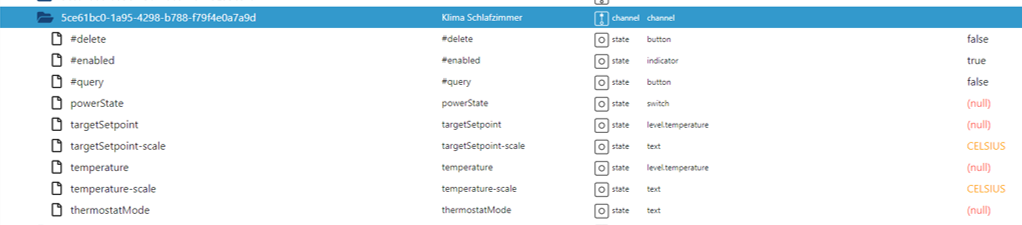
        Bild1.png

        Thomas BraunT HomoranH 2 Antworten Letzte Antwort
        0
        • S SmartHomie

          @homoran
          Das würde ich machen.....aber das Issue ist "closed" und #127 auch.

          Kleines Update zum Alexa2 Adapter. Die beiden Klimageräte sind in Alexa integriert und werden über den Alexa2 Adapter auch angezeigt. Die Datenpunkte sind aber offensichtlich tot. Also müssen wir wohl auf einen angepassten Daikin Adapter warten.
          Bild1.png

          Thomas BraunT Online
          Thomas BraunT Online
          Thomas Braun
          Most Active
          schrieb am zuletzt editiert von
          #16

          @smarthomie sagte in Daikin Adapter ohne Funktion:

          Das würde ich machen.....aber das Issue ist "closed" und #127 auch.

          Nö, #63 ist heute offen.

          Linux-Werkzeugkasten:
          https://forum.iobroker.net/topic/42952/der-kleine-iobroker-linux-werkzeugkasten
          NodeJS Fixer Skript:
          https://forum.iobroker.net/topic/68035/iob-node-fix-skript
          iob_diag: curl -sLf -o diag.sh https://iobroker.net/diag.sh && bash diag.sh

          1 Antwort Letzte Antwort
          0
          • S SmartHomie

            @homoran
            Das würde ich machen.....aber das Issue ist "closed" und #127 auch.

            Kleines Update zum Alexa2 Adapter. Die beiden Klimageräte sind in Alexa integriert und werden über den Alexa2 Adapter auch angezeigt. Die Datenpunkte sind aber offensichtlich tot. Also müssen wir wohl auf einen angepassten Daikin Adapter warten.
            Bild1.png

            HomoranH Nicht stören
            HomoranH Nicht stören
            Homoran
            Global Moderator Administrators
            schrieb am zuletzt editiert von
            #17

            @smarthomie sagte in Daikin Adapter ohne Funktion:

            aber das Issue ist "closed" und #127 auch.

            wurde doch unter meinem Beotrag als "open" verlinkt :thinking_face:

            kein Support per PN! - Fragen im Forum stellen - es gibt fast nichts, was nicht auch für andere interessant ist.

            Benutzt das Voting rechts unten im Beitrag wenn er euch geholfen hat.

            der Installationsfixer: curl -fsL https://iobroker.net/fix.sh | bash -

            S 1 Antwort Letzte Antwort
            0
            • HomoranH Homoran

              @smarthomie sagte in Daikin Adapter ohne Funktion:

              aber das Issue ist "closed" und #127 auch.

              wurde doch unter meinem Beotrag als "open" verlinkt :thinking_face:

              S Offline
              S Offline
              SmartHomie
              schrieb am zuletzt editiert von
              #18

              @homoran stimmt, das Closed bezog sich auf den verlinkten Beitrag #127. #63 ist offen.

              1 Antwort Letzte Antwort
              0
              • S SmartHomie

                @homoran said in Daikin Adapter ohne Funktion:

                Aber was hast du denn in der
                @smarthomie sagte in Daikin Adapter ohne Funktion:

                Konfiguration des Adapters ... recht spärlich.

                eingegeben?
                hast du den Haken bei http-get?

                Was kommt denn im (debug-) Log?

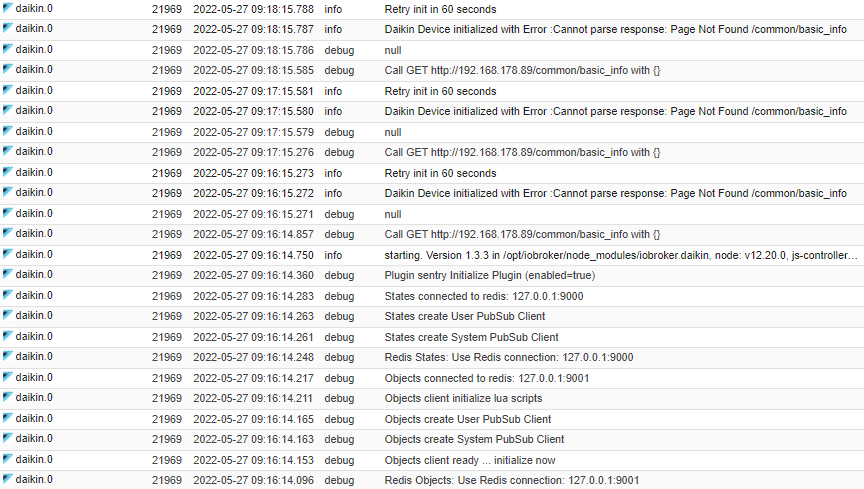
                Ich habe es sowohl ohne als auch mit Haken probiert. Das Ergebnis im Log ist immer gleich (hätte ich mal direkt mitposten können) :

                Bild1.png

                Bild2.png

                A Offline
                A Offline
                Aidan
                schrieb am zuletzt editiert von Aidan
                #19

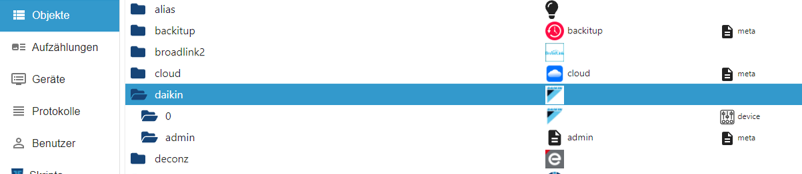
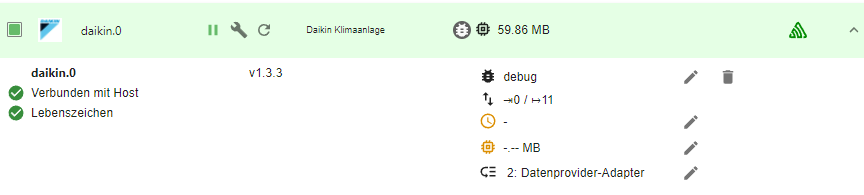
                @smarthomie Ich habe exakt das gleiche Problem, keine Datenpunkte vorhanden. Die beiden leeren Ordner habe ich auch. Adapter ist on. Hattest du den Fehler eingestellt? in der Hoffnung, das der Adapter auf die neuen Geräte aktualisiert wird? Eventuell schon eine Lösung vorhanden? Ich nutze kein Alexa.
                937e8ad9-1340-43bc-ab87-6c8c1abd80cb-image.png

                bcbddb3b-5b56-4f7f-925e-d07616039fcb-image.png
                0e0e1752-c077-4ec3-adfa-91dc297835b5-image.png

                HomoranH 1 Antwort Letzte Antwort
                0
                • A Aidan

                  @smarthomie Ich habe exakt das gleiche Problem, keine Datenpunkte vorhanden. Die beiden leeren Ordner habe ich auch. Adapter ist on. Hattest du den Fehler eingestellt? in der Hoffnung, das der Adapter auf die neuen Geräte aktualisiert wird? Eventuell schon eine Lösung vorhanden? Ich nutze kein Alexa.
                  937e8ad9-1340-43bc-ab87-6c8c1abd80cb-image.png

                  bcbddb3b-5b56-4f7f-925e-d07616039fcb-image.png
                  0e0e1752-c077-4ec3-adfa-91dc297835b5-image.png

                  HomoranH Nicht stören
                  HomoranH Nicht stören
                  Homoran
                  Global Moderator Administrators
                  schrieb am zuletzt editiert von Homoran
                  #20

                  @aidan sagte in Daikin Adapter ohne Funktion:

                  Ich habe exakt das gleiche Problem

                  die identischen Geräte?

                  @aidan sagte in Daikin Adapter ohne Funktion:

                  Eventuell schon eine Lösung vorhanden

                  ja!

                  https://forum.iobroker.net/search?term=Daikin-cloud&in=titlesposts

                  kein Support per PN! - Fragen im Forum stellen - es gibt fast nichts, was nicht auch für andere interessant ist.

                  Benutzt das Voting rechts unten im Beitrag wenn er euch geholfen hat.

                  der Installationsfixer: curl -fsL https://iobroker.net/fix.sh | bash -

                  A 1 Antwort Letzte Antwort
                  0
                  • HomoranH Homoran

                    @aidan sagte in Daikin Adapter ohne Funktion:

                    Ich habe exakt das gleiche Problem

                    die identischen Geräte?

                    @aidan sagte in Daikin Adapter ohne Funktion:

                    Eventuell schon eine Lösung vorhanden

                    ja!

                    https://forum.iobroker.net/search?term=Daikin-cloud&in=titlesposts

                    A Offline
                    A Offline
                    Aidan
                    schrieb am zuletzt editiert von
                    #21

                    @homoran danke, das schaue ich mir mal an

                    Ich habe 4 Wandgeräte:
                    1x FTXM42R2V1B
                    2x FTXM20R2V1B
                    1x FTXM25R2V1B

                    Die Geräte haben ein integriertes W-LAN Modul und werden über ONECTA App gesteuert.

                    A 1 Antwort Letzte Antwort
                    0
                    • A Aidan

                      @homoran danke, das schaue ich mir mal an

                      Ich habe 4 Wandgeräte:
                      1x FTXM42R2V1B
                      2x FTXM20R2V1B
                      1x FTXM25R2V1B

                      Die Geräte haben ein integriertes W-LAN Modul und werden über ONECTA App gesteuert.

                      A Offline
                      A Offline
                      Aidan
                      schrieb am zuletzt editiert von
                      #22

                      @aidan said in Daikin Adapter ohne Funktion:

                      @homoran danke, das schaue ich mir mal an

                      Ich habe 4 Wandgeräte:
                      1x FTXM42R2V1B
                      2x FTXM20R2V1B
                      1x FTXM25R2V1B

                      Die Geräte haben ein integriertes W-LAN Modul und werden über ONECTA App gesteuert.

                      Ok, da bin ich wohl zu blöd zu,

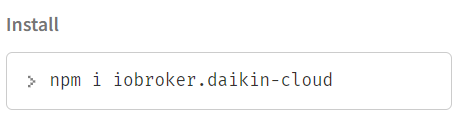
                      1. Schritt: npm i iobroker.daikin-cloud
                      2. Schritt: den Proxy Adapter installiert
                      3. Schritt ? kein QR Code zu finden und der daikin-cloud adapter taucht auch nirgends auf.

                      Ich würde ja gerne mit Testen, denke aber, dass mein Wissen hier mehr als begrenzt ist^^

                      GlasfaserG 1 Antwort Letzte Antwort
                      0
                      • A Aidan

                        @aidan said in Daikin Adapter ohne Funktion:

                        @homoran danke, das schaue ich mir mal an

                        Ich habe 4 Wandgeräte:
                        1x FTXM42R2V1B
                        2x FTXM20R2V1B
                        1x FTXM25R2V1B

                        Die Geräte haben ein integriertes W-LAN Modul und werden über ONECTA App gesteuert.

                        Ok, da bin ich wohl zu blöd zu,

                        1. Schritt: npm i iobroker.daikin-cloud
                        2. Schritt: den Proxy Adapter installiert
                        3. Schritt ? kein QR Code zu finden und der daikin-cloud adapter taucht auch nirgends auf.

                        Ich würde ja gerne mit Testen, denke aber, dass mein Wissen hier mehr als begrenzt ist^^

                        GlasfaserG Offline
                        GlasfaserG Offline
                        Glasfaser
                        schrieb am zuletzt editiert von
                        #23

                        @aidan sagte in Daikin Adapter ohne Funktion:

                        Schritt: npm i iobroker.daikin-cloud

                        Adapter ... reingeprügelt und wohin !?

                        und der daikin-cloud adapter taucht auch nirgends auf.

                        die Instanz wird nicht automatisch dadurch installiert .

                        Synology 918+ 16GB - ioBroker in Docker v9 , VISO auf Trekstor Primebook C13 13,3" , Hikvision Domkameras mit Surveillance Station .. CCU RaspberryMatic in Synology VM .. Zigbee CC2538+CC2592 .. Sonoff .. KNX .. Modbus ..

                        A 1 Antwort Letzte Antwort
                        0
                        • GlasfaserG Glasfaser

                          @aidan sagte in Daikin Adapter ohne Funktion:

                          Schritt: npm i iobroker.daikin-cloud

                          Adapter ... reingeprügelt und wohin !?

                          und der daikin-cloud adapter taucht auch nirgends auf.

                          die Instanz wird nicht automatisch dadurch installiert .

                          A Offline
                          A Offline
                          Aidan
                          schrieb am zuletzt editiert von Aidan
                          #24

                          @glasfaser
                          Ich habe keinen Ort angegeben, dachte das iobroker.daikin der Pfad wäre.
                          4d3f5c89-949e-439e-84ec-755db8801daa-image.png

                          so stehts unter https://www.npmjs.com/package/iobroker.daikin-cloud beschrieben

                          1 Antwort Letzte Antwort
                          0
                          • GlasfaserG Offline
                            GlasfaserG Offline
                            Glasfaser
                            schrieb am zuletzt editiert von
                            #25

                            @aidan

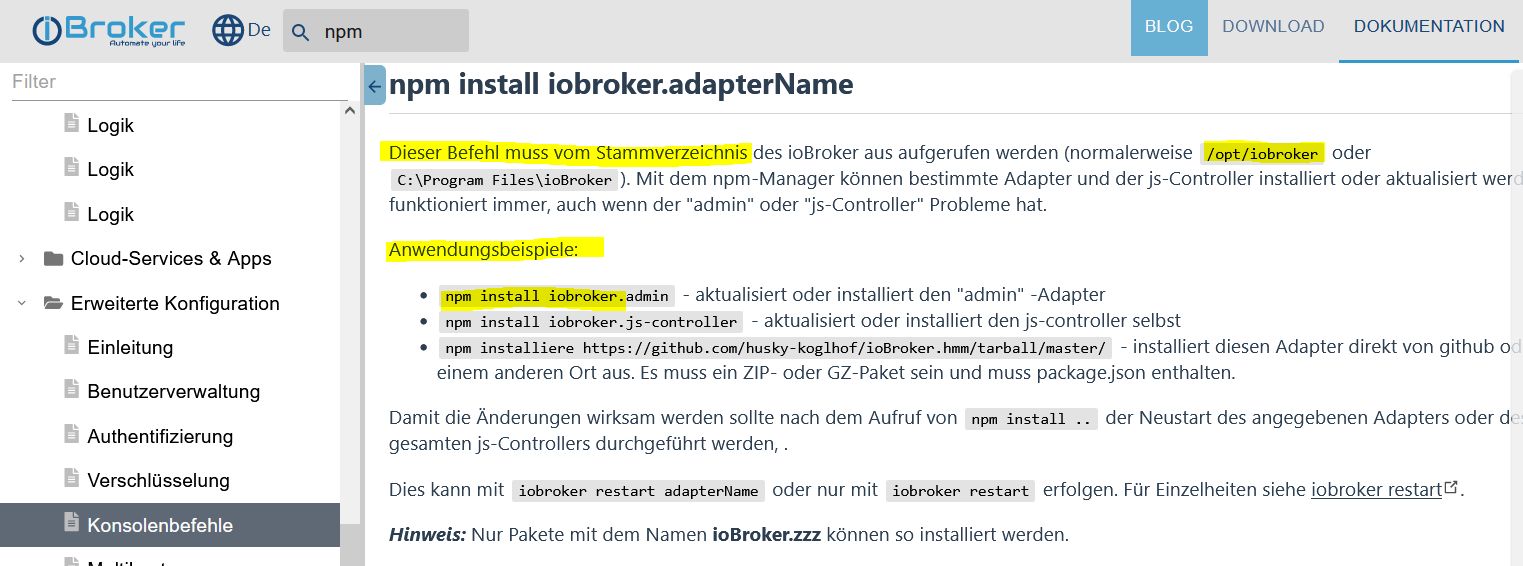
                            035c196f-a22a-43ff-98c2-44cdd9ad819d-grafik.png

                            https://www.iobroker.net/#de/documentation/config/cli.md

                            Synology 918+ 16GB - ioBroker in Docker v9 , VISO auf Trekstor Primebook C13 13,3" , Hikvision Domkameras mit Surveillance Station .. CCU RaspberryMatic in Synology VM .. Zigbee CC2538+CC2592 .. Sonoff .. KNX .. Modbus ..

                            A 1 Antwort Letzte Antwort
                            0
                            • GlasfaserG Glasfaser

                              @aidan

                              035c196f-a22a-43ff-98c2-44cdd9ad819d-grafik.png

                              https://www.iobroker.net/#de/documentation/config/cli.md

                              A Offline
                              A Offline
                              Aidan
                              schrieb am zuletzt editiert von
                              #26

                              @glasfaser

                              pi@raspberrypi:~ $ cd /opt/iobroker
                              pi@raspberrypi:/opt/iobroker $ npm i iobroker.daikin-cloud
                              npm WARN optional SKIPPING OPTIONAL DEPENDENCY: fsevents@2.3.2 (node_modules/fsevents):
                              npm WARN notsup SKIPPING OPTIONAL DEPENDENCY: Unsupported platform for fsevents@2.3.2: wanted {"os":"darwin","arch":"any"} (current: {"os":"linux","arch":"arm"})
                              npm WARN optional SKIPPING OPTIONAL DEPENDENCY: osx-temperature-sensor@1.0.7 (node_modules/osx-temperature-sensor):
                              npm WARN notsup SKIPPING OPTIONAL DEPENDENCY: Unsupported platform for osx-temperature-sensor@1.0.7: wanted {"os":"darwin","arch":"any"} (current: {"os":"linux","arch":"arm"})
                              
                              + iobroker.daikin-cloud@0.1.1
                              added 53 packages from 44 contributors in 24.221s
                              
                              77 packages are looking for funding
                                run `npm fund` for details
                              
                              pi@raspberrypi:/opt/iobroker $ 
                              
                              
                              GlasfaserG 1 Antwort Letzte Antwort
                              0
                              • A Aidan

                                @glasfaser

                                pi@raspberrypi:~ $ cd /opt/iobroker
                                pi@raspberrypi:/opt/iobroker $ npm i iobroker.daikin-cloud
                                npm WARN optional SKIPPING OPTIONAL DEPENDENCY: fsevents@2.3.2 (node_modules/fsevents):
                                npm WARN notsup SKIPPING OPTIONAL DEPENDENCY: Unsupported platform for fsevents@2.3.2: wanted {"os":"darwin","arch":"any"} (current: {"os":"linux","arch":"arm"})
                                npm WARN optional SKIPPING OPTIONAL DEPENDENCY: osx-temperature-sensor@1.0.7 (node_modules/osx-temperature-sensor):
                                npm WARN notsup SKIPPING OPTIONAL DEPENDENCY: Unsupported platform for osx-temperature-sensor@1.0.7: wanted {"os":"darwin","arch":"any"} (current: {"os":"linux","arch":"arm"})
                                
                                + iobroker.daikin-cloud@0.1.1
                                added 53 packages from 44 contributors in 24.221s
                                
                                77 packages are looking for funding
                                  run `npm fund` for details
                                
                                pi@raspberrypi:/opt/iobroker $ 
                                
                                
                                GlasfaserG Offline
                                GlasfaserG Offline
                                Glasfaser
                                schrieb am zuletzt editiert von
                                #27

                                @aidan

                                Ja ... was möchtest du mir mit dem Log sagen ... der Adapter ist installiert !

                                Synology 918+ 16GB - ioBroker in Docker v9 , VISO auf Trekstor Primebook C13 13,3" , Hikvision Domkameras mit Surveillance Station .. CCU RaspberryMatic in Synology VM .. Zigbee CC2538+CC2592 .. Sonoff .. KNX .. Modbus ..

                                A 1 Antwort Letzte Antwort
                                0
                                • GlasfaserG Glasfaser

                                  @aidan

                                  Ja ... was möchtest du mir mit dem Log sagen ... der Adapter ist installiert !

                                  A Offline
                                  A Offline
                                  Aidan
                                  schrieb am zuletzt editiert von Aidan
                                  #28

                                  @glasfaser
                                  ich finde ihn aber nicht in den Instanzen bzw, unter Adaptern
                                  Raspi ist neu gestartet.

                                  Eine Schritt Anleitung wäre super.

                                  GlasfaserG HomoranH 2 Antworten Letzte Antwort
                                  0
                                  • A Aidan

                                    @glasfaser
                                    ich finde ihn aber nicht in den Instanzen bzw, unter Adaptern
                                    Raspi ist neu gestartet.

                                    Eine Schritt Anleitung wäre super.

                                    GlasfaserG Offline
                                    GlasfaserG Offline
                                    Glasfaser
                                    schrieb am zuletzt editiert von Glasfaser
                                    #29

                                    @aidan

                                    bzw, unter Adaptern

                                    ???

                                    Zeige mal

                                    iobroker update -i
                                    iobroker list adapters
                                    iobroker list instances
                                    

                                    und

                                    sudo ln -s /usr/bin/node /usr/bin/nodejs
                                    
                                    uname -m && which nodejs node npm && nodejs -v && node -v && npm -v && whoami && pwd && sudo apt update &> /dev/null && sudo apt update && apt policy nodejs
                                    

                                    Synology 918+ 16GB - ioBroker in Docker v9 , VISO auf Trekstor Primebook C13 13,3" , Hikvision Domkameras mit Surveillance Station .. CCU RaspberryMatic in Synology VM .. Zigbee CC2538+CC2592 .. Sonoff .. KNX .. Modbus ..

                                    A 1 Antwort Letzte Antwort
                                    0
                                    • GlasfaserG Glasfaser

                                      @aidan

                                      bzw, unter Adaptern

                                      ???

                                      Zeige mal

                                      iobroker update -i
                                      iobroker list adapters
                                      iobroker list instances
                                      

                                      und

                                      sudo ln -s /usr/bin/node /usr/bin/nodejs
                                      
                                      uname -m && which nodejs node npm && nodejs -v && node -v && npm -v && whoami && pwd && sudo apt update &> /dev/null && sudo apt update && apt policy nodejs
                                      
                                      A Offline
                                      A Offline
                                      Aidan
                                      schrieb am zuletzt editiert von Aidan
                                      #30

                                      @glasfaser

                                      pi@raspberrypi:~ $ iobroker update-i
                                      iobroker [command]
                                      
                                      Commands:
                                        iobroker setup                                               Setup ioBroker
                                        iobroker start [all|<adapter>.<instance>]                    Starts the js-controller or a specified adapter instance
                                        iobroker stop [<adapter>.<instance>]                         stops the js-controller or a specified adapter instance
                                        iobroker restart [<adapter>.<instance>]                      Restarts js-controller or a specified adapter instance  [aliases: r]
                                        iobroker debug <adapter>[.<instance>]                        Starts a Node.js debugging session for the adapter instance
                                        iobroker info                                                Shows the host info
                                        iobroker logs [<adapter>]                                    Monitor log
                                        iobroker add <adapter> [desiredNumber]                       Add instance of adapter  [aliases: a]
                                        iobroker install <adapter>                                   Installs a specified adapter  [aliases: i]
                                        iobroker rebuild [<module>]                                  Rebuild all native modules or path
                                        iobroker url <url> [<name>]                                  Install adapter from specified url, e.g. GitHub
                                        iobroker del <adapter>                                       Remove adapter and all instances from this host  [aliases: delete]
                                        iobroker del <adapter>.<instance>                            Remove adapter instance  [aliases: delete]
                                        iobroker update [<repositoryUrl>]                            Update repository and list adapters
                                        iobroker upgrade                                             Upgrade management
                                        iobroker upload [all|<adapter>]                              Upload management  [aliases: u]
                                        iobroker object                                              Object management  [aliases: o]
                                        iobroker state                                               State management  [aliases: s]
                                        iobroker message <adapter>[.instance] <command> [<message>]  Send message to adapter instance/s
                                        iobroker list <type> [<filter>]                              List all entries, like objects
                                        iobroker chmod <mode> <file>                                 Change file rights
                                        iobroker chown <user> <group> <file>                         Change file ownership
                                        iobroker touch <file>                                        Touch file
                                        iobroker rm <file>                                           Remove file
                                        iobroker file                                                File management
                                        iobroker user                                                User commands
                                        iobroker group                                               group management
                                        iobroker host <hostname>                                     Set host to given hostname
                                        iobroker set <adapter>.<instance>                            Change settings of adapter config
                                        iobroker license <license.file or license.text>              Update license by given file
                                        iobroker cert                                                Certificate management
                                        iobroker clean <yes>                                         Clears all objects and states
                                        iobroker backup                                              Create backup
                                        iobroker restore <backup name or path>                       Restore a specified backup
                                        iobroker validate <backup name or path>                      Validate a specified backup
                                        iobroker status [all|<adapter>.<instance>]                   Status of ioBroker or adapter instance  [aliases: isrun]
                                        iobroker repo [<name>]                                       Show repo information
                                        iobroker uuid                                                Show uuid of the installation  [aliases: id]
                                        iobroker unsetup                                             Reset license, installation secret and language
                                        iobroker fix                                                 Execute the installation fixer script, this updates your ioBroker installation
                                        iobroker multihost                                           Multihost management
                                        iobroker compact                                             compact group management
                                        iobroker plugin                                              Plugin management
                                        iobroker version [<adapter>]                                 Show version of js-controller or specified adapter  [aliases: v]
                                      
                                      Options:
                                        --help  Show help  [boolean]
                                      
                                      
                                      pi@raspberrypi:~ $ iobroker list adapters
                                      system.adapter.admin                   : admin          - v5.3.8
                                      system.adapter.alarm                   : alarm          - v3.0.5
                                      system.adapter.daswetter               : daswetter      - v3.1.2
                                      system.adapter.discovery               : discovery      - v3.0.3
                                      system.adapter.email                   : email          - v1.0.10
                                      system.adapter.heos                    : heos           - v1.9.1
                                      system.adapter.hm-rega                 : hm-rega        - v3.0.40
                                      system.adapter.hm-rpc                  : hm-rpc         - v1.15.12
                                      system.adapter.hmip                    : hmip           - v1.15.4
                                      system.adapter.ical                    : ical           - v1.12.1
                                      system.adapter.icons-material-png      : icons-material-png - v0.1.0
                                      system.adapter.icons-mfd-png           : icons-mfd-png  - v1.1.0
                                      system.adapter.icons-open-icon-library-png: icons-open-icon-library-png - v0.1.2
                                      system.adapter.icons-ultimate-png      : icons-ultimate-png - v1.0.1
                                      system.adapter.info                    : info           - v1.9.19
                                      system.adapter.javascript              : javascript     - v5.2.21
                                      system.adapter.linkeddevices           : linkeddevices  - v1.4.3
                                      system.adapter.proxy                   : proxy          - v1.2.2
                                      system.adapter.simple-api              : simple-api     - v2.6.5
                                      system.adapter.socketio                : socketio       - v4.2.0
                                      system.adapter.tankerkoenig            : tankerkoenig   - v2.1.1
                                      system.adapter.telegram                : telegram       - v1.12.2
                                      system.adapter.tvspielfilm             : tvspielfilm    - v2.0.4
                                      system.adapter.vis                     : vis            - v1.4.15
                                      system.adapter.vis-google-fonts        : vis-google-fonts - v1.0.3
                                      system.adapter.vis-hqwidgets           : vis-hqwidgets  - v1.2.0
                                      system.adapter.vis-jqui-mfd            : vis-jqui-mfd   - v1.0.12
                                      system.adapter.vis-justgage            : vis-justgage   - v1.0.2
                                      system.adapter.vis-map                 : vis-map        - v1.0.4
                                      system.adapter.vis-metro               : vis-metro      - v1.2.0
                                      system.adapter.vis-plumb               : vis-plumb      - v1.0.2
                                      system.adapter.vis-timeandweather      : vis-timeandweather - v1.1.7
                                      system.adapter.vis-weather             : vis-weather    - v2.5.5
                                      system.adapter.web                     : web            - v4.3.0
                                      system.adapter.yr  
                                      
                                      pi@raspberrypi:~ $ iobroker list instances
                                      
                                      + system.adapter.admin.0                  : admin                 : raspberrypi                              -  enabled, port: 8081, bind: 0.0.0.0, run as: admin
                                        system.adapter.alarm.0                  : alarm                 : raspberrypi                              - disabled
                                      + system.adapter.discovery.0              : discovery             : raspberrypi                              -  enabled
                                      + system.adapter.email.0                  : email                 : raspberrypi                              -  enabled
                                        system.adapter.gartenbewaesserung.0     : gartenbewaesserung    : raspberrypi                              - disabled
                                        system.adapter.heos.0                   : heos                  : raspberrypi                              - disabled
                                      + system.adapter.hm-rega.0                : hm-rega               : raspberrypi                              -  enabled
                                      + system.adapter.hm-rpc.1                 : hm-rpc                : raspberrypi                              -  enabled, port: 0
                                      + system.adapter.hm-rpc.2                 : hm-rpc                : raspberrypi                              -  enabled, port: 0
                                        system.adapter.ical.0                   : ical                  : raspberrypi                              -  enabled
                                        system.adapter.icons-material-png.0     : icons-material-png    : raspberrypi                              -  enabled
                                        system.adapter.icons-mfd-png.0          : icons-mfd-png         : raspberrypi                              -  enabled
                                        system.adapter.icons-open-icon-library-png.0: icons-open-icon-library-png: raspberrypi                              -  enabled
                                        system.adapter.icons-ultimate-png.0     : icons-ultimate-png    : raspberrypi                              -  enabled
                                      + system.adapter.info.0                   : info                  : raspberrypi                              -  enabled
                                      + system.adapter.javascript.0             : javascript            : raspberrypi                              -  enabled
                                        system.adapter.proxy.0                  : proxy                 : raspberrypi                              - disabled
                                      + system.adapter.tankerkoenig.0           : tankerkoenig          : raspberrypi                              -  enabled
                                        system.adapter.telegram.0               : telegram              : raspberrypi                              - disabled, port: 8443, bind: 0.0.0.0
                                        system.adapter.tvspielfilm.0            : tvspielfilm           : raspberrypi                              -  enabled
                                        system.adapter.vis-google-fonts.0       : vis-google-fonts      : raspberrypi                              -  enabled
                                        system.adapter.vis-hqwidgets.0          : vis-hqwidgets         : raspberrypi                              -  enabled
                                        system.adapter.vis-jqui-mfd.0           : vis-jqui-mfd          : raspberrypi                              -  enabled
                                        system.adapter.vis-justgage.0           : vis-justgage          : raspberrypi                              -  enabled
                                        system.adapter.vis-map.0                : vis-map               : raspberrypi                              -  enabled
                                        system.adapter.vis-metro.0              : vis-metro             : raspberrypi                              -  enabled
                                        system.adapter.vis-plumb.0              : vis-plumb             : raspberrypi                              -  enabled
                                        system.adapter.vis-timeandweather.0     : vis-timeandweather    : raspberrypi                              -  enabled
                                        system.adapter.vis-weather.0            : vis-weather           : raspberrypi                              -  enabled
                                        system.adapter.vis.0                    : vis                   : raspberrypi                              -  enabled
                                      + system.adapter.web.0                    : web                   : raspberrypi                              -  enabled, port: 8082, bind: 0.0.0.0, run as: admin
                                      
                                      + instance is alive
                                      
                                      
                                      pi@raspberrypi:~ $ sudo ln -s /usr/bin/node /usr/bin/nodejs
                                      ln: die symbolische Verknüpfung '/usr/bin/nodejs' konnte nicht angelegt werden: Die Datei existiert bereits
                                      
                                      
                                      GlasfaserG 1 Antwort Letzte Antwort
                                      0
                                      • A Aidan

                                        @glasfaser

                                        pi@raspberrypi:~ $ iobroker update-i
                                        iobroker [command]
                                        
                                        Commands:
                                          iobroker setup                                               Setup ioBroker
                                          iobroker start [all|<adapter>.<instance>]                    Starts the js-controller or a specified adapter instance
                                          iobroker stop [<adapter>.<instance>]                         stops the js-controller or a specified adapter instance
                                          iobroker restart [<adapter>.<instance>]                      Restarts js-controller or a specified adapter instance  [aliases: r]
                                          iobroker debug <adapter>[.<instance>]                        Starts a Node.js debugging session for the adapter instance
                                          iobroker info                                                Shows the host info
                                          iobroker logs [<adapter>]                                    Monitor log
                                          iobroker add <adapter> [desiredNumber]                       Add instance of adapter  [aliases: a]
                                          iobroker install <adapter>                                   Installs a specified adapter  [aliases: i]
                                          iobroker rebuild [<module>]                                  Rebuild all native modules or path
                                          iobroker url <url> [<name>]                                  Install adapter from specified url, e.g. GitHub
                                          iobroker del <adapter>                                       Remove adapter and all instances from this host  [aliases: delete]
                                          iobroker del <adapter>.<instance>                            Remove adapter instance  [aliases: delete]
                                          iobroker update [<repositoryUrl>]                            Update repository and list adapters
                                          iobroker upgrade                                             Upgrade management
                                          iobroker upload [all|<adapter>]                              Upload management  [aliases: u]
                                          iobroker object                                              Object management  [aliases: o]
                                          iobroker state                                               State management  [aliases: s]
                                          iobroker message <adapter>[.instance] <command> [<message>]  Send message to adapter instance/s
                                          iobroker list <type> [<filter>]                              List all entries, like objects
                                          iobroker chmod <mode> <file>                                 Change file rights
                                          iobroker chown <user> <group> <file>                         Change file ownership
                                          iobroker touch <file>                                        Touch file
                                          iobroker rm <file>                                           Remove file
                                          iobroker file                                                File management
                                          iobroker user                                                User commands
                                          iobroker group                                               group management
                                          iobroker host <hostname>                                     Set host to given hostname
                                          iobroker set <adapter>.<instance>                            Change settings of adapter config
                                          iobroker license <license.file or license.text>              Update license by given file
                                          iobroker cert                                                Certificate management
                                          iobroker clean <yes>                                         Clears all objects and states
                                          iobroker backup                                              Create backup
                                          iobroker restore <backup name or path>                       Restore a specified backup
                                          iobroker validate <backup name or path>                      Validate a specified backup
                                          iobroker status [all|<adapter>.<instance>]                   Status of ioBroker or adapter instance  [aliases: isrun]
                                          iobroker repo [<name>]                                       Show repo information
                                          iobroker uuid                                                Show uuid of the installation  [aliases: id]
                                          iobroker unsetup                                             Reset license, installation secret and language
                                          iobroker fix                                                 Execute the installation fixer script, this updates your ioBroker installation
                                          iobroker multihost                                           Multihost management
                                          iobroker compact                                             compact group management
                                          iobroker plugin                                              Plugin management
                                          iobroker version [<adapter>]                                 Show version of js-controller or specified adapter  [aliases: v]
                                        
                                        Options:
                                          --help  Show help  [boolean]
                                        
                                        
                                        pi@raspberrypi:~ $ iobroker list adapters
                                        system.adapter.admin                   : admin          - v5.3.8
                                        system.adapter.alarm                   : alarm          - v3.0.5
                                        system.adapter.daswetter               : daswetter      - v3.1.2
                                        system.adapter.discovery               : discovery      - v3.0.3
                                        system.adapter.email                   : email          - v1.0.10
                                        system.adapter.heos                    : heos           - v1.9.1
                                        system.adapter.hm-rega                 : hm-rega        - v3.0.40
                                        system.adapter.hm-rpc                  : hm-rpc         - v1.15.12
                                        system.adapter.hmip                    : hmip           - v1.15.4
                                        system.adapter.ical                    : ical           - v1.12.1
                                        system.adapter.icons-material-png      : icons-material-png - v0.1.0
                                        system.adapter.icons-mfd-png           : icons-mfd-png  - v1.1.0
                                        system.adapter.icons-open-icon-library-png: icons-open-icon-library-png - v0.1.2
                                        system.adapter.icons-ultimate-png      : icons-ultimate-png - v1.0.1
                                        system.adapter.info                    : info           - v1.9.19
                                        system.adapter.javascript              : javascript     - v5.2.21
                                        system.adapter.linkeddevices           : linkeddevices  - v1.4.3
                                        system.adapter.proxy                   : proxy          - v1.2.2
                                        system.adapter.simple-api              : simple-api     - v2.6.5
                                        system.adapter.socketio                : socketio       - v4.2.0
                                        system.adapter.tankerkoenig            : tankerkoenig   - v2.1.1
                                        system.adapter.telegram                : telegram       - v1.12.2
                                        system.adapter.tvspielfilm             : tvspielfilm    - v2.0.4
                                        system.adapter.vis                     : vis            - v1.4.15
                                        system.adapter.vis-google-fonts        : vis-google-fonts - v1.0.3
                                        system.adapter.vis-hqwidgets           : vis-hqwidgets  - v1.2.0
                                        system.adapter.vis-jqui-mfd            : vis-jqui-mfd   - v1.0.12
                                        system.adapter.vis-justgage            : vis-justgage   - v1.0.2
                                        system.adapter.vis-map                 : vis-map        - v1.0.4
                                        system.adapter.vis-metro               : vis-metro      - v1.2.0
                                        system.adapter.vis-plumb               : vis-plumb      - v1.0.2
                                        system.adapter.vis-timeandweather      : vis-timeandweather - v1.1.7
                                        system.adapter.vis-weather             : vis-weather    - v2.5.5
                                        system.adapter.web                     : web            - v4.3.0
                                        system.adapter.yr  
                                        
                                        pi@raspberrypi:~ $ iobroker list instances
                                        
                                        + system.adapter.admin.0                  : admin                 : raspberrypi                              -  enabled, port: 8081, bind: 0.0.0.0, run as: admin
                                          system.adapter.alarm.0                  : alarm                 : raspberrypi                              - disabled
                                        + system.adapter.discovery.0              : discovery             : raspberrypi                              -  enabled
                                        + system.adapter.email.0                  : email                 : raspberrypi                              -  enabled
                                          system.adapter.gartenbewaesserung.0     : gartenbewaesserung    : raspberrypi                              - disabled
                                          system.adapter.heos.0                   : heos                  : raspberrypi                              - disabled
                                        + system.adapter.hm-rega.0                : hm-rega               : raspberrypi                              -  enabled
                                        + system.adapter.hm-rpc.1                 : hm-rpc                : raspberrypi                              -  enabled, port: 0
                                        + system.adapter.hm-rpc.2                 : hm-rpc                : raspberrypi                              -  enabled, port: 0
                                          system.adapter.ical.0                   : ical                  : raspberrypi                              -  enabled
                                          system.adapter.icons-material-png.0     : icons-material-png    : raspberrypi                              -  enabled
                                          system.adapter.icons-mfd-png.0          : icons-mfd-png         : raspberrypi                              -  enabled
                                          system.adapter.icons-open-icon-library-png.0: icons-open-icon-library-png: raspberrypi                              -  enabled
                                          system.adapter.icons-ultimate-png.0     : icons-ultimate-png    : raspberrypi                              -  enabled
                                        + system.adapter.info.0                   : info                  : raspberrypi                              -  enabled
                                        + system.adapter.javascript.0             : javascript            : raspberrypi                              -  enabled
                                          system.adapter.proxy.0                  : proxy                 : raspberrypi                              - disabled
                                        + system.adapter.tankerkoenig.0           : tankerkoenig          : raspberrypi                              -  enabled
                                          system.adapter.telegram.0               : telegram              : raspberrypi                              - disabled, port: 8443, bind: 0.0.0.0
                                          system.adapter.tvspielfilm.0            : tvspielfilm           : raspberrypi                              -  enabled
                                          system.adapter.vis-google-fonts.0       : vis-google-fonts      : raspberrypi                              -  enabled
                                          system.adapter.vis-hqwidgets.0          : vis-hqwidgets         : raspberrypi                              -  enabled
                                          system.adapter.vis-jqui-mfd.0           : vis-jqui-mfd          : raspberrypi                              -  enabled
                                          system.adapter.vis-justgage.0           : vis-justgage          : raspberrypi                              -  enabled
                                          system.adapter.vis-map.0                : vis-map               : raspberrypi                              -  enabled
                                          system.adapter.vis-metro.0              : vis-metro             : raspberrypi                              -  enabled
                                          system.adapter.vis-plumb.0              : vis-plumb             : raspberrypi                              -  enabled
                                          system.adapter.vis-timeandweather.0     : vis-timeandweather    : raspberrypi                              -  enabled
                                          system.adapter.vis-weather.0            : vis-weather           : raspberrypi                              -  enabled
                                          system.adapter.vis.0                    : vis                   : raspberrypi                              -  enabled
                                        + system.adapter.web.0                    : web                   : raspberrypi                              -  enabled, port: 8082, bind: 0.0.0.0, run as: admin
                                        
                                        + instance is alive
                                        
                                        
                                        pi@raspberrypi:~ $ sudo ln -s /usr/bin/node /usr/bin/nodejs
                                        ln: die symbolische Verknüpfung '/usr/bin/nodejs' konnte nicht angelegt werden: Die Datei existiert bereits
                                        
                                        
                                        GlasfaserG Offline
                                        GlasfaserG Offline
                                        Glasfaser
                                        schrieb am zuletzt editiert von
                                        #31

                                        @aidan sagte in Daikin Adapter ohne Funktion:

                                        iobroker update-i

                                        iobroker update -i
                                        

                                        Synology 918+ 16GB - ioBroker in Docker v9 , VISO auf Trekstor Primebook C13 13,3" , Hikvision Domkameras mit Surveillance Station .. CCU RaspberryMatic in Synology VM .. Zigbee CC2538+CC2592 .. Sonoff .. KNX .. Modbus ..

                                        A 1 Antwort Letzte Antwort
                                        0
                                        • GlasfaserG Glasfaser

                                          @aidan sagte in Daikin Adapter ohne Funktion:

                                          iobroker update-i

                                          iobroker update -i
                                          
                                          A Offline
                                          A Offline
                                          Aidan
                                          schrieb am zuletzt editiert von
                                          #32

                                          @glasfaser

                                          pi@raspberrypi:~ $ iobroker update -i
                                          Used repository: Stable (default)
                                          Adapter    "admin"        : 5.3.8    , installed 5.3.8
                                          Adapter    "alarm"        : 3.1.0    , installed 3.0.5  [Updatable]
                                          Adapter    "daswetter"    : 3.1.2    , installed 3.1.2
                                          Adapter    "discovery"    : 3.0.3    , installed 3.0.3
                                          Adapter    "email"        : 1.0.10   , installed 1.0.10
                                          Adapter    "heos"         : 1.9.1    , installed 1.9.1
                                          Adapter    "hm-rega"      : 3.0.40   , installed 3.0.40
                                          Adapter    "hm-rpc"       : 1.15.12  , installed 1.15.12
                                          Adapter    "hmip"         : 1.17.0   , installed 1.15.4 [Updatable]
                                          Adapter    "ical"         : 1.12.1   , installed 1.12.1
                                          Adapter    "icons-material-png": 0.1.0, installed 0.1.0
                                          Adapter    "icons-mfd-png": 1.1.0    , installed 1.1.0
                                          Adapter    "icons-open-icon-library-png": 0.1.2, installed 0.1.2
                                          Adapter    "icons-ultimate-png": 1.0.1, installed 1.0.1
                                          Adapter    "info"         : 1.9.19   , installed 1.9.19
                                          Adapter    "javascript"   : 5.2.21   , installed 5.2.21
                                          Controller "js-controller": 4.0.23   , installed 4.0.23
                                          Adapter    "linkeddevices": 1.4.3    , installed 1.4.3
                                          Adapter    "proxy"        : 1.2.2    , installed 1.2.2
                                          Adapter    "simple-api"   : 2.6.5    , installed 2.6.5
                                          Adapter    "socketio"     : 4.2.0    , installed 4.2.0
                                          Adapter    "tankerkoenig" : 2.1.1    , installed 2.1.1
                                          Adapter    "telegram"     : 1.12.2   , installed 1.12.2
                                          Adapter    "tvspielfilm"  : 2.0.4    , installed 2.0.4
                                          Adapter    "vis"          : 1.4.15   , installed 1.4.15
                                          Adapter    "vis-google-fonts": 1.0.3 , installed 1.0.3
                                          Adapter    "vis-hqwidgets": 1.2.0    , installed 1.2.0
                                          Adapter    "vis-jqui-mfd" : 1.0.12   , installed 1.0.12
                                          Adapter    "vis-justgage" : 1.0.2    , installed 1.0.2
                                          Adapter    "vis-map"      : 1.0.4    , installed 1.0.4
                                          Adapter    "vis-metro"    : 1.2.0    , installed 1.2.0
                                          Adapter    "vis-plumb"    : 1.0.2    , installed 1.0.2
                                          Adapter    "vis-timeandweather": 1.1.7, installed 1.1.7
                                          Adapter    "vis-weather"  : 2.5.5    , installed 2.5.5
                                          Adapter    "web"          : 4.3.0    , installed 4.3.0
                                          Adapter    "ws"           : 1.3.0    , installed 1.3.0
                                          Adapter    "yr"           : 5.3.0    , installed 5.1.2  [Updatable]
                                          
                                          
                                          GlasfaserG 2 Antworten Letzte Antwort
                                          0
                                          Antworten
                                          • In einem neuen Thema antworten
                                          Anmelden zum Antworten
                                          • Älteste zuerst
                                          • Neuste zuerst
                                          • Meiste Stimmen


                                          Support us

                                          ioBroker
                                          Community Adapters
                                          Donate

                                          305

                                          Online

                                          32.6k

                                          Benutzer

                                          82.3k

                                          Themen

                                          1.3m

                                          Beiträge
                                          Community
                                          Impressum | Datenschutz-Bestimmungen | Nutzungsbedingungen | Einwilligungseinstellungen
                                          ioBroker Community 2014-2025
                                          logo
                                          • Anmelden

                                          • Du hast noch kein Konto? Registrieren

                                          • Anmelden oder registrieren, um zu suchen
                                          • Erster Beitrag
                                            Letzter Beitrag
                                          0
                                          • Home
                                          • Aktuell
                                          • Tags
                                          • Ungelesen 0
                                          • Kategorien
                                          • Unreplied
                                          • Beliebt
                                          • GitHub
                                          • Docu
                                          • Hilfe