
NEWS




Test Adapter ioBroker.backitup v3.1.x
-
pi@ioBroker:~ $ iobroker stop pi@ioBroker:~ $ iobroker fix library: loaded Library version=2022-02-10 ========================================================================== Welcome to the ioBroker installation fixer! Script version: 2022-02-13 You might need to enter your password a couple of times. ========================================================================== ========================================================================== Installing prerequisites (1/3) ========================================================================== OK:1 http://phoscon.de/apt/deconz buster InRelease OK:2 http://archive.raspberrypi.org/debian buster InRelease OK:3 https://repos.influxdata.com/debian buster InRelease OK:4 https://packages.grafana.com/oss/deb stable InRelease OK:5 https://deb.nodesource.com/node_14.x buster InRelease Holen:6 http://raspbian.raspberrypi.org/raspbian buster InRelease [15,0 kB] Holen:7 https://archive.raspbian.org/raspbian buster InRelease [15,0 kB] Holen:8 http://raspbian.raspberrypi.org/raspbian buster/main armhf Packages [13,0 MB] Holen:9 https://archive.raspbian.org/raspbian buster/main Sources [11,4 MB] 45% [8 Packages 5.715 kB/13,0 MB 44%] [9 Sources 6.144 kB/11,4 MB 54%] Holen:10 https://archive.raspbian.org/raspbian buster/main armhf Packages [13,0 MB] Es wurden 37,4 MB in 2 min 40 s geholt (233 kB/s). Paketlisten werden gelesen... Fertig Installed gcc-c++ ========================================================================== Checking ioBroker user and directory permissions (2/3) ========================================================================== Created /etc/sudoers.d/iobroker Fixing directory permissions... ========================================================================== Checking autostart (3/3) ========================================================================== Enabling autostart... Autostart enabled! ========================================================================== Your installation was fixed successfully Run iobroker start to start ioBroker again! ========================================================================== pi@ioBroker:~ $ iobroker update -i Used repository: Stable (default) Adapter "admin" : 5.3.8 , installed 5.3.8 Adapter "alarm" : 3.0.5 , installed 3.0.5 Adapter "alexa2" : 3.11.2 , installed 3.11.2 Adapter "backitup" : 2.4.6 , installed 2.4.6 Adapter "bring" : 1.7.13 , installed 1.7.13 Adapter "bydhvs" : 1.3.0 , installed 1.3.0 Adapter "cloud" : 4.1.1 , installed 4.1.1 Adapter "countdown" : 1.2.5 , installed 1.2.5 Adapter "deconz" : 1.3.20 , installed 1.3.20 Adapter "device-reminder": 1.2.9 , installed 1.2.9 Adapter "devices" : 1.0.10 , installed 1.0.10 Adapter "discovery" : 3.0.3 , installed 2.8.0 [Updatable] Adapter "dwd" : 2.8.3 , installed 2.8.3 Adapter "echarts" : 1.0.3 , installed 1.0.3 Adapter "eusec" : 0.8.4 , installed 0.8.5 Adapter "fb-checkpresence": 1.1.14, installed 1.1.13 [Updatable] Adapter "feiertage" : 1.1.0 , installed 1.1.0 Adapter "flot" : 1.10.7 , installed 1.10.7 Adapter "fritzdect" : 2.2.3 , installed 2.2.3 Adapter "fronius" : 1.1.3 , installed 1.1.3 Adapter "fullybrowser" : 2.1.1 , installed 2.1.1 Adapter "heizoel" : 1.0.3 , installed 1.0.3 Adapter "history" : 1.11.1 , installed 1.11.1 Adapter "hm-rega" : 3.0.39 , installed 3.0.39 Adapter "hm-rpc" : 1.15.12 , installed 1.15.11 [Updatable] Adapter "ical" : 1.12.1 , installed 1.12.1 Adapter "icons-mfd-png": 1.0.2 , installed 1.0.2 Adapter "icons-mfd-svg": 1.0.2 , installed 1.0.2 Adapter "icons-open-icon-library-png": 0.1.2, installed 0.1.2 Adapter "influxdb" : 2.6.3 , installed 2.6.3 Adapter "info" : 1.9.18 , installed 1.9.18 Adapter "iot" : 1.11.4 , installed 1.11.4 Adapter "javascript" : 5.2.21 , installed 5.2.21 Controller "js-controller": 4.0.21 , installed 4.0.21 Adapter "mihome-vacuum": 3.3.1 , installed 3.3.5 Adapter "mobile" : 1.0.1 , installed 1.0.1 Adapter "modbus" : 4.0.4 , installed 4.0.4 Adapter "mqtt" : 2.7.4 , installed 2.7.4 Adapter "nut" : 1.5.1 , installed 1.5.1 Adapter "ping" : 1.5.3 , installed 1.5.3 Adapter "pollenflug" : 1.0.6 , installed 1.0.6 Adapter "pushover" : 2.1.0 , installed 2.1.0 Adapter "rpi2" : 1.3.2 , installed 1.3.2 Adapter "sayit" : 1.12.3 , installed 1.12.3 Adapter "shelly" : 5.3.2 , installed 5.3.2 Adapter "simple-api" : 2.6.4 , installed 2.6.4 Adapter "socketio" : 4.2.0 , installed 4.2.0 Adapter "sonoff" : 2.5.0 , installed 2.5.0 Adapter "sonos" : 2.1.7 , installed 2.1.7 Adapter "synology" : 2.1.6 , installed 2.1.6 Adapter "tankerkoenig" : 2.1.1 , installed 2.1.1 Adapter "telegram" : 1.12.2 , installed 1.11.1 [Updatable] Adapter "text2command" : 2.2.1 , installed 2.2.1 Adapter "tr-064" : 4.2.16 , installed 4.2.16 Adapter "trashschedule": 1.4.5 , installed 1.4.5 Adapter "unifi" : 0.5.10 , installed 0.5.10 Adapter "vis" : 1.4.5 , installed 1.4.5 Adapter "vis-bars" : 0.1.4 , installed 0.1.4 Adapter "vis-canvas-gauges": 0.1.5, installed 0.1.5 Adapter "vis-colorpicker": 1.2.0 , installed 1.2.0 Adapter "vis-google-fonts": 1.0.3 , installed 1.0.3 Adapter "vis-hqwidgets": 1.1.9 , installed 1.1.9 Adapter "vis-icontwo" : 0.87.0 , installed 0.87.0 Adapter "vis-inventwo" : 3.3.1 , installed 3.3.1 Adapter "vis-jqui-mfd" : 1.0.12 , installed 1.0.12 Adapter "vis-justgage" : 1.0.2 , installed 1.0.2 Adapter "vis-keyboard" : 0.0.2 , installed 0.0.2 Adapter "vis-map" : 1.0.4 , installed 1.0.4 Adapter "vis-material-advanced": 1.7.2, installed 1.7.2 Adapter "vis-plumb" : 1.0.2 , installed 1.0.2 Adapter "vis-timeandweather": 1.1.7, installed 1.1.7 Adapter "vis-weather" : 2.5.5 , installed 2.5.5 Adapter "weatherunderground": 3.4.1, installed 3.4.1 Adapter "web" : 4.2.3 , installed 4.2.3 Adapter "windows-control": 0.1.5 , installed 0.1.5 Adapter "ws" : 1.2.0 , installed 1.3.0 Adapter "yahka" : 0.13.1 , installed 0.13.1 Adapter "yeelight-2" : 1.1.2 , installed 1.1.2 pi@ioBroker:~ $ iobroker list instances system.adapter.admin.0 : admin : ioBroker - enabled, port: 8081, bind: 0.0.0.0, run as: admin system.adapter.alarm.0 : alarm : ioBroker - disabled system.adapter.alexa2.0 : alexa2 : ioBroker - enabled system.adapter.backitup.0 : backitup : ioBroker - enabled system.adapter.bring.0 : bring : ioBroker - enabled system.adapter.bydhvs.0 : bydhvs : ioBroker - enabled system.adapter.cloud.0 : cloud : ioBroker - enabled system.adapter.countdown.0 : countdown : ioBroker - enabled system.adapter.deconz.0 : deconz : ioBroker - enabled system.adapter.device-reminder.0 : device-reminder : ioBroker - enabled system.adapter.devices.0 : devices : ioBroker - disabled system.adapter.discovery.0 : discovery : ioBroker - enabled system.adapter.dwd.0 : dwd : ioBroker - enabled system.adapter.echarts.0 : echarts : ioBroker - enabled system.adapter.eusec.0 : eusec : ioBroker - enabled system.adapter.feiertage.0 : feiertage : ioBroker - enabled system.adapter.flot.0 : flot : ioBroker - disabled system.adapter.fritzdect.0 : fritzdect : ioBroker - enabled system.adapter.fronius-solarweb.0 : fronius-solarweb : ioBroker - enabled system.adapter.fronius.0 : fronius : ioBroker - enabled system.adapter.fully-tablet-control.0 : fully-tablet-control : ioBroker - disabled system.adapter.fullybrowser.0 : fullybrowser : ioBroker - disabled system.adapter.heizoel.0 : heizoel : ioBroker - enabled system.adapter.history.0 : history : ioBroker - enabled system.adapter.hm-rega.0 : hm-rega : ioBroker - enabled system.adapter.hm-rpc.0 : hm-rpc : ioBroker - enabled, port: 18701 system.adapter.hm-rpc.1 : hm-rpc : ioBroker - enabled, port: 12001 system.adapter.hm-rpc.2 : hm-rpc : ioBroker - enabled, port: 12010 system.adapter.ical.0 : ical : ioBroker - enabled system.adapter.icons-mfd-png.0 : icons-mfd-png : ioBroker - disabled system.adapter.icons-mfd-svg.0 : icons-mfd-svg : ioBroker - disabled system.adapter.icons-open-icon-library-png.0: icons-open-icon-library-png: ioBroker - disabled system.adapter.influxdb.0 : influxdb : ioBroker - enabled, port: 8086 system.adapter.info.0 : info : ioBroker - enabled system.adapter.iot.0 : iot : ioBroker - enabled system.adapter.javascript.0 : javascript : ioBroker - enabled system.adapter.mihome-vacuum.0 : mihome-vacuum : ioBroker - enabled, port: 54321 system.adapter.mobile.0 : mobile : ioBroker - disabled system.adapter.mqtt.0 : mqtt : ioBroker - enabled, port: 1886, bind: 0.0.0.0 system.adapter.nut.0 : nut : ioBroker - enabled system.adapter.ping.0 : ping : ioBroker - enabled system.adapter.pollenflug.0 : pollenflug : ioBroker - enabled system.adapter.pushover.0 : pushover : ioBroker - enabled system.adapter.rpi2.0 : rpi2 : ioBroker - enabled system.adapter.shelly.0 : shelly : ioBroker - enabled, port: 1882, bind: 0.0.0.0 system.adapter.simple-api.0 : simple-api : ioBroker - enabled, port: 8087, bind: 0.0.0.0, run as: admin system.adapter.sonoff.0 : sonoff : ioBroker - enabled, port: 1883, bind: 192.168.178.21 system.adapter.sonos.0 : sonos : ioBroker - enabled system.adapter.sourceanalytix.0 : sourceanalytix : ioBroker - enabled system.adapter.synology.0 : synology : ioBroker - enabled, port: 5001 system.adapter.tankerkoenig.0 : tankerkoenig : ioBroker - enabled system.adapter.telegram.0 : telegram : ioBroker - enabled, port: 8443, bind: 0.0.0.0 system.adapter.text2command.0 : text2command : ioBroker - enabled system.adapter.time-switch.0 : time-switch : ioBroker - enabled system.adapter.tr-064.0 : tr-064 : ioBroker - enabled system.adapter.trashschedule.0 : trashschedule : ioBroker - enabled system.adapter.unifi.0 : unifi : ioBroker - disabled system.adapter.vis-bars.0 : vis-bars : ioBroker - disabled system.adapter.vis-canvas-gauges.0 : vis-canvas-gauges : ioBroker - disabled system.adapter.vis-colorpicker.0 : vis-colorpicker : ioBroker - disabled system.adapter.vis-google-fonts.0 : vis-google-fonts : ioBroker - enabled system.adapter.vis-hqwidgets.0 : vis-hqwidgets : ioBroker - disabled system.adapter.vis-icontwo.0 : vis-icontwo : ioBroker - disabled system.adapter.vis-jqui-mfd.0 : vis-jqui-mfd : ioBroker - disabled system.adapter.vis-justgage.0 : vis-justgage : ioBroker - disabled system.adapter.vis-keyboard.0 : vis-keyboard : ioBroker - disabled system.adapter.vis-map.0 : vis-map : ioBroker - disabled system.adapter.vis-material-advanced.0 : vis-material-advanced : ioBroker - disabled system.adapter.vis-materialdesign.0 : vis-materialdesign : ioBroker - disabled system.adapter.vis-plumb.0 : vis-plumb : ioBroker - disabled system.adapter.vis-timeandweather.0 : vis-timeandweather : ioBroker - disabled system.adapter.vis-weather.0 : vis-weather : ioBroker - disabled system.adapter.vis.0 : vis : ioBroker - enabled system.adapter.wallpanel.0 : wallpanel : ioBroker - enabled system.adapter.weatherunderground.0 : weatherunderground : ioBroker - enabled system.adapter.web.0 : web : ioBroker - enabled, port: 8082, bind: 0.0.0.0, run as: admin system.adapter.yahka.0 : yahka : ioBroker - enabled system.adapter.yeelight-2.0 : yeelight-2 : ioBroker - enabled + instance is alive pi@ioBroker:~ $NodeJS:
pi@ioBroker:~ $ sudo ln -s /usr/bin/node /usr/bin/nodejs
ln: die symbolische Verknüpfung '/usr/bin/nodejs' konnte nicht angelegt werden: Die Datei existiert bereits
pi@ioBroker:~ $ which nodejs node npm && nodejs -v && node -v && npm -v && whoami && pwd && sudo apt update &> /dev/null && sudo apt update && apt policy nodejs /usr/bin/nodejs /usr/bin/node /usr/bin/npm v14.19.1 v14.19.1 6.14.16 pi /home/pi OK:1 http://phoscon.de/apt/deconz buster InRelease OK:2 http://archive.raspberrypi.org/debian buster InRelease OK:3 https://packages.grafana.com/oss/deb stable InRelease OK:4 https://deb.nodesource.com/node_14.x buster InRelease OK:5 https://repos.influxdata.com/debian buster InRelease OK:6 http://raspbian.raspberrypi.org/raspbian buster InRelease OK:7 https://archive.raspbian.org/raspbian buster InRelease Paketlisten werden gelesen... Fertig Abhängigkeitsbaum wird aufgebaut. Statusinformationen werden eingelesen.... Fertig Aktualisierung für 3 Pakete verfügbar. Führen Sie »apt list --upgradable« aus, um sie anzuzeigen. nodejs: Installiert: 14.19.1-deb-1nodesource1 Installationskandidat: 14.19.1-deb-1nodesource1 Versionstabelle: *** 14.19.1-deb-1nodesource1 500 500 https://deb.nodesource.com/node_14.x buster/main armhf Packages 100 /var/lib/dpkg/status 10.24.0~dfsg-1~deb10u1 500 500 http://raspbian.raspberrypi.org/raspbian buster/main armhf Packages 500 https://archive.raspbian.org/raspbian buster/main armhf Packages pi@ioBroker:~ $Passt soweit.
-
Gut, dann ist zumindest sudo richtig.
Was an der Stelle dann im Code steht und bei dir zu einem nicht erledigten Backup führt muss sich dann wer anders anschauen, da hab ich keine Aktien drin./usr/bin/iobroker: Zeile 8: 23540 Getötet sudo -H -u iobroker node /opt/iobroker/node_modules/iobroker.js-controller/iobroker.js "$@"scheint mir aber auch nicht vollständig zu sein.
-
Hättest Du eine Idee oder die Möglichkeit in den Code zu schauen (wie Thomas vorgeschlagen hat)?
@qqolli Das wäre der Code vom Controller und nicht von Backitup.
Ich konnte da im Code nix wirklich feststellen.Versuche nach dem
iob fixund einem kompletten Neustart deines System nochmal einiob backupauf der CLI -
@qqolli Das wäre der Code vom Controller und nicht von Backitup.
Ich konnte da im Code nix wirklich feststellen.Versuche nach dem
iob fixund einem kompletten Neustart deines System nochmal einiob backupauf der CLIHabe ich gemacht, hat sich aber leider nichts geändert:
pi@ioBroker:~ $ iobroker backup host.ioBroker 66821 states saved host.ioBroker 86838 objects saved /usr/bin/iobroker: Zeile 8: 30312 Getötet sudo -H -u iobroker node /opt/iobroker/node_modules/iobroker.js-controller/iobroker.js "$@" pi@ioBroker:~ $ ls -al /opt/iobroker/backups/ insgesamt 16 drwxrwxr-x+ 2 iobroker iobroker 12288 Apr 18 18:38 . drwxrwxr-x+ 10 iobroker iobroker 4096 Apr 19 11:34 .. pi@ioBroker:~ $ -
Habe ich gemacht, hat sich aber leider nichts geändert:
pi@ioBroker:~ $ iobroker backup host.ioBroker 66821 states saved host.ioBroker 86838 objects saved /usr/bin/iobroker: Zeile 8: 30312 Getötet sudo -H -u iobroker node /opt/iobroker/node_modules/iobroker.js-controller/iobroker.js "$@" pi@ioBroker:~ $ ls -al /opt/iobroker/backups/ insgesamt 16 drwxrwxr-x+ 2 iobroker iobroker 12288 Apr 18 18:38 . drwxrwxr-x+ 10 iobroker iobroker 4096 Apr 19 11:34 .. pi@ioBroker:~ $Mit der Fehlermeldung finde ich z. B. diesen Thread:
https://forum.iobroker.net/topic/48300/iobroker-lässt-sich-nicht-upgraden/37
Hilft dir vermutlich aber auch nicht weiter.
-
Habe ich gemacht, hat sich aber leider nichts geändert:
pi@ioBroker:~ $ iobroker backup host.ioBroker 66821 states saved host.ioBroker 86838 objects saved /usr/bin/iobroker: Zeile 8: 30312 Getötet sudo -H -u iobroker node /opt/iobroker/node_modules/iobroker.js-controller/iobroker.js "$@" pi@ioBroker:~ $ ls -al /opt/iobroker/backups/ insgesamt 16 drwxrwxr-x+ 2 iobroker iobroker 12288 Apr 18 18:38 . drwxrwxr-x+ 10 iobroker iobroker 4096 Apr 19 11:34 .. pi@ioBroker:~ $@qqolli Installiere mal den js-controller neu. Da ist sicher irgendwas kaputt
-
Hallo,
danke für die Antwort.
Könntest Du mir genau beschreiben, wie ich den js-controller sauber und ordnungsgemäß lösche und neu installiere, ohne mir etwas grundlegend und endgültig zu zerschießen?
Da gab es mal was von Stabilostick:
cd /opt/iobroker
sudo iobroker stop
mv node_modules node_modules_
sudo npm cache clean
sudo npm i npm@latest -g
npm i iobroker.js-controller --production
npm i iobroker.admin --production
npm i iobroker.discovery --production
sudo iobroker start
Würde da das
npm i iobroker.js-controller --productionalleine reichen? Also nur:
cd /opt/iobroker sudo iobroker stop sudo npm cache clean npm i iobroker.js-controller --production sudo iobroker start -
Hallo,
danke für die Antwort.
Könntest Du mir genau beschreiben, wie ich den js-controller sauber und ordnungsgemäß lösche und neu installiere, ohne mir etwas grundlegend und endgültig zu zerschießen?
Da gab es mal was von Stabilostick:
cd /opt/iobroker
sudo iobroker stop
mv node_modules node_modules_
sudo npm cache clean
sudo npm i npm@latest -g
npm i iobroker.js-controller --production
npm i iobroker.admin --production
npm i iobroker.discovery --production
sudo iobroker start
Würde da das
npm i iobroker.js-controller --productionalleine reichen? Also nur:
cd /opt/iobroker sudo iobroker stop sudo npm cache clean npm i iobroker.js-controller --production sudo iobroker start@qqolli
Lass das 'sudo' jeweils weg! -
Hallo,
danke für die Antwort.
Könntest Du mir genau beschreiben, wie ich den js-controller sauber und ordnungsgemäß lösche und neu installiere, ohne mir etwas grundlegend und endgültig zu zerschießen?
Da gab es mal was von Stabilostick:
cd /opt/iobroker
sudo iobroker stop
mv node_modules node_modules_
sudo npm cache clean
sudo npm i npm@latest -g
npm i iobroker.js-controller --production
npm i iobroker.admin --production
npm i iobroker.discovery --production
sudo iobroker start
Würde da das
npm i iobroker.js-controller --productionalleine reichen? Also nur:
cd /opt/iobroker sudo iobroker stop sudo npm cache clean npm i iobroker.js-controller --production sudo iobroker startIch würde es so machen:
iobroker stop
iobroker fix
cd /opt/iobroker
sudo -H -u iobroker npm install iobroker.js-controller
cd ~
iobroker start
Linux-Werkzeugkasten:
https://forum.iobroker.net/topic/42952/der-kleine-iobroker-linux-werkzeugkasten
NodeJS Fixer Skript:
https://forum.iobroker.net/topic/68035/iob-node-fix-skript
iob_diag: curl -sLf -o diag.sh https://iobroker.net/diag.sh && bash diag.sh -
Ich würde es so machen:
iobroker stop iobroker fix cd /opt/iobroker sudo -H -u iobroker npm install iobroker.js-controller cd ~ iobroker startHabe ich gemacht:
Bei der Installation des JS-Controllers, was bedeutet da:156 packages are looking for fundingMuss ich da nochwas machen?
Linux ioBroker 5.10.103-v7l+ #1529 SMP Tue Mar 8 12:24:00 GMT 2022 armv7l The programs included with the Debian GNU/Linux system are free software; the exact distribution terms for each program are described in the individual files in /usr/share/doc/*/copyright. Debian GNU/Linux comes with ABSOLUTELY NO WARRANTY, to the extent permitted by applicable law. Last login: Wed Apr 20 10:39:52 2022 from 192.168.178.49 pi@ioBroker:~ $ iobroker stop pi@ioBroker:~ $ iobroker fix library: loaded Library version=2022-02-10 ========================================================================== Welcome to the ioBroker installation fixer! Script version: 2022-02-13 You might need to enter your password a couple of times. ========================================================================== ========================================================================== Installing prerequisites (1/3) ========================================================================== OK:1 http://phoscon.de/apt/deconz buster InRelease OK:2 http://archive.raspberrypi.org/debian buster InRelease OK:3 https://packages.grafana.com/oss/deb stable InRelease OK:4 https://repos.influxdata.com/debian buster InRelease OK:5 https://deb.nodesource.com/node_14.x buster InRelease OK:6 http://raspbian.raspberrypi.org/raspbian buster InRelease OK:7 https://archive.raspbian.org/raspbian buster InRelease Paketlisten werden gelesen... Fertig Installed gcc-c++ ========================================================================== Checking ioBroker user and directory permissions (2/3) ========================================================================== Created /etc/sudoers.d/iobroker Fixing directory permissions... ========================================================================== Checking autostart (3/3) ========================================================================== Enabling autostart... Autostart enabled! ========================================================================== Your installation was fixed successfully Run iobroker start to start ioBroker again! ========================================================================== pi@ioBroker:~ $ cd /opt/iobroker/ pi@ioBroker:/opt/iobroker $ pi@ioBroker:/opt/iobroker $ sudo -H -u iobroker npm install iobroker.js-controller > iobroker.js-controller@4.0.21 preinstall /opt/iobroker/node_modules/iobroker.js-controller > node lib/preinstallCheck.js NPM version: 6.14.16 > iobroker.js-controller@4.0.21 install /opt/iobroker/node_modules/iobroker.js-controller > node iobroker.js setup first Successfully migrated 87608 objects to Redis Sets object _design/system updated { "defaultPrivate": "-----BEGIN RSA PRIVATE KEY----------END RSA PRIVATE KEY-----\r\n", "defaultPublic": "-----BEGIN CERTIFICATE---------END CERTIFICATE-----\r\n" } Update certificate defaultPrivate The object "system.certificates" was updated successfully. Update certificate defaultPublic The object "system.certificates" was updated successfully. npm WARN optional SKIPPING OPTIONAL DEPENDENCY: fsevents@~2.3.2 (node_modules/chokidar/node_modules/fsevents): npm WARN notsup SKIPPING OPTIONAL DEPENDENCY: Unsupported platform for fsevents@2.3.2: wanted {"os":"darwin","arch":"any"} (current: {"os":"linux","arch":"arm"}) npm WARN crc@4.1.0 requires a peer of buffer@>=6.0.3 but none is installed. You must install peer dependencies yourself. npm WARN optional SKIPPING OPTIONAL DEPENDENCY: osx-temperature-sensor@1.0.7 (node_modules/osx-temperature-sensor): npm WARN notsup SKIPPING OPTIONAL DEPENDENCY: Unsupported platform for osx-temperature-sensor@1.0.7: wanted {"os":"darwin","arch":"any"} (current: {"os":"linux","arch":"arm"}) + iobroker.js-controller@4.0.21 added 7 packages from 1 contributor, removed 7 packages, updated 25 packages and moved 1 package in 131.488s 156 packages are looking for funding run `npm fund` for details pi@ioBroker:/opt/iobroker $ cd ~ pi@ioBroker:~ $ iobroker start pi@ioBroker:~ $ -
-
Habe ich gemacht:
Bei der Installation des JS-Controllers, was bedeutet da:156 packages are looking for fundingMuss ich da nochwas machen?
Linux ioBroker 5.10.103-v7l+ #1529 SMP Tue Mar 8 12:24:00 GMT 2022 armv7l The programs included with the Debian GNU/Linux system are free software; the exact distribution terms for each program are described in the individual files in /usr/share/doc/*/copyright. Debian GNU/Linux comes with ABSOLUTELY NO WARRANTY, to the extent permitted by applicable law. Last login: Wed Apr 20 10:39:52 2022 from 192.168.178.49 pi@ioBroker:~ $ iobroker stop pi@ioBroker:~ $ iobroker fix library: loaded Library version=2022-02-10 ========================================================================== Welcome to the ioBroker installation fixer! Script version: 2022-02-13 You might need to enter your password a couple of times. ========================================================================== ========================================================================== Installing prerequisites (1/3) ========================================================================== OK:1 http://phoscon.de/apt/deconz buster InRelease OK:2 http://archive.raspberrypi.org/debian buster InRelease OK:3 https://packages.grafana.com/oss/deb stable InRelease OK:4 https://repos.influxdata.com/debian buster InRelease OK:5 https://deb.nodesource.com/node_14.x buster InRelease OK:6 http://raspbian.raspberrypi.org/raspbian buster InRelease OK:7 https://archive.raspbian.org/raspbian buster InRelease Paketlisten werden gelesen... Fertig Installed gcc-c++ ========================================================================== Checking ioBroker user and directory permissions (2/3) ========================================================================== Created /etc/sudoers.d/iobroker Fixing directory permissions... ========================================================================== Checking autostart (3/3) ========================================================================== Enabling autostart... Autostart enabled! ========================================================================== Your installation was fixed successfully Run iobroker start to start ioBroker again! ========================================================================== pi@ioBroker:~ $ cd /opt/iobroker/ pi@ioBroker:/opt/iobroker $ pi@ioBroker:/opt/iobroker $ sudo -H -u iobroker npm install iobroker.js-controller > iobroker.js-controller@4.0.21 preinstall /opt/iobroker/node_modules/iobroker.js-controller > node lib/preinstallCheck.js NPM version: 6.14.16 > iobroker.js-controller@4.0.21 install /opt/iobroker/node_modules/iobroker.js-controller > node iobroker.js setup first Successfully migrated 87608 objects to Redis Sets object _design/system updated { "defaultPrivate": "-----BEGIN RSA PRIVATE KEY----------END RSA PRIVATE KEY-----\r\n", "defaultPublic": "-----BEGIN CERTIFICATE---------END CERTIFICATE-----\r\n" } Update certificate defaultPrivate The object "system.certificates" was updated successfully. Update certificate defaultPublic The object "system.certificates" was updated successfully. npm WARN optional SKIPPING OPTIONAL DEPENDENCY: fsevents@~2.3.2 (node_modules/chokidar/node_modules/fsevents): npm WARN notsup SKIPPING OPTIONAL DEPENDENCY: Unsupported platform for fsevents@2.3.2: wanted {"os":"darwin","arch":"any"} (current: {"os":"linux","arch":"arm"}) npm WARN crc@4.1.0 requires a peer of buffer@>=6.0.3 but none is installed. You must install peer dependencies yourself. npm WARN optional SKIPPING OPTIONAL DEPENDENCY: osx-temperature-sensor@1.0.7 (node_modules/osx-temperature-sensor): npm WARN notsup SKIPPING OPTIONAL DEPENDENCY: Unsupported platform for osx-temperature-sensor@1.0.7: wanted {"os":"darwin","arch":"any"} (current: {"os":"linux","arch":"arm"}) + iobroker.js-controller@4.0.21 added 7 packages from 1 contributor, removed 7 packages, updated 25 packages and moved 1 package in 131.488s 156 packages are looking for funding run `npm fund` for details pi@ioBroker:/opt/iobroker $ cd ~ pi@ioBroker:~ $ iobroker start pi@ioBroker:~ $@qqolli sagte in Test Adapter Backitup v2.4.x:
Muss ich da nochwas machen?
Nein. Das sind 156 Pakete, deren Maintainer sich über deine (finanzielle) Unterstützung freuen würden.
Linux-Werkzeugkasten:
https://forum.iobroker.net/topic/42952/der-kleine-iobroker-linux-werkzeugkasten
NodeJS Fixer Skript:
https://forum.iobroker.net/topic/68035/iob-node-fix-skript
iob_diag: curl -sLf -o diag.sh https://iobroker.net/diag.sh && bash diag.sh -
@qqolli sagte in Test Adapter Backitup v2.4.x:
Muss ich da nochwas machen?
Nein. Das sind 156 Pakete, deren Maintainer sich über deine (finanzielle) Unterstützung freuen würden.
Na, schau mal einer an:
pi@ioBroker:~ $ iobroker backup
host.ioBroker 67346 states saved
host.ioBroker 87510 objects saved
Backup created: /opt/iobroker/backups/2022_04_20-12_07_26_backupiobroker.tar.gz
pi@ioBroker:~ $ ls -al /opt/iobroker/backups/
insgesamt 38780
drwxrwxr-x+  2 iobroker iobroker    12288 Apr 20 12:08 .
drwxrwxr-x+ 10 iobroker iobroker     4096 Apr 20 11:50 ..
-rw-rw-r--+  1 iobroker iobroker 39692317 Apr 20 12:08 2022_04_20-12_07_26_backupiobroker.tar.gz
pi@ioBroker:~ $
Und endlich auch:
Started iobroker ...
[DEBUG] [mount] - noserverino option: false
[DEBUG] [mount] - cifs-mount command: "sudo mount -t cifs -o username=backup,password=****,rw,file_mode=0777,dir_mode=0777,vers=3.1.1 //192.168.178.23/backup/ioBroker /opt/iobroker/backups"
[DEBUG] [mount] - mount successfully completed
[DEBUG] [mount] - done
[DEBUG] [iobroker] - host.ioBroker 67346 states saved

[DEBUG] [iobroker] - host.ioBroker 87510 objects saved

[DEBUG] [iobroker] - Backup created: /opt/iobroker/backups/iobroker_2022_04_20-12_10_45_backupiobroker.tar.gz

[DEBUG] [iobroker] - done
[DEBUG] [cifs] - done
[DEBUG] [clean] - done
[DEBUG] [pushover] - done
[DEBUG] [historyHTML] - new history html values created
[DEBUG] [historyHTML] - done
[DEBUG] [historyJSON] - new history json values created
[DEBUG] [historyJSON] - done
[DEBUG] [umount] - mount activ, umount is started ...
[DEBUG] [umount] - umount successfully completed
[DEBUG] [umount] - done
[EXIT] 0
ist das Backup wieder auf der NAS!!!
Vielen lieben dank an euch beide für die Hilfe und eure Zeit! Ihr seid die Besten :-)
-
Na, schau mal einer an:
pi@ioBroker:~ $ iobroker backup
host.ioBroker 67346 states saved
host.ioBroker 87510 objects saved
Backup created: /opt/iobroker/backups/2022_04_20-12_07_26_backupiobroker.tar.gz
pi@ioBroker:~ $ ls -al /opt/iobroker/backups/
insgesamt 38780
drwxrwxr-x+  2 iobroker iobroker    12288 Apr 20 12:08 .
drwxrwxr-x+ 10 iobroker iobroker     4096 Apr 20 11:50 ..
-rw-rw-r--+  1 iobroker iobroker 39692317 Apr 20 12:08 2022_04_20-12_07_26_backupiobroker.tar.gz
pi@ioBroker:~ $
Und endlich auch:
Started iobroker ...
[DEBUG] [mount] - noserverino option: false
[DEBUG] [mount] - cifs-mount command: "sudo mount -t cifs -o username=backup,password=****,rw,file_mode=0777,dir_mode=0777,vers=3.1.1 //192.168.178.23/backup/ioBroker /opt/iobroker/backups"
[DEBUG] [mount] - mount successfully completed
[DEBUG] [mount] - done
[DEBUG] [iobroker] - host.ioBroker 67346 states saved

[DEBUG] [iobroker] - host.ioBroker 87510 objects saved

[DEBUG] [iobroker] - Backup created: /opt/iobroker/backups/iobroker_2022_04_20-12_10_45_backupiobroker.tar.gz

[DEBUG] [iobroker] - done
[DEBUG] [cifs] - done
[DEBUG] [clean] - done
[DEBUG] [pushover] - done
[DEBUG] [historyHTML] - new history html values created
[DEBUG] [historyHTML] - done
[DEBUG] [historyJSON] - new history json values created
[DEBUG] [historyJSON] - done
[DEBUG] [umount] - mount activ, umount is started ...
[DEBUG] [umount] - umount successfully completed
[DEBUG] [umount] - done
[EXIT] 0
ist das Backup wieder auf der NAS!!!
Vielen lieben dank an euch beide für die Hilfe und eure Zeit! Ihr seid die Besten :-)
Hallo, der Backitup Adapter soll soll in eine bestimmten Telegram Chat benachrichtigen. Kann ich irgendwo die Chat id eintragen?
-
Hallo, der Backitup Adapter soll soll in eine bestimmten Telegram Chat benachrichtigen. Kann ich irgendwo die Chat id eintragen?
@gonzokalle Diese Einstellungen machst du in der Telegram Instanz
-
@gonzokalle Diese Einstellungen machst du in der Telegram Instanz
-
@simatec
Okay
Wie/wo kann ich hier eine Chat id eintragen?
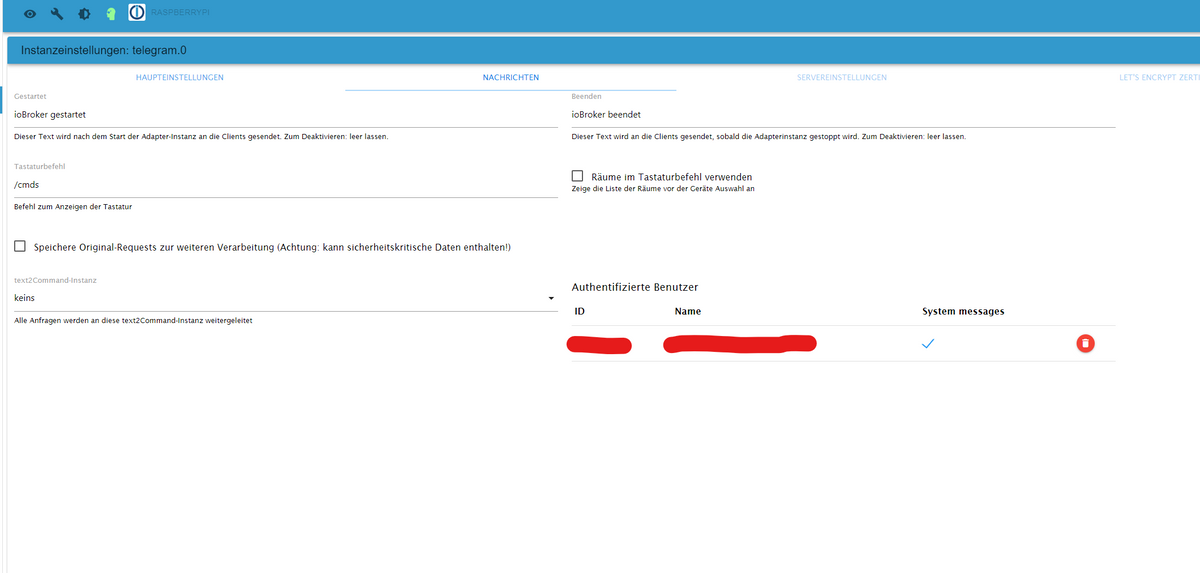
@gonzokalle Über den Token in den Telegram Einstellungen der Instanz gibst du doch an, in welchen Chat die Telegram Instanz sendet.
-
@gonzokalle Über den Token in den Telegram Einstellungen der Instanz gibst du doch an, in welchen Chat die Telegram Instanz sendet.
@simatec
Wenn ich den Token (xxxxxxxxxx:yyyyyyyyyyyyyyyyyyyyyyy-zzzzzzzzzzz) eingebe schreibt mir der Bot unter seinen Namen.
Er soll mir aber in eine Chatgruppe (Chat id habe ich) schreiben.
Der Bot ist natürlich Admin der Chatgruppe. -
@simatec
Wenn ich den Token (xxxxxxxxxx:yyyyyyyyyyyyyyyyyyyyyyy-zzzzzzzzzzz) eingebe schreibt mir der Bot unter seinen Namen.
Er soll mir aber in eine Chatgruppe (Chat id habe ich) schreiben.
Der Bot ist natürlich Admin der Chatgruppe.@gonzokalle
Da musst du beim Telegram Adapter nachfragen.
Mir ist da nix bekannt -
Ab sofort steht auf Github und in kürze auch im latest die Version 2.4.7 zur Verfügung.
Changelog
2.4.7 (2022-05-16)
- (simatec) dependencies updated
- (simatec) many small bugfixes
- (simatec) Fix Sentry Error Messages
- (simatec) Default SMB Version 3.1.1



Hey! Du scheinst an dieser Unterhaltung interessiert zu sein, hast aber noch kein Konto.
Hast du es satt, bei jedem Besuch durch die gleichen Beiträge zu scrollen? Wenn du dich für ein Konto anmeldest, kommst du immer genau dorthin zurück, wo du zuvor warst, und kannst dich über neue Antworten benachrichtigen lassen (entweder per E-Mail oder Push-Benachrichtigung). Du kannst auch Lesezeichen speichern und Beiträge positiv bewerten, um anderen Community-Mitgliedern deine Wertschätzung zu zeigen.
Mit deinem Input könnte dieser Beitrag noch besser werden 💗
Registrieren AnmeldenSupport us
389
Online33.1k
Benutzende83.7k
Themen1.3m
Beiträge