




[ Geklärt ] Problem bei Influx Installation
-
@pete0815 Hatte gestern meinen Raspi auch updatet, und auch das Problem gehabt das influxdb nicht mehr starten konnte. Bei mir hat geholfen
sudo chmod +x /usr/lib/influxdb/scripts/influxd-systemd-start.sh
und dann ließ es sich starten mit
sudo systemctl start influxdb@picky
Vielen Dank!!!! Das war Lösung und läuft wieder.Hatte auch einen Beitrag ergoogelt im computerbase forum, dort wird gezeigt, dass der Ordner /usr/lib/influxdb/scripts/ sich verändert hat und hier genau die1 Datei (influxd-systemd-start.sh) hinzu gekommen ist. Wie genau die Nutzerechte hier den services und skripte funktionieren bzw. sich geändert haben muss ich passen, aber es läuft wieder.
Links zu anderen Foren waren nicht erlaubt, aber die Info darf man zitieren?
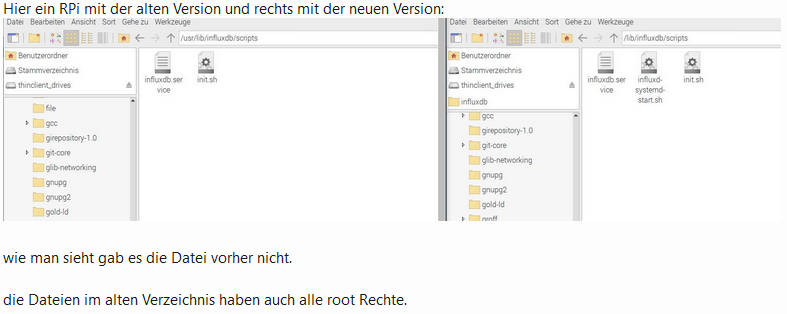
(Quelle: ComputerBaseForum -
@pete0815 Hatte gestern meinen Raspi auch updatet, und auch das Problem gehabt das influxdb nicht mehr starten konnte. Bei mir hat geholfen
sudo chmod +x /usr/lib/influxdb/scripts/influxd-systemd-start.sh
und dann ließ es sich starten mit
sudo systemctl start influxdb@picky Hi, nach 3 Tagen Google-Suche - Forenstöbern etc. ... BIST DU MEINe Mann/Frau !!!.
Du hast den heutigen HeldenGlobe von mir gewonnen !!!Das war die Lösung für meine Fehlermeldung:
Failed to start InfluxDB is an open-source, distributed, time series database.endlich :-)
Danke -
nachdem ich influx eingeben habe kommt ein >
bei mir. Was muss ich bei dieser Meldung machen?ERR: error parsing query: found Mira, expected SELECT, DELETE, SHOW, CREATE, DROP, EXPLAIN, GRANT, REVOKE, ALTER, SET, KILL at line 1, char 1 Warning: It is possible this error is due to not setting a database. Please set a database with the command "use <database>". > databaseFolgende Anleitung habe ich genutzt
https://www.verdrahtet.info/2020/02/14/installation-von-influxdb-grafana-inkl-verbindung-zu-iobroker/
`
und bin bis zum Anbschnitt influxdb gekommenIobroker läuft als VM auf Proxmoxserver x folgende Hersteller im Einsatz Sonoff, Gosund, Siemens x Aofo über Tasmota x Zigbee x das Smarthome wächst und wächst
-
nachdem ich influx eingeben habe kommt ein >
bei mir. Was muss ich bei dieser Meldung machen?ERR: error parsing query: found Mira, expected SELECT, DELETE, SHOW, CREATE, DROP, EXPLAIN, GRANT, REVOKE, ALTER, SET, KILL at line 1, char 1 Warning: It is possible this error is due to not setting a database. Please set a database with the command "use <database>". > databaseFolgende Anleitung habe ich genutzt
https://www.verdrahtet.info/2020/02/14/installation-von-influxdb-grafana-inkl-verbindung-zu-iobroker/
`
und bin bis zum Anbschnitt influxdb gekommen@basti97 sagte in [ Geklärt ] Problem bei Influx Installation:
Please set a database
Das macht die InfluxDb Instanz automatisch für dich, wenn du die Datenbank einträgst und die Instanz gestartet hast
Dann brauchst du nicht uber die Influx CLI extra eine Datenbank anlegen.umgestiegen von Proxmox auf Unraid
-
@basti97 sagte in [ Geklärt ] Problem bei Influx Installation:
Please set a database
Das macht die InfluxDb Instanz automatisch für dich, wenn du die Datenbank einträgst und die Instanz gestartet hast
Dann brauchst du nicht uber die Influx CLI extra eine Datenbank anlegen. -
@crunchip Guten Morgen und einen schönen Feiertag;
Bin jetzt damit beschäftigt Grafana einzurichten.
Aber auch hier ist alles anders wie normal.
Es beginnt schon mit der Eingabe der Settings
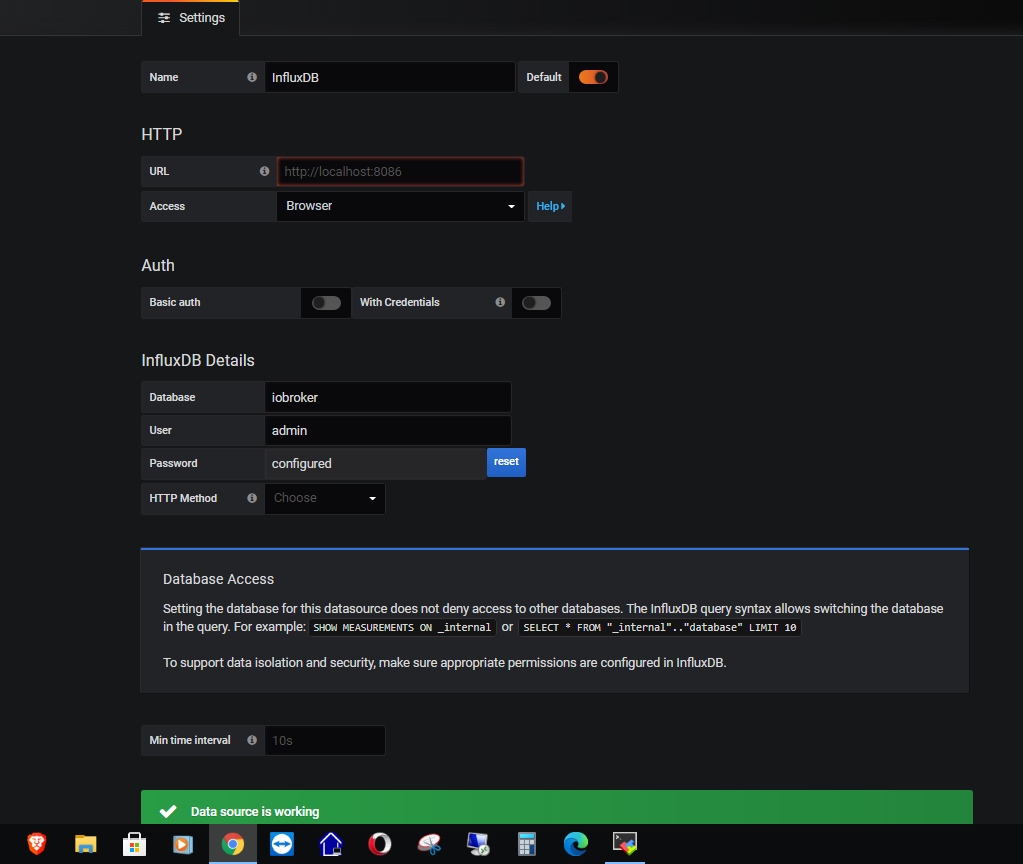
Grafana verbindet sich nur wenn unter Access "BROWSER" ausgewählt ist.
Habe viel gesucht und überall nur Verbindung über Server gefunden.
Deshalb die Frage ist Browser OK oder eher nicht.Nach diesem Video habe ich dann meine Datenpunkte konfiguriert und überprüft.
https://www.youtube.com/watch?v=VXfpds4Rtqc&t=4072s
Alles prima..In den Dashboard Einstellungen sollten dann die in influxdb geloggten Daten
unter dem Reiter "select measurement" erscheinen. Das Feld bleibt aber leer.
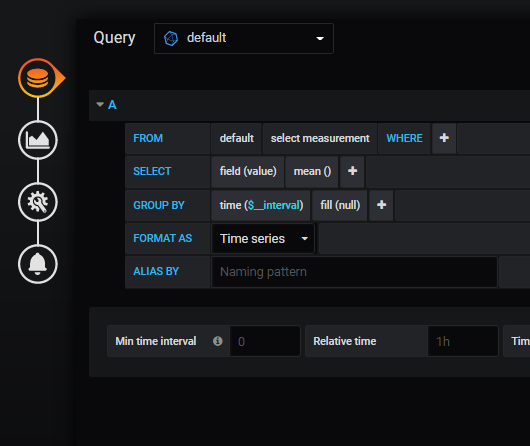
Wie kann ich prüfen, ob besagte date überhaupt in der influxdb auftauchen.
Z. B. mit einem Befehl im Terminal.Ich bin doch noch etwas weiter gekommen.

Connected to http://localhost:8086 version 1.8.3
InfluxDB shell version: 1.8.3
> show databases
name: databases
name
----
_internal
iobroker
> use iobroker
Using database iobroker
> show measurements
name: measurements
name
----
influxdb.0.info.connection
mihome.0.devices.magnet_158d00020910b2.state
mihome.0.devices.magnet_158d00020b5d12.state
mihome.0.devices.magnet_158d00020b5d69.state
mihome.0.devices.magnet_158d0003e72274.state
mihome.0.devices.magnet_158d0003e741ac.state
mihome.0.devices.magnet_158d0003e74624.state
mihome.0.devices.magnet_158d0003e746aa.state
mihome.0.devices.magnet_158d0003e747f7.state
mihome.0.devices.weather_v1_158d00023213f6.humidity
mihome.0.devices.weather_v1_158d00023213f6.temperature
mihome.0.devices.weather_v1_158d000232801d.humidity
mihome.0.devices.weather_v1_158d000232801d.temperature
mihome.0.devices.weather_v1_158d0002329079.humidity
mihome.0.devices.weather_v1_158d0002329079.temperature
mihome.0.devices.weather_v1_158d00023290a8.humidity
mihome.0.devices.weather_v1_158d00023290a8.temperature
mihome.0.devices.weather_v1_158d00023290e8.humidity
mihome.0.devices.weather_v1_158d00023290e8.temperature
mihome.0.devices.weather_v1_158d00024906fa.humidity
mihome.0.devices.weather_v1_158d00024906fa.temperature
mihome.0.devices.weather_v1_158d00036b52b9.humidity
mihome.0.devices.weather_v1_158d00036b52b9.temperature
mihome.0.devices.weather_v1_158d00036b53b3.humidity
mihome.0.devices.weather_v1_158d00036b53b3.temperature
mihome.0.devices.weather_v1_158d00036b53ce.humidity
mihome.0.devices.weather_v1_158d00036b53ce.temperature
mihome.0.devices.weather_v1_158d00036bd6ea.humidity
mihome.0.devices.weather_v1_158d00036bd6ea.temperature
mihome.0.devices.weather_v1_158d00036bd78e.humidity
mihome.0.devices.weather_v1_158d00036bd78e.temperature
> show series
key
---
influxdb.0.info.connection
mihome.0.devices.magnet_158d00020910b2.state
mihome.0.devices.magnet_158d00020b5d12.state
mihome.0.devices.magnet_158d00020b5d69.state
mihome.0.devices.magnet_158d0003e72274.state
mihome.0.devices.magnet_158d0003e741ac.state
mihome.0.devices.magnet_158d0003e74624.state
mihome.0.devices.magnet_158d0003e746aa.state
mihome.0.devices.magnet_158d0003e747f7.state
mihome.0.devices.weather_v1_158d00023213f6.humidity
mihome.0.devices.weather_v1_158d00023213f6.temperature
mihome.0.devices.weather_v1_158d000232801d.humidity
mihome.0.devices.weather_v1_158d000232801d.temperature
mihome.0.devices.weather_v1_158d0002329079.humidity
mihome.0.devices.weather_v1_158d0002329079.temperature
mihome.0.devices.weather_v1_158d00023290a8.humidity
mihome.0.devices.weather_v1_158d00023290a8.temperature
mihome.0.devices.weather_v1_158d00023290e8.humidity
mihome.0.devices.weather_v1_158d00023290e8.temperature
mihome.0.devices.weather_v1_158d00024906fa.humidity
mihome.0.devices.weather_v1_158d00024906fa.temperature
mihome.0.devices.weather_v1_158d00036b52b9.humidity
mihome.0.devices.weather_v1_158d00036b52b9.temperature
mihome.0.devices.weather_v1_158d00036b53b3.humidity
mihome.0.devices.weather_v1_158d00036b53b3.temperature
mihome.0.devices.weather_v1_158d00036b53ce.humidity
mihome.0.devices.weather_v1_158d00036b53ce.temperature
mihome.0.devices.weather_v1_158d00036bd6ea.humidity
mihome.0.devices.weather_v1_158d00036bd6ea.temperature
mihome.0.devices.weather_v1_158d00036bd78e.humidity
mihome.0.devices.weather_v1_158d00036bd78e.temperature
> > Das Initallisieren des Grafana Server:
ERR: error parsing query: found >, expected SELECT, DELETE, SHOW, CREATE, DROP, EXPLAIN, GRANT, REVOKE, ALTER, SET, KILL at line 1, char 1
> show tag keys
> show field keys
name: influxdb.0.info.connection
fieldKey fieldType
-------- ---------
ack      boolean
from     string
q        float
value    string

name: mihome.0.devices.magnet_158d00020910b2.state
fieldKey fieldType
-------- ---------
ack      boolean
from     string
q        float
value    boolean

name: mihome.0.devices.magnet_158d00020b5d12.state
fieldKey fieldType
-------- ---------
ack      boolean
from     string
q        float
value    boolean

name: mihome.0.devices.magnet_158d00020b5d69.state
fieldKey fieldType
-------- ---------
ack      boolean
from     string
q        float
value    boolean

name: mihome.0.devices.magnet_158d0003e72274.state
fieldKey fieldType
-------- ---------
ack      boolean
from     string
q        float
value    boolean

name: mihome.0.devices.magnet_158d0003e741ac.state
fieldKey fieldType
-------- ---------
ack      boolean
from     string
q        float
value    boolean

name: mihome.0.devices.magnet_158d0003e74624.state
fieldKey fieldType
-------- ---------
ack      boolean
from     string
q        float
value    boolean

name: mihome.0.devices.magnet_158d0003e746aa.state
fieldKey fieldType
-------- ---------
ack      boolean
from     string
q        float
value    boolean

name: mihome.0.devices.magnet_158d0003e747f7.state
fieldKey fieldType
-------- ---------
ack      boolean
from     string
q        float
value    boolean

name: mihome.0.devices.weather_v1_158d00023213f6.humidity
fieldKey fieldType
-------- ---------
ack      boolean
from     string
q        float
value    float

name: mihome.0.devices.weather_v1_158d00023213f6.temperature
fieldKey fieldType
-------- ---------
ack      boolean
from     string
q        float
value    float

name: mihome.0.devices.weather_v1_158d000232801d.humidity
fieldKey fieldType
-------- ---------
ack      boolean
from     string
q        float
value    float

name: mihome.0.devices.weather_v1_158d000232801d.temperature
fieldKey fieldType
-------- ---------
ack      boolean
from     string
q        float
value    float

name: mihome.0.devices.weather_v1_158d0002329079.humidity
fieldKey fieldType
-------- ---------
ack      boolean
from     string
q        float
value    float

name: mihome.0.devices.weather_v1_158d0002329079.temperature
fieldKey fieldType
-------- ---------
ack      boolean
from     string
q        float
value    float

name: mihome.0.devices.weather_v1_158d00023290a8.humidity
fieldKey fieldType
-------- ---------
ack      boolean
from     string
q        float
value    float

name: mihome.0.devices.weather_v1_158d00023290a8.temperature
fieldKey fieldType
-------- ---------
ack      boolean
from     string
q        float
value    float

name: mihome.0.devices.weather_v1_158d00023290e8.humidity
fieldKey fieldType
-------- ---------
ack      boolean
from     string
q        float
value    float

name: mihome.0.devices.weather_v1_158d00023290e8.temperature
fieldKey fieldType
-------- ---------
ack      boolean
from     string
q        float
value    float

name: mihome.0.devices.weather_v1_158d00024906fa.humidity
fieldKey fieldType
-------- ---------
ack      boolean
from     string
q        float
value    float

name: mihome.0.devices.weather_v1_158d00024906fa.temperature
fieldKey fieldType
-------- ---------
ack      boolean
from     string
q        float
value    float

name: mihome.0.devices.weather_v1_158d00036b52b9.humidity
fieldKey fieldType
-------- ---------
ack      boolean
from     string
q        float
value    float

name: mihome.0.devices.weather_v1_158d00036b52b9.temperature
fieldKey fieldType
-------- ---------
ack      boolean
from     string
q        float
value    float

name: mihome.0.devices.weather_v1_158d00036b53b3.humidity
fieldKey fieldType
-------- ---------
ack      boolean
from     string
q        float
value    float

name: mihome.0.devices.weather_v1_158d00036b53b3.temperature
fieldKey fieldType
-------- ---------
ack      boolean
from     string
q        float
value    float

name: mihome.0.devices.weather_v1_158d00036b53ce.humidity
fieldKey fieldType
-------- ---------
ack      boolean
from     string
q        float
value    float

name: mihome.0.devices.weather_v1_158d00036b53ce.temperature
fieldKey fieldType
-------- ---------
ack      boolean
from     string
q        float
value    float

name: mihome.0.devices.weather_v1_158d00036bd6ea.humidity
fieldKey fieldType
-------- ---------
ack      boolean
from     string
q        float
value    float

name: mihome.0.devices.weather_v1_158d00036bd6ea.temperature
fieldKey fieldType
-------- ---------
ack      boolean
from     string
q        float
value    float

name: mihome.0.devices.weather_v1_158d00036bd78e.humidity
fieldKey fieldType
-------- ---------
ack      boolean
from     string
q        float
value    float

name: mihome.0.devices.weather_v1_158d00036bd78e.temperature
fieldKey fieldType
-------- ---------
ack      boolean
from     string
q        float
value    float
>
Ist soweit alles richtig?
Soweit erst mal zum aktuellen Stand.
Freundliche Grüße
Michael@altersrentner said in [[ Geklärt ] Problem bei Influx Installation](/post
Hi, ich muss den Post mal aufnehmen da ich an dieser Stelle mit der DB scheitere!
Connected to http://localhost:8086 version 1.8.3
InfluxDB shell version: 1.8.3
> show databases
name: databases
name
----
_internal
iobroker
> use iobroker
Using database iobroker
Da mein Startwert für meinen Wasserverbrauch in Grafana viel zu hoch ist, wollte ich diesen einen Wert aus der InfluxDB löschen. Allerdings bekomme ich bei show databases nur:
ERR: unable to parse authentication credentials
Warning: It is possible this error is due to not setting a database.
Please set a database with the command "use <database>".und wenn ich die Datenbank auswähle die ich ja erstellt habe und die auch Daten für Grafana bereitstellt erahtle ich:
ERR: unable to parse authentication credentials
DB does not exist!jemand eine Idee was ich falsch mache?
-
@altersrentner said in [[ Geklärt ] Problem bei Influx Installation](/post
Hi, ich muss den Post mal aufnehmen da ich an dieser Stelle mit der DB scheitere!
Connected to http://localhost:8086 version 1.8.3
InfluxDB shell version: 1.8.3
> show databases
name: databases
name
----
_internal
iobroker
> use iobroker
Using database iobroker
Da mein Startwert für meinen Wasserverbrauch in Grafana viel zu hoch ist, wollte ich diesen einen Wert aus der InfluxDB löschen. Allerdings bekomme ich bei show databases nur:
ERR: unable to parse authentication credentials
Warning: It is possible this error is due to not setting a database.
Please set a database with the command "use <database>".und wenn ich die Datenbank auswähle die ich ja erstellt habe und die auch Daten für Grafana bereitstellt erahtle ich:
ERR: unable to parse authentication credentials
DB does not exist!jemand eine Idee was ich falsch mache?
@benziman welche Version?
Was wo und wie gibst du denn ein? -
ich bin auf der VM wo influx isntalliert ist und gebe dort influx ein, danach show database oder use iobroker (die DB wird aktuell von Grafana abgefragt)
@benziman da ich immer noch nicht sehe, was wo und wie du eingibst, kann ich auch nicht weiter helfen
seh dir mal olgendes an https://www.smarthome-tricks.de/software-iobroker/1-2-grafana-installation-von-influxdb-und-integration-in-iobroker/ Punkt 2 -
@benziman da ich immer noch nicht sehe, was wo und wie du eingibst, kann ich auch nicht weiter helfen
seh dir mal olgendes an https://www.smarthome-tricks.de/software-iobroker/1-2-grafana-installation-von-influxdb-und-integration-in-iobroker/ Punkt 2ich bin auf einem LSC Container mit Debian 20.0.4 LTS (Proxmox) mit root eingeloggt.
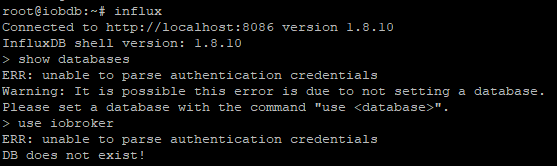
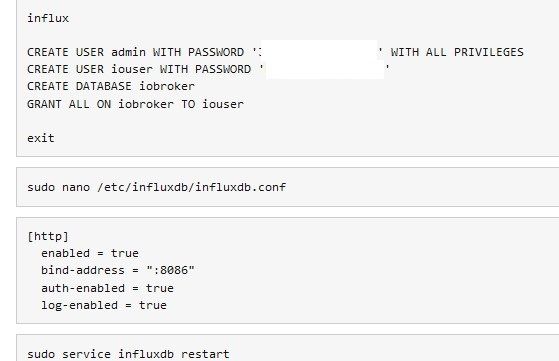
Datenbank und User wurden mit folgenden Befehlen erstellt
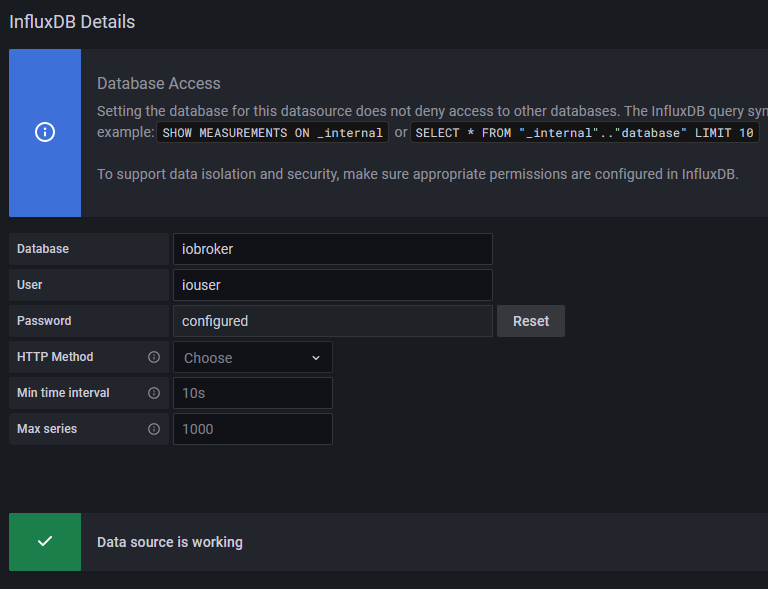
Grafana nutzt die DB mit aktuellen Werten:
Edit: hat sich erledigt. habe nach dem influx Befehl noch "auth" eigegeben und mich dann authentifiziert. Dann wird auch die DB angezeigt.
Danke -
@Altersrentner so kommen wir nicht weiter, da is der Wurm drin und kann dir ehrlich gesagt, nicht sagen, wo der Fehler liegt.
Ne Möglichkeit dann doch nochmal influx zu entfernen und frisch installieren.sudo apt-get autoremove influxdbdanach nochmal eine installation anstoßen, bezieht sich auf ubuntu
wget -qO- https://repos.influxdata.com/influxdb.key | sudo apt-key add -
source /etc/lsb-release
echo "deb https://repos.influxdata.com/${DISTRIB_ID,,} ${DISTRIB_CODENAME} stable" | sudo tee /etc/apt/sources.list.d/influxdb.list

sudo apt-get update && sudo apt-get install influxdb
sudo systemctl unmask influxdb.service
sudo systemctl start influxdb
für debian
wget -qO- https://repos.influxdata.com/influxdb.key | sudo apt-key add -
source /etc/os-release
echo "deb https://repos.influxdata.com/debian $(lsb_release -cs) stable" | sudo tee /etc/apt/sources.list.d/influxdb.list
sudo apt-get update && sudo apt-get install influxdb
sudo systemctl enable influxdb
sudo systemctl start influxdb
wenn fertig, prüfen ob der Dienst läuft
sudo systemctl status influxdb -
Kurze Frage, gilt der Befehl auch noch für Influxdb2?
sudo apt-get autoremove influxdbViele Grüße
sudo service influxdb stop
sudo apt remove influxdb
sudo apt remove influxdb-client
sudo apt remove influxdb2
sudo apt autoclean && sudo apt autoremove
oder
sudo apt-get autoremove --purge influxdb2umgestiegen von Proxmox auf Unraid
-
sudo service influxdb stop
sudo apt remove influxdb
sudo apt remove influxdb-client
sudo apt remove influxdb2
sudo apt autoclean && sudo apt autoremove
oder
sudo apt-get autoremove --purge influxdb2



Hey! Du scheinst an dieser Unterhaltung interessiert zu sein, hast aber noch kein Konto.
Hast du es satt, bei jedem Besuch durch die gleichen Beiträge zu scrollen? Wenn du dich für ein Konto anmeldest, kommst du immer genau dorthin zurück, wo du zuvor warst, und kannst dich über neue Antworten benachrichtigen lassen (entweder per E-Mail oder Push-Benachrichtigung). Du kannst auch Lesezeichen speichern und Beiträge positiv bewerten, um anderen Community-Mitgliedern deine Wertschätzung zu zeigen.
Mit deinem Input könnte dieser Beitrag noch besser werden 💗
Registrieren Anmelden375
Online33.0k
Benutzer83.6k
Themen1.3m
Beiträge