



Skip to content
  • Home
  • Aktuell
  • Tags
  • 0 Ungelesen 0
  • Kategorien
  • Unreplied
  • Beliebt
  • GitHub
  • Docu
  • Hilfe
Skins
  • Light
  • Brite
  • Cerulean
  • Cosmo
  • Flatly
  • Journal
  • Litera
  • Lumen
  • Lux
  • Materia
  • Minty
  • Morph
  • Pulse
  • Sandstone
  • Simplex
  • Sketchy
  • Spacelab
  • United
  • Yeti
  • Zephyr
  • Dark
  • Cyborg
  • Darkly
  • Quartz
  • Slate
  • Solar
  • Superhero
  • Vapor

  • Standard: (Kein Skin)
  • Kein Skin
Einklappen
ioBroker Logo

Community Forum

donate donate
  1. ioBroker Community Home
  2. Deutsch
  3. Skripten / Logik
  4. Blockly
  5. Gleichung in Blockly

NEWS

  • Weihnachtsangebot 2025! 🎄
    BluefoxB
    Bluefox
    15
    1
    451

  • UPDATE 31.10.: Amazon Alexa - ioBroker Skill läuft aus ?
    apollon77A
    apollon77
    48
    3
    9.0k

  • Monatsrückblick – September 2025
    BluefoxB
    Bluefox
    13
    1
    2.3k

Gleichung in Blockly

Geplant Angeheftet Gesperrt Verschoben Blockly
blockly
31 Beiträge 3 Kommentatoren 2.9k Aufrufe 1 Watching
  • Älteste zuerst
  • Neuste zuerst
  • Meiste Stimmen
Antworten
  • In einem neuen Thema antworten
Anmelden zum Antworten
Dieses Thema wurde gelöscht. Nur Nutzer mit entsprechenden Rechten können es sehen.
  • N Nordischerjung

    @dutchman Hmm

    9e9d066d-6078-4fb4-8bbc-e754f669aa01-grafik.png

    mehr geht da nicht reinzuschreiben. Normalerweise müsste die Formel dann so aussehen

    (1.0 / (0.001129148 + 0.000234125 * (%value% / (1024 - %value%))  + 0.0000000876741 * (%value% / (1024 - %value%)) * (%value% / (1024 - %value%)) * (%value% / (1024 - %value%)))) - 273.15
    
    DutchmanD Offline
    DutchmanD Offline
    Dutchman
    Developer Most Active Administrators
    schrieb am zuletzt editiert von
    #8

    @nordischerjung sagte in Gleichung in Blockly:

    @dutchman Hmm

    9e9d066d-6078-4fb4-8bbc-e754f669aa01-grafik.png

    mehr geht da nicht reinzuschreiben. Normalerweise müsste die Formel dann so aussehen

    (1.0 / (0.001129148 + 0.000234125 * (%value% / (1024 - %value%))  + 0.0000000876741 * (%value% / (1024 - %value%)) * (%value% / (1024 - %value%)) * (%value% / (1024 - %value%)))) - 273.15
    

    dan ist der Webinterface abgeschnitten, es geht definitiv länger oder nimm halt ESPHome :)

    N 1 Antwort Letzte Antwort
    0
    • DutchmanD Dutchman

      @nordischerjung sagte in Gleichung in Blockly:

      @dutchman Hmm

      9e9d066d-6078-4fb4-8bbc-e754f669aa01-grafik.png

      mehr geht da nicht reinzuschreiben. Normalerweise müsste die Formel dann so aussehen

      (1.0 / (0.001129148 + 0.000234125 * (%value% / (1024 - %value%))  + 0.0000000876741 * (%value% / (1024 - %value%)) * (%value% / (1024 - %value%)) * (%value% / (1024 - %value%)))) - 273.15
      

      dan ist der Webinterface abgeschnitten, es geht definitiv länger oder nimm halt ESPHome :)

      N Offline
      N Offline
      Nordischerjung
      schrieb am zuletzt editiert von
      #9

      @dutchman sagte in Gleichung in Blockly:

      dan ist der Webinterface abgeschnitten, es geht definitiv länger oder nimm halt ESPHome :)

      damit hab ich mich ja noch gar nicht befasst :thinking_face:

      Gruß Nordischerjung

      sonnige Grüße von der Ostsee

      DutchmanD 1 Antwort Letzte Antwort
      0
      • N Nordischerjung

        @dutchman sagte in Gleichung in Blockly:

        dan ist der Webinterface abgeschnitten, es geht definitiv länger oder nimm halt ESPHome :)

        damit hab ich mich ja noch gar nicht befasst :thinking_face:

        DutchmanD Offline
        DutchmanD Offline
        Dutchman
        Developer Most Active Administrators
        schrieb am zuletzt editiert von Dutchman
        #10

        @nordischerjung sagte in Gleichung in Blockly:

        @dutchman sagte in Gleichung in Blockly:

        dan ist der Webinterface abgeschnitten, es geht definitiv länger oder nimm halt ESPHome :)

        damit hab ich mich ja noch gar nicht befasst :thinking_face:

        Du hast 3 moeglichkeiten

        • die Formel in espeasy entragen auch wen man es nicht sieht
        • die Berechnung in nem blockly/javascript machen
        • umstellen auf ESPHome und es damit machen, hier meine docu dazu : https://drozmotix.github.io/languages/de/Adapter/ESPHome/01.basics.html
        DutchmanD 1 Antwort Letzte Antwort
        0
        • DutchmanD Dutchman

          @nordischerjung sagte in Gleichung in Blockly:

          @dutchman sagte in Gleichung in Blockly:

          dan ist der Webinterface abgeschnitten, es geht definitiv länger oder nimm halt ESPHome :)

          damit hab ich mich ja noch gar nicht befasst :thinking_face:

          Du hast 3 moeglichkeiten

          • die Formel in espeasy entragen auch wen man es nicht sieht
          • die Berechnung in nem blockly/javascript machen
          • umstellen auf ESPHome und es damit machen, hier meine docu dazu : https://drozmotix.github.io/languages/de/Adapter/ESPHome/01.basics.html
          DutchmanD Offline
          DutchmanD Offline
          Dutchman
          Developer Most Active Administrators
          schrieb am zuletzt editiert von Dutchman
          #11

          @Nordischerjung

          und bei Interesse hier mal ne Beispiel config der analogen sensor

          sensor:
            - platform: adc
              pin: 35
              # unit_of_measurement: '%' <<< wen du as # wecknimmst kan man hier die Einheit übergeben
              attenuation: 11db
              accuracy_decimals: 4
              filters:
                - median:
                    window_size: 7
                    send_every: 5
                    send_first_at: 1
              # filters:
              #   - lambda: |-
              #       if (x > 1.1) {
              #         return 0;
              #       } else if (x < 0.51) {
              #         return 100;
              #       } else {
              #         return (1.1-x) / (1.1-0.51) * 100.0;
              #       }
              name: "Palm Luca"
              update_interval: 5s


          Info zu den filtern : https://esphome.io/components/sensor/index.html

          beispiel meiner dev Umgebung, dhabe die Berechnung momentan kurz ausgeschaltet da ich es anders ueebewache
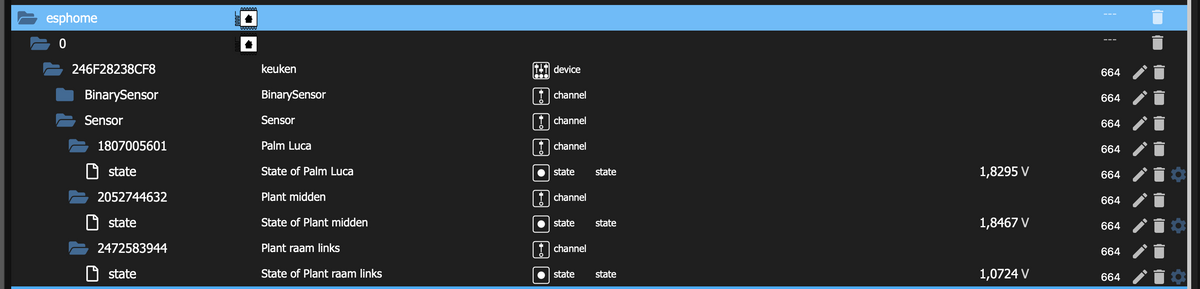
          Schermafbeelding 2021-08-24 om 16.20.04.png

          N 1 Antwort Letzte Antwort
          0
          • DutchmanD Dutchman

            @Nordischerjung

            und bei Interesse hier mal ne Beispiel config der analogen sensor

            sensor:
              - platform: adc
                pin: 35
                # unit_of_measurement: '%' <<< wen du as # wecknimmst kan man hier die Einheit übergeben
                attenuation: 11db
                accuracy_decimals: 4
                filters:
                  - median:
                      window_size: 7
                      send_every: 5
                      send_first_at: 1
                # filters:
                #   - lambda: |-
                #       if (x > 1.1) {
                #         return 0;
                #       } else if (x < 0.51) {
                #         return 100;
                #       } else {
                #         return (1.1-x) / (1.1-0.51) * 100.0;
                #       }
                name: "Palm Luca"
                update_interval: 5s


            Info zu den filtern : https://esphome.io/components/sensor/index.html

            beispiel meiner dev Umgebung, dhabe die Berechnung momentan kurz ausgeschaltet da ich es anders ueebewache
            Schermafbeelding 2021-08-24 om 16.20.04.png

            N Offline
            N Offline
            Nordischerjung
            schrieb am zuletzt editiert von
            #12

            @dutchman dann hat der Wemos nicht mehr die ESPeasy Seite, richtig? Ich habe dort den 4-fach Analog ADS1115 und ein AZDelivery 0,96 Zoll OLED Display I2C SSD1306 Chip 128 x 64 Pixel dran. muss das dann komplett neu eingegeben werden oder wird das von ESPHome direkt übernommen. Muss mich damit mal beschäftigen. Vielleicht ja heute Abend :stuck_out_tongue_closed_eyes:

            Gruß Nordischerjung

            sonnige Grüße von der Ostsee

            DutchmanD 1 Antwort Letzte Antwort
            0
            • N Nordischerjung

              @dutchman dann hat der Wemos nicht mehr die ESPeasy Seite, richtig? Ich habe dort den 4-fach Analog ADS1115 und ein AZDelivery 0,96 Zoll OLED Display I2C SSD1306 Chip 128 x 64 Pixel dran. muss das dann komplett neu eingegeben werden oder wird das von ESPHome direkt übernommen. Muss mich damit mal beschäftigen. Vielleicht ja heute Abend :stuck_out_tongue_closed_eyes:

              DutchmanD Offline
              DutchmanD Offline
              Dutchman
              Developer Most Active Administrators
              schrieb am zuletzt editiert von
              #13

              @nordischerjung sagte in Gleichung in Blockly:

              @dutchman dann hat der Wemos nicht mehr die ESPeasy Seite, richtig? Ich habe dort den 4-fach Analog ADS1115 und ein AZDelivery 0,96 Zoll OLED Display I2C SSD1306 Chip 128 x 64 Pixel dran. muss das dann komplett neu eingegeben werden oder wird das von ESPHome direkt übernommen. Muss mich damit mal beschäftigen. Vielleicht ja heute Abend :stuck_out_tongue_closed_eyes:

              muss man übernehmen, die Sensoren kannst so übernehmen wie in der yaml display ist kleines bissl komplizierten man kan aber die sensor werte Director aufs display geben
              https://esphome.io/components/display/index.html

              hab mich bis jetzt noch nicht wirklich mit displays bescchaeftigt, haupsaechlich Sensoren und Autoren hab dazu auch noch n issue offen beim adapter.

              was soll das display bei dir machen ?

              N 1 Antwort Letzte Antwort
              0
              • DutchmanD Dutchman

                @nordischerjung sagte in Gleichung in Blockly:

                @dutchman dann hat der Wemos nicht mehr die ESPeasy Seite, richtig? Ich habe dort den 4-fach Analog ADS1115 und ein AZDelivery 0,96 Zoll OLED Display I2C SSD1306 Chip 128 x 64 Pixel dran. muss das dann komplett neu eingegeben werden oder wird das von ESPHome direkt übernommen. Muss mich damit mal beschäftigen. Vielleicht ja heute Abend :stuck_out_tongue_closed_eyes:

                muss man übernehmen, die Sensoren kannst so übernehmen wie in der yaml display ist kleines bissl komplizierten man kan aber die sensor werte Director aufs display geben
                https://esphome.io/components/display/index.html

                hab mich bis jetzt noch nicht wirklich mit displays bescchaeftigt, haupsaechlich Sensoren und Autoren hab dazu auch noch n issue offen beim adapter.

                was soll das display bei dir machen ?

                N Offline
                N Offline
                Nordischerjung
                schrieb am zuletzt editiert von
                #14

                @dutchman im Display zeige ich die Werte, uhrzeit und IP Adresse an

                Gruß Nordischerjung

                sonnige Grüße von der Ostsee

                DutchmanD 1 Antwort Letzte Antwort
                0
                • N Nordischerjung

                  @dutchman im Display zeige ich die Werte, uhrzeit und IP Adresse an

                  DutchmanD Offline
                  DutchmanD Offline
                  Dutchman
                  Developer Most Active Administrators
                  schrieb am zuletzt editiert von
                  #15

                  @nordischerjung sagte in Gleichung in Blockly:

                  @dutchman im Display zeige ich die Werte, uhrzeit und IP Adresse an

                  ah na dan easy. :) das geht alles in der yaml

                  beispiel :

                  sensor:
                    - platform: ...
                      # ...
                      id: my_sensor
                  
                  display:
                    - platform: ...
                      # ...
                      lambda: |-
                        it.printf(0, 0, id(my_font), "The sensor value is: %.1f", id(my_sensor).state);
                        // If the sensor has the value 30.02, the result will be: "The sensor value is: 30.0"
                  

                  man muss en syntax einmal verstehen, imm Grunde machst du hier einen sensor, dem sensor gibts du ne variable (in diesem all my_sensor) und dan kannste beim Display deinen text aufbauen und die texte variable einfuellen

                  N 1 Antwort Letzte Antwort
                  0
                  • DutchmanD Dutchman

                    @nordischerjung sagte in Gleichung in Blockly:

                    @dutchman im Display zeige ich die Werte, uhrzeit und IP Adresse an

                    ah na dan easy. :) das geht alles in der yaml

                    beispiel :

                    sensor:
                      - platform: ...
                        # ...
                        id: my_sensor
                    
                    display:
                      - platform: ...
                        # ...
                        lambda: |-
                          it.printf(0, 0, id(my_font), "The sensor value is: %.1f", id(my_sensor).state);
                          // If the sensor has the value 30.02, the result will be: "The sensor value is: 30.0"
                    

                    man muss en syntax einmal verstehen, imm Grunde machst du hier einen sensor, dem sensor gibts du ne variable (in diesem all my_sensor) und dan kannste beim Display deinen text aufbauen und die texte variable einfuellen

                    N Offline
                    N Offline
                    Nordischerjung
                    schrieb am zuletzt editiert von
                    #16

                    @dutchman sagte in Gleichung in Blockly:

                    id(my_font), "The sensor value is: %.1f", id(my_sensor).state)

                    Ich bin gerade dabei mit ESPHome umzugehen, wie mache ich das hier?
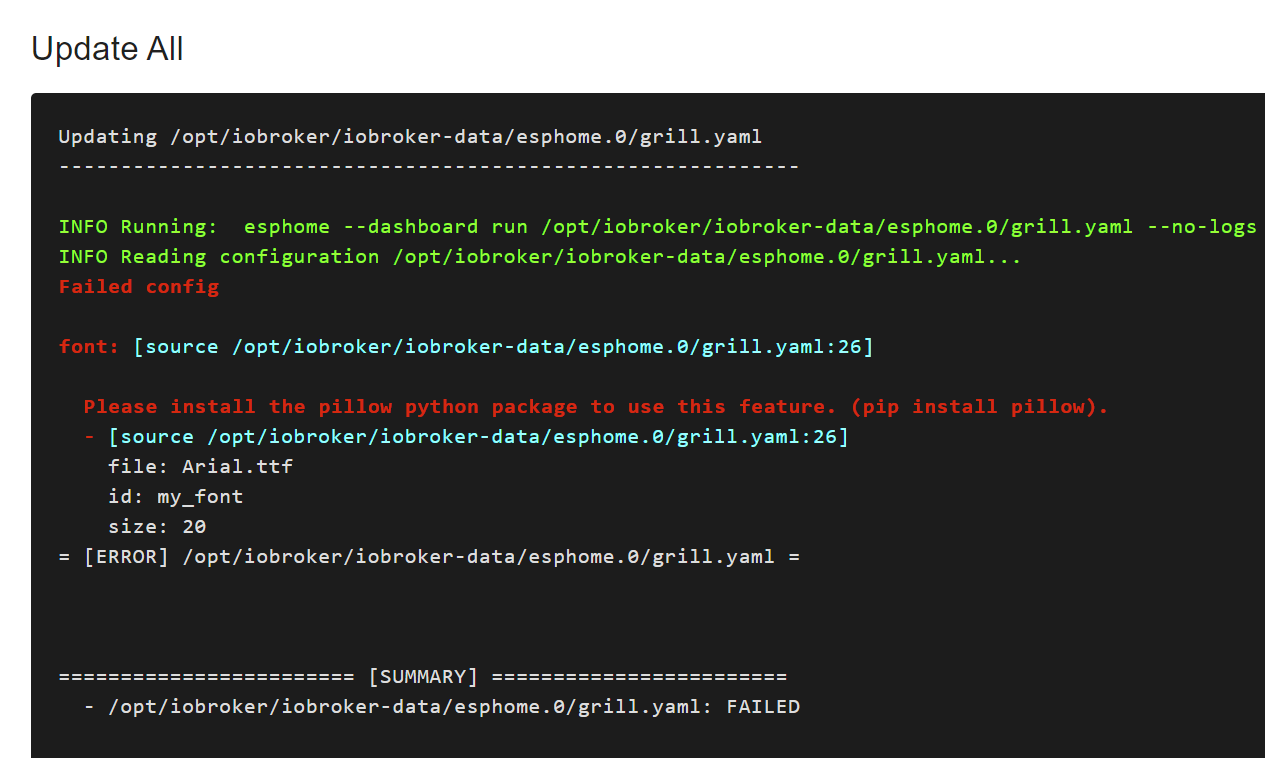
                    b2e04a1c-1e50-4885-959b-3552fac58844-image.png

                    und wie bekomme ich die Formel jetzt an die Eingänge?

                    Gruß Nordischerjung

                    sonnige Grüße von der Ostsee

                    DutchmanD 1 Antwort Letzte Antwort
                    0
                    • N Nordischerjung

                      @dutchman sagte in Gleichung in Blockly:

                      id(my_font), "The sensor value is: %.1f", id(my_sensor).state)

                      Ich bin gerade dabei mit ESPHome umzugehen, wie mache ich das hier?

                      b2e04a1c-1e50-4885-959b-3552fac58844-image.png

                      und wie bekomme ich die Formel jetzt an die Eingänge?

                      DutchmanD Offline
                      DutchmanD Offline
                      Dutchman
                      Developer Most Active Administrators
                      schrieb am zuletzt editiert von
                      #17

                      @nordischerjung sagte in Gleichung in Blockly:

                      @dutchman sagte in Gleichung in Blockly:

                      id(my_font), "The sensor value is: %.1f", id(my_sensor).state)

                      Ich bin gerade dabei mit ESPHome umzugehen, wie mache ich das hier?

                      b2e04a1c-1e50-4885-959b-3552fac58844-image.png

                      und wie bekomme ich die Formel jetzt an die Eingänge?

                      Zeig mal deine yaml bitte

                      N 1 Antwort Letzte Antwort
                      0
                      • DutchmanD Dutchman

                        @nordischerjung sagte in Gleichung in Blockly:

                        @dutchman sagte in Gleichung in Blockly:

                        id(my_font), "The sensor value is: %.1f", id(my_sensor).state)

                        Ich bin gerade dabei mit ESPHome umzugehen, wie mache ich das hier?

                        b2e04a1c-1e50-4885-959b-3552fac58844-image.png

                        und wie bekomme ich die Formel jetzt an die Eingänge?

                        Zeig mal deine yaml bitte

                        N Offline
                        N Offline
                        Nordischerjung
                        schrieb am zuletzt editiert von
                        #18

                        @dutchman sagte in Gleichung in Blockly:

                        Zeig mal deine yaml bitte

                        Moin,

                        esphome:
                          name: grill
                          platform: ESP8266
                          board: d1_mini_pro #esp01_1m
                        
                        # Enable logging
                        logger:
                        
                        <<: !include secrets.yaml


                        captive_portal:
                        
                        font:
                          - file: "Arial.ttf"
                            id: my_font
                            size: 20
                        # Activate i2c bus  
                        i2c:
                          sda: D2
                          scl: D1
                          scan: True
                          id: bus_a
                          
                        #Display OLED SSD 1306 128x64  
                        display:
                          - platform: ssd1306_i2c
                            model: "SSD1306 128x64"
                            reset_pin: D0
                            address: 0x3C
                            lambda: |-
                              it.print(0, 0, id(my_font), "Grilltemperatur: %.0f °C", id(gt).state)
                              
                        #ADS1115 4x AnalogIn      
                        ads1115:
                          - address: 0x48
                        #Sensor 0  
                        sensor:
                          - platform: ads1115
                            multiplexer: 'A0_GND'
                            gain: 6.144
                            name: "Grilltemperatur"
                            id: "gt"
                        #Sensor 1
                          - platform: ads1115
                            multiplexer: 'A1_GND'
                            gain: 6.144
                            name: "Fleischtemperatur1"
                            id: "ft1"
                        #Sensor 2
                          - platform: ads1115
                            multiplexer: 'A2_GND'
                            gain: 6.144
                            name: "Fleischtemperatur2"    
                            id: "ft2"
                        

                        Benötige ich die capitve_portal Zeile?
                        Ich hab die WiFi Einstellung in der Secret.yaml ausgelagert, kann ich dort auch einfach 2 Wifi Neztwerke hinterlegen unter wifi (nicht den Fallback)?

                        Gruß Nordischerjung

                        sonnige Grüße von der Ostsee

                        DutchmanD 1 Antwort Letzte Antwort
                        0
                        • N Nordischerjung

                          @dutchman sagte in Gleichung in Blockly:

                          Zeig mal deine yaml bitte

                          Moin,

                          esphome:
                            name: grill
                            platform: ESP8266
                            board: d1_mini_pro #esp01_1m
                          
                          # Enable logging
                          logger:
                          
                          <<: !include secrets.yaml


                          captive_portal:
                          
                          font:
                            - file: "Arial.ttf"
                              id: my_font
                              size: 20
                          # Activate i2c bus  
                          i2c:
                            sda: D2
                            scl: D1
                            scan: True
                            id: bus_a
                            
                          #Display OLED SSD 1306 128x64  
                          display:
                            - platform: ssd1306_i2c
                              model: "SSD1306 128x64"
                              reset_pin: D0
                              address: 0x3C
                              lambda: |-
                                it.print(0, 0, id(my_font), "Grilltemperatur: %.0f °C", id(gt).state)
                                
                          #ADS1115 4x AnalogIn      
                          ads1115:
                            - address: 0x48
                          #Sensor 0  
                          sensor:
                            - platform: ads1115
                              multiplexer: 'A0_GND'
                              gain: 6.144
                              name: "Grilltemperatur"
                              id: "gt"
                          #Sensor 1
                            - platform: ads1115
                              multiplexer: 'A1_GND'
                              gain: 6.144
                              name: "Fleischtemperatur1"
                              id: "ft1"
                          #Sensor 2
                            - platform: ads1115
                              multiplexer: 'A2_GND'
                              gain: 6.144
                              name: "Fleischtemperatur2"    
                              id: "ft2"
                          

                          Benötige ich die capitve_portal Zeile?
                          Ich hab die WiFi Einstellung in der Secret.yaml ausgelagert, kann ich dort auch einfach 2 Wifi Neztwerke hinterlegen unter wifi (nicht den Fallback)?

                          DutchmanD Offline
                          DutchmanD Offline
                          Dutchman
                          Developer Most Active Administrators
                          schrieb am zuletzt editiert von
                          #19

                          @nordischerjung sagte in Gleichung in Blockly:

                          Moin,

                          moinse, deine yaml hat nen Fehler
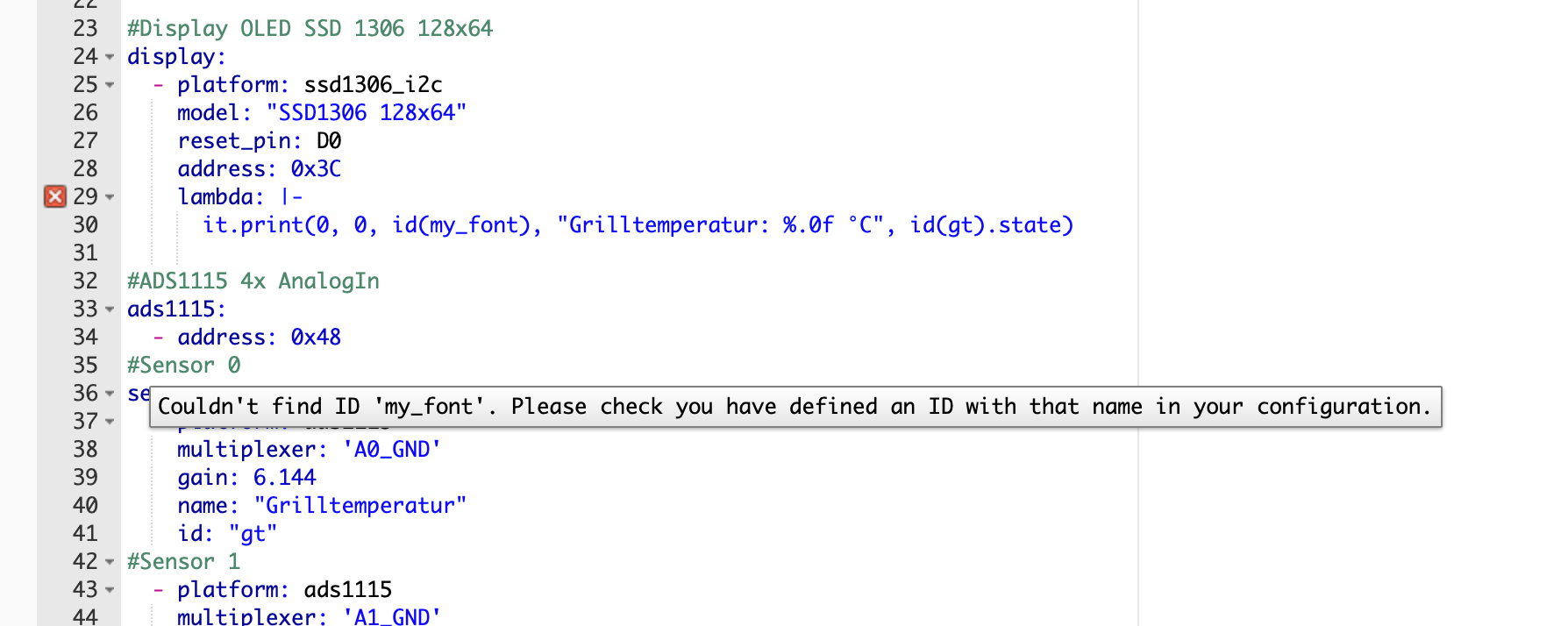
                          Schermafbeelding 2021-08-25 om 08.37.31.png

                          @nordischerjung sagte in Gleichung in Blockly:

                          Ich hab die WiFi Einstellung in der Secret.yaml ausgelagert, kann ich dort auch einfach 2 Wifi Neztwerke hinterlegen unter wifi (nicht den Fallback)?

                          https://esphome.io/components/wifi.html
                          Starting with version 1.10.0, you can give ESPHome a number of WiFi networks to connect to. ESPHome will then attempt to connect to the one with the highest signal strength.

                          To enable this mode, remove the ssid and password options from your wifi configuration and move everything under the networks key:

                          # Example configuration entry
                          wifi:
                            networks:
                            - ssid: FirstNetworkToConnectTo
                              password: VerySafePassword
                            - ssid: SecondNetworkToConnectTo
                              password: VerySafePassword
                            # Other options
                            # ...
                          
                          N 1 Antwort Letzte Antwort
                          0
                          • DutchmanD Dutchman

                            @nordischerjung sagte in Gleichung in Blockly:

                            Moin,

                            moinse, deine yaml hat nen Fehler

                            Schermafbeelding 2021-08-25 om 08.37.31.png

                            @nordischerjung sagte in Gleichung in Blockly:

                            Ich hab die WiFi Einstellung in der Secret.yaml ausgelagert, kann ich dort auch einfach 2 Wifi Neztwerke hinterlegen unter wifi (nicht den Fallback)?

                            https://esphome.io/components/wifi.html
                            Starting with version 1.10.0, you can give ESPHome a number of WiFi networks to connect to. ESPHome will then attempt to connect to the one with the highest signal strength.

                            To enable this mode, remove the ssid and password options from your wifi configuration and move everything under the networks key:

                            # Example configuration entry
                            wifi:
                              networks:
                              - ssid: FirstNetworkToConnectTo
                                password: VerySafePassword
                              - ssid: SecondNetworkToConnectTo
                                password: VerySafePassword
                              # Other options
                              # ...
                            
                            N Offline
                            N Offline
                            Nordischerjung
                            schrieb am zuletzt editiert von
                            #20

                            @dutchman sagte in Gleichung in Blockly:

                            moinse, deine yaml hat nen Fehler

                            Ja ich weiß :stuck_out_tongue_winking_eye:
                            nur, wie behebe ich den? Weil er mit font nicht klar kommt. Wie installiere ich das?
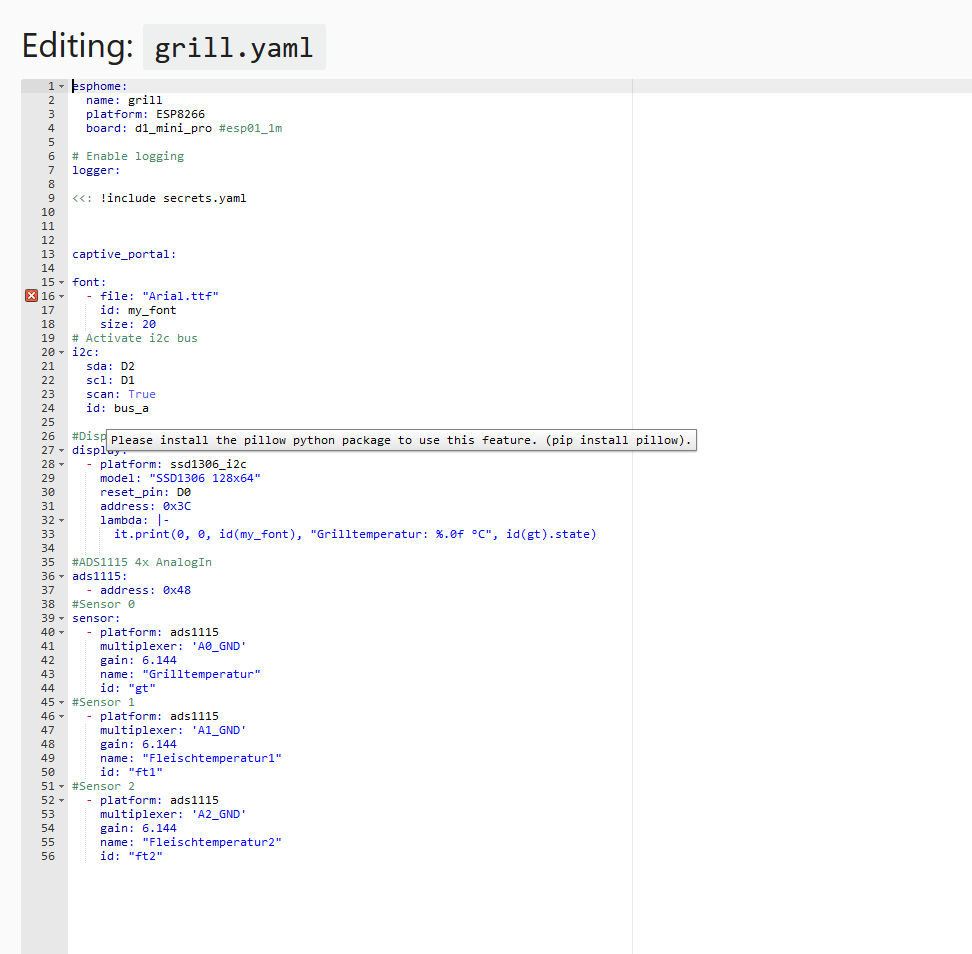
                            a7c43795-67af-4796-b96a-7c2dd838c0f5-grafik.png

                            Gruß Nordischerjung

                            sonnige Grüße von der Ostsee

                            DutchmanD FredFF 2 Antworten Letzte Antwort
                            0
                            • N Nordischerjung

                              @dutchman sagte in Gleichung in Blockly:

                              moinse, deine yaml hat nen Fehler

                              Ja ich weiß :stuck_out_tongue_winking_eye:
                              nur, wie behebe ich den? Weil er mit font nicht klar kommt. Wie installiere ich das?

                              a7c43795-67af-4796-b96a-7c2dd838c0f5-grafik.png

                              DutchmanD Offline
                              DutchmanD Offline
                              Dutchman
                              Developer Most Active Administrators
                              schrieb am zuletzt editiert von Dutchman
                              #21

                              @nordischerjung sagte in Gleichung in Blockly:

                              nur, wie behebe ich den? Weil er mit font nicht klar kommt. Wie installiere ich das?

                              was soll my_font sein, ist ne variable die du nirgendwo definiert hast ?

                              dir fehlt das hier :

                              font:
                                - file: "fonts/Comic Sans MS.ttf"
                                  id: my_font
                                  size: 20
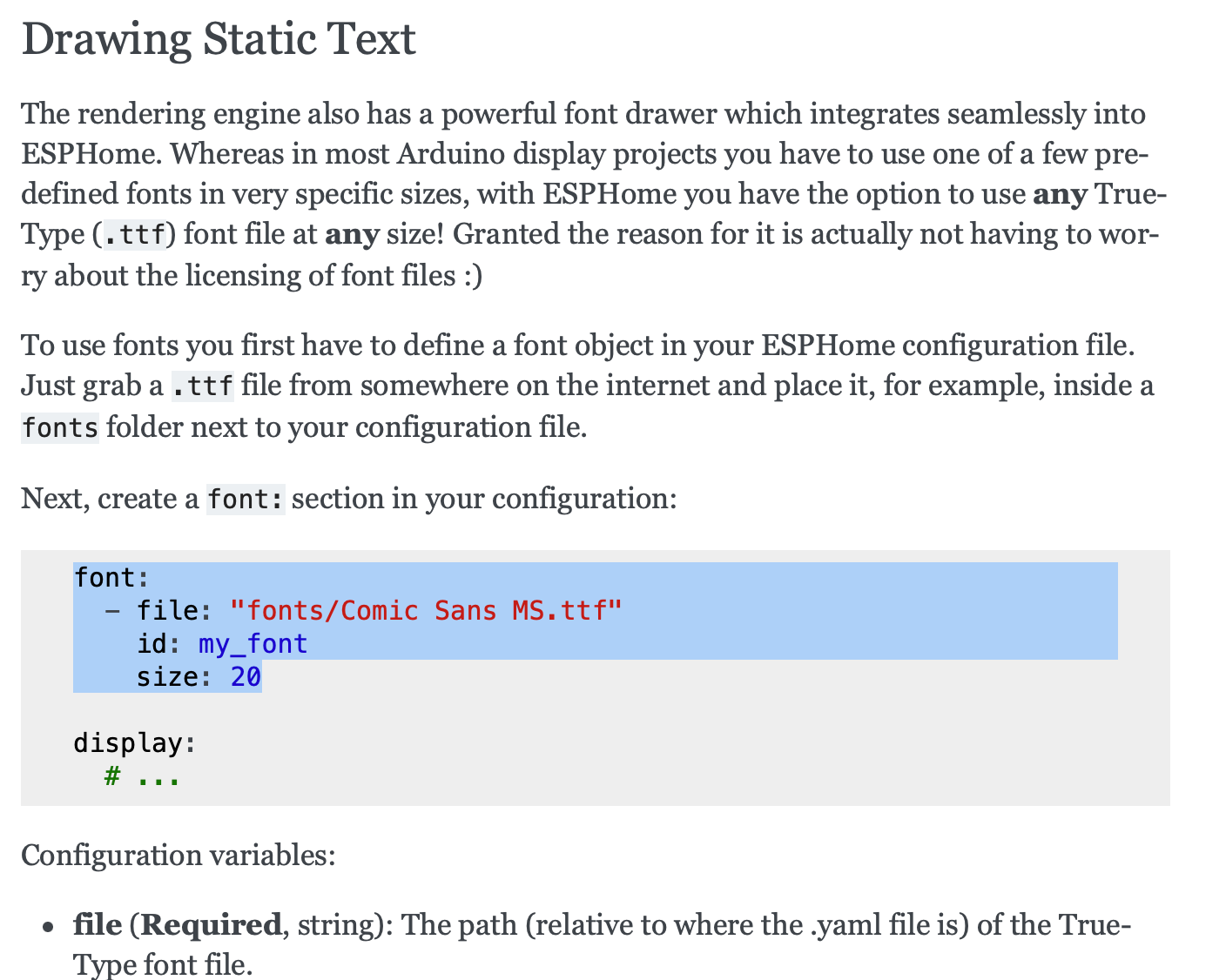
                              

                              Schermafbeelding 2021-08-25 om 12.33.08.png

                              https://esphome.io/components/display/index.html

                              N 1 Antwort Letzte Antwort
                              0
                              • DutchmanD Dutchman

                                @nordischerjung sagte in Gleichung in Blockly:

                                nur, wie behebe ich den? Weil er mit font nicht klar kommt. Wie installiere ich das?

                                was soll my_font sein, ist ne variable die du nirgendwo definiert hast ?

                                dir fehlt das hier :

                                font:
                                  - file: "fonts/Comic Sans MS.ttf"
                                    id: my_font
                                    size: 20
                                

                                Schermafbeelding 2021-08-25 om 12.33.08.png

                                https://esphome.io/components/display/index.html

                                N Offline
                                N Offline
                                Nordischerjung
                                schrieb am zuletzt editiert von
                                #22

                                @dutchman Doch habe ich guck mal mein Screenshot

                                Gruß Nordischerjung

                                sonnige Grüße von der Ostsee

                                1 Antwort Letzte Antwort
                                0
                                • N Nordischerjung

                                  @dutchman sagte in Gleichung in Blockly:

                                  moinse, deine yaml hat nen Fehler

                                  Ja ich weiß :stuck_out_tongue_winking_eye:
                                  nur, wie behebe ich den? Weil er mit font nicht klar kommt. Wie installiere ich das?

                                  a7c43795-67af-4796-b96a-7c2dd838c0f5-grafik.png

                                  FredFF Online
                                  FredFF Online
                                  FredF
                                  Most Active Forum Testing
                                  schrieb am zuletzt editiert von FredF
                                  #23

                                  @nordischerjung Steht doch da:

                                  Please install the pillow python package to use this feature. (pip install pillow)
                                  
                                  DutchmanD 1 Antwort Letzte Antwort
                                  0
                                  • FredFF FredF

                                    @nordischerjung Steht doch da:

                                    Please install the pillow python package to use this feature. (pip install pillow)
                                    
                                    DutchmanD Offline
                                    DutchmanD Offline
                                    Dutchman
                                    Developer Most Active Administrators
                                    schrieb am zuletzt editiert von
                                    #24

                                    @fredf sagte in Gleichung in Blockly:

                                    @nordischerjung Steht doch da:

                                    Please install the pillow python package to use this feature. (pip install pillow)
                                    

                                    stimmmt er benutzt ne font die es standard nicht gibt

                                    N 1 Antwort Letzte Antwort
                                    0
                                    • DutchmanD Dutchman

                                      @fredf sagte in Gleichung in Blockly:

                                      @nordischerjung Steht doch da:

                                      Please install the pillow python package to use this feature. (pip install pillow)
                                      

                                      stimmmt er benutzt ne font die es standard nicht gibt

                                      N Offline
                                      N Offline
                                      Nordischerjung
                                      schrieb am zuletzt editiert von
                                      #25

                                      @dutchman Welche ist den Standard und wie installiere ich das? In der Konsole? Über ESPhome?

                                      Gruß Nordischerjung

                                      sonnige Grüße von der Ostsee

                                      DutchmanD 1 Antwort Letzte Antwort
                                      0
                                      • N Nordischerjung

                                        @dutchman Welche ist den Standard und wie installiere ich das? In der Konsole? Über ESPhome?

                                        DutchmanD Offline
                                        DutchmanD Offline
                                        Dutchman
                                        Developer Most Active Administrators
                                        schrieb am zuletzt editiert von Dutchman
                                        #26

                                        @nordischerjung sagte in Gleichung in Blockly:

                                        @dutchman Welche ist den Standard und wie installiere ich das? In der Konsole? Über ESPhome?

                                        pip und Python ist lose vom ESPHome, liegt auf deinem linux system. also ja einfach auf der console

                                        pip install pillow
                                        

                                        oder probiere zum Testen de Eintrag ohne abhängigkeiten ;)

                                        N 1 Antwort Letzte Antwort
                                        0
                                        • DutchmanD Dutchman

                                          @nordischerjung sagte in Gleichung in Blockly:

                                          @dutchman Welche ist den Standard und wie installiere ich das? In der Konsole? Über ESPhome?

                                          pip und Python ist lose vom ESPHome, liegt auf deinem linux system. also ja einfach auf der console

                                          pip install pillow
                                          

                                          oder probiere zum Testen de Eintrag ohne abhängigkeiten ;)

                                          N Offline
                                          N Offline
                                          Nordischerjung
                                          schrieb am zuletzt editiert von
                                          #27

                                          @dutchman sagte in Gleichung in Blockly:

                                          @nordischerjung sagte in Gleichung in Blockly:

                                          @dutchman Welche ist den Standard und wie installiere ich das? In der Konsole? Über ESPhome?

                                          pip und Python ist lose vom ESPHome, liegt auf deinem linux system. also ja einfach auf der console

                                          pip install pillow
                                          

                                          Ich bin zu blöd dazu, funktioniert beides nicht. Aber ist pillow dann nicht schon vorhanden?

                                          sb@iobroker:~$  pip install pillow
                                          Defaulting to user installation because normal site-packages is not writeable
                                          Requirement already satisfied: pillow in ./.local/lib/python3.7/site-packages (8.3.1)
                                          sb@iobroker:~$


                                          oder probiere zum Testen de Eintrag ohne abhängigkeiten ;)

                                          INFO Compiling app...
                                          INFO Running:  platformio run -d /opt/iobroker/iobroker-data/esphome.0/grill
                                          Processing grill (board: d1_mini_pro; framework: arduino; platform: platformio/espressif8266@2.6.2)
                                          --------------------------------------------------------------------------------
                                          HARDWARE: ESP8266 80MHz, 80KB RAM, 16MB Flash
                                          PACKAGES: 
                                           - framework-arduinoespressif8266 3.20704.0 (2.7.4) 
                                           - tool-esptool 1.413.0 (4.13) 
                                           - tool-esptoolpy 1.20800.0 (2.8.0) 
                                           - toolchain-xtensa 2.40802.200502 (4.8.2)
                                          Library Manager: Installing Update
                                          Warning! Could not find the package with 'Update' requirements for your system 'linux_x86_64'
                                          Dependency Graph
                                          |-- <ESPAsyncTCP-esphome> 1.2.3
                                          |   |-- <ESP8266WiFi> 1.0
                                          |-- <ESPAsyncWebServer-esphome> 1.3.0
                                          |   |-- <ESPAsyncTCP-esphome> 1.2.3
                                          |   |   |-- <ESP8266WiFi> 1.0
                                          |   |-- <Hash> 1.0
                                          |   |-- <ESP8266WiFi> 1.0
                                          |-- <ESP8266WiFi> 1.0
                                          |-- <ESP8266mDNS> 1.2
                                          |   |-- <ESP8266WiFi> 1.0
                                          |-- <Wire> 1.0
                                          |-- <DNSServer> 1.1.1
                                          |   |-- <ESP8266WiFi> 1.0
                                          Compiling .pioenvs/grill/src/main.cpp.o
                                          Compiling .pioenvs/grill/libd43/ESP8266WiFi/WiFiClient.cpp.o
                                          /opt/iobroker/iobroker-data/esphome.0/grill.yaml: In lambda function:
                                          /opt/iobroker/iobroker-data/esphome.0/grill.yaml:34:60: error: no matching function for call to 'esphome::display::DisplayBuffer::print(int, int, const char [26], float&)'
                                                 it.print(0, 0, "Grilltemperatur: %.0f °C", id(gt).state)
                                                                                                      ^
                                          /opt/iobroker/iobroker-data/esphome.0/grill.yaml:34:60: note: candidates are:
                                          In file included from src/esphome.h:15:0,
                                                           from src/main.cpp:3:
                                          src/esphome/components/display/display_buffer.h:140:8: note: void esphome::display::DisplayBuffer::print(int, int, esphome::display::Font*, esphome::Color, esphome::display::TextAlign, const char*)
                                             void print(int x, int y, Font *font, Color color, TextAlign align, const char *text);
                                                  ^
                                          src/esphome/components/display/display_buffer.h:140:8: note:   candidate expects 6 arguments, 4 provided
                                          src/esphome/components/display/display_buffer.h:150:8: note: void esphome::display::DisplayBuffer::print(int, int, esphome::display::Font*, esphome::Color, const char*)
                                             void print(int x, int y, Font *font, Color color, const char *text);
                                                  ^
                                          src/esphome/components/display/display_buffer.h:150:8: note:   candidate expects 5 arguments, 4 provided
                                          src/esphome/components/display/display_buffer.h:160:8: note: void esphome::display::DisplayBuffer::print(int, int, esphome::display::Font*, esphome::display::TextAlign, const char*)
                                             void print(int x, int y, Font *font, TextAlign align, const char *text);
                                                  ^
                                          src/esphome/components/display/display_buffer.h:160:8: note:   candidate expects 5 arguments, 4 provided
                                          src/esphome/components/display/display_buffer.h:169:8: note: void esphome::display::DisplayBuffer::print(int, int, esphome::display::Font*, const char*)
                                             void print(int x, int y, Font *font, const char *text);
                                                  ^
                                          src/esphome/components/display/display_buffer.h:169:8: note:   no known conversion for argument 3 from 'const char [26]' to 'esphome::display::Font*'
                                          /opt/iobroker/iobroker-data/esphome.0/grill.yaml:35:3: error: expected ';' before '}' token
                                                 
                                             ^
                                          Compiling .pioenvs/grill/libd43/ESP8266WiFi/WiFiClientSecureAxTLS.cpp.o
                                          *** [.pioenvs/grill/src/main.cpp.o] Error 1
                                          ========================= [FAILED] Took 11.44 seconds =========================
                                          

                                          Gruß Nordischerjung

                                          sonnige Grüße von der Ostsee

                                          DutchmanD 1 Antwort Letzte Antwort
                                          0
                                          Antworten
                                          • In einem neuen Thema antworten
                                          Anmelden zum Antworten
                                          • Älteste zuerst
                                          • Neuste zuerst
                                          • Meiste Stimmen


                                          Support us

                                          ioBroker
                                          Community Adapters
                                          Donate

                                          713

                                          Online

                                          32.5k

                                          Benutzer

                                          81.6k

                                          Themen

                                          1.3m

                                          Beiträge
                                          Community
                                          Impressum | Datenschutz-Bestimmungen | Nutzungsbedingungen | Einwilligungseinstellungen
                                          ioBroker Community 2014-2025
                                          logo
                                          • Anmelden

                                          • Du hast noch kein Konto? Registrieren

                                          • Anmelden oder registrieren, um zu suchen
                                          • Erster Beitrag
                                            Letzter Beitrag
                                          0
                                          • Home
                                          • Aktuell
                                          • Tags
                                          • Ungelesen 0
                                          • Kategorien
                                          • Unreplied
                                          • Beliebt
                                          • GitHub
                                          • Docu
                                          • Hilfe
