




Influx DB abgelehnt
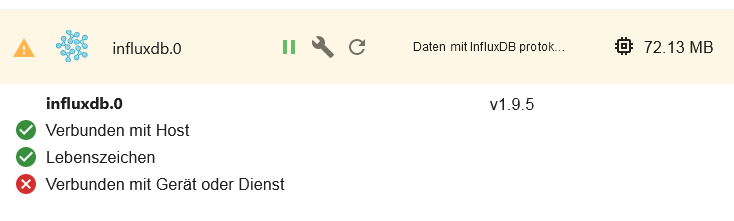
-
@crunchip
Die läuft auf meinem Raspi4
Folgendes kommt zurückpi@raspberrypi-4:~ $ sudo systemctl status influxdb ● influxdb.service - InfluxDB is an open-source, distributed, time series databa Loaded: loaded (/lib/systemd/system/influxdb.service; enabled; vendor preset: Active: activating (start) since Mon 2021-08-09 19:53:39 CEST; 869ms ago Docs: https://docs.influxdata.com/influxdb/ Cntrl PID: 3868 (influxd-systemd) Tasks: 14 (limit: 4915) CGroup: /system.slice/influxdb.service ├─3868 /bin/bash -e /usr/lib/influxdb/scripts/influxd-systemd-start.s ├─3869 /usr/bin/influxd -config /etc/influxdb/influxdb.conf └─3898 sleep 1 Aug 09 19:53:40 raspberrypi-4 influxd-systemd-start.sh[3868]: ts=2021-08-09T17:5 Aug 09 19:53:40 raspberrypi-4 influxd-systemd-start.sh[3868]: ts=2021-08-09T17:5 Aug 09 19:53:40 raspberrypi-4 influxd-systemd-start.sh[3868]: ts=2021-08-09T17:5 Aug 09 19:53:40 raspberrypi-4 influxd-systemd-start.sh[3868]: ts=2021-08-09T17:5 Aug 09 19:53:40 raspberrypi-4 influxd-systemd-start.sh[3868]: ts=2021-08-09T17:5 Aug 09 19:53:40 raspberrypi-4 influxd-systemd-start.sh[3868]: ts=2021-08-09T17:5 Aug 09 19:53:40 raspberrypi-4 influxd-systemd-start.sh[3868]: ts=2021-08-09T17:5 Aug 09 19:53:40 raspberrypi-4 influxd-systemd-start.sh[3868]: ts=2021-08-09T17:5 Aug 09 19:53:40 raspberrypi-4 influxd-systemd-start.sh[3868]: ts=2021-08-09T17:5 Aug 09 19:53:40 raspberrypi-4 influxd-systemd-start.sh[3868]: ts=2021-08-09T17:5 lines 1-21/21 (END)...skipping... ● influxdb.service - InfluxDB is an open-source, distributed, time series database Loaded: loaded (/lib/systemd/system/influxdb.service; enabled; vendor preset: enabled) Active: activating (start) since Mon 2021-08-09 19:53:39 CEST; 869ms ago Docs: https://docs.influxdata.com/influxdb/ Cntrl PID: 3868 (influxd-systemd) Tasks: 14 (limit: 4915) CGroup: /system.slice/influxdb.service ├─3868 /bin/bash -e /usr/lib/influxdb/scripts/influxd-systemd-start.sh ├─3869 /usr/bin/influxd -config /etc/influxdb/influxdb.conf └─3898 sleep 1 Aug 09 19:53:40 raspberrypi-4 influxd-systemd-start.sh[3868]: ts=2021-08-09T17:53:40.030148Z lvl=info msg="Opened shard" log_id=0 Aug 09 19:53:40 raspberrypi-4 influxd-systemd-start.sh[3868]: ts=2021-08-09T17:53:40.034577Z lvl=info msg="Opened shard" log_id=0 Aug 09 19:53:40 raspberrypi-4 influxd-systemd-start.sh[3868]: ts=2021-08-09T17:53:40.038945Z lvl=info msg="Opened file" log_id=0V Aug 09 19:53:40 raspberrypi-4 influxd-systemd-start.sh[3868]: ts=2021-08-09T17:53:40.039547Z lvl=info msg="Opened file" log_id=0V Aug 09 19:53:40 raspberrypi-4 influxd-systemd-start.sh[3868]: ts=2021-08-09T17:53:40.069378Z lvl=info msg="Opened shard" log_id=0 Aug 09 19:53:40 raspberrypi-4 influxd-systemd-start.sh[3868]: ts=2021-08-09T17:53:40.073503Z lvl=info msg="Opened file" log_id=0V Aug 09 19:53:40 raspberrypi-4 influxd-systemd-start.sh[3868]: ts=2021-08-09T17:53:40.109773Z lvl=info msg="Opened shard" log_id=0 Aug 09 19:53:40 raspberrypi-4 influxd-systemd-start.sh[3868]: ts=2021-08-09T17:53:40.111716Z lvl=info msg="Opened file" log_id=0V Aug 09 19:53:40 raspberrypi-4 influxd-systemd-start.sh[3868]: ts=2021-08-09T17:53:40.112566Z lvl=info msg="Opened shard" log_id=0 Aug 09 19:53:40 raspberrypi-4 influxd-systemd-start.sh[3868]: ts=2021-08-09T17:53:40.113951Z lvl=info msg="Opened file" log_id=0V ~ -
pi@raspberrypi-4:~ $ sudo systemctl start influxdb
Job for influxdb.service failed because the control process exited with error co                                de.
See "systemctl status influxdb.service" and "journalctl -xe" for details.
pi@raspberrypi-4:~ $
pi@raspberrypi-4:~ $ sudo systemctl status influxdb ● influxdb.service - InfluxDB is an open-source, distributed, time series database Loaded: loaded (/lib/systemd/system/influxdb.service; enabled; vendor preset: enabled) Active: activating (start) since Mon 2021-08-09 20:03:10 CEST; 4s ago Docs: https://docs.influxdata.com/influxdb/ Cntrl PID: 9061 (influxd-systemd) Tasks: 14 (limit: 4915) CGroup: /system.slice/influxdb.service ├─9061 /bin/bash -e /usr/lib/influxdb/scripts/influxd-systemd-start.sh ├─9062 /usr/bin/influxd -config /etc/influxdb/influxdb.conf └─9117 sleep 1 Aug 09 20:03:11 raspberrypi-4 influxd-systemd-start.sh[9061]: ts=2021-08-09T18:03:11.987162Z lvl=info msg="Opene Aug 09 20:03:11 raspberrypi-4 influxd-systemd-start.sh[9061]: ts=2021-08-09T18:03:11.988535Z lvl=info msg="Opene Aug 09 20:03:11 raspberrypi-4 influxd-systemd-start.sh[9061]: ts=2021-08-09T18:03:11.990493Z lvl=info msg="Opene Aug 09 20:03:11 raspberrypi-4 influxd-systemd-start.sh[9061]: ts=2021-08-09T18:03:11.992701Z lvl=info msg="Opene Aug 09 20:03:12 raspberrypi-4 influxd-systemd-start.sh[9061]: ts=2021-08-09T18:03:12.011117Z lvl=info msg="Opene Aug 09 20:03:12 raspberrypi-4 influxd-systemd-start.sh[9061]: ts=2021-08-09T18:03:12.013498Z lvl=info msg="Opene Aug 09 20:03:12 raspberrypi-4 influxd-systemd-start.sh[9061]: ts=2021-08-09T18:03:12.026994Z lvl=info msg="Opene Aug 09 20:03:12 raspberrypi-4 influxd-systemd-start.sh[9061]: ts=2021-08-09T18:03:12.033842Z lvl=info msg="Opene Aug 09 20:03:12 raspberrypi-4 influxd-systemd-start.sh[9061]: ts=2021-08-09T18:03:12.530789Z lvl=info msg="Opene Aug 09 20:03:14 raspberrypi-4 influxd-systemd-start.sh[9061]: ts=2021-08-09T18:03:14.776764Z lvl=info msg="Readi lines 1-21/21 (END) -
pi@raspberrypi-4:~ $ sudo systemctl start influxdb
Job for influxdb.service failed because the control process exited with error co                                de.
See "systemctl status influxdb.service" and "journalctl -xe" for details.
pi@raspberrypi-4:~ $
pi@raspberrypi-4:~ $ sudo systemctl status influxdb ● influxdb.service - InfluxDB is an open-source, distributed, time series database Loaded: loaded (/lib/systemd/system/influxdb.service; enabled; vendor preset: enabled) Active: activating (start) since Mon 2021-08-09 20:03:10 CEST; 4s ago Docs: https://docs.influxdata.com/influxdb/ Cntrl PID: 9061 (influxd-systemd) Tasks: 14 (limit: 4915) CGroup: /system.slice/influxdb.service ├─9061 /bin/bash -e /usr/lib/influxdb/scripts/influxd-systemd-start.sh ├─9062 /usr/bin/influxd -config /etc/influxdb/influxdb.conf └─9117 sleep 1 Aug 09 20:03:11 raspberrypi-4 influxd-systemd-start.sh[9061]: ts=2021-08-09T18:03:11.987162Z lvl=info msg="Opene Aug 09 20:03:11 raspberrypi-4 influxd-systemd-start.sh[9061]: ts=2021-08-09T18:03:11.988535Z lvl=info msg="Opene Aug 09 20:03:11 raspberrypi-4 influxd-systemd-start.sh[9061]: ts=2021-08-09T18:03:11.990493Z lvl=info msg="Opene Aug 09 20:03:11 raspberrypi-4 influxd-systemd-start.sh[9061]: ts=2021-08-09T18:03:11.992701Z lvl=info msg="Opene Aug 09 20:03:12 raspberrypi-4 influxd-systemd-start.sh[9061]: ts=2021-08-09T18:03:12.011117Z lvl=info msg="Opene Aug 09 20:03:12 raspberrypi-4 influxd-systemd-start.sh[9061]: ts=2021-08-09T18:03:12.013498Z lvl=info msg="Opene Aug 09 20:03:12 raspberrypi-4 influxd-systemd-start.sh[9061]: ts=2021-08-09T18:03:12.026994Z lvl=info msg="Opene Aug 09 20:03:12 raspberrypi-4 influxd-systemd-start.sh[9061]: ts=2021-08-09T18:03:12.033842Z lvl=info msg="Opene Aug 09 20:03:12 raspberrypi-4 influxd-systemd-start.sh[9061]: ts=2021-08-09T18:03:12.530789Z lvl=info msg="Opene Aug 09 20:03:14 raspberrypi-4 influxd-systemd-start.sh[9061]: ts=2021-08-09T18:03:14.776764Z lvl=info msg="Readi lines 1-21/21 (END)@albi_63 welche version von influx läuft da?
apt policy influxdb -
pi@raspberrypi-4:~ $ apt policy influxdb influxdb: Installiert: 1.8.9-1 Installationskandidat: 1.8.9-1 Versionstabelle: *** 1.8.9-1 500 500 https://repos.influxdata.com/debian buster/stable armhf Packages 100 /var/lib/dpkg/status 1.6.4-1+deb10u1 500 500 http://raspbian.raspberrypi.org/raspbian buster/main armhf Packages pi@raspberrypi-4:~ $ -
pi@raspberrypi-4:~ $ apt policy influxdb influxdb: Installiert: 1.8.9-1 Installationskandidat: 1.8.9-1 Versionstabelle: *** 1.8.9-1 500 500 https://repos.influxdata.com/debian buster/stable armhf Packages 100 /var/lib/dpkg/status 1.6.4-1+deb10u1 500 500 http://raspbian.raspberrypi.org/raspbian buster/main armhf Packages pi@raspberrypi-4:~ $@albi_63 ok passt
probier mal nach der Reihe, eins nach dem anderensudo systemctl stop influxdb sudo systemctl daemon-reload sudo systemctl unmask influxdb.service sudo systemctl enable influxdb sudo systemctl start influxdb sudo systemctl status influxdb -
pi@raspberrypi-4:~ $ apt policy influxdb influxdb: Installiert: 1.8.9-1 Installationskandidat: 1.8.9-1 Versionstabelle: *** 1.8.9-1 500 500 https://repos.influxdata.com/debian buster/stable armhf Packages 100 /var/lib/dpkg/status 1.6.4-1+deb10u1 500 500 http://raspbian.raspberrypi.org/raspbian buster/main armhf Packages pi@raspberrypi-4:~ $ -
@thomas-braun der Adapter
-
@albi_63 ok passt
probier mal nach der Reihe, eins nach dem anderensudo systemctl stop influxdb sudo systemctl daemon-reload sudo systemctl unmask influxdb.service sudo systemctl enable influxdb sudo systemctl start influxdb sudo systemctl status influxdb@crunchip
Kriege denselben Fehler beim Startpi@raspberrypi-4:~ $ sudo systemctl stop influxdb pi@raspberrypi-4:~ $ sudo systemctl daemon-reload pi@raspberrypi-4:~ $ sudo systemctl unmask influxdb.service pi@raspberrypi-4:~ $ sudo systemctl enable influxdb pi@raspberrypi-4:~ $ sudo systemctl start influxdb Job for influxdb.service failed because the control process exited with error code. See "systemctl status influxdb.service" and "journalctl -xe" for details. pi@raspberrypi-4:~ $ -
@crunchip
Kriege denselben Fehler beim Startpi@raspberrypi-4:~ $ sudo systemctl stop influxdb pi@raspberrypi-4:~ $ sudo systemctl daemon-reload pi@raspberrypi-4:~ $ sudo systemctl unmask influxdb.service pi@raspberrypi-4:~ $ sudo systemctl enable influxdb pi@raspberrypi-4:~ $ sudo systemctl start influxdb Job for influxdb.service failed because the control process exited with error code. See "systemctl status influxdb.service" and "journalctl -xe" for details. pi@raspberrypi-4:~ $@albi_63 sagte in Influx DB abgelehnt:
Job for influxdb.service failed because the control process exited with error code.
ich erinnere mich, es gab nach dem update beim PI ne Änderung, siehe https://www.reddit.com/r/influxdb/comments/ovulei/cant_start_influxdb_after_last_update/
sudo chown -R influxdb:influxdb /usr/lib/influxdb -
@albi_63 sagte in Influx DB abgelehnt:
Job for influxdb.service failed because the control process exited with error code.
ich erinnere mich, es gab nach dem update beim PI ne Änderung, siehe https://www.reddit.com/r/influxdb/comments/ovulei/cant_start_influxdb_after_last_update/
sudo chown -R influxdb:influxdb /usr/lib/influxdb@crunchip
ich starte mal den pi neu
Habe deinen Befehl mal abgesetzt mit folgendere Mldungpi@raspberrypi-4:~ $ sudo chown -R influxdb:influxdb /usr/lib/influxdb pi@raspberrypi-4:~ $ sudo systemctl status influxdb ● influxdb.service - InfluxDB is an open-source, distributed, time series databa Loaded: loaded (/lib/systemd/system/influxdb.service; enabled; vendor preset: Active: activating (start) since Mon 2021-08-09 20:30:32 CEST; 7s ago Docs: https://docs.influxdata.com/influxdb/ Cntrl PID: 23741 (influxd-systemd) Tasks: 14 (limit: 4915) CGroup: /system.slice/influxdb.service ├─23741 /bin/bash -e /usr/lib/influxdb/scripts/influxd-systemd-start. ├─23742 /usr/bin/influxd -config /etc/influxdb/influxdb.conf └─23809 sleep 1 Aug 09 20:30:34 raspberrypi-4 influxd-systemd-start.sh[23741]: ts=2021-08-09T18: Aug 09 20:30:34 raspberrypi-4 influxd-systemd-start.sh[23741]: ts=2021-08-09T18: Aug 09 20:30:34 raspberrypi-4 influxd-systemd-start.sh[23741]: ts=2021-08-09T18: Aug 09 20:30:34 raspberrypi-4 influxd-systemd-start.sh[23741]: ts=2021-08-09T18: Aug 09 20:30:34 raspberrypi-4 influxd-systemd-start.sh[23741]: ts=2021-08-09T18: Aug 09 20:30:34 raspberrypi-4 influxd-systemd-start.sh[23741]: ts=2021-08-09T18: Aug 09 20:30:34 raspberrypi-4 influxd-systemd-start.sh[23741]: ts=2021-08-09T18: Aug 09 20:30:34 raspberrypi-4 influxd-systemd-start.sh[23741]: ts=2021-08-09T18: Aug 09 20:30:34 raspberrypi-4 influxd-systemd-start.sh[23741]: ts=2021-08-09T18: Aug 09 20:30:36 raspberrypi-4 influxd-systemd-start.sh[23741]: ts=2021-08-09T18: lines 1-21/21 (END)...skipping... ● influxdb.service - InfluxDB is an open-source, distributed, time series database Loaded: loaded (/lib/systemd/system/influxdb.service; enabled; vendor preset: enabled) Active: activating (start) since Mon 2021-08-09 20:30:32 CEST; 7s ago Docs: https://docs.influxdata.com/influxdb/ Cntrl PID: 23741 (influxd-systemd) Tasks: 14 (limit: 4915) CGroup: /system.slice/influxdb.service ├─23741 /bin/bash -e /usr/lib/influxdb/scripts/influxd-systemd-start.sh ├─23742 /usr/bin/influxd -config /etc/influxdb/influxdb.conf └─23809 sleep 1 Aug 09 20:30:34 raspberrypi-4 influxd-systemd-start.sh[23741]: ts=2021-08-09T18:30:34.169851Z lvl=info msg="Opened shard Aug 09 20:30:34 raspberrypi-4 influxd-systemd-start.sh[23741]: ts=2021-08-09T18:30:34.172000Z lvl=info msg="Opened file" Aug 09 20:30:34 raspberrypi-4 influxd-systemd-start.sh[23741]: ts=2021-08-09T18:30:34.182599Z lvl=info msg="Opened shard Aug 09 20:30:34 raspberrypi-4 influxd-systemd-start.sh[23741]: ts=2021-08-09T18:30:34.186909Z lvl=info msg="Opened file" Aug 09 20:30:34 raspberrypi-4 influxd-systemd-start.sh[23741]: ts=2021-08-09T18:30:34.210084Z lvl=info msg="Opened shard Aug 09 20:30:34 raspberrypi-4 influxd-systemd-start.sh[23741]: ts=2021-08-09T18:30:34.211484Z lvl=info msg="Opened file" Aug 09 20:30:34 raspberrypi-4 influxd-systemd-start.sh[23741]: ts=2021-08-09T18:30:34.216219Z lvl=info msg="Opened shard Aug 09 20:30:34 raspberrypi-4 influxd-systemd-start.sh[23741]: ts=2021-08-09T18:30:34.226941Z lvl=info msg="Opened shard Aug 09 20:30:34 raspberrypi-4 influxd-systemd-start.sh[23741]: ts=2021-08-09T18:30:34.715741Z lvl=info msg="Opened shard Aug 09 20:30:36 raspberrypi-4 influxd-systemd-start.sh[23741]: ts=2021-08-09T18:30:36.901402Z lvl=info msg="Reading file ~ ~ ~ ~ -
@albi_63 sagte in Influx DB abgelehnt:
Job for influxdb.service failed because the control process exited with error code.
ich erinnere mich, es gab nach dem update beim PI ne Änderung, siehe https://www.reddit.com/r/influxdb/comments/ovulei/cant_start_influxdb_after_last_update/
sudo chown -R influxdb:influxdb /usr/lib/influxdb@crunchip
Aktuells LOGpi@raspberrypi-4:~ $ sudo service grafana-server stop pi@raspberrypi-4:~ $ sudo service grafana-server start pi@raspberrypi-4:~ $ sudo service grafana-server status ● grafana-server.service - Grafana instance Loaded: loaded (/usr/lib/systemd/system/grafana-server.service; enabled; vend Active: active (running) since Mon 2021-08-09 20:37:49 CEST; 41s ago Docs: http://docs.grafana.org Main PID: 4403 (grafana-server) Tasks: 12 (limit: 4915) CGroup: /system.slice/grafana-server.service └─4403 /usr/sbin/grafana-server --config=/etc/grafana/grafana.ini --p Aug 09 20:37:50 raspberrypi-4 grafana-server[4403]: t=2021-08-09T20:37:50+0200 l Aug 09 20:37:50 raspberrypi-4 grafana-server[4403]: t=2021-08-09T20:37:50+0200 l Aug 09 20:37:50 raspberrypi-4 grafana-server[4403]: t=2021-08-09T20:37:50+0200 l Aug 09 20:37:50 raspberrypi-4 grafana-server[4403]: t=2021-08-09T20:37:50+0200 l Aug 09 20:37:50 raspberrypi-4 grafana-server[4403]: t=2021-08-09T20:37:50+0200 l Aug 09 20:37:50 raspberrypi-4 grafana-server[4403]: t=2021-08-09T20:37:50+0200 l Aug 09 20:37:50 raspberrypi-4 grafana-server[4403]: t=2021-08-09T20:37:50+0200 l Aug 09 20:37:50 raspberrypi-4 grafana-server[4403]: t=2021-08-09T20:37:50+0200 l Aug 09 20:37:50 raspberrypi-4 grafana-server[4403]: t=2021-08-09T20:37:50+0200 l Aug 09 20:37:50 raspberrypi-4 grafana-server[4403]: t=2021-08-09T20:37:50+0200 l lines 1-19/19 (END) ● grafana-server.service - Grafana instance Loaded: loaded (/usr/lib/systemd/system/grafana-server.service; enabled; vendor preset: enabled) Active: active (running) since Mon 2021-08-09 20:37:49 CEST; 41s ago Docs: http://docs.grafana.org Main PID: 4403 (grafana-server) Tasks: 12 (limit: 4915) CGroup: /system.slice/grafana-server.service └─4403 /usr/sbin/grafana-server --config=/etc/grafana/grafana.ini --pidfile=/var/run/grafan Aug 09 20:37:50 raspberrypi-4 grafana-server[4403]: t=2021-08-09T20:37:50+0200 lvl=info msg="Initializ Aug 09 20:37:50 raspberrypi-4 grafana-server[4403]: t=2021-08-09T20:37:50+0200 lvl=info msg="Initializ Aug 09 20:37:50 raspberrypi-4 grafana-server[4403]: t=2021-08-09T20:37:50+0200 lvl=info msg="Initializ Aug 09 20:37:50 raspberrypi-4 grafana-server[4403]: t=2021-08-09T20:37:50+0200 lvl=info msg="Initializ Aug 09 20:37:50 raspberrypi-4 grafana-server[4403]: t=2021-08-09T20:37:50+0200 lvl=info msg="Initializ Aug 09 20:37:50 raspberrypi-4 grafana-server[4403]: t=2021-08-09T20:37:50+0200 lvl=info msg="Initializ Aug 09 20:37:50 raspberrypi-4 grafana-server[4403]: t=2021-08-09T20:37:50+0200 lvl=info msg="Backend r Aug 09 20:37:50 raspberrypi-4 grafana-server[4403]: t=2021-08-09T20:37:50+0200 lvl=warn msg="phantomJS Aug 09 20:37:50 raspberrypi-4 grafana-server[4403]: t=2021-08-09T20:37:50+0200 lvl=info msg="Initializ Aug 09 20:37:50 raspberrypi-4 grafana-server[4403]: t=2021-08-09T20:37:50+0200 lvl=info msg="HTTP Serv ~ -
@albi_63 sagte in Influx DB abgelehnt:
Job for influxdb.service failed because the control process exited with error code.
ich erinnere mich, es gab nach dem update beim PI ne Änderung, siehe https://www.reddit.com/r/influxdb/comments/ovulei/cant_start_influxdb_after_last_update/
sudo chown -R influxdb:influxdb /usr/lib/influxdbpi@raspberrypi-4:~ $ sudo systemctl status influxdb ● influxdb.service - InfluxDB is an open-source, distributed, time series database Loaded: loaded (/lib/systemd/system/influxdb.service; enabled; vendor preset: enabled) Active: activating (start) since Mon 2021-08-09 20:42:24 CEST; 608ms ago Docs: https://docs.influxdata.com/influxdb/ Cntrl PID: 6850 (influxd-systemd) Tasks: 14 (limit: 4915) CGroup: /system.slice/influxdb.service ├─6850 /bin/bash -e /usr/lib/influxdb/scripts/influxd-systemd-start.sh ├─6851 /usr/bin/influxd -config /etc/influxdb/influxdb.conf └─6881 sleep 1 Aug 09 20:42:24 raspberrypi-4 influxd-systemd-start.sh[6850]: ts=2021-08-09T18:42:24.853626Z lvl=info Aug 09 20:42:24 raspberrypi-4 influxd-systemd-start.sh[6850]: ts=2021-08-09T18:42:24.854913Z lvl=info Aug 09 20:42:24 raspberrypi-4 influxd-systemd-start.sh[6850]: ts=2021-08-09T18:42:24.867937Z lvl=info Aug 09 20:42:24 raspberrypi-4 influxd-systemd-start.sh[6850]: ts=2021-08-09T18:42:24.869383Z lvl=info Aug 09 20:42:24 raspberrypi-4 influxd-systemd-start.sh[6850]: ts=2021-08-09T18:42:24.874605Z lvl=info Aug 09 20:42:24 raspberrypi-4 influxd-systemd-start.sh[6850]: ts=2021-08-09T18:42:24.876170Z lvl=info Aug 09 20:42:24 raspberrypi-4 influxd-systemd-start.sh[6850]: ts=2021-08-09T18:42:24.897106Z lvl=info Aug 09 20:42:24 raspberrypi-4 influxd-systemd-start.sh[6850]: ts=2021-08-09T18:42:24.898455Z lvl=info Aug 09 20:42:24 raspberrypi-4 influxd-systemd-start.sh[6850]: ts=2021-08-09T18:42:24.910176Z lvl=info Aug 09 20:42:24 raspberrypi-4 infl -
@crunchip
Aktuells LOGpi@raspberrypi-4:~ $ sudo service grafana-server stop pi@raspberrypi-4:~ $ sudo service grafana-server start pi@raspberrypi-4:~ $ sudo service grafana-server status ● grafana-server.service - Grafana instance Loaded: loaded (/usr/lib/systemd/system/grafana-server.service; enabled; vend Active: active (running) since Mon 2021-08-09 20:37:49 CEST; 41s ago Docs: http://docs.grafana.org Main PID: 4403 (grafana-server) Tasks: 12 (limit: 4915) CGroup: /system.slice/grafana-server.service └─4403 /usr/sbin/grafana-server --config=/etc/grafana/grafana.ini --p Aug 09 20:37:50 raspberrypi-4 grafana-server[4403]: t=2021-08-09T20:37:50+0200 l Aug 09 20:37:50 raspberrypi-4 grafana-server[4403]: t=2021-08-09T20:37:50+0200 l Aug 09 20:37:50 raspberrypi-4 grafana-server[4403]: t=2021-08-09T20:37:50+0200 l Aug 09 20:37:50 raspberrypi-4 grafana-server[4403]: t=2021-08-09T20:37:50+0200 l Aug 09 20:37:50 raspberrypi-4 grafana-server[4403]: t=2021-08-09T20:37:50+0200 l Aug 09 20:37:50 raspberrypi-4 grafana-server[4403]: t=2021-08-09T20:37:50+0200 l Aug 09 20:37:50 raspberrypi-4 grafana-server[4403]: t=2021-08-09T20:37:50+0200 l Aug 09 20:37:50 raspberrypi-4 grafana-server[4403]: t=2021-08-09T20:37:50+0200 l Aug 09 20:37:50 raspberrypi-4 grafana-server[4403]: t=2021-08-09T20:37:50+0200 l Aug 09 20:37:50 raspberrypi-4 grafana-server[4403]: t=2021-08-09T20:37:50+0200 l lines 1-19/19 (END) ● grafana-server.service - Grafana instance Loaded: loaded (/usr/lib/systemd/system/grafana-server.service; enabled; vendor preset: enabled) Active: active (running) since Mon 2021-08-09 20:37:49 CEST; 41s ago Docs: http://docs.grafana.org Main PID: 4403 (grafana-server) Tasks: 12 (limit: 4915) CGroup: /system.slice/grafana-server.service └─4403 /usr/sbin/grafana-server --config=/etc/grafana/grafana.ini --pidfile=/var/run/grafan Aug 09 20:37:50 raspberrypi-4 grafana-server[4403]: t=2021-08-09T20:37:50+0200 lvl=info msg="Initializ Aug 09 20:37:50 raspberrypi-4 grafana-server[4403]: t=2021-08-09T20:37:50+0200 lvl=info msg="Initializ Aug 09 20:37:50 raspberrypi-4 grafana-server[4403]: t=2021-08-09T20:37:50+0200 lvl=info msg="Initializ Aug 09 20:37:50 raspberrypi-4 grafana-server[4403]: t=2021-08-09T20:37:50+0200 lvl=info msg="Initializ Aug 09 20:37:50 raspberrypi-4 grafana-server[4403]: t=2021-08-09T20:37:50+0200 lvl=info msg="Initializ Aug 09 20:37:50 raspberrypi-4 grafana-server[4403]: t=2021-08-09T20:37:50+0200 lvl=info msg="Initializ Aug 09 20:37:50 raspberrypi-4 grafana-server[4403]: t=2021-08-09T20:37:50+0200 lvl=info msg="Backend r Aug 09 20:37:50 raspberrypi-4 grafana-server[4403]: t=2021-08-09T20:37:50+0200 lvl=warn msg="phantomJS Aug 09 20:37:50 raspberrypi-4 grafana-server[4403]: t=2021-08-09T20:37:50+0200 lvl=info msg="Initializ Aug 09 20:37:50 raspberrypi-4 grafana-server[4403]: t=2021-08-09T20:37:50+0200 lvl=info msg="HTTP Serv ~@albi_63 da läuft es doch nun
edit
grafana
aber dein influx noch nicht -
@albi_63 sagte in Influx DB abgelehnt:
Job for influxdb.service failed because the control process exited with error code.
ich erinnere mich, es gab nach dem update beim PI ne Änderung, siehe https://www.reddit.com/r/influxdb/comments/ovulei/cant_start_influxdb_after_last_update/
sudo chown -R influxdb:influxdb /usr/lib/influxdb -
@blechsoldat haben wir doch schon gemacht
-
@crunchip
Leider nein
Der Server läuft aber ich bekomme im IoBroker immerinfluxdb.0 2021-08-09 20:48:18.754 error Error: connect ECONNREFUSED 127.0.0.1:8086@albi_63 sagte in Influx DB abgelehnt:
Der Server läuft
mich stört aber das
@albi_63 sagte in Influx DB abgelehnt:
Active: activating (start) since Mon 2021-08-09 20:42:24 CEST; 608ms ago
sollte so aussehen
Active: active (running) since Sat 2021-08-07 07:47:32 CEST; 2 days agoguck dir mal das an https://community.influxdata.com/t/influxdb-1-8-7-will-not-start/20965/4
-
@albi_63 sagte in Influx DB abgelehnt:
Der Server läuft
mich stört aber das
@albi_63 sagte in Influx DB abgelehnt:
Active: activating (start) since Mon 2021-08-09 20:42:24 CEST; 608ms ago
sollte so aussehen
Active: active (running) since Sat 2021-08-07 07:47:32 CEST; 2 days agoguck dir mal das an https://community.influxdata.com/t/influxdb-1-8-7-will-not-start/20965/4
-
@crunchip
Könnte aber ein Rechteproblem sein nur bringt mir auch dieser Befehl nichts:sudo chown -R influxdb:influxdb /usr/lib/influxdb/*Wenn ich im IoBroker auf Verbindung testen gehe erhalte ich:
Error: connect ECONNREFUSED 127.0.0.1:8086@albi_63 hab eins drüber nen link gepostet, da steht es wurde an der v 1.8.9 etwas am startscript geändert, les das mal durch und probier
-
@albi_63 hab eins drüber nen link gepostet, da steht es wurde an der v 1.8.9 etwas am startscript geändert, les das mal durch und probier



Hey! Du scheinst an dieser Unterhaltung interessiert zu sein, hast aber noch kein Konto.
Hast du es satt, bei jedem Besuch durch die gleichen Beiträge zu scrollen? Wenn du dich für ein Konto anmeldest, kommst du immer genau dorthin zurück, wo du zuvor warst, und kannst dich über neue Antworten benachrichtigen lassen (entweder per E-Mail oder Push-Benachrichtigung). Du kannst auch Lesezeichen speichern und Beiträge positiv bewerten, um anderen Community-Mitgliedern deine Wertschätzung zu zeigen.
Mit deinem Input könnte dieser Beitrag noch besser werden 💗
Registrieren Anmelden439
Online33.0k
Benutzer83.6k
Themen1.3m
Beiträge