Weiter zum Inhalt
  • Home
  • Aktuell
  • Tags
  • 0 Ungelesen 0
  • Kategorien
  • Unreplied
  • Beliebt
  • GitHub
  • Docu
  • Hilfe
Skins
  • Hell
  • Brite
  • Cerulean
  • Cosmo
  • Flatly
  • Journal
  • Litera
  • Lumen
  • Lux
  • Materia
  • Minty
  • Morph
  • Pulse
  • Sandstone
  • Simplex
  • Sketchy
  • Spacelab
  • United
  • Yeti
  • Zephyr
  • Dunkel
  • Cyborg
  • Darkly
  • Quartz
  • Slate
  • Solar
  • Superhero
  • Vapor

  • Standard: (Kein Skin)
  • Kein Skin
Einklappen
ioBroker Logo

Community Forum

donate donate
  1. ioBroker Community Home
  2. Deutsch
  3. ioBroker Allgemein
  4. Admin funktioniert seit update auf 5.1.10 nicht mehr

NEWS

  • Monatsrückblick Januar/Februar 2026 ist online!
    BluefoxB
    Bluefox
    18
    1
    722

  • Jahresrückblick 2025 – unser neuer Blogbeitrag ist online! ✨
    BluefoxB
    Bluefox
    18
    1
    5.9k

  • Neuer Blogbeitrag: Monatsrückblick - Dezember 2025 🎄
    BluefoxB
    Bluefox
    13
    1
    1.5k

Admin funktioniert seit update auf 5.1.10 nicht mehr

Geplant Angeheftet Gesperrt Verschoben ioBroker Allgemein
60 Beiträge 6 Kommentatoren 2.0k Aufrufe 6 Beobachtet
  • Älteste zuerst
  • Neuste zuerst
  • Meiste Stimmen
Antworten
  • In einem neuen Thema antworten
Anmelden zum Antworten
Dieses Thema wurde gelöscht. Nur Nutzer mit entsprechenden Rechten können es sehen.
  • M Offline
    M Offline
    myssv
    schrieb am zuletzt editiert von
    #39

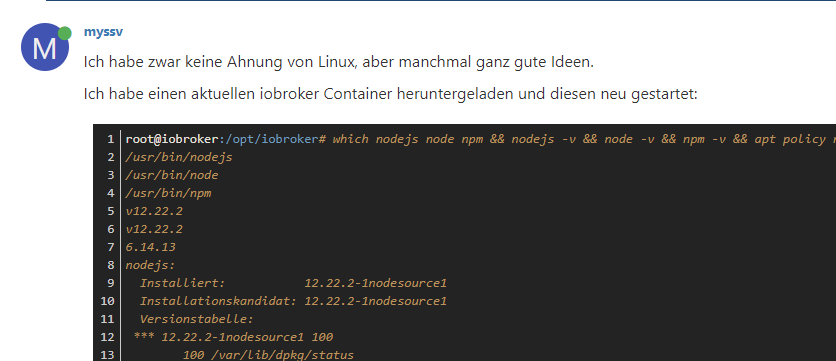
    Ich habe zwar keine Ahnung von Linux, aber manchmal ganz gute Ideen.

    Ich habe einen aktuellen iobroker Container heruntergeladen und diesen neu gestartet:

    root@iobroker:/opt/iobroker# which nodejs node npm && nodejs -v && node -v && npm -v && apt policy nodejs
    /usr/bin/nodejs
    /usr/bin/node
    /usr/bin/npm
    v12.22.2
    v12.22.2
    6.14.13
    nodejs:
      Installiert:           12.22.2-1nodesource1
      Installationskandidat: 12.22.2-1nodesource1
      Versionstabelle:
     *** 12.22.2-1nodesource1 100
            100 /var/lib/dpkg/status
    root@iobroker:/opt/iobroker# 
    
    Thomas BraunT 1 Antwort Letzte Antwort
    0
    • M myssv

      Ich habe zwar keine Ahnung von Linux, aber manchmal ganz gute Ideen.

      Ich habe einen aktuellen iobroker Container heruntergeladen und diesen neu gestartet:

      root@iobroker:/opt/iobroker# which nodejs node npm && nodejs -v && node -v && npm -v && apt policy nodejs
      /usr/bin/nodejs
      /usr/bin/node
      /usr/bin/npm
      v12.22.2
      v12.22.2
      6.14.13
      nodejs:
        Installiert:           12.22.2-1nodesource1
        Installationskandidat: 12.22.2-1nodesource1
        Versionstabelle:
       *** 12.22.2-1nodesource1 100
              100 /var/lib/dpkg/status
      root@iobroker:/opt/iobroker# 
      
      Thomas BraunT Online
      Thomas BraunT Online
      Thomas Braun
      Most Active
      schrieb am zuletzt editiert von
      #40

      @myssv Da fehlt nur noch das Nodesource-Repo.

      Linux-Werkzeugkasten:
      https://forum.iobroker.net/topic/42952/der-kleine-iobroker-linux-werkzeugkasten
      NodeJS Fixer Skript:
      https://forum.iobroker.net/topic/68035/iob-node-fix-skript
      iob_diag: curl -sLf -o diag.sh https://iobroker.net/diag.sh && bash diag.sh

      M 1 Antwort Letzte Antwort
      0
      • Thomas BraunT Thomas Braun

        @myssv Da fehlt nur noch das Nodesource-Repo.

        M Offline
        M Offline
        myssv
        schrieb am zuletzt editiert von
        #41

        @thomas-braun sagte in Admin funktioniert seit update auf 5.1.10 nicht mehr:

        @myssv Da fehlt nur noch das Nodesource-Repo.

        So?

        root@iobroker:/opt/iobroker# which nodejs node npm && nodejs -v && node -v && npm -v && apt policy nodejs
        /usr/bin/nodejs
        /usr/bin/node
        /usr/bin/npm
        v12.22.2
        v12.22.2
        6.14.13
        nodejs:
          Installiert:           12.22.2-1nodesource1
          Installationskandidat: 12.22.2-1nodesource1
          Versionstabelle:
         *** 12.22.2-1nodesource1 500
                500 https://deb.nodesource.com/node_12.x buster/main amd64 Packages
                100 /var/lib/dpkg/status
             10.24.0~dfsg-1~deb10u1 500
                500 http://deb.debian.org/debian buster/main amd64 Packages
                500 http://security.debian.org/debian-security buster/updates/main amd64 Packages
        

        Der Update Fehler beim Admin ist geblieben:

        root@iobroker:/opt/iobroker# iobroker upgrade
        
        This upgrade of "admin" will introduce the following changes:
        ==========================================================================
        -> 5.1.10:
        Corrected some GUI errors
        ==========================================================================
        
        Would you like to upgrade admin from @5.1.9 to @5.1.10 now? [(y)es, (n)o]: y
        Update admin from @5.1.9 to @5.1.10
        host.iobroker Adapter "system.adapter.admin.0" is stopped.
        NPM version: 6.14.13
        npm install iobroker.admin@5.1.10 --loglevel error --prefix "/opt/iobroker" (System call)
        npm ERR! code EINTEGRITY
        npm ERR! Verification failed while extracting iobroker.openligadb@https://github.com/oweitman/ioBroker.openligadb/tarball/master:
        npm ERR! Verification failed while extracting iobroker.openligadb@https://github.com/oweitman/ioBroker.openligadb/tarball/master:
        npm ERR! sha512-pB22Fvp08/amIRWYLQfhozpKkRAiM2LUDrNZrEnHDhERBwidYFYWOFFJ80N54pVh9yz6Y3gbJ3VWK4/VmPl77A== integrity checksum failed when using sha512: wanted sha512-pB22Fvp08/amIRWYLQfhozpKkRAiM2LUDrNZrEnHDhERBwidYFYWOFFJ80N54pVh9yz6Y3gbJ3VWK4/VmPl77A== but got sha512-WLFcOaoHfNIu5uGyi6Q/iQ/UB+ITNjsAYShVYAUsWoefc/3RrqZzWl7odAxoQaRDmnkYP9+/s2/sE2mrAJPakQ==. (252178 bytes)
        
        npm ERR! A complete log of this run can be found in:
        npm ERR!     /opt/iobroker/.npm/_logs/2021-07-10T09_59_43_420Z-debug.log
        upload [4] admin.admin /opt/iobroker/node_modules/iobroker.admin/admin/words.js words.js application/javascript
        upload [3] admin.admin /opt/iobroker/node_modules/iobroker.admin/admin/jsonConfig.json jsonConfig.json application/json
        upload [2] admin.admin /opt/iobroker/node_modules/iobroker.admin/admin/index_m.html index_m.html text/html
        upload [1] admin.admin /opt/iobroker/node_modules/iobroker.admin/admin/index.html index.html text/html
        upload [0] admin.admin /opt/iobroker/node_modules/iobroker.admin/admin/admin.png admin.png image/png
        Adapter "admin" updated
        host.iobroker Adapter "system.adapter.admin.0" is started
        root@iobroker:/opt/iobroker#
        
        Thomas BraunT 1 Antwort Letzte Antwort
        0
        • M myssv

          @thomas-braun sagte in Admin funktioniert seit update auf 5.1.10 nicht mehr:

          @myssv Da fehlt nur noch das Nodesource-Repo.

          So?

          root@iobroker:/opt/iobroker# which nodejs node npm && nodejs -v && node -v && npm -v && apt policy nodejs
          /usr/bin/nodejs
          /usr/bin/node
          /usr/bin/npm
          v12.22.2
          v12.22.2
          6.14.13
          nodejs:
            Installiert:           12.22.2-1nodesource1
            Installationskandidat: 12.22.2-1nodesource1
            Versionstabelle:
           *** 12.22.2-1nodesource1 500
                  500 https://deb.nodesource.com/node_12.x buster/main amd64 Packages
                  100 /var/lib/dpkg/status
               10.24.0~dfsg-1~deb10u1 500
                  500 http://deb.debian.org/debian buster/main amd64 Packages
                  500 http://security.debian.org/debian-security buster/updates/main amd64 Packages
          

          Der Update Fehler beim Admin ist geblieben:

          root@iobroker:/opt/iobroker# iobroker upgrade
          
          This upgrade of "admin" will introduce the following changes:
          ==========================================================================
          -> 5.1.10:
          Corrected some GUI errors
          ==========================================================================
          
          Would you like to upgrade admin from @5.1.9 to @5.1.10 now? [(y)es, (n)o]: y
          Update admin from @5.1.9 to @5.1.10
          host.iobroker Adapter "system.adapter.admin.0" is stopped.
          NPM version: 6.14.13
          npm install iobroker.admin@5.1.10 --loglevel error --prefix "/opt/iobroker" (System call)
          npm ERR! code EINTEGRITY
          npm ERR! Verification failed while extracting iobroker.openligadb@https://github.com/oweitman/ioBroker.openligadb/tarball/master:
          npm ERR! Verification failed while extracting iobroker.openligadb@https://github.com/oweitman/ioBroker.openligadb/tarball/master:
          npm ERR! sha512-pB22Fvp08/amIRWYLQfhozpKkRAiM2LUDrNZrEnHDhERBwidYFYWOFFJ80N54pVh9yz6Y3gbJ3VWK4/VmPl77A== integrity checksum failed when using sha512: wanted sha512-pB22Fvp08/amIRWYLQfhozpKkRAiM2LUDrNZrEnHDhERBwidYFYWOFFJ80N54pVh9yz6Y3gbJ3VWK4/VmPl77A== but got sha512-WLFcOaoHfNIu5uGyi6Q/iQ/UB+ITNjsAYShVYAUsWoefc/3RrqZzWl7odAxoQaRDmnkYP9+/s2/sE2mrAJPakQ==. (252178 bytes)
          
          npm ERR! A complete log of this run can be found in:
          npm ERR!     /opt/iobroker/.npm/_logs/2021-07-10T09_59_43_420Z-debug.log
          upload [4] admin.admin /opt/iobroker/node_modules/iobroker.admin/admin/words.js words.js application/javascript
          upload [3] admin.admin /opt/iobroker/node_modules/iobroker.admin/admin/jsonConfig.json jsonConfig.json application/json
          upload [2] admin.admin /opt/iobroker/node_modules/iobroker.admin/admin/index_m.html index_m.html text/html
          upload [1] admin.admin /opt/iobroker/node_modules/iobroker.admin/admin/index.html index.html text/html
          upload [0] admin.admin /opt/iobroker/node_modules/iobroker.admin/admin/admin.png admin.png image/png
          Adapter "admin" updated
          host.iobroker Adapter "system.adapter.admin.0" is started
          root@iobroker:/opt/iobroker#
          
          Thomas BraunT Online
          Thomas BraunT Online
          Thomas Braun
          Most Active
          schrieb am zuletzt editiert von
          #42

          @myssv

          Der Download von Openliga ist immer noch kaputt.

          Linux-Werkzeugkasten:
          https://forum.iobroker.net/topic/42952/der-kleine-iobroker-linux-werkzeugkasten
          NodeJS Fixer Skript:
          https://forum.iobroker.net/topic/68035/iob-node-fix-skript
          iob_diag: curl -sLf -o diag.sh https://iobroker.net/diag.sh && bash diag.sh

          M J 2 Antworten Letzte Antwort
          0
          • Thomas BraunT Thomas Braun

            @myssv

            Der Download von Openliga ist immer noch kaputt.

            M Offline
            M Offline
            myssv
            schrieb am zuletzt editiert von
            #43

            @thomas-braun

            
            cd /opt/iobroker
            npm cache clear --force


            Hatte ich ausgeführt. Kann es an der Version bei github liegen?

            Thomas BraunT 1 Antwort Letzte Antwort
            0
            • Thomas BraunT Thomas Braun

              @myssv

              Der Download von Openliga ist immer noch kaputt.

              J Offline
              J Offline
              Jan1
              schrieb am zuletzt editiert von
              #44

              @thomas-braun
              Der läuft bei mir im Browser.

              1 Antwort Letzte Antwort
              0
              • M myssv

                @thomas-braun

                
                cd /opt/iobroker
                npm cache clear --force


                Hatte ich ausgeführt. Kann es an der Version bei github liegen?

                Thomas BraunT Online
                Thomas BraunT Online
                Thomas Braun
                Most Active
                schrieb am zuletzt editiert von
                #45

                @myssv

                npm cache verify
                

                Linux-Werkzeugkasten:
                https://forum.iobroker.net/topic/42952/der-kleine-iobroker-linux-werkzeugkasten
                NodeJS Fixer Skript:
                https://forum.iobroker.net/topic/68035/iob-node-fix-skript
                iob_diag: curl -sLf -o diag.sh https://iobroker.net/diag.sh && bash diag.sh

                M 1 Antwort Letzte Antwort
                0
                • Thomas BraunT Thomas Braun

                  @myssv

                  npm cache verify
                  
                  M Offline
                  M Offline
                  myssv
                  schrieb am zuletzt editiert von
                  #46

                  @thomas-braun sagte in Admin funktioniert seit update auf 5.1.10 nicht mehr:

                  npm cache verify

                  root@iobroker:/opt/iobroker# npm cache verify
                  Cache verified and compressed (~/.npm/_cacache):
                  Content verified: 30 (40281332 bytes)
                  Index entries: 37
                  Finished in 0.69s
                  root@iobroker:/opt/iobroker# 
                  
                  M 1 Antwort Letzte Antwort
                  0
                  • M myssv

                    @thomas-braun sagte in Admin funktioniert seit update auf 5.1.10 nicht mehr:

                    npm cache verify

                    root@iobroker:/opt/iobroker# npm cache verify
                    Cache verified and compressed (~/.npm/_cacache):
                    Content verified: 30 (40281332 bytes)
                    Index entries: 37
                    Finished in 0.69s
                    root@iobroker:/opt/iobroker# 
                    
                    M Offline
                    M Offline
                    myssv
                    schrieb am zuletzt editiert von
                    #47
                    root@iobroker:/opt/iobroker# iobroker upgrade
                    
                    This upgrade of "admin" will introduce the following changes:
                    ==========================================================================
                    -> 5.1.10:
                    Corrected some GUI errors
                    ==========================================================================
                    
                    Would you like to upgrade admin from @5.1.9 to @5.1.10 now? [(y)es, (n)o]: y
                    Update admin from @5.1.9 to @5.1.10
                    host.iobroker Adapter "system.adapter.admin.0" is stopped.
                    NPM version: 6.14.13
                    npm install iobroker.admin@5.1.10 --loglevel error --prefix "/opt/iobroker" (System call)
                    npm ERR! code EINTEGRITY
                    npm ERR! Verification failed while extracting iobroker.openligadb@https://github.com/oweitman/ioBroker.openligadb/tarball/master:
                    npm ERR! Verification failed while extracting iobroker.openligadb@https://github.com/oweitman/ioBroker.openligadb/tarball/master:
                    npm ERR! sha512-pB22Fvp08/amIRWYLQfhozpKkRAiM2LUDrNZrEnHDhERBwidYFYWOFFJ80N54pVh9yz6Y3gbJ3VWK4/VmPl77A== integrity checksum failed when using sha512: wanted sha512-pB22Fvp08/amIRWYLQfhozpKkRAiM2LUDrNZrEnHDhERBwidYFYWOFFJ80N54pVh9yz6Y3gbJ3VWK4/VmPl77A== but got sha512-WLFcOaoHfNIu5uGyi6Q/iQ/UB+ITNjsAYShVYAUsWoefc/3RrqZzWl7odAxoQaRDmnkYP9+/s2/sE2mrAJPakQ==. (252178 bytes)
                    
                    npm ERR! A complete log of this run can be found in:
                    npm ERR!     /opt/iobroker/.npm/_logs/2021-07-10T10_12_55_252Z-debug.log
                    upload [4] admin.admin /opt/iobroker/node_modules/iobroker.admin/admin/words.js words.js application/javascript
                    upload [3] admin.admin /opt/iobroker/node_modules/iobroker.admin/admin/jsonConfig.json jsonConfig.json application/json
                    upload [2] admin.admin /opt/iobroker/node_modules/iobroker.admin/admin/index_m.html index_m.html text/html
                    upload [1] admin.admin /opt/iobroker/node_modules/iobroker.admin/admin/index.html index.html text/html
                    upload [0] admin.admin /opt/iobroker/node_modules/iobroker.admin/admin/admin.png admin.png image/png
                    Adapter "admin" updated
                    host.iobroker Adapter "system.adapter.admin.0" is started
                    
                    1 Antwort Letzte Antwort
                    0
                    • M myssv

                      Moin zusammen,

                      ich habe gerade das Update vom Admin Adapter auf die 5.1.10 gestartet. Dabei hat er sich irgendwie aufgehängt. Es lief der Kreis in Dauerschleife.

                      Danach habe ich den Server neu gestartet und nun komme ich nicht mehr auf die Admin Oberfläche. Die VIS an sich läuft, aber der Admin nicht.

                      Was kann ich tun?

                      PS: Das ganze läuft bei mir in einer Docker-Umgebung auf einer Synology. Mit dem Portainer komme ich auf die Oberfläche und in die Logs. Die zeigen aber nichts ungewöhnliches:


                      ------------------------------------------------------------
                      
                      -----       Welcome to your ioBroker-container!        -----
                      
                      -----          Startupscript is now running.           -----
                      
                      -----                Please be patient!                -----
                      
                      ------------------------------------------------------------


                      ------------------------------------------------------------
                      
                      -----              Debugging information               -----
                      
                      -----                                                  -----
                      
                      -----                      System                      -----
                      
                      -----               arch:      x86_64                  -----
                      
                      -----                                                  -----
                      
                      -----                     Versions                     -----
                      
                      -----               image:     v5.1.0                  -----
                      
                      -----               node:      v14.17.3                -----
                      
                      -----               npm:       7.19.1                  -----
                      
                      -----                                                  -----
                      
                      -----                       ENV                        -----
                      
                      -----               AVAHI:     false                   -----
                      
                      -----               PACKAGES:  nano                    -----
                      
                      -----               SETGID:    1000                    -----
                      
                      -----               SETUID:    1000                    -----
                      
                      -----               USBDEVICES: none                    -----
                      
                      -----               ZWAVE:     false                   -----
                      
                      ------------------------------------------------------------


                      ------------------------------------------------------------
                      
                      -----         Step 1 of 5: Preparing container         -----
                      
                      ------------------------------------------------------------


                      Installing additional packages is set by ENV.
                      
                      The following packages will be installed: nano...
                      
                      Done.


                      ------------------------------------------------------------
                      
                      -----   Step 2 of 5: Detecting ioBroker installation   -----
                      
                      ------------------------------------------------------------


                      Existing installation of ioBroker detected in /opt/iobroker.


                      ------------------------------------------------------------
                      
                      -----   Step 3 of 5: Checking ioBroker installation    -----
                      
                      ------------------------------------------------------------


                      (Re)Setting folder permissions (This might take a while! Please be patient!)...
                      
                      Done.


                      Fixing "sudo-bug" by replacing sudo in iobroker with gosu...
                      
                      Done.


                      ------------------------------------------------------------
                      
                      -----      Step 4 of 5: Applying special settings      -----
                      
                      ------------------------------------------------------------


                      Some adapters have special requirements/ settings which can be activated by the use of environment variables.
                      
                      For more information take a look at readme.md on Github!


                      ------------------------------------------------------------
                      
                      -----          Step 5 of 5: ioBroker startup           -----
                      
                      ------------------------------------------------------------


                      Starting ioBroker...


                      host.iobroker check instance "system.adapter.admin.0" for host "iobroker"
                      
                      host.iobroker check instance "system.adapter.email.0" for host "iobroker"
                      
                      host.iobroker check instance "system.adapter.javascript.0" for host "iobroker"
                      
                      host.iobroker check instance "system.adapter.weatherunderground.0" for host "iobroker"
                      
                      host.iobroker check instance "system.adapter.web.0" for host "iobroker"
                      
                      host.iobroker check instance "system.adapter.history.0" for host "iobroker"
                      
                      host.iobroker check instance "system.adapter.vis.0" for host "iobroker"
                      
                      host.iobroker check instance "system.adapter.info.0" for host "iobroker"
                      
                      host.iobroker check instance "system.adapter.vis-hqwidgets.0" for host "iobroker"
                      
                      host.iobroker check instance "system.adapter.vis-timeandweather.0" for host "iobroker"
                      
                      host.iobroker check instance "system.adapter.trashschedule.0" for host "iobroker"
                      
                      host.iobroker check instance "system.adapter.ical.0" for host "iobroker"
                      
                      host.iobroker check instance "system.adapter.dwd.0" for host "iobroker"
                      
                      host.iobroker check instance "system.adapter.rainbird.0" for host "iobroker"
                      
                      host.iobroker check instance "system.adapter.tankerkoenig.0" for host "iobroker"
                      
                      host.iobroker check instance "system.adapter.vis-rgraph.0" for host "iobroker"
                      
                      host.iobroker check instance "system.adapter.vis-materialdesign.0" for host "iobroker"
                      
                      host.iobroker check instance "system.adapter.web-speedy.0" for host "iobroker"
                      
                      host.iobroker check instance "system.adapter.vis-canvas-gauges.0" for host "iobroker"
                      
                      host.iobroker check instance "system.adapter.openligadb.0" for host "iobroker"
                      
                      host.iobroker check instance "system.adapter.pollenflug.0" for host "iobroker"
                      
                      host.iobroker check instance "system.adapter.ping.0" for host "iobroker"
                      
                      host.iobroker check instance "system.adapter.backitup.0" for host "iobroker"
                      
                      host.iobroker check instance "system.adapter.vis-google-fonts.0" for host "iobroker"
                      
                      host.iobroker check instance "system.adapter.fritzdect.0" for host "iobroker"
                      
                      host.iobroker check instance "system.adapter.fb-checkpresence.0" for host "iobroker"
                      
                      host.iobroker check instance "system.adapter.tr-064.0" for host "iobroker"
                      
                      host.iobroker check instance "system.adapter.fitbit-api.0" for host "iobroker"
                      
                      host.iobroker check instance "system.adapter.fitbit-api.1" for host "iobroker"
                      
                      host.iobroker check instance "system.adapter.tvprogram.0" for host "iobroker"
                      
                      host.iobroker check instance "system.adapter.telegram.0" for host "iobroker"
                      
                      host.iobroker check instance "system.adapter.govee.0" for host "iobroker"
                      
                      ls: Zugriff auf '/dev/disk/by-id/' nicht möglich: Datei oder Verzeichnis nicht gefunden
                      
                      
                      ls: Zugriff auf '/dev/disk/by-id/' nicht möglich: Datei oder Verzeichnis nicht gefunden


                      GlasfaserG Offline
                      GlasfaserG Offline
                      Glasfaser
                      schrieb am zuletzt editiert von
                      #48

                      @myssv
                      @Thomas-Braun
                      ... das ist nur ein gebastel .. er hantiert im Docker mit root ( Standart Login ) man weiß ja nicht was vorher noch war , besonders da er im BETA Status ist

                      das gibt kein Ende ....Docker neu .... Backup rein fertig !

                      Synology 918+ 16GB - ioBroker in Docker v9 , VISO auf Trekstor Primebook C13 13,3" , Hikvision Domkameras mit Surveillance Station .. CCU RaspberryMatic in Synology VM .. Zigbee CC2538+CC2592 .. Sonoff .. KNX .. Modbus ..

                      M 2 Antworten Letzte Antwort
                      0
                      • GlasfaserG Glasfaser

                        @myssv
                        @Thomas-Braun
                        ... das ist nur ein gebastel .. er hantiert im Docker mit root ( Standart Login ) man weiß ja nicht was vorher noch war , besonders da er im BETA Status ist

                        das gibt kein Ende ....Docker neu .... Backup rein fertig !

                        M Offline
                        M Offline
                        myssv
                        schrieb am zuletzt editiert von
                        #49

                        @glasfaser sagte in Admin funktioniert seit update auf 5.1.10 nicht mehr:

                        das gibt kein Ende ....Docker neu .... Backup rein fertig !

                        Das habe ich ja vorhin gemacht!

                        GlasfaserG 1 Antwort Letzte Antwort
                        0
                        • M myssv

                          @glasfaser sagte in Admin funktioniert seit update auf 5.1.10 nicht mehr:

                          das gibt kein Ende ....Docker neu .... Backup rein fertig !

                          Das habe ich ja vorhin gemacht!

                          GlasfaserG Offline
                          GlasfaserG Offline
                          Glasfaser
                          schrieb am zuletzt editiert von
                          #50

                          @myssv sagte in Admin funktioniert seit update auf 5.1.10 nicht mehr:

                          Das habe ich ja vorhin gemacht!

                          Ab welchen Beitrag ,ich sehe davon nichts ?
                          Synology 918+ 16GB - ioBroker in Docker v9 , VISO auf Trekstor Primebook C13 13,3" , Hikvision Domkameras mit Surveillance Station .. CCU RaspberryMatic in Synology VM .. Zigbee CC2538+CC2592 .. Sonoff .. KNX .. Modbus ..

                          M 1 Antwort Letzte Antwort
                          0
                          • GlasfaserG Glasfaser

                            @myssv sagte in Admin funktioniert seit update auf 5.1.10 nicht mehr:

                            Das habe ich ja vorhin gemacht!

                            Ab welchen Beitrag ,ich sehe davon nichts ?

                            M Offline
                            M Offline
                            myssv
                            schrieb am zuletzt editiert von
                            #51

                            @glasfaser sagte in Admin funktioniert seit update auf 5.1.10 nicht mehr:

                            @myssv sagte in Admin funktioniert seit update auf 5.1.10 nicht mehr:

                            Das habe ich ja vorhin gemacht!

                            Ab welchen Beitrag ,ich sehe davon nichts ?

                            21ab6f34-848e-4533-bc4d-8c20b97ab18c-image.png

                            GlasfaserG 1 Antwort Letzte Antwort
                            0
                            • M myssv

                              @glasfaser sagte in Admin funktioniert seit update auf 5.1.10 nicht mehr:

                              @myssv sagte in Admin funktioniert seit update auf 5.1.10 nicht mehr:

                              Das habe ich ja vorhin gemacht!

                              Ab welchen Beitrag ,ich sehe davon nichts ?

                              21ab6f34-848e-4533-bc4d-8c20b97ab18c-image.png

                              GlasfaserG Offline
                              GlasfaserG Offline
                              Glasfaser
                              schrieb am zuletzt editiert von
                              #52

                              @myssv

                              Hast du den Adapter openligadb mal deinstalliert ?

                              Synology 918+ 16GB - ioBroker in Docker v9 , VISO auf Trekstor Primebook C13 13,3" , Hikvision Domkameras mit Surveillance Station .. CCU RaspberryMatic in Synology VM .. Zigbee CC2538+CC2592 .. Sonoff .. KNX .. Modbus ..

                              M 1 Antwort Letzte Antwort
                              0
                              • GlasfaserG Glasfaser

                                @myssv

                                Hast du den Adapter openligadb mal deinstalliert ?

                                M Offline
                                M Offline
                                myssv
                                schrieb am zuletzt editiert von
                                #53

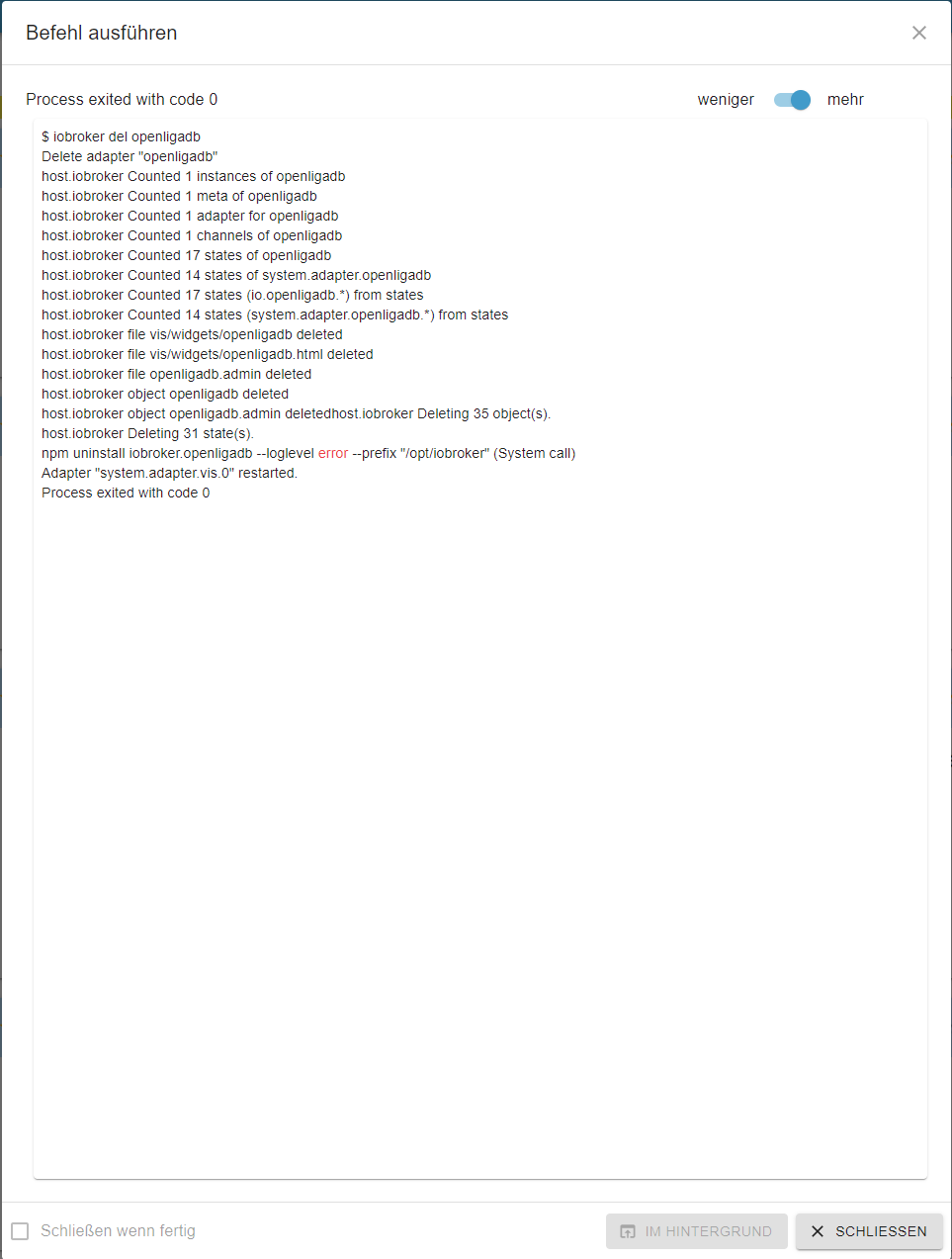
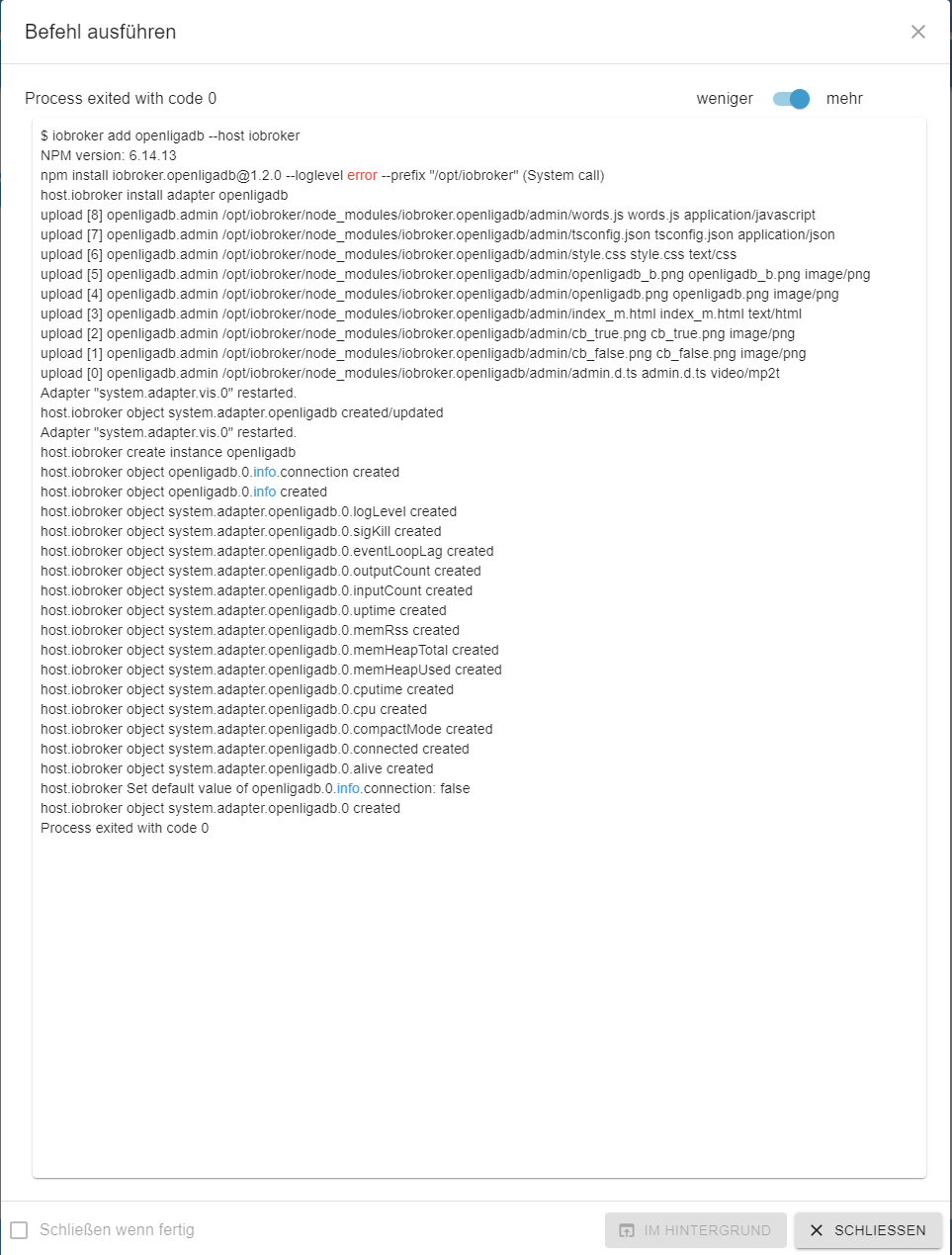
                                @glasfaser jetzt ja

                                f01f0ecd-9090-4992-a89d-98e1dbfba8fe-image.png

                                fd6f082b-d80e-4601-ae05-d7ea23c720e2-image.png

                                Jetzt lief das Update durch ...

                                root@iobroker:/opt/iobroker# iobroker upgrade
                                
                                This upgrade of "admin" will introduce the following changes:
                                ==========================================================================
                                -> 5.1.10:
                                Corrected some GUI errors
                                ==========================================================================
                                
                                Would you like to upgrade admin from @5.1.9 to @5.1.10 now? [(y)es, (n)o]: y
                                Update admin from @5.1.9 to @5.1.10
                                host.iobroker Adapter "system.adapter.admin.0" is stopped.
                                NPM version: 6.14.13
                                npm install iobroker.admin@5.1.10 --loglevel error --prefix "/opt/iobroker" (System call)
                                upload [14] admin.admin /opt/iobroker/node_modules/iobroker.admin/admin/words.js words.js application/javascript
                                Update "system.adapter.admin.0"
                                upload [13] admin.admin /opt/iobroker/node_modules/iobroker.admin/admin/jsonConfig.json jsonConfig.json application/json
                                upload [12] admin.admin /opt/iobroker/node_modules/iobroker.admin/admin/index_m.html index_m.html text/html
                                upload [11] admin.admin /opt/iobroker/node_modules/iobroker.admin/admin/index.html index.html text/html
                                upload [10] admin.admin /opt/iobroker/node_modules/iobroker.admin/admin/i18n/zh-cn/translations.json i18n/zh-cn/translations.json application/json
                                upload [9] admin.admin /opt/iobroker/node_modules/iobroker.admin/admin/i18n/ru/translations.json i18n/ru/translations.json application/json
                                upload [8] admin.admin /opt/iobroker/node_modules/iobroker.admin/admin/i18n/pt/translations.json i18n/pt/translations.json application/json
                                upload [7] admin.admin /opt/iobroker/node_modules/iobroker.admin/admin/i18n/pl/translations.json i18n/pl/translations.json application/json
                                upload [6] admin.admin /opt/iobroker/node_modules/iobroker.admin/admin/i18n/nl/translations.json i18n/nl/translations.json application/json
                                upload [5] admin.admin /opt/iobroker/node_modules/iobroker.admin/admin/i18n/it/translations.json i18n/it/translations.json application/json
                                upload [4] admin.admin /opt/iobroker/node_modules/iobroker.admin/admin/i18n/fr/translations.json i18n/fr/translations.json application/json
                                upload [3] admin.admin /opt/iobroker/node_modules/iobroker.admin/admin/i18n/es/translations.json i18n/es/translations.json application/json
                                upload [2] admin.admin /opt/iobroker/node_modules/iobroker.admin/admin/i18n/en/translations.json i18n/en/translations.json application/json
                                upload [1] admin.admin /opt/iobroker/node_modules/iobroker.admin/admin/i18n/de/translations.json i18n/de/translations.json application/json
                                upload [0] admin.admin /opt/iobroker/node_modules/iobroker.admin/admin/admin.png admin.png image/png
                                Adapter "admin" updated
                                host.iobroker Adapter "system.adapter.admin.0" is started
                                

                                Vielen Dank für Eure Hilfe!!!

                                1 Antwort Letzte Antwort
                                -1
                                • GlasfaserG Glasfaser

                                  @myssv
                                  @Thomas-Braun
                                  ... das ist nur ein gebastel .. er hantiert im Docker mit root ( Standart Login ) man weiß ja nicht was vorher noch war , besonders da er im BETA Status ist

                                  das gibt kein Ende ....Docker neu .... Backup rein fertig !

                                  M Offline
                                  M Offline
                                  myssv
                                  schrieb am zuletzt editiert von
                                  #54

                                  @glasfaser sagte in Admin funktioniert seit update auf 5.1.10 nicht mehr:

                                  @myssv
                                  @Thomas-Braun
                                  besonders da er im BETA Status ist

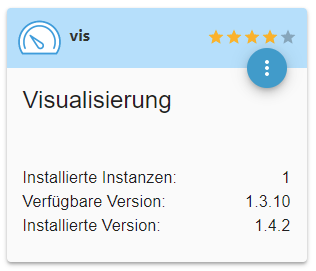
                                  Nun ja, wäre ich nicht im Beta Status, könnte ich z.B. die Neue Vis-Offline Lizenz nicht nutzen.

                                  Zitat: Zur Nutzung dieser Offline Lizenz ist der Vis Adapter in Version v1.4.3 nötig.

                                  Im Stable ist noch 1.3.10
                                  55eb618f-46eb-40ba-bd6d-7a0f9444ae0a-image.png

                                  GlasfaserG 1 Antwort Letzte Antwort
                                  0
                                  • M myssv

                                    @glasfaser sagte in Admin funktioniert seit update auf 5.1.10 nicht mehr:

                                    @myssv
                                    @Thomas-Braun
                                    besonders da er im BETA Status ist

                                    Nun ja, wäre ich nicht im Beta Status, könnte ich z.B. die Neue Vis-Offline Lizenz nicht nutzen.

                                    Zitat: Zur Nutzung dieser Offline Lizenz ist der Vis Adapter in Version v1.4.3 nötig.

                                    Im Stable ist noch 1.3.10

                                    55eb618f-46eb-40ba-bd6d-7a0f9444ae0a-image.png

                                    GlasfaserG Offline
                                    GlasfaserG Offline
                                    Glasfaser
                                    schrieb am zuletzt editiert von Glasfaser
                                    #55

                                    @myssv
                                    Es war eine Anmerkung , das du komplett im Beta-Status bist.

                                    Du kannst auch die VIS 1.4.3 einzeln nutzen ohne alles im Beta zu haben !

                                    Synology 918+ 16GB - ioBroker in Docker v9 , VISO auf Trekstor Primebook C13 13,3" , Hikvision Domkameras mit Surveillance Station .. CCU RaspberryMatic in Synology VM .. Zigbee CC2538+CC2592 .. Sonoff .. KNX .. Modbus ..

                                    M 1 Antwort Letzte Antwort
                                    0
                                    • GlasfaserG Glasfaser

                                      @myssv
                                      Es war eine Anmerkung , das du komplett im Beta-Status bist.

                                      Du kannst auch die VIS 1.4.3 einzeln nutzen ohne alles im Beta zu haben !

                                      M Offline
                                      M Offline
                                      myssv
                                      schrieb am zuletzt editiert von myssv
                                      #56

                                      @glasfaser

                                      ok, verstehe.

                                      Aber das macht die Sache gerade für unerfahrene Anwender wie mich nicht gerade einfacher. Da ich mir dann die Adapter selber suchen muss, wo neue Updates Sinn machen.

                                      Dazu kommen dann ja evtl. noch irgendwelche Abhängigkeiten. Die aktuelle VIS setzt dies oder jenes vorraus, wo ich dann auch wieder manuell suchen muss ...

                                      Im Beta Status wurden mir bisher immer gleich die neuen Versionen vorgeschlagen und ich hatte noch nicht ein Problem damit. Außer wenn ich selber was ver(schlimm)bessern wollte ...

                                      Thomas BraunT HomoranH 2 Antworten Letzte Antwort
                                      0
                                      • M myssv

                                        @glasfaser

                                        ok, verstehe.

                                        Aber das macht die Sache gerade für unerfahrene Anwender wie mich nicht gerade einfacher. Da ich mir dann die Adapter selber suchen muss, wo neue Updates Sinn machen.

                                        Dazu kommen dann ja evtl. noch irgendwelche Abhängigkeiten. Die aktuelle VIS setzt dies oder jenes vorraus, wo ich dann auch wieder manuell suchen muss ...

                                        Im Beta Status wurden mir bisher immer gleich die neuen Versionen vorgeschlagen und ich hatte noch nicht ein Problem damit. Außer wenn ich selber was ver(schlimm)bessern wollte ...

                                        Thomas BraunT Online
                                        Thomas BraunT Online
                                        Thomas Braun
                                        Most Active
                                        schrieb am zuletzt editiert von
                                        #57

                                        @myssv

                                        gerade für unerfahrene Anwender wie mich nicht gerade einfacher.

                                        Und gerade dann sollte man nicht komplett im Beta-Zweig herumhüpfen.

                                        Linux-Werkzeugkasten:
                                        https://forum.iobroker.net/topic/42952/der-kleine-iobroker-linux-werkzeugkasten
                                        NodeJS Fixer Skript:
                                        https://forum.iobroker.net/topic/68035/iob-node-fix-skript
                                        iob_diag: curl -sLf -o diag.sh https://iobroker.net/diag.sh && bash diag.sh

                                        1 Antwort Letzte Antwort
                                        1
                                        • M myssv

                                          @glasfaser

                                          ok, verstehe.

                                          Aber das macht die Sache gerade für unerfahrene Anwender wie mich nicht gerade einfacher. Da ich mir dann die Adapter selber suchen muss, wo neue Updates Sinn machen.

                                          Dazu kommen dann ja evtl. noch irgendwelche Abhängigkeiten. Die aktuelle VIS setzt dies oder jenes vorraus, wo ich dann auch wieder manuell suchen muss ...

                                          Im Beta Status wurden mir bisher immer gleich die neuen Versionen vorgeschlagen und ich hatte noch nicht ein Problem damit. Außer wenn ich selber was ver(schlimm)bessern wollte ...

                                          HomoranH Nicht stören
                                          HomoranH Nicht stören
                                          Homoran
                                          Global Moderator Administrators
                                          schrieb am zuletzt editiert von
                                          #58

                                          @myssv sagte in Admin funktioniert seit update auf 5.1.10 nicht mehr:

                                          wo neue Updates Sinn machen.

                                          was verstehst du darunter?
                                          neue gerade halbwegs implementierte Features, die nach ausgiebigem Testen etwas später auch im "stable" sind, wenn weitestgehend gesichert ist, dass sie stabil laufen?

                                          es gibt nur ganz wenige Fälle, in denen man kurzfristig das Repo zur Installation umstellen müsste, dann aber nur diese eine Aktualisierung durchführt und danach sofort das Repo wieder auf stable stellt.

                                          Wo ist dabei das Problem.
                                          wenn du immer im stable bist erfährst du gar nichts von anderen Versionen.

                                          kein Support per PN! - Fragen im Forum stellen -
                                          Benutzt das Voting rechts unten im Beitrag wenn er euch geholfen hat.
                                          Das Forum freut sich über eine Spende. Benutzt dazu den Spendenbutton oben rechts. Danke!
                                          der Installationsfixer: curl -fsL https://iobroker.net/fix.sh | bash -

                                          SezerS 1 Antwort Letzte Antwort
                                          0

                                          Hey! Du scheinst an dieser Unterhaltung interessiert zu sein, hast aber noch kein Konto.

                                          Hast du es satt, bei jedem Besuch durch die gleichen Beiträge zu scrollen? Wenn du dich für ein Konto anmeldest, kommst du immer genau dorthin zurück, wo du zuvor warst, und kannst dich über neue Antworten benachrichtigen lassen (entweder per E-Mail oder Push-Benachrichtigung). Du kannst auch Lesezeichen speichern und Beiträge positiv bewerten, um anderen Community-Mitgliedern deine Wertschätzung zu zeigen.

                                          Mit deinem Input könnte dieser Beitrag noch besser werden 💗

                                          Registrieren Anmelden
                                          Antworten
                                          • In einem neuen Thema antworten
                                          Anmelden zum Antworten
                                          • Älteste zuerst
                                          • Neuste zuerst
                                          • Meiste Stimmen


                                          Support us

                                          ioBroker
                                          Community Adapters
                                          Donate
                                          FAQ Cloud / IOT
                                          HowTo: Node.js-Update
                                          HowTo: Backup/Restore
                                          Downloads
                                          BLOG

                                          539

                                          Online

                                          32.8k

                                          Benutzer

                                          82.6k

                                          Themen

                                          1.3m

                                          Beiträge
                                          Community
                                          Impressum | Datenschutz-Bestimmungen | Nutzungsbedingungen | Einwilligungseinstellungen
                                          ioBroker Community 2014-2025
                                          logo
                                          • Anmelden

                                          • Du hast noch kein Konto? Registrieren

                                          • Anmelden oder registrieren, um zu suchen
                                          • Erster Beitrag
                                            Letzter Beitrag
                                          0
                                          • Home
                                          • Aktuell
                                          • Tags
                                          • Ungelesen 0
                                          • Kategorien
                                          • Unreplied
                                          • Beliebt
                                          • GitHub
                                          • Docu
                                          • Hilfe