




Admin funktioniert seit update auf 5.1.10 nicht mehr
-
Moin zusammen,
ich habe gerade das Update vom Admin Adapter auf die 5.1.10 gestartet. Dabei hat er sich irgendwie aufgehängt. Es lief der Kreis in Dauerschleife.
Danach habe ich den Server neu gestartet und nun komme ich nicht mehr auf die Admin Oberfläche. Die VIS an sich läuft, aber der Admin nicht.
Was kann ich tun?
PS: Das ganze läuft bei mir in einer Docker-Umgebung auf einer Synology. Mit dem Portainer komme ich auf die Oberfläche und in die Logs. Die zeigen aber nichts ungewöhnliches:
------------------------------------------------------------ ----- Welcome to your ioBroker-container! ----- ----- Startupscript is now running. ----- ----- Please be patient! ----- ------------------------------------------------------------ ------------------------------------------------------------ ----- Debugging information ----- ----- ----- ----- System ----- ----- arch: x86_64 ----- ----- ----- ----- Versions ----- ----- image: v5.1.0 ----- ----- node: v14.17.3 ----- ----- npm: 7.19.1 ----- ----- ----- ----- ENV ----- ----- AVAHI: false ----- ----- PACKAGES: nano ----- ----- SETGID: 1000 ----- ----- SETUID: 1000 ----- ----- USBDEVICES: none ----- ----- ZWAVE: false ----- ------------------------------------------------------------ ------------------------------------------------------------ ----- Step 1 of 5: Preparing container ----- ------------------------------------------------------------ Installing additional packages is set by ENV. The following packages will be installed: nano... Done. ------------------------------------------------------------ ----- Step 2 of 5: Detecting ioBroker installation ----- ------------------------------------------------------------ Existing installation of ioBroker detected in /opt/iobroker. ------------------------------------------------------------ ----- Step 3 of 5: Checking ioBroker installation ----- ------------------------------------------------------------ (Re)Setting folder permissions (This might take a while! Please be patient!)... Done. Fixing "sudo-bug" by replacing sudo in iobroker with gosu... Done. ------------------------------------------------------------ ----- Step 4 of 5: Applying special settings ----- ------------------------------------------------------------ Some adapters have special requirements/ settings which can be activated by the use of environment variables. For more information take a look at readme.md on Github! ------------------------------------------------------------ ----- Step 5 of 5: ioBroker startup ----- ------------------------------------------------------------ Starting ioBroker... host.iobroker check instance "system.adapter.admin.0" for host "iobroker" host.iobroker check instance "system.adapter.email.0" for host "iobroker" host.iobroker check instance "system.adapter.javascript.0" for host "iobroker" host.iobroker check instance "system.adapter.weatherunderground.0" for host "iobroker" host.iobroker check instance "system.adapter.web.0" for host "iobroker" host.iobroker check instance "system.adapter.history.0" for host "iobroker" host.iobroker check instance "system.adapter.vis.0" for host "iobroker" host.iobroker check instance "system.adapter.info.0" for host "iobroker" host.iobroker check instance "system.adapter.vis-hqwidgets.0" for host "iobroker" host.iobroker check instance "system.adapter.vis-timeandweather.0" for host "iobroker" host.iobroker check instance "system.adapter.trashschedule.0" for host "iobroker" host.iobroker check instance "system.adapter.ical.0" for host "iobroker" host.iobroker check instance "system.adapter.dwd.0" for host "iobroker" host.iobroker check instance "system.adapter.rainbird.0" for host "iobroker" host.iobroker check instance "system.adapter.tankerkoenig.0" for host "iobroker" host.iobroker check instance "system.adapter.vis-rgraph.0" for host "iobroker" host.iobroker check instance "system.adapter.vis-materialdesign.0" for host "iobroker" host.iobroker check instance "system.adapter.web-speedy.0" for host "iobroker" host.iobroker check instance "system.adapter.vis-canvas-gauges.0" for host "iobroker" host.iobroker check instance "system.adapter.openligadb.0" for host "iobroker" host.iobroker check instance "system.adapter.pollenflug.0" for host "iobroker" host.iobroker check instance "system.adapter.ping.0" for host "iobroker" host.iobroker check instance "system.adapter.backitup.0" for host "iobroker" host.iobroker check instance "system.adapter.vis-google-fonts.0" for host "iobroker" host.iobroker check instance "system.adapter.fritzdect.0" for host "iobroker" host.iobroker check instance "system.adapter.fb-checkpresence.0" for host "iobroker" host.iobroker check instance "system.adapter.tr-064.0" for host "iobroker" host.iobroker check instance "system.adapter.fitbit-api.0" for host "iobroker" host.iobroker check instance "system.adapter.fitbit-api.1" for host "iobroker" host.iobroker check instance "system.adapter.tvprogram.0" for host "iobroker" host.iobroker check instance "system.adapter.telegram.0" for host "iobroker" host.iobroker check instance "system.adapter.govee.0" for host "iobroker" ls: Zugriff auf '/dev/disk/by-id/' nicht möglich: Datei oder Verzeichnis nicht gefunden ls: Zugriff auf '/dev/disk/by-id/' nicht möglich: Datei oder Verzeichnis nicht gefunden -
Moin zusammen,
ich habe gerade das Update vom Admin Adapter auf die 5.1.10 gestartet. Dabei hat er sich irgendwie aufgehängt. Es lief der Kreis in Dauerschleife.
Danach habe ich den Server neu gestartet und nun komme ich nicht mehr auf die Admin Oberfläche. Die VIS an sich läuft, aber der Admin nicht.
Was kann ich tun?
PS: Das ganze läuft bei mir in einer Docker-Umgebung auf einer Synology. Mit dem Portainer komme ich auf die Oberfläche und in die Logs. Die zeigen aber nichts ungewöhnliches:
------------------------------------------------------------ ----- Welcome to your ioBroker-container! ----- ----- Startupscript is now running. ----- ----- Please be patient! ----- ------------------------------------------------------------ ------------------------------------------------------------ ----- Debugging information ----- ----- ----- ----- System ----- ----- arch: x86_64 ----- ----- ----- ----- Versions ----- ----- image: v5.1.0 ----- ----- node: v14.17.3 ----- ----- npm: 7.19.1 ----- ----- ----- ----- ENV ----- ----- AVAHI: false ----- ----- PACKAGES: nano ----- ----- SETGID: 1000 ----- ----- SETUID: 1000 ----- ----- USBDEVICES: none ----- ----- ZWAVE: false ----- ------------------------------------------------------------ ------------------------------------------------------------ ----- Step 1 of 5: Preparing container ----- ------------------------------------------------------------ Installing additional packages is set by ENV. The following packages will be installed: nano... Done. ------------------------------------------------------------ ----- Step 2 of 5: Detecting ioBroker installation ----- ------------------------------------------------------------ Existing installation of ioBroker detected in /opt/iobroker. ------------------------------------------------------------ ----- Step 3 of 5: Checking ioBroker installation ----- ------------------------------------------------------------ (Re)Setting folder permissions (This might take a while! Please be patient!)... Done. Fixing "sudo-bug" by replacing sudo in iobroker with gosu... Done. ------------------------------------------------------------ ----- Step 4 of 5: Applying special settings ----- ------------------------------------------------------------ Some adapters have special requirements/ settings which can be activated by the use of environment variables. For more information take a look at readme.md on Github! ------------------------------------------------------------ ----- Step 5 of 5: ioBroker startup ----- ------------------------------------------------------------ Starting ioBroker... host.iobroker check instance "system.adapter.admin.0" for host "iobroker" host.iobroker check instance "system.adapter.email.0" for host "iobroker" host.iobroker check instance "system.adapter.javascript.0" for host "iobroker" host.iobroker check instance "system.adapter.weatherunderground.0" for host "iobroker" host.iobroker check instance "system.adapter.web.0" for host "iobroker" host.iobroker check instance "system.adapter.history.0" for host "iobroker" host.iobroker check instance "system.adapter.vis.0" for host "iobroker" host.iobroker check instance "system.adapter.info.0" for host "iobroker" host.iobroker check instance "system.adapter.vis-hqwidgets.0" for host "iobroker" host.iobroker check instance "system.adapter.vis-timeandweather.0" for host "iobroker" host.iobroker check instance "system.adapter.trashschedule.0" for host "iobroker" host.iobroker check instance "system.adapter.ical.0" for host "iobroker" host.iobroker check instance "system.adapter.dwd.0" for host "iobroker" host.iobroker check instance "system.adapter.rainbird.0" for host "iobroker" host.iobroker check instance "system.adapter.tankerkoenig.0" for host "iobroker" host.iobroker check instance "system.adapter.vis-rgraph.0" for host "iobroker" host.iobroker check instance "system.adapter.vis-materialdesign.0" for host "iobroker" host.iobroker check instance "system.adapter.web-speedy.0" for host "iobroker" host.iobroker check instance "system.adapter.vis-canvas-gauges.0" for host "iobroker" host.iobroker check instance "system.adapter.openligadb.0" for host "iobroker" host.iobroker check instance "system.adapter.pollenflug.0" for host "iobroker" host.iobroker check instance "system.adapter.ping.0" for host "iobroker" host.iobroker check instance "system.adapter.backitup.0" for host "iobroker" host.iobroker check instance "system.adapter.vis-google-fonts.0" for host "iobroker" host.iobroker check instance "system.adapter.fritzdect.0" for host "iobroker" host.iobroker check instance "system.adapter.fb-checkpresence.0" for host "iobroker" host.iobroker check instance "system.adapter.tr-064.0" for host "iobroker" host.iobroker check instance "system.adapter.fitbit-api.0" for host "iobroker" host.iobroker check instance "system.adapter.fitbit-api.1" for host "iobroker" host.iobroker check instance "system.adapter.tvprogram.0" for host "iobroker" host.iobroker check instance "system.adapter.telegram.0" for host "iobroker" host.iobroker check instance "system.adapter.govee.0" for host "iobroker" ls: Zugriff auf '/dev/disk/by-id/' nicht möglich: Datei oder Verzeichnis nicht gefunden ls: Zugriff auf '/dev/disk/by-id/' nicht möglich: Datei oder Verzeichnis nicht gefundeniobroker list instances -
iobroker list instances@thomas-braun sagte in Admin funktioniert seit update auf 5.1.10 nicht mehr:
iobroker list instances
root@iobroker:/opt/iobroker# iobroker list instances system.adapter.admin.0 : admin : iobroker - disabled, port: 8081, bind: 0.0.0.0, run as: admin + system.adapter.backitup.0 : backitup : iobroker - enabled system.adapter.dwd.0 : dwd : iobroker - enabled + system.adapter.email.0 : email : iobroker - enabled + system.adapter.fb-checkpresence.0 : fb-checkpresence : iobroker - enabled system.adapter.fitbit-api.0 : fitbit-api : iobroker - enabled system.adapter.fitbit-api.1 : fitbit-api : iobroker - enabled system.adapter.flot.0 : flot : iobroker - enabled + system.adapter.fritzdect.0 : fritzdect : iobroker - enabled + system.adapter.govee.0 : govee : iobroker - enabled + system.adapter.history.0 : history : iobroker - enabled system.adapter.ical.0 : ical : iobroker - enabled system.adapter.icons-material-png.0 : icons-material-png : iobroker - enabled system.adapter.icons-mfd-png.0 : icons-mfd-png : iobroker - enabled + system.adapter.info.0 : info : iobroker - enabled system.adapter.javascript.0 : javascript : iobroker - enabled + system.adapter.openligadb.0 : openligadb : iobroker - enabled + system.adapter.ping.0 : ping : iobroker - enabled + system.adapter.pollenflug.0 : pollenflug : iobroker - enabled + system.adapter.rainbird.0 : rainbird : iobroker - enabled + system.adapter.tankerkoenig.0 : tankerkoenig : iobroker - enabled + system.adapter.telegram.0 : telegram : iobroker - enabled, port: 8443, bind: 0.0.0.0 + system.adapter.tr-064.0 : tr-064 : iobroker - enabled + system.adapter.trashschedule.0 : trashschedule : iobroker - enabled + system.adapter.tvprogram.0 : tvprogram : iobroker - enabled system.adapter.vis-canvas-gauges.0 : vis-canvas-gauges : iobroker - enabled system.adapter.vis-google-fonts.0 : vis-google-fonts : iobroker - enabled system.adapter.vis-hqwidgets.0 : vis-hqwidgets : iobroker - enabled system.adapter.vis-materialdesign.0 : vis-materialdesign : iobroker - enabled system.adapter.vis-rgraph.0 : vis-rgraph : iobroker - enabled system.adapter.vis-timeandweather.0 : vis-timeandweather : iobroker - enabled system.adapter.vis.0 : vis : iobroker - enabled system.adapter.weatherunderground.0 : weatherunderground : iobroker - enabled + system.adapter.web-speedy.0 : web-speedy : iobroker - enabled + system.adapter.web.0 : web : iobroker - enabled, port: 8082, bind: 0.0.0.0, run as: admin + instance is alive root@iobroker:/opt/iobroker# -
@thomas-braun sagte in Admin funktioniert seit update auf 5.1.10 nicht mehr:
iobroker list instances
root@iobroker:/opt/iobroker# iobroker list instances system.adapter.admin.0 : admin : iobroker - disabled, port: 8081, bind: 0.0.0.0, run as: admin + system.adapter.backitup.0 : backitup : iobroker - enabled system.adapter.dwd.0 : dwd : iobroker - enabled + system.adapter.email.0 : email : iobroker - enabled + system.adapter.fb-checkpresence.0 : fb-checkpresence : iobroker - enabled system.adapter.fitbit-api.0 : fitbit-api : iobroker - enabled system.adapter.fitbit-api.1 : fitbit-api : iobroker - enabled system.adapter.flot.0 : flot : iobroker - enabled + system.adapter.fritzdect.0 : fritzdect : iobroker - enabled + system.adapter.govee.0 : govee : iobroker - enabled + system.adapter.history.0 : history : iobroker - enabled system.adapter.ical.0 : ical : iobroker - enabled system.adapter.icons-material-png.0 : icons-material-png : iobroker - enabled system.adapter.icons-mfd-png.0 : icons-mfd-png : iobroker - enabled + system.adapter.info.0 : info : iobroker - enabled system.adapter.javascript.0 : javascript : iobroker - enabled + system.adapter.openligadb.0 : openligadb : iobroker - enabled + system.adapter.ping.0 : ping : iobroker - enabled + system.adapter.pollenflug.0 : pollenflug : iobroker - enabled + system.adapter.rainbird.0 : rainbird : iobroker - enabled + system.adapter.tankerkoenig.0 : tankerkoenig : iobroker - enabled + system.adapter.telegram.0 : telegram : iobroker - enabled, port: 8443, bind: 0.0.0.0 + system.adapter.tr-064.0 : tr-064 : iobroker - enabled + system.adapter.trashschedule.0 : trashschedule : iobroker - enabled + system.adapter.tvprogram.0 : tvprogram : iobroker - enabled system.adapter.vis-canvas-gauges.0 : vis-canvas-gauges : iobroker - enabled system.adapter.vis-google-fonts.0 : vis-google-fonts : iobroker - enabled system.adapter.vis-hqwidgets.0 : vis-hqwidgets : iobroker - enabled system.adapter.vis-materialdesign.0 : vis-materialdesign : iobroker - enabled system.adapter.vis-rgraph.0 : vis-rgraph : iobroker - enabled system.adapter.vis-timeandweather.0 : vis-timeandweather : iobroker - enabled system.adapter.vis.0 : vis : iobroker - enabled system.adapter.weatherunderground.0 : weatherunderground : iobroker - enabled + system.adapter.web-speedy.0 : web-speedy : iobroker - enabled + system.adapter.web.0 : web : iobroker - enabled, port: 8082, bind: 0.0.0.0, run as: admin + instance is alive root@iobroker:/opt/iobroker#iobroker start admin -
@thomas-braun sagte in Admin funktioniert seit update auf 5.1.10 nicht mehr:
iobroker start admin
funktioniert erst mal wieder, Danke!
Aber das Update ist nicht durchgeführt.
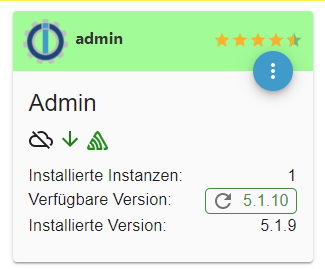
Wenn ich es erneut starte
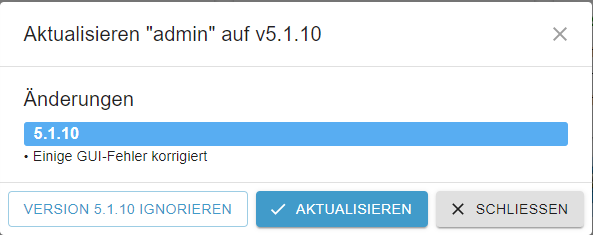
Bin ich wieder in der Dauerschleife ...

Ich lasse ihn einfach mal laufen ...
-
@myssv
Auf der Konsole arbeiten.iobroker stop iobroker update iobroker upgrade -
@thomas-braun sagte in Admin funktioniert seit update auf 5.1.10 nicht mehr:
iobroker upgrade
Bringt auch einen Fehler
root@iobroker:/opt/iobroker# iobroker upgrade This upgrade of "admin" will introduce the following changes: ========================================================================== -> 5.1.10: Corrected some GUI errors ========================================================================== Would you like to upgrade admin from @5.1.9 to @5.1.10 now? [(y)es, (n)o]: y Update admin from @5.1.9 to @5.1.10 host.iobroker Adapter "system.adapter.admin.0" is stopped. NPM version: 7.19.1 npm install iobroker.admin@5.1.10 --loglevel error --prefix "/opt/iobroker" (System call) npm ERR! code EINTEGRITY npm ERR! sha512-pB22Fvp08/amIRWYLQfhozpKkRAiM2LUDrNZrEnHDhERBwidYFYWOFFJ80N54pVh9yz6Y3gbJ3VWK4/VmPl77A== integrity checksum failed when using sha512: wanted sha512-pB22Fvp08/amIRWYLQfhozpKkRAiM2LUDrNZrEnHDhERBwidYFYWOFFJ80N54pVh9yz6Y3gbJ3VWK4/VmPl77A== but got sha512-WLFcOaoHfNIu5uGyi6Q/iQ/UB+ITNjsAYShVYAUsWoefc/3RrqZzWl7odAxoQaRDmnkYP9+/s2/sE2mrAJPakQ==. (252178 bytes) npm ERR! A complete log of this run can be found in: npm ERR! /opt/iobroker/.npm/_logs/2021-07-10T08_37_22_045Z-debug.log upload [4] admin.admin /opt/iobroker/node_modules/iobroker.admin/admin/words.js words.js application/javascript upload [3] admin.admin /opt/iobroker/node_modules/iobroker.admin/admin/jsonConfig.json jsonConfig.json application/json upload [2] admin.admin /opt/iobroker/node_modules/iobroker.admin/admin/index_m.html index_m.html text/html upload [1] admin.admin /opt/iobroker/node_modules/iobroker.admin/admin/index.html index.html text/html upload [0] admin.admin /opt/iobroker/node_modules/iobroker.admin/admin/admin.png admin.png image/png Adapter "admin" updated host.iobroker Adapter "system.adapter.admin.0" is started -
@thomas-braun sagte in Admin funktioniert seit update auf 5.1.10 nicht mehr:
iobroker upgrade
Bringt auch einen Fehler
root@iobroker:/opt/iobroker# iobroker upgrade This upgrade of "admin" will introduce the following changes: ========================================================================== -> 5.1.10: Corrected some GUI errors ========================================================================== Would you like to upgrade admin from @5.1.9 to @5.1.10 now? [(y)es, (n)o]: y Update admin from @5.1.9 to @5.1.10 host.iobroker Adapter "system.adapter.admin.0" is stopped. NPM version: 7.19.1 npm install iobroker.admin@5.1.10 --loglevel error --prefix "/opt/iobroker" (System call) npm ERR! code EINTEGRITY npm ERR! sha512-pB22Fvp08/amIRWYLQfhozpKkRAiM2LUDrNZrEnHDhERBwidYFYWOFFJ80N54pVh9yz6Y3gbJ3VWK4/VmPl77A== integrity checksum failed when using sha512: wanted sha512-pB22Fvp08/amIRWYLQfhozpKkRAiM2LUDrNZrEnHDhERBwidYFYWOFFJ80N54pVh9yz6Y3gbJ3VWK4/VmPl77A== but got sha512-WLFcOaoHfNIu5uGyi6Q/iQ/UB+ITNjsAYShVYAUsWoefc/3RrqZzWl7odAxoQaRDmnkYP9+/s2/sE2mrAJPakQ==. (252178 bytes) npm ERR! A complete log of this run can be found in: npm ERR! /opt/iobroker/.npm/_logs/2021-07-10T08_37_22_045Z-debug.log upload [4] admin.admin /opt/iobroker/node_modules/iobroker.admin/admin/words.js words.js application/javascript upload [3] admin.admin /opt/iobroker/node_modules/iobroker.admin/admin/jsonConfig.json jsonConfig.json application/json upload [2] admin.admin /opt/iobroker/node_modules/iobroker.admin/admin/index_m.html index_m.html text/html upload [1] admin.admin /opt/iobroker/node_modules/iobroker.admin/admin/index.html index.html text/html upload [0] admin.admin /opt/iobroker/node_modules/iobroker.admin/admin/admin.png admin.png image/png Adapter "admin" updated host.iobroker Adapter "system.adapter.admin.0" is started@myssv
Falsche npm-Version.
Installier npm@6.
Und auch node mal prüfen ob das senkrecht istcd /opt/iobroker npm cache clear --forceKann aber sein, dass das auf dem komischen Synology/Docker-Zeuch nicht/anders funktioniert.
-
@myssv
Falsche npm-Version.
Installier npm@6.
Und auch node mal prüfen ob das senkrecht istcd /opt/iobroker npm cache clear --forceKann aber sein, dass das auf dem komischen Synology/Docker-Zeuch nicht/anders funktioniert.
@thomas-braun
Dann ist auch gleich die Frage was er für ne Node hat, da die 7er NPM nicht unbedingt das Problem sein muss, nur gehört die auch in Node 16.
Ich hatte ein paar Updates mit Node 16 und NPM 7, wohl auch vom Admin und das lief. -
@thomas-braun
Dann ist auch gleich die Frage was er für ne Node hat, da die 7er NPM nicht unbedingt das Problem sein muss, nur gehört die auch in Node 16.
Ich hatte ein paar Updates mit Node 16 und NPM 7, wohl auch vom Admin und das lief.@jan1 Auf meinem bleeding edge Testsystem läuft das auch.
Aber das kannst du nicht auf einem Produktivsystem supporten. Also ist da node12 oder 14 inkl. npm@6 angesagt.Beim TE sind aber ein paar Bits beim Download gekippt, würde ich sagen.
-
Mit npm@6 bekomme ich neue Meldungen:
root@iobroker:/opt/iobroker# iobroker upgrade

This upgrade of "admin" will introduce the following changes:
==========================================================================
-> 5.1.10:
Corrected some GUI errors
==========================================================================

Would you like to upgrade admin from @5.1.9 to @5.1.10 now? [(y)es, (n)o]: y
Update admin from @5.1.9 to @5.1.10
NPM version: 6.14.13
npm install iobroker.admin@5.1.10 --loglevel error --prefix "/opt/iobroker" (System call)
npm ERR! code EINTEGRITY
npm ERR! Verification failed while extracting iobroker.openligadb@https://github.com/oweitman/ioBroker.openligadb/tarball/master:
npm ERR! Verification failed while extracting iobroker.openligadb@https://github.com/oweitman/ioBroker.openligadb/tarball/master:
npm ERR! sha512-pB22Fvp08/amIRWYLQfhozpKkRAiM2LUDrNZrEnHDhERBwidYFYWOFFJ80N54pVh9yz6Y3gbJ3VWK4/VmPl77A== integrity checksum failed when using sha512: wanted sha512-pB22Fvp08/amIRWYLQfhozpKkRAiM2LUDrNZrEnHDhERBwidYFYWOFFJ80N54pVh9yz6Y3gbJ3VWK4/VmPl77A== but got sha512-WLFcOaoHfNIu5uGyi6Q/iQ/UB+ITNjsAYShVYAUsWoefc/3RrqZzWl7odAxoQaRDmnkYP9+/s2/sE2mrAJPakQ==. (252178 bytes)

npm ERR! A complete log of this run can be found in:
npm ERR!     /opt/iobroker/.npm/_logs/2021-07-10T08_49_51_606Z-debug.log
upload [4] admin.admin /opt/iobroker/node_modules/iobroker.admin/admin/words.js words.js application/javascript
upload [3] admin.admin /opt/iobroker/node_modules/iobroker.admin/admin/jsonConfig.json jsonConfig.json application/json
upload [2] admin.admin /opt/iobroker/node_modules/iobroker.admin/admin/index_m.html index_m.html text/html
upload [1] admin.admin /opt/iobroker/node_modules/iobroker.admin/admin/index.html index.html text/html
upload [0] admin.admin /opt/iobroker/node_modules/iobroker.admin/admin/admin.png admin.png image/png
Adapter "admin" updated
Node ist: Node.js v14.17.3 (Empfohlene Version v12.22.3)
-
Mit npm@6 bekomme ich neue Meldungen:
root@iobroker:/opt/iobroker# iobroker upgrade

This upgrade of "admin" will introduce the following changes:
==========================================================================
-> 5.1.10:
Corrected some GUI errors
==========================================================================

Would you like to upgrade admin from @5.1.9 to @5.1.10 now? [(y)es, (n)o]: y
Update admin from @5.1.9 to @5.1.10
NPM version: 6.14.13
npm install iobroker.admin@5.1.10 --loglevel error --prefix "/opt/iobroker" (System call)
npm ERR! code EINTEGRITY
npm ERR! Verification failed while extracting iobroker.openligadb@https://github.com/oweitman/ioBroker.openligadb/tarball/master:
npm ERR! Verification failed while extracting iobroker.openligadb@https://github.com/oweitman/ioBroker.openligadb/tarball/master:
npm ERR! sha512-pB22Fvp08/amIRWYLQfhozpKkRAiM2LUDrNZrEnHDhERBwidYFYWOFFJ80N54pVh9yz6Y3gbJ3VWK4/VmPl77A== integrity checksum failed when using sha512: wanted sha512-pB22Fvp08/amIRWYLQfhozpKkRAiM2LUDrNZrEnHDhERBwidYFYWOFFJ80N54pVh9yz6Y3gbJ3VWK4/VmPl77A== but got sha512-WLFcOaoHfNIu5uGyi6Q/iQ/UB+ITNjsAYShVYAUsWoefc/3RrqZzWl7odAxoQaRDmnkYP9+/s2/sE2mrAJPakQ==. (252178 bytes)

npm ERR! A complete log of this run can be found in:
npm ERR!     /opt/iobroker/.npm/_logs/2021-07-10T08_49_51_606Z-debug.log
upload [4] admin.admin /opt/iobroker/node_modules/iobroker.admin/admin/words.js words.js application/javascript
upload [3] admin.admin /opt/iobroker/node_modules/iobroker.admin/admin/jsonConfig.json jsonConfig.json application/json
upload [2] admin.admin /opt/iobroker/node_modules/iobroker.admin/admin/index_m.html index_m.html text/html
upload [1] admin.admin /opt/iobroker/node_modules/iobroker.admin/admin/index.html index.html text/html
upload [0] admin.admin /opt/iobroker/node_modules/iobroker.admin/admin/admin.png admin.png image/png
Adapter "admin" updated
Node ist: Node.js v14.17.3 (Empfohlene Version v12.22.3)
@myssv
Der korrupte Download liegt noch im Cache.
Ist aber wohl von Openliga aus git. -
@myssv
Der korrupte Download liegt noch im Cache.
Ist aber wohl von Openliga aus git.@thomas-braun Auch nach dem Löschen des Cache bekomme ich die Fehler:
oot@iobroker:/opt/iobroker# cd /opt/iobroker root@iobroker:/opt/iobroker# npm cache clear --force npm WARN using --force I sure hope you know what you are doing. root@iobroker:/opt/iobroker# iobroker stop iobroker controller daemon is not running root@iobroker:/opt/iobroker# iobroker update Used repository: beta hash unchanged, use cached sources update done Adapter "admin" : 5.1.10 , installed 5.1.9 [Updateable] Adapter "backitup" : 2.1.13 , installed 2.1.13 Adapter "cloud" : 4.0.11 , installed 4.0.11 Adapter "dwd" : 2.7.7 , installed 2.7.7 Adapter "email" : 1.0.10 , installed 1.0.10 Adapter "fb-checkpresence": 1.1.7 , installed 1.1.7 Adapter "fitbit-api" : 0.1.1 , installed 0.1.1 Adapter "flot" : 1.10.6 , installed 1.10.6 Adapter "fritzdect" : 2.1.12 , installed 2.1.12 Adapter "fullcalendar" : 1.1.0 , installed 1.1.0 Adapter "history" : 1.9.13 , installed 1.9.13 Adapter "ical" : 1.9.3 , installed 1.9.3 Adapter "icons-material-png": 0.1.0 , installed 0.1.0 Adapter "icons-mfd-png" : 1.0.2 , installed 1.0.2 Adapter "info" : 1.7.15 , installed 1.7.15 Controller "js-controller" : 3.3.14 , installed 3.3.14 Adapter "openligadb" : 1.2.0 , installed 1.2.0 Adapter "ping" : 1.4.12 , installed 1.4.12 Adapter "pollenflug" : 1.0.6 , installed 1.0.6 Adapter "rainbird" : 0.2.2 , installed 0.2.3 Adapter "simple-api" : 2.6.1 , installed 2.6.1 Adapter "socketio" : 3.1.4 , installed 3.1.4 Adapter "tankerkoenig" : 2.1.1 , installed 2.1.1 Adapter "telegram" : 1.9.0 , installed 1.9.0 Adapter "tr-064" : 4.2.12 , installed 4.2.12 Adapter "trashschedule" : 1.1.3 , installed 1.1.3 Adapter "tvprogram" : 1.1.0 , installed 1.1.0 Adapter "vis" : 1.4.2 , installed 1.4.2 Adapter "vis-canvas-gauges": 0.1.5 , installed 0.1.5 Adapter "vis-google-fonts": 0.1.0 , installed 0.1.0 Adapter "vis-hqwidgets" : 1.1.7 , installed 1.1.7 Adapter "vis-materialdesign": 0.5.9 , installed 0.5.9 Adapter "vis-rgraph" : 0.0.2 , installed 0.0.2 Adapter "vis-timeandweather": 1.1.7 , installed 1.1.7 Adapter "weatherunderground": 3.3.1 , installed 3.3.1 Adapter "web" : 3.4.4 , installed 3.4.4 Adapter "web-speedy" : 0.2.0 , installed 0.2.0 root@iobroker:/opt/iobroker# iobroker upgrade This upgrade of "admin" will introduce the following changes: ========================================================================== -> 5.1.10: Corrected some GUI errors ========================================================================== Would you like to upgrade admin from @5.1.9 to @5.1.10 now? [(y)es, (n)o]: y Update admin from @5.1.9 to @5.1.10 host.iobroker Adapter "system.adapter.admin.0" is stopped. NPM version: 6.14.13 npm install iobroker.admin@5.1.10 --loglevel error --prefix "/opt/iobroker" (System call) npm ERR! code EINTEGRITY npm ERR! Verification failed while extracting iobroker.openligadb@https://github.com/oweitman/ioBroker.openligadb/tarball/master: npm ERR! Verification failed while extracting iobroker.openligadb@https://github.com/oweitman/ioBroker.openligadb/tarball/master: npm ERR! sha512-pB22Fvp08/amIRWYLQfhozpKkRAiM2LUDrNZrEnHDhERBwidYFYWOFFJ80N54pVh9yz6Y3gbJ3VWK4/VmPl77A== integrity checksum failed when using sha512: wanted sha512-pB22Fvp08/amIRWYLQfhozpKkRAiM2LUDrNZrEnHDhERBwidYFYWOFFJ80N54pVh9yz6Y3gbJ3VWK4/VmPl77A== but got sha512-WLFcOaoHfNIu5uGyi6Q/iQ/UB+ITNjsAYShVYAUsWoefc/3RrqZzWl7odAxoQaRDmnkYP9+/s2/sE2mrAJPakQ==. (252178 bytes) npm ERR! A complete log of this run can be found in: npm ERR! /opt/iobroker/.npm/_logs/2021-07-10T08_56_35_606Z-debug.log upload [4] admin.admin /opt/iobroker/node_modules/iobroker.admin/admin/words.js words.js application/javascript upload [3] admin.admin /opt/iobroker/node_modules/iobroker.admin/admin/jsonConfig.json jsonConfig.json application/json upload [2] admin.admin /opt/iobroker/node_modules/iobroker.admin/admin/index_m.html index_m.html text/html upload [1] admin.admin /opt/iobroker/node_modules/iobroker.admin/admin/index.html index.html text/html upload [0] admin.admin /opt/iobroker/node_modules/iobroker.admin/admin/admin.png admin.png image/png Adapter "admin" updated host.iobroker Adapter "system.adapter.admin.0" is started -
Mit npm@6 bekomme ich neue Meldungen:
root@iobroker:/opt/iobroker# iobroker upgrade

This upgrade of "admin" will introduce the following changes:
==========================================================================
-> 5.1.10:
Corrected some GUI errors
==========================================================================

Would you like to upgrade admin from @5.1.9 to @5.1.10 now? [(y)es, (n)o]: y
Update admin from @5.1.9 to @5.1.10
NPM version: 6.14.13
npm install iobroker.admin@5.1.10 --loglevel error --prefix "/opt/iobroker" (System call)
npm ERR! code EINTEGRITY
npm ERR! Verification failed while extracting iobroker.openligadb@https://github.com/oweitman/ioBroker.openligadb/tarball/master:
npm ERR! Verification failed while extracting iobroker.openligadb@https://github.com/oweitman/ioBroker.openligadb/tarball/master:
npm ERR! sha512-pB22Fvp08/amIRWYLQfhozpKkRAiM2LUDrNZrEnHDhERBwidYFYWOFFJ80N54pVh9yz6Y3gbJ3VWK4/VmPl77A== integrity checksum failed when using sha512: wanted sha512-pB22Fvp08/amIRWYLQfhozpKkRAiM2LUDrNZrEnHDhERBwidYFYWOFFJ80N54pVh9yz6Y3gbJ3VWK4/VmPl77A== but got sha512-WLFcOaoHfNIu5uGyi6Q/iQ/UB+ITNjsAYShVYAUsWoefc/3RrqZzWl7odAxoQaRDmnkYP9+/s2/sE2mrAJPakQ==. (252178 bytes)

npm ERR! A complete log of this run can be found in:
npm ERR!     /opt/iobroker/.npm/_logs/2021-07-10T08_49_51_606Z-debug.log
upload [4] admin.admin /opt/iobroker/node_modules/iobroker.admin/admin/words.js words.js application/javascript
upload [3] admin.admin /opt/iobroker/node_modules/iobroker.admin/admin/jsonConfig.json jsonConfig.json application/json
upload [2] admin.admin /opt/iobroker/node_modules/iobroker.admin/admin/index_m.html index_m.html text/html
upload [1] admin.admin /opt/iobroker/node_modules/iobroker.admin/admin/index.html index.html text/html
upload [0] admin.admin /opt/iobroker/node_modules/iobroker.admin/admin/admin.png admin.png image/png
Adapter "admin" updated
Node ist: Node.js v14.17.3 (Empfohlene Version v12.22.3)
which nodejs node npm && nodejs -v && node -v && npm -v && sudo apt update && sudo apt update && apt policy nodejsliefert?
-
which nodejs node npm && nodejs -v && node -v && npm -v && sudo apt update && sudo apt update && apt policy nodejsliefert?
root@iobroker:/opt/iobroker# which nodejs node npm && nodejs -v && node -v && npm -v && sudo apt update && sudo apt update && apt policy nodejs /usr/bin/nodejs /usr/local/bin/node /usr/local/bin/npm v12.22.1 v14.17.3 6.14.13 Holen:1 http://security.debian.org/debian-security buster/updates InRelease [65,4 kB] Holen:2 http://deb.debian.org/debian buster InRelease [122 kB] Holen:3 http://deb.debian.org/debian buster-updates InRelease [51,9 kB] Holen:4 https://deb.nodesource.com/node_12.x buster InRelease [4.584 B] Holen:5 http://security.debian.org/debian-security buster/updates/main amd64 Packages [293 kB] Holen:6 http://deb.debian.org/debian buster/main amd64 Packages [7.907 kB] Holen:7 https://deb.nodesource.com/node_12.x buster/main amd64 Packages [766 B] Holen:8 http://deb.debian.org/debian buster-updates/main amd64 Packages [15,2 kB] Es wurden 8.459 kB in 8 s geholt (1.002 kB/s). Paketlisten werden gelesen... Fertig Abhängigkeitsbaum wird aufgebaut. Statusinformationen werden eingelesen.... Fertig Aktualisierung für 29 Pakete verfügbar. Führen Sie »apt list --upgradable« aus, um sie anzuzeigen. OK:1 http://security.debian.org/debian-security buster/updates InRelease OK:2 http://deb.debian.org/debian buster InRelease OK:3 http://deb.debian.org/debian buster-updates InRelease OK:4 https://deb.nodesource.com/node_12.x buster InRelease Paketlisten werden gelesen... Fertig Abhängigkeitsbaum wird aufgebaut. Statusinformationen werden eingelesen.... Fertig Aktualisierung für 29 Pakete verfügbar. Führen Sie »apt list --upgradable« aus, um sie anzuzeigen. nodejs: Installiert: 12.22.1-1nodesource1 Installationskandidat: 12.22.2-1nodesource1 Versionstabelle: 12.22.2-1nodesource1 500 500 https://deb.nodesource.com/node_12.x buster/main amd64 Packages *** 12.22.1-1nodesource1 100 100 /var/lib/dpkg/status 10.24.0~dfsg-1~deb10u1 500 500 http://deb.debian.org/debian buster/main amd64 Packages 500 http://security.debian.org/debian-security buster/updates/main amd64 Packages -
root@iobroker:/opt/iobroker# which nodejs node npm && nodejs -v && node -v && npm -v && sudo apt update && sudo apt update && apt policy nodejs /usr/bin/nodejs /usr/local/bin/node /usr/local/bin/npm v12.22.1 v14.17.3 6.14.13 Holen:1 http://security.debian.org/debian-security buster/updates InRelease [65,4 kB] Holen:2 http://deb.debian.org/debian buster InRelease [122 kB] Holen:3 http://deb.debian.org/debian buster-updates InRelease [51,9 kB] Holen:4 https://deb.nodesource.com/node_12.x buster InRelease [4.584 B] Holen:5 http://security.debian.org/debian-security buster/updates/main amd64 Packages [293 kB] Holen:6 http://deb.debian.org/debian buster/main amd64 Packages [7.907 kB] Holen:7 https://deb.nodesource.com/node_12.x buster/main amd64 Packages [766 B] Holen:8 http://deb.debian.org/debian buster-updates/main amd64 Packages [15,2 kB] Es wurden 8.459 kB in 8 s geholt (1.002 kB/s). Paketlisten werden gelesen... Fertig Abhängigkeitsbaum wird aufgebaut. Statusinformationen werden eingelesen.... Fertig Aktualisierung für 29 Pakete verfügbar. Führen Sie »apt list --upgradable« aus, um sie anzuzeigen. OK:1 http://security.debian.org/debian-security buster/updates InRelease OK:2 http://deb.debian.org/debian buster InRelease OK:3 http://deb.debian.org/debian buster-updates InRelease OK:4 https://deb.nodesource.com/node_12.x buster InRelease Paketlisten werden gelesen... Fertig Abhängigkeitsbaum wird aufgebaut. Statusinformationen werden eingelesen.... Fertig Aktualisierung für 29 Pakete verfügbar. Führen Sie »apt list --upgradable« aus, um sie anzuzeigen. nodejs: Installiert: 12.22.1-1nodesource1 Installationskandidat: 12.22.2-1nodesource1 Versionstabelle: 12.22.2-1nodesource1 500 500 https://deb.nodesource.com/node_12.x buster/main amd64 Packages *** 12.22.1-1nodesource1 100 100 /var/lib/dpkg/status 10.24.0~dfsg-1~deb10u1 500 500 http://deb.debian.org/debian buster/main amd64 Packages 500 http://security.debian.org/debian-security buster/updates/main amd64 Packages@myssv
NodeJS ist ja auch krumm installiert. -
@myssv
NodeJS ist ja auch krumm installiert.@thomas-braun sagte in Admin funktioniert seit update auf 5.1.10 nicht mehr:
@myssv
NodeJS ist ja auch krumm installiert.???
Sorry, bin nicht der Fachmann auf dem Gebiet und mache alles nach bestem Wissen und Gewissen ...
-
@thomas-braun sagte in Admin funktioniert seit update auf 5.1.10 nicht mehr:
@myssv
NodeJS ist ja auch krumm installiert.???
Sorry, bin nicht der Fachmann auf dem Gebiet und mache alles nach bestem Wissen und Gewissen ...
@myssv Schau in meiner Signatur wie man das richtig über apt installiert.
-
@myssv
NodeJS ist ja auch krumm installiert.@thomas-braun sagte in Admin funktioniert seit update auf 5.1.10 nicht mehr:
@myssv
NodeJS ist ja auch krumm installiert.genau das war meine Vermutung, deshalb der Hinweis, dass es eigentlich laufen sollte wenn der Rest auch passt ;)
Manuell dran gefummelt und sich alles verbogen.


Hey! Du scheinst an dieser Unterhaltung interessiert zu sein, hast aber noch kein Konto.
Hast du es satt, bei jedem Besuch durch die gleichen Beiträge zu scrollen? Wenn du dich für ein Konto anmeldest, kommst du immer genau dorthin zurück, wo du zuvor warst, und kannst dich über neue Antworten benachrichtigen lassen (entweder per E-Mail oder Push-Benachrichtigung). Du kannst auch Lesezeichen speichern und Beiträge positiv bewerten, um anderen Community-Mitgliedern deine Wertschätzung zu zeigen.
Mit deinem Input könnte dieser Beitrag noch besser werden 💗
Registrieren Anmelden453
Online33.0k
Benutzer83.6k
Themen1.3m
Beiträge