




[gelöst] Stromausfall Web-Oberfläche öffnet sich nicht mehr

-
Ok
Ich bin dankbar für jeden Tipp.
Verstehen tue ich das alles nicht, ich copy paste nur was anscheinend bei anderen funktioniert haben soll :(internal/modules/cjs/loader.js:818 throw err; ^ Error: Cannot find module '/opt/iobroker/node_modules/iobroker.js-controller/iobroker.js' at Function.Module._resolveFilename (internal/modules/cjs/loader.js:815:15) at Function.Module._load (internal/modules/cjs/loader.js:667:27) at Function.executeUserEntryPoint [as runMain] (internal/modules/run_main.js:60:12) at internal/main/run_main_module.js:17:47 { code: 'MODULE_NOT_FOUND', requireStack: [] }@berserker sagte in Stromausfall Web-Oberfläche öffnet sich nicht mehr:
ich copy paste nur was anscheinend bei anderen funktioniert haben soll
wenn du so etwas machst musst du aber genau darauf achten, für welche Installation diese codes genutzt wurden.
Da hat sich in den 7 Jahren ioBroker einiges geändert -
@berserker Der erste Teil mit den Fehlern stammt vom terminal-Adapter. Den würde ich rauswerfen, wenn das System wieder läuft.
iobroker restart iobroker status iobroker list instancesOkay werde ich machen
Ausgabe ist folgendes:
pi@pi:/opt/iobroker $ iobroker restart
pi@pi:/opt/iobroker $ iobroker status
iobroker is running on this host.


Objects type: file
States  type: file
pi@pi:/opt/iobroker $ iobroker list instances


+ instance is alive
pi@pi:/opt/iobroker $
Danke schonmal für die Hilfe!!
-
Okay werde ich machen
Ausgabe ist folgendes:
pi@pi:/opt/iobroker $ iobroker restart
pi@pi:/opt/iobroker $ iobroker status
iobroker is running on this host.


Objects type: file
States  type: file
pi@pi:/opt/iobroker $ iobroker list instances


+ instance is alive
pi@pi:/opt/iobroker $
Danke schonmal für die Hilfe!!
iobroker list adapters -
iobroker list adapters -
@berserker Okay.
iobroker add admin -
Das kommt dabei raus
pi@pi:~ $ cd /opt/iobroker pi@pi:/opt/iobroker $ sudo -H -u iobroker npm install iobroker.js-controller > iobroker.js-controller@3.2.16 preinstall /opt/iobroker/node_modules/iobroker.js-controller > node lib/preinstallCheck.js NPM version: 6.14.12 > authenticate-pam@1.0.2 install /opt/iobroker/node_modules/authenticate-pam > node-gyp rebuild make: Verzeichnis „/opt/iobroker/node_modules/authenticate-pam/build“ wird betreten CXX(target) Release/obj.target/authenticate_pam/authenticate_pam.o ../authenticate_pam.cc: In function ‘void after_doing_auth(uv_work_t*, int)’: ../authenticate_pam.cc:107:87: warning: ‘v8::Local<v8::Value> Nan::MakeCallback(v8::Local<v8::Object>, v8::Local<v8::Function>, int, v8::Local<v8::Value>*)’ is deprecated [-Wdeprecated-declarations] Nan::MakeCallback(Nan::GetCurrentContext()->Global(), Nan::New(m->callback), 1, args); ^ In file included from ../authenticate_pam.cc:23: ../../nan/nan.h:1026:46: note: declared here NAN_DEPRECATED inline v8::Local<v8::Value> MakeCallback( ^~~~~~~~~~~~ ../authenticate_pam.cc:107:87: warning: ‘v8::Local<v8::Value> Nan::MakeCallback(v8::Local<v8::Object>, v8::Local<v8::Function>, int, v8::Local<v8::Value>*)’ is deprecated [-Wdeprecated-declarations] Nan::MakeCallback(Nan::GetCurrentContext()->Global(), Nan::New(m->callback), 1, args); ^ In file included from ../authenticate_pam.cc:23: ../../nan/nan.h:1026:46: note: declared here NAN_DEPRECATED inline v8::Local<v8::Value> MakeCallback( ^~~~~~~~~~~~ ../authenticate_pam.cc: In function ‘Nan::NAN_METHOD_RETURN_TYPE Authenticate(Nan::NAN_METHOD_ARGS_TYPE)’: ../authenticate_pam.cc:147:83: warning: ‘v8::Local<v8::Value> v8::Object::Get(v8::Local<v8::Value>)’ is deprecated: Use maybe version [-Wdeprecated-declarations] Local<Value> res = options->Get(Nan::New<String>("serviceName").ToLocalChecked()); ^ In file included from /home/iobroker/.cache/node-gyp/12.22.1/include/node/v8-internal.h:14, from /home/iobroker/.cache/node-gyp/12.22.1/include/node/v8.h:27, from /home/iobroker/.cache/node-gyp/12.22.1/include/node/node.h:67, from ../../nan/nan.h:56, from ../authenticate_pam.cc:23: /home/iobroker/.cache/node-gyp/12.22.1/include/node/v8.h:3553:51: note: declared here V8_DEPRECATED("Use maybe version", Local<Value> Get(Local<Value> key)); ^~~ /home/iobroker/.cache/node-gyp/12.22.1/include/node/v8config.h:328:3: note: in definition of macro ‘V8_DEPRECATED’ declarator __attribute__((deprecated(message))) ^~~~~~~~~~ ../authenticate_pam.cc:150:69: error: no matching function for call to ‘v8::String::WriteUtf8(char [128], unsigned int)’ serviceName->WriteUtf8(m->serviceName, sizeof(m->serviceName) - 1); ^ In file included from /home/iobroker/.cache/node-gyp/12.22.1/include/node/node.h:67, from ../../nan/nan.h:56, from ../authenticate_pam.cc:23: /home/iobroker/.cache/node-gyp/12.22.1/include/node/v8.h:2878:7: note: candidate: ‘int v8::String::WriteUtf8(v8::Isolate*, char*, int, int*, int) const’ int WriteUtf8(Isolate* isolate, char* buffer, int length = -1, ^~~~~~~~~ /home/iobroker/.cache/node-gyp/12.22.1/include/node/v8.h:2878:7: note: no known conversion for argument 1 from ‘char [128]’ to ‘v8::Isolate*’ ../authenticate_pam.cc:152:69: warning: ‘v8::Local<v8::Value> v8::Object::Get(v8::Local<v8::Value>)’ is deprecated: Use maybe version [-Wdeprecated-declarations] res = options->Get(Nan::New<String>("remoteHost").ToLocalChecked()); ^ In file included from /home/iobroker/.cache/node-gyp/12.22.1/include/node/v8-internal.h:14, from /home/iobroker/.cache/node-gyp/12.22.1/include/node/v8.h:27, from /home/iobroker/.cache/node-gyp/12.22.1/include/node/node.h:67, from ../../nan/nan.h:56, from ../authenticate_pam.cc:23: /home/iobroker/.cache/node-gyp/12.22.1/include/node/v8.h:3553:51: note: declared here V8_DEPRECATED("Use maybe version", Local<Value> Get(Local<Value> key)); ^~~ /home/iobroker/.cache/node-gyp/12.22.1/include/node/v8config.h:328:3: note: in definition of macro ‘V8_DEPRECATED’ declarator __attribute__((deprecated(message))) ^~~~~~~~~~ ../authenticate_pam.cc:155:66: error: no matching function for call to ‘v8::String::WriteUtf8(char [128], unsigned int)’ remoteHost->WriteUtf8(m->remoteHost, sizeof(m->remoteHost) - 1); ^ In file included from /home/iobroker/.cache/node-gyp/12.22.1/include/node/node.h:67, from ../../nan/nan.h:56, from ../authenticate_pam.cc:23: /home/iobroker/.cache/node-gyp/12.22.1/include/node/v8.h:2878:7: note: candidate: ‘int v8::String::WriteUtf8(v8::Isolate*, char*, int, int*, int) const’ int WriteUtf8(Isolate* isolate, char* buffer, int length = -1, ^~~~~~~~~ /home/iobroker/.cache/node-gyp/12.22.1/include/node/v8.h:2878:7: note: no known conversion for argument 1 from ‘char [128]’ to ‘v8::Isolate*’ ../authenticate_pam.cc:160:58: error: no matching function for call to ‘v8::String::WriteUtf8(char [128], unsigned int)’ username->WriteUtf8(m->username, sizeof(m->username) - 1); ^ In file included from /home/iobroker/.cache/node-gyp/12.22.1/include/node/node.h:67, from ../../nan/nan.h:56, from ../authenticate_pam.cc:23: /home/iobroker/.cache/node-gyp/12.22.1/include/node/v8.h:2878:7: note: candidate: ‘int v8::String::WriteUtf8(v8::Isolate*, char*, int, int*, int) const’ int WriteUtf8(Isolate* isolate, char* buffer, int length = -1, ^~~~~~~~~ /home/iobroker/.cache/node-gyp/12.22.1/include/node/v8.h:2878:7: note: no known conversion for argument 1 from ‘char [128]’ to ‘v8::Isolate*’ ../authenticate_pam.cc:161:58: error: no matching function for call to ‘v8::String::WriteUtf8(char [128], unsigned int)’ password->WriteUtf8(m->password, sizeof(m->password) - 1); ^ In file included from /home/iobroker/.cache/node-gyp/12.22.1/include/node/node.h:67, from ../../nan/nan.h:56, from ../authenticate_pam.cc:23: /home/iobroker/.cache/node-gyp/12.22.1/include/node/v8.h:2878:7: note: candidate: ‘int v8::String::WriteUtf8(v8::Isolate*, char*, int, int*, int) const’ int WriteUtf8(Isolate* isolate, char* buffer, int length = -1, ^~~~~~~~~ /home/iobroker/.cache/node-gyp/12.22.1/include/node/v8.h:2878:7: note: no known conversion for argument 1 from ‘char [128]’ to ‘v8::Isolate*’ ../authenticate_pam.cc: At global scope: ../authenticate_pam.cc:170:11: error: variable or field ‘init’ declared void void init(Handle<Object> exports) { ^~~~~~ ../authenticate_pam.cc:170:11: error: ‘Handle’ was not declared in this scope ../authenticate_pam.cc:170:11: note: suggested alternative: ‘rand_r’ void init(Handle<Object> exports) { ^~~~~~ rand_r ../authenticate_pam.cc:170:24: error: expected primary-expression before ‘>’ token void init(Handle<Object> exports) { ^ ../authenticate_pam.cc:170:26: error: ‘exports’ was not declared in this scope void init(Handle<Object> exports) { ^~~~~~~ In file included from ../../nan/nan.h:56, from ../authenticate_pam.cc:23: ../authenticate_pam.cc:175:31: error: ‘init’ was not declared in this scope NODE_MODULE(authenticate_pam, init); ^~~~ /home/iobroker/.cache/node-gyp/12.22.1/include/node/node.h:736:36: note: in definition of macro ‘NODE_MODULE_X’ (node::addon_register_func) (regfunc), \ ^~~~~~~ ../authenticate_pam.cc:175:1: note: in expansion of macro ‘NODE_MODULE’ NODE_MODULE(authenticate_pam, init); ^~~~~~~~~~~ ../authenticate_pam.cc:175:31: note: suggested alternative: ‘int’ NODE_MODULE(authenticate_pam, init); ^~~~ /home/iobroker/.cache/node-gyp/12.22.1/include/node/node.h:736:36: note: in definition of macro ‘NODE_MODULE_X’ (node::addon_register_func) (regfunc), \ ^~~~~~~ ../authenticate_pam.cc:175:1: note: in expansion of macro ‘NODE_MODULE’ NODE_MODULE(authenticate_pam, init); ^~~~~~~~~~~ make: *** [authenticate_pam.target.mk:109: Release/obj.target/authenticate_pam/authenticate_pam.o] Fehler 1 make: Verzeichnis „/opt/iobroker/node_modules/authenticate-pam/build“ wird verlassen gyp ERR! build error gyp ERR! stack Error: `make` failed with exit code: 2 gyp ERR! stack at ChildProcess.onExit (/usr/lib/node_modules/npm/node_modules/node-gyp/lib/build.js:194:23) gyp ERR! stack at ChildProcess.emit (events.js:314:20) gyp ERR! stack at Process.ChildProcess._handle.onexit (internal/child_process.js:276:12) gyp ERR! System Linux 5.10.17-v7l+ gyp ERR! command "/usr/bin/node" "/usr/lib/node_modules/npm/node_modules/node-gyp/bin/node-gyp.js" "rebuild" gyp ERR! cwd /opt/iobroker/node_modules/authenticate-pam gyp ERR! node -v v12.22.1 gyp ERR! node-gyp -v v5.1.0 gyp ERR! not ok > iobroker.js-controller@3.2.16 install /opt/iobroker/node_modules/iobroker.js-controller > node iobroker.js setup first Cannot read system.config: null (OK when migrating or restoring) object 0_userdata.0.example_state created object 0_userdata.0 created object alias.0 created object system.certificates created object system.repositories created object system.config created object enum.functions created object enum.rooms created object system.group.user created object system.group.administrator created object _design/system created The following notifications happened during sync: - Ignoring Directory "admin.admin" because officially not created as meta object. Please remove directory! - Ignoring Directory "alexa2.admin" because officially not created as meta object. Please remove directory! - Ignoring Directory "backitup.admin" because officially not created as meta object. Please remove directory! - Ignoring Directory "deconz.admin" because officially not created as meta object. Please remove directory! - Ignoring Directory "discovery.admin" because officially not created as meta object. Please remove directory! - Ignoring Directory "eufy-security.admin" because officially not created as meta object. Please remove directory! - Ignoring Directory "history.admin" because officially not created as meta object. Please remove directory! - Ignoring Directory "homee.admin" because officially not created as meta object. Please remove directory! - Ignoring Directory "hue.admin" because officially not created as meta object. Please remove directory! - Ignoring Directory "info.admin" because officially not created as meta object. Please remove directory! - Ignoring Directory "javascript.admin" because officially not created as meta object. Please remove directory! - Ignoring Directory "ph803w.admin" because officially not created as meta object. Please remove directory! - Ignoring Directory "sonos.admin" because officially not created as meta object. Please remove directory! - Ignoring Directory "terminal" because officially not created as meta object. Please remove directory! - Ignoring Directory "terminal.admin" because officially not created as meta object. Please remove directory! - Ignoring Directory "web" because officially not created as meta object. Please remove directory! - Ignoring Directory "web.admin" because officially not created as meta object. Please remove directory! - Ignoring Directory "yahka.admin" because officially not created as meta object. Please remove directory! Renamed repository "default to "stable" Renamed repository "latest to "beta" npm WARN optional SKIPPING OPTIONAL DEPENDENCY: fsevents@~2.3.2 (node_modules/chokidar/node_modules/fsevents): npm WARN notsup SKIPPING OPTIONAL DEPENDENCY: Unsupported platform for fsevents@2.3.2: wanted {"os":"darwin","arch":"any"} (current: {"os":"linux","arch":"arm"}) npm WARN optional SKIPPING OPTIONAL DEPENDENCY: osx-temperature-sensor@1.0.7 (node_modules/osx-temperature-sensor): npm WARN notsup SKIPPING OPTIONAL DEPENDENCY: Unsupported platform for osx-temperature-sensor@1.0.7: wanted {"os":"darwin","arch":"any"} (current: {"os":"linux","arch":"arm"}) npm WARN optional SKIPPING OPTIONAL DEPENDENCY: authenticate-pam@1.0.2 (node_modules/authenticate-pam): npm WARN optional SKIPPING OPTIONAL DEPENDENCY: authenticate-pam@1.0.2 install: `node-gyp rebuild` npm WARN optional SKIPPING OPTIONAL DEPENDENCY: Exit status 1 + iobroker.js-controller@3.2.16 added 13 packages from 33 contributors in 35.592s 54 packages are looking for funding run `npm fund` for details ╭────────────────────────────────────────────────────────────────╮ │ │ │ New major version of npm available! 6.14.12 → 7.19.0 │ │ Changelog: https://github.com/npm/cli/releases/tag/v7.19.0 │ │ Run npm install -g npm to update! │ │ │ ╰────────────────────────────────────────────────────────────────╯ pi@pi:/opt/iobroker $@berserker sagte in Stromausfall Web-Oberfläche öffnet sich nicht mehr:
Cannot read system.config: null (OK when migrating or restoring)
Da gibt's Arbeit für das Mini HowTo
-
@berserker Okay.
iobroker add admin@thomas-braun said in Stromausfall Web-Oberfläche öffnet sich nicht mehr:
iobroker add admin
pi@pi:/opt/iobroker $ iobroker add admin host.pi install adapter admin upload [3] admin.admin /opt/iobroker/node_modules/iobroker.admin/admin/words.js words.js application/javascript upload [2] admin.admin /opt/iobroker/node_modules/iobroker.admin/admin/index_m.html index_m.html text/html upload [1] admin.admin /opt/iobroker/node_modules/iobroker.admin/admin/index.html index.html text/html upload [0] admin.admin /opt/iobroker/node_modules/iobroker.admin/admin/admin.png admin.png image/png host.pi object system.adapter.admin created/updated host.pi create instance admin host.pi object admin.0.info.newsETag created host.pi object admin.0.info.newsfeed created host.pi object admin.0.connected created host.pi object admin.0 created host.pi object admin.0.info created host.pi object system.adapter.admin.upload created host.pi object system.adapter.admin.0.logLevel created host.pi object system.adapter.admin.0.sigKill created host.pi object system.adapter.admin.0.eventLoopLag created host.pi object system.adapter.admin.0.outputCount created host.pi object system.adapter.admin.0.inputCount created host.pi object system.adapter.admin.0.uptime created host.pi object system.adapter.admin.0.memRss created host.pi object system.adapter.admin.0.memHeapTotal created host.pi object system.adapter.admin.0.memHeapUsed created host.pi object system.adapter.admin.0.cputime created host.pi object system.adapter.admin.0.cpu created host.pi object system.adapter.admin.0.compactMode created host.pi object system.adapter.admin.0.connected created host.pi object system.adapter.admin.0.alive created host.pi object system.adapter.admin.0 created pi@pi:/opt/iobroker $ -
@thomas-braun said in Stromausfall Web-Oberfläche öffnet sich nicht mehr:
iobroker add admin
pi@pi:/opt/iobroker $ iobroker add admin host.pi install adapter admin upload [3] admin.admin /opt/iobroker/node_modules/iobroker.admin/admin/words.js words.js application/javascript upload [2] admin.admin /opt/iobroker/node_modules/iobroker.admin/admin/index_m.html index_m.html text/html upload [1] admin.admin /opt/iobroker/node_modules/iobroker.admin/admin/index.html index.html text/html upload [0] admin.admin /opt/iobroker/node_modules/iobroker.admin/admin/admin.png admin.png image/png host.pi object system.adapter.admin created/updated host.pi create instance admin host.pi object admin.0.info.newsETag created host.pi object admin.0.info.newsfeed created host.pi object admin.0.connected created host.pi object admin.0 created host.pi object admin.0.info created host.pi object system.adapter.admin.upload created host.pi object system.adapter.admin.0.logLevel created host.pi object system.adapter.admin.0.sigKill created host.pi object system.adapter.admin.0.eventLoopLag created host.pi object system.adapter.admin.0.outputCount created host.pi object system.adapter.admin.0.inputCount created host.pi object system.adapter.admin.0.uptime created host.pi object system.adapter.admin.0.memRss created host.pi object system.adapter.admin.0.memHeapTotal created host.pi object system.adapter.admin.0.memHeapUsed created host.pi object system.adapter.admin.0.cputime created host.pi object system.adapter.admin.0.cpu created host.pi object system.adapter.admin.0.compactMode created host.pi object system.adapter.admin.0.connected created host.pi object system.adapter.admin.0.alive created host.pi object system.adapter.admin.0 created pi@pi:/opt/iobroker $@berserker
Läuft der Admin jetzt?iobroker list instances -
@thomas-braun said in Stromausfall Web-Oberfläche öffnet sich nicht mehr:
iobroker add admin
pi@pi:/opt/iobroker $ iobroker add admin host.pi install adapter admin upload [3] admin.admin /opt/iobroker/node_modules/iobroker.admin/admin/words.js words.js application/javascript upload [2] admin.admin /opt/iobroker/node_modules/iobroker.admin/admin/index_m.html index_m.html text/html upload [1] admin.admin /opt/iobroker/node_modules/iobroker.admin/admin/index.html index.html text/html upload [0] admin.admin /opt/iobroker/node_modules/iobroker.admin/admin/admin.png admin.png image/png host.pi object system.adapter.admin created/updated host.pi create instance admin host.pi object admin.0.info.newsETag created host.pi object admin.0.info.newsfeed created host.pi object admin.0.connected created host.pi object admin.0 created host.pi object admin.0.info created host.pi object system.adapter.admin.upload created host.pi object system.adapter.admin.0.logLevel created host.pi object system.adapter.admin.0.sigKill created host.pi object system.adapter.admin.0.eventLoopLag created host.pi object system.adapter.admin.0.outputCount created host.pi object system.adapter.admin.0.inputCount created host.pi object system.adapter.admin.0.uptime created host.pi object system.adapter.admin.0.memRss created host.pi object system.adapter.admin.0.memHeapTotal created host.pi object system.adapter.admin.0.memHeapUsed created host.pi object system.adapter.admin.0.cputime created host.pi object system.adapter.admin.0.cpu created host.pi object system.adapter.admin.0.compactMode created host.pi object system.adapter.admin.0.connected created host.pi object system.adapter.admin.0.alive created host.pi object system.adapter.admin.0 created pi@pi:/opt/iobroker $Die Web Oberfläche ist wieder da.
Ich lass erstmal die Finger weg bis du etwas dazu sagst.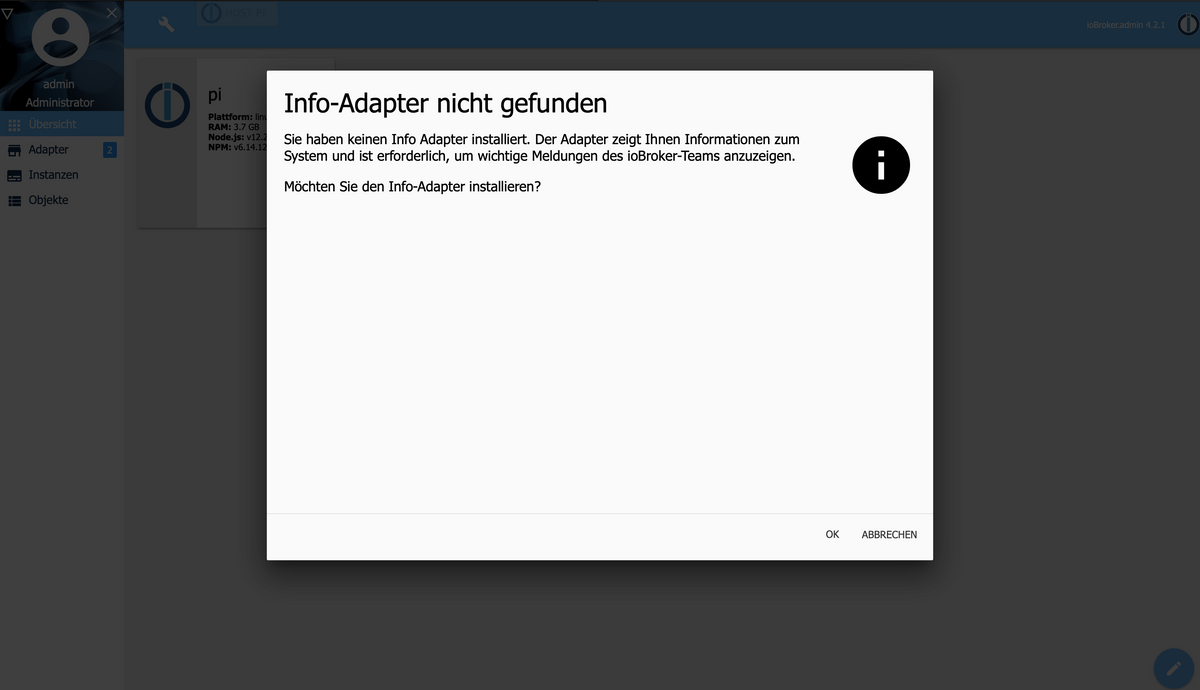
-
@berserker
Läuft der Admin jetzt?iobroker list instances@thomas-braun said in Stromausfall Web-Oberfläche öffnet sich nicht mehr:
iobroker list instances
pi@pi:/opt/iobroker $ iobroker list instances
+ system.adapter.admin.0                  : admin                 : pi                                       -  enabled, port: 8081, bind: 0.0.0.0, run as: admin

+ instance is alive
pi@pi:/opt/iobroker $
Das kommt dabei raus
-
Die Web Oberfläche ist wieder da.
Ich lass erstmal die Finger weg bis du etwas dazu sagst.@berserker Dann solltest du jetzt die fehlenden Adapter ja nachinstallieren können.
-
@berserker Dann solltest du jetzt die fehlenden Adapter ja nachinstallieren können.
Wenn ich jetzt die fehlenden Adapter nachinstalliert, sind die Settings dann noch da ??
Vielen Dank erstmal
-
@berserker Dann solltest du jetzt die fehlenden Adapter ja nachinstallieren können.
-
Wenn ich Adapter installieren möchte, dann steht bei den Adaptern die ich hatte, dass schon einer Installiert ist.
Kann ich zB. den Skripte Adapter irgendwie mit den alten Skripten herunterladen?
-
Wenn ich jetzt die fehlenden Adapter nachinstalliert, sind die Settings dann noch da ??
Vielen Dank erstmal
@berserker Vermutlich so einfach nicht.
Du kannst jetzt Mal nach demversuchen die alten Einstellungen herbeizaubern.
-
-
Hab ich getan
Eine frage:
Der Post den du mir verlinkt hast ist doch nur um den Iobroker wieder an laufen zu bekommen oder?
Ich wüsste nicht an welcher Stelle ich da jetzt einsteigen müsste.
Wäre dankbar wenn du mir noch einmal helfen könntest.
Und könnte es sein das die Daten noch da sind, da ja mir angezeigt wird das die Instanzen installiert sind. Ich kann sie im der Instanzen Liste und in den Objekten nur leider nicht sehen.
-
Hab ich getan
Eine frage:
Der Post den du mir verlinkt hast ist doch nur um den Iobroker wieder an laufen zu bekommen oder?
Ich wüsste nicht an welcher Stelle ich da jetzt einsteigen müsste.
Wäre dankbar wenn du mir noch einmal helfen könntest.
Und könnte es sein das die Daten noch da sind, da ja mir angezeigt wird das die Instanzen installiert sind. Ich kann sie im der Instanzen Liste und in den Objekten nur leider nicht sehen.
@berserker
Du kannst probieren periobroker upload allOder aus dem Mini-HowTo deine alten states und objects wieder herstellen.
-
@berserker
Du kannst probieren periobroker upload allOder aus dem Mini-HowTo deine alten states und objects wieder herstellen.
pi@pi:/opt/iobroker $ iobroker upload all
upload [80] info.admin /opt/iobroker/node_modules/iobroker.info/admin/words.js words.js application/javascript
upload [70] info.admin /opt/iobroker/node_modules/iobroker.info/admin/lib/js/hostInfo.js lib/js/hostInfo.js application/javascript
upload [60] info.admin /opt/iobroker/node_modules/iobroker.info/admin/lib/js/bootstrap.min.js lib/js/bootstrap.min.js application/javascript
upload [50] info.admin /opt/iobroker/node_modules/iobroker.info/admin/lib/img/logos/slackware.png lib/img/logos/slackware.png image/png
upload [40] info.admin /opt/iobroker/node_modules/iobroker.info/admin/lib/img/logos/manjaro.png lib/img/logos/manjaro.png image/png
upload [30] info.admin /opt/iobroker/node_modules/iobroker.info/admin/lib/img/logos/coreos.png lib/img/logos/coreos.png image/png
upload [20] info.admin /opt/iobroker/node_modules/iobroker.info/admin/lib/img/icons/disk.png lib/img/icons/disk.png image/png
upload [19] info.admin /opt/iobroker/node_modules/iobroker.info/admin/lib/img/icons/cpu.png lib/img/icons/cpu.png image/png
upload [18] info.admin /opt/iobroker/node_modules/iobroker.info/admin/lib/img/icons/battery.png lib/img/icons/battery.png image/png
upload [17] info.admin /opt/iobroker/node_modules/iobroker.info/admin/lib/img/clock/sechand.png lib/img/clock/sechand.png image/png
upload [16] info.admin /opt/iobroker/node_modules/iobroker.info/admin/lib/img/clock/minhand.png lib/img/clock/minhand.png image/png
upload [15] info.admin /opt/iobroker/node_modules/iobroker.info/admin/lib/img/clock/hourhand.png lib/img/clock/hourhand.png image/png
upload [14] info.admin /opt/iobroker/node_modules/iobroker.info/admin/lib/img/clock/clockface.png lib/img/clock/clockface.png image/png
upload [13] info.admin /opt/iobroker/node_modules/iobroker.info/admin/lib/fonts/fontawesome-webfont.woff2 lib/fonts/fontawesome-webfont.woff2 font/woff2
upload [12] info.admin /opt/iobroker/node_modules/iobroker.info/admin/lib/fonts/fontawesome-webfont.woff lib/fonts/fontawesome-webfont.woff font/woff
upload [11] info.admin /opt/iobroker/node_modules/iobroker.info/admin/lib/fonts/fontawesome-webfont.ttf lib/fonts/fontawesome-webfont.ttf font/ttf
upload [10] info.admin /opt/iobroker/node_modules/iobroker.info/admin/lib/fonts/fontawesome-webfont.svg lib/fonts/fontawesome-webfont.svg image/svg+xml
upload [9] info.admin /opt/iobroker/node_modules/iobroker.info/admin/lib/fonts/fontawesome-webfont.eot lib/fonts/fontawesome-webfont.eot application/vnd.ms-fontobject
upload [8] info.admin /opt/iobroker/node_modules/iobroker.info/admin/lib/fonts/FontAwesome.otf lib/fonts/FontAwesome.otf font/otf
upload [7] info.admin /opt/iobroker/node_modules/iobroker.info/admin/lib/data/infoData.json lib/data/infoData.json application/json
upload [6] info.admin /opt/iobroker/node_modules/iobroker.info/admin/lib/css/simplemde.min.css lib/css/simplemde.min.css text/css
upload [5] info.admin /opt/iobroker/node_modules/iobroker.info/admin/lib/css/info.css lib/css/info.css text/css
upload [4] info.admin /opt/iobroker/node_modules/iobroker.info/admin/lib/css/font-awesome.min.css lib/css/font-awesome.min.css text/css
upload [3] info.admin /opt/iobroker/node_modules/iobroker.info/admin/lib/css/chartist.min.css lib/css/chartist.min.css text/css
upload [2] info.admin /opt/iobroker/node_modules/iobroker.info/admin/lib/css/bootstrap.min.css lib/css/bootstrap.min.css text/css
upload [1] info.admin /opt/iobroker/node_modules/iobroker.info/admin/info.png info.png image/png
upload [0] info.admin /opt/iobroker/node_modules/iobroker.info/admin/index_m.html index_m.html text/html
Update "system.adapter.info.0"
upload [4] hue.admin /opt/iobroker/node_modules/iobroker.hue/admin/words.js words.js application/javascript
upload [3] hue.admin /opt/iobroker/node_modules/iobroker.hue/admin/instruction.png instruction.png image/png
upload [2] hue.admin /opt/iobroker/node_modules/iobroker.hue/admin/index_m.html index_m.html text/html
upload [1] hue.admin /opt/iobroker/node_modules/iobroker.hue/admin/index.html index.html text/html
upload [0] hue.admin /opt/iobroker/node_modules/iobroker.hue/admin/hue.jpeg hue.jpeg image/jpeg
upload [13] deconz.admin /opt/iobroker/node_modules/iobroker.deconz/admin/words.js words.js application/javascript
upload [12] deconz.admin /opt/iobroker/node_modules/iobroker.deconz/admin/instruction.png instruction.png image/png
upload [11] deconz.admin /opt/iobroker/node_modules/iobroker.deconz/admin/index_m.html index_m.html text/html
upload [10] deconz.admin /opt/iobroker/node_modules/iobroker.deconz/admin/i18n/zh-cn/translations.json i18n/zh-cn/translations.json application/json
upload [9] deconz.admin /opt/iobroker/node_modules/iobroker.deconz/admin/i18n/ru/translations.json i18n/ru/translations.json application/json
upload [8] deconz.admin /opt/iobroker/node_modules/iobroker.deconz/admin/i18n/pt/translations.json i18n/pt/translations.json application/json
upload [7] deconz.admin /opt/iobroker/node_modules/iobroker.deconz/admin/i18n/pl/translations.json i18n/pl/translations.json application/json
upload [6] deconz.admin /opt/iobroker/node_modules/iobroker.deconz/admin/i18n/nl/translations.json i18n/nl/translations.json application/json
upload [5] deconz.admin /opt/iobroker/node_modules/iobroker.deconz/admin/i18n/it/translations.json i18n/it/translations.json application/json
upload [4] deconz.admin /opt/iobroker/node_modules/iobroker.deconz/admin/i18n/fr/translations.json i18n/fr/translations.json application/json
upload [3] deconz.admin /opt/iobroker/node_modules/iobroker.deconz/admin/i18n/es/translations.json i18n/es/translations.json application/json
upload [2] deconz.admin /opt/iobroker/node_modules/iobroker.deconz/admin/i18n/en/translations.json i18n/en/translations.json application/json
upload [1] deconz.admin /opt/iobroker/node_modules/iobroker.deconz/admin/i18n/de/translations.json i18n/de/translations.json application/json
upload [0] deconz.admin /opt/iobroker/node_modules/iobroker.deconz/admin/deconz.png deconz.png image/png
Update "system.adapter.deconz.0"
upload [3] admin.admin /opt/iobroker/node_modules/iobroker.admin/admin/words.js words.js application/javascript
upload [2] admin.admin /opt/iobroker/node_modules/iobroker.admin/admin/index_m.html index_m.html text/html
upload [1] admin.admin /opt/iobroker/node_modules/iobroker.admin/admin/index.html index.html text/html
upload [0] admin.admin /opt/iobroker/node_modules/iobroker.admin/admin/admin.png admin.png image/png
Update "system.adapter.admin.0"
pi@pi:/opt/iobroker $
Das kommt bei raus.
Ich finde irgendwie keinen Post indem etwas in dem Sinne zu finden ist
Abgesehen davon erstmal meinen Respekt und ein großes Danke für deine Hilfe!!
-
Hab ich getan
Eine frage:
Der Post den du mir verlinkt hast ist doch nur um den Iobroker wieder an laufen zu bekommen oder?
Ich wüsste nicht an welcher Stelle ich da jetzt einsteigen müsste.
Wäre dankbar wenn du mir noch einmal helfen könntest.
Und könnte es sein das die Daten noch da sind, da ja mir angezeigt wird das die Instanzen installiert sind. Ich kann sie im der Instanzen Liste und in den Objekten nur leider nicht sehen.
@berserker sagte in Stromausfall Web-Oberfläche öffnet sich nicht mehr:
Ich wüsste nicht an welcher Stelle ich da jetzt einsteigen müsste.
am Anfang.
@berserker sagte in Stromausfall Web-Oberfläche öffnet sich nicht mehr:
d in den Objekten nur leider nicht sehen.
weil es wahrsche7nlich die Datenbanken der Objekte ind States terschossen hat
die stellst du mit der verlinkten Anleit6ng aus deren internen backups wieder her
kein Support per PN! - Fragen im Forum stellen - Benutzt das Voting rechts unten im Beitrag wenn er euch geholfen hat.
Das Forum freut sich über eine Spende. Benutzt dazu den Spendenbutton oben rechts. Danke!
der Installationsfixer: curl -fsL https://iobroker.net/fix.sh | bash -


Hey! Du scheinst an dieser Unterhaltung interessiert zu sein, hast aber noch kein Konto.
Hast du es satt, bei jedem Besuch durch die gleichen Beiträge zu scrollen? Wenn du dich für ein Konto anmeldest, kommst du immer genau dorthin zurück, wo du zuvor warst, und kannst dich über neue Antworten benachrichtigen lassen (entweder per E-Mail oder Push-Benachrichtigung). Du kannst auch Lesezeichen speichern und Beiträge positiv bewerten, um anderen Community-Mitgliedern deine Wertschätzung zu zeigen.
Mit deinem Input könnte dieser Beitrag noch besser werden 💗
Registrieren AnmeldenSupport us
506
Online33.0k
Benutzer83.6k
Themen1.3m
Beiträge