




IoBroker.mpd
-
Aber jetzt scheint es zu klappen. `
hmm.. bei mir und noch ein paar bekannten geht die ansage nur bis 70 Zeichen :? Was hast du jetzt gemacht? Eventuell konnte man die Ansage spalten..
> Was genau ist denn Max2Play bzw. muss du dafür bezahlen damit damit MPD funktioniert?für ca. 10€ bekommt man einige features freigeschaltet, z.b.
Bluetooth Plugin
Einfaches Raspberry Pi Touchdisplay Setup
Multisqueeze
SD Kartenschutz
FHEM Erweiterung
Raspberry PI Einstellungen für Audioausgabegeräte & Performanceoptionen für CPU
aber mpd geht auch auf Basis version.
-
Hi,
Also ich habe den PI mit Rasbian Jessie Lite installiert.
Dann mpd, mpc, alsa-utils, mpg321 installiert. Das ganze teil rebootet und die Ansage in iobroker MPD auf die neue IP umgestellt.
Danach kommt die Ansage vollständig, wie gesagt ich nutze schon länger IVONA.
Gruß
-
Hi,
muss hier nochmal etwas fragen.
Habe gestern ein neues Script zur Ansage DWD Warnungen gestartet.
Wollte dann direkt meine Ansagen testen und dabei ist mir im MPD logfile auf dem MPD Server (pi) aufgefallen das es voll mit diesen Einträgen ist:
alsa_mixer: Failed to read mixer for 'My ALSA Device': no such mixer control: PCMAlso schnell gegoogelt und gefunden das ich in die mpd.conf bei Output device das eintragen soll was hier ausgegeben wird:
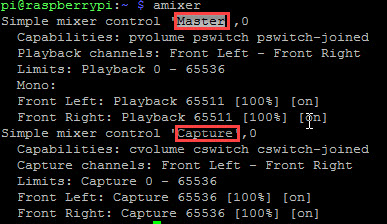
Dann sieht mein mpd.conf wie folgt aus:
audio_output {
        type            "alsa"
        name            "My ALSA Device"
        device          "hw:0,0"        # optional
#       mixer_type      "hardware"      # optional
#       mixer_device    "default"       # optional
        mixer_control   "Master"        # optional
#       mixer_index     "0"             # optional
}
Mit diesem Eintrag in der mpd.conf sind meine Fehlerhaften Logeinträge weg… ABER die Ansagen werden abgeschnitten!
Diese Ansage:
100;Guten Morgen, heute ist Samstag der 28te Januar 2017\. Es ist8 Uhr und 18 Minuten. Die Aussentemperatur beträgt -1,8 Grad. Wetter Bedingungen,Teils Wolkig . und Achtung, heute ist Abfuhrtermin: Schadstoffmobil S2 .wird nur so angesagt:
100;Guten Morgen, heute ist Samstag der 28te Januar 2017\. Es ist8 Uhr und 18 Minuten. Die Aussentemperatur beträgt -1Und diese:
80;Amtliche WARNUNG vor FROST. gültig vom, 27.01.2017 17:00 bis, 28.01.2017 11:00\. Es tritt leichter Frost zwischen -1 °C und -4 °C auf. In Tal- und Muldenlagen sinken die Temperaturen auf Werte bis -6 °C.wird nur so angesagt:
80;Amtliche WARNUNG vor FROST. gültig vom, 27.01.2017 17:00 bis, 28.01.2017 11:00.Hat da jemand eine Idee was ich wie in MPD einstellen kann/muss damit die Ansage komplett ist und das Logfile frei von Fehlern bleibt.
Danke und Gruß
Mirko
-
Hi,
muss hier nochmal etwas fragen.
Habe gestern ein neues Script zur Ansage DWD Warnungen gestartet.
Wollte dann direkt meine Ansagen testen und dabei ist mir im MPD logfile auf dem MPD Server (pi) aufgefallen das es voll mit diesen Einträgen ist:
alsa_mixer: Failed to read mixer for 'My ALSA Device': no such mixer control: PCMAlso schnell gegoogelt und gefunden das ich in die mpd.conf bei Output device das eintragen soll was hier ausgegeben wird:
amixer.jpg
Dann sieht mein mpd.conf wie folgt aus:
audio_output {
        type            "alsa"
        name            "My ALSA Device"
        device          "hw:0,0"        # optional
#       mixer_type      "hardware"      # optional
#       mixer_device    "default"       # optional
        mixer_control   "Master"        # optional
#       mixer_index     "0"             # optional
}
Mit diesem Eintrag in der mpd.conf sind meine Fehlerhaften Logeinträge weg… ABER die Ansagen werden abgeschnitten!
Diese Ansage:
100;Guten Morgen, heute ist Samstag der 28te Januar 2017\. Es ist8 Uhr und 18 Minuten. Die Aussentemperatur beträgt -1,8 Grad. Wetter Bedingungen,Teils Wolkig . und Achtung, heute ist Abfuhrtermin: Schadstoffmobil S2 .wird nur so angesagt:
100;Guten Morgen, heute ist Samstag der 28te Januar 2017\. Es ist8 Uhr und 18 Minuten. Die Aussentemperatur beträgt -1Und diese:
80;Amtliche WARNUNG vor FROST. gültig vom, 27.01.2017 17:00 bis, 28.01.2017 11:00\. Es tritt leichter Frost zwischen -1 °C und -4 °C auf. In Tal- und Muldenlagen sinken die Temperaturen auf Werte bis -6 °C.wird nur so angesagt:
80;Amtliche WARNUNG vor FROST. gültig vom, 27.01.2017 17:00 bis, 28.01.2017 11:00.Hat da jemand eine Idee was ich wie in MPD einstellen kann/muss damit die Ansage komplett ist und das Logfile frei von Fehlern bleibt.
Danke und Gruß
Mirko `
http://ip web adapter:port/state/sayit.0.tts.mp3 ````. nicht beschnitten? -
http://ip web adapter:port/state/sayit.0.tts.mp3
````. nicht beschnitten? `
Das ist nicht abgeschnitten.
Hier mal meine komplette MPD conf von dem Raspberry PI3
! cat /etc/mpd.conf
! # An example configuration file for MPD.
! # Read the user manual for documentation: http://www.musicpd.org/doc/user/
! # or /usr/share/doc/mpd/user-manual.html
! # Files and directories #######################################################
! #
! # This setting controls the top directory which MPD will search to discover the
! # available audio files and add them to the daemon's online database. This
! # setting defaults to the XDG directory, otherwise the music directory will be
! # be disabled and audio files will only be accepted over ipc socket (using
! # file:// protocol) or streaming files over an accepted protocol.
! #
! music_directory "/var/lib/mpd/music"
! #
! # This setting sets the MPD internal playlist directory. The purpose of this
! # directory is storage for playlists created by MPD. The server will use
! # playlist files not created by the server but only if they are in the MPD
! # format. This setting defaults to playlist saving being disabled.
! #
! playlist_directory "/var/lib/mpd/playlists"
! #
! # This setting sets the location of the MPD database. This file is used to
! # load the database at server start up and store the database while the
! # server is not up. This setting defaults to disabled which will allow
! # MPD to accept files over ipc socket (using file:// protocol) or streaming
! # files over an accepted protocol.
! #
! db_file "/var/lib/mpd/tag_cache"
! #
! # These settings are the locations for the daemon log files for the daemon.
! # These logs are great for troubleshooting, depending on your log_level
! # settings.
! #
! # The special value "syslog" makes MPD use the local syslog daemon. This
! # setting defaults to logging to syslog, otherwise logging is disabled.
! #
! log_file "/var/log/mpd/mpd.log"
! #
! # This setting sets the location of the file which stores the process ID
! # for use of mpd –kill and some init scripts. This setting is disabled by
! # default and the pid file will not be stored.
! #
! pid_file "/run/mpd/pid"
! #
! # This setting sets the location of the file which contains information about
! # most variables to get MPD back into the same general shape it was in before
! # it was brought down. This setting is disabled by default and the server
! # state will be reset on server start up.
! #
! state_file "/var/lib/mpd/state"
! #
! # The location of the sticker database. This is a database which
! # manages dynamic information attached to songs.
! #
! sticker_file "/var/lib/mpd/sticker.sql"
! #
! ###############################################################################
! # General music daemon options ################################################
! #
! # This setting specifies the user that MPD will run as. MPD should never run as
! # root and you may use this setting to make MPD change its user ID after
! # initialization. This setting is disabled by default and MPD is run as the
! # current user.
! #
! user "mpd"
! #
! # This setting specifies the group that MPD will run as. If not specified
! # primary group of user specified with "user" setting will be used (if set).
! # This is useful if MPD needs to be a member of group such as "audio" to
! # have permission to use sound card.
! #
! #group "nogroup"
! #
! # This setting sets the address for the daemon to listen on. Careful attention
! # should be paid if this is assigned to anything other then the default, any.
! # This setting can deny access to control of the daemon. Choose any if you want
! # to have mpd listen on every address
! #
! # For network
! bind_to_address "any"
! #
! # And for Unix Socket
! #bind_to_address "/run/mpd/socket"
! #
! # This setting is the TCP port that is desired for the daemon to get assigned
! # to.
! #
! #port "6600"
! #
! # This setting controls the type of information which is logged. Available
! # setting arguments are "default", "secure" or "verbose". The "verbose" setting
! # argument is recommended for troubleshooting, though can quickly stretch
! # available resources on limited hardware storage.
! #
! #log_level "verbose"
! #
! # If you have a problem with your MP3s ending abruptly it is recommended that
! # you set this argument to "no" to attempt to fix the problem. If this solves
! # the problem, it is highly recommended to fix the MP3 files with vbrfix
! # (available as vbrfix in the debian archive), at which
! # point gapless MP3 playback can be enabled.
! #
! #gapless_mp3_playback "yes"
! #
! # Setting "restore_paused" to "yes" puts MPD into pause mode instead
! # of starting playback after startup.
! #
! #restore_paused "no"
! #
! # This setting enables MPD to create playlists in a format usable by other
! # music players.
! #
! #save_absolute_paths_in_playlists "no"
! #
! # This setting defines a list of tag types that will be extracted during the
! # audio file discovery process. The complete list of possible values can be
! # found in the mpd.conf man page.
! #metadata_to_use "artist,album,title,track,name,genre,date,composer,performer,disc"
! #
! # This setting enables automatic update of MPD's database when files in
! # music_directory are changed.
! #
! #auto_update "yes"
! #
! # Limit the depth of the directories being watched, 0 means only watch
! # the music directory itself. There is no limit by default.
! #
! #auto_update_depth "3"
! #
! ###############################################################################
! # Symbolic link behavior ######################################################
! #
! # If this setting is set to "yes", MPD will discover audio files by following
! # symbolic links outside of the configured music_directory.
! #
! #follow_outside_symlinks "yes"
! #
! # If this setting is set to "yes", MPD will discover audio files by following
! # symbolic links inside of the configured music_directory.
! #
! #follow_inside_symlinks "yes"
! #
! ###############################################################################
! # Zeroconf / Avahi Service Discovery ##########################################
! #
! # If this setting is set to "yes", service information will be published with
! # Zeroconf / Avahi.
! #
! #zeroconf_enabled "no"
! #
! # The argument to this setting will be the Zeroconf / Avahi unique name for
! # this MPD server on the network.
! #
! #zeroconf_name "Music Player"
! #
! ###############################################################################
! # Permissions #################################################################
! #
! # If this setting is set, MPD will require password authorization. The password
! # can setting can be specified multiple times for different password profiles.
! #
! #password "password@read,add,control,admin"
! #
! # This setting specifies the permissions a user has who has not yet logged in.
! #
! #default_permissions "read,add,control,admin"
! #
! ###############################################################################
! # Database #######################################################################
! #
! #database {
! # plugin "proxy"
! # host "other.mpd.host"
! # port "6600"
! #}
! # Input #######################################################################
! #
! input {
! plugin "curl"
! # proxy "proxy.isp.com:8080"
! # proxy_user "user"
! # proxy_password "password"
! }
! #
! ###############################################################################
! # Audio Output ################################################################
! #
! # MPD supports various audio output types, as well as playing through multiple
! # audio outputs at the same time, through multiple audio_output settings
! # blocks. Setting this block is optional, though the server will only attempt
! # autodetection for one sound card.
! #
! # An example of an ALSA output:
! #
! audio_output {
! type "alsa"
! name "My ALSA Device"
! device "hw:0,0" # optional
! # mixer_type "hardware" # optional
! # mixer_device "default" # optional
! mixer_control "Master" # optional
! # mixer_index "0" # optional
! }
! #
! # An example of an OSS output:
! #
! #audio_output {
! # type "oss"
! # name "My OSS Device"
! # device "/dev/dsp" # optional
! # mixer_type "hardware" # optional
! # mixer_device "/dev/mixer" # optional
! # mixer_control "PCM" # optional
! #}
! #
! # An example of a shout output (for streaming to Icecast):
! #
! #audio_output {
! # type "shout"
! # encoding "ogg" # optional
! # name "My Shout Stream"
! # host "localhost"
! # port "8000"
! # mount "/mpd.ogg"
! # password "hackme"
! # quality "5.0"
! # bitrate "128"
! # format "44100:16:1"
! # protocol "icecast2" # optional
! # user "source" # optional
! # description "My Stream Description" # optional
! # url "http://example.com" # optional
! # genre "jazz" # optional
! # public "no" # optional
! # timeout "2" # optional
! # mixer_type "software" # optional
! #}
! #
! # An example of a recorder output:
! #
! #audio_output {
! # type "recorder"
! # name "My recorder"
! # encoder "vorbis" # optional, vorbis or lame
! # path "/var/lib/mpd/recorder/mpd.ogg"
! ## quality "5.0" # do not define if bitrate is defined
! # bitrate "128" # do not define if quality is defined
! # format "44100:16:1"
! #}
! #
! # An example of a httpd output (built-in HTTP streaming server):
! #
! #audio_output {
! # type "httpd"
! # name "My HTTP Stream"
! # encoder "vorbis" # optional, vorbis or lame
! # port "8000"
! # bind_to_address "0.0.0.0" # optional, IPv4 or IPv6
! # quality "5.0" # do not define if bitrate is defined
! # bitrate "128" # do not define if quality is defined
! # format "44100:16:1"
! # max_clients "0" # optional 0=no limit
! #}
! #
! # An example of a pulseaudio output (streaming to a remote pulseaudio server)
! # Please see README.Debian if you want mpd to play through the pulseaudio
! # daemon started as part of your graphical desktop session!
! #
! #audio_output {
! # type "pulse"
! # name "My Pulse Output"
! # server "remote_server" # optional
! # sink "alsa_output.0.analog-stereo" # optional
! #}
! #
! # An example of a winmm output (Windows multimedia API).
! #
! #audio_output {
! # type "winmm"
! # name "My WinMM output"
! # device "Digital Audio (S/PDIF) (High Definition Audio Device)" # optional
! # or
! # device "0" # optional
! # mixer_type "hardware" # optional
! #}
! #
! # An example of an openal output.
! #
! #audio_output {
! # type "openal"
! # name "My OpenAL output"
! # device "Digital Audio (S/PDIF) (High Definition Audio Device)" # optional
! #}
! #
! ## Example "pipe" output:
! #
! #audio_output {
! # type "pipe"
! # name "my pipe"
! # command "aplay -f cd 2>/dev/null"
! ## Or if you're want to use AudioCompress
! # command "AudioCompress -m | aplay -f cd 2>/dev/null"
! ## Or to send raw PCM stream through PCM:
! # command "nc example.org 8765"
! # format "44100:16:2"
! #}
! #
! ## An example of a null output (for no audio output):
! #
! #audio_output {
! # type "null"
! # name "My Null Output"
! # mixer_type "none" # optional
! #}
! #
! # If MPD has been compiled with libsamplerate support, this setting specifies
! # the sample rate converter to use. Possible values can be found in the
! # mpd.conf man page or the libsamplerate documentation. By default, this is
! # setting is disabled.
! #
! #samplerate_converter "Fastest Sinc Interpolator"
! #
! ###############################################################################
! # Normalization automatic volume adjustments ##################################
! #
! # This setting specifies the type of ReplayGain to use. This setting can have
! # the argument "off", "album", "track" or "auto". "auto" is a special mode that
! # chooses between "track" and "album" depending on the current state of
! # random playback. If random playback is enabled then "track" mode is used.
! # See <http://www.replaygain.org> for more details about ReplayGain.
! # This setting is off by default.
! #
! #replaygain "album"
! #
! # This setting sets the pre-amp used for files that have ReplayGain tags. By
! # default this setting is disabled.
! #
! #replaygain_preamp "0"
! #
! # This setting sets the pre-amp used for files that do NOT have ReplayGain tags.
! # By default this setting is disabled.
! #
! #replaygain_missing_preamp "0"
! #
! # This setting enables or disables ReplayGain limiting.
! # MPD calculates actual amplification based on the ReplayGain tags
! # and replaygain_preamp / replaygain_missing_preamp setting.
! # If replaygain_limit is enabled MPD will never amplify audio signal
! # above its original level. If replaygain_limit is disabled such amplification
! # might occur. By default this setting is enabled.
! #
! #replaygain_limit "yes"
! #
! # This setting enables on-the-fly normalization volume adjustment. This will
! # result in the volume of all playing audio to be adjusted so the output has
! # equal "loudness". This setting is disabled by default.
! #
! #volume_normalization "no"
! #
! ###############################################################################
! # Character Encoding ##########################################################
! #
! # If file or directory names do not display correctly for your locale then you
! # may need to modify this setting.
! #
! filesystem_charset "UTF-8"
! #
! # This setting controls the encoding that ID3v1 tags should be converted from.
! #
! id3v1_encoding "UTF-8"
! #
! ###############################################################################
! # SIDPlay decoder #############################################################
! #
! # songlength_database:
! # Location of your songlengths file, as distributed with the HVSC.
! # The sidplay plugin checks this for matching MD5 fingerprints.
! # See http://www.c64.org/HVSC/DOCUMENTS/Songlengths.faq
! #
! # default_songlength:
! # This is the default playing time in seconds for songs not in the
! # songlength database, or in case you're not using a database.
! # A value of 0 means play indefinitely.
! #
! # filter:
! # Turns the SID filter emulation on or off.
! #
! #decoder {
! # plugin "sidplay"
! # songlength_database "/media/C64Music/DOCUMENTS/Songlengths.txt"
! # default_songlength "120"
! # filter "true"
! #}
! #
! ###############################################################################
! pi@raspberrypi:~ $Habe schon versucht auf Pulseaudio umzustellen aber irgendwie startet MPD dann nicht mehr

-
http://ip web adapter:port/state/sayit.0.tts.mp3
````. nicht beschnitten? `
Das ist nicht abgeschnitten.
Hier mal meine komplette MPD conf von dem Raspberry PI3
! cat /etc/mpd.conf
! # An example configuration file for MPD.
! # Read the user manual for documentation: http://www.musicpd.org/doc/user/
! # or /usr/share/doc/mpd/user-manual.html
! # Files and directories #######################################################
! #
! # This setting controls the top directory which MPD will search to discover the
! # available audio files and add them to the daemon's online database. This
! # setting defaults to the XDG directory, otherwise the music directory will be
! # be disabled and audio files will only be accepted over ipc socket (using
! # file:// protocol) or streaming files over an accepted protocol.
! #
! music_directory "/var/lib/mpd/music"
! #
! # This setting sets the MPD internal playlist directory. The purpose of this
! # directory is storage for playlists created by MPD. The server will use
! # playlist files not created by the server but only if they are in the MPD
! # format. This setting defaults to playlist saving being disabled.
! #
! playlist_directory "/var/lib/mpd/playlists"
! #
! # This setting sets the location of the MPD database. This file is used to
! # load the database at server start up and store the database while the
! # server is not up. This setting defaults to disabled which will allow
! # MPD to accept files over ipc socket (using file:// protocol) or streaming
! # files over an accepted protocol.
! #
! db_file "/var/lib/mpd/tag_cache"
! #
! # These settings are the locations for the daemon log files for the daemon.
! # These logs are great for troubleshooting, depending on your log_level
! # settings.
! #
! # The special value "syslog" makes MPD use the local syslog daemon. This
! # setting defaults to logging to syslog, otherwise logging is disabled.
! #
! log_file "/var/log/mpd/mpd.log"
! #
! # This setting sets the location of the file which stores the process ID
! # for use of mpd –kill and some init scripts. This setting is disabled by
! # default and the pid file will not be stored.
! #
! pid_file "/run/mpd/pid"
! #
! # This setting sets the location of the file which contains information about
! # most variables to get MPD back into the same general shape it was in before
! # it was brought down. This setting is disabled by default and the server
! # state will be reset on server start up.
! #
! state_file "/var/lib/mpd/state"
! #
! # The location of the sticker database. This is a database which
! # manages dynamic information attached to songs.
! #
! sticker_file "/var/lib/mpd/sticker.sql"
! #
! ###############################################################################
! # General music daemon options ################################################
! #
! # This setting specifies the user that MPD will run as. MPD should never run as
! # root and you may use this setting to make MPD change its user ID after
! # initialization. This setting is disabled by default and MPD is run as the
! # current user.
! #
! user "mpd"
! #
! # This setting specifies the group that MPD will run as. If not specified
! # primary group of user specified with "user" setting will be used (if set).
! # This is useful if MPD needs to be a member of group such as "audio" to
! # have permission to use sound card.
! #
! #group "nogroup"
! #
! # This setting sets the address for the daemon to listen on. Careful attention
! # should be paid if this is assigned to anything other then the default, any.
! # This setting can deny access to control of the daemon. Choose any if you want
! # to have mpd listen on every address
! #
! # For network
! bind_to_address "any"
! #
! # And for Unix Socket
! #bind_to_address "/run/mpd/socket"
! #
! # This setting is the TCP port that is desired for the daemon to get assigned
! # to.
! #
! #port "6600"
! #
! # This setting controls the type of information which is logged. Available
! # setting arguments are "default", "secure" or "verbose". The "verbose" setting
! # argument is recommended for troubleshooting, though can quickly stretch
! # available resources on limited hardware storage.
! #
! #log_level "verbose"
! #
! # If you have a problem with your MP3s ending abruptly it is recommended that
! # you set this argument to "no" to attempt to fix the problem. If this solves
! # the problem, it is highly recommended to fix the MP3 files with vbrfix
! # (available as vbrfix in the debian archive), at which
! # point gapless MP3 playback can be enabled.
! #
! #gapless_mp3_playback "yes"
! #
! # Setting "restore_paused" to "yes" puts MPD into pause mode instead
! # of starting playback after startup.
! #
! #restore_paused "no"
! #
! # This setting enables MPD to create playlists in a format usable by other
! # music players.
! #
! #save_absolute_paths_in_playlists "no"
! #
! # This setting defines a list of tag types that will be extracted during the
! # audio file discovery process. The complete list of possible values can be
! # found in the mpd.conf man page.
! #metadata_to_use "artist,album,title,track,name,genre,date,composer,performer,disc"
! #
! # This setting enables automatic update of MPD's database when files in
! # music_directory are changed.
! #
! #auto_update "yes"
! #
! # Limit the depth of the directories being watched, 0 means only watch
! # the music directory itself. There is no limit by default.
! #
! #auto_update_depth "3"
! #
! ###############################################################################
! # Symbolic link behavior ######################################################
! #
! # If this setting is set to "yes", MPD will discover audio files by following
! # symbolic links outside of the configured music_directory.
! #
! #follow_outside_symlinks "yes"
! #
! # If this setting is set to "yes", MPD will discover audio files by following
! # symbolic links inside of the configured music_directory.
! #
! #follow_inside_symlinks "yes"
! #
! ###############################################################################
! # Zeroconf / Avahi Service Discovery ##########################################
! #
! # If this setting is set to "yes", service information will be published with
! # Zeroconf / Avahi.
! #
! #zeroconf_enabled "no"
! #
! # The argument to this setting will be the Zeroconf / Avahi unique name for
! # this MPD server on the network.
! #
! #zeroconf_name "Music Player"
! #
! ###############################################################################
! # Permissions #################################################################
! #
! # If this setting is set, MPD will require password authorization. The password
! # can setting can be specified multiple times for different password profiles.
! #
! #password "password@read,add,control,admin"
! #
! # This setting specifies the permissions a user has who has not yet logged in.
! #
! #default_permissions "read,add,control,admin"
! #
! ###############################################################################
! # Database #######################################################################
! #
! #database {
! # plugin "proxy"
! # host "other.mpd.host"
! # port "6600"
! #}
! # Input #######################################################################
! #
! input {
! plugin "curl"
! # proxy "proxy.isp.com:8080"
! # proxy_user "user"
! # proxy_password "password"
! }
! #
! ###############################################################################
! # Audio Output ################################################################
! #
! # MPD supports various audio output types, as well as playing through multiple
! # audio outputs at the same time, through multiple audio_output settings
! # blocks. Setting this block is optional, though the server will only attempt
! # autodetection for one sound card.
! #
! # An example of an ALSA output:
! #
! audio_output {
! type "alsa"
! name "My ALSA Device"
! device "hw:0,0" # optional
! # mixer_type "hardware" # optional
! # mixer_device "default" # optional
! mixer_control "Master" # optional
! # mixer_index "0" # optional
! }
! #
! # An example of an OSS output:
! #
! #audio_output {
! # type "oss"
! # name "My OSS Device"
! # device "/dev/dsp" # optional
! # mixer_type "hardware" # optional
! # mixer_device "/dev/mixer" # optional
! # mixer_control "PCM" # optional
! #}
! #
! # An example of a shout output (for streaming to Icecast):
! #
! #audio_output {
! # type "shout"
! # encoding "ogg" # optional
! # name "My Shout Stream"
! # host "localhost"
! # port "8000"
! # mount "/mpd.ogg"
! # password "hackme"
! # quality "5.0"
! # bitrate "128"
! # format "44100:16:1"
! # protocol "icecast2" # optional
! # user "source" # optional
! # description "My Stream Description" # optional
! # url "http://example.com" # optional
! # genre "jazz" # optional
! # public "no" # optional
! # timeout "2" # optional
! # mixer_type "software" # optional
! #}
! #
! # An example of a recorder output:
! #
! #audio_output {
! # type "recorder"
! # name "My recorder"
! # encoder "vorbis" # optional, vorbis or lame
! # path "/var/lib/mpd/recorder/mpd.ogg"
! ## quality "5.0" # do not define if bitrate is defined
! # bitrate "128" # do not define if quality is defined
! # format "44100:16:1"
! #}
! #
! # An example of a httpd output (built-in HTTP streaming server):
! #
! #audio_output {
! # type "httpd"
! # name "My HTTP Stream"
! # encoder "vorbis" # optional, vorbis or lame
! # port "8000"
! # bind_to_address "0.0.0.0" # optional, IPv4 or IPv6
! # quality "5.0" # do not define if bitrate is defined
! # bitrate "128" # do not define if quality is defined
! # format "44100:16:1"
! # max_clients "0" # optional 0=no limit
! #}
! #
! # An example of a pulseaudio output (streaming to a remote pulseaudio server)
! # Please see README.Debian if you want mpd to play through the pulseaudio
! # daemon started as part of your graphical desktop session!
! #
! #audio_output {
! # type "pulse"
! # name "My Pulse Output"
! # server "remote_server" # optional
! # sink "alsa_output.0.analog-stereo" # optional
! #}
! #
! # An example of a winmm output (Windows multimedia API).
! #
! #audio_output {
! # type "winmm"
! # name "My WinMM output"
! # device "Digital Audio (S/PDIF) (High Definition Audio Device)" # optional
! # or
! # device "0" # optional
! # mixer_type "hardware" # optional
! #}
! #
! # An example of an openal output.
! #
! #audio_output {
! # type "openal"
! # name "My OpenAL output"
! # device "Digital Audio (S/PDIF) (High Definition Audio Device)" # optional
! #}
! #
! ## Example "pipe" output:
! #
! #audio_output {
! # type "pipe"
! # name "my pipe"
! # command "aplay -f cd 2>/dev/null"
! ## Or if you're want to use AudioCompress
! # command "AudioCompress -m | aplay -f cd 2>/dev/null"
! ## Or to send raw PCM stream through PCM:
! # command "nc example.org 8765"
! # format "44100:16:2"
! #}
! #
! ## An example of a null output (for no audio output):
! #
! #audio_output {
! # type "null"
! # name "My Null Output"
! # mixer_type "none" # optional
! #}
! #
! # If MPD has been compiled with libsamplerate support, this setting specifies
! # the sample rate converter to use. Possible values can be found in the
! # mpd.conf man page or the libsamplerate documentation. By default, this is
! # setting is disabled.
! #
! #samplerate_converter "Fastest Sinc Interpolator"
! #
! ###############################################################################
! # Normalization automatic volume adjustments ##################################
! #
! # This setting specifies the type of ReplayGain to use. This setting can have
! # the argument "off", "album", "track" or "auto". "auto" is a special mode that
! # chooses between "track" and "album" depending on the current state of
! # random playback. If random playback is enabled then "track" mode is used.
! # See <http://www.replaygain.org> for more details about ReplayGain.
! # This setting is off by default.
! #
! #replaygain "album"
! #
! # This setting sets the pre-amp used for files that have ReplayGain tags. By
! # default this setting is disabled.
! #
! #replaygain_preamp "0"
! #
! # This setting sets the pre-amp used for files that do NOT have ReplayGain tags.
! # By default this setting is disabled.
! #
! #replaygain_missing_preamp "0"
! #
! # This setting enables or disables ReplayGain limiting.
! # MPD calculates actual amplification based on the ReplayGain tags
! # and replaygain_preamp / replaygain_missing_preamp setting.
! # If replaygain_limit is enabled MPD will never amplify audio signal
! # above its original level. If replaygain_limit is disabled such amplification
! # might occur. By default this setting is enabled.
! #
! #replaygain_limit "yes"
! #
! # This setting enables on-the-fly normalization volume adjustment. This will
! # result in the volume of all playing audio to be adjusted so the output has
! # equal "loudness". This setting is disabled by default.
! #
! #volume_normalization "no"
! #
! ###############################################################################
! # Character Encoding ##########################################################
! #
! # If file or directory names do not display correctly for your locale then you
! # may need to modify this setting.
! #
! filesystem_charset "UTF-8"
! #
! # This setting controls the encoding that ID3v1 tags should be converted from.
! #
! id3v1_encoding "UTF-8"
! #
! ###############################################################################
! # SIDPlay decoder #############################################################
! #
! # songlength_database:
! # Location of your songlengths file, as distributed with the HVSC.
! # The sidplay plugin checks this for matching MD5 fingerprints.
! # See http://www.c64.org/HVSC/DOCUMENTS/Songlengths.faq
! #
! # default_songlength:
! # This is the default playing time in seconds for songs not in the
! # songlength database, or in case you're not using a database.
! # A value of 0 means play indefinitely.
! #
! # filter:
! # Turns the SID filter emulation on or off.
! #
! #decoder {
! # plugin "sidplay"
! # songlength_database "/media/C64Music/DOCUMENTS/Songlengths.txt"
! # default_songlength "120"
! # filter "true"
! #}
! #
! ###############################################################################
! pi@raspberrypi:~ $Habe schon versucht auf Pulseaudio umzustellen aber irgendwie startet MPD dann nicht mehr
`add in conf :
audio_buffer_size "4096" buffer_before_play "100%" -
add in conf :
audio_buffer_size       "4096"
buffer_before_play      "100%"
```` `  `  `
Hi,
i added the lines to mpd.conf:
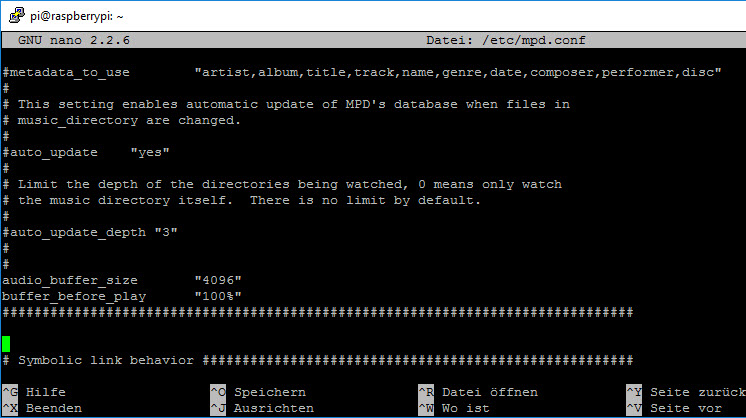
Guess there is not special place at mpd.conf file for it.
Changed the Mixer back to "Master" but sound is still not complete
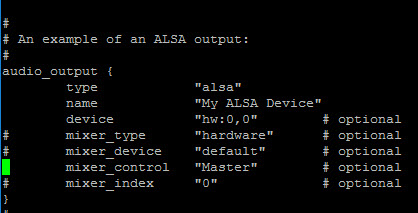
This one:
80;Amtliche WARNUNG vor FROST. gültig vom, 27.01.2017 17:00 bis, 28.01.2017 11:00\. Es tritt leichter Frost zwischen -1 °C und -4 °C auf. In Tal- und Muldenlagen sinken die Temperaturen auf Werte bis -6 °C.Stops here:
80;Amtliche WARNUNG vor FROST. gültig vom, 27.01.2017 17:00 bis, 28.01.2017 11I guess it's ok just to stop and start mpd and pi reboot is not needed?
This is mpd logfile during playing:
! Jan 28 15:11 : client: [0] opened from 192.168.178.19:58384
! Jan 28 15:11 : client: [0] process command "idle"
! Jan 28 15:11 : client: [0] command returned 1
! Jan 28 15:11 : client: [0] process command "status"
! Jan 28 15:11 : client: [0] command returned 0
! Jan 28 15:11 : client: [0] process command "idle"
! Jan 28 15:11 : client: [0] command returned 1
! Jan 28 15:11 : client: [0] process command "playlist"
! Jan 28 15:11 : client: [0] command returned 0
! Jan 28 15:11 : client: [0] process command "idle"
! Jan 28 15:11 : client: [0] command returned 1
! Jan 28 15:11 : client: [0] process command "rm "temp_ForSayIt""
! Jan 28 15:11 : client: [0] command returned 0
! Jan 28 15:11 : client: [0] process command "idle"
! Jan 28 15:11 : client: [0] command returned 1
! Jan 28 15:11 : client: [0] process command "save "temp_ForSayIt""
! Jan 28 15:11 : client: [0] command returned 0
! Jan 28 15:11 : client: [0] process command "idle"
! Jan 28 15:11 : client: [0] command returned 1
! Jan 28 15:11 : client: [0] process command "currentsong"
! Jan 28 15:11 : client: [0] command returned 0
! Jan 28 15:11 : client: [0] process command "idle"
! Jan 28 15:11 : client: [0] command returned 1
! Jan 28 15:11 : client: [0] process command "status"
! Jan 28 15:11 : client: [0] command returned 0
! Jan 28 15:11 : client: [0] process command "idle"
! Jan 28 15:11 : client: [0] command returned 1
! Jan 28 15:11 : client: [0] process command "stats"
! Jan 28 15:11 : client: [0] command returned 0
! Jan 28 15:11 : client: [0] process command "idle"
! Jan 28 15:11 : client: [0] command returned 1
! Jan 28 15:11 : client: [0] process command "clear"
! Jan 28 15:11 : client: [0] command returned 0
! Jan 28 15:11 : client: [0] process command "idle"
! Jan 28 15:11 : client: [0] command returned 1
! Jan 28 15:11 : client: [0] process command "currentsong"
! Jan 28 15:11 : client: [0] command returned 0
! Jan 28 15:11 : client: [0] process command "idle"
! Jan 28 15:11 : client: [0] command returned 1
! Jan 28 15:11 : client: [0] process command "status"
! Jan 28 15:11 : client: [0] command returned 0
! Jan 28 15:11 : client: [0] process command "idle"
! Jan 28 15:11 : client: [0] command returned 1
! Jan 28 15:11 : client: [0] process command "stats"
! Jan 28 15:11 : client: [0] command returned 0
! Jan 28 15:11 : client: [0] process command "idle"
! Jan 28 15:11 : client: [0] command returned 1
! Jan 28 15:11 : client: [0] process command "consume "1""
! Jan 28 15:11 : client: [0] command returned 0
! Jan 28 15:11 : client: [0] process command "idle"
! Jan 28 15:11 : client: [0] command returned 1
! Jan 28 15:11 : client: [0] process command "playlist"
! Jan 28 15:11 : client: [0] command returned 0
! Jan 28 15:11 : client: [0] process command "idle"
! Jan 28 15:11 : client: [0] command returned 1
! Jan 28 15:11 : client: [0] process command "addid "http://192.168.178.18:8082/state/sayit.1.tts.mp3""
! Jan 28 15:11 : client: [0] command returned 0
! Jan 28 15:11 : client: [0] process command "idle"
! Jan 28 15:11 : client: [0] command returned 1
! Jan 28 15:11 : client: [0] process command "currentsong"
! Jan 28 15:11 : client: [0] command returned 0
! Jan 28 15:11 : client: [0] process command "idle"
! Jan 28 15:11 : client: [0] command returned 1
! Jan 28 15:11 : client: [0] process command "status"
! Jan 28 15:11 : client: [0] command returned 0
! Jan 28 15:11 : client: [0] process command "idle"
! Jan 28 15:11 : client: [0] command returned 1
! Jan 28 15:11 : client: [0] process command "stats"
! Jan 28 15:11 : client: [0] command returned 0
! Jan 28 15:11 : client: [0] process command "idle"
! Jan 28 15:11 : client: [0] command returned 1
! Jan 28 15:11 : client: [0] process command "playid "2""
! Jan 28 15:11 : playlist: play 0:"http://192.168.178.18:8082/state/sayit.1.tts.mp3"
! Jan 28 15:11 : client: [0] command returned 0
! Jan 28 15:11 : client: [0] process command "idle"
! Jan 28 15:11 : client: [0] command returned 1
! Jan 28 15:11 : client: [0] process command "playlist"
! Jan 28 15:11 : client: [0] command returned 0
! Jan 28 15:11 : client: [0] process command "idle"
! Jan 28 15:11 : client: [0] command returned 1
! Jan 28 15:11 : decoder_thread: probing plugin mad
! Jan 28 15:11 : decoder: audio_format=22050:24:1, seekable=false
! Jan 28 15:11 : alsa_output: opened hw:0,0 type=HW
! Jan 28 15:11 : alsa_output: format=S16_LE (Signed 16 bit Little Endian)
! Jan 28 15:11 : alsa_output: buffer: size=512..32768 time=23219..1486078
! Jan 28 15:11 : alsa_output: period: size=512..32768 time=23219..1486078
! Jan 28 15:11 : alsa_output: default period_time = buffer_time/4 = 500000/4 = 125000
! Jan 28 15:11 : alsa_output: buffer_size=11025 period_size=2760
! Jan 28 15:11 : output: opened plugin=alsa name="My ALSA Device" audio_format=22050:16:1
! Jan 28 15:11 : output: converting from 22050:24:1
! Jan 28 15:11 : client: [0] process command "currentsong"
! Jan 28 15:11 : client: [0] command returned 0
! Jan 28 15:11 : client: [0] process command "idle"
! Jan 28 15:11 : client: [0] command returned 1
! Jan 28 15:11 : client: [0] process command "status"
! Jan 28 15:11 : client: [0] command returned 0
! Jan 28 15:11 : client: [0] process command "idle"
! Jan 28 15:11 : client: [0] command returned 1
! Jan 28 15:11 : client: [0] process command "stats"
! Jan 28 15:11 : client: [0] command returned 0
! Jan 28 15:11 : client: [0] process command "idle"
! Jan 28 15:11 : client: [0] command returned 1
! Jan 28 15:11 : client: [0] process command "playlist"
! Jan 28 15:11 : client: [0] command returned 0
! Jan 28 15:11 : client: [0] process command "idle"
! Jan 28 15:11 : client: [0] command returned 1
! Jan 28 15:11 : client: [0] process command "currentsong"
! Jan 28 15:11 : client: [0] command returned 0
! Jan 28 15:11 : client: [0] process command "idle"
! Jan 28 15:11 : client: [0] command returned 1
! Jan 28 15:11 : client: [0] process command "status"
! Jan 28 15:11 : client: [0] command returned 0
! Jan 28 15:11 : client: [0] process command "idle"
! Jan 28 15:11 : client: [0] command returned 1
! Jan 28 15:11 : client: [0] process command "stats"
! Jan 28 15:11 : client: [0] command returned 0
! Jan 28 15:11 : client: [0] process command "idle"
! Jan 28 15:11 : client: [0] command returned 1
! Jan 28 15:11 : client: [0] process command "setvol "80""
! Jan 28 15:11 : client: [0] command returned 0
! Jan 28 15:11 : client: [0] process command "idle"
! Jan 28 15:11 : client: [0] command returned 1
! Jan 28 15:11 : client: [0] process command "idle"
! Jan 28 15:11 : client: [0] command returned 1
! Jan 28 15:11 : client: [0] process command "idle"
! Jan 28 15:11 : client: [0] command returned 1
! Jan 28 15:11 : client: [0] process command "currentsong"
! Jan 28 15:11 : client: [0] command returned 0
! Jan 28 15:11 : client: [0] process command "idle"
! Jan 28 15:11 : client: [0] command returned 1
! Jan 28 15:11 : client: [0] process command "status"
! Jan 28 15:11 : client: [0] command returned 0
! Jan 28 15:11 : client: [0] process command "idle"
! Jan 28 15:11 : client: [0] command returned 1
! Jan 28 15:11 : client: [0] process command "currentsong"
! Jan 28 15:11 : client: [0] command returned 0
! Jan 28 15:11 : client: [0] process command "idle"
! Jan 28 15:11 : client: [0] command returned 1
! Jan 28 15:11 : client: [0] process command "status"
! Jan 28 15:11 : client: [0] command returned 0
! Jan 28 15:11 : client: [0] process command "idle"
! Jan 28 15:11 : client: [0] command returned 1
! Jan 28 15:11 : client: [0] process command "currentsong"
! Jan 28 15:11 : client: [0] command returned 0
! Jan 28 15:11 : client: [0] process command "idle"
! Jan 28 15:11 : client: [0] command returned 1
! Jan 28 15:11 : client: [0] process command "status"
! Jan 28 15:11 : client: [0] command returned 0
! Jan 28 15:11 : client: [0] process command "idle"
! Jan 28 15:11 : client: [0] command returned 1
! Jan 28 15:11 : client: [0] process command "currentsong"
! Jan 28 15:11 : client: [0] command returned 0
! Jan 28 15:11 : client: [0] process command "idle"
! Jan 28 15:11 : client: [0] command returned 1
! Jan 28 15:11 : client: [0] process command "status"
! Jan 28 15:11 : client: [0] command returned 0
! Jan 28 15:11 : client: [0] process command "idle"
! Jan 28 15:11 : client: [0] command returned 1
! Jan 28 15:11 : client: [0] process command "currentsong"
! Jan 28 15:11 : client: [0] command returned 0
! Jan 28 15:11 : client: [0] process command "idle"
! Jan 28 15:11 : client: [0] command returned 1
! Jan 28 15:11 : client: [0] process command "status"
! Jan 28 15:11 : client: [0] command returned 0
! Jan 28 15:11 : client: [0] process command "idle"
! Jan 28 15:11 : client: [0] command returned 1
! Jan 28 15:11 : client: [0] process command "currentsong"
! Jan 28 15:11 : client: [0] command returned 0
! Jan 28 15:11 : client: [0] process command "idle"
! Jan 28 15:11 : client: [0] command returned 1
! Jan 28 15:11 : client: [0] process command "status"
! Jan 28 15:11 : client: [0] command returned 0
! Jan 28 15:11 : client: [0] process command "idle"
! Jan 28 15:11 : client: [0] command returned 1
! Jan 28 15:12 : client: [0] process command "currentsong"
! Jan 28 15:12 : client: [0] command returned 0
! Jan 28 15:12 : client: [0] process command "idle"
! Jan 28 15:12 : client: [0] command returned 1
! Jan 28 15:12 : client: [0] process command "status"
! Jan 28 15:12 : client: [0] command returned 0
! Jan 28 15:12 : client: [0] process command "idle"
! Jan 28 15:12 : client: [0] command returned 1
! Jan 28 15:12 : client: [0] process command "currentsong"
! Jan 28 15:12 : client: [0] command returned 0
! Jan 28 15:12 : client: [0] process command "idle"
! Jan 28 15:12 : client: [0] command returned 1
! Jan 28 15:12 : client: [0] process command "status"
! Jan 28 15:12 : client: [0] command returned 0
! Jan 28 15:12 : client: [0] process command "idle"
! Jan 28 15:12 : client: [0] command returned 1
! Jan 28 15:12 : client: [0] process command "currentsong"
! Jan 28 15:12 : client: [0] command returned 0
! Jan 28 15:12 : client: [0] process command "idle"
! Jan 28 15:12 : client: [0] command returned 1
! Jan 28 15:12 : client: [0] process command "status"
! Jan 28 15:12 : client: [0] command returned 0
! Jan 28 15:12 : client: [0] process command "idle"
! Jan 28 15:12 : client: [0] command returned 1
! Jan 28 15:12 : client: [0] process command "consume "0""
! Jan 28 15:12 : client: [0] command returned 0
! Jan 28 15:12 : client: [0] process command "idle"
! Jan 28 15:12 : client: [0] command returned 1
! Jan 28 15:12 : client: [0] process command "clear"
! Jan 28 15:12 : playlist: stop
! Jan 28 15:12 : player: played "http://192.168.178.18:8082/state/sayit.1.tts.mp3"
! Jan 28 15:12 : output: closed plugin=alsa name="My ALSA Device"
! Jan 28 15:12 : client: [0] command returned 0
! Jan 28 15:12 : client: [0] process command "idle"
! Jan 28 15:12 : client: [0] command returned 1
! Jan 28 15:12 : client: [0] process command "currentsong"
! Jan 28 15:12 : client: [0] command returned 0
! Jan 28 15:12 : client: [0] process command "idle"
! Jan 28 15:12 : client: [0] command returned 1
! Jan 28 15:12 : client: [0] process command "status"
! Jan 28 15:12 : client: [0] command returned 0
! Jan 28 15:12 : client: [0] process command "idle"
! Jan 28 15:12 : client: [0] command returned 1
! Jan 28 15:12 : client: [0] process command "stats"
! Jan 28 15:12 : client: [0] command returned 0
! Jan 28 15:12 : client: [0] process command "idle"
! Jan 28 15:12 : client: [0] command returned 1
! Jan 28 15:12 : client: [0] process command "currentsong"
! Jan 28 15:12 : client: [0] command returned 0
! Jan 28 15:12 : client: [0] process command "idle"
! Jan 28 15:12 : client: [0] command returned 1
! Jan 28 15:12 : client: [0] process command "status"
! Jan 28 15:12 : client: [0] command returned 0
! Jan 28 15:12 : client: [0] process command "idle"
! Jan 28 15:12 : client: [0] command returned 1
! Jan 28 15:12 : client: [0] process command "load "temp_ForSayIt""
! Jan 28 15:12 : client: [0] command returned 0
! Jan 28 15:12 : client: [0] process command "idle"
! Jan 28 15:12 : client: [0] command returned 1
! Jan 28 15:12 : client: [0] process command "playlist"
! Jan 28 15:12 : client: [0] command returned 0
! Jan 28 15:12 : client: [0] process command "idle"
! Jan 28 15:12 : client: [0] command returned 1
! Jan 28 15:12 : client: [0] process command "currentsong"
! Jan 28 15:12 : client: [0] command returned 0
! Jan 28 15:12 : client: [0] process command "idle"
! Jan 28 15:12 : client: [0] command returned 1
! Jan 28 15:12 : client: [0] process command "status"
! Jan 28 15:12 : client: [0] command returned 0
! Jan 28 15:12 : client: [0] process command "idle"
! Jan 28 15:12 : client: [0] command returned 1
! Jan 28 15:12 : client: [0] process command "stats"
! Jan 28 15:12 : client: [0] command returned 0
! Jan 28 15:12 : client: [0] process command "idle"
! Jan 28 15:12 : client: [0] command returned 1
! Jan 28 15:12 : client: [0] process command "playlist"
! Jan 28 15:12 : client: [0] command returned 0
! Jan 28 15:12 : client: [0] process command "idle"
! Jan 28 15:12 : client: [0] command returned 1
! Jan 28 15:12 : client: [0] process command "stop"
! Jan 28 15:12 : client: [0] command returned 0
! Jan 28 15:12 : client: [0] process command "idle"
! Jan 28 15:12 : client: [0] command returned 1This is how the logfile looks if i change mpd.conf back to "defaults" with unused Mixer Control and output is complete:
Please let me know if we shall continue in english or german?
Thanks for help
-
Hi,
i added the lines to mpd.conf:
added buffer.jpg
Guess there is not special place at mpd.conf file for it.
Changed the Mixer back to "Master" but sound is still not complete
Audio_output.jpg
This one:
80;Amtliche WARNUNG vor FROST. gültig vom, 27.01.2017 17:00 bis, 28.01.2017 11:00\. Es tritt leichter Frost zwischen -1 °C und -4 °C auf. In Tal- und Muldenlagen sinken die Temperaturen auf Werte bis -6 °C.Stops here:
80;Amtliche WARNUNG vor FROST. gültig vom, 27.01.2017 17:00 bis, 28.01.2017 11I guess it's ok just to stop and start mpd and pi reboot is not needed?
This is mpd logfile during playing:
! Jan 28 15:11 : client: [0] opened from 192.168.178.19:58384
! Jan 28 15:11 : client: [0] process command "idle"
! Jan 28 15:11 : client: [0] command returned 1
! Jan 28 15:11 : client: [0] process command "status"
! Jan 28 15:11 : client: [0] command returned 0
! Jan 28 15:11 : client: [0] process command "idle"
! Jan 28 15:11 : client: [0] command returned 1
! Jan 28 15:11 : client: [0] process command "playlist"
! Jan 28 15:11 : client: [0] command returned 0
! Jan 28 15:11 : client: [0] process command "idle"
! Jan 28 15:11 : client: [0] command returned 1
! Jan 28 15:11 : client: [0] process command "rm "temp_ForSayIt""
! Jan 28 15:11 : client: [0] command returned 0
! Jan 28 15:11 : client: [0] process command "idle"
! Jan 28 15:11 : client: [0] command returned 1
! Jan 28 15:11 : client: [0] process command "save "temp_ForSayIt""
! Jan 28 15:11 : client: [0] command returned 0
! Jan 28 15:11 : client: [0] process command "idle"
! Jan 28 15:11 : client: [0] command returned 1
! Jan 28 15:11 : client: [0] process command "currentsong"
! Jan 28 15:11 : client: [0] command returned 0
! Jan 28 15:11 : client: [0] process command "idle"
! Jan 28 15:11 : client: [0] command returned 1
! Jan 28 15:11 : client: [0] process command "status"
! Jan 28 15:11 : client: [0] command returned 0
! Jan 28 15:11 : client: [0] process command "idle"
! Jan 28 15:11 : client: [0] command returned 1
! Jan 28 15:11 : client: [0] process command "stats"
! Jan 28 15:11 : client: [0] command returned 0
! Jan 28 15:11 : client: [0] process command "idle"
! Jan 28 15:11 : client: [0] command returned 1
! Jan 28 15:11 : client: [0] process command "clear"
! Jan 28 15:11 : client: [0] command returned 0
! Jan 28 15:11 : client: [0] process command "idle"
! Jan 28 15:11 : client: [0] command returned 1
! Jan 28 15:11 : client: [0] process command "currentsong"
! Jan 28 15:11 : client: [0] command returned 0
! Jan 28 15:11 : client: [0] process command "idle"
! Jan 28 15:11 : client: [0] command returned 1
! Jan 28 15:11 : client: [0] process command "status"
! Jan 28 15:11 : client: [0] command returned 0
! Jan 28 15:11 : client: [0] process command "idle"
! Jan 28 15:11 : client: [0] command returned 1
! Jan 28 15:11 : client: [0] process command "stats"
! Jan 28 15:11 : client: [0] command returned 0
! Jan 28 15:11 : client: [0] process command "idle"
! Jan 28 15:11 : client: [0] command returned 1
! Jan 28 15:11 : client: [0] process command "consume "1""
! Jan 28 15:11 : client: [0] command returned 0
! Jan 28 15:11 : client: [0] process command "idle"
! Jan 28 15:11 : client: [0] command returned 1
! Jan 28 15:11 : client: [0] process command "playlist"
! Jan 28 15:11 : client: [0] command returned 0
! Jan 28 15:11 : client: [0] process command "idle"
! Jan 28 15:11 : client: [0] command returned 1
! Jan 28 15:11 : client: [0] process command "addid "http://192.168.178.18:8082/state/sayit.1.tts.mp3""
! Jan 28 15:11 : client: [0] command returned 0
! Jan 28 15:11 : client: [0] process command "idle"
! Jan 28 15:11 : client: [0] command returned 1
! Jan 28 15:11 : client: [0] process command "currentsong"
! Jan 28 15:11 : client: [0] command returned 0
! Jan 28 15:11 : client: [0] process command "idle"
! Jan 28 15:11 : client: [0] command returned 1
! Jan 28 15:11 : client: [0] process command "status"
! Jan 28 15:11 : client: [0] command returned 0
! Jan 28 15:11 : client: [0] process command "idle"
! Jan 28 15:11 : client: [0] command returned 1
! Jan 28 15:11 : client: [0] process command "stats"
! Jan 28 15:11 : client: [0] command returned 0
! Jan 28 15:11 : client: [0] process command "idle"
! Jan 28 15:11 : client: [0] command returned 1
! Jan 28 15:11 : client: [0] process command "playid "2""
! Jan 28 15:11 : playlist: play 0:"http://192.168.178.18:8082/state/sayit.1.tts.mp3"
! Jan 28 15:11 : client: [0] command returned 0
! Jan 28 15:11 : client: [0] process command "idle"
! Jan 28 15:11 : client: [0] command returned 1
! Jan 28 15:11 : client: [0] process command "playlist"
! Jan 28 15:11 : client: [0] command returned 0
! Jan 28 15:11 : client: [0] process command "idle"
! Jan 28 15:11 : client: [0] command returned 1
! Jan 28 15:11 : decoder_thread: probing plugin mad
! Jan 28 15:11 : decoder: audio_format=22050:24:1, seekable=false
! Jan 28 15:11 : alsa_output: opened hw:0,0 type=HW
! Jan 28 15:11 : alsa_output: format=S16_LE (Signed 16 bit Little Endian)
! Jan 28 15:11 : alsa_output: buffer: size=512..32768 time=23219..1486078
! Jan 28 15:11 : alsa_output: period: size=512..32768 time=23219..1486078
! Jan 28 15:11 : alsa_output: default period_time = buffer_time/4 = 500000/4 = 125000
! Jan 28 15:11 : alsa_output: buffer_size=11025 period_size=2760
! Jan 28 15:11 : output: opened plugin=alsa name="My ALSA Device" audio_format=22050:16:1
! Jan 28 15:11 : output: converting from 22050:24:1
! Jan 28 15:11 : client: [0] process command "currentsong"
! Jan 28 15:11 : client: [0] command returned 0
! Jan 28 15:11 : client: [0] process command "idle"
! Jan 28 15:11 : client: [0] command returned 1
! Jan 28 15:11 : client: [0] process command "status"
! Jan 28 15:11 : client: [0] command returned 0
! Jan 28 15:11 : client: [0] process command "idle"
! Jan 28 15:11 : client: [0] command returned 1
! Jan 28 15:11 : client: [0] process command "stats"
! Jan 28 15:11 : client: [0] command returned 0
! Jan 28 15:11 : client: [0] process command "idle"
! Jan 28 15:11 : client: [0] command returned 1
! Jan 28 15:11 : client: [0] process command "playlist"
! Jan 28 15:11 : client: [0] command returned 0
! Jan 28 15:11 : client: [0] process command "idle"
! Jan 28 15:11 : client: [0] command returned 1
! Jan 28 15:11 : client: [0] process command "currentsong"
! Jan 28 15:11 : client: [0] command returned 0
! Jan 28 15:11 : client: [0] process command "idle"
! Jan 28 15:11 : client: [0] command returned 1
! Jan 28 15:11 : client: [0] process command "status"
! Jan 28 15:11 : client: [0] command returned 0
! Jan 28 15:11 : client: [0] process command "idle"
! Jan 28 15:11 : client: [0] command returned 1
! Jan 28 15:11 : client: [0] process command "stats"
! Jan 28 15:11 : client: [0] command returned 0
! Jan 28 15:11 : client: [0] process command "idle"
! Jan 28 15:11 : client: [0] command returned 1
! Jan 28 15:11 : client: [0] process command "setvol "80""
! Jan 28 15:11 : client: [0] command returned 0
! Jan 28 15:11 : client: [0] process command "idle"
! Jan 28 15:11 : client: [0] command returned 1
! Jan 28 15:11 : client: [0] process command "idle"
! Jan 28 15:11 : client: [0] command returned 1
! Jan 28 15:11 : client: [0] process command "idle"
! Jan 28 15:11 : client: [0] command returned 1
! Jan 28 15:11 : client: [0] process command "currentsong"
! Jan 28 15:11 : client: [0] command returned 0
! Jan 28 15:11 : client: [0] process command "idle"
! Jan 28 15:11 : client: [0] command returned 1
! Jan 28 15:11 : client: [0] process command "status"
! Jan 28 15:11 : client: [0] command returned 0
! Jan 28 15:11 : client: [0] process command "idle"
! Jan 28 15:11 : client: [0] command returned 1
! Jan 28 15:11 : client: [0] process command "currentsong"
! Jan 28 15:11 : client: [0] command returned 0
! Jan 28 15:11 : client: [0] process command "idle"
! Jan 28 15:11 : client: [0] command returned 1
! Jan 28 15:11 : client: [0] process command "status"
! Jan 28 15:11 : client: [0] command returned 0
! Jan 28 15:11 : client: [0] process command "idle"
! Jan 28 15:11 : client: [0] command returned 1
! Jan 28 15:11 : client: [0] process command "currentsong"
! Jan 28 15:11 : client: [0] command returned 0
! Jan 28 15:11 : client: [0] process command "idle"
! Jan 28 15:11 : client: [0] command returned 1
! Jan 28 15:11 : client: [0] process command "status"
! Jan 28 15:11 : client: [0] command returned 0
! Jan 28 15:11 : client: [0] process command "idle"
! Jan 28 15:11 : client: [0] command returned 1
! Jan 28 15:11 : client: [0] process command "currentsong"
! Jan 28 15:11 : client: [0] command returned 0
! Jan 28 15:11 : client: [0] process command "idle"
! Jan 28 15:11 : client: [0] command returned 1
! Jan 28 15:11 : client: [0] process command "status"
! Jan 28 15:11 : client: [0] command returned 0
! Jan 28 15:11 : client: [0] process command "idle"
! Jan 28 15:11 : client: [0] command returned 1
! Jan 28 15:11 : client: [0] process command "currentsong"
! Jan 28 15:11 : client: [0] command returned 0
! Jan 28 15:11 : client: [0] process command "idle"
! Jan 28 15:11 : client: [0] command returned 1
! Jan 28 15:11 : client: [0] process command "status"
! Jan 28 15:11 : client: [0] command returned 0
! Jan 28 15:11 : client: [0] process command "idle"
! Jan 28 15:11 : client: [0] command returned 1
! Jan 28 15:11 : client: [0] process command "currentsong"
! Jan 28 15:11 : client: [0] command returned 0
! Jan 28 15:11 : client: [0] process command "idle"
! Jan 28 15:11 : client: [0] command returned 1
! Jan 28 15:11 : client: [0] process command "status"
! Jan 28 15:11 : client: [0] command returned 0
! Jan 28 15:11 : client: [0] process command "idle"
! Jan 28 15:11 : client: [0] command returned 1
! Jan 28 15:12 : client: [0] process command "currentsong"
! Jan 28 15:12 : client: [0] command returned 0
! Jan 28 15:12 : client: [0] process command "idle"
! Jan 28 15:12 : client: [0] command returned 1
! Jan 28 15:12 : client: [0] process command "status"
! Jan 28 15:12 : client: [0] command returned 0
! Jan 28 15:12 : client: [0] process command "idle"
! Jan 28 15:12 : client: [0] command returned 1
! Jan 28 15:12 : client: [0] process command "currentsong"
! Jan 28 15:12 : client: [0] command returned 0
! Jan 28 15:12 : client: [0] process command "idle"
! Jan 28 15:12 : client: [0] command returned 1
! Jan 28 15:12 : client: [0] process command "status"
! Jan 28 15:12 : client: [0] command returned 0
! Jan 28 15:12 : client: [0] process command "idle"
! Jan 28 15:12 : client: [0] command returned 1
! Jan 28 15:12 : client: [0] process command "currentsong"
! Jan 28 15:12 : client: [0] command returned 0
! Jan 28 15:12 : client: [0] process command "idle"
! Jan 28 15:12 : client: [0] command returned 1
! Jan 28 15:12 : client: [0] process command "status"
! Jan 28 15:12 : client: [0] command returned 0
! Jan 28 15:12 : client: [0] process command "idle"
! Jan 28 15:12 : client: [0] command returned 1
! Jan 28 15:12 : client: [0] process command "consume "0""
! Jan 28 15:12 : client: [0] command returned 0
! Jan 28 15:12 : client: [0] process command "idle"
! Jan 28 15:12 : client: [0] command returned 1
! Jan 28 15:12 : client: [0] process command "clear"
! Jan 28 15:12 : playlist: stop
! Jan 28 15:12 : player: played "http://192.168.178.18:8082/state/sayit.1.tts.mp3"
! Jan 28 15:12 : output: closed plugin=alsa name="My ALSA Device"
! Jan 28 15:12 : client: [0] command returned 0
! Jan 28 15:12 : client: [0] process command "idle"
! Jan 28 15:12 : client: [0] command returned 1
! Jan 28 15:12 : client: [0] process command "currentsong"
! Jan 28 15:12 : client: [0] command returned 0
! Jan 28 15:12 : client: [0] process command "idle"
! Jan 28 15:12 : client: [0] command returned 1
! Jan 28 15:12 : client: [0] process command "status"
! Jan 28 15:12 : client: [0] command returned 0
! Jan 28 15:12 : client: [0] process command "idle"
! Jan 28 15:12 : client: [0] command returned 1
! Jan 28 15:12 : client: [0] process command "stats"
! Jan 28 15:12 : client: [0] command returned 0
! Jan 28 15:12 : client: [0] process command "idle"
! Jan 28 15:12 : client: [0] command returned 1
! Jan 28 15:12 : client: [0] process command "currentsong"
! Jan 28 15:12 : client: [0] command returned 0
! Jan 28 15:12 : client: [0] process command "idle"
! Jan 28 15:12 : client: [0] command returned 1
! Jan 28 15:12 : client: [0] process command "status"
! Jan 28 15:12 : client: [0] command returned 0
! Jan 28 15:12 : client: [0] process command "idle"
! Jan 28 15:12 : client: [0] command returned 1
! Jan 28 15:12 : client: [0] process command "load "temp_ForSayIt""
! Jan 28 15:12 : client: [0] command returned 0
! Jan 28 15:12 : client: [0] process command "idle"
! Jan 28 15:12 : client: [0] command returned 1
! Jan 28 15:12 : client: [0] process command "playlist"
! Jan 28 15:12 : client: [0] command returned 0
! Jan 28 15:12 : client: [0] process command "idle"
! Jan 28 15:12 : client: [0] command returned 1
! Jan 28 15:12 : client: [0] process command "currentsong"
! Jan 28 15:12 : client: [0] command returned 0
! Jan 28 15:12 : client: [0] process command "idle"
! Jan 28 15:12 : client: [0] command returned 1
! Jan 28 15:12 : client: [0] process command "status"
! Jan 28 15:12 : client: [0] command returned 0
! Jan 28 15:12 : client: [0] process command "idle"
! Jan 28 15:12 : client: [0] command returned 1
! Jan 28 15:12 : client: [0] process command "stats"
! Jan 28 15:12 : client: [0] command returned 0
! Jan 28 15:12 : client: [0] process command "idle"
! Jan 28 15:12 : client: [0] command returned 1
! Jan 28 15:12 : client: [0] process command "playlist"
! Jan 28 15:12 : client: [0] command returned 0
! Jan 28 15:12 : client: [0] process command "idle"
! Jan 28 15:12 : client: [0] command returned 1
! Jan 28 15:12 : client: [0] process command "stop"
! Jan 28 15:12 : client: [0] command returned 0
! Jan 28 15:12 : client: [0] process command "idle"
! Jan 28 15:12 : client: [0] command returned 1This is how the logfile looks if i change mpd.conf back to "defaults" with unused Mixer Control and output is complete:
mpd_OK.log
Please let me know if we shall continue in english or german?
Thanks for help `
Ideal if Russian. English or German, I do not care, google translator ishes them. :)After the changes have to restart the MPD, not the driver.
audio_buffer_size "2048" buffer_before_play "50%" -
-
Ideal if Russian. English or German, I do not care, google translator ishes them. :)
After the changes have to restart the MPD, not the driver.
audio_buffer_size       "2048"
buffer_before_play      "50%"
```` `
Same problem.
instalator hat geschrieben:
Stops here:
is this the issue of "70 characters"?
no more supported?
Greets
Rainer `
Hi Rainer,
liegt nicht an der 70 Zeichen Beschränkung. Die Ansagen sind vollständig wenn ich in der mpd.conf auf dem Server die Mixer configuration nicht anpasse. Das erzeugt allerdings fehler im log und ich kann die Lautstärke nicht steuern.
Gruß
Mirko
-
Hi,
Für einige Tage lief die Ansage problemlos.
Seit gestern nichts mehr. Muss dann auf dem PI MPD restarten.
Dann gehen wieder 2-3 Ansagen bevor wieder Schluss ist.
Hat eventuell jemand eine Idee was das sein könnte?
Gesendet von iPhone mit Tapatalk Pro
-
Hallo,
ich habe Mopidy auf einem RPi installiert.
Unter Zustände wird über den MPD Adapter auch alles angezeigt, leider nicht über die Objekte.
Ich möchte gerne mit Blockly ein Script zusammen basteln, dass der Verstärker an bzw. aus geschaltet wird, wenn die Wiedergabe stopt oder startet. Hierzu bräuchte ich ja den Play.State. Dieser wird aber nur bei den Zuständen angezeigt und nicht bei den Objekten.
Wie kann ich das lösen?
Vielen Dank schon mal!
-
Hallo,
ich habe Mopidy auf einem RPi installiert.
Unter Zustände wird über den MPD Adapter auch alles angezeigt, leider nicht über die Objekte.
Ich möchte gerne mit Blockly ein Script zusammen basteln, dass der Verstärker an bzw. aus geschaltet wird, wenn die Wiedergabe stopt oder startet. Hierzu bräuchte ich ja den Play.State. Dieser wird aber nur bei den Zuständen angezeigt und nicht bei den Objekten.
Wie kann ich das lösen?
Vielen Dank schon mal! `
http://www.iobroker.net/docu/?page_id=6489&lang=ru#i-5 -
Muss mal fragen,
Hat hier irgendwer einen PI3 als MPD Deamon laufen, Lautsprecher über Klinke angeschlossen und alles selber installiert!
Sprich als erstes Wheezy oder Jessie und dann MPD und was sonst noch notwendig ist?
Falls ja kann derjenige mir vielleicht ne kleine Anleitung geben, schreiben oder einen guten link Posten.
Bei meiner ersten Installation ging nach ca. 14 Tagen keine Ansage mehr. Wenn ich dann MPD oder PI restartet habe kamen wieder 2-3 Ansagen und dann war wieder Schluss.
Jetzt versuche ich neu zu installieren.
Wenn ich nur MPD und MPG321 installiere kommt die Ansage unvollständig und es knistert im Lautsprecher.
Deshalb würde ich mich über erneute Hilfe freuen.
Danke und Gruß
Mirko
Gesendet von iPhone mit Tapatalk Pro
-
Hallo,
ich habe Mopidy auf einem RPi installiert.
Unter Zustände wird über den MPD Adapter auch alles angezeigt, leider nicht über die Objekte.
Ich möchte gerne mit Blockly ein Script zusammen basteln, dass der Verstärker an bzw. aus geschaltet wird, wenn die Wiedergabe stopt oder startet. Hierzu bräuchte ich ja den Play.State. Dieser wird aber nur bei den Zuständen angezeigt und nicht bei den Objekten.
Wie kann ich das lösen?
Vielen Dank schon mal!
[http://www.iobroker.net/docu/?page_id=6489&lang=ru#i-5](http://www.iobroker.net/docu/?page_id=6489&lang=ru#i-5)Leider finde ich auch keinen Play Button in den Objekten. Es ändert sich auch kein Zustand wenn ich Play oder Pause drücke (außer halt in den Zuständen)
-
Hallo,
ich habe Mopidy auf einem RPi installiert.
Unter Zustände wird über den MPD Adapter auch alles angezeigt, leider nicht über die Objekte.
Ich möchte gerne mit Blockly ein Script zusammen basteln, dass der Verstärker an bzw. aus geschaltet wird, wenn die Wiedergabe stopt oder startet. Hierzu bräuchte ich ja den Play.State. Dieser wird aber nur bei den Zuständen angezeigt und nicht bei den Objekten.
Wie kann ich das lösen?
Vielen Dank schon mal!
[http://www.iobroker.net/docu/?page_id=6489&lang=ru#i-5](http://www.iobroker.net/docu/?page_id=6489&lang=ru#i-5)Leider finde ich auch keinen Play Button in den Objekten. Es ändert sich auch kein Zustand wenn ich Play oder Pause drücke (außer halt in den Zuständen) ` delete mpd adapter and instal
-
Hallo Zusammen,
ich habe nun auch mal mpd installiert und wollte es mit sayit nutzen. Nun habe ich auf meinem Wand Tablet einen MPD installiert. Problem hier nun, das auch bei mir nicht der gesamte Inhalt wiedergegeben wird, der Ausgegebene Text wird abgeschnitten.
Gibt es hier bereits einen Lösungsansatz?
Danke und Gruß
-
@coronaxxl:Hallo Zusammen,
ich habe nun auch mal mpd installiert und wollte es mit sayit nutzen. Nun habe ich auf meinem Wand Tablet einen MPD installiert. Problem hier nun, das auch bei mir nicht der gesamte Inhalt wiedergegeben wird, der Ausgegebene Text wird abgeschnitten.
Gibt es hier bereits einen Lösungsansatz?
Danke und Gruß `
Hast du auch MPG321 installiert?
Was für ein Tablet hast du? Android, IOS, windows?
Ich denke das google nur 70 Zeichen unterstützt weißt du schon. Also Polly nutzen.
Gesendet von iPhone mit Tapatalk Pro
-
Wo soll der MPG321 installiert werden?
Ich nutze ein Android Tablet. Mit Polly?
Grüße



Hey! Du scheinst an dieser Unterhaltung interessiert zu sein, hast aber noch kein Konto.
Hast du es satt, bei jedem Besuch durch die gleichen Beiträge zu scrollen? Wenn du dich für ein Konto anmeldest, kommst du immer genau dorthin zurück, wo du zuvor warst, und kannst dich über neue Antworten benachrichtigen lassen (entweder per E-Mail oder Push-Benachrichtigung). Du kannst auch Lesezeichen speichern und Beiträge positiv bewerten, um anderen Community-Mitgliedern deine Wertschätzung zu zeigen.
Mit deinem Input könnte dieser Beitrag noch besser werden 💗
Registrieren Anmelden367
Online33.0k
Benutzende83.7k
Themen1.3m
Beiträge