Weiter zum Inhalt
  • Home
  • Aktuell
  • Tags
  • 0 Ungelesen 0
  • Kategorien
  • Unreplied
  • Beliebt
  • GitHub
  • Docu
  • Hilfe
Skins
  • Hell
  • Brite
  • Cerulean
  • Cosmo
  • Flatly
  • Journal
  • Litera
  • Lumen
  • Lux
  • Materia
  • Minty
  • Morph
  • Pulse
  • Sandstone
  • Simplex
  • Sketchy
  • Spacelab
  • United
  • Yeti
  • Zephyr
  • Dunkel
  • Cyborg
  • Darkly
  • Quartz
  • Slate
  • Solar
  • Superhero
  • Vapor

  • Standard: (Kein Skin)
  • Kein Skin
Einklappen
ioBroker Logo

Community Forum

donate donate
  1. ioBroker Community Home
  2. Deutsch
  3. ioBroker Allgemein
  4. Error in Upgrade js-controller 3.1.6 zu 3.2.16

NEWS

  • Neues YouTube-Video: Visualisierung im Devices-Adapter
    BluefoxB
    Bluefox
    11
    1
    472

  • Neuer ioBroker-Blog online: Monatsrückblick März/April 2026
    BluefoxB
    Bluefox
    8
    1
    1.9k

  • Verwendung von KI bitte immer deutlich kennzeichnen
    HomoranH
    Homoran
    11
    1
    837

Error in Upgrade js-controller 3.1.6 zu 3.2.16

Geplant Angeheftet Gesperrt Verschoben ioBroker Allgemein
23 Beiträge 5 Kommentatoren 660 Aufrufe 6 Beobachtet
  • Älteste zuerst
  • Neuste zuerst
  • Meiste Stimmen
Antworten
  • In einem neuen Thema antworten
Anmelden zum Antworten
Dieses Thema wurde gelöscht. Nur Nutzer mit entsprechenden Rechten können es sehen.
  • Marcel K 0M Offline
    Marcel K 0M Offline
    Marcel K 0
    schrieb am zuletzt editiert von
    #1

    Hello,

    I hope someone can help me on this topic. I tried to upgrade my system and ran into following errors. Should I just do a clean reinstall or is there a fix to my issue?
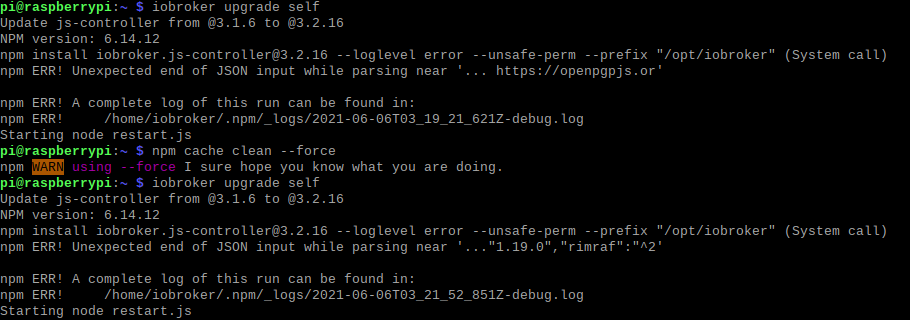
    59684f93-4eb5-4eed-aa1f-68c91e552601-image.png

    Thanks for reading!

    arteckA 1 Antwort Letzte Antwort
    0
    • Marcel K 0M Marcel K 0

      Hello,

      I hope someone can help me on this topic. I tried to upgrade my system and ran into following errors. Should I just do a clean reinstall or is there a fix to my issue?

      59684f93-4eb5-4eed-aa1f-68c91e552601-image.png

      Thanks for reading!

      arteckA Offline
      arteckA Offline
      arteck
      Developer Most Active
      schrieb am zuletzt editiert von
      #2

      @marcel-k-0 right folder is

      /opt/iobroker

      switch into plz

      cd /opt/iobroker
      

      then

      iobroker update
      iobroker upgrade self
      

      zigbee hab ich, zwave auch, nuc's genauso und HA auch

      Marcel K 0M 1 Antwort Letzte Antwort
      1
      • arteckA arteck

        @marcel-k-0 right folder is

        /opt/iobroker

        switch into plz

        cd /opt/iobroker
        

        then

        iobroker update
        iobroker upgrade self
        
        Marcel K 0M Offline
        Marcel K 0M Offline
        Marcel K 0
        schrieb am zuletzt editiert von
        #3

        @arteck Thank you for you reply. Ich hab gesehen du postest auch in deutsch, deshalb wechsele ich mal die Sprache.
        Leider habe ich auch in dem Verzeichnis noch den selben Fehler.

        bae7076e-773b-4ffb-924c-a5745d17d2e9-image.png

        arteckA 1 Antwort Letzte Antwort
        0
        • Marcel K 0M Marcel K 0

          @arteck Thank you for you reply. Ich hab gesehen du postest auch in deutsch, deshalb wechsele ich mal die Sprache.
          Leider habe ich auch in dem Verzeichnis noch den selben Fehler.
          bae7076e-773b-4ffb-924c-a5745d17d2e9-image.png

          arteckA Offline
          arteckA Offline
          arteck
          Developer Most Active
          schrieb am zuletzt editiert von arteck
          #4

          @marcel-k-0 was sagt dein node

          node -v
          

          zigbee hab ich, zwave auch, nuc's genauso und HA auch

          Marcel K 0M 1 Antwort Letzte Antwort
          0
          • arteckA arteck

            @marcel-k-0 was sagt dein node

            node -v
            
            Marcel K 0M Offline
            Marcel K 0M Offline
            Marcel K 0
            schrieb am zuletzt editiert von
            #5

            @arteck 225d74d4-dd12-4a88-9c52-7e5353a3d96e-image.png

            1 Antwort Letzte Antwort
            0
            • arteckA Offline
              arteckA Offline
              arteck
              Developer Most Active
              schrieb am zuletzt editiert von arteck
              #6

              @marcel-k-0 dann mach so

              cd /opt/iobroker
              npm i iobroker.js-controller@3.2.16
              

              zigbee hab ich, zwave auch, nuc's genauso und HA auch

              Thomas BraunT 1 Antwort Letzte Antwort
              0
              • arteckA arteck

                @marcel-k-0 dann mach so

                cd /opt/iobroker
                npm i iobroker.js-controller@3.2.16
                
                Thomas BraunT Online
                Thomas BraunT Online
                Thomas Braun
                Most Active
                schrieb am zuletzt editiert von
                #7

                @arteck @Marcel-K-0

                Besser

                cd /opt/iobroker
                sudo -H -u iobroker npm install iobroker.js-controller@3.2.16
                

                Linux-Werkzeugkasten:
                https://forum.iobroker.net/topic/42952/der-kleine-iobroker-linux-werkzeugkasten
                NodeJS Fixer Skript:
                https://forum.iobroker.net/topic/68035/iob-node-fix-skript
                iob_diag: curl -sLf -o diag.sh https://iobroker.net/diag.sh && bash diag.sh

                arteckA Marcel K 0M 2 Antworten Letzte Antwort
                0
                • Thomas BraunT Thomas Braun

                  @arteck @Marcel-K-0

                  Besser

                  cd /opt/iobroker
                  sudo -H -u iobroker npm install iobroker.js-controller@3.2.16
                  
                  arteckA Offline
                  arteckA Offline
                  arteck
                  Developer Most Active
                  schrieb am zuletzt editiert von
                  #8

                  @thomas-braun und danach

                  iobroker fix
                  

                  zigbee hab ich, zwave auch, nuc's genauso und HA auch

                  Thomas BraunT 1 Antwort Letzte Antwort
                  0
                  • arteckA arteck

                    @thomas-braun und danach

                    iobroker fix
                    
                    Thomas BraunT Online
                    Thomas BraunT Online
                    Thomas Braun
                    Most Active
                    schrieb am zuletzt editiert von
                    #9

                    @arteck
                    Schaden kann es nicht.
                    Aber mit

                    sudo -H -u iobroker
                    

                    vorweg werden die Rechte gleich richtig gesetzt.

                    Linux-Werkzeugkasten:
                    https://forum.iobroker.net/topic/42952/der-kleine-iobroker-linux-werkzeugkasten
                    NodeJS Fixer Skript:
                    https://forum.iobroker.net/topic/68035/iob-node-fix-skript
                    iob_diag: curl -sLf -o diag.sh https://iobroker.net/diag.sh && bash diag.sh

                    1 Antwort Letzte Antwort
                    0
                    • Thomas BraunT Thomas Braun

                      @arteck @Marcel-K-0

                      Besser

                      cd /opt/iobroker
                      sudo -H -u iobroker npm install iobroker.js-controller@3.2.16
                      
                      Marcel K 0M Offline
                      Marcel K 0M Offline
                      Marcel K 0
                      schrieb am zuletzt editiert von
                      #10

                      @thomas-braun @arteck
                      Hi Leute,
                      leider auch mit diesen Befehlen kein Erfolg gehabt:f02bda42-0307-4314-96be-3732fe8a9dcd-image.png

                      Vielleicht doch alles neu installieren?

                      arteckA 1 Antwort Letzte Antwort
                      0
                      • Marcel K 0M Marcel K 0

                        @thomas-braun @arteck
                        Hi Leute,
                        leider auch mit diesen Befehlen kein Erfolg gehabt:f02bda42-0307-4314-96be-3732fe8a9dcd-image.png

                        Vielleicht doch alles neu installieren?

                        arteckA Offline
                        arteckA Offline
                        arteck
                        Developer Most Active
                        schrieb am zuletzt editiert von arteck
                        #11

                        @marcel-k-0 mach ein

                        sudo rm - R /opt/iobroker/node_modules/rimraf
                        

                        und dann nochmal

                        sudo -H -u iobroker npm install iobroker.js-controller@3.2.16
                        

                        zigbee hab ich, zwave auch, nuc's genauso und HA auch

                        Marcel K 0M 1 Antwort Letzte Antwort
                        0
                        • arteckA arteck

                          @marcel-k-0 mach ein

                          sudo rm - R /opt/iobroker/node_modules/rimraf
                          

                          und dann nochmal

                          sudo -H -u iobroker npm install iobroker.js-controller@3.2.16
                          
                          Marcel K 0M Offline
                          Marcel K 0M Offline
                          Marcel K 0
                          schrieb am zuletzt editiert von
                          #12

                          @arteck said in Error in Upgrade js-controller 3.1.6 zu 3.2.16:

                          sudo -H -u iobroker npm install iobroker.js-controller@3.2.16

                          Geht leider nicht.

                          e5928c40-2bdb-4f6b-a2ef-8d05a8079b03-image.png

                          Thomas BraunT 1 Antwort Letzte Antwort
                          0
                          • Marcel K 0M Marcel K 0

                            @arteck said in Error in Upgrade js-controller 3.1.6 zu 3.2.16:

                            sudo -H -u iobroker npm install iobroker.js-controller@3.2.16

                            Geht leider nicht.
                            e5928c40-2bdb-4f6b-a2ef-8d05a8079b03-image.png

                            Thomas BraunT Online
                            Thomas BraunT Online
                            Thomas Braun
                            Most Active
                            schrieb am zuletzt editiert von
                            #13

                            @marcel-k-0

                            sudo rm -R /opt/iobroker/node_modules/rimraf
                            

                            Und bitte keine Screenshots von KonsolenTEXT, die kann man so schlecht kopieren.
                            Bitte Ausgaben der Konsole in CodeTags einbetten.
                            5947db1a-ccb3-4b12-9d5c-739b6b4ef0d5-image.png

                            Linux-Werkzeugkasten:
                            https://forum.iobroker.net/topic/42952/der-kleine-iobroker-linux-werkzeugkasten
                            NodeJS Fixer Skript:
                            https://forum.iobroker.net/topic/68035/iob-node-fix-skript
                            iob_diag: curl -sLf -o diag.sh https://iobroker.net/diag.sh && bash diag.sh

                            Marcel K 0M 1 Antwort Letzte Antwort
                            0
                            • Thomas BraunT Thomas Braun

                              @marcel-k-0

                              sudo rm -R /opt/iobroker/node_modules/rimraf
                              

                              Und bitte keine Screenshots von KonsolenTEXT, die kann man so schlecht kopieren.
                              Bitte Ausgaben der Konsole in CodeTags einbetten.
                              5947db1a-ccb3-4b12-9d5c-739b6b4ef0d5-image.png

                              Marcel K 0M Offline
                              Marcel K 0M Offline
                              Marcel K 0
                              schrieb am zuletzt editiert von
                              #14

                              @thomas-braun Okay ich konnte das Verzeichnis löschen, leider trotzdem kein Erfolg beim installieren.

                              pi@raspberrypi:/opt/iobroker $ sudo rm -R /opt/iobroker/node_modules/rimraf
                              pi@raspberrypi:/opt/iobroker $ sudo -H -u iobroker npm install iobroker.js-controller@3.2.16
                              npm ERR! Unexpected end of JSON input while parsing near '... https://openpgpjs.or'
                              
                              npm ERR! A complete log of this run can be found in:
                              npm ERR!     [2021-06-08T00_39_31_043Z-debug.log](/assets/uploads/files/1623113026827-2021-06-08t00_39_31_043z-debug.log) /home/iobroker/.npm/_logs/2021-06-08T00_39_31_043Z-debug.log
                              

                              Hier auch das referenzierte logfile 2021-06-08T00_39_31_043Z-debug.log

                              Danke nochmal für eure Hilfe und Geduld :)

                              apollon77A arteckA 2 Antworten Letzte Antwort
                              0
                              • Marcel K 0M Marcel K 0

                                @thomas-braun Okay ich konnte das Verzeichnis löschen, leider trotzdem kein Erfolg beim installieren.

                                pi@raspberrypi:/opt/iobroker $ sudo rm -R /opt/iobroker/node_modules/rimraf
                                pi@raspberrypi:/opt/iobroker $ sudo -H -u iobroker npm install iobroker.js-controller@3.2.16
                                npm ERR! Unexpected end of JSON input while parsing near '... https://openpgpjs.or'
                                
                                npm ERR! A complete log of this run can be found in:
                                npm ERR!     [2021-06-08T00_39_31_043Z-debug.log](/assets/uploads/files/1623113026827-2021-06-08t00_39_31_043z-debug.log) /home/iobroker/.npm/_logs/2021-06-08T00_39_31_043Z-debug.log
                                

                                Hier auch das referenzierte logfile 2021-06-08T00_39_31_043Z-debug.log

                                Danke nochmal für eure Hilfe und Geduld :)

                                apollon77A Offline
                                apollon77A Offline
                                apollon77
                                schrieb am zuletzt editiert von
                                #15

                                @marcel-k-0 da scheint bei dir im npm Cache oder bei npm und damit netzwerkebene was komisch zu sein. Npm Cache löschen („npm cache clean“ oder so ähnlich ausführen) bzw nochmal versuchen.

                                Beitrag hat geholfen? Votet rechts unten im Beitrag :-) https://paypal.me/Apollon77 / https://github.com/sponsors/Apollon77

                                • Debug-Log für Instanz einschalten? Admin -> Instanzen -> Expertenmodus -> Instanz aufklappen - Loglevel ändern
                                • Logfiles auf Platte /opt/iobroker/log/… nutzen, Admin schneidet Zeilen ab
                                1 Antwort Letzte Antwort
                                0
                                • Marcel K 0M Marcel K 0

                                  @thomas-braun Okay ich konnte das Verzeichnis löschen, leider trotzdem kein Erfolg beim installieren.

                                  pi@raspberrypi:/opt/iobroker $ sudo rm -R /opt/iobroker/node_modules/rimraf
                                  pi@raspberrypi:/opt/iobroker $ sudo -H -u iobroker npm install iobroker.js-controller@3.2.16
                                  npm ERR! Unexpected end of JSON input while parsing near '... https://openpgpjs.or'
                                  
                                  npm ERR! A complete log of this run can be found in:
                                  npm ERR!     [2021-06-08T00_39_31_043Z-debug.log](/assets/uploads/files/1623113026827-2021-06-08t00_39_31_043z-debug.log) /home/iobroker/.npm/_logs/2021-06-08T00_39_31_043Z-debug.log
                                  

                                  Hier auch das referenzierte logfile 2021-06-08T00_39_31_043Z-debug.log

                                  Danke nochmal für eure Hilfe und Geduld :)

                                  arteckA Offline
                                  arteckA Offline
                                  arteck
                                  Developer Most Active
                                  schrieb am zuletzt editiert von
                                  #16

                                  @marcel-k-0 hmm

                                  npm cache clean
                                  

                                  wenn der meckert dann

                                  npm cache clean --force
                                  

                                  und nochmal

                                  zigbee hab ich, zwave auch, nuc's genauso und HA auch

                                  Marcel K 0M 1 Antwort Letzte Antwort
                                  0
                                  • arteckA arteck

                                    @marcel-k-0 hmm

                                    npm cache clean
                                    

                                    wenn der meckert dann

                                    npm cache clean --force
                                    

                                    und nochmal

                                    Marcel K 0M Offline
                                    Marcel K 0M Offline
                                    Marcel K 0
                                    schrieb am zuletzt editiert von
                                    #17

                                    @arteck
                                    Immer noch kein Erfolg. Soll ich mal das npm update ausführen, welches hier anpriesen wird?

                                    pi@raspberrypi:~ $ npm cache clean --force
                                    npm WARN using --force I sure hope you know what you are doing.
                                    
                                    
                                       â­âââââââââââââââââââââââââââââââââââââââââââââââââââââââââââââââââ®
                                       â                                                                â
                                       â     New major version of npm available! 6.14.12 -> 7.16.0      â
                                       â   Changelog: https://github.com/npm/cli/releases/tag/v7.16.0   â
                                       â               Run npm install -g npm to update!                â
                                       â                                                                â
                                       â°âââââââââââââââââââââââââââââââââââââââââââââââââââââââââââââââââ¯
                                    
                                    pi@raspberrypi:~ $ sudo -H -u iobroker npm install iobroker.js-controller@3.2.16
                                    npm WARN deprecated request@2.88.2: request has been deprecated, see https://github.com/request/request/issues/3142
                                    npm ERR! Unexpected end of JSON input while parsing near '... https://openpgpjs.or'
                                    
                                    npm ERR! A complete log of this run can be found in:
                                    npm ERR!     /home/iobroker/.npm/_logs/2021-06-08T10_57_46_269Z-debug.log
                                    
                                    
                                    arteckA 1 Antwort Letzte Antwort
                                    0
                                    • Marcel K 0M Marcel K 0

                                      @arteck
                                      Immer noch kein Erfolg. Soll ich mal das npm update ausführen, welches hier anpriesen wird?

                                      pi@raspberrypi:~ $ npm cache clean --force
                                      npm WARN using --force I sure hope you know what you are doing.
                                      
                                      
                                         â­âââââââââââââââââââââââââââââââââââââââââââââââââââââââââââââââââ®
                                         â                                                                â
                                         â     New major version of npm available! 6.14.12 -> 7.16.0      â
                                         â   Changelog: https://github.com/npm/cli/releases/tag/v7.16.0   â
                                         â               Run npm install -g npm to update!                â
                                         â                                                                â
                                         â°âââââââââââââââââââââââââââââââââââââââââââââââââââââââââââââââââ¯
                                      
                                      pi@raspberrypi:~ $ sudo -H -u iobroker npm install iobroker.js-controller@3.2.16
                                      npm WARN deprecated request@2.88.2: request has been deprecated, see https://github.com/request/request/issues/3142
                                      npm ERR! Unexpected end of JSON input while parsing near '... https://openpgpjs.or'
                                      
                                      npm ERR! A complete log of this run can be found in:
                                      npm ERR!     /home/iobroker/.npm/_logs/2021-06-08T10_57_46_269Z-debug.log
                                      
                                      
                                      arteckA Offline
                                      arteckA Offline
                                      arteck
                                      Developer Most Active
                                      schrieb am zuletzt editiert von
                                      #18

                                      @marcel-k-0

                                      nein bloss nicht..

                                      aber der muss sio

                                      sudo npm cache clean --force
                                      

                                      zigbee hab ich, zwave auch, nuc's genauso und HA auch

                                      Marcel K 0M 1 Antwort Letzte Antwort
                                      0
                                      • arteckA arteck

                                        @marcel-k-0

                                        nein bloss nicht..

                                        aber der muss sio

                                        sudo npm cache clean --force
                                        
                                        Marcel K 0M Offline
                                        Marcel K 0M Offline
                                        Marcel K 0
                                        schrieb am zuletzt editiert von
                                        #19

                                        @arteck Auch das geht nicht. Verzeichnis rimraf nicht vorhanden.

                                        pi@raspberrypi:~ $ sudo npm cache clean --force
                                        npm WARN using --force I sure hope you know what you are doing.
                                        pi@raspberrypi:~ $ sudo -H -u iobroker npm install iobroker.js-controller@3.2.16
                                        npm WARN deprecated request@2.88.2: request has been deprecated, see https://github.com/request/request/issues/3142
                                        npm ERR! Unexpected end of JSON input while parsing near '..."1.19.0","rimraf":"^2'
                                        
                                        npm ERR! A complete log of this run can be found in:
                                        npm ERR!     /home/iobroker/.npm/_logs/2021-06-08T12_59_29_218Z-debug.log
                                        pi@raspberrypi:~ $ sudo rm -R /opt/iobroker/node_modules/rimraf 
                                        rm: das Entfernen von '/opt/iobroker/node_modules/rimraf' ist nicht möglich: Datei oder Verzeichnis nicht gefunden
                                        
                                        
                                        GlasfaserG 1 Antwort Letzte Antwort
                                        0
                                        • Marcel K 0M Marcel K 0

                                          @arteck Auch das geht nicht. Verzeichnis rimraf nicht vorhanden.

                                          pi@raspberrypi:~ $ sudo npm cache clean --force
                                          npm WARN using --force I sure hope you know what you are doing.
                                          pi@raspberrypi:~ $ sudo -H -u iobroker npm install iobroker.js-controller@3.2.16
                                          npm WARN deprecated request@2.88.2: request has been deprecated, see https://github.com/request/request/issues/3142
                                          npm ERR! Unexpected end of JSON input while parsing near '..."1.19.0","rimraf":"^2'
                                          
                                          npm ERR! A complete log of this run can be found in:
                                          npm ERR!     /home/iobroker/.npm/_logs/2021-06-08T12_59_29_218Z-debug.log
                                          pi@raspberrypi:~ $ sudo rm -R /opt/iobroker/node_modules/rimraf 
                                          rm: das Entfernen von '/opt/iobroker/node_modules/rimraf' ist nicht möglich: Datei oder Verzeichnis nicht gefunden
                                          
                                          
                                          GlasfaserG Offline
                                          GlasfaserG Offline
                                          Glasfaser
                                          schrieb am zuletzt editiert von
                                          #20

                                          @marcel-k-0

                                          ..."1.19.0","rimraf":"^2'

                                          Versuche mal :

                                          sudo rm -R /opt/iobroker/package-lock.json
                                          

                                          Synology 918+ 16GB - ioBroker in Docker v9 , VISO auf Trekstor Primebook C13 13,3" , Hikvision Domkameras mit Surveillance Station .. CCU RaspberryMatic in Synology VM .. Zigbee CC2538+CC2592 .. Sonoff .. KNX .. Modbus ..

                                          1 Antwort Letzte Antwort
                                          0

                                          Hey! Du scheinst an dieser Unterhaltung interessiert zu sein, hast aber noch kein Konto.

                                          Hast du es satt, bei jedem Besuch durch die gleichen Beiträge zu scrollen? Wenn du dich für ein Konto anmeldest, kommst du immer genau dorthin zurück, wo du zuvor warst, und kannst dich über neue Antworten benachrichtigen lassen (entweder per E-Mail oder Push-Benachrichtigung). Du kannst auch Lesezeichen speichern und Beiträge positiv bewerten, um anderen Community-Mitgliedern deine Wertschätzung zu zeigen.

                                          Mit deinem Input könnte dieser Beitrag noch besser werden 💗

                                          Registrieren Anmelden
                                          Antworten
                                          • In einem neuen Thema antworten
                                          Anmelden zum Antworten
                                          • Älteste zuerst
                                          • Neuste zuerst
                                          • Meiste Stimmen


                                          Support us

                                          ioBroker
                                          Community Adapters
                                          Donate
                                          FAQ Cloud / IOT
                                          HowTo: Node.js-Update
                                          HowTo: Backup/Restore
                                          Downloads
                                          BLOG

                                          558

                                          Online

                                          32.9k

                                          Benutzer

                                          83.0k

                                          Themen

                                          1.3m

                                          Beiträge
                                          Community
                                          Impressum | Datenschutz-Bestimmungen | Nutzungsbedingungen | Einwilligungseinstellungen
                                          ioBroker Community 2014-2025
                                          logo
                                          • Anmelden

                                          • Du hast noch kein Konto? Registrieren

                                          • Anmelden oder registrieren, um zu suchen
                                          • Erster Beitrag
                                            Letzter Beitrag
                                          0
                                          • Home
                                          • Aktuell
                                          • Tags
                                          • Ungelesen 0
                                          • Kategorien
                                          • Unreplied
                                          • Beliebt
                                          • GitHub
                                          • Docu
                                          • Hilfe