Skip to content
  • Home
  • Aktuell
  • Tags
  • 0 Ungelesen 0
  • Kategorien
  • Unreplied
  • Beliebt
  • GitHub
  • Docu
  • Hilfe
Skins
  • Light
  • Brite
  • Cerulean
  • Cosmo
  • Flatly
  • Journal
  • Litera
  • Lumen
  • Lux
  • Materia
  • Minty
  • Morph
  • Pulse
  • Sandstone
  • Simplex
  • Sketchy
  • Spacelab
  • United
  • Yeti
  • Zephyr
  • Dark
  • Cyborg
  • Darkly
  • Quartz
  • Slate
  • Solar
  • Superhero
  • Vapor

  • Standard: (Kein Skin)
  • Kein Skin
Einklappen
ioBroker Logo

Community Forum

donate donate
  1. ioBroker Community Home
  2. Deutsch
  3. Tester
  4. Probleme mit Serialport bei zwave2

NEWS

  • UPDATE 31.10.: Amazon Alexa - ioBroker Skill läuft aus ?
    apollon77A
    apollon77
    48
    3
    8.7k

  • Monatsrückblick – September 2025
    BluefoxB
    Bluefox
    13
    1
    2.2k

  • Neues Video "KI im Smart Home" - ioBroker plus n8n
    BluefoxB
    Bluefox
    16
    1
    3.2k

Probleme mit Serialport bei zwave2

Geplant Angeheftet Gesperrt Verschoben Tester
118 Beiträge 5 Kommentatoren 10.4k Aufrufe 2 Watching
  • Älteste zuerst
  • Neuste zuerst
  • Meiste Stimmen
Antworten
  • In einem neuen Thema antworten
Anmelden zum Antworten
Dieses Thema wurde gelöscht. Nur Nutzer mit entsprechenden Rechten können es sehen.
  • E Esmax666

    @thomas-braun Ach so ok done

    Aber wo können das Problem kommen?

    Thomas BraunT Online
    Thomas BraunT Online
    Thomas Braun
    Most Active
    schrieb am zuletzt editiert von
    #14

    @esmax666

    iobroker stop
    iobroker setup first
    iobroker start 
    

    Linux-Werkzeugkasten:
    https://forum.iobroker.net/topic/42952/der-kleine-iobroker-linux-werkzeugkasten
    NodeJS Fixer Skript:
    https://forum.iobroker.net/topic/68035/iob-node-fix-skript
    iob_diag: curl -sLf -o diag.sh https://iobroker.net/diag.sh && bash diag.sh

    E 1 Antwort Letzte Antwort
    0
    • Thomas BraunT Thomas Braun

      @esmax666

      iobroker stop
      iobroker setup first
      iobroker start 
      
      E Offline
      E Offline
      Esmax666
      schrieb am zuletzt editiert von Esmax666
      #15

      @thomas-braun

      Ich bekomme das

      			
      zwave2.0	2021-05-15 22:42:36.595	info	(20844) starting. Version 1.9.3 in /opt/iobroker/node_modules/iobroker.zwave2, node: v12.22.1, js-controller: 3.2.16
      host.raspberrypi	2021-05-15 22:42:34.299	info	instance system.adapter.zwave2.0 started with pid 20844
      host.raspberrypi	2021-05-15 22:42:34.149	info	"system.adapter.zwave2.0" enabled
      host.raspberrypi	2021-05-15 22:42:19.970	info	Do not restart adapter system.adapter.zwave2.0 because disabled or deleted
      host.raspberrypi	2021-05-15 22:42:19.968	error	instance system.adapter.zwave2.0 terminated with code 3 (NO_ADAPTER_CONFIG_FOUND)
      zwave2.0	2021-05-15 22:42:19.322	warn	(20832) Terminated (NO_ADAPTER_CONFIG_FOUND): Without reason
      zwave2.0	2021-05-15 22:42:19.309	error	(20832) adapter disabled
      

      Aber ich hatte für die raspi pi3 schon usb0 als parameter. Ich bin fast sicher

      Eventuell muss man driver installieren?

      Thomas BraunT 1 Antwort Letzte Antwort
      0
      • E Esmax666

        @thomas-braun

        Ich bekomme das

        			
        zwave2.0	2021-05-15 22:42:36.595	info	(20844) starting. Version 1.9.3 in /opt/iobroker/node_modules/iobroker.zwave2, node: v12.22.1, js-controller: 3.2.16
        host.raspberrypi	2021-05-15 22:42:34.299	info	instance system.adapter.zwave2.0 started with pid 20844
        host.raspberrypi	2021-05-15 22:42:34.149	info	"system.adapter.zwave2.0" enabled
        host.raspberrypi	2021-05-15 22:42:19.970	info	Do not restart adapter system.adapter.zwave2.0 because disabled or deleted
        host.raspberrypi	2021-05-15 22:42:19.968	error	instance system.adapter.zwave2.0 terminated with code 3 (NO_ADAPTER_CONFIG_FOUND)
        zwave2.0	2021-05-15 22:42:19.322	warn	(20832) Terminated (NO_ADAPTER_CONFIG_FOUND): Without reason
        zwave2.0	2021-05-15 22:42:19.309	error	(20832) adapter disabled
        

        Aber ich hatte für die raspi pi3 schon usb0 als parameter. Ich bin fast sicher

        Eventuell muss man driver installieren?

        Thomas BraunT Online
        Thomas BraunT Online
        Thomas Braun
        Most Active
        schrieb am zuletzt editiert von
        #16

        @esmax666 Jetzt müsstest du den Adapter einstellen können.

        Linux-Werkzeugkasten:
        https://forum.iobroker.net/topic/42952/der-kleine-iobroker-linux-werkzeugkasten
        NodeJS Fixer Skript:
        https://forum.iobroker.net/topic/68035/iob-node-fix-skript
        iob_diag: curl -sLf -o diag.sh https://iobroker.net/diag.sh && bash diag.sh

        E 1 Antwort Letzte Antwort
        0
        • Thomas BraunT Thomas Braun

          @esmax666 Jetzt müsstest du den Adapter einstellen können.

          E Offline
          E Offline
          Esmax666
          schrieb am zuletzt editiert von
          #17

          @thomas-braun

          Was.soll ich genau einstellen? Und wo?

          Soll ich das auch installieren?
          Install additional packages
          On some systems it will be necessary to install additional packages. Therefore run the following on the console before installing the adapter:

          apt-get install pkg-config libudev-dev

          Thomas BraunT 1 Antwort Letzte Antwort
          0
          • E Esmax666

            @thomas-braun

            Was.soll ich genau einstellen? Und wo?

            Soll ich das auch installieren?
            Install additional packages
            On some systems it will be necessary to install additional packages. Therefore run the following on the console before installing the adapter:

            apt-get install pkg-config libudev-dev

            Thomas BraunT Online
            Thomas BraunT Online
            Thomas Braun
            Most Active
            schrieb am zuletzt editiert von
            #18

            @esmax666 Wenn du das noch nicht getan hast...

            Linux-Werkzeugkasten:
            https://forum.iobroker.net/topic/42952/der-kleine-iobroker-linux-werkzeugkasten
            NodeJS Fixer Skript:
            https://forum.iobroker.net/topic/68035/iob-node-fix-skript
            iob_diag: curl -sLf -o diag.sh https://iobroker.net/diag.sh && bash diag.sh

            E 1 Antwort Letzte Antwort
            -1
            • Thomas BraunT Thomas Braun

              @esmax666 Wenn du das noch nicht getan hast...

              E Offline
              E Offline
              Esmax666
              schrieb am zuletzt editiert von Esmax666
              #19

              @thomas-braun war schon da habe gerade geprüft

              Thomas BraunT 1 Antwort Letzte Antwort
              0
              • E Esmax666

                @thomas-braun war schon da habe gerade geprüft

                Thomas BraunT Online
                Thomas BraunT Online
                Thomas Braun
                Most Active
                schrieb am zuletzt editiert von
                #20

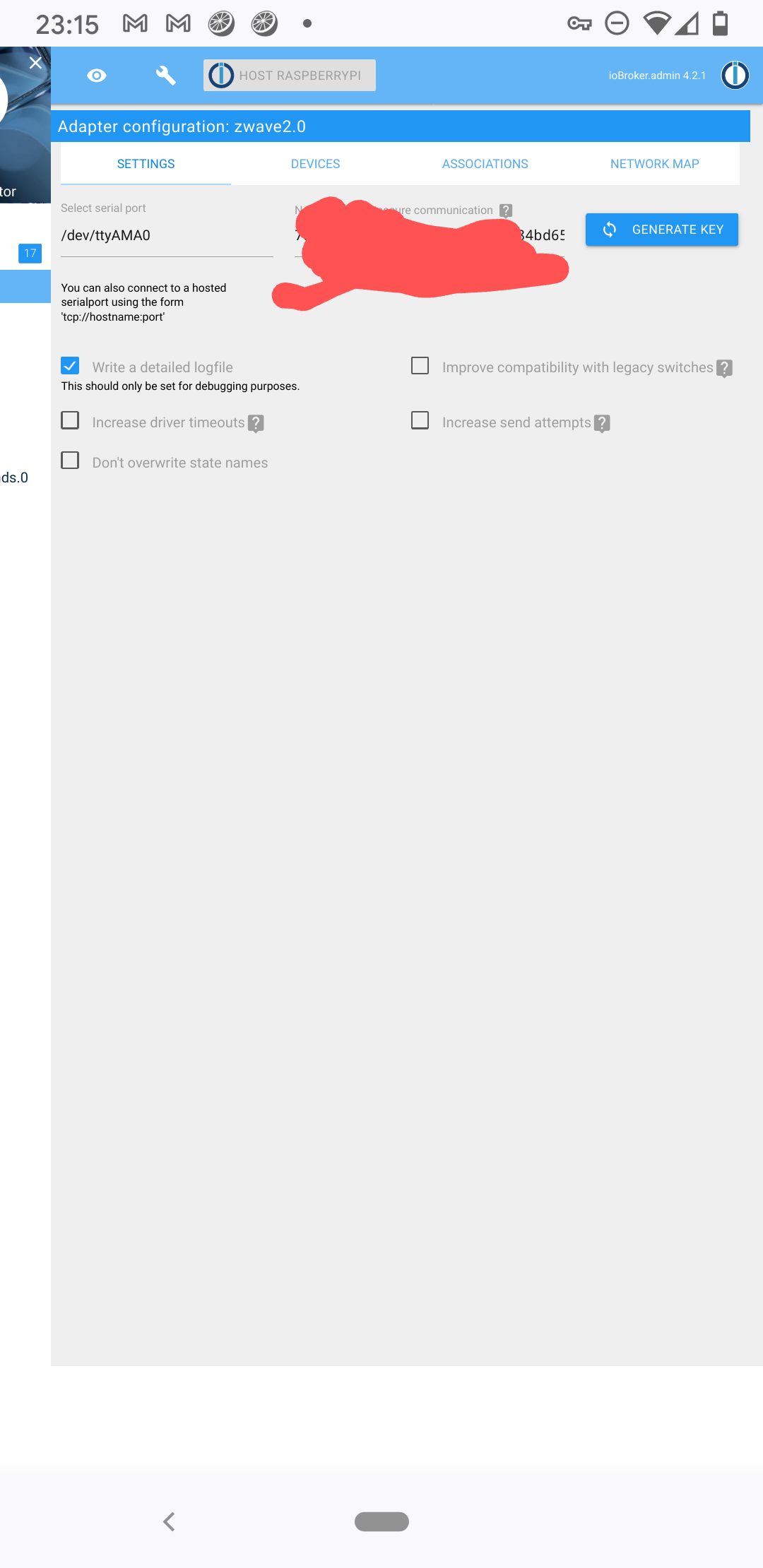
                @esmax666 Wie sieht denn jetzt die Adapter config aus?

                Linux-Werkzeugkasten:
                https://forum.iobroker.net/topic/42952/der-kleine-iobroker-linux-werkzeugkasten
                NodeJS Fixer Skript:
                https://forum.iobroker.net/topic/68035/iob-node-fix-skript
                iob_diag: curl -sLf -o diag.sh https://iobroker.net/diag.sh && bash diag.sh

                E 1 Antwort Letzte Antwort
                0
                • Thomas BraunT Thomas Braun

                  @esmax666 Wie sieht denn jetzt die Adapter config aus?

                  E Offline
                  E Offline
                  Esmax666
                  schrieb am zuletzt editiert von
                  #21

                  @thomas-braun wie immer gleich

                  Screenshot_20210515-231523~2.png

                  Thomas BraunT 1 Antwort Letzte Antwort
                  0
                  • E Esmax666

                    @thomas-braun wie immer gleich

                    Screenshot_20210515-231523~2.png

                    Thomas BraunT Online
                    Thomas BraunT Online
                    Thomas Braun
                    Most Active
                    schrieb am zuletzt editiert von
                    #22

                    @esmax666
                    Da kann ich nicht weiterhelfen. Hab den Adapter nicht im Einsatz. Aber die 17 Updates könntest du schon mal einspielen.

                    Linux-Werkzeugkasten:
                    https://forum.iobroker.net/topic/42952/der-kleine-iobroker-linux-werkzeugkasten
                    NodeJS Fixer Skript:
                    https://forum.iobroker.net/topic/68035/iob-node-fix-skript
                    iob_diag: curl -sLf -o diag.sh https://iobroker.net/diag.sh && bash diag.sh

                    E 1 Antwort Letzte Antwort
                    0
                    • Thomas BraunT Thomas Braun

                      @esmax666
                      Da kann ich nicht weiterhelfen. Hab den Adapter nicht im Einsatz. Aber die 17 Updates könntest du schon mal einspielen.

                      E Offline
                      E Offline
                      Esmax666
                      schrieb am zuletzt editiert von
                      #23

                      @thomas-braun schade. Man muss wahrscheinlich irgendwo usb driver installieren

                      Sonst wo hast du gehen das ich genau 17 update brauche?
                      Wie und was soll ich genau machen?

                      Thomas BraunT 1 Antwort Letzte Antwort
                      0
                      • E Esmax666

                        @thomas-braun schade. Man muss wahrscheinlich irgendwo usb driver installieren

                        Sonst wo hast du gehen das ich genau 17 update brauche?
                        Wie und was soll ich genau machen?

                        Thomas BraunT Online
                        Thomas BraunT Online
                        Thomas Braun
                        Most Active
                        schrieb am zuletzt editiert von Thomas Braun
                        #24

                        @esmax666 sagte in Test Adapter Z-Wave 2 v1.10.x:

                        Man muss wahrscheinlich irgendwo usb driver installieren

                        Windows User, oder? Der Treiber ist im Linux-Kernel schon drin.

                        Und die anstehenden Updates sehe ich links in deinem Screenshot.

                        iobroker update
                        iobroker upgrade
                        

                        Linux-Werkzeugkasten:
                        https://forum.iobroker.net/topic/42952/der-kleine-iobroker-linux-werkzeugkasten
                        NodeJS Fixer Skript:
                        https://forum.iobroker.net/topic/68035/iob-node-fix-skript
                        iob_diag: curl -sLf -o diag.sh https://iobroker.net/diag.sh && bash diag.sh

                        E 1 Antwort Letzte Antwort
                        0
                        • Thomas BraunT Thomas Braun

                          @esmax666 sagte in Test Adapter Z-Wave 2 v1.10.x:

                          Man muss wahrscheinlich irgendwo usb driver installieren

                          Windows User, oder? Der Treiber ist im Linux-Kernel schon drin.

                          Und die anstehenden Updates sehe ich links in deinem Screenshot.

                          iobroker update
                          iobroker upgrade
                          
                          E Offline
                          E Offline
                          Esmax666
                          schrieb am zuletzt editiert von
                          #25

                          @thomas-braun ich weiss aber irgenwie erkennt zwave2 nicht usb0 und usb1

                          Die version hier sind auch richtig oder?

                          Type: js-controller
                          Title: JS controller
                          OS: linux
                          Available: 3.2.16
                          Installed: 3.2.16
                          Events: ↦15 / ↦13
                          

                          pi@raspberrypi:~ $ node -v
                          v12.22.1
                          pi@raspberrypi:~ $ nodejs -v
                          v12.22.1
                          pi@raspberrypi:~ $ npm -v
                          6.14.12

                          Thomas BraunT 1 Antwort Letzte Antwort
                          0
                          • E Esmax666

                            @thomas-braun ich weiss aber irgenwie erkennt zwave2 nicht usb0 und usb1

                            Die version hier sind auch richtig oder?

                            Type: js-controller
                            Title: JS controller
                            OS: linux
                            Available: 3.2.16
                            Installed: 3.2.16
                            Events: ↦15 / ↦13
                            

                            pi@raspberrypi:~ $ node -v
                            v12.22.1
                            pi@raspberrypi:~ $ nodejs -v
                            v12.22.1
                            pi@raspberrypi:~ $ npm -v
                            6.14.12

                            Thomas BraunT Online
                            Thomas BraunT Online
                            Thomas Braun
                            Most Active
                            schrieb am zuletzt editiert von Thomas Braun
                            #26

                            @esmax666 Der Stick liegt auf dem device node /dev/ttyAMA0

                            Linux-Werkzeugkasten:
                            https://forum.iobroker.net/topic/42952/der-kleine-iobroker-linux-werkzeugkasten
                            NodeJS Fixer Skript:
                            https://forum.iobroker.net/topic/68035/iob-node-fix-skript
                            iob_diag: curl -sLf -o diag.sh https://iobroker.net/diag.sh && bash diag.sh

                            E 2 Antworten Letzte Antwort
                            0
                            • Thomas BraunT Thomas Braun

                              @esmax666 Der Stick liegt auf dem device node /dev/ttyAMA0

                              E Offline
                              E Offline
                              Esmax666
                              schrieb am zuletzt editiert von
                              #27

                              @thomas-braun

                              Soll ich noch das machen?

                              https://medium.com/@thedyslexiccoder/how-to-update-nodejs-npm-on-a-raspberry-pi-4-da75cad4148c

                              Thomas BraunT 1 Antwort Letzte Antwort
                              0
                              • E Esmax666

                                @thomas-braun

                                Soll ich noch das machen?

                                https://medium.com/@thedyslexiccoder/how-to-update-nodejs-npm-on-a-raspberry-pi-4-da75cad4148c

                                Thomas BraunT Online
                                Thomas BraunT Online
                                Thomas Braun
                                Most Active
                                schrieb am zuletzt editiert von Thomas Braun
                                #28

                                @esmax666 Nein.

                                Die Anleitung wird so ohnehin nicht funktionieren, da fehlt noch Zeug davor.

                                Linux-Werkzeugkasten:
                                https://forum.iobroker.net/topic/42952/der-kleine-iobroker-linux-werkzeugkasten
                                NodeJS Fixer Skript:
                                https://forum.iobroker.net/topic/68035/iob-node-fix-skript
                                iob_diag: curl -sLf -o diag.sh https://iobroker.net/diag.sh && bash diag.sh

                                E 1 Antwort Letzte Antwort
                                0
                                • Thomas BraunT Thomas Braun

                                  @esmax666 Nein.

                                  Die Anleitung wird so ohnehin nicht funktionieren, da fehlt noch Zeug davor.

                                  E Offline
                                  E Offline
                                  Esmax666
                                  schrieb am zuletzt editiert von
                                  #29

                                  @thomas-braun was meinst was feht

                                  Sonst fur die zwave0 version gab das:

                                  Raspberry Pi3 only: Activate GPIO UART
                                  On Raspberry Pi 3, the UART is by default occupied by the bluetooth module. To activate it for use with a GPIO module, follow these steps:

                                  sudo nano /boot/cmdline.txt

                                  remove console=serial0,115200
                                  save the file and close it
                                  sudo nano /boot/config.txt
                                  Look for each of the following lines. If they are commented out with a #, remove that. If they don't exist, add them to the end of the file:

                                  dtoverlay=pi3-miniuart-bt
                                  enable_uart=1
                                  force_turbo=1
                                  reboot

                                  Aber das brauchen wir nicht mehr oder ? Hab nicht gesehen fur zwave2

                                  AlCalzoneA 1 Antwort Letzte Antwort
                                  0
                                  • Thomas BraunT Online
                                    Thomas BraunT Online
                                    Thomas Braun
                                    Most Active
                                    schrieb am zuletzt editiert von
                                    #30

                                    @esmax666 Ich kenn den Adapter nicht. Mal in die readme geschaut? Da steht vielleicht was drin.

                                    Linux-Werkzeugkasten:
                                    https://forum.iobroker.net/topic/42952/der-kleine-iobroker-linux-werkzeugkasten
                                    NodeJS Fixer Skript:
                                    https://forum.iobroker.net/topic/68035/iob-node-fix-skript
                                    iob_diag: curl -sLf -o diag.sh https://iobroker.net/diag.sh && bash diag.sh

                                    1 Antwort Letzte Antwort
                                    0
                                    • E Esmax666

                                      @thomas-braun was meinst was feht

                                      Sonst fur die zwave0 version gab das:

                                      Raspberry Pi3 only: Activate GPIO UART
                                      On Raspberry Pi 3, the UART is by default occupied by the bluetooth module. To activate it for use with a GPIO module, follow these steps:

                                      sudo nano /boot/cmdline.txt

                                      remove console=serial0,115200
                                      save the file and close it
                                      sudo nano /boot/config.txt
                                      Look for each of the following lines. If they are commented out with a #, remove that. If they don't exist, add them to the end of the file:

                                      dtoverlay=pi3-miniuart-bt
                                      enable_uart=1
                                      force_turbo=1
                                      reboot

                                      Aber das brauchen wir nicht mehr oder ? Hab nicht gesehen fur zwave2

                                      AlCalzoneA Offline
                                      AlCalzoneA Offline
                                      AlCalzone
                                      Developer
                                      schrieb am zuletzt editiert von
                                      #31

                                      @esmax666 Probier mal /dev/serial0, da bin ich beim Raspberry Pi 4 auch schon drüber gestolpert.

                                      Ansonsten: ist das wirklich ein Z-Stick Gen5 oder doch ein Z-Stick Gen5 + ? Ich hab grob im Hinterkopf dass ersterer Probleme mit neueren USB-Schnittstellen macht.

                                      Warum `sudo` böse ist: https://forum.iobroker.net/post/17109

                                      E 5 Antworten Letzte Antwort
                                      0
                                      • Thomas BraunT Thomas Braun

                                        @esmax666 Der Stick liegt auf dem device node /dev/ttyAMA0

                                        E Offline
                                        E Offline
                                        Esmax666
                                        schrieb am zuletzt editiert von
                                        #32

                                        @thomas-braun

                                        Hab gerade geprüft auf raspi3 hatte ich eher /dev/ttyACM0

                                        1 Antwort Letzte Antwort
                                        0
                                        • AlCalzoneA AlCalzone

                                          @esmax666 Probier mal /dev/serial0, da bin ich beim Raspberry Pi 4 auch schon drüber gestolpert.

                                          Ansonsten: ist das wirklich ein Z-Stick Gen5 oder doch ein Z-Stick Gen5 + ? Ich hab grob im Hinterkopf dass ersterer Probleme mit neueren USB-Schnittstellen macht.

                                          E Offline
                                          E Offline
                                          Esmax666
                                          schrieb am zuletzt editiert von Esmax666
                                          #33

                                          @alcalzone Z-Stick Gen5 + mit raspu hat das funktioniert mit acm0

                                          AlCalzoneA 1 Antwort Letzte Antwort
                                          0
                                          Antworten
                                          • In einem neuen Thema antworten
                                          Anmelden zum Antworten
                                          • Älteste zuerst
                                          • Neuste zuerst
                                          • Meiste Stimmen


                                          Support us

                                          ioBroker
                                          Community Adapters
                                          Donate

                                          679

                                          Online

                                          32.4k

                                          Benutzer

                                          81.5k

                                          Themen

                                          1.3m

                                          Beiträge
                                          Community
                                          Impressum | Datenschutz-Bestimmungen | Nutzungsbedingungen | Einwilligungseinstellungen
                                          ioBroker Community 2014-2025
                                          logo
                                          • Anmelden

                                          • Du hast noch kein Konto? Registrieren

                                          • Anmelden oder registrieren, um zu suchen
                                          • Erster Beitrag
                                            Letzter Beitrag
                                          0
                                          • Home
                                          • Aktuell
                                          • Tags
                                          • Ungelesen 0
                                          • Kategorien
                                          • Unreplied
                                          • Beliebt
                                          • GitHub
                                          • Docu
                                          • Hilfe