



Skip to content
  • Home
  • Aktuell
  • Tags
  • 0 Ungelesen 0
  • Kategorien
  • Unreplied
  • Beliebt
  • GitHub
  • Docu
  • Hilfe
Skins
  • Light
  • Brite
  • Cerulean
  • Cosmo
  • Flatly
  • Journal
  • Litera
  • Lumen
  • Lux
  • Materia
  • Minty
  • Morph
  • Pulse
  • Sandstone
  • Simplex
  • Sketchy
  • Spacelab
  • United
  • Yeti
  • Zephyr
  • Dark
  • Cyborg
  • Darkly
  • Quartz
  • Slate
  • Solar
  • Superhero
  • Vapor

  • Standard: (Kein Skin)
  • Kein Skin
Einklappen
ioBroker Logo

Community Forum

donate donate
  1. ioBroker Community Home
  2. Deutsch
  3. ioBroker Allgemein
  4. Anfänger sucht Hilfe bei Install. proxmox auf INTELNUC8i3BEK
NEWS

  • Neuer Blogbeitrag: Monatsrückblick - Dezember 2025 🎄
    BluefoxB
    Bluefox
    11
    1
    489

  • Weihnachtsangebot 2025! 🎄
    BluefoxB
    Bluefox
    24
    1
    1.6k

  • UPDATE 31.10.: Amazon Alexa - ioBroker Skill läuft aus ?
    apollon77A
    apollon77
    48
    3
    9.6k

Anfänger sucht Hilfe bei Install. proxmox auf INTELNUC8i3BEK

Geplant Angeheftet Gesperrt Verschoben ioBroker Allgemein
1.0k Beiträge 16 Kommentatoren 249.5k Aufrufe 15 Watching
  • Älteste zuerst
  • Neuste zuerst
  • Meiste Stimmen
Antworten
  • In einem neuen Thema antworten
Anmelden zum Antworten
Dieses Thema wurde gelöscht. Nur Nutzer mit entsprechenden Rechten können es sehen.
  • Thomas BraunT Thomas Braun

    @goetschhofer

    Ist der karl berechtigt mit influx in der Form zu agieren?

    G Offline
    G Offline
    GOETSCHHOFER
    schrieb am zuletzt editiert von GOETSCHHOFER
    #479

    @thomas-braun

    Hallo Thomas,

    kann ich hier mit getfacl nicht die Berechtigungen für den BN=karl abfragen ?
    Beim pi war das möglich oder mache ich hier etwas falsch ?

    Habe es gerade gesehen, bei der vorigen Abfrage ist ja der BN=karl angeführt.

    karl@LXC-INFLUXDB-192:~$ getfacl /home/karl/influx_backup
    -bash: getfacl: command not found
    karl@LXC-INFLUXDB-192:~$ cd /home/karl/influx_backup
    karl@LXC-INFLUXDB-192:~/influx_backup$ getfac1
    -bash: getfac1: command not found
    karl@LXC-INFLUXDB-192:~/influx_backup$ getfacl /home/karl/influx_backup
    -bash: getfacl: command not found
    karl@LXC-INFLUXDB-192:~/influx_backup$ getfacl /home/karl/             
    -bash: getfacl: command not found
    karl@LXC-INFLUXDB-192:~/influx_backup$ 
    
    crunchipC 1 Antwort Letzte Antwort
    0
    • G GOETSCHHOFER

      @thomas-braun

      Hallo Thomas,

      kann ich hier mit getfacl nicht die Berechtigungen für den BN=karl abfragen ?
      Beim pi war das möglich oder mache ich hier etwas falsch ?

      Habe es gerade gesehen, bei der vorigen Abfrage ist ja der BN=karl angeführt.

      karl@LXC-INFLUXDB-192:~$ getfacl /home/karl/influx_backup
      -bash: getfacl: command not found
      karl@LXC-INFLUXDB-192:~$ cd /home/karl/influx_backup
      karl@LXC-INFLUXDB-192:~/influx_backup$ getfac1
      -bash: getfac1: command not found
      karl@LXC-INFLUXDB-192:~/influx_backup$ getfacl /home/karl/influx_backup
      -bash: getfacl: command not found
      karl@LXC-INFLUXDB-192:~/influx_backup$ getfacl /home/karl/             
      -bash: getfacl: command not found
      karl@LXC-INFLUXDB-192:~/influx_backup$ 
      
      crunchipC Abwesend
      crunchipC Abwesend
      crunchip
      Forum Testing Most Active
      schrieb am zuletzt editiert von
      #480

      @goetschhofer debian LXC Container sind nur auf minimal ausgelegt, diverse Dinge müssen bei gebrauch nachinstalliert werden.
      sowie auch sudo oder curl nach installieren musstest um die Befehle zu nutzen

      umgestiegen von Proxmox auf Unraid

      G 1 Antwort Letzte Antwort
      1
      • crunchipC crunchip

        @goetschhofer debian LXC Container sind nur auf minimal ausgelegt, diverse Dinge müssen bei gebrauch nachinstalliert werden.
        sowie auch sudo oder curl nach installieren musstest um die Befehle zu nutzen

        G Offline
        G Offline
        GOETSCHHOFER
        schrieb am zuletzt editiert von
        #481

        @crunchip said in Anfänger sucht Hilfe bei Install. proxmox auf INTELNUC8i3BEK:

        @goetschhofer debian LXC Container sind nur auf minimal ausgelegt, diverse Dinge müssen bei gebrauch nachinstalliert werden.
        sowie auch sudo oder curl nach installieren musstest um die Befehle zu nutzen

        D. h. es müsste dieser Block durchgeführt werden ?

        Der user karl ist ja schon da, kann ich wahrscheinlich weglassen ?

        apt update & apt upgrade
        dpkg-reconfigure tzdata
        apt install sudo curl
        adduser karl
        usermod -aG sudo karl
         
        
        crunchipC 1 Antwort Letzte Antwort
        0
        • G GOETSCHHOFER

          @crunchip said in Anfänger sucht Hilfe bei Install. proxmox auf INTELNUC8i3BEK:

          @goetschhofer debian LXC Container sind nur auf minimal ausgelegt, diverse Dinge müssen bei gebrauch nachinstalliert werden.
          sowie auch sudo oder curl nach installieren musstest um die Befehle zu nutzen

          D. h. es müsste dieser Block durchgeführt werden ?

          Der user karl ist ja schon da, kann ich wahrscheinlich weglassen ?

          apt update & apt upgrade
          dpkg-reconfigure tzdata
          apt install sudo curl
          adduser karl
          usermod -aG sudo karl
           
          
          crunchipC Abwesend
          crunchipC Abwesend
          crunchip
          Forum Testing Most Active
          schrieb am zuletzt editiert von
          #482

          @goetschhofer nein das hast du doch schon, Pakete die du da installiert hattest, war sudo und curl

          sudo apt-get install acl
          

          umgestiegen von Proxmox auf Unraid

          G 1 Antwort Letzte Antwort
          1
          • crunchipC crunchip

            @goetschhofer nein das hast du doch schon, Pakete die du da installiert hattest, war sudo und curl

            sudo apt-get install acl
            
            G Offline
            G Offline
            GOETSCHHOFER
            schrieb am zuletzt editiert von
            #483

            @crunchip said in Anfänger sucht Hilfe bei Install. proxmox auf INTELNUC8i3BEK:

            @goetschhofer nein das hast du doch schon, Pakete die du da installiert hattest, war sudo und curl

            sudo apt-get install acl
            

            Ja, dies habe ich mir auch gedacht, zumindest soweit ich mich erinnern kann.

            Habe das restore jetzt mit und ohne sudo durchgeführt, aber immer noch gleiche Fehlermeldung. :cry:

            karl@LXC-INFLUXDB-192:~$ sudo apt-get install acl
            [sudo] password for karl: 
            Reading package lists... Done
            Building dependency tree       
            Reading state information... Done
            The following NEW packages will be installed:
              acl
            0 upgraded, 1 newly installed, 0 to remove and 0 not upgraded.
            Need to get 60.3 kB of archives.
            After this operation, 211 kB of additional disk space will be used.
            Get:1 http://ftp.debian.org/debian buster/main amd64 acl amd64 2.2.53-4 [60.3 kB]
            Fetched 60.3 kB in 0s (470 kB/s)
            Selecting previously unselected package acl.
            (Reading database ... 20942 files and directories currently installed.)
            Preparing to unpack .../acl_2.2.53-4_amd64.deb ...
            Unpacking acl (2.2.53-4) ...
            Setting up acl (2.2.53-4) ...
            Processing triggers for man-db (2.8.5-2) ...
            karl@LXC-INFLUXDB-192:~$ influxd restore -portable /home/karl/influx_backup
            2021/05/12 09:25:30 error updating meta: dial tcp [::1]:8088: connect: connection refused
            restore: dial tcp [::1]:8088: connect: connection refused
            karl@LXC-INFLUXDB-192:~$ sudo influxd restore -portable /home/karl/influx_backup
            2021/05/12 09:25:51 error updating meta: dial tcp [::1]:8088: connect: connection refused
            restore: dial tcp [::1]:8088: connect: connection refused
            karl@LXC-INFLUXDB-192:~$ 
            
            simatecS 2 Antworten Letzte Antwort
            0
            • G GOETSCHHOFER

              @crunchip said in Anfänger sucht Hilfe bei Install. proxmox auf INTELNUC8i3BEK:

              @goetschhofer nein das hast du doch schon, Pakete die du da installiert hattest, war sudo und curl

              sudo apt-get install acl
              

              Ja, dies habe ich mir auch gedacht, zumindest soweit ich mich erinnern kann.

              Habe das restore jetzt mit und ohne sudo durchgeführt, aber immer noch gleiche Fehlermeldung. :cry:

              karl@LXC-INFLUXDB-192:~$ sudo apt-get install acl
              [sudo] password for karl: 
              Reading package lists... Done
              Building dependency tree       
              Reading state information... Done
              The following NEW packages will be installed:
                acl
              0 upgraded, 1 newly installed, 0 to remove and 0 not upgraded.
              Need to get 60.3 kB of archives.
              After this operation, 211 kB of additional disk space will be used.
              Get:1 http://ftp.debian.org/debian buster/main amd64 acl amd64 2.2.53-4 [60.3 kB]
              Fetched 60.3 kB in 0s (470 kB/s)
              Selecting previously unselected package acl.
              (Reading database ... 20942 files and directories currently installed.)
              Preparing to unpack .../acl_2.2.53-4_amd64.deb ...
              Unpacking acl (2.2.53-4) ...
              Setting up acl (2.2.53-4) ...
              Processing triggers for man-db (2.8.5-2) ...
              karl@LXC-INFLUXDB-192:~$ influxd restore -portable /home/karl/influx_backup
              2021/05/12 09:25:30 error updating meta: dial tcp [::1]:8088: connect: connection refused
              restore: dial tcp [::1]:8088: connect: connection refused
              karl@LXC-INFLUXDB-192:~$ sudo influxd restore -portable /home/karl/influx_backup
              2021/05/12 09:25:51 error updating meta: dial tcp [::1]:8088: connect: connection refused
              restore: dial tcp [::1]:8088: connect: connection refused
              karl@LXC-INFLUXDB-192:~$ 
              
              simatecS Offline
              simatecS Offline
              simatec
              Developer Most Active
              schrieb am zuletzt editiert von
              #484

              @goetschhofer Zeige mal bitte deine influxdb.conf
              Speziell den teil der bind

              • Besuche meine Github Seite
              • Beitrag hat geholfen oder willst du mich unterstützen
              • HowTo Restore ioBroker
              G 1 Antwort Letzte Antwort
              1
              • G GOETSCHHOFER

                @crunchip said in Anfänger sucht Hilfe bei Install. proxmox auf INTELNUC8i3BEK:

                @goetschhofer nein das hast du doch schon, Pakete die du da installiert hattest, war sudo und curl

                sudo apt-get install acl
                

                Ja, dies habe ich mir auch gedacht, zumindest soweit ich mich erinnern kann.

                Habe das restore jetzt mit und ohne sudo durchgeführt, aber immer noch gleiche Fehlermeldung. :cry:

                karl@LXC-INFLUXDB-192:~$ sudo apt-get install acl
                [sudo] password for karl: 
                Reading package lists... Done
                Building dependency tree       
                Reading state information... Done
                The following NEW packages will be installed:
                  acl
                0 upgraded, 1 newly installed, 0 to remove and 0 not upgraded.
                Need to get 60.3 kB of archives.
                After this operation, 211 kB of additional disk space will be used.
                Get:1 http://ftp.debian.org/debian buster/main amd64 acl amd64 2.2.53-4 [60.3 kB]
                Fetched 60.3 kB in 0s (470 kB/s)
                Selecting previously unselected package acl.
                (Reading database ... 20942 files and directories currently installed.)
                Preparing to unpack .../acl_2.2.53-4_amd64.deb ...
                Unpacking acl (2.2.53-4) ...
                Setting up acl (2.2.53-4) ...
                Processing triggers for man-db (2.8.5-2) ...
                karl@LXC-INFLUXDB-192:~$ influxd restore -portable /home/karl/influx_backup
                2021/05/12 09:25:30 error updating meta: dial tcp [::1]:8088: connect: connection refused
                restore: dial tcp [::1]:8088: connect: connection refused
                karl@LXC-INFLUXDB-192:~$ sudo influxd restore -portable /home/karl/influx_backup
                2021/05/12 09:25:51 error updating meta: dial tcp [::1]:8088: connect: connection refused
                restore: dial tcp [::1]:8088: connect: connection refused
                karl@LXC-INFLUXDB-192:~$ 
                
                simatecS Offline
                simatecS Offline
                simatec
                Developer Most Active
                schrieb am zuletzt editiert von
                #485

                @goetschhofer

                influxd restore -portable -db Datenbankname /home/karl/influx_backup
                
                • Besuche meine Github Seite
                • Beitrag hat geholfen oder willst du mich unterstützen
                • HowTo Restore ioBroker
                G 1 Antwort Letzte Antwort
                1
                • simatecS simatec

                  @goetschhofer Zeige mal bitte deine influxdb.conf
                  Speziell den teil der bind

                  G Offline
                  G Offline
                  GOETSCHHOFER
                  schrieb am zuletzt editiert von
                  #486

                  @simatec said in Anfänger sucht Hilfe bei Install. proxmox auf INTELNUC8i3BEK:

                  @goetschhofer Zeige mal bitte deine influxdb.conf
                  Speziell den teil der bind

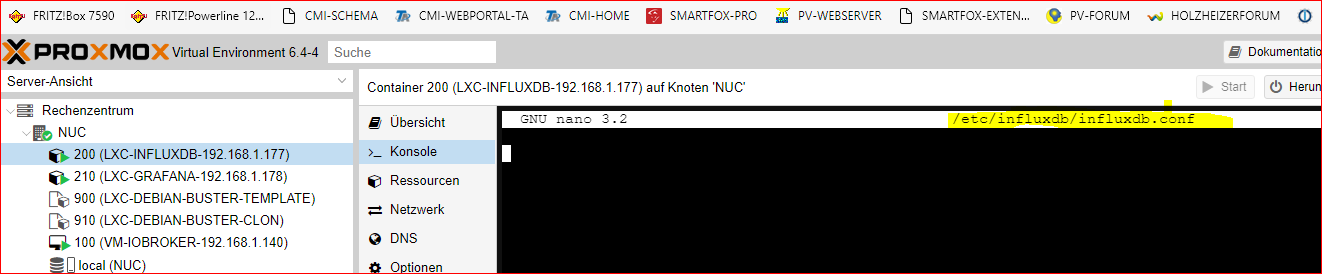
                  Hätte mit abgefragt, aber da sehe ich nichts ?

                  sudo nano /etc/influxdb/influxdb.conf 
                  

                  14e41a3a-ae26-4204-8785-9f98305ffcd3-image.png

                  crunchipC 2 Antworten Letzte Antwort
                  0
                  • simatecS simatec

                    @goetschhofer

                    influxd restore -portable -db Datenbankname /home/karl/influx_backup
                    
                    G Offline
                    G Offline
                    GOETSCHHOFER
                    schrieb am zuletzt editiert von
                    #487

                    @simatec said in Anfänger sucht Hilfe bei Install. proxmox auf INTELNUC8i3BEK:

                    @goetschhofer

                    influxd restore -portable -db Datenbankname /home/karl/influx_backup
                    

                    Weiß nicht ob dies richtig ist, aber ich habe mal Datenbankname mit influxdb ersetzt ?

                    karl@LXC-INFLUXDB-192:~$ influxd restore -portable -db Datenbankname /home/karl/influx_backup
                    2021/05/12 09:47:25 error updating meta: dial tcp [::1]:8088: connect: connection refused
                    restore: dial tcp [::1]:8088: connect: connection refused
                    karl@LXC-INFLUXDB-192:~$ influxd restore -portable -db influxdb /home/karl/influx_backup
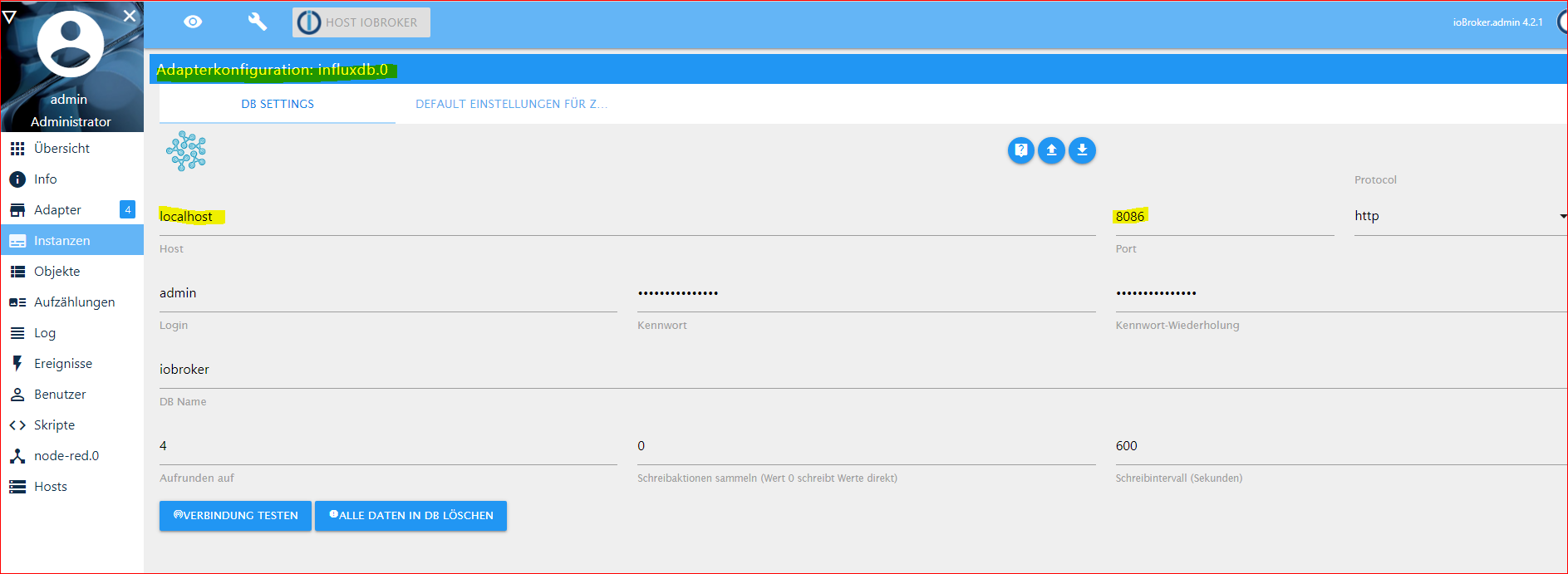
                    2021/05/12 09:48:00 error updating meta: dial tcp [::1]:8088: connect: connection refused
                    restore: dial tcp [::1]:8088: connect: connection refused
                    karl@LXC-INFLUXDB-192:~$ 
                    
                    crunchipC 1 Antwort Letzte Antwort
                    0
                    • G GOETSCHHOFER

                      @simatec said in Anfänger sucht Hilfe bei Install. proxmox auf INTELNUC8i3BEK:

                      @goetschhofer

                      influxd restore -portable -db Datenbankname /home/karl/influx_backup
                      

                      Weiß nicht ob dies richtig ist, aber ich habe mal Datenbankname mit influxdb ersetzt ?

                      karl@LXC-INFLUXDB-192:~$ influxd restore -portable -db Datenbankname /home/karl/influx_backup
                      2021/05/12 09:47:25 error updating meta: dial tcp [::1]:8088: connect: connection refused
                      restore: dial tcp [::1]:8088: connect: connection refused
                      karl@LXC-INFLUXDB-192:~$ influxd restore -portable -db influxdb /home/karl/influx_backup
                      2021/05/12 09:48:00 error updating meta: dial tcp [::1]:8088: connect: connection refused
                      restore: dial tcp [::1]:8088: connect: connection refused
                      karl@LXC-INFLUXDB-192:~$ 
                      
                      crunchipC Abwesend
                      crunchipC Abwesend
                      crunchip
                      Forum Testing Most Active
                      schrieb am zuletzt editiert von
                      #488

                      @goetschhofer nein iobroker heisst deine Datenbank

                      umgestiegen von Proxmox auf Unraid

                      G 1 Antwort Letzte Antwort
                      1
                      • crunchipC crunchip

                        @goetschhofer nein iobroker heisst deine Datenbank

                        G Offline
                        G Offline
                        GOETSCHHOFER
                        schrieb am zuletzt editiert von
                        #489

                        @crunchip said in Anfänger sucht Hilfe bei Install. proxmox auf INTELNUC8i3BEK:

                        @goetschhofer nein iobroker heisst deine Datenbank

                        karl@LXC-INFLUXDB-192:~$ influxd restore -portable -db iobroker /home/karl/influx_backup
                        2021/05/12 09:51:11 error updating meta: dial tcp [::1]:8088: connect: connection refused
                        restore: dial tcp [::1]:8088: connect: connection refused
                        karl@LXC-INFLUXDB-192:~$ 
                        
                        G 1 Antwort Letzte Antwort
                        0
                        • G GOETSCHHOFER

                          @simatec said in Anfänger sucht Hilfe bei Install. proxmox auf INTELNUC8i3BEK:

                          @goetschhofer Zeige mal bitte deine influxdb.conf
                          Speziell den teil der bind

                          Hätte mit abgefragt, aber da sehe ich nichts ?

                          sudo nano /etc/influxdb/influxdb.conf 
                          

                          14e41a3a-ae26-4204-8785-9f98305ffcd3-image.png

                          crunchipC Abwesend
                          crunchipC Abwesend
                          crunchip
                          Forum Testing Most Active
                          schrieb am zuletzt editiert von
                          #490

                          @goetschhofer ohne sudo

                          umgestiegen von Proxmox auf Unraid

                          1 Antwort Letzte Antwort
                          1
                          • G GOETSCHHOFER

                            @crunchip said in Anfänger sucht Hilfe bei Install. proxmox auf INTELNUC8i3BEK:

                            @goetschhofer nein iobroker heisst deine Datenbank

                            karl@LXC-INFLUXDB-192:~$ influxd restore -portable -db iobroker /home/karl/influx_backup
                            2021/05/12 09:51:11 error updating meta: dial tcp [::1]:8088: connect: connection refused
                            restore: dial tcp [::1]:8088: connect: connection refused
                            karl@LXC-INFLUXDB-192:~$ 
                            
                            G Offline
                            G Offline
                            GOETSCHHOFER
                            schrieb am zuletzt editiert von GOETSCHHOFER
                            #491

                            @goetschhofer said in Anfänger sucht Hilfe bei Install. proxmox auf INTELNUC8i3BEK:

                            @crunchip said in Anfänger sucht Hilfe bei Install. proxmox auf INTELNUC8i3BEK:

                            @goetschhofer nein iobroker heisst deine Datenbank

                            Ohne sudo.

                            karl@LXC-INFLUXDB-192:~$ influxd restore -portable -db iobroker /home/karl/influx_backup
                            2021/05/12 09:51:11 error updating meta: dial tcp [::1]:8088: connect: connection refused
                            restore: dial tcp [::1]:8088: connect: connection refused
                            karl@LXC-INFLUXDB-192:~$ 
                            

                            45dc3d9e-bad2-412d-a2f6-36e1fb035d26-image.png

                            crunchipC 1 Antwort Letzte Antwort
                            0
                            • G GOETSCHHOFER

                              @goetschhofer said in Anfänger sucht Hilfe bei Install. proxmox auf INTELNUC8i3BEK:

                              @crunchip said in Anfänger sucht Hilfe bei Install. proxmox auf INTELNUC8i3BEK:

                              @goetschhofer nein iobroker heisst deine Datenbank

                              Ohne sudo.

                              karl@LXC-INFLUXDB-192:~$ influxd restore -portable -db iobroker /home/karl/influx_backup
                              2021/05/12 09:51:11 error updating meta: dial tcp [::1]:8088: connect: connection refused
                              restore: dial tcp [::1]:8088: connect: connection refused
                              karl@LXC-INFLUXDB-192:~$ 
                              

                              45dc3d9e-bad2-412d-a2f6-36e1fb035d26-image.png

                              crunchipC Abwesend
                              crunchipC Abwesend
                              crunchip
                              Forum Testing Most Active
                              schrieb am zuletzt editiert von crunchip
                              #492

                              @goetschhofer der Port in der Instanz passt schon, hatte ich dir doch schon erklärt.
                              und hoffe, du hast die Instanz nicht zwischenzeitlich nochmal gestartet, sonst wurde die Datenbank wieder angelegt

                               nano /etc/influxdb/influxdb.conf
                              

                              umgestiegen von Proxmox auf Unraid

                              G 1 Antwort Letzte Antwort
                              1
                              • crunchipC crunchip

                                @goetschhofer der Port in der Instanz passt schon, hatte ich dir doch schon erklärt.
                                und hoffe, du hast die Instanz nicht zwischenzeitlich nochmal gestartet, sonst wurde die Datenbank wieder angelegt

                                 nano /etc/influxdb/influxdb.conf
                                
                                G Offline
                                G Offline
                                GOETSCHHOFER
                                schrieb am zuletzt editiert von
                                #493

                                @crunchip said in Anfänger sucht Hilfe bei Install. proxmox auf INTELNUC8i3BEK:

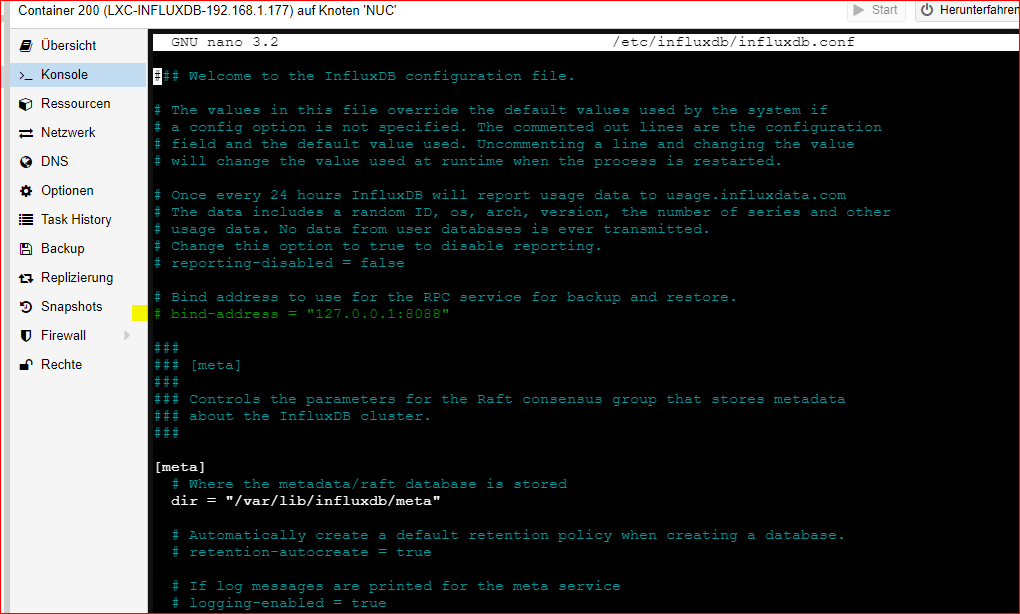
                                nano /etc/influxdb/influxdb.conf

                                Die Instanz habe ich seit Installation des iobroker nie gestartet.
                                159bd122-6f38-4850-80b6-4626f5891aaa-image.png

                                crunchipC simatecS 2 Antworten Letzte Antwort
                                0
                                • G GOETSCHHOFER

                                  @crunchip said in Anfänger sucht Hilfe bei Install. proxmox auf INTELNUC8i3BEK:

                                  nano /etc/influxdb/influxdb.conf

                                  Die Instanz habe ich seit Installation des iobroker nie gestartet.

                                  159bd122-6f38-4850-80b6-4626f5891aaa-image.png

                                  crunchipC Abwesend
                                  crunchipC Abwesend
                                  crunchip
                                  Forum Testing Most Active
                                  schrieb am zuletzt editiert von crunchip
                                  #494

                                  @goetschhofer bin mir nicht sicher, aber änder mal ab in

                                  bind-address = "0.0.0.0:8088"


                                  danach

                                   systemctl restart influxdb.service


                                  anschließend

                                  influxd restore -portable -db iobroker /home/karl/influx_backup
                                  

                                  umgestiegen von Proxmox auf Unraid

                                  G 1 Antwort Letzte Antwort
                                  0
                                  • G GOETSCHHOFER

                                    @crunchip said in Anfänger sucht Hilfe bei Install. proxmox auf INTELNUC8i3BEK:

                                    nano /etc/influxdb/influxdb.conf

                                    Die Instanz habe ich seit Installation des iobroker nie gestartet.

                                    159bd122-6f38-4850-80b6-4626f5891aaa-image.png

                                    simatecS Offline
                                    simatecS Offline
                                    simatec
                                    Developer Most Active
                                    schrieb am zuletzt editiert von
                                    #495

                                    @goetschhofer Da du deine Instanz von Influx schon laufen hast, wurde bereits die db "iobroker angelegt, was beim restore ein problem ist.
                                    Beim Restore einer Datenbank darf diese nicht existieren.

                                    Also führe bitte folgende Schritte aus.

                                    Adapter Influx stoppen

                                    influx -execute='DROP DATABASE iobroker'
                                    influxd restore -portable -db iobroker /home/karl/influx_backup
                                    
                                    • Besuche meine Github Seite
                                    • Beitrag hat geholfen oder willst du mich unterstützen
                                    • HowTo Restore ioBroker
                                    G 2 Antworten Letzte Antwort
                                    1
                                    • crunchipC crunchip

                                      @goetschhofer bin mir nicht sicher, aber änder mal ab in

                                      bind-address = "0.0.0.0:8088"


                                      danach

                                       systemctl restart influxdb.service


                                      anschließend

                                      influxd restore -portable -db iobroker /home/karl/influx_backup
                                      
                                      G Offline
                                      G Offline
                                      GOETSCHHOFER
                                      schrieb am zuletzt editiert von
                                      #496

                                      @crunchip said in Anfänger sucht Hilfe bei Install. proxmox auf INTELNUC8i3BEK:

                                      @goetschhofer bin mir nicht sicher, aber änder mal ab in

                                      bind-address = "0.0.0.0:8088"


                                      danach

                                       systemctl restart influxdb.service


                                      anschließend

                                      influxd restore -portable -db iobroker /home/karl/influx_backup
                                      

                                      Ich kann es nicht ändern, da unten Fehlermeldung.
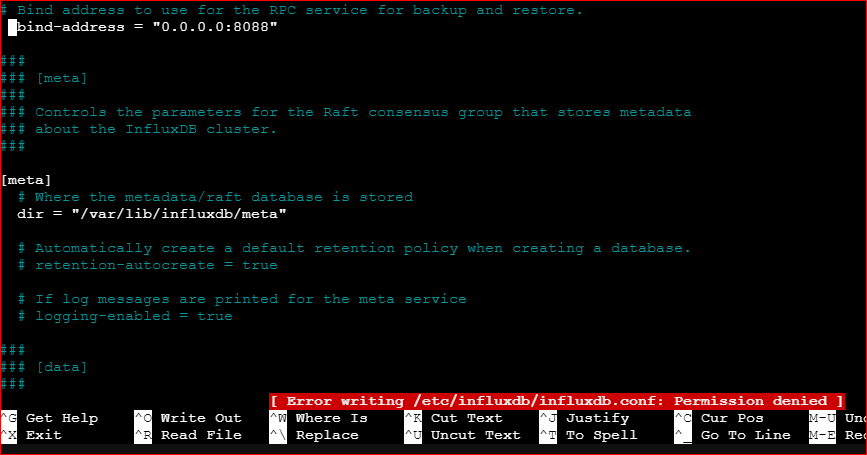
                                      1adaa1f1-d7bc-4fdf-9bdc-e6d9ca0764c9-image.png

                                      simatecS 1 Antwort Letzte Antwort
                                      0
                                      • simatecS simatec

                                        @goetschhofer Da du deine Instanz von Influx schon laufen hast, wurde bereits die db "iobroker angelegt, was beim restore ein problem ist.
                                        Beim Restore einer Datenbank darf diese nicht existieren.

                                        Also führe bitte folgende Schritte aus.

                                        Adapter Influx stoppen

                                        influx -execute='DROP DATABASE iobroker'
                                        influxd restore -portable -db iobroker /home/karl/influx_backup
                                        
                                        G Offline
                                        G Offline
                                        GOETSCHHOFER
                                        schrieb am zuletzt editiert von
                                        #497

                                        @simatec said in Anfänger sucht Hilfe bei Install. proxmox auf INTELNUC8i3BEK:

                                        @goetschhofer Da du deine Instanz von Influx schon laufen hast, wurde bereits die db "iobroker angelegt, was beim restore ein problem ist.
                                        Beim Restore einer Datenbank darf diese nicht existieren.

                                        Also führe bitte folgende Schritte aus.

                                        Adapter Influx stoppen

                                        influx -execute='DROP DATABASE iobroker'
                                        influxd restore -portable -db iobroker /home/karl/influx_backup
                                        

                                        Adapter Influx läuft aktuell nicht und ist nie gelaufen !

                                        1 Antwort Letzte Antwort
                                        0
                                        • G GOETSCHHOFER

                                          @crunchip said in Anfänger sucht Hilfe bei Install. proxmox auf INTELNUC8i3BEK:

                                          @goetschhofer bin mir nicht sicher, aber änder mal ab in

                                          bind-address = "0.0.0.0:8088"


                                          danach

                                           systemctl restart influxdb.service


                                          anschließend

                                          influxd restore -portable -db iobroker /home/karl/influx_backup
                                          

                                          Ich kann es nicht ändern, da unten Fehlermeldung.

                                          1adaa1f1-d7bc-4fdf-9bdc-e6d9ca0764c9-image.png

                                          simatecS Offline
                                          simatecS Offline
                                          simatec
                                          Developer Most Active
                                          schrieb am zuletzt editiert von
                                          #498

                                          @goetschhofer die conf musst du mit sudo ändern

                                          • Besuche meine Github Seite
                                          • Beitrag hat geholfen oder willst du mich unterstützen
                                          • HowTo Restore ioBroker
                                          1 Antwort Letzte Antwort
                                          0
                                          Antworten
                                          • In einem neuen Thema antworten
                                          Anmelden zum Antworten
                                          • Älteste zuerst
                                          • Neuste zuerst
                                          • Meiste Stimmen


                                          Support us

                                          ioBroker
                                          Community Adapters
                                          Donate
                                          FAQ Cloud / IOT
                                          HowTo: Node.js-Update
                                          HowTo: Backup/Restore
                                          Downloads
                                          BLOG

                                          778

                                          Online

                                          32.5k

                                          Benutzer

                                          81.8k

                                          Themen

                                          1.3m

                                          Beiträge
                                          Community
                                          Impressum | Datenschutz-Bestimmungen | Nutzungsbedingungen | Einwilligungseinstellungen
                                          ioBroker Community 2014-2025
                                          logo
                                          • Anmelden

                                          • Du hast noch kein Konto? Registrieren

                                          • Anmelden oder registrieren, um zu suchen
                                          • Erster Beitrag
                                            Letzter Beitrag
                                          0
                                          • Home
                                          • Aktuell
                                          • Tags
                                          • Ungelesen 0
                                          • Kategorien
                                          • Unreplied
                                          • Beliebt
                                          • GitHub
                                          • Docu
                                          • Hilfe

